 VeilStar
- VeilStar
- veilstar
- Europe/Stockholm
- Yes
- No
 MC-132787
![[Mojang] Gegy](../../../data/avatars/users/10122.svg)







The bug
In 1.13, lily pads appear much less frequently in swamp biomes at locations where there is no land compared to 1.12.
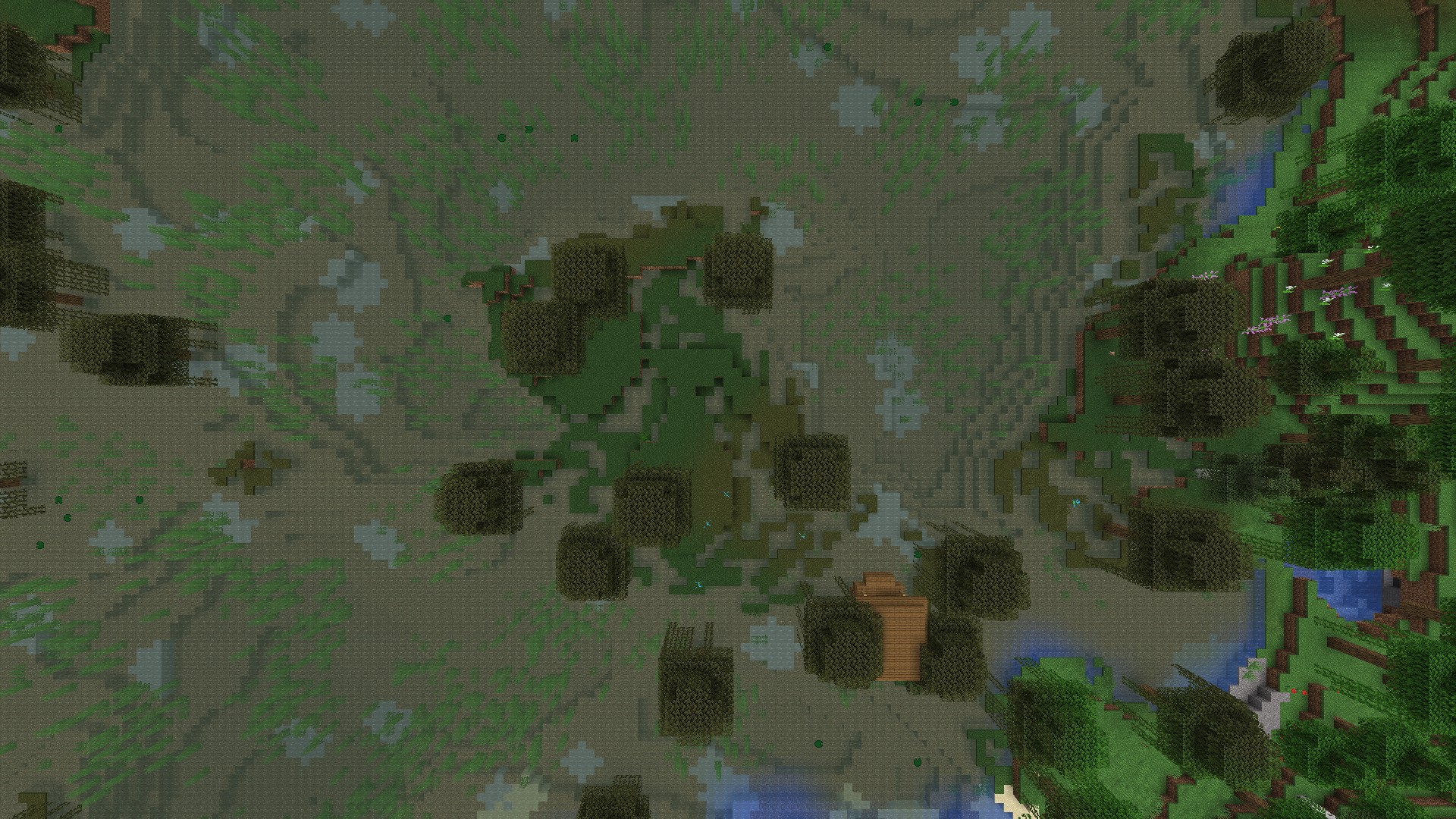
In 1.14 (Pre-Release 2) no lily pads generate in swamp areas that are a mix of water and grass, while lily pads did generate in these areas in 1.13.2 and prior versions. I've deleted the old screenshots and attached new ones showing the same swamp location in 1.12.2, 1.13.2, and 1.14 Pre-release 2.
At this rate in 1.15 lily pads will only be obtainable through fishing. #SaveTheLilyPads
The bug
In 1.13, lily pads appear much less frequently in swamp biomes at locations where there is no land compared to 1.12.
In 1.14 (Pre-Release 2) no lily pads generate in swamp areas that are a mix of water and grass, while lily pads did generate in these areas in 1.13.2 and prior versions. I've deleted the old screenshots and attached new ones showing the same swamp location in 1.12.2, 1.13.2, and 1.14 Pre-release 2.
At this rate in 1.15 lily pads will only be obtainable through fishing. #SaveTheLilyPadsThe bug
In 1.13, lily pads appear much less frequently in swamp biomes at locations where there is no land compared to 1.12. In 1.14 Pre-Release 2 this has gotten even worse: now no lily pads generate in swamp areas that are a mix of water and grass, while lily pads did generate in these areas in 1.13.2 and prior versions.
I've deleted the old screenshots and attached new ones showing the same swamp location in 1.12.2, 1.13.2, and 1.14 Pre-release 2. The seed is
-7016193228615810917. To get to the location shown in the screenshots use the following command: /tp @s 1235 100 -950 0 90
At this rate in 1.15 lily pads will only be obtainable through fishing. #SaveTheLilyPads
1.12.2.jpg
Lily pads generate much less frequently / do not generate in certain areas
The bug
In 1.13 and 1.14, lily pads appear much less frequently in swamp biomes at locations where there is no land compared to 1.12. In 1.14 Pre-Release 2 this has gotten even worse: now no lily pads generate in swamp areas that are a mix of water and grass, while lily pads did generate in these areas in 1.13.2 and prior versions.
I've deleted the old screenshots and attached new ones showing the same swamp location in 1.12.2, 1.13.2, and 1.14 Pre-release 2. The seed is
-7016193228615810917. To get to the location shown in the screenshots use the following command: /tp @s 1235 100 -950 0 90
At this rate in 1.15 lily pads will only be obtainable through fishing. #SaveTheLilyPads
When right-clicking grouped recipes to reveal different options the window that pops up appears darker than it should be on some pages. Page 1 and 2 have this darker overlay, while page 3 does not. I'm assuming this might apply to pages 2 pages in a row, every other 2 pages. Meaning that page 1, 2, 5, 6, 9, 10 would be affected, while page 3, 4, 7, 8 would not be.
This applies to everything that pops up when right-clicking a recipe group. Not just the background.
Currently unable to confirm if it still affects the latest snapshot due to
MC-146804, but I assume so.
https://bugs.mojang.com/browse/MC-146804
When right-clicking grouped recipes to reveal different options the window that pops up appears darker than it should be on some pages. Page 1 and 2 have this darker overlay, while page 3 does not. I'm assuming this might apply to pages 2 pages in a row, every other 2 pages. Meaning that page 1, 2, 5, 6, 9, 10 would be affected, while page 3, 4, 7, 8 would not be.
This applies to everything that pops up when right-clicking a recipe group. Not just the background.
Currently unable to confirm if it still affects the latest snapshot due to
MC-146804, but I assume so.
1.13.2: When right-clicking grouped recipes to reveal different options the window that pops up appears darker than it should be on some pages. Page 1 and 2 have this darker overlay, while page 3 does not. I'm assuming this might apply to pages 2 pages in a row, every other 2 pages. Meaning that page 1, 2, 5, 6, 9, 10 would be affected, while page 3, 4, 7, 8 would not be.
This does not apply if a search is entered, and it applies to everything that pops up when right-clicking a recipe group. Not just the background.
Recipe grouping pop-up is darker than it should beon some pages
1.13.2: When right-clicking grouped recipes to reveal different options the window that pops up appears darker than it should be on some pages. Page 1 and 2 have this darker overlay, while page 3 does not. I'm assuming this might apply to pages 2 pages in a row, every other 2 pages. Meaning that page 1, 2, 5, 6, 9, 10 would be affected, while page 3, 4, 7, 8 would not be.
This does not apply if a search is entered, and it applies to everything that pops up when right-clicking a recipe group. Not just the background.
When right-clicking grouped recipes to reveal different options the window that pops up appears darker than it should be on some pages. Page 1 and 2 have this darker overlay, while page 3 does not. I'm assuming this might apply to pages 2 pages in a row, every other 2 pages. Meaning that page 1, 2, 5, 6, 9, 10 would be affected, while page 3, 4, 7, 8 would not be.
This does not apply if a search is entered, and it applies to everything that pops up when right-clicking a recipe group. Not just the background.
1.13.2: When right-clicking grouped recipes to reveal different options the window that pops up appears darker than it should be on some pages. Page 1 and 2 have this darker overlay, while page 3 does not. I'm assuming this might apply to pages 2 pages in a row, every other 2 pages. Meaning that page 1, 2, 5, 6, 9, 10 would be affected, while page 3, 4, 7, 8 would not be.
This does not apply if a search is entered, and it applies to everything that pops up when right-clicking a recipe group. Not just the background.
When right-clicking grouped recipes to reveal different options the window that pops up appears darker than it should
be on some pages. Page 1 and 2 have this darker overlay, while page 3 does not. I'm assuming this might apply to pages 2 pages in a row, every other 2 pages. Meaning that page 1, 2, 5, 6, 9, 10 would be affected, while page 3, 4, 7, 8 would notbe.This
does not apply if a search is entered, and itapplies to everything that pops up when right-clicking a recipe group. Not just the background.
For 1.13.2: When right-clicking grouped recipes to reveal different options the window that pops up appears darker than it should be on some pages. Page 1 and 2 have this darker overlay, while page 3 does not. I'm assuming this might apply to pages 2 pages in a row, every other 2 pages. Meaning that page 1, 2, 5, 6, 9, 10 would be affected, while page 3, 4, 7, 8 would not be.
This does not apply if a search is entered, and it applies to everything that pops up when right-clicking a recipe group. Not just the background.
When right-clicking grouped recipes to reveal different options the window that pops up appears darker than it should be.
This applies to everything that pops up when right-clicking a recipe group. Not just the background.
For 1.13.2: When right-clicking grouped recipes to reveal different options the window that pops up appears darker than it should be on some pages. Page 1 and 2 have this darker overlay, while page 3 does not. I'm assuming this might apply to pages 2 pages in a row, every other 2 pages. Meaning that page 1, 2, 5, 6, 9, 10 would be affected, while page 3, 4, 7, 8 would not be.
This does not apply if a search is entered, and it applies to everything that pops up when right-clicking a recipe group. Not just the background.
When right-clicking grouped recipes to reveal different options the window that pops up appears darker than it should be. In the attached screenshot the area encircled in orange is 166 166 166 RGB, while the areas encircled in green are 198 198 198 RGB. The texture for both areas has the exact same color: 198 198 198 RGB.
This darkening overlay applies to everything that pops up when right-clicking a recipe group. Not just the background.
Windows 7 (64 bit), Java 1.8.0_202-b08, GTX 970
Windows 7 (64 bit), Java 1.8.0_202-b08, GTX 970 with driver sion 419.67.
Windows 7 (64 bit), Java 1.8.0_202-b08, GTX 970 with driver version 419.67.
book and lecternbackgroundarenot dimmedbackground is not dimmed for book or lectern
When the player breaks a block and attempts to place a block against it at the exact same time the block gets directly replaced with the block that was attempted to be placed, even if there was no other block to place the new block against for it to be place in that position.
Here's a
[video[||https://www.youtube.com/watch?v=zkuGfK9DHhM]https://www.youtube.com/watch?v=zkuGfK9DHhM] demonstrating this. While it doesn't break anything, it's rather strange for this to happen, given that the player essentially placed a block in thin air.When the player breaks a block and attempts to place a block against it at the exact same time the block gets directly replaced with the block that was attempted to be placed, even if there was no other block to place the new block against for it to be place in that position.
Here's a video demonstrating this. While it doesn't break anything, it's rather strange for this to happen, given that the player essentially placed a block in thin air.
When the player breaks a block and attempts to place a block against it at the exact same time the block gets directly replaced with the block that was attempted to be placed, even if there was no other block to place the new block against for it to be placed in that position.
Here's a video demonstrating this. While it doesn't break anything, it's rather strange for this to happen, given that the player essentially placed a block in thin air.
Odd block placement behavior when breaking and placing at the same time
The console gets spammed
(presumably onceevery frame,meaning upto hundreds of messages every second) with the following message:[Client thread/INFO]: OpenGL debug message, id=1281, source=API, type=ERROR, severity=HIGH, message=GL_INVALID_VALUE error generated. View frustum must not have a zero values of: (right-left), (top-bottom), or (zFar-zNear).
Not sure if this is specific to some environments, but I'm on the following:
Windows 7 (64 bit)
Java 1.8.0_202-b08
GTX 970 with driver version 419.67.The console gets spammed every frame (meaning upto hundreds of messages every second) with the following message:
[Client thread/INFO]: OpenGL debug message, id=1281, source=API, type=ERROR, severity=HIGH, message=GL_INVALID_VALUE error generated. View frustum must not have a zero values of: (right-left), (top-bottom), or (zFar-zNear).
This obviously also creates absolutely massive log files, with the higher the framerate the game is running at the quicker the log file grows in size. Running at 240 fps the log file seems to increase about 1mb every 17 seconds. Meaning that running the game at 240 fps for 5 hours would result in a log file of a gigabyte in size.
Not sure if this is specific to some environments, but I'm on the following:
Windows 7 (64 bit)
Java 1.8.0_202-b08
GTX 970 with driver version 419.67.
Theconsole gets spammed every frame (meaning upto hundreds of messages every second) with the following message:[Client thread/INFO]: OpenGL debug message, id=1281, source=API, type=ERROR, severity=HIGH, message=GL_INVALID_VALUE error generated. View frustum must not have a zero values of: (right-left), (top-bottom), or (zFar-zNear).
This obviously also creates absolutely massive log files, with the higher the framerate the game is running at the quicker the log file grows in size. Running at 240 fps the log file seems to increase about 1mb every 17 seconds. Meaning that running the game at 240 fps for 5 hours would result in a log file of a gigabyte in size.
Not sure if this is specific to some environments, but I'm on the following:
Windows 7 (64 bit)
Java 1.8.0_202-b08
GTX 970 with driver version 419.67.When the game is running in fullscreen but is not in focus (meaning you're on a different window) the game output console gets spammed every frame (meaning upto hundreds of messages every second) with the following message:
[Client thread/INFO]: OpenGL debug message, id=1281, source=API, type=ERROR, severity=HIGH, message=GL_INVALID_VALUE error generated. View frustum must not have a zero values of: (right-left), (top-bottom), or (zFar-zNear).
This obviously also creates absolutely massive log files, with the higher the framerate the game is running at the quicker the log file grows in size. Running at 240 fps the log file seems to increase about 1mb every 17 seconds. Meaning that running the game at 240 fps for 5 hours would result in a log file of a gigabyte in size.
Not sure if this is specific to some environments, but I'm on the following:
Windows 7 (64 bit)
Java 1.8.0_202-b08
GTX 970 with driver version 419.67.
When the game is running in fullscreen but is not in focus (meaning you're on a different window) the game output console gets spammed every frame (meaning upto hundreds of messages every second) with the following message:[Client thread/INFO]: OpenGL debug message, id=1281, source=API, type=ERROR, severity=HIGH, message=GL_INVALID_VALUE error generated. View frustum must not have a zero values of: (right-left), (top-bottom), or (zFar-zNear).
This obviously also creates absolutely massive log files, with the higher the framerate the game is running at the quicker the log file grows in size. Running at 240 fps the log file seems to increase about 1mb every 17 seconds. Meaning that running the game at 240 fps for 5 hours would result in a log file of a gigabyte in size.
Not sure if this is specific to some environments, but I'm on the following:
Windows 7 (64 bit)
Java 1.8.0_202-b08
GTX 970 with driver version 419.67.From version 1.13-pre2 onward, when the game is running in fullscreen but is not in focus (meaning you're on a different window) the game output console gets spammed every frame (meaning upto hundreds of messages every second) with the following message:
[Client thread/INFO]: OpenGL debug message, id=1281, source=API, type=ERROR, severity=HIGH, message=GL_INVALID_VALUE error generated. View frustum must not have a zero values of: (right-left), (top-bottom), or (zFar-zNear).
This obviously also creates absolutely massive log files, with the higher the framerate the game is running at the quicker the log file grows in size. Running at 240 fps the log file seems to increase about 1mb every 17 seconds. Meaning that running the game at 240 fps for 5 hours would result in a log file of a gigabyte in size.
This occurs even on the main menu (where the splash text is and singleplayer and multiplayer buttons are).
Not sure if this is specific to some environments, but I'm on the following:
Windows 7 (64 bit)
Java 1.8.0_202-b08
GTX 970 with driver version 419.67.
Console gets spammed with OpenGL error: frustum must not have a zero values ofConsole & log gets spammed with OpenGL error every frame when minimized
From version 1.13-pre2 onward, when the game is
running in fullscreen but is not in focus (meaning you're on a different window)the game output console gets spammed every frame (meaning upto hundreds of messages every second) with the following message:[Client thread/INFO]: OpenGL debug message, id=1281, source=API, type=ERROR, severity=HIGH, message=GL_INVALID_VALUE error generated. View frustum must not have a zero values of: (right-left), (top-bottom), or (zFar-zNear).
This
obviouslyalso createsabsolutely massive log files, with the higher the framerate the game is running at the quicker the log file grows in size. Running at 240 fps the log file seems to increase about 1mb every 17 seconds. Meaning that running the game at 240 fps for 5 hours would result in a log file of a gigabyte in size.This occurs even on the main menu (where the splash text is and singleplayer and multiplayer buttons are).
Not sure if this is specific to some environments, but I'm on the following:
Windows 7 (64 bit)
Java 1.8.0_202-b08
GTX 970 with driver version 419.67.From version 1.13-pre2 onward, when the game is minimized the game output console gets spammed every frame (meaning upto hundreds of messages every second) with the following message:
[Client thread/INFO]: OpenGL debug message, id=1281, source=API, type=ERROR, severity=HIGH, message=GL_INVALID_VALUE error generated. View frustum must not have a zero values of: (right-left), (top-bottom), or (zFar-zNear).
This also creates log files that are huge in size, with the higher the framerate the game is running at the quicker the log file grows in size. Running at 240 fps the log file seems to increase about 1mb every 17 seconds. Meaning that running the game minimized at 240 fps for 5 hours would result in a log file of a gigabyte in size.
This occurs anywhere in the game, even on the main menu (where the splash text is and singleplayer and multiplayer buttons are).
Not sure if this is specific to some environments, but I'm on the following:
Windows 7 (64 bit)
Java 1.8.0_202-b08
GTX 970 with driver version 419.67.Notes for myself ruling stuff that I've tried out:
-Not world specific
-Still occurs with 1 monitor
-Occurs in both fullscreen and windowed mode
-Not resource pack specific (happens without any resource packs loaded)
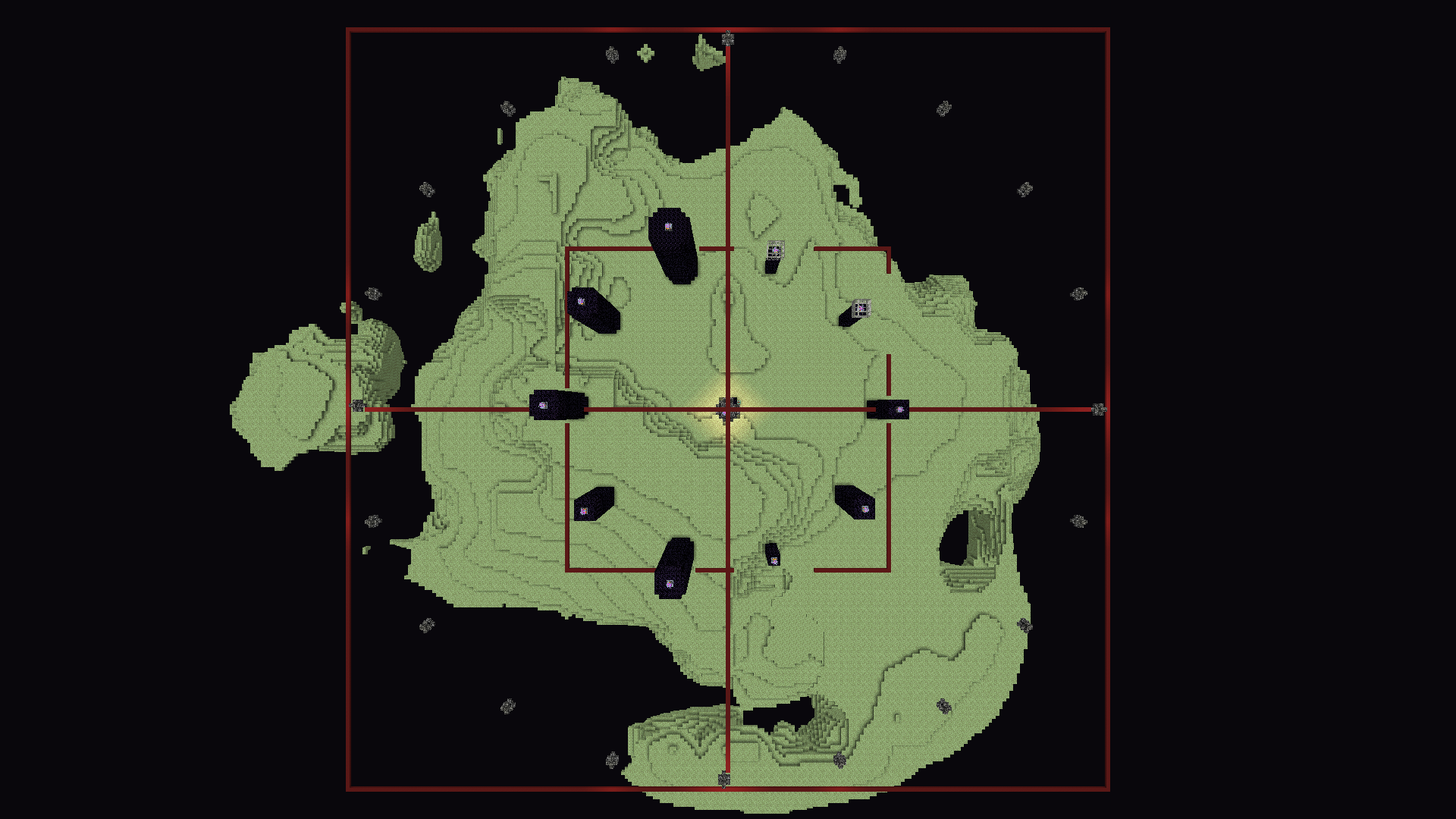
End gateways and obsidian pillars generate offset from world axis / misaligned
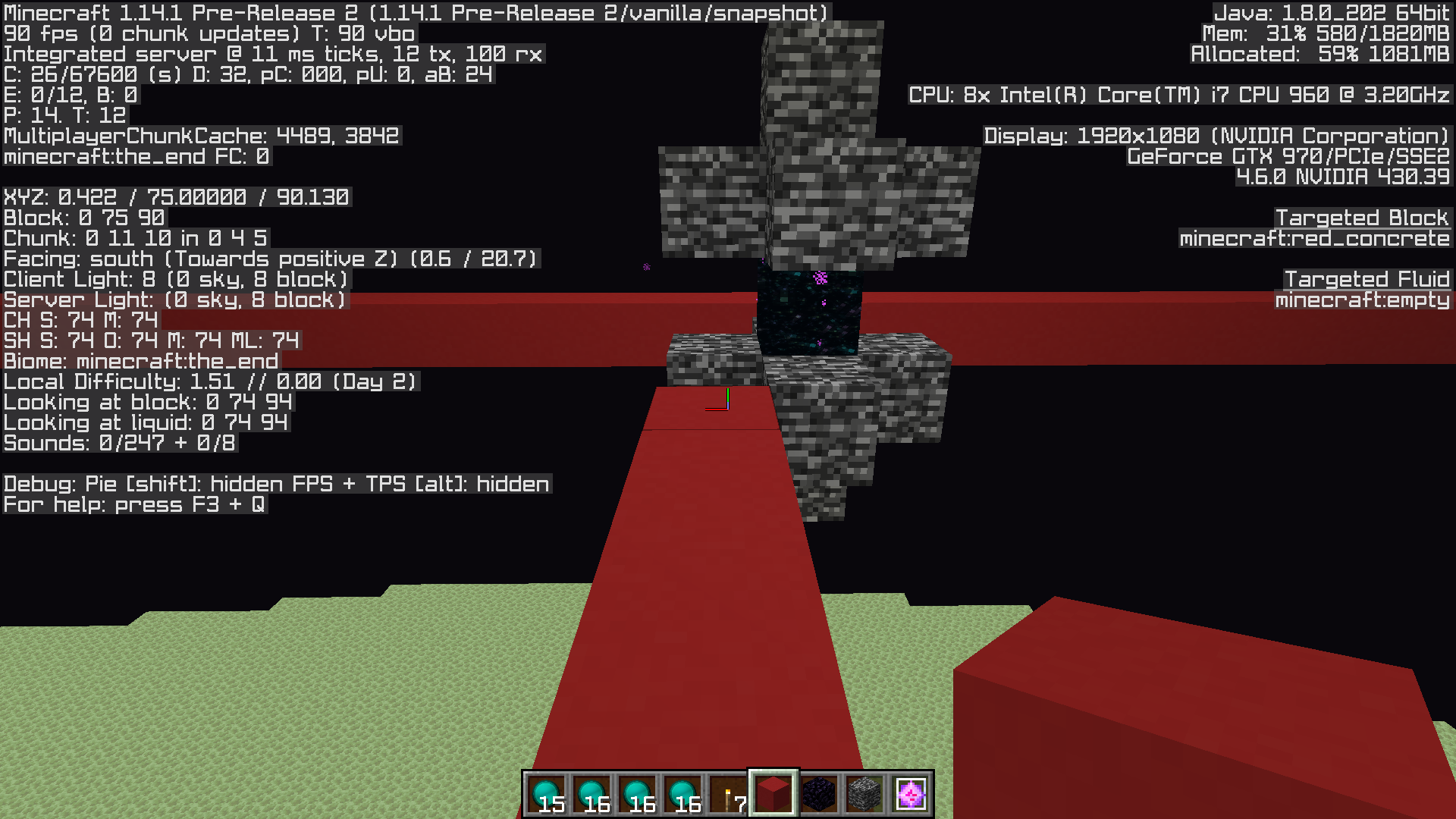
Since 1.14.1 Pre-Release 2 the end gateways and obsidian pillars that generate in the end dimension are misaligned. It looks like The south end is offset by one block towards the west, and the west end is offset by one block towards the north.
The center of the obsidian pillars on the world axises would be aligned on the axises before, resulting in the end gateways
Since1.14.1 Pre-Release 2 the end gateways and obsidian pillars that generate in the end dimension are misaligned. It looks like The south end is offset by one block towards the west, and the west end is offset by one block towards the north.The center of the obsidian pillars on the world axises would be aligned on the axises before, resulting in the end gateways
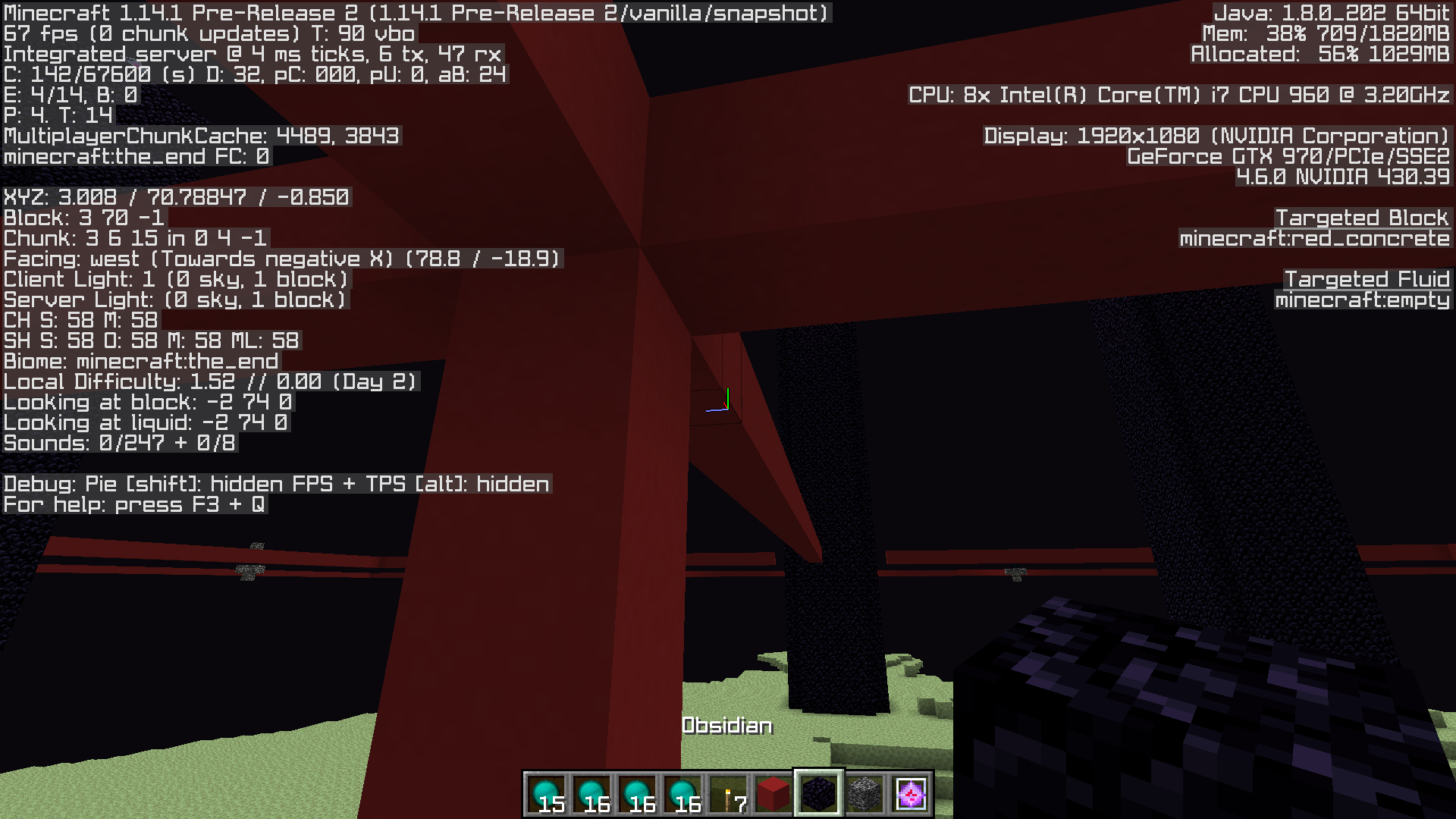
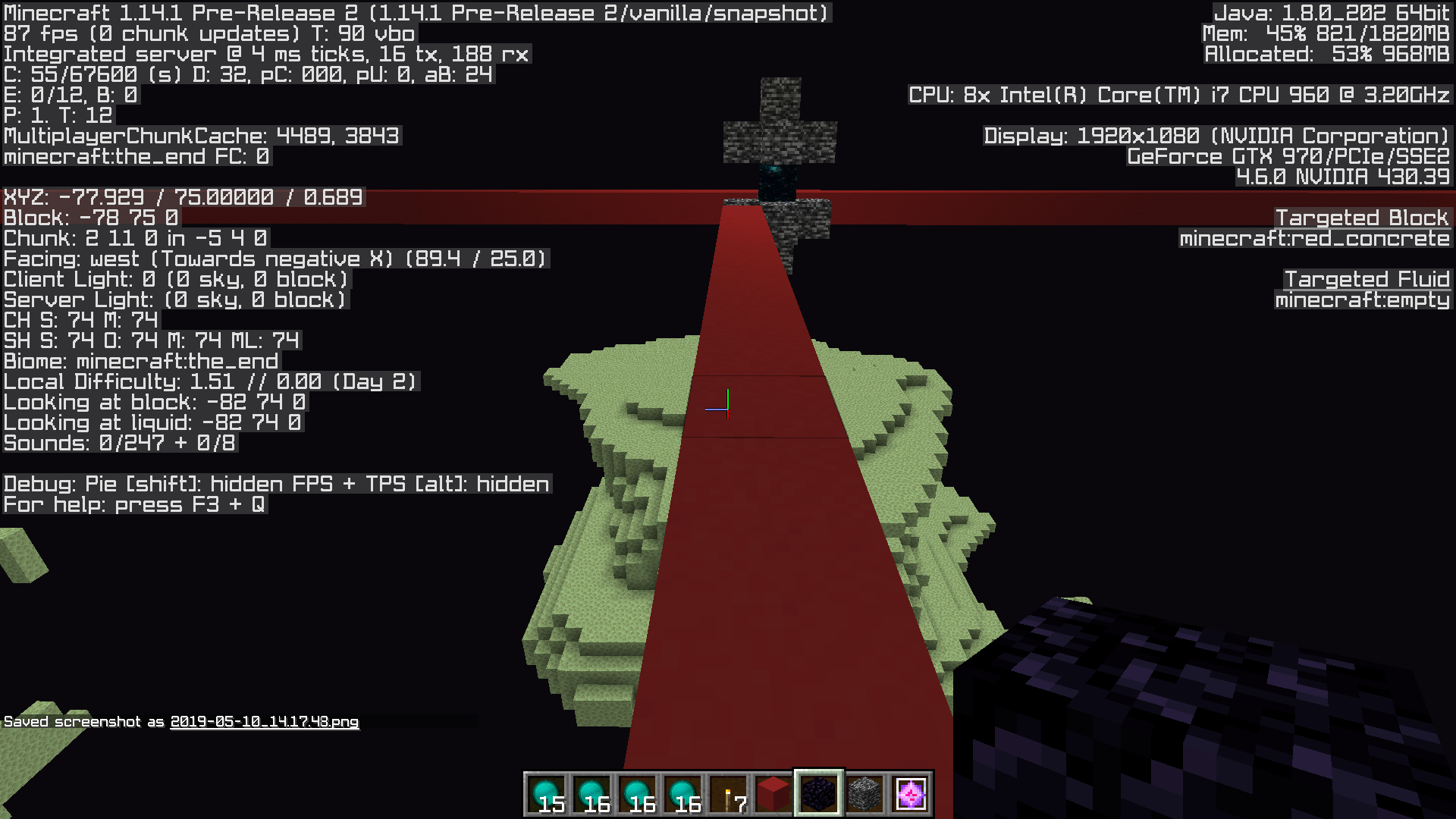
In 1.14.1 Pre-Release 2 the end gateways and obsidian pillars that generate in the end dimension are misaligned. It looks like The south end is offset by one block towards the west, and the west end is offset by one block towards the north.
The center of the obsidian pillars on the world axes would be aligned to the axis before, and the same goes for the end gateways. The ones on the world axes would generate at these coordinates before:
North: 0 75 -96
East: 96 75 0
South: 0 75 96
West: -96 75 0While they now generate at
North: 0 75 -96
Eeast 96 75 -1
South 96 75 0
West -1 75 96
In 1.14.1 Pre-Release 2 the end gateways and obsidian pillars that generate in the end dimension are misaligned. It looks like The south end is offset by one block towards the west, and the west end is offset by one block towards the north.
The center of the obsidian pillars on the world axes would be aligned to the axis before, and the same goes for the end gateways. The ones on the world axes would generate at these coordinates before:
North: 0 75 -96
East: 96 75 0
South: 0 75 96
West: -96 75 0While they now generate at
North: 0 75 -96
Eeast 96 75 -1
South96750
West-17596In 1.14.1 Pre-Release 2 the end gateways and obsidian pillars that generate in the end dimension are misaligned. It looks like The south end is offset by one block towards the west, and the west end is offset by one block towards the north.
The center of the obsidian pillars on the world axes would be aligned to the axis before, and the same goes for the end gateways. The ones on the world axes would generate at these coordinates before:
North: 0 75 -96
East: 96 75 0
South: 0 75 96
West: -96 75 0While they now generate at
North: 0 75 -96
Eeast 96 75 -1
South -1 75 96
West 96 75 -1
Villagers have 8 inventory slots to store items, but still pick up items even when they have no space in their inventory anymore, voiding any new items they pick up at this stage.
Can easily be observed by spawning a villager, throwing it 8 stacks of carrots, and then a stack of potatoes. They will still pick up the stack of potatoes despite having no room for it. Using the /data get entity <villager> Inventory command to check their inventory shows that they only have 8 stacks of carrots, and no potatoes.
This broke in
Villagers have 8 inventory slots to store items, but still pick up items even when they have no space in their inventory anymore, voiding any new items they pick up at this stage.
Can easily be observed by spawning a villager, throwing it 8 stacks of carrots, and then a stack of potatoes. They will still pick up the stack of potatoes despite having no room for it. Using the /data get entity <villager> Inventory command to check their inventory shows that they only have 8 stacks of carrots, and no potatoes.
This broke in
Villagers have 8 inventory slots to store items, but still pick up items even when they have no space in their inventory anymore, voiding any new items they pick up at this stage.
Can easily be observed by spawning a villager, throwing it 8 stacks of carrots, and then a stack of potatoes. They will still pick up the stack of potatoes despite having no room for it. Using the /data get entity <villager> Inventory command to check their inventory shows that they only have 8 stacks of carrots, and no potatoes.
This started occuring in 1.14.2 Pre-Release 1. 1.14.1 didn't have this issue.
Villagers continue to pick up items client-side despite having no space in their inventory.
Villagers have 8 inventory slots to store items,
but stillpick up items even when they have no space in their inventory anymore, voiding any new items theypick upat this stage.Can easily be observed by spawning a villager, throwing it 8 stacks of carrots, and then a stack of potatoes. They will still pick up the stack of potatoes despite having no room for it. Using the /data get entity <villager> Inventory command to check their inventory shows that they only have 8 stacks of carrots, and no potatoes.
This started occuring in 1.14.2 Pre-Release 1. 1.14.1 didn't have this issue.
Villagers only have 8 inventory slots to store items, however, the client still shows villagers picking up items even when these slots are full and they have no space in their inventory anymore. Server-side the villager never picked up these items.
This started occuring in 1.14.2 Pre-Release 1. 1.14.1 didn't have this issue. Possibly introduced with the changed made to fix
MC-140174.
Villagers only have 8 inventory slots to store items, however, the client still shows villagers picking up items even when these slots are full and they have no space in their inventory anymore. Server-side the villager never picked up these items.
This started occuring in 1.14.2 Pre-Release 1. 1.14.1 didn't have this issue. Possibly introduced with the changed made to fix
MC-140174.When the player picks up these non-existent (for the client) items no pickup sound is played.
Villagers only have 8 inventory slots to store items, however, the client still shows villagers picking up items even when these slots are full and they have no space in their inventory anymore. Server-side the villager never picked up these items.
This started occuring in 1.14.2 Pre-Release 1. 1.14.1 didn't have this issue. Possibly introduced with the change
dmade to fixMC-140174.When the player picks up these non-existent (for the client) items no pickup sound is played.
Villagers only have 8 inventory slots to store items, however, the client still shows villagers picking up items even when these slots are full and they have no space in their inventory anymore. Server-side the villager never picked up these items.
This started occuring in 1.14.2 Pre-Release 1. 1.14.1 didn't have this issue. Possibly introduced with the changes made to fix
MC-140174.When the player picks up these non-existent (for the client) items no pickup sound is played.
Villagers only have 8 inventory slots to store items, however, the client still shows villagers picking up items even when these slots are full and they have no space in their inventory anymore. Server-side the villager never picked up these items.
This started occuring in 1.14.2 Pre-Release 1. 1.14.1 didn't have this issue. Possibly introduced with the changes made to fix
MC-140174.When the player picks up these non-existent (for the client) items no pickup sound is played.
The bug is now slightly different in 1.14.3 Pre-Release 1: This does not occur for potatoes or carrots anymore. It looks like villagers can now only hold upto 4 stacks of potatoes and carrots, and will not attempt to pick up more than this. (Is that intended?) It does still occur for bread, wheat, and wheat seeds.
Villagers only have 8 inventory slots to store items, however, the client still shows villagers picking up items even when these slots are full and they have no space in their inventory anymore. Server-side the villager never picked up these items.
This started occuring in 1.14.2 Pre-Release 1. 1.14.1 didn't have this issue. Possibly introduced with the changes made to fix
MC-140174.When the player picks up these non-existent (for the client) items no pickup sound is played.
The bug is now slightly different in 1.14.3 Pre-Release 1: This does not occur for potatoes or carrots anymore. It looks like villagers can now only hold upto 4 stacks of potatoes and carrots, and will not attempt to pick up more than this. (Is that intended?) It does still occur for bread, wheat, and wheat seeds.
Villagers only have 8 inventory slots to store items, however, the client still shows villagers picking up items even when these slots are full and they have no space in their inventory anymore. Server-side the villager never picked up these items.
This started occuring in 1.14.2 Pre-Release 1. 1.14.1 didn't have this issue. Possibly introduced with the changes made to fix
MC-140174.When the player picks up these non-existent (for the client) items no pickup sound is played.
The bug is now slightly different in 1.14.3 Pre-Release 1: This does not occur for potatoes or carrots anymore. It looks like villagers can now only hold upto 4 stacks of potatoes and carrots, and will not attempt to pick up more than this. (Is that intended? I assume this was introduced as part of the fix for
MC-74407, but it seems rather strange.) The issue still occurs for bread, wheat, and wheat seeds.
Villagers only have 8 inventory slots to store items, however, the client still shows villagers picking up items even when these slots are full and they have no space in their inventory anymore. Server-side the villager never picked up these items.
This started occuring in 1.14.2 Pre-Release 1. 1.14.1 didn't have this issue. Possibly introduced with the changes made to fix
MC-140174.When the player picks up these non-existent (for the client) items no pickup sound is played.
The bug is now slightly different in 1.14.3 Pre-Release 1: This does not occur for potatoes or carrots anymore. It looks like villagers can now only hold up to 4 stacks of potatoes, and up to 4 stacks of carrots, and will not attempt to pick up more than this. (Is that intended? I assume this was introduced as part of the fix for
MC-74407, but it seems rather strange.) The issue still occurs for bread, wheat, and wheat seeds.
Anvil item entities get deleted when trying to stack with another anvil item entity. This only happens when both item entities are created by an anvil falling onto the same non-full block. Making them stack together afterwards by pushing them with water, or otherwise throwing an anvil item entity in the same block space does not produce this issue.
To reproduce:
Place a bottom slab with on top of that a block, and stack multiple anvils on top of each other on top of this block. Then break the block, and let all the anvils fall down and turn into items.
Anvil item entities get deleted when trying to stack with another anvil item entity. This only happens when both item entities are created by an anvil falling onto the same non-full block. Making them stack together afterwards by pushing them with water, or otherwise throwing an anvil item entity in the same block space does not produce this issue.
It looks like the anvil checks whether or not there is an anvil entity already, and if so, simply replaces it
To reproduce:
Place a bottom slab with on top of that a block, and stack multiple anvils on top of each other on top of this block. Then break the block, and let all the anvils fall down and turn into items.
Created this issue as requested by this comment from a moderator.
After upgrading my singleplayer world from 1.14.2 Pre-Release 4 to 1.14.2 I noticed a few dark spots on the ground after going to trough a nether portal to the overworld. The sky light values are lower than they should be in these spots. Flying up in the air shows several subchunks higher up having a sky light value of 0, despite not being obstructed by any blocks above.
Here is a video showing this, as it's hard to accurately describe in words, and screenshots don't show everything there is to see.
I (currently) don't have any steps to reproduce the issue. (I currently don't have the time to spend.)
I've attached the region file where these lighting issues are present as well as the world's level.dat. If anything else needs to be uploaded please let me know. (Though I probably won't be uploading the entire world folder as that's a lot of data, and I don't see how having random regions which I don't know are affected will help at all.)
I can upload a 'trimmed down' version of the backup that was made right before updating the world to 1.14.2 from 1.14.2 Pre-Release 4 if wanted, but I'd need to be suggested a hosting site (that isn't dropbox and doesn't require an account) that would allow files upto about 200mb for that.
Created this issue as requested by this comment from a moderator.
After upgrading my singleplayer world from 1.14.2 Pre-Release 4 to 1.14.2 I noticed a few dark spots on the ground after going to trough a nether portal to the overworld. The sky light values are lower than they should be in these spots. Flying up in the air shows several subchunks higher up having a sky light value of 0, despite not being obstructed by any blocks above.
Here is a video showing this, as it's hard to accurately describe in words, and screenshots don't show everything there is to see.
I (currently) don't have any steps to reproduce the issue. (I currently don't have the time to spend.)
I've attached the region file where these lighting issues are present as well as the world's level.dat. If anything else needs to be uploaded please let me know. (Though I probably won't be uploading the entire world folder as that's a lot of data, and I don't see how having random regions which I don't know are affected will help at all.)
I can upload a 'trimmed down' version of the backup that was made right before updating the world to 1.14.2 from 1.14.2 Pre-Release 4 if wanted, but I'd need to be suggested a hosting site (that isn't dropbox and doesn't require an account) that would allow files upto about 200mb for that.
Link to the world from before upgrading it to 1.14.2: https://www76.zippyshare.com/v/oe5niLUA/file.html
After upgrading this world to to 1.14.2 (again) and going through the nether portal at -46 55 -65 similar lighting issues show up. Not the exact same though.
Created this issue as requested by this comment from a moderator.
After upgrading my singleplayer world from 1.14.2 Pre-Release 4 to 1.14.2 I noticed a few dark spots on the ground after going to trough a nether portal to the overworld. The sky light values are lower than they should be in these spots. Flying up in the air shows several subchunks higher up having a sky light value of 0, despite not being obstructed by any blocks above.
Here is a video showing this, as it's hard to accurately describe in words, and screenshots don't show everything there is to see.
I (currently) don't have any steps to reproduce the issue. (I currently don't have the time to spend.)
I've attached the region file where these lighting issues are present as well as the world's level.dat. If anything else needs to be uploaded please let me know. (Though I probably won't be uploading the entire world folder as that's a lot of data, and I don't see how having random regions which I don't know are affected will help at all.)
I can upload a 'trimmed down' version of the backup that was made right before updating the world to 1.14.2 from 1.14.2 Pre-Release 4 if wanted, but I'd need to be suggested a hosting site (that isn't dropbox and doesn't require an account) that would allow files upto about 200mb for that.
Link to the world from before upgrading it to 1.14.2: https://www76.zippyshare.com/v/oe5niLUA/file.html
After upgrading this world to to 1.14.2 (again) and going through the nether portal at -46 55 -65 similar lighting issues show up. Not the exact same though.
Created this issue as requested by this comment from a moderator.
After upgrading my singleplayer world from 1.14.2 Pre-Release 4 to 1.14.2 I noticed a few dark spots on the ground after going to trough a nether portal to the overworld. The sky light values are lower than they should be in these spots. Flying up in the air shows several subchunks higher up having a sky light value of 0, despite not being obstructed by any blocks above.
Here is a video showing this, as it's hard to accurately describe in words, and screenshots don't show everything there is to see.
I (currently) don't have any steps to reproduce the issue. (I currently don't have the time to spend.)
I've attached the region file where these lighting issues are present as well as the world's level.dat. If anything else needs to be uploaded please let me know. (Though I probably won't be uploading the entire world folder as that's a lot of data, and I don't see how having random regions which I don't know are affected will help at all.)
Link to the world from before upgrading it to 1.14.2: https://www76.zippyshare.com/v/oe5niLUA/file.html
After upgrading this world to to 1.14.2 (again) and going through the nether portal at -46 55 -65 similar lighting issues show up. Not the exact same though.Render distance 12.
Created this issue as requested by this comment from a moderator.
After upgrading my singleplayer world from 1.14.2 Pre-Release 4 to 1.14.2 I noticed a few dark spots on the ground after going to trough a nether portal to the overworld. The sky light values are lower than they should be in these spots. Flying up in the air shows several subchunks higher up having a sky light value of 0, despite not being obstructed by any blocks above.
Here is a video showing this, as it's hard to accurately describe in words, and screenshots don't show everything there is to see.
I (currently) don't have any steps to reproduce the issue. (I currently don't have the time to spend.)
I've attached the region file where these lighting issues are present as well as the world's level.dat. If anything else needs to be uploaded please let me know.
(Though I probably won't be uploading the entire world folder as that's a lot of data, and I don't see how having random regions which I don't know are affected will help at all.)Link to the world from before upgrading it to 1.14.2: https://www76.zippyshare.com/v/oe5niLUA/file.html
After upgrading this world to to 1.14.2 (again) and going through the nether portal at -46 55 -65 similar lighting issues show up. Not the exact same though.Render distance 12.
Created this issue as requested by this comment from a moderator.
After upgrading my singleplayer world from 1.14.2 Pre-Release 4 to 1.14.2 I noticed a few dark spots on the ground after going to trough a nether portal to the overworld. The sky light values are lower than they should be in these spots. Flying up in the air shows several subchunks higher up having a sky light value of 0, despite not being obstructed by any blocks above.
Here is a video showing this, as it's hard to accurately describe in words, and screenshots don't show everything there is to see.
I (currently) don't have any steps to reproduce the issue. (I currently don't have the time to spend.)
I've attached the region file where these lighting issues are present as well as the world's level.dat. If anything else needs to be uploaded please let me know.
Link to the world from before upgrading it to 1.14.2: https://www76.zippyshare.com/v/oe5niLUA/file.html
After upgrading this world to to 1.14.2 (again) and going through the nether portal at -46 55 -65 in the nether similar lighting issues show up. Not the exact same though.Render distance 12.
I created a quick little data pack that creates a perimeter reasonably quickly. It clears out a 289x289 area around the player from Y 255 to Y 0, removing one layer every tick from the top of the world going downwards. This, while obviously creating a lot of lag while it's clearing blocks, in itself runs fine.
The issue occurs once it's done clearing the area. At some point shortly after the area is cleared the server completely freezes for several minutes. The /debug command doesn't show what's going on (as far as I can tell). When it finally unfreezes all light levels in the area where blocks were removed seem to have been recalculated as they are now correct, where as before the light levels were still the same as before any blocks were removed in the area.
I'm not sure why it doesn't recalculate light levels on the fly while blocks are being cleared out, but regardless, recalculating light levels seems to take an abnormally long time to finish. I would expect it to cause a big lag spike, but not a complete server freeze for 4 - 5 minutes (on my system).
A debug output and the data pack are attached.
Also, here is a (very boring) video demonstrating the issue: https://www.youtube.com/watch?v=k36lSDuDTGM
I created a quick little data pack that creates a perimeter reasonably quickly. It clears out a 289x289 area around the player from Y 255 to Y 0, removing one layer every tick from the top of the world going downwards. This, while obviously creating a lot of lag while it's clearing blocks, in itself runs fine.
The issue occurs once it's done clearing the area. At some point shortly after the area is cleared the server completely freezes for several minutes. The /debug command doesn't show what's going on (as far as I can tell). When it finally unfreezes all light levels in the area where blocks were removed seem to have been recalculated as they are now correct, where as before the light levels were still the same as before any blocks were removed in the area.
I'm not sure why it doesn't recalculate light levels on the fly while blocks are being cleared out, but regardless, recalculating light levels seems to take an abnormally long time to finish. I would expect it to cause a big lag spike, but not a complete server freeze for 4 - 5 minutes (on my system).
A debug output and the data pack are attached.
Also, here is a (very boring) video demonstrating the issue: https://www.youtube.com/watch?v=k36lSDuDTGM
At 1:22 the data pack is done clearing out all blocks.
At 3:02 the server suddenly freezes completely.
At 8:48 the server is no longer frozen. At this point you can see that the previous tick took over 5 minutes.
I stopped recording at this point, but once I flew back into the perimeter all light levels updates to what they should be.
I created a quick little data pack that creates a perimeter reasonably quickly. It clears out a 289x289 area around the player from Y 255 to Y 0, removing one layer every tick from the top of the world going downwards. This, while obviously creating a lot of lag while it's clearing blocks, in itself runs fine.
The issue occurs once it's done clearing the area. At some point shortly after the area is cleared the server completely freezes for several minutes. The /debug command doesn't show what's going on (as far as I can tell). When it finally unfreezes all light levels in the area where blocks were removed seem to have been recalculated as they are now correct, where as before the light levels were still the same as before any blocks were removed in the area.
I'm not sure why it doesn't recalculate light levels on the fly while blocks are being cleared out, but regardless, recalculating light levels seems to take an abnormally long time to finish. I would expect it to cause a big lag spike, but not a complete server freeze for 4 - 5 minutes (on my system).
A debug output and the data pack are attached.
Also, here is a (very boring) video demonstrating the issue: https://www.youtube.com/watch?v=k36lSDuDTGM
At 1:22 the data pack is done clearing out all blocks.
At 3:02 the server suddenly freezes completely.
At 8:48 the server is no longer frozen. At this point you can see that the previous tick took over 5 minutes.
I stopped recording at this point, but once I flew back into the perimeter all light levels updates to what they should be.To use the data pack simply type "/trigger MakePerimeter". Make sure your render distance is set to at least 10 if you plan on using the data pack, and don't move too far away from the position you were originally at in order to keep the chunks loaded.
I created a quick little data pack that creates a perimeter reasonably quickly. It clears out a 289x289 area around the player from Y 255 to Y 0, removing one layer every tick from the top of the world going downwards. This, while obviously creating a lot of lag while it's clearing blocks, in itself runs fine.
The issue occurs once it's done clearing the area. At some point shortly after the area is cleared the server completely freezes for several minutes. The /debug command doesn't show what's going on (as far as I can tell). When it finally unfreezes all light levels in the area where blocks were removed seem to have been recalculated as they are now correct, where as before the light levels were still the same as before any blocks were removed in the area.
I'm not sure why it doesn't recalculate light levels on the fly while blocks are being cleared out, but regardless, recalculating light levels seems to take an abnormally long time to finish. I would expect it to cause a big lag spike, but not a complete server freeze for 4 - 5 minutes (on my system).
This doesn't always happen (for some reason, needs more testing). I've also not been able to reproduce it in 1.13.3 Pre-Release 2 yet, but that may be a coincidence.
A debug output and the data pack are attached.
Also, here is a (very boring) video demonstrating the issue: https://www.youtube.com/watch?v=k36lSDuDTGM
At 1:22 the data pack is done clearing out all blocks.
At 3:02 the server suddenly freezes completely.
At 8:48 the server is no longer frozen. At this point you can see that the previous tick took over 5 minutes.
I stopped recording at this point, but once I flew back into the perimeter all light levels updates to what they should be.To use the data pack simply type "/trigger MakePerimeter". Make sure your render distance is set to at least 10 if you plan on using the data pack, and don't move too far away from the position you were originally at in order to keep the chunks loaded.
I created a quick little data pack that creates a perimeter reasonably quickly. It clears out a 289x289 area around the player from Y 255 to Y 0, removing one layer every tick from the top of the world going downwards. This, while obviously creating a lot of lag while it's clearing blocks, in itself runs fine.
The issue occurs once it's done clearing the area. At some point shortly after the area is cleared the server completely freezes for several minutes. The /debug command doesn't show what's going on (as far as I can tell). When it finally unfreezes all light levels in the area where blocks were removed seem to have been recalculated as they are now correct, where as before the light levels were still the same as before any blocks were removed in the area.
I'm not sure why it doesn't recalculate light levels on the fly while blocks are being cleared out, but regardless, recalculating light levels seems to take an abnormally long time to finish. I would expect it to cause a big lag spike, but not a complete server freeze for 4 - 5 minutes (on my system).
This doesn't always happen(for some reason,needs more testing).I've also not been able to reproduce it in 1.13.3 Pre-Release 2 yet, but that may be a coincidence.A debug output and the data pack are attached.
Also, here is a (very boring) video demonstrating the issue: https://www.youtube.com/watch?v=k36lSDuDTGM
At 1:22 the data pack is done clearing out all blocks.
At 3:02 the server suddenly freezes completely.
At 8:48 the server is no longer frozen. At this point you can see that the previous tick took over 5 minutes.
I stopped recording at this point, but once I flew back into the perimeter all light levels updates to what they should be.To use the data pack simply type "/trigger MakePerimeter". Make sure your render distance is set to at least 10 if you plan on using the data pack, and don't move too far away from the position you were originally at in order to keep the chunks loaded.
I created a quick little data pack that creates a perimeter reasonably quickly. It clears out a 289x289 area around the player from Y 255 to Y 0, removing one layer every tick from the top of the world going downwards. This, while obviously creating a lot of lag while it's clearing blocks, in itself runs fine.
The issue occurs once it's done clearing the area. At some point shortly after the area is cleared the server completely freezes for several minutes. The /debug command doesn't show what's going on (as far as I can tell). When it finally unfreezes all light levels in the area where blocks were removed seem to have been recalculated as they are now correct, where as before the light levels were still the same as before any blocks were removed in the area.
I'm not sure why it doesn't recalculate light levels on the fly while blocks are being cleared out, but regardless, recalculating light levels seems to take an abnormally long time to finish. I would expect it to cause a big lag spike, but not a complete server freeze for 4 - 5 minutes (on my system).
It seems like this doesn't always happen for some reason (needs more testing). and the the time it takes for it to occur after all blocks have been cleared is fairly random. Sometimes it only takes a few seconds, other times it takes several minutes.
A debug output and the data pack are attached.
Also, here is a (very boring) video demonstrating the issue: https://www.youtube.com/watch?v=k36lSDuDTGM
At 1:22 the data pack is done clearing out all blocks.
At 3:02 the server suddenly freezes completely.
At 8:48 the server is no longer frozen. At this point you can see that the previous tick took over 5 minutes.
I stopped recording at this point, but once I flew back into the perimeter all light levels updates to what they should be.To use the data pack simply type "/trigger MakePerimeter". Make sure your render distance is set to at least 10 if you plan on using the data pack, and don't move too far away from the position you were originally at in order to keep the chunks loaded.
I created a quick little data pack that creates a perimeter reasonably quickly. It clears out a 289x289 area around the player from Y 255 to Y 0, removing one layer every tick from the top of the world going downwards. This, while obviously creating a lot of lag while it's clearing blocks, in itself runs fine.
The issue occurs once it's done clearing the area. At some point shortly after the area is cleared the server completely freezes for several minutes. The /debug command doesn't show what's going on (as far as I can tell). When it finally unfreezes all light levels in the area where blocks were removed seem to have been recalculated as they are now correct, where as before the light levels were still the same as before any blocks were removed in the area.
I'm not sure why it doesn't recalculate light levels on the fly while blocks are being cleared out, but regardless, recalculating light levels seems to take an abnormally long time to finish. I would expect it to cause a big lag spike, but not a complete server freeze for 4 - 5 minutes (on my system).
It seems like this doesn't always happen for some reason (needs more testing). and the the time it takes for it to occur after all blocks have been cleared is fairly random. Sometimes it only takes a few seconds, other times it takes several minutes.
A debug output and the data pack are attached.
Also, here is a (very boring) video demonstrating the issue: https://www.youtube.com/watch?v=k36lSDuDTGM
At 1:22 the data pack is done clearing out all blocks.
At 3:02 the server suddenly freezes completely.
At 8:48 the server is no longer frozen. At this point you can see that the previous tick took over 5 minutes.
I stopped recording at this point, but once I flew back into the perimeter all light levels updates to what they should be.To use the data pack simply type "/trigger MakePerimeter". Make sure your render distance is set to at least 10 if you plan on using the data pack, and don't move too far away from the position you were originally at in order to keep the chunks loaded.
To summarize:
-Light levels are not being updated on the go when clearing out a large amount of blocks at once.
-At some point the server freezes completely for serveral minutes, during which it looks like light levels are being recalculated.
-The above takes (what seems like) an abnormally long time.
I created a quick little data pack that creates a perimeter reasonably quickly. It clears out a 289x289 area around the player from Y 255 to Y 0, removing one layer every tick from the top of the world going downwards. This, while obviously creating a lot of lag while it's clearing blocks, in itself runs fine.
The issue occurs once it's done clearing the area. At some point shortly after the area is cleared the server completely freezes for several minutes. The /debug command doesn't show what's going on (as far as I can tell). When it finally unfreezes all light levels in the area where blocks were removed seem to have been recalculated as they are now correct, where as before the light levels were still the same as before any blocks were removed in the area.
I'm not sure why it doesn't recalculate light levels on the fly while blocks are being cleared out, but regardless, recalculating light levels seems to take an abnormally long time to finish. I would expect it to cause a big lag spike, but not a complete server freeze for 4 - 5 minutes (on my system).
It seems like this doesn't always happen for some reason (needs more testing). and the the time it takes for it to occur after all blocks have been cleared is fairly random. Sometimes it only takes a few seconds, other times it takes several minutes.
A debug output and the data pack are attached.
Also, here is a (very boring) video demonstrating the issue: https://www.youtube.com/watch?v=k36lSDuDTGM
At 1:22 the data pack is done clearing out all blocks.
At 3:02 the server suddenly freezes completely.
At 8:48 the server is no longer frozen. At this point you can see that the previous tick took over 5 minutes.
I stopped recording at this point, but once I flew back into the perimeter all light levels updatesto what they should be.To use the data pack simply type "/trigger MakePerimeter". Make sure your render distance is set to at least 10 if you plan on using the data pack, and don't move too far away from the position you were originally at in order to keep the chunks loaded.
To summarize:
-Light levels are not being updated on the go when clearing out a large amount of blocks at once.
-At some point the server freezes completely for serveral minutes, during which it looks like light levels are being recalculated.
-The above takes (what seems like) an abnormally long time.I created a quick little data pack that creates a perimeter reasonably quickly. It clears out a 289x289 area around the player from Y 255 to Y 0, removing one layer every tick from the top of the world going downwards. This, while obviously creating a lot of lag while it's clearing blocks, in itself runs fine.
The issue occurs once it's done clearing the area. At some point shortly after the area is cleared the server completely freezes for several minutes. The /debug command doesn't show what's going on (as far as I can tell). When it finally unfreezes all light levels in the area where blocks were removed seem to have been recalculated as they are now correct, where as before the light levels were still the same as before any blocks were removed in the area.
I'm not sure why it doesn't recalculate light levels on the fly while blocks are being cleared out, but regardless, recalculating light levels seems to take an abnormally long time to finish. I would expect it to cause a big lag spike, but not a complete server freeze for 4 - 5 minutes (on my system).
It seems like this doesn't always happen for some reason (needs more testing). and the the time it takes for it to occur after all blocks have been cleared is fairly random. Sometimes it only takes a few seconds, other times it takes several minutes.
A debug output and the data pack are attached.
Also, here is a (very boring) video demonstrating the issue: https://www.youtube.com/watch?v=k36lSDuDTGM
At 1:22 the data pack is done clearing out all blocks.
At 3:02 the server suddenly freezes completely.
At 8:48 the server is no longer frozen. At this point you can see that the previous tick took over 5 minutes.
I stopped recording at this point, but once I flew back into the perimeter all light levels updated to what they should be.To use the data pack simply type "/trigger MakePerimeter". Make sure your render distance is set to at least 10 if you plan on using the data pack, and don't move too far away from the position you were originally at in order to keep the chunks loaded.
To summarize:
-Light levels are not being updated on the go when clearing out a large amount of blocks at once.
-At some point the server freezes completely for serveral minutes, during which it looks like light levels are being recalculated.
-The above takes (what seems like) an abnormally long time.
I created a quick little data pack that creates a perimeter reasonably quickly. It clears out a 289x289 area around the player from Y 255 to Y 0, removing one layer every tick from the top of the world going downwards. This, while obviously creating a lot of lag while it's clearing blocks, in itself runs fine.
The issue occurs once it's done clearing the area. At some point shortly after the area is cleared the server completely freezes for several minutes. The /debug command doesn't show what's going on (as far as I can tell). When it finally unfreezes all light levels in the area where blocks were removed seem to have been recalculated as they are now correct, where as before the light levels were still the same as before any blocks were removed in the area.
I'm not sure why it doesn't recalculate light levels on the fly while blocks are being cleared out, but regardless, recalculating light levels seems to take an abnormally long time to finish. I would expect it to cause a big lag spike, but not a complete server freeze for 4 - 5 minutes (on my system).
It seems like this doesn't always happen for some reason (needs more testing). and the the time it takes for it to occur after all blocks have been cleared is fairly random. Sometimes it only takes a few seconds, other times it takes several minutes.
A debug output and the data pack are attached.
Also, here is a (very boring) video demonstrating the issue: https://www.youtube.com/watch?v=k36lSDuDTGM
At 1:22 the data pack is done clearing out all blocks.
At 3:02 the server suddenly freezes completely.
At 8:48 the server is no longer frozen. At this point you can see that the previous tick took over 5 minutes.
I stopped recording at this point, but once I flew back into the perimeter all light levels updated to what they should be.To use the data pack simply type "/trigger MakePerimeter". Make sure your render distance is set to at least
10if you plan on using the data pack, and don't move too far away from the position you were originally at in order to keep the chunks loaded.To summarize:
-Light levels are not being updated on the go when clearing out a large amount of blocks at once.
-At some point the server freezes completely for serveral minutes, during which it looks like light levels are being recalculated.
-The above takes (what seems like) an abnormally long time.I created a quick little data pack that creates a perimeter reasonably quickly. It clears out a 289x289 area around the player from Y 255 to Y 0, removing one layer every tick from the top of the world going downwards. This, while obviously creating a lot of lag while it's clearing blocks, in itself runs fine.
The issue occurs once it's done clearing the area. At some point shortly after the area is cleared the server completely freezes for several minutes. The /debug command doesn't show what's going on (as far as I can tell). When it finally unfreezes all light levels in the area where blocks were removed seem to have been recalculated as they are now correct, where as before the light levels were still the same as before any blocks were removed in the area.
I'm not sure why it doesn't recalculate light levels on the fly while blocks are being cleared out, but regardless, recalculating light levels seems to take an abnormally long time to finish. I would expect it to cause a big lag spike, but not a complete server freeze for 4 - 5 minutes (on my system).
It seems like this doesn't always happen for some reason (needs more testing). and the the time it takes for it to occur after all blocks have been cleared is fairly random. Sometimes it only takes a few seconds, other times it takes several minutes.
A debug output and the data pack are attached.
Also, here is a (very boring) video demonstrating the issue: https://www.youtube.com/watch?v=k36lSDuDTGM
At 1:22 the data pack is done clearing out all blocks.
At 3:02 the server suddenly freezes completely.
At 8:48 the server is no longer frozen. At this point you can see that the previous tick took over 5 minutes.
I stopped recording at this point, but once I flew back into the perimeter all light levels updated to what they should be.To use the data pack simply type "/trigger MakePerimeter". Make sure your render distance is set to at least 9 if you plan on using the data pack, and don't move too far away from the position you were originally at in order to keep the chunks loaded.
To summarize:
-Light levels are not being updated on the go when clearing out a large amount of blocks at once.
-At some point the server freezes completely for serveral minutes, during which it looks like light levels are being recalculated.
-The above takes (what seems like) an abnormally long time.
![[Mod] violine1101](../../../data/avatars/users/92858.png)
The bug
When spam-clicking with the sword on the ground and run at the same time the character gets stuck.
This also happens when left clicking with the debug stick in Creative mode and when hitting blocks which can normally be broken instantaneously in Survival with a debug stick.
How to reproduce
- Be in gamemode creative
- Get a sword or a trident
- Look at the ground and spamclick on the left mouse button
- Try to run while you still spamclick with your sword/trident
Further notes by VeilStar
This issue affects more than what is currently mentioned in here.
Any time the player (attemps to) break a block, but the block isn't broken server-side, the player gets teleported back to where they were when they broke that block.
This issue appears when running around while clicking the ground with a sword in creative mode I assume because the client is actually still sending 'block interaction packets' as they are technically still 'mining' the block. However, neither the client nor server break the block because the player is holding a sword.
This same issue can also be observed in survival mode when the server is lagging as the lag introduces 'block lag'. Block lag is when the player mines a block but the block re-appears due to not (yet) being broken server-side because of the lag. Before this issue was introduced the block re-appeared and that was that. Since this issue was introduced the player also gets teleported back as soon as the block re-appears. (Here's a video showing this on a vanilla singleplayer world where I caused excessive server lag for the purpose of demonstration.)
Also, while I know this isn't relevant for you guys, this issue also affects modded servers where the player isn't allowed to break certain blocks or blocks in certain areas. The block gets broken client-side, but then re-appears for the client in the next (server) tick, and since 1.14.4 (Pre-Release 4?) the player gets teleported back to the location they were at when they broke the block client-side. (Here's a video of that on a spigot 1.14.4 server with a plugin that offers such functionality.)
This is almost certainly caused by the fix for
MC-156013, andMC-156852might be in the same boat. What is the point of pre-releases anymore if changes introduced in them cause more issues than they solve and make it into the final releases for a version? Anyhow, my point is that fix implemented forMC-156013is plain bad and I can't trust you guys to not fix this issue by doing something equally bad, like adding a check that doesn't teleport the player back if they're holding a sword.With that said, a better fix for
MC-156013using the current method is probably to teleport the player back only if the player's hitbox intersects the re-appearing block. This would get rid of this issue as well.
@Kristian Spangsege "According to this forum post, it also affects Windows 7." That would be me, and I can confirm I have this issue (as described in the forum post) on Windows 7, on both the 'old' and 'new' official launchers. The problem does not occur using the Twitch (Curse) app to download and launch the game.
Edit: Please add Windows 7 to the Environments, and every version to the Affected Versions? I've tried 1.6.4, 1.7, 1.8, 1.9.8, 1.12 and 1.12.2. The only unaffected version is the latest snapshot, 17w43a.
Copy pasta from my forum post:Except for the java.io.IOException: Stream Closed lines, I get the exact same issue. Nothing on my end has changed since it last worked (24 hours ago), and nothing I do solves the issue.
Quick list of the things I've tried:
Removing Java arguments
Re-installing Java
Re-installing Minecraft
Using a different launcher
Using a different version of Minecraft
Making sure there is no permission nonsense going on (running as admin, make sure folders & files are read- and write-able)
And then I found out that the ONLY version of minecraft I can run is the latest snapshot, 17w43a. I'm assuming Mojang has messed something up here, as this started happening right around when that snapshot got released, and nothing on my end has changed, and nothing I do fixes it.
From the Game Output tab:
Error: Could not find or load main class net.minecraft.launchwrapper.Launch
From the Launcher Log tab:
[17:54:12 INFO]: Launching game
[17:54:12 INFO]: Unpacking natives to C:\Users\VS\AppData\Roaming\.minecraft\versions\1.8.9-OptiFine_HD_U_H8\1.8.9-OptiFine_HD_U_H8-natives-2189187137883
[17:54:13 INFO]: Launching in C:\Users\VS\AppData\Roaming\.minecraft
[17:54:13 INFO]: Half command: C:\Program Files\Java\jre1.8.0_151\bin\javaw.exe -Xmx5G net.minecraft.launchwrapper.Launch
[17:54:13 INFO]: Looking for orphaned versions to clean up...
[17:54:13 ERROR]: Game ended with bad state (exit code 1)
[17:54:13 INFO]: Ignoring visibility rule and showing launcher due to a game crash
[17:54:13 INFO]: Looking for old natives & assets to clean up...
[17:54:13 INFO]: Deleting C:\Users\VS\AppData\Roaming\.minecraft\versions\1.8.9-OptiFine_HD_U_H8\1.8.9-OptiFine_HD_U_H8-natives-2189187137883
(I was using optifine 1.8.9 there, but it is the exact same, aside from the version name, for any unmodified version of minecraft.)
Java 8 Update 151, Windows 7.
I had a bit of a chat with a friend (nicknamed SnuRRe) who doesn't have the issue about this, trying to hopefully get somewhere with it, and while completely unsuccessful when it comes to trying to fix it, it seems that using the Curse launcher (twitch app) to install and launch minecraft works, so that's a work-around for some that just really want to play the game for the time being I guess. Assuming no proper solution or official statement has been made regarding this since I'll probably continue trying later and post if I find anything noteworthy, but that's all I've got for now.
Solved in latest launcher, 1.6.84-j for me as well (running windows 7).Mostly solved in the latest launcher, 1.6.84-j for me, on Windows 7. Some non-vanilla versions that used to work fine still break with the error as described in this issue. In my case OptiFine 1.8.9 HD U I3, doesn't work, while OptiFine 1.12.2 HD U C6 works. Other 1.12 and 1.12.2 modded clients work fine for me as well. Not entirely resolved.
Looks like OptiFine 1.8.9 HD U H7 works fine. Other 1.8.9 versions not working may or may not be something on my end, I'm not sure, and at this point, I don't care to know anymore. I just want to play this block game.
Strange. This happens to all recipe groups for me, regardless of whether or not any (or all) of it is craftable or what page the book is on (which does affect it in 1.13.2). No settings I change seems to get rid of this dark overlay either. I've added my Java version and OS and GPU drivers to the environment field for what that's worth. If this is not a 'global' issue, any idea on what could cause this?
Looks like this is probably a duplicate of
MC-100830. The issue is very similar and the same message gets spammed in the console, however, the issue is MUCH worse than it was in previous versions. Also, the player can take (massive amounts of fall) damage from this, killing the player instantly.Edit: the issue is probably best demonstrated trying to ride a horse up a staircase.
MC-100830doesn't mention it occuring with full blocks or slabs, but from my experience this has always been an issue with full blocks as well in prior versions, but has been less common to occur on full blocks, and most common on stairs.Still an issue in 1.14 Pre-Release 2.
Since
MC-148340was closed as a duplicate of this issue I'll re-post my comment with some minor edits here as I feel it's still relevant:Looks like this is probably a duplicate of
MC-100830. The issue is very similar and the same message gets spammed in the console, however, the issue is MUCH worse in the 1.14 pre-release versions than it was in prior released versions. Also, on some occasions the player can take (massive amounts of) (fall) damage from this, killing the player instantly.MC-100830doesn't mention it occuring with full blocks or slabs, but from my experience this has always been an issue with full blocks as well in prior versions, but has been less common to occur on full blocks, and most common on stairs.If this is deemed not a duplicate of
MC-100830, please add them as 'relates to' to each other?@Neko this occurs on any world created in 1.14 Pre-Release 2 for me. Given that, a world download isn't going to help. I've attached a crash report file and the latest.log file from the same world though. Also, for some reason the issue didn't occur the first time I created this new world, though it did happen after closing the game and opening the world again. Also happened in any other world as far as I've observed.
Edit: Not sure how to tag users I guess. Also attached the same world the crash report and log file are from.
I have attached it just now (and edited my comment) before seeing your comment. Bad timing and not sure if you'd see it if I didn't comment again. Sorry.
I forgot about this bug report. Looks like it's gotten even worse in the current 1.14 pre release versions where lily pads don't generate at all in some sub-biomes of the swamp biome. I've updated the ticket accordingly. Thanks.
Thanks for the info.
The issue still occurs with the resource pack disabled.
I initially only noticed the error message spam when looking at the latest.log file for a different reason, and I have the launcher close itself when the game starts, which is why I didn't think of looking at the Game Output tab in the launcher before, but it turns out the error message spam occurs only when running the game in fullscreen and the game isn't in focus (meaning you're on another window). I've updated the description accordingly.
No, it minimizes for me as well. (Which is when the spam starts.) This occurs even on the main menu (where the splash text is) and during the loading progress bar after launching the game but before seeing the main menu.
Edit: After trying some stuff out I've been getting it to occur in windowed mode in some instances where the window size is big (between 1280x720 and 1920x1080) as well but haven't been able to consistently reproduce that. Having the game in fullscreen but not in focus is still the only way I've been able to consistently reproduce it (both at native and at lower resolutions).
Also, I have no other systems I can test this on, but this might be an Nvidia (or even driver) specific issue?
Went back to through versions to see what version this started occuring on, and it looks like it started on 1.13-pre2 and affects every version since.
MC-145079has a latest.log attachment where the same issue is visible, but sadly doesn't have any info regarding the environment it's running in.Couldn't find any other tickets with the slightest of mention of this after doing as thorough of a search as possible.
Can confirm this still occurs in 1.14 Pre-Release 3.
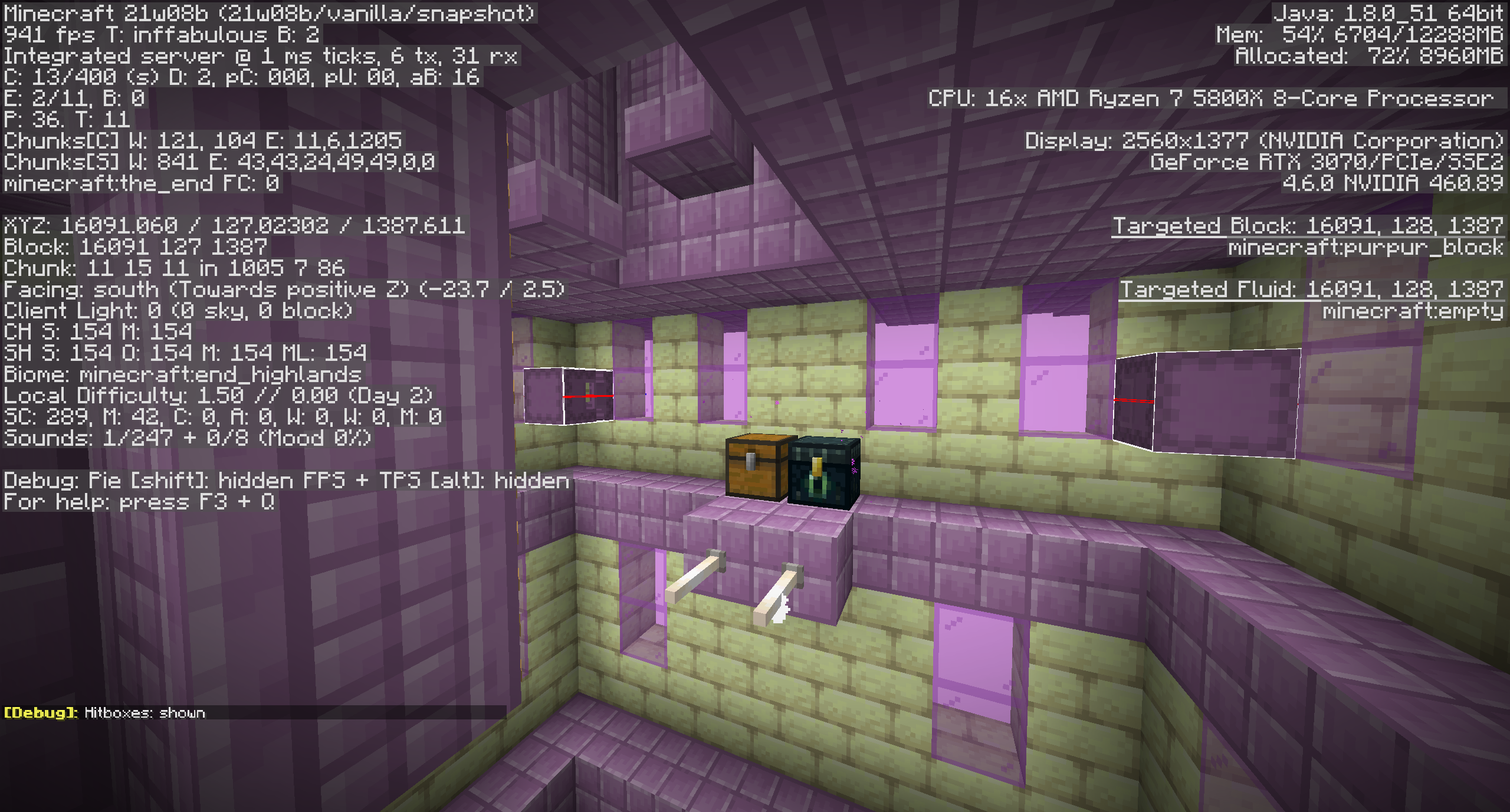
This happens because the game places you slightly too low down (inside the block) when it teleports you. For some reason this only seems to happen to the gateways in the end dimension that the game automatically generates as I can't reproduce it using the setblock command (/setblock 0 75 0 minecraft:end_gateway{ExitPortal:{X:5,Y:75,Z:0}}, for example), even when setting the exit location to somewhere in unloaded chunks.
jeankevdu62 Perhaps change the the summary (title) and description to mention that it places you inside the block, causing you to get pushed out? Just a suggestion.
Still occurs in 1.14 Pre-Release 3 as well.
Finally figured out this is caused by Dxtory's overlay hook (which shows the game's framerate & recording/screenshot status of the program). I didn't even think of this as I'm so used to having it running at all times. Still strange that this only started happening in 1.13 pre-release 2 still, but oh well. Please close as invalid I suppose. (I can't seem to close it myself.) Sorry for the waste of time.
Still an issue in 1.14 Pre-Release 5. It's also very easy to reproduce. From my testing on a random seed 19 out of the 20 generated gateways near 0 0 gets you stuck in the floor slightly upon teleporting through it, of which 6 of would most likely kill you, as going through them gets you get stuck in the floor and slowly you get pushed out into the void.
Please confirm (and fix).
video
Still occurs in 1.14 (release).
Still an issue in 1.14 (release) as well.
Also still occurs in 1.14 (release).
Since a bunch of years (and with that versions and code changes) have passed, could the "won't fix" resolution perhaps be reconsidered?
I realize this isn't r/Mojira, but since I don't have a reddit account and recently ran into this issue I figured I might as well leave a comment.
Still occurs in 1.14.1 Pre-Release 1 (which for some reason is 1.14.1 on here?).
Still an issue in 1.14.2 Pre-Release 2 as well...
Still present in 1.14.2 Pre-Release 2.
Still an issue in 1.14.1 (release).
I can't reproduce this unless I set the mobGriefing gamerule to false, in which case it's intended behavior.
The pillars generating all the way down to the lowest block in the world has been a thing since 1.9 (if I recall correctly) and has an issue at MC-86654 (which needs updating). Nothing regarding that has changed in the recent pre-releases as far as I can tell?
Also, it seems that some pillars generate skinnier than they should be. The smallest ones were 5x5 with the corner blocks missing. The smallest ones are now 3x3. Not sure if a separate bug report should be made for that or not.
Duplicate of
MC-152088I suppose since this one was created a few hours later, but feel free to closeMC-152088instead if this one is preferred.Duplicate of
MC-153079I supposeEdit: Nevermind. Actually
MC-152824This not only happens with doors (including trapdoors and fence gates) but also when using ender pearls and being teleported (slightly) inside a block. Seems related to fixing
MC-147715.Yep. I didn't find that one because I didn't think to search for resolved issues (since it happens in the current version)...
Duplicate of MC-152728 (which I didn't find as I assumed it was only the FOV that didn't change, but there is more to it). Please close as duplicate.
Still in 1.14.2 (Release). Also, please add "FOV" be added to the title/description to make it easier to find this bug report.
Can also confirm this is still an issue in 1.14.2. In my case it's a skylight issue. Several subchunks starting from the third topmost down to ground level (or the lowest block perhaps?) the skylight is incorrect; 0 or less than 15 despite there being only air above.
Strangely, ever since the initial fix for this I've never had it in my singleplayer world, however, as soon as I updated to 1.14.2 (from 1.14.2 Pre Release 4) this issue occured. Might be a coincidence though.
I've also attached a screenshot, but here's a video of it in addition since it's hard to properly show in screenshots: https://www.youtube.com/watch?v=cn1D_NYuMIw
Not sure what your point is KennyTV. I didn't say the title is inaccurate or anything. I simply asked for "FOV" to be added somewhere in the bug report so that it's easier to find.
Reason being is that this bug also affects the FOV (which is a symptom of sprinting, yes), and the FOV not changing correctly was first and only thing I noticed about this bug for a little while, leading me to create a duplicate bug report as I didn't find this one. I realized later that there was more to it than that. Had "FOV" been anywhere in the bug report I would have found it immediately and not wasted people's time. I don't see the harm in it being added.
Anyway, FOV has since been added to the labels, which is all I was really looking for.
Duplicate of
MC-152088/MC-152168?So....
The main thing that is described in this bug report has been resolved 6 days ago in a duplicate bug report at
MC-153665apparently, and the assignee for this bug report has been changed to no one a day after that happened, yet this bug report is still marked as in progress.I still don't know the limitation that makes villagers only able to pick up a maximum of of 4 stacks for potatoes and carrots that was introduced at some point during 1.14.3 Pre-Release 1 is intended behavior. Is it? Is it not? Do I repurpose this bug report to be about that? Should a new bug report be created instead? Should this one be closed?
Seems to be resolved. I can no longer reproduce this in the latest snapshot (1.14.4 Pre-Release 2). Please close I guess.
This issue affects more than what is currently mentioned in here.
Any time the player (attemps to) break a block, but the block isn't broken server-side, the player gets teleported back to where they were when they broke that block.
This issue appears when running around while clicking the ground with a sword in creative mode I assume because the client is actually still sending 'block interaction packets' as they are technically still 'mining' the block. However, neither the client nor server break the block because the player is holding a sword.
This same issue can also be observed in survival mode when the server is lagging as the lag introduces 'block lag'. Block lag is when the player mines a block but the block re-appears due to not (yet) being broken server-side because of the lag. Before this issue was introduced the block re-appeared and that was that. Since this issue was introduced the player also gets teleported back as soon as the block re-appears. (Here's a video showing this on a vanilla singleplayer world where I caused excessive server lag for the purpose of demonstration.)
Also, while I know this isn't relevant for you guys, this issue also affects modded servers where the player isn't allowed to break certain blocks or blocks in certain areas. The block gets broken client-side, but then re-appears for the client in the next (server) tick, and since 1.14.4 (Pre-Release 4?) the player gets teleported back to the location they were at when they broke the block client-side. (Here's a video of that on a spigot 1.14.4 server with a plugin that offers such functionality.)
This is almost certainly caused by the fix for
MC-156013, andMC-156852might be in the same boat. What is the point of pre-releases anymore if changes introduced in them cause more issues than they solve and make it into the final releases for a version? Anyhow, my point is that fix implemented forMC-156013is plain bad and I can't trust you guys to not fix this issue by doing something equally bad, like adding a check that doesn't teleport the player back if they're holding a sword.With that said, a better fix for
MC-156013using the current method is probably to teleport the player back only if the player's hitbox intersects the re-appearing block. This would get rid of this issue as well.https://bugs.mojang.com/browse/MC-151399
Resolved in a future version according to a duplicate issue @
MC-152172@ Jonathan
For context: This ticket was specifically regarding the player getting stuck inside a block upon teleporting through a gateway. What would happen was that you would get teleported clipping slightly inside the block you were supposed to be teleported on top of, and you were unable move out of the block through normal movement (walking, sprinting, jumping). You had to teleport (via ender pearls or other means), use water to swim up, or mine the block to unstuck yourself.
If this block you were clipping in was at the very edge of an island you would get pushed off the edge and fall the void with little you can do to save yourself. This itself isn't really an issue or specific to this issue, but just a game mechanic where you get pushed towards air if you're inside blocks that have air on at least one side.
Here's a video that shows the issue: https://www.youtube.com/watch?v=dlX73SOpOXU&feature=youtu.be&t=105
I'm not sure if the player clipping inside the block (and being stuck inside it) was caused by the 'crawling' feature (in which your hitbox becomes much smaller if your head is inside a block but your feet are not) that was introduced or not, but either way this sure appears to have been fixed as I personally haven't experienced it since. You now get teleported on top of the block.
Anyway, whether you're still experiencing the exact same issue or a slightly different one, create a new ticket if there isn't another one that already describes the exact issue.
This seems to have been fixed at some point during the most recent bunch of snapshots for 1.15. Lily pads now generate even more frequently than they used to back in 1.12.2.
Nope. Seems fixed. Please close.
Looks like this got fixed along the way with all the recent rendering changes.
This is still an issue in 1.15 Pre-Release 1.
Still an issue in 1.15 Pre-Release 6
Still an issue in 1.15 Pre-Release 6
And 1.15 Pre-Release 7, but you might as well wait until 1.15 is released to update the ticket at this point... :/Still affects 1.15
And 1.15 as well.
Just ran into this exact issue when attempting to optimize a datapack. Correct me if I'm wrong, but this means that any items created by a tile entity can't be handled by functions during the first tick of their existence regardless of what you do, right? Meaning that any work-around that could be done using functions would essentially involve waiting for the next game tick?
This is not entirely fixed but I'm not sure if a new issue should be opened or not.
This still occurs in the following situations:
Why "Won't Fix"? As minor of an issue as it is, surely there's no harm in leaving it open and fixing it one day (like a lot of other issues)?
Oh yup. I didn't manage to find it before reporting. my bad.