 MC-13046
Certain supported characters glitch out, clearing out lines of text.
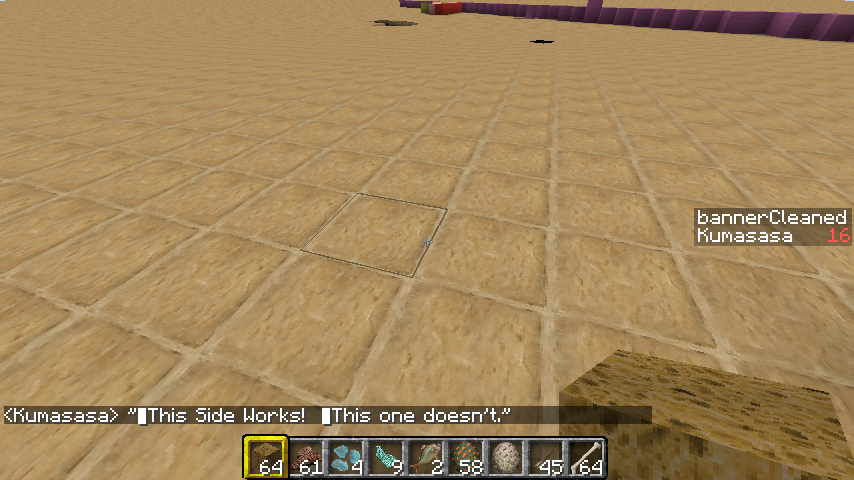
Any and all Unicode characters that have transparency at their leftmost pixels (Such as ▗,▝ and ▐) don't work when typed into chat or books: Anything to the right of them is not displayed, allowing players to write "empty" messages on chat and renamed items, and preventing them from using them in ASCII art.
This is NOT an issue of them not being supported: their mirrored versions (▖,▘ and ▌) are properly displayed, and one can find them under "glyph_25.png" in Minecraft's "font" folder.
To reproduce: Copy and paste "▌This Side Works! ▐This one doesn't." or similar in any text field in-game.
Also: ({[
Fix provided in this comment.
Environment
Win 7, should be reproducible in all Java/Game versions.
Linked Issues
is duplicated by1


Created Issue:
Certain supported characters glitch out, clearing out lines of text.
Any and all Unicode characters that have transparency at their leftmost pixels (Such as ▗,▝ and ▐) don't work when typed into chat or books: Anything to the right of them is not displayed, allowing players to write "empty" messages on chat and renamed items, and preventing them from using them in ASCII art.
This is NOT an issue of them not being supported: their mirrored versions (▖,▘ and ▌) are properly displayed, and one can find them under "glyph_25.png" in Minecraft's "font" folder.To reproduce: Copy and paste "▌This Side Works! ▐This one doesn't." or similar in any text field in-game.
Environment
Win 7, should be reproducible in all Java/Game versions.
Attachments1
![[Mojang] Grum (Erik Broes)](../../../data/assets/gravatar/grum.png)
![[Mod] Ezekiel (ezfe)](../../../data/assets/gravatar/ezekielelin.jpeg)
relates to

Any and all Unicode characters that have transparency at their leftmost pixels (Such as ▗,▝ and ▐) don't work when typed into chat or books: Anything to the right of them is not displayed, allowing players to write "empty" messages on chat and renamed items, and preventing them from using them in ASCII art.
This is NOT an issue of them not being supported: their mirrored versions (▖,▘ and ▌) are properly displayed, and one can find them under "glyph_25.png" in Minecraft's "font" folder.To reproduce: Copy and paste "▌This Side Works! ▐This one doesn't." or similar in any text field in-game.
Also: ({[
Any and all Unicode characters that have transparency at their leftmost pixels (Such as ▗,▝ and ▐) don't work when typed into chat or books: Anything to the right of them is not displayed, allowing players to write "empty" messages on chat and renamed items, and preventing them from using them in ASCII art.
This is NOT an issue of them not being supported: their mirrored versions (▖,▘ and ▌) are properly displayed, and one can find them under "glyph_25.png" in Minecraft's "font" folder.To reproduce: Copy and paste "▌This Side Works! ▐This one doesn't." or similar in any text field in-game.
Also: ({[
Fix provided in this comment.
 ProfMobius (Thomas Guimbretiere)
is duplicated by

Confirmed for
Also with:
▕
@ Marcono1234
Can't confirm. Are you sure you are experiencing the same bug?
When I paste ▕ in the chat I can't type any more letters (1.8.3)
Confirmed, but that's probably a different bug.
Cannot confirm in 1.8.3, see screenshot.
No, he's talking about the "▕" character, not the one in the description. He's also reporting different behavior, which makes me think it's a separate bug.
Confirmed for
MC-80169also for ({[ (only opening ones, might be a problem because of the space in front of these characters)Confirmed for
Could you please update the affected characters?
Did I miss any?
The reason for that seems to be that in glyph_sizes.bin ( for example has a width of 156. I do not know how this is converted however when the game reads the width with the method getCharWidth(char p_78263_1_) of the class /Client/src/net/minecraft/client/gui/FontRenderer.java (MCP 1.8 names) it returns as this.glyphWidth[p_78263_1_] -100 which gets converted to 268435449 as a size.
After some testing I found out that setting the charWidth to glyphWidth[char] & 15 in case it is negative fixes this (but please recheck, I found this out randomly).
Will be fixed in next snapshot (15w51a).
Many thanks for the well written bug report and the accurate solution in the comments.
Cheers!
You are welcome, even though it was kind of random that this worked...
However it is not quite fixed, it looks you might have forgot to change the getCharWidth(char p_78263_1_) method, because when clicking at a long string of these full width characters, the cursor appears at the wrong position.Caused byMC-23952Marcono1234, read my old fix explanation in the
MC-7181(https://bugs.mojang.com/browse/MC-7181?focusedCommentId=54675); it is not that random why the fix works. Unsigned vs. signed integers, sign-extensions, bitshifts...You are right, thank you for letting me know