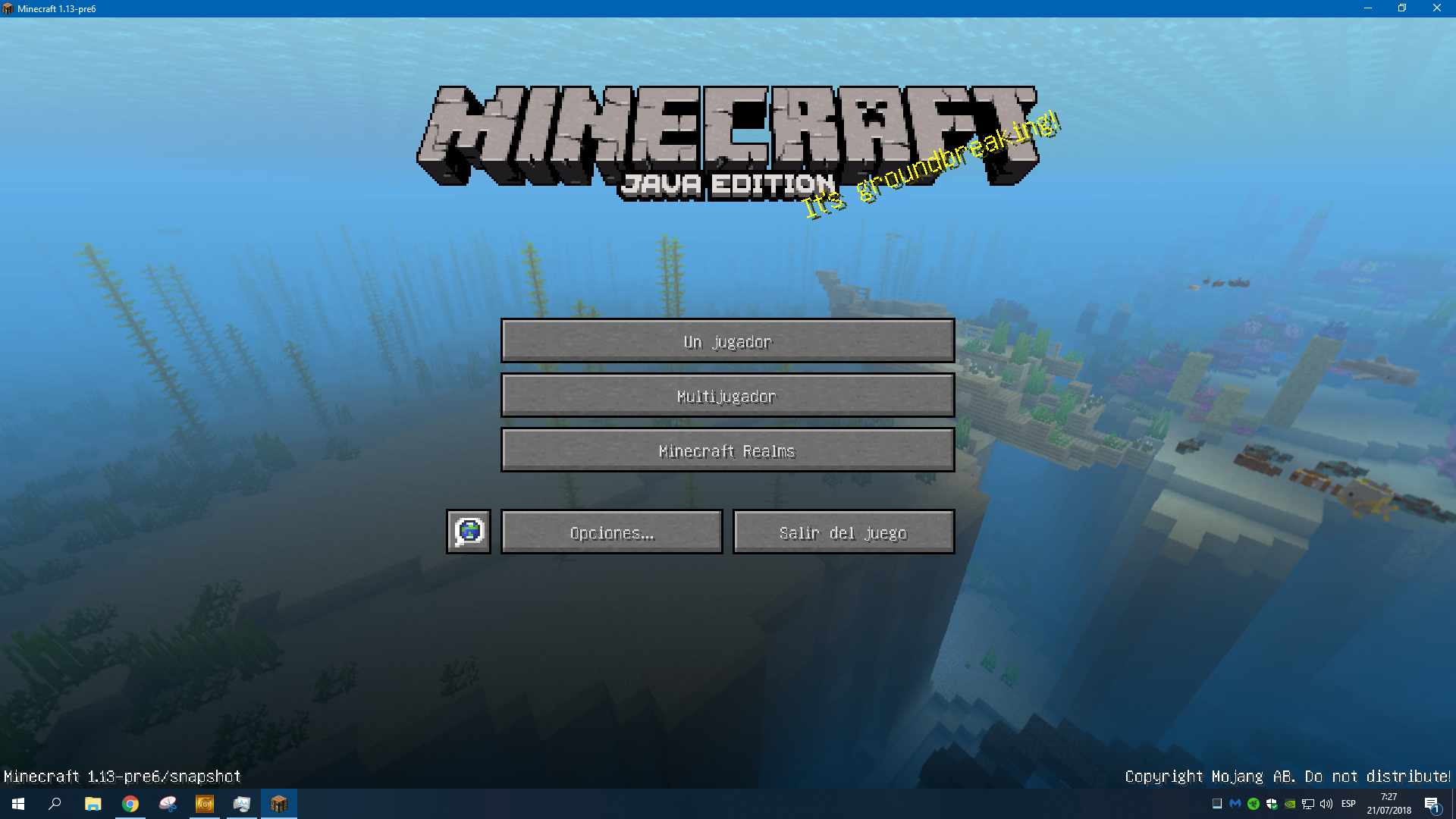
Distorted graphics in 1.13 caused by Razer cortex's overlay / nvidia gamecaster
- This issue is caused by Razer cortex's overlay, and nvidia gamecaster
- See also other incompatible software may cause this effect.
I was so excited to try the new aquactic update but the main menu and not only that,all the menus are glitchy, the strange thing is that not affects the in-game performance I make my way to create a new world and is all normal 120 fps but when i pressed Esc the game instanly crashes. I tried to see te process with the task manager a nothing happends, it just closes
This only is for the 1.13, i test it in the 1.12.2 and its all ok
PD: The texture glitching appears in the 1.13-pre6 and it comes with a different font for some reason
But it appears that the Esc crashing is older, it appears in the first snapshot of 1.13, the 18w05a
I tried reinstaling minecraft and java and nothing happends
C  [nvoglv64.dll+0xaff490]

Java frames: (J=compiled Java code, j=interpreted, Vv=VM code)
J 6758  org.lwjgl.system.JNI.invokePV(JJ)V (0 bytes) @ 0x0000000003aac884 [0x0000000003aac840+0x44]
j  org.lwjgl.glfw.GLFW.glfwSwapBuffers(J)V+17
j  cfs.a(Z)V+17
J 6762 C1 cfi.c(Z)V (878 bytes) @ 0x0000000003dfb564 [0x0000000003df9040+0x2524]
j  cfi.a()V+75
j  net.minecraft.client.main.Main.main([Ljava/lang/String;)V+1168
Collection of graphics drivers:
| Ticket | Reporter | Driver |
|---|---|---|
| Nolan ross | OpenGL: GeForce GTX 1060 3GB/PCIe/SSE2 GL version 4.6.0 NVIDIA 398.36, NVIDIA Corporation | |
| rubick | OpenGL: GeForce GT 540M/PCIe/SSE2 GL version 4.6.0 NVIDIA 391.35, NVIDIA Corporation | |
| Daniel Ryan | OpenGL: GeForce GTX 1060 6GB/PCIe/SSE2 GL version 4.6.0 NVIDIA 398.36, NVIDIA Corporation | |
| Andres Lopez | OpenGL: GeForce GTX 1060 6GB/PCIe/SSE2 GL version 4.6.0 NVIDIA 398.36, NVIDIA Corporation | |
| n/a | Kumasasa | OpenGL: GeForce GTX 1050 Ti/PCIe/SSE2 GL version 4.6.0 NVIDIA 398.36, NVIDIA Corporation |
last one for comparison, Kumasasa doesn't have this issue
Environment
Windows 10
Java 8
Nvidia GTX 1060
I7-7700K
Linked Issues
is duplicated by12
 MC-134137OpenGLDuplicateMC-134149I can't play 1.13DuplicateMC-134280My screen tears massively in 1.13 but no other versionsDuplicateMC-134379Screen problems in snapshot 1.13DuplicateMC-134385Glitched Main MenuDuplicateMC-134386When opening Minecraft Java Edition, 1.13. Glitched screenDuplicateMC-134756Whenever I log into play Minecraft, i am met with a blurry screen and cannot playDuplicateMC-135246Menu becomes random linesDuplicateMC-135395CrashesDuplicateMC-136694Graphical Issue, ONLY 1.13.1DuplicateMC-140475After clicking any options buttons on the main menu, I get weird linesDuplicateMC-177656Minecraft 1.15.2 is crashing continuously.Duplicate
Attachments15


Created Issue:
Strange new bug in 1.13
I was so excited to try the new aquactic update but the main menu and not only that,all the menus are glitchy, the strange thing is that not affects the in-game performance I make my way to create a new world and is all normal 120 fps but when i pressed Esc the game instanly crashes. I tried to see te process with the task manager a nothing happends, it just closes
This only is for the 1.13, i test it in the 1.12.2 and its all ok
I tried reinstaling minecraft and java and nothing happends
Environment
Windows 10
Java 8
Nvidia GTX 1060
I7-7700K
Attachments4

Strange new bugin 1.13Distorted graphics in 1.13
I was so excited to try the new aquactic update but the main menu and not only that,all the menus are glitchy, the strange thing is that not affects the in-game performance I make my way to create a new world and is all normal 120 fps but when i pressed Esc the game instanly crashes. I tried to see te process with the task manager a nothing happends, it just closes
This only is for the 1.13, i test it in the 1.12.2 and its all ok
I tried reinstaling minecraft and java and nothing happends
I was so excited to try the new aquactic update but the main menu and not only that,all the menus are glitchy, the strange thing is that not affects the in-game performance I make my way to create a new world and is all normal 120 fps but when i pressed Esc the game instanly crashes. I tried to see te process with the task manager a nothing happends, it just closes
This only is for the 1.13, i test it in the 1.12.2 and its all ok
I tried reinstaling minecraft and java and nothing happends
C  [nvoglv64.dll+0xaff490]

Java frames: (J=compiled Java code, j=interpreted, Vv=VM code)
J 6758  org.lwjgl.system.JNI.invokePV(JJ)V (0 bytes) @ 0x0000000003aac884 [0x0000000003aac840+0x44]
j  org.lwjgl.glfw.GLFW.glfwSwapBuffers(J)V+17
j  cfs.a(Z)V+17
J 6762 C1 cfi.c(Z)V (878 bytes) @ 0x0000000003dfb564 [0x0000000003df9040+0x2524]
j  cfi.a()V+75
j  net.minecraft.client.main.Main.main([Ljava/lang/String;)V+1168
is duplicated by
![[Mod] Neko](../../../data/avatars/users/92901.png)
I was so excited to try the new aquactic update but the main menu and not only that,all the menus are glitchy, the strange thing is that not affects the in-game performance I make my way to create a new world and is all normal 120 fps but when i pressed Esc the game instanly crashes. I tried to see te process with the task manager a nothing happends, it just closes
This only is for the 1.13, i test it in the 1.12.2 and its all ok
I tried reinstaling minecraft and java and nothing happends
C [nvoglv64.dll+0xaff490] Java frames: (J=compiled Java code, j=interpreted, Vv=VM code) J 6758 org.lwjgl.system.JNI.invokePV(JJ)V (0 bytes) @ 0x0000000003aac884 [0x0000000003aac840+0x44] j org.lwjgl.glfw.GLFW.glfwSwapBuffers(J)V+17 j cfs.a(Z)V+17 J 6762 C1 cfi.c(Z)V (878 bytes) @ 0x0000000003dfb564 [0x0000000003df9040+0x2524] j cfi.a()V+75 j net.minecraft.client.main.Main.main([Ljava/lang/String;)V+1168Collection of graphics drivers:
Ticket Reporter Driver MC-134280Nolan ross OpenGL: GeForce GTX 1060 3GB/PCIe/SSE2 GL version 4.6.0 NVIDIA 398.36, NVIDIA Corporation MC-134386rubick OpenGL: GeForce GT 540M/PCIe/SSE2 GL version 4.6.0 NVIDIA 391.35, NVIDIA Corporation
I was so excited to try the new aquactic update but the main menu and not only that,all the menus are glitchy, the strange thing is that not affects the in-game performance I make my way to create a new world and is all normal 120 fps but when i pressed Esc the game instanly crashes. I tried to see te process with the task manager a nothing happends, it just closes
This only is for the 1.13, i test it in the 1.12.2 and its all ok
I tried reinstaling minecraft and java and nothing happends
C [nvoglv64.dll+0xaff490] Java frames: (J=compiled Java code, j=interpreted, Vv=VM code) J 6758 org.lwjgl.system.JNI.invokePV(JJ)V (0 bytes) @ 0x0000000003aac884 [0x0000000003aac840+0x44] j org.lwjgl.glfw.GLFW.glfwSwapBuffers(J)V+17 j cfs.a(Z)V+17 J 6762 C1 cfi.c(Z)V (878 bytes) @ 0x0000000003dfb564 [0x0000000003df9040+0x2524] j cfi.a()V+75 j net.minecraft.client.main.Main.main([Ljava/lang/String;)V+1168Collection of graphics drivers:
Ticket Reporter Driver MC-134280Nolan ross OpenGL: GeForce GTX 1060 3GB/PCIe/SSE2 GL version 4.6.0 NVIDIA 398.36, NVIDIA Corporation MC-134386rubick OpenGL: GeForce GT 540M/PCIe/SSE2 GL version 4.6.0 NVIDIA 391.35, NVIDIA Corporation MC-134385Daniel Ryan OpenGL: GeForce GTX 1060 6GB/PCIe/SSE2 GL version 4.6.0 NVIDIA 398.36, NVIDIA Corporation MC-134114Andres LopezOpenGL: GeForce GTX 1060 6GB/PCIe/SSE2 GL version 4.6.0 NVIDIA 398.36, NVIDIA Corporation
I was so excited to try the new aquactic update but the main menu and not only that,all the menus are glitchy, the strange thing is that not affects the in-game performance I make my way to create a new world and is all normal 120 fps but when i pressed Esc the game instanly crashes. I tried to see te process with the task manager a nothing happends, it just closes
This only is for the 1.13, i test it in the 1.12.2 and its all ok
I tried reinstaling minecraft and java and nothing happends
C [nvoglv64.dll+0xaff490] Java frames: (J=compiled Java code, j=interpreted, Vv=VM code) J 6758 org.lwjgl.system.JNI.invokePV(JJ)V (0 bytes) @ 0x0000000003aac884 [0x0000000003aac840+0x44] j org.lwjgl.glfw.GLFW.glfwSwapBuffers(J)V+17 j cfs.a(Z)V+17 J 6762 C1 cfi.c(Z)V (878 bytes) @ 0x0000000003dfb564 [0x0000000003df9040+0x2524] j cfi.a()V+75 j net.minecraft.client.main.Main.main([Ljava/lang/String;)V+1168Collection of graphics drivers:
Ticket Reporter Driver MC-134280Nolan ross OpenGL: GeForce GTX 1060 3GB/PCIe/SSE2 GL version 4.6.0 NVIDIA 398.36, NVIDIA Corporation MC-134386rubick OpenGL: GeForce GT 540M/PCIe/SSE2 GL version 4.6.0 NVIDIA 391.35, NVIDIA Corporation MC-134385Daniel Ryan OpenGL: GeForce GTX 1060 6GB/PCIe/SSE2 GL version 4.6.0 NVIDIA 398.36, NVIDIA Corporation MC-134114Andres LopezOpenGL: GeForce GTX 1060 6GB/PCIe/SSE2 GL version 4.6.0 NVIDIA 398.36, NVIDIA Corporation I was so excited to try the new aquactic update but the main menu and not only that,all the menus are glitchy, the strange thing is that not affects the in-game performance I make my way to create a new world and is all normal 120 fps but when i pressed Esc the game instanly crashes. I tried to see te process with the task manager a nothing happends, it just closes
This only is for the 1.13, i test it in the 1.12.2 and its all ok
I tried reinstaling minecraft and java and nothing happends
C [nvoglv64.dll+0xaff490] Java frames: (J=compiled Java code, j=interpreted, Vv=VM code) J 6758 org.lwjgl.system.JNI.invokePV(JJ)V (0 bytes) @ 0x0000000003aac884 [0x0000000003aac840+0x44] j org.lwjgl.glfw.GLFW.glfwSwapBuffers(J)V+17 j cfs.a(Z)V+17 J 6762 C1 cfi.c(Z)V (878 bytes) @ 0x0000000003dfb564 [0x0000000003df9040+0x2524] j cfi.a()V+75 j net.minecraft.client.main.Main.main([Ljava/lang/String;)V+1168Collection of graphics drivers:
Ticket Reporter Driver MC-134280Nolan ross OpenGL: GeForce GTX 1060 3GB/PCIe/SSE2 GL version 4.6.0 NVIDIA 398.36, NVIDIA Corporation MC-134386rubick OpenGL: GeForce GT 540M/PCIe/SSE2 GL version 4.6.0 NVIDIA 391.35, NVIDIA Corporation MC-134385Daniel Ryan OpenGL: GeForce GTX 1060 6GB/PCIe/SSE2 GL version 4.6.0 NVIDIA 398.36, NVIDIA Corporation MC-134114Andres Lopez OpenGL: GeForce GTX 1060 6GB/PCIe/SSE2 GL version 4.6.0 NVIDIA 398.36, NVIDIA Corporation n/a Kumasasa OpenGL: GeForce GTX 1050 Ti/PCIe/SSE2 GL version 4.6.0 NVIDIA 398.36, NVIDIA Corporation last one for comparison, Kumasasa doesn't have this issue
I was so excited to try the new aquactic update but the main menu and not only that,all the menus are glitchy, the strange thing is that not affects the in-game performance I make my way to create a new world and is all normal 120 fps but when i pressed Esc the game instanly crashes. I tried to see te process with the task manager a nothing happends, it just closes
This only is for the 1.13, i test it in the 1.12.2 and its all ok
I tried reinstaling minecraft and java and nothing happends
C [nvoglv64.dll+0xaff490] Java frames: (J=compiled Java code, j=interpreted, Vv=VM code) J 6758 org.lwjgl.system.JNI.invokePV(JJ)V (0 bytes) @ 0x0000000003aac884 [0x0000000003aac840+0x44] j org.lwjgl.glfw.GLFW.glfwSwapBuffers(J)V+17 j cfs.a(Z)V+17 J 6762 C1 cfi.c(Z)V (878 bytes) @ 0x0000000003dfb564 [0x0000000003df9040+0x2524] j cfi.a()V+75 j net.minecraft.client.main.Main.main([Ljava/lang/String;)V+1168Collection of graphics drivers:
Ticket Reporter Driver MC-134280Nolan ross OpenGL: GeForce GTX 1060 3GB/PCIe/SSE2 GL version 4.6.0 NVIDIA 398.36, NVIDIA Corporation MC-134386rubick OpenGL: GeForce GT 540M/PCIe/SSE2 GL version 4.6.0 NVIDIA 391.35, NVIDIA Corporation MC-134385Daniel Ryan OpenGL: GeForce GTX 1060 6GB/PCIe/SSE2 GL version 4.6.0 NVIDIA 398.36, NVIDIA Corporation MC-134114Andres Lopez OpenGL: GeForce GTX 1060 6GB/PCIe/SSE2 GL version 4.6.0 NVIDIA 398.36, NVIDIA Corporation n/a Kumasasa OpenGL: GeForce GTX 1050 Ti/PCIe/SSE2 GL version 4.6.0 NVIDIA 398.36, NVIDIA Corporation last one for comparison, Kumasasa doesn't have this issue
I was so excited to try the new aquactic update but the main menu and not only that,all the menus are glitchy, the strange thing is that not affects the in-game performance I make my way to create a new world and is all normal 120 fps but when i pressed Esc the game instanly crashes. I tried to see te process with the task manager a nothing happends, it just closes
This only is for the 1.13, i test it in the 1.12.2 and its all ok
PD: The texture glitching appears in the 1.13-pre6 and it comes with a differnet font for some reason
But it appears that the Esc crashing is older, it appears in the first snapshot of 1.13, the 18w05aI tried reinstaling minecraft and java and nothing happends
C [nvoglv64.dll+0xaff490] Java frames: (J=compiled Java code, j=interpreted, Vv=VM code) J 6758 org.lwjgl.system.JNI.invokePV(JJ)V (0 bytes) @ 0x0000000003aac884 [0x0000000003aac840+0x44] j org.lwjgl.glfw.GLFW.glfwSwapBuffers(J)V+17 j cfs.a(Z)V+17 J 6762 C1 cfi.c(Z)V (878 bytes) @ 0x0000000003dfb564 [0x0000000003df9040+0x2524] j cfi.a()V+75 j net.minecraft.client.main.Main.main([Ljava/lang/String;)V+1168Collection of graphics drivers:
Ticket Reporter Driver MC-134280Nolan ross OpenGL: GeForce GTX 1060 3GB/PCIe/SSE2 GL version 4.6.0 NVIDIA 398.36, NVIDIA Corporation MC-134386rubick OpenGL: GeForce GT 540M/PCIe/SSE2 GL version 4.6.0 NVIDIA 391.35, NVIDIA Corporation MC-134385Daniel Ryan OpenGL: GeForce GTX 1060 6GB/PCIe/SSE2 GL version 4.6.0 NVIDIA 398.36, NVIDIA Corporation MC-134114Andres Lopez OpenGL: GeForce GTX 1060 6GB/PCIe/SSE2 GL version 4.6.0 NVIDIA 398.36, NVIDIA Corporation n/a Kumasasa OpenGL: GeForce GTX 1050 Ti/PCIe/SSE2 GL version 4.6.0 NVIDIA 398.36, NVIDIA Corporation last one for comparison, Kumasasa doesn't have this issue
I was so excited to try the new aquactic update but the main menu and not only that,all the menus are glitchy, the strange thing is that not affects the in-game performance I make my way to create a new world and is all normal 120 fps but when i pressed Esc the game instanly crashes. I tried to see te process with the task manager a nothing happends, it just closes
This only is for the 1.13, i test it in the 1.12.2 and its all ok
PD: The texture glitching appears in the 1.13-pre6 and it comes with a differ
net font for some reason
But it appears that the Esc crashing is older, it appears in the first snapshot of 1.13, the 18w05aI tried reinstaling minecraft and java and nothing happends
C [nvoglv64.dll+0xaff490] Java frames: (J=compiled Java code, j=interpreted, Vv=VM code) J 6758 org.lwjgl.system.JNI.invokePV(JJ)V (0 bytes) @ 0x0000000003aac884 [0x0000000003aac840+0x44] j org.lwjgl.glfw.GLFW.glfwSwapBuffers(J)V+17 j cfs.a(Z)V+17 J 6762 C1 cfi.c(Z)V (878 bytes) @ 0x0000000003dfb564 [0x0000000003df9040+0x2524] j cfi.a()V+75 j net.minecraft.client.main.Main.main([Ljava/lang/String;)V+1168Collection of graphics drivers:
Ticket Reporter Driver MC-134280Nolan ross OpenGL: GeForce GTX 1060 3GB/PCIe/SSE2 GL version 4.6.0 NVIDIA 398.36, NVIDIA Corporation MC-134386rubick OpenGL: GeForce GT 540M/PCIe/SSE2 GL version 4.6.0 NVIDIA 391.35, NVIDIA Corporation MC-134385Daniel Ryan OpenGL: GeForce GTX 1060 6GB/PCIe/SSE2 GL version 4.6.0 NVIDIA 398.36, NVIDIA Corporation MC-134114Andres Lopez OpenGL: GeForce GTX 1060 6GB/PCIe/SSE2 GL version 4.6.0 NVIDIA 398.36, NVIDIA Corporation n/a Kumasasa OpenGL: GeForce GTX 1050 Ti/PCIe/SSE2 GL version 4.6.0 NVIDIA 398.36, NVIDIA Corporation last one for comparison, Kumasasa doesn't have this issue
I was so excited to try the new aquactic update but the main menu and not only that,all the menus are glitchy, the strange thing is that not affects the in-game performance I make my way to create a new world and is all normal 120 fps but when i pressed Esc the game instanly crashes. I tried to see te process with the task manager a nothing happends, it just closes
This only is for the 1.13, i test it in the 1.12.2 and its all ok
PD: The texture glitching appears in the 1.13-pre6 and it comes with a different font for some reason
But it appears that the Esc crashing is older, it appears in the first snapshot of 1.13, the 18w05aI tried reinstaling minecraft and java and nothing happends
C [nvoglv64.dll+0xaff490] Java frames: (J=compiled Java code, j=interpreted, Vv=VM code) J 6758 org.lwjgl.system.JNI.invokePV(JJ)V (0 bytes) @ 0x0000000003aac884 [0x0000000003aac840+0x44] j org.lwjgl.glfw.GLFW.glfwSwapBuffers(J)V+17 j cfs.a(Z)V+17 J 6762 C1 cfi.c(Z)V (878 bytes) @ 0x0000000003dfb564 [0x0000000003df9040+0x2524] j cfi.a()V+75 j net.minecraft.client.main.Main.main([Ljava/lang/String;)V+1168Collection of graphics drivers:
Ticket Reporter Driver MC-134280Nolan ross OpenGL: GeForce GTX 1060 3GB/PCIe/SSE2 GL version 4.6.0 NVIDIA 398.36, NVIDIA Corporation MC-134386rubick OpenGL: GeForce GT 540M/PCIe/SSE2 GL version 4.6.0 NVIDIA 391.35, NVIDIA Corporation MC-134385Daniel Ryan OpenGL: GeForce GTX 1060 6GB/PCIe/SSE2 GL version 4.6.0 NVIDIA 398.36, NVIDIA Corporation MC-134114Andres Lopez OpenGL: GeForce GTX 1060 6GB/PCIe/SSE2 GL version 4.6.0 NVIDIA 398.36, NVIDIA Corporation n/a Kumasasa OpenGL: GeForce GTX 1050 Ti/PCIe/SSE2 GL version 4.6.0 NVIDIA 398.36, NVIDIA Corporation last one for comparison, Kumasasa doesn't have this issue
Distorted graphics in 1.13 caused by GameCaster of Razer Central
Workaround
- This issue is caused by GameCaster of Razer Central
- See also other incompatible software like Razer cortex's overlay, and nvidia gamecaster causes this effect.
I was so excited to try the new aquactic update but the main menu and not only that,all the menus are glitchy, the strange thing is that not affects the in-game performance I make my way to create a new world and is all normal 120 fps but when i pressed Esc the game instanly crashes. I tried to see te process with the task manager a nothing happends, it just closes
This only is for the 1.13, i test it in the 1.12.2 and its all ok
PD: The texture glitching appears in the 1.13-pre6 and it comes with a different font for some reason
But it appears that the Esc crashing is older, it appears in the first snapshot of 1.13, the 18w05aI tried reinstaling minecraft and java and nothing happends
C [nvoglv64.dll+0xaff490] Java frames: (J=compiled Java code, j=interpreted, Vv=VM code) J 6758 org.lwjgl.system.JNI.invokePV(JJ)V (0 bytes) @ 0x0000000003aac884 [0x0000000003aac840+0x44] j org.lwjgl.glfw.GLFW.glfwSwapBuffers(J)V+17 j cfs.a(Z)V+17 J 6762 C1 cfi.c(Z)V (878 bytes) @ 0x0000000003dfb564 [0x0000000003df9040+0x2524] j cfi.a()V+75 j net.minecraft.client.main.Main.main([Ljava/lang/String;)V+1168Collection of graphics drivers:
Ticket Reporter Driver MC-134280Nolan ross OpenGL: GeForce GTX 1060 3GB/PCIe/SSE2 GL version 4.6.0 NVIDIA 398.36, NVIDIA Corporation MC-134386rubick OpenGL: GeForce GT 540M/PCIe/SSE2 GL version 4.6.0 NVIDIA 391.35, NVIDIA Corporation MC-134385Daniel Ryan OpenGL: GeForce GTX 1060 6GB/PCIe/SSE2 GL version 4.6.0 NVIDIA 398.36, NVIDIA Corporation MC-134114Andres Lopez OpenGL: GeForce GTX 1060 6GB/PCIe/SSE2 GL version 4.6.0 NVIDIA 398.36, NVIDIA Corporation n/a Kumasasa OpenGL: GeForce GTX 1050 Ti/PCIe/SSE2 GL version 4.6.0 NVIDIA 398.36, NVIDIA Corporation last one for comparison, Kumasasa doesn't have this issue
Workaround
- This issue is caused by GameCaster of Razer Central
- See also other incompatible software like Razer cortex's overlay, and nvidia gamecaster cause
sthis effect.I was so excited to try the new aquactic update but the main menu and not only that,all the menus are glitchy, the strange thing is that not affects the in-game performance I make my way to create a new world and is all normal 120 fps but when i pressed Esc the game instanly crashes. I tried to see te process with the task manager a nothing happends, it just closes
This only is for the 1.13, i test it in the 1.12.2 and its all ok
PD: The texture glitching appears in the 1.13-pre6 and it comes with a different font for some reason
But it appears that the Esc crashing is older, it appears in the first snapshot of 1.13, the 18w05aI tried reinstaling minecraft and java and nothing happends
C [nvoglv64.dll+0xaff490] Java frames: (J=compiled Java code, j=interpreted, Vv=VM code) J 6758 org.lwjgl.system.JNI.invokePV(JJ)V (0 bytes) @ 0x0000000003aac884 [0x0000000003aac840+0x44] j org.lwjgl.glfw.GLFW.glfwSwapBuffers(J)V+17 j cfs.a(Z)V+17 J 6762 C1 cfi.c(Z)V (878 bytes) @ 0x0000000003dfb564 [0x0000000003df9040+0x2524] j cfi.a()V+75 j net.minecraft.client.main.Main.main([Ljava/lang/String;)V+1168Collection of graphics drivers:
Ticket Reporter Driver MC-134280Nolan ross OpenGL: GeForce GTX 1060 3GB/PCIe/SSE2 GL version 4.6.0 NVIDIA 398.36, NVIDIA Corporation MC-134386rubick OpenGL: GeForce GT 540M/PCIe/SSE2 GL version 4.6.0 NVIDIA 391.35, NVIDIA Corporation MC-134385Daniel Ryan OpenGL: GeForce GTX 1060 6GB/PCIe/SSE2 GL version 4.6.0 NVIDIA 398.36, NVIDIA Corporation MC-134114Andres Lopez OpenGL: GeForce GTX 1060 6GB/PCIe/SSE2 GL version 4.6.0 NVIDIA 398.36, NVIDIA Corporation n/a Kumasasa OpenGL: GeForce GTX 1050 Ti/PCIe/SSE2 GL version 4.6.0 NVIDIA 398.36, NVIDIA Corporation last one for comparison, Kumasasa doesn't have this issue
Workaround
- This issue is caused by Razer cortex's overlay, and nvidia gamecaster
- See also other incompatible software may cause this effect.
I was so excited to try the new aquactic update but the main menu and not only that,all the menus are glitchy, the strange thing is that not affects the in-game performance I make my way to create a new world and is all normal 120 fps but when i pressed Esc the game instanly crashes. I tried to see te process with the task manager a nothing happends, it just closes
This only is for the 1.13, i test it in the 1.12.2 and its all ok
PD: The texture glitching appears in the 1.13-pre6 and it comes with a different font for some reason
But it appears that the Esc crashing is older, it appears in the first snapshot of 1.13, the 18w05aI tried reinstaling minecraft and java and nothing happends
C [nvoglv64.dll+0xaff490] Java frames: (J=compiled Java code, j=interpreted, Vv=VM code) J 6758 org.lwjgl.system.JNI.invokePV(JJ)V (0 bytes) @ 0x0000000003aac884 [0x0000000003aac840+0x44] j org.lwjgl.glfw.GLFW.glfwSwapBuffers(J)V+17 j cfs.a(Z)V+17 J 6762 C1 cfi.c(Z)V (878 bytes) @ 0x0000000003dfb564 [0x0000000003df9040+0x2524] j cfi.a()V+75 j net.minecraft.client.main.Main.main([Ljava/lang/String;)V+1168Collection of graphics drivers:
Ticket Reporter Driver MC-134280Nolan ross OpenGL: GeForce GTX 1060 3GB/PCIe/SSE2 GL version 4.6.0 NVIDIA 398.36, NVIDIA Corporation MC-134386rubick OpenGL: GeForce GT 540M/PCIe/SSE2 GL version 4.6.0 NVIDIA 391.35, NVIDIA Corporation MC-134385Daniel Ryan OpenGL: GeForce GTX 1060 6GB/PCIe/SSE2 GL version 4.6.0 NVIDIA 398.36, NVIDIA Corporation MC-134114Andres Lopez OpenGL: GeForce GTX 1060 6GB/PCIe/SSE2 GL version 4.6.0 NVIDIA 398.36, NVIDIA Corporation n/a Kumasasa OpenGL: GeForce GTX 1050 Ti/PCIe/SSE2 GL version 4.6.0 NVIDIA 398.36, NVIDIA Corporation last one for comparison, Kumasasa doesn't have this issue
Distorted graphics in 1.13 caused byGameCaster of Razer CentralDistorted graphics in 1.13 caused by Razer cortex's overlay / nvidia gamecaster
is duplicated by
is duplicated by
is duplicated by
is duplicated by
is duplicated by
![[Mod] violine1101](../../../data/avatars/users/92858.png)
relates to
is duplicated by
![[Mod] tryashtar](../../../data/avatars/users/41963.png)
is duplicated by
- This issue is caused by Razer cortex's overlay, and nvidia gamecaster
- See also other incompatible software may cause this effect.
I was so excited to try the new aquactic update but the main menu and not only that,all the menus are glitchy, the strange thing is that not affects the in-game performance I make my way to create a new world and is all normal 120 fps but when i pressed Esc the game instanly crashes. I tried to see te process with the task manager a nothing happends, it just closes
This only is for the 1.13, i test it in the 1.12.2 and its all ok
PD: The texture glitching appears in the 1.13-pre6 and it comes with a different font for some reason
But it appears that the Esc crashing is older, it appears in the first snapshot of 1.13, the 18w05a
I tried reinstaling minecraft and java and nothing happends
C  [nvoglv64.dll+0xaff490]

Java frames: (J=compiled Java code, j=interpreted, Vv=VM code)
J 6758  org.lwjgl.system.JNI.invokePV(JJ)V (0 bytes) @ 0x0000000003aac884 [0x0000000003aac840+0x44]
j  org.lwjgl.glfw.GLFW.glfwSwapBuffers(J)V+17
j  cfs.a(Z)V+17
J 6762 C1 cfi.c(Z)V (878 bytes) @ 0x0000000003dfb564 [0x0000000003df9040+0x2524]
j  cfi.a()V+75
j  net.minecraft.client.main.Main.main([Ljava/lang/String;)V+1168
Collection of graphics drivers:
| Ticket | Reporter | Driver |
|---|---|---|
| Nolan ross | OpenGL: GeForce GTX 1060 3GB/PCIe/SSE2 GL version 4.6.0 NVIDIA 398.36, NVIDIA Corporation | |
| rubick | OpenGL: GeForce GT 540M/PCIe/SSE2 GL version 4.6.0 NVIDIA 391.35, NVIDIA Corporation | |
| Daniel Ryan | OpenGL: GeForce GTX 1060 6GB/PCIe/SSE2 GL version 4.6.0 NVIDIA 398.36, NVIDIA Corporation | |
| Andres Lopez | OpenGL: GeForce GTX 1060 6GB/PCIe/SSE2 GL version 4.6.0 NVIDIA 398.36, NVIDIA Corporation | |
| n/a | Kumasasa | OpenGL: GeForce GTX 1050 Ti/PCIe/SSE2 GL version 4.6.0 NVIDIA 398.36, NVIDIA Corporation |
last one for comparison, Kumasasa doesn't have this issue

MC-134114, thats his
Wait, that's no screen tearing what's solvable by VSync, that's a broken graphics output.
I've seen that a few days before here on the tracker, until then resolved to MC-134114
same problem in MC-134114
I check every driver and they are all fine
THANK YOU SO MUCH this also solve my problem in MC-134114
See MC-134114.
See MC-134114.
![[Mod] Asteraoth](../../../data/avatars/users/92886.png)
See MC-134114.
This bug report was created on behalf of a user who encountered this issue in the #minecrafthelp irc channel on irc.esper.net, and is filed here for future reference. This relates to MC-134114, but to the best of my knowledge, does not duplicate any existing ones.
Upon launch via the official launcher in 1.13.2, the game will instantly crash with the Plays.tv recording app running in the background. This was determined through a process of elimination by disabling suspect applications running in the background- when Plays.tv was disabled, the crashes stopped.
Sample file paths for the app:
C:\Users\antho\AppData\Local\Plays\app-2.0.2\Plays.exe
C:\Users\antho\AppData\Local\Plays-ltc\0.45.0\PlaysTVComm.exe
I have also attached the JVM crash logs: one from 1.12.2, and one from 1.13.2. While nothing has changed config wise between the two versions on the user's end, the java stacktraces are different. The problematic frame stays the same.
Java frames: (J=compiled Java code, j=interpreted, Vv=VM code)
j org.lwjgl.opengl.WindowsContextImplementation.nSwapBuffers(Ljava/nio/ByteBuffer;)V+0
j org.lwjgl.opengl.WindowsContextImplementation.swapBuffers()V+35
j org.lwjgl.opengl.ContextGL.swapBuffers()V+3
j org.lwjgl.opengl.DrawableGL.swapBuffers()V+0
j org.lwjgl.opengl.Display.swapBuffers()V+39
j org.lwjgl.opengl.Display.update(Z)V+44
j org.lwjgl.opengl.Display.update()V+1
j bib.i()V+10
j bib.az()V+483
j bib.a()V+74
j net.minecraft.client.main.Main.main([Ljava/lang/String;)V+1094
v ~StubRoutines::call_stub
Java frames: (J=compiled Java code, j=interpreted, Vv=VM code)
j  org.lwjgl.system.JNI.invokePV(JJ)V+0
J 6712 C1 cgd.a(Z)V (137 bytes) @ 0x0000000002eee754 [0x0000000002eee580+0x1d4]
j  cft.c(Z)V+469
j  cft.a()V+75
j  net.minecraft.client.main.Main.main([Ljava/lang/String;)V+1168
v  ~StubRoutines::call_stub
Something interesting that may be worthwhile to note is that the LWJGL lines of the 1.12.2 stacktrace match a 3+ year old LWJGL bug report char for char. Perhaps this is related?
There is otherwise no other obvious clue when troubleshooting the cause. The exit code after crashing is just 1.
See MC-134114.


Crash report?
This is exactly what I'm experiencing I posted an issue but haven't had much help so far.
I upload a forced crash in any case
we have the same case men
Everyone having this issue:
Please force a crash by pressing F3 + C for 10 seconds while in-game and attach the crash report (minecraft/crash-reports/crash-<DATE>-client.txt) here.
i think this is something with the gtx 1060, i saw all the similar issues and 3/5 cases , including me, said that they have a gtx 1060, 1 said 3GB and me and another person said 6GB so i think it doesnt matter the quantity of GB
But one had a 540m and 1050ti sooo, Its definitely a driver issue or mc issue
The texture glitching appears in the 1.13-pre6 and it comes with a different font for some reason
But it appears that the Esc crashing is older, it appears in the first snapshot of 1.13, the 18w05a
So...
There is a solution?
SOLVED, the disorted graphics and the Esc crash, it was the razer cortex optimization, i just saw it in this report
MC-134137and i deactivated and now it works as normalThat's what it was... I disabled cortex as well and it worked but didn't know that's what fixed it.
Sadly deinstalling cortex did not work for me. still having the same problem