 Kraif
Kraif
- Kraif
- kraif
- Europe/Andorra
- Yes
- No


![[Mojang] Ulraf](../../../data/avatars/users/43122.png)

![[Mojang] Alexander](../../../data/avatars/users/21580.png)

![[Mojang] Bartosz Bok](../../../data/avatars/users/10122.svg)
![[Mojang] slicedlime](../../../data/assets/gravatar/slicedlime.jpeg)
![[Mojang] Matthew Gatland](../../../data/avatars/users/43046.png)

 MC-50556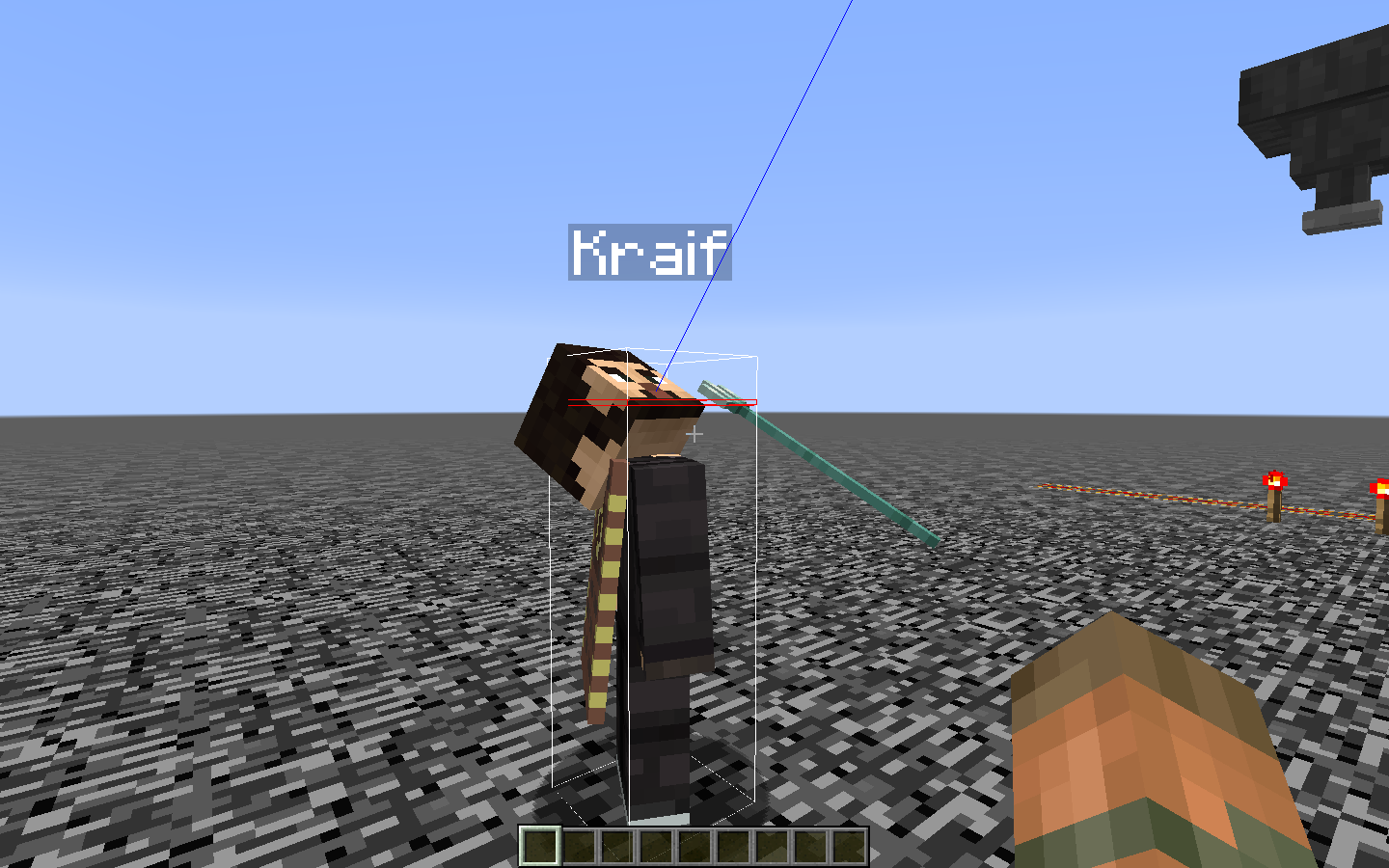


What are the seed and coordinates?
Can you provide the seed and coordinates, please?
Duplicate of
MC-110507.However, the reporter of that issue didn't provide the seed and coordinates, can you?
Confirmed for 1.13-pre7.
Confirmed for 1.13-pre8.
Duplicate of
MC-133593.
Oops! Sorry, it was a 3, not a 4

This is not a bug; It says: "(Place resource pack files here)". Also, it's present in ALL the MC languages.
There is not any /kill command in 1.13. At least, that's what my game says.
Attach the crash report (.minecraft/crash-reports) after having this issue.
Can you provide the full crash report?
About the other issue, I also had it, I restarted MC and worked.
Duplicate of
MC-113904.
I can't help you if you don't tell me what graphic card do you use (NVIDIA, Intel...).
Are you using Discord? If yes, disable it and check if the issue persists.
Can you attach the crash report (.minecraft/crash-reports) after having this issue, please?
Are you using Discord? If yes, disable it and check if the issue persists. See
MC-124460.
Mac OS X (x86_64) version 10.7.4Your operating system is under the [minimum requirements|https://help.mojang.com/customer/en/portal/articles/325948-minecraft-system-requirements|https://help.mojang.com/customer/en/portal/articles/325948-minecraft-system-requirements].]. You will need macOS: OS X 10.9 Maverick.
Operating System: Mac OS X (x86_64) version 10.7.4.
Your operating system is under the [minimum requirements|https://help.mojang.com/customer/en/portal/articles/325948-minecraft-system-requirements.] You need macOS: OS X 10.9 Maverick.
Translations are suggested by the community at Crowdin. Not a bug.
Does
MCL-5546describe your issue?Contact 💬 Community Support to get further help.
Oh OK, thanks Kumasasa. By the way, I didn't find another duplicate for this, so I tested it and could confirm.
Outdated version, this bug tracker is for 1.13 and the newest snapshots.
OpenGL: Intel(R) HD Graphics 620Your system does not meet the minimum requirements:
> GPU (Integrated): Intel HD Graphics 4000 (Ivy Bridge) or AMD Radeon R5 series (Kaveri line) with OpenGL 4.4*
-->
REALMS-870?
You can find the crash report by following this steps (this is the way I do it):
- Press Windows+R
- Type %appdata%
- Click .minecraft
- Then crash-reports
And finally attach the crash report here, as the bot said.

This is a technical support issue. Contact the Community Support.
When on an entity's camera, either spider or creeper. Dying after changing into survival will cause us having the filter the mob have after reviving
Steps To Reproduce:
1. Spawn a spider and some zombie
2. /gamemode sp
3. View the spider camera
4. Change to gamemode survival
5. Wait until killed by zombie
6. Filter will stay the sameReloging won't fix it. Only way to go back is to do the same thing but with another mob which have the normal filter
The bug
When on an entity's camera, either spider or creeper. Dying after changing into survival will cause us having the filter the mob have after reviving
How to reproduce
1. Spawn a spider and some zombie
2. /gamemode sp
3. View the spider camera
4. Change to gamemode survival
5. Wait until killed by zombie
6. Filter will stay the sameReloging won't fix it. Only way to go back is to do the same thing but with another mob which have the normal filter.
Bryarr Misner : the crash report you attached is invalid because you are using a Modified version/launcher.
Runtime outdated! Runtime version should be should be 1.8.0_51That's what the log says.
Sounds like
MC-112780.
The bug
If you create a new world with the option Generate Structures set to OFF and you try to use the command /locate , it will give you the coordinates of a non-generated structure (it gives you the coordinates of where the structure should be located).
How to reproduce
- Create New World.
- More World Options...
- Generate structures: OFF.
- Join the world.
- Type the command /locate and select a structure.
- Click the coordinates the command gives to you.
->
It teleports you to a place with no structure. The game should say, Could not find any structure nearby.
Probably this Works as Intended. Discovered while testing
MC-77787.
Added a short video about the strange behavior of the skeleton.
Minecraft 2018.08.26 - 20.56.34.04.mp4
If you have Speed 4 and FOV Quake Pro, you can look through Blocks: https://www.youtube.com/watch?v=Z82SYnlbYZk&feature=youtu.be
This x-ray like effect also happens with speed 2, Quake Pro, and sprinting.
The bug
If you have Speed 2/3/4... and FOV Quake Pro, you can look through blocks.
How to reproduce
- Create a wall (12 blocks long and 2 blocks tall, for example).
- Change your FOV to Quake Pro: ESC, Options..., FOV.
- Apply a speed effect: /effect give NAME minecraft:speed 100 2 (3,4).
- Go next to the wall and sprint, you will see through the wall.
Confirmed for 1.13.1.
Not sure if this works as intended, but I believe all entities arenotsupposed tobe able to pass through theworldborder. I want to limit my world in a custom map, yet the Ender Dragon still seems to come and go as he pleases.
The bug
All entities are supposed not be able to pass through the World border, however, Ender Dragons are able to do it.
Be careful if you try to reproduce this in the End,
MC-136523.
The bug
If you modify the world border in the End, you won't be able to see it, however, you cannot pass through / build out of it.
How to reproduce
- Go to the End.
- Go on top of the Bedrock End Portal.
- Type the commands /worldborder center ~ ~ and then /worldborder set 5.
- You won't see the world border. However, you won't be able get/build out f
romthe range set (5 blocks).The bug
If you modify the world border in the End, you won't be able to see it, however, you cannot pass through / build out of it.
How to reproduce
- Go to the End.
- Go on top of the Bedrock End Portal.
- Type the commands /worldborder center ~ ~ and then /worldborder set 5.
- You won't see the world border. However, you won't be able get/build out of the range set (5 blocks).
Put a shield in your off-hand, and food in your main hand.
When you are hungry, eat the food.
You will eat the food, and your shield will come up to block.This doesn't happen with inverse slot arrangement, mind you.
Edit: This appears to only be happening in third person, and it's more of a "partial block". Your arm doesn't go up all the way to block.
Code analysis by Marcono1234 can be found in
this comment.The bug
Put a shield in your off-hand, and food in your main hand.
When you are hungry, eat the food.
You will eat the food, and your shield will come up to block.This doesn't happen with inverse slot arrangement, mind you.
Edit: This appears to only be happening in third person, and it's more of a "partial block". Your arm doesn't go up all the way to block.
Code analysis
Code analysis by Marcono1234 can be found in this comment.
The bug
Put a shield in your off-hand, and food in your main hand.
When you are hungry, eat the food.
You will eat the food, and your shield will come up to block.This doesn't happen with inverse slot arrangement, mind you.
Edit:This appears to only be happening in third person, and it's more of a "partial block". Your arm doesn't go up all the way to block.
Code analysis
Code analysis by Marcono1234 can be found in this comment.
The bug
How to reproduce
Put a shield in your off-hand, and food in your main hand.
When you are hungry, eat the food.
You will eat the food, and your shield will come up to block.This doesn't happen with inverse slot arrangement, mind you.
This appears to only be happening in third person, and it's more of a "partial block". Your arm doesn't go up all the way to block.
Code analysis
By Marcono1234 can be found in this comment.
The bugHow to reproduce
Put a shield in your off-hand, and food in your main hand.
When you are hungry, eat the food.
You will eat the food, and your shield will come up to block.This doesn't happen with inverse slot arrangement, mind you.
This appears to only be happening in third person, and it's more of a "partial block". Your arm doesn't go up all the way to block.
Code analysis
By Marcono1234 can be found in this comment.
The bug
Shield blocking happens even while eating in third person.
How to reproduce
- Put a shield in your off-hand, and food in your main hand.
- When you are hungry, eat the food.
->
This appears to only be happening in third person, and it's more of a "partial block". Your arm doesn't go up all the way to block.
Code analysis
By Marcono1234 can be found in this comment.
The bugShield blocking happens even while eating in third person.
How to reproduce
- Put a shield in your off-hand, and food in your main hand.
- When you are hungry, eat the food.
->
This appears to only be happening in third person, and it's more of a "partial block". Your arm doesn't go up all the way to block.
Code analysis
By Marcono1234 can be found in this comment.
The bug
Shield blocking happens even while eating in third person.
How to reproduce
- Put a shield in your off-hand, and food in your main hand.
- When you are hungry, eat the food.
->
Code analysis
By Marcono1234 can be found in this comment.
The bug
Shield blocking happens even while eating in third person.
How to reproduce
- Put a shield in your off-hand, and food in your main hand.
- When you are hungry, eat the food.
->
Code analysis
By Marcono1234 can be found in this comment.
The bug
Shield blocking happens even while eating in third person.
How to reproduce
- Put a shield in your off-hand, and food in your main hand.
- When you are hungry, eat the food.
->
Code analysis
By Marcono1234 can be found in this comment.
The bug
- Walking on slabs with your feet sticking out into adjacent shallow flowing water, like on the attached screenshots
- Standing on a fence with shallow floating water on it doesn't allow you to jump, like in
MC-13373
The bug
The Unicode font is very thin and unreadable.
Examples:
- Gui scale small.
- Signs from 2-3 blocks distance.
- Scaling chat lower then 60 % (gui scale normal).
Kapos' Default Font for Everything v0.1 for 1.9.2 fixes this issue.
Poll by fromgate about translation:
21% did not use Russian translation because they don't like "unicode" font
Original blog post.

What should happen:
When a minecart you are riding turns 90 degrees to the left, you should look 90 degress to the left too.
When riding straight tracks you should always look forwards.What happens:
When turning my field of vision does not align to the minecart correctly. Its always about 10 degrees off.
When going straight my field of vision randomly turns a couple of degrees.Steps to reproduce:
Ride a minecart. (May be a mac specific bug as i haven't seen it on other youtubevideos.)The bug
What should happen:
When a minecart you are riding turns 90 degrees to the left, you should look 90 degress to the left too.
When riding straight tracks you should always look forwards.What happens:
When turning my field of vision does not align to the minecart correctly. Its always about 10 degrees off.
When going straight my field of vision randomly turns a couple of degrees.How to reproduce
Ride a minecart. (May be a mac specific bug as i haven't seen it on other youtubevideos.)
What I expected to happen was...:
Crafting fireworks with firework stars, using shift-click should just get me a stack of fireworks.What actually happened was...:
It crafts the fireworks you want, plus with the remaining ingredients, it crafts whatever else it can, all at once.
StepstoReproduce:
1. Set up the crafting table with equal-sized stacks of firework star, paper and gunpowder – except use fewer firework stars.
2. Shift-click to craft the fireworks.
3. All at once, it will craft rockets using up all the firework stars (expected), and also enough plain rockets to use up all the gunpowder and paper (unexpected).The bug
What I expected to happen was...:
Crafting fireworks with firework stars, using shift-click should just get me a stack of fireworks.What actually happened was...:
It crafts the fireworks you want, plus with the remaining ingredients, it crafts whatever else it can, all at once.How to reproduce
1. Set up the crafting table with equal-sized stacks of firework star, paper and gunpowder – except use fewer firework stars.
2. Shift-click to craft the fireworks.
3. All at once, it will craft rockets using up all the firework stars (expected), and also enough plain rockets to use up all the gunpowder and paper (unexpected).
The bug
What I expected to happen was...:
Crafting fireworks with firework stars, using shift-click should just get me a stack of fireworks.What actually happened was...:
It crafts the fireworks you want, plus with the remaining ingredients, it crafts whatever else it can, all at once.How to reproduce
1. Set up the crafting table with equal-sized stacks of firework star, paper and gunpowder – except use fewer firework stars.
2. Shift-click to craft the fireworks.
3. All at once, it will craft rockets using up all the firework stars (expected), and also enough plain rockets to use up all the gunpowder and paper (unexpected).The bug
What I expected to happen was...:
Crafting fireworks with firework stars, using shift-click should just get me a stack of fireworks.What actually happened was...:
It crafts the fireworks you want, plus with the remaining ingredients, it crafts whatever else it can, all at once.How to reproduce
- Set up the crafting table with equal-sized stacks of firework star, paper and gunpowder – except use fewer firework stars.
- Shift-click to craft the fireworks.
- All at once, it will craft rockets using up all the firework stars (expected), and also enough plain rockets to use up all the gunpowder and paper (unexpected).
Windows 7 (Latest Java)
Windows 10
Maximum is 30 symbols, but renamed chest's name does not fit in its window if the name is 29or 30symbols long.As of 1.13-pre6 the maximum name is 35 chars.
Sorry for poor English
TNT Minecarts detonate at corner.
I think that they derail temporarily, causing TNT Minecarts detonate.
But it has no reason to derail the carts.How to Reproduce
Set the blocks&rails&torches EXACTLY same from the pictures. (Type of blocks can changed)
There must be a block at wool's section (even glass can detonate the cart.)In Figure 1(2013-01-14_21.06.37.png), place TNT cart at crosshead points.
In Figure 2(2013-01-14_21.06.54.png), place TNT cart at crosshead points, and push slightly and escape quickly so don't stop the cart.Plus.
Even a mob at lime wool's section can detonate the cart.Plus II (Jan.15)
In Figure 1, these can be substitue of lime wool
All full-sized blocks
Lower slab
Upper slab (Upside down)
Any direction of stairs
Cobblestone wall (1 piece)
Chest
Leaves
Cactus
Beacon
Hopper
Daylight sensor
Cake
Any direction of fence gate
Redstone comparator
Redstone repeater
Lower side closed trapdoor
Piston arm
Brewing stand
Enchantment Table
End portal frameand these cannot be
Fence (1 piece)
Pressure plate
The bug
TNT Minecarts detonate at corner. They derail temporarily, causing TNT Minecarts detonate.
How to Reproduce
- Set the blocks, rails and torches in the same way from the pictures.
Extra information
In Figure 1(2013-01-14_21.06.37.png), place TNT cart at crosshead points.
In Figure 2(2013-01-14_21.06.54.png), place TNT cart at crosshead points, and push slightly and escape quickly so don't stop the cart.Plus.
Even a mob at lime wool's section can detonate the cart.Plus II (Jan.15)
In Figure 1, these can be substitue of lime wool
All full-sized blocks
Lower slab
Upper slab (Upside down)
Any direction of stairs
Cobblestone wall (1 piece)
Chest
Leaves
Cactus
Beacon
Hopper
Daylight sensor
Cake
Any direction of fence gate
Redstone comparator
Redstone repeater
Lower side closed trapdoor
Piston arm
Brewing stand
Enchantment Table
End portal frameand these cannot be
Fence (1 piece)
Pressure plate
The bug
TNT Minecarts detonate at corner. They derail temporarily, causing TNT Minecarts detonate.
How to Reproduce
- Set the blocks, rails and torches in the same way from the pictures.
Extra information
In Figure 1(2013-01-14_21.06.37.png), place TNT cart at crosshead points.
In Figure 2(2013-01-14_21.06.54.png), place TNT cart at crosshead points, and push slightly and escape quickly so don't stop the cart.Plus.
Even a mob at lime wool's section can detonate the cart.Plus II (Jan.15)
In Figure 1, these can be substitue of lime wool
All full-sized blocks
Lower slab
Upper slab (Upside down)
Any direction of stairs
Cobblestone wall (1 piece)
Chest
Leaves
Cactus
Beacon
Hopper
Daylight sensor
Cake
Any direction of fence gate
Redstone comparator
Redstone repeater
Lower side closed trapdoor
Piston arm
Brewing stand
Enchantment Table
End portal frameand these cannot be
Fence (1 piece)
Pressure plate
The bug
TNT Minecarts detonate at corner. They derail temporarily, causing TNT Minecarts detonate.
How to Reproduce
- Set the blocks, rails and torches in the same way from the pictures.
Extra information
- Screenshot 1, place TNT cart at crosshead points.
Screenshot 2, place TNT cart at crosshead points, and push slightly and escape quickly so don't stop the cart.- Even a mob at lime wool's section can detonate the cart.
The Ender Dragon is unable to destroy any type of minecart or boat. It simply passes through them.
Steps to Reproduce:
1. Make a new Creative world.
2. Construct an End Portal and enter it.
3. Place down any kind of rail and place each type of minecart on the tracks. Place down a boat near the minecarts as well.
4. Stand near the minecarts and boat and wait for the Ender Dragon to charge at you.
5. When the Ender Dragon flys through you, notice the rails were destroyed but all minecarts remained intact.The bug
The Ender Dragon is unable to destroy any type of minecart or boat. It simply passes through them.
How to reproduce
1. Make a new Creative world.
2. Construct an End Portal and enter it.
3. Place down any kind of rail and place each type of minecart on the tracks. Place down a boat near the minecarts as well.
4. Stand near the minecarts and boat and wait for the Ender Dragon to charge at you.
5. When the Ender Dragon flys through you, notice the rails were destroyed but all minecarts remained intact.
With Smooth Lighting turned on (minimum or maximum doesn't matter) light will spill through the corner of a block if there is a light source either behind or beneath an adjacent block.
See screenshots for more info.
Once a zombie is hit all the others surrounding it get mad at you, even if you're invisible.
how to reproduce:
use an invisibilty potion or the command /effect (player) (duration) 14
punch a zombie
getmurdered
Steps to reproduce
- If you are on single player, build a tower and place a falling block on top so that it lands on a chest, make you are in the chest's inventory when it lands
- If you are on multiplayer get someone to place a block on top of the chest whilst you have it open
The chest will not close the way it does when destroyed
How to reproduce
- If you are on single player, build a tower and place a falling block on top so that it lands on a chest, make you are in the chest's inventory when it lands
- If you are on multiplayer get someone to place a block on top of the chest whilst you have it open
-> (x)The chest will not close the way it does when destroyed
How to reproduce
- If you are on single player, build a tower and place a falling block on top so that it lands on a chest, make you are in the chest's inventory when it lands
- If you are on multiplayer get someone to place a block on top of the chest whilst you have it open
-> (x)The chest will not close the way it does when destroyed
How to reproduce
- If you are on single player, build a tower and place a falling block on top so that it lands on a chest, make you are in the chest's inventory when it lands
- If you are on multiplayer get someone to place a block on top of the chest whilst you have it open
->
Cannot break Minecart while Horse/Slime/Shulker in it
Once horses are in minecarts, it is very difficult to free them, as the
horseshit box is much larger than the minecart. You just end up hitting the horse instead of hitting the minecart.
You can free them by breaking minecart from underneath by making a hole.
The minecarts/boats don't disappear in Survival or Adventure mode.
A video explaining this is here http://youtu.be/2L5Kf38J_VE
Code analysis by Marcono1234 can be found in this
commentThe bug
Creative: If you throw a snowball to a Minecart, it will disappear.
Survival/Adventure: Won't delete the Minecart.
Code analysis
Code analysis by Marcono1234 can be found in this comment.
The bug
Creative:If you throw a snowball to a Minecart, it will disappear.
Survival/Adventure: Won't delete the Minecart.
Code analysis
Code analysis by Marcono1234 can be found in this comment.
The bug
If you throw a snowball to a Minecart, it will disappear (creative). However, that does not happen in survival/adventure mode.
Code analysis
Code analysis by Marcono1234 can be found in this comment.
Expected behaviorI would not be able to break a block of quartz in adventure mode
Actual behavior
I started to hit it, and I saw the breaking animation along with the sound, but my arm was not moving. Once the block got to the end of the breaking animation it just restarted it again until I stopped holding left click.
Stepsto reproduce
- Go into Survival
- Start to break a block, without actually breaking it
- Stop holding left click
- Go into Adventure mode
- Try to break the block you were just hitting. It should start the breaking animation and sound, but not actually break (Note: You cannot break other blocks and cannot do this glitch on multiple blocks at the same time)
This doesn't seem like it will be too much of a problem since you can't actually break the block. Hopefully it can be fixed :3
The bug
I started to hit it, and I saw the breaking animation along with the sound, but my arm was not moving. Once the block got to the end of the breaking animation it just restarted it again until I stopped holding left click.
How to reproduce
- Go into Survival
- Start to break a block, without actually breaking it
- Stop holding left click
- Go into Adventure mode
- Try to break the block you were just hitting. It should start the breaking animation and sound, but not actually break (Note: You cannot break other blocks and cannot do this glitch on multiple blocks at the same time)
This doesn't seem like it will be too much of a problem since you can't actually break the block.
The bug
When tutorial asks you to open your inventory, while you're in the nether portal waiting to be teleported, if you press E to bring up the inventory, you complete this tutorial even though the inventory itself cannot appear while you're in a nether portal.
Stepsto reproduce
- Edit options.txt so it has tutorialStep:open_inventory in it
- Open/create a world in creative, make sure you have a lit nether portal
- Switch to survival, walk/jump/break blocks to make tutorial notification ("Open your inventory") appear
- Walk into the portal and press E
→Tutorial notification will be removed, while inventory hasn't appearedThe bug
When tutorial asks you to open your inventory, while you're in the nether portal waiting to be teleported, if you press E to bring up the inventory, you complete this tutorial even though the inventory itself cannot appear while you're in a nether portal.
How to reproduce
- Edit options.txt so it has tutorialStep:open_inventory in it
- Open/create a world in creative, make sure you have a lit nether portal
- Switch to survival, walk/jump/break blocks to make tutorial notification ("Open your inventory") appear
- Walk into the portal and press E
→Tutorial notification will be removed, while inventory hasn't appeared
I have noticed this bug ever since the witches first made their appearance in 1.4: Usually witches notice the player on sight, as with other mobs, but if the witch is walking around (while in its "calm" state, not aggro'd) it doesn't pursue players, even when hit, until it reaches the place it was going to originally. It knows the player's there, because it drinks its swiftness potion. It attacks when you approach the witch when it's idle, but as you approach it while it's walking, it won't attack until it stops moving.
To Reproduce
1. Go into creative and spawn a witch.
2. Wait for the witch to walk somewhere.
3. While it's walking, quickly move into survival (gamemode 0).
4. Notice the witch keep moving, then attack when it stops.This isn't a huge issue, but it makes witches easier to kill at times, especially that they can spawn anywhere since 1.7. I often notice it normally playing, when I approach it while it's moving.
NOTE: Witch behavior is the same with mobs too, tested with snow golem, iron golem, and other witches. The witch does not notice them either.
The bug
I have noticed this bug ever since the witches first made their appearance in 1.4: Usually witches notice the player on sight, as with other mobs, but if the witch is walking around (while in its "calm" state, not aggro'd) it doesn't pursue players, even when hit, until it reaches the place it was going to originally. It knows the player's there, because it drinks its swiftness potion. It attacks when you approach the witch when it's idle, but as you approach it while it's walking, it won't attack until it stops moving.
How to reproduce
1. Go into creative and spawn a witch.
2. Wait for the witch to walk somewhere.
3. While it's walking, quickly move into survival (gamemode 0).
4. Notice the witch keep moving, then attack when it stops.This isn't a huge issue, but it makes witches easier to kill at times, especially that they can spawn anywhere since 1.7. I often notice it normally playing, when I approach it while it's moving.
NOTE: Witch behavior is the same with mobs too, tested with snow golem, iron golem, and other witches. The witch does not notice them either.
Can -
not- reproduce for 1.13.1. Now it shows the Classic preset, not Air. Also, if you remove the first 3; the "Cake preset" will work.
To reproduce
- Place a command block
- Give it the command /clone ~ ~ ~ ~ ~1 ~ ~ ~ ~1
- Place a pressure plate on top of it
- Jump on the pressure plate
Results
The command block and the pressure plate are cloned
The pressure plate is depressed as if someone is standing on it
After some time the pressure plate pops upExpected result
I can walk onto the cloned pressure plate to activate the cloned command block immediately
How to reproduce
- Place a command block
- Give it the command /clone ~ ~ ~ ~ ~1 ~ ~ ~ ~1
- Place a pressure plate on top of it
- Jump on the pressure plate
Results
The command block and the pressure plate are cloned
The pressure plate is depressed as if someone is standing on it
After some time the pressure plate pops upExpected result
I can walk onto the cloned pressure plate to activate the cloned command block immediately
Confirmed for 1.13.1. Please, keep the ticket updated accordingly.
The bug
If you try to use a lead on a squid
with a lead, it will not work.Blocks
MC-27803.This bug first appeared in 18w15a (thanks [Mod] Asteraoth for the information). Before that version, you were able to use a lead on squids.
The bug
If you try to use a lead on a squid, it will not work.
Blocks
MC-27803.This bug first appeared in 18w15a (thanks [Mod] Asteraoth for the information). Before that version, you were able to use a lead on squids.
The bug
If you try to use a lead on a squid, it will not work.
Blocks
MC-27803. This bug first appeared in 18w15a (thanks [Mod] Asteraoth for the information). Before that version, you were able to use a lead on squids.
Zombies are unable to destroy the bottom half of doors. Villagers, however can access houses with doors placed one block above the ground. This means doors can be placed one-block above the ground to protect villagers. (See attached picture - the zombie is jumping but is unable to reach the villager).
Zombies should have the ability to break doors from below.
The bug
Zombies are unable to destroy the bottom half of doors. Villagers, however can access houses with doors placed one block above the ground. This means doors can be placed one-block above the ground to protect villagers. (See attached picture - the zombie is jumping but is unable to reach the villager).
Expected behavior:
With a jukebox on the left side of the character, in the Face-Facing Third person view, the music would play out of the right ear/speaker.What happened:
The jukebox actually plays out of the left ear still.How to reproduce:
1) Place Jukebox
2) Insert Disc
3) Enter face-facing third person view
4) Hold your left movement key
5) Observe as the music fades out into the left ear, not the right as it should be.
6) Also works going to the right.
The bug
When you put all graphics options in minimal values, the leaves of all trees seems like 'Fancy' graphics, but you cannot see through them. This effect disappears temporarily when you press T or take stacks of your inventory.
How to reproduce
Upload the options.txt attached here to your .minecraft folder, then, just create a world and see.
IfmobGriefingis false, blocks' GUIs will close when Ender Dragon comes into contact with themmobGriefing set into false does not work correctly with Ender Dragons
mobGriefing set into false does not workcorrectlywith Ender Dragons
Confirmed for 18w33a.
Yeah, really annoying for Spanish people.

Kraif You haven't actually attached the world. Also stop deleting your comments; it is not helpful to anyone plus we can still see them.

![[Mod] violine1101](../../../data/avatars/users/92858.png)
Kraif, that report is entirely unrelated.
Tony Tonchev, do you have a crash report in your .minecraft/crash-reports folder? If yes, please attach the latest one. If not, please go to Community Support, linked below.
Quick Links:
📓 Issue Guidelines – 💬 Community Support – 📧 Customer Support – 📖 Game Wiki
![[Mod] Michael Wobst](../../../data/avatars/users/37868.png)
Kraif, we were not able to reproduce following the provided reproduction steps. Did you reproduce it on a dedicated server or maybe did you play in LAN mode? Or did you do something else to reproduce?
![[Mod] bemoty](../../../data/avatars/users/50554.png)
Kraif you mean for 1.13.1?
![[Mod] Asteraoth](../../../data/avatars/users/92886.png)
Thank you Kraif for making me add 1.13.1. 

@Kraif, you are now the reporter.
![[Mod] Pokechu22](../../../data/avatars/users/92931.png)
Fixed in 18w01a, which added death.attack.mob.item. Note that 18w01a also changed mob names and item display names (but not lore) to use JSON text, but will only refuse to spawn the mob if the mob name is invalid JSON. If the item name is invalid JSON (MC-123807), you will get "[Diamond Sword]" in chat, which presumably is what happened to Kraif.
/summon zombie ~ ~1 ~ {CustomName:"{\"text\":\"Zombie test dummy\"}",HandItems:[{id:"minecraft:diamond_sword",Count:1b,tag:{display:{Name:"{\"text\":\"This Sword\"}",Lore:["This is a test!"]}}},{}]}
/summon skeleton ~ ~1 ~ {CustomName:"{\"text\":\"Renamed Skeleton\"}",HandItems:[{id:"minecraft:bow",Count:1b,tag:{display:{Name:"{\"text\":\"Renamed Bow\"}",Lore:["This is also a test!"]}}},{}]}
@Kraif and [Mod] Avoma, could you please describe how you think the feedback for this command differs from the one for other commands?
If I see that correctly this report was created before the command syntax changes (and the introduction of Brigadier), but in the latest versions it appears the feedback is consistent with all other commands. (Though due to MC-124634, the feedback could be improved, but for all commands.)
Can't reproduce.
Confirmed for 1.13-pre7.
Duplicate of
MC-132635.About the model render:
The trident is rendered in the hitbox, not in the head; attached screenshot.
Can't reproduce.
Duplicate of
MC-132635.Duplicate of MC-133354.
Duplicate of
MC-133157.Duplicate of
MC-929.Can't reproduce.
Confirmed for 1.13-pre8.
Confirmed for 1.13-pre8.
Confirmed for 1.13-pre8.
Can't reproduce in 1.13-pre8.
Confirmed for 1.13-pre8.
Confirmed for 1.13-pre8.
Confirmed for 1.13-pre8.
Confirmed for 1.13-pre8.
Confirmed for 1.13-pre8.
Confirmed for 1.13-pre8.
Confirmed for 1.13-pre8.
Confirmed for 1.13-pre8.
Confirmed for 1.13-pre8.
Seems to be fixed for 1.13-pre8.
Confirmed for 1.13-pre8.
Confirmed for 1.13-pre8.
Confirmed for 1.13-pre8 (tested it with normal armor stands).
Confirmed for 1.13-pre8.
Confirmed for 1.13-pre8.
Confirmed for 1.13-pre8.
Confirmed for 1.13-pre8.
Duplicate of
MC-113337.I don't think this is a bug; however, looks the same for me.
No, that report was created 2 days ago, yours 8 hours ago.
Well, if it crashes, there must be any log or crash-report.
Confirmed for 1.12.2 (in the snapshot 1.13-pre8 its format is "day-month-year").
Confirmed for 1.13-pre8.
Can't reproduce. Here I attach my world.
Confirmed for 1.13-pre8.
Crash report?
Duplicate of
MC-133553.Relates to
MC-131476.How do you know it's a duplicate of
MCL-6022without a crash report?There are two issues which report this bug (except converting a world from 18w16a to 18w20) in 1.13-pre8:
MC-133598&MC-133553.Do you mean that rectangle?
If you mean that rectangle: Duplicate of
MC-133506.Of
MC-50384Can't reproduce.
Here I attach my world created with Buffet mode, Dark Forest.For some reason I cannot upload the world, sorry.
Do you have any video or screenshot? (probably I didn't reproduce it correctly).
Confirmed for 1.13-pre9.
Confirmed for 1.13-pre9.
Confirmed for 1.13-pre9.
Confirmed for 1.13-pre9.
Confirmed for 1.13-pre9 (tested it with normal armor stands).
Confirmed for 1.13-pre9.
Confirmed for 1.13-pre9.
Confirmed for 1.13-pre9.
Confirmed for 1.13-pre9.
Confirmed for 1.13-pre9.
Confirmed for 1.13-pre9.
Confirmed for 1.13-pre9.
Can't reproduce in 1.13-pre9.
Confirmed for 1.13-pre9.
Confirmed for 1.13-pre9.
Confirmed for 1.13-pre9.
Confirmed for 1.13-pre9.
Can't reproduce for 1.13-pre9. Are you sure it's not a mouse issue and not a game issue?
Confirmed for 1.13-pre10.
Confirmed for 1.13-pre10.
Confirmed for 1.13-pre10.
Confirmed for 1.13-pre10.
Confirmed for 1.13-pre10 (tested it with normal armor stands).
Confirmed for 1.13-pre10.
Confirmed for 1.13-pre10.
Confirmed for 1.13-pre10.
Confirmed for 1.13-pre10.
Confirmed for 1.13-pre10.
Confirmed for 1.13-pre10.
Confirmed for 1.13-pre10.
Confirmed for 1.13-pre10.
Confirmed for 1.13-pre10.
Confirmed for 1.13-pre10.
Confirmed for 1.13-pre10.
Confirmed for 1.13-pre10.
Confirmed for 1.13-pre10.
Relates to
MC-133421.Confirmed for 1.13.
Confirmed for 1.13.
Confirmed for 1.13.
Confirmed for 1.13.
Confirmed for 1.13 (tested it with normal armor stands).
Confirmed for 1.13.
Confirmed for 1.13.
Confirmed for 1.13.
Confirmed for 1.13.
Confirmed for 1.13.
Confirmed for 1.13.
Confirmed for 1.13.
Confirmed for 1.13.
Confirmed for 1.13.
Confirmed for 1.13.
Duplicate of
MC-121772.Duplicate of
MC-121772.Crash report?
Duplicate of
MCL-6218(which is resolved as a duplicate ofMCL-5583).Duplicate of
MCL-5546.Can't reproduce. Are you in the water when you join the server?
Duplicate of
MC-121508.Do you have any video/screenshot?
Duplicate of
MC-121772.Can't reproduce.
Duplicate of
MC-131286.Seems to affect 1.13, see
MC-134537.Then, this is not a Minecraft Launcher issue.
Also, crash report?
Can't reproduce. Minecraft Version? Can you provide any log?
Also, you can check service statuses here.
Can confirm too.
Crash report?
Relates to
MC-124915.DoesMC-37463describe your issue?Also, maybe this is caused because of your drivers OpenGL: GeForce GTX 950/PCIe/SSE2 GL version 4.6.0 NVIDIA 391.25, NVIDIA Corporation try updating them.
Are you using Discord? That app interferes with Minecraft. Check
MC-124460.Duplicate of
MC-129579.Weird, the log says (beggining):
[0723/163122:INFO:GameCallbacks.cpp(193)] launcher/launcher (main) info Preparing to launch minecraft client for 1.13And then (ending):
Duplicate ofMC-38565.Isn't this a duplicate of
MC-122113?This is a MCPE issue. Move it there.
Possibly duplicate of
MC-130258.Confirmed for 1.13.
And... what's the difference between
MC-886and your ticket? o.OThis is not a Minecraft Launcher issue. Move your report to Minecraft: Java Edition.
Does
MC-133842describe your issue?(Crash-report is the same).
Crash-report / logs?
Duplicate of
MC-123021.Yavuz Selim Yüzügüllü : Optifine is a third party software; Issues should be resolved/reproducible with Minecraft Vanilla.
Sincerely, your report does not give any information.
This tracker is only for updated versions of vanilla (unmodified) Minecraft; forge is not supported. Please report crashes/issues to the authors of the mods you are using.
Duplicate of MC-91007.Duplicate of
MC-9553.Also can you provide the crash report of a debug crash (F3+C for 10 seconds)?I attached a debug crash report. I can reproduce it too.
Can you attach the full crash-report/log?
Can't reproduce.
Drop the file in "Attachments".
Duplicate of
MC-134546..minecraft folder --> crash-reports
Then, .minecraft folder --> logs and attach the log after the crash.
Confirmed for 1.13.
Can you attach the full crash report?
Are you using Discord? If yes, close it and try if this still occurs.
This issue is already reported
MC-124460. It may possibly be caused by Discord's "Overlay" feature.Wait, isn't this a duplicate of
MC-134546?First issue --> Duplicate of
MC-134546.Second issue --> Duplicate of
MC-121772.Also here's a tip (copy&paste) from the glossary: Submit ONE issue per report please, it's easier for us to follow and manage!
Duplicate of
MC-93437.Duplicate of
MC-131296.This will be fixed in the next Launcher update. The string was added to Crowdin, see.
DoesMC-128257describe your issue?Maybe it's similar or the return of that one. By the way, fixed
Confirmed for 18w30a.
Confirmed for 18w30a.
Confirmed for 18w30a.
Confirmed for 18w30a.
Confirmed for 18w30a.
Confirmed for 18w30a (tested it with normal armor stands).
Confirmed for 18w30a.
Confirmed for 18w30a.
Confirmed for 18w30a.
Confirmed for 18w30a.
Confirmed for 18w30a.
Confirmed for 18w30a.
Confirmed for 18w30a.
Confirmed for 18w30a.
Confirmed for 18w30a.
Confirmed for 18w30a.
Confirmed for 18w30a.
Confirmed for 18w30a.
Confirmed for 18w30a.
Confirmed for 18w30a.
Confirmed for 18w30a.
Confirmed for 18w30a.
Confirmed for 18w30a.
Confirmed for 18w30a.
Confirmed for 18w30a.
Confirmed for 18w30a.
Confirmed for 18w30a.
Confirmed for 18w30a.
Confirmed for 18w30a.
Confirmed for 18w30a.
Are you using Discord? If yes, disable it and check if this issue persists.
Report/move your issue in/to Minecraft Realms.
The server ran out of memory, probably that's what is causing the crash.
7227963800 bytes (6893 MB) / 8378122240 bytes (7990 MB) up to 8378122240 bytes (7990 MB).
Then, attach the full launcher log (.minecraft/launcher_log).
Possibly duplicate of
MC-113904.You can also try updating your drivers (if they are outdated).
Attach the launcher_log or crash-report after having this issue.
Are you using Discord? If yes, disable it and check if the issue persists.Confirmed for 18w30a.
Duplicate of
MC-127839.Are you using Discord? If yes, disable it and check if the issue persists.
As Urielsalis said in
MC-134819, this was confirmed in the release notes, will be fixed in the next snapshot.Confirmed for 18w30a.
[Mod] Urielsalis , yes, it does.
[Mod] Urielsalis, isn't this a duplicate of
MCL-6022too?What command did you use exactly?
Also, can you attach the crash report (.minecraft/crash-reports) after having this issue?
Confirmed for 18w30a.
Confirmed for 18w30a.
Force a debug crash F3+C for 10 seconds while having this issue and attach the crash report here.