 MC-161948
Models with alpha channel do not render all faces consistently
The bug
When viewed through certain faces, other faces of a model with alpha channel transparency do not render.
How to reproduce
The easiest way to view this bug is to summon an invisible armor_stand with a semi-transparent block in its head armor slot:
/summon minecraft:armor_stand ~ ~ ~ {ArmorItems:[{},{},{},{id:"minecraft:black_stained_glass",Count:1}],Marker:1,Invisible:1,NoGravity:1}
In this way, every face can be observed independently of the others.
Affected models
Any model with alpha channel transparency is affected in a similar way. This currently includes:
- any stained_glass
- any stained_glass_pane
- minecraft:ice
- minecraft:slime_block
- minecraft:slime (entity)
Models without alpha transparency (i.e.: only full transparency) are not affected:
- minecraft:glass
- minecraft:glass_pane
- minecraft:beacon
- minecraft:iron_bars
Model rendering issues
The following table shows the deficiencies in model rendering for semi-transparent textures. This table is relative to the stained glass Model Cardinality (see below).
| Looking In Face | Renders Bottom | Renders Top | Renders North | Renders South | Renders West | Renders East |
|---|---|---|---|---|---|---|
| Bottom | N/A | No | No | No | No | No |
| Top | Yes | N/A | No | No | No | No |
| North | Yes | Yes | N/A | No | No | No |
| South | Yes | Yes | Yes | N/A | No | No |
| West | Yes | Yes | Yes | Yes | N/A | No |
| East | Yes | Yes | Yes | Yes | Yes | N/A |
This table does not appear to be the same for the stained glass pane model, though similar issues can be observed.
This table is the same for the slime entity model, but the faces are in a different orientation (see below).
Cause
There are multiple locations in the code and model files where the faces are added/defined in the order DOWN, UP, NORTH, SOUTH, WEST, EAST, and this can be seen in the table.
Visual evidence
Relative to the texture (when placed in the world) these are the assigned cardinalities of the faces for full blocks (stained_glass, ice, slime_block):

When looking through the face in the Looking Through column, the other faces in the Render X column contain the render status of those faces.
The slime model exhibits the same table, but in a different orientation, which can be seen here:
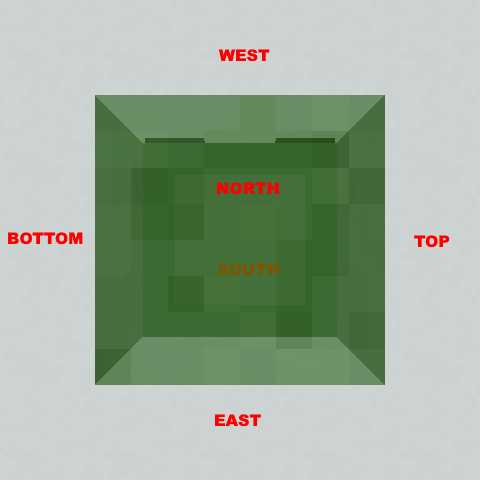
Here is an example model showing the extent of the issues:
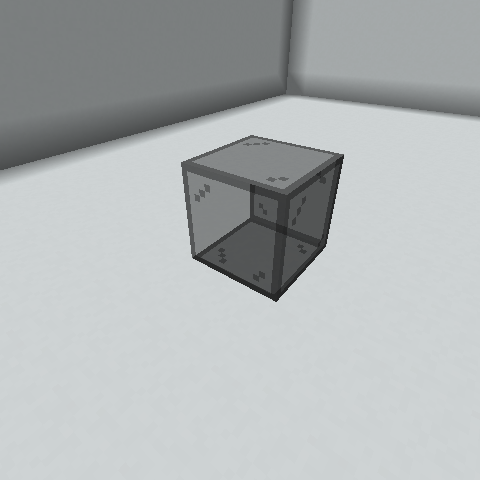
In the model cardinality, this is looking from South-East-Above.
Note: this is not a block in the world, it is a Head Item on an invisible armor_stand.
Here is an interactive example:

Linked Issues
is duplicated by1

Created Issue:
Item models with alpha channel do not render all faces consistently
Description
When viewed through certain faces, other faces of an item model with alpha channel transparency do not render.
Steps to Reproduce
The easiest way to view this bug is to summon an invisible armor_stand with a semi-transparent block in its head armor slot:
/summon minecraft:armor_stand ~ ~ ~ {ArmorItems:[{},{},{},{id:"minecraft:black_stained_glass",Count:1}],Marker:1,Invisible:1,NoGravity:1In this way, every face of the block can be observed independently of the others.
Affected Models
Any model with alpha channel transparency is affected in the exact same way. This currently includes:
- any stained_glass
- any stained_glass_pane
- minecraft:ice
- minecraft:slime_block
Models without alpha transparency (i.e.: only full transparency) are not affected:
- minecraft:glass
- minecraft:glass_pane
- minecraft:beacon
- minecraft:iron_bars
Model Rendering Issues
The following table shows the deficiencies in model rendering for semi-transparent textures.
Looking In Face Renders Top Renders Bottom Renders North Renders East Renders South Renders West Top N/A Yes No No No No Bottom No N/A No No No No North Yes Yes N/A No No No East Yes Yes Yes N/A Yes Yes South Yes Yes Yes No N/A No West Yes Yes Yes No Yes N/A Interestingly, this table exhibits a pattern. It is inverted symmetric along the diagonal.
Visual Evidence
Relative to the texture (when placed in the world) these are the assigned cardinalities of the faces:
When looking through the face in the Looking Through column, the other faces in the Render X column contain the render status of those faces. The entire table should be Yes.
Here is an example model showing the extent of the issues:
In the model cardinality, this is looking from South-East-Above.
Note: this is not a block in the world, it is a Head Item on an invisible armor_stand.
Environment
Java 8 Update 51
Windows 10
Intel HD Graphics
Attachments2
Description
When viewed through certain faces, other faces of an item model with alpha channel transparency do not render.
Steps to Reproduce
The easiest way to view this bug is to summon an invisible armor_stand with a semi-transparent block in its head armor slot:
/summon minecraft:armor_stand ~ ~ ~ {ArmorItems:[{},{},{},{id:"minecraft:black_stained_glass",Count:1}],Marker:1,Invisible:1,NoGravity:1In this way, every face of the block can be observed independently of the others.
Affected Models
Any model with alpha channel transparency is affected in the exact same way. This currently includes:
- any stained_glass
- any stained_glass_pane
- minecraft:ice
- minecraft:slime_block
Models without alpha transparency (i.e.: only full transparency) are not affected:
- minecraft:glass
- minecraft:glass_pane
- minecraft:beacon
- minecraft:iron_bars
Model Rendering Issues
The following table shows the deficiencies in model rendering for semi-transparent textures.
Looking In Face Renders Top Renders Bottom Renders North Renders East Renders South Renders West Top N/A Yes No No No No Bottom No N/A No No No No North Yes Yes N/A No No No East Yes Yes Yes N/A Yes Yes South Yes Yes Yes No N/A No West Yes Yes Yes No Yes N/A Interestingly, this table exhibits a pattern. It is inverted symmetric along the diagonal.
Visual Evidence
Relative to the texture (when placed in the world) these are the assigned cardinalities of the faces:
When looking through the face in the Looking Through column, the other faces in the Render X column contain the render status of those faces. The entire table should be Yes.
Here is an example model showing the extent of the issues:
In the model cardinality, this is looking from South-East-Above.
Note: this is not a block in the world, it is a Head Item on an invisible armor_stand.
![[Mod] violine1101](../../../data/avatars/users/92858.png)
When viewed through certain faces, other faces of an item model with alpha channel transparency do not render.
Steps to Reproduce
The easiest way to view this bug is to summon an invisible armor_stand with a semi-transparent block in its head armor slot:
/summon minecraft:armor_stand ~ ~ ~ {ArmorItems:[{},{},{},{id:"minecraft:black_stained_glass",Count:1}],Marker:1,Invisible:1,NoGravity:1}In this way, every face of the block can be observed independently of the others.
Affected Models
Any model with alpha channel transparency is affected in the exact same way. This currently includes:
- any stained_glass
- any stained_glass_pane
- minecraft:ice
- minecraft:slime_block
Models without alpha transparency (i.e.: only full transparency) are not affected:
- minecraft:glass
- minecraft:glass_pane
- minecraft:beacon
- minecraft:iron_bars
Model Rendering Issues
The following table shows the deficiencies in model rendering for semi-transparent textures.
Looking In Face Renders Top Renders Bottom Renders North Renders East Renders South Renders West Top N/A Yes No No No No Bottom No N/A No No No No North Yes Yes N/A No No No East Yes Yes Yes N/A Yes Yes South Yes Yes Yes No N/A No West Yes Yes Yes No Yes N/A Interestingly, this table exhibits a pattern. It is inverted symmetric along the diagonal.
Visual Evidence
Relative to the texture (when placed in the world) these are the assigned cardinalities of the faces:
When looking through the face in the Looking Through column, the other faces in the Render X column contain the render status of those faces. The entire table should be Yes.
Here is an example model showing the extent of the issues:
In the model cardinality, this is looking from South-East-Above.
Note: this is not a block in the world, it is a Head Item on an invisible armor_stand.
Java 8 Update 51
Windows 10
Intel HD Graphics
When viewed through certain faces, other faces of an item model with alpha channel transparency do not render.
Steps to Reproduce
The easiest way to view this bug is to summon an invisible armor_stand with a semi-transparent block in its head armor slot:
/summon minecraft:armor_stand ~ ~ ~ {ArmorItems:[{},{},{},{id:"minecraft:black_stained_glass",Count:1}],Marker:1,Invisible:1,NoGravity:1}In this way, every face of the block can be observed independently of the others.
Affected Models
Any model with alpha channel transparency is affected in
the exact sameway. This currently includes:
- any stained_glass
- any stained_glass_pane
- minecraft:ice
- minecraft:slime_block
Models without alpha transparency (i.e.: only full transparency) are not affected:
- minecraft:glass
- minecraft:glass_pane
- minecraft:beacon
- minecraft:iron_bars
Model Rendering Issues
The following table shows the deficiencies in model rendering for semi-transparent textures.
Looking In Face Renders Top Renders Bottom Renders North Renders East Renders South Renders West Top N/A Yes No No No No Bottom No N/A No No No No North Yes Yes N/A No No No East Yes Yes Yes N/A Yes Yes South Yes Yes Yes No N/A No West Yes Yes Yes No Yes N/A Interestingly, this table exhibits a pattern. It is inverted symmetric along the diagonal.
Visual Evidence
Relative to the texture (when placed in the world) these are the assigned cardinalities of the faces:
When looking through the face in the Looking Through column, the other faces in the Render X column contain the render status of those faces. The entire table should be Yes.
Here is an example model showing the extent of the issues:
In the model cardinality, this is looking from South-East-Above.
Note: this is not a block in the world, it is a Head Item on an invisible armor_stand.
When viewed through certain faces, other faces of an item model with alpha channel transparency do not render.
Steps to Reproduce
The easiest way to view this bug is to summon an invisible armor_stand with a semi-transparent block in its head armor slot:
/summon minecraft:armor_stand ~ ~ ~ {ArmorItems:[{},{},{},{id:"minecraft:black_stained_glass",Count:1}],Marker:1,Invisible:1,NoGravity:1}In this way, every face of the block can be observed independently of the others.
Affected Models
Any model with alpha channel transparency is affected in a similar way. This currently includes:
- any stained_glass
- any stained_glass_pane
- minecraft:ice
- minecraft:slime_block
- minecraft:slime (entity)
Models without alpha transparency (i.e.: only full transparency) are not affected:
- minecraft:glass
- minecraft:glass_pane
- minecraft:beacon
- minecraft:iron_bars
Model Rendering Issues
The following table shows the deficiencies in model rendering for semi-transparent textures. This table is relative to the stained glass Model Cardinality (see below).
Looking In Face Renders Top Renders Bottom Renders North Renders East Renders South Renders West Top N/A Yes No No No No Bottom No N/A No No No No North Yes Yes N/A No No No East Yes Yes Yes N/A Yes Yes South Yes Yes Yes No N/A No West Yes Yes Yes No Yes N/A Interestingly, this table exhibits a pattern. It is inverted symmetric along the diagonal.
This table does not appear to be the same for the stained glass pane model, though similar issues can be observed.
This table is the same for the slime entity model, but the faces are in a different orientation (see below).
Visual Evidence
Relative to the texture (when placed in the world) these are the assigned cardinalities of the faces for full blocks (stained_glass, ice, slime_block):
When looking through the face in the Looking Through column, the other faces in the Render X column contain the render status of those faces. The entire table should be Yes.
The slime model exhibits the same table, but in a different orientation, which can be seen here:
Here is an example model showing the extent of the issues:
In the model cardinality, this is looking from South-East-Above.
Note: this is not a block in the world, it is a Head Item on an invisible armor_stand.
Item models with alpha channel do not render all faces consistentlyModels with alpha channel do not render all faces consistently
When viewed through certain faces, other faces of a
n itemmodel with alpha channel transparency do not render.
Steps to Reproduce
The easiest way to view this bug is to summon an invisible armor_stand with a semi-transparent block in its head armor slot:
/summon minecraft:armor_stand ~ ~ ~ {ArmorItems:[{},{},{},{id:"minecraft:black_stained_glass",Count:1}],Marker:1,Invisible:1,NoGravity:1}In this way, every face
of the blockcan be observed independently of the others.
Affected Models
Any model with alpha channel transparency is affected in a similar way. This currently includes:
- any stained_glass
- any stained_glass_pane
- minecraft:ice
- minecraft:slime_block
- minecraft:slime (entity)
Models without alpha transparency (i.e.: only full transparency) are not affected:
- minecraft:glass
- minecraft:glass_pane
- minecraft:beacon
- minecraft:iron_bars
Model Rendering Issues
The following table shows the deficiencies in model rendering for semi-transparent textures. This table is relative to the stained glass Model Cardinality (see below).
Looking In Face Renders Top Renders Bottom Renders North Renders East Renders South Renders West Top N/A Yes No No No No Bottom No N/A No No No No North Yes Yes N/A No No No East Yes Yes Yes N/A Yes Yes South Yes Yes Yes No N/A No West Yes Yes Yes No Yes N/A Interestingly, this table exhibits a pattern. It is inverted symmetric along the diagonal.
This table does not appear to be the same for the stained glass pane model, though similar issues can be observed.
This table is the same for the slime entity model, but the faces are in a different orientation (see below).
Visual Evidence
Relative to the texture (when placed in the world) these are the assigned cardinalities of the faces for full blocks (stained_glass, ice, slime_block):
When looking through the face in the Looking Through column, the other faces in the Render X column contain the render status of those faces. The entire table should be Yes.
The slime model exhibits the same table, but in a different orientation, which can be seen here:
Here is an example model showing the extent of the issues:
In the model cardinality, this is looking from South-East-Above.
Note: this is not a block in the world, it is a Head Item on an invisible armor_stand.
When viewed through certain faces, other faces of a model with alpha channel transparency do not render.
Steps to Reproduce
The easiest way to view this bug is to summon an invisible armor_stand with a semi-transparent block in its head armor slot:
/summon minecraft:armor_stand ~ ~ ~ {ArmorItems:[{},{},{},{id:"minecraft:black_stained_glass",Count:1}],Marker:1,Invisible:1,NoGravity:1}In this way, every face can be observed independently of the others.
Affected Models
Any model with alpha channel transparency is affected in a similar way. This currently includes:
- any stained_glass
- any stained_glass_pane
- minecraft:ice
- minecraft:slime_block
- minecraft:slime (entity)
Models without alpha transparency (i.e.: only full transparency) are not affected:
- minecraft:glass
- minecraft:glass_pane
- minecraft:beacon
- minecraft:iron_bars
Model Rendering Issues
The following table shows the deficiencies in model rendering for semi-transparent textures. This table is relative to the stained glass Model Cardinality (see below).
Looking In Face Renders Top Renders Bottom Renders North Renders East Renders South Renders West Top N/A Yes No No No No Bottom No N/A No No No No North Yes Yes N/A No No No East Yes Yes Yes N/A Yes Yes South Yes Yes Yes No N/A No West Yes Yes Yes No Yes N/A Interestingly, this table exhibits a pattern. It is inverted symmetric along the diagonal.
This table does not appear to be the same for the stained glass pane model, though similar issues can be observed.
This table is the same for the slime entity model, but the faces are in a different orientation (see below).
Visual Evidence
Relative to the texture (when placed in the world) these are the assigned cardinalities of the faces for full blocks (stained_glass, ice, slime_block):
When looking through the face in the Looking Through column, the other faces in the Render X column contain the render status of those faces. The entire table should be Yes.
The slime model exhibits the same table, but in a different orientation, which can be seen here:
Here is an example model showing the extent of the issues:
In the model cardinality, this is looking from South-East-Above.
Note: this is not a block in the world, it is a Head Item on an invisible armor_stand.
Here is an interactive example:
When viewed through certain faces, other faces of a model with alpha channel transparency do not render.
Steps to Reproduce
The easiest way to view this bug is to summon an invisible armor_stand with a semi-transparent block in its head armor slot:
/summon minecraft:armor_stand ~ ~ ~ {ArmorItems:[{},{},{},{id:"minecraft:black_stained_glass",Count:1}],Marker:1,Invisible:1,NoGravity:1}In this way, every face can be observed independently of the others.
Affected Models
Any model with alpha channel transparency is affected in a similar way. This currently includes:
- any stained_glass
- any stained_glass_pane
- minecraft:ice
- minecraft:slime_block
- minecraft:slime (entity)
Models without alpha transparency (i.e.: only full transparency) are not affected:
- minecraft:glass
- minecraft:glass_pane
- minecraft:beacon
- minecraft:iron_bars
Model Rendering Issues
The following table shows the deficiencies in model rendering for semi-transparent textures. This table is relative to the stained glass Model Cardinality (see below).
Looking In Face Renders Top Renders Bottom Renders North Renders East Renders South Renders West Top N/A Yes No No No No Bottom No N/A No No No No North Yes Yes N/A No No No East Yes Yes Yes N/A Yes Yes South Yes Yes Yes No N/A No West Yes Yes Yes No Yes N/A Interestingly, this table exhibits a pattern. It is inverted symmetric along the diagonal.
This table does not appear to be the same for the stained glass pane model, though similar issues can be observed.
This table is the same for the slime entity model, but the faces are in a different orientation (see below).
Visual EvidenceRelative to the texture (when placed in the world) these are the assigned cardinalities of the faces for full blocks (stained_glass, ice, slime_block):
When looking through the face in the Looking Through column, the other faces in the Render X column contain the render status of those faces. The entire table should be Yes.
The slime model exhibits the same table, but in a different orientation, which can be seen here:
Here is an example model showing the extent of the issues:
In the model cardinality, this is looking from South-East-Above.
Note: this is not a block in the world, it is a Head Item on an invisible armor_stand.
Here is an interactive example:
When viewed through certain faces, other faces of a model with alpha channel transparency do not render.
Steps to Reproduce
The easiest way to view this bug is to summon an invisible armor_stand with a semi-transparent block in its head armor slot:
/summon minecraft:armor_stand ~ ~ ~ {ArmorItems:[{},{},{},{id:"minecraft:black_stained_glass",Count:1}],Marker:1,Invisible:1,NoGravity:1}In this way, every face can be observed independently of the others.
Affected Models
Any model with alpha channel transparency is affected in a similar way. This currently includes:
- any stained_glass
- any stained_glass_pane
- minecraft:ice
- minecraft:slime_block
- minecraft:slime (entity)
Models without alpha transparency (i.e.: only full transparency) are not affected:
- minecraft:glass
- minecraft:glass_pane
- minecraft:beacon
- minecraft:iron_bars
Model Rendering Issues
The following table shows the deficiencies in model rendering for semi-transparent textures. This table is relative to the stained glass Model Cardinality (see below).
Looking In Face Renders Top Renders Bottom Renders North Renders East Renders South Renders West Top N/A Yes No No No No Bottom No N/A No No No No North Yes Yes N/A No No No East Yes Yes Yes N/A Yes Yes South Yes Yes Yes No N/A No West Yes Yes Yes No Yes N/A Interestingly, this table exhibits a pattern. It is inverted symmetric along the diagonal.
This table does not appear to be the same for the stained glass pane model, though similar issues can be observed.
This table is the same for the slime entity model, but the faces are in a different orientation (see below).
Possible Cause?
Considering the table, it may be that textures are only aware of the transparent textures added to the model before their own face is added. Assuming textures are added in the order (for blocks): bottom, top, north, west, south, east then each texture only shows the textures added before it.
Visual Evidence
Relative to the texture (when placed in the world) these are the assigned cardinalities of the faces for full blocks (stained_glass, ice, slime_block):
When looking through the face in the Looking Through column, the other faces in the Render X column contain the render status of those faces. The entire table should be Yes.
The slime model exhibits the same table, but in a different orientation, which can be seen here:
Here is an example model showing the extent of the issues:
In the model cardinality, this is looking from South-East-Above.
Note: this is not a block in the world, it is a Head Item on an invisible armor_stand.
Here is an interactive example:
When viewed through certain faces, other faces of a model with alpha channel transparency do not render.
Steps to Reproduce
The easiest way to view this bug is to summon an invisible armor_stand with a semi-transparent block in its head armor slot:
/summon minecraft:armor_stand ~ ~ ~ {ArmorItems:[{},{},{},{id:"minecraft:black_stained_glass",Count:1}],Marker:1,Invisible:1,NoGravity:1}In this way, every face can be observed independently of the others.
Affected Models
Any model with alpha channel transparency is affected in a similar way. This currently includes:
- any stained_glass
- any stained_glass_pane
- minecraft:ice
- minecraft:slime_block
- minecraft:slime (entity)
Models without alpha transparency (i.e.: only full transparency) are not affected:
- minecraft:glass
- minecraft:glass_pane
- minecraft:beacon
- minecraft:iron_bars
Model Rendering Issues
The following table shows the deficiencies in model rendering for semi-transparent textures. This table is relative to the stained glass Model Cardinality (see below).
Looking In Face Renders TopRenders BottomRenders North Renders EastRenders South Renders WestTopN/A YesNo No No No BottomNoN/A No No No No North Yes Yes N/A No No No EastYes Yes Yes N/A YesYesSouth Yes Yes Yes NoN/A No WestYes Yes Yes NoYes N/A Interestingly, this table exhibits a pattern. It is inverted symmetric along the diagonal.
This table does not appear to be the same for the stained glass pane model, though similar issues can be observed.
This table is the same for the slime entity model, but the faces are in a different orientation (see below).
Possible Cause?
Considering the table, it may be that textures are only aware of the transparent textures added to the model before their own face is added. Assuming textures are added in the order (for blocks): bottom, top, north, west, south, east then each texture only shows the textures added before it.
Visual Evidence
Relative to the texture (when placed in the world) these are the assigned cardinalities of the faces for full blocks (stained_glass, ice, slime_block):
When looking through the face in the Looking Through column, the other faces in the Render X column contain the render status of those faces. The entire table should be Yes.
The slime model exhibits the same table, but in a different orientation, which can be seen here:
Here is an example model showing the extent of the issues:
In the model cardinality, this is looking from South-East-Above.
Note: this is not a block in the world, it is a Head Item on an invisible armor_stand.
Here is an interactive example:
When viewed through certain faces, other faces of a model with alpha channel transparency do not render.
Steps to Reproduce
The easiest way to view this bug is to summon an invisible armor_stand with a semi-transparent block in its head armor slot:
/summon minecraft:armor_stand ~ ~ ~ {ArmorItems:[{},{},{},{id:"minecraft:black_stained_glass",Count:1}],Marker:1,Invisible:1,NoGravity:1}In this way, every face can be observed independently of the others.
Affected Models
Any model with alpha channel transparency is affected in a similar way. This currently includes:
- any stained_glass
- any stained_glass_pane
- minecraft:ice
- minecraft:slime_block
- minecraft:slime (entity)
Models without alpha transparency (i.e.: only full transparency) are not affected:
- minecraft:glass
- minecraft:glass_pane
- minecraft:beacon
- minecraft:iron_bars
Model Rendering Issues
The following table shows the deficiencies in model rendering for semi-transparent textures. This table is relative to the stained glass Model Cardinality (see below).
Looking In Face Renders Bottom Renders Top Renders North Renders West Renders South Renders East Bottom N/A No No No No No Top Yes N/A No No No No North Yes Yes N/A No No No West Yes Yes Yes N/A No No South Yes Yes Yes Yes N/A No East Yes Yes Yes Yes Yes N/A Interestingly, this table exhibits a pattern. It is inverted symmetric along the diagonal.
This table does not appear to be the same for the stained glass pane model, though similar issues can be observed.
This table is the same for the slime entity model, but the faces are in a different orientation (see below).
Possible Cause?
Considering the table, it may be that textures are only aware of the transparent textures added to the model before their own face is added. Assuming textures are added in the order (for blocks): bottom, top, north, west, south, east then each texture only shows the textures added before it.
Visual Evidence
Relative to the texture (when placed in the world) these are the assigned cardinalities of the faces for full blocks (stained_glass, ice, slime_block):
When looking through the face in the Looking Through column, the other faces in the Render X column contain the render status of those faces. The entire table should be Yes.
The slime model exhibits the same table, but in a different orientation, which can be seen here:
Here is an example model showing the extent of the issues:
In the model cardinality, this is looking from South-East-Above.
Note: this is not a block in the world, it is a Head Item on an invisible armor_stand.
Here is an interactive example:
When viewed through certain faces, other faces of a model with alpha channel transparency do not render.
Steps to Reproduce
The easiest way to view this bug is to summon an invisible armor_stand with a semi-transparent block in its head armor slot:
/summon minecraft:armor_stand ~ ~ ~ {ArmorItems:[{},{},{},{id:"minecraft:black_stained_glass",Count:1}],Marker:1,Invisible:1,NoGravity:1}In this way, every face can be observed independently of the others.
Affected Models
Any model with alpha channel transparency is affected in a similar way. This currently includes:
- any stained_glass
- any stained_glass_pane
- minecraft:ice
- minecraft:slime_block
- minecraft:slime (entity)
Models without alpha transparency (i.e.: only full transparency) are not affected:
- minecraft:glass
- minecraft:glass_pane
- minecraft:beacon
- minecraft:iron_bars
Model Rendering Issues
The following table shows the deficiencies in model rendering for semi-transparent textures. This table is relative to the stained glass Model Cardinality (see below).
Looking In Face Renders Bottom Renders Top Renders North Renders WestRenders SouthRenders East Bottom N/A No No No No No Top Yes N/A No No No No North Yes Yes N/A No No No WestYes Yes Yes N/A No No SouthYes Yes Yes Yes N/A No East Yes Yes Yes Yes Yes N/A
Interestingly, this table exhibits a pattern. It is inverted symmetric along the diagonal.This table
does not appear to be the same for the stained glass pane model, though similar issues can be observed.This table is the same for the slime entity model, but the faces are in a different orientation (see below).
PossibleCause?
Considering the table, it may be that textures are only aware of the transparent textures added to the model before their ownfaceis added. Assuming texturesare added in the order(for blocks):bottom,top, north, west, south, eastthen each texture only shows the textures added before it.
Visual Evidence
Relative to the texture (when placed in the world) these are the assigned cardinalities of the faces for full blocks (stained_glass, ice, slime_block):
When looking through the face in the Looking Through column, the other faces in the Render X column contain the render status of those faces.
The entire table should beYes.
The slime model exhibits the same table, but in a different orientation, which can be seen here:
Here is an example model showing the extent of the issues:
In the model cardinality, this is looking from South-East-Above.
Note: this is not a block in the world, it is a Head Item on an invisible armor_stand.
Here is an interactive example:
When viewed through certain faces, other faces of a model with alpha channel transparency do not render.
Steps to Reproduce
The easiest way to view this bug is to summon an invisible armor_stand with a semi-transparent block in its head armor slot:
/summon minecraft:armor_stand ~ ~ ~ {ArmorItems:[{},{},{},{id:"minecraft:black_stained_glass",Count:1}],Marker:1,Invisible:1,NoGravity:1}In this way, every face can be observed independently of the others.
Affected Models
Any model with alpha channel transparency is affected in a similar way. This currently includes:
- any stained_glass
- any stained_glass_pane
- minecraft:ice
- minecraft:slime_block
- minecraft:slime (entity)
Models without alpha transparency (i.e.: only full transparency) are not affected:
- minecraft:glass
- minecraft:glass_pane
- minecraft:beacon
- minecraft:iron_bars
Model Rendering Issues
The following table shows the deficiencies in model rendering for semi-transparent textures. This table is relative to the stained glass Model Cardinality (see below).
Looking In Face Renders Bottom Renders Top Renders North Renders South Renders West Renders East Bottom N/A No No No No No Top Yes N/A No No No No North Yes Yes N/A No No No South Yes Yes Yes N/A No No West Yes Yes Yes Yes N/A No East Yes Yes Yes Yes Yes N/A This table does not appear to be the same for the stained glass pane model, though similar issues can be observed.
This table is the same for the slime entity model, but the faces are in a different orientation (see below).
Cause
There are multiple locations in the code and model files where the faces are added/defined in the order DOWN, UP, NORTH, SOUTH, WEST, EAST, and this can be seen in the table.
Visual Evidence
Relative to the texture (when placed in the world) these are the assigned cardinalities of the faces for full blocks (stained_glass, ice, slime_block):
When looking through the face in the Looking Through column, the other faces in the Render X column contain the render status of those faces.
The slime model exhibits the same table, but in a different orientation, which can be seen here:
Here is an example model showing the extent of the issues:
In the model cardinality, this is looking from South-East-Above.
Note: this is not a block in the world, it is a Head Item on an invisible armor_stand.
Here is an interactive example:
relates to
![[Mojang] slicedlime](../../../data/assets/gravatar/slicedlime.jpeg)
 Important
![[Mod] Michael Wobst](../../../data/avatars/users/37868.png)
When viewed through certain faces, other faces of a model with alpha channel transparency do not render.
Steps to Reproduce
The easiest way to view this bug is to summon an invisible armor_stand with a semi-transparent block in its head armor slot:
/summon minecraft:armor_stand ~ ~ ~ {ArmorItems:[{},{},{},{id:"minecraft:black_stained_glass",Count:1}],Marker:1,Invisible:1,NoGravity:1}In this way, every face can be observed independently of the others.
Affected Models
Any model with alpha channel transparency is affected in a similar way.
This currently includes:
- any stained_glass
- any stained_glass_pane
- minecraft:ice
- minecraft:slime_block
- minecraft:slime (entity)
Models without alpha transparency (i.e.: only full transparency) are not affected:
- minecraft:glass
- minecraft:glass_pane
- minecraft:beacon
- minecraft:iron_bars
Model Rendering Issues
The following table shows the deficiencies in model rendering for semi-transparent textures. This table is relative to the stained glass Model Cardinality (see below).
Looking In Face Renders Bottom Renders Top Renders North Renders South Renders West Renders East Bottom N/A No No No No No Top Yes N/A No No No No North Yes Yes N/A No No No South Yes Yes Yes N/A No No West Yes Yes Yes Yes N/A No East Yes Yes Yes Yes Yes N/A This table does not appear to be the same for the stained glass pane model, though similar issues can be observed.
This table is the same for the slime entity model, but the faces are in a different orientation (see below).
Cause
There are multiple locations in the code and model files where the faces are added/defined in the order DOWN, UP, NORTH, SOUTH, WEST, EAST, and this can be seen in the table.
Visual Evidence
Relative to the texture (when placed in the world) these are the assigned cardinalities of the faces for full blocks (stained_glass, ice, slime_block):
When looking through the face in the Looking Through column, the other faces in the Render X column contain the render status of those faces.
The slime model exhibits the same table, but in a different orientation, which can be seen here:
Here is an example model showing the extent of the issues:
In the model cardinality, this is looking from South-East-Above.
Note: this is not a block in the world, it is a Head Item on an invisible armor_stand.
Here is an interactive example:
The bug
When viewed through certain faces, other faces of a model with alpha channel transparency do not render.
How to reproduce
The easiest way to view this bug is to summon an invisible armor_stand with a semi-transparent block in its head armor slot:
/summon minecraft:armor_stand ~ ~ ~ {ArmorItems:[{},{},{},{id:"minecraft:black_stained_glass",Count:1}],Marker:1,Invisible:1,NoGravity:1}In this way, every face can be observed independently of the others.
Affected models
Any model with alpha channel transparency is affected in a similar way. This currently includes:
- any stained_glass
- any stained_glass_pane
- minecraft:ice
- minecraft:slime_block
- minecraft:slime (entity)
Models without alpha transparency (i.e.: only full transparency) are not affected:
- minecraft:glass
- minecraft:glass_pane
- minecraft:beacon
- minecraft:iron_bars
Model rendering issues
The following table shows the deficiencies in model rendering for semi-transparent textures. This table is relative to the stained glass Model Cardinality (see below).
Looking In Face Renders Bottom Renders Top Renders North Renders South Renders West Renders East Bottom N/A No No No No No Top Yes N/A No No No No North Yes Yes N/A No No No South Yes Yes Yes N/A No No West Yes Yes Yes Yes N/A No East Yes Yes Yes Yes Yes N/A This table does not appear to be the same for the stained glass pane model, though similar issues can be observed.
This table is the same for the slime entity model, but the faces are in a different orientation (see below).
Cause
There are multiple locations in the code and model files where the faces are added/defined in the order DOWN, UP, NORTH, SOUTH, WEST, EAST, and this can be seen in the table.
Visual evidence
Relative to the texture (when placed in the world) these are the assigned cardinalities of the faces for full blocks (stained_glass, ice, slime_block):
When looking through the face in the Looking Through column, the other faces in the Render X column contain the render status of those faces.
The slime model exhibits the same table, but in a different orientation, which can be seen here:
Here is an example model showing the extent of the issues:
In the model cardinality, this is looking from South-East-Above.
Note: this is not a block in the world, it is a Head Item on an invisible armor_stand.
Here is an interactive example:
![[Mojang] Georgii Gavrichev](../../../data/avatars/users/22428.png) [Mojang] Georgii Gavrichev
[Mojang] Georgii Gavrichevrelates to
![[Mod] Pokechu22](../../../data/avatars/users/92931.png)
relates to
relates to
![[Mod] tryashtar](../../../data/avatars/users/41963.png)
is duplicated by
relates to
![[Bot] Piston](../../../data/avatars/users/31202.png)

Does MC-161948 cover your issue?
Thank you for your report!
We're actually already tracking this issue in MC-161948, so I resolved and linked this ticket as a duplicate.
If you would like to add a vote and any extra information to the main ticket it would be appreciated.
If you haven't already, you might like to make use of the search feature in the future to see if the issue has already been reported.
Quick Links:
📓 Issue Guidelines – 💬 Community Support – 📧 Customer Support – 📖 Game Wiki
Great ticket! Can confirm.