 MC-164446
Tags don't load if one of their values is invalid, causing all data packs to unload
The bug
While this may seem intended at first, it is actually inconsistent with function loading and it causes some major problems.
If a function is not recognized while loading, the error is not detected and will be dealt with at runtime, causing that command to be ignored. This is useful because a data pack may rely on another data pack. If that other data pack is not available, we don't want our own data pack to break.
In contrast, if a function tag has an invalid function as one of its values, the whole tag is made invalid. This can cause a chain reaction which can cause other data packs to stop working. Like shown in the attached screenshot, this can also cause all data packs to unload.
How to reproduce
Steps to unload one tag:
- Download the "test1.zip" file and place it in the datapacks folder of your world. This is a data pack with one function tag.
- Reload the data pack and notice an error in the log
Couldn't read function tag list minecraft:foo from minecraft:tags/functions/foo.json in data pack test
com.google.gson.JsonParseException: Unknown value 'minecraft:bar'
...
Steps to unload #minecraft:load and break other data packs 
- Download the "test2.zip" file and place it in the datapacks folder of your world. This is a data pack with two function tags. The #minecraft:load tag has one entry #test:foo which itself also has one entry #test:bar. However, this last tag does not exist.
- Reload the data pack and notice an error in the log
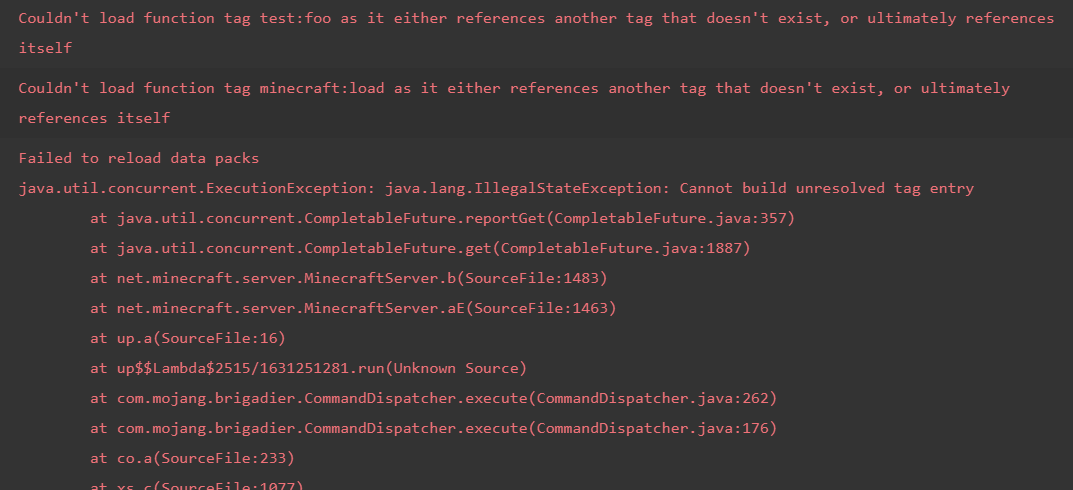
Couldn't load function tag test:foo as it either references another tag that doesn't exist, or ultimately references itself
Couldn't load function tag minecraft:load as it either references another tag that doesn't exist, or ultimately references itself
Failed to reload data packsjava.util.concurrent.ExecutionException: java.lang.IllegalStateException: Cannot build unresolved tag entry
...
The full error message from the log is available here.
- Notice that the vanilla data pack is completely disabled (even though it appears enabled when you run /datapack list). See screenshot-1.png
The worst part is that is doesn't tell you in which data pack or function file the error is, so debugging any problems with tags is a pain.
Linked Issues
![[Helper] Misode](../../../data/avatars/users/93314.png)


 Low
LowCreated Issue:
Tags don't load if one of their values is invalid
The bug
While this may seem intended at first, it is actually inconsistent with function loading and it causes some major problems.
If a function is not recognized while loading, the error is not detected and will be dealt with at runtime, causing that command to be ignored. This is useful because a data pack may rely on another data pack. If that other data pack is not available, we don't want our own data pack to break.
In contrast, if a function tag has an invalid function as one of its values, the whole tag is made invalid. This can cause a chain reaction which can cause other data packs to stop working. Like shown in the attached screenshot, this can also cause all data packs to unload.
How to reproduce
- Download the "test1.zip" file and place it in the datapacks folder of your world. This is a data pack with one function tag.
- Reload the data pack and notice an error in the log
Couldn't read function tag list minecraft:foo from minecraft:tags/functions/foo.json in data pack test
com.google.gson.JsonParseException: Unknown value 'minecraft:bar'
...
Attachments2
test1.zip
![[Mod] NeunEinser](../../../data/avatars/users/39263.png)
The bug
While this may seem intended at first, it is actually inconsistent with function loading and it causes some major problems.
If a function is not recognized while loading, the error is not detected and will be dealt with at runtime, causing that command to be ignored. This is useful because a data pack may rely on another data pack. If that other data pack is not available, we don't want our own data pack to break.
In contrast, if a function tag has an invalid function as one of its values, the whole tag is made invalid. This can cause a chain reaction which can cause other data packs to stop working. Like shown in the attached screenshot, this can also cause all data packs to unload.
How to reproduce
- Download the "test1.zip" file and place it in the datapacks folder of your world. This is a data pack with one function tag.
- Reload the data pack and notice an error in the log
Couldn't read function tag list minecraft:foo from minecraft:tags/functions/foo.json in data pack test com.google.gson.JsonParseException: Unknown value 'minecraft:bar' ...The bug
While this may seem intended at first, it is actually inconsistent with function loading and it causes some major problems.
If a function is not recognized while loading, the error is not detected and will be dealt with at runtime, causing that command to be ignored. This is useful because a data pack may rely on another data pack. If that other data pack is not available, we don't want our own data pack to break.
In contrast, if a function tag has an invalid function as one of its values, the whole tag is made invalid. This can cause a chain reaction which can cause other data packs to stop working. Like shown in the attached screenshot, this can also cause all data packs to unload.
How to reproduce
Steps to unload one tag:
- Download the "test1.zip" file and place it in the datapacks folder of your world. This is a data pack with one function tag.
- Reload the data pack and notice an error in the log
Couldn't read function tag list minecraft:foo from minecraft:tags/functions/foo.json in data pack test com.google.gson.JsonParseException: Unknown value 'minecraft:bar' ...Steps to unload #minecraft:load and break other data packs
The bug
While this may seem intended at first, it is actually inconsistent with function loading and it causes some major problems.
If a function is not recognized while loading, the error is not detected and will be dealt with at runtime, causing that command to be ignored. This is useful because a data pack may rely on another data pack. If that other data pack is not available, we don't want our own data pack to break.
In contrast, if a function tag has an invalid function as one of its values, the whole tag is made invalid. This can cause a chain reaction which can cause other data packs to stop working. Like shown in the attached screenshot, this can also cause all data packs to unload.
How to reproduce
Steps to unload one tag:
- Download the "test1.zip" file and place it in the datapacks folder of your world. This is a data pack with one function tag.
- Reload the data pack and notice an error in the log
Couldn't read function tag list minecraft:foo from minecraft:tags/functions/foo.json in data pack test com.google.gson.JsonParseException: Unknown value 'minecraft:bar' ...Steps to unload #minecraft:load and break other data packs
- Download the "test2.zip" file and place it in the datapacks folder of your world. This is a data pack with two function tags. The #minecraft:load tag has one entry #test:foo which itself also has one entry #test:bar. However, this last tag does not exist.
The bug
While this may seem intended at first, it is actually inconsistent with function loading and it causes some major problems.
If a function is not recognized while loading, the error is not detected and will be dealt with at runtime, causing that command to be ignored. This is useful because a data pack may rely on another data pack. If that other data pack is not available, we don't want our own data pack to break.
In contrast, if a function tag has an invalid function as one of its values, the whole tag is made invalid. This can cause a chain reaction which can cause other data packs to stop working. Like shown in the attached screenshot, this can also cause all data packs to unload.
How to reproduce
Steps to unload one tag:
- Download the "test1.zip" file and place it in the datapacks folder of your world. This is a data pack with one function tag.
- Reload the data pack and notice an error in the log
Couldn't read function tag list minecraft:foo from minecraft:tags/functions/foo.json in data pack test com.google.gson.JsonParseException: Unknown value 'minecraft:bar' ...Steps to unload #minecraft:load and break other data packs
- Download the "test2.zip" file and place it in the datapacks folder of your world. This is a data pack with two function tags. The #minecraft:load tag has one entry #test:foo which itself also has one entry #test:bar. However, this last tag does not exist.
The bug
While this may seem intended at first, it is actually inconsistent with function loading and it causes some major problems.
If a function is not recognized while loading, the error is not detected and will be dealt with at runtime, causing that command to be ignored. This is useful because a data pack may rely on another data pack. If that other data pack is not available, we don't want our own data pack to break.
In contrast, if a function tag has an invalid function as one of its values, the whole tag is made invalid. This can cause a chain reaction which can cause other data packs to stop working. Like shown in the attached screenshot, this can also cause all data packs to unload.
How to reproduce
Steps to unload one tag:
- Download the "test1.zip" file and place it in the datapacks folder of your world. This is a data pack with one function tag.
- Reload the data pack and notice an error in the log
Couldn't read function tag list minecraft:foo from minecraft:tags/functions/foo.json in data pack test com.google.gson.JsonParseException: Unknown value 'minecraft:bar' ...Steps to unload #minecraft:load and break other data packs
- Download the "test2.zip" file and place it in the datapacks folder of your world. This is a data pack with two function tags. The #minecraft:load tag has one entry #test:foo which itself also has one entry #test:bar. However, this last tag does not exist.
- Reload the data pack and notice an error in the log
Couldn't load function tag test:foo as it either references another tag that doesn't exist, or ultimately references itself Couldn't load function tag minecraft:load as it either references another tag that doesn't exist, or ultimately references itself Failed to reload data packsjava.util.concurrent.ExecutionException: java.lang.IllegalStateException: Cannot build unresolved tag entry ...The full error message from the log is available here.
The bug
While this may seem intended at first, it is actually inconsistent with function loading and it causes some major problems.
If a function is not recognized while loading, the error is not detected and will be dealt with at runtime, causing that command to be ignored. This is useful because a data pack may rely on another data pack. If that other data pack is not available, we don't want our own data pack to break.
In contrast, if a function tag has an invalid function as one of its values, the whole tag is made invalid. This can cause a chain reaction which can cause other data packs to stop working. Like shown in the attached screenshot, this can also cause all data packs to unload.
How to reproduce
Steps to unload one tag:
- Download the "test1.zip" file and place it in the datapacks folder of your world. This is a data pack with one function tag.
- Reload the data pack and notice an error in the log
Couldn't read function tag list minecraft:foo from minecraft:tags/functions/foo.json in data pack test com.google.gson.JsonParseException: Unknown value 'minecraft:bar' ...Steps to unload #minecraft:load and break other data packs
- Download the "test2.zip" file and place it in the datapacks folder of your world. This is a data pack with two function tags. The #minecraft:load tag has one entry #test:foo which itself also has one entry #test:bar. However, this last tag does not exist.
- Reload the data pack and notice an error in the log
Couldn't load function tag test:foo as it either references another tag that doesn't exist, or ultimately references itself Couldn't load function tag minecraft:load as it either references another tag that doesn't exist, or ultimately references itself Failed to reload data packsjava.util.concurrent.ExecutionException: java.lang.IllegalStateException: Cannot build unresolved tag entry ...The full error message from the log is available here.
The worst part is that is doesn't tell you in which data pack or function file the error is, so debugging any problems with tags is a pain.
![[Mojang] slicedlime](../../../data/assets/gravatar/slicedlime.jpeg)
The bug
While this may seem intended at first, it is actually inconsistent with function loading and it causes some major problems.
If a function is not recognized while loading, the error is not detected and will be dealt with at runtime, causing that command to be ignored. This is useful because a data pack may rely on another data pack. If that other data pack is not available, we don't want our own data pack to break.
In contrast, if a function tag has an invalid function as one of its values, the whole tag is made invalid. This can cause a chain reaction which can cause other data packs to stop working. Like shown in the attached screenshot, this can also cause all data packs to unload.
How to reproduce
Steps to unload one tag:
- Download the "test1.zip" file and place it in the datapacks folder of your world. This is a data pack with one function tag.
- Reload the data pack and notice an error in the log
Couldn't read function tag list minecraft:foo from minecraft:tags/functions/foo.json in data pack test com.google.gson.JsonParseException: Unknown value 'minecraft:bar' ...Steps to unload #minecraft:load and break other data packs
- Download the "test2.zip" file and place it in the datapacks folder of your world. This is a data pack with two function tags. The #minecraft:load tag has one entry #test:foo which itself also has one entry #test:bar. However, this last tag does not exist.
- Reload the data pack and notice an error in the log
Couldn't load function tag test:foo as it either references another tag that doesn't exist, or ultimately references itself Couldn't load function tag minecraft:load as it either references another tag that doesn't exist, or ultimately references itself Failed to reload data packsjava.util.concurrent.ExecutionException: java.lang.IllegalStateException: Cannot build unresolved tag entry ...The full error message from the log is available here.
- Notice that the vanilla data pack is completely disabled (even though it appears enabled when you run /datapack list). See screenshot-1.png
The worst part is that is doesn't tell you in which data pack or function file the error is, so debugging any problems with tags is a pain.
The bug
While this may seem intended at first, it is actually inconsistent with function loading and it causes some major problems.
If a function is not recognized while loading, the error is not detected and will be dealt with at runtime, causing that command to be ignored. This is useful because a data pack may rely on another data pack. If that other data pack is not available, we don't want our own data pack to break.
In contrast, if a function tag has an invalid function as one of its values, the whole tag is made invalid. This can cause a chain reaction which can cause other data packs to stop working. Like shown in the attached screenshot, this can also cause all data packs to unload.
How to reproduce
Steps to unload one tag:
- Download the "test1.zip" file and place it in the datapacks folder of your world. This is a data pack with one function tag.
- Reload the data pack and notice an error in the log
Couldn't read function tag list minecraft:foo from minecraft:tags/functions/foo.json in data pack test com.google.gson.JsonParseException: Unknown value 'minecraft:bar' ...Steps to unload #minecraft:load and break other data packs
- Download the "test2.zip" file and place it in the datapacks folder of your world. This is a data pack with two function tags. The #minecraft:load tag has one entry #test:foo which itself also has one entry #test:bar. However, this last tag does not exist.
- Reload the data pack and notice an error in the log
Couldn't load function tag test:foo as it either references another tag that doesn't exist, or ultimately references itself Couldn't load function tag minecraft:load as it either references another tag that doesn't exist, or ultimately references itself Failed to reload data packsjava.util.concurrent.ExecutionException: java.lang.IllegalStateException: Cannot build unresolved tag entry ...The full error message from the log is available here.
- Notice that the vanilla data pack is completely disabled
(even though it appears enabled when you run/datapack list). See screenshot-1.png
The worst part is that is doesn't tell you in which data pack or function file the error is, so debugging any problems with tags is a pain.
The bug
While this may seem intended at first, it is actually inconsistent with function loading and it causes some major problems.
If a function is not recognized while loading, the error is not detected and will be dealt with at runtime, causing that command to be ignored. This is useful because a data pack may rely on another data pack. If that other data pack is not available, we don't want our own data pack to break.
In contrast, if a function tag has an invalid function as one of its values, the whole tag is made invalid. This can cause a chain reaction which can cause other data packs to stop working. Like shown in the attached screenshot, this can also cause all data packs to unload.
How to reproduce
Steps to unload one tag:
- Download the "test1.zip" file and place it in the datapacks folder of your world. This is a data pack with one function tag.
- Reload the data pack and notice an error in the log
Couldn't read function tag list minecraft:foo from minecraft:tags/functions/foo.json in data pack test com.google.gson.JsonParseException: Unknown value 'minecraft:bar' ...Steps to unload #minecraft:load and break other data packs
- Download the "test2.zip" file and place it in the datapacks folder of your world. This is a data pack with two function tags. The #minecraft:load tag has one entry #test:foo which itself also has one entry #test:bar. However, this last tag does not exist.
- Reload the data pack and notice an error in the log
Couldn't load function tag test:foo as it either references another tag that doesn't exist, or ultimately references itself Couldn't load function tag minecraft:load as it either references another tag that doesn't exist, or ultimately references itself Failed to reload data packsjava.util.concurrent.ExecutionException: java.lang.IllegalStateException: Cannot build unresolved tag entry ...The full error message from the log is available here.
- Notice that the vanilla data pack is completely disabled
The worst part is that is doesn't tell you in which data pack or function file the error is, so debugging any problems with tags is a pain.
![[Mod] violine1101](../../../data/avatars/users/92858.png)
is duplicated by
![[Mod] tryashtar](../../../data/avatars/users/41963.png)
Tags don't load if one of their values is invalid, causing all data packs to unload
is duplicated by
![[Bot] Piston](../../../data/avatars/users/31202.png)
![[Mojang] Bartosz Bok](../../../data/avatars/users/10122.svg) [Mojang] Bartosz Bok
[Mojang] Bartosz Bok![[Mod] SPGoding](../../../data/avatars/users/44622.png)
Thank you for your report!
However, this issue is a Duplicate of MC-164446.
If you would like to add a vote and any extra information to the main ticket it would be appreciated.
If you haven't already, you might like to make use of the search feature to see if the issue has already been mentioned.
Quick Links:
📓 Issue Guidelines – 💬 Community Support – 📧 Customer Support – 📖 Game Wiki
See MC-164446. Check the game log:
Couldn't load entity_type tag minecraft:impact_projectiles as it either references another tag that doesn't exist, or ultimately references itself
This was fixed together with MC-164446 in 20w14a
The log mentions this:
Couldn't load function tag minecraft:tick as it is missing following references: diarmor:main (from Buff Elytra)
The data/minecraft/tags/functions/tick.json file does indeed include an invalid reference to diarmor:main. That function does not exist. Therefor the #minecraft:tick function tag cannot load and this also stops other data packs from working.
In the second pack the issue is a capital M in a data/customrecipes/recipes/trident.json
—
The fix for MC-164446 added better errors in the log. The issue you're describing can be fixed by resolving all the errors in the log.
affects 20w09a