![[Helper] Misode](../../../data/avatars/users/93314.png) [Helper] Misode
[Helper] Misode
- Misoloo
- misoloo
- Europe/Brussels
- Yes
- No

![[Mojang] Nathan Adams](../../../data/assets/gravatar/dinnerbone.png)
![[Mojang] Grum (Erik Broes)](../../../data/assets/gravatar/grum.png)
 MC-125234
![[Mojang] Agnes Larsson](../../../data/avatars/users/10122.svg)






 MCPE-40433
 MCL-10530





When clicking with a dye on a shulker, you would expect it to change color just like a sheep. However, this does not happen.
Duplicates MC-121278
Steps to reproduce
- Go to survival mode
- Run this command:
{/xp set @p 0}- Then run this command:
{/xp add @p -10}- Notice the success message in chat
Steps to reproduce:
- Open a new survival world with cheats disabled
- Click Open to LAN and enable cheats
- Notice you can still not use OP commands
Notes:
- I haven't been able to test whether or not new players will have cheats enabled, feel free to do so
- This might be intended to stop players from cheating in a world with cheats disabled
See title
Gamerule doDaylightCycleisfalse by defaultGamerules doDaylightCycle and doWeatherCycle are false by default
See the attachment for a screen
chot. I have no resource packs on.See the attachment for a screenshot. I have no resource packs on.
EDIT: Reloading the game fixes this issue. Please tell if you can reproduce this bug.
See the attachment for a screenshot. I have no resource packs on.
EDIT: Reloading the game fixe
sthis issue. Please tell if you can reproduce this bug.See the attachment for a screenshot. I have no resource packs on.
EDIT: Reloading the game fixed this issue. Please tell if you can reproduce this bug.
Inconsistent behaviour oftheautocompletebehavior
javaw_2018-02-14_20-13-23.png
When enchanting 30 books with level 30 I got these trident books:
- 2x Loyalty III
- 2x Impaling
VI - 2x ImpalingV1xRaptide IIIKnowing that the Trident is a treasure item, these seem way to common
even though this was a small test.Test 1 - 30 books:
- 2x Loyalty III
- 2x Impaling IV
- 2x Impaling V
- 1x Raptide III
Test 2 - 200 books:
- 15x Loyalty III (7.5%)
- 9x Impaling IV (4.5%)
- 5x Impaling V (2.5%)
- 3x Channeling (1.5%)
- 1x Raptide III (0.5%)
Total: 33 Trident enchants (16.5%)
Knowing that the Trident is a treasure item, these seem way to common.
The following test are books enchanted with level 30
Test 1 - 30 books:
- 2x Loyalty III
- 2x Impaling IV
- 2x Impaling V
- 1x Raptide III
Test 2 - 200 books:
- 15x Loyalty III (7.5%)
- 9x Impaling IV (4.5%)
- 5x Impaling V (2.5%)
- 3x Channeling (1.5%)
- 1x Raptide III (0.5%)
Total: 33 Trident enchants (16.5%)
Knowing that the Trident is a treasure item, these seem way to common.
The following tests are books enchanted with level 30
Test 1 - 30 books:
- 2x Loyalty III
- 2x Impaling IV
- 2x Impaling V
- 1x Raptide III
Test 2 - 200 books:
- 15x Loyalty III (7.5%)
- 9x Impaling IV (4.5%)
- 5x Impaling V (2.5%)
- 3x Channeling (1.5%)
- 1x Raptide III (0.5%)
Total: 33 Trident enchants (16.5%)
Knowing that the Trident is a treasure item, these seem way to common.
Done
Trident enchantments are way too common
Trident enchantments arewaytoo commonTrident and crossbow enchantments are too common
The following tests are books enchanted with level 30
Test 1 - 30 books:
- 2x Loyalty III
- 2x Impaling IV
- 2x Impaling V
- 1x Raptide III
Test 2 - 200 books:
- 15x Loyalty III (7.5%)
- 9x Impaling IV (4.5%)
- 5x Impaling V (2.5%)
- 3x Channeling (1.5%)
- 1x Raptide III (0.5%)
Total: 33 Trident enchants (16.5%)
Knowing that the Trident is a treasure item, these seem way to common.
The following tests are books enchanted with level 30.
Original Test with 200 books:
- 15x Loyalty III (7.5%)
- 9x Impaling IV (4.5%)
- 5x Impaling V (2.5%)
- 3x Channeling (1.5%)
- 1x Raptide III (0.5%)
Total: 33 Trident enchants (16.5%)
Test in 1.15.1 with over 12K books using a loot table: See attachment.
Knowing that the Trident is a treasure item, these seem way to common. The crossbow enchantments are also specific, in comparison to efficiency and unbreaking. Enchantments that are used on more items should be more common.
The bug
When an item is given the same uuid in its Owner tag as a player, you would expect the player to be able to pickup the item. This however doesn't work.
How to reproduce
- Fill up your inventory with a random item other than dirt.
- Give yourself a dirt item using the following command:
/give @s minecraft:dirt
->The item is thrown in front of you as expected.- Make place in your inventory and try to pickup the dirt
->Notice you are unable to do so. This is because /give add an Owner tagsoonly that player can pickup the item.This bug can also be reproduced by manually summoning an item with the correct Owner tag
The bug
When an item is given the same uuid in its Owner tag as a player, you would expect the player to be able to pickup the item. This however doesn't work.
How to reproduce
- Fill up your inventory with a random item other than dirt.
- Give yourself a dirt item using the following command:
/give @s minecraft:dirt→ The item is thrown in front of you as expected.
- Make place in your inventory and try to pickup the dirt
→ Notice you are unable to do so. This is because /give adds an Owner tag to make sure only that player can pickup the item.This bug can also be reproduced by manually summoning an item with the correct Owner tag
Not all options to handle blocks are available for the 4 ways of modifying blocks in the world.
block handling option setblock fill clone structure block replace only certain blocks replace

drop the item of the blocks replace only air only copy aironly copy certain blocks(1) This is not necessary as /setblock and /fill only allow to place one type of block
Not all options to handle blocks are available for the 4 ways of modifying blocks in the world.
block handling option setblock fill clone structure block replace only certain blocks drop the item of the blocks replace only air only copy certain blocks only copy air (1) This is not necessary as /setblock and /fill only allow to place one type of block
Not all options to handle blocks are available for the 4 ways of modifying blocks in the world.
block handling option setblock fill clone structure block replace only certain blocks drop the item of the blocksreplace only aironly copy certain blocks only copy air (1) This is not necessary as /setblock and /fill only allow to place one type of block
Not all options to handle blocks are available for the 4 ways of modifying blocks in the world.
block handling option setblock fill clone structure block replace only certain blocks replace only air drop the item of the blocks only copy certain blocks only copy air (1) This is not necessary as /setblock and /fill only allow to place one type of block
Not all options to handle blocks are available for the 4 ways of modifying blocks in the world.
block handling option setblock fill clone structure block replace only certain blocks replace only air drop the item of the blocks only copy certain blocks only copy air(1) This is not necessary as /setblock and /fill only allow to place one type of block
Not all options to handle blocks are available for the 4 ways of modifying blocks in the world.
block handling option setblock fill clone structure block replace only certain blocks replace only air drop the item of the blocks only copy certain blocks copy everything except air (1) This is not necessary as /setblock and /fill only allow to place one type of block
Not all options to handle blocks are available for the 4 ways of modifying blocks in the world.
block handling option setblock fill clone structure block replace only certain blocks filteredreplace only air filtered airdrop the item of the blocks only copy certain blocks copy everything except air (1) This is not necessary as /setblock and /fill only allow to place one type of block
Not all options to handle blocks are available for the 4 ways of modifying blocks in the world.
block handling option setblock fill clone structure block replace only certain blocks replace only air drop the item of the blocks only copy certain blocks copy everything except air (1) This is not necessary as /setblock and /fill only allow to place one type of block
Advancementsfirstexecute their rewards before printing a message in chat
Advancements executetheirrewards before printingamessage in chat
How to reproduce
- Create a new superflat world with minecraft:glass as preset
- Make it night time by running this: /time set midnight
- Fill a layer of stone at layer 63: /fill ~ 63 ~ ~20 63 ~20 stone
→ No hostile mobs are spawning- Fill a layer of stone at any other layer: /fill ~ 30 ~ ~20 30 ~20 stone
→ Mobs are spawning correctly on this layerNote: This bug was introduced in
**18w19a
How to reproduce
- Type the following command in chat. Notice that it will give the * as suggestion.
/stopsound @s *→ Notice in the chat it gives an error and doesn't clear the sounds of all categories.
Note: stopping all sounds can we done with the following command so it's possible that the parser is incorrect and not the execution of the command.
/stopsound @s
Snowmen attack invisibleslimesSnowmen attack invisible mobs
The bug
The world began lagging a lot after being in the world for only a few minutes (up to 2 tps).
There were several sources for the lag, they continued to spam the log.
'root.levels.<World Name>.tick.chunkMap' took aprox 136.55596 ms 'root.gameRenderer.level.terrain.render_Solid' took aprox 116.747944 ms 'root.gameRenderer.level.terrain.render_Mipped Cutout' took aprox 100.156129 ms 'root.tick.level.entities.regular.tick' took aprox 3314.98573 ms 'root.gameRenderer.level.translucent.render_Translucent' took aprox 210.058438 ms 'root.display_update' took aprox 145.738387 ms 'root.gameRenderer.level.entities.entities' took aprox 3265.771666 msReloading the world didn't fix it and made it worse. The "Something's taking too long!" appeared in the log and I got 0.36 tps at one point. Even restarting the game didn't fix it.
The bug
The world began lagging a lot after being in the world for only a few minutes (up to 2 tps).
There were several sources for the lag, they continued to spam the log. These are a few (I only included the top of the stack)
'root.levels.<World Name>.tick.chunkMap' took aprox 136.55596 ms 'root.gameRenderer.level.terrain.render_Solid' took aprox 116.747944 ms 'root.gameRenderer.level.terrain.render_Mipped Cutout' took aprox 100.156129 ms 'root.tick.level.entities.regular.tick' took aprox 3314.98573 ms 'root.gameRenderer.level.translucent.render_Translucent' took aprox 210.058438 ms 'root.display_update' took aprox 145.738387 ms 'root.gameRenderer.level.entities.entities' took aprox 3265.771666 msReloading the world didn't fix it and made it worse. The "Something's taking too long!" appeared in the log and I got 0.36 tps at one point. Even restarting the game didn't fix it.
The bug
The world began lagging a lot after being in the world for only a few minutes (up to 2 tps).
There were several sources for the lag, they continued to spam the log. These are a few (I only included the top of the stack)
'root.levels.<World Name>.tick.chunkMap' took aprox 136.55596 ms 'root.gameRenderer.level.terrain.render_Solid' took aprox116.747944ms 'root.gameRenderer.level.terrain.render_Mipped Cutout' took aprox 100.156129ms 'root.tick.level.entities.regular.tick' took aprox3314.98573ms 'root.gameRenderer.level.translucent.render_Translucent' took aprox210.058438ms 'root.display_update' took aprox145.738387ms 'root.gameRenderer.level.entities.entities' took aprox3265.771666msReloading the world didn't fix it and made it worse. The "Something's taking too long!" appeared in the log and I got 0.36 tps at one point. Even restarting the game didn't fix it.
The bug
The world began lagging a lot after being in the world for only a few minutes (up to 2 tps).
There were several sources for the lag, they continued to spam the log. These are a few (I only included the top of the stack)
'root.levels.<World Name>.tick.chunkMap' took aprox 136.55596 ms 'root.levels.<World Name>.tick.tickPending.ticking' took aprox 237.336287 ms 'root.gameRenderer.level.terrain.render_Solid' took aprox 116.747944 ms 'root.gameRenderer.level.terrain.render_Mipped Cutout' took aprox 100.156129 ms 'root.tick.level.entities.regular.tick' took aprox 3314.98573 ms 'root.gameRenderer.level.translucent.render_Translucent' took aprox 210.058438 ms 'root.display_update' took aprox 145.738387 ms 'root.gameRenderer.level.entities.entities' took aprox 3265.771666 msReloading the world didn't fix it and made it worse. The "Something's taking too long!" appeared in the log and I got 0.36 tps at one point. Even restarting the game didn't fix it.
The bug
The world began lagging a lot after being in the world for only a few minutes (up to 2 tps).
There were several sources for the lag, they continued to spam the log. These are a few (I only included the top of the stack)
'root.levels.<World Name>.tick.chunkMap' took aprox 136.55596 ms 'root.levels.<World Name>.tick.tickPending.ticking' took aprox 237.336287 ms 'root.gameRenderer.level.terrain.render_Solid' took aprox116.747944ms 'root.gameRenderer.level.terrain.render_Mipped Cutout' took aprox 100.156129ms 'root.tick.level.entities.regular.tick' took aprox3314.98573ms 'root.gameRenderer.level.translucent.render_Translucent' took aprox210.058438ms 'root.display_update' took aprox145.738387ms 'root.gameRenderer.level.entities.entities' took aprox3265.771666msReloading the world didn't fix it and made it worse. The "Something's taking too long!" appeared in the log and I got 0.36 tps at one point. Even restarting the game didn't fix it.
The bug
The world began lagging a lot after being in the world for only a few minutes (up to 2 tps).
There were several sources for the lag, they continued to spam the log. These are a few (I only included the top of the stack)
'root.levels.<World Name>.tick.chunkMap' took aprox 136.55596 ms 'root.levels.<World Name>.tick.tickPending.ticking' took aprox 237.336287 ms 'root.levels.<World Name>.tick.tickBlocks.pollingChunks' took aprox 482.945172 ms 'root.gameRenderer.level.terrain.render_Solid' took aprox 116.747944 ms 'root.gameRenderer.level.terrain.render_Mipped Cutout' took aprox 100.156129 ms 'root.tick.level.entities.regular.tick' took aprox 3314.98573 ms 'root.gameRenderer.level.translucent.render_Translucent' took aprox 210.058438 ms 'root.display_update' took aprox 145.738387 ms 'root.gameRenderer.level.entities.entities' took aprox 3265.771666 msReloading the world didn't fix it and made it worse. The "Something's taking too long!" appeared in the log and I got 0.36 tps at one point. Even restarting the game didn't fix it.
Minecraft 1.13-pre2 vanilla
Mem: 1024MB
CPU: 4x Intel(R) Core(TM) i7-6500U CPU @ 250GHz
Display: Intel(R) HD Graphics 520
The bug
The world began lagging a lot after being in the world for only a few minutes (up to 2 tps).
There were several sources for the lag, they continued to spam the log. These are a few (I only included the top of the stack)
'root.levels.<World Name>.tick.chunkMap' took aprox 136.55596 ms
'root.levels.<World Name>.tick.tickPending.ticking' took aprox 237.336287 ms
'root.levels.<World Name>.tick.tickBlocks.pollingChunks' took aprox 482.945172 ms
'root.gameRenderer.level.terrain.render_Solid' took aprox 116.747944 ms
'root.gameRenderer.level.terrain.render_Mipped Cutout' took aprox 100.156129 ms
'root.tick.level.entities.regular.tick' took aprox 3314.98573 ms
'root.gameRenderer.level.translucent.render_Translucent' took aprox 210.058438 ms
'root.display_update' took aprox 145.738387 ms
'root.gameRenderer.level.entities.entities' took aprox 3265.771666 ms
Reloading the world didn't fix it and made it worse. The "Something's taking too long!" appeared in the log and I got 0.36 tps at one point. Even restarting the game didn't fix it.The bug
The world began lagging a lot after being in the world for only a few minutes (up to 2 tps).
There were several sources for the lag, they continued to spam the log. These are a few (I only included the top of the stack)
'root.levels.<World Name>.tick.chunkMap' took aprox 136.55596 ms 'root.levels.<World Name>.tick.tickPending.ticking' took aprox 237.336287 ms 'root.levels.<World Name>.tick.tickBlocks.pollingChunks' took aprox 482.945172 ms 'root.gameRenderer.level.terrain.render_Solid' took aprox 116.747944 ms 'root.gameRenderer.level.terrain.render_Mipped Cutout' took aprox 100.156129 ms 'root.tick.level.entities.regular.tick' took aprox 3314.98573 ms 'root.gameRenderer.level.translucent.render_Translucent' took aprox 210.058438 ms 'root.display_update' took aprox 145.738387 ms 'root.gameRenderer.level.entities.entities' took aprox 3265.771666 msEspecially the top two continue to affect the world even when standing still and not causing any block updates.
Reloading the world didn't fix it and made it worse. The "Something's taking too long!" appeared in the log and I got 0.36 tps at one point. Even restarting the game didn't fix it.
The bug
The world began lagging a lot after being in the world for only a few minutes (up to 2 tps).
There were several sources for the lag, they continued to spam the log. These are a few (I only included the top of the stack)
'root.levels.<World Name>.tick.chunkMap' took aprox 136.55596 ms
'root.levels.<World Name>.tick.tickPending.ticking' took aprox 237.336287 ms
'root.levels.<World Name>.tick.tickBlocks.pollingChunks' took aprox 482.945172 ms
'root.gameRenderer.level.terrain.render_Solid' took aprox 116.747944 ms
'root.gameRenderer.level.terrain.render_Mipped Cutout' took aprox 100.156129 ms
'root.tick.level.entities.regular.tick' took aprox 3314.98573 ms
'root.gameRenderer.level.translucent.render_Translucent' took aprox 210.058438 ms
'root.display_update' took aprox 145.738387 ms
'root.gameRenderer.level.entities.entities' took aprox 3265.771666 ms
Especially the top two continue to affect the world even when standing still and not causing any block updates.Re
loading the world didn't fix it and made it worse. The "Something's taking too long!" appeared in the log and I got 0.36 tps at one point. Even restarting the game didn't fix it.The bug
The world began lagging a lot after being in the world for only a few minutes (up to 2 tps). Several warnings were getting spammed in chat.
Something's taking too long! 'root.levels.Lag Testing 3.tick.chunkMap' took aprox 175.17683 ms Something's taking too long! 'root.levels.Lag Testing 3.tick' took aprox 377.796249 ms Something's taking too long! 'root.levels.Lag Testing 3' took aprox 379.229534 ms Something's taking too long! 'root.levels' took aprox 380.05798 ms Something's taking too long! 'root' took aprox 381.170078 ms Something's taking too long! 'root.levels.Lag Testing 3.tick.chunkMap' took aprox 120.998022 ms Something's taking too long! 'root.levels.Lag Testing 3.tick.entities.regular' took aprox 110.506359 ms Something's taking too long! 'root.levels.Lag Testing 3.tick.entities' took aprox 111.198113 ms Something's taking too long! 'root.levels.Lag Testing 3.tick' took aprox 278.788566 ms Something's taking too long! 'root.levels.Lag Testing 3' took aprox 280.338789 ms Something's taking too long! 'root.levels' took aprox 281.087037 ms Something's taking too long! 'root' took aprox 282.027284 ms Something's taking too long! 'root.levels.Lag Testing 3.tick.chunkMap' took aprox 157.881409 ms Something's taking too long! 'root.levels.Lag Testing 3.tick' took aprox 256.2084 ms Something's taking too long! 'root.levels.Lag Testing 3' took aprox 257.773636 ms Something's taking too long! 'root.levels' took aprox 258.301834 ms Something's taking too long! 'root' took aprox 259.115662 msThis happened even when standing still and not causing any block updates.
Rejoining the world didn't fix it and made it worse. The "Something's taking too long!" appeared in the log and I got 0.36 tps at one point. Even restarting the game didn't fix it.
How to reproduce
- Create a new default world
- Run /debug start
- After a few seconds run /debug stop
→ The chat says the game is running at about 1-5fps- Look in the game log
→ You should see similar warnings as above
Massive lag when idle in world
The bug
The world began lagging a lot after being in the world for only a few minutes (up to 2 tps). Several warnings were getting spammed in chat.
Something's taking too long! 'root.levels.Lag Testing 3.tick.chunkMap' took aprox 175.17683 ms Something's taking too long! 'root.levels.Lag Testing 3.tick' took aprox 377.796249 ms Something's taking too long! 'root.levels.Lag Testing 3' took aprox 379.229534 ms Something's taking too long! 'root.levels' took aprox 380.05798 ms Something's taking too long! 'root' took aprox 381.170078 ms Something's taking too long! 'root.levels.Lag Testing 3.tick.chunkMap' took aprox 120.998022 ms Something's taking too long! 'root.levels.Lag Testing 3.tick.entities.regular' took aprox 110.506359 ms Something's taking too long! 'root.levels.Lag Testing 3.tick.entities' took aprox 111.198113 ms Something's taking too long! 'root.levels.Lag Testing 3.tick' took aprox 278.788566 ms Something's taking too long! 'root.levels.Lag Testing 3' took aprox 280.338789 ms Something's taking too long! 'root.levels' took aprox 281.087037 ms Something's taking too long! 'root' took aprox 282.027284 ms Something's taking too long! 'root.levels.Lag Testing 3.tick.chunkMap' took aprox157.881409ms Something's taking too long! 'root.levels.Lag Testing 3.tick' took aprox 256.2084 ms Something's taking too long! 'root.levels.Lag Testing 3' took aprox 257.773636ms Something's taking too long! 'root.levels' took aprox258.301834ms Something's taking too long! 'root' took aprox 259.115662 msThis happened even when standing still and not causing any block updates.
Rejoining the world didn't fix it and made it worse. The "Something's taking too long!" appeared in the log and I got 0.36 tps at one point. Even restarting the game didn't fix it.
How to reproduce
- Create a new default world
- Run /debug start
- After a few seconds run /debug stop
→ The chat says the game is running at about 1-5fps- Look in the game log
→ You should see similar warnings as aboveThe bug
The world began lagging a lot after being in the world for only a few minutes (up to 2 tps). Several warnings were getting spammed in chat.
Something's taking too long! 'root.levels.Lag Testing 3.tick.chunkMap' took aprox 175.17683 ms Something's taking too long! 'root.levels.Lag Testing 3.tick' took aprox 377.796249 ms Something's taking too long! 'root.levels.Lag Testing 3' took aprox 379.229534 ms Something's taking too long! 'root.levels' took aprox 380.05798 ms Something's taking too long! 'root' took aprox 381.170078 ms Something's taking too long! 'root.levels.Lag Testing 3.tick.chunkMap' took aprox 120.998022 ms Something's taking too long! 'root.levels.Lag Testing 3.tick.entities.regular' took aprox 110.506359 ms Something's taking too long! 'root.levels.Lag Testing 3.tick.entities' took aprox 111.198113 ms Something's taking too long! 'root.levels.Lag Testing 3.tick' took aprox 278.788566 ms Something's taking too long! 'root.levels.Lag Testing 3' took aprox 280.338789 ms Something's taking too long! 'root.levels' took aprox 281.087037 ms Something's taking too long! 'root' took aprox 282.027284 ms Something's taking too long! 'root.levels.Lag Testing 3.tick.tickBlocks.pollingChunks.tickBlocks' took aprox 2000.871902 ms Something's taking too long! 'root.levels.Lag Testing 3.tick.tickBlocks.pollingChunks' took aprox 2003.750324 ms Something's taking too long! 'root.levels.Lag Testing 3.tick.tickBlocks' took aprox 2004.084547 ms Something's taking too long! 'root.levels.Lag Testing 3.tick.chunkMap' took aprox 165.035982 ms Something's taking too long! 'root.levels.Lag Testing 3.tick.entities.regular' took aprox 104.508922 ms Something's taking too long! 'root.levels.Lag Testing 3.tick.entities' took aprox 105.421911 ms Something's taking too long! 'root.levels.Lag Testing 3.tick' took aprox 2296.07411 ms Something's taking too long! 'root.levels.Lag Testing 3' took aprox 2297.31263 ms Something's taking too long! 'root.levels' took aprox 2297.937618 ms Something's taking too long! 'root' took aprox 2298.715495 msThis happened even when standing still and not causing any block updates.
Rejoining the world didn't fix it and made it worse. The "Something's taking too long!" appeared in the log and I got 0.36 tps at one point. Even restarting the game didn't fix it.
How to reproduce
- Create a new default world
- Run /debug start
- After a few seconds run /debug stop
→ The chat says the game is running at about 1-5fps- Look in the game log
→ You should see similar warnings as above
The bug
The world began lagging a lot after being in the world for only a few minutes (up to 2 tps). Several warnings were getting spammed in chat.
Something's taking too long! 'root.levels.Lag Testing 3.tick.chunkMap' took aprox 175.17683 ms Something's taking too long! 'root.levels.Lag Testing 3.tick' took aprox 377.796249 ms Something's taking too long! 'root.levels.Lag Testing 3' took aprox 379.229534 ms Something's taking too long! 'root.levels' took aprox 380.05798 ms Something's taking too long! 'root' took aprox 381.170078 ms Something's taking too long! 'root.levels.Lag Testing 3.tick.chunkMap' took aprox 120.998022 ms Something's taking too long! 'root.levels.Lag Testing 3.tick.entities.regular' took aprox 110.506359 ms Something's taking too long! 'root.levels.Lag Testing 3.tick.entities' took aprox 111.198113 ms Something's taking too long! 'root.levels.Lag Testing 3.tick' took aprox 278.788566 ms Something's taking too long! 'root.levels.Lag Testing 3' took aprox 280.338789 ms Something's taking too long! 'root.levels' took aprox 281.087037 ms Something's taking too long! 'root' took aprox 282.027284 ms Something's taking too long! 'root.levels.Lag Testing 3.tick.tickBlocks.pollingChunks.tickBlocks' took aprox 2000.871902 ms Something's taking too long! 'root.levels.Lag Testing 3.tick.tickBlocks.pollingChunks' took aprox 2003.750324 ms Something's taking too long! 'root.levels.Lag Testing 3.tick.tickBlocks' took aprox 2004.084547 ms Something's taking too long! 'root.levels.Lag Testing 3.tick.chunkMap' took aprox 165.035982 ms Something's taking too long! 'root.levels.Lag Testing 3.tick.entities.regular' took aprox 104.508922 ms Something's taking too long! 'root.levels.Lag Testing 3.tick.entities' took aprox 105.421911 ms Something's taking too long! 'root.levels.Lag Testing 3.tick' took aprox 2296.07411 ms Something's taking too long! 'root.levels.Lag Testing 3' took aprox 2297.31263 ms Something's taking too long! 'root.levels' took aprox 2297.937618 ms Something's taking too long! 'root' took aprox 2298.715495 msThis happened even when standing still and not causing any block updates.
Rejoining the world didn't fix it and made it worse. The "Something's taking too long!" appeared in the log and I got 0.36 tps at one point. Even restarting the game didn't fix it.
How to reproduce
- Create a new default world
- Run /debug start
- After a few seconds run /debug stop
→ The chat says the game is running at about 1-5fps- Look in the game log
→ You should see similar warnings as aboveThis issue is also reproduce-able in superflat worlds, although while the warnings are still showing up, the lag is less significant.
The bug
The world began lagging a lot after being in the world for only a few minutes (up to 2 tps). Several warnings were getting spammed in chat.
Something's taking too long! 'root.levels.Lag Testing 3.tick.chunkMap' took aprox 175.17683 ms Something's taking too long! 'root.levels.Lag Testing 3.tick' took aprox 377.796249 ms Something's taking too long! 'root.levels.Lag Testing 3' took aprox 379.229534 ms Something's taking too long! 'root.levels' took aprox 380.05798 ms Something's taking too long! 'root' took aprox 381.170078 ms Something's taking too long! 'root.levels.Lag Testing 3.tick.chunkMap' took aprox 120.998022 ms Something's taking too long! 'root.levels.Lag Testing 3.tick.entities.regular' took aprox 110.506359 ms Something's taking too long! 'root.levels.Lag Testing 3.tick.entities' took aprox 111.198113 ms Something's taking too long! 'root.levels.Lag Testing 3.tick' took aprox 278.788566 ms Something's taking too long! 'root.levels.Lag Testing 3' took aprox 280.338789 ms Something's taking too long! 'root.levels' took aprox 281.087037 ms Something's taking too long! 'root' took aprox 282.027284 ms Something's taking too long! 'root.levels.Lag Testing 3.tick.tickBlocks.pollingChunks.tickBlocks' took aprox 2000.871902 ms Something's taking too long! 'root.levels.Lag Testing 3.tick.tickBlocks.pollingChunks' took aprox 2003.750324 ms Something's taking too long! 'root.levels.Lag Testing 3.tick.tickBlocks' took aprox 2004.084547 ms Something's taking too long! 'root.levels.Lag Testing 3.tick.chunkMap' took aprox 165.035982 ms Something's taking too long! 'root.levels.Lag Testing 3.tick.entities.regular' took aprox 104.508922 ms Something's taking too long! 'root.levels.Lag Testing 3.tick.entities' took aprox 105.421911 ms Something's taking too long! 'root.levels.Lag Testing 3.tick' took aprox 2296.07411 ms Something's taking too long! 'root.levels.Lag Testing 3' took aprox 2297.31263 ms Something's taking too long! 'root.levels' took aprox 2297.937618 ms Something's taking too long! 'root' took aprox 2298.715495 msThis happened even when standing still and not causing any block updates.
Rejoining the world didn't fix it and made it worse. The "Something's taking too long!" appeared in the log and I got 0.36 tps at one point. Even restarting the game didn't fix it.
How to reproduce
- Create a new default world
- Run /debug start
- After a few seconds run /debug stop
→ The chat says the game is running at about 1-5fps- Look in the game log
→ You should see similar warnings as aboveThis issue is also reproduce-able in superflat worlds, although while the warnings are still showing up, the lag is less significant.
The bug
The world began lagging a lot after being in the world for only a few minutes (up to 2 tps). Several warnings were getting spammed in chat.
Something's taking too long! 'root.levels.Lag Testing 3.tick.chunkMap' took aprox 175.17683 ms Something's taking too long! 'root.levels.Lag Testing 3.tick' took aprox 377.796249 ms Something's taking too long! 'root.levels.Lag Testing 3' took aprox 379.229534 ms Something's taking too long! 'root.levels' took aprox 380.05798 ms Something's taking too long! 'root' took aprox 381.170078 ms Something's taking too long! 'root.levels.Lag Testing 3.tick.chunkMap' took aprox 120.998022 ms Something's taking too long! 'root.levels.Lag Testing 3.tick.entities.regular' took aprox 110.506359 ms Something's taking too long! 'root.levels.Lag Testing 3.tick.entities' took aprox 111.198113 ms Something's taking too long! 'root.levels.Lag Testing 3.tick' took aprox 278.788566 ms Something's taking too long! 'root.levels.Lag Testing 3' took aprox 280.338789 ms Something's taking too long! 'root.levels' took aprox 281.087037 ms Something's taking too long! 'root' took aprox 282.027284 ms Something's taking too long! 'root.levels.Lag Testing 3.tick.tickBlocks.pollingChunks.tickBlocks' took aprox 2000.871902 ms Something's taking too long! 'root.levels.Lag Testing 3.tick.tickBlocks.pollingChunks' took aprox 2003.750324 ms Something's taking too long! 'root.levels.Lag Testing 3.tick.tickBlocks' took aprox 2004.084547 ms Something's taking too long! 'root.levels.Lag Testing 3.tick.chunkMap' took aprox 165.035982 ms Something's taking too long! 'root.levels.Lag Testing 3.tick.entities.regular' took aprox 104.508922 ms Something's taking too long! 'root.levels.Lag Testing 3.tick.entities' took aprox 105.421911 ms Something's taking too long! 'root.levels.Lag Testing 3.tick' took aprox 2296.07411 ms Something's taking too long! 'root.levels.Lag Testing 3' took aprox 2297.31263 ms Something's taking too long! 'root.levels' took aprox 2297.937618 ms Something's taking too long! 'root' took aprox 2298.715495 msThis happened even when standing still and not causing any block updates.
How to reproduce
- Create a new default world
- Wait a few minutes
- Run /debug start
- After a few seconds run /debug stop
→ The chat says the game is running at about 1-5fps- Look in the game log
→ You should see similar warnings as aboveNotes:
- This issue is also reproduce-able in superflat worlds, although while the warnings are still showing up, the lag is less significant.
- Rejoining the world or reloading the chunks (f3+A) causes the lag to dissapear, but only temporary.
The bug
The world began lagging a lot after being in the world for only a few minutes (up to 2 tps). Several warnings were getting spammed in chat.
Something's taking too long! 'root.levels.Lag Testing 3.tick.chunkMap' took aprox 175.17683 ms Something's taking too long! 'root.levels.Lag Testing 3.tick' took aprox 377.796249 ms Something's taking too long! 'root.levels.Lag Testing 3' took aprox 379.229534 ms Something's taking too long! 'root.levels' took aprox 380.05798 ms Something's taking too long! 'root' took aprox 381.170078 ms Something's taking too long! 'root.levels.Lag Testing 3.tick.chunkMap' took aprox 120.998022 ms Something's taking too long! 'root.levels.Lag Testing 3.tick.entities.regular' took aprox 110.506359 ms Something's taking too long! 'root.levels.Lag Testing 3.tick.entities' took aprox 111.198113 ms Something's taking too long! 'root.levels.Lag Testing 3.tick' took aprox 278.788566 ms Something's taking too long! 'root.levels.Lag Testing 3' took aprox 280.338789 ms Something's taking too long! 'root.levels' took aprox 281.087037 ms Something's taking too long! 'root' took aprox 282.027284 ms Something's taking too long! 'root.levels.Lag Testing 3.tick.tickBlocks.pollingChunks.tickBlocks' took aprox 2000.871902 ms Something's taking too long! 'root.levels.Lag Testing 3.tick.tickBlocks.pollingChunks' took aprox 2003.750324 ms Something's taking too long! 'root.levels.Lag Testing 3.tick.tickBlocks' took aprox 2004.084547 ms Something's taking too long! 'root.levels.Lag Testing 3.tick.chunkMap' took aprox 165.035982 ms Something's taking too long! 'root.levels.Lag Testing 3.tick.entities.regular' took aprox 104.508922 ms Something's taking too long! 'root.levels.Lag Testing 3.tick.entities' took aprox 105.421911 ms Something's taking too long! 'root.levels.Lag Testing 3.tick' took aprox 2296.07411 ms Something's taking too long! 'root.levels.Lag Testing 3' took aprox 2297.31263 ms Something's taking too long! 'root.levels' took aprox 2297.937618 ms Something's taking too long! 'root' took aprox 2298.715495 msThis happened even when standing still and not causing any block updates.
How to reproduce
- Create a new default world
- Wait a few minutes
- Run /debug start
- After a few seconds run /debug stop
→ The chat says the game is running at about 1-5fps- Look in the game log
→ You should see similar warnings as aboveNotes:
- This issue is also reproduce-able in superflat worlds, although while the warnings are still showing up, the lag is less significant.
- Rejoining the world or reloading the chunks (f3+A) causes the lag to dis
sapear, but only temporary.The bug
The world began lagging a lot after being in the world for only a few minutes (up to 2 tps). Several warnings were getting spammed in chat.
Something's taking too long! 'root.levels.Lag Testing 3.tick.chunkMap' took aprox 175.17683 ms Something's taking too long! 'root.levels.Lag Testing 3.tick' took aprox 377.796249 ms Something's taking too long! 'root.levels.Lag Testing 3' took aprox 379.229534 ms Something's taking too long! 'root.levels' took aprox 380.05798 ms Something's taking too long! 'root' took aprox 381.170078 ms Something's taking too long! 'root.levels.Lag Testing 3.tick.chunkMap' took aprox 120.998022 ms Something's taking too long! 'root.levels.Lag Testing 3.tick.entities.regular' took aprox 110.506359 ms Something's taking too long! 'root.levels.Lag Testing 3.tick.entities' took aprox 111.198113 ms Something's taking too long! 'root.levels.Lag Testing 3.tick' took aprox 278.788566 ms Something's taking too long! 'root.levels.Lag Testing 3' took aprox 280.338789 ms Something's taking too long! 'root.levels' took aprox 281.087037 ms Something's taking too long! 'root' took aprox 282.027284 ms Something's taking too long! 'root.levels.Lag Testing 3.tick.tickBlocks.pollingChunks.tickBlocks' took aprox 2000.871902 ms Something's taking too long! 'root.levels.Lag Testing 3.tick.tickBlocks.pollingChunks' took aprox 2003.750324 ms Something's taking too long! 'root.levels.Lag Testing 3.tick.tickBlocks' took aprox 2004.084547 ms Something's taking too long! 'root.levels.Lag Testing 3.tick.chunkMap' took aprox 165.035982 ms Something's taking too long! 'root.levels.Lag Testing 3.tick.entities.regular' took aprox 104.508922 ms Something's taking too long! 'root.levels.Lag Testing 3.tick.entities' took aprox 105.421911 ms Something's taking too long! 'root.levels.Lag Testing 3.tick' took aprox 2296.07411 ms Something's taking too long! 'root.levels.Lag Testing 3' took aprox 2297.31263 ms Something's taking too long! 'root.levels' took aprox 2297.937618 ms Something's taking too long! 'root' took aprox 2298.715495 msThis happened even when standing still and not causing any block updates.
How to reproduce
- Create a new default world
- Wait a few minutes
- Run /debug start
- After a few seconds run /debug stop
→ The chat says the game is running at about 1-5fps- Look in the game log
→ You should see similar warnings as aboveNotes:
- This issue is also reproduce-able in superflat worlds, although while the warnings are still showing up, the lag is less significant.
- Rejoining the world or reloading the chunks (f3+A) causes the lag to disappear, but only temporary.
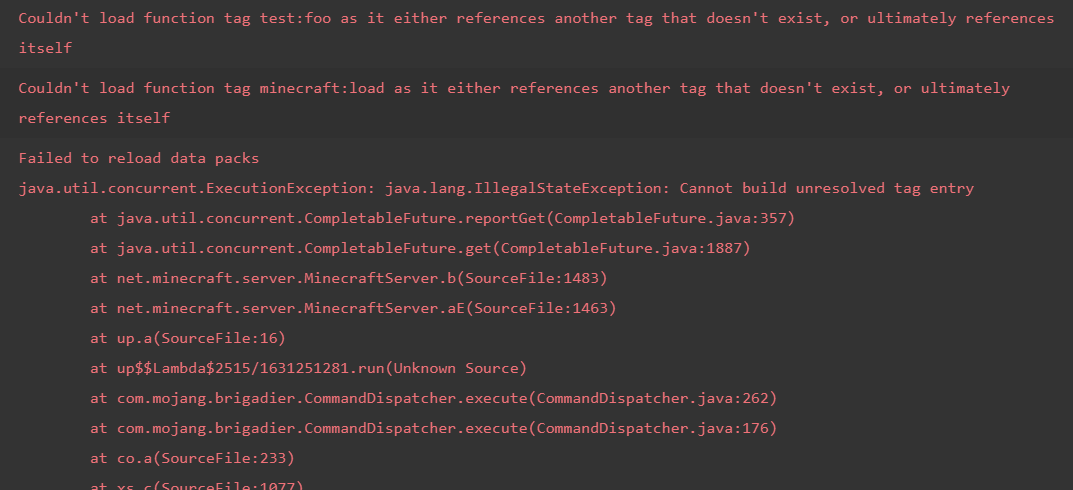
Invalid block/item tag inside another tag file causes the game to crash
How to reproduce
- Make a datapack with a block/item tag file in data/minecraft/tags/block/test.json
The file should look like this:{ "values": [ "#minecraft:invalid" ] }
- Type /reload in chat
→- Close the world and open the world back up
→How to reproduce
- Make a datapack with a block/item tag file in a datapack
The file should look like this:{ "values": [ "#minecraft:invalid" ] }
- Type /reload in chat
→- Close the world and open the world back up
→

How to reproduce
- Make a datapack with a block/item tag file in a datapack. The file should look like this:
{ "values": [ "#minecraft:invalid" ] }- Type /reload in chat
→- Close the world and open the world back up
→
Invalid block/item tag inside another tagfilecauses the game to crashInvalid block/item tag inside another tag silently unloads datapacks
How to reproduce
- Make a datapack with a block/item tag file in a datapack. The file should look like this:
{
  "values": [
    "#minecraft:invalid"
  ]
}
- Type /reload in chat
→
How to reproduce
- Make a datapack with a block/item tag file in a datapack. The file should look like this:
{ "values": [ "#minecraft:invalid" ] }- Type /reload in chat
→Edit 1.15.1: It seems like the vanilla data pack is immune and won't be unloaded. However other data packs are still affected.
How to reproduce
- Make a datapack with a block/item tag file in a datapack. The file should look like this:
{
  "values": [
    "#minecraft:invalid"
  ]
}
- Type /reload in chat
→
Invalidblock/itemtag inside another tag silentlyunloadsdatapacksInvalid tag inside another tag silently fails to reload data packs
Edit 1.15.1: It seems like the vanilla data pack is immune and won't be unloaded. However other data packs are still affected.
How to reproduce
- Make a datapack with a
block/itemtag file in a datapack. The file should look like this:{ "values": [ "#minecraft:invalid" ] }
- Type /reload in chat
→How to reproduce
- Make a datapack with a tag file in a datapack. The file should look like this:
{
  "values": [
    "#minecraft:invalid"
  ]
}
- Type /reload in chat
→
sorting on age behaves weirdlySorting on age behaves weirdly
The bug
sort=nearest is supposed to take the closest entities first, and if two entities are at exactly the same distance, it takes the oldest entity. Vice versa, sort=furthest is supposed to take the furthest entities first, and if two entities are at exactly the same distance, it takes the youngest entity.
However, it seems to use the arbitrary method to sort two entities that are the same distance away.
How to reproduce
- Summon two entities after each other at exactly the same location
summon armor_stand ~ ~ ~ {CustomName:"\"One\""}
summon armor_stand ~ ~ ~ {CustomName:"\"Two\""}
- Run the following command
execute as @e[type=armor_stand,sort=nearest] run say hi→
- Run the following command
execute as @e[type=armor_stand,sort=furthest] run say hi→
The bug
sort=nearest is supposed to take the closest entities first, and if two entities are at exactly the same distance, it takes the oldest entity. Vice versa, sort=furthest is supposed to take the furthest entities first, and if two entities are at exactly the same distance, it takes the youngest entity.
However, it seems to use the arbitrary method to sort two entities that are the same distance away.
How to reproduce
- Summon two entities after each other at exactly the same location
summon armor_stand ~ ~ ~ {CustomName:"\"One\""} summon armor_stand ~ ~ ~ {CustomName:"\"Two\""}- Run the following command
execute as @e[type=armor_stand,sort=nearest] run say hi→
- Run the following command
execute as @e[type=armor_stand,sort=furthest] run say hi→
The bug
sort=nearest is supposed to take the closest entities first, and if two entities are at exactly the same distance, it takes the oldest entity. Vice versa, sort=furthest is supposed to take the furthest entities first, and if two entities are at exactly the same distance, it takes the youngest entity.
However, it seems to use the arbitrary method to sort two entities that are the same distance away.
How to reproduce
- Summon two entities after each other at exactly the same location
summon armor_stand ~ ~ ~ {CustomName:"\"One\""} summon armor_stand ~ ~ ~ {CustomName:"\"Two\""}- Run the following command
execute as @e[type=armor_stand,sort=nearest] run say hi→
- Run the following command
execute as @e[type=armor_stand,sort=furthest] run say hi→
The bug
sort=nearest is supposed to take the closest entities first, and if two entities are at exactly the same distance, it takes the oldest entity. Vice versa, sort=furthest is supposed to take the furthest entities first, and if two entities are at exactly the same distance, it takes the youngest entity.
However, it seems to use the arbitrary method to sort two entities that are the same distance away.
How to reproduce
- Summon two entities after each other at exactly the same location
summon armor_stand ~ ~ ~ {CustomName:"\"One\""}
summon armor_stand ~ ~ ~ {CustomName:"\"Two\""}
- Run the following command
execute as @e[type=armor_stand,sort=nearest] run say hi→
- Run the following command
execute as @e[type=armor_stand,sort=furthest] run say hi→
Note: Maybe this is related to
MC-126946
When using /debug the game prints a message in chat and it also saves profiler results to a file. The "Time span" value in the file is supposedly measured in milliseconds
("ms"). The value printed in chat is measured in seconds. You notice that the value in the file is 10e9 times larger than the one in chat. So it should write ns (nanoseconds) instead of ms (milliseconds).Example comparison:
Profiler results (text file): Time span: 16968367420 ms
Game chat: Stopped debug profiling after 16.97 secondsWhen using /debug the game prints a message in chat and it also saves profiler results to a file. The "Time span" value in the file is supposedly measured in milliseconds and the value printed in chat is measured in seconds. You notice that the value in the file is 10e9 times larger than the one in chat. So it should write ns (nanoseconds) instead of ms (milliseconds).
Example comparison:
Profiler results (text file): Time span: 16968367420 ms
Game chat: Stopped debug profiling after 16.97 seconds
dropentitymainhand.weapon can place items in the offhand and head slot/drop with mainhand.weapon can place items in the offhand and head slot
How to reproduce
- Run the following command
/drop entity @s weapon.mainhand loot minecraft:chests/buried_treasure→ Notice that it put items in your mainhand, offhand and head slot. It doesn't put items in any other part of your inventory
Note: The same happens when using weapon. When using weapon.offhand, only the offhand and the head slot are filled with items
/drop withmainhand.weapon can place items in the offhand and head slot/drop with weapon slot can place items in the offhand and head slot
How to reproduce
- Run the following command
/drop entity @s weapon.mainhandloot minecraft:chests/buried_treasure→ Notice that it put items in your mainhand, offhand and head slot. It doesn't put items in any other part of your inventory
Note: The same happens when using weapon. When using weapon.offhand, only the offhand and the head slot are filled with items
How to reproduce
- Run the following command
/drop entity @s weapon loot minecraft:chests/buried_treasure→ Notice that it put items in your mainhand, offhand and head slot. It doesn't put items in any other part of your inventory
Note: The same happens when using weapon.mainhand. When using weapon.offhand, only the offhand and the head slot are filled with items
/drop with weapon slot can place items in theoffhand andhead slot
Some part of the output log linesarecut off and doesn't wrap correctlySome part of the output log lines is cut off and doesn't wrap correctly
Some part of the output loglinesis cut off and doesn't wrap correctlyPart of the output log is cut off and doesn't wrap correctly

Will wait for comment of [Helper] Misode before resolving as fixed.
The bug
The hitbox for the lectern extends above the top of its 1x1x1 cube, meaning that raycasting never collides with it, even though it should.
See screenshots.
- 19.19.38 shows my cursor pointing at the lectern visual model and the lectern not being selected.
- 19.19.42 shows my cursor pointing low enough to hit the lectern and the raycast volume being shown to extend to the top of the visual model (i.e. above the point my cursor was pointing at in 19.19.38).
This is likely due to optimizations made in the raycasting method that assume all voxel shapes are contained within the 1x1x1 cube, even if those shapes extend beyond (in any direction).
This also affects extended shulker boxes and piston heads (see MC-124459), as stated by [Helper] Misode in this comment.

Sorry for the many edits of the report.
@[Helper] Misode, that is MC-165536, which might actually be the same underlying bug.

Steps to reproduce the bug:
create two normal worlds, one with an icon customize the other one must be created automatically
in a world add a custom icon
Observed results:
if you delete the icon that is generated automatically, it breaks
---------------------------------------------------------------------
sometimes it happens even if you don't delete the icon.
Minecraft duplicates it

[Helper] Misode, not a duplicate of MC-173283; that's about the entity being killed, this is about being converted. Relates to instead
![[Mod] Avoma](../../../data/avatars/users/86198.png)
This ticket is actively updated by [Helper] Misode, so I don't think there is any need to transfer ownership.
![[Mod] ManosSef](../../../data/avatars/users/61702.png)
Setting the location.dimension field of the entity condition in player_killed_entity will not make the advancement check for the entity's dimension, but the dimension the player that will get the advancement is in.
How to reproduce:
- Summon a ghast with no AI in the nether.
- Use /forceload add on the chunk the ghast is in, or have another player stand close to the ghast to make sure it is loaded.
- Place a TNT block next to it.
- Light the TNT using flint and steel or a fire charge and go through a nether portal before it explodes.
→ You just got the advancement "Uneasy Alliance", even though the ghast was in the nether.
Expected result:
The advancement would require the ghast to be in the overworld.
Observed result:
Only the player is required to be in the overworld.
Code analysis:
Code analysis by [Helper] Misode can be found in this comment.
![[Mod] ampolive](../../../data/avatars/users/18949.svg)
Resolving as WAI based on changelogs cited by [Helper] Misode.
![[Mod] turbo](../../../data/avatars/users/92867.png)
The game crashes when hit by a breeze after disabling the update_1_21 data pack.
Steps to reproduce
- Create a new world with update_1_21 data pack enabled.
- Run /datapack disable update_1_21 and exit the world.
- Rejoin the world, spawn a breeze and go into survival mode.
- Wait for the breeze to attack you and the game will crash instantly.
I filed this bug report following a discussion on the Minecraft Commands Discord server involving [Mojang] slicedlime, using [Helper] Misode's repro steps.
I think this would be part of the well known eating bug where after you've eaten the animation continues and it takes double as long to eat. So for some reason, the code will trigger the "consume food" method twice. I guess one for the entity that gave the food and another one for the entity that ate the food. They probably didn't thought of the fact that you can feed wolves too. I assuming this uses a different method for breeding.
is would explain both bugs. The player itself eats and feed and when you feed the wolves, the game thinks you've eaten the rotten flesh as well.
I might be completely wrong, but this is how I would explain this bug without knowing the code.
This is not normal! It's like when you [creeper] see a sweet strawberry [player] but in between there is a huge monster [cat] that wants to eat you. Normal people [creepers] wouldn't go for the strawberry [player].
This bug makes the use of cats for protection pointless. If this stays in the game, you should aswell remove the cats entirely out of the game.
@bengineer8 I get your point, but randomness in game design is not an option for enemy behavior. Especially when the behavior can be either positive or negative. A characteristic for games is that they are predictable. So just let them avoid cats. The goal of Minecraft is that it's simple and understandable and this is totally not understandable!
Confirmed for 1.11.2
Cannot confirm for latest version 1.11.2. This is not how glass looks. You must be using a render mod or texture pack.
Works as intended. Magma blocks are only supposed to damage entities on top of the block.
Isn't this just called lag?
Why can't they do that? They still might want to eat fish even tho they are tamed.
Can confirm for 1.11.2
I had to try this multiple times (20+) to reproduce.
EDIT:
After testing with an auto-clicker I managed to reproduce this way faster. Even clicking the jukebox, giving it a block update or breaking the jukebox won't stop the music. When pressing escape the music stops but continues when going back to the game.
EDIT 2:
After quitting the world and reloading it, the music starts from the beginning. When the music has ended, the music just stops and no music disks are duplicated.
EDIT 3:
When clicking the jukebox with another music disk both sounds are played at once. This allows you to play 'an infinite' amount of disks at once.
I can't get this to reproduce.
I am in creative and grabbing the slot with left mouse button. The stack now follows the mouse cursor. I click outside the GUI box with either left or right button and the stack always drops. What I cannot do in creative is holding a stack and only dropping one item.
The hotbar is rendered in front of the glowing, so they should be consistent
Are you sure you were not in creative when you looked at them?
Duplicate of
MC-114968A video of the bug: https://youtu.be/vZGfwCFMwuE?t=1m59s
Cannot confirm.
Cannot reproduce. Are you sure you were not in creative?
Cannot reproduce.
Works as intended. Spawn chunks will only stay loaded if at least one player is in that dimension.
Confirmed for 1.12
It looks like you are using a texture pack. I cannot reproduce this.
Cannot reproduce this (with a Parrot I assume)
This is not a bug but a problem that you have. Check if the world folder exists in .minecraft/save
Check your java version (should be Java 8, which is new to 1.12)
Just from a redstone perspective; it looks like you have a hopper under the shulker box to pick up the dropped shulker box when full. However, hoppers can also pull items out of containers like shulker boxes and thus will remove the item from the shulker.
Click view crash report an include that with this report.
Duplicate of
MC-86850Duplicate of
MC-46650. Please search before creating a bug report.Pleas attach a screenshot of it.
I want to add that having this on false, a command with execute in it, in a command block will also not show the output box
Works as intended. Repeater stays on for one extra tick (when redstone dust in front is off), when the repeater wants to urn back on in the tick after that, it is being powered by the redstone dust, so it stays on.
This seems like a keyboard problem
According to
MC-93622, this was fixed in Minecraft 15w51aDuplicate of
MC-101579Please search before creating a new bug report
Remove the resource pack. Maybe it changed the direction the command block is facing in
Works as intended. The scenarios you described are not affected by the cooldown. Placing, removing blocks and all right click functions are all instant. It's called an attack cooldown, not an item cooldown.
Can confirm after testing
Cannot reproduce this.
Duplicate of
MC-121283Duplicate of
MC-29503I can find horses that spawned naturally when I fly around. So cannot reproduce.
Works for me (Windows 10, idk if it matters)
Make sure the text field is actually selected.
Can confirm.
This is also the case for player names
"Teleported Steve entities to 3, 4, 5"
Confirmed for 17w45a with the following commands:
/xp set @p 1999999999 levels
/kill @p
This will give a score of -20
Duplicates
MC-121642I would say this report duplicates instead of relates to
MC-121637Autocomplete is currently only implemented for literals.
Confirmed for 17w47a
Confirmed for 17w47a
Duplicate of
MC-121630Please search before you create a new issue.
Duplicate of
MC-121630Please search before you create a new issue.
It doesn't have to be a double chest. You can also reproduce this when you have 9 single chest and break the middle one. (made by placing the chests using shift or with different rotation)
Duplicate of
MC-124902This is WAI. The client does this for every moving entity
I had something similar happening. The game ticks were more than 10 times faster (measured with /debug) and the tps even increased every time running /reload or /datapack (which paused the game for a few seconds).
https://gfycat.com/CompetentLazyAmericanavocet
https://gfycat.com/FirmImportantHoiho
Perhaps a more general title should be given to this report about all graphical glitches with the new water?
Duplicate of
MC-125190Only happens with transparent blocks that have the #minecraft:water_hacked tag
WAI - Item names are now text components: https://minecraft.gamepedia.com/1.13#Command_format_2
Doesn't only affect shulker boxes. Affects all blocks that drop with nbt. Perhaps the title and description should be changed a bit.
Affects:
All cases fail and give an error message though.
A mod can close this. I found out that the advancement file had an error that was not logged to the game output.
This is purely about changing block ids in the world, but of course a /state command that could do more than rotation would be ideal.
@Aaron Rhodes Fixed. Thanks
I just had this happening a second time. I added my crash report.
Caused by
MC-124911?Duplicate of
MC-125272(which has been marked as WAI)I noticed this happens with a every item that has been damaged. (when the Damage tag exists). It also happens with food and potions. It doesn't happen with chorus fruit or ender pearls.
With the help of a script and some command blocks I now have some results of a decently large sample size of 2000 enchanted books. I got some interesting results in 18w22a so I decided to also check the same test in 18w07a to see the difference.
18w07a: 109 / 500 (21.8%)
18w21b: 90 / 500 (18%)
18w22a: 193 / 2000 (9.7%)
It is clear that the amount of trident enchantments has been significantly reduced in 18w22a. However, @Jeb is still assigned, so maybe this isn't resolved?
Yes, blocks at 63 and mobs spawning at 64 is the only layer it happens with.
Still the same as after 18w22a. With a test in 1.13 pre-2 I got 90 / 1000 (9%). Still waiting on a response from one of the devs to confirm this as fixed.
The ticket that was marked as 'duplicates' talks about snow layers not being placed in certain biomes. Neither the wiki or that bug report mention a height limitation. Thus this bug should be reopened as according to the wiki snowmen shouldn't leave a trail in plains, while they do above y=66
Hmm, neither can I now. You can close this.
(It was probably
MC-131368that caused me to think this)user-f2760 This issue is (still) a concern in Minecraft 1.13-pre2. To add onto the original ticket, Snow Golems will place snow layers above and at y=67 in warm biomes, which they are not supposed to do according to the wiki and
MC-377.Possibly the same issue as
MC-131614?Possibly the same issue as
MC-131614?[Mod] Michael Wobst It seems indeed very related. It looks like it's the same bug, but triggered from somewhere else. Not sure if that makes this a duplicate or not.
Pau Olivares Optifine is a third party software. You can't consider a ticket resolved by forcing a player to use a third party software. If you say you couldn't confirm this, you should use the vanilla client.
Also I doubt changing anything outside of Minecraft would fix this issue because everything works fine in previous version.
Armando Alejandro Mejias Vera confirmed this bug as well.
Duplicates
MC-126373I can reproduce this bug. The Air tag is set to 0 when there are any other tags given in the command.
EDIT: It looks like this happens with every entity. Eg. try summoning a pig underwater with Foo:1 as NBT: it immediately starts taking damage.
Can confirm but is probably a won't fix. Most weird combinations of buffet worlds are broken
[Mod] tryashtar You can close this now.
This seems to be fixed for me in the latest version of the launcher
Kumasasa Sorry for this late response but I wasn't able to test this until now. I can indeed confirm that this is fixed in the major version 1.13.
I can reproduce this
[Mojang] Mega_Spud (Jay Wells) The ticket that you linked as duplicates doesn't describe the same issue as this one. This ticket needs to be reopened.
[Mojang] Bartosz Bok Even if filling other slots if you don't specify a count is intended, it's really weird that it could fill armor slots. And the thing is, only the head slot is affected. No other slots, which seems inconsistent.
Managed to reproduce this in 18w43c in creative mode. Please reopen.
EDIT: I can reproduce this every time by just holding down a number key.
Confirmed for v2.1.2474 - Please reopen!
Appears to be fixed in the latest snapshot. I did not test in what snapshot exactly it was silently fixed.
I cannot reproduce this anymore in the latest snapshot. So it must have been fixed silently.
Please reopen this ticket as it was actually never fixed. It slipped through my testing because it lo longer gives an error message in chat, it now generates a proper error message in the game log. But it still aborts loading the datapacks.
This is fixed in 2.1.3674
Confirmed for 1.14 and 1.14.1-pre1 and 2
@Michael Wobst Please reopen this. I'm having significant tps issues without doing anything in the world. Here is a download to a world this is happening in: https://drive.google.com/file/d/1er1yw_d1guh8bnE-gw31l-PRGk8nP_kj/view?usp=sharing
This was indirectly caused by
MC-135501Can you also attach the debug report, like violine mentioned?
"as well as the debug report found in debug/debug-report-<DATE>.zip here."
Can a dev please look at this? A slightly outdated or incorrect data pack can ruin all your data packs and like Paint said, also the vanilla data pack. It's ridiculous that this bug has been a thing for 3 major versions.
Duplicate of
MC-167570Affects 1.15 and 1.15.1
Duplicate of
MC-137700. See this comment: http://bugs.mojang.com/browse/MC-137700#comment-496502And easy fix is adding a 1 after the slot id like this:
/loot replace entity @s weapon.mainhand 1 mine ~ ~3 ~ stone{getContents:true}Confirmed for 1.15.1.
Also affects shulker boxes and piston heads.
I can confirm. However, I believe this is a duplicate of MC-160926
Would you be willing to share your world?
Affects 1.15.1
Also effects zombie -> drowned conversion, but interestingly, not their PersistenceRequired tag, which gets transferred correctly.
Isn't this simply caused by torches having a 1 redstone tick delay?
Doesn't this make sense? With the default generation, only sea grass spawns in caves below oceans, but not corals or kelp. There's no actual sea floor in caves buffets.
What you're describing looks like the gamerules mobGriefing was set to false. This prevents villagers from picking up items and sheep from converting grass to dirt.
Confirmed for 1.15.1.
After teleporting the cow to the void, it dies and no longer exists. But the entity does still exist inside the Passengers array of the pig. If you then kill the pig, the cow will suddenly come back in the position where the pig died.
Cannot reproduce in 1.15.1
Steps to reproduce were wrong causing the detection area to wrap around. The selector should use y_rotation=9..13 instead of y_rotation=13..9. Using these new steps I cannot reproduce anymore.
Notice this doesn't match the player.
Cannot confirm in 1.15.1
Water is only slightly shaded because of the lower skylight.
I did a large scale test with over 10K books with loot tables and the results are obvious. I attached a screenshot.
After doing some tests in 1.15.1: There is a slight difference in speed, but it's a lot less noticeable.
These are tests of 25 blocks. Numbers are the time in ticks measured with commands.
From these results it is clear that the difference between source blocks and falling water is obvious when you are floating in the water, but almost not noticeable when you are swimming.
Affects 1.15.1
Can also be reproduced with the following command:
The chat prints "Dropped 0 items".
Confirmed for 1.15.1
Only affects the cartography table now.
Can confirm. You can also reproduce this in survival by using the original repro steps of
MC-1541. It appears as if the effect amplifier decreased, but you still have the same attributes.Can confirm. This is different from moving in between an ocean and swamp biome.
It seems like zombie pigmen don't spawn in the warped forest or soul sand valley, causing very high spawn rates for ghasts and endermen.
Please provide seed and coordinates
This is a feature. From the snapshot article:
Please attach screenshots, and also include the seed and location.
@Travistar99 Are you still able to reproduce this in the original environment? If so please add those details.
qmagnet Could I have ownership of this ticket to keep it up-to-date?
I did some experiments in 1.15 and 20w07a and I cannot experience significantly worse framerate looking at item frames.
All measurements in ms per frame while looking downwards:
At a flat ground: 11mspf
At 300 item frames filled with items: 19mspf
At 200 pigs with no ai: 24mspf
At 200 armor stands: 23mspf
At a forest: 20mspf
So it is true that item frames cause some FPS drop, it is not different than looking at any complex part of the world. The results above show that item frames are not significantly worse than other entities. In fact, they are better than most other entities. I think what gave the impression of item frames being so bad is that they are often used in huge amounts.
So I believe this bug can be closed.
Affects 1.15.2. Scanning my logs, I still get these warnings every once in a while, but they're incredibly rare. Haven't got them in 20w06a or 20w07a.
I'm unable to replicate this either with the steps that Nathan provided. Greg Milson are you sure this is still happening? If so please edit the description and specifically the steps to reproduce.
Cannot reproduce anymore. In a scenario like this, the zombie would never step in the void.

I cannot reproduce this in 20w07a. I had over 20K fences, but memory was still below 1 GB, which is not significantly higher than any normal gameplay these days.
Cannot reproduce in 20w07a. If someone can still reproduce this, please add more precise steps to reproduce.
Cannot reproduce in 20w07a. All seeds in the description and comments work correctly.
Cannot reproduce either in 20w07a
Cannot reproduce in 20w07a. None of the seeds and coordinates work, sometimes because there isn't even a structure.
The location features need to be lowercase, so "mansion" and "mineshaft".
Tested this in 20w08a. Now prints a simple "Structure 'minecraft:foo' is not available" message in chat. There are no exception being thrown in the log.
Working as intended. The 17w49a article mentioned:
You can only use block/item ID's in block/item tags.
I can reproduce this with Intel Graphics 620.
I believe MC-161823 describes your issue. Please leave a comment there if you have more information to add.
Cannot reproduce in 20w09a.
Please provide the seed and coordinates
Probably working as intended for the same reason as
MC-172170Does
MC-29318describe your issue? It may be the more general case.Working as intended. /forceload was made OP level 2 in 1.14.
The debug report tells me that you have disabled the doMobSpawning gamerule. To fix this run this command:
/gamerule doMobSpawning trueWe discussed this on the Mojira discord. In 20w09a, there were two fixes implemented:
Only one of those is necessary to fix
MC-172356.Thank you for your report!
However, this issue is a Duplicate of
MC-149375.If you would like to add a vote and any extra information to the main ticket it would be appreciated.
If you haven't already, you might like to make use of the search feature to see if the issue has already been mentioned.
Quick Links:
📓 Issue Guidelines – 💬 Community Support – 📧 Customer Support – 📖 Game Wiki
Thank you for your report!
However, this issue is a Duplicate of
MC-91893.If you would like to add a vote and any extra information to the main ticket it would be appreciated.
If you haven't already, you might like to make use of the search feature to see if the issue has already been mentioned.
Quick Links:
📓 Issue Guidelines – 💬 Community Support – 📧 Customer Support – 📖 Game Wiki
Thank you for your report!
However, this issue is a Duplicate of
MC-107432.If you would like to add a vote and any extra information to the main ticket it would be appreciated.
If you haven't already, you might like to make use of the search feature to see if the issue has already been mentioned.
Quick Links:
📓 Issue Guidelines – 💬 Community Support – 📧 Customer Support – 📖 Game Wiki
Thank you for your report!
However, this issue is a Duplicate of
MC-172123.If you would like to add a vote and any extra information to the main ticket it would be appreciated.
If you haven't already, you might like to make use of the search feature to see if the issue has already been mentioned.
Quick Links:
📓 Issue Guidelines – 💬 Community Support – 📧 Customer Support – 📖 Game Wiki
Thank you for your report!
However, this issue is a Duplicate of
MC-173165.That ticket has already been resolved as Fixed. The fix will arrive in the next version or is already included in the latest development version of the game, you can check the Fix Version/s field in that ticket to learn more.
If you haven't already, you might like to make use of the search feature to see if the issue has already been mentioned.
Quick Links:
📓 Issue Guidelines – 💬 Community Support – 📧 Customer Support – 📖 Game Wiki
Thank you for your report!
However, this issue is a Duplicate of
MC-68535.That ticket has already been resolved, which means this is not considered a bug and won't be fixed. Please do not leave a comment on the linked ticket.
If you haven't already, you might like to make use of the search feature to see if the issue has already been mentioned.
Quick Links:
📓 Issue Guidelines – 💬 Community Support – 📧 Customer Support – 📖 Game Wiki
This is a duplicate of
MC-170835. Please leave a comment on the original bug report instead of creating a new one.Cannot reproduce. Check your controls settings.
Cannot reproduce. Do you have exact reproduction steps?
I'm pretty sure this is working as intended.
Cannot reproduce. Keep in mind that only endermites spawned by a player will attract endermen. Endermites spawned using a spawn egg wont. For this case, see
MC-53518.I cannot reproduce because I'm having trouble understanding the reproduction steps. Could you try clarifying please?
Thank you for your report!
However, this issue is a Duplicate of
MC-1133.If you would like to add a vote and any extra information to the main ticket it would be appreciated.
If you haven't already, you might like to make use of the search feature to see if the issue has already been mentioned.
Quick Links:
📓 Issue Guidelines – 💬 Community Support – 📧 Customer Support – 📖 Game Wiki
Thank you for your report!
However, this issue is a Duplicate of
MC-173199.If you would like to add a vote and any extra information to the main ticket it would be appreciated.
If you haven't already, you might like to make use of the search feature to see if the issue has already been mentioned.
Quick Links:
📓 Issue Guidelines – 💬 Community Support – 📧 Customer Support – 📖 Game Wiki
Thank you for your report!
However, this issue is a Duplicate of
MC-148795.If you would like to add a vote and any extra information to the main ticket it would be appreciated.
If you haven't already, you might like to make use of the search feature to see if the issue has already been mentioned.
Quick Links:
📓 Issue Guidelines – 💬 Community Support – 📧 Customer Support – 📖 Game Wiki
Cannot reproduce in 20w09a with any of the mentioned seeds and coordinates.
Cannot reproduce both in 1.15.2 and 20w09a. I am granted the advancement correctly when I shoot a mob with a spectral arrow. Maybe
MC-135501caused the advancement to unload?Could you also attach the debug report, created by using /debug report? Best time to do this is when you are experiencing low TPS.
Thank you for your report!
However, this issue is a Duplicate of
MC-173234.If you would like to add a vote and any extra information to the main ticket it would be appreciated.
If you haven't already, you might like to make use of the search feature to see if the issue has already been mentioned.
Quick Links:
📓 Issue Guidelines – 💬 Community Support – 📧 Customer Support – 📖 Game Wiki
This is working as intended. According to the 20w07a snapshot article:
I would guess this is caused by endermen, and thus working as intended. They will have a chance to pick up certain blocks and place them elsewhere.
Thank you for your report!
However, this issue is a Duplicate of
MC-173176.That ticket has already been resolved as Fixed. The fix will arrive in the next version or is already included in the latest development version of the game, you can check the Fix Version/s field in that ticket to learn more.
If you haven't already, you might like to make use of the search feature to see if the issue has already been mentioned.
Quick Links:
📓 Issue Guidelines – 💬 Community Support – 📧 Customer Support – 📖 Game Wiki
This is likely intended. According to the 20w07a snapshot article:
What are the exact steps to reproduce this? In what way does this affect the game?
Working as intended. When you are inside the hitbox of a block, you can't place blocks outside of it.
Please attach a zipped version of the world, or describe exact steps to reproduce the bug.
I also can't reproduce this anymore
For rotation being reset after mob conversion, see
MC-88967I cannot reproduce for F3 and ESC. Perhaps system dependent?
Thank you for your report!
However, this issue is a Duplicate of
MC-172272.If you would like to add a vote and any extra information to the main ticket it would be appreciated.
If you haven't already, you might like to make use of the search feature to see if the issue has already been mentioned.
Quick Links:
📓 Issue Guidelines – 💬 Community Support – 📧 Customer Support – 📖 Game Wiki
I am not able to reproduce this. Fabian Zoller Can you upload your world?
It does indeed appear that fish spawning is much more stable now. I can still get 110+ cods spawning, this may be acceptable. The number of cod also stabilizes after a while instead of fluctuating drastically.
So I'd say that this is fixed.
Random ticks also cause the vine under the stairs to update.
Working as intended. The 1.14 article states:
According to the code, they have a very small chance to spawn in normal Jungles, but they only have a weight of 1 (for example parrots have a weight of 40 and skeletons have a weight of 100). The chances are further decreased because pandas cannot spawn on leaves.
Bamboo Jungles on the other hand give pandas a weight of 80, and they have a lot fewer patches of leaves covering the ground.
Can reproduce. This is inconsistent with area effect clouds and marker armor stands.
These blocks are most likely ghost blocks, in which this is a duplicate of
MC-54026. That ticket was closed as "Cannot reproduce". If you have a reliable way to reproduce this, please add a comment to that ticket.This is partially a duplicate of
MC-137700. The fix is to add a "1" just after the slot identifier. This will limit the amount of items being dropped.Most likely working as intended. I believe this was made so items attach to the wall instead of floating in the air.
I was able to reproduce this, but it only happens very rarely according to my testing.
Most likely working as intended. Ender pearls, llama spit, etc. have never been able to break chorus fruit.
I don't see what the bug is here. If you mean that fungi generate next to lava, that's caused by the lava falling down after the fungi generate. If you mean warped fungi spawning in crimson forest and vice versa, that's works as intended.
My apologies, I was misunderstanding the bug report. I have since updated the description and added a data pack to reproduce the issue.
This is not specific to piglins or to this snapshot. I believe this is caused by the position of mobs being interpolated between ticks. The mob doesn't die before hitting the ground, the mob just appears to be still falling down when the death animation starts.
Cannot reproduce.
I am unable to reproduce this with the limited steps you provided. Could you make the steps more detailed and add a video or screenshots of this bug happening?
Can confirm. This is happening to a lot of players even with good ping, when the server tps is low.
Could you check if the workaround in MC-165967 resolves the issue?
I cannot reproduce this.
This is also the case for sea grass, vines, fern, etc. So most likely working as intended
Inconsistencies can also be bugs. It's up to the developers whether they consider this working as intended or not.
In this case I find it unlikely that they will change existing commands.
I cannot reproduce either. Check that you don't have any resource packs enabled.
This is intended. When water finds a lower block nearby it will not spread out.
You are using a resource pack. Please check if you can also reproduce this without a resource pack and attach a new screenshot.
You can only report bugs for the latest release and latest snapshot.
Cannot reproduce. This is simply bad luck.