Level.dat, Level.dat_old and player files in the playerdata folder can become corrupt in certain situations
Please attach the console log of your game using these instructions after having done the following:
- Open a world
- Make some changes to it, ones that will likely lead to corruption
- Leave the world
- If the world has disappeared from your saves list, please copy the log and provide it here - if not, please start again with Step 1.
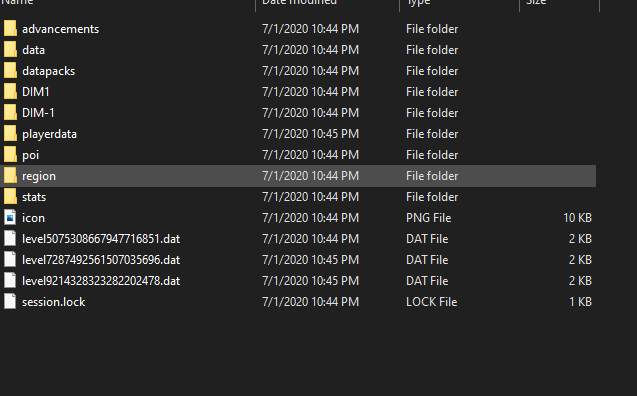
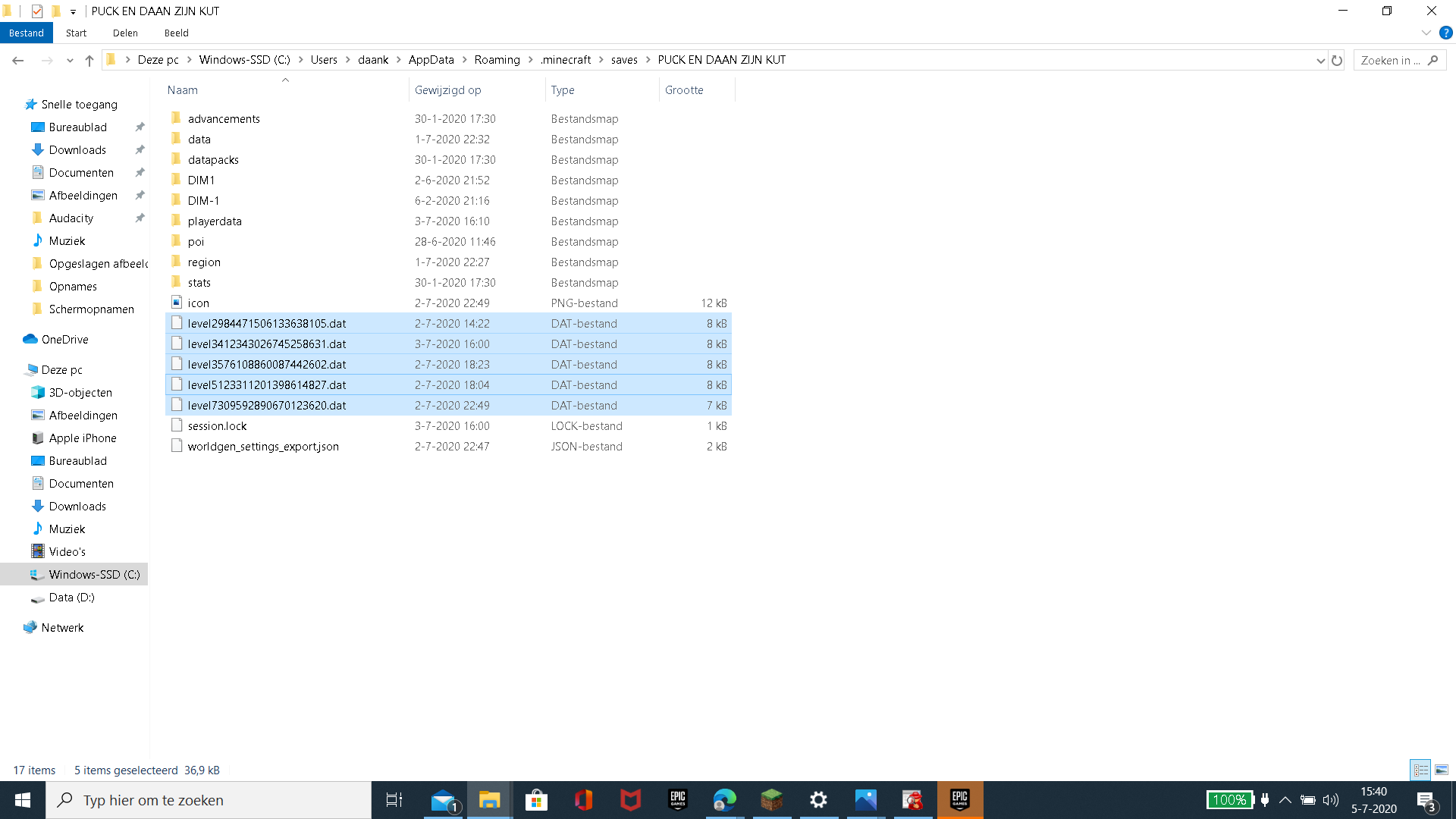
To make the world appear again in the saves list, you can rename the newest of the "level##########.dat" file to "level.dat" in the folder of the save affected by this.
When an update is given to a tile entity ( adding items into a chest, placing a chest... etc). directly before saving and exiting a world, the level.dat file is deleted or lost (don't know). this now only loses any inventory and disappearing from the in-game world list. the way i temp fix it is to use a backup of the world and simply copy the level.dat and level.dat_old onto the non-backup world
Linked Issues
is duplicated by16
 MC-193443Dissapearing worldsDuplicateMC-193646World getting removedDuplicateMC-194272Multiple CorruptionsDuplicateMC-194357Saving of worldsDuplicateMC-194470My world has disappear by it self. please find the answerDuplicateMC-194750Hardcore world disappearDuplicateMC-195032when I leave a world it gets deletedDuplicateMC-195969WorldsDuplicateMC-196254Can't play saved world, Level.dat is missing DuplicateMC-196384Worlds Deleted Themselves after saving and exitingDuplicateMC-196464I lost my world and %appdata% is not helping to recover itDuplicateMC-197026World wont show up in game but the file is in saves still.DuplicateMC-197492World has dissapeared in game yet shows up in appdata and the level.dat file isnt changed, DuplicateMC-197540LAN World Deleting/Overwriting Player 2 Data with Empty Data FileDuplicateMC-200486I was playing on my favorite Minecraft world, and all of a sudden, i couldn't place blocks!!!DuplicateMC-260754My world disappearedDuplicate
Attachments9


 Very Important
Created Issue:
Level.dat and Level.dat_old are deleted when an update is given to a tile entity before logging out.
Attachments1
When an update is given to a tile entity ( adding items into a chest, placing a chest... etc). directly before saving and exiting a world, the level.dat file is deleted or lost (don't know). this now only loses any inventory and disappearing from the in-game world list. the way i temp fix it is to use a backup of the world and simply copy the level.dat and level.dat_old onto the non-backup world
![[Bot] Arisa](../../../data/avatars/users/43007.png)
i was trying to recreate it now, for some reason I could only get it to work in windowed mode.
is duplicated by
Level.dat and Level.dat_old are deleted when an update is given to a tile entity before logging out.
is duplicated by
When an update is given to a tile entity ( adding items into a chest, placing a chest... etc). directly before saving and exiting a world, the level.dat file is deleted or lost (don't know). this now only loses any inventory and disappearing from the in-game world list. the way i temp fix it is to use a backup of the world and simply copy the level.dat and level.dat_old onto the non-backup world
Moderator NoteIf you are experiencing this issue, please attach some of the files with the odd filename with the numbers for us to take a look at.
HiJackThis is a program that will show us a basic overview of programs running on your computer. While it does sound scary, it does not give us any personal or sensitive information. Download: <https://sourceforge.net/projects/hjt/files/2.0.5%20beta/HijackThis.exe/download>
Run HijackThis as Administrator, choose "I accept", then "Do a system scan and save a log file". After a while a text file will open. Copy everything, put the log onto <https://paste.ubuntu.com/>, enter your username in the "Poster" field, click "Paste!" and send the URL of the page it takes you to into this channel.
When an update is given to a tile entity ( adding items into a chest, placing a chest... etc). directly before saving and exiting a world, the level.dat file is deleted or lost (don't know). this now only loses any inventory and disappearing from the in-game world list. the way i temp fix it is to use a backup of the world and simply copy the level.dat and level.dat_old onto the non-backup world
Moderator NoteIf you are experiencing this issue, please attach some of the files with the odd filename with the numbers for us to take a look at.
HiJackThis is a program that will show us a basic overview of programs running on your computer. While it does sound scary, it does not give us any personal or sensitive information. Download:
<https://sourceforge.net/projects/hjt/files/2.0.5%20beta/HijackThis.exe/download>Run HijackThis as Administrator, choose "I accept", then "Do a system scan and save a log file". After a while a text file will open. Copy everything, put the log onto <https://paste.ubuntu.com/>, enter your username in the "Poster" field, click "Paste!" and send the URL of the page it takes you to into this channel.
When an update is given to a tile entity ( adding items into a chest, placing a chest... etc). directly before saving and exiting a world, the level.dat file is deleted or lost (don't know). this now only loses any inventory and disappearing from the in-game world list. the way i temp fix it is to use a backup of the world and simply copy the level.dat and level.dat_old onto the non-backup world
Moderator NoteIf you are experiencing this issue, please attach some of the files with the odd filename with the numbers for us to take a look at.
Please also run a HiJackThis diagnostic. HiJackThis is a program that will show us a basic overview of programs running on your computer. While it does sound scary, it does not give us any personal or sensitive information. Download: https://sourceforge.net/projects/hjt/files/2.0.5%20beta/HijackThis.exe/download
Run HijackThis as Administrator, choose "I accept", then "Do a system scan and save a log file". After a while a text file will open, please save this file and then upload it to this report.
When an update is given to a tile entity ( adding items into a chest, placing a chest... etc). directly before saving and exiting a world, the level.dat file is deleted or lost (don't know). this now only loses any inventory and disappearing from the in-game world list. the way i temp fix it is to use a backup of the world and simply copy the level.dat and level.dat_old onto the non-backup world
2020-04-17 (28).png
![[Mojang] slicedlime](../../../data/assets/gravatar/slicedlime.jpeg)
![[Mojang] Bartosz Bok](../../../data/avatars/users/10122.svg) [Mojang] Bartosz Bok
[Mojang] Bartosz Bok![[Mojang] Adrian Östergård](../../../data/assets/gravatar/nighter.jpeg)
Moderator NoteIf you are experiencing this issue, please attach some of the files with the odd filename with the numbers for us to take a look at.
Please also run a HiJackThis diagnostic. HiJackThis is a program that will show us a basic overview of programs running on your computer. While it does sound scary, it does not give us any personal or sensitive information. Download: https://sourceforge.net/projects/hjt/files/2.0.5%20beta/HijackThis.exe/download
Run HijackThis as Administrator, choose "I accept", then "Do a system scan and save a log file". After a while a text file will open, please save this file and then upload it to this report.
Please also attach the console log of your game from the exact time the world has gone missing from the game using these instructions.
When an update is given to a tile entity ( adding items into a chest, placing a chest... etc). directly before saving and exiting a world, the level.dat file is deleted or lost (don't know). this now only loses any inventory and disappearing from the in-game world list. the way i temp fix it is to use a backup of the world and simply copy the level.dat and level.dat_old onto the non-backup world
Moderator NoteIf you are experiencing this issue, please attach some of the files with the odd filename with the numbers for us to take a look at.
Please also run a HiJackThis diagnostic. HiJackThis is a program that will show us a basic overview of programs running on your computer. While it does sound scary, it does not give us any personal or sensitive information. Download: https://sourceforge.net/projects/hjt/files/2.0.5%20beta/HijackThis.exe/download
Run HijackThis as Administrator, choose "I accept", then "Do a system scan and save a log file". After a while a text file will open, please save this file and then upload it to this report.
Please also attach the console log of your game from the exact time the world has gone missing from the game using these instructions.
When an update is given to a tile entity ( adding items into a chest, placing a chest... etc). directly before saving and exiting a world, the level.dat file is deleted or lost (don't know). this now only loses any inventory and disappearing from the in-game world list. the way i temp fix it is to use a backup of the world and simply copy the level.dat and level.dat_old onto the non-backup world
Moderator NotePlease attach the console log of your game from the exact time the world has gone missing from the game using these instructions.
When an update is given to a tile entity ( adding items into a chest, placing a chest... etc). directly before saving and exiting a world, the level.dat file is deleted or lost (don't know). this now only loses any inventory and disappearing from the in-game world list. the way i temp fix it is to use a backup of the world and simply copy the level.dat and level.dat_old onto the non-backup world
Moderator NotePlease attach the console log of your game from the exact time the world has gone missing from the game using these instructions.
WorkaroundTo make the world appear again in the saves list, you can rename the newest of the "level##########.dat" file to "level.dat" in the folder of the save affected by this.
When an update is given to a tile entity ( adding items into a chest, placing a chest... etc). directly before saving and exiting a world, the level.dat file is deleted or lost (don't know). this now only loses any inventory and disappearing from the in-game world list. the way i temp fix it is to use a backup of the world and simply copy the level.dat and level.dat_old onto the non-backup world
is duplicated by
MC-194249
is duplicated by
is duplicated by
is duplicated by
relates to
is duplicated by
is duplicated by
is duplicated by
is duplicated by
is duplicated by
is duplicated by

is duplicated by
relates to
is duplicated by
Moderator NotePlease attach the console log of your game
from the exact time the world has gone missing from the gameusing these instructions.WorkaroundTo make the world appear again in the saves list, you can rename the newest of the "level##########.dat" file to "level.dat" in the folder of the save affected by this.
When an update is given to a tile entity ( adding items into a chest, placing a chest... etc). directly before saving and exiting a world, the level.dat file is deleted or lost (don't know). this now only loses any inventory and disappearing from the in-game world list. the way i temp fix it is to use a backup of the world and simply copy the level.dat and level.dat_old onto the non-backup world
Moderator NotePlease attach the console log of your game using these instructions after having done the following:
- Open a world
- Make some changes to it, ones that will likely lead to corruption
- Leave the world
- If the world has disappeared from your saves list, please copy the log and provide it here - if not, please start again with Step 1.
WorkaroundTo make the world appear again in the saves list, you can rename the newest of the "level##########.dat" file to "level.dat" in the folder of the save affected by this.
When an update is given to a tile entity ( adding items into a chest, placing a chest... etc). directly before saving and exiting a world, the level.dat file is deleted or lost (don't know). this now only loses any inventory and disappearing from the in-game world list. the way i temp fix it is to use a backup of the world and simply copy the level.dat and level.dat_old onto the non-backup world
Level.dat and Level.dat_oldare deleted when an update is given to a tile entity before logging outLevel.dat and Level.dat_old can become corrupt in certain situations
Level.datand Level.dat_old can become corrupt in certain situationsLevel.dat, Level.dat_old and player files in the playerdata folder can become corrupt in certain situations
relates to
is duplicated by
relates to
is duplicated by
![[Mod] tryashtar](../../../data/avatars/users/41963.png)
is duplicated by
relates to
is duplicated by
![[Helper] Jack McKalling](../../../data/avatars/users/92859.png)
Moderator NotePlease attach the console log of your game using these instructions after having done the following:
- Open a world
- Make some changes to it, ones that will likely lead to corruption
- Leave the world
- If the world has disappeared from your saves list, please copy the log and provide it here - if not, please start again with Step 1.
WorkaroundTo make the world appear again in the saves list, you can rename the newest of the "level##########.dat" file to "level.dat" in the folder of the save affected by this.
When an update is given to a tile entity ( adding items into a chest, placing a chest... etc). directly before saving and exiting a world, the level.dat file is deleted or lost (don't know). this now only loses any inventory and disappearing from the in-game world list. the way i temp fix it is to use a backup of the world and simply copy the level.dat and level.dat_old onto the non-backup world
![[Mod] ampolive](../../../data/avatars/users/18949.svg)
is duplicated by
[Mojang] Bartosz Bok![[Mojang] Panda](../../../data/avatars/users/41658.png)
relates to
My bad, it's MC-193198.
Duplicate of MC-193198.
If you are experiencing this issue, please attach some of the files with the odd filename with the numbers onto MC-193198 for us to take a look at.
If you are experiencing this issue, please attach some of the files with the odd filename with the numbers onto MC-193198 for us to take a look at.
Thank you for your report!
However, we are already tracking this issue, and this report is a Duplicate of MC-193198, which is a report that has not been resolved yet.
If you want, you can upvote the parent ticket, and enable watching to receive any updates about it - if you believe you have any information that may be important for this issue, please leave a comment on the parent. Please also use the search function in the future to prevent duplicate reports.
Quick Links:
📓 Issue Guidelines – 🛠 Community Support – 📧 Customer Support – ✍️ Feedback and Suggestions – 📖 Game Wiki
💬 Mojira Subreddit – 💬 Mojira Discord
![[Mod] Chandler](../../../data/assets/gravatar/triwonder81.png)
Duplicate of MC-193198
If you can, please try to help us diagnose this issue by attaching the game console log from the time the issue occurred.
There are also workaround steps on MC-193198.
There is a workaround listed on MC-193198, if you can, please also provide a launcher log from the moment the corruption occurred.
Please read the moderator notes on MC-193198.
Thank you for your report!
We're tracking this issue in MC-193198, so this ticket is being resolved and linked as a duplicate.
If you would like to add a vote and any extra information to the main ticket it would be appreciated.
If you haven't already, you might like to make use of the search feature to see if the issue has already been mentioned.
Quick Links:
📓 Issue Guidelines – 💬 Community Support – 📧 Customer Support – ✍️ Feedback and Suggestions – 📖 Game Wiki
– I am a bot. This action was performed automagically! Please report any issues in Discord or Reddit
Thank you for your report!
However, we are already tracking this issue, and this report is a Duplicate of MC-193198, which is a report that has not been resolved yet.
If you want, you can upvote the parent ticket, and enable watching to receive any updates about it - if you believe you have any information that may be important for this issue, please leave a comment on the parent. Please also use the search function in the future to prevent duplicate reports.
Quick Links:
📓 Issue Guidelines – 🛠 Community Support – 📧 Customer Support – ✍️ Feedback and Suggestions – 📖 Game Wiki
💬 Mojira Subreddit – 💬 Mojira Discord
No comment? Okay but Anyways Duplicate of MC-193198
Duplicate of MC-193198 - If you can consistently reproduce this, please provide the log of the game at the exact moment the world disappears from your saves list in that report.
There is a workaround on MC-193198 - if it constantly happens to you, please provide the console log from the exact moment a world has gone missing on the parent report.
![[Mod] markderickson](../../../data/avatars/users/18946.svg)
Hi there!
This sounds like a duplicate of MC-193198, and I'm copying the moderator note from that report to this comment so you know what to do next.
Although a lot of people have experienced this issue, we're still not sure of the cause; that's why we're asking for this information.
Please attach the console log of your game from the exact time the world has gone missing from the game using these instructions to MC-193198.
Also, there's a workaround that you can use to recover the world (but if you have the information requested above, please attach it!):
To make the world appear again in the saves list, you can rename the newest of the "level##########.dat" file to "level.dat" in the folder of the save affected by this.
Thank you for your report!
However, this issue is a Duplicate of MC-193198.
It has been linked to this report. If you have additional information, please add it to that report.
Please search before reporting, as it's likely that one exists already.
Quick Links:
📓 Issue Guidelines – 💬 Community Support – 📧 Customer Support – 📖 Game Wiki
My friends World has disappeared and will not show up in his single-player worlds yet it is still in the saves folder in .minecraft. After looking to see if this was a problem I found issue MC-193198 which has the same problem where their world is gone but my friend's level.dat file has no change to it. He sent me the world file and everything seems normal but the world doesn't show up in my single-player worlds either.
WORLD FILE : https://www.mediafire.com/file/0hntymbvc9ase7j/file
Very very strange - this is an extension of MC-193198. Please follow the instructions in the moderator note on that report, as we really really need to see a log of this occurring.
By the way, if you have not figured it out, just renaming the corrupted files (the one containing all the extra numbers at the end) can restore the lost player data.
Thank you for your report!
However, we are already tracking this issue, and this report is a Duplicate of MC-193198, which is a report that has not been resolved yet.
If you want, you can upvote the parent ticket, and enable watching to receive any updates about it - if you believe you have any information that may be important for this issue, please leave a comment on the parent. Please also use the search function in the future to prevent duplicate reports.
Quick Links:
📓 Issue Guidelines – 🛠 Community Support – 📧 Customer Support – ✍️ Feedback and Suggestions – 📖 Game Wiki
💬 Mojira Subreddit – 💬 Mojira Discord
Thank you for your report!
We're tracking this issue in MC-193198, so this ticket is being resolved and linked as a duplicate.
If you would like to add a vote and any extra information to the main ticket it would be appreciated.
If you haven't already, you might like to make use of the search feature to see if the issue has already been mentioned.
Quick Links:
📓 Bug Tracker Guidelines – 💬 Community Support – 📧 Mojang Support
📓 Project Summary – ✍️ Feedback and Suggestions – 📖 Game Wiki
– I am a bot. This action was performed automatically! Please report any issues on Discord or Reddit
Thank you for your report!
We're tracking this issue in MC-193198, so this ticket is being resolved and linked as a duplicate.
If you would like to add a vote and any extra information to the main ticket it would be appreciated.
If you haven't already, you might like to make use of the search feature to see if the issue has already been mentioned.
Quick Links:
📓 Bug Tracker Guidelines – 💬 Community Support – 📧 Mojang Support
📓 Project Summary – ✍️ Feedback and Suggestions – 📖 Game Wiki
MC-193198 does not look like a duplicate of this bug, because this one does not affect level.dat.
Thank you for your report!
We're tracking this issue in MC-193198, so this ticket is being resolved and linked as a duplicate.
If you would like to add a vote and any extra information to the main ticket it would be appreciated.
If you haven't already, you might like to make use of the search feature to see if the issue has already been mentioned.
Quick Links:
📓 Bug Tracker Guidelines – 💬 Community Support – 📧 Mojang Support
📓 Project Summary – ✍️ Feedback and Suggestions – 📖 Game Wiki

Does MC-193198 describe your issue?
Does MC-193198 describes your issue?
Does MC-193198 describe your issue?
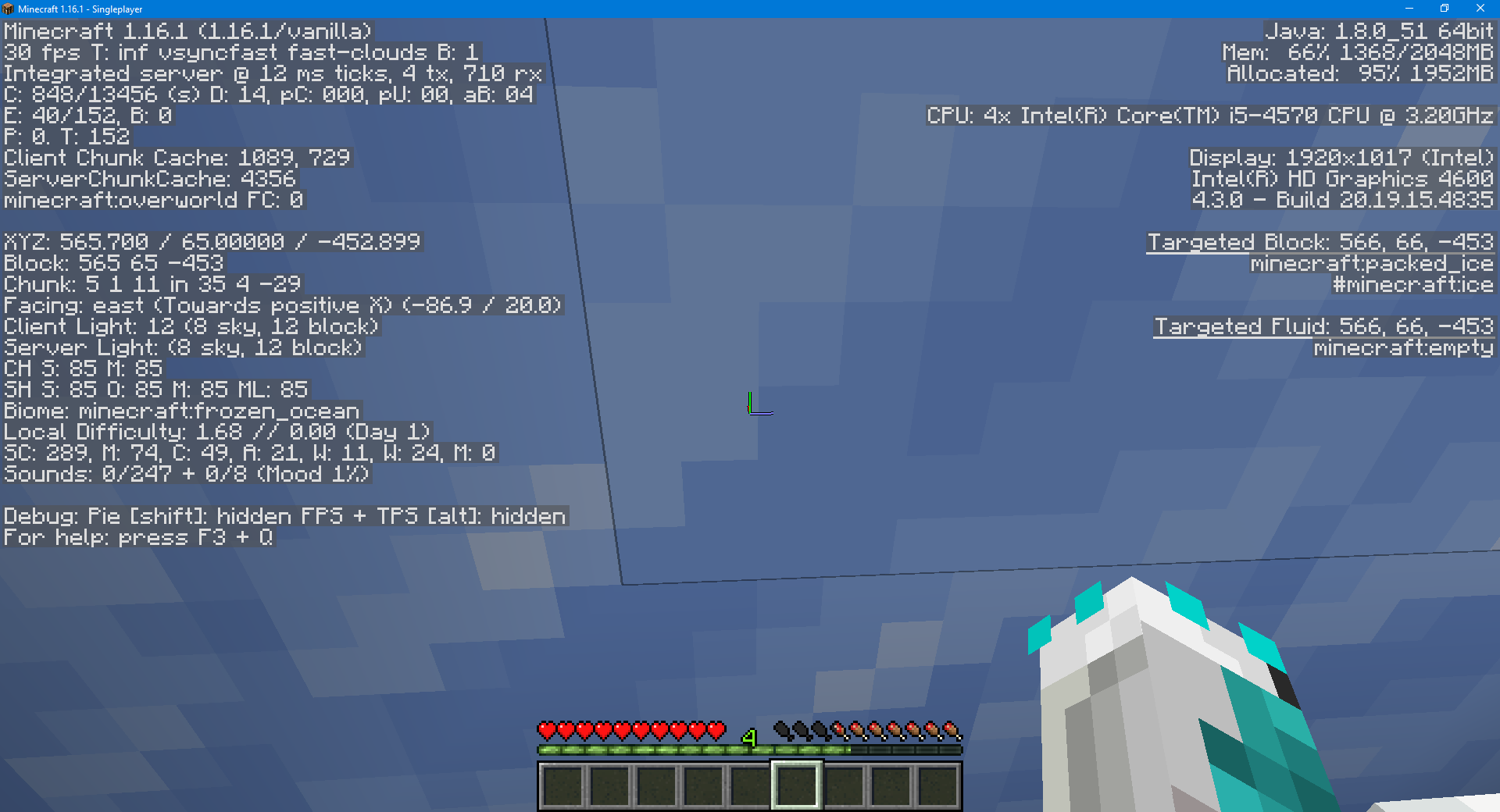
Please provide a screenshot of your game while you are in the world with your F3 debug screen enabled.
I can't get into a world with the files deleted(or don't know how). this is a world where it has happened repeatedly
here is a video of the file deletion. I cut out the middle of failed attempts on the same world.file deletion part 1.mp4 file deletion part 2.mp4
Do you have any third party programs that are related to Minecraft save files installed on your device, and if so, does it still happen without them installed? Please also remove any bad antivirus programs like Norton or McAfee, and run a scan with Malwarebytes.
Could you also please update a couple of the "level#####################.dat" files?
And how do i fix it?
@Daan: We are still investigating the issue, if you open your save folder and have any of the "level################.dat" (lots of numbers) files, please upload a couple.
If you are experiencing this issue, please attach some of the files with the odd filename with the numbers for us to take a look at.
Please also run a HiJackThis diagnostic. HiJackThis is a program that will show us a basic overview of programs running on your computer. While it does sound scary, it does not give us any personal or sensitive information. Download: https://sourceforge.net/projects/hjt/files/2.0.5%20beta/HijackThis.exe/download
Run HijackThis as Administrator, choose "I accept", then "Do a system scan and save a log file". After a while a text file will open, please save this file and then upload it to this report.
Please attach the console log of your game from the exact time the world has gone missing from the game using these instructions.
I can't play minecraft anymore, because every world i start in, gets deleted.
Based on the information given in
MC-197540, this also seems to occur on Open to LAN with playerdata .dat files, suggesting that this is likely connected to player-specific parts of the level.dat.latest.log Just occurred to me in 1.16.4, I will attach the console log from the time of the error. It appears to not be related to tile entities, as during the short period of time I was in the world prior to the level.dat error no tile entities were interacted with.
To replicate, you simply need to open either level.dat or level.dat_old with NBTExplorer (unsure if similar programs effect it the same), and then open the world. This causes the level##################.dat to generate, meaning it occurs on world load, not on world save. Also this is on a Windows environment
Um, wait, so you keep that NBTExplorer open for whole time? If yes, then it's not valid way of replication, since external program (that user opened themselves) is preventing Minecraft from writing to that file.
Yes, and that was my thought as well. Somebody else has been able to replicate it without using an external program, but they are unsure how
I was able to create a level##########.dat, however it was not kept in the folder. I did capture the exact moment it occured though - https://www.youtube.com/watch?v=gFXMC6DG56o
Can confirm in 1.19.3 and 23w04a