Loading of old worlds is temporarily disabled
Launcher works just fine but when I try to load a world all of my worlds are totally unavailable.
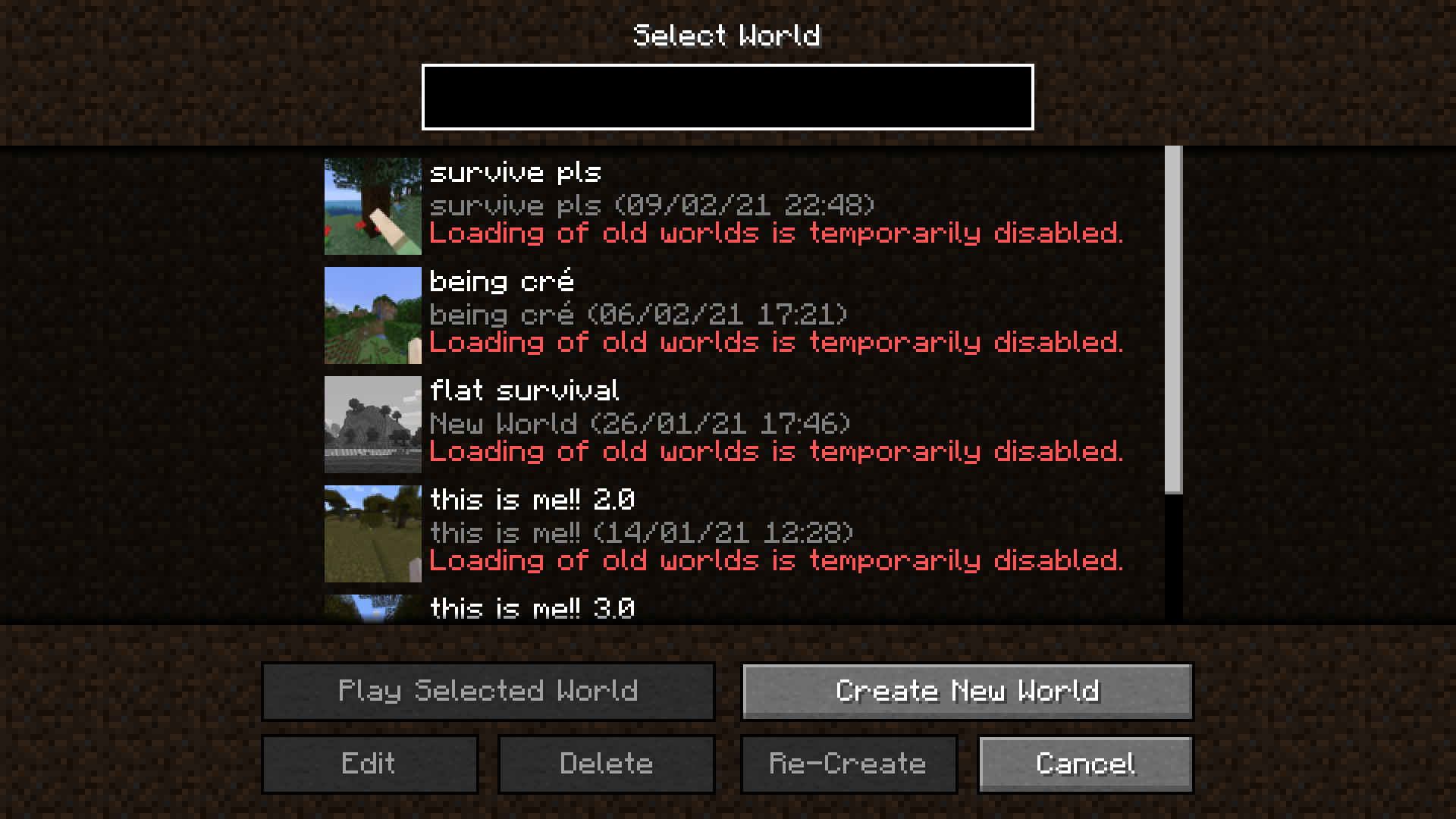
There is red text under each which states "loading of old worlds is temporarily unavailable" but I can't see any scheduled downtime on Mojang site or twitter account.
A help article I read told me to uninstall the program, clear my cache, reinstall the program and launch. I did all of that but it didn't change anything.
Another help article suggested if I have Windows 10N I might need to install a Media Features Pack. I have Windows 10 Pro so that pack is built in it seems.
Attached is a screenshot of what I'm seeing. Appreciate if you can let me know how to resolve.
Thanks a million,
Jen
Linked Issues
is duplicated by18
 MC-214886Issue opening worldsDuplicateMC-214937Launcher updated and now says wont load old worldsDuplicateMC-214960not letting me playDuplicateMC-215017can't open up my worldDuplicateMC-215018i am not able to load my old worlds in the latest snapshot 21w06aDuplicateMC-215109Upgrading an old world to 21w06a causes chunk borders that expose the voidDuplicateMC-215228Loading of Old Worlds Temporarily Disabled in SnapshotDuplicateMC-215257En mi usuario no puedo jugar en mis mundosDuplicateMC-215320Mobs, Villagers, Dogs disappearing in Minecraft... please helpDuplicateMC-215638Can' re-start world with 21s06aDuplicateMC-215945I can't load my old worlds anymore and I was trying really hard and want you to fix this pleaseDuplicateMC-216008Cant Load Old Worlds In SnapshotDuplicateMC-216100I can't access my old 1.16 worlds and create a copy for 1.17DuplicateMC-216187Loading of old worlds is temporarily disabledDuplicateMC-216189Loading old worlds temporarily disabledDuplicateMC-216193Loading of old worlds is temporarily disabledDuplicateMC-217492Possible versioning issueDuplicateMC-236648Invalid VersionDuplicate
Attachments1

Created Issue:
Loading of old worlds is temporarily disabled
Launcher works just fine but when I try to load a world all of my worlds are totally unavailable.
There is red text under each which states "loading of old worlds is temporarily unavailable" but I can't see any scheduled downtime on Mojang site or twitter account.
A help article I read told me to uninstall the program, clear my cache, reinstall the program and launch. I did all of that but it didn't change anything.
Another help article suggested if I have Windows 10N I might need to install a Media Features Pack. I have Windows 10 Pro so that pack is built in it seems.
Attached is a screenshot of what I'm seeing. Appreciate if you can let me know how to resolve.
Thanks a million,
Jen
Attachments1
![[Mod] Neko](../../../data/avatars/users/92901.png)
![[Mod] violine1101](../../../data/avatars/users/92858.png)
relates to
is duplicated by
is duplicated by
![[Mod] tryashtar](../../../data/avatars/users/41963.png)
is duplicated by
is duplicated by
is duplicated by
is duplicated by
is duplicated by
![[Mod] Chandler](../../../data/assets/gravatar/triwonder81.png)
is duplicated by
is duplicated by

is duplicated by
![[Mod] Michael Wobst](../../../data/avatars/users/37868.png)
is duplicated by
is duplicated by
is duplicated by
is duplicated by
relates to
is duplicated by
is duplicated by
Duplicate of MC-214806, WAI

look at here ---> MC-214806
Thank you for your report!
We're tracking this issue in MC-214806, so this ticket is being resolved and linked as a duplicate.
That ticket has already been resolved as working as intended, which means this is not considered a bug and won't be fixed. Please do not leave a comment on the linked ticket.
If you haven't already, you might like to make use of the search feature to see if the issue has already been mentioned.
Quick Links:
📓 Bug Tracker Guidelines – 💬 Community Support – 📧 Mojang Support
📓 Project Summary – ✍️ Feedback and Suggestions – 📖 Game Wiki
![[Bot] Arisa](../../../data/avatars/users/43007.png)
Thank you for your report!
We're tracking this issue in MC-214806, so this ticket is being resolved and linked as a duplicate.
That ticket has already been resolved as working as intended, which means this is not considered a bug and won't be fixed. Please do not leave a comment on the linked ticket.
If you haven't already, you might like to make use of the search feature to see if the issue has already been mentioned.
Quick Links:
📓 Bug Tracker Guidelines – 💬 Community Support – 📧 Mojang Support
📓 Project Summary – ✍️ Feedback and Suggestions – 📖 Game Wiki
– I am a bot. This action was performed automatically! Please report any issues on Discord or Reddit
Thank you for your report!
We're tracking this issue in MC-214806, so this ticket is being resolved and linked as a duplicate.
That ticket has already been resolved as working as intended, which means this is not considered a bug and won't be fixed. Please do not leave a comment on the linked ticket.
If you haven't already, you might like to make use of the search feature to see if the issue has already been mentioned.
Quick Links:
📓 Bug Tracker Guidelines – 💬 Community Support – 📧 Mojang Support
📓 Project Summary – ✍️ Feedback and Suggestions – 📖 Game Wiki
– I am a bot. This action was performed automatically! Please report any issues on Discord or Reddit
See MC-214806.

Duplicates MC-214806
See MC-214806. Current development versions don't allow loading old worlds. This will change at some point.
If you don't know what snapshots are, you shouldn't be playing on them.
Thank you for your report!
We're tracking this issue in MC-214806, so this ticket is being resolved and linked as a duplicate.
That ticket has already been resolved as working as intended, which means this is not considered a bug and won't be fixed. Please do not leave a comment on the linked ticket.
If you haven't already, you might like to make use of the search feature to see if the issue has already been mentioned.
Quick Links:
📓 Bug Tracker Guidelines – 💬 Community Support – 📧 Mojang Support
📓 Project Summary – ✍️ Feedback and Suggestions – 📖 Game Wiki
– I am a bot. This action was performed automatically! Please report any issues on Discord or Reddit
Works as intended MC-214806
From the changelog:
"You'll be unable to open old worlds in this snapshot as there is currently no upgrade path towards the new world height".
Thank you for your report!
We're tracking this issue in MC-214806, so this ticket is being resolved and linked as a duplicate.
That ticket has already been resolved as working as intended, which means this is not considered a bug and won't be fixed. Please do not leave a comment on the linked ticket.
If you haven't already, you might like to make use of the search feature to see if the issue has already been mentioned.
Quick Links:
📓 Bug Tracker Guidelines – 💬 Community Support – 📧 Mojang Support
📓 Project Summary – ✍️ Feedback and Suggestions – 📖 Game Wiki
As stated this is MC-214806
![[Mod] Avoma](../../../data/avatars/users/86198.png)
This report appears to be a duplicate of MC-214806, which was later resolved as, "Works As Intended". You are experiencing this issue, as the world height + depth has changed as of snapshot 21w06a. Please see the parent ticket for further details, regarding this problem.

Duplicate of MC-214806, which is working as intended. Mojang will definitely enabled it a again, since it is only temporarily disabled, but I can't say when, since I am not mojang.
Duplicate of MC-214806, which is working as intended. Mojang will definitely enabled it a again, since it is only temporarily disabled, but I can't say when, since I am not mojang.
Duplicate of MC-214806, which is working as intended. Mojang will definitely enabled it a again, since it is only temporarily disabled, but I can't say when, since I am not mojang.
Thank you for your report!
We're tracking this issue in MC-214806, so this ticket is being resolved and linked as a duplicate.
That ticket has already been resolved as working as intended, which means this is not considered a bug and won't be fixed. Please do not leave a comment on the linked ticket.
If you haven't already, you might like to make use of the search feature to see if the issue has already been mentioned.
Quick Links:
📓 Bug Tracker Guidelines – 💬 Community Support – 📧 Mojang Support
📓 Project Summary – ✍️ Feedback and Suggestions – 📖 Game Wiki
– I am a bot. This action was performed automatically! Please report any issues on Discord or Reddit
This is a duplicate of MC-214806, an update path will be added in the future.

Thank you for your report!
We're tracking this issue in MC-214806, so this ticket is being resolved and linked as a duplicate.
That ticket has already been resolved as working as intended, which means this is not considered a bug and won't be fixed. Please do not leave a comment on the linked ticket.
If you haven't already, you might like to make use of the search feature to see if the issue has already been mentioned.
Quick Links:
📓 Bug Tracker Guidelines – 💬 Community Support – 📧 Mojang Support
📓 Project Summary – ✍️ Feedback and Suggestions – 📖 Game Wiki
– I am a bot. This action was performed automatically! Please report any issues on Discord or Reddit

Thank you for your report!
We're tracking this issue in MC-214806, so this ticket is being resolved and linked as a duplicate.
That ticket has already been resolved as working as intended, which means this is not considered a bug and won't be fixed. Please do not leave a comment on the linked ticket.
If you haven't already, you might like to make use of the search feature to see if the issue has already been mentioned.
Quick Links:
📓 Bug Tracker Guidelines – 💬 Community Support – 📧 Mojang Support
📓 Project Summary – ✍️ Feedback and Suggestions – 📖 Game Wiki
– I am a bot. This action was performed automatically! The ticket was resolved by one of our moderators, and I left this message to give more information to you.
This is intended, the world height has no method of being updated to the new one yet, see the changelog
This is likely intended due to the world height change
See https://www.minecraft.net/en-us/article/minecraft-snapshot-21w06a
If you don't know what snapshots are, you should change your version to 1.16.5 (however you won't be able to load your worlds there either).
Is there an estimated eta on when the issue will be resolved? Whether it be for the snapshot 21w06a or 1.16.15
This blocks MC-383.
It will be fixed before 1.17 is released.
Is this something permanent? I spent all of 2020 with my kids building up our old world. But we haven't played for over a month because the worlds are now temporarily disabled.
I'd load our world in a previous snapshot. Is that possible?
Luckily, it isn't permanent. It says that it is temporary.
True. It does say that. But is it true, really?
I don't mind if, at some point in my world's map, there's some sort of a dropoff. I can work around it. Actually, it sounds like an interesting geographical feature I could work with. Mojang, take note! We might not mind the drop!
How this is currently implemented in Bedrock Edition is that 64 layers of Bedrock blocks (y = -1 to y = -64) are generated under old chunks. There is no surface level drop off. Java will probably do something similar.