In the world selection screen, world names/versions/timestamps can overflow the list to the right
The bug
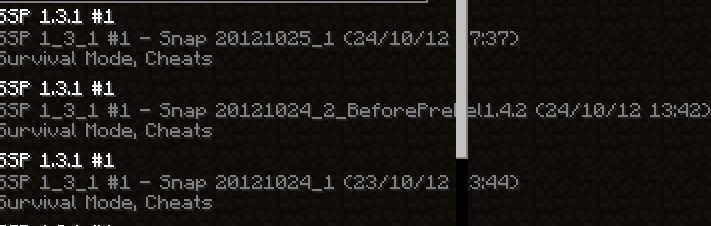
The scrollbar in the listing of worlds to select for single player is rendered over the names/version names/timestamps of the worlds.
How to reproduce
- Open Minecraft, and navigate to the Singleplayer menu, then to the Create World menu
- For the world's name, use a very long world name, or test this issue in a version with a longer name (like 1.16.3 Release Candidate 1).
- Create the world
- Save and quit to title from the world, then navigate back to the Singleplayer menu
 The directory/version/timestamp line of the world you created passes the scroll bar
Expected behavior
The scrollbar to not obscure part of the name, either by being rendered below (but still taking mouse input to scroll) or use a different color for the text with contrast against the scroll bar.
Linked Issues
is duplicated by16
 MC-1560281.14.4 version in world list overlaps with scroll barDuplicateMC-167773Scrollbar shows up on top of world descriptionDuplicateMC-211343World version name goes through and past the scrollbarDuplicateMC-226584World description overwrites the selection boxDuplicateMC-227318Render error in statistics menuDuplicateMC-227640Description Past Slider BarDuplicateMC-253681the "outdated" text on the select world screen is cut off when too longDuplicateMC-260163Text in single player world select can be blocked and run off screen.DuplicateMC-260164Text in single player world select can be blocked and run off screen.DuplicateMC-260165Text in single player world select can be blocked and run off screen.DuplicateMC-263362Scroll bar covers description text on "Select World" screenDuplicateMC-267082Text glitch on world screenDuplicateMC-267668World Description Can Go Pass The ScrollerDuplicateMC-268547world names overflows out the screenDuplicateMC-268798Text in new menu goes through the skillet of the sliderDuplicateMC-268966Scroll Bar hiding version partiallyDuplicate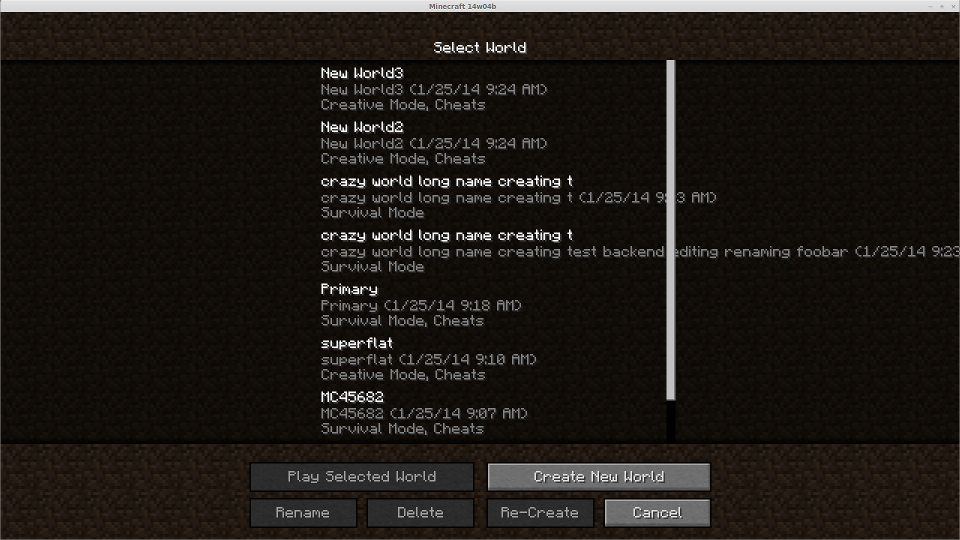

- Unresolved
![[Mod] markderickson](../../../data/avatars/users/18946.svg) [Mod] markderickson
[Mod] markderickson Richard Cox
- 34
- 18
- Confirmed
 Low
Low- Platform
- UI
- scroll-bar ui-colours world-selection
1.4.2 - 25w05a
1.4.2 1.4.7 13w02b 1.5.1 1.5.2 13w18b 13w18c 13w19a 13w21a 1.6.1 1.6.2 1.6.4 13w38a 13w38b 13w38c 13w39b 13w41a 13w41b 13w42a 13w42b 1.7.4 14w02c 14w03b 14w04a 14w04b 14w11b 1.16.3 1.16.4-pre1 1.16.4-pre2 1.16.4-rc1 1.16.4 20w45a 20w46a 20w48a 20w49a 20w51a 21w03a 1.16.5-rc1 1.16.5 21w05a 21w05b 21w08b 21w10a 21w11a 21w13a 21w20a 1.17-pre1 1.17-rc1 1.17 1.17.1 21w39a 21w42a 1.18-pre4 1.18-pre5 1.18-pre8 1.18.1 22w03a 22w06a 1.18.2 22w14a 1.19-pre1 1.19 1.19.1-rc1 1.19.1 1.19.2 22w42a 1.19.3-pre2 1.19.3 23w03a 23w04a 1.19.4 23w18a 1.20-pre5 1.20-rc1 1.20 1.20.1 23w31a 23w32a 1.20.2-pre2 1.20.2 1.20.3-pre4 1.20.3-rc1 1.20.4 23w51b 24w04a 24w06a 24w09a 1.21 24w33a 1.21.1 24w40a 1.21.4 25w05a
Created Issue:
In World Listing Scrollbar Obscures The World Names/Timestamps
The scrollbar in the listing of worlds to select for single player is rendered over the names/timestamps of the worlds.
Recreate: Use a very long world name, or rename the save folder to be long.
Expected: The scrollbar to not obscure part of the name, either by being rendered below (but still taking mouse input to scroll) or use a different colour for the text with contrast against the scroll bar.
Environment
Win7x64/J7u9x64
Attachments1


![[Mod] Ezekiel (ezfe)](../../../data/assets/gravatar/ezekielelin.jpeg)
Is this still a concern in the latest Minecraft version 14w02c? If so, please update the affected versions in order to best aid Mojang ensuring bugs are still valid in the latest releases/pre-releases.
Is this still a concern in the latest Minecraft version 14w11b? If so, please update the affected versions in order to best aid Mojang ensuring bugs are still valid in the latest releases/pre-releases.
![[Mod] Neko](../../../data/avatars/users/92901.png)
is duplicated by
![[Mod] Michael Wobst](../../../data/avatars/users/37868.png)
is duplicated by
![[Mojang] Adrian Östergård](../../../data/assets/gravatar/nighter.jpeg) Low
Low![[Helper] Jack McKalling](../../../data/avatars/users/92859.png)
Win7x64/J7u9x64
![[Mod] Chandler](../../../data/assets/gravatar/triwonder81.png)
![[Mod] SPGoding](../../../data/avatars/users/44622.png)
The scrollbar in the listing of worlds to select for single player is rendered over the names/version names/timestamps of the worlds.
Recreate: Use a very long world name, or rename the save folder to be long, or a world created in a version with a longer name (like 1.16.3 Release Candidate 1).
Expected: The scrollbar to not obscure part of the name, either by being rendered below (but still taking mouse input to scroll) or use a different colour for the text with contrast against the scroll bar.
In World Listing Scrollbar Obscures The World Names/Version Names/Timestamps

![[Mojang] slicedlime](../../../data/assets/gravatar/slicedlime.jpeg)
![[Mod] violine1101](../../../data/avatars/users/92858.png)
is duplicated by
![[Bot] Arisa](../../../data/avatars/users/43007.png)
InWorld Listing Scrollbar Obscures The WorldNames/VersionNames/TimestampsIn the world selection screen, world names/versions/timestamps can overflow the list to the right
relates to
is duplicated by
is duplicated by
is duplicated by
The scrollbar in the listing of worlds to select for single player is rendered over the names/version names/timestamps of the worlds.
Recreate: Use a very long world name, or rename the save folder to be long, or a world created in a version with a longer name (like 1.16.3 Release Candidate 1).
Expected:The scrollbar to not obscure part of the name, either by being rendered below (but still taking mouse input to scroll) or use a different colour for the text with contrast against the scroll bar.The bug
The scrollbar in the listing of worlds to select for single player is rendered over the names/version names/timestamps of the worlds.
How to reproduce
- Open Minecraft, and navigate to the Singleplayer menu, then to the Create World menu
- For the world's name, use a very long world name, or test this issue in a version with a longer name (like 1.16.3 Release Candidate 1).
- Create the world
- Save and quit to title from the world, then navigate back to the Singleplayer menu
Expected behavior
The scrollbar to not obscure part of the name, either by being rendered below (but still taking mouse input to scroll) or use a different color for the text with contrast against the scroll bar.
![[Mod] ampolive](../../../data/avatars/users/18949.svg)
relates to
is duplicated by
![[Mod] Avoma](../../../data/avatars/users/86198.png)
is duplicated by
![[Helper] Johnibur](../../../data/avatars/users/28381.png)
is duplicated by
is duplicated by
![[Mod] turbo](../../../data/avatars/users/92867.png)
is duplicated by
![[Mod] j_p_smith](../../../data/avatars/users/92851.png)
is duplicated by
is duplicated by
is duplicated by
![[Mod] Jarl-Penguin](../../../data/avatars/users/92849.png)
is duplicated by
is duplicated by
Relates to MC-383.
Some mob names are long enough to be pushed under the scroll bar and end up occluded by it.
Thank you for your report!
We're actually already tracking this issue at MC-383, so we will resolve and link this ticket as a Duplicate.
This issue has currently no plan of being fixed.
If you haven't already, you might like to make use of the search feature to see if the issue has already been mentioned.
Quick Links:
📓 Issue Guidelines – 💬 Community Support – 📧 Customer Support – 📖 Game Wiki
Hello! This looks to be a duplicate of MC-383.
Thank you for your report!
We're tracking this issue in MC-383, so this ticket is being resolved and linked as a duplicate.
If you would like to add a vote and any extra information to the main ticket it would be appreciated.
If you haven't already, you might like to make use of the search feature to see if the issue has already been mentioned.
Quick Links:
📓 Bug Tracker Guidelines – 💬 Community Support – 📧 Mojang Support
📓 Project Summary – ✍️ Feedback and Suggestions – 📖 Game Wiki
This blocks MC-383.
Relates to MC-383.
Duplicate of MC-383.
Thank you for your report!
We're tracking this issue in MC-383, so this ticket is being resolved and linked as a duplicate.
If you would like to add a vote and any extra information to the main ticket it would be appreciated.
If you haven't already, you might like to make use of the search feature to see if the issue has already been mentioned.
Quick Links:
📓 Bug Tracker Guidelines – 💬 Community Support – 📧 Mojang Support
📓 Project Summary – ✍️ Feedback and Suggestions – 📖 Game Wiki
– I am a bot. This action was performed automatically! If you think it was incorrect, please notify us on Discord or Reddit
Duplicate of MC-383.
Thank you for your report!
We're tracking this issue in MC-383, so this ticket is being resolved and linked as a duplicate.
If you would like to add a vote and any extra information to the main ticket it would be appreciated.
If you haven't already, you might like to make use of the search feature to see if the issue has already been mentioned.
Quick Links:
📓 Bug Tracker Guidelines – 💬 Community Support – 📧 Mojang Support
📓 Project Summary – ✍️ Feedback and Suggestions – 📖 Game Wiki
– I am a bot. This action was performed automatically! If you think it was incorrect, please notify us on Discord or Reddit
Thank you for your report!
We're tracking this issue in MC-383, so this ticket is being resolved and linked as a duplicate.
If you would like to add a vote and any extra information to the main ticket it would be appreciated.
If you haven't already, you might like to make use of the search feature to see if the issue has already been mentioned.
Quick Links:
📓 Bug Tracker Guidelines – 💬 Community Support – 📧 Mojang Support
📓 Project Summary – ✍️ Feedback and Suggestions – 📖 Game Wiki
– I am a bot. This action was performed automatically! If you think it was incorrect, please notify us on Discord or Reddit
Thank you for your report!
We're tracking this issue in MC-383, so this ticket is being resolved and linked as a duplicate.
If you would like to add a vote and any extra information to the main ticket it would be appreciated.
If you haven't already, you might like to make use of the search feature to see if the issue has already been mentioned.
Quick Links:
📓 Bug Tracker Guidelines – 💬 Community Support – 📧 Mojang Support
📓 Project Summary – ✍️ Feedback and Suggestions – 📖 Game Wiki
Thank you for your report!
We're tracking this issue in MC-383, so this ticket is being resolved and linked as a duplicate.
If you would like to add a vote and any extra information to the main ticket it would be appreciated.
If you haven't already, you might like to make use of the search feature to see if the issue has already been mentioned.
Quick Links:
📓 Bug Tracker Guidelines – 💬 Community Support – 📧 Mojang Support
📓 Project Summary – ✍️ Feedback and Suggestions – 📖 Game Wiki
Thank you for your report!
We're tracking this issue in MC-383, so this ticket is being resolved and linked as a duplicate.
If you would like to add a vote and any extra information to the main ticket it would be appreciated.
If you haven't already, you might like to make use of the search feature to see if the issue has already been mentioned.
Quick Links:
📓 Bug Tracker Guidelines – 💬 Community Support – 📧 Mojang Support
📓 Project Summary – ✍️ Feedback and Suggestions – 📖 Game Wiki
Can confirm this was fixed for resource packs and data packs in 20w30a. The world selection screen issue is MC-383.
Thank you for your report!
We're tracking this issue in MC-383, so this ticket is being resolved and linked as a duplicate.
If you would like to add a vote and any extra information to the main ticket it would be appreciated.
If you haven't already, you might like to make use of the search feature to see if the issue has already been mentioned.
Quick Links:
📓 Bug Tracker Guidelines – 💬 Community Support – 📧 Mojang Support (Technical Issues) – 📧 Microsoft Support (Account Issues)
📓 Project Summary – ✍️ Feedback and Suggestions – 📖 Game Wiki
Thank you for your report!
We're tracking this issue in MC-383, so this ticket is being resolved and linked as a duplicate.
If you would like to add a vote and any extra information to the main ticket it would be appreciated.
If you haven't already, you might like to make use of the search feature to see if the issue has already been mentioned.
Quick Links:
📓 Bug Tracker Guidelines – 💬 Community Support – 📧 Mojang Support (Technical Issues) – 📧 Microsoft Support (Account Issues)
📓 Project Summary – ✍️ Feedback and Suggestions – 📖 Game Wiki
Thank you for your report!
We're actually already tracking this issue in MC-383, so this ticket is being resolved and linked as a duplicate.
If you would like to add a vote or any additional information to the main ticket it would be appreciated.
Please be sure to use the search feature before creating a ticket to see if the issue has already been reported.
Quick Links:
📗 Tracker Guidelines | 🛠 Community Support | 📧 Mojang Support | 🔑 Account Support | ✍️ Feedback Discord
Thank you for your report!
We're tracking this issue in MC-383, so this ticket is being resolved and linked as a duplicate.
If you would like to add a vote and any extra information to the main ticket it would be appreciated.
If you haven't already, you might like to make use of the search feature to see if the issue has already been mentioned.
Quick Links:
📓 Bug Tracker Guidelines – 💬 Community Support – 📧 Mojang Support (Technical Issues) – 📧 Microsoft Support (Account Issues)
📓 Project Summary – ✍️ Feedback and Suggestions – 📖 Game Wiki
– I am a bot. This action was performed automatically! The ticket was resolved by one of our moderators, and I left this message to give more information to you.
Thank you for your report!
We're actually already tracking this issue in MC-383, so this ticket is being resolved and linked as a duplicate.
If you would like to add a vote or any additional information to the main ticket it would be appreciated.
Please be sure to use the search feature before creating a ticket to see if the issue has already been reported.
Quick Links:
📗 Tracker Guidelines | 🛠 Community Support | 📧 Mojang Support | 🔑 Account Support | ✍️ Feedback Discord
Don't make the name so long then.
Minecraft GUI on the Multiplayer and Singleplayer screens has never resized.
Confirmed.
Ok, retested on 14w04b when full-screen. The first "crazy world long name" was created through the front end hitting the world name character limit. You can see the name there fits, but the date stamp on it overflows the scroll bar. The one just below it I renamed the save folder and it overflowed everything.
Is this still a concern in the latest Minecraft version 14w30c? If so, please update the affected versions in order to best aid Mojang ensuring bugs are still valid in the latest releases/pre-releases.
Hi! I'd like to request ownership of this report so I can continue to update it.
Can confirm in 21w05b.
I cannot reproduce in 21w06a due to long version names not showing at all, as old versions can no longer be opened. This is temporary (please don't resolve as Cannot Reproduce/Fixed)!
I've found a way to reproduce the issue. Sorry for the missing updates.
Can confirm in 1.17.
Can confirm in 1.17.1.
Affects 1.18.1
Affects 1.18.2
Can confirm in 1.19.
Can confirm in 1.19.1.
Can confirm in 1.19.2.
Can confirm in 23w03a
Can confirm in 23w04a
Can confirm in 23w06a
Can confirm in 23w18a
Can confirm in 1.20.3 Release Candidate 1
Can confirm in 24w33a
Can confirm in 24w34a