 MC-245937
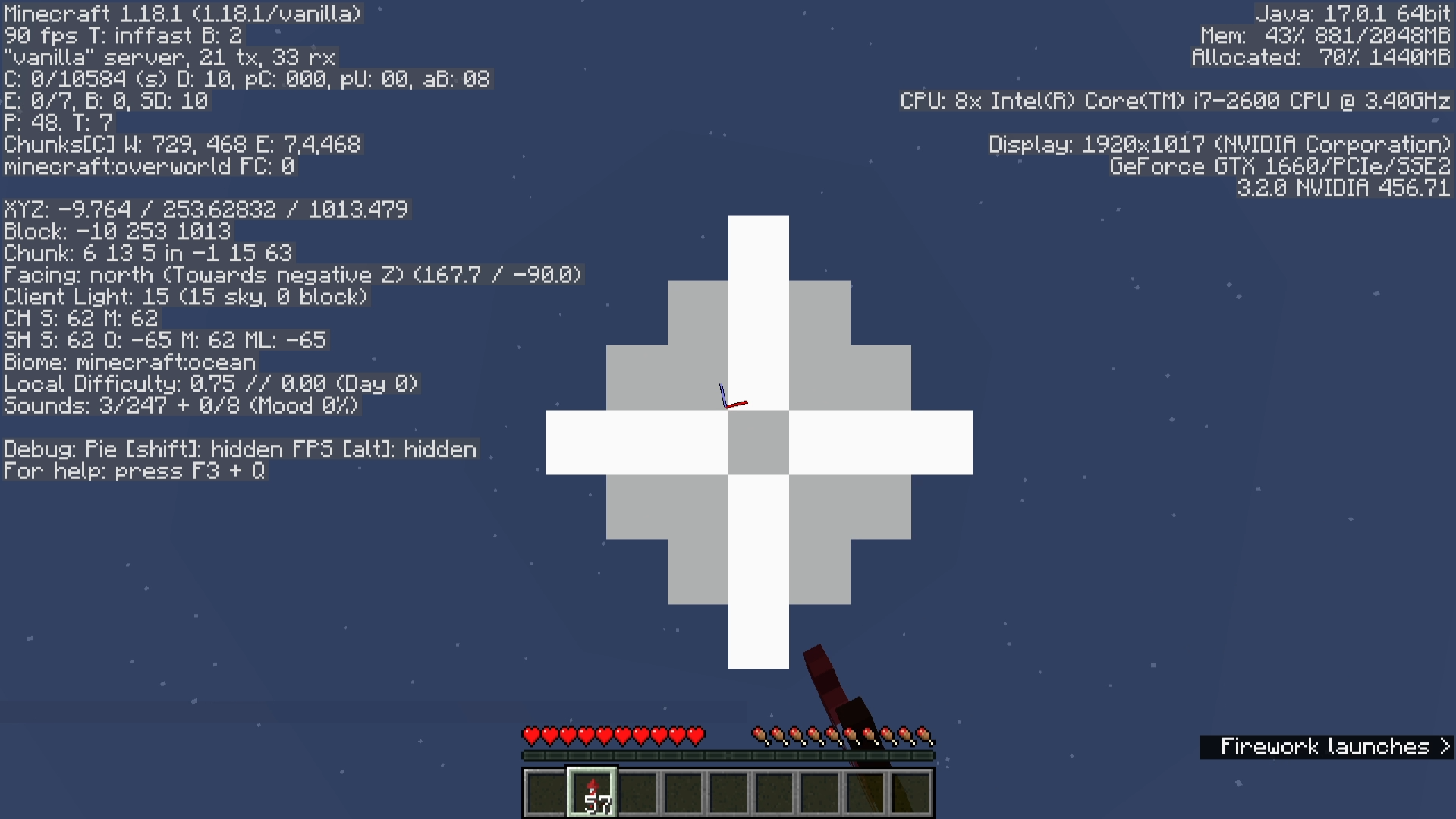
Flashing particles when boosting upwards with firework rockets
Reproduction steps:
- Equip elytra and obtain several fireworks
- Look directly upwards
- Take off and use fireworks to boost straight up
Effect:
- Particles spawn and repeatedly flash on screen
Expected:
- No photo-sensitivity issues are present in the game
Note: Turning particles to minimal removes the offending particles, but that is arguably a workaround rather than a proper option.
Example: https://clips.twitch.tv/TameLovelyHorseNomNom-yZTMoeeoQys3jaOG
Linked Issues
 Normal
Attachments2
![[Mod] Avoma](../../../data/avatars/users/86198.png)
![[Mojang] slicedlime](../../../data/assets/gravatar/slicedlime.jpeg)
 Important
Created Issue:
Flashing Particles when boosting upwards with fireworks
Reproduction steps:
- Equip elytra and obtain several fireworks
- Look directly upwards
- Take off and use fireworks to boost straight up
Effect:
- Particles spawn and repeatedly flash on screen
Expected:
- No flashing lights are present in the game
Note: Turning particles to minimal removes the offending particles, but that is arguably a workaround rather than a proper option.
Example: https://clips.twitch.tv/TameLovelyHorseNomNom-yZTMoeeoQys3jaOG
Reproduction steps:
- Equip elytra and obtain several fireworks
- Look directly upwards
- Take off and use fireworks to boost straight up
Effect:
- Particles spawn and repeatedly flash on screen
Expected:
- No
flashing lights are present in the gameNote: Turning particles to minimal removes the offending particles, but that is arguably a workaround rather than a proper option.
Example: https://clips.twitch.tv/TameLovelyHorseNomNom-yZTMoeeoQys3jaOG
Reproduction steps:
- Equip elytra and obtain several fireworks
- Look directly upwards
- Take off and use fireworks to boost straight up
Effect:
- Particles spawn and repeatedly flash on screen
Expected:
- No photo-sensitivity issues are present in the game
Note: Turning particles to minimal removes the offending particles, but that is arguably a workaround rather than a proper option.
Example: https://clips.twitch.tv/TameLovelyHorseNomNom-yZTMoeeoQys3jaOG
![[Mod] Anthony Cicinelli](../../../data/avatars/users/10122.svg)
![[Mod] ampolive](../../../data/avatars/users/18949.svg)
FlashingParticles when boosting upwards with fireworksFlashing particles when boosting upwards with firework rockets
![[Mod] SPGoding](../../../data/avatars/users/44622.png)
relates to
![[Mojang] Timur Nazarov](../../../data/avatars/users/18945.svg) [Mojang] Timur Nazarov
[Mojang] Timur Nazarov![[Bot] Piston](../../../data/avatars/users/31202.png)
relates to
I am able to reproduce this issue in 1.18.1. As stated by [Mojang] slicedlime in MC-245937, no photo-sensitivity issues should be present in the game.
No photo-sensitivity issues are present in the game
You can use the following command to reproduce this.
/setblock ~ ~ ~ minecraft:repeating_command_block{Command:"/effect give @p minecraft:blindness 1 5 true",auto:1b}
![[Helper] lillybeacon](../../../data/avatars/users/93893.png)
When you fly with an elytra and boost with firework rockets, the particles appear to show on your feet instead of on your hand where you hold your firework rockets. This was fixed on Java (MC-245937), and this is considered a parity issue.
How to Reproduce
Fly with an elytra and boost with firework rockets in third person.
Observed Result
The particles appear on your feet.
Expected Result
The particles appear on your hand where you hold your firework rockets.
Thank you for your report!
However, this issue is Working as Intended.
The report you have submitted is working as intended: see MC-245937 and MC-248532.
Please note, that mechanics of the game may change between updates.
Things such as graphics, sounds, world creation, biomes, redstone, villagers, and animals may not work the same in current versions.
Full Version History – Snapshot Version History – Feature Requests and Suggestions
Quick Links:
📓 Bug Tracker Guidelines – 💬 Community Support – 📧 Mojang Support
📓 Project Summary – ✍️ Feedback and Suggestions – 📖 Game Wiki
The Bug:
The pulsating of the night vision effect isn't accessible-friendly.
When the night vision effect is low in duration, the sky's brightness pulsates, thus in some cases creating a distorting inconvenience for players, especially those who suffer from photosensitive epilepsy.
The in-game additions of the "Hide Lighting Flashes" button and the "Darkness Pulsing" slider heavily suggest that Mojang aims to make the game more accessible to those who suffer from photosensitive epilepsy and other similar problems. This concept is also reinforced by the triaging and fixing of bug reports such as MC-221686, MC-245937, MC-253881, MC-253367, and MC-253968. Additionally, here's a quote from Mojang Studios employee, [Mojang] slicedlime on MC-245937, which further reinforces the same concept as mentioned above.
No photo-sensitivity issues are present in the game
Steps to Reproduce:
- Set the time to "midnight".
/time set midnight
- Give yourself the night vision effect with a low duration.
/effect give @s minecraft:night_vision 10 0
- Observe how the sky flashes and how there's no way to stop this from happening, thus potentially harming those who suffer from photosensitive epilepsy and other similar problems.
Observed Behavior:
The pulsating of the night vision effect isn't accessible-friendly and cannot be disabled, thus in some cases creating a distorting inconvenience for players, especially those who suffer from photosensitive epilepsy.
Expected Behavior:
There should be an option to control if or how much the night vision effect can make the sky pulsate.
The Bug:
The damage tilt effect isn't accessible-friendly.
When you take damage, the damage tilt animation is played. This basically shakes your screen. Due to the fix of MC-26678, the damage tilt now shows the direction of incoming damage and in some cases, this causes the screen to violently shake, thus potentially creating a distorting inconvenience for players since there is currently no way to disable this.
The in-game additions of the "Distortion Effects" slider and the "FOV Effects" slider heavily suggest that Mojang aims to make the game more accessible for audiences of any kind. The concept of accessibility is also reinforced by the triaging and fixing of bug reports such as MC-221686, MC-245937, MC-253881, MC-253367, and MC-253968. This persuades me to believe that the distortion severity of the damage tilt effect should be able to be controlled.
Steps to Reproduce:
- Give yourself the resistance effect and summon a zombie by using the commands provided below.
/effect give @s minecraft:resistance 999999 255 true/summon minecraft:zombie ~ ~ ~ {ArmorItems:[{},{},{},{id:"minecraft:diamond_helmet",Count:1b}]} - Allow the zombie to attack you and watch closely as the damage tilt animation is played.
- Observe how the screen harshly jerks and how there's no way to stop this from happening.
Observed Behavior:
The damage tilt effect isn't accessible-friendly and cannot be disabled, thus in some cases creating a distorting inconvenience for players.
Expected Behavior:
There should be an option to control if or how much the damage tilt effect can make the screen shake.
The Bug:
Text scrolling speed isn't accessible-friendly.
In 23w06a, text scrolling was added to fix issues where text would be displayed outside of their buttons. This feature is really neat, however, in some cases where the given text is really long, it can scroll at a notably fast rate therefore making it barely legible, especially to individuals that suffer from dyslexia. While it's true that the fixing of MC-259893 would resolve a large portion of this core problem, remnants of it would still remain. Currently, the speed at which text scrolls is determined by how long the text is and there is currently no way to alter it.
The in-game additions of the "Distortion Effects" slider and the "FOV Effects" slider heavily suggest that Mojang aims to make the game more accessible for audiences of any kind. The concept of accessibility is also reinforced by the triaging and fixing of bug reports such as MC-221686, MC-245937, MC-253881, MC-253367, MC-253968, and MC-259197. This persuades me to believe that speed of text scrolling should be able to be controlled.
Steps to Reproduce:
- Change your language to one that consists of long pieces of text, for example, Catalan (Català).
- Navigate to your video settings and watch the speed at which text scrolls within buttons and sliders.
- Navigate to your accessibility settings and observe how there's no option to control the speed at which the text scrolls.
Observed Behavior:
Text scrolling speed isn't accessible-friendly and cannot be controlled, thus in some cases creating an inconvenience for players, especially to those for suffer from dyslexia.
Expected Behavior:
There should be an option to control the speed of text scrolling.
I can also confirm this behavior in 1.18.1. This issue is occurring because when you use a firework rocket to receive a boost when flying, the particles are summoned just beneath your hitbox and since your light of sight is positioned more towards your feet when gliding with elytra ( MC-245937.png
MC-100008), the particles appear extremely close up to the camera in first person when flying upwards, resulting in this problem occurring.MC-245937.mp4
Relates to MC-144069.
Kinda fixed in 22w06a, but there's still a particle on screen off to the side a bit, on the side where you are holding the firework.
It is fixed in 22w06a. The particle is now positioned in a place where it doesn’t take up most of the screen and also flash when flying upwards, which is uncomfortable to look at. The fix makes it only take up a very small amount of your screen and is also the case when looking straight up or down. It is also implemented in a way that has to be intentional; if you have a firework in your off hand then the particles will be at your off hand.