 MC-246224
The top face textures of cauldrons, composters, and hoppers are misaligned
The Bug:
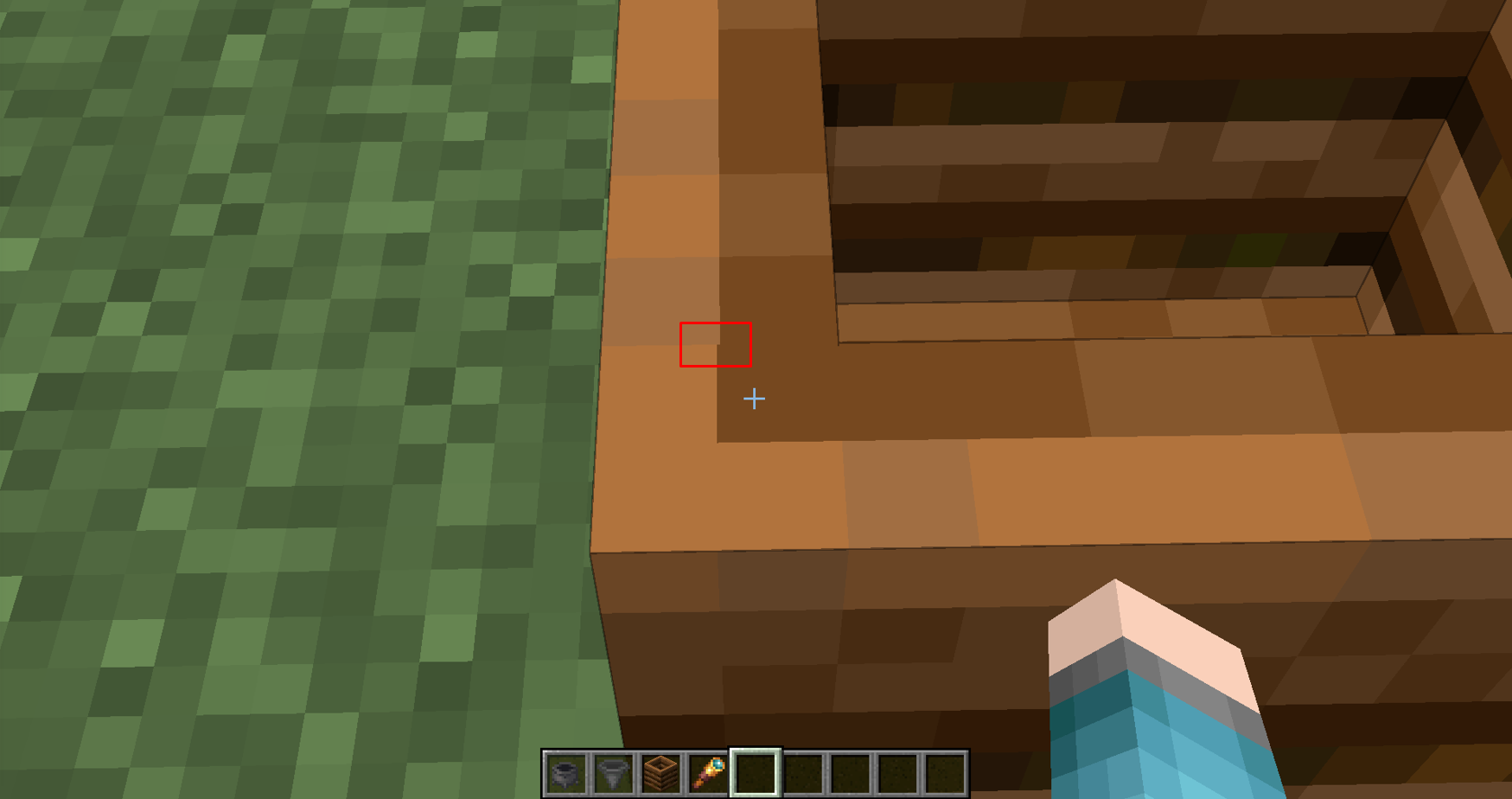
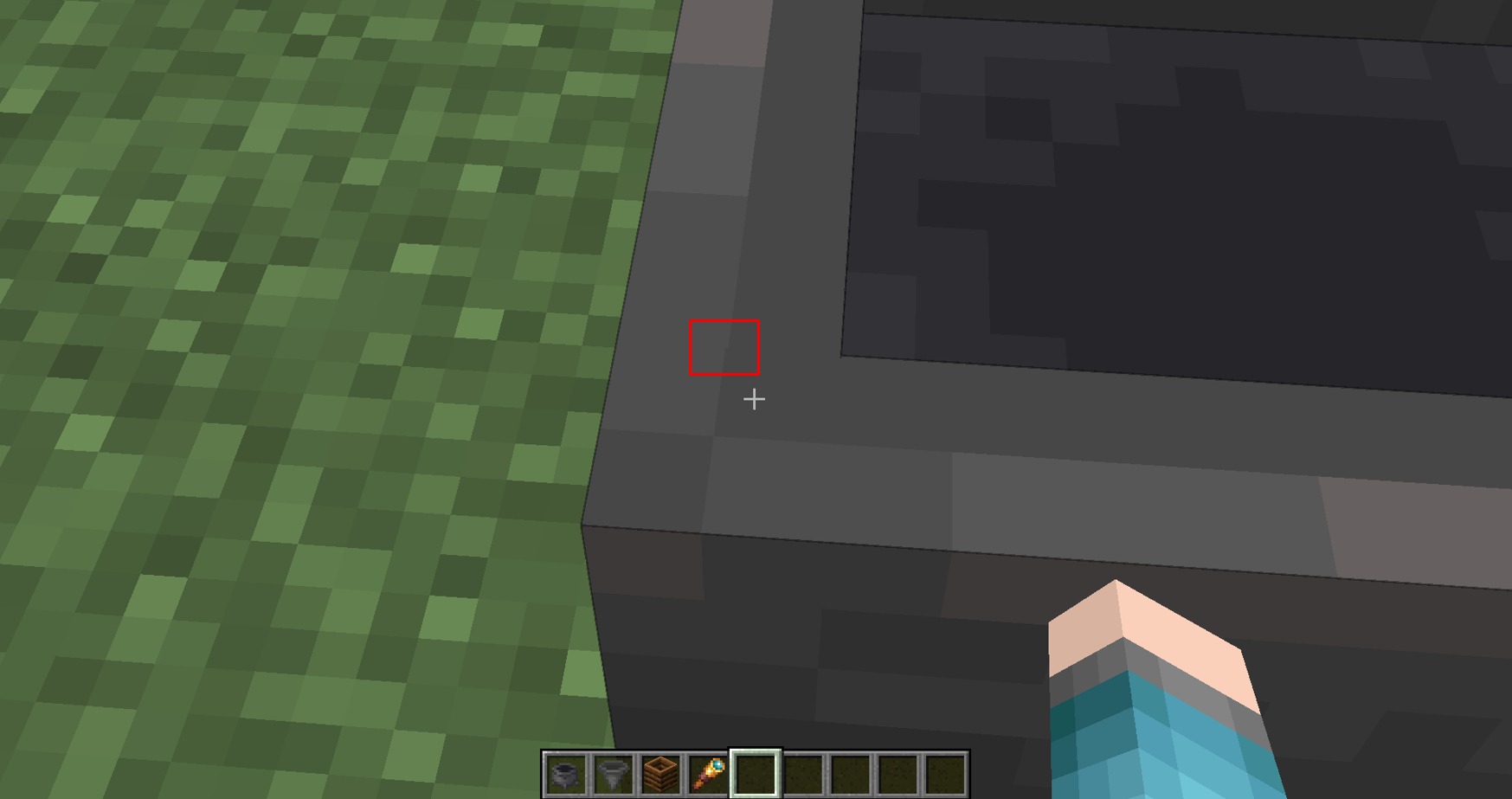
The top face textures of cauldrons, composters, and hoppers are misaligned.
Steps to Reproduce:
- Place down a cauldron, composter, or hopper.
- Look around the corners of the block's top face texture, (use a spyglass if necessary).
- Take note as to whether or not the top face textures of cauldrons, composters, and hoppers are misaligned.
Observed Behavior:
Pixels within the textures don't line up correctly and look odd.
Expected Behavior:
Pixels would be aligned correctly.
Linked Issues
is duplicated by2
 Important
![[Mod] Avoma](../../../data/avatars/users/86198.png)

Created Issue:
The top face textures of cauldrons, composters, and hoppers are misaligned
The Bug:
The top face textures of cauldrons, composters, and hoppers are misaligned.
Steps to Reproduce:
- Place down a cauldron, composter, or hopper.
- Look around the corners of the block's top face texture.
- Take note as to whether or not some pixels on the top face textures of cauldrons, composters, and hoppers aren't aligned correctly.
Observed Behavior:
Pixels within the textures don't line up correctly and look add.
Expected Behavior:
Pixels would be aligned correctly.
The Bug:
The top face textures of cauldrons, composters, and hoppers are misaligned.
Steps to Reproduce:
- Place down a cauldron, composter, or hopper.
- Look around the corners of the block's top face texture.
- Take note as to whether or not
some pixels onthe top face textures of cauldrons, composters, and hoppers aren'talignedcorrectly.Observed Behavior:
Pixels within the textures don't line up correctly and look add.
Expected Behavior:
Pixels would be aligned correctly.
The Bug:
The top face textures of cauldrons, composters, and hoppers are misaligned.
Steps to Reproduce:
- Place down a cauldron, composter, or hopper.
- Look around the corners of the block's top face texture, (use a spyglass if necessary).
- Take note as to whether or not the top face textures of cauldrons, composters, and hoppers are misaligned.
Observed Behavior:
Pixels within the textures don't line up correctly and look add.
Expected Behavior:
Pixels would be aligned correctly.
MC-246224.png
![[Mod] Michael Wobst](../../../data/avatars/users/37868.png)
The Bug:
The top face textures of cauldrons, composters, and hoppers are misaligned.
Steps to Reproduce:
- Place down a cauldron, composter, or hopper.
- Look around the corners of the block's top face texture, (use a spyglass if necessary).
- Take note as to whether or not the top face textures of cauldrons, composters, and hoppers are misaligned.
Observed Behavior:
Pixels within the textures don't line up correctly and look
add.Expected Behavior:
Pixels would be aligned correctly.
The Bug:
The top face textures of cauldrons, composters, and hoppers are misaligned.
Steps to Reproduce:
- Place down a cauldron, composter, or hopper.
- Look around the corners of the block's top face texture, (use a spyglass if necessary).
- Take note as to whether or not the top face textures of cauldrons, composters, and hoppers are misaligned.
Observed Behavior:
Pixels within the textures don't line up correctly and look odd.
Expected Behavior:
Pixels would be aligned correctly.
is duplicated by
![[Mojang] Moesh](../../../data/avatars/users/10122.svg)

relates to
![[Mod] ampolive](../../../data/avatars/users/18949.svg)
relates to
is duplicated by
![[Mod] Chandler](../../../data/assets/gravatar/triwonder81.png)
relates to
![[Mod] Jiingy](../../../data/avatars/users/91802.png)
This issue duplicates MC-246224
![[Bot] Arisa](../../../data/avatars/users/43007.png)
Thank you for your report!
We're tracking this issue in MC-246224, so this ticket is being resolved and linked as a duplicate.
If you would like to add a vote and any extra information to the main ticket it would be appreciated.
If you haven't already, you might like to make use of the search feature to see if the issue has already been mentioned.
Quick Links:
📓 Bug Tracker Guidelines – 💬 Community Support – 📧 Mojang Support
📓 Project Summary – ✍️ Feedback and Suggestions – 📖 Game Wiki
– I am a bot. This action was performed automatically! The ticket was resolved by one of our moderators, and I left this message to give more information to you.
This seems small enough that it may not even be the block's model at fault, much like is the case for MC-246224 (which should be marked as related).

TBH, this should be Won't Fix for the same reason MC-246224 is.
The bug
Dirt paths and farmland are designed to be 15/16 blocks tall, as can be seen from the model files. However, a keen eye reveals that they appear to be ever so slightly shorter than this, as the pixel below the topmost pixel of the adjacent block is visible without needing to clip the camera inside of any blocks.
As the model files themselves are not at fault here, this issue is very closely related to MC-169897 and MC-246224, as neither the door nor the cauldron/composter/hopper model files are flawed, meaning the game's handling of them must be at fault.
How to reproduce
- Make a path block be directly adjacent to a full block such as a grass block
- Look very closely
Expected results
Only the top row of pixels on the side of the grass block would be visible, with the rest fully occluded by the path.
Actual results
The second row of pixels from the top is just barely visible even though it should not be.
This is a rounding error in the internal code, which mojang has previously recognized and resolved as Won't Fix (you linked it youself: MC-246224); why go through the trouble reporting an issue who's source is the same, and expect a different resolution?
Internal code has precision loss, and that's not going to be addressed with such minuscule result.
Duplicate of the reports you linked.
Thank you for your report!
We're tracking this issue as MC-246224, so this ticket is being resolved and linked as a duplicate.
That ticket has already been resolved as Won't Fix, which means this is considered a bug but won't be fixed. The description of that ticket or the comments might explain the rationale. Please do not leave a comment on the linked ticket.
If you haven't already, you might like to make use of the search feature to see if the issue has already been mentioned.
Quick Links:
📓 Bug Tracker Guidelines – 💬 Community Support – 📧 Mojang Support
📓 Project Summary – ✍️ Feedback and Suggestions – 📖 Game Wiki
This is a rounding error in texture UV mapping that cannot really be fixed. See also MC-246224.
Closing as Won't Fix per the resolution of MC-246224.
This is a merge of MC-262427 and MC-262433 as requested by [Mojang] Maxime Lebrot in the comments of the latter.
Here is the latest revision of the resource pack to fix this: reworked-pot-models-and-texture-25w02a-v1.0.zip
The bug
The models for flower pots, as well as the models for objects inside of flower pots, are very poorly made:
- The shape is defined in a very wasteful way; currently the flower pot model itself uses 22 quads to define its mesh, but a visually identical result can be achieved using just 11 quads (similarly to how it was rendered prior to release 1.8).
- The texture mapping on the pot itself is also not done very well - the side texture shares a row of pixels with the top texture, and the bottom texture uses two planes to create a weird hodgepodge of the rim and side. It is extremely difficult to create a good texture for flower pots without outright replacing the model file.
It is possible to completely solve both of these problems simply by reworking the flower pot texture and the affected models.
How to reproduce
This concerns reproducing the render lag.
- Download the attached resource pack
- Set your render distance to 16 chunks
- Create this superflat world:
100*minecraft:flower_pot;minecraft:the_void
- Enter flying mode
/tp @s 0 64 0 0 90
- Compare performance with and without the resource pack using F3+2
Expected results
Flower pots would be optimal in vanilla already.
Actual results
We get much less lag with the resource pack, even though the pots ultimately look no different (MC-246224) aside.
How to fix
The fix should be simple:
- replace vanilla's current model files with the model files in the attached resource pack
- replace vanilla's flower pot texture with the texture provided in the resource pack
- replace Programmer Art's flower pot texture with the texture attached:

Further notes
Why are flower pots like this, anyway?
In release 1.4, when flower pots were implemented, their model system was just about optimal. However, when blocks were converted over to using data-driven models in 1.8, the model that flower pots were made to use was of an inferior quality, a fate shared by many other blocks such as cauldrons. Two of the outer areas of the pot use a cuboid of six sides, and the other two use four, which already gets us 20 planes. The dirt is another plane, and the bottom texture to plug the gap is another, getting us up to the 22-faced mess we have today.
Notably, the top face now uses four texture planes to define the outer rim, even though it previously only used one before 1.8. Any retexturing of the inner area of the rim texture will not be visible in vanilla's current model.
And what's up with the mapping on the bottom?
Up until 1.13, block placement rules were far more restrictive. Flower pots required a supporting block, and could not be placed on a visually transparent block such as glass. So the bottom was never visible in normal gameplay.
When these placement rules were relaxed, it was noted that the mapping on the bottom was incorrect, and that an empty area of the texture was mapped to this area instead. This was eventually fixed in 1.16 (MC-120335, MC-170842), however only the model file was changed to fix this, and the texture was left completely untouched despite there not being a dedicated "bottom" part. This means that the bottom "texture" is actually a weird combination of the top texture and side texture, and cannot be changed independently of either of them. The potted cactus model doesn't even use it currectly anymore (MC-194192).
How is the mapping fixed?
We have enough space in a 16x16 texture file to fit a dedicated "rim" texture, a dedicated "side" texture, a dedicated "inside" texture and a dedicated "bottom" texture - so that's what I've done here. All of the potted object models have been updated to match it. This means that we can also make potted cactus's bottom look correct without needing to waste an extra plane on it. The outcomes, besides the fix for potted cactus, and ignoring clipping inside of the pots, should be 100% visually identical to how flower pots already look in-game; MC-246224 may cause discrepancies, but these are unnoticeable in most cases even if you're actively looking for them.
Since the new format will break any existing textures for flower pots, here's the new specification, and how to update an existing texture file to match it:
- The top-left 6x6 region is for the top texture of the flower pot, so move the middle 6x6 region to the top left.
- The bottom-left 6x6 region is for the side texture of the flower pot. Move the bottom-middle 6x6 region of the old texture to this quadrant. (The top row of pixels should be a duplicate of the bottom row of pixels for the top texture.)
- The top-right 6x6 region is for the inside of the flower pot. By default, this visually duplicates the outside, so you can copy that region to here.
- The bottom-right 6x6 region is for the bottom of the flower pot. Resource pack creators will probably want to create their own bottom texture, but if the previous appearance is desired it can be recreated by placing the top texture here, and filling in its central 4x4 gap with the bottom-middle 4x4 region of the side texture.
The bug
The models that hoppers use are notably unoptimized, using many more texture planes than are neccessary. This causes rendering lag in areas where a lot of hoppers are present, such as automatic storage facilities.
Implementation
Both vanilla hopper models (downwards and horizontal) use 32 texture planes to render parts of the block, most of which are at the top and are used for rendering the concavity. However, many of these are coplanar, which results in flat surfaces using more than a single quad to render when only one is neccessary. This also causes MC-246224 to be visible upon close inspection.
It's possible to do both hopper models using just 21 texture planes instead. The end result is the same, and MC-246224 is eliminated (although MC-73186 can take its place).
How to reproduce
- Download the optimized hopper resource pack attached to this ticket
- Create the following superflat world:
minecraft:barrier,10*minecraft:hopper;minecraft:the_void
- Set your render distance to 2 and simulation distance to 5
- Execute the command
/tp @s 0 -50 0 0 90
- Open the performance debug bars using Alt-F3
- Compare the performance you get when using vanilla's hopper model versus the optimized hopper model from the resource pack attached
How to fix
I've made this fix very simple - you just need to replace the current hopper model files (hopper.json and hopper_side.json) with the ones in the resource pack. The hopper_top.png texture file, in both the current default textures and Programmer Art, will also have to be replaced with the textures included in the resource pack as well (see MC-262454 for more information). I give full 100% permission and encouragement to Mojang to use these assets in the game.
The bug
The models for normal straight stairs as well as concave corner stairs use more planes than they need to define their shape, which can contribute to rendering lag as stairs are a commonly-used block in building.
Straight stairs use two cuboids, one with six faces and another with five. A visually identical result can be achieved by using two intersecting cuboids which have five faces each. While this reduction of only one face is far less than that of MC-262452 and MC-262433, the more widespread use of stairs causes this to stack up quite a bit.
Inner corner stairs use three cuboids which share 15 faces among themselves. It's possible to recreate this shape as well by using three correctly-arranged elements that only have four faces, bringing the number of faces the game needs to render per block down to 12.
Outer corner stairs appear to be optimal as is and can remain as they are - this resource pack does not touch their model.
I have tested these models thoroughly, and can confirm that they produce visually identical results to the vanilla models; the only cases in which they differ is when clipping inside of them via Spectator mode, which is not a concern. (A minor issue which is also the cause of MC-246224/MC-73186 may cause incredibly subtle jittering due to pixel misalignment, however this is virtually unnoticeable and can be completely ignored. I've tested these two models with the "Model Gap Fix" Fabric mod for 1.19.4, and the issue is absent there.)
How to reproduce
- Download the attached resource pack
- Create a superflat world with this preset:
minecraft:barrier,10*minecraft:sandstone_stairs;minecraft:the_void
- Set both render distance and simulation distance to 5
- Execute the command
/tp @s 0 -50 0 0 0
- Press Alt-F3 to show the FPS bars
- Compare performance
How to fix
The fix for this should be very, very simple. The resource pack attached to this ticket contains optimized versions of stairs.json and inner_stairs.json. The versions of these models in the current Minecraft development branch should be replaced with the models provided in the resource pack.