 MC-256811
Double-tapping jump button to fly cannot be disabled/reconfigured
Reported due to a comment on MC-203401.
The bug
Flying via double-tapping the "jump" button cannot be bound separately from the "jump" button itself. This means there is no way (outside of changing gamemode) to not fly when tapping the "jump" button in quick succession, which may be required in certain circumstances such as dealing critical hits in tight spaces.
This may be considered a feature request but for a control to be absent from configuration does not seem right.
How to reproduce
- In Creative mode, double-tap your usual jump button while grounded
- Note that this causes flying
- Change the jump keybind to an unused key such as K
- Double-tap this new key and note that you still start flying, demonstrating that it follows the "jump" key
Expected behaviour
The double-tap-to-fly behaviour would not follow the jump button.
Actual behaviour
This functionality is hardcoded to always be stuck with the jump button. There exists no option to change it, nor is it a different rebindable control that happens to share the jump key's place by default.
How to fix
A preferable solution would be for there to be a dedicated keybind for flying, which would default to the spacebar key just like jumping does. When both are bound to spacebar, pressing spacebar once would cause the player to jump as usual whereas pressing it twice would activate flying. If the fly key and jump key do not share a keybind, the dedicated flying key would immediately activate or deactivate flying upon a single press.
Linked Issues
relates to4

Created Issue:
Double-tapping jump button to sprint cannot be disabled/reconfigured
Very closely relates to MC-203401.
The bug
Flying via double-tapping the "jump" button cannot be bound separately from the "jump" button itself. This means there is no way (outside of changing gamemode) to not fly when tapping the "jump" button in quick succession, which may be required in certain circumstances such as dealing critical hits in tight spaces.
This may be considered a feature request but for a control to be absent from configuration does not seem right.
How to reproduce
- In Creative mode, double-tap your usual jump button while grounded
- Note that this causes flying
- Change the jump keybind to an unused key such as K
- Double-tap this new key and note that you still start flying, demonstrating that it follows the "jump" key
Expected behaviour
The double-tap-to-fly behaviour would not follow the jump button.
Actual behaviour
This functionality is hardcoded to always be stuck with the jump button. There exists no option to change it, nor is it a different rebindable control that happens to share the jump key's place by default.
How to fix
A preferable solution would be for there to be a dedicated keybind for flying, which woudl default to the spacebar key just like jumping does. When both are bound to spacebar, pressing spacebar once would cause the player to jump as usual whereas pressing it twice would activate flying. If the fly key and jump key do not share a keybind, the dedicated flying key would immediately actiate or deactivate flying upon a single press.
Very closely relates to MC-203401.
The bug
Flying via double-tapping the "jump" button cannot be bound separately from the "jump" button itself. This means there is no way (outside of changing gamemode) to not fly when tapping the "jump" button in quick succession, which may be required in certain circumstances such as dealing critical hits in tight spaces.
This may be considered a feature request but for a control to be absent from configuration does not seem right.
How to reproduce
- In Creative mode, double-tap your usual jump button while grounded
- Note that this causes flying
- Change the jump keybind to an unused key such as K
- Double-tap this new key and note that you still start flying, demonstrating that it follows the "jump" key
Expected behaviour
The double-tap-to-fly behaviour would not follow the jump button.
Actual behaviour
This functionality is hardcoded to always be stuck with the jump button. There exists no option to change it, nor is it a different rebindable control that happens to share the jump key's place by default.
How to fix
A preferable solution would be for there to be a dedicated keybind for flying, which wou
dl default to the spacebar key just like jumping does. When both are bound to spacebar, pressing spacebar once would cause the player to jump as usual whereas pressing it twice would activate flying. If the fly key and jump key do not share a keybind, the dedicated flying key would immediately actiate or deactivate flying upon a single press.Very closely relates to MC-203401. Reported due to a comment on MC-203401.
The bug
Flying via double-tapping the "jump" button cannot be bound separately from the "jump" button itself. This means there is no way (outside of changing gamemode) to not fly when tapping the "jump" button in quick succession, which may be required in certain circumstances such as dealing critical hits in tight spaces.
This may be considered a feature request but for a control to be absent from configuration does not seem right.
How to reproduce
- In Creative mode, double-tap your usual jump button while grounded
- Note that this causes flying
- Change the jump keybind to an unused key such as K
- Double-tap this new key and note that you still start flying, demonstrating that it follows the "jump" key
Expected behaviour
The double-tap-to-fly behaviour would not follow the jump button.
Actual behaviour
This functionality is hardcoded to always be stuck with the jump button. There exists no option to change it, nor is it a different rebindable control that happens to share the jump key's place by default.
How to fix
A preferable solution would be for there to be a dedicated keybind for flying, which would default to the spacebar key just like jumping does. When both are bound to spacebar, pressing spacebar once would cause the player to jump as usual whereas pressing it twice would activate flying. If the fly key and jump key do not share a keybind, the dedicated flying key would immediately actiate or deactivate flying upon a single press.
Very closely relates to MC-203401. Reported due to a comment on MC-203401.
The bug
Flying via double-tapping the "jump" button cannot be bound separately from the "jump" button itself. This means there is no way (outside of changing gamemode) to not fly when tapping the "jump" button in quick succession, which may be required in certain circumstances such as dealing critical hits in tight spaces.
This may be considered a feature request but for a control to be absent from configuration does not seem right.
How to reproduce
- In Creative mode, double-tap your usual jump button while grounded
- Note that this causes flying
- Change the jump keybind to an unused key such as K
- Double-tap this new key and note that you still start flying, demonstrating that it follows the "jump" key
Expected behaviour
The double-tap-to-fly behaviour would not follow the jump button.
Actual behaviour
This functionality is hardcoded to always be stuck with the jump button. There exists no option to change it, nor is it a different rebindable control that happens to share the jump key's place by default.
How to fix
A preferable solution would be for there to be a dedicated keybind for flying, which would default to the spacebar key just like jumping does. When both are bound to spacebar, pressing spacebar once would cause the player to jump as usual whereas pressing it twice would activate flying. If the fly key and jump key do not share a keybind, the dedicated flying key would immediately activate or deactivate flying upon a single press.
![[Mod] tryashtar](../../../data/avatars/users/41963.png)
Double-tapping jump button tosprintcannot be disabled/reconfiguredDouble-tapping jump button to fly cannot be disabled/reconfigured
![[Mod] Avoma](../../../data/avatars/users/86198.png)
![[Mod] ampolive](../../../data/avatars/users/18949.svg)
![[Mod] markderickson](../../../data/avatars/users/18946.svg)
relates to
 Normal
Very closely relates toMC-203401. Reported due to a comment on MC-203401.The bug
Flying via double-tapping the "jump" button cannot be bound separately from the "jump" button itself. This means there is no way (outside of changing gamemode) to not fly when tapping the "jump" button in quick succession, which may be required in certain circumstances such as dealing critical hits in tight spaces.
This may be considered a feature request but for a control to be absent from configuration does not seem right.
How to reproduce
- In Creative mode, double-tap your usual jump button while grounded
- Note that this causes flying
- Change the jump keybind to an unused key such as K
- Double-tap this new key and note that you still start flying, demonstrating that it follows the "jump" key
Expected behaviour
The double-tap-to-fly behaviour would not follow the jump button.
Actual behaviour
This functionality is hardcoded to always be stuck with the jump button. There exists no option to change it, nor is it a different rebindable control that happens to share the jump key's place by default.
How to fix
A preferable solution would be for there to be a dedicated keybind for flying, which would default to the spacebar key just like jumping does. When both are bound to spacebar, pressing spacebar once would cause the player to jump as usual whereas pressing it twice would activate flying. If the fly key and jump key do not share a keybind, the dedicated flying key would immediately activate or deactivate flying upon a single press.
Reported due to a comment on MC-203401.
The bug
Flying via double-tapping the "jump" button cannot be bound separately from the "jump" button itself. This means there is no way (outside of changing gamemode) to not fly when tapping the "jump" button in quick succession, which may be required in certain circumstances such as dealing critical hits in tight spaces.
This may be considered a feature request but for a control to be absent from configuration does not seem right.
How to reproduce
- In Creative mode, double-tap your usual jump button while grounded
- Note that this causes flying
- Change the jump keybind to an unused key such as K
- Double-tap this new key and note that you still start flying, demonstrating that it follows the "jump" key
Expected behaviour
The double-tap-to-fly behaviour would not follow the jump button.
Actual behaviour
This functionality is hardcoded to always be stuck with the jump button. There exists no option to change it, nor is it a different rebindable control that happens to share the jump key's place by default.
How to fix
A preferable solution would be for there to be a dedicated keybind for flying, which would default to the spacebar key just like jumping does. When both are bound to spacebar, pressing spacebar once would cause the player to jump as usual whereas pressing it twice would activate flying. If the fly key and jump key do not share a keybind, the dedicated flying key would immediately activate or deactivate flying upon a single press.
![[Mod] turbo](../../../data/avatars/users/92867.png)
relates to
![[Mod] ManosSef](../../../data/avatars/users/61702.png)
![[Mod] Jiingy](../../../data/avatars/users/91802.png)
In creative mode, the player can start flying by double-tapping space, but cannot if they are standing in the center of 4 underwater magma blocks.
Steps to Reproduce:
- Build a 2×2 square of magma blocks underwater (must have water sources above) as shown:
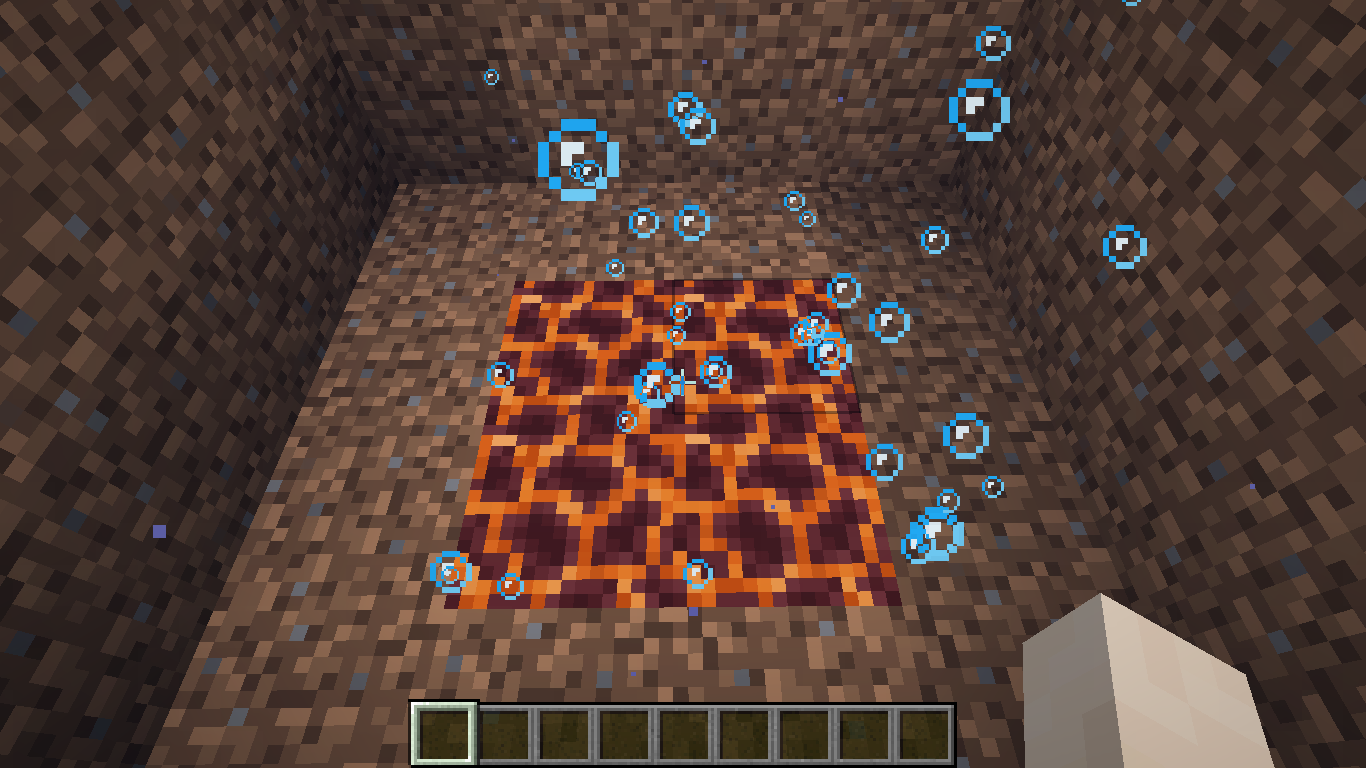
- Stand in the center of the 4 magma blocks
- Double-tap spacebar
Expected & Observed Results:
 → Flight mode will not be activated
 → Flight mode would be activated
Notes:
- Related to
MC-268947MC-256811 MC-147790 MC-68453 - This behavior is unexpected when compared to the fact that the player can enter fly-mode when standing inside a single bubble column.
- This issue was updated after it's original triage date by [Mod] Jiingy on 3/5/2024 to be a bit clearer, but still retains it's original information.
[~Brevort] Flying has been reported under MC-256811.
Closely relates to MC-203401 and MC-256811. Also relates to MC-122645, MC-147718, MC-226124 and MC-226655.
The bug
The action for dropping every single item inside of a slot is hardcoded to always use the same key as dropping only a single item. This can cause several issues: for example, if your drop key is B, then dropping all items will trigger the narrator as well (MC-122645), which is something I personally can attest to being extremely annoying.
How to fix
A separate keybind could be implemented for dropping every item. By default, it could still be Q, but could be bound to a separate key such that pressing it would drop every item instead.
Increasing the minecraft:generic.gravity attribute past the general range of 0.5 prevents initiating flight in creative mode by double-pressing space. The only method to commence flying in such circumstances is by switching the game mode to spectator.
Steps to Reproduce:
- Modify the player's generic.gravity
/attribute @p minecraft:generic.gravity base set 0.5 - Attempt to enter fly mode
→ The player will be pulled to the ground to quickly, and will not be able to fly.