Teleporting to negative coordinates is inaccurate
This is working as intended as there is no +0 and -0 coordinate. 0 itself cannot be positive or negative, there are only coordinates greater or less than 0.
The coordinate of a block is the coordinate rounded down, meaning anything from -0.1 to -1.0 is part of the -1 block coordinate. The center of the block at -1 is at -0.5.

When teleporting to a negative coordinate, the player ends up one block closer to 0.
For example, if I type "/tp 400 60 -704", I will instead end up in 400 60 -703.
-25 50 -39 would end up in -24 50 -38.
The same problem occurs if using command blocks.
I am not sure if the issue is present in previous versions.
Environment
Windows 7, 64 bit.
Linked Issues
is duplicated by42
 MC-6253Odd Command Block / Teleportation behaviorDuplicateMC-7467Minecraft command block tp bugDuplicateMC-10320The commandblock teleports the player not on right z coord what was given to the tp command, it adds 1 to the z coord (if you enter z: 100, it will tp you to z: 101)DuplicateMC-13121Command block inaccurate when using the tp commandDuplicateMC-18364Teleportation BugDuplicateMC-34125/tp command off by 1 block diagnally.DuplicateMC-36551X Coordinate Slightly off When TeleportingDuplicateMC-36609-1 coordinates are offsetDuplicateMC-39099/testfor in command blocks doesn't target the appropriate locationDuplicateMC-39578set block issueDuplicateMC-40960Coordinates Offset! BugDuplicateMC-48757XYZ: X coordinate is offDuplicateMC-49993TeleportingDuplicateMC-50689tp slightly offDuplicateMC-55869Command Block TeleportationDuplicateMC-64185Coordinates bugDuplicateMC-68303Command blocks teleport to the incorrect coordinates.DuplicateMC-72457"Looking at" coordinates are off by one on the negative valuesDuplicateMC-74560The "Looking At" variable in F3 mode is offset by 1 block relative to the /fill command with command blocksDuplicateMC-75685When i type in the exact coordinates for the command block to spawn a blocl /setblock it's always slittley off.DuplicateMC-77548Major - Impossible to get the EXACT block player is standing onDuplicateMC-81109Wrong coordinates when coordinates are negativeDuplicateMC-81291-0 Corrodents BugDuplicateMC-84853XYZ off sideDuplicateMC-85559Testfor Command Doesn't Work In My 15w32c ServerDuplicateMC-98309Debug Menu Cordinate tracking is 2 blocks offDuplicateMC-113466Incorrect Z coordinateDuplicateMC-114056Bug with teleporting to exact coords using commandsDuplicateMC-114565F3 interface/GUI shows incorrect "X" cordinates in Minecraft 1.11.2DuplicateMC-124436All negative locations read as their location +1DuplicateMC-124603X coordinate bugDuplicateMC-124828Confusing error with /tpDuplicateMC-131725Z Coordinates Do Not MatchDuplicateMC-132384Commands do not recognize coordinates of -0DuplicateMC-135638Negative coordinates are off by 1DuplicateMC-166839Player Coordinates Inaccurate to Where the Player is Actually StandingDuplicateMC-197494Negative coordinates is brokenDuplicateMC-219792It seems there's a bug with the teleport commandDuplicateMC-241478Coordinates offset in negativeDuplicateMC-1988Teleport command doesn't work good in the command blockDuplicateMC-2080The tp command teleports you to the z you gave -1.DuplicateMC-2849Incorrect teleport locationDuplicate
relates to5
MC-55671When executing the teleport command, the X and Z coordinates are edited by .5 instead of the YInvalidMC-36602Commands with coordinates are NOW offset -1 x and/or z from where it should be (at negative X and Z coordinates)Works As IntendedMC-42494You cant detect a block thats is at x y -0InvalidMC-58097Coordinates Are Messed UpDuplicateMC-153454Negative ZeroInvalid



Created Issue:
Teleporting to negative coordinates is inaccurate
When teleporting to a negative coordinate, the player ends up one block closer to 0.
For example, if I type "/tp 400 60 -704", I will instead end up in 400 60 -703.
-25 50 -39 would end up in -24 50 -38.
The same problem occurs if using command blocks.I am not sure if the issue is present in previous versions.
Environment
Windows 7, 64 bit.
- Unresolved
- Open
- Minecraft - Public
- Unconfirmed
- Creative
- bug coordinate glich teleport
- 1.4.5

is duplicated by
is duplicated by
When teleporting to a negative coordinate, the player ends up one block closer to 0.
For example, if I type "/tp 400 60 -704", I will instead end up in 400 60 -703.
-25 50 -39 would end up in -24 50 -38.
The same problem occurs if using command blocks.I am not sure if the issue is present in previous versions.
When teleporting to a negative coordinate, the player ends up one block closer to 0.
For example, if I type "/tp 400 60 -704", I will instead end up in 400 60 -703.
-25 50 -39 would end up in -24 50 -38.
The same problem occurs if using command blocks.I am not sure if the issue is present in previous versions.
is duplicated by
is duplicated by
is duplicated by

is duplicated by
is duplicated by
is duplicated by
is duplicated by
relates to
Moderator Note:This is working as intended as there is no +0 and -0 coordinate as that violates the laws of math, 0 itself cannot be positive or negative only coordinates greater or less than 0.
When teleporting to a negative coordinate, the player ends up one block closer to 0.
For example, if I type "/tp 400 60 -704", I will instead end up in 400 60 -703.
-25 50 -39 would end up in -24 50 -38.
The same problem occurs if using command blocks.I am not sure if the issue is present in previous versions.
is cloned by
clones
is cloned by
is duplicated by
is duplicated by
Moderator Note:This is working as intended as there is no +0 and -0 coordinate as that violates the laws of math, 0 itself cannot be positive or negative only coordinates greater or less than 0.
When teleporting to a negative coordinate, the player ends up one block closer to 0.
For example, if I type "/tp 400 60 -704", I will instead end up in 400 60 -703.
-25 50 -39 would end up in -24 50 -38.
The same problem occurs if using command blocks.I am not sure if the issue is present in previous versions.
is duplicated by
relates to
is duplicated by
relates to
is duplicated by

is duplicated by
is duplicated by
relates to
is duplicated by
is duplicated by

is duplicated by
is duplicated by
is duplicated by

is duplicated by
![[Mod] Torabi](../../../data/assets/gravatar/torabi.png)
is duplicated by
is duplicated by
![[Mod] Neko](../../../data/avatars/users/92901.png)
is duplicated by
is duplicated by
is duplicated by
![[Mod] Pokechu22](../../../data/avatars/users/92931.png)
is duplicated by
is duplicated by
is duplicated by
is duplicated by
is duplicated by
![[Mod] tryashtar](../../../data/avatars/users/41963.png)
is duplicated by
is duplicated by
is duplicated by
is duplicated by
is duplicated by
![[Mod] violine1101](../../../data/avatars/users/92858.png)
relates to
Moderator Note:This is working as intended as there is no +0 and -0 coordinate as that violates the laws of math, 0 itself cannot be positive or negative only coordinates greater or less than 0.
When teleporting to a negative coordinate, the player ends up one block closer to 0.
For example, if I type "/tp 400 60 -704", I will instead end up in 400 60 -703.
-25 50 -39 would end up in -24 50 -38.
The same problem occurs if using command blocks.I am not sure if the issue is present in previous versions.
Moderator Note:This is working as intended as there is no +0 and -0 coordinate. 0 itself cannot be positive or negative, there are only coordinates greater or less than 0.
The coordinate of a block is the coordinate rounded down, meaning anything from -0.1 to -1.0 is part of the -1 block coordinate. The center of the block at -1 is at -0.5.
When teleporting to a negative coordinate, the player ends up one block closer to 0.
For example, if I type "/tp 400 60 -704", I will instead end up in 400 60 -703.
-25 50 -39 would end up in -24 50 -38.
The same problem occurs if using command blocks.I am not sure if the issue is present in previous versions.
Duplicate of MC-4794, please use the search function to see if your bug has already been submitted. Currently over 40% of tickets are being closed as duplicate.
Duplicate of MC-4794, please use the search function to see if your bug has already been submitted. Currently over 42% of tickets are being closed as duplicate.
Duplicate of MC-4794, please use the search function to see if your bug has already been submitted. Currently over 52% of tickets are being closed as duplicate.
Duplicate of MC-4794, please use the search function to see if your bug has already been submitted. Currently over 55% of tickets are being closed as duplicate.
Duplicate of MC-4794, please use the search function to see if your bug has already been submitted. Currently over 57% of tickets are being closed as duplicate.
Duplicate of MC-4794 - If you have not, please use the search function in the future, to see if your bug has already been submitted. If you could not find the original report, please comment with the keywords you searched for.
The direction in which negative coordinates round is a much older issue, currently marked Works As Intended. However, the commands that used coordinates only affected entities before, which aren't bound to the grid like blocks are.
The simple workaround would be to specify the proper fractional values in the command, unless it only accepts whole values.
Duplicate of MC-4794 - If you have not, please use the search function in the future, to see if your bug has already been submitted. If you could not find the original report, please comment with the keywords you searched for.
Duplicate of MC-4794 - If you have not, please use the search function in the future, to see if your bug has already been submitted. If you could not find the original report, please comment with the keywords you searched for.
Block coordinates are by design always at the NW corner of a block, see the explaination in MC-4794
For the  in your head, read all the comments of
 MC-4794, then it may become 
If you specify the coordinates without decimals , X and Z get increased to land on the middle of a block instead of the border between blocks (see explanation in MC-4794), but the Y coordinate gets not increased so that you stand with your feet on a block.
If you specify the coordinates with decimals (/tp @p 1.1 2.2 3.1, you'll get TP'd to the exact coordinates.
That has nothing to do with the prevention of suffocation.
... or this is the common misconception between the coordinates of the blocks and player coordinates, see explanation in MC-4794
The video does clarify your meaning, thanks. However, this isn't a bug in the game (note that your "Block" and "Looking At" are always the same when looking down at the block at your feet). The XYZ values only appear different due to the way they are counted. Kumasasa explains this well in MC-4794, as quoted below:
Please take a closer look at the coordinates.
The coordinates mark the corners of the blocks.
If you omit the fractional digits, you land always at the center of the nearest block (seen in +x, +z direction):
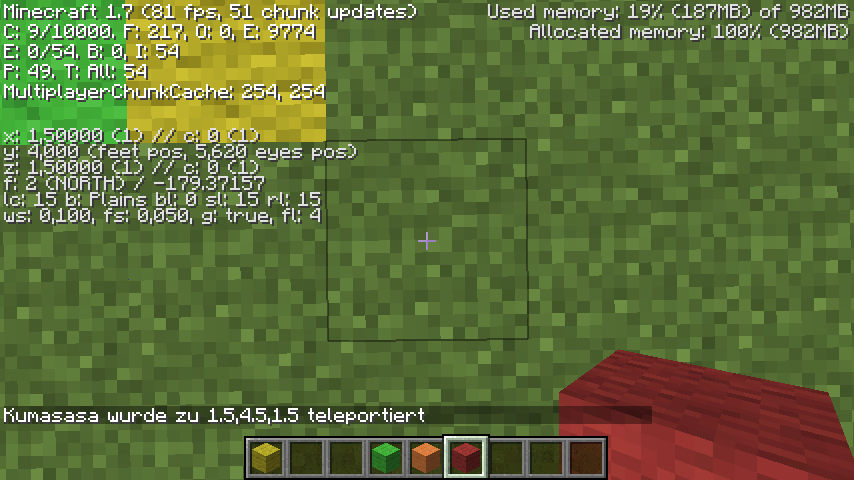
If you teleport to 1 / y / 1, you land at 1.5 / y /1.5
If you teleport to -1 / y / -1 you land at -0,5 / y / -0.5
but if you specify the fractinonal digits, you land excactly at given coordinates:
If you teleport to 1.0 / y / 1.0, you land at 1.0 / y /1.0
If you teleport to -1.0 / y / -1.0 you land at -1.0 / y / -1.0
And continued:
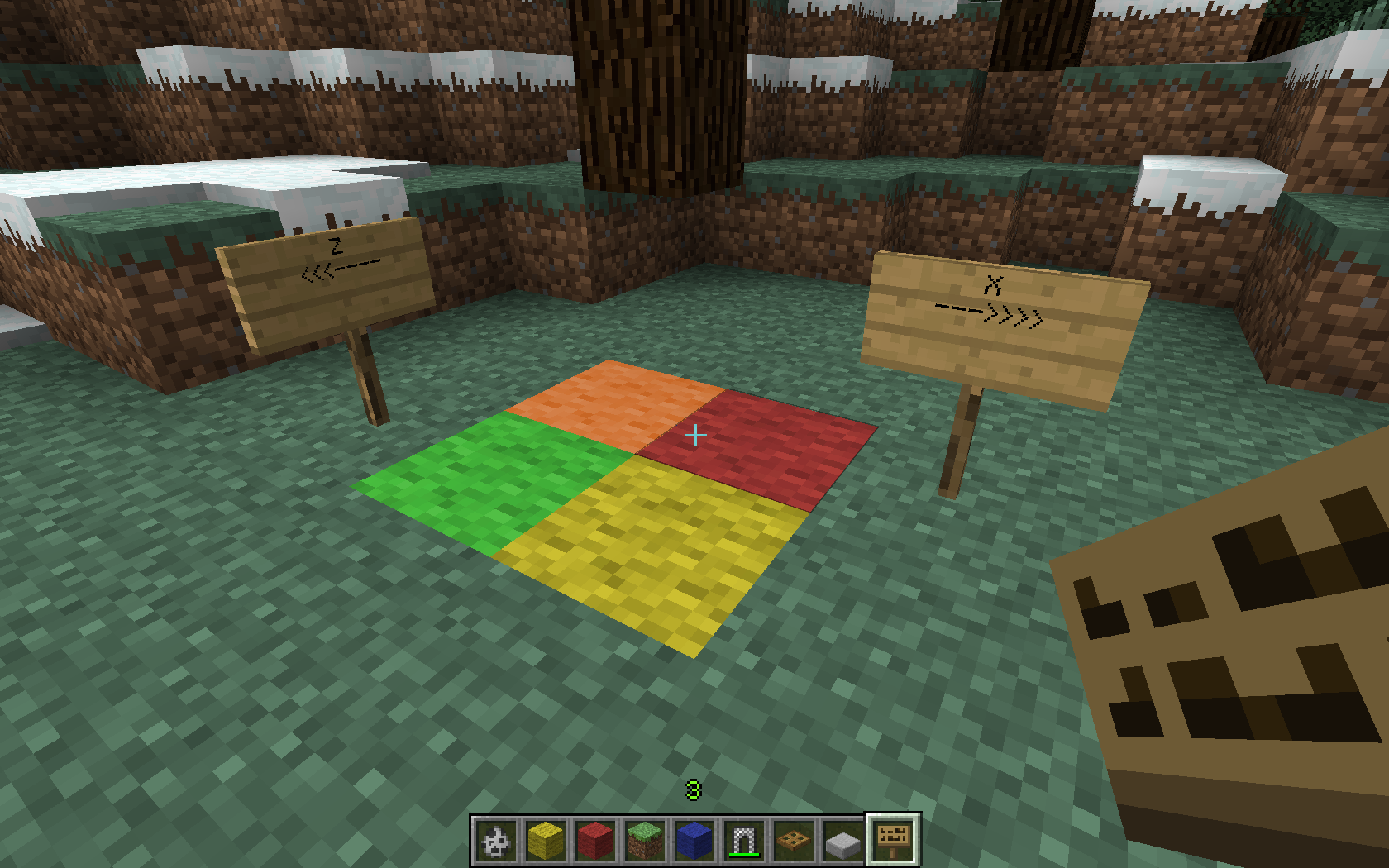
Think of a coordinate system on graph paper. The axes of the coordinate system go exactly through each one line on the paper, the squares on the paper are the blocks.
--> The integer coordinates mark the corners of the blocks, not the blocks itself.
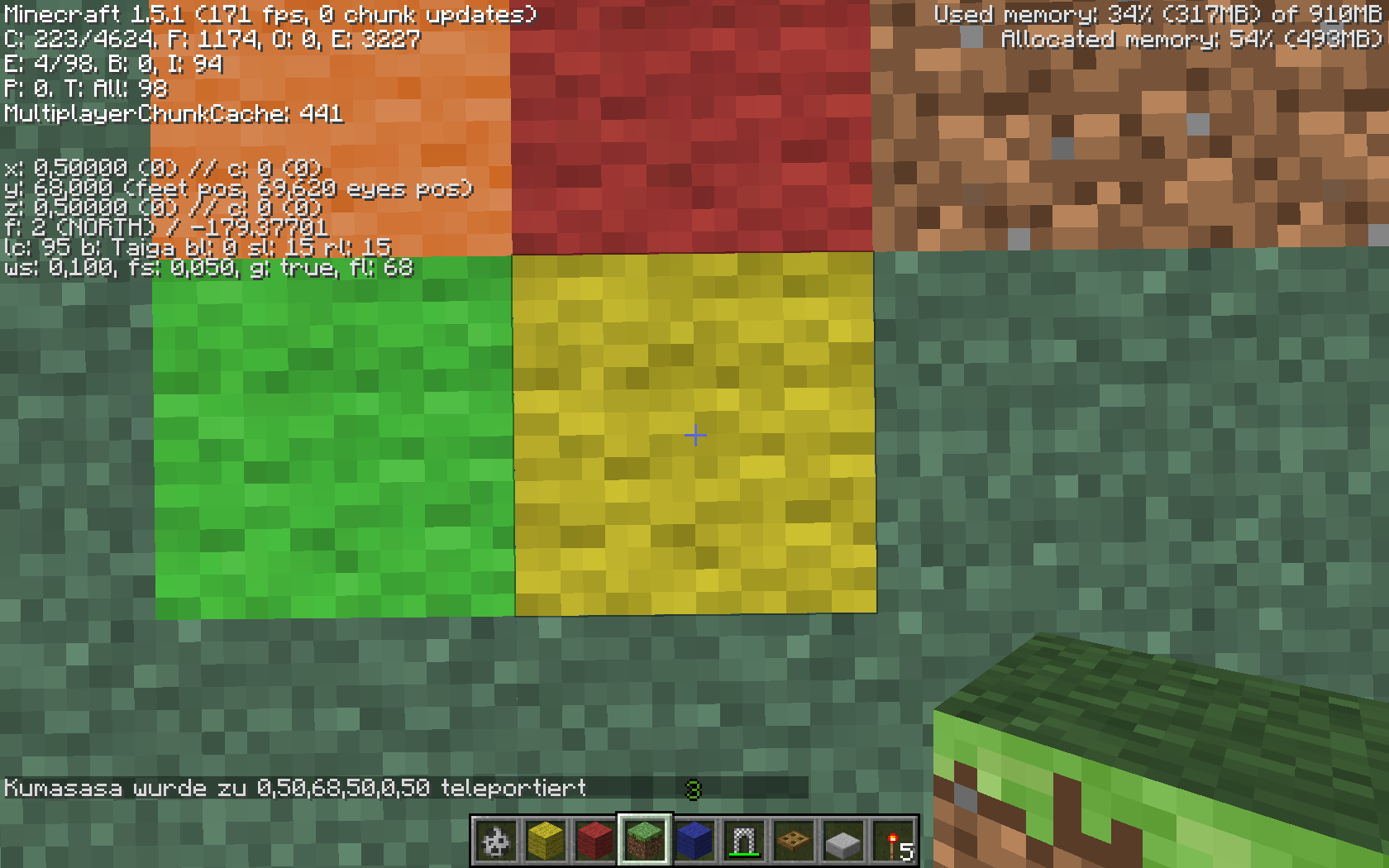
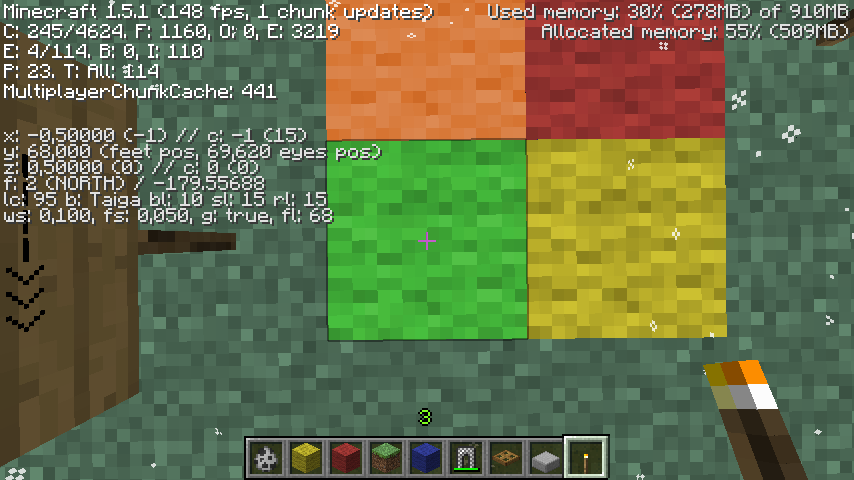
If you teleport to (0.0/0.0), you land on the exact center of the coordinate system.
If you teleport to (0/0), you land on the middle of the block right of the Z axis and below the X axis (Yellow block), but at the coordinates (0.5/0.5)
If you teleport to (-1/0), you land on the middle of the block left of the Z axis and below the X axis (Green block), but at the coordinates (-0.5/0.5)
Not sure what you mean, probably a duplicate of MC-4794
Duplicate of MC-4794
WAI as you are using a negative coordinate. See MC-4794 for an explanation of the coordinate system.
Kumasasa's comment from MC-4794:
The coordinates mark the corners of the blocks.
If you omit the fractional digits, you land always at the center of the nearest block (seen in +x, +z direction):
If you teleport to 1 / y / 1, you land at 1.5 / y /1.5
If you teleport to -1 / y / -1 you land at -0,5 / y / -0.5
but if you specify the fractional digits, you land exactly at given coordinates:
If you teleport to 1.0 / y / 1.0, you land at 1.0 / y /1.0
If you teleport to -1.0 / y / -1.0 you land at -1.0 / y / -1.0
WAI. See MC-4794 for an explanation.
This is how coordinates work. -0 and +0 are the same position; -1 is 1 unit away from 0. Add +.5 to get the center of the block, and the block at -1 is centered at -.5, the block at 0 is centered at +.5, the block at 1 is centered at +1.5, etc. See MC-4794 for more information.
Duplicate of MC-4794; this is how coordinates work.
This is how coordinates work; see MC-4794 for more information.
Of course is only the Z-Coordinate in your example "affected", because it's negative.
But where is the difference to MC-4794 ?

When viewing the F3 Debug Information to view my current coordinates, The double listed for the XYZ is incorrectly off by 1 when compared to the Block information.
This is consistent for any negative coordinate.
Positive coordinates are correct.
This appears to be a problem with using "Math.floor" with negative numbers, which always rounds down (towards 0 when positive, away from 0 when negative), instead of casting the double into an int which would correctly truncate the fractional portion instead.
What I expected to happen was...:
When viewing the debug information for my current position, the screen showed:
XYZ: -152.477 -0.07309 -3.334
I expected to see:
Block: -152 0 -3
What actually happened was...:
I saw this instead:
Block: -153 -1 -4
Reason that I expected it:
When I am between blocks (i.e., within a fractional coordinate) I expect to see the Block coordinate to be the same as the XYZ coordinate without the fraction (i.e., just the integer portion of the coordinate).
This is because when I am between A and B, I am within A and moving to B.
Example:
10.7 65 256.9 means I have not yet crossed any of the the lines that divide 10 65 256 from:
- 10 65 257
- 10 65 255
- 11 65 256
- 9 65 256
Steps to Reproduce:
1. Start any existing world, or create a new one in v1.16.1.
2. Once spawned in, press F3 to bring up the debug screen.
3. Move to any location with a negative X, Y, or Z coordinate.
4. Notice as you move within your chosen negative axis that the XYZ, showing the fractional portion of the coordinate, is always one less than the Block coordinate for where you are standing. This affects all negative coordinates and only negative coordinates. If you are at a positive X and a negative Z, you will see the off-by-1 on the Z only. Likewise, if you are at a negative X and a positive Z, you will see the off-by-1 on the X only. If both are negative, both will be affected. If neither are negative, then neither will be affected. This also occurs for negative values of Y (see attached screenshot).
Similar bug reports:
MC-4794
MC-36602
MC-47763
MC-51286
MC-113466
MC-135638
All of the above have been marked as resolved.
Whether this bug has never been successfully patched, or whether this is a regression of some kind, I'm not sure.
What I am sure about is that, for those reports above which were marked as "Works as Intended", this was clearly a mistake as this behavior cannot be what the developers intended.
If I am standing on top of the center of a block at -10 76 -25, then my XYZ coordinates should be be -10.5 76 -25.5 and my Block should be -10 76 -25..
When I move exactly 1 block to the west (further along the negative X axis), my XYZ coordinates should then be -11.5 76 -25.5 and my Block should be -11 76 -25.
Yet, the debug screen tells me that I am at -11 75 -26 when I am standing on -10 76 -25.
Again, positive coordinates are displayed correctly.
This only affects negative coordinates.
Suggestions for correction:
The "official Minecraft wiki" states about Block (emphasis mine):
The coordinates of the block the player's feet are in, in xyz format. Similar to XYZ as above, floored to the whole number.
The quote above made me suspect that the Block information is being obtained using "Math.floor" and empirical testing confirms behavior consistent with this suspicion.
Simply casting to an int (i.e., "(int) coordinate") would suffice as that truncates fractions, rather than rounding them in a particular direction.
You could also do "Math.floor(Math.abs(coordinate))" to strip any negative signs prior to "floor"ing the number, which would also give you correct behavior.
See MC-4794
See MC-4794
See MC-4794, it adds 0.5 to center you on the block
![[Bot] Arisa](../../../data/avatars/users/43007.png)
Thank you for your report!
We're tracking this issue in MC-4794, so this ticket is being resolved and linked as a duplicate.
That ticket has already been resolved as working as intended, which means this is not considered a bug and won't be fixed. Please do not leave a comment on the linked ticket.
If you haven't already, you might like to make use of the search feature to see if the issue has already been mentioned.
Quick Links:
📓 Bug Tracker Guidelines – 💬 Community Support – 📧 Mojang Support
📓 Project Summary – ✍️ Feedback and Suggestions – 📖 Game Wiki
– I am a bot. This action was performed automatically! The ticket was resolved by one of our moderators, and I left this message to give more information to you.
Please take a closer look at the coordinates.
The coordinates mark the corners of the blocks.
If you omit the fractinonal digits, you land always at the center of the nearest block (seen in +x, +z direction):
but if you specify the fractinonal digits, you land excactly at given coordinates:
I don't think that this works as intended because if you look next to the exact coordinates (next to all those numbers) there are parenthesis with an integer of your x/z. If x = -849. 21371, the integer will be 850, but if z = 360.78782 then the integer will be 360. For some reason if the coordinate is negative, it will add one to make it an integer. I think it's still a bug.
It's all correct.
Think of a coordinate system on graph paper. The axes of the coordinate system go exactly through each one line on the paper, the squares on the paper are the blocks.
--> The integer coordinates mark the corners of the blocks, not the blocks itself.
Please do not mark issues as private, unless your bug report is a security issue containing information that may compromise your server/client.
Can somebody just tell me.....is this behavior totally intended and will stay in the game for the foreseeable future?
@Dustin Held: What behaviour do you mean exactly ?
The issue described in the description. Teleporting one block closer to 0,0 with negative cords.
There is no issue, just a misconception of the coordinate system.Kk.
This isn't a misconception. It has changed and he is asking the question of whether or not the new coordinate system is permanent.
Thank you @Ross Sullivan. It absolutely has changed. I don't like arguing with mods.....but this HAS changed since previous versions.
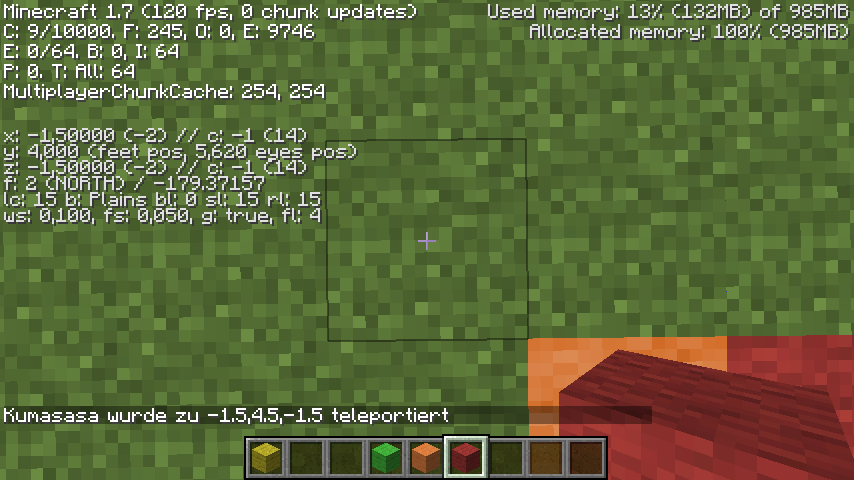
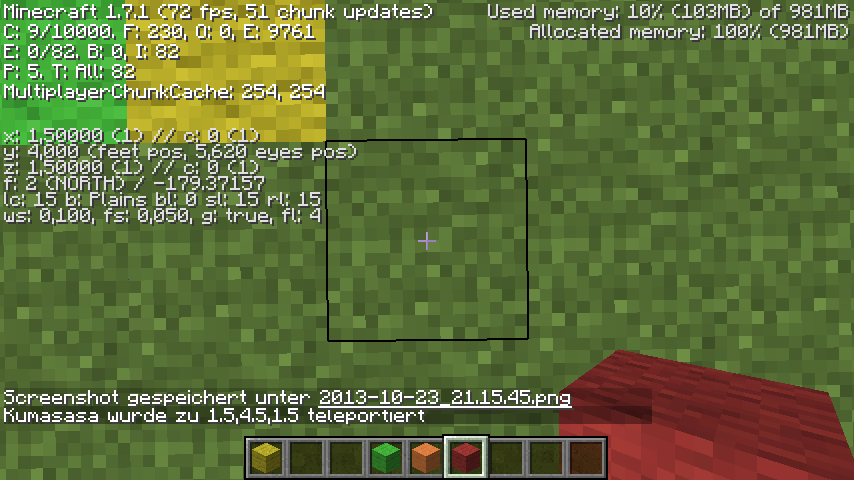
Nothing has changed.Look at my screenshots and try it out.It HAD changed. That was in version 1.7. Today, version 1.7.1 was released. this fixed the bug. I appreciate that you may have made a mistake and no offence meant. But Dustin was right, and I was having the same problem. Thank you for your help all the same.
You're right.
Sorry for the noise.