Dynamically changing parts of blocks are not disappearing when they're no longer rendered
blocks with parts that are affected by their tile entities or have smoothly moving parts (ex: chests, signs, heads... ) don't remove their smoothly moving or tile entity affected part after being unloaded. They appear again (so there are two of them in the same spot) when they are reloaded.
to reproduce.
1: place a chest
2. unload the chunk with the chest (teleporting to 100000, 100, 100000, then teleporting back should work)
3. reload the chunk with the chest
4. break the chest
5. the chest should stay, if it didn't stay, try again and go further away
This works with (that i've found) Chests, Trapped chests, Ender Chests Skulls, Signs, and Banners
This kind of works with: Enchanting tables, Spawners.
This doesn't work with: fences, furnaces, hoppers.
Environment
Windows 8.1
Processor: Intel Celeron CPU 1007u @1.50GHz 1.50GHz
Installed memory (RAM): 4.00Gb (3.89 GB usable)
System type: 64-bit Operating System x64-based processor
Java: version 1.7.0_55, Vendor: Oracle Corporation, 64 bit.
Linked Issues
is duplicated by62
 MC-62300Mob spawners have 2 mobs insideDuplicateMC-62350Enchanting table doesn't remove its book on unloadDuplicateMC-62521Enchantment table the book is broken.DuplicateMC-62522the chests reman closedDuplicateMC-62523Zombie model stays after Breaking spawnerDuplicateMC-62823Echanting table visual glitchDuplicateMC-63201Chest lid is opened and closed at the same timeDuplicateMC-63557Enchanting Tables and BannersDuplicateMC-63584Chest Texture ProblemsDuplicateMC-63703entities on animated blocks bug out when chunk is unloadedDuplicateMC-63722Silverfish inside spawners remain when spawner is broken.DuplicateMC-63840Chest Animation BugDuplicateMC-63841Enchantment Table Render BugDuplicateMC-63873Chest bugDuplicateMC-63934Chest Messed UpDuplicateMC-63966Block Entities StayingDuplicateMC-64137An open and closed chest lid on a double chest at the same time after exiting the chest guiDuplicateMC-64191Chest and sign bugDuplicateMC-64217Entities and Blocks not updating/reloading correctlyDuplicateMC-64384Chests and banners visual glitchDuplicateMC-64717Enchantment table spawning excess booksDuplicateMC-64721Chest animation bugDuplicateMC-64802Chest closed while in chest.DuplicateMC-64813Debug mode not removing TileEntities from previous snapshotDuplicateMC-64893Beacon beam remaining after beacon block removalDuplicateMC-64894An bug of animationsDuplicateMC-64950animal in the spawnerDuplicateMC-64992Opening chest animation sometimes shows an open lid and a closed lid when the chest is "open"DuplicateMC-65292Breaking Named Banner Leaves PhantomDuplicateMC-65315Visual BugsDuplicateMC-65343Bug in chests and TreesDuplicateMC-65348Enchanting table has many books on topDuplicateMC-65392opening a chest doesnt make the texture show an open chest is looks both opened and closedDuplicateMC-65842Buggy texture of enchant tableDuplicateMC-65968Enchantment Table (book glitch)DuplicateMC-66056Chest glitchingDuplicateMC-66367Mob Spawner renders 2 mobs in itDuplicateMC-66369Enchntment tableDuplicateMC-66393Trunk when the open shows texture of closedDuplicateMC-66477Mob spawner glitchingDuplicateMC-66544Phantom blocks after teleporting then breakingDuplicateMC-66548graphical door glitchDuplicateMC-66586door animation bugDuplicateMC-66605door texture bugDuplicateMC-66623Beacon light visual glitching after leaving render distanceDuplicateMC-66758Two booksDuplicateMC-66834Chest animation fail!DuplicateMC-66875Visual lead glitchDuplicateMC-66886Certain Tile/Block entities glitch when chunks are unloaded and reloadedDuplicateMC-67134Chest Lid DuplicateMC-67390Chest bug on World host.DuplicateMC-67597chests don't open rightDuplicateMC-67656enchantment table bugDuplicateMC-67734Sometimes in creative the survival inventory chest glitches out.DuplicateMC-67741If You Were to Leave a Placed Down Enchant Table, and left the chunk, When going back into the chunk there would be two enchantment books floating. Thiis is repeatableDuplicateMC-67775chest has no black hole when you open itDuplicateMC-67837Chest Bug!DuplicateMC-67895Visual Issue with ChestsDuplicateMC-68079Messed up enchantment table book effect while placed and after brokenDuplicateMC-68133Chest Shenanigans DuplicateMC-68176Door Visual GlitchDuplicateMC-68968Singleplayer lagDuplicate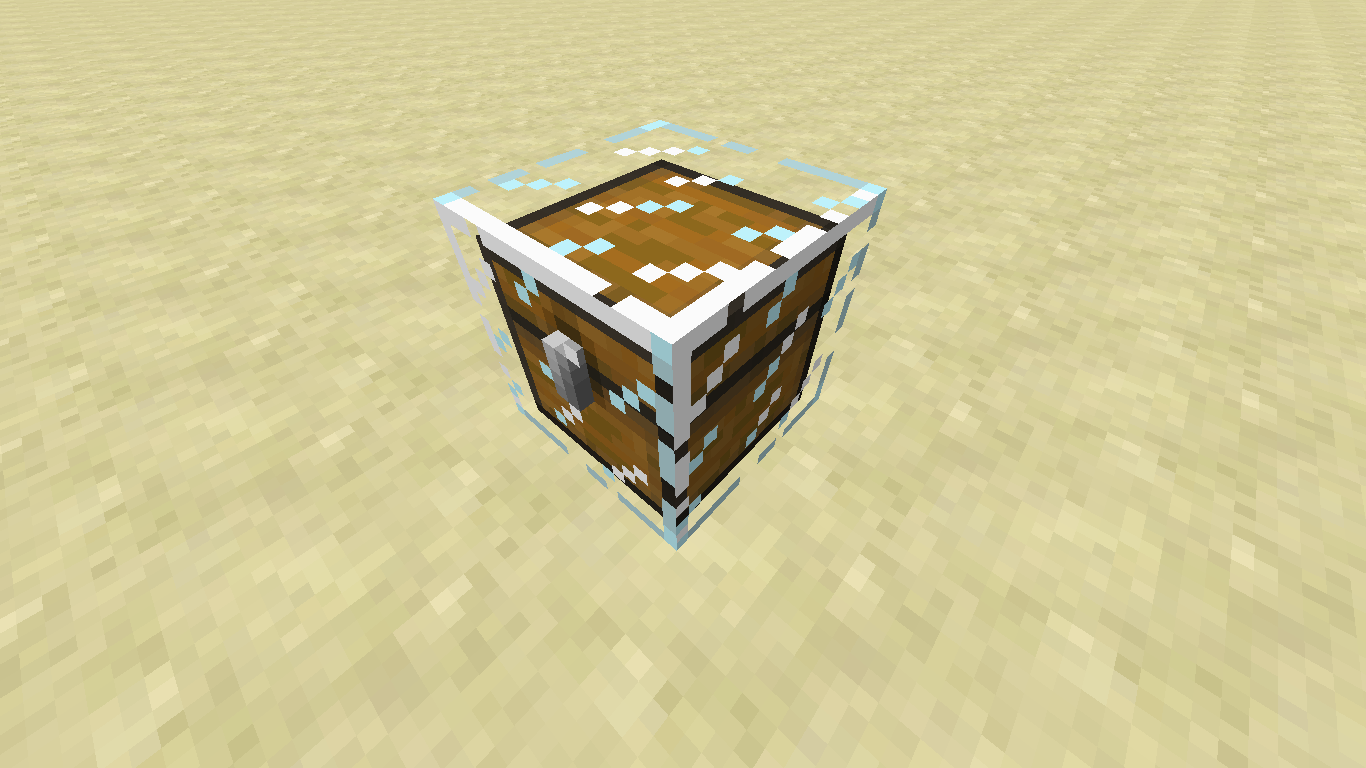

Created Issue:
tile entity non cube blocks don't unrender
blocks with tile entities and non cubic models (ex: chests, signs, heads... with a few exceptions) don't disappear if you unload their chunk. They appear again (so there are two of them in the same spot) when they are re rendered
to reproduce.
1: place a chest
2. unload the chunk with the chest (teleporting to 100000, 100, 100000, then teleporting back should work)
3. reload the chunk with the chest
4. break the chest
5. the chest should stay, if it didn't stay, try again and go further awayThis works with (that i've found) Chests, Trapped chests, Ender Chests Skulls, Signs, and Banners
This doesn't work with: fences, furnaces, hoppers.
Environment
Windows 8.1
Processor: Intel Celeron CPU 1007u @1.50GHz 1.50GHz
Installed memory (RAM): 4.00Gb (3.89 GB usable)
System type: 64-bit Operating System x64-based processor
Java: version 1.7.0_55, Vendor: Oracle Corporation, 64 bit.

relates to
blocks with tile entities and non cubic models (ex: chests, signs, heads... with a few exceptions) don't disappear if you unload their chunk. They appear again (so there are two of them in the same spot) when they are re rendered
to reproduce.
1: place a chest
2. unload the chunk with the chest (teleporting to 100000, 100, 100000, then teleporting back should work)
3. reload the chunk with the chest
4. break the chest
5. the chest should stay, if it didn't stay, try again and go further awayThis works with (that i've found) Chests, Trapped chests, Ender Chests Skulls, Signs, and Banners
This doesn't work with: fences, furnaces, hoppers.
blocks with tile entities and non cubic models (ex: chests, signs, heads... with a few exceptions) don't disappear if you unload their chunk. They appear again (so there are two of them in the same spot) when they are re rendered
to reproduce.
1: place a chest
2. unload the chunk with the chest (teleporting to 100000, 100, 100000, then teleporting back should work)
3. reload the chunk with the chest
4. break the chest
5. the chest should stay, if it didn't stay, try again and go further awayThis works with (that i've found) Chests, Trapped chests, Ender Chests Skulls, Signs, and Banners
This kind of works with: Enchanting tables, Spawners.
This doesn't work with: fences, furnaces, hoppers.
blocks with
tile entities and non cubic models (ex: chests, signs, heads... with a few exceptions) don't disappear if you unload their chunk. They appear again (so there are two of them in the same spot) when they are rerenderedto reproduce.
1: place a chest
2. unload the chunk with the chest (teleporting to 100000, 100, 100000, then teleporting back should work)
3. reload the chunk with the chest
4. break the chest
5. the chest should stay, if it didn't stay, try again and go further awayThis works with (that i've found) Chests, Trapped chests, Ender Chests Skulls, Signs, and Banners
This kind of works with: Enchanting tables, Spawners.
This doesn't work with: fences, furnaces, hoppers.
blocks with parts that are affected by their tile entities or have smoothly moving parts (ex: chests, signs, heads... ) don't remove their smoothly moving or tile entity affected part after being unloaded. They appear again (so there are two of them in the same spot) when they are reloaded.
to reproduce.
1: place a chest
2. unload the chunk with the chest (teleporting to 100000, 100, 100000, then teleporting back should work)
3. reload the chunk with the chest
4. break the chest
5. the chest should stay, if it didn't stay, try again and go further awayThis works with (that i've found) Chests, Trapped chests, Ender Chests Skulls, Signs, and Banners
This kind of works with: Enchanting tables, Spawners.
This doesn't work with: fences, furnaces, hoppers.
tile entity non cube blocks don't unrender
relates to
relates to
is duplicated by
is duplicated by

is duplicated by
is duplicated by
is duplicated by
is duplicated by

is duplicated by

is duplicated by
relates to
is duplicated by
is duplicated by
blocks with parts that are affected by their tile entities or have smoothly moving parts (ex: chests, signs, heads... ) don't remove their smoothly moving or tile entity affected part after being unloaded. They appear again (so there are two of them in the same spot) when they are reloaded.
to reproduce.
1: place a chest
2. unload the chunk with the chest (teleporting to 100000, 100, 100000, then teleporting back should work)
3. reload the chunk with the chest
4. break the chest
5. the chest should stay, if it didn't stay, try again and go further awayThis works with (that i've found) Chests, Trapped chests, Ender Chests Skulls, Signs, and Banners
This
kind ofworkswith:Enchanting tables, Spawners.This doesn't work with: fences, furnaces, hoppers.
blocks with parts that are affected by their tile entities or have smoothly moving parts (ex: chests, signs, heads... ) don't remove their smoothly moving or tile entity affected part after being unloaded. They appear again (so there are two of them in the same spot) when they are reloaded.
to reproduce.
1: place a chest
2. unload the chunk with the chest (teleporting to 100000, 100, 100000, then teleporting back should work)
3. reload the chunk with the chest
4. break the chest
5. the chest should stay, if it didn't stay, try again and go further awayThis works with (that i've found) Chests, Trapped chests, Ender Chests Skulls, Signs, and Banners
This kind of works with: Enchanting tables, Spawners.
This doesn't work with: fences, furnaces, hoppers.
is duplicated by
is duplicated by
is duplicated by
is duplicated by
relates to
is duplicated by
is duplicated by
is duplicated by
is duplicated by
is duplicated by
is duplicated by
is duplicated by
is duplicated by
is duplicated by
is duplicated by
is duplicated by
is duplicated by
is duplicated by
is duplicated by
is duplicated by
![[Mod] CubeTheThird](../../../data/assets/gravatar/cubethethird.jpeg)
is duplicated by
is duplicated by

is duplicated by
is duplicated by
is duplicated by
duplicates
is duplicated by
duplicates
is duplicated by
is duplicated by
relates to
is duplicated by
![[Mojang] Searge (Michael Stoyke)](../../../data/assets/gravatar/searge.png) [Mojang] Searge (Michael Stoyke)
[Mojang] Searge (Michael Stoyke)is duplicated by
is duplicated by
![[Mod] Torabi](../../../data/assets/gravatar/torabi.png)
is duplicated by

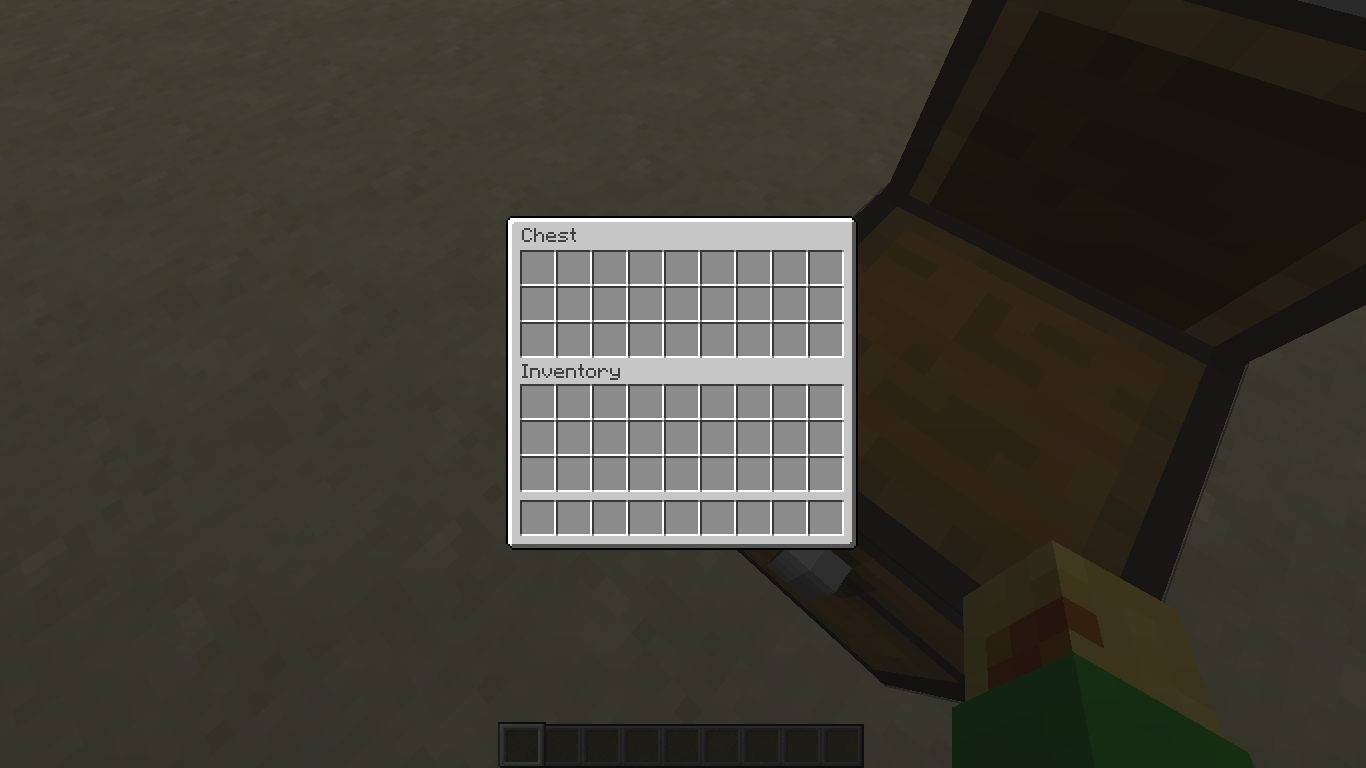
well they are importmant, if asked for settings, we need all video settings, however looking into it further, this looks like: MC-64161, since in the second screenshot it shows that there are 2 models for the chest at ones, same with your chest, all title entity's will not unload, bannes are tile entitys, so kind of a duplicate

Dupe of MC-64161
Dupe of MC-64161
Dupe of MC-64161
Dupe of MC-64161
Dupe of MC-64161
Dupe of MC-64161

Searge and Jig, I can confirm this bug exists, but it's been reported at MC-64161
This isn't a dupe of MC-64161. It's a dupe of something else, but was linked to the wrong report. Should be marked as duplicate of the one called 'blocks take a while to update visually' or something like that.
The old chest model didn't disappear and can bee seen by opening the chest. after breaking the sorce chest, you can place blocks in the ghost chest
Confirmed for 14w30c
Relating (or duplicating)
MC-62350If my bug is relating to another one that is obviously the one that represents this issue, do I close mine? I think I figured the bug out, Blocks with smoothly moving parts (the book of an enchantment table) or that are visually affected by their Tile Entity (text on a sign) are failing to remove their rendered moving, or changing parts after being no longer loaded. Anyway, here's a forced crash where the bug was happening with a few different blocks if it helps (not that you couldn't get it yourself and I don't see anything useful in there either)
Confirmed for
Confirmed for Beacons as well.
MC-66623All of these bugs are part of
MC-62166At least related.
The way I see it is that because this bug is completely visual, and reloading the chunk solves it, it definitely acts the same as
MC-62166and F3+A always fixes this bug. It would be better to point the entire community towards one report, and increase the votes than to split up 2 of the same issue simply because one affects movable blocks and the other doesn't. IfMC-62166gets fixed and this doesn't (I highly doubt they are different), this one can be reopened. But it would be better to merge them and create one report.Affects 14w34b