 MC-71018
Mesa (Bryce) doesn't use some settings from custom World
I lowered the sea level (29) and Depth Base Size (3) and set biome to Mesa. I also raised biomeScaleWeight.
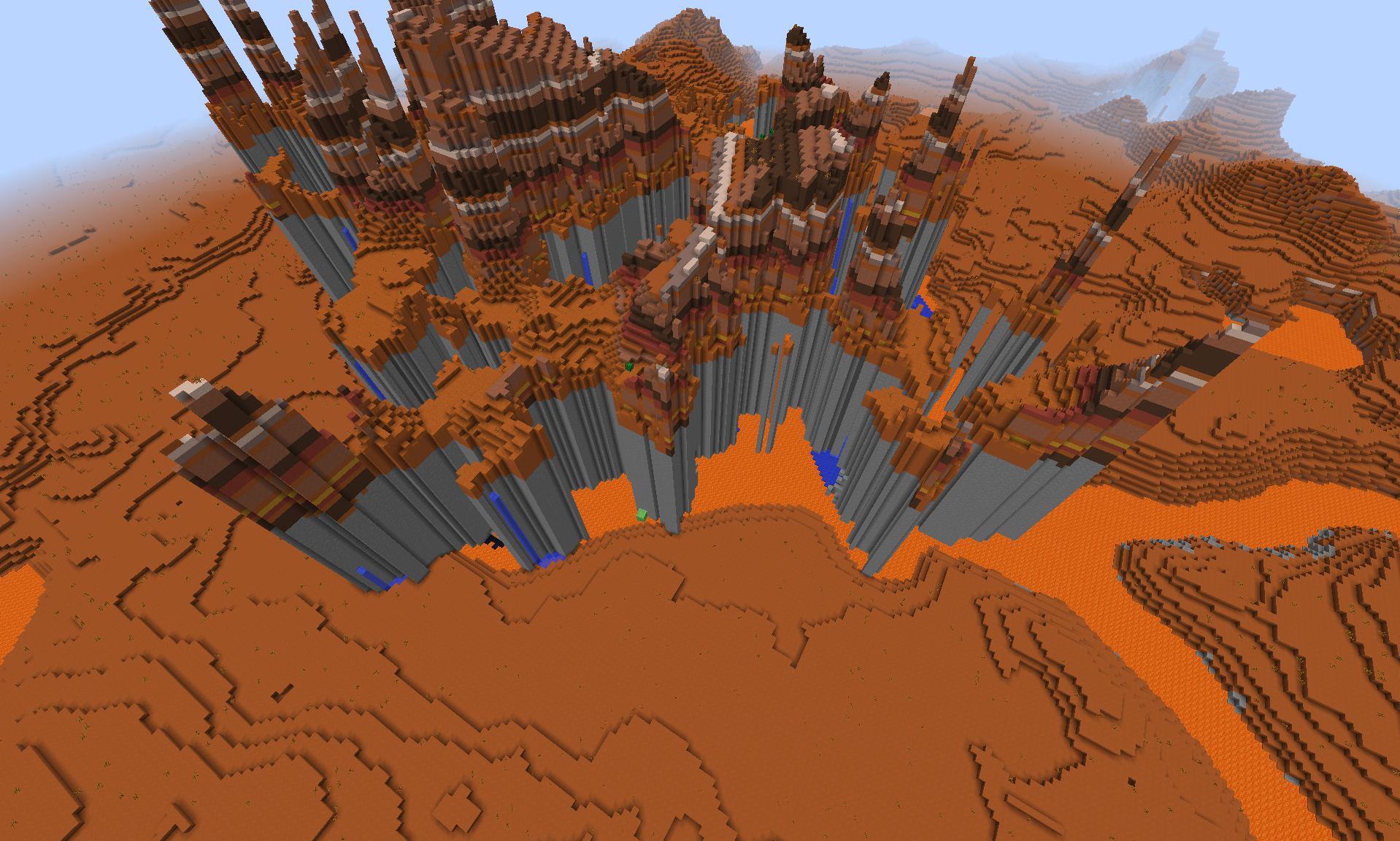
World generates mostly like expected but is seems like Mesa (Bryce) is not using the lowered baseSize in some parts.
The stone on the screenshot is going up to the normal sea level.
How to reproduce
- Create new custom world using the seed 1104859589434701128 and this preset:
{"coordinateScale":684.412,"heightScale":684.412,"lowerLimitScale":512.0,"upperLimitScale":512.0,"depthNoiseScaleX":200.0,"depthNoiseScaleZ":200.0,"depthNoiseScaleExponent":0.5,"mainNoiseScaleX":80.0,"mainNoiseScaleY":160.0,"mainNoiseScaleZ":80.0,"baseSize":3.0,"stretchY":12.0,"biomeDepthWeight":1.0,"biomeDepthOffset":0.0,"biomeScaleWeight":2.0704226,"biomeScaleOffset":0.0,"seaLevel":29,"useCaves":false,"useDungeons":false,"dungeonChance":8,"useStrongholds":false,"useVillages":false,"useMineShafts":false,"useTemples":false,"useMonuments":false,"useRavines":true,"useWaterLakes":false,"waterLakeChance":4,"useLavaLakes":true,"lavaLakeChance":80,"useLavaOceans":true,"fixedBiome":33,"biomeSize":4,"riverSize":4,"dirtSize":1,"dirtCount":0,"dirtMinHeight":0,"dirtMaxHeight":256,"gravelSize":33,"gravelCount":0,"gravelMinHeight":0,"gravelMaxHeight":256,"graniteSize":33,"graniteCount":20,"graniteMinHeight":0,"graniteMaxHeight":30,"dioriteSize":33,"dioriteCount":0,"dioriteMinHeight":0,"dioriteMaxHeight":80,"andesiteSize":33,"andesiteCount":0,"andesiteMinHeight":0,"andesiteMaxHeight":80,"coalSize":17,"coalCount":0,"coalMinHeight":0,"coalMaxHeight":128,"ironSize":9,"ironCount":0,"ironMinHeight":0,"ironMaxHeight":64,"goldSize":9,"goldCount":0,"goldMinHeight":0,"goldMaxHeight":32,"redstoneSize":8,"redstoneCount":0,"redstoneMinHeight":0,"redstoneMaxHeight":16,"diamondSize":8,"diamondCount":0,"diamondMinHeight":0,"diamondMaxHeight":16,"lapisSize":7,"lapisCount":0,"lapisCenterHeight":16,"lapisSpread":16} - Make sure to have biome fixed to Mesa or Mesa Plateau (it seems like there is another bug while using presets)
- /tp -1650 100 -1950
Linked Issues




Created Issue:
Mesa (Bryce) doesn't use some settings from custom World
I lowered the sealevel (29) and Depth Base Size (3) and set Biome to Mesa. I also rised biomeScaleWeight.
World generates mostly like expected but is seams like Mesa (Bryce) is not using the lowered baseSize in some parts.
The Stone on the Screenshot is going up to the normal sealevel.
My preset:
{"coordinateScale":684.412,"heightScale":684.412,"lowerLimitScale":512.0,"upperLimitScale":512.0,"depthNoiseScaleX":200.0,"depthNoiseScaleZ":200.0,"depthNoiseScaleExponent":0.5,"mainNoiseScaleX":80.0,"mainNoiseScaleY":160.0,"mainNoiseScaleZ":80.0,"baseSize":3.0,"stretchY":12.0,"biomeDepthWeight":1.0,"biomeDepthOffset":0.0,"biomeScaleWeight":2.0704226,"biomeScaleOffset":0.0,"seaLevel":29,"useCaves":false,"useDungeons":false,"dungeonChance":8,"useStrongholds":false,"useVillages":false,"useMineShafts":false,"useTemples":false,"useMonuments":false,"useRavines":true,"useWaterLakes":false,"waterLakeChance":4,"useLavaLakes":true,"lavaLakeChance":80,"useLavaOceans":true,"fixedBiome":37,"biomeSize":4,"riverSize":4,"dirtSize":1,"dirtCount":0,"dirtMinHeight":0,"dirtMaxHeight":256,"gravelSize":33,"gravelCount":0,"gravelMinHeight":0,"gravelMaxHeight":256,"graniteSize":33,"graniteCount":20,"graniteMinHeight":0,"graniteMaxHeight":30,"dioriteSize":33,"dioriteCount":0,"dioriteMinHeight":0,"dioriteMaxHeight":80,"andesiteSize":33,"andesiteCount":0,"andesiteMinHeight":0,"andesiteMaxHeight":80,"coalSize":17,"coalCount":0,"coalMinHeight":0,"coalMaxHeight":128,"ironSize":9,"ironCount":0,"ironMinHeight":0,"ironMaxHeight":64,"goldSize":9,"goldCount":0,"goldMinHeight":0,"goldMaxHeight":32,"redstoneSize":8,"redstoneCount":0,"redstoneMinHeight":0,"redstoneMaxHeight":16,"diamondSize":8,"diamondCount":0,"diamondMinHeight":0,"diamondMaxHeight":16,"lapisSize":7,"lapisCount":0,"lapisCenterHeight":16,"lapisSpread":16}Environment
LMDE + Java 1.7.0_21 64bit
Attachments1
I lowered the sealevel (29) and Depth Base Size (3) and set Biome to Mesa. I also rised biomeScaleWeight.
World generates mostly like expected but is seams like Mesa (Bryce) is not using the lowered baseSize in some parts.
The Stone on the Screenshot is going up to the normal sealevel.
My preset:
{"coordinateScale":684.412,"heightScale":684.412,"lowerLimitScale":512.0,"upperLimitScale":512.0,"depthNoiseScaleX":200.0,"depthNoiseScaleZ":200.0,"depthNoiseScaleExponent":0.5,"mainNoiseScaleX":80.0,"mainNoiseScaleY":160.0,"mainNoiseScaleZ":80.0,"baseSize":3.0,"stretchY":12.0,"biomeDepthWeight":1.0,"biomeDepthOffset":0.0,"biomeScaleWeight":2.0704226,"biomeScaleOffset":0.0,"seaLevel":29,"useCaves":false,"useDungeons":false,"dungeonChance":8,"useStrongholds":false,"useVillages":false,"useMineShafts":false,"useTemples":false,"useMonuments":false,"useRavines":true,"useWaterLakes":false,"waterLakeChance":4,"useLavaLakes":true,"lavaLakeChance":80,"useLavaOceans":true,"fixedBiome":37,"biomeSize":4,"riverSize":4,"dirtSize":1,"dirtCount":0,"dirtMinHeight":0,"dirtMaxHeight":256,"gravelSize":33,"gravelCount":0,"gravelMinHeight":0,"gravelMaxHeight":256,"graniteSize":33,"graniteCount":20,"graniteMinHeight":0,"graniteMaxHeight":30,"dioriteSize":33,"dioriteCount":0,"dioriteMinHeight":0,"dioriteMaxHeight":80,"andesiteSize":33,"andesiteCount":0,"andesiteMinHeight":0,"andesiteMaxHeight":80,"coalSize":17,"coalCount":0,"coalMinHeight":0,"coalMaxHeight":128,"ironSize":9,"ironCount":0,"ironMinHeight":0,"ironMaxHeight":64,"goldSize":9,"goldCount":0,"goldMinHeight":0,"goldMaxHeight":32,"redstoneSize":8,"redstoneCount":0,"redstoneMinHeight":0,"redstoneMaxHeight":16,"diamondSize":8,"diamondCount":0,"diamondMinHeight":0,"diamondMaxHeight":16,"lapisSize":7,"lapisCount":0,"lapisCenterHeight":16,"lapisSpread":16}I lowered the sealevel (29) and Depth Base Size (3) and set Biome to Mesa. I also rised biomeScaleWeight.
World generates mostly like expected but is seams like Mesa (Bryce) is not using the lowered baseSize in some parts.
The Stone on the Screenshot is going up to the normal sealevel.
Steps to reproduce:
1. Create new cutom World use the preset below
2. Make sure to have Biome fixed to Mesa or Mesa Plateau (it seams like there is another Bug while using presets)
3. Change Gamemode to 1
4. Fly around and find a Mesa (Bryce) BiomeMy preset:
{"coordinateScale":684.412,"heightScale":684.412,"lowerLimitScale":512.0,"upperLimitScale":512.0,"depthNoiseScaleX":200.0,"depthNoiseScaleZ":200.0,"depthNoiseScaleExponent":0.5,"mainNoiseScaleX":80.0,"mainNoiseScaleY":160.0,"mainNoiseScaleZ":80.0,"baseSize":3.0,"stretchY":12.0,"biomeDepthWeight":1.0,"biomeDepthOffset":0.0,"biomeScaleWeight":2.0704226,"biomeScaleOffset":0.0,"seaLevel":29,"useCaves":false,"useDungeons":false,"dungeonChance":8,"useStrongholds":false,"useVillages":false,"useMineShafts":false,"useTemples":false,"useMonuments":false,"useRavines":true,"useWaterLakes":false,"waterLakeChance":4,"useLavaLakes":true,"lavaLakeChance":80,"useLavaOceans":true,"fixedBiome":37,"biomeSize":4,"riverSize":4,"dirtSize":1,"dirtCount":0,"dirtMinHeight":0,"dirtMaxHeight":256,"gravelSize":33,"gravelCount":0,"gravelMinHeight":0,"gravelMaxHeight":256,"graniteSize":33,"graniteCount":20,"graniteMinHeight":0,"graniteMaxHeight":30,"dioriteSize":33,"dioriteCount":0,"dioriteMinHeight":0,"dioriteMaxHeight":80,"andesiteSize":33,"andesiteCount":0,"andesiteMinHeight":0,"andesiteMaxHeight":80,"coalSize":17,"coalCount":0,"coalMinHeight":0,"coalMaxHeight":128,"ironSize":9,"ironCount":0,"ironMinHeight":0,"ironMaxHeight":64,"goldSize":9,"goldCount":0,"goldMinHeight":0,"goldMaxHeight":32,"redstoneSize":8,"redstoneCount":0,"redstoneMinHeight":0,"redstoneMaxHeight":16,"diamondSize":8,"diamondCount":0,"diamondMinHeight":0,"diamondMaxHeight":16,"lapisSize":7,"lapisCount":0,"lapisCenterHeight":16,"lapisSpread":16}
custom_biome.png
duplicates
When using your preset, the biome is encoded with "?" and the slider is outside of the sliding range, caused by
MC-54484
But when substracting 2 of fixedBiome then it's still not looking better.
{"coordinateScale":684.412,"heightScale":684.412,"lowerLimitScale":512.0,"upperLimitScale":512.0,"depthNoiseScaleX":200.0,"depthNoiseScaleZ":200.0,"depthNoiseScaleExponent":0.5,"mainNoiseScaleX":80.0,"mainNoiseScaleY":160.0,"mainNoiseScaleZ":80.0,"baseSize":3.0,"stretchY":12.0,"biomeDepthWeight":1.0,"biomeDepthOffset":0.0,"biomeScaleWeight":2.0704226,"biomeScaleOffset":0.0,"seaLevel":29,"useCaves":false,"useDungeons":false,"dungeonChance":8,"useStrongholds":false,"useVillages":false,"useMineShafts":false,"useTemples":false,"useMonuments":false,"useRavines":true,"useWaterLakes":false,"waterLakeChance":4,"useLavaLakes":true,"lavaLakeChance":80,"useLavaOceans":true,"fixedBiome":35,"biomeSize":4,"riverSize":4,"dirtSize":1,"dirtCount":0,"dirtMinHeight":0,"dirtMaxHeight":256,"gravelSize":33,"gravelCount":0,"gravelMinHeight":0,"gravelMaxHeight":256,"graniteSize":33,"graniteCount":20,"graniteMinHeight":0,"graniteMaxHeight":30,"dioriteSize":33,"dioriteCount":0,"dioriteMinHeight":0,"dioriteMaxHeight":80,"andesiteSize":33,"andesiteCount":0,"andesiteMinHeight":0,"andesiteMaxHeight":80,"coalSize":17,"coalCount":0,"coalMinHeight":0,"coalMaxHeight":128,"ironSize":9,"ironCount":0,"ironMinHeight":0,"ironMaxHeight":64,"goldSize":9,"goldCount":0,"goldMinHeight":0,"goldMaxHeight":32,"redstoneSize":8,"redstoneCount":0,"redstoneMinHeight":0,"redstoneMaxHeight":16,"diamondSize":8,"diamondCount":0,"diamondMinHeight":0,"diamondMaxHeight":16,"lapisSize":7,"lapisCount":0,"lapisCenterHeight":16,"lapisSpread":16}
duplicates
I lowered the sealevel (29) and Depth Base Size (3) and set Biome to Mesa. I also rised biomeScaleWeight.
World generates mostly like expected but is seams like Mesa (Bryce) is not using the lowered baseSize in some parts.
The Stone on the Screenshot is going up to the normal sealevel.
Steps to reproduce:
1. Create new cutom World use the preset below
2. Make sure to have Biome fixed to Mesa or Mesa Plateau (it seams like there is another Bug while using presets)
3. Change Gamemode to 1
4. Fly around and find a Mesa (Bryce) BiomeMy preset:
{"coordinateScale":684.412,"heightScale":684.412,"lowerLimitScale":512.0,"upperLimitScale":512.0,"depthNoiseScaleX":200.0,"depthNoiseScaleZ":200.0,"depthNoiseScaleExponent":0.5,"mainNoiseScaleX":80.0,"mainNoiseScaleY":160.0,"mainNoiseScaleZ":80.0,"baseSize":3.0,"stretchY":12.0,"biomeDepthWeight":1.0,"biomeDepthOffset":0.0,"biomeScaleWeight":2.0704226,"biomeScaleOffset":0.0,"seaLevel":29,"useCaves":false,"useDungeons":false,"dungeonChance":8,"useStrongholds":false,"useVillages":false,"useMineShafts":false,"useTemples":false,"useMonuments":false,"useRavines":true,"useWaterLakes":false,"waterLakeChance":4,"useLavaLakes":true,"lavaLakeChance":80,"useLavaOceans":true,"fixedBiome":37,"biomeSize":4,"riverSize":4,"dirtSize":1,"dirtCount":0,"dirtMinHeight":0,"dirtMaxHeight":256,"gravelSize":33,"gravelCount":0,"gravelMinHeight":0,"gravelMaxHeight":256,"graniteSize":33,"graniteCount":20,"graniteMinHeight":0,"graniteMaxHeight":30,"dioriteSize":33,"dioriteCount":0,"dioriteMinHeight":0,"dioriteMaxHeight":80,"andesiteSize":33,"andesiteCount":0,"andesiteMinHeight":0,"andesiteMaxHeight":80,"coalSize":17,"coalCount":0,"coalMinHeight":0,"coalMaxHeight":128,"ironSize":9,"ironCount":0,"ironMinHeight":0,"ironMaxHeight":64,"goldSize":9,"goldCount":0,"goldMinHeight":0,"goldMaxHeight":32,"redstoneSize":8,"redstoneCount":0,"redstoneMinHeight":0,"redstoneMaxHeight":16,"diamondSize":8,"diamondCount":0,"diamondMinHeight":0,"diamondMaxHeight":16,"lapisSize":7,"lapisCount":0,"lapisCenterHeight":16,"lapisSpread":16}I lowered the sealevel (29) and Depth Base Size (3) and set Biome to Mesa. I also rised biomeScaleWeight.
World generates mostly like expected but is seams like Mesa (Bryce) is not using the lowered baseSize in some parts.
The Stone on the Screenshot is going up to the normal sealevel.
Steps to reproduce:
1. Create new cutom World using the preset{"coordinateScale":684.412,"heightScale":684.412,"lowerLimitScale":512.0,"upperLimitScale":512.0,"depthNoiseScaleX":200.0,"depthNoiseScaleZ":200.0,"depthNoiseScaleExponent":0.5,"mainNoiseScaleX":80.0,"mainNoiseScaleY":160.0,"mainNoiseScaleZ":80.0,"baseSize":3.0,"stretchY":12.0,"biomeDepthWeight":1.0,"biomeDepthOffset":0.0,"biomeScaleWeight":2.0704226,"biomeScaleOffset":0.0,"seaLevel":29,"useCaves":false,"useDungeons":false,"dungeonChance":8,"useStrongholds":false,"useVillages":false,"useMineShafts":false,"useTemples":false,"useMonuments":false,"useRavines":true,"useWaterLakes":false,"waterLakeChance":4,"useLavaLakes":true,"lavaLakeChance":80,"useLavaOceans":true,"fixedBiome":33,"biomeSize":4,"riverSize":4,"dirtSize":1,"dirtCount":0,"dirtMinHeight":0,"dirtMaxHeight":256,"gravelSize":33,"gravelCount":0,"gravelMinHeight":0,"gravelMaxHeight":256,"graniteSize":33,"graniteCount":20,"graniteMinHeight":0,"graniteMaxHeight":30,"dioriteSize":33,"dioriteCount":0,"dioriteMinHeight":0,"dioriteMaxHeight":80,"andesiteSize":33,"andesiteCount":0,"andesiteMinHeight":0,"andesiteMaxHeight":80,"coalSize":17,"coalCount":0,"coalMinHeight":0,"coalMaxHeight":128,"ironSize":9,"ironCount":0,"ironMinHeight":0,"ironMaxHeight":64,"goldSize":9,"goldCount":0,"goldMinHeight":0,"goldMaxHeight":32,"redstoneSize":8,"redstoneCount":0,"redstoneMinHeight":0,"redstoneMaxHeight":16,"diamondSize":8,"diamondCount":0,"diamondMinHeight":0,"diamondMaxHeight":16,"lapisSize":7,"lapisCount":0,"lapisCenterHeight":16,"lapisSpread":16}and seed 1104859589434701128
2. Make sure to have Biome fixed to Mesa or Mesa Plateau (it seams like there is another Bug while using presets)
3. Change Gamemode to 1
4. Teleport to -1650 100 -1950
![[Bot] Arisa](../../../data/assets/gravatar/mustek2.png)
![[Mod] Skylinerw](../../../data/assets/gravatar/skylinerw.png)


![[Mod] Michael Wobst](../../../data/avatars/users/37868.png)
I lowered the sealevel (29) and Depth Base Size (3) and set Biome to Mesa. I also rised biomeScaleWeight.
World generates mostly like expected but is seams like Mesa (Bryce) is not using the lowered baseSize in some parts.
The Stone on the Screenshot is going up to the normal sealevel.
Steps to reproduce:1. Create new cutom World using the preset{"coordinateScale":684.412,"heightScale":684.412,"lowerLimitScale":512.0,"upperLimitScale":512.0,"depthNoiseScaleX":200.0,"depthNoiseScaleZ":200.0,"depthNoiseScaleExponent":0.5,"mainNoiseScaleX":80.0,"mainNoiseScaleY":160.0,"mainNoiseScaleZ":80.0,"baseSize":3.0,"stretchY":12.0,"biomeDepthWeight":1.0,"biomeDepthOffset":0.0,"biomeScaleWeight":2.0704226,"biomeScaleOffset":0.0,"seaLevel":29,"useCaves":false,"useDungeons":false,"dungeonChance":8,"useStrongholds":false,"useVillages":false,"useMineShafts":false,"useTemples":false,"useMonuments":false,"useRavines":true,"useWaterLakes":false,"waterLakeChance":4,"useLavaLakes":true,"lavaLakeChance":80,"useLavaOceans":true,"fixedBiome":33,"biomeSize":4,"riverSize":4,"dirtSize":1,"dirtCount":0,"dirtMinHeight":0,"dirtMaxHeight":256,"gravelSize":33,"gravelCount":0,"gravelMinHeight":0,"gravelMaxHeight":256,"graniteSize":33,"graniteCount":20,"graniteMinHeight":0,"graniteMaxHeight":30,"dioriteSize":33,"dioriteCount":0,"dioriteMinHeight":0,"dioriteMaxHeight":80,"andesiteSize":33,"andesiteCount":0,"andesiteMinHeight":0,"andesiteMaxHeight":80,"coalSize":17,"coalCount":0,"coalMinHeight":0,"coalMaxHeight":128,"ironSize":9,"ironCount":0,"ironMinHeight":0,"ironMaxHeight":64,"goldSize":9,"goldCount":0,"goldMinHeight":0,"goldMaxHeight":32,"redstoneSize":8,"redstoneCount":0,"redstoneMinHeight":0,"redstoneMaxHeight":16,"diamondSize":8,"diamondCount":0,"diamondMinHeight":0,"diamondMaxHeight":16,"lapisSize":7,"lapisCount":0,"lapisCenterHeight":16,"lapisSpread":16}and seed 1104859589434701128
2. Make sure to have Biome fixed to Mesa or Mesa Plateau (it seams like there is another Bug while using presets)
3. Change Gamemode to 1
4. Teleport to -1650 100 -1950I lowered the sea level (29) and Depth Base Size (3) and set biome to Mesa. I also raised biomeScaleWeight.
World generates mostly like expected but is seems like Mesa (Bryce) is not using the lowered baseSize in some parts.The stone on the screenshot is going up to the normal sea level.
How to reproduce
- Create new custom world using the seed 1104859589434701128 and this preset:
{"coordinateScale":684.412,"heightScale":684.412,"lowerLimitScale":512.0,"upperLimitScale":512.0,"depthNoiseScaleX":200.0,"depthNoiseScaleZ":200.0,"depthNoiseScaleExponent":0.5,"mainNoiseScaleX":80.0,"mainNoiseScaleY":160.0,"mainNoiseScaleZ":80.0,"baseSize":3.0,"stretchY":12.0,"biomeDepthWeight":1.0,"biomeDepthOffset":0.0,"biomeScaleWeight":2.0704226,"biomeScaleOffset":0.0,"seaLevel":29,"useCaves":false,"useDungeons":false,"dungeonChance":8,"useStrongholds":false,"useVillages":false,"useMineShafts":false,"useTemples":false,"useMonuments":false,"useRavines":true,"useWaterLakes":false,"waterLakeChance":4,"useLavaLakes":true,"lavaLakeChance":80,"useLavaOceans":true,"fixedBiome":33,"biomeSize":4,"riverSize":4,"dirtSize":1,"dirtCount":0,"dirtMinHeight":0,"dirtMaxHeight":256,"gravelSize":33,"gravelCount":0,"gravelMinHeight":0,"gravelMaxHeight":256,"graniteSize":33,"graniteCount":20,"graniteMinHeight":0,"graniteMaxHeight":30,"dioriteSize":33,"dioriteCount":0,"dioriteMinHeight":0,"dioriteMaxHeight":80,"andesiteSize":33,"andesiteCount":0,"andesiteMinHeight":0,"andesiteMaxHeight":80,"coalSize":17,"coalCount":0,"coalMinHeight":0,"coalMaxHeight":128,"ironSize":9,"ironCount":0,"ironMinHeight":0,"ironMaxHeight":64,"goldSize":9,"goldCount":0,"goldMinHeight":0,"goldMaxHeight":32,"redstoneSize":8,"redstoneCount":0,"redstoneMinHeight":0,"redstoneMaxHeight":16,"diamondSize":8,"diamondCount":0,"diamondMinHeight":0,"diamondMaxHeight":16,"lapisSize":7,"lapisCount":0,"lapisCenterHeight":16,"lapisSpread":16}- Make sure to have biome fixed to Mesa or Mesa Plateau (it seems like there is another bug while using presets)
- /tp -1650 100 -1950
LMDE + Java 1.7.0_21 64bit
![[Mod] Ezekiel (ezfe)](../../../data/assets/gravatar/ezekielelin.jpeg)
is blocked by
![[Mojang] Nathan Adams](../../../data/assets/gravatar/dinnerbone.png)
![[Mojang] slicedlime](../../../data/assets/gravatar/slicedlime.jpeg)
I'am not sure if i was able to make my problem clear, because custom_biome.png isn't related to it und you can barely see it on 2014-09-05_17.35.56.png
I think far in backround there is a Mesa (Bryce) Biome with my Problem but i dont think someone sees it exept he knows what he is looking for.
So to make it clear: I think i found a bug that just has an effect on "Mesa (Bryce)" Biome. The Pillars in this Biome are generated on the normal high and not the lowered one so you get realy high stone walls. And i don't think this is intended.
Ok. See what you mean. Forget my comments.
I dont know how it works here, but it seems for me, that this Bug is still marked as dublication of
MC-54484Will anybody pay attention to it this way?
Its the first bug i report here, so i dont know how long something like confirmation of the bug normaly takes.
Perhaps i am just a bit impatient because i want to create my red Planet.
That was just a left over link. This ticket is still open.
is this still a concern in 15w45a?
No longer an issue. Fixed between 1.8.1 and 15w45a.
Are you kidding?
It got better (the walls are not made of Stone any more) but i still think it is not the intendet behavior.
And i can see on both pictures, that you didn't follow my steps to reproduce the bug.
There is no problem with "Mesa" biome, there is a problem with "Mesa (Bryce)" biome.
And realy? After one year you don't give me some days to respond?
No.
Are you ?
Instead of providing a seed and coordinates you just wrote "Fly around and find a Mesa (Bryce) Biome".
Than you could write: "Please provide seed and coordinates."
And you will get them.
And not just wait one year and close it.
seed: 1104859589434701128
coord: -1650 100 -1950
it's normal on the bug tracker that if there is a bug in generation of a structure/world, that you provide the seed and coords
Failing to reproduce this issue with seed 1104859589434701128 (Typo ? Triple checked that) and the customized preset from the ticket description.
Strangely the biome in the customize screen is printed as "?" (Because of
MC-54484?)No, in this preset is an old bug. At the time i wrote the report fixed biomes got changed in the generated preset.
Just switch fixed biome to Mesa.
This bug is also still there but i fixed it in this preset manually:
{"coordinateScale":684.412,"heightScale":684.412,"lowerLimitScale":512.0,"upperLimitScale":512.0,"depthNoiseScaleX":200.0,"depthNoiseScaleZ":200.0,"depthNoiseScaleExponent":0.5,"mainNoiseScaleX":80.0,"mainNoiseScaleY":160.0,"mainNoiseScaleZ":80.0,"baseSize":3.0,"stretchY":12.0,"biomeDepthWeight":1.0,"biomeDepthOffset":0.0,"biomeScaleWeight":2.0704226,"biomeScaleOffset":0.0,"seaLevel":29,"useCaves":false,"useDungeons":false,"dungeonChance":8,"useStrongholds":false,"useVillages":false,"useMineShafts":false,"useTemples":false,"useMonuments":false,"useRavines":true,"useWaterLakes":false,"waterLakeChance":4,"useLavaLakes":true,"lavaLakeChance":80,"useLavaOceans":true,"fixedBiome":33,"biomeSize":4,"riverSize":4,"dirtSize":1,"dirtCount":0,"dirtMinHeight":0,"dirtMaxHeight":256,"gravelSize":33,"gravelCount":0,"gravelMinHeight":0,"gravelMaxHeight":256,"graniteSize":33,"graniteCount":20,"graniteMinHeight":0,"graniteMaxHeight":30,"dioriteSize":33,"dioriteCount":0,"dioriteMinHeight":0,"dioriteMaxHeight":80,"andesiteSize":33,"andesiteCount":0,"andesiteMinHeight":0,"andesiteMaxHeight":80,"coalSize":17,"coalCount":0,"coalMinHeight":0,"coalMaxHeight":128,"ironSize":9,"ironCount":0,"ironMinHeight":0,"ironMaxHeight":64,"goldSize":9,"goldCount":0,"goldMinHeight":0,"goldMaxHeight":32,"redstoneSize":8,"redstoneCount":0,"redstoneMinHeight":0,"redstoneMaxHeight":16,"diamondSize":8,"diamondCount":0,"diamondMinHeight":0,"diamondMaxHeight":16,"lapisSize":7,"lapisCount":0,"lapisCenterHeight":16,"lapisSpread":16}Confirmed and updated description.
Is this still an issue in the most recent versions (currently that is 1.10.2, or 16w42a) of Minecraft? If so, please update the affected versions and help us keeping this ticket updated from time to time.
Still same Problem in 1.10.2
For 16w42a Problem occurs on new coordinates: 80 100 -500
Btw. Enviroment is Arch+Cinnamon DE+Java OpenJDK 1.8.0_102 now