 MC-87655
Arrows with negative damage can crash the game on hitting an enemy
Arrows with negative damage can crash the game on hitting an enemy.
This crash is strange, because crash seems to be dependent both on just how negative the damage is, and on the distance from player to the hit mob.
How to Reproduce:
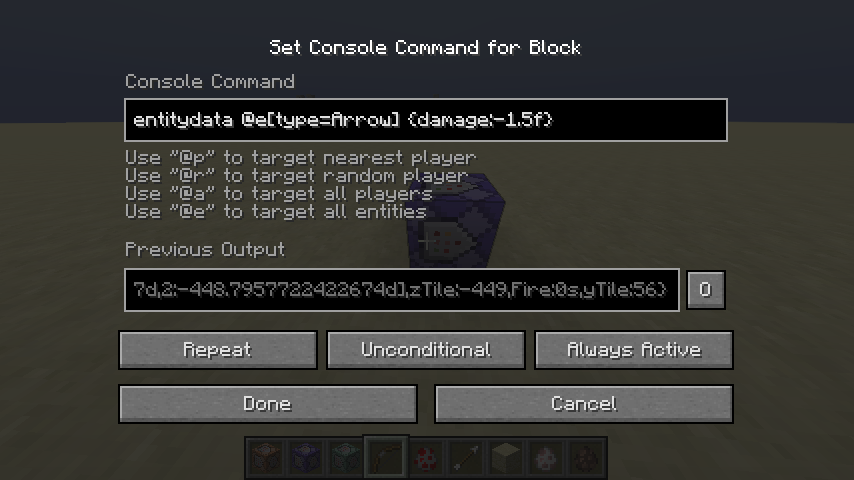
1. Place an Always Active Repeat Command Block anywhere in the world with the following command inside:
execute as @e[type=arrow] run data merge entity @s {damage:Xf}
The exact value of X determines if the game will crash.
2. Place and immobilize two Villagers, one 5 blocks away from the player, second around 25 blocks away.
3. Shoot a villager with the bow. Be sure that the arrow will be in the air for at least one tick for the command to work.
4. Depending on the value of X and which Villager you shoot, the following things should happen:
X = -1.0:
Near Villager: Game Doesn't Crash
Far Villager: Game Doesn't Crash
X = -1.4:
Near Villager: Game Crashes
Far Villager: Game Doesn't Crash
X = -1.5:
Near Villager: Game Crashes
Far Villager: Game Crashes
For all X lower than -1.5, game always crashes on hitting any of the villagers.

Description: Ticking entity

java.lang.IllegalArgumentException: bound must be positive
	at java.util.Random.nextInt(Random.java:388)
	at aoj.b(SourceFile:368)
	at aoj.a(SourceFile:335)
	at aoj.R_(SourceFile:264)
	at aol.R_(SourceFile:99)
	at axx.a(SourceFile:1243)
	at td.a(SourceFile:575)
	at axx.g(SourceFile:1218)
	at axx.o_(SourceFile:1100)
	at td.o_(SourceFile:491)
	at net.minecraft.server.MinecraftServer.b(SourceFile:755)
	at net.minecraft.server.MinecraftServer.a(SourceFile:681)
	at dgg.a(SourceFile:131)
	at net.minecraft.server.MinecraftServer.run(SourceFile:584)
	at java.lang.Thread.run(Thread.java:745)
Linked Issues


![[Helper] Lord_Quadrato](../../../data/avatars/users/26105.png)
Created Issue:
Arrows with negative damage can crash the game on hitting an enemy
Arrows with negative damage can crash the game on hitting an enemy.
This crash is strange, because crash seems to be dependant both on just how negative the damage is, and on the distance from player to the hit mob.
How to Reproduce:
1. Place an Always Active Repeat Command Block anywhere in the world with the following command inside:
"entitydata @e[type=Arrow]
{damage:Xf}"
The exact value of X determines if the game will crash.2. Place and immobilize two Villagers, one 5 blocks away from the player, second around 25 blocks away.
3. Shoot a villager with the bow. Be sure that the arrow will be in the air for at least one tick for the command to work.
4. Depending on the value of X and which Villager you shoot, the following things should happen:
*X = -1.0: *
Near Villager: Game Doesn't Crash
Far Villager: Game Doesn't Crash*X = -1.3: *
Near Villager: Game Doesn't Crash
Far Villager: Game Doesn't Crash*X = -1.4: *
Near Villager: Game Crashes
Far Villager: Game Doesn't Crash*X = -1.5: *
Near Villager: Game Crashes
Far Villager: Game CrashesFor all X lower than -1.5, game always crashes on hitting any of the villagers.
Environment
OS: Windows 8.1
Java Version: 8 Update 51
Attachments2
Arrows with negative damage can crash the game on hitting an enemy.
This crash is strange, because crash seems to be dependant both on just how negative the damage is, and on the distance from player to the hit mob.
How to Reproduce:
1. Place an Always Active Repeat Command Block anywhere in the world with the following command inside:
"entitydata @e[type=Arrow]
{damage:Xf}"
The exact value of X determines if the game will crash.2. Place and immobilize two Villagers, one 5 blocks away from the player, second around 25 blocks away.
3. Shoot a villager with the bow. Be sure that the arrow will be in the air for at least one tick for the command to work.
4. Depending on the value of X and which Villager you shoot, the following things should happen:
*X = -1.0:*
Near Villager: Game Doesn't Crash
Far Villager: Game Doesn't Crash
*X = -1.3:*
Near Villager: Game Doesn't Crash
Far Villager: Game Doesn't Crash
*X = -1.4:*
Near Villager: Game Crashes
Far Villager: Game Doesn't Crash
*X = -1.5:*
Near Villager: Game Crashes
Far Villager: Game CrashesFor all X lower than -1.5, game always crashes on hitting any of the villagers.

Arrows with negative damage can crash the game on hitting an enemy.
This crash is strange, because crash seems to be dependant both on just how negative the damage is, and on the distance from player to the hit mob.
How to Reproduce:
1. Place an Always Active Repeat Command Block anywhere in the world with the following command inside:
"entitydata @e[type=Arrow]
{damage:Xf}"
The exact value of X determines if the game will crash.2. Place and immobilize two Villagers, one 5 blocks away from the player, second around 25 blocks away.
3. Shoot a villager with the bow. Be sure that the arrow will be in the air for at least one tick for the command to work.
4. Depending on the value of X and which Villager you shoot, the following things should happen:
X = -1.0:
Near Villager: Game Doesn't Crash
Far Villager: Game Doesn't CrashX = -1.3:
Near Villager: Game Doesn't Crash
Far Villager: Game Doesn't CrashX = -1.4:
Near Villager: Game Crashes
Far Villager: Game Doesn't CrashX = -1.5:
Near Villager: Game Crashes
Far Villager: Game CrashesFor all X lower than -1.5, game always crashes on hitting any of the villagers.
Arrows with negative damage can crash the game on hitting an enemy.
This crash is strange, because crash seems to be dependant both on just how negative the damage is, and on the distance from player to the hit mob.
How to Reproduce:
1. Place an Always Active Repeat Command Block anywhere in the world with the following command inside:
entitydata @e[type=Arrow] {damage:Xf}The exact value of X determines if the game will crash.
2. Place and immobilize two Villagers, one 5 blocks away from the player, second around 25 blocks away.
3. Shoot a villager with the bow. Be sure that the arrow will be in the air for at least one tick for the command to work.
4. Depending on the value of X and which Villager you shoot, the following things should happen:
X = -1.0:
Near Villager: Game Doesn't Crash
Far Villager: Game Doesn't CrashX = -1.3:
Near Villager: Game Doesn't Crash
Far Villager: Game Doesn't CrashX = -1.4:
Near Villager: Game Crashes
Far Villager: Game Doesn't CrashX = -1.5:
Near Villager: Game Crashes
Far Villager: Game CrashesFor all X lower than -1.5, game always crashes on hitting any of the villagers.
![[Mod] Neko](../../../data/avatars/users/92901.png)
Arrows with negative damage can crash the game on hitting an enemy.
This crash is strange, because crash seems to be dependant both on just how negative the damage is, and on the distance from player to the hit mob.
How to Reproduce:
1. Place an Always Active Repeat Command Block anywhere in the world with the following command inside:
entitydata @e[type=Arrow] {damage:Xf}The exact value of X determines if the game will crash.
2. Place and immobilize two Villagers, one 5 blocks away from the player, second around 25 blocks away.
3. Shoot a villager with the bow. Be sure that the arrow will be in the air for at least one tick for the command to work.
4. Depending on the value of X and which Villager you shoot, the following things should happen:
X = -1.0:
Near Villager: Game Doesn't Crash
Far Villager: Game Doesn't CrashX = -1.3:
Near Villager: Game Doesn't Crash
Far Villager: Game Doesn't CrashX = -1.4:
Near Villager: Game Crashes
Far Villager: Game Doesn't CrashX = -1.5:
Near Villager: Game Crashes
Far Villager: Game CrashesFor all X lower than -1.5, game always crashes on hitting any of the villagers.
Description: Ticking entity

java.lang.IllegalArgumentException: bound must be positive
	at java.util.Random.nextInt(Random.java:388)
	at aax.a(SourceFile:323)
	at aax.A_(SourceFile:255)
	at abq.A_(SourceFile:81)
	at ajn.a(SourceFile:1537)
	at lv.a(SourceFile:718)
	at ajn.g(SourceFile:1515)
	at ajn.k(SourceFile:1398)
	at lv.k(SourceFile:551)
	at net.minecraft.server.MinecraftServer.D(SourceFile:634)
	at net.minecraft.server.MinecraftServer.C(SourceFile:562)
	at ccb.C(SourceFile:154)
	at net.minecraft.server.MinecraftServer.run(SourceFile:466)
	at java.lang.Thread.run(Thread.java:745)

![[Mod] Michael Wobst](../../../data/avatars/users/37868.png)
Arrows with negative damage can crash the game on hitting an enemy.
This crash is strange, because crash seems to be depend
ant both on just how negative the damage is, and on the distance from player to the hit mob.How to Reproduce:
1. Place an Always Active Repeat Command Block anywhere in the world with the following command inside:
entitydata @e[type=Arrow] {damage:Xf}The exact value of X determines if the game will crash.
2. Place and immobilize two Villagers, one 5 blocks away from the player, second around 25 blocks away.
3. Shoot a villager with the bow. Be sure that the arrow will be in the air for at least one tick for the command to work.
4. Depending on the value of X and which Villager you shoot, the following things should happen:
X = -1.0:
Near Villager: Game Doesn't Crash
Far Villager: Game Doesn't CrashX = -1.3:
Near Villager: Game Doesn't Crash
Far Villager: Game Doesn't CrashX = -1.4:
Near Villager: Game Crashes
Far Villager: Game Doesn't CrashX = -1.5:
Near Villager: Game Crashes
Far Villager: Game CrashesFor all X lower than -1.5, game always crashes on hitting any of the villagers.
Description: Ticking entity java.lang.IllegalArgumentException: bound must be positive at java.util.Random.nextInt(Random.java:388) at aax.a(SourceFile:323) at aax.A_(SourceFile:255) at abq.A_(SourceFile:81) at ajn.a(SourceFile:1537) at lv.a(SourceFile:718) at ajn.g(SourceFile:1515) at ajn.k(SourceFile:1398) at lv.k(SourceFile:551) at net.minecraft.server.MinecraftServer.D(SourceFile:634) at net.minecraft.server.MinecraftServer.C(SourceFile:562) at ccb.C(SourceFile:154) at net.minecraft.server.MinecraftServer.run(SourceFile:466) at java.lang.Thread.run(Thread.java:745)Arrows with negative damage can crash the game on hitting an enemy.
This crash is strange, because crash seems to be dependent both on just how negative the damage is, and on the distance from player to the hit mob.
How to Reproduce:
1. Place an Always Active Repeat Command Block anywhere in the world with the following command inside:
entitydata @e[type=arrow] {damage:Xf}The exact value of X determines if the game will crash.
2. Place and immobilize two Villagers, one 5 blocks away from the player, second around 25 blocks away.
3. Shoot a villager with the bow. Be sure that the arrow will be in the air for at least one tick for the command to work.
4. Depending on the value of X and which Villager you shoot, the following things should happen:
X = -1.0:
Near Villager: Game Doesn't Crash
Far Villager: Game Doesn't CrashX = -1.3:
Near Villager: Game Doesn't Crash
Far Villager: Game Doesn't CrashX = -1.4:
Near Villager: Game Crashes
Far Villager: Game Doesn't CrashX = -1.5:
Near Villager: Game Crashes
Far Villager: Game CrashesFor all X lower than -1.5, game always crashes on hitting any of the villagers.
Description: Ticking entity

java.lang.IllegalArgumentException: bound must be positive
	at java.util.Random.nextInt(Random.java:388)
	at aax.a(SourceFile:323)
	at aax.A_(SourceFile:255)
	at abq.A_(SourceFile:81)
	at ajn.a(SourceFile:1537)
	at lv.a(SourceFile:718)
	at ajn.g(SourceFile:1515)
	at ajn.k(SourceFile:1398)
	at lv.k(SourceFile:551)
	at net.minecraft.server.MinecraftServer.D(SourceFile:634)
	at net.minecraft.server.MinecraftServer.C(SourceFile:562)
	at ccb.C(SourceFile:154)
	at net.minecraft.server.MinecraftServer.run(SourceFile:466)
	at java.lang.Thread.run(Thread.java:745)

Arrows with negative damage can crash the game on hitting an enemy.
This crash is strange, because crash seems to be dependent both on just how negative the damage is, and on the distance from player to the hit mob.
How to Reproduce:
1. Place an Always Active Repeat Command Block anywhere in the world with the following command inside:
entitydata @e[type=arrow] {damage:Xf}The exact value of X determines if the game will crash.
2. Place and immobilize two Villagers, one 5 blocks away from the player, second around 25 blocks away.
3. Shoot a villager with the bow. Be sure that the arrow will be in the air for at least one tick for the command to work.
4. Depending on the value of X and which Villager you shoot, the following things should happen:
X = -1.0:
Near Villager: Game Doesn't Crash
Far Villager: Game Doesn't CrashX = -1.3:
Near Villager: Game Doesn't Crash
Far Villager: Game Doesn't CrashX = -1.4:
Near Villager: Game Crashes
Far Villager: Game Doesn't CrashX = -1.5:
Near Villager: Game Crashes
Far Villager: Game CrashesFor all X lower than -1.5, game always crashes on hitting any of the villagers.
Description: Ticking entity java.lang.IllegalArgumentException: bound must be positive at java.util.Random.nextInt(Random.java:388) at aax.a(SourceFile:323) at aax.A_(SourceFile:255) at abq.A_(SourceFile:81) at ajn.a(SourceFile:1537) at lv.a(SourceFile:718) at ajn.g(SourceFile:1515) at ajn.k(SourceFile:1398) at lv.k(SourceFile:551) at net.minecraft.server.MinecraftServer.D(SourceFile:634) at net.minecraft.server.MinecraftServer.C(SourceFile:562) at ccb.C(SourceFile:154) at net.minecraft.server.MinecraftServer.run(SourceFile:466) at java.lang.Thread.run(Thread.java:745)Arrows with negative damage can crash the game on hitting an enemy.
This crash is strange, because crash seems to be dependent both on just how negative the damage is, and on the distance from player to the hit mob.
How to Reproduce:
1. Place an Always Active Repeat Command Block anywhere in the world with the following command inside:
entitydata @e[type=arrow] {damage:Xf}The exact value of X determines if the game will crash.
2. Place and immobilize two Villagers, one 5 blocks away from the player, second around 25 blocks away.
3. Shoot a villager with the bow. Be sure that the arrow will be in the air for at least one tick for the command to work.
4. Depending on the value of X and which Villager you shoot, the following things should happen:
X = -1.0:
Near Villager: Game Doesn't Crash
Far Villager: Game Doesn't CrashX = -1.3:
Near Villager: Game Doesn't Crash
Far Villager: Game Doesn't CrashX = -1.4:
Near Villager: Game Crashes
Far Villager: Game Doesn't CrashX = -1.5:
Near Villager: Game Crashes
Far Villager: Game CrashesFor all X lower than -1.5, game always crashes on hitting any of the villagers.
Description: Ticking entity

java.lang.IllegalArgumentException: bound must be positive
	at java.util.Random.nextInt(Random.java:388)
	at aeh.a(SourceFile:324)
	at aeh.B_(SourceFile:256)
	at afa.B_(SourceFile:98)
	at amu.a(SourceFile:1524)
	at oo.a(SourceFile:714)
	at amu.h(SourceFile:1500)
	at amu.k(SourceFile:1382)
	at oo.k(SourceFile:547)
	at net.minecraft.server.MinecraftServer.D(SourceFile:632)
	at net.minecraft.server.MinecraftServer.C(SourceFile:560)
	at chd.C(SourceFile:154)
	at net.minecraft.server.MinecraftServer.run(SourceFile:464)
	at java.lang.Thread.run(Thread.java:745)
Arrows with negative damage can crash the game on hitting an enemy.
This crash is strange, because crash seems to be dependent both on just how negative the damage is, and on the distance from player to the hit mob.
How to Reproduce:
1. Place an Always Active Repeat Command Block anywhere in the world with the following command inside:
entitydata@e[type=arrow] {damage:Xf}The exact value of X determines if the game will crash.
2. Place and immobilize two Villagers, one 5 blocks away from the player, second around 25 blocks away.
3. Shoot a villager with the bow. Be sure that the arrow will be in the air for at least one tick for the command to work.
4. Depending on the value of X and which Villager you shoot, the following things should happen:
X = -1.0:
Near Villager: Game Doesn't Crash
Far Villager: Game Doesn't CrashX = -1.
3:
Near Villager: GameDoesn'tCrash
Far Villager: Game Doesn't CrashX = -1.
4:
Near Villager: Game Crashes
Far Villager: GameDoesn'tCrashX = -1.5:
Near Villager: Game Crashes
Far Villager: Game CrashesFor all X lower than -1.5, game always crashes on hitting any of the villagers.
Description: Ticking entity java.lang.IllegalArgumentException: bound must be positive at java.util.Random.nextInt(Random.java:388) at aeh.a(SourceFile:324) at aeh.B_(SourceFile:256) at afa.B_(SourceFile:98) at amu.a(SourceFile:1524) atoo.a(SourceFile:714) at amu.h(SourceFile:1500) at amu.k(SourceFile:1382) atoo.k(SourceFile:547) at net.minecraft.server.MinecraftServer.D(SourceFile:632) at net.minecraft.server.MinecraftServer.C(SourceFile:560) atchd.C(SourceFile:154) at net.minecraft.server.MinecraftServer.run(SourceFile:464) at java.lang.Thread.run(Thread.java:745)Arrows with negative damage can crash the game on hitting an enemy.
This crash is strange, because crash seems to be dependent both on just how negative the damage is, and on the distance from player to the hit mob.
How to Reproduce:
1. Place an Always Active Repeat Command Block anywhere in the world with the following command inside:
execute as @e[type=arrow] run data merge entity @s {damage:Xf}The exact value of X determines if the game will crash.
2. Place and immobilize two Villagers, one 5 blocks away from the player, second around 25 blocks away.
3. Shoot a villager with the bow. Be sure that the arrow will be in the air for at least one tick for the command to work.
4. Depending on the value of X and which Villager you shoot, the following things should happen:
X = -1.0:
Near Villager: Game Doesn't Crash
Far Villager: Game Doesn't CrashX = -1.4:
Near Villager: Game Crashes
Far Villager: Game Doesn't CrashX = -1.5:
Near Villager: Game Crashes
Far Villager: Game CrashesFor all X lower than -1.5, game always crashes on hitting any of the villagers.
1.13.1-pre1: crash-2018-08-19_21.00.58-server.txtDescription: Ticking entity java.lang.IllegalArgumentException: bound must be positive at java.util.Random.nextInt(Random.java:388) at aoj.b(SourceFile:368) at aoj.a(SourceFile:335) at aoj.R_(SourceFile:264) at aol.R_(SourceFile:99) at axx.a(SourceFile:1243) at td.a(SourceFile:575) at axx.g(SourceFile:1218) at axx.o_(SourceFile:1100) at td.o_(SourceFile:491) at net.minecraft.server.MinecraftServer.b(SourceFile:755) at net.minecraft.server.MinecraftServer.a(SourceFile:681) at dgg.a(SourceFile:131) at net.minecraft.server.MinecraftServer.run(SourceFile:584) at java.lang.Thread.run(Thread.java:745)
OS: Windows 8.1
Java Version: 8 Update 51
![[Mod] tryashtar](../../../data/avatars/users/41963.png)
![[Mojang] Nathan Adams](../../../data/assets/gravatar/dinnerbone.png)
![[Mod] violine1101](../../../data/avatars/users/92858.png)
is duplicated by
MC-150101
is duplicated by
relates to
is duplicated by
relates to
The bug
When an arrow with a very high damage value (or a really high speed) deals critical damage and hits an entity, the server can crash.
Description: Ticking entity

java.lang.IllegalArgumentException: bound must be positive
	at java.util.Random.nextInt(Random.java:388)
	at bdb.a(SourceFile:351)
	at bdn.a(SourceFile:118)
	at bdb.h(SourceFile:227)
	at bdd.h(SourceFile:103)
	at yr.a(SourceFile:584)
	at yr$$Lambda$3446/120053388.accept(Unknown Source)
	at boq.a(SourceFile:577)
	at yr.a(SourceFile:399)
	at net.minecraft.server.MinecraftServer.b(SourceFile:827)
	at net.minecraft.server.MinecraftServer.a(SourceFile:766)
	at enn.a(SourceFile:89)
	at net.minecraft.server.MinecraftServer.run(SourceFile:625)
	at java.lang.Thread.run(Thread.java:745)
Reproduction steps
- Switch to Survival mode
/execute at @s anchored eyes run summon arrow ~ ~3 ~ {damage:1e100d,crit:1b} The game crashes once the arrow hits you
Code analysis
20w17a, Mojang names
The fix for MC-87655 made sure, that the damage value used for damage calculation is always >= 0. However, if the result of damage * speed becomes > Integer.MAX_VALUE the result overflows and becomes negative (see MC-181312). If the arrow is dealing critical damage (crit:1b), this negative value is passed to java.util.Random.nextInt(int), the exception seen in the crash report is thrown.
If only MC-181312 was fixed, the calculated damage would overflow after adding the critical damage bonus, which might currently not cause any crashes, but could in the future.
Therefore, it would make sense to clamp the damage to a maximum (e.g. of Integer.MAX_VALUE / 2, or even smaller) since higher damage will likely never occur in vanilla gameplay anyway and would likely kill any entity instantaneously.
Can confirm.
For anyone testing this, the bow needs to be fully drawn.
Please attach a crash report.
Crash Report
Confirmed for
Also when an arrow with negative damage is inside a chunk and the game tries to save the chunk it fails:
@Marcono1234:
MC-82779I am not sure if the saving problem is actually
MC-82779Confirmed for
Is this still an issue in the most recent versions (currently that is 1.10.2, or 16w42a) of Minecraft? If so, please update the affected versions and help us keeping this ticket updated from time to time.
Confirmed in 1.11.1
Confirmed in 1.11.2
Edit: World becomes unusable in 1.11.2 after initial crash- the game just crashes with the same error after subsequent attempts to load it.
Tried in 1.12. Appears to be fixed, or something has changed, since my server didn't crash when I tried this on it.
Nope, not fixed as of 1.12.2, nor the latest 1.13 snapshot, 17w50a.
So I had this happen to me just the other day while I was trying to figure out raycast math. I wondered how critical arrow damage worked while writing a long comment on a youtube video since nowhere explained that damage, figured it out myself, and then experimented with negative values while I was at it. And boom, world permanently lost thanks to this bug (at least it wasn't terribly important). Well, at least until external editing programs update for 1.13 so I can delete the arrows from existence (if no fix comes).
Basically, if a critical arrow attempts to deal negative 4 base damage (e.g. not counting bonus crit damage) or beyond at the moment of contact (even if the victim is an entity that normally can't be damaged apparently, just crashed from trying it on a falling_block entity), you'll lose your world to permacrashes as long as the arrow exists (crash-strength arrows don't disappear on hit). I think the world progresses a handful of ticks every time you re-enter the world though, so if you're really persistent you might get back in eventually if it can despawn, not sure... If it hits a player in the snapshot though, you'll be able to get back into your world easily, which I think is due to a snapshot-only bug of projectiles not currently being able to hit entities from inside their hitbox... But even in the release version, you're able to get back into the world for a moment, so I think the arrow will eventually hit the ground/pass by the player. Apparently the world loads before the player does judging by my own crash reports (they seem to be just about the same as the one posted by the OP, but I'll link two of my last ones for the sake of evidence at the end of this comment, with the first one being from 1.12.2, second one from 17w50a), so I think that'd be the case. I mention that because if the arrow crashes from a non-player entity, the next time you attempt to load in, the crash report doesn't list the player as being in the world, because the world (and thus the entities) is loading pretty much instantly before the player even has a chance to appear (maybe you'd be able to escape the area that has the arrow if it was a really far-off entity that was hit though). Depending on the entity (and probably other situations), attempting to get back into that world can prevent the game from auto-closing on crash, and for such worlds, loading a different world first for some reason will allow it to crash-close on its own as normal. Otherwise, you need to use the task manager to close either the window or the process in the snapshot version, and for the release version, you need to end the process (unlike the snapshots, the window itself closes instantly via task manager, but the process will still be running).
I guess the moral of the story is to not mess with critical negative damage. Non-crit negative damage seems completely safe though, and negative damage arrows have a quite-interesting property of increasing the damage of the next hit the victim takes for 0.5 seconds by an amount equal to the negative damage. It's also a wonderful way (and the only way, I think?) to push players via knockback without harming them (I just wish 0 damage arrows could hit players like they can entities, so that there's no 0.5s "vulnerability" window... but I guess there's gonna be a vulnerability window no matter what since you can get hit right before the end of the 0.5s and then get hit again right away, but that in itself can be avoided/utilized with careful consideration). So only if possible, please don't get rid of negative damage mechanics if you fix this crash issue!
All that aside, here's an example command of what can perma-crash your game:
WARNING: Do NOT risk doing this on a world you care about!
/summon arrow ~ ~2.5 ~ {Motion:[0.0,-1.0],damage:-4,crit:1}While you might possibly recover just fine if you only hit yourself with it, if it hits an entity, well, don't say I didn't warn you! Seriously, use a test world if you're gonna run the command on anything, haha. Velocity times damage is how much the arrow will hurt (round it up (never down for arrows) to a full number if the result has decimals; also, motion on multiple axes complicates the velocity a bit, so I recommend a single axis for easy math). At a basically point-blank range like this, the air doesn't have time to slow it down, so it does precisely -4 damage, which is how much it takes (minimum) to crash as long as it's also a crit arrow.
Anyway, I've probably (over)written enough... These aforementioned crash reports are basically identical, but just in case:

1.12.2 report: crash-2018-01-01_05.18.40-server.txt
17w50a report: crash-2018-01-01_05.19.30-server.txt
Making an arrow with very high damage will crash the game when hitting a player. This can be used by any player with creative by getting this item and placing it above themselves:
give @s chicken_spawn_egg{EntityTag:{id:"minecraft:arrow",damage:1e100d,pickup:1,crit:1}}
I believe this to be a serious issue allowing players with creative to crash any Minecraft server
Can anyone reproduce this in recent versions?
In my testing it stopped happening precisely in the update from 1.14-prerelease5 to 1.14, although 1.14.2 is marked as affected.
This was indeed fixed in 1.14. For the crash for very high damage values, see
MC-181313.The affected version 1.14.2 came from
MC-154177which actually describes the issue for very high damage values. Removing that affected version and setting 1.14 as "Fix Version" is not easily (if at all) possibly, so I resolved this report as "Cannot Reproduce".In 1.14 the code was changed to call Math.max(speed * damage, 0, which makes sure that the calculated damage value is always >= 0.