 MC-87798
Command blocks running before a joining player is fully loaded
The bug
When a player joins a world or server, repeating command blocks begin to run before they are fully loaded into the game.
What I expected to happen was...
I expected for the repeating commands blocks to only execute when a player is fully loaded, so that they doesn't falsely execute a successful testfor command.
What actually happened was...
A repeating command block checking for a player will fail momentarily, even though the player has joined.
How to reproduce
- On singleplayer, enter the following command in a repeating command block:
execute unless entity @a run setblock ~ ~1 ~ stone
- Exit and rejoin the world
→ A block of stone has been placed above the command block
Original steps to Reproduce
1. Create a new world of any type in creative mode.
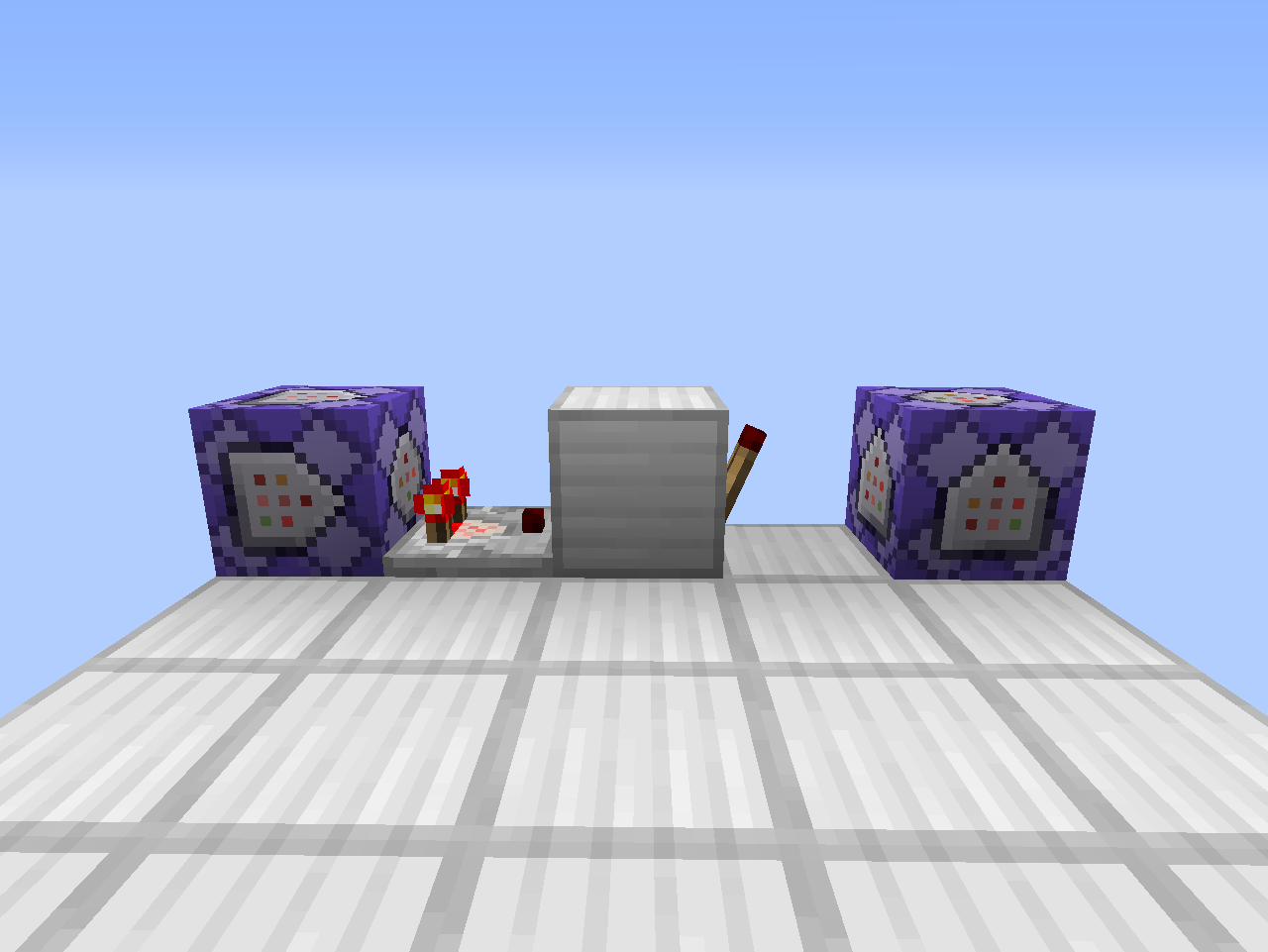
2. Place a repeating, no-redstone, non-conditional command block with the command testfor @a.
3. In front of that, place a redstone comparator, a solid block, and a redstone torch (on the block).
4. Adjacent to the redstone torch, place a repeating, redstone-reliant, non-conditional command block with a say command (e.g. say eggplant).
5. Nothing should happen; this means that the first command block's testfor @a command is successful, preventing the second command block's command from executing.
6. Exit and rejoin the world. [@] eggplant will be in chat twice, meaning that the command blocks executed for about two ticks before realizing the player existed.
This is a problem if you have a message that shows up when nobody is on a certain team, or if you want something to run when there are no players online (in a server).
Linked Issues


Created Issue:
Team not applied to a player for a moment as they join
When a player joins a world or server, their team is not applied to them for a moment as Minecraft loads them.
What I expected to happen was...:
I expected a team to have priority whilst loading, so that no command blocks checking for a player not on a team would ever succeed.What actually happened was...:
A command block checking for a player not in a team will momentarily succeed as Minecraft loads the player.Steps to Reproduce:
1. Create a new world of any type in creative mode (to ensure no existing teams conflict).
2. Type /gamerule commandBlockOutput false to make sure your chat isn't spammed.
3. Type /scoreboard teams add team1 to create a new team.
4. Type /scoreboard teams add team2 to create another new team.
5. Open the world to LAN and have another account join the world.
6. Type /scoreboard teams join team1 @a to have both yourself and the other account join the first team.
7. You may disconnect the other account now, it won't be used again.
8. Type /give @p minecraft:command_block to give yourself a command block.
9. Place the command block. Set it to "Repeat" mode. In it, type the command testfor @a[team=team1]. This command block will succeed only when there is a player in team1.
10. Switch the command block to "Always Active" mode.
11. Place a redstone comparator facing outwards from the block.
12. Place a solid block in front.
13. Skip a block, and place another command block.
14. Switch this second command block to "Repeat" mode. Type a silly say command, like say eggplant.
15. Place a torch on the side of the solid block, so it will power the second command block.
16. The second command block will say "eggplant" twice while the torch inverts.
17. Note that these two command blocks will do the following: If no players are found on team1, then say "eggplant" over and over.
18. Nothing should happen after that, because the only player (you) is on team1!
19. Exit the world.
20. Rejoin the world.
21. In the chat, your say command was executed a few times! That means that someone who is not on a team has been on your world, but you are the only player who has joined your world! This means that, for a moment, you were not on a team!This is a problem if you have a message that shows up when nobody is on a certain team!
Environment
Windows x64, Java 7

Bug is still present in 15w40a.
When a player joins a world or server,
their team is not applied to them for a moment as Minecraft loads them.What I expected to happen was...:
I expecteda team to have priority whilst loading, so that nocommand blockschecking for a player not on a team would ever succeed.What actually happened was...:
A command block checking for a playernot in a team will momentarily succeed as Minecraft loads the player.Steps to Reproduce:
1. Create a new world of any type in creative mode(to ensure no existing teams conflict).
2. Type /gamerule commandBlockOutput falseto make sure your chat isn't spammed.
3. Type /scoreboard teams add team1 to create a new team.
4. Type /scoreboard teams add team2 to create another new team.
5.Open the world to LAN and have another account join the world.
6. Type /scoreboard teams join team1 @ato have both yourself and the other account join the first team.
7.You may disconnect the other account now, it won't beused again.
8. Type/give @p minecraft:command_blockto give yourself a command block.
9. Place the command block. Set it to "Repeat" mode. In it, type the command testfor @a[team=team1]. This command block will succeed only when there is a player in team1.
10. Switch the command block to "Always Active" mode.
11. Place a redstone comparator facing outwards from the block.
12. Place a solid block in front.
13. Skip a block, and place another command block.
14. Switch this second command block to "Repeat" mode. Type a silly say command, like say eggplant.
15. Place a torch on the side of the solid block, so it will power the second command block.
16. The second command block will say "eggplant" twice while the torch inverts.
17. Note that these two command blocks will do the following: If no players are found on team1, then say "eggplant" over and over.
18. Nothing should happen after that, because the only player (you) is on team1!
19. Exit the world.
20. Rejoin the world.21. In the chat, your say command was executed a few times! Thatmeansthatsomeone who is not on a team has been on your world, but you are the only player who has joined your world! This means that, for a moment, you were not on a team!This is a problem if you have a message that shows up when nobody is on a certain team
!When a player joins a world or server, repeating command blocks begin to run before they are fully loaded into the game.
What I expected to happen was...:
I expected for the repeating commands blocks to only execute when a player is fully loaded, so that they doesn't falsely execute a successful `testfor` command.What actually happened was...:
A repeating command block checking for a player will fail momentarily, even though the player has joined.Steps to Reproduce:
1. Create a new world of any type in creative mode.
2. Place a repeating, no-redstone, non-conditional command block with the command `testfor @a`.
3. In front of that, place a redstone comparator, a solid block, and a redstone torch (on the block).
4. Adjacent to the redstone torch, place a repeating, redstone-reliant, non-conditional command block with a `say` command (e.g. `say eggplant`).
5. Nothing should happen; this means that the first command block's `testfor @a` command is successful, preventing the second command block's command from executing.
6. Exit and rejoin the world. `[@] eggplant` will be in chat twice, meaning that the command blocks executed for about two ticks before realizing the player existed.This is a problem if you have a message that shows up when nobody is on a certain team, or if you want something to run when there are no players online (in a server).
Team not applied to a player for a moment as they joinCommand blocks runnig before
When a player joins a world or server, repeating command blocks begin to run before they are fully loaded into the game.
What I expected to happen was...:
I expected for the repeating commands blocks to only execute when a player is fully loaded, so that they doesn't falsely execute a successful `testfor` command.What actually happened was...:
A repeating command block checking for a player will fail momentarily, even though the player has joined.Steps to Reproduce:
1. Create a new world of any type in creative mode.
2. Place a repeating, no-redstone, non-conditional command block with the command`testfor @a`.
3. In front of that, place a redstone comparator, a solid block, and a redstone torch (on the block).
4. Adjacent to the redstone torch, place a repeating, redstone-reliant, non-conditional command block with a`say` command (e.g. `say eggplant`).
5. Nothing should happen; this means that the first command block's`testfor @a` command is successful, preventing the second command block's command from executing.
6. Exit and rejoin the world.`[@]eggplant`will be in chat twice, meaning that the command blocks executed for about two ticks before realizing the player existed.This is a problem if you have a message that shows up when nobody is on a certain team, or if you want something to run when there are no players online (in a server).
When a player joins a world or server, repeating command blocks begin to run before they are fully loaded into the game.
What I expected to happen was...:
I expected for the repeating commands blocks to only execute when a player is fully loaded, so that they doesn't falsely execute a successful `testfor` command.What actually happened was...:
A repeating command block checking for a player will fail momentarily, even though the player has joined.Steps to Reproduce:
1. Create a new world of any type in creative mode.
2. Place a repeating, no-redstone, non-conditional command block with the command testfor @a.
3. In front of that, place a redstone comparator, a solid block, and a redstone torch (on the block).
4. Adjacent to the redstone torch, place a repeating, redstone-reliant, non-conditional command block with a say command (e.g. say eggplant).
5. Nothing should happen; this means that the first command block's testfor @a command is successful, preventing the second command block's command from executing.
6. Exit and rejoin the world. [@] eggplant will be in chat twice, meaning that the command blocks executed for about two ticks before realizing the player existed.This is a problem if you have a message that shows up when nobody is on a certain team, or if you want something to run when there are no players online (in a server).
Command blocks running before a joining player is fully loaded


![[Mod] Neko](../../../data/avatars/users/92901.png)
relates to
![[Mod] Michael Wobst](../../../data/avatars/users/37868.png)
Windows x64, Java 7
When a player joins a world or server, repeating command blocks begin to run before they are fully loaded into the game.
What I expected to happen was...:
I expected for the repeating commands blocks to only execute when a player is fully loaded, so that they doesn't falsely execute a successful`testfor` command.What actually happened was...:
A repeating command block checking for a player will fail momentarily, even though the player has joined.Steps to Reproduce:
1. Create a new world of any type in creative mode.
2. Place a repeating, no-redstone, non-conditional command block with the command testfor @a.
3. In front of that, place a redstone comparator, a solid block, and a redstone torch (on the block).
4. Adjacent to the redstone torch, place a repeating, redstone-reliant, non-conditional command block with a say command (e.g. say eggplant).
5. Nothing should happen; this means that the first command block's testfor @a command is successful, preventing the second command block's command from executing.
6. Exit and rejoin the world. [@] eggplant will be in chat twice, meaning that the command blocks executed for about two ticks before realizing the player existed.This is a problem if you have a message that shows up when nobody is on a certain team, or if you want something to run when there are no players online (in a server).
When a player joins a world or server, repeating command blocks begin to run before they are fully loaded into the game.
What I expected to happen was...:
I expected for the repeating commands blocks to only execute when a player is fully loaded, so that they doesn't falsely execute a successful testfor command.What actually happened was...:
A repeating command block checking for a player will fail momentarily, even though the player has joined.Steps to Reproduce:
1. Create a new world of any type in creative mode.
2. Place a repeating, no-redstone, non-conditional command block with the command testfor @a.
3. In front of that, place a redstone comparator, a solid block, and a redstone torch (on the block).
4. Adjacent to the redstone torch, place a repeating, redstone-reliant, non-conditional command block with a say command (e.g. say eggplant).
5. Nothing should happen; this means that the first command block's testfor @a command is successful, preventing the second command block's command from executing.
6. Exit and rejoin the world. [@] eggplant will be in chat twice, meaning that the command blocks executed for about two ticks before realizing the player existed.This is a problem if you have a message that shows up when nobody is on a certain team, or if you want something to run when there are no players online (in a server).
![[Mojang] Nathan Adams](../../../data/assets/gravatar/dinnerbone.png)
![[Mod] Greymagic27](../../../data/avatars/users/92875.png)
![[Helper] Misode](../../../data/avatars/users/93314.png)
When a player joins a world or server, repeating command blocks begin to run before they are fully loaded into the game.
What I expected to happen was...:
I expected for the repeating commands blocks to only execute when a player is fully loaded, so that they doesn't falsely execute a successful testfor command.What actually happened was...:
A repeating command block checking for a player will fail momentarily, even though the player has joined.Steps to Reproduce:
1. Create a new world of any type in creative mode.
2. Place a repeating, no-redstone, non-conditional command block with the command testfor @a.
3. In front of that, place a redstone comparator, a solid block, and a redstone torch (on the block).
4. Adjacent to the redstone torch, place a repeating, redstone-reliant, non-conditional command block with a say command (e.g. say eggplant).
5. Nothing should happen; this means that the first command block's testfor @a command is successful, preventing the second command block's command from executing.
6. Exit and rejoin the world. [@] eggplant will be in chat twice, meaning that the command blocks executed for about two ticks before realizing the player existed.This is a problem if you have a message that shows up when nobody is on a certain team, or if you want something to run when there are no players online (in a server).
The bug
When a player joins a world or server, repeating command blocks begin to run before they are fully loaded into the game.
What I expected to happen was...
I expected for the repeating commands blocks to only execute when a player is fully loaded, so that they doesn't falsely execute a successful testfor command.
What actually happened was...
A repeating command block checking for a player will fail momentarily, even though the player has joined.
How to reproduce
- On singleplayer, enter the following command in a repeating command block:
execute unless entity @a run setblock ~ ~1 ~ stone- Exit and rejoin the world
→Original steps to Reproduce
1. Create a new world of any type in creative mode.
2. Place a repeating, no-redstone, non-conditional command block with the command testfor @a.
3. In front of that, place a redstone comparator, a solid block, and a redstone torch (on the block).
4. Adjacent to the redstone torch, place a repeating, redstone-reliant, non-conditional command block with a say command (e.g. say eggplant).
5. Nothing should happen; this means that the first command block's testfor @a command is successful, preventing the second command block's command from executing.
6. Exit and rejoin the world. [@] eggplant will be in chat twice, meaning that the command blocks executed for about two ticks before realizing the player existed.This is a problem if you have a message that shows up when nobody is on a certain team, or if you want something to run when there are no players online (in a server).
![[Mod] violine1101](../../../data/avatars/users/92858.png)
relates to
![[Mod] Chandler](../../../data/assets/gravatar/triwonder81.png)

Might be caused by or relates to MC-87798. The title is misleading and probably wrong, but Minecraft runs the repeating command blocks before the player even entered the world
The problem seems to be that command blocks get activated too early in singleplayer.
Confirmed for
Note: The first command did not even print something in the chat
Bug is still present in 15w38b.
Confirmed in pre-release 3
Sounds like error 404 not found
Try a similar command
Confirmed in 1.16 Release Candidate 1. Steps to reproduce in current version:
→