 MCPE-144202
Outdated Minecraft Logo on some screens/artwork
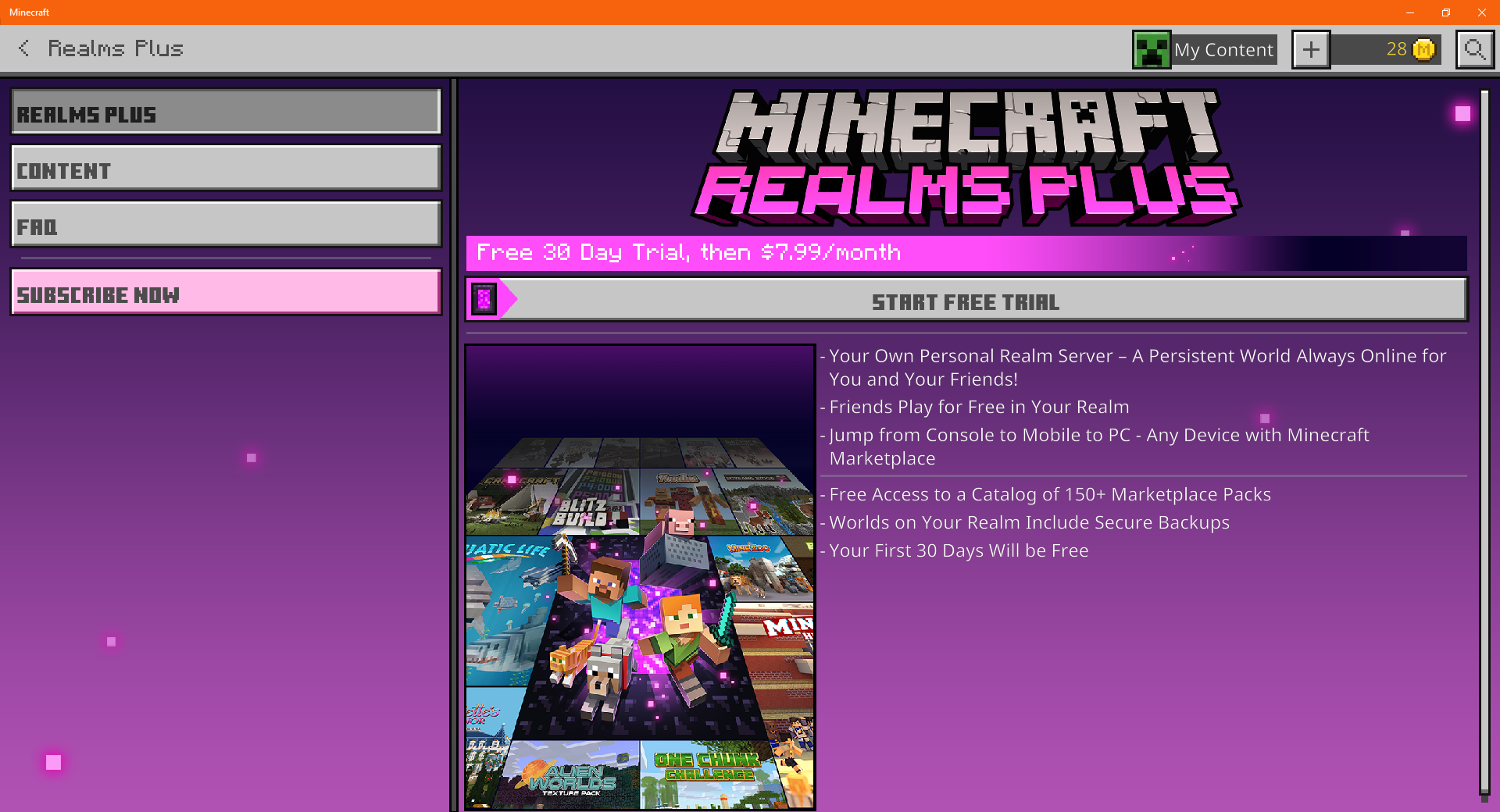
In some screens/artwork prompts, it will show the old Minecraft Logo, in 1.17.30, they updated the Minecraft logo on the main home screen, but not on everything else.
Logos that are affected:
- The Realms Logo
- The Realms Plus Logo
- The Beta Logo
Screens that are affected:
- The Realms Plus overview screen
- The Subscriptions tab in Settings
Artwork that is affected:
- The Realms Art Icon
- The Placeholder Store Artwork (This even has the Pre Better Together Logo)
- The Realms Plus Art Icon
How To Reproduce:
Look at one of these in the Files (Must be in a resource pack that is extracted) or look at one in game demonstrated above.
Observed Results: Its all using the old Minecraft Logo
Expected Results: It should use the new logo if possible.
Linked Issues
is duplicated by1
Attachments7




- Fixed
 gumdropolotl
- 11
- 5
- Confirmed
- 639172
- Multiple
- Windows 10
1.19.0.34 Beta - 1.20.32 Hotfix
1.19.0.34 Beta 1.19.10.20 Preview 1.19.0.29 Preview 1.18.10.28 Beta 1.18.10.27 Beta 1.18.10.26 Beta 1.18.10.24 Beta 1.18.10.21 Beta 1.18.10.20 Beta 1.18.0.27 Beta 1.18.0.24 Beta 1.18.0.22 Beta 1.18.0.21 Beta 1.18.0.20 Beta 1.17.34 1.17.40 1.18.0.25 Beta 1.17.41 Hotfix 1.18.0 1.18.2 Hotfix 1.18.30 1.18.31 1.19.10 1.20.32 Hotfix
Created Issue:
Outdated Minecraft Logo on some screens/artwork
In some screens/artwork prompts, it will show the old Minecraft Logo, in 1.17.30, they updated the Minecraft logo on the main home screen, but not on everything else.
Screens that are affected:
- The Realms Plus overview screen
- The Subscriptions tab in Settings
Artwork that is affected:
- The Realms Art Icon
- The Placeholder Store Artwork (This even has the Pre Better Together Logo)
- The Realms Plus Art Icon
How To Reproduce:
Look at one of these in the Files (Must be in a resource pack that is extracted) or look at one in game demonstrated above.
Observed Results: Its all using the old Minecraft Logo
Expected Results: It should use the new logo if possible.
Attachments5
Paint 3D 10_7_2021 8_52_11 PM (2).png
![[Helper] lillybeacon](../../../data/avatars/users/93893.png)
![[MCQA] Bartłomiej Słodkowski](../../../data/avatars/users/18941.svg)
In some screens/artwork prompts, it will show the old Minecraft Logo, in 1.17.30, they updated the Minecraft logo on the main home screen, but not on everything else.
Screens that are affected:
- The Realms Plus overview screen
- The Subscriptions tab in Settings
Artwork that is affected:
- The Realms Art Icon
- The Placeholder Store Artwork (This even has the Pre Better Together Logo)
- The Realms Plus Art Icon
How To Reproduce:
Look at one of these in the Files (Must be in a resource pack that is extracted) or look at one in game demonstrated above.
Observed Results: Its all using the old Minecraft Logo
Expected Results: It should use the new logo if possible.
In some screens/artwork prompts, it will show the old Minecraft Logo, in 1.17.30, they updated the Minecraft logo on the main home screen, but not on everything else.
Logos that are affected:
- The Realms Logo
- The Realms Plus Logo
- The Beta Logo
Screens that are affected:
- The Realms Plus overview screen
- The Subscriptions tab in Settings
Artwork that is affected:
- The Realms Art Icon
- The Placeholder Store Artwork (This even has the Pre Better Together Logo)
- The Realms Plus Art Icon
How To Reproduce:
Look at one of these in the Files (Must be in a resource pack that is extracted) or look at one in game demonstrated above.
Observed Results: Its all using the old Minecraft Logo
Expected Results: It should use the new logo if possible.

In some screens/artwork prompts, it will show the old Minecraft Logo, in 1.17.30, they updated the Minecraft logo on the main home screen, but not on everything else.
Logos that are affected:
- The Realms Logo
- The Realms Plus Logo
- The Beta Logo
Screens that are affected:
- The Realms Plus overview screen
- The Subscriptions tab in Settings
Artwork that is affected:
- The Realms Art Icon
- The Placeholder Store Artwork (This even has the Pre Better Together Logo)
- The Realms Plus Art Icon
How To Reproduce:
Look at one of these in the Files (Must be in a resource pack that is extracted) or look at one in game demonstrated above.
Observed Results: Its all using the old Minecraft Logo
Expected Results: It should use the new logo if possible.
In some screens/artwork prompts, it will show the old Minecraft Logo, in 1.17.30, they updated the Minecraft logo on the main home screen, but not on everything else.
Logos that are affected:
- The Realms Logo
- The Realms Plus Logo
- The Beta Logo
Screens that are affected:
- The Realms Plus overview screen
- The Subscriptions tab in Settings
Artwork that is affected:
- The Realms Art Icon
- The Placeholder Store Artwork (This even has the Pre Better Together Logo)
- The Realms Plus Art Icon
How To Reproduce:
Look at one of these in the Files (Must be in a resource pack that is extracted) or look at one in game demonstrated above.
Observed Results: Its all using the old Minecraft Logo
Expected Results: It should use the new logo if possible.
![[Mod] Umija5895M](../../../data/avatars/users/10122.svg)
is duplicated by
![[Bot] Arisa](../../../data/avatars/users/43007.png)
![[Mod] EVGENSYPERPRO](../../../data/avatars/users/92853.png)
In some screens/artwork prompts, it will show the old Minecraft Logo, in 1.17.30, they updated the Minecraft logo on the main home screen, but not on everything else.
Logos that are affected:
- The Realms Logo
- The Realms Plus Logo
- The Beta Logo
Screens that are affected:
- The Realms Plus overview screen
- The Subscriptions tab in Settings
Artwork that is affected:
- The Realms Art Icon
- The Placeholder Store Artwork (This even has the Pre Better Together Logo)
- The Realms Plus Art Icon
How To Reproduce:
Look at one of these in the Files (Must be in a resource pack that is extracted) or look at one in game demonstrated above.
Observed Results: Its all using the old Minecraft Logo
Expected Results: It should use the new logo if possible.
![[Mod] turbo](../../../data/avatars/users/92867.png)
![[Mod] Greymagic27](../../../data/avatars/users/92875.png)
Thank you for your report!
We're tracking this issue in MCPE-144202, so this ticket is being resolved and linked as a duplicate.
If you would like to add a vote and any extra information to the main ticket it would be appreciated.
If you haven't already, you might like to make use of the search feature to see if the issue has already been mentioned.
Quick Links:
📓 Bug Tracker Guidelines – 💬 Community Support – 📧 Mojang Support
📓 Project Summary – ✍️ Feedback and Suggestions – 📖 Game Wiki
– I am a bot. This action was performed automatically! The ticket was resolved by one of our moderators, and I left this message to give more information to you.
Where can the "Placeholder Store Artwork" be seen?
The Placeholder Store Artwork is very hidden in game. You cant even see it at all. In order to actually see it, you have to download a resource pack from the Official Minecraft addon webpage, then when downloaded you need to extract that downloaded file. Once done you can explore all UI textures / artwork, and you should see it there.
Here's a better example:
Minecraft Addon Website > Download Resource Pack > Extract all > When done, open the file > Textures > UI > Scroll down until you find the Placeholder Store Art.
Yeah that sux man
Also affects the Minecraft Preview Logo In-game.
Affect on the Microsoft sign in minecraft account screen
The "Beta" Logo Is Still Outdated In 1.19.60.23 Preview
I Wish To Be "Preview" Logo Will Rebranding For Google Play Beta Testing
As additional information to this issue, the Minecraft Realms logo should be updated to use the one that uses the franchise logo. As should the Minecraft Realms Plus logo. It appears that the Minecraft Brand Direction & Creative team (in collaboration with Bold) did not create a new logo for Minecraft Realms Plus when they created their new branding and identity but one can expect that the 'PLUS' would be a subtitle, using their logo system.
Even https://www.minecraft.net/en-us/realms is full of old logos and information.
This issue is still present on Minecraft: Bedrock Edition version 1.19.83.
Affects in 1.20.20.20 Preview