 MCPE-36301
/fill...replace fails to remove water from waterlogged blocks
In short ... By using a command like / fill to remove water from a particular location, blocks other than just water are not cleaned and remain as water sources. Here is an example:
1) I will empty some of the water from this building, preserving only the structure.

2) This is the command I will use:
(It means that I will replace all water blocks with air.)
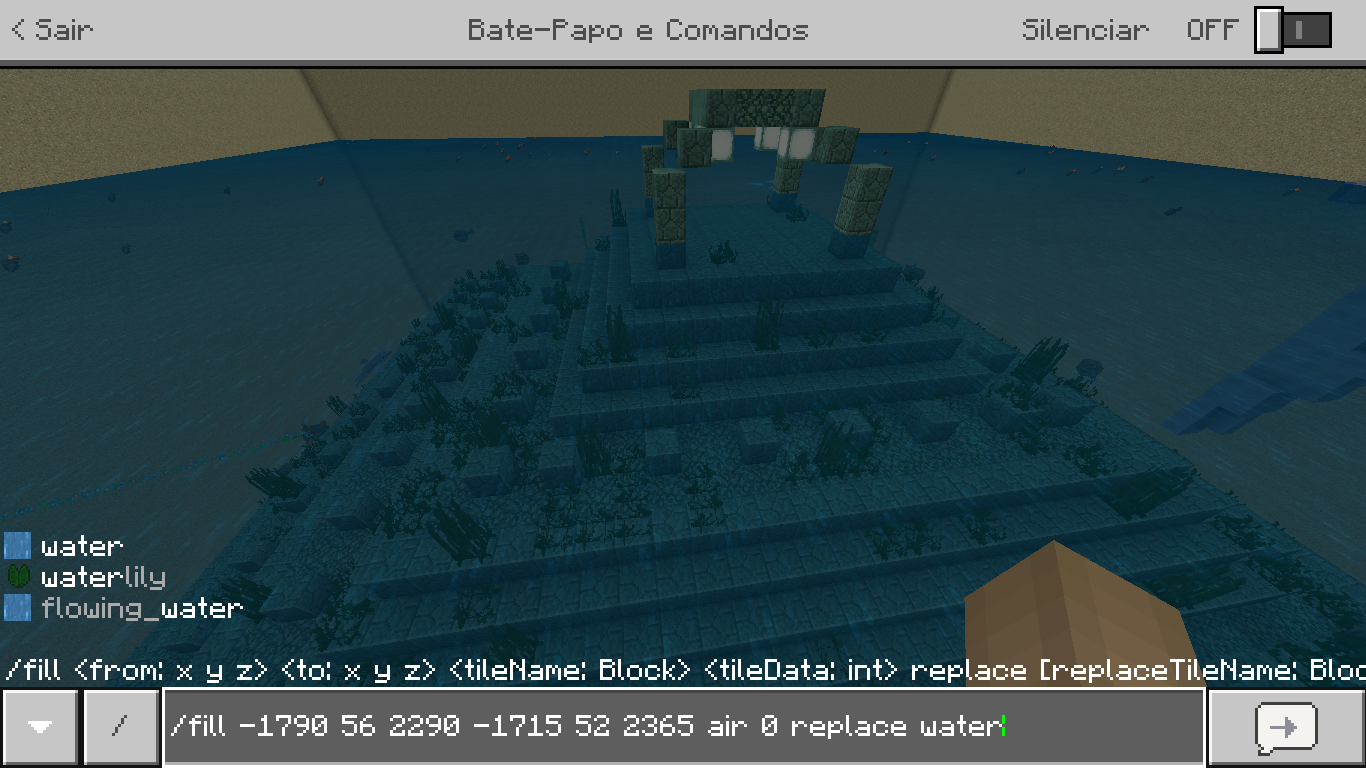
3) After executing the command, I noticed that there were still blocks of water.

4) Looking closer I could see that it was the blocks of grass that made the bug.

------
The summary of the command used is as follows:
"/ fill xa ya za xb yb zb air 0 replace water"
In the example, the water is not gone because there is something besides the water itself.
Linked Issues
is duplicated by2

Created Issue:
Failure to remove water from blocks with water by commands
In short ... By using a command like / fill to remove water from a particular location, blocks other than just water are not cleaned and remain as water sources. Here is an example:
Attachments4
In short ... By using a command like / fill to remove water from a particular location, blocks other than just water are not cleaned and remain as water sources. Here is an example:
In short ... By using a command like / fill to remove water from a particular location, blocks other than just water are not cleaned and remain as water sources. Here is an example:
1) I will empty all the water of this structure, keeping only the construction itself.
2) This is the command I'm going to use.
3) After executing the command, I noticed that there were still blocks of water.
4) Looking closer I could see that it was the blocks of grass that made the bug.
The mistake made me a bit stressed because I'll have to take the grams manually ... Correct this, please.
Failure to remove waterfrom blocks with water by commandsFailed to remove water using / fill in some blocks
In short ... By using a command like / fill to remove water from a particular location, blocks other than just water are not cleaned and remain as water sources. Here is an example:
1) I will empty all the water of this structure, keeping only the construction itself.
2) This is the command I'm going to use.
3) After executing the command, I noticed that there were still blocks of water.
4) Looking closer I could see that it was the blocks of grass that made the bug.
The
mistake made me a bit stressed because I'll have to take the grams manually ... Correct this, please.In short ... By using a command like / fill to remove water from a particular location, blocks other than just water are not cleaned and remain as water sources. Here is an example:
1) I will empty all the water of this structure, keeping only the construction itself.
2) This is the command I'm going to use.
3) After executing the command, I noticed that there were still blocks of water.
4) Looking closer I could see that it was the blocks of grass that made the bug.
------
The error also happens when we give the command:
"/ fill xa ya za xb and b zb air"The grass blocks disappear, but the water continues ...
In short ... By using a command like / fill to remove water from a particular location, blocks other than just water are not cleaned and remain as water sources. Here is an example:
1) I will empty all the water of this structure, keeping only the construction itself.
2) This is the command I'm going to use.
3) After executing the command, I noticed that there were still blocks of water.
4) Looking closer I could see that it was the blocks of grass that made the bug.
------
The error also happens when we give the command:
"/ fill xa ya za xb and b zb air"The seagrass blocks disappear, but the water continues ...
In short ... By using a command like / fill to remove water from a particular location, blocks other than just water are not cleaned and remain as water sources. Here is an example:
1) I will empty all the water of this structure, keeping only the construction itself.
2) This is the command I'm going to use.
3) After executing the command, I noticed that there were still blocks of water.
4) Looking closer I could see that it was the blocks of grass that made the bug.
------
The error also happens when we give the command:
"/ fill xa ya za xbandb zb air"The seagrass blocks disappear, but the water continues ...
In short ... By using a command like / fill to remove water from a particular location, blocks other than just water are not cleaned and remain as water sources. Here is an example:
1) I will empty all the water of this structure, keeping only the construction itself.
2) This is the command I'm going to use.
3) After executing the command, I noticed that there were still blocks of water.
4) Looking closer I could see that it was the blocks of grass that made the bug.
------
The error also happens when we give the command:
"/ fill xa ya za xb yb zb air 0"The seagrass blocks disappear, but the water continues ...
Failed to remove water using /fill in some blocks
![[MCPE Mod] Dr.Awesome4333](../../../data/assets/gravatar/drawesome4333.png)
![[Mojang] Mega_Spud (Jay Wells)](../../../data/avatars/users/92696.png)
![[Mod] LateLag](../../../data/avatars/users/92884.png)
Failed toremove water using /fill in someblocksFailed to use / fill to remove water from blocks with water (other than just it)
In short ... By using a command like / fill to remove water from a particular location, blocks other than just water are not cleaned and remain as water sources. Here is an example:
1) I will empty all the water of this structure, keeping only the construction itself.
2) This is the command I'm going to use.
3) After executing the command, I noticed that there were still blocks of water.
4) Looking closer I could see that it was the blocks of grass that made the bug.
------
The error also happens when we give the command:
"/ fill xa ya za xb yb zb air 0"The seagrass blocks disappear, but the water continues ...
In short ... By using a command like / fill to remove water from a particular location, blocks other than just water are not cleaned and remain as water sources. Here is an example:
1) I will empty all the water of this structure, keeping only the construction itself.
2) This is the command I'm going to use.
(It means that I will replace all air blocks with water.)
3) After executing the command, I noticed that there were still blocks of water.
4) Looking closer I could see that it was the blocks of grass that made the bug.
------
The error also happens when we give the command:
"/ fill xa ya za xb yb zb air 0"The seagrass blocks disappear, but the water continues ...
In short ... By using a command like / fill to remove water from a particular location, blocks other than just water are not cleaned and remain as water sources. Here is an example:
1) I will empty all the water of this structure, keeping only the construction itself.
2) This is the command I'm going to use.
(It means that I will replace allair blocks withwater.)
3) After executing the command, I noticed that there were still blocks of water.
4) Looking closer I could see that it was the blocks of grass that made the bug.
------
The error also happens when we give the command:
"/ fill xa ya za xb yb zb air 0"The seagrass blocks disappear, but the water continues ...
In short ... By using a command like / fill to remove water from a particular location, blocks other than just water are not cleaned and remain as water sources. Here is an example:
1) I will empty all the water of this structure, keeping only the construction itself.
2) This is the command I'm going to use.
(It means that I will replace all water blocks with air.)
3) After executing the command, I noticed that there were still blocks of water.
4) Looking closer I could see that it was the blocks of grass that made the bug.
------
The error also happens when we give the command:
"/ fill xa ya za xb yb zb air 0 replace water"The seagrass blocks disappear, but the water continues ...
In short ... By using a command like / fill to remove water from a particular location, blocks other than just water are not cleaned and remain as water sources. Here is an example:
1) I will empty all the water of this structure, keeping only the construction itself.
2) This is the command I'm going to use.
(It means that I will replace all water blocks with air.)
3) After executing the command, I noticed that there were still blocks of water.
4) Looking closer I could see that it was the blocks of grass that made the bug.
------
The
error also happens when we give the command:
"/ fill xa ya za xb yb zb air 0 replace water"
The seagrass blocks disappear, but the water continues ...In short ... By using a command like / fill to remove water from a particular location, blocks other than just water are not cleaned and remain as water sources. Here is an example:
1) I will empty all the water of this structure, keeping only the construction itself.
2) This is the command I'm going to use.
(It means that I will replace all water blocks with air.)
3) After executing the command, I noticed that there were still blocks of water.
4) Looking closer I could see that it was the blocks of grass that made the bug.
------
The summary of the command used is as follows:
"/ fill xa ya za xb yb zb air 0 replace water"In the example, the water is not gone because there is something besides the water itself.
In short ... By using a command like / fill to remove water from a particular location, blocks other than just water are not cleaned and remain as water sources. Here is an example:
1) I will empty
allthe waterof thisstructure, keeping only theconstruction itself.
2) This is the command I
'm going touse.
(It means that I will replace all water blocks with air.)
3) After executing the command, I noticed that there were still blocks of water.
4) Looking closer I could see that it was the blocks of grass that made the bug.
------
The summary of the command used is as follows:
"/ fill xa ya za xb yb zb air 0 replace water"In the example, the water is not gone because there is something besides the water itself.
In short ... By using a command like / fill to remove water from a particular location, blocks other than just water are not cleaned and remain as water sources. Here is an example:
1) I will empty some of the water from this building, preserving only the structure.
2) This is the command I will use:
(It means that I will replace all water blocks with air.)
3) After executing the command, I noticed that there were still blocks of water.
4) Looking closer I could see that it was the blocks of grass that made the bug.
------
The summary of the command used is as follows:
"/ fill xa ya za xb yb zb air 0 replace water"In the example, the water is not gone because there is something besides the water itself.
![[Mod] OcelotOnesie](../../../data/avatars/users/43220.png)
![[MCQA] Bartłomiej Słodkowski](../../../data/avatars/users/18941.svg)
is duplicated by
![[Bot] Arisa](../../../data/avatars/users/43007.png)
![[Mod] GoldenHelmet](../../../data/avatars/users/18951.svg)
Failed to use / fillto remove water fromblocks with water (other than just it)/fill...replace fails to remove water from waterlogged blocks
is duplicated by
![[Mod] Jarl-Penguin](../../../data/avatars/users/92849.png)
![[Mod] Greymagic27](../../../data/avatars/users/92875.png)
Thank you for your report!
We're tracking this issue in MCPE-36301, so this ticket is being resolved and linked as a duplicate.
If you would like to add a vote and any extra information to the main ticket it would be appreciated.
If you haven't already, you might like to make use of the search feature to see if the issue has already been mentioned.
Quick Links:
📓 Bug Tracker Guidelines – 💬 Community Support – 📧 Mojang Support
📓 Project Summary – ✍️ Feedback and Suggestions – 📖 Game Wiki
– I am a bot. This action was performed automatically! The ticket was resolved by one of our moderators, and I left this message to give more information to you.
Thank you for your report!
We're tracking this issue in MCPE-36301, so this ticket is being resolved and linked as a duplicate.
If you would like to add a vote and any extra information to the main ticket it would be appreciated.
If you haven't already, you might like to make use of the search feature to see if the issue has already been mentioned.
Quick Links:
📓 Bug Tracker Guidelines – 💬 Community Support – 📧 Mojang Support (Technical Issues) – 📧 Microsoft Support (Account Issues)
📓 Project Summary – ✍️ Feedback and Suggestions – 📖 Game Wiki
– I am a bot. This action was performed automatically! The ticket was resolved by one of our moderators, and I left this message to give more information to you.
It seems to deal with the new waterlogged blocks as they are not considered "water" but sea grass with water in it.
Work around: Replace all sea grass with air, then replace all water with air.
That's exactly what I did! : D
But it's still a bug for not removing the water ... Is not it?
I am not sure what is intended in this case, I will leave that up to Mojang and their Dev team to decide.
In fact ... The bug affects ALL blocks with more than just water.
The behaviour is partially the same in the Java edition, except that when using the fill command without replacing blocks, the water and the waterlogged blocks get removed at the same time.
Haha, did not think of a function to relate a ticket to two platforms. : D
Anyway ...
Cleaning up old tickets: This ticket has not been updated recently (~1 year+) so is being closed as Cannot Reproduce. If you feel this is still a valid issue then please comment, or create a new ticket following the Issue Guidelines.
Quick Links:
📓 Issue Guidelines – 💬 Mojang Support – 📧 Suggestions – 📖 Minecraft Wiki
This is still a valid ticket, it can be reproduced by using /fill replace water with air when there is seagrass or kelp in the water. If you then remove the plants, and use /fill again, some water source blocks will remain (and if there are enough of them, they will spawn new water blocks until most of the area is filled up again)
Reopening based on the above comment.
Also affects Win 10 Bedrock version 1.12.1 with server 1.12.1 (Ubuntu)
I ran into this when cloning a shipwreck to be above the water and then tried to use /fill to replace the water with air.
It seems to mainly affect non-cube blocks, although some cube blocks seemed to be waterlogged.
Anything affected had to be manually removed, use /fill to replace with air, and then add the block back.
Also affects Java version 1.14.4
It's the same problem as Rob Edgler's comment about Win 10 Bedrock version 1.12.1
Affects 1.16.40
Affects 1.17.10