 MD
MD
- Boidster
- boidster
- America/Chicago
- Yes
- No
 MCPE-25907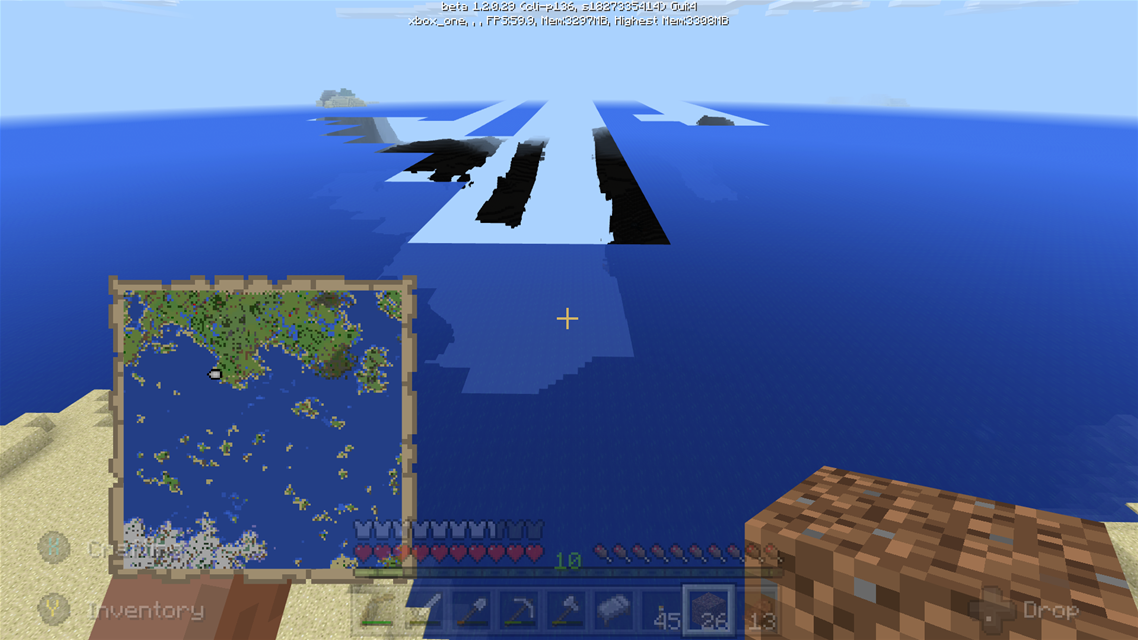


Note1: this is confirmed only for 1.2.0.29; we don't have 1.2.0.31 on Xbox yet; or at least I don't
Note 2: this may be related to
MCPE-22836orMCPE-24486, though the description of those bugs isn't quite what I'm talking about here.*Problem: *when building, for example, a bridge across a chasm, you should be able to crouch and walk backward with the Place Block button held down, placing blocks under your feet as you cross the chasm. Instead, it will occasionally place a block on top of the block you're standing on, pushing you off the bridge to die. Ask me how I know.
Steps to reproduce:
1. Put a stack of dirt in your hand
2. Find a ravine or chasm to cross, or simply start 1 or 2 blocks off the ground (for full effect, you want to be high enough to die when you land, or over a lava lake)
3. Choose a direction to build your "bridge" and face the opposite direction; for example if you want to build the bridge heading northward, face south
4. Crouch, walk backwards (facing south, but heading northward), and aim the cursor downward so that it crosses the vertical (north-facing) face of the block you're standing on before you reach the limit of your movement on that block
5. Press and hold the Place Block button while continuing to walk backwardsExpected Behavior: You can walk backward indefinitely, placing blocks as you go to build your bridge.
Actual Behavior: It will work for a few blocks perhaps, but eventually it will place a block on top of the very block you're standing on, pushing you off the bridge.
Note1: this is confirmed only for 1.2.0.29; we don't have 1.2.0.31 on Xbox yet; or at least I don't
Note 2: this may be related to
MCPE-22836orMCPE-24486, though the description of those bugs isn't quite what I'm talking about here.Problem: when building, for example, a bridge across a chasm, you should be able to crouch and walk backward with the Place Block button held down, placing blocks under your feet as you cross the chasm. Instead, it will occasionally place a block on top of the block you're standing on, pushing you off the bridge to die. Ask me how I know.
Steps to reproduce:
1. Put a stack of dirt in your hand
2. Find a ravine or chasm to cross, or simply start 1 or 2 blocks off the ground (for full effect, you want to be high enough to die when you land, or over a lava lake)
3. Choose a direction to build your "bridge" and face the opposite direction; for example if you want to build the bridge heading northward, face south
4. Crouch, walk backwards (facing south, but heading northward), and aim the cursor downward so that it crosses the vertical (north-facing) face of the block you're standing on before you reach the limit of your movement on that block
5. Press and hold the Place Block button while continuing to walk backwardsExpected Behavior: You can walk backward indefinitely, placing blocks as you go to build your bridge.
Actual Behavior: It will work for a few blocks perhaps, but eventually it will place a block on top of the very block you're standing on, pushing you off the bridge.
When harvesting a crop, pressing (A)/Mine will only harvest the closest block. So for example if there is a row of sugar cane and you stand at the end, you will only harvest the closest plant and must re-press the button to harvest the next plant, and so on.
Contrast with Console Edition, where all plants in range would harvest immediately, and moving forward the harvesting/mining action would continue as you move down the row.
Contrast also with mining behavior when the cursor is pointed at a non-crop block. The mining action will continue as long as the button is pressed, mining blocks up to 5 away as closer blocks are destroyed.Perhaps this is intentional, but it sure feels
like a bug.Problem: When harvesting a crop, pressing (A)/Mine will only harvest the closest block. So for example if there is a row of sugar cane and you stand at the end, you will only harvest the closest plant and must re-press the button to harvest the next plant, and so on.
Steps to Reproduce:
1. Stand at the end of a row of tall crops at least 5 plants deep, facing down the row (2- or 3- height sugar cane works well for testing)
2. With any tool/block in hand, or an empty hand, press and hold the Mine button
Expected Behavior: you mine each crop block in front of you, continuously (or possibly instantly, as it was in console edition) until 5 blocks away have been mined/broken
Actual Behavior: you mine the closest block only, and then the mining/breaking action stops until you release and re-press the Mine button.
When playing co-op with me as the host, if my partner is near me his map marker changes to a small icon of his player head. This head completely obscures my own marker so I can't tell where I am with any detail, nor can I tell which direction I am moving until I get far enough away for my marker to appear from underneath his.
I think the host's marker should always be visible, on top of all other markers.
Problem: When playing co-op with me as the host, if my partner is near me his map marker changes to a small icon of his player head. This head completely obscures my own marker so I can't tell where I am with any detail, nor can I tell which direction I am moving until I get far enough away for my marker to appear from underneath his.
Steps to Reproduce:
1. Start a multiplayer world and invite another player
2. Use and view a locator map while the non-host player is nearby ("nearby" is relative to the map resolution)Expected Behavior: The host's pointer-style marker is visible on top of the non-host player's face-style marker.
Actual Behavior: The non-host's face-style marker obscures the host's pointer.
Problem: When playing co-op with me as the host, if my partner is near me his map marker changes to a small icon of his player head. This head completely obscures my own marker so I can't tell where I am with any detail, nor can I tell which direction I am moving until I get far enough away for my marker to appear from underneath his.
Steps to Reproduce:
1. Start a multiplayer world and invite another player
2. Use and view a locator map while the non-host player is nearby ("nearby" is relative to the map resolution), until the non-host's marker changes to a face icon instead of a pointerExpected Behavior: The host's pointer-style marker is visible on top of the non-host player's face-style marker.
Actual Behavior: The non-host's face-style marker obscures the host's pointer.
(Note that this is a different issue from the other map marker-related bug I reported a minute ago.)
When playing co-op on Xbox last night my (non-hosting) partner could not see my map marker at all, no matter how far apart we were. He only ever saw his own marker, and could only find me by looking for my Gamertag floating out in the world.
(Note that this is a different issue from
MCPE-25907, which I also reported)Problem: When playing co-op on Xbox last night my (non-hosting) partner could not see my map marker at all, no matter how far apart we were. He only ever saw his own marker, and could only find me by looking for my Gamertag floating out in the world.
Steps to Reproduce:
1. Start an online world and invite another player
2. Equip both players with locator maps
3. Have each player use and look at their locator mapsExpected Behavior:
(According to Wiki)
A) If the maps are clones of each other, both players should be able to see both markers
B) If the maps are not clones of each other, each player should see their own marker onlyActual Behavior:
A) Unknown if the maps are clones of each other; I need to test this
B) If the maps are not clones, the host can see both markers (subject toMCPE-25907), but the non-host cannot see the host's marker
(Note that this is a different issue from
MCPE-25907, which I also reported)Problem:
When playing co-op on Xbox last night my (non-hosting) partner could not see my map marker at all, no matter how far apart we were. He only ever saw his own marker, and could only find me by looking for my Gamertag floating out in the world.Steps to Reproduce:
1. Start an online world and invite another player
2. Equip both players with locator maps
3. Have each player use and look at their locator mapsExpected Behavior:
(According to Wiki)
A) If the maps are clones of each other, both players should be able to see both markers
B) If the maps are not clones of each other, each player should see their own marker onlyActual Behavior:
A) Unknown if the maps are clones of each other; I need to test this
B) If the maps are not clones, the host can seeboth markers (subject toMCPE-25907), but the non-host cannot see the host's marker(Note that this is a different issue from
MCPE-25907, which I also reported)Problem: Host and non-host have inconsistent or incorrect map marker visibility on non-cloned maps.
Steps to Reproduce:
1. Start an online world and invite another player
2. Equip both players with locator maps
3. Have each player use and look at their locator mapsExpected Behavior:
(According to Wiki)
A) If the maps are clones of each other, both players should be able to see both markers
B) If the maps are not clones of each other, each player should see their own marker onlyActual Behavior:
A) Unknown if the maps are clones of each other; I need to test this
B) If the maps are not clones, the host can see both markers (subject toMCPE-25907), but the non-host cannot see the host's marker (which, if I'm reading the Wiki correctly, is intended behavior for non-cloned maps)
Okay, Step 1: Hack Xbox.

Very minor bug. When attempting to ride a tamed, saddled horse if you are holding a fence when you left-trigger, it will place a fencepost in the ground beyond the horse (and you will ride the horse as well).
I tried a couple of other blocks and they did not show similar behavior, i.e. it did not place a dirt block if I was holding dirt.
(Updated to use suggested format)
Affected version: 1.5.2
Summary: When attempting to ride a tamed, saddled horse if you are holding a fence when you left-trigger, it will place a fencepost in the ground beyond the horse (and you will ride the horse as well).
Steps to reproduce:
1) Beg, borrow, or steal a tamed, saddled horse
2) Have a fence in primary hand
3) Attempt to ride horse (left trigger on Xbox)Expected result: you climb on the horse
Observed result: you climb on the horse and also place a fencepost in the ground just beyond the horse
Pictures/video attached: No
Note: I tried a couple of other blocks and they did not show similar behavior, i.e. it did not place a dirt block if I was holding dirt.
(Updated to use suggested format)
Affected version: 1.5.2
Summary: When attempting to ride a tamed, saddled horse if you are holding a fence when you left-trigger, it will place a fencepost in the ground beyond the horse (and you will ride the horse as well).
Steps to reproduce:
1) Beg, borrow, or steal a tamed, saddled horse
2) Have a fence in primary hand
3) Attempt to ride horse (left trigger on Xbox)Expected result: you climb on the horse
Observed result: you climb on the horse and also place a fencepost in the ground just beyond the horse
Pictures/video attached: No
Note: I tried a couple of other blocks and they did not show similar behavior, i.e. it did not place a dirt block if I was holding dirt.
(Updated to use suggested format)
Affected version: 1.5.2
Summary: When attempting to ride a tamed, saddled horse if you are holding a fence when you left-trigger, it will place a fencepost in the ground beyond the horse (and you will ride the horse as well).
Steps to reproduce:
1) Beg, borrow, or steal a tamed, saddled horse
2) Have a fence in primary hand
3) Attempt to ride horse (left trigger on Xbox)Expected result: you climb on the horse
Observed result: you climb on the horse and also place a fencepost in the ground just beyond the horse
Pictures/video attached: No
Note: I tried a couple of other blocks and they did not show similar behavior, i.e. it did not place a dirt block if I was holding dirt.That is a dirty lie. This does affect other blocks; I must not have been pointing at a close-enough spot of ground before. It definitely will drop a block of, say, cobblestone if you try to ride the horse with cobble in your hand.
![[MCPE Mod] Auldrick](../../../data/avatars/users/10122.svg)
MD: Golems spawn within 16 blocks of the village center. If they're spawning outside the spawn pad, it's because the village center isn't where you want it to be. The center is recalculated each time a valid door is added, so the order they're added makes a difference. If you continue to have this problem, place your doors a few at a time and work from both ends toward the middle. If you have doors on both sides of the spawn pad, alternate between the sides as you work. That will keep the center from jumping around too far from the center of the spawn pad.
MD I just now updated above. My previous conclusion was slightly off. I'm sure you'll find the correction helpful.
MD: The problem with adding it to this ticket is that we've identified a specific bug with non-oak doors that was causing the OP's problem, and that has already been passed on to the developers. Your problem has a different cause, and we can't specify what it is yet. We don't want to delay work on the known bug by conflating it with what might be a totally different bug having a similar effect. If we had more of a handle on what's causing your problem, then yes, we might add it to this ticket if it involved the same part of program logic. But since we don't know that, it's better to treat it independently.
Also, the devs rely on the bug tracker report, including comments, for background. That's why we try to keep these reports focused on the reported bug and discourage chatting and unnecessary "me too" comments, because those are just irrelevant noise to the devs. Comments about related problems can often be helpful, either by providing more clues for the devs or by getting them to look for a broader common cause, and that's why I've kept this conversation going. But at this point a common cause between the OP's problem and yours is looking quite unlikely, and that's why I think it's time to move this discussion to its own report.
![[Mod] GoldenHelmet](../../../data/avatars/users/18951.svg)
@MD several changes were made in 1.16 that, as I see it, have fixed this bug.
- There is now instant despawning at a set radius (varies with sim distance)
- The light level requirement for despawning has been removed.
- Certain events that used to grant persistence no longer do, most notably monsters targeting other mobs/players.
The only remaining issue that has been joined with this ticket is that the global mob cap of 200 blocks all natural spawning, and 200 is too low for the way some users play the game and/or multiplayer worlds. If 4 people each have 50 animals at their bases, for example, no one else in the world can get monster spawns. Or if one person has a an automatic chicken hatcher that they just leave running.
Can confirm on Xbox One release 8 (1.2.0.25). Played "survival mode" on Lifeboat and then loaded up my own world (created under release 7; not a converted world). Stone tools and items (e.g. furnace) required stone instead of cobble, just like it was on Lifeboat. No resource or behavior packs showed as loaded.
Possibly relevant to this issue: I was playing on Xbox One last night, co-op, and as we explored overland we came across an area that just was not rendered. Or rather, I did. I was the host, and I could "see through the world" (much like the attached images) for a pretty large section (maybe 5-10 chunks?) but my co-op partner said everything looked normal. Mobs in the affected area were frozen in place and "vibrating" for lack of a better term. Trying to move, apparently, but glitched and having seizures.
The one difference I saw, compared to the attached pictures, is that chunks beyond where the glitch was were rendered fine. It was sort of like a ravine of un-rendered chunks existed between us and our destination (which was towards areas we had not ever explored before).
Closing and reopening the world corrected the issue, and we did not experience it again on our way back to base.
Are you saying that when you create a new map, you aren't always at the center of it? If so, I don't think that's a bug. Maps are actually fixed to the world and cover a specific area no matter where in that area you are when you first create the map. It does not create an NxN map centered on where you are standing.
It's like standing in Sacramento, CA, USA and "creating" a map of California. Your marker will be north-central on the map. Standing in San Diego and creating a map would give you the exact same map, but your pointer will be far south. Minecraft maps are fixed like maps of US states are.
Sorry if I misunderstood the issue.
Can confirm in Xbox 1.2.0.29 as well. What used to be the Mining Fatigue sound is now the Crashing Your Game sound. I was able to escape by piloting my boat out of the area, but it took a few crashes before I was out of range.
Consulting the Wiki, this may be intended behavior?
Other players will only be displayed on the map if they have a map in their inventory cloned from the one being looked at.
But that doesn't explain why my map showed his marker, but his did not show mine. If the maps were not clones of each other (I don't think they were; I think he was using his initial "free" map), shouldn't we both be "blind" to the other player's location? Or, as host, do I get some special override to see all other players in the game on my map regardless of cloned status?
Image shows the effect I see in my world. In all cases where I've experienced this, I was in a boat, traveling at speed across the ocean. Possibly outstripping the game's ability to render chunks as I move.
Agree with Hunter that this is not a duplicate. Mining with an unenchanted pick is continuous - hold the trigger down and the pick will keep mining out to 5 blocks away. If adding Efficiency causes the pick to only mine the closest block, and then you have to release and pull the trigger again to mine the next one, that's a bug.
The issue linked as a "duplicate" appears to be about the magnitude of the Efficiency 4/5 enchantment, not an issue where pull-and-hold on the trigger doesn't result in continuous mining.
The bug might be one of two things:
1) Normal, un-enchanted picks are bugged, and should not be mining continuously when the trigger is held
or
2) Enchanted picks are bugged, and should behave just like un-enchanted picks when the trigger is held (though presumably also breaking blocks faster)
Option 2 is the preferred bug, since in both Java and Console editions, holding down the Mine button/trigger results in continuous mining, at whatever speed the tool allows.
Edit to add: if anything, this bug might be related to this one: https://bugs.mojang.com/browse/MCPE-25909
Also affects vines. If you hit a vine with an axe it will break, but the axe will not then continue to chop at the tree. You have to release and re-pull the trigger.
Just created
MCPE-26027, which may be related. In that bug, however, I'm talking about attempting to place blocks (to build a bridge) while crouching and walking backwards. So the sneak button is never released.If the root cause is that the player's hitbox is actually moving completely off of the block while crouched, then it would explain both this bug and the one in my report.
Downloaded MCPE for iOS and this bug does not occur there. Can continuously mine crops and vines/trees.
Happened to me about 3 days ago (1.2.0.29). I was signed into Xbox Live before starting and after exiting the game, and there was no indication that I had ever lost connectivity while playing.
Xbox One games are supposed to auto-sync with the cloud and, if some internet connection issue arises that prevents the cloud save from being completed, the next time you start the game it should notice the discrepancy and give you a choice of which save to start from. At least, that is how MC Xbox One Edition does it and the very few times I've ever been out of sync I've always been able to pick the local HD save and not lost any work. Not so with Bedrock.
It used to be that XP went either to your level or to Mending, as a random chance for each XP orb. Until the Mending tool/weapon was fully repaired, that is, after which all XP goes to the player.
On Console Edition you would see the tool drop briefly from view (as though you had switched tools) every time the XP orb went towards Mending. If the orb instead went to the player, there would be no animation of the tool in hand.
And but so, do you see the tool animation with every orb and you see your experience level increase on every orb?
Don't post duplicate bugs hoping for more attention. Just address the reasons for the Invalid designation, as you did. Also Vote for your own issue; that might raise its visibility.
It seems clear that punches have been increased from 1 HP to 2HP (a half-heart to a full heart) of damage. Sheep (8 HP) took 4 hits, cow (10 HP) took 10 hits. Not sure it's a bug; the creator of your video didn't seem to think so, though he did notice stronger punches.
Have you done any testing of your own, or did you just watch a YouTube video and come to report it as a bug?
Well, it could be me who misunderstands. I remember clearly from the Console Edition that if I threw Potions o'Enchanting on the floor while holding a tool with Mending, I would only see the animation (and change to the item's durability) every few orbs collected. For other orbs, I'd see my XP bar increase. So it seemed to be a chance of getting a Mending effect on each orb.
Based on some forum threads, I think the way it works is that if you are holding or wearing a Mending-enchanted item, when an XP orb is collected the game will choose a held or worn item at random to apply the XP to. If that randomly-chosen item is not currently damaged, then the XP will instead go to your XP bar.
So say you are holding your pick (80% durability remaining), wearing chest armor (100%), and have a shovel (70%) in your hotbar but not currently held. All have Mending. You gather an XP orb. The game chooses with 50% chance either the pick or your chest armor - the shovel does not count because it is not held or worn - and tries to apply the XP orb. If the armor is chosen, it's already at 100% so the XP can't be applied there and it goes to your character XP bar instead.
If the pick is chosen, you see the little animation (or you would in console edition anyhow) and the pick gets some mending.
Katie is correct, but this game is not in beta any longer. I'm running v1.2.0 on iOS 10.x. Max render distance has been reduced/is still reduced to 6 chunks. I'm interested to hear if this is a bug, or if it's some restriction they had to put in place to accommodate all of the various devices. Agree with Nathan that we should be allowed to choose whatever distance our device can handle, at least in single-player mode. And even in MP mode, I'm not sure how the render distance of my device affects the other players. Maybe I can see farther, but...so?
You may wish to post a thread at the Minecraft game forum. That's a better place to discuss issues and ask for advice.
For your bug report here, can you provide specifics? Do you own a Realm or are you trying to connect to someone else's? What is the result of doing a "Test Multiplayer Network" on your Xbox's network settings screen? Is your NAT open?
I think maybe this is a dupe of
MCPE-25909, which is specific to crops and has nothing to do with enchantments or dirt/grass.Seems to be fixed for vines in 1.2. So if I hit a vine on a tree trunk with an axe, it breaks the vine and then keeps on hitting the trunk. As expected.
Still not working on grass and crops. With grass at least, it's a little strange - if you start by punching the dirt, then move the cursor up to the grass, it will mow through several plants in a row. Once you hit an upper block of a tall grass, the punching stops.
I saw something in the bugfixes that they tweaked the continuous breaking/punching animation if there were no target blocks in range. So you can't just stand there and punch the air. Maybe that is affecting punching crops and plants and things which have transparent blocks behind them?
For what it's worth, I don't have any issues with shovels on dirt, sand, or gravel in iOS or Xbox.
For me, on iOS10, the game freezes at the "Save & Quit" button press when offline (no WiFi, no cell data connection).
Confirmed on Xbox One 1.2.1. Tried to light up a large area via my usual walk-backward-and-place-torch-every-3-seconds and I got 2 torches for every trigger pull. Then noticed gates would openclose instead of just opening. Then was building a dirt bridge and got like 3 or 4 blocks down (in incorrect places) before I realized what was happening.
They are saying that this too-fast block placement bug is a duplicate of this: https://bugs.mojang.com/browse/MCPE-26812
Not sure I agree, since a mod changed the description of that other bug to be about opening/closing/using objects, not about placing blocks. And recent reports seem to show they've fixed the opening/closing/using problem, but not the block placement problem.
Probably a duplicate of
MCPE-26139.Duplicate of
MCPE-26139.Agree - this is NOT resolved. There are a bunch of comments here since 1.2.2.3 stating as much - why was it marked resolved?
FWIW, this also happened to me (after months away from Minecraft). Down below the main list there is a "Sync Old Worlds" button (or similar). Clicking that let me recover 2 out of 3 worlds from the cloud (the 3rd would not sync; it came back corrupted for some reason).
The greyed-out worlds showed 0.0MB size, but if I tried to open them they did seem to be older versions of the worlds I remembered. After using the Sync Old Worlds option, I just deleted the greyed-out versions.
For what it's worth, this issue can be closed. I get the expected behavior in 1.4.
For what it is worth, this issue hit me on a new multiplayer world created in 1.4 (Xbox One). I had 3 sheep and maybe 15 chickens in two separate fenced enclosures about 5x5 each. Oak fence on dirt. I went down into my branch mine (within 4 chunks of the base) for a couple of in-game days and when I came back to the surface all of the sheep were gone and about half of the chickens. Not in a biome where wolves appear (and besides...fences) and there was no damage to the enclosures.
I had fed two of the sheep (producing the 3rd) and sheared all three of them. Not sure if that counts as "interacting" for the purposes of "mobs you interact with should not despawn." I fed who knows how many of the original set of chickens, and maybe hurt a few of them by throwing eggs into the enclosure. I'm pretty certain harming a mob is supposed to prevent them from despawning - so maybe the ones I beaned with eggs are the ones that survived the purge?
Since this was all in a single play session, no crash was involved. I can provide seed and coordinates if needed.
Some "me too" and a comment:
Me too: on Xbox One 1.4.2, I found that trying to catch salmon in my 3x3x2 deep fish tank was pretty frustrating, as the bucket would grab the fish and then immediately dump it back out. This did not happen when catching fish in rivers, and it seemed to go better if I wedged myself back into a corner and tried to catch fish farther away. So maybe it's detecting the non-water blocks near the fish and causing the Fish Bucket to immediately empty? It kinda reminds me of the old ~1.2 era bug of double-placing torches when walking, or the quick open-close of gates when walking towards them.
Comment: the wiki says that to obtain a Fish Bucket you apply a Water Bucket to a Fish. I interpreted this to mean that an empty bucket would not work - it has to be a Water Bucket. My experience chasing and catching fish under water seemed to confirm this behavior. And so @KraftyFox I think that you are supposed to have a full bucket; that part isn't a bug.
The catch-and-release behavior does seem to be a bug.
I never did have an empty bucket actually delete the fish, though. It just took the source block of water and the fish got away. If empty buckets delete fish (and don't result in a Fish Bucket) then that is also a bug I'd think.
Wow. Mind blown. I only do "natural-ish" snail iron farms and my process has always been 1) build spawn area and kill pit, 2) place doors (of various types due to architectural/aesthetic concerns) where they need to be, 3) build houses around doors.
And then comes 4) wonder why the dang iron golems are spawning outside the wading pool, and why the villagers seem to ignore the south block of flats...
Note to self: add step 3a) break all doors and replace them after houses are built.
Thanks @Auldrick!
Also not the case on Xbox One 1.4.2. Dark oak seems to drop fewer saplings, but they did self-decay and I did get the correct sapling from the tree. (And also correct drops from spruce trees.)
(This is not meant as an attack on submitter - just more info for troubleshooting)
Thanks. I do understand the mechanism - I worked up an Excel sheet that will calculate village center based on Xs placed in cells to indicate doors. And back in the old Console Edition the layouts worked fine.
I think probably my problem was that some doors were, say, dark oak, and after placing them (100% sky on both sides for 5+ blocks out) I would then build the house around it. But, I learned from your post, those doors would not be valid no matter how many "roof" blocks I added behind it, since it's only checked when placed. So yeah my village center was off because half my doors (the non-oak ones) were probably not valid even though they looked valid.
When I do step 3a) break-and-replace all doors (as the final step before populating the village and starting up the farm), I will pay attention to the order I replace them. Alternating sides, as you say. Good idea, thanks.
See:
MCPE-34385I'm on Xbox One 1.4.2 and have no problems swimming. Definitely I will sink if I'm not pressing A or swimming towards the surface. Probably going to need more detail from submitter. Is it the same no matter what you are carrying/wearing?
May or may not be related - (on Xbox One 1.4.2) I tried to get a pair of sheep to follow me through an open gate and they were very good at crowding each other and forcing a stalemate at the gate. Both sheep tried to get through at the same moment, neither sheep could squeeze by. I had to push one sheep several blocks away and then run back to the gate and switch to wheat so the closer sheep could get through before the farther one ran to block it.
From image, it looks like maybe white sheep is being pushed towards the left wall a bit, and it's getting hung up on the edge of the door? Or does this problem happen even if there's only one animal?
See this bug:
MCPE-33152For being the one animal in the game that should be most amenable to being led around by a rope, horses sure have problems with it. I've never been able to lead horses up and down hills smoothly, in any version.
A thought for you - was there only a single block for the horse to climb up on? I think they tend to go uphill easier if there is at least a 2-block wide "step" for them to get onto.
They should make apples into lures for horses, like seed is for chickens or wheat for sheep. Let the horse figure its way up the hill without needing me to lead it.
I know this will be closed due to non-English, but here's the Google Translate:
And here is Google's attempt at a translation of "Sorry, only English..."
Whatever the situation with this bug, trades should automatically go to inventory. I mean, that is how they should code it. Put a stack of wheat on the left, and tap/click/press A on emeralds on the right to pump emeralds into inventory. It should not "pick up" the emerald from the trading UI for you to manually place before doing another trade.
@Auldrick Thanks. And also great googly moogly that's a "fun" bug. Nearly impossible for a console heathen like myself to ever figure out.
Another anecdote: in my (brand new 1.4.2) world I finally found a village (built, apparently, over the Hellmouth - half of the foundations stretch down into caves, so I named it Sunnydale) and proceeded to:
In light of the information in this bug, I built the entire village before adding a single door. So all walls and roofs were already in place.
I then added 24 doors with symmetrical arrangement around the pool, made a short fenced chute from the old village to the new condos, and broke the last original village door. The villagers dutifully "discovered" the new doors and moved through the chute into the condos. I then razed the old village down to foundations.
So I have 24 doors, about 14 villagers and...no iron golems. For about 3 hours of game play, not a single one. I have searched hither and yon even though if it was some sort of weird village center issue, the out-of-whack center point couldn't be more than about 10 blocks from my intended center because the closest door of original village (and the last one to be destroyed) is only maybe 20 blocks from the closest "condo" door.
I have also destroyed all 24 doors and replaced them (all are regular oak, by the way). Still no golems.
Tonight I plan on destroying the doors and leaving it that way for a good hour, then replacing them to see if the golems will start spawning. So far, however, there does seem to be a bug unrelated to the bizarre non-oak valid door check.
Diagram of the condo village is attached. The border of the pool is a cobble block with fence on top. Outer farm border is 2 cobble blocks; roof (all the way around the perimeter) is dark oak plank and dark oak stairs. White area is just grass blocks, where the villagers mingle and make new villagers (in clear violation of the HOA policy!) Numbers indicate height above ground level (doors are resting on ground of course). This is my standard snail farm design and it's worked on several maps before.
This is just an anecdote, but FWIW my villagers are picking up bread, and breeding. I built a new golem farm for them to live in and started with about 6 villagers. I now have 14, and I did feed out a stack of bread to get them started. Xbox One 1.4.2 new world.Sorry did not notice that this bug was limited to converted worlds.
Voted. I went caving for a couple of hours last night and didn't encounter a single mob. They seem to come out at night on the surface (always a few torches running around at daybreak), but down in the caves...nada. Saves durability on my bow, I guess, but a little challenge besides falls & lava would be nice.
Might be WAI; shouldn't be WAI, though. Possibly this needs to be an enhancement request, if it was intentional (what's the logic I wonder?) that a half-height slab of rock or wood doesn't block light.
My apologies, my description was bad and I feel bad. This is a bog standard flowing water/drop hole/lava blade snail farm. Only water source blocks are in corners of pool. Center area is not actually lava, its a 2x2 hole that drops to the kill area. Drops feed to hoppers and a chest. Golem Farm 101. The design is still sound, as far as i know.
Broke all doors and waited a bit, then put them back. Played an hour, no golem. Copied world and opened in creative, removed 4 water source blocks, got a golem. So now I’m testing flowing water more closely. Maybe survival map is confused about the water? There have never been source blocks anywhere but the corners, but...shrug.
Thanks. I did some more testing last night and...well...I still think something's wrong with the world, but the farm is working now. Since I had copied it to creative and removed the water blocks and that worked, I tried copying the world and opening in survival. The idea being just copying the world might fix whatever glitch I think I had.
Waited maybe a half hour without getting a golem, so then I removed the water blocks. I did get a golem after that. So I put the water back, flushing the golem - Golem 1 - down the hole (5 iron; this will be important in a moment), and got back to waiting. The idea now being that for whatever reason maybe removing and replacing the source blocks un-glitched the farm.
After another 20 minutes or so (off destroying the original village; not paying close attention to the pool), I come back and there are 10 iron in the chest. So at least one more golem - Golem 2 - had spawned.
Next I moved about 20 blocks from the edge of the village and nerd-poled up about 30 to look down at the pool and watch. Spent about 30 minutes up there and never did see a spawn in the pool (I was not staring at it the entire time), but when I came back down and went into the village there was a golem - Golem 4 (trust me) - roaming the walkway outside of the pool. So clearly I have a slight village center problem, but that's fine I can fix it.
After corralling that golem and pushing it through a break in the outer pool wall, I went to check the chest and there was 21 iron in there. So again at least one other golem - Golem 3 - had spawned some time when I was watching-not-watching the pool from my nerd pole.
Alright, so overall maybe 40-50 minutes of time from when Golem 1 spawned on the dry pool to when Golem 4 spawned outside the pool fence. With 21 total iron it could easily have been 5 or even 6 golems in that time (maybe they spawned right next to the hole and dropped so quickly I never saw them). So...not really that far from what might be expected?
My last tests tonight will be back in the original world - I'm going to give the existing farm a solid 30 minutes to spawn something, and if it doesn't I'm going to remove the water source blocks again. Trying to suss out whether a) there is no glitch; I was just really unlucky getting no spawns in the first half-hour I was running the farm, b) there is a glitch, related to the water, or c) there is a glitch, and copying the world fixed it.
Well, I can open another ticket, but the original title: "Iron golems no longer...spawn naturally in farms" seems to apply. I think the non-oak door bug is a contributor, but after more testing last night and this morning I think the more generic description is apt. I just don't get golems consistently. I had a good run for a while the other day, but last night and today, no matter what combination of water/no water or original world or copy, survival or creative, the golems didn't come. I think the spawn logic is messed up. If I create a new ticket, it will have essentially the same title as this one. I'm OK with that if you are.
Unsure if I should be adding my "me too" here, or creating a new issue. My problem is basically the same, but I'm willing to provide details of testing (see discussion in
MCPE-33751for example). I'm working in a new world created in 1.4.2 on Xbox One.In short: iron golem spawns are at best very inconsistent and at worst they are broken in a way that I haven't been able to narrow down yet. I have a snail farm (24 doors, at least 14 villagers) that has been confirmed to produce golems, but which goes an hour (and several hours, cumulatively across play sessions) without spawning a single golem. This is with me in the vicinity (no more than 50 blocks away from a village edge) doing other stuff or just waiting for a golem. I'm happy to copy/paste the discussion from the other issue here so devs have what they need.
My farm design is attached. It's flowing water to a central drop hole (corner blocks of pool are water source blocks); pretty standard design. Numbers indicate height above ground level (doors are placed on 0-level blocks).
Okay good idea. I have spent a half hour or more just sitting on the roof of the village (...uh...20 or so taxicab blocks from the hole I guess?), but I have also spent time nearby breaking up the old village, or spelunking the Hellmouth that is right below that. I have had golems spawn while I was out bulldozing the old village (Golems 3 and 4 from my previous discussion). My
processing rangesimulation distance is set to 10 chunks.I will map out the area and provide coordinates for the drop hole, the doors, and the farthest that I can remember nerd-poling to wait. For what it's worth, the villagers are always active when I'm watching from a distance. Dunno if that implies their area is a ticking area.
ETA: I wonder if this relates at all to
MCPE-29902("Village data does not load")?It took me perhaps 30 minutes to collect this information, during which zero golems spawned.
(Doors in this screenshot are slightly different; this is before I made them symmetrical on all 4 sides.)
Played another hour last night, no more than 25 blocks from village edge, including many minutes spent inside the wall of the village. No golems. I broke all the doors and replaced them first thing when I started the play session.
It occurs to me that of the 4 or so copies of this world I have made, this village has only ever spawned golems in the first play session on each copy. I've got one creative-mode copy and 3 survival mode copies and they all popped at least one golem when I first opened them after copying, but none since then. It's like the village just gets lost. The villagers seem to recognize it (they hide behind doors at night), but not the golem spawner.
Tonight I'm going to flush the console cache just in case, and try a new creative flat world (not a copy of this world) and open/close/copy it a couple of times to see if it behaves similarly.
Xbox One X here, same issue I think. Sometimes when mining blocks the mining animation, the block cracking animation, and the particles/item drop all appear laggy. It's intermittent and as far as I can tell pretty random. Playing an infinite survival world created in 1.4.2.
ETA: possibly related to
MCPE-35030? I had not been paying attention to the autosave icon (it's very dim), but I will next time. That other bug seems to be referring to a multiplayer game; I'm playing solo.This weekend I played several hours in the survival map and not a single golem spawned. Note that this farm has spawned golems before, for about a 40-minute period several days ago. Since then nothing. I have destroyed and replaced the doors a few times, removed the water from the central pool, cleared cache, and closed down a monster spawner I found 100 or so blocks away (shouldn't matter, as I don't think iron golems are supposed to be subject to the normal mob cap).
I also created two villages in creative (flat world, easy difficulty) - one that looks kinda like the diagram (no water or lava though) and one that was just a collection of doors with blocks on the ground behind them - and in about 90 minutes of play only got 2 golems to spawn.
I think this bug is fairly non-specific. That is, golem spawning is just broken. Either that or it's broken in a very specific way that is impossible to detect, like "golems won't spawn if there is both a grey sheep and a dappled horse in loaded chunks. Golems spawn at double normal rate if a salmon is within 10 blocks of a swimming chicken."
See
MCPE-35078, and add your vote there.This seems to be a duplicate of
MCPE-35078. You should add your vote to that bug, and add a watch if you want to get e-mails about updates. Mods will close this one, probably, and mark it as a duplicate.Possibly related to
MCPE-29902, though why breaking/replacing all doors doesn't fix it is a mystery.I did finally get a golem (two actually...the village is over-breeding villagers which I will put into a new bug report) in the dry central pool. Added water to flush them down to the kill area and did not get a golem in about 40 minutes with water in the pool. Removed the water and about 20 minutes later two more golems showed up.
So...maybe flowing water is now a problem for spawning? I will try to do more rigorous testing.
ETA: What is this I can't even.
After flushing the 2nd pair of golems mentioned above, I left the water in place because I was tired of messing with it. I went about my business around the village, tending crops, trading, or whatever. Probably some AFK time as well. Later in the evening last night on a whim I went down to check the chest and there were 70 iron bars in it. So the golems had been popping for a while (probably 12-15 of them I'd say).
But the remainder of the night - about 90 minutes of play - not a single golem. I made exactly zero changes to anything. So I dunno about the water thing. I'm back to "it's just broken in a non-specific way." After 10+ hours of play I get an hour or two of normal spawning, then back to nada zilch zippo. I feel like I'm taking crazy pills.
For what it's worth, this also affects Xbox One 1.4.2. I get these villager "scrums" out in the open pathways of my bespoke village. No amount of pushing will dislodge them from their gathering.
Also affects Xbox One 1.4.2. I had a pod of 4 farmers today all throwing potatoes at each other. They do have access to potato crops nearby (and only potato crops) so in my case anyway they wouldn't necessarily need to create tubers out of thin air. It sure looks like a glitch in the villager inventory trigger mechanism, where villager A will toss food to "hungry" villager B, causing villager A now to become "hungry" and B tosses some back. In my case it was a 4-way infinite-hunger loop.
There definitely is an issue with villager caps as of 1.4.2 on Xbox One. In contrast to all of the "villagers won't breed" bug, I've got 24 villagers now in a 24-door village. If one of the less useful villagers has a sudden and tragic "accident", it won't be long before a baby villager pops.
The 0.35:1 ratio of villagers to doors is absolutely not in effect. I have yet to see a zombie siege, but if the rules for sieges are still accurate (>=10 houses and >=20 villagers) it makes it impossible to build a village that will produce an iron golem (21 houses, 10 villagers), while not also triggering a siege.
Rather than start a new issue; I'll add to this one. I think the description of this bug is a little off. AFAIK, maps are not supposed to work in The Nether at all. Nevermind the zoom, the map should just be a fuzzy nothing when viewed in the Nether.
However, in my world (Xbox One 1.4.2) my Overworld map works just fine in The Nether - showing Overworld position (moving at 8x speed as I walk through The Nether). This made it much easier to build a Nether shortcut between two bases, but I don't think it's intended behavior, based on both the regular Wiki and the Bedrock Wiki.
I will post a screenshot later.
Thanks for ideas. I am not interested in an optimized design, however. I'd like as natural a village as I can manage with the understanding that I don't want the villagers just wandering off too far. I can't create a ticking area because this is a survival world with no cheats.
If "villagers can't be allowed to touch the doors" is a requirement to spawn iron golems, then I'd like devs to make that clear. Likewise, if village center is somehow being recalculated even though all of the villagers roam around (so they should all have recognized all the doors) then I'd like to understand that better. And even so, a village center issue would cause iron golems to appear outside the pool, but at the normal rate. That I could understand.
It should work fine. It worked perfectly in Console Edition and, if I remember correctly, worked fine in Bedrock version 1.2-ish (not the same world; this one was created fresh in 1.4.2). I also didn't have the villager cap issue before - that seems new for 1.4.
Duplicate of
MCPE-33888An update to my previous: yesterday I went into the village to find every single villager holding potatoes in their hands, and bunches of potatoes lying all around. Far more potatoes than I think could be farmed on the 10 or so tilled spots they have in their enclosed village. So perhaps they are spawning potatoes out of thin air...
I have removed all of the tilled land to see if they continue with the tater fest they seem to be having.
There are other, newer bug reports about similar invisible bed issues, and they have much more activity and information. Probably you can just close this one.Nevermind that. I don't actually see any active bugs that seem to describe this exact issue.
Possibly a stupid question: was it a locator map (with compass) that you created?
Yes. Bedrock Edition has "empty map" and "empty locator map". Only the locator map will show your position. A regular map can be upgraded, I believe, by adding a compass to it.
https://minecraft.gamepedia.com/Map#Crafting
Still an issue in 1.5.0 Xbox One.
Possibly a duplicate of
MCPE-35364. I'd recommend you vote for/watch that other issue.Also affects Xbox One, since at least 1.4.2. I always lose half a heart when exiting the portal into the Overworld. No damage when exiting in the Nether.
I think this is a duplicate of
MCPE-35324. You probably should vote on that issue and watch it if you want.This may be a duplicate of
MCPE-31497. I'm on Xbox One, but I get similar behavior. I have a village of fairly basic design which has worked perfectly in earlier versions, but as of at least 1.4.2 does not spawn golems consistently. Read that bug for much more detail, and vote for it.Duplicate of
MCPE-34385. You may want to vote for/watch that issue.@Mega_Spud, Auldrick stated that
MCPE-33751was specific only to non-oak doors being used. He encouraged me to search for or create a different issue, and I foundMCPE-31497already created (and rather dormant) about general lack of iron golem spawning. Is this ticket a known duplicate of the non-oak door issue? Or should it be tied to the still-openMCPE-31497?I am still testing and gathering information for that ticket.
I've been thinking more and more that this is related to more general mob spawning issues (i.e.
MCPE-21856). So last night I went on a small killing spree outside of the village (taking out all passive mobs except horses, because...horses man I can't do that), then traveled 1,000 blocks away from the village for a while (hoping for some despawns).Upon returning, the village spawned 2 iron golems (at the same time; village has 24 doors and 24 villagers due to the villager cap bug
MCPE-29771), then over the next 45 minutes it spawned nothing more.IMO this bug needs a "Related to" for
MCPE-21856.Pretty sure this is working as intended, if I'm reading the patch notes correctly (https://minecraft.gamepedia.com/Bedrock_Edition_1.5#Mobs_2)
Also affects Xbox 1.5.0. Not every game start, but occasionally I get the patch notes again.
I found an older Reddit thread mentioning that Render Distance and Simulation Distance might interact in a way that prevents far-off mobs from despawning, affecting mob caps. And but so anyway, as another shot in the dark I set render distance to 10, to match the simulation distance. Didn't change anything: 2 hours played, no golems.
You might want to add your vote to
MCPE-21856(general mob spawn issues). On Xbox One I seem to get a few nighttime hostiles on the surface (nothing in caves), but like you I have never seen a slime. There is a huge swamp near my spawn point and no slimes have ever spawned there. I have also explored caves and ravines for hours and never found a slime. Makes getting a horse lead difficult.Also happens in iOS 1.5.0. Not only do the villagers walk through the fire, once they start burning they seem attracted to the fire and just circle around in it until they croak.
Gruva's video (linked earlier in this discussion) is fantastic. Very educational. I'm not sure, however, that the mechanics identified in that video (from maybe back on version 1.2 or so?) still apply. It's worse now than even then, when the max (under some conditions anyway) was 7 surface spawns and 7 cave spawns (but also no despawns? It's confusing).
Gruva if you're watching and you have another 10 hours to kill a quick retest under 1.5.1 would be illuminating.
I tried setting my world to Peaceful and then traversing a large radius around both of my bases to try to force-despawn anything that might be hitting the mob cap, but there was no change after reverting to Normal difficulty. Nothing in the caves at all, no iron golems.
Same issue with Xbox One.
I think this is WAI and OP is just familiar with Console Edition maps. In Bedrock edition, newly-created maps are at Zoom Level 0 (128x128 blocks). The maximum zoom level is 4 (2048x2048 blocks). You can expand your map by placing it on a crafting table and putting a single piece of paper in each of the surrounding squares. See details in the Wiki: https://minecraft.gamepedia.com/Map#Zoom_out
Note also that in 1.5.1 the expanded map will not include the area you originally explored. It will be a blank (but larger) map. This is a bug I think and I'm off to search the bug reports for it.
If I don't find it I will create a new bug and link to it here.New bug
MCPE-36057Why is the iron wasted? What happens to the blocks if you don't get a golem?
MCPE-35832Ah, that makes sense. Has this world always been in Survival mode, with no cheats enabled at any time? And pardon me for the stupid question: are you sure you haven't already earned that achievement maybe on a previous world?
That's interesting, but I'm not sure my results bear out your findings. The village spans at least four chunks, and possibly as many as nine chunks. The villagers roam freely around the village, though they do show a preference for one side vs. the other.
Nevertheless, they reliably breed up to exactly 24 villagers. There are 24 doors in the village, so due to bug
MCPE-29771I'm pretty certain that they have detected all of the doors even though, since the center pool itself occupies a whole chunk, at least 1/2 the doors would be invisible to them if your findings were the case in my world.I'm pretty convinced my villagers think they are living in a 24-door village even though the village is in at least four different chunks. And the village has spawned golems before as noted in my comment from 13 July. Maybe it's the case that they only first notice doors when they are in the same chunk, but as they move around they remember those doors and therefore eventually the village grows to include all 24 doors? Or did your testing show that villagers forget doors that are in different chunks (shrinking the village)?
I can't square the breeding behavior with that kind of villager/door mechanic, but I will go do the math on the village to see where the chunk boundaries are.
Same behavior on Xbox One v1.5.1. Three in-game days spent in a swamp, got one slime. Many, many Drowned however.
I think the lag-induced block skip is a different (more frustrating, because it affects many/all blocks) issue from the planting issue reported here. I play on a local world, solo, on an Xbox One X. Lag is not an issue, but planting still skips. So do fenceposts. Regular blocks (cobble, wood, etc.) do not ever skip.
Planting, fencposting (TM, All Rights Reserved), and likely a few other actions have slower-than-usual animations, it seems. Even on a lag-free system they will skip when moving at walking speed, because the animation does not complete in time for the next block.
Make sure you add your vote to one of the bug reports for Realm laggyness.
Note that this bug is a different issue from the one reported in
MCPE-35857. I will post a comment in that bug as well.This bug is reporting a problem with planting direction, not walking speed. The bug here was that you could only walk, say, North and plant a continuous row. You could not walk in a Z-pattern or anything other than a straight line. It has nothing to do with skipping occasional plantings when walking.
For what it is worth, the issue reported in this bug appears to have been fixed as of
1.5.01.5.1. I can plant in any direction I want, walking in a Z-pattern or randomly and a plant will be placed in any farmland block the cursor crosses (mostly - see the completely different bugMCPE-35857).I think this bug here can be marked Resolved, but
MCPE-35857cannot (as of 1.5.2).@Mega_Spud, I do not think this bug reports the same issue as
MCPE-32345. They are related, but not the same.MCPE-32345: can only plant in a single row/direction; any deviation causes the planting action to stop until the button/trigger is released and re-pressed.This bug: even if planting in a single direction, the planting does not occur quickly enough to fill every block, and about every 3rd or 4th block will be skipped.
As of 1.5.0, the issue reported in
MCPE-32345has been fixed. I can walk in any direction I want, holding the left trigger to spray carrots around the field and it will try to plant in any farmland block I cross. Used to be I had to walk in a single ordinal direction, along a single row. SoMCPE-32345is fixed.As of 1.5.2, I still cannot walk down a row at normal walking speed and plant every block in the row, which is what this bug is about. Every 3rd or 4th block will be skipped because the planting animation does not complete in time. Basically Steve can walk across a block faster than the planting animation completes, meaning every 3rd or 4th block there is a skip.
Perhaps the fix in 1.6.0 that you noted for
MCPE-32345also fixes the bug reported here, which is great. But this bug is not a duplicate ofMCPE-32345, IMO. I've experienced both and only one of them is fixed at the moment in 1.5.2.Wow, that is bizarre. Possibly related:
MCPE-36057. I didn't have a zoom-4 map from pre-Aquatic so I can't test the alignment issue. But zooming a map doesn't work like it used to either. Your picture also shows that issue - you ought to have at least all of the same explored area filled in, even if mis-aligned.Still an issue 1.5.2 Xbox One.
@Morgwenna - turn off the Barry White CD in your trading hall.
Are there doors in/around your trading hall? Villagers are only supposed to breed when they detect a village, but with them already breaking the supposed 0.35 x <number of doors> cap, who knows. Maybe they are trying to repopulate the world.
Here's how I'd write it:
<snip> Eyeth is on top of things!
See
MCPE-34385, and vote for it.MCPE-32355Maybe related?
MCPE-35651FWIW, in 1.5.2 I see slimes jump right into very large bodies of lava all the time. It's not like there's a lava square and the slimes are so big they can't avoid it. They just hop right into a
lava lakeflowing lava pool (not lava source blocks)lava lake* and go poof.*Upon further inspection, it was all lava source blocks. The correction has been corrected.
I would not close this until it's fixed in a release version. Not all of us play the betas, and as of 1.5.2 this is still a problem.
I'm pretty convinced now that
MCPE-36035is actually getting at the core of the problem.I gave up on getting the farm to work and just left it be for a week or more. 20 hours of play in and around the village and not a single golem. Then this weekend I decided to shut off the water and within 2 minutes a golem spawned. Flushed him down and removed the water again and another golem spawned in a few minutes. I kept doing that for an hour - spawn, flush, remove water, repeat. I got 5 or 6 golems that way.
Then I left the water in place and played for 2 more hours. Not a single golem.
I have since set the central area up with a push-button flush mechanism and the golems are spawning normally as I would expect. Hence my conviction that
MCPE-36035(iron golems don't spawn on water) is the problem. Maybe the Drowned spawn rules somehow interfered with the golems?Also affects redstone.
Looks like this is being tracked in
MCPE-35364.Thanks. Your picture looks identical for all intents and purposes. I did not think there was anything wrong with the design (the occasional rogue golem notwithstanding). I have tested the seed and the design extensively in creative and it works fine. I am not suggesting that there is a bug related to spawn area, or on # of villagers required (though they will breed up to 24 now), or that the seed is bad. I am suggesting that, over a period of time, such a farm will stop working, and that spawning in water is key to the issue.
For a short period a month or so ago, I got a dozen or more golems to spawn with the water flowing. I wasn't even paying much attention to it, just puttering around the village doing my stuff. Came back to 30+ iron bars in the collection chest. Then it just stopped and never started up again.
I can't explain my more recent experience of A) leaving the farm alone (24 villagers, water flowing) for ~20 hours of game play with zero golems and B) turning off the water and getting a golem within 2 minutes, and regular golems after that (but never if the water is in place) without surmising that there is a bug in how golems spawn in water.
One person on
MCPE-36035said that the golems-in-water bug is fixed in 1.6.0 so I'm keeping my fingers crossed. For now I'm rigging up an every-5-minutes redstone clock to flush the spawn area.If you play that world for ~10 hours or so (survival/Normal, including a few overnights without sleeping) and the farm keeps producing normally, then I definitely will throw my hands up in exasperation. Don't just go AFK, though - I've been all over the area building things and exploring the (VAST!) cave structure under the village. My guess is that other spawns (Drowned, if I had to guess) are affecting the farm. Caves are all lit up and the two zombie spawners I found are shut down. Not that they should matter for iron golems.
For what it's worth, my bed frequently turns into a 1x1 bed-height invisible hitbox. Xbox One 1.5.2.
I can axe the hitbox and the bed pops out. Game does not crash.
MCPE-21856. Vote for that one; it's the one they seem to be using to track the spawn rate issue.This also appears to reset explored Ocean Explorer maps that were in the area of the zoomed regular map. Here's the sequence of events for me:
1) Buy Ocean Explorer map
2) Travel to the indicated location and explore the area, including completely mapping the location of the ocean monument (did not actually go into the monument however)
2a) A portion of the 3/4 zoom regular map was filled in, of course, as I explored the area
3) Back at base, zoom the 3/4 regular map to 4/4 and lose all explored areas as indicated in the original bug description
4) Pick up the ocean explorer map - all areas are back to "unexplored" colors/textures, like I had never been there
5) Buy a 2nd ocean explorer map from the same villager - it is the exact same map (as expected), and also completely unexplored as though I had never been in the area
It certainly seems that the game is completely "unexploring" areas when you zoom maps. I guess mapmaking/zooming is more closely tied than I expected to whatever data structure holds "explored chunks". The game legit thinks I never explored those areas.
Wow, good find. I guess perhaps Console Edition was the broken edition, if this farm was working for me there. But now I'm curious if this entire time I forgot that my old farm had a sunken spawn pit? Ugh, my face will be red if I find that.
I will sink the spawn floor down a block tonight and see how it goes. Thanks for spending so much time helping with this!
One lingering question (for academic purposes only, if the sunken floor works) - why did the villagers all "see" the houses and run into them at night? And why did they reliably breed up to population 24? I wonder if, as you say, it was related to light level? So they recognized the village for an hour or two each day, got their groove on, and the rest of the time they didn't see any houses. That doesn't explain why they ran into the houses at night, though.
Yes, I believe you found the root of my problem. This bug report is not mine (I just kind of hijacked it as a generic "iron golem spawning problem"), but as far as I'm concerned I don't have any issue any more. Mods can close this bug if they want.
After dropping the spawn zone down a block, the farm produces golems as expected. I realized that the 8 centered doors (4 pairs of 2 doors) would still have been valid, and probably also the other 4 doors on one entire side of my particular village, because I did build an add-on base on the other side of the back wall of the villager apartments. So for those apartments, anyway, they had the full 5 roof blocks.
I'm probably going to next try reversing the village, so "outside" points away from the pool, allowing me to build two spawn platforms.
As for your question about them spawning up to 24, I didn't do rigorous testing, and with your findings regarding order of placement and how I was, for a time, playing with removing and adding water, who knows if my observations are all that accurate. But from what I recall, when they got to 24 villagers, they would breed another right away if an excess Farmer accidentally got shoved into the pool and down the kill hole.
So this was just user error - sorry for wasting everybody's time! And thanks for the help.
Voted. I tried getting villagers out of my iron farm and over to a trading hall and wrangling them ~100 blocks away was a challenge. For a while I'd just hope they took off in the right direction with me running behind them breaking every 20th rail and dropping down a block to stop them if they decided to reverse direction.
I then set up directional powered rails (only pushes them in the direction I want them to go), and they seemed not to resist that. I never had one reverse direction after they had been pushed by the powered rail. The end point of the rail line, at the trading hall, has a gap in the rail, so they stop there waiting for me to push them onto the last segment (inside the hall) which leads them to their stall. They resist being pushed onto that last bit of rail quite strongly. As soon as the cart "locks on" to the rail, the villager pushes it back off (still pining for the village I presume).
Need to make them passive in carts.
Edit: Ninja'd!
Not a hopper expert by any means, but sez Wiki: "A disabled hopper does not pull items from above (including item entities) or push them out, but may receive items from other droppers and hoppers, and may have its items removed by another hopper beneath it."
Seems a powered hopper will do nothing, acting basically as a 5-slot inert container. There are RS torches under the blocks under the hoppers, right? I've only barely played around with hopper sorters, but the ones I've done have had 3 "layers" of hoppers. The top layer is the input (an empty chain of hoppers), the 2nd layer is the sorters (with 22 items each), and the 3rd layer is output (pulling from the sorters and pushing into chests). Your picture only has the bottom two layers of what I'm familiar with and the comparators are attached to the output layer instead of the sort layer. What is your understanding of how the sorter would work?
@Jeffrey, what kind of blocks were affected? I've seen it with fenceposts, but never with a full building block like dirt or cobble.
Still affecting 1.5.3. Periodically on reload, my bed is invisible. There is a 1x1xbed-height hitbox where the foot of the bed should be, and striking it causes the bed to drop as an item entity. It's a small bug, more annoyance than real issue.
For what it is worth I created a world with that seed, went to the coordinates, and added like 20 doors to the buildings around the well. Within a couple of minutes I had an iron golem roaming the village. This was in Creative, Normal, Always Day. Windows 10 1.5.3.
I don't think chunks matter. I think villagers can only "see" doors that are within 16 blocks though? Maybe split up your villager pod so 1/2 is on each side? My survival farm is semi-natural, with the villagers allowed to roam around to the doors, and it seems to work (after Eyeth helped me fix it).
See this bug, picture "igf.jpg": https://bugs.mojang.com/browse/MCPE-31497
HOWEVER, you must drop the spawn floor (the water pool and the surrounding fence) by one block. That was my problem; flowing water was counting as a "roof" block for several doors. Also it might be worthwhile to expand the pool to 18x18 to avoid occasional golem spawns outside the zone. Although the villagers can roam around, I do keep them segmented using fencing so that there are always a couple of villagers within 16 blocks of each door. I get 30-40 iron/hr with the one spawn platform. This was built in survival, in the area of an existing village (since razed to the ground).
You can stand right in the pool if you want, to welcome them. You can't be farther than your simulation distance (in settings), as far as I know. I have a trading hall/auto-farm setup about 100 blocks from the edge of the village buildings and I can be over there while iron golems spawn at the village. My simulation distance is 10 chunks (160 blocks).
For what it is worth, I have a carrot farm on Xbox 1.5.3 that has been working consistently for a few hours. I have not done any of the rigorous testing you've done, but then the farm is working so I didn't have incentive. Farmer harvests from a large area and plants in a much smaller area that is flushed into chests after he leaves. He will range to the edges of the large supply area to pull up mature carrots and come back to plant the flushed area (also replanting the entire large area as needed).
Hmm...take the water out and see what happens. If you dropped the pit floor down a level it shouldn't matter. As long as the pit floor is at least 1 block lower than the blocks the doors are resting on, it should work.
If you copy the world to creative and just spam a bunch of houses, can you get a golem to spawn (nevermind the pit or capturing the golem in any way)? How about if you start a new world with the same seed and then throw a village together in creative mode?
I had serious issues with my farm until Eyeth pointed out my mistake with water, and since then I've converted it into a 2-tier spawn platform and it's working normally (you have to flip the orientation of the houses 180, so the spawn platform is on the same side as the roofs, doors facing away from the spawn area). This world was created in 1.4.3 I think; one of the pre-Aquatic versions, but within the last two months or so.
FWIW, powered rail works correctly for me on Xbox. Minecarts are painfully slow when unpowered, but after going over a (correctly energized) powered rail section it zips along pretty quickly. Quite a bit faster than running.
Without a definition of "far away" it's tough to say if this is a bug or WAI. Obviously the game can't continuously simulate the entire explored world no matter the distance to the player. Especially not on a phone. How far is "far away"? And what does OP expect the behavior to be?
For what it is worth, I play on Xbox One X and have not experienced this issue (yet?). The game load time seems about the same as it always was. Maybe regional, if not specific to Jeff's Xbox?
I have this - or a similar - issue on Xbox. World was created under 1.4.3 and uses the City texture pack. Every time I open the world, the game downloads/installs the City texture pack again. The world opens up OK after that, but for some reason it needs to download the pack every time. The world is only ~91MB.
For what it's worth, someone (FlnDutch on the forums) has found that this is fixed in 1.6. I haven't been able to duplicate the results yet, but probably I am doing something wrong.
The relevant thread is here: https://www.minecraftforum.net/forums/minecraft/discussion/2923856-why-does-this-golem-farm-not-spawn-golems?page=4
Also WAI during rain. At least so sez Wiki: "At night or during rain, villagers will run inside, closing doors behind them"
That was my understanding as well. FlnDutch has posted a .mcworld file in that thread which he says contains a working, stacked pair of villages (both producing golems at the expected rate). My Win10 machine is not easily available for playing MC so I haven't been able to try his world. I have not been able to duplicate the results on my own. I get behavior that would be expected if only the lowest village was active - only it produces golems. Villagers in the upper village will breed, however, up to the point where the villager count (total across both villages) matches the # of doors in both villages. Seems consistent with @Annie Ellico's comment.
Edit: he now reports that the upper village's population did transfer to the bottom village, as expected. He has some interesting results using water to phase the upper village in and out of existence, but it's not really a solution to this bug. So...nevermind I guess?
Hi Guy. Are you always internet-connected and logged into Xbox Live when you play? I'm not sure it matters, but there should be cloud saves of your worlds, if you are logged in when you play. I think there's a "Sync Old Worlds" or something like that on the UI (not at my Xbox now, sorry). Even though these aren't "old" worlds, I wonder if they live on in the cloud.
Any power interruptions or maybe internet interruptions while playing? A few bug reports here mention lost worlds due to power problems.
I play on Xbox One and <knock on wood> have yet to lose a world since 1.4.3. So I'm grasping at straws here. And now that I've said that I expect my world will be gone when I get home.
This is a duplicate of https://bugs.mojang.com/browse/MCPE-37377, which I see you have also commented on. Be sure to vote for that other issue as well. Mods will, eventually, mark this one as a duplicate.
For what it is worth, I had the City texture pack as a global resource default. Removing it from that list seemed to make the problem go away. The world opens up without re-downloading the pack now. The game seems to have a slightly new behavior in 1.6.1 where it will get to the main "Play" menu and then shortly switch to "Loading Resources" for a moment and then back to the main menu. No problems loading worlds after that.
This is the most-voted-for issue, with over double the next-highest, and it is over two years old. Not likely they are ever going to fix it. Note that two 1.13 Beta versions still show as being affected by this bug. Bedrock is for players not interested in significant challenge from mobs, or in building working farms. And I say that as a former 100% console player. Gotta play Java from now on...
In addition to providing updates in this bug report, it is worthwhile to rate the game in the Microsoft Store and ensure your rating and comments reflect the negative effect this bug (and others) has on your enjoyment of the game. Due to this bug and the lack of hostile spawns (
MCPE-21856) I haven't played Minecraft in probably a year. I keep up with the Jira updates, but so far it seems that the bugs aren't hurting sales so they're not really getting significant attention.Two things about the chunk border idea (which I think is a strong possibility) which make me go "hmmm..."
1) It's hard to see how multiple entities would vanish at once if it was a border issue. If the idea is that Chunk A is saved, entity X in Chunk B wanders into Chunk A and then some time later Chunk B is saved (poof X has disappeared), this would mean that people who notice 'several' villagers disappearing at once would have had all of those villagers wander over a chunk border at the same moment?
Alternatively, there must be a long (not milliseconds, more like seconds) delay between adjacent chunks being saved. Maybe the player moves just far enough away to cause Chunk A to save, but Chunk B stays active for a while until the player moves just far enough for Chunk B to then save?
I can easily see a chunk-border-related chunk save timing issue poofing entities one at a time over time. But groups of them all at once? Harder to explain.
2) Useful test: build two animal pens, one entirely in a chunk, one spanning a chunk boundry. Fill both with livestock. Run around like a madman, unloading and loading your animal pens as you move away/come back. Do this 1,000 times and report back the % of each pen that disappeared. Good luck we're all counting on you.
Issue is almost exactly 3 years old now. Definitely a top priority for Mojang. Right after they overhaul cave bats.
@Shannon - what we are referring to is the initial reporting of this bug, from April 17, 2017. There are ~160 comments stretching back that far and 360+ other related reported bugs. As Dr.Awesome said in his warning to me, it is a complex problem and has been with us for some time. I did not experience the bug when it was first reported, but was hit several times in 2018-2019 before I put the game on the shelf.
@Dr.Awesome - I take your point. The Helpers here have done a lot of different tests and posted their results. Even yours truly has posited some constructive ideas (or so I thought at the time). However I should not just post complaints. If you happen to know of any particular corner of this issue that the devs would like us to play with, I'll go play with it and try to be constructive again. This plus the #1 voted bug has kept me out of the game for a long time, but I'm fine going in and running particular tests. Feedback about what the bug might be and what it is not would be helpful, so we don't rehash the same topics (i.e. Nether portals).
@thcrafter06, what were the steps you used for your testing? Based on the three years of comments it seems this bug is related more to despawning rules and the mob cap getting hit and then never recovering. IMO a comprehensive set of tests would need to be run to determine for certain if the bug had been fixed. But if you did that sort of test, it would be helpful to understand your process.
That is excellent information, thanks.
@astrokitty, it is the same bug. I lost numerous villagers and horses in single-player and multi-player (locally hosted, not realms) on Xbox One. Eventually stopped playing in 2019 or so because so much work was wasted. Game-killing bug now 4 years old.
Please be sure to vote for the bug. It doesn't seem to have much effect so far on getting it solved, but it's the only way to show the impact of the bug.
@astrokitty, your calmness and optimism are admirable. I wish I was more like you in situations like this. Please continue with the positive vibes.
I speak from some experience: there are no bugs which are four years worth of "hard to fix". Not in waterfall, not in agile, not in DevOps. If it takes four years to find and fix a bug, then the bug isn't the problem. The problem is a failure of process, governance, and/or prioritization. This community has provided almost four years of tests, screenshots, examples, ideas, and workarounds, but we have not a single developer comment on bug-finding progress, nor a single patch directly for this bug. GoldenHelmet actually provided a sample world and repeatable steps! But...nothing. If I were more like you, I would not presume that they are more concerned with new features and "dungeons" and spin-off properties than they are about killing this game-breaking bug. Sadly I'm not more like you, so that is indeed what I presume. It's not credible to me that developers have been actively working on this bug for four years with no progress.
But I'm going to try to adopt some of your spirit, astrokitty, for the next year of waiting.
@Jim Gersetich, they deleted my reply to you as well. They do not allow discussion of the bugfix here, only reports of entities despawning unexpectedly. With only one or two more years worth of nearly identical reports they'll have enough information to attempt a fix. It is likely that your post and this one will be deleted again.
My response to you prior was, in short: we should not assume that the solution is trivial, especially considering the behaviors people are witnessing. Even one of your own reported behaviors points not at the vanilla despawn algorithm, but at more complex problems.
With all the focus on chunk borders, I wanted to point out especially to new commenters that among the hundreds of reports on this problem several mention sitting cats or wolves being lost. Crossing a chunk border during the save process is certainly one reasonable explanation for disappearing entities, but it can't be the only reason. As well, any cause which is not related to chunk borders could explain every other occurrence whereas "crossing chunk borders" can only explain some of them. Frankly after watching this issue evolve over 4+ years I think the issue is a more generic chunk saving problem, not specifically related to "entity crosses a border at the wrong time". I'm not convinced the borders really matter so much (not that me being convinced matters at all). The good news is that it seems to be happening so frequently now with 1.17.30 that it ought to be fairly easily repeatable by developers. Fingers crossed. All new commenters please vote for this issue, thanks.
@nefaeria, with all due respect some of us have been experiencing this symptom of entities disappearing for over four years. It is unfortunate that it seems to have gotten much worse with the latest update, but it is not some new thing even though there may be a new (additional?) cause. There is no practical difference between "disappearing" and "despawning". From the player's perspective, an entity that was in the world and which should remain in the world (due to interactions, naming, and so on) is nevertheless removed from the world. Whether it's due to chunks, distance, Nether portals, saves/crashes, or whatever other cause, the effect is the same (and IMO should be tracked here under this bug report).
The reports of entities being found underground are interesting, but until Mojang provides us some feedback (ha) about whether that is a specific issue unrelated to other entity disappearances, it's all just "where my mobs at, yo?" This is the bug for that.
I would add that it's to the benefit of people experiencing this issue for the first time to join all reports into this ticket, and VOTE for it. Multiple low-vote tickets are less likely to get attention than - and I'm just throwing out an unreasonably hyperbolic example here - a 600+ comment, 1000+ vote, 4-year old bug. As if that would ever happen, ha.
I see they have added a new bug (
MCPE-144208) specifically for mobs disappearing "on logout or when leave area". I guess the "on logout" could be some specific new thing, but "on leave area" is also an event that precedes, in some cases, our own favorite bug here #21416. I love you guys, we're like family now. But anyhow my concern, which with $2 can buy you a cup of coffee, is that that other bug gets investigated and solved and closed and us poor slobs over here continue to languish. Even though our mobs disappear "on leave area" all the time.And really, "on logout" isn't unheard of here on 21416 either. It's maybe just not the entire mob collection that reliably goes >poof<. I guess if they can fix 14428 at least the game will go back to being as annoying as it was before 17.0. If I were a glass-half-full person, I'd say the 17.0 problems are probably just a misguided attempt to fix the overall despawn issue. They really are trying to fix it! <unconvincing smile>