World chunk generation/rendering is slow and extremely laggy at times.
When ever I make a new world it takes a minute to load the chunks in front of my character. The old world gen speeds were manageable but now it's taking the biscuit in some circumstances it can be rendered unplayable. May I also add that the entity render distance is extremely low now. This bug is also making the game very laggy as the tablet try's it's hardest to render the chunks faster but the game is bottlenecking this.
Linked Issues
is duplicated by66
 MCPE-18262World's and dimensions loading timeDuplicateMCPE-18906Heavy lag after updateDuplicateMCPE-19329The Chunks and the loading screen bar creating a new world Load SlowlyDuplicateMCPE-19474No landscapeDuplicateMCPE-19538Deep ocean chunks slower to render than all other chunks.DuplicateMCPE-19612PerformanceDuplicateMCPE-19803Slow rendering DuplicateMCPE-20174Slow chunk loadingDuplicateMCPE-20199Game OptimizationDuplicateMCPE-21430Lazy chunk loadingDuplicateMCPE-21966Loading Visited Chunks Takes ForeverDuplicateMCPE-22015World will not load chunksDuplicateMCPE-22296Greek Mythology Mashup - freezes and glitchesDuplicateMCPE-22456Lag when moving and chunks loading very slowlyDuplicateMCPE-22532World wont load when exploring and massive frame drops.DuplicateMCPE-22970Parts of a chunk doesn't load after a TNT explodesDuplicateMCPE-23333Apple TV app crashes on world loadDuplicateMCPE-23398Random Unloaded Chunks OccuringDuplicateMCPE-23431Slow Chunk LoadingDuplicateMCPE-23488Chunk loading causes a lot of lag.DuplicateMCPE-23494Chunks optimization is precarious!DuplicateMCPE-23803REALLY slow chunk loadingDuplicateMCPE-24427Chunks won't load, just space of nothingnessDuplicateMCPE-24597Chunk not loading and causing lagsDuplicateMCPE-24676ender pearlDuplicateMCPE-24759Chunk Loading GlitchDuplicateMCPE-24893Plutonium Mode DuplicateMCPE-25130I've noticed the world chunks loading a LOT SLOWER than before. DuplicateMCPE-25320Chunk loading atrocious. Almost unplayable.DuplicateMCPE-25533Problem with Server in MCPE on iPad Air 2DuplicateMCPE-25813Invisible ground BugDuplicateMCPE-26312Chunk loading causes massive framerate drops on a 1GB iOS device. DuplicateMCPE-28379Black shadows un start worldDuplicateMCPE-28546Engine not rendering chunks after resuming the gameDuplicateMCPE-28596Ok there is problem with corrupted chunks of the world in any dimension and if you go through the corrupted chunk the player freezes and the game crashes but this but has not been fixed in recent updatesDuplicateMCPE-29320Parts of old world invisibleDuplicateMCPE-29965Blocks disapearing.DuplicateMCPE-30212Glitching lands that bug out the surroundings.DuplicateMCPE-30238Fly in realms and world crashesDuplicateMCPE-30428Blocks occasionally disappear, revealing underground structureDuplicateMCPE-31311Loading chunksDuplicateMCPE-31495Game doesnt not render properly/"unrenders"DuplicateMCPE-31632chunk load bugDuplicateMCPE-31890Rendering continues to bugDuplicateMCPE-31986Rendering issueDuplicateMCPE-34419Chests signs and banners aren't occluded properly causing lagDuplicateMCPE-34441Graphics issuesDuplicateMCPE-34929Chunk rendering is really slow.DuplicateMCPE-34931Lagering DuplicateMCPE-35060Chunk Loading issuesDuplicateMCPE-35137Flickering the chunks problemsDuplicateMCPE-35974Chunks aren't able to load in some mapsDuplicateMCPE-36188Pixels of world missingDuplicateMCPE-36214When I walk in more chunks the lag comes back in my world.DuplicateMCPE-36446Issue With Rendering ChunksDuplicateMCPE-36508Chunk loading on switch is terribleDuplicateMCPE-37947Extreme lags when go any source of water especially ocean and lag in world generationDuplicateMCPE-39252Chunks won't load/slow loading, world became very LAGGY! (Realm/Survival) DuplicateMCPE-39534the load in the chunks have lag with 1 gb of ramDuplicateMCPE-40387New Chunks LoadingDuplicateMCPE-45215Nintendo Switch Chunk rendering too slow?DuplicateMCPE-78041Slow Chunk LoadingDuplicateMCPE-79394Chunks not loading properlyDuplicateMCPE-79505Chunks load much slowerDuplicateMCPE-79883Chunks not loadingDuplicateMCPE-82370My worlds are loading too slow, it needs to get fixed to prevent in-game glitches.Duplicate
relates to6
MCPE-18084Lagging when player loads new chunksCannot ReproduceMCPE-18427Using an extended map/explorer map causes intense FPS drops and delays chunk generation.FixedMCPE-19964Massive lag when worlds are over 500mbWorks As IntendedMCPE-20380Large MC Windows 10 world, near 100% CPUDuplicateMCPE-21715Chunks not loadingCannot ReproduceMCPE-85614Chunk loading is slow, causing lag spikes, void walls, and lighting errors.FixedAttachments14








- Fixed
 DecrepitRain060
 - 87
- 37
- Confirmed
- 58802 / 109635
- Tablet - iOS - iPad Air 2
- iOS 10
- chunk chunk-loading lag ocean rendering world-generation
1.15.0.9 RTX Beta - 1.14.60 Hotfix
1.15.0.9 RTX Beta 1.16.0.63 Beta 1.16.0.60 Beta 1.14.1 Hotfix 1.4.1 (Nintendo Switch) 1.4.4.0 1.0.0 1.0.3 1.0.4.0 1.0.4.1 1.0.4.11 1.0.5.0 1.0.7.0 1.1.0.8 1.1.0.9 1.0.8.1 1.0.9.1 1.1.0.55 1.1.3.52 1.1.5.0 1.2.0.22 1.2.0.25 1.2.0.31 1.2.0.81 1.2.9.1 1.2.11.4 1.2.13.10 1.2.13.12 1.4.3.0 1.6.0.1 1.4.2.0 1.6.0.5 1.6.0.6 1.6.0.8 Beta 1.6.2.0 1.6.1 1.7.0 1.9.0.3 Beta 1.14.60 Hotfix
Created Issue:
world gen & end
When ever I make a new world it takes a minute to load the chunks in front of my character. The old world gen speeds were manageable but now it's taking the biscuit in some circumstances it can be rendered unplayable. The end is extremely laggy at times as there's so many particuls every where plus the end sky masks the pillars. These problems have been found on my iPhone as well.
Attachments1
When ever I make a new world it takes a minute to load the chunks in front of my character. The old world gen speeds were manageable but now it's taking the biscuit in some circumstances it can be rendered unplayable. The end is extremely laggy at times as there's so many particuls every where plus the end sky masks the pillars. These problems have been found on my iPhone as well. May I also add that the entity render distance is extremely low now.
world gen & end plus entity render distance

worldgen & end plus entity render distanceWorld chunk generation is slow
relates to
![[Mojang] Adrian Östergård](../../../data/assets/gravatar/nighter.jpeg)

![[MCPE Helper] Aspergerian](../../../data/avatars/users/64928.png)
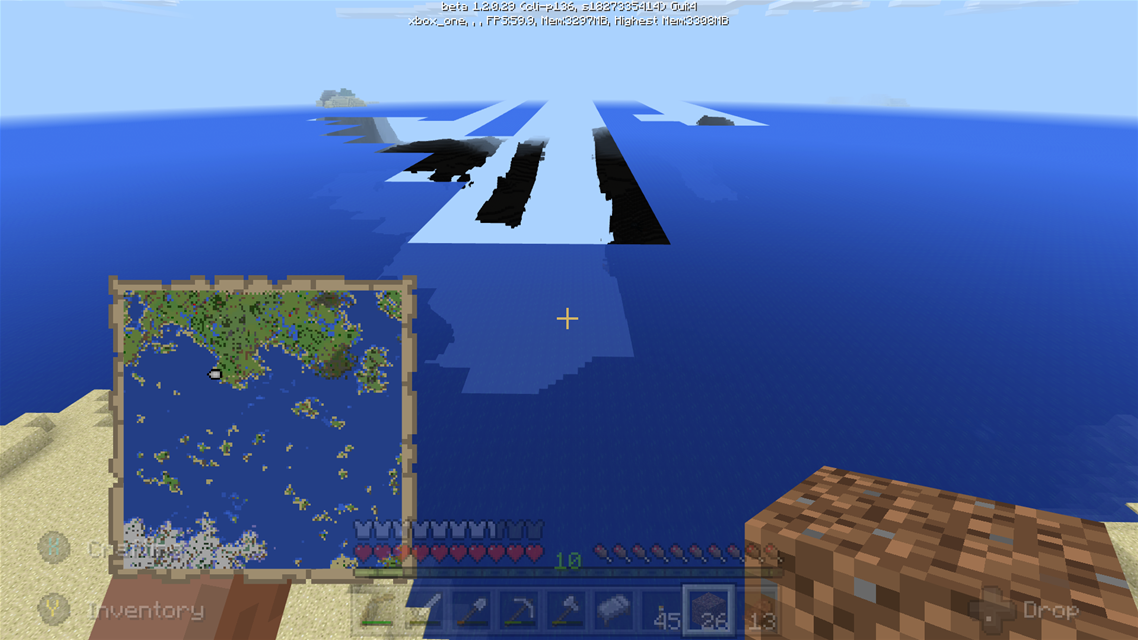
Affects 1.0.4.0 (chunk generation is also very slow over oceans/deep oceans and is also affected when holding out a zoomed-out map; it lags like crazy).
![[MCPE Mod] Celesian](../../../data/avatars/users/81635.png)
is duplicated by
Definitely affecting 1.0.4.11.
Affects 1.0.4.1.
It seems this issue mostly occurs over oceans/deep oceans, and the chunk loading ultimately stops until the player either looks up or approaches the nearest loaded chunk.
It's somewhat fine on land (a bit slower than usual), so long as no giant bodies of water are present.
Affects 1.0.5.0.
Chunk generation is more smoother now in 1.1.0.1, a bit laggy with maps though.
![[Mojang] Mega_Spud (Jay Wells)](../../../data/avatars/users/92696.png)
relates to
relates to
World chunk generation/rendering is slow.
is duplicated by
is duplicated by
When ever I make a new world it takes a minute to load the chunks in front of my character. The old world gen speeds were manageable but now it's taking the biscuit in some circumstances it can be rendered unplayable. The end is extremely laggy at times as there's so many particuls every where plus the end sky masks the pillars. These problems have been found on my iPhone as well. May I also add that the entity render distance is extremely low now. This bug is also making the game very laggy as the tablet try's it's hardest to render the chunks faster but the game is bottlenecking this.
World chunk generation/rendering is slow and extremely laggy at times.
When ever I make a new world it takes a minute to load the chunks in front of my character. The old world gen speeds were manageable but now it's taking the biscuit in some circumstances it can be rendered unplayable.
The end is extremely laggy at times as there's so many particuls every where plus the end sky masks the pillars. These problems have been found on my iPhone as well.May I also add that the entity render distance is extremely low now. This bug is also making the game very laggy as the tablet try's it's hardest to render the chunks faster but the game is bottlenecking this.
is duplicated by
is duplicated by
is duplicated by
is duplicated by
is duplicated by

![[Mod] bemoty](../../../data/avatars/users/50554.png)
is duplicated by
is duplicated by
![[Mod] Pokechu22](../../../data/avatars/users/92931.png)
is duplicated by
is duplicated by
is duplicated by
is duplicated by
is duplicated by
is duplicated by
is duplicated by
MCPE-22165
is duplicated by
is duplicated by
is duplicated by
is duplicated by
is duplicated by
is duplicated by
is duplicated by
is duplicated by
is duplicated by
is duplicated by
is duplicated by
is duplicated by
is duplicated by

is duplicated by
is duplicated by
is duplicated by
is duplicated by
is duplicated by
is duplicated by
is duplicated by
is duplicated by
![[Mod] Neko](../../../data/avatars/users/92901.png)
is duplicated by
is duplicated by
is duplicated by
is duplicated by
![[Mod] Asteraoth](../../../data/avatars/users/92886.png)
is duplicated by
is duplicated by
![[Mojang] Nathan Adams](../../../data/assets/gravatar/dinnerbone.png)
Still affects 1.7.0. Especially when travelling at high speed.
![[Mod] OcelotOnesie](../../../data/avatars/users/43220.png)
is duplicated by
is duplicated by

is duplicated by
![[Bot] Arisa](../../../data/avatars/users/43007.png)
is duplicated by
is duplicated by
is duplicated by
relates to
Relates to this issue MCPE-19308
Relates to MCPE-19308.
Same as MCPE-19308.
Thank you for your report!
However, this issue has been closed as a Duplicate of MCPE-19308.
It has been linked to this report. If you have additional information, please add it to that report.
If you have not, please search before reporting, as it's likely that one exists already.
Quick Links:
📓 Issue Guidelines – 💬 Community Support – 📧 Feedback – 📖 Game Wiki
Thank you for your report!
However, this issue has been closed as a Duplicate of MCPE-19308
It has been linked to this report. If you have additional information, please add it to that report.
Please search before reporting, as it's likely that one exists already.
Quick Links:
📓 Issue Guidelines – 💬 Community Support – 📧 Customer Support – 📖 Game Wiki
Thank you for your report!
However, this issue has been closed as a Duplicate of MCPE-19308
It has been linked to this report. If you have additional information, please add it to that report.
Please search before reporting, as it's likely that one exists already.
Quick Links:
📓 Issue Guidelines – 💬 Community Support – 📧 Customer Support – 📖 Game Wiki
Thank you for your report!
However, this issue has been closed as a Duplicate of MCPE-19308
It has been linked to this report. If you have additional information, please add it to that report.
Please search before reporting, as it's likely that one exists already.
Quick Links:
📓 Issue Guidelines – 💬 Community Support – 📧 Customer Support – 📖 Game Wiki
Thank you for your report!
However, this issue has been closed as a Duplicate of MCPE-19308
It has been linked to this report. If you have additional information, please add it to that report.
Please search before reporting, as it's likely that one exists already.
Quick Links:
📓 Issue Guidelines – 💬 Community Support – 📧 Customer Support – 📖 Game Wiki
Thank you for your report!
However, this issue is a Duplicate of MCPE-19308.
If you have additional information, please add it to that report.
Please search before reporting, as it's likely that one exists already.
Quick Links:
📓 Issue Guidelines – 💬 Community Support – 📧 Customer Support – 📖 Game Wiki
Thank you for your report!
However, this issue is a Duplicate of MCPE-19308.
If you have additional information, please add it to that report.
Please search before reporting, as it's likely that one exists already.
Quick Links:
📓 Issue Guidelines – 💬 Community Support – 📧 Customer Support – 📖 Game Wiki
Thank you for your report!
However, this issue has been closed as a Duplicate of MCPE-19308.
It has been linked to this report. If you have additional information, please add it to that report.
If you have not, please search before reporting, as it's likely that one exists already.
Quick Links:
📓 Issue Guidelines – 💬 Community Support – 📧 Feedback – 📖 Game Wiki
Thank you for your report!
However, this issue has been closed as a Duplicate of MCPE-19308.
It has been linked to this report. If you have additional information, please add it to that report.
If you have not, please search before reporting, as it's likely that one exists already.
Quick Links:
📓 Issue Guidelines – 💬 Community Support – 📧 Feedback – 📖 Game Wiki
Thank you for your report!
However, this issue has been closed as a Duplicate of MCPE-19308.
It has been linked to this report. If you have additional information, please add it to that report.
If you have not, please search before reporting, as it's likely that one exists already.
Quick Links:
📓 Issue Guidelines – 💬 Community Support – 📧 Feedback – 📖 Game Wiki
Thank you for your report!
However, this issue has been closed as a Duplicate of MCPE-19308.
It has been linked to this report. If you have additional information, please add it to that report.
If you have not, please search before reporting, as it's likely that one exists already.
Also, please refer to the issue guidelines below, before making new tickets:
Quick Links:
📓 Issue Guidelines – 💬 Community Support – 📧 Feedback – 📖 Game Wiki
Thank you for your report!
However, this issue has been closed as a Duplicate of MCPE-19308.
It has been linked to this report. If you have additional information, please add it to that report.
If you have not, please search before reporting, as it's likely that one exists already.
Quick Links:
📓 Issue Guidelines – 💬 Community Support – 📧 Feedback – 📖 Game Wiki
Thank you for your report!
However, this issue has been closed as a Duplicate of MCPE-19308.
It has been linked to this report. If you have additional information, please add it to that report.
If you have not, please search before reporting, as it's likely that one exists already.
Quick Links:
📓 Issue Guidelines – 💬 Community Support – 📧 Feedback – 📖 Game Wiki
Thank you for your report!
However, this issue has been closed as a Duplicate of MCPE-19308.
It has been linked to this report. If you have additional information, please add it to that report.
If you have not, please search before reporting, as it's likely that one exists already.
Quick Links:
📓 Issue Guidelines – 💬 Community Support – 📧 Feedback – 📖 Game Wiki
Thank you for your report!
However, this issue has been closed as a Duplicate of MCPE-19308.
It has been linked to this report. If you have additional information, please add it to that report.
If you have not, please search before reporting, as it's likely that one exists already.
Quick Links:
📓 Issue Guidelines – 💬 Community Support – 📧 Feedback – 📖 Game Wiki
Yes, that's MCPE-19308.
Relates to / duplicates MCPE-19308.
Thank you for your report!
However, this issue has been closed as a Duplicate of MCPE-19308.
It has been linked to this report. If you have additional information, please add it to that report.
If you have not, please search before reporting, as it's likely that one exists already.
Quick Links:
📓 Issue Guidelines – 💬 Community Support – 📧 Feedback – 📖 Game Wiki
Thank you for your report!
However, this issue has been closed as a Duplicate of MCPE-19308.
It has been linked to this report. If you have additional information, please add it to that report.
If you have not, please search before reporting, as it's likely that one exists already.
Quick Links:
📓 Issue Guidelines – 💬 Community Support – 📧 Feedback – 📖 Game Wiki
Thank you for your report!
However, this issue is a Duplicate of MCPE-19308.
If you have additional information, please add it to that report.
Please search before reporting, as it's likely that one exists already.
Quick Links:
📓 Issue Guidelines – 💬 Community Support – 📧 Customer Support – 📖 Game Wiki
Thank you for your report!
However, this issue is a duplicate of MCPE-19308. If you have additional information to add, please add it to that report.
Also, please remember to search to see if your issue has been reported previously. (Having similar problems on one report can really help us understand and resolve the problem sooner.) If you find a similar issue, you can upvote it and add your version, or if it's already closed as Fixed you can add a comment to request reopening it.
Thank you for your report!
However, this issue has been closed as a Duplicate of MCPE-19308.
Your additional information and observations are very useful, so if you can add them to the comments section of the parent issue it would be appreciated.
If you have not, you might like to make use of the search feature before making a new ticket, as it's likely that the issue has been reported already.
Quick Links:
📓 Issue Guidelines – 💬 Community Support – 📧 Feedback – 📖 Game Wiki
Thank you for your report!
However, this issue has been closed as a Duplicate of MCPE-19308.
Your additional information and observations are very useful, so if you can add them to the comments section of the parent issue it would be appreciated.
If you have not, you might like to make use of the search feature before making a new ticket, as it's likely that the issue has been reported already.
Quick Links:
📓 Issue Guidelines – 💬 Community Support – 📧 Feedback – 📖 Game Wiki
Thank you for your report!
However, this issue has been closed as a Duplicate of MCPE-19308.
Your additional information and observations are very useful, so if you can add them to the comments section of the parent issue it would be appreciated.
If you have not, you might like to make use of the search feature before making a new ticket, as it's likely that the issue has been reported already.
Quick Links:
📓 Issue Guidelines – 💬 Community Support – 📧 Feedback – 📖 Game Wiki
I think this is a duplicate of MCPE-19308.

It could be related to MCPE-19308 although that description is about render speed, and I have no problem with that. It's also reported for a different OS; this is Windows 10.
My render speed is fine, and my render distance is set to the maximum 16 chunks. My son and I play in the same world; he on an iPad mini and me on Windows 10. We've only seen this on the Windows side. But apparently others are seeing it on different platforms.
There have been similar incidents, NOT when flying around, but when digging a tunnel in close quarters. I'll encounter a block that looks invisible (I see bright sky beyond even though I'm not looking up), and allows me to see mobs in the distance as silhouettes. I don't see underground structures though that invisible block though. Digging out and replacing the block fixes the problem. Hmm, next time I see the issue for which I took a screenshot, I'll try walking up to the edge and digging an invisible block to see what happens. I haven't tried that yet.
I also experience this on Windows 10, so I know what you're describing. MCPE-19308 doesn't just talk about slow rendering, it also talks about slow chunk generation. (Generation is creating the data structure in memory, either by loading it from the save file or by building it from scratch if it's new. Rendering is creating the screen image from the in-memory data.)
Slow generation is what you're experiencing. It occurs when you're exploring a large area quickly, usually while flying. That requires loading a lot of chunks and generating new ones, and these are relatively slow operations. If you go so fast that the game can't load or create them fast enough, it may lose track of some chunks it's trying to load or generate. Either way, those chunks can't be rendered, so you see through them, often all the way to the sky on the "other side" of the world. (Entities always appear, because they're rendered separately from chunks. They look like silhouettes when they're in a dark place. Some block surfaces in chunks on the other side of the "hole" also render, similar to Java's Spectator mode if you're familiar with that.)
Slow rendering causes the same appearance, but it usually corrects itself after a short time or when the player moves.
The slow generation and slow rendering appearances are similar. They may or may not be caused by the same bug, but that's up to the devs to figure out, so currently we're tracking them as the same issue and why I said I think this is duplicate of that. A moderator will review and correct me if I'm wrong.
This is likely unrelated to invisible chunks caused by slow generation as reported in MCPE-19308, which I re-reported in MCPE-30428. I'm creating this description of an unrelated bug from the comments in that ticket.
When digging a tunnel in close quarters, I'll sometimes encounter a block that looks invisible with empty space beyond (I see bright blue sky beyond even though I'm not looking up).
I don't see how slow generation would cause this. I'm moving slowly, at the rate of 1 block every second or so. In this case I don't see underground structure through the 'window' as described in MCPE-30428, but I do sometimes see silhouettes of mobs in the distance. It's almost as if the game loses track of a single block.
This occurred a couple days ago; I had just started a new survival game. After spawning for the first time, I didn't explore, I just harvested wood from a nearby tree and immediately began digging a temporary shelter using a pickaxe from the starting bonus chest. I had dug a stairway down about 4 blocks and was digging out a small room for a crafting table and a furnace, when one of the blocks on the wall became invisible, showing bright blue sky and a distant silhouette of a skeleton bobbing up and down, likely in the river near where I spawned.
I've also seen a floor block do this (not 1.2.9 but some previous 1.2.x version). The first time that happened, seeing bright sky through a hole in the floor, I thought I had broken through the bottom of the world, which shouldn't be possible in survival mode (and I hadn't dug anywhere deep enough either).
When it happens, it typically affects just 1 block. Digging out and replacing the invisible block fixes the problem.
Let's just link this as duplicating MCPE-19308 and close this ticket as a duplicate. I've written a new clean ticket MCPE-30451 for the invisible-block-while-digging issue.
Very good, thanks for being so patient and cooperative!
Mods, please close as a duplicate of MCPE-19308 per OP's comment above.
Thank you for your report!
However, this issue has been closed as a Duplicate of MCPE-19308.
Quick Links:
📓 Issue Guidelines – 💬 Community Support – 📧 Feedback – 📖 Game Wiki
Thank you for your report!
However, this issue has been closed as a Duplicate of MCPE-19308.
Quick Links:
📓 Issue Guidelines – 💬 Community Support – 📧 Feedback – 📖 Game Wiki
Thank you for your report!
However, this issue has been closed as a Duplicate of MCPE-19308.
Quick Links:
📓 Issue Guidelines – 💬 Community Support – 📧 Feedback – 📖 Game Wiki
Thank you for your report!
However, this issue has been closed as a Duplicate of MCPE-19308.
Your additional information and observations are very useful, so if you can add them to the comments section of the parent issue it would be appreciated.
If you have not, you might like to make use of the search feature before making a new ticket, as it's likely that the issue has been reported already.
Quick Links:
📓 Issue Guidelines – 💬 Community Support – 📧 Feedback – 📖 Game Wiki
Thank you for your report!
However, this issue has been closed as a Duplicate of MCPE-19308.
Your additional information and observations are very useful, so if you can add them to the comments section of the parent issue it would be appreciated.
If you have not, you might like to make use of the search feature before making a new ticket, as it's likely that the issue has been reported already.
Quick Links:
📓 Issue Guidelines – 💬 Community Support – 📧 Feedback – 📖 Game Wiki
Thank you for your report!
However, this issue has been closed as a Duplicate of MCPE-19308.
Your additional information and observations are very useful, so if you can add them to the comments section of the parent issue it would be appreciated.
If you have not, you might like to make use of the search feature before making a new ticket, as it's likely that the issue has been reported already.
Quick Links:
📓 Issue Guidelines – 💬 Community Support – 📧 Feedback – 📖 Game Wiki
Thank you for your report!
However, this issue has been closed as a Duplicate of MCPE-19308.
Your additional information and observations are very useful, so if you can add them to the comments section of the parent issue it would be appreciated.
If you have not, you might like to make use of the search feature before making a new ticket, as it's likely that the issue has been reported already.
Quick Links:
📓 Issue Guidelines – 💬 Community Support – 📧 Feedback – 📖 Game Wiki
Thank you for your report!
However, this issue is a Duplicate of MCPE-31800 and MCPE-19308.
Please limit bug reports to one issue per report.
If you have additional information, please add it to those reports.
Please search before reporting, as it's likely that one exists already.
Quick Links:
📓 Issue Guidelines – 💬 Community Support – 📧 Customer Support – 📖 Game Wiki
Thank you for your report!
However, this issue has been closed as a Duplicate of MCPE-19308.
Quick Links:
📓 Issue Guidelines – 💬 Community Support – 📧 Feedback – 📖 Game Wiki
Thank you for your report!
However, this issue has been closed as a Duplicate of MCPE-19308.
Your additional information and observations are very useful, so if you can add them to the comments section of the parent issue it would be appreciated.
If you have not, you might like to make use of the search feature before making a new ticket, as it's likely that the issue has been reported already.
Quick Links:
📓 Issue Guidelines – 💬 Community Support – 📧 Feedback – 📖 Game Wiki
angecalo: I think this is a duplicate of MCPE-19308. Would you mind taking a look at that one (the screenshots should look similar to what you're seeing) and say whether you think it's the same?
Thank you for your report!
However, this issue is a Duplicate of MCPE-19308.
If you have additional information, please add it to that report.
Please search before reporting, as it's likely that one exists already.
Quick Links:
📓 Issue Guidelines – 💬 Community Support – 📧 Customer Support – 📖 Game Wiki
Thank you for your report!
However, this issue is a Duplicate of MCPE-19308.
If you have additional information, please add it to that report.
Please search before reporting, as it's likely that one exists already.
Quick Links:
📓 Issue Guidelines – 💬 Community Support – 📧 Customer Support – 📖 Game Wiki
The issue described by MCPE-19308 and its dozens of "duplicates" is that chunk rendering, user input, UI panel loading, and simulation updating (TPS) are all being severely slowed at certain times, particularly at times when heavy chunk generation and/or loading from the world save file are expected. Because these effects all seem to be triggered as a group, we're assuming they're caused by the same underlying bug in database management, and that's why we've combined them even though their descriptions don't always sound alike.
The description you gave above is consistent with that database management problem. If chunk loading is delayed, the chunks can't be rendered, so they're invisible and you can see the chunks behind them. Similarly, unloaded chunks can't get update ticks, so they remain in a frozen state while other chunks around them are processing ticks and changing. That might explain your redstone malfunctions.
Since invisible walls and redstone malfunctions were the only actual problems you mentioned in the description (and even those terms are very general; the screenshots helped, but I had to guess at what the redstone malfunction is), I didn't see anything to distinguish this report from MCPE-19308 and its dozens of duplicates. And I still don't, since your redstone issue can be explained and we don't think it matters whether the world is new or old (because some of those reports were about old worlds that had the same issues).
However, if you still feel you can make a case for keeping this report separate, feel free to add more details about things that the 19308 bug doesn't explain. You might like to review the Issue Guidelines to get a sense of the kind of details we need, and if you include additional screenshots, I'd appreciate it if you could turn off the texture pack first. (I'm not familiar with it, so I might not see that a side texture is missing or I might mistake a repeater for a comparator, for instance.)
Thank you for your report!
However, this issue has been closed as a Duplicate of MCPE-19308.
Please add a vote and any new information to the main ticket, which will be updated accordingly.
If you have not, you might like to make use of the search feature before making a new ticket, as it's likely that the issue has been reported already.
Quick Links:
📓 Issue Guidelines – 💬 Community Support – 📧 Feedback – 📖 Game Wiki
Thank you for your report!
However, this issue has been closed as a Duplicate of MCPE-19308.
Please add a vote and any new information to the main ticket, which will be updated accordingly.
If you have not, you might like to make use of the search feature before making a new ticket, as it's likely that the issue has been reported already.
Quick Links:
📓 Issue Guidelines – 💬 Community Support – 📧 Feedback – 📖 Game Wiki
Thank you for your report!
However, this issue has been closed as a Duplicate of MCPE-19308.
Please add a vote and any new information to the main ticket, which will be updated accordingly.
If you have not, you might like to make use of the search feature before making a new ticket, as it's likely that the issue has been reported already.
Quick Links:
📓 Issue Guidelines – 💬 Community Support – 📧 Feedback – 📖 Game Wiki
Thank you for your report!
However, this issue has been closed as a Duplicate of MCPE-19308.
Please add a vote and any new information to the main ticket, which will be updated accordingly.
If you have not, you might like to make use of the search feature before making a new ticket, as it's likely that the issue has been reported already.
Quick Links:
📓 Issue Guidelines – 💬 Community Support – 📧 Feedback – 📖 Game Wiki
Thank you for your report!
However, this issue has been closed as a Duplicate of MCPE-19308.
Please add a vote and any new information to the main ticket, which will be updated accordingly.
If you have not, you might like to make use of the search feature before making a new ticket, as it's likely that the issue has been reported already.
Quick Links:
📓 Issue Guidelines – 💬 Community Support – 📧 Feedback – 📖 Game Wiki
Thank you for your report!
However, this issue has been closed as a Duplicate of MCPE-19308.
Please add a vote and any new information to the main ticket, which will be updated accordingly.
If you have not, you might like to make use of the search feature before making a new ticket, as it's likely that the issue has been reported already.
Quick Links:
📓 Issue Guidelines – 💬 Community Support – 📧 Feedback – 📖 Game Wiki
Thank you for your report!
However, this issue has been closed as a Duplicate of MCPE-19308.
Please add a vote and any new information to the main ticket, which will be updated accordingly.
If you have not, you might like to make use of the search feature before making a new ticket, as it's likely that the issue has been reported already.
Quick Links:
📓 Issue Guidelines – 💬 Community Support – 📧 Feedback – 📖 Game Wiki
Thank you for your report!
However, this issue has been closed as a Duplicate of MCPE-19308.
Please add a vote and any new information to the main ticket, which will be updated accordingly.
If you have not, you might like to make use of the search feature before making a new ticket, as it's likely that the issue has been reported already.
Quick Links:
📓 Issue Guidelines – 💬 Community Support – 📧 Feedback – 📖 Game Wiki

Duplicate of MCPE-19308.

With all due respect, this is NOT a duplicate AT ALL.
MCPE-19308 is truly two issues in the same bug report - it is about rendering issues - about the blocks taking a while to show up, and a little bit of this. I am aware of that, I have that issue too.
The sole focus of this bug is that the blocks were ALREADY rendered, and are now COMPLETELY destroyed by coding. Please reopen this, unless Mod Neko believes on behalf of Jagex that the two issues are resolved in the same strand of game coding, then I will concede.
Reopened because it describes a different issue from MCPE-19308.
Thank you for your report!
However, this issue is a Duplicate of MCPE-19308.
If you have additional information, please add it to that report.
Please search before reporting, as it's likely that one exists already.
Quick Links:
📓 Issue Guidelines – 💬 Community Support – 📧 Customer Support – 📖 Game Wiki
Thank you for your report!
However, this issue is a Duplicate of MCPE-19308.
If you have additional information, please add it to that report.
Please search before reporting, as it's likely that one exists already.
Quick Links:
📓 Issue Guidelines – 💬 Community Support – 📧 Customer Support – 📖 Game Wiki
Thank you for your report!
However, this issue is a Duplicate of MCPE-35560 / MCPE-19308.
If you have additional information, please add it to that report.
Please search before reporting, as it's likely that one exists already.
Quick Links:
📓 Issue Guidelines – 💬 Community Support – 📧 Customer Support – 📖 Game Wiki
Thank you for your report!
However, this issue is a Duplicate of MCPE-19308.
If you have additional information, please add it to that report.
Please search before reporting, as it's likely that one exists already.
Quick Links:
📓 Issue Guidelines – 💬 Community Support – 📧 Customer Support – 📖 Game Wiki
Thank you for your report!
However, this issue is a Duplicate of MCPE-19308.
If you have additional information, please add it to that report.
Please search before reporting, as it's likely that one exists already.
Quick Links:
📓 Issue Guidelines – 💬 Community Support – 📧 Customer Support – 📖 Game Wiki

The game lags terrible when autosaves. This is a problem specialy since the Bedrock Edition doesn't allow to disable it.
When happening, chunks are not loading until the autosave ends. This causes the player can move along the empty, and walls random become invisible, affecting a lot to the game experience.
Mined block refuse to dissapear, placed blocks are not showing in screen and the object menu cannot be opened until the autosave ends.
I'm not talking about internet lag, this issue happens when the game autosaves, which occur every 2 minutes, making the game nearly unplayable. Setting the distance simulation to minimum doesn't help.
This issue is more noticeable in local multiplayer. With 2 players affects a lot to the game experience. With more players the game behaves similar at game crashing making it unplayable.
Pretty sure it's related with MCPE-34884 and possibly with MCPE-19308
Thank you for your report!
We're already tracking this issue at MCPE-19308, so I will resolve and link this ticket as a duplicate.
If you would like to add a vote and any extra information to the main ticket it would be appreciated.
If you haven't already, you might like to make use of the search feature to see if the issue has already been mentioned.
Quick Links:
📓 Issue Guidelines – 💬 Community Support – 📧 Customer Support – 📖 Game Wiki
Thank you for your report!
We're actually already tracking this issue at MCPE-19308, so I will resolve and link this ticket as a duplicate.
If you would like to add a vote and any extra information to the main ticket it would be appreciated.
If you haven't already, you might like to make use of the search feature to see if the issue has already been mentioned.
Quick Links:
📓 Issue Guidelines – 💬 Community Support – 📧 Customer Support – ✍️ Feedback and Suggestions – 📖 Game Wiki

Thank you for your report!
We're tracking this issue in MCPE-19308, so this ticket is being resolved and linked as a duplicate.
If you would like to add a vote and any extra information to the main ticket it would be appreciated.
If you haven't already, you might like to make use of the search feature to see if the issue has already been mentioned.
Quick Links:
📓 Issue Guidelines – 💬 Community Support – 📧 Customer Support – ✍️ Feedback and Suggestions – 📖 Game Wiki
Thank you for your report!
We're tracking this issue in MCPE-19308, so this ticket is being resolved and linked as a duplicate.
If you would like to add a vote and any extra information to the main ticket it would be appreciated.
If you haven't already, you might like to make use of the search feature to see if the issue has already been mentioned.
Quick Links:
📓 Issue Guidelines – 💬 Community Support – 📧 Customer Support – ✍️ Feedback and Suggestions – 📖 Game Wiki
We're tracking this issue as MCPE-19308, so this ticket is being resolved and linked as a duplicate.
If you would like to add a vote and any extra information to the main ticket it would be appreciated.
If you aren't already, please don't forget to use the search feature, the less time volunteers spend linking duplicates the more time we have to update new reports.
Voting on an existing report has a greater impact on getting the bugs most important to you fixed!
Quick Links:
📓 Issue Guidelines – 💬 Community Support – 📧 Customer Support – ✍️ Feedback and Suggestions – 📖 Game Wiki
We're tracking this issue as MCPE-19308, so this ticket is being resolved and linked as a duplicate.
If you would like to add a vote and any extra information to the main ticket it would be appreciated.
If you aren't already, please don't forget to use the search feature, the less time volunteers spend linking duplicates the more time we have to update new reports.
Voting on an existing report has a greater impact on getting the bugs most important to you fixed!
Quick Links:
📓 Issue Guidelines – 💬 Community Support – 📧 Customer Support – ✍️ Feedback and Suggestions – 📖 Game Wiki
This ticket replaces MCPE-19308, which reported similar slow chunk loading in release 1.0 to 1.2. Those problems were mostly corrected by tuning efforts, and I espect that will be what we need in this case as well.
I have experienced this slowness on Windows 10 while sprint flying in creative mode. It's especially slow over the ocean. (Ocean chunks seem to take longer to generate than terrain chunks since the Update Aquatic). It is possible for me, at full speed, to fly over a void space before the generated chunk gets rendered.
I have also tested this on a iPad Pro and the issue is 10x worse
I have an iPad 4 and have noticed this on 1.0.0 and 1.0.1. If I'm in creative and flying over the ocean it is especially noticeable. In some cases, when I hit an unrendered chunk and cannot move forward, I've sat still for several minutes and waited for the world to render out to my distance settings, but it will just sit there for minutes without updating the view more than one or two chunks to the side. However if I continue trying to push forward, it will sometimes render dozens of chunks very rapidly but only out about 4 chunks ahead of me, then I have to wait again.
The problem becomes much worse if I'm hosting a game with my daughters over wifi. If we are in different dimensions it is almost impossible for any of us to do anything.
If there is land ahead of me, it seems to keep trying / succeeding in rendering out to my max distance.
This is happening to me as well every since I updated with the latest upgrade in December 2016. I actually purchased the holiday resource. Now I am very sorry I upgraded and attained this resource. My game had very little glitches until I made the update. I cannot even walk and my would generate fast enough. I have to wait and come back! I hate it! My daughter, husband and grandchildren are all having the same problem. Please, someone, help... I am losing interest, and I started this game to please my grandchildren. They love the worlds I create for them to explore!
This is happening in version 1.0.3
Happens in 1.1.0.1 on kindle fire running fire os 5.3.2.1
im having the same problem on realms and on my world im on minecarft windows 10
Adding Android 6.0 MCPE 1.1.0.9 (and before) as also still being affected.
Is there any clue that the development team are aware of and acting on this issue? There is no point playing this game at the moment because 1.0.8 seems far worse than the previous version. Exploration is almost pointless once you have reached a certain size as it is agonising waiting for the chunks to load and render.
Same. It's less intense in 1.1.0.9 on my Note 5, but still buggy with ocean chunk rendering, especially with a big render distance and when holding out a map.
Have recently downloaded 1.1 for iPad. Rendering is far worse than it has ever been for me. Huge areas that take ages to render - over cave systems particularly and even on land now whereas it was worse in the ocean. The question is this. If the actual georgraphy has not changed that much e.g. Number of mines/caves for example, why does every release make is worse and not better? Basically it was OK once but recent changes are just dire.... I still do not know whether this failure is even on the developer's priority list.
On my + 820 MB world game is unplayable, massive lag spikes and chunks render veeery slowly especially in jungle area. Version: 1.1.1.
Have the same on my world i just started a week ago. had this problem since 1.0 and now ver.1.1.1 and its still isnt fixed.

Just downloaded the latest update 1.1.1 which was supposed to address this but it is no better on my Win10. Tried lowering rendering distance, reducing graphics, nothing helps. Still huge blank chunks in front of me. Game is unplayable like this.
Confirmed again in 1.1.2 on the Windows 10 edition.
Hello everybody I come to you today because I have a problem with my worlds there is a bug and it takes the sea from my world's and makes a huge hole and it 1200-2000 block's high and wife and I have a team working in it but they can't find an answer.
Our realm has been experiencing a lot of issues loading chunks since the 1.1 update in addition to extreme lag and frequent crashes. When the 1.1 update came out, we explored 10,000 blocks from spawn in order to find one of the new woodland mansions. Often when joining the game, a player has to stand still and wait 5-10 minutes for the chunks around them to load before moving. This happens in frequently traveled chunks like the spawn area as well as individual player bases and in the nether. Using maps seems to exacerbate this issue on single player games as well as multiplayer.
Confirmed in 1.1.4.51
My LP world had me been experiencing this issue. Chunks can't load or take a couple of min causing lag on the world. I know my device can handle it just MCPE not letting the chunks load. iPod 6 gen MCPE user.
In official part of changelog to 1.2 Build 1 there is a bug fix: "Optimized chunk generation and loading". That's mean's this bug will be finally fixed in Better Together update! Hurray!
Fixed in:
1.2.0.2
It s not fixed at me-Samsung Galaxy J5 2016 I have insane lag.
Same , its not fixed , And i am using my Windows 10 Device Too! It can deffinetly handle the game
In build 2 bug back for me. Unplayable again
I get 2 fps on my world that was created in 0.15
1.1.4 was better. Loaded 1.1.5 and wish I hadn't. Game unplayable again. I am truly appalled that the game gets released with such memory issues that causes the failure to render properly.
The full 1.2 will fix all the issues. But when it coming? https://twitter.com/_tomcc/status/894294291467558912
I have the same problem with my iPad Air 2. When I travel by boat, horse or rail the terrain doesn't generate to keep up with my traveling. After about 30 blocks I have to wait 10-30 seconds for the terrain to generate. MCPE v1.1.5
The problem has gotten so bad (it takes minutes vs. seconds) to generate terrain that I've had to give up using my worlds on my iPad,
Edward Laska. I have found that installing the new software rather then applying the updates improves matters considerably. Of course you lose all the games which is a pain. Also, although everyone says that leaving apps open does not impede things they do. Something to do with memory clean up which apps do not do properly after closing - hence the well known tip to download something huge (game or films) so that the apps will tidy and free up space. Minecraft needs every ounce of space available therefore I have to shut all apps - especially safari and any BBC app. After that a hard reboot should sort it out. If the game gets bigger than 60-70 mb even with 2 gb spare for temp space then things really do start slowing down. Not the news you want to hear but I doubt very much Microsoft will sort this out for us 32 bit users.
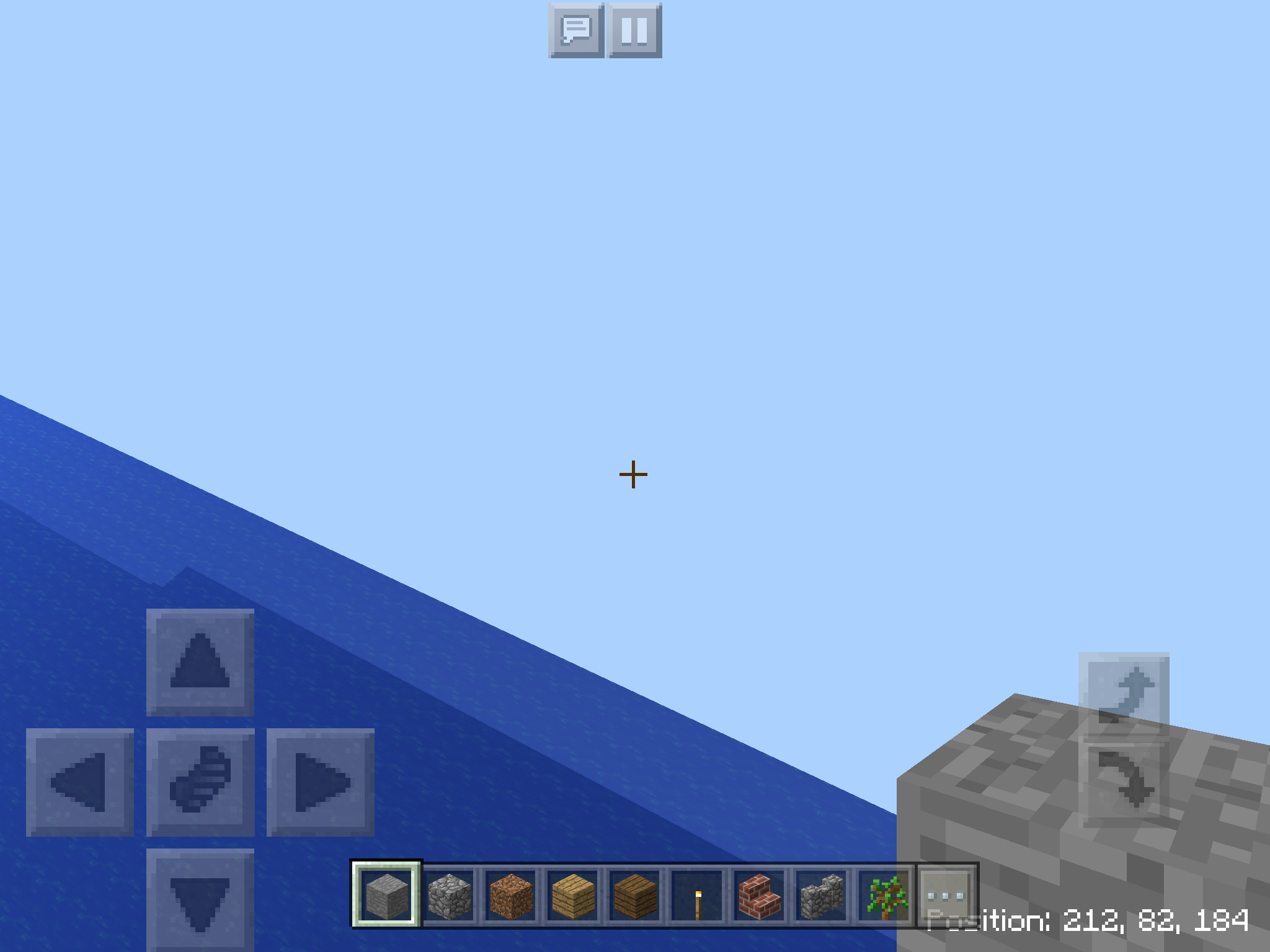
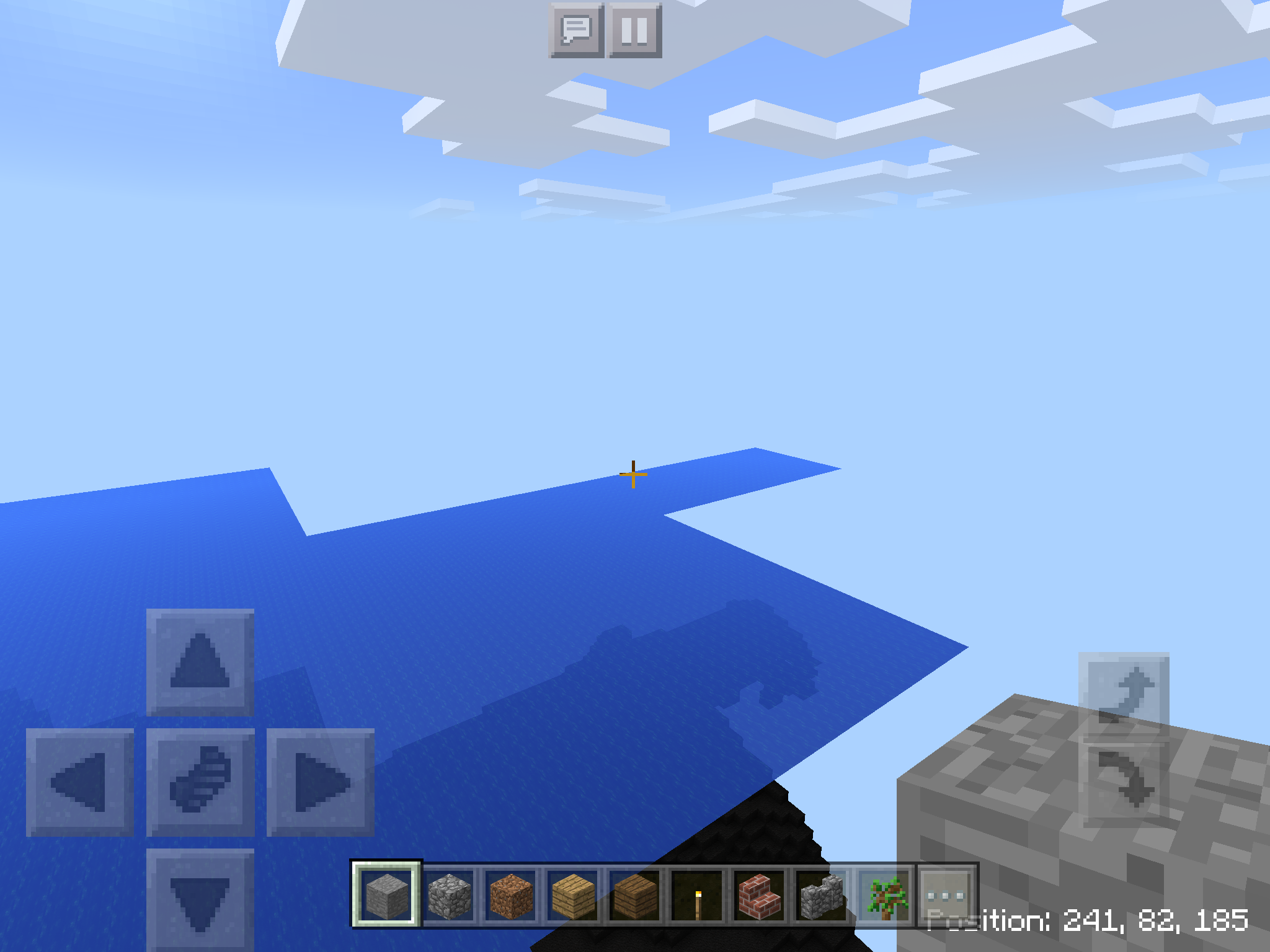
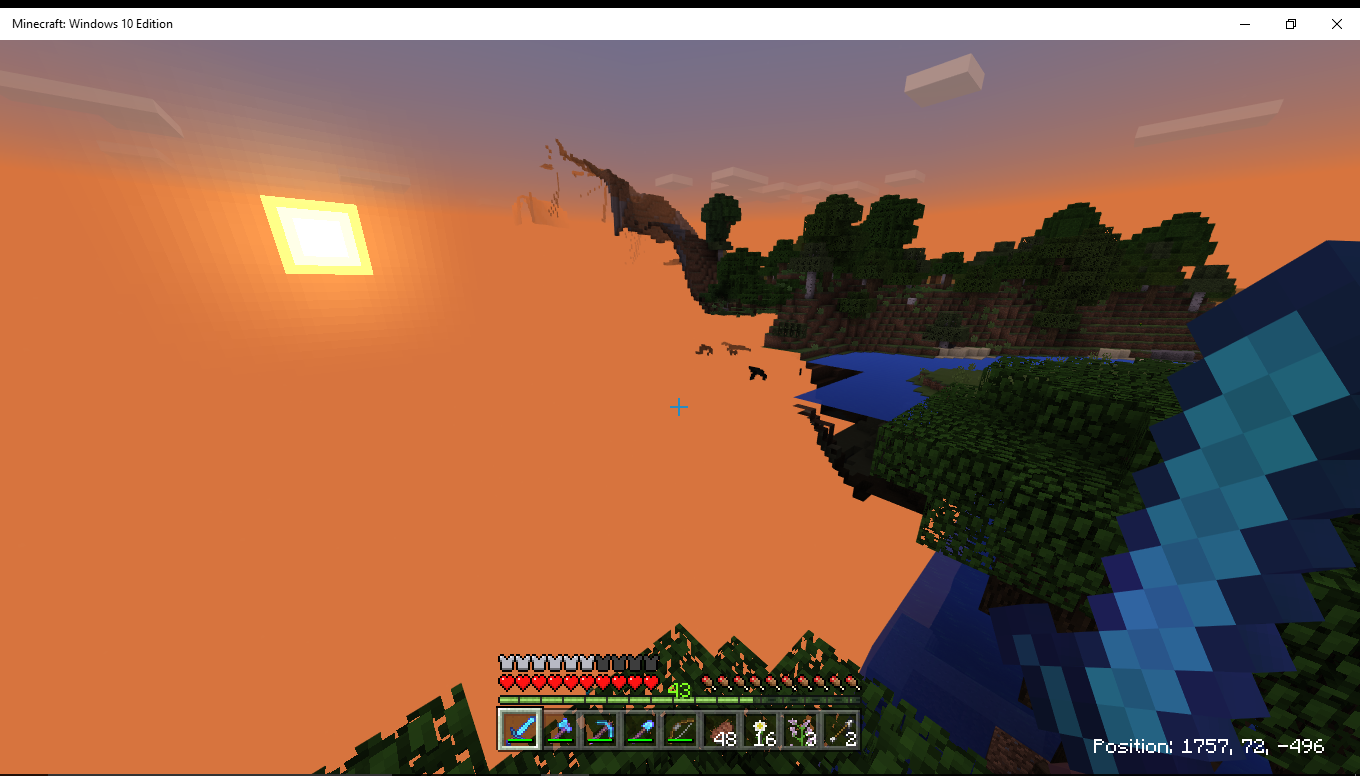
Possibly relevant to this issue: I was playing on Xbox One last night, co-op, and as we explored overland we came across an area that just was not rendered. Or rather, I did. I was the host, and I could "see through the world" (much like the attached images) for a pretty large section (maybe 5-10 chunks?) but my co-op partner said everything looked normal. Mobs in the affected area were frozen in place and "vibrating" for lack of a better term. Trying to move, apparently, but glitched and having seizures.
The one difference I saw, compared to the attached pictures, is that chunks beyond where the glitch was were rendered fine. It was sort of like a ravine of un-rendered chunks existed between us and our destination (which was towards areas we had not ever explored before).
Closing and reopening the world corrected the issue, and we did not experience it again on our way back to base.
Image shows the effect I see in my world. In all cases where I've experienced this, I was in a boat, traveling at speed across the ocean. Possibly outstripping the game's ability to render chunks as I move.
I am having this issue on xbox1. The world will load, but there's a chunk missing where I can see through the world.
This was partially fixed in the 1.2.10.1 beta, but didn't make it to the official 1.2.10.2. However, I think it is partially fixed in the 1.2.13.5 beta
For those still experiencing this issue, could you please let me know if it ever happens in single player, and if so what the devices and triggers for it are?
Mega_Spud... I upgraded to iOS 1.2.11 and it is far slower than 1.2.10. I thought it had finally been sorted but the latest released version is far worse - a retrograde step. I always play single player and usually with wifi off and I have downloaded a RAM cleaner so that I can clear unused RAM before I start. It is glitchy, suffering from more freezes for measurable seconds, as you are digging for example. Using explorer maps has become a bit of a nightmare again with chunks taking a long time to load/render and this is with a small explored world is less than 30mb. So the problem has not been solved. Hope this helps.
Ok thanks for the info!
Mega Spud.... in addition, the time it takes between the Nether and Overworld is very much longer - so much so it is boring, frustrating and makes game play tedious. May not be connected but 1.2.10 was so much better
Still affects 1.6.0.1
Seems to mostly affect the mobile versions. I've been playing in W10 but its fine as long as I'm not travelling too fast via riptide+rockets with elytra. But I get about 15 fps or lower when in mobile even with the render dustance set to minimum.
Still affects 1.6.0.5
Still affects 1.6.0.6
Can confirm this bug with the latest edition for Nintendo Switch (as of July 22nd, 2018). Chunks can be slow to load depending on the terrain. This bug does affect multiplayer gameplay on the Switch and it has occurred several times. If we wait a long period most often the chunks do load but it does take some time (10s - 1min+).
World was generated new as of the Aquatic Update's release (bought newly for the Switch).
Getting this issue on Switch. I have one area where several chunks refused to load even producing black blocks on a map. Some of those chunks eventually loaded after going away and returning a few times but others stubbornly remain. If you look into one there is no bedrock and you could fall into the void. Mine are in an ocean SW of my house (near spawn) by about 1500 blocks. I've given up flying as I keep running out of terrain and hitting an invisible barrier. I also died once when I swam into an unloaded chunk, presumably I fell into the void.
Still affects 1.6.0.8
Mods needs to re-evaluate this.
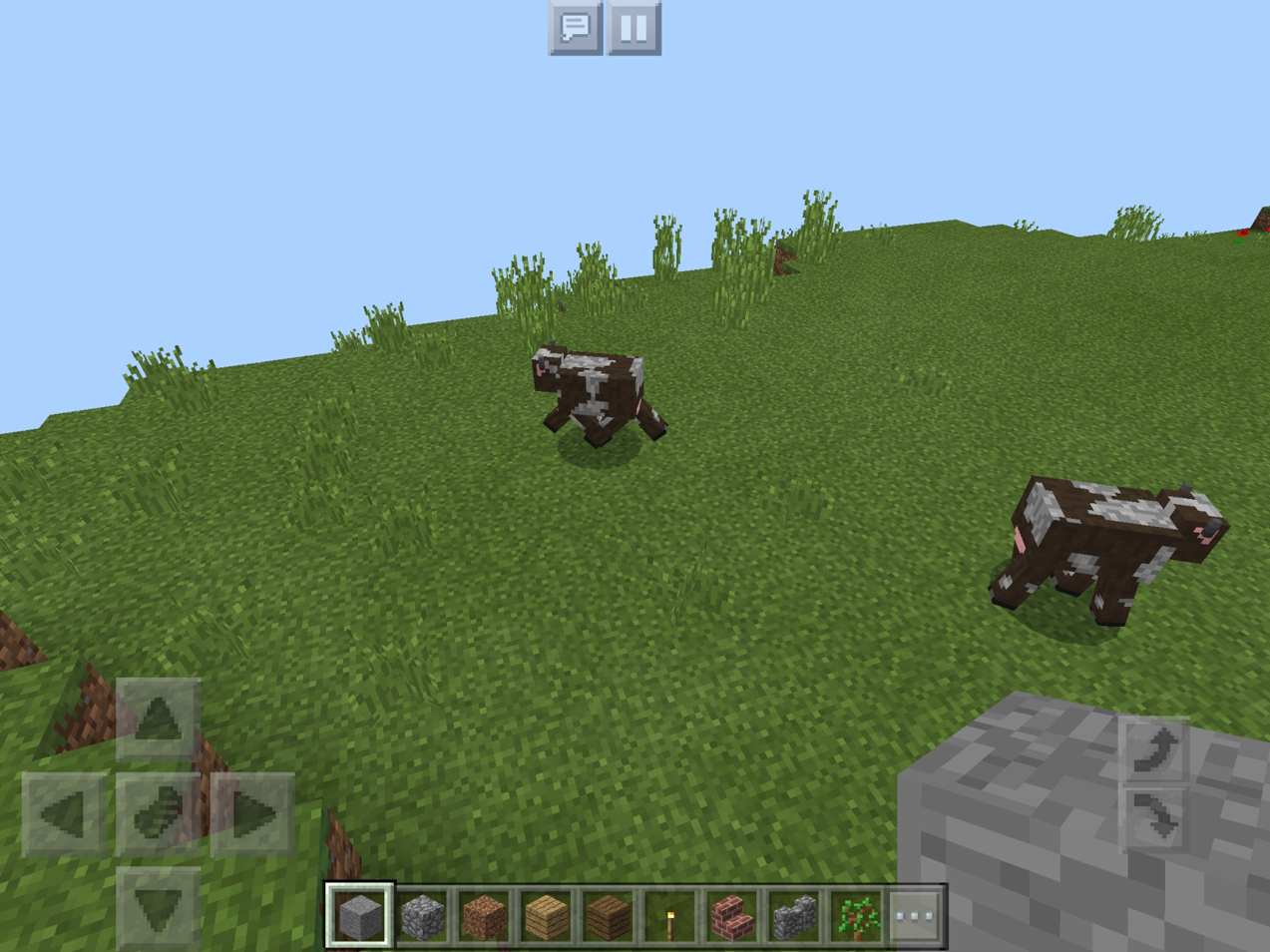
The main issue on this page is the rendering issue of how long chunks take to load, with two screenshots touching on a second opposite issue of the coding's permanent destruction of game chunks!
To that end,
MCPE-38165is NOT a duplicate because it is SOLELY about the coding's DESTRUCTION of ENTIRE chunks AFTER RENDERING had already occurred at least once in the game.Rio: Yes, I agree that your other report describes a different issue. I will reopen it momentarily. Sorry for the delay in noticing your appeals.
Can we please make this glitch a priority and not wait to fix it? This one is particularly game-breaking, and I don't think we should wait!.. Also @auldrick My post was for Xbox One and this is for Nintendo/iOS, should it still be marked as Duplicate?
Rocks: This report is not marked as a duplicate, so I'm not sure what your question means.
Regarding priority, once a report has been turned over to the developers, we on the bug tracker can't really do much to move it along. You in the community actually have more power than we do in that respect, by voting for an issue. Since this report is already one of the highest voted, you can be sure it has a relatively high priority.
But priority isn't the problem anyway. The problem is that this isn't a bug, it's a performance issue, and there's a huge difference. A bug is relatively easier to find and fix because you know what the code is supposed to do and you can read it and figure out where it doesn't do that right. But that doesn't work for a performance issue.* With a performance issue, the code actually works correctly already, it's just too slow, so you have to take a different approach: You have to figure out a way to redesign parts of the program to make them run more efficiently. The key word here is "redesign": Designing is a creative process, not a technical one. It has to wait until inspiration hits, and there's no way to predict when that will happen or to make it happen sooner. And a lot of the time, an idea that sounds good at first doesn't work out and you have to start over again. On top of that, even after you've found a good idea that works, design changes usually require a lot more studying and code modification than bug fixes, so that makes performance issues take longer to fix too. I hope this explains why solving this problem is taking longer than everybody wishes it would. Unfortunately, it can't be helped.
(* Actually, sometimes bugs can cause performance issues too, but those are relatively quickly found and fixed. That has already happened in this case, which is why the problem improved for a little while before it got worse again.)
@Auldrick To be honest, I'm not a dev, and I'm not an expert coder... BUT, a lot of the bugs on Minecraft that I find are pretty cut-and-paste... All the stuff you're explaining, I understand! I have enough experience in Minecraft I can usually find a bug and the likely cause of it too! I understand all the processes and things for fixing something, and I think a lot of the players of Minecraft do as well. I asked about priority because I think we as players become frustrated when we have to wait for mild bugs to be fixed; and in this case, catastrophic bugs... It worries me, for this glitch that it is so game-breaking it should be prioritized whether players up-vote it or not!
I understand this is a performance issue, or combination of bug/performance. But, regardless it can be classified as a bug and we don't really have an option to separate the two when submitting reports.
The "duplicate" I was referring to was the post I created for the Xbox One platform, they marked it as a duplicate of this which is for Nintendo, that was my question/confusion.
MCPE-39252Rocks: Yes, marking your report as a duplicate was appropriate. Don't worry, we won't overlook fixing this on the Xbox One just because it's not listed as an affected device above, and your report won't be ignored because it's closed as a Duplicate.
As we're preparing to pass a report to the developers, we read through all the comments and linked reports to make sure we're getting a complete picture, and we look for relevant info to add from other reports. This particular problem occurs on all platforms, so listing them individually wouldn't be helpful. (Over 90% of bugs cross platforms, so we only highlight it when a problem is clearly limited to certain platforms.) Occasionally, we might overlook something relevant. If you think your report mentions something unique that we've overlooked and you're very sure it's relevant to this problem, we welcome you to add it here in a brief comment. Just please try not to speculate; that just adds to our (and the developers') workload.
The developers also have access to this system. If they find there's a platform-specific aspect of this problem they'll come back and look through the comments and linked reports for more info, so they can see your report if they need to. (Unfortunately, for a report like this one where there are dozens of duplicates, they probably won't read them all because that would take too much time. That's one reason we stress searching first to avoid creating duplicate reports.)
Load times on the Nintendo Switch also suffer a great deal, and it's gotten worse since the 1.8 update.
On my end, this seems fixed in 1.9.0.5
I have ram 4gb avaliable 1.2 GB ram, but lagg when fall some gravel world 1.1 GB, because fps is low and too much some memory (500-800 MB). But the chunk next generation is slowest when using some falling gravel with MCPE Master
Affect 1.13.0.2 and 1.13.0.4
Still not fixed on 1.14.1, chunks load really slow and random on nintendo switch.
Nintendo switch chunk loading is still slow. The custom tegra x1 may not be as powerful as the xbox one or ps4s cpus but it is not THIS much slower.
chunk loading also slow on v1.14.20 and v1.14.30
you can even fly elytra properly
I still have big issue to fly with my Elytra on my switch. Is there any solution on the way after more than 3 years?
Very slow loading while flying without elytra across the world on XB1X. I was hitting void area constantly.
Chunk rendering is very slow on bedrock especially on the switch I cant fly with my elytra properly the world around me needs so long to load PLEASE FIX THIS A LITTLE BIT
Affects 1.16.0.61
Affects v1.16.0
Flying with an elytra to fast can still cause you to hit a void wall.
Especially a problem with the nether, as chunks there seem to load slower (interestingly chunks in the end seem to load faster, but only with islands).
Additionally on switch chunks seem to have "lazy" loading, this can be seen when loading into a world, or just walking, chunks only load if they are relatively close to you, and not at the edge of the render distance (the fog).
Also, I don't know if this is a seperate issue, but when flying with elytra, then coming back to your base, the lighting is not loaded in, and it takes a couple of minutes to load in and make everything look normal.
Has this issue been acknowledged by the developers, or is it low on the priority, because this majorly harms the end game of minecraft, which is why the majority of players don't notice it.
It happens in creative, but it doesn't really have a consequence there.
All we can do is wait patiently.
i have a problem when i load in a world its all blank and i can see nothing only mobs and animals and some writing is missing and my custom characters head is missing and this is all on the windows 10 can you fix it?
This whole issue basically forces you to have a realm if you want to have a good experience in the end game.
@Borys janishweski I think your issue might be seperate to this issue, so you could create a new bug report for it (but search for duplicates first).
Absolutely a huge problem on Switch 1.16 as well now.
Don't even need to mention flight, the slowest horse is now too fast by about 30 seconds.
I tried flying on an old laptop from 2012 on battery power, and chunks still loaded faster than the switch version (no void walls were hit!), so maybe the switch version has an issue with it's chunk loading being lazy.
Hasan Majid: The bug tracker staff is just community volunteers. We don't have access to Mojang's internal systems so we can't see what they're doing with the reports we forward to them. Questions about the status of a report need to be directed to the Community Management team. Also, please don't use the comments to make general remarks and chat with other users. The bug tracker is not a discussion forum (there are many others available). Comments are meant for providing additional information that the developers might find helpful when working on the bug.
Borys janishweski: To report a bug, you don't just add it in a comment on some random unrelated bug, you need to create a bug report of your own, and if you have multiple bugs you need to create a separate report for each one. But it doesn't sound like you've actually identified a bug yet. I think you might need to try Community Support first (see links below). Incidentally, the bug tracker doesn't fix your bugs for you, it helps you report a persistent, reproducible bug to the developers so they can fix it for everybody. Community Support can help you solve your problems if they're not caused by a bug, or if they are the community can help you understand and describe it better so you can create a useful bug report here.
Everybody: This ticket was originally reporting severe lag and slowness in a very early version of the game. That problem crossed platforms and affected all but high end devices. It was caused by several pieces of inefficient code in that release. The developers tuned the code for better performance back in the 1.2 release, and I suspect most people were satisfied with the improvements by at least 1.211 because new comments about it virtually ceased at that point. Also, [Mojang] Mega_Spud (Jay Wells) asked for comments from anybody still having this issue at that time and there was virtually no response.
We probably should have closed this ticket at that time, but we didn't because we weren't sure if the developers were done with it. (They work on tuning all the time, actually, and it's not always clear whether a particular bit they've changed will improve the slowness described here.)
Over time, a few more people have joined the report, leaving comments about it still affecting them. Since the great majority of people were satisfied long ago, we believe these later comments are caused by something other than the original problem reported here. For this reason, it would be best if they were reported separately instead of added to this report. The benefit is that a new report can give more specific information about what game mechanics feel too slow, and perhaps observations about conditions that make it better or worse. Since these aren't general all-platforms problems, the devs will need this more specific information to address these issues. So we're asking those of you who started commenting after March 2018 to create a new report that describes your specific experience of slowness or lag.
As for this report, I will soon be closing it as Fixed, unless any of the original (pre-March 2018) commenters respond to say it was never fixed for them.
Sorry about commenting here, I only did due to the fact everytime I made a bug report it got marker as a duplicate of this report.
Hasan: No worries. In fact I'm a little concerned that the helpers will do that with the new tickets I'm asking for, but I'll try to impress on them not to. If you know the number of your bug report that got closed, I'll see if I can reopen it so you don't have to create it again.
So should I wait until this bug report is closed to create new bug reports, or just create them regardless?
No need to wait, but did you see that I was offering to reopen the ones you already created? Just give me the report numbers if you have them.
Unfortunatly, I cannot find the old issues I may have created, likely because they were made on another jira account, so I'll just create new seperate issues.
Thank you for your continued assistance.
Made new bug report
MCPE-85614Can confirm this happens in 1.16.0 on Nintendo Switch. Will upload a video shortly.
The Badmin:
Thanks for the video.It looks pretty much the same as mine and, I'm sure, what may other people are experiencing in 1.16. The devs need to do some more tuning. which is what they had to do for this original ticket but the tuning will be in different code, and it will be easier for them if we make a new ticket to get rid of the information for the problems that were already fixed. So I'm going to make Hasan's new ticket,MCPE-85614, the parent ticket we collect these reports under. I will copy your videos to it, and you probably want to upvote and watch it because I'm about to close this ticket.Edit: I just realized the video I looked at was attached by Hasan, not you, but I assume yours will look much the same. If you'd like, you can upload it to
MCPE-85614.This issue was mostly fixed in 1.2, with additional work done at an unknown later time.
Also affects on 1.17.0 on 2GB RAM phone