 Insane96MCP
- insane96mcp
- insane96mcp
- Europe/Stockholm
- Yes
- No
 MCPE-1987
 MCL-352
 MC-77687
















When I open the launcher I'll get this error in the console:
java.net.ConnectException: Connection timed out: connectWhen I open the launcher I'll get this error in the console:
Bootstrap started
Downloading: https://s3.amazonaws.com/Minecraft.Download/launcher/launcher.pack.lzma
Exception: java.net.ConnectException: Connection timed out: connect
Downloading: https://s3.amazonaws.com/Minecraft.Download/launcher/launcher.pack.lzma (try 2/10)
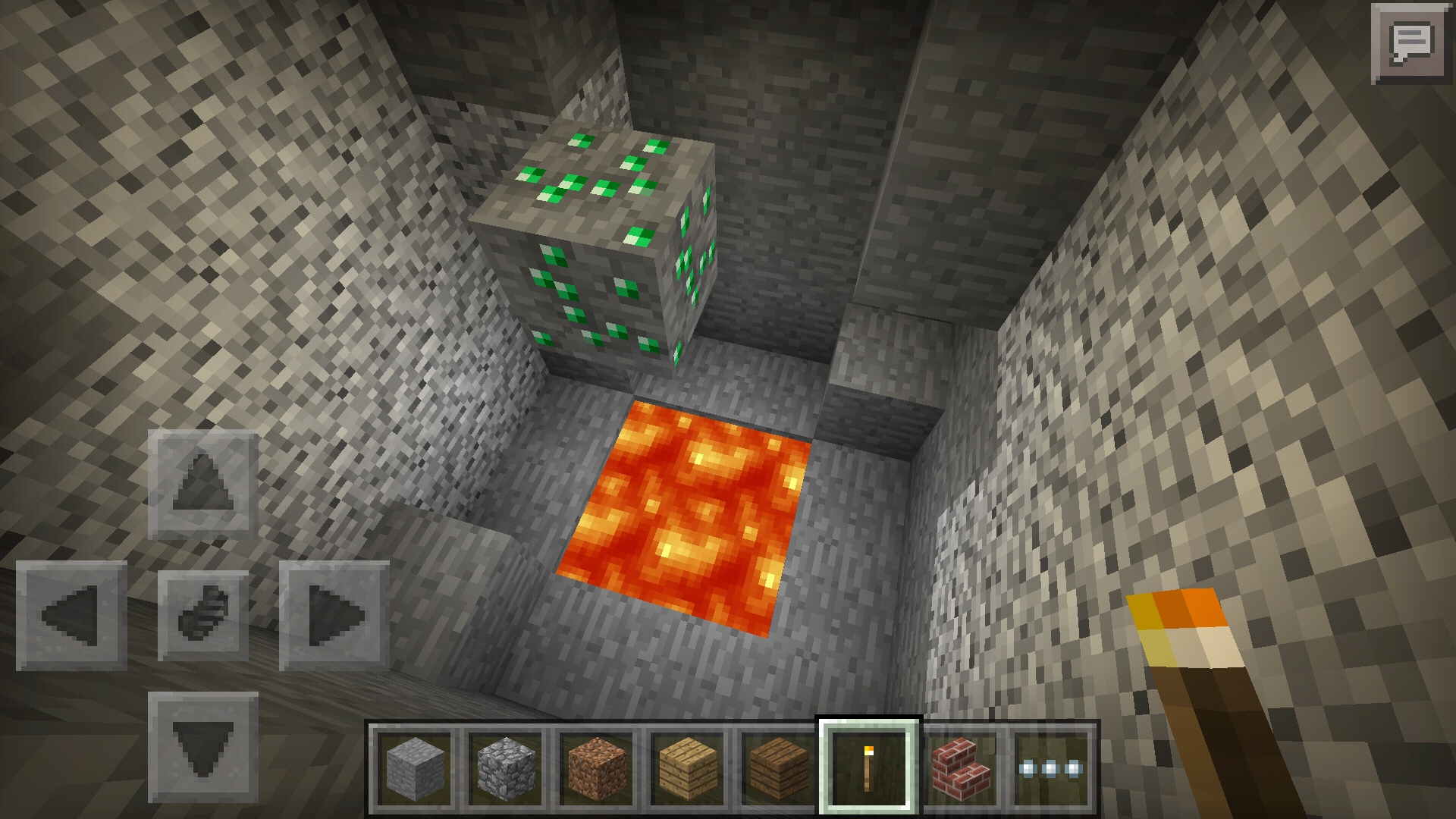
If you go in a extreme hills biome and you find a cave, you'll notice that there are emeralds floating in the air, I think that those emeralds have been generated after caves generation happened
Edit: In pictures there are emeralds on the way of a cave
To reproduce, place a chest beside a block, walk on top of the chest, then try to get on top of the block, you'll fell inside the blocks
To reproduce, place a chest beside a block, walk on top of the chest, then try to get on top of the block, you'll fell inside the blocks
, or place some stair and try to walk on them
Happens on build 2 too
You can fall through blocks while coming from top of a not-full block (like slabs or chests)
Eats some rottern flesha and you'll get Poison instead of Hunger
Eats some rottern flesha
and you'll get Poison instead of HungerEats some rottern fleshaand you'll get Poison instead of Hunger. Same in build 2
When a client on LAN eats, it doesn't consume the food eaten
Keeps happening in build 2
While a client on LAN world dies, it doesn't lose it's invenoey (like /gamerule keepInventory true)
Happens on build 2 too!
This only applies on Multiplayer servers.
When this command: http://pastebin.com/raw/B2dx9AQF is put into a command block while on a server, the client who put it gets kicked with this message:
Internal Exception: io.netty.handler.codec.DecoderException: java.lang.IndexOutOfBoundsException; readerIndex(1) + length(1) exceeds writerIndex(1): UnpooledHeapByteBuf(ridx: 1, widx: 1, cap: 1)
That happens with some other command too. I didn't check the lenght of the command, maybe that's the problem.This only applies on Multiplayer servers.
When this command: http://pastebin.com/raw/B2dx9AQF is put into a command block while on a server, the client who put it gets kicked with this message:
Internal Exception: io.netty.handler.codec.DecoderException: java.lang.IndexOutOfBoundsException; readerIndex(1) + length(1) exceeds writerIndex(1): UnpooledHeapByteBuf(ridx: 1, widx: 1, cap: 1)I can rejoin the server as after I get kicked
That happens with some other command too. I didn't check the lenght of the command, maybe that's the problem.
This only applies on Multiplayer servers.
When this command: http://pastebin.com/raw/B2dx9AQF is put into a command block while on a server, the client who put it gets kicked with this message:
Internal Exception: io.netty.handler.codec.DecoderException: java.lang.IndexOutOfBoundsException; readerIndex(1) + length(1) exceeds writerIndex(1): UnpooledHeapByteBuf(ridx: 1, widx: 1, cap: 1)I can rejoin the server as after I get kicked
That happens with some other command too.
I didn't check the lenght of the command, maybe that's the problem.This only applies on Multiplayer servers.
When this command: http://pastebin.com/raw/B2dx9AQF is put into a command block while on a server, the client who put it gets kicked with this message:
Internal Exception: io.netty.handler.codec.DecoderException: java.lang.IndexOutOfBoundsException; readerIndex(1) + length(1) exceeds writerIndex(1): UnpooledHeapByteBuf(ridx: 1, widx: 1, cap: 1)I can rejoin the server as after I get kicked
That happens with some other command too.
Server Log: http://pastebin.com/xbnUzZzd
Client Log: http://pastebin.com/hTz0tHrg
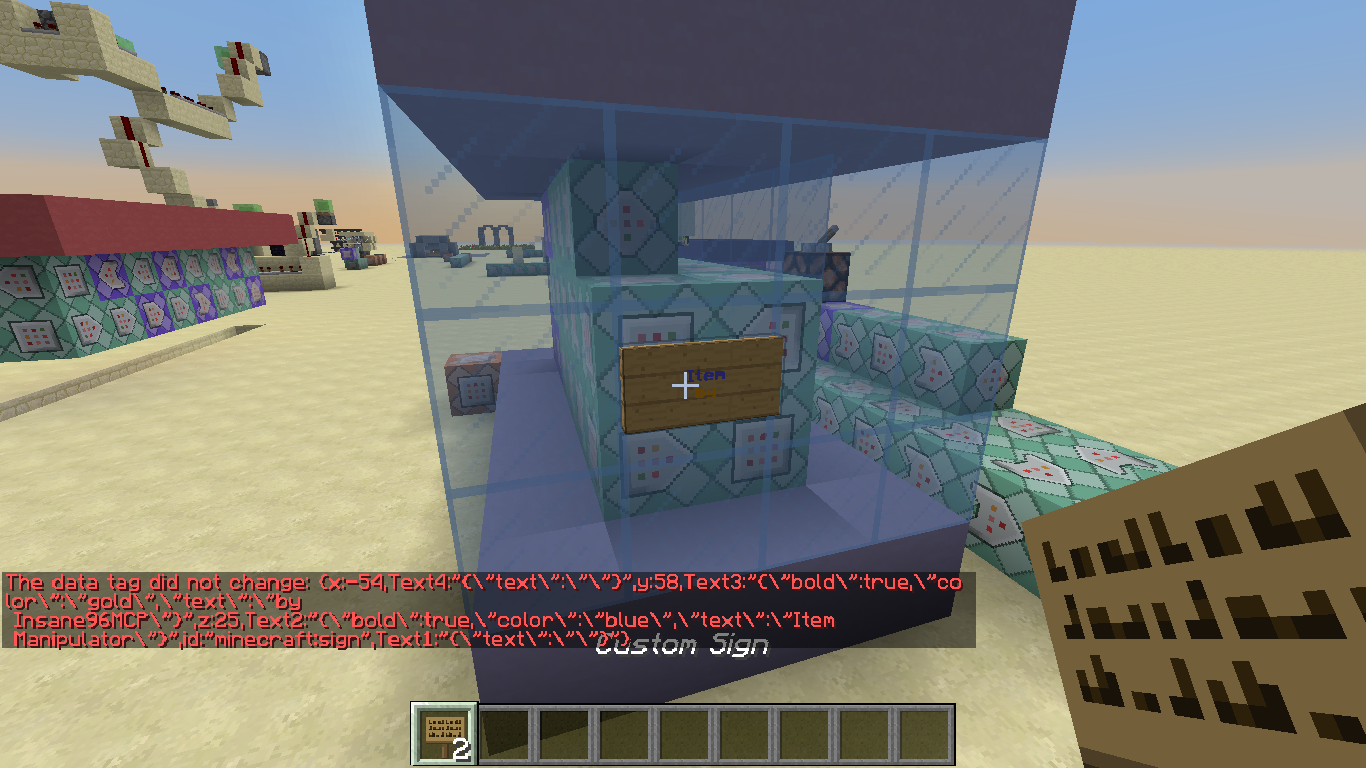
If I give myself a sign with BlockEntityTag, and there's space in text, the text after the space doesn't get render
/give @p sign 2 0 {BlockEntityTag:{Text2:"
{\"text\":\"Item Manipulator\",\"color\":\"blue\",\"bold\":true}",Text3:"
{\"text\":\"by Insane96MCP\",\"color\":\"gold\",\"bold\":true}"},display:{Name:"Custom Sign"}}
I've tried relogging into the world too, but nothing changed.
Maybe is related to:
If I give myself a sign with BlockEntityTag, and there's space in text, the text after the space doesn't get render
/give @p sign 2 0 {BlockEntityTag:{Text2:"
{\"text\":\"Item Manipulator\",\"color\":\"blue\",\"bold\":true}",Text3:"
{\"text\":\"by Insane96MCP\",\"color\":\"gold\",\"bold\":true}"},display:{Name:"Custom Sign"}}
I've tried relogging into the world too, but nothing changed.
Maybe is related to:
MC-105982
If I give myself a sign with BlockEntityTag, and there's space in text, the text after the space doesn't get render
{{ /give @p sign 2 0 {BlockEntityTag:{Text2:"
{\"text\":\"Item Manipulator\",\"color\":\"blue\",\"bold\":true}",Text3:"
{\"text\":\"by Insane96MCP\",\"color\":\"gold\",\"bold\":true}"},display:{Name:"Custom Sign"}} }}
I've tried relogging into the world too, but nothing changed.
Maybe is related to:
MC-105982
If I give myself a sign with BlockEntityTag, and there's space in text, the text after the space doesn't get render
{{ /give @p sign 2 0 {BlockEntityTag:{Text2:"
{\"text\":\"Item Manipulator\",\"color\":\"blue\",\"bold\":true}",Text3:"
{\"text\":\"by Insane96MCP\",\"color\":\"gold\",\"bold\":true}"},display:{Name:"Custom Sign"}} }}
I've tried relogging into the world too, but nothing changed.
Maybe is related to:
MC-105982If I give myself a sign with BlockEntityTag, and there's space in text, the text after the space doesn't get render
{{ /give @p sign 2 0 {BlockEntityTag:{Text2:"{\"text\":\"Item Manipulator\",\"color\":\"blue\",\"bold\":true}",Text3:"{\"text\":\"by Insane96MCP\",\"color\":\"gold\",\"bold\":true}"},display:{Name:"Custom Sign"}} }}
I've tried relogging into the world too, but nothing changed.
Maybe is related to:
MC-105982
If I give myself a sign with BlockEntityTag, and there's space in text, the text after the space doesn't get render
{{/give @p sign 2 0 {BlockEntityTag:{Text2:"{\"text\":\"Item Manipulator\",\"color\":\"blue\",\"bold\":true}",Text3:"{\"text\":\"by Insane96MCP\",\"color\":\"gold\",\"bold\":true}"},display:{Name:"Custom Sign"}}}}I've tried relogging into the world too, but nothing changed.
Maybe is related to:
MC-105982
If I give myself a sign with BlockEntityTag, and there's space in text, the text after the space doesn't get render
/give @p sign 2 0 {BlockEntityTag:{Text2:"{\"text\":\"Item Manipulator\",\"color\":\"blue\",\"bold\":true}",Text3:"{\"text\":\"by Insane96MCP\",\"color\":\"gold\",\"bold\":true}"},display:{Name:"Custom Sign"}}
I've tried relogging into the world
too, but nothing changed.Maybe is related to:
MC-105982
I get this crash report
{{---- Minecraft Crash Report ----
// Oops.Time: 7/5/17 8:37 AM
Description: Registering texturejava.lang.NullPointerException: Registering texture
at cdr.a(SourceFile:215)
at cdk.a(SourceFile:46)
at cdp.a(SourceFile:60)
at cdp.a(SourceFile:42)
at blv.f(SourceFile:96)
at blz.c(SourceFile:138)
at blz.a(SourceFile:118)
at buo.a(SourceFile:1079)
at bhz.az(SourceFile:1023)
at bhz.a(SourceFile:419)
at net.minecraft.client.main.Main.main(SourceFile:123)
at sun.reflect.NativeMethodAccessorImpl.invoke0(Native Method)
at sun.reflect.NativeMethodAccessorImpl.invoke(Unknown Source)
at sun.reflect.DelegatingMethodAccessorImpl.invoke(Unknown Source)
at java.lang.reflect.Method.invoke(Unknown Source)
at org.multimc.onesix.OneSixLauncher.launchWithMainClass(OneSixLauncher.java:236)
at org.multimc.onesix.OneSixLauncher.launch(OneSixLauncher.java:297)
at org.multimc.EntryPoint.listen(EntryPoint.java:162)
at org.multimc.EntryPoint.main(EntryPoint.java:53)A detailed walkthrough of the error, its code path and all known details is as follows:
---------------------------------------------------------------------------------------– Head –
Thread: Client thread
Stacktrace:
at cdr.a(SourceFile:215)
at cdk.a(SourceFile:46)– Resource location being registered –
Details:
Resource location: minecraft:
Texture object class: cdk
Stacktrace:
at cdp.a(SourceFile:60)
at cdp.a(SourceFile:42)
at blv.f(SourceFile:96)
at blz.c(SourceFile:138)
at blz.a(SourceFile:118)– Screen render details –
Details:
Screen name: blz
Mouse location: Scaled: (129, 42). Absolute: (389, 591)
Screen size: Scaled: (427, 240). Absolute: (1280, 720). Scale factor of 3– Affected level –
Details:
Level name: MpServer
All players: 1 total; [bub['<PROFILE NAME>'/2135, l='MpServer', x=123.30, y=73.00, z=246.30]]
Chunk stats: MultiplayerChunkCache: 870, 870
Level seed: 0
Level generator: ID 00 - default, ver 1. Features enabled: false
Level generator options:
Level spawn location: World: (125,64,243), Chunk: (at 13,4,3 in 7,15; contains blocks 112,0,240 to 127,255,255), Region: (0,0; contains chunks 0,0 to 31,31, blocks 0,0,0 to 511,255,511)
Level time: 464 game time, 464 day time
Level dimension: 0
Level storage version: 0x00000 - Unknown?
Level weather: Rain time: 0 (now: false), thunder time: 0 (now: false)
Level game mode: Game mode: creative (ID 1). Hardcore: false. Cheats: false
Forced entities: 107 total; [adp['Witch'/4117, l='MpServer', x=142.50, y=57.00, z=191.50], adp['Witch'/4118, l='MpServer', x=144.50, y=58.00, z=186.71], aae['Sheep'/60, l='MpServer', x=60.47, y=68.00, z=169.47], acj['item.tile.torch'/65, l='MpServer', x=65.68, y=23.00, z=197.63], aae['Sheep'/66, l='MpServer', x=68.50, y=70.00, z=210.50], aae['Sheep'/67, l='MpServer', x=68.50, y=70.00, z=212.50], aae['Sheep'/68, l='MpServer', x=68.50, y=70.00, z=211.50], acj['item.tile.torch'/74, l='MpServer', x=76.57, y=28.00, z=214.47], afd['Minecart with Chest'/75, l='MpServer', x=73.50, y=19.06, z=226.50], acj['item.tile.torch'/76, l='MpServer', x=74.01, y=22.00, z=226.53], afd['Minecart with Chest'/77, l='MpServer', x=83.50, y=24.06, z=259.50], zu['Chicken'/78, l='MpServer', x=76.80, y=76.00, z=315.37], zu['Chicken'/79, l='MpServer', x=83.50, y=77.00, z=310.50], zu['Chicken'/80, l='MpServer', x=84.50, y=77.00, z=309.50], zu['Chicken'/81, l='MpServer', x=83.50, y=79.00, z=305.50], adw['Villager'/96, l='MpServer', x=98.51, y=72.00, z=171.44], adw['Villager'/97, l='MpServer', x=100.50, y=72.00, z=168.50], aae['Sheep'/98, l='MpServer', x=101.50, y=77.00, z=188.50], aae['Sheep'/99, l='MpServer', x=99.50, y=76.00, z=188.50], aae['Sheep'/100, l='MpServer', x=96.50, y=75.00, z=187.50], aae['Sheep'/101, l='MpServer', x=98.50, y=76.00, z=187.50], acj['item.tile.torch'/102, l='MpServer', x=99.82, y=23.00, z=200.56], acj['item.tile.torch'/103, l='MpServer', x=90.80, y=27.00, z=201.32], bub['<PROFILE NAME>'/2135, l='MpServer', x=123.30, y=73.00, z=246.30], acj['item.tile.torch'/104, l='MpServer', x=92.92, y=27.00, z=201.12], zu['Chicken'/105, l='MpServer', x=91.50, y=81.00, z=279.50], zu['Chicken'/106, l='MpServer', x=92.50, y=81.00, z=278.50], zu['Chicken'/107, l='MpServer', x=88.50, y=81.00, z=274.50], zu['Chicken'/108, l='MpServer', x=89.49, y=82.00, z=272.87], afd['Minecart with Chest'/120, l='MpServer', x=116.50, y=28.06, z=180.50], acj['item.tile.rail'/121, l='MpServer', x=115.77, y=26.00, z=195.18], acj['item.tile.rail'/123, l='MpServer', x=120.25, y=26.00, z=195.13], acj['item.tile.rail'/127, l='MpServer', x=110.35, y=26.00, z=196.48], acj['item.tile.rail'/128, l='MpServer', x=109.74, y=26.00, z=196.13], zu['Chicken'/129, l='MpServer', x=107.50, y=80.00, z=209.50], zu['Chicken'/130, l='MpServer', x=100.86, y=79.00, z=202.58], zu['Chicken'/131, l='MpServer', x=106.50, y=80.00, z=207.50], zu['Chicken'/132, l='MpServer', x=102.50, y=80.00, z=219.08], acj['item.tile.torch'/134, l='MpServer', x=109.86, y=30.00, z=250.38], acj['item.tile.rail'/135, l='MpServer', x=105.32, y=26.00, z=257.13], acj['item.tile.rail'/136, l='MpServer', x=111.25, y=26.00, z=258.54], aak['Wolf'/145, l='MpServer', x=127.20, y=75.00, z=170.13], aak['Wolf'/146, l='MpServer', x=124.50, y=78.00, z=166.50], aak['Wolf'/147, l='MpServer', x=120.50, y=73.00, z=166.50], adw['Villager'/149, l='MpServer', x=123.50, y=74.00, z=168.50], acj['item.item.string'/150, l='MpServer', x=120.13, y=23.00, z=216.20], acj['item.tile.rail'/151, l='MpServer', x=120.13, y=23.00, z=216.31], acj['item.tile.rail'/153, l='MpServer', x=125.88, y=26.00, z=198.15], acj['item.tile.rail'/154, l='MpServer', x=125.57, y=26.00, z=196.66], acj['item.tile.rail'/155, l='MpServer', x=124.08, y=26.00, z=195.22], acj['item.item.string'/156, l='MpServer', x=120.13, y=23.00, z=201.80], afd['Minecart with Chest'/157, l='MpServer', x=125.50, y=26.06, z=220.50], acj['item.tile.torch'/158, l='MpServer', x=128.62, y=26.00, z=226.13], zu['Chicken'/159, l='MpServer', x=123.50, y=71.00, z=295.50], zu['Chicken'/160, l='MpServer', x=115.53, y=71.00, z=282.89], zu['Chicken'/161, l='MpServer', x=120.48, y=70.00, z=294.22], zu['Chicken'/162, l='MpServer', x=125.50, y=71.00, z=292.50], acj['item.tile.torch'/171, l='MpServer', x=142.04, y=26.00, z=213.64], zu['Chicken'/192, l='MpServer', x=179.55, y=79.00, z=253.19], zu['Chicken'/193, l='MpServer', x=177.50, y=81.00, z=247.50], zu['Chicken'/194, l='MpServer', x=182.16, y=79.00, z=254.42], zu['Chicken'/195, l='MpServer', x=176.50, y=82.00, z=244.50], aae['Sheep'/196, l='MpServer', x=176.50, y=81.00, z=246.50], aae['Sheep'/197, l='MpServer', x=177.50, y=81.00, z=247.50], aae['Sheep'/198, l='MpServer', x=178.50, y=81.00, z=247.50], aae['Sheep'/199, l='MpServer', x=179.85, y=82.00, z=245.18], zu['Chicken'/200, l='MpServer', x=179.86, y=80.00, z=250.58], zu['Chicken'/201, l='MpServer', x=182.50, y=82.00, z=244.50], zu['Chicken'/202, l='MpServer', x=183.50, y=81.00, z=246.50], zu['Chicken'/203, l='MpServer', x=182.50, y=81.00, z=247.50], aae['Sheep'/215, l='MpServer', x=200.50, y=82.00, z=260.50], aae['Sheep'/216, l='MpServer', x=200.50, y=75.00, z=277.50], aae['Sheep'/217, l='MpServer', x=201.50, y=78.00, z=273.50], aae['Sheep'/218, l='MpServer', x=202.50, y=78.00, z=272.50], adr['Zombie'/4368, l='MpServer', x=122.50, y=22.00, z=234.50], adr['Zombie'/4369, l='MpServer', x=122.50, y=22.00, z=235.50], acq['Creeper'/4370, l='MpServer', x=121.50, y=22.00, z=235.50], acs['Enderman'/4371, l='MpServer', x=59.50, y=56.00, z=281.50], adr['Zombie'/4384, l='MpServer', x=113.78, y=61.00, z=187.50], adr['Zombie'/4429, l='MpServer', x=93.50, y=51.00, z=207.50], adi['Skeleton'/2722, l='MpServer', x=51.50, y=63.00, z=310.50], adi['Skeleton'/2736, l='MpServer', x=52.50, y=63.00, z=309.50], acq['Creeper'/2738, l='MpServer', x=46.52, y=16.00, z=170.83], adr['Zombie'/2742, l='MpServer', x=75.26, y=41.00, z=215.37], zr['Bat'/3213, l='MpServer', x=105.30, y=24.94, z=215.58], zr['Bat'/3214, l='MpServer', x=96.64, y=24.08, z=207.75], acj['item.tile.gravel'/3266, l='MpServer', x=101.13, y=29.00, z=200.10], acj['item.tile.gravel'/3630, l='MpServer', x=101.88, y=29.00, z=197.88], zr['Bat'/3820, l='MpServer', x=153.52, y=26.09, z=211.75], zr['Bat'/3835, l='MpServer', x=110.75, y=26.10, z=169.25], adi['Skeleton'/3875, l='MpServer', x=170.50, y=26.00, z=217.50], adi['Skeleton'/3876, l='MpServer', x=168.50, y=26.00, z=218.50], adi['Skeleton'/3877, l='MpServer', x=171.50, y=26.00, z=217.50], adr['Zombie'/3878, l='MpServer', x=171.50, y=26.00, z=219.50], acq['Creeper'/3882, l='MpServer', x=130.50, y=28.00, z=182.50], adi['Skeleton'/3883, l='MpServer', x=134.50, y=28.00, z=180.50], adr['Zombie'/4004, l='MpServer', x=147.50, y=36.00, z=166.50], zr['Bat'/4042, l='MpServer', x=94.52, y=24.01, z=249.93], zr['Bat'/4043, l='MpServer', x=87.13, y=26.10, z=259.45], acq['Creeper'/4053, l='MpServer', x=70.50, y=62.00, z=316.50], acq['Creeper'/4054, l='MpServer', x=65.50, y=62.00, z=318.50], adi['Skeleton'/4058, l='MpServer', x=136.67, y=26.00, z=212.50], zr['Bat'/4069, l='MpServer', x=200.78, y=30.34, z=188.02], adr['Zombie'/4082, l='MpServer', x=81.50, y=65.00, z=237.50], adi['Skeleton'/4092, l='MpServer', x=82.50, y=27.00, z=209.50], acq['Creeper'/4093, l='MpServer', x=80.50, y=27.00, z=212.50], acq['Creeper'/4094, l='MpServer', x=81.50, y=27.00, z=213.50]]
Retry entities: 0 total; []
Server brand: vanilla
Server type: Integrated singleplayer server
Stacktrace:
at brz.a(SourceFile:365)
at bhz.b(SourceFile:2587)
at bhz.a(SourceFile:428)
at net.minecraft.client.main.Main.main(SourceFile:123)
at sun.reflect.NativeMethodAccessorImpl.invoke0(Native Method)
at sun.reflect.NativeMethodAccessorImpl.invoke(Unknown Source)
at sun.reflect.DelegatingMethodAccessorImpl.invoke(Unknown Source)
at java.lang.reflect.Method.invoke(Unknown Source)
at org.multimc.onesix.OneSixLauncher.launchWithMainClass(OneSixLauncher.java:236)
at org.multimc.onesix.OneSixLauncher.launch(OneSixLauncher.java:297)
at org.multimc.EntryPoint.listen(EntryPoint.java:162)
at org.multimc.EntryPoint.main(EntryPoint.java:53)– System Details –
Details:
Minecraft Version: 1.12
Operating System: Windows 10 (amd64) version 10.0
Java Version: 1.8.0_131, Oracle Corporation
Java VM Version: Java HotSpot(TM) 64-Bit Server VM (mixed mode), Oracle Corporation
Memory: 1258982648 bytes (1200 MB) / 1655701504 bytes (1579 MB) up to 2863661056 bytes (2731 MB)
JVM Flags: 3 total; -XX:HeapDumpPath=MojangTricksIntelDriversForPerformance_javaw.exe_minecraft.exe.heapdump -Xms1024m -Xmx3072m
IntCache: cache: 0, tcache: 0, allocated: 13, tallocated: 95
Launched Version: MultiMC5
LWJGL: 2.9.1
OpenGL: GeForce GTX 850M/PCIe/SSE2 GL version 4.5.0 NVIDIA 382.53, NVIDIA Corporation
GL Caps: Using GL 1.3 multitexturing.
Using GL 1.3 texture combiners.
Using framebuffer objects because OpenGL 3.0 is supported and separate blending is supported.
Shaders are available because OpenGL 2.1 is supported.
VBOs are available because OpenGL 1.5 is supported.Using VBOs: Yes
Is Modded: Probably not. Jar signature remains and client brand is untouched.
Type: Client (map_client.txt)
Resource Packs: Clouds-Pack (Modified).zip (incompatible)
Current Language: English (US)
Profiler Position: N/A (disabled)
CPU: 8x Intel(R) Core(TM) i7-4710HQ CPU @ 2.50GHz
#@Unable to render embedded object: File (@# Game crashed) not found.Crash report saved to: #@!@# D:\Giochi\Minecraft\MultiMC\instances\LootTables\minecraft\crash-reports\crash-2017-07-05_08.37.20-client.txt}}When I try to open the Advancement screen with the following advancements:
advancements/Test/root.json: https://pastebin.com/TtKsdxef
advancements/Test/basic.json: https://pastebin.com/eVKg5KQR
advancements/Test/advanced.json: https://pastebin.com/bMQSVw0nWhen Root and Basic are Granted to the player
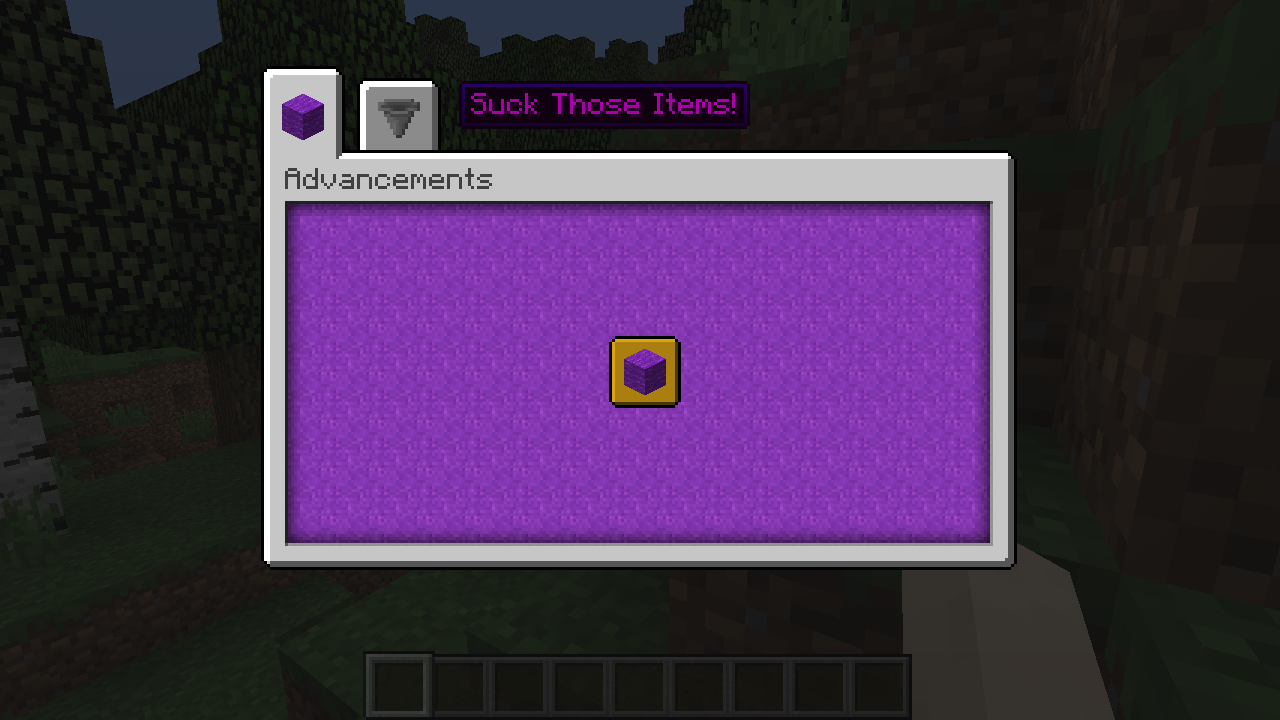
In the screenshot you can see that as soon as I open the "Suck those Items" tab, the game crashes.
And the "parent" tag into Basic and Advanced is not working for some reasonsI get this crash report
{{java.lang.NullPointerException: Registering texture
at cdr.a(SourceFile:215)
at cdk.a(SourceFile:46)
at cdp.a(SourceFile:60)
at cdp.a(SourceFile:42)
at blv.f(SourceFile:96)
at blz.c(SourceFile:138)
at blz.a(SourceFile:118)
at buo.a(SourceFile:1079)
at bhz.az(SourceFile:1023)
at bhz.a(SourceFile:419)
at net.minecraft.client.main.Main.main(SourceFile:123)
at sun.reflect.NativeMethodAccessorImpl.invoke0(Native Method)
at sun.reflect.NativeMethodAccessorImpl.invoke(Unknown Source)
at sun.reflect.DelegatingMethodAccessorImpl.invoke(Unknown Source)
at java.lang.reflect.Method.invoke(Unknown Source)
at org.multimc.onesix.OneSixLauncher.launchWithMainClass(OneSixLauncher.java:236)
at org.multimc.onesix.OneSixLauncher.launch(OneSixLauncher.java:297)
at org.multimc.EntryPoint.listen(EntryPoint.java:162)
at org.multimc.EntryPoint.main(EntryPoint.java:53)}}Full crash report: https://pastebin.com/sTyFCxF4
When I try to open the Advancement screen with the following advancements:
advancements/Test/root.json: https://pastebin.com/TtKsdxef
advancements/Test/basic.json: https://pastebin.com/eVKg5KQR
advancements/Test/advanced.json: https://pastebin.com/bMQSVw0nWhen Root and Basic are Granted to the player
In the screenshot you can see that as soon as I open the "Suck those Items" tab, the game crashes.
And the "parent" tag into Basic and Advanced is not working for some reasons
I get this crash report
{{java.lang.NullPointerException: Registering texture
at cdr.a(SourceFile:215)
at cdk.a(SourceFile:46)
at cdp.a(SourceFile:60)
at cdp.a(SourceFile:42)
at blv.f(SourceFile:96)
at blz.c(SourceFile:138)
at blz.a(SourceFile:118)
at buo.a(SourceFile:1079)
at bhz.az(SourceFile:1023)
at bhz.a(SourceFile:419)
at net.minecraft.client.main.Main.main(SourceFile:123)
at sun.reflect.NativeMethodAccessorImpl.invoke0(Native Method)
at sun.reflect.NativeMethodAccessorImpl.invoke(Unknown Source)
at sun.reflect.DelegatingMethodAccessorImpl.invoke(Unknown Source)
at java.lang.reflect.Method.invoke(Unknown Source)
at org.multimc.onesix.OneSixLauncher.launchWithMainClass(OneSixLauncher.java:236)
at org.multimc.onesix.OneSixLauncher.launch(OneSixLauncher.java:297)
at org.multimc.EntryPoint.listen(EntryPoint.java:162)
at org.multimc.EntryPoint.main(EntryPoint.java:53)}}Full crash report: https://pastebin.com/sTyFCxF4
When I try to open the Advancement screen with the following advancements:
advancements/Test/root.json: https://pastebin.com/TtKsdxef
advancements/Test/basic.json: https://pastebin.com/eVKg5KQR
advancements/Test/advanced.json: https://pastebin.com/bMQSVw0nWhen Root and Basic are Granted to the player
In the screenshot you can see that as soon as I open the "Suck those Items" tab, the game crashes.
And the "parent" tag into Basic and Advanced is not working for some reasonsI get this crash report
java.lang.NullPointerException: Registering texture at cdr.a(SourceFile:215) at cdk.a(SourceFile:46) at cdp.a(SourceFile:60) at cdp.a(SourceFile:42) at blv.f(SourceFile:96) at blz.c(SourceFile:138) at blz.a(SourceFile:118) at buo.a(SourceFile:1079) at bhz.az(SourceFile:1023) at bhz.a(SourceFile:419) at net.minecraft.client.main.Main.main(SourceFile:123) at sun.reflect.NativeMethodAccessorImpl.invoke0(Native Method) at sun.reflect.NativeMethodAccessorImpl.invoke(Unknown Source) at sun.reflect.DelegatingMethodAccessorImpl.invoke(Unknown Source) at java.lang.reflect.Method.invoke(Unknown Source) at org.multimc.onesix.OneSixLauncher.launchWithMainClass(OneSixLauncher.java:236) at org.multimc.onesix.OneSixLauncher.launch(OneSixLauncher.java:297) at org.multimc.EntryPoint.listen(EntryPoint.java:162) at org.multimc.EntryPoint.main(EntryPoint.java:53)Full crash report: https://pastebin.com/sTyFCxF4
When I try to open the Advancement screen with the following advancements:
advancements/Test/root.json: https://pastebin.com/TtKsdxef
advancements/Test/basic.json: https://pastebin.com/eVKg5KQR
advancements/Test/advanced.json: https://pastebin.com/bMQSVw0nWhen Root and Basic are Granted to the player
In the screenshot you can see that as soon as I open the "Suck those Items" tab, the game crashes.
And the "parent" tag into Basic and Advanced is not working for some reasons
Crash when trying to open Advancement screen with custom advancementsWhen trying to open Advancement screen with custom advancements I get a java.lang.NullPointerException: Registering texture
I get this crash report
java.lang.NullPointerException: Registering textureat cdr.a(SourceFile:215)at cdk.a(SourceFile:46)at cdp.a(SourceFile:60)at cdp.a(SourceFile:42)at blv.f(SourceFile:96)at blz.c(SourceFile:138)at blz.a(SourceFile:118)at buo.a(SourceFile:1079)at bhz.az(SourceFile:1023)at bhz.a(SourceFile:419)at net.minecraft.client.main.Main.main(SourceFile:123)at sun.reflect.NativeMethodAccessorImpl.invoke0(Native Method) at sun.reflect.NativeMethodAccessorImpl.invoke(Unknown Source) at sun.reflect.DelegatingMethodAccessorImpl.invoke(Unknown Source) at java.lang.reflect.Method.invoke(Unknown Source) at org.multimc.onesix.OneSixLauncher.launchWithMainClass(OneSixLauncher.java:236) at org.multimc.onesix.OneSixLauncher.launch(OneSixLauncher.java:297) at org.multimc.EntryPoint.listen(EntryPoint.java:162) at org.multimc.EntryPoint.main(EntryPoint.java:53)Full crash report: https://pastebin.com/
sTyFCxF4When I try to open the Advancement screen with the following advancements:
advancements/Test/root.json: https://pastebin.com/TtKsdxef
advancements/Test/basic.json: https://pastebin.com/eVKg5KQR
advancements/Test/advanced.json: https://pastebin.com/bMQSVw0nWhen Root and Basic are Granted to the player
In the screenshot you can see that as soon as I open the "Suck those Items" tab, the game crashes.
And the "parent" tag into Basic and Advanced is not working for some reasonsI get this crash report
java.lang.NullPointerException: Registering texture at cdr.a(SourceFile:215) at cdk.a(SourceFile:46) at cdp.a(SourceFile:60) at cdp.a(SourceFile:42) at blv.f(SourceFile:96) at blz.c(SourceFile:138) at blz.a(SourceFile:118) at buo.a(SourceFile:1079) at bhz.az(SourceFile:1023) at bhz.a(SourceFile:419) at net.minecraft.client.main.Main.main(SourceFile:123)Full crash report: https://pastebin.com/ntvHfe7E
When I try to open the Advancement screen with the following advancements:
advancements/Test/root.json: https://pastebin.com/TtKsdxef
advancements/Test/basic.json: https://pastebin.com/eVKg5KQR
advancements/Test/advanced.json: https://pastebin.com/bMQSVw0nWhen Root and Basic are Granted to the player
In the screenshot you can see that as soon as I open the "Suck those Items" tab, the game crashes.
And the "parent" tag into Basic and Advanced is not working for some reasons
Done, updated with Vanilla client and launcher.
Same crash
Today I've tried changing bats loot tables just by adding rabbit hide to the drops. But the bats drop absolutely nothing.
Edit: After a little messing around with loot tables I can confirm that those mobs ignore their respective loot table
- Bat
- Endermite
Loot table
{
    "pools": [
        {
            "rolls": 1,
            "entries": [
                {
                    "type": "item",
                    "name": "minecraft:rabbit_hide",
                    "weight": 1,
                    "functions": [
                        {
                            "function": "set_count",
                            "count": {
                                "min": 0,
                                "max": 1
                            }
                        },
                        {
                            "function": "looting_enchant",
                            "count": {
                                "min": 0,
                                "max": 1
                            }
                        }
                    ]
                }
            ],
            "conditions": [
                {
                    "condition": "killed_by_player_or_pets"
                }
            ]
        }
    ]
}
Bats seems to ignore loot tablesSome mobs seems to ignore loot tables
Upon dropping an undamaged item it has no Damage:0 tag, so you can't check via commands if the item is not damaged.
How to Reproduce
- Get a diamond pickaxe from creative mode
- Drop it
- Run this command: "/data get entity @e[type=item,limit=1]"
- Inside the "Item" NBTTag there's no
_tag: {Damage:0}_
Upon dropping an undamaged item it has no Damage:0 tag, so you can't check via commands if the item is not damaged.
How to Reproduce
- Get a diamond pickaxe from creative mode
- Drop it
- Run this command: "/data get entity @e[type=item,limit=1]"
- Inside the "Item" NBTTag there's no tag: {Damage:0}
Upon dropping an undamaged item it has no Damage:0 tag, so you can't check via commands if the item is not damaged.
How to Reproduce
- Get a diamond pickaxe from creative mode
- Drop it
- Run this command: "/data get entity @e[type=item,limit=1]"
- Inside the "Item" NBTTag there's no tag:
{Damage:0}
Upon dropping an undamaged item it has no Damage:0 tag, so you can't check via commands if the item is not damaged.
How to Reproduce
- Get a diamond pickaxe from creative mode
- Drop it
- Run this command:
"/data get entity @e[type=item,limit=1]"- Inside the
"Item"NBTTag there's no tag:{Damage:0}Upon dropping an undamaged item it has no Damage:0 tag, so you can't check via commands if the item is not damaged.
How to Reproduce
- Get a diamond pickaxe from creative mode
- Drop it
- Run this command: /data get entity @e[type=item,limit=1]
- Inside the Item NBTTag there's no tag:{Damage:0}
Upon dropping an undamaged item it has no Damage:0 tag, so you can't check via commands if the item is not damaged.
How to Reproduce
- Get a diamond pickaxe from creative mode
- Drop it
- Run this command: /data get entity @e[type=item,limit=1]
- Inside the Item NBTTag there's no tag:{Damage:0}
Exiting and re-entering the world writes the tag:{Damage:0} to the item (both if on ground on your inventory)
MinecraftMC-119214When trying to open Advancement screen with custom advancements I get a java.lang.NullPointerException: Registering texture
The server hangs on entering and then crashes.
Even tried setting difficulty to peaceful.Stack trace
java.lang.Error at java.util.function.Predicate.lambda$and$0(Predicate.java:69) at java.util.function.Predicate$$Lambda$1680/679504212.test(Unknown Source) at cge.a(SourceFile:502) at bru.a(SourceFile:748) at brl.c(SourceFile:66) at brf.c(SourceFile:22) at brd.d(SourceFile:58) at brd.b(SourceFile:50) at brd.k(SourceFile:42) at bcs.j(SourceFile:118) at aag.a(SourceFile:616) at aag$$Lambda$3606/1596345653.accept(Unknown Source) at bru.a(SourceFile:561) at aag.a(SourceFile:406) at net.minecraft.server.MinecraftServer.b(SourceFile:868) at zg.b(SourceFile:303) at net.minecraft.server.MinecraftServer.a(SourceFile:808) at net.minecraft.server.MinecraftServer.w(SourceFile:667) at net.minecraft.server.MinecraftServer.a(SourceFile:254) at net.minecraft.server.MinecraftServer$$Lambda$3302/1177013603.run(Unknown Source) at java.lang.Thread.run(Thread.java:748)Full crash log: https://gist.github.com/Insane96/d19bccc7c83a06181069b2133ae04e7f
Here's the download of the world:
The server hangs on entering and then crashes.
Even tried setting difficulty to peaceful.Stack trace
java.lang.Error at java.util.function.Predicate.lambda$and$0(Predicate.java:69) at java.util.function.Predicate$$Lambda$1680/679504212.test(Unknown Source) at cge.a(SourceFile:502) at bru.a(SourceFile:748) at brl.c(SourceFile:66) at brf.c(SourceFile:22) at brd.d(SourceFile:58) at brd.b(SourceFile:50) at brd.k(SourceFile:42) at bcs.j(SourceFile:118) at aag.a(SourceFile:616) at aag$$Lambda$3606/1596345653.accept(Unknown Source) at bru.a(SourceFile:561) at aag.a(SourceFile:406) at net.minecraft.server.MinecraftServer.b(SourceFile:868) at zg.b(SourceFile:303) at net.minecraft.server.MinecraftServer.a(SourceFile:808) at net.minecraft.server.MinecraftServer.w(SourceFile:667) at net.minecraft.server.MinecraftServer.a(SourceFile:254) at net.minecraft.server.MinecraftServer$$Lambda$3302/1177013603.run(Unknown Source) at java.lang.Thread.run(Thread.java:748)Full crash log: https://gist.github.com/Insane96/d19bccc7c83a06181069b2133ae04e7f
Here's the download of the world: https://drive.google.com/file/d/1Mbbgw-tIxUKM4gESv_8E5xUsb7RxQBTu/view?usp=sharing
EDIT: The server seems to hang only when at around -1400 -400
It just doesn't set the value even if the command doesn't fail.
To reproduce:
- Summon a creeper near you
_/summon creeper ~ ~ ~ {NoAI:1}_
- Add the modifier to the creeper:
_/data modify entity @e[type=creeper,limit=1,sort=nearest] Attributes[ {Name:"minecraft:generic.max\_health"}].Modifiers append value
{Name:"test.max\_health",Amount:0.0,Operation:1,UUID:[I;-633757882,1012614665,-1758719176,-1591490096]}_
- Check that the modifier is there:
_/data get entity @e[type=creeper,limit=1,sort=nearest] Attributes[ {Name:"minecraft:generic.max\_health"}].Modifiers_... it's there- Add a dummy scoreboard objective /scoreboard objectives add test dummy
- Set a score value for the creeper /scoreboard players set @e[type=creeper,limit=1,sort=nearest] test 16
- And now the offender:
_/execute as @e[type=creeper,limit=1,sort=nearest] store result entity @s Attributes[ {Name:"minecraft:generic.max\_health"}].Modifiers[
{Name:"hg.max_health"}].Amount double 1 run scoreboard players get @s test_ ... The command outputs entity_uuid has 16 [test] but the Amount NBT is not set:
- _/data get entity @e[type=creeper,limit=1,sort=nearest] Attributes[ {Name:"minecraft:generic.max\_health"}
].Modifiers_
It just doesn't set the value even if the command doesn't fail.
To reproduce:
- Summon a creeper near you /summon creeper ~ ~ ~ {NoAI:1}
- Add the modifier to the creeper: /data modify entity @e[type=creeper,limit=1,sort=nearest] Attributes[ {Name:"minecraft:generic.max_health"}].Modifiers append value
{Name:"test.max\_health",Amount:0.0,Operation:1,UUID:[I;-633757882,1012614665,-1758719176,-1591490096]}- Check that the modifier is there: /data get entity @e[type=creeper,limit=1,sort=nearest] Attributes[ {Name:"minecraft:generic.max_health"}].Modifiers ... it's there
- Add a dummy scoreboard objective /scoreboard objectives add test dummy
- Set a score value for the creeper /scoreboard players set @e[type=creeper,limit=1,sort=nearest] test 16
- And now the offender: /execute as @e[type=creeper,limit=1,sort=nearest] store result entity @s Attributes[ {Name:"minecraft:generic.max_health"}].Modifiers[
{Name:"hg.max_health"}].Amount double 1 run scoreboard players get @s test ... The command outputs entity_uuid has 16 [test] but the Amount is not set:- /data get entity @e[type=creeper,limit=1,sort=nearest] Attributes[ {Name:"minecraft:generic.max_health"}].Modifiers
center_hit.png
![[Mod] Asteraoth](../../../data/avatars/users/92886.png)
The bug
When spawned with skulls and soul sand, the wither used to show its bar slowly filling up the health right before it was about to explode and be ready for fight. That is no longer the case in this version. Compare it with 1.8.9 to see the difference. This means also that command blocks are unable to detect the health of the wither.
Code analysis
Code analysis by Insane96MCP can be found in this comment.

When you summon a hostile mob with /summon command and "Attributes" tag, the "follow_range" is ineffective, if you are far from this hostile mob, it won't chase you unless you close to it, just like their "follow_range" is default
The command is
/summon minecraft:skeleton ~ ~ ~ {Attributes:[{Name:generic.follow_range,Base:100}],PersistenceRequired:1}
Remember to change the time to night, or the skeleton will be burned to death
I don't know which version did this issue appeared, but it exactly didn't happen in 1.13
OK, I tested it again today, When the skeleton find you, the "follow_range" will be useful as usual, it will keep chaseing you unless you run out its changed "follow_range"(you set) not its default "follow_range", this bug will only happens before the hostile mobs find you.
Code analysis
Code analysis by Insane96MCP can be found in this comment.
![[MCPE Mod] Auldrick](../../../data/avatars/users/10122.svg)
Insane96MCP: Looting does not increase the chance of getting drops. It only gives you a chance of getting more drops, if anything is dropped. So Looting does not apply to the 8 / 9 endermen who didn't drop anything, and in effect you only tested 1.
First a roll is made to decide whether anything is dropped; Looting does not apply to this roll.
If the first roll comes up "Yes", another roll is made (for each item the mob can drop) to determine how many items it drops. This roll is what Looting affects.

When fighting the ender dragon, melee attacks sometimes don't register at all.
On the middle hitbox where the torso is ubicated, hits don't register from the center of the model towards the tail. Instead, they are only registering near the head, and only on certain weird angles. From what i've seen, the other hitboxes where the head and tail are located seem to be unaffected. Another important thing to say is that wings don't ever register hits (more info in the comments).
Basically, melee attacks done facing to the back or middle of the model don't register, seems to depend on the dragon's or player's position. Arrows however, always register.
Code Analysis
Code analysis by Insane96MCP can be found in this comment.
This issue appears to be caused by two root problems:
- There is a desync between client and server for entity IDs for the small hitboxes the dragon is composed of due to an off-by-one error (see
MC-274526) - The hit detection used by the game does not account for the fact that due to its size, the dragon entity can be located in a chunk the player is not looking at (see MC-261638, also affects other entities with large hitboxes)

When a hitbox goes over several chunk sections, you can no longer interact with it properly after a certain point.
Affected entities
- Ender dragon (see
MC-158205) - Entities with a large generic.scale attribute
- Interaction entities
- Huge slimes
- Giants
To reproduce
- Summon an interaction entity:
/summon minecraft:interaction ~ ~ ~ {Tags:["intr"],height:33} - Place a repeating command block chain with the following commands:
execute as @e[tag=intr] if data entity @s attack.player as @a at @s run playsound minecraft:block.note_block.banjo block @s execute as @e[tag=intr] run data remove entity @s attack - Enable F3+B to see the hitbox of the interaction entity.
- While looking at the interaction entity, attack it near the top.
Expected behaviour
When hitting the interaction entity, it should always play a sound.
Observed behaviour
No sound is played when the interaction entity is hit at the top.
Video
This video showcases the issue with giants and large slimes.
In the video, the vertical chunk section change is marked with purple particles.
https://youtu.be/SxYdbqZcstM
Note
It also seems that there is a difference between projectiles, player hitting and movement collision checks. For example, you can hit a mob, but an arrow can't hit it at the same point.
Code Analysis
A code analysis by Insane96MCP for this issue happening with the ender dragon specifically can be found in this comment in MC-158205, although it is entangled with another unrelated code issue.

Wow... This is STILL not even assigned (considered low priority too...  ), & the fix MIGHT even be relatively simple?
Is it an issue of the mob being unable to perceive properly first, in order to then follow? Or is the follow property just plain not adding itself onto the mobs correctly?
Could Insane96MCP be onto something, maybe?
![[Mod] violine1101](../../../data/avatars/users/92858.png)
I've added a brief summary of the findings by Insane96MCP and from MC-274526 to the description.
The second issue with the raycast not working properly does not only affect the ender dragon but large mobs in general. With the recently added scale attribute, it is easily reproducible with other mobs too. I'll file a separate bug report about this for that reason. This has already been reported here: MC-261638.
This happens in multiplayer: the local server doesn't count some placed blocks from players which aren't player 1.
This bug does't happen everytime you die!
Mobs have wrong health, try to hit mobs with nothing, everytime you hit mobs, you'll get it half heart damage.
Made it!
It download the file: launcher.pack.lzma
Can someone post the fix?
There isn't the spash screen in this version with Mojang loading screen!
Work as intended.
It happens to me too!
I've a Galaxy S-Plus connected with 2 Xperia Tipo, a Galaxy S-Advance and a mediacom tablet.
I think is not a bug, it's part of new AI introduced in 0.8.0/0.8.1
It's normal that they don't open doors, they have degraded AI
They said to make a backup of your worlds
Try to increase Render Distance
Try increasing render distance
Confirmed for me, it's the same
I think is a problem related to a mob spawner
I have the animation
In build 2 you can set your render distance to minimal
Work as intended, Slimes have the 1.8 AI where they can swim
Works as Intended, check out PC Villages
It's a bug, on PC you cannot craft Stone Bricks by Granite, Andesite etc.
Confirmed, they spawn even in the deserts
Affected by changing difficulty in game
You know that spawners need light / darkness to work
Confirmed on Build 3
Mark as resolved in Build 3
Seems not happen to me
Android: 4.4.2
Phone: Samsung Galaxy S-Plus
Confirmed in Snaphot 14w27b
Please, fix that, is so annoying
Confirmed in 14w27b
I've allocated 2GB of ram and render distance over 10 chunks will cause this glitch
This bug isn't in MC 1.8
Confirmed in 0.10.5
Fixed in 0.10
I've seen that happens on pre-0.9.0 worlds
Wrong bug tracker, this is MCPE not MCPC
Can confirm, clients not taking damage from more than about 30 blocks of falling
That doesn't happen anymore
That seems to happen only to iOS users
I have an image of the bug, it seems to happen more on empty (like skyblock) / superflat worlds
The image: http://i.imgur.com/WeeFdUM.png
Can confirm on MXPE 0.10.5 Android
Already fixed
I've made a screen when destroying blocks: http://imgur.com/OjZTMR8
And you should change the title of bug to: Game stops rendering blocks
Confirmed, this bugs lasts from earlier versions of MCPE
Can confirm
Confirmed on Galaxy S5 Android 4.4.2
And seems that when are spawned directly in the fire, when they walk out of fire, they aren't set on fire
Confirmed on Galaxy S5 Android 4.4.2
That happens too for Dark Oak trees
Can confirm
Can confirm on Galaxy S5
Confirmed on Galaxy S5
This bug happens to clients only, they only see a normal creeper, instead of a flashing, growing up creeper while on his fuse process, before exploding
Can confirm on galaxy S5 Android 4.4.2
Seems to happen only with tile entities
Can confirm on Galaxy S5 Android 4.4.2
Can confirm on Galaxy S5 Android 4.4.2
Can confirm on Galaxy S5 Android 4.4.2
Any particle is visible underwater
Can confirm on Galaxy S5 Android 4.4.2
Sometimes chests become invisible and lost all their content.
Is the world loading?
How you can place glowstone on your head?
Can confirm on Galaxy S5 Android 4.4.2
Yes, this works as intended
Duplicate
Duplicated
Can confirm on Galaxy S5 Android 4.4.2
This seems lag, the client thinks that the arrow has it him, instead, the server is not as this
Works as intended
Works as Intended
As stated by Tommaso, the bugs that eat your progress have been fixed
As stated by Tommaso on twitter that bug has been fixed
Added pictures
Sorry, mispelled, this bug will be fixed in 0.11
As stated by Johan the 0.11 will NOT come out in February: https://twitter.com/jbernhardsson/status/562534400462950400
So no one knows
Nope, that happens to android too.
To reproduce:
In a survival world let a client enter, then let the client fall from ~ 40 block, it will take no damage
Can confim on 0.10.5!
Here's a video showing it: http://youtu.be/nYEZOQdrWsw
CiambyCiamby (client) took no fall damage from that 40 blocks high pillar
Instead, I (server) took fall damage and died
I know, but if they will be added this bug will occur
Nope, that happens even in singleplayer
I tried to reproduce that bug again, and i noticed that if i get far away from the chest, when i come back it is invisible
Fire arrows are supposed to ignite mobs
Here's a video while on a LAN world as client: http://youtu.be/wtzY33F5YsY
Duplicated of
MCPE-8174Every mob with a top layer texture have weird texture, like the villager
Can confirm on Galaxy S5 0.11.0 Build 2
Seems that has been fixed on 0.11 build 2
Duplicated of
MCPE-47Duplicated of
MCPE-8175Fixed in 0.11 build 1
I think that this is a rendering glitch, I think that if you update a block near it, it will return to normal level
Can confirm on 0.11.0 build 2
Works as intended, even skeletons doesn't drop bows
Fixed in 0.11 build 2
Fixed in 0.11 build 2
Fixed in 0.11 build 2
Fixed as 0.11 build 2
Fixed as 0.11 build 2
Keeps happening on 0.11 build 2
Keeps happening on 0.1q build 2. Please fix this bug, or skyblock like maps can be only played in singleplayer
As 0.11 build 2, clients are taking NO knockback. Please fix, in PvP is so annoying
Same as 0.11 build 2
Confirmed as 0.11 build 2
Can confirm as 0.11 build 2
Keeps happening as 0.11 build 2
Not happening for me on Galaxy S5 build 2
And why raw chicken gives Hunger?
The screenshot was made in beta 2
Yes, affects build 2 too
Yes, build 2 too
Already wrote that is confirmed on Galaxy S5 0.11 Build 2
Yeah, applies to 0.11.0 build 3
Nope, the lava is not updated until it comes in contact with flowing lava, is not intended
Affects 0.11 beta 5
Fixed as 0.11.0 build 8
Fixed as build 11
Keeps happening on build 13 sadly :/
Fixed as build 12
Keeps happening in 15w41b
Not fixed in 15w46a
Still there in 15w46a
A lot better as 15w46a. TY ProfMobius
Affects 0.13.1 too
It only goes away when daytime.
Close it as intended
Can confirm in 16w06a, try getting into lava or into the void
Confirmed on Official 1.9 Release. Idk why but that never happened to me before 1.9 ...
As for Minecraft 1.9 official release, if you install the mod Optifine, this problem doesn't occur
Forgot to mention that I can rejoin the server instantly after.
Added logs
But the string is actually ~32200 chars long
Confirmed in 1.9.4
Confirmed for 1.10.2
Does affects Mending too?
Can confirm for 1.12 Pre-7
I think that works as intended since the crafting recipes are generated dynamically
Can confirm for 1.1.4
Can confirm for 1.1.5 too (this is happening since enchantments were added)
Still a concern in 1.12.1: http://i.imgur.com/xGzCGV0.png
Confirmed for 1.12.2
Please link to this comment in the description
The following is based on a decompiled version of Minecraft 1.12 using MCP snapshot_20180119
In the EntityWither#updateAITasks method, the line that updates the boss health bar
EntityWither.bossInfo.setPercent(EntityWither.getHealth() / EntityWither.getMaxHealth())
is inside the else of the condition EntityWither.getInvulTime > 0.
This means that the wither health bar is updated only when the wither is NOT invulnerable.
Can confirm on Win10 edition 1.5 where I barely see any mob in night time.
If the problem is lag for low end devices, just add a world option / gamerule / whatever.
I really hope this will be taken care soon.
Happened to me with a baby drowned on 1.5 Win10 edition.
After about 60 seconds of dancing around him, he started attacking me.
Still happens in 1.5.1
I know Axes will be buffed but since the last year nothing changed, and it's annoying getting sword enchantments instead of useful things
Can confirm still in 1.5.1. Items are not taken if the hopper is pushing items into something (tested with a normal chest)



InsaneLootTablesBedrock v1.1.0.mcpack
Bats should drop Rabbit Hide and Endermites should drop enderpearls, but nothing drops from both.
Can confirm for 1.13 release.
Can confirm for 1.13.1 ...
Afaik there were messages like
"<player> was doomed to fall by <mob>"
Please this still happens in 1.11 and hasn't been solved ... you can't get a good fast axe due to this bug since you keep getting Sharpness and such ...
Can confirm this. Is impossible that on 10 enderman kills 8 / 9 of them drops nothing with Looting III.
Same happened with Blazes and Creepers.
I know how Looting works but given that it's like almost impossible to get no drops from 8 endermen straight.
[1.11.4 on Realm] Can confirm happens with naturally spawned Iron Golems. Mine went in the near forest about 100 blocks from the village (then died while fighting RIP)
It's been more than 2 years and still nothing changed ... 'cmon
Can confirm in 1.11.3
@Torzod this is Minecraft Bedrock edition (1.11.4) not Java edition (1.14.1)
Why?
Can confirm for 1.14.3
When the dragon attacks most of the times misses the player because is too above or too below the player
Related or duplicated of
MC-156522Still happens in 1.15.1 ... died on skyblock (built in bottom slabs) due to a skeleton going crazy. This seems to happen on any non full block, e.g. when the skeleton is not at perfectly rounded Y coordinate
Still an issue in 1.15.1
Can still confirm as 1.15.1
Can confirm in 1.16.2.
Get some experience, /xp set @p 0 and /xp set @p 0 levels will keep the score to the old value. This is so annoying for datapacks while dealing with experience.
I'm pretty sure there's some kind of desync problem as sometimes when in creative you try to hit her (melee) you can't (with a weapon you see the Sharpness particles but no hit is registered).
EDIT: Found out MC-225055
For the Ender Dragon the code specifically says that only Thorns damage (direct or indirect) is applied when the generic attackEntityFrom is used, while to apply damage from players attackEntityPartFrom should be used.
With mods magic I've managed to summon at the actual position of the ender dragon's parts (head, neck, wings and tail) some angry villager particles. (Tested in singleplayer) As you can see the client sees the dragon there (both hitboxes and actual model) while on the server she's ahead.
The tail parts:
Related to
MC-158205Finally after two hours of debugging I've found out why you can't hit the dragon sometimes. It has to do with where the dragon is (chunk wise) and where you're aiming at.
But first off, why can't you hit wings? Seems like they're swapped between client and server. So if right wing has Entity ID 1 and left wing has Entity ID 2 on the client, for the server it'll be Entity ID 2 for the right wing and Entity ID 1 for the left wing. With this the server thinks that you're hitting the far away wing so since there's a max range for the hit of 6 blocks you can't reach it and so the hit is registered on the client (MC-225055) but not on the server.
For the problems about not hitting her at all is a little bit more complicated.
The problem arises when you aim at any of the dragon's part: if you're aiming at the chunk in the direction where the center position of the dragon is you'll hit her, otherwise the hit will miss, that's because the ender dragon is not found in the chunks you're raycasting in so the hitboxes aren't checked at all.
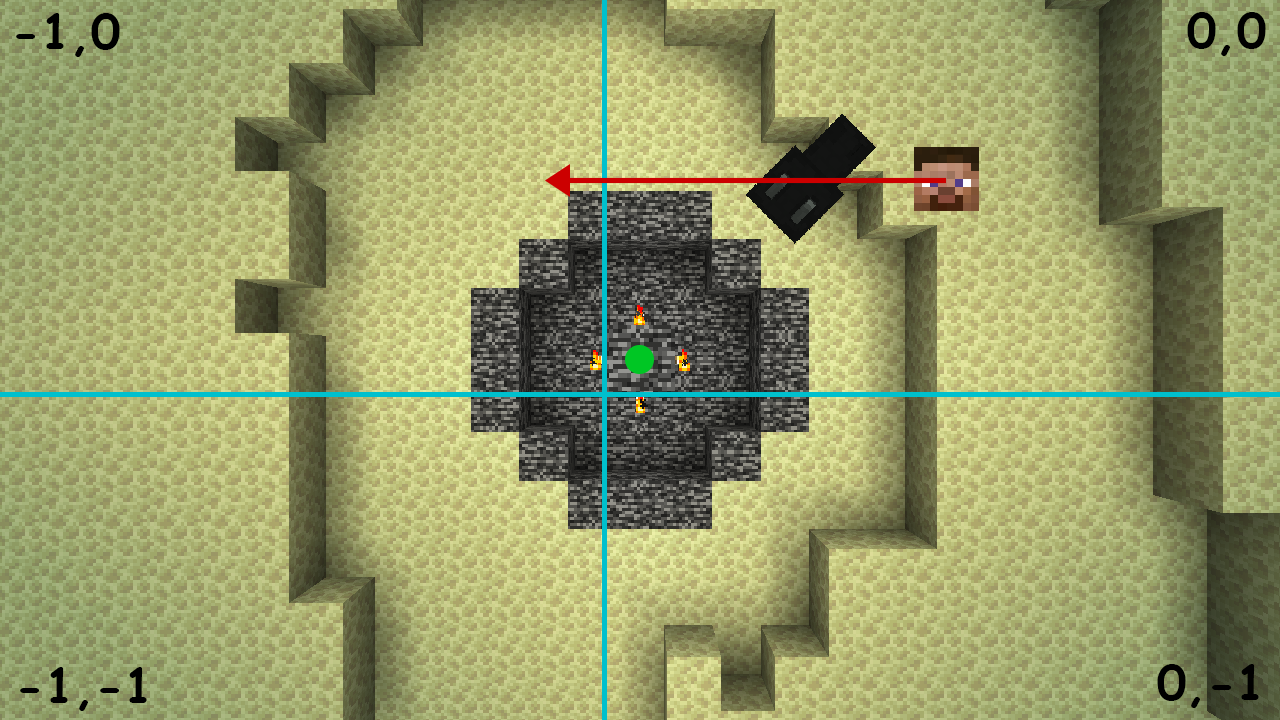
Let's make an example.

Here the player, the ender dragon's head hitbox and the ender dragon position are all in chunk 0,0. When the player tries to hit the Ender Dragon's head he searches for the Ender dragon in Chunk 0,0 and -1,0 (the direction looking). The dragon is found in 0,0 so raycasts are made to find the head and in the end (pun intended), the attack lands, dealing damage to the dragon.
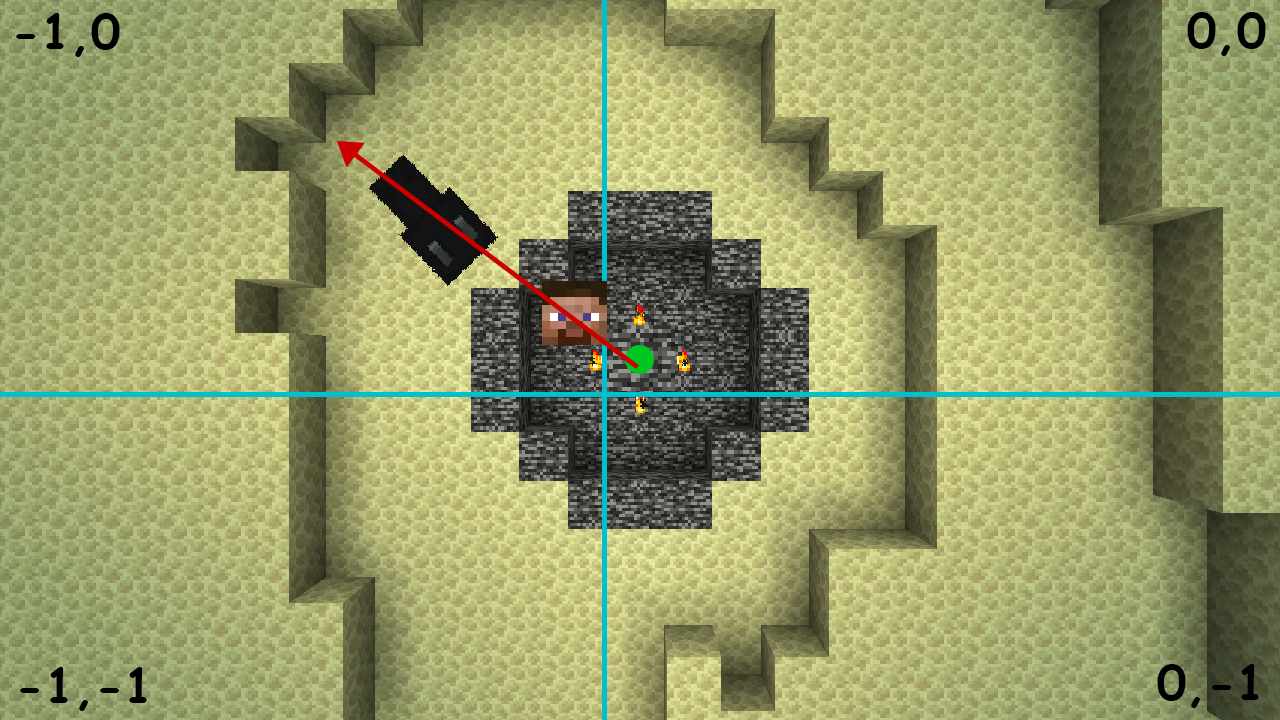
In this case the hit will not land as the Ender Dragon is searched for in chunks -1,0 and -1,-1, but she's in 0,0 thus not found, the finding of the head is not done and the hit fails.

"Why most of the times I can hit her while in the portal?"

Because the raycast actually starts from 2 blocks behind the player so most of the times 0,0 will be searched for the dragon.
While in this case your hitbox doesn't load 0,0 so the dragon is not found and the hits will not land

Note that in the examples the Ender Dragon center position is always in 0,0 but can be in any of the 4 chunks when slightly off.
Related to
MC-158205This happens due to calculating the Regeneration effect (but the same applies for Wither and Poison) based off the remaining duration of the potion.
In MobEffect#isDurationEffectTick (using Mojang mappings) the duration is divided by the amount of ticks when the effect should apply, so changing the duration (e.g. applying it continuously with a repeating command block) will completely break the potion effect, never actually applying.
The fastest solution to fix this would be to replace (in the apply check formula) the duration with the entity's ticksExisted, so the apply of the potion wouldn't be tied to the potion duration, but to the entity time in the world.
This is due to the AI applying the follow range before it's actually changed.
(Using Mojang mappings) The NearestAttackableTargetGoal is applied to mobs in the creation of the entity (when is actually instantiated), where the follow range is taken from TargetGoal#getFollowDistance, and, at that time, is the default one.
So, the only way to actually make it apply is to leave and join back the world, where, when the entity is created, the mob has already the correct attribute (modifier) and the Goal takes the correct follow range.
One way to fix this is to change the target search to query the mob's follow range every time the distance is needed,
but I really don't know how it would affect performance.I tried doing this in one of my mods and seems like it doesn't affect performance.
This is caused by the fact that the Ender Dragon knockbacks entities server side only, so momentum stacks and when it's updated client side they're launched in the air. This is easily fixable by setting `hurtMarked = true` to pushed entities in `EnderDragon#knockBack` which makes the knockback applied server side being sent client side
This is easily fixed
Using Mojmaps 1.20.1
In the aiStep method the code calls the addParticles method but as pointed out by other users the inLove ticks aren't sent client side.
This can be fixed by checking if the code is running server side and then send the particles to clients