 MacchuPicchu
- MacchuPicchu
- macchupicchu
- Europe/Amsterdam
- Yes
- No
 MC-152141
 Normal
 Low
Low





Steps to reproduce:
1) Obtain a list of Vietnamese characters. Either visit https://vietnamesetypography.com/alphabet/ or copy the below:
ÁáÀàẢảÃãẠạĂăẮắẰằẲẳẴẵẶặÂâẤấẦầẨẩẪẫẬậĐđÉéÈèẺẻẼẽẸẹÊêẾếỀềỂểỄễỆệÍíÌìỈỉĨĩỊịÓóÒòỎỏÕõỌọÔôỐốỒồỔổỖỗỘộƠơỚớỜờỞởỠỡỢợÚúÙùỦủŨũỤụƯưỨứỪừỬửỮữỰựÝýỲỳỶỷỸỹỴỵ2) Paste the characters into any text field in Minecraft (chat, book and quill, etc.)
3) Observe that while most characters are supported, a few are not and default to Unicode, specifically: Ẵ ẵ Ẽ ẽ Ễ ễ Ồ Ỡ ỡ Ữ Ỹ ỹ
Steps to reproduce:
1) Obtain a list of Vietnamese characters. Either visit https://vietnamesetypography.com/alphabet/ or copy the below:
ÁáÀàẢảÃãẠạĂăẮắẰằẲẳẴẵẶặÂâẤấẦầẨẩẪẫẬậĐđÉéÈèẺẻẼẽẸẹÊêẾếỀềỂểỄễỆệÍíÌìỈỉĨĩỊịÓóÒòỎỏÕõỌọÔôỐốỒồỔ ổỖỗỘộƠơỚớỜờỞởỠỡỢợÚúÙùỦủŨũỤụƯưỨứỪừỬửỮữỰựÝýỲỳỶỷỸỹỴỵ2) Paste the characters into any text field in Minecraft (chat, book and quill, etc.)
3) Observe that while most characters are supported, a few are not and default to Unicode, specifically: Ẵ ẵ Ẽ ẽ Ễ ễ Ồ Ỡ ỡ Ữ Ỹ ỹ
Steps to reproduce:
1) Obtain a list of Vietnamese characters. Either visit https://vietnamesetypography.com/alphabet/ or copy the below:
ÁáÀàẢảÃãẠạĂăẮắẰằẲẳẴẵẶặÂâẤấẦầẨẩẪẫẬậĐđÉéÈèẺẻẼẽẸẹÊêẾếỀềỂểỄễỆệÍíÌìỈỉĨĩỊịÓóÒòỎỏÕõỌọÔôỐốỒồỔổỖỗỘộƠơỚớỜờỞởỠỡỢợÚúÙùỦủŨũỤụƯưỨứỪừỬửỮữỰựÝýỲỳỶỷỸỹỴỵ2) Paste the characters into any text field in Minecraft (chat, book and quill, etc.)
3) Observe that while most characters are supported, a few are not and default to Unicode, specifically: Ẵ ẵ Ẽ ẽ Ễ ễ Ồ Ỡ ỡ Ữ Ỹ ỹ
 Screen Shot 2019-05-17 at 12.15.12 PM.png
Steps to reproduce:
1) Obtain a complete list of Vietnamese characters. Either visit https://vietnamesetypography.com/alphabet/ or copy the below:
ÁáÀàẢảÃãẠạĂăẮắẰằẲẳẴẵẶặÂâẤấẦầẨẩẪẫẬậĐđÉéÈèẺẻẼẽẸẹÊêẾếỀềỂểỄễỆệÍíÌìỈỉĨĩỊịÓóÒòỎỏÕõỌọÔôỐốỒồỔổỖỗỘộƠơỚớỜờỞởỠỡỢợÚúÙùỦủŨũỤụƯưỨứỪừỬửỮữỰựÝýỲỳỶỷỸỹỴỵ2) Paste the characters into any text field in Minecraft (chat, book and quill, etc.)
3) Observe that while most characters are supported, a few are not and default to Unicode, specifically: Ẵ ẵ Ẽ ẽ Ễ ễ Ồ Ỡ ỡ Ữ Ỹ ỹ
Surely this isn't difficult to fix, what's going on here?
May I have ownership of this ticket? I want this bug fixed more than anything
Mods, please at least give this ticket some Labels, so that it has a chance of being noticed. Some relevant ones might be 'accessibility', 'hotkey', 'hotbar', 'anvil', 'UI', 'item', 'numberkey', 'inventory' etc.
Mansion mushroom roomlacksmushroomsWoodland Mansion mushroom room is missing mushrooms

Right, but, is that stuff only viewable via mods or could I put together a data pack to test it
So this isn't something I can make a simple testing data pack for, is what you guys are saying
@Dhranios where did you get this information? It's not correct. Both words can be employed for either meaning.
https://www.grammarly.com/blog/while-vs-whilst/
https://www.merriam-webster.com/dictionary/whilst
You say yourself that whilst is an accepted (if rarer) spelling of while in American English. I don't think this should be considered a bug report.
Also, for what it's worth, I personally find that the use of whilst lends a humorous element to these death messages that I very much appreciate.
To be frank, this entire bug report is bogus. It IS NOT THE CASE that whilst constitutes a spelling error in American English, despite what is repeated in the title and body of this report.
When used as a conjunction, whilst is a synonym of while in every sense of the word – the only difference in American English being that the former is perceived as more formal. So, at most, the behavior outlined here is a stylistic inconsistency. And not everyone agrees that said "inconsistency" should be "fixed"; I think that the mildly stylistically incongruous use of whilst is hilarious and should be kept.
Right but the two words are being used as different parts of speech, so I don't see that as an inconsistency
There's a handy shortcut available for dropping items quickly, and that is to press and hold the Drop key (Q by default)
, whichthrows items out of one's inventory at very high speed.Unfortunately, if the Drop key is set to certain keybinds, this functionality breaks. From my testing, those keybinds include Shift, CapsLock, Alt/Option, and Control.
I found this bug because my normal key
bind for Drop is Left Alt, a decision that was made necessary because of MC-22882. The only way to drop a full stack on Mac is Cntrl+Cmd+Drop,and so for ergonomic reasons,Left Alt is the most sensible key bind.There's a handy shortcut available for dropping items quickly, and that is to press and hold the Drop key (Q by default); this throws items out of one's inventory at very high speed.
Unfortunately, if the Drop key is set to certain keybinds, this functionality breaks. From my testing, those keybinds include Shift, CapsLock, Alt/Option, and Control.
I found this bug because my normal keybind for Drop is Left Alt, a decision that was made necessary because of MC-22882. The only way to drop a full stack on Mac is Cntrl+Cmd+Drop, so Left Alt is the most ergonomically sensible key bind.
There's a handy shortcut available for dropping items quickly, and that is to press and hold the Drop key (Q by default); this throws items out of one's inventory at very high speed.
Unfortunately, if the Drop key is set to certain keybinds, this functionality breaks. From my testing, those keybinds include Shift, CapsLock, Alt/Option, and Control.
I found this bug because my normal keybind for Drop is Left Alt, a decision that was made necessary because of MC-22882. The only way to drop a full stack on Mac is Cntrl+Cmd+Drop, s
oLeft Altisthe most ergonomically sensible keybind.There's a handy shortcut available for dropping items quickly, and that is to press and hold the Drop key (Q by default); this throws items out of one's inventory at very high speed.
Unfortunately, if the Drop key is set to certain keybinds, this functionality breaks. From my testing, those keybinds include Shift, CapsLock, Alt/Option, and Control.
I found this bug because my normal keybind for Drop is Left Alt, a decision that was made necessary because of MC-22882. The only way to drop a full stack on Mac is Cntrl+Cmd+Drop, which makes Left Alt the most ergonomically sensible keybind.
Present in 1.19.
Present in 1.19.
Present in 1.19.
Present in 1.19.
Present in 1.19.
Present in 1.19.
Present in 1.19.

MacchuPicchu People likely got different methods, mods to see HorseStats are one way, of course those usually don't work in snapshots.
What you could do is to summon horses with fix specific stats, breed them, and look into the foles' outcomes, e.g. manually via data get entity, or you create/use a datapack which would show you horses' stats.
With that approach, you would amass enough values to be somewhat sure that the Status Quo is still the same as described in the bugpost.
That being said, as long as nothing in the code itself regarding Horses would be changed, the way a fole's stats' outcome is calculated by the game should logically usually always remain the same.
Confirmed fix, added pictures of the fix for consistency. Thank you Mojang
Thank you for reporting this, it is SUCH an annoying bug. It happens regardless of what your hotkeys are bound to, not just 1 - 9.
Mojang, PVP players hotkey items in and out of anvils all the time and at high speeds when gearing up. If you want the next "combat update" to successfully appeal to as many people as possible, don't let this bug fall by the wayside. It needs to be fixed!!
I can't seem to reproduce this bug in 1.14.2, has this been fixed?
My (MacBook Air) keyboard is able to type those Vietnamese characters with no difficulty...
Still present in 1.14.3 pre1
You seem to be operating from the assumption that Mojang is expected to support literally every character in Unicode for the Minecraft font. That's not true as best as I can tell, why would you ask them to waste their time doing that?
It would be better if you organized these letters based on the context/language within which they are used, so that the reasons for adding specific characters are more clear.
violine1101 The short answer is that there aren't any Minecraft languages that use these characters.
Still present in 1.15 release
Still present in 20w16a
Can confirm in 22w17a
WeslyMC please correct the title to "any hotkey" not just 1-9
Also, for Christ's sake, PLEASE fix this, Mojang. Some of us rely on hotkeys a lot for accessibility reasons >: (
Confirmed for 22w17a
Also, please correct the title to "any hotkey" or "a hotkey"
Two things, please update the ticket:
1) I can't find Nuu-chah-nulth anywhere in the languages menu in 1.18.2. I think it might have been quietly removed.
2) You missed some combining character issues with the Yorùbá language, which has about 43 million native speakers, mostly in Nigeria. The issue arises when letters like ọ and ẹ are given tonal markers like ` and ´. Attached are two examples I found in-game of ọ́ and ẹ̀ being rendered incorrectly:
Please update the ticket in accordance with my previous comment
Oh. Apologies, I thought I was helping :/
Yes, I was able to find that after your initial comment. Not very easy to locate, I must say. Not to mention disappointing.
I'd thought I'd done my due diligence when I searched for all of these issues and nothing turned up, but ah well
I would like to request ownership of this ticket. Thank you
Present in 1.19-pre1.
Present in 1.19-pre1.
Present in 1.19-pre1.
Again, please correct the title. The bug is present for any hotkey bind, not just 1-9.
Present in 1.19-pre1.
Present in 1.19-pre1.
Present in 1.19-pre1.
Present in 1.19-pre1.
Present in 1.19-pre1.
@MMK21 I think you mean 8,200
Present in 1.19-pre2.
Present in 1.19-pre2.
Present in 1.19-pre2.
Present in 1.19-pre2.
Present in 1.19-pre2.
Present in 1.19-pre2.
Present in 1.19-pre2.
Present in 1.19-pre2.
Present in 1.19-pre2, although the part where it mentions the difference in accent height for Ń and Ň doesn't appear to be the case anymore, at least for me?
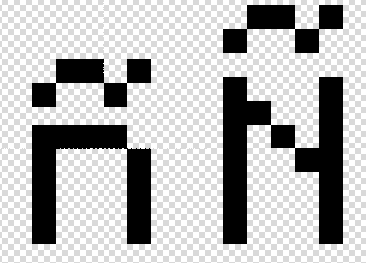
Can no longer reproduce in 1.19-pre2. Compared to the original pictures, it looks like the tilde accent has since been shifted 1 pixel to the right on both ñ and Ñ. To me it makes it a bit more recognizable?
By the way, if it's felt that what I just mentioned doesn't actually address the readability problem : what exactly is the proposed solution here? It's really difficult to make a ~ in such a tiny space, and I think that the current font does about as good a job as possible
Can confirm in 1.19-pre2.
Can confirm in 1.19-pre2.
Is this really a bug? I mean, the observation itself is true, but if you type in the name of an enchantment in the creative search bar, it does offer you books for all levels of that enchantment. To include all levels of all enchantments in the main menu would, I think, introduce way too much clutter.
Present in 1.19-pre2.
Present in 1.19-pre2.
Present in 1.19-pre2.
Present in 1.19-pre2.
I believe you're supposed to use Ctrl + Cmd + Q. This still triggers the quit-application key combination (so, still present in 1.19-pre2, I guess?) but if you do what I did and rebind Q to something else, you're still very much able to drop full stacks of items on macs.
Present in 1.19-pre2.
Present in 1.19-pre2.
Any mods out there that have thoughts on my previous comment?
Any mods out there with thoughts on my previous comment?
Present in 1.19-pre3.
Present in 1.19-pre3.
Present in 1.19-pre3.
Present in 1.19-pre3.
Present in 1.19-pre3.
Present in 1.19-pre3.
Present in 1.19-pre3.
Present in 1.19-pre3.
Present in 1.19-pre3.
Present in 1.19-pre3.
Present in 1.19-pre3.
Present in 1.19-pre3.
Present in 1.19-pre3.
Present in 1.19-pre3.
Present in 1.19-pre3. Any mods out there with thoughts on my previous note?
Present in 1.19-pre3.
Present in 1.19-pre3.
Present in 1.19-pre3.
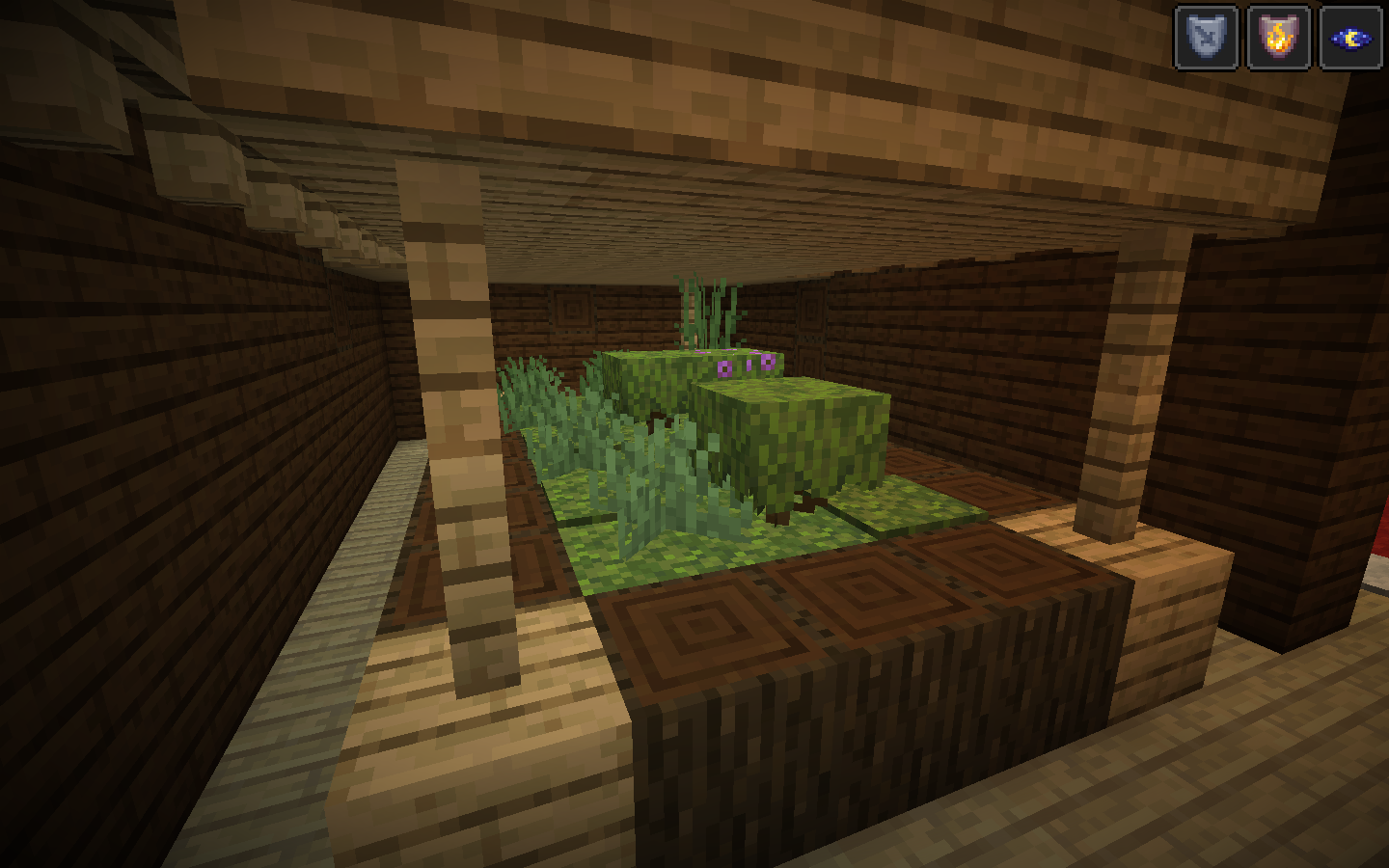
While testing for this bug, I came across a mushroom room whose dirt got overrun by moss from a nearby lush caves biome (picture attached). Is this worth reporting as a separate issue?

Seed: 8000217649056594053 @ 4460 100 2860
But there's no good alternative that fits within the space allocated for diacritics, at least that I can see; how is this bug report not an exercise in futility
Or do you mean the fact that the tilde in Ñ is occluded by text in lines directly above it? In that case this is purely a duplicate of MC-133331
How exactly is Mojang supposed to make a more readable tilde than this within the constraints of the Minecraft font?
Maybe something like this? Seems like the only other option
There's no way this isn't WAI
This bug report incorrectly claims that the usage of burnt constitutes a spelling error; see here.
Furthermore, I believe that burnt is preferable over burned on stylistic grounds; you can see my thoughts in this Reddit post.
Is there any way to reliably test for the presence of this bug in vanilla Minecraft? I'd like to be able to keep tabs on it
Mods?? Please update the ticket description in accordance with my previous comments. There is no longer an inconsistency between Ň and Ń.
GoldenHelmet there's supposed to be a space in between each period too
The correct spelling should instead be whilst; see my arguments in this Reddit post.
Present in 1.19-pre4.
Present in 1.19-pre4.
Present in 1.19-pre4.
Present in 1.19-pre4.
Present in 1.19-pre4.
Present in 1.19-pre4.
Present in 1.19-pre4.
Present in 1.19-pre4.
Present in 1.19-pre4.
Present in 1.19-pre4.
Present in 1.19-pre4.
Present in 1.19-pre4.
Present in 1.19-pre4.
Present in 1.19-pre4.
Present in 1.19-pre4.
Present in 1.19-pre4.
Present in 1.19-pre4.
Present in 1.19-pre4.
Present in 1.19-pre4.
Present in 1.19-pre4.
IMPORTANT COUNTER-ARGUMENT
I believe that this bug report incorrectly argues for the removal of the word whilst. My thoughts on the matter can be found in this Reddit post.
I have also deleted all previous comments in an attempt to reduce clutter.
Present in 1.19-pre5.
Present in 1.19-pre5.
Present in 1.19-pre5.
Present in 1.19-pre5.
Present in 1.19-pre5.
Present in 1.19-pre5.
Present in 1.19-pre5.
Present in 1.19-pre5.
Present in 1.19-pre5.
Present in 1.19-pre5.
Present in 1.19-pre5.
Present in 1.19-pre5.
Present in 1.19-pre5.
Present in 1.19-pre5.
Present in 1.19-pre5.
Present in 1.19-pre5.
Present in 1.19-pre5.
Present in 1.19-pre5.
Present in 1.19-pre5.
Present in 1.19-pre5.
Present in 1.19-rc1.
Present in 1.19-rc1.
Present in 1.19-rc1.
Present in 1.19-rc1.
Present in 1.19-rc1.
Present in 1.19-rc1.
Present in 1.19-rc1.
Present in 1.19-rc1.
Present in 1.19-rc1.
Present in 1.19-rc1.
Present in 1.19-rc1.
Present in 1.19-rc1.
Present in 1.19-rc1.
Present in 1.19-rc1.
Present in 1.19-rc1.
Present in 1.19-rc1.
Present in 1.19-rc1.
Present in 1.19-rc1.
Present in 1.19-rc1.
So THIS is why enchanted dyed leather armor looks so god-awful? Interesting
Present in 1.19-rc1.
Present in 1.19-rc1.
Present in 1.19-rc1.
I think that the description should specify Oxeye Daisies and Azure Bluets as being affected in addition to mentioning White Tulips.
Time to revive what appears to be a forgotten bug . . .
Present in 1.19-rc1.
Present in 1.19-rc1.
Present in 1.19-rc1.
Present in 1.19-rc1.
Present in 1.19-rc2.
Present in 1.19-rc2.
Present in 1.19-rc2.
Present in 1.19-rc2.
Present in 1.19-rc2.
Present in 1.19-rc2.
Present in 1.19-rc2.
Present in 1.19-rc2.
Present in 1.19-rc2.
Present in 1.19-rc2.
Present in 1.19-rc2.
Present in 1.19-rc2.
Present in 1.19-rc2.
Present in 1.19-rc2.
Present in 1.19-rc2.
Present in 1.19-rc2.
Present in 1.19-rc2.
Present in 1.19-rc2.
Present in 1.19-rc2.
Present in 1.19-rc2.
Present in 1.19-rc2.
Present in 1.19-rc2.
Mike, if you don't want to see the offending messages, you can use a texture pack with an edited splash text file that overrides the vanilla one. You can make it yourself fairly easily too
Hasn't Mr. Kniberg left Mojang?
Present in 22w24a.
Present in 22w24a.
Present in 22w24a.
Present in 22w24a.
Present in 22w24a.
Present in 22w24a.
Present in 22w24a.
Present in 22w24a.
Present in 22w24a.
Present in 22w24a.
Present in 22w24a.
Present in 22w24a.
Present in 22w24a.
Present in 22w24a.
Present in 22w24a.
Present in 22w24a.
Present in 22w24a.
Present in 22w24a.
Present in 22w24a.
Present in 22w24a.
Present in 22w24a.
Present in 22w24a.
Present in 22w24a.
Present in 1.19.2.
Present in 1.19.2.
Present in 1.19.2.
Present in 1.19.2.
Present in 1.19.2.
Present in 1.19.2.
Present in 1.19.2.
Present in 1.19.2.
Present in 1.19.2.
Present in 1.19.2.