Sometimes armor stands won't update their visual rotation
Sometimes when you rotate an armor stand with the /tp command, the client doesn't update it: the armor stand twitches or does nothing at all.
In this glitched state the stand won't update if you try to /tp it to itself. It will update if you rotate it again, teleport to another location, reopen the world or wait some time for it to fix itself.
For a NoGravity armor stand it will always be the first rotation, but it won't happen again if you teleport it to another coordinates first.
Example command:
/execute as @e[type=armor_stand,limit=1] at @s run tp @s ~ ~ ~ ~45 ~
Linked Issues
is duplicated by8
 MC-111383Rotating an armor_stand that is on the ground with /tp causes visual glitchDuplicateMC-131603Can't use teleport command to change rotation of armor_stand when that be summonedDuplicateMC-131703Armor Stand does not change X-rotation in the same tick as being summonedDuplicateMC-139237Could not turn an armor stand with ~ ~ ~ ~5 ~DuplicateMC-160812Armor stand rotate via /tp commandDuplicateMC-165312Armor Stands have wrong rotationDuplicateMC-224663armor stand model does not match its rotation when teleporting it every tick.DuplicateMC-261127Armor Stands dont update visially when data merge is usedDuplicate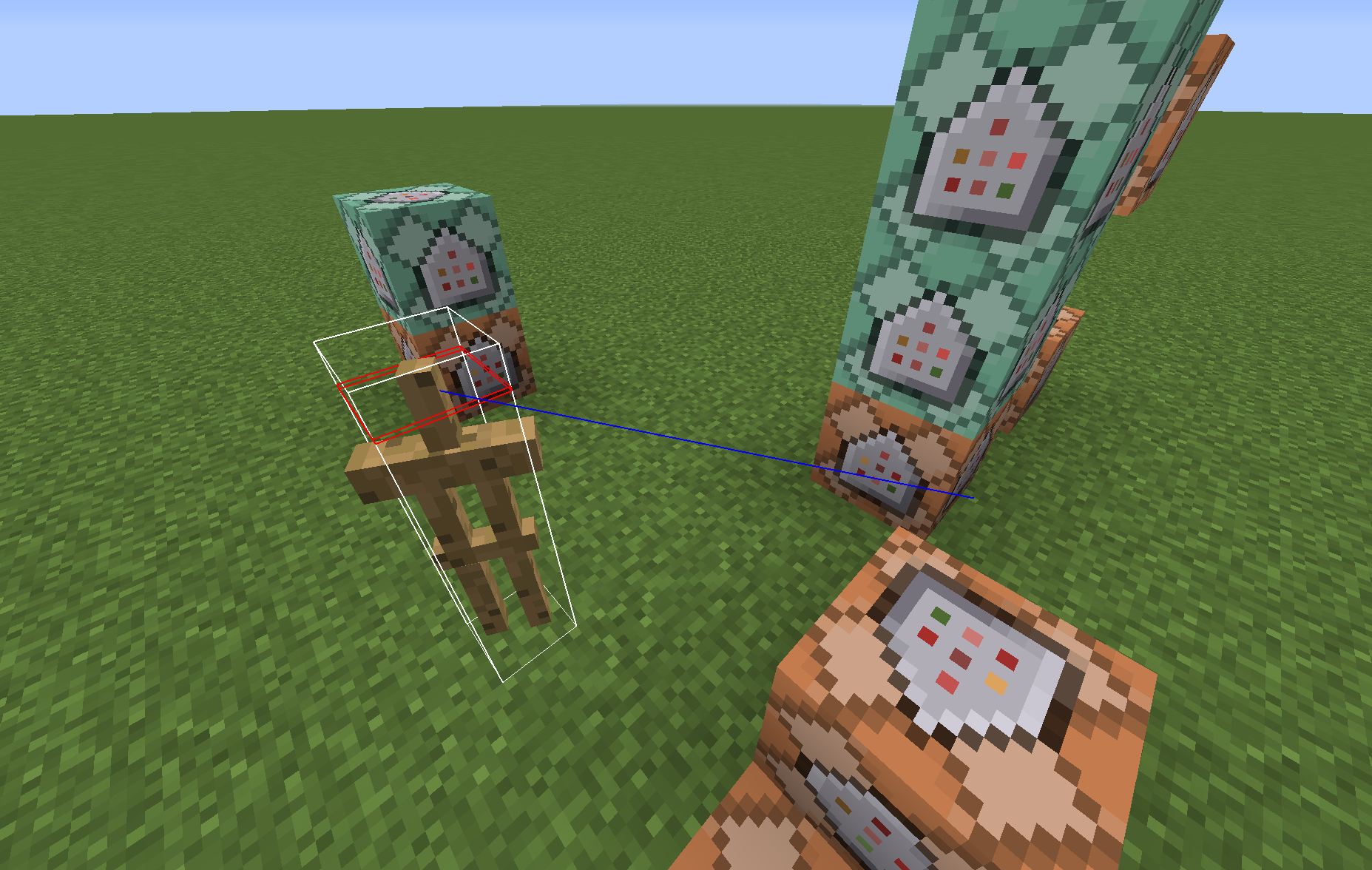


- Fixed
 user-f2760
 SunCat
![[Mojang] Bartosz Bok](../../../data/avatars/users/10122.svg) [Mojang] Bartosz Bok
[Mojang] Bartosz Bok- 40
- 22
- Confirmed
 Low
Low- Entities
- armor_stand
1.10 - 1.20.1
1.10 1.10.1 1.10.2 16w32a 16w32b 16w33a 16w36a 16w38a 16w39a 16w39b 16w39c 16w40a 16w41a 16w42a 16w43a 16w44a 1.11-pre1 1.11 16w50a 1.11.1 1.11.2 17w06a 17w13b 17w15a 17w16b 17w17b 17w18b 1.12-pre2 1.12-pre6 1.12-pre7 1.12.2 18w06a 18w07a 18w15a 18w20c 1.13.1 1.14 1.14.1 1.14.4 19w45b 20w07a 1.16.5 1.18.1 1.19.2 1.19.4 23w18a 1.20.1- 1.15-pre4 1.20.2-pre1
Created Issue:
Newly summoned NoGravity ArmorStand needs to be rotated at least twice to update it's visual rotation.
Steps to reproduce:
- Summon an ArmorStand via
/summon ArmorStand ~ ~ ~ {NoGravity:1}- Change it's rotation.
Ex. commands:/tp @e[type=ArmorStand] ~ ~ ~ ~45 ~/tp @e[type=ArmorStand] ~ ~ ~ 45 ~
- Notice that the ArmorStand visually didn't rotate, but it's direction of looking (can be seen via F3+B) is updated.
- If you reopen the world at this or next point, the ArmorStand will be updated and fixed.
- If you teleport the ArmorStand in this same place with the same rotation, it still won't update. You can use any of these commands:
/tp @e[type=ArmorStand] ~ ~ ~
Steps to reproduce:
- Summon an ArmorStand via
/summon ArmorStand ~ ~ ~ {NoGravity:1}- Change it's rotation.
Ex. commands:/tp @e[type=ArmorStand] ~ ~ ~ ~45 ~/tp @e[type=ArmorStand] ~ ~ ~ 45 ~
- Notice that the ArmorStand visually didn't rotate, but it's direction of looking (can be seen via F3+B) is updated.
- If you reopen the world at this or next point, the ArmorStand will be updated and fixed.
- If you teleport the ArmorStand in this same place with the same rotation, it still won't update. You can use any of these commands:
/tp @e[type=ArmorStand] ~ ~ ~Steps to reproduce:
- Summon an ArmorStand via
/summon ArmorStand ~ ~ ~ {NoGravity:1}- Change it's rotation.
Ex. commands:
Relative:/tp @e[type=ArmorStand] ~ ~ ~ ~45 ~Absolute:
/tp @e[type=ArmorStand] ~ ~ ~ 45 ~
- Notice that the ArmorStand visually didn't rotate, but it's direction of looking (can be seen via F3+B) is updated.
- If you reopen the world at this or next step, the ArmorStand will be updated and fixed.
- Teleport the ArmorStand in this same place with the same rotation. You can use any of these commands:
/tp @e[type=ArmorStand] ~ ~ ~/tp @e[type=ArmorStand] ~ ~ ~ ~ ~/tp @e[type=ArmorStand] ~ ~ ~ (a number you used in the 2nd step) ~
- Notice that it still won't update.
- Change it's rotation again (using an absolute command with a different number or any relative one).
- Now it's updated, and will behave normally.
Workarounds:
- For normal players: reopen the world.
- For map makers: teleport the ArmorStand to itself, then change it's rotation.
A few notes:
Steps to reproduce:
- Summon an ArmorStand via
/summon ArmorStand ~ ~ ~ {NoGravity:1}- Change it's rotation.
Ex. commands:
Relative:/tp @e[type=ArmorStand] ~ ~ ~ ~45 ~Absolute:
/tp @e[type=ArmorStand] ~ ~ ~ 45 ~
- Notice that the ArmorStand visually didn't rotate, but it's direction of looking (can be seen via F3+B) is updated.
- If you reopen the world at this or next step, the ArmorStand will be updated and fixed.
- Teleport the ArmorStand in this same place with the same rotation. You can use any of these commands:
/tp @e[type=ArmorStand] ~ ~ ~/tp @e[type=ArmorStand] ~ ~ ~ ~ ~/tp @e[type=ArmorStand] ~ ~ ~ (a number you used in the 2nd step) ~
- Notice that it still won't update.
- Change it's rotation again (using an absolute command with a different number or any relative one).
- Now it's
updated, and will behave normally.Workarounds:
- For normal players: reopen the world.
- For map makers: teleport the ArmorStand to itself, then change it's rotation.
A few notes:
Steps to reproduce:
- Summon an ArmorStand via
/summon ArmorStand ~ ~ ~ {NoGravity:1}- Change it's rotation.
Ex. commands:
Relative:/tp @e[type=ArmorStand] ~ ~ ~ ~45 ~Absolute:
/tp @e[type=ArmorStand] ~ ~ ~ 45 ~
- Notice that the ArmorStand visually didn't rotate, but it's direction of looking (can be seen via F3+B) is updated.
- If you reopen the world at this or next step, the ArmorStand will be updated and fixed.
- Teleport the ArmorStand in this same place with the same rotation. You can use any of these commands:
/tp @e[type=ArmorStand] ~ ~ ~/tp @e[type=ArmorStand] ~ ~ ~ ~ ~/tp @e[type=ArmorStand] ~ ~ ~ (a number you used in the 2nd step) ~
- Notice that it still won't update.
- Change it's rotation again (using an absolute command with a different number or any relative one).
- Now it's fixed.
Workarounds:
- For normal players: reopen the world.
- For map makers: teleport the ArmorStand to itself, then change it's rotation.
A few notes:
- If you change the ArmorStand's rotation and position, or only position, it'll will behave as expectIed since then.
- Don't use chain command blocks or spam the commands very fast, or it will be
MC-67695.
![[Mojang] Grum (Erik Broes)](../../../data/assets/gravatar/grum.png)
![[Mojang] Searge (Michael Stoyke)](../../../data/assets/gravatar/searge.png) [Mojang] Searge (Michael Stoyke)
[Mojang] Searge (Michael Stoyke)Steps to reproduce:
- Summon an ArmorStand via
/summon ArmorStand ~ ~ ~ {NoGravity:1}- Change it's rotation.
Ex. commands:
Relative:/tp @e[type=ArmorStand] ~ ~ ~ ~45 ~Absolute:
/tp @e[type=ArmorStand] ~ ~ ~ 45 ~
- Notice that the ArmorStand visually didn't rotate, but it's direction of looking (can be seen via F3+B) is updated.
- If you reopen the world at this or next step, the ArmorStand will be updated and fixed.
- Teleport the ArmorStand in this same place with the same rotation. You can use any of these commands:
/tp @e[type=ArmorStand] ~ ~ ~/tp @e[type=ArmorStand] ~ ~ ~ ~ ~/tp @e[type=ArmorStand] ~ ~ ~ (a number you used in the 2nd step) ~
- Notice that it still won't update.
- Change it's rotation again (using an absolute command with a different number or any relative one).
- Now it's fixed.
Workarounds:
- For normal players: reopen the world.
- For map makers: teleport the ArmorStand to itself, then change it's rotation.
A few notes:
- If you change the ArmorStand's rotation and position, or only position, it'll will behave as expectIed since then.
- Don't use chain command blocks or spam the commands very fast, or it will be
MC-67695.Steps to reproduce:
- Summon an ArmorStand via
/summon ArmorStand ~ ~ ~ {NoGravity:1,Tags:["bug"]}- Change it's rotation.
Ex. commands:
Relative:/tp @e[tag=bug] ~ ~ ~ ~45 ~Absolute:
/tp @e[tag=bug] ~ ~ ~ 45 ~
- Notice that the ArmorStand visually didn't rotate, but it's direction of looking (can be seen via F3+B) is updated.
- If you reopen the world at this or next step, the ArmorStand will be updated and fixed.
- Teleport the ArmorStand in this same place with the same rotation. You can use any of these commands:
/tp @e[tag=bug] ~ ~ ~/tp @e[tag=bug] ~ ~ ~ ~ ~/tp @e[tag=bug] ~ ~ ~ (a number you used in the 2nd step) ~
- Notice that it still won't update.
- Change it's rotation again (using an absolute command with a different number or any relative one).
- Now it's fixed.
Workarounds:
- For normal players: reopen the world.
- For map makers: teleport the ArmorStand to itself, then change it's rotation.
A few notes:
- If you change the ArmorStand's rotation and position, or only position, it'll will behave as expectIed since then.
- Don't use chain command blocks or spam the commands very fast, or it will be
MC-67695.
Steps to reproduce:
- Summon an ArmorStand via
/summon ArmorStand ~ ~ ~ {NoGravity:1,Tags:["bug"]}- Change it's rotation.
Ex. commands:
Relative:/tp @e[tag=bug] ~ ~ ~ ~45 ~Absolute:
/tp @e[tag=bug] ~ ~ ~ 45 ~
- Notice that the ArmorStand visually didn't rotate, but it's direction of looking (can be seen via F3+B) is updated.
- If you reopen the world at this or next step, the ArmorStand will be updated and fixed.
- Teleport the ArmorStand in this same place with the same rotation. You can use any of these commands:
/tp @e[tag=bug] ~ ~ ~/tp @e[tag=bug] ~ ~ ~ ~ ~/tp @e[tag=bug] ~ ~ ~ (a number you used in the 2nd step) ~
- Notice that it still won't update.
- Change it's rotation again (using an absolute command with a different number or any relative one).
- Now it's fixed.
Workarounds:
- For normal players: reopen the world.
- For map makers: teleport the ArmorStand to itself, then change it's rotation.
A few notes:
- If you change the ArmorStand's rotation and position, or only position, it'll will behave as expect
Ied since then.- Don't use chain command blocks or spam the commands very fast, or it will be
MC-67695.Steps to reproduce:
- Summon an ArmorStand via
/summon ArmorStand ~ ~ ~ {NoGravity:1,Tags:["bug"]}- Change it's rotation.
Ex. commands:
Relative:/tp @e[tag=bug] ~ ~ ~ ~45 ~Absolute:
/tp @e[tag=bug] ~ ~ ~ 45 ~
- Notice that the ArmorStand visually
didn't rotaterotated and returned back very fast, but it's direction of looking (can be seen via F3+B) is updated.- If you reopen the world at this or next step, the ArmorStand will be updated and fixed.
- Teleport the ArmorStand in this same place with the same rotation. You can use any of these commands:
/tp @e[tag=bug] ~ ~ ~/tp @e[tag=bug] ~ ~ ~ ~ ~/tp @e[tag=bug] ~ ~ ~ (a number you used in the 2nd step) ~
- Notice that it still won't update.
- Change it's rotation again (using an absolute command with a different number or any relative one).
- Now it's fixed.
Workarounds:
- For normal players: reopen the world.
- For map makers: teleport the ArmorStand to itself, then change it's rotation.
A few notes:
- If you change the ArmorStand's rotation and position, or only position, it'll will behave as expected since then.
- Don't use chain command blocks or spam the commands very fast, or it will be
MC-67695.
Steps to reproduce:
- Summon an ArmorStand via
/summon ArmorStand ~ ~ ~ {NoGravity:1,Tags:["bug"]}- Change it's rotation.
Ex. commands:
Relative:/tp @e[tag=bug] ~ ~ ~ ~45 ~Absolute:
/tp @e[tag=bug] ~ ~ ~ 45 ~
- Notice that the ArmorStand visually
didn't rotaterotated andreturned back very fast, but it's direction of looking (can be seen via F3+B) is updated.- If you reopen the world at this or next step, the ArmorStand will be updated and fixed.
- Teleport the ArmorStand in this same place with the same rotation. You can use any of these commands:
/tp @e[tag=bug] ~ ~ ~/tp @e[tag=bug] ~ ~ ~ ~ ~/tp @e[tag=bug] ~ ~ ~ (a number you used in the 2nd step) ~
- Notice that it still won't update.
- Change it's rotation again (using an absolute command with a different number or any relative one).
- Now it's fixed.
Workarounds:
- For normal players: reopen the world.
- For map makers: teleport the ArmorStand to itself, then change it's rotation.
A few notes:
- If you change the ArmorStand's rotation and position, or only position, it'll will behave as expected since then.
- Don't use chain command blocks or spam the commands very fast, or it will be
MC-67695.
Steps to reproduce:
- Summon an ArmorStand via
/summon ArmorStand ~ ~ ~ {NoGravity:1,Tags:["bug"]}- Change it's rotation.
Ex. commands:
Relative:/tp @e[tag=bug] ~ ~ ~ ~45 ~Absolute:
/tp @e[tag=bug] ~ ~ ~ 45 ~
- Notice that the ArmorStand visually
didn't rotaterotated and turned back very fast, but it's direction of looking (can be seen via F3+B) is updated.- If you reopen the world at this or next step, the ArmorStand will be updated and fixed.
- Teleport the ArmorStand in this same place with the same rotation. You can use any of these commands:
/tp @e[tag=bug] ~ ~ ~/tp @e[tag=bug] ~ ~ ~ ~ ~/tp @e[tag=bug] ~ ~ ~ (a number you used in the 2nd step) ~
- Notice that it still won't update.
- Change it's rotation again (using an absolute command with a different number or any relative one).
- Now it's fixed.
Workarounds:
- For normal players: reopen the world.
- For map makers: teleport the ArmorStand to itself, then change it's rotation.
A few notes:
- If you change the ArmorStand's rotation and position, or only position, it'll will behave as expected since then.
- Don't use chain command blocks or spam the commands very fast, or it will be
MC-67695.Steps to reproduce:
- Summon an ArmorStand via
/summon ArmorStand ~ ~ ~ {NoGravity:1,Tags:["bug"]}- Change it's rotation.
Ex. commands:
Relative:/tp @e[tag=bug] ~ ~ ~ ~45 ~Absolute:
/tp @e[tag=bug] ~ ~ ~ 45 ~
- Notice that the ArmorStand visually didn't rotate, but it's direction of looking (can be seen via F3+B) is updated.
- If you reopen the world at this or next step, the ArmorStand will be updated and fixed.
- Teleport the ArmorStand in this same place with the same rotation. You can use any of these commands:
/tp @e[tag=bug] ~ ~ ~/tp @e[tag=bug] ~ ~ ~ ~ ~/tp @e[tag=bug] ~ ~ ~ (a number you used in the 2nd step) ~
- Notice that it still won't update.
- Change it's rotation again (using an absolute command with a different number or any relative one).
- Now it's fixed.
Workarounds:
- For normal players: reopen the world.
- For map makers: teleport the ArmorStand to itself, then change it's rotation.
A few notes:
- If you change the ArmorStand's rotation and position, or only position, it'll will behave as expected since then.
- Don't use chain command blocks or spam the commands very fast, or it will be
MC-67695.
Steps to reproduce:
- Summon an
ArmorStand via/summonArmorStand ~ ~ ~ {NoGravity:1,Tags:["bug"]}- Change it's rotation.
Ex. commands:
Relative:/tp @e[tag=bug] ~ ~ ~ ~45 ~Absolute:
/tp @e[tag=bug] ~ ~ ~ 45 ~
- Notice that the
ArmorStand visually didn't rotate, but it's direction of looking (can be seen via F3+B) is updated.- If you reopen the world at this or next step, the
ArmorStand will be updated and fixed.- Teleport the
ArmorStand in this same place with the same rotation. You can use any of these commands:/tp @e[tag=bug] ~ ~ ~/tp @e[tag=bug] ~ ~ ~ ~ ~/tp @e[tag=bug] ~ ~ ~ (a number you used in the 2nd step) ~
- Notice that it still won't update.
- Change it's rotation again (using an absolute command with a different number or any relative one).
- Now it's fixed.
Workarounds:
- For normal players: reopen the world.
- For map makers: teleport the
ArmorStand to itself, then change it's rotation.A few notes:
- If you change the
ArmorStand's rotation and position, or only position, it'll will behave as expected since then.- Don't use chain command blocks or spam the commands very fast, or it will be
MC-67695.Steps to reproduce:
- Summon an armor stand via
/summon armor_stand ~ ~ ~ {NoGravity:1,Tags:["bug"]}- Change it's rotation.
Ex. commands:
Relative:/tp @e[tag=bug] ~ ~ ~ ~45 ~Absolute:
/tp @e[tag=bug] ~ ~ ~ 45 ~
- Notice that the armor stand visually didn't rotate, but it's direction of looking (can be seen via F3+B) is updated.
- If you reopen the world at this or next step, the armor stand will be updated and fixed.
- Teleport the armor stand in this same place with the same rotation. You can use any of these commands:
/tp @e[tag=bug] ~ ~ ~/tp @e[tag=bug] ~ ~ ~ ~ ~/tp @e[tag=bug] ~ ~ ~ (a number you used in the 2nd step) ~
- Notice that it still won't update.
- Change it's rotation again (using an absolute command with a different number or any relative one).
- Now it's fixed.
Workarounds:
- For normal players: reopen the world.
- For map makers: teleport the armor stand to itself, then change it's rotation.
A few notes:
- If you change the armor stand's rotation and position, or only position, it'll will behave as expected since then.
- Don't use chain command blocks or spam the commands very fast, or it will be
MC-67695.
Newly summoned NoGravity Armor Stand needs to be rotated at least twice to update it's visual rotation.
Steps to reproduce:
- Summon an armor stand via
/summon armor_stand ~ ~ ~ {NoGravity:1,Tags:["bug"]}- Change it's rotation.
Ex. commands:
Relative:/tp @e[tag=bug] ~ ~ ~ ~45 ~Absolute:
/tp @e[tag=bug] ~ ~ ~ 45 ~
- Notice that the armor stand visually didn't rotate, but it's direction of looking (can be seen via F3+B) is updated.
- If you reopen the world at this or next step, the armor stand will be updated and fixed.
- Teleport the armor stand in this same place with the same rotation. You can use any of these commands:
/tp @e[tag=bug] ~ ~ ~/tp @e[tag=bug] ~ ~ ~ ~ ~/tp @e[tag=bug] ~ ~ ~ (a number you used in the 2nd step) ~
- Notice that it still won't update.
- Change it's rotation again (using an absolute command with a different number or any relative one).
- Now it's fixed.
Workarounds:
- For normal players: reopen the world
.- For map makers: teleport the armor stand to itself, then change it's rotation.
A few notes:
- If you change the armor stand's rotation and position, or only position, it'll will behave as expected since then.
- Don't use chain command blocks or spam the commands very fast, or it will be
MC-67695.Steps to reproduce:
- Summon an armor stand via
/summon armor_stand ~ ~ ~ {NoGravity:1,Tags:["bug"]}- Change it's rotation.
Ex. commands:
Relative:/tp @e[tag=bug] ~ ~ ~ ~45 ~Absolute:
/tp @e[tag=bug] ~ ~ ~ 45 ~
- Notice that the armor stand visually didn't rotate, but it's direction of looking (can be seen via F3+B) is updated.
- If you reopen the world at this or next step, the armor stand will be updated and fixed.
- Teleport the armor stand in this same place with the same rotation. You can use any of these commands:
/tp @e[tag=bug] ~ ~ ~/tp @e[tag=bug] ~ ~ ~ ~ ~/tp @e[tag=bug] ~ ~ ~ (a number you used in the 2nd step) ~
- Notice that it still won't update.
- Change it's rotation again (using an absolute command with a different number or any relative one).
- Now it's fixed.
Workarounds:
- For normal players: reopen the world or wait some time
- For map makers: teleport the armor stand to itself, then change it's rotation.
A few notes:
- If you change the armor stand's rotation and position, or only position, it'll will behave as expected since then.
- Don't use chain command blocks or spam the commands very fast, or it will be
MC-67695.
Steps to reproduce:
- Summon an armor stand via
/summon armor_stand ~ ~ ~ {NoGravity:1,Tags:["bug"]}- Change it's rotation.
Ex. commands:
Relative:/tp @e[tag=bug] ~ ~ ~ ~45 ~Absolute:
/tp @e[tag=bug] ~ ~ ~ 45 ~
- Notice that the armor stand visually didn't rotate, but it's direction of looking (can be seen via F3+B) is updated.
- If you reopen the world at this or next step, the armor stand will be updated and fixed.
- Teleport the armor stand in this same place with the same rotation. You can use any of these commands:
/tp @e[tag=bug] ~ ~ ~/tp @e[tag=bug] ~ ~ ~ ~ ~/tp @e[tag=bug] ~ ~ ~ (a number you used in the 2nd step) ~
- Notice that it still won't update.
- Change it's rotation again (using an absolute command with a different number or any relative one).
- Now it's fixed.
Workarounds:
- For normal players: reopen the world or wait
some time- For map makers: teleport the armor stand to itself, then change it's rotation.
A few notes:
- If you change the armor stand's rotation and position, or only position, it'll will behave as expected since then.
- Don't use chain command blocks or spam the commands very fast, or it will be
MC-67695.Steps to reproduce:
- Summon an armor stand via
/summon armor_stand ~ ~ ~ {NoGravity:1,Tags:["bug"]}- Change it's rotation.
Ex. commands:
Relative:/tp @e[tag=bug] ~ ~ ~ ~45 ~Absolute:
/tp @e[tag=bug] ~ ~ ~ 45 ~
- Notice that the armor stand visually didn't rotate, but it's direction of looking (can be seen via F3+B) is updated.
- If you reopen the world at this or next step, the armor stand will be updated and fixed.
- Teleport the armor stand in this same place with the same rotation. You can use any of these commands:
/tp @e[tag=bug] ~ ~ ~/tp @e[tag=bug] ~ ~ ~ ~ ~/tp @e[tag=bug] ~ ~ ~ (a number you used in the 2nd step) ~
- Notice that it still won't update.
- Change it's rotation again (using an absolute command with a different number or any relative one).
- Now it's fixed.
Workarounds:
- For normal players: reopen the world or wait a few minutes.
- For map makers: teleport the armor stand to itself, then change it's rotation.
A few notes:
- If you change the armor stand's rotation and position, or only position, it'll will behave as expected since then.
- Don't use chain command blocks or spam the commands very fast, or it will be
MC-67695.
![[Mod] Michael Wobst](../../../data/avatars/users/37868.png)
Steps to reproduce:
- Summon an armor stand via
/summon armor_stand ~ ~ ~ {NoGravity:1,Tags:["bug"]}- Change it
's rotation.
Ex. commands:
Relative:/tp @e[tag=bug] ~ ~ ~ ~45 ~Absolute:
/tp @e[tag=bug] ~ ~ ~ 45 ~
- Notice that the armor stand visually didn't rotate, but it's direction of looking (can be seen via F3+B) is updated.
- If you reopen the world at this or next step, the armor stand will be updated and fixed.
- Teleport the armor stand in this same place with the same rotation. You can use any of these commands:
/tp @e[tag=bug] ~ ~ ~/tp @e[tag=bug] ~ ~ ~ ~ ~/tp @e[tag=bug] ~ ~ ~ (a number you used in the 2nd step) ~
- Notice that it still won't update.
- Change it's rotation again (using an absolute command with a different number or any relative one).
- Now it's fixed.
Workarounds:
- For normal players: reopen the world or wait a few minutes.
- For map makers: teleport the armor stand to itself, then change it's rotation.
A few notes:
- If you change the armor stand's rotation and position, or only position, it'll will behave as expected since then.
- Don't use chain command blocks or spam the commands very fast, or it will be
MC-67695.
Steps to reproduce:
- Summon an armor stand via
/summon armor_stand ~ ~ ~ {NoGravity:1,Tags:["bug"]}- Change it's rotation.
Ex. commands:
Relative:/tp @e[tag=bug] ~ ~ ~ ~45 ~Absolute:
/tp @e[tag=bug] ~ ~ ~ 45 ~
- Notice that the armor stand visually didn't rotate, but it's direction of looking (can be seen via F3+B) is updated.
- If you reopen the world at this or next step, the armor stand will be updated and fixed.
- Also it fixes itself in a few minutes.
- Teleport the armor stand in this same place with the same rotation. You can use any of these commands:
/tp @e[tag=bug] ~ ~ ~/tp @e[tag=bug] ~ ~ ~ ~ ~/tp @e[tag=bug] ~ ~ ~ (a number you used in the 2nd step) ~
- Notice that it still won't update.
- Change it's rotation again (using an absolute command with a different number or any relative one).
- Now it's fixed.
Workarounds:
- For normal players: reopen the world or wait a few minutes.
- For map makers: teleport the armor stand to itself, then change it's rotation.
A few notes:
- If you change the armor stand's rotation and position, or only position, it'll will behave as expected since then.
- Don't use chain command blocks or spam the commands very fast, or it will be
MC-67695.
Steps to reproduce:
- Summon an armor stand via
/summon armor_stand ~ ~ ~ {NoGravity:1,Tags:["bug"]}- Change it
's rotation.
Ex. commands:
Relative:/tp @e[tag=bug] ~ ~ ~ ~45 ~Absolute:
/tp @e[tag=bug] ~ ~ ~ 45 ~
- Notice that the armor stand visually didn't rotate, but it's direction of looking (can be seen via F3+B) is updated.
- If you reopen the world at this or next step, the armor stand will be updated and fixed.
- Also it fixes itself in a few minutes.
- Teleport the armor stand in this same place with the same rotation. You can use any of these commands:
/tp @e[tag=bug] ~ ~ ~/tp @e[tag=bug] ~ ~ ~ ~ ~/tp @e[tag=bug] ~ ~ ~ (a number you used in the 2nd step) ~
- Notice that it still won't update.
- Change it's rotation again (using an absolute command with a different number or any relative one).
- Now it's fixed.
Workarounds:
- For normal players: reopen the world or wait a few minutes.
- For map makers: teleport the armor stand to itself, then change it's rotation.
A few notes:
- If you change the armor stand's rotation and position, or only position, it'll will behave as expected since then.
- Don't use chain command blocks or spam the commands very fast, or it will be
MC-67695.
Newly summoned NoGravity Armor Stand needs to be rotated at least twice to update it's visual rotation.
Newly summoned NoGravityArmor Stand needs to be rotated at least twice toupdate its visual rotation.Armor Stand needs to be rotated a few times before it updates its visual rotation.
is duplicated by
Steps to reproduce:
- Summon an armor stand via
/summon armor_stand ~ ~ ~ {NoGravity:1,Tags:["bug"]}- Change its rotation.
Ex. commands:
Relative:/tp @e[tag=bug] ~ ~ ~ ~45 ~Absolute:
/tp @e[tag=bug] ~ ~ ~ 45 ~
- Notice that the armor stand visually didn't rotate, but it's direction of looking (can be seen via F3+B) is updated.
- If you reopen the world at this or next step, the armor stand will be updated and fixed.
- Also it fixes itself in a few minutes.
- Teleport the armor stand in this same place with the same rotation. You can use any of these commands:
/tp @e[tag=bug] ~ ~ ~/tp @e[tag=bug] ~ ~ ~ ~ ~/tp @e[tag=bug] ~ ~ ~ (a number you used in the 2nd step) ~
- Notice that it still won't update.
- Change it's rotation again (using an absolute command with a different number or any relative one).
- Now it's fixed.
Workarounds:
- For normal players: reopen the world or wait a few minutes.
- For map makers: teleport the armor stand to itself, then change it's rotation.
A
fewnotes:
- If you change the armor stand's rotation and position, or only position, it'll will behave as expected since then.
- Don't use chain command blocks or spam the commands very fast, or it will be
MC-67695.Sometimes when you rotate an armor stand with /tp, the client don't update it: the armor stand twitches or does nothing at all.
In this glitched state the stand won't update if you try to /tp it to itself. It will update if you rotate it again, teleport to another location, reopen the world or wait some time for it to fix itself.For a NoGravity armor stand it will always be the first rotation, but it won't happen again if you teleport it to another coordinates first.
Example command:
/tp @e[type=armor_stand,c=1] ~ ~ ~ ~45 ~A note:
- Don't use chain command blocks, or it will be
MC-67695.
Armor Standneeds to be rotated a few times before it updatesits visual rotation.Sometimes Armor Stand won't update its visual rotation.
relates to
relates to
Sometimes when you rotate an armor stand with
/tp, the client don't update it: the armor stand twitches or does nothing at all.In this glitched state the stand won't update if you try to /tpit to itself. It will update if you rotate it again, teleport to another location, reopen the world or wait some time for it to fix itself.For a NoGravity armor stand it will always be the first rotation, but it won't happen again if you teleport it to another coordinates first.
Example command:
A note:
- Don't use chain command blocks, or it will be
MC-67695.Sometimes when you rotate an armor stand with the /tp command, the client doesn't update it: the armor stand twitches or does nothing at all.
In this glitched state the stand won't update if you try to /tp it to itself. It will update if you rotate it again, teleport to another location, reopen the world or wait some time for it to fix itself.For a NoGravity armor stand it will always be the first rotation, but it won't happen again if you teleport it to another coordinates first.
Example command:
/tp @e[type=armor_stand,c=1] ~ ~ ~ ~45 ~A note:
- Don't use chain command blocks, or it will be
MC-67695.
[Mojang] Searge (Michael Stoyke)Sometimes when you rotate an armor stand with the /tp command, the client doesn't update it: the armor stand twitches or does nothing at all.
In this glitched state the stand won't update if you try to /tp it to itself. It will update if you rotate it again, teleport to another location, reopen the world or wait some time for it to fix itself.For a NoGravity armor stand it will always be the first rotation, but it won't happen again if you teleport it to another coordinates first.
Example command:
/tp@e[type=armor_stand,c=1]~ ~ ~ ~45 ~A note:
- Don't use chain command blocks, or it will be
MC-67695.Sometimes when you rotate an armor stand with the /tp command, the client doesn't update it: the armor stand twitches or does nothing at all.
In this glitched state the stand won't update if you try to /tp it to itself. It will update if you rotate it again, teleport to another location, reopen the world or wait some time for it to fix itself.For a NoGravity armor stand it will always be the first rotation, but it won't happen again if you teleport it to another coordinates first.
Example command:
/execute as @e[type=armor_stand,limit=1] at @s run tp @s ~ ~ ~ ~45 ~

![[Mod] tryashtar](../../../data/avatars/users/41963.png)
![[Mod] Neko](../../../data/avatars/users/92901.png)
is duplicated by
![[Mojang] Nathan Adams](../../../data/assets/gravatar/dinnerbone.png)
![[Mod] Sonicwave](../../../data/avatars/users/94627.png)
![[Mod] violine1101](../../../data/avatars/users/92858.png)
is duplicated by
[Mojang] Bartosz Bok![[Bot] Piston](../../../data/avatars/users/31202.png)
Sometimes armor stand won't updateitsvisual rotationSometimes armor stands won't update their visual rotation
 Low
Low![[Mod] ampolive](../../../data/avatars/users/18949.svg)
is duplicated by
is duplicated by
![[Bot] Arisa](../../../data/avatars/users/43007.png)
![[Mod] markderickson](../../../data/avatars/users/18946.svg)
By default, entities face south. If you teleport them to face another direction after being summoned, some entities (like the Zombie) will not rotate immediately but rather take 0-3 ticks to complete the rotation (the less you rotate them the shorter. Attempting to rotate an entity 180 degrees will result in the maximum delay of 3 ticks).
However, if you attempt to teleport that entity while it is still rotating, some entities with the NoAI tag (such as zombies) will stop rotating and will be fixed semi-rotated until you stop teleporting them. (Can be fixed by reloading the world like bug MC-103800. This includes zombies, villagers, and other entities that have rotation animation.
Entities without AI, such as armorstands, will be affected by the bug as well, but will not have the rotation animation and instead be visually stuck mid-rotation. E.g. if you summon an armorstand, teleport it to face North and start teleporting it via ^ ^ ^k, it will travel North while it's body will be facing somewhere west or east (it seems at random)
Steps to reproduce:
1) Summon an entity with NoAI (tested for zombies, armor stands)
2) On the same tick teleport it to any location facing any direction (opposite for maximum effect)
3) On the same tick (or up to 3 ticks after it's been summoned) start teleporting it like ^ ^ ^0.1 every tick
4) Once you stop teleporting it, entities with AI will continue rotating until their bodies have completed the rotation, but entities without AI will be stuck with their heads and their bodies mid-rotation (heads will be rotated more in the right direction, but still limited to 90 degrees more than their bodies).
To avoid this, start repeatedly teleporting the entity after the third tick.
Thank you for your report!
We're actually already tracking this issue in MC-103800, so I resolved and linked this ticket as a duplicate.
If you would like to add a vote and any extra information to the main ticket it would be appreciated.
If you haven't already, you might like to make use of the search feature in the future to see if the issue has already been reported.
Quick Links:
📓 Issue Guidelines – 💬 Community Support – 📧 Customer Support – 📖 Game Wiki
Thank you for your report!
We're actually already tracking this issue in MC-103800, so I resolved and linked this ticket as a duplicate.
If you would like to add a vote and any extra information to the main ticket it would be appreciated.
If you haven't already, you might like to make use of the search feature in the future to see if the issue has already been reported.
Quick Links:
📓 Issue Guidelines – 💬 Community Support – 📧 Customer Support – 📖 Game Wiki
I can confirm that sometimes armor stands don't rotate, but now it seems like instance of MC-103800.
Well that's mighty odd! I've done a ton of stuff with armour stands and never noticed the graphical glitch before but going back and running the same tests in 1.14.4 does indeed show the same graphical glitch.
I'll add my vote and a comment to MC-103800.
Many thanks.
This is actually what got MC-103800 reopened. (And all test cases used forward teleportation, seeing the images it has.)
This seems to describe the cause rather well, but has much less activity than that report.
I'd suggest resolving this as duplicate, and copying over the steps to reproduce to MC-103800 (and removing armor stands from the title, as this correctly points out, it's not limited to them).
Duplicate of MC-103800.
Thank you for your report!
We're tracking this issue in MC-103800, so this ticket is being resolved and linked as a duplicate.
If you would like to add a vote and any extra information to the main ticket it would be appreciated.
If you haven't already, you might like to make use of the search feature to see if the issue has already been mentioned.
Quick Links:
📓 Bug Tracker Guidelines – 💬 Community Support – 📧 Mojang Support
📓 Project Summary – ✍️ Feedback and Suggestions – 📖 Game Wiki
– I am a bot. This action was performed automatically! The ticket was resolved by one of our moderators, and I left this message to give more information to you.
Thank you for your report!
We're tracking this issue in MC-103800, so this ticket is being resolved and linked as a duplicate.
If you would like to add a vote and any extra information to the main ticket it would be appreciated.
If you haven't already, you might like to make use of the search feature to see if the issue has already been mentioned.
Quick Links:
📓 Bug Tracker Guidelines – 💬 Community Support – 📧 Mojang Support
📓 Project Summary – ✍️ Feedback and Suggestions – 📖 Game Wiki
Can confirm, but I'm pretty sure there's already a report of this issue. Can't find it at the moment though.
I ran into this problem right away after introduction of ArmorStands, because one of the first things I did with them was making a circle by teleporting them in one spot in usually 45 or 22.5 degrees. I never considered it a bug, although it certainly would be great if it could be fixed }=)
As for the "workarounds" for mapmakers: The only way I found or did was to just tp the ArmorStand/ArmorStands again with that value, so if I e.g. had 16 AS in a circle, the 16th wouldn't update rightaway, so I just circled all the 16 AS again to have it tightaway optically updated.
As for the workaround for normal players which is mentioned in the bugpost: Additionally to reopening the world, the updating of the AS will happen automatically after a while!
I forgot how many minutes realtime it is, maybe around 5 or so.
I can test around a bit after work and provide a bit more information, either the realtime after when the AS updated itself, or a little video where one can see it demonstrated.
Does anyone know of a fix for this? I'm really lost.
That's true, but you can't really reopen the world or give it time to fix itself in a map. Also, I eventually found a fairly decent fix myself; Whenever you rotate the armor stand, wait one tick then rotate it slightly, then wait 3 ticks and rotate it back. It should work 100% of the time, hopefully.
Never mind, that doesn't work at all. I still need help.
Does your armor stand have NoGravity? If so, then teleporting it to itself (/tp @e[type=armor_stand,c=1] ~ ~ ~), waiting and then rotating it should work (at least it worked when I first tested this bug)
I tired playing around with the NoGravity tag to update the armor stand, and it seemed to work, however the armor stand I want to rotate doesn't have NoGravity, and it can't even have it temporarily because it's constantly moving.
Actually, I think maybe if I separate the armor stand into two armor stands, one that controls the movement and one that shows the visuals, and make the visuals have NoGravity, that might work. It'd probably be a lot less smooth, but it's worth it.
In this case I don't know. Try to ask somewhere else. And we should end this discussion, because it's a bugtracker, not a discussion forum.
Confirmed in 18w06a. It's a bit more difficult to tell, but it seems to happen with other entities as well. If someone had access to the code for armor stands, it would help get to the bottom of this issue. Something that would also help with these visual issues would be to remove the gradual visual updating that is currently applied when rotating/teleporting an entity. i.e. rotating an armor stand 90 degrees to the left would be seen instantly, rather than it appearing to turn to the new rotation. The behavior seems to be closely related to the shaking base plates as well, and that may actually be the cause of this issue.
I can confirm for minecraft 18w07a
Happens in 18w20c too.
Happens in pre-release 4 too
Confirmed for 1.13.1.
Confirmed for 1.14
And for 1.14.1.
This is still the case in 1.14.2 Can be reproduced in datapack by adding the following to an mcfunction file:
summon minecraft:armor_stand ~ ~ ~ {CustomNameVisible:0b,Small:1b,Invulnerable:1b,Invisible:1b,PersistenceRequired:1b,DisabledSlots:4144959,ArmorItems:[{},{},{},{id:"minecraft:trident",Count:1b,tag:{CustomModelData:15670002}}],CustomName:"{\"text\":\"stand\"{color:#22863a}}",Tags:["newStand"]}
execute store result entity @e[tag=newStand,limit=1] Rotation[0] float 0.001 run data get entity @p Rotation[0] 1000
execute store result entity @e[tag=newStand,limit=1] Rotation[1] float 0.001 run data get entity @p Rotation[1] 1000
Run this function as the player and the summoned armor stand will not have the same rotation as the player. Reload the world and it will.
You can see this in the video I added. The hammer is placed on the head of an armor stand. When the game reloads it is rotated correctly. It is summoned using very similar commands to those above.
armor_stand.mov
Confirmed for 1.15-pre3
I've set up a scoreboard and command block to continually display the Rotation[0] value of an armour stand in the sidebar and it appears that this is something to do with the animation of the armour stand being rotated as the internal data for Rotation[0] gets updated properly.
Using execute as @e[type=minecraft:armor_stand,distance=..5] at @s run tp @s ~ ~ ~ facing entity @p to rotate the stand to face the nearest player seems to work when the command is being run every tick by a command block but doesn't work consistently when run manually in chat with the player moving a significant amount between executions.
Has this been resolved for all entities? I’m fairly sure this bug falls within MC-154790 and doesn’t apply only to armor stands.
This bug applies to most rotating of armor stands, not just when it's just been made; they mess up their rotation almost every time I turn and then (the next tick) move them.
Still in 1.15.2 from what I can see.
Yes I am still seeing some sporadic twitching in 20w07a as well.
It seems to occur when summoning an armor stand and then in the same tick (but different command block) modifying it's rotation value.
Can't reproduce in 1.16.1
This still happens for me in 1.18.1, only when rotating in the same tick (eg function), and then moving it using teleports, and even then it still occasionally does it correctly.
Here's a video showcasing the bug in 1.18: https://youtu.be/KJfcfw9OM24
The functions running here are too complicated to set them up for a bug report, but as you can see, the rotation is constantly incorrect (sometimes facing 0 0, while other times, facing -90 0 (should be facing -135 0)).
The function for spawning Neville can be found here (note line 5/6 are immediately teleporting the spawned entities to the command's rotation context)
The moving of Neville seems to be required, as I cannot reproduce with just a simplified function for the spawning (see chair, which only changes Pose, not location). The function for the moving is here (note line 18-19).
I will try to find a simple setup which people can easily test in the near future.
I attached a data pack which can be used to reproduce this issue. Do note that it will not work as reliably as the Neville video, so a bunch of attempts may need to be made. Having server-side lag helps with reproducing this.
Face away from the 0 0 rotation, and run the function "summon".
Affects 1.19.2.
If SunCat doesn't mind, I'd be willing to become the reported and keep this updated. My commands keep triggering this rather reliably.
Can confirm in 23w18a
Still in 1.20.1; requesting ownership.