Double chest won't form when holding shift
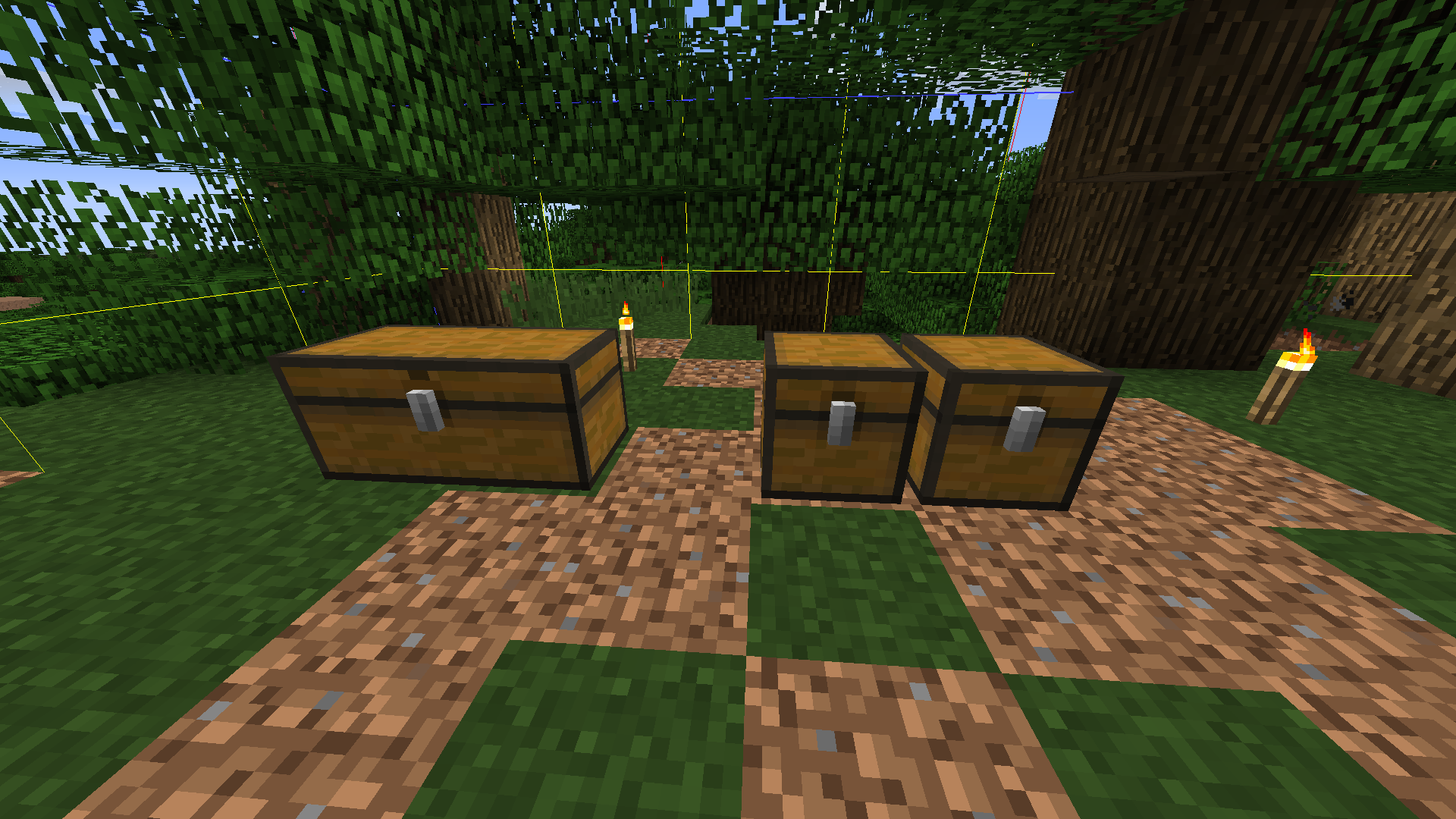
Double chest wont form if shift clicking on the block next to the chest. Will instead form 2 single chests as if you placed a trapped chest next to it. Both function as normal.
Environment
Windows 7 Professional SP1, R9 270 GPU, Intel i-7 4770@3.4GHz
Linked Issues
is duplicated by32
 MC-122880Placing a double chest on a double chest does not connect the top chestDuplicateMC-125587Chests do not combine if next to eachotherDuplicateMC-125704Chest GlitchDuplicateMC-126251chests not joiningDuplicateMC-127335Shift clicking chestsDuplicateMC-127358Holding SHIFT makes chests not connect to each otherDuplicateMC-128309chests not merging when placed directly next to each otherDuplicateMC-129845Chests don't form double chestsDuplicateMC-130255 chests don't come together when stackedDuplicateMC-130975When you press shift the chests are still dividedDuplicateMC-131396Double chests created only side-by-sideDuplicateMC-131469Chest-urile nu se fac double chest.DuplicateMC-131621Chests not joining togetherDuplicateMC-131656when sneaking chests of the same kind wont connect togetherDuplicateMC-1325711.13 pre 5 Chests not mergingDuplicateMC-134444Can place two single chests next to each other on top of an existing double chestDuplicateMC-142654Double Chest not createdDuplicateMC-149590When putting chests on top of chests, they won't become double chests.DuplicateMC-151361Can't place double chests on top of double chests (fixed)DuplicateMC-152200Single Chests placed next to each other sometimes not combining into double chestsDuplicateMC-154355Can't place double-chest on top of double-chestDuplicateMC-157900Problem with chest connectingDuplicateMC-163556double chest is not a double chestDuplicateMC-177719chests dont become double chestsDuplicateMC-180712Chests are not going to be double chests if you Place them with shift on other chestsDuplicateMC-181225chests don't connectDuplicateMC-190213Chest connect bugDuplicateMC-196187My chests won't double when I place them on top of my first double chest.DuplicateMC-198895Double chest doesn't form when placing a chest using shift.DuplicateMC-214757If you sit down and put the chest next to the chest, it will not become large (snapshot: 20w03a)DuplicateMC-264220when crouching and placing 2 chests right next to eachother it dosent turn into a double chestDuplicateMC-266715Chest not connecting into double chestDuplicate
Attachments1

Created Issue:
Double Chest won't form
Double chest wont form if Shift clicking on the block next to the chest. Will instead form 2 single chests as if you placed a trapped chest next to it. Both function as normal.
Environment
Windows 7 Professional SP1, R9 270 GPU, Intel i-7 4770@3.4GHz
![[Mod] violine1101](../../../data/avatars/users/92858.png)
![[Mod] Neko](../../../data/avatars/users/92901.png)
Double chest wont form if
Shift clicking on the block next to the chest. Will instead form 2 single chests as if you placed a trapped chest next to it. Both function as normal.Double chest wont form if shift clicking on the block next to the chest. Will instead form 2 single chests as if you placed a trapped chest next to it. Both function as normal.
DoubleChest won't formDouble chest won't form
is duplicated by
relates to
is duplicated by

relates to

is duplicated by
relates to
is duplicated by
is duplicated by
is duplicated by
is duplicated by
is duplicated by
is duplicated by
![[Mod] Pokechu22](../../../data/avatars/users/92931.png)
![[Mod] tryashtar](../../../data/avatars/users/41963.png)
is duplicated by
is duplicated by
is duplicated by
is duplicated by
is duplicated by
Double chest won't form when holding shift
is duplicated by
![[Mod] OcelotOnesie](../../../data/avatars/users/43220.png)
is duplicated by
![[Mod] Greymagic27](../../../data/avatars/users/92875.png)
is duplicated by
![[Bot] Arisa](../../../data/avatars/users/43007.png)
is duplicated by
is duplicated by

is duplicated by
is duplicated by
is duplicated by
is duplicated by

Duplicate of MC-127285.
If you hold shift while placing a chest, it will create a single chest, unless you're looking at another single chest (in which case it will connect to that chest and create a large chest).
Duplicate of MC-127285.
When sneaking (holding shift by default), a single chest will be placed, unless you look at a single chest (in which case it will try to create a double chest together with that chest).

See MC-127285
Dupe of MC-127285.
duplicate of MC-127285
Thank you for your report!
We're tracking this issue as MC-127285, so this ticket is being resolved and linked as a duplicate.
That ticket has already been resolved as working as intended, which means this is not considered a bug and won't be fixed. Please do not leave a comment on the linked ticket.
If you haven't already, you might like to make use of the search feature to see if the issue has already been mentioned.
Quick Links:
📓 Issue Guidelines – 💬 Community Support – 📧 Customer Support – ✍️ Feedback and Suggestions – 📖 Game Wiki
– I am a bot. This action was performed automatically! Please report any issues in Discord or Reddit
Thank you for your report!
However, we are already tracking this issue, and this report is a Duplicate of MC-127285, which has been marked as Works as Intended - this is an intentional game feature. If you have a different opinion, please visit the Feedback website.
Please use the search function in the future to prevent duplicate reports.
Quick Links:
📓 Issue Guidelines – 🛠 Community Support – 📧 Customer Support – ✍️ Feedback and Suggestions – 📖 Game Wiki
💬 Mojira Subreddit – 💬 Mojira Discord
Thank you for your report!
We're tracking this issue in MC-127285, so this ticket is being resolved and linked as a duplicate.
That ticket has already been resolved as working as intended, which means this is not considered a bug and won't be fixed. Please do not leave a comment on the linked ticket.
If you haven't already, you might like to make use of the search feature to see if the issue has already been mentioned.
Quick Links:
📓 Bug Tracker Guidelines – 💬 Community Support – 📧 Mojang Support
📓 Project Summary – ✍️ Feedback and Suggestions – 📖 Game Wiki

Thank you for your report!
We're tracking this issue in MC-127285, so this ticket is being resolved and linked as a duplicate.
That ticket has already been resolved as working as intended, which means this is not considered a bug and won't be fixed. Please do not leave a comment on the linked ticket.
If you haven't already, you might like to make use of the search feature to see if the issue has already been mentioned.
Quick Links:
📓 Bug Tracker Guidelines – 💬 Community Support – 📧 Mojang Support
📓 Project Summary – ✍️ Feedback and Suggestions – 📖 Game Wiki
Thank you for your report!
We're tracking this issue in MC-127285, so this ticket is being resolved and linked as a duplicate.
If you would like to add a vote and any extra information to the main ticket it would be appreciated.
If you haven't already, you might like to make use of the search feature to see if the issue has already been mentioned.
Quick Links:
📓 Bug Tracker Guidelines – 💬 Community Support – 📧 Mojang Support
📓 Project Summary – ✍️ Feedback and Suggestions – 📖 Game Wiki
– I am a bot. This action was performed automatically! The ticket was resolved by one of our moderators, and I left this message to give more information to you.
Thank you for your report!
We're tracking this issue in MC-127285, so this ticket is being resolved and linked as a duplicate.
If you would like to add a vote and any extra information to the main ticket it would be appreciated.
If you haven't already, you might like to make use of the search feature to see if the issue has already been mentioned.
Quick Links:
📓 Bug Tracker Guidelines – 💬 Community Support – 📧 Mojang Support
📓 Project Summary – ✍️ Feedback and Suggestions – 📖 Game Wiki
– I am a bot. This action was performed automatically! The ticket was resolved by one of our moderators, and I left this message to give more information to you.
This is how chest placing works in 1.13. Holding shift = "connect the chest to the block I'm looking at". If that block is not a chest, it creates a single chest.
On the plus side, you can put normal chests and normal double chests next to each other now.
Also see
MC-126251for more information.