 maggstrom
- maggstrom
- maggstrom
- Europe/Vienna
- Yes
- No
 MC-126084
 MCPE-24535






Thanks for pointing this out!
This issue is already known and is currently worked on!

This relates to MC-75279, however that one was fixed in a previous patch.
A similar issue is happening when sprinting/"flying" in gamemode 1 underwater.
The cape is doing it's usual animation, which doesn't really fit the enviroment.See this comment for a summary what causes this while flying. To fix this, the cape renderer would have to make a difference for when the player is in the swimming animation and change the f2 value to keep the cape down to the player's body.
This relates to
MC-75279, however that one was fixed in a previouspatch.A similar issue is happening when sprinting/"flying" in creative mode underwater.
The cape is doing its usual animation, which doesn't really fit the environment.See this comment for a summary what causes this while flying. To fix this, the cape renderer would have to make a difference for when the player is in the swimming animation and change the f2 value to keep the cape down to the player's body.
This relates to
MC-75279, however that one was fixed in a previous update.A similar issue is happening when sprinting/"flying" in creative mode underwater.
The cape is doing its usual animation, which doesn't really fit the environment.See this comment by [Mod] bemoty for a summary of what causes this while flying. To fix this, the cape renderer would have to make a difference for when the player is in the swimming animation and change the f2 value to keep the cape down to the player's body.
This relates to
MC-75279, however that one was fixed in a previous update.A similar issue is happening when sprinting/"flying" in creative mode underwater.
The cape is doing its usual animation, which doesn't really fit the environment.See
this commentby [Mod] bemotyfor a summary of what causes this while flying.To fix this, the cape renderer would have to make a difference for when the player is in the swimming animation and change the f2 value to keep the cape down to the player's body.This relates to
MC-75279, however that one was fixed in a previous update.A similar issue is happening when sprinting/"flying" in creative mode underwater.
The cape is doing its usual animation, which doesn't really fit the environment.See this comment by [Mod] bemoty for a summary of what causes this while flying.
To fix this, the cape renderer would have to make a difference for when the player is in the swimming animation and change the f2 value to keep the cape down to the player's body.
This relates to
MC-75279, however that one was fixed in a previous update.A similar issue is happening when sprinting/"flying" in creative mode underwater.
The cape is doing its usual animation, which doesn't really fit the environment.See this comment by [Mod] bemoty for a summary of what causes this while flying.
To fix this, the cape renderer would have to make a difference for when the player is in the swimming animation and change the f2 value to keep the cape down to the player's body.This relates to
MC-75279, however that one was fixed in a previous update.A similar issue is happening when sprinting/"flying" in creative mode underwater.
The cape is doing its usual animation, which doesn't really fit the environment.See this comment by [Mod] bemoty for a summary of what causes this while flying.
To fix this, the cape renderer would have to make a difference for when the player is in the swimming animation and change the f2 value to keep the cape down to the player's body.
Underwater sprint cape render (front view).png
Cape sprint underwateranimationCape render when sprinting underwater
This relates to
MC-75279, however that one was fixed in a previous update.A similar issue is happening when sprinting
/"flying"in creative mode underwater.
The cape is doing its usual animation, which doesn't really fit the environment.See this comment by [Mod] bemoty for a summary of what causes this while flying.
To fix this, the cape renderer would have to make a difference for when the player is in the swimming animation and change the f2 value to keep the cape down to the player's body.This relates to
MC-75279, however that one was fixed in a previous update.A similar issue is happening when sprinting / flying in creative mode underwater.
The cape is doing its usual animation, which doesn't really fit the environment.See this comment by [Mod] bemoty for a summary of what causes this while flying.
To fix this, the cape renderer would have to make a difference for when the player is in the swimming animation and change the f2 value to keep the cape down to the player's body.
This relates to
MC-75279, however that one was fixed in a previous update.A similar issue is happening when sprinting
/flying in creative mode underwater.
The cape is doing its usual animation, which doesn't really fit the environment.See this comment by [Mod] bemoty for a summary of what causes this while flying.
To fix this, the cape renderer would have to make a difference for when the player is in the swimming animation and change the f2 value to keep the cape down to the player's body.This relates to
MC-75279, however that one was fixed in a previous update.A similar issue is happening when sprinting & "flying" in creative mode underwater.
The cape is doing its usual animation, which doesn't really fit the environment.See this comment by [Mod] bemoty for a summary of what causes this while flying.
To fix this, the cape renderer would have to make a difference for when the player is in the swimming animation and change the f2 value to keep the cape down to the player's body.
Confirmed in 18w08b (see screenshot)
Normal chests update
when placed underwater, however trapped chests and Ender chests don't (see screenshot attachment).Normal chests update so that they fit the underwater environment, however trapped chests and Ender chests don't (see screenshot attachment).
I personally noticed this in previous versions some time ago as well. May be coincidental, or intended.
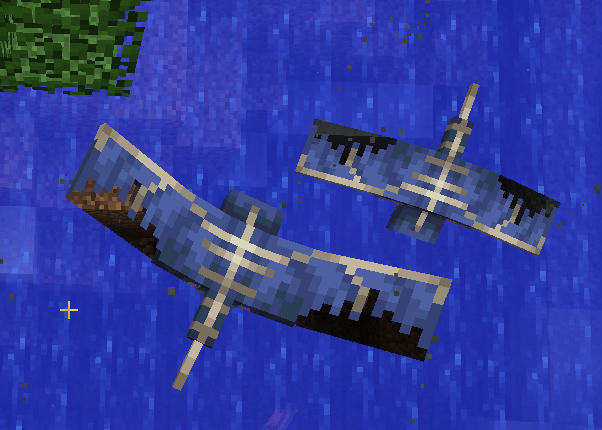
The new texture of the phantom with the torn wings doesn't render correctly when looking at water.
This relates to the hacked water problem inMC-125216, which currently is only known as a problem with blocks but not with entities.
I could imagine this being fixed if the actual model would be updated to fit the new texture.
I don't see any stairs in your screenshot. Could you explain the problem a bit more detailed?
String: https://crowdin.com/translate/minecraft/9458/enus-de?filter=basic&value=0#5240748
The letter "K" is capitalized in the word "BlocK".String:
https://crowdin.com/translate/minecraft/9458/enus-de?filter=basic&value=0#5240748The letter "K" is capitalized in the word "BlocK".
"Weathered Copper BlocK" --> "Weathered Copper Block"
![[Mod] Neko](../../../data/avatars/users/92901.png)
![[Mod] violine1101](../../../data/avatars/users/92858.png)
Maybe there is a problem with the screen of your device?
I personally have never had any issues like this.
Confirmed in 1.12.2
Have you checked if your PC fullfills the system requirements of Minecraft?
Is enough RAM available?
Did you try reinstalling the game?
That's not considered a "bug" though.
Have you tried the command "/locate Mansion" yet?
You could teleport to the coordinates of that location to make sure you're at the right spot.
Confirmed in 1.2.0.7
Confirmed in 1.12.2
Trying to hold on to the ladder with "SHIFT" doesn't work, climbing up with "W" works though.
Confirmed in 1.12.2
Confirmed in 1.12.2
This section is for bug reports in the Minecraft Java Edition.
Your bug however is part of the Windows 10 Edition, which is connected to XBox.
Make sure to report it in the right section:
https://bugs.mojang.com/projects/MCPE/
This is not a bug related to the game, but a problem with your Microsoft account.
Please only use this section for bug reports.
Confirmed in 1.2.10.2
Confirmed in 1.2.10.2
Behavior seems randomized, some of them attack, some of them don't.
This seems to be connected to XBL. Similar issues have been reported here: MCPE-29021
Maybe you can find a solution there.
I'm sorry to hear that, but i don't think this is the place you should put bugs like this.
As far as i understood, this is related to your Xbox Live profiles, this forum however is only used for actual game related issues.
Check your Realm world settings if you have enabled a forced gamemode. You could also enable OP rights for someone else in the player configurations just to make sure if this only affects you. In case you couldn't use command blocks, try changing the setting for these in the world settings as well.
Don't think it's really a problem. As redstonehelper pointed out, doesn't have to be the same direction in a different dimension.
Related to
MC-32813Could you please add more information regarding this issue? Crashreport would be helpful
Thanks for the information.
Have you tried closing and then re-opening your Realm? You can do so in the Realm settings if you wish.
Realms only work in the newest Minecraft version. This doesn't include snapshots.
Achievements are part of the strings which are localized.
You could check if achievements have been translated for your language already on Crowdin.
Duplicate of MC-124312
Thanks for your report!
However, this is the wrong place to report issues regarding Realms.
Please open a new one here.
Could not confirm.
For me it works, as intended, with pressing tab once.
Already mentioned here:
MC-126022It apparently is fixed, do you use the sprint button or double W for sprinting?
Duplicate of MC-125216
Could you please provide more information for how this issue can be reproduced?
If you're using a laptop, it could be related to MC-112068
The issue you're having with the "tile.movingBlock.name" item has already been reported in MCPE-25287.
Therefore this ticket is a duplicate, but you can help by adding more detailed information about this bug in the comments there
Confirmed in 18w08a.
Passing a block underneath isn't possible in general unless there's at least one block space between your head and the edge.
This is rather a feature request, not a bug.
As far as I know, it is intented to no be that common.
See information about the biome here.
"...A rare biome wherein large mounds of terracotta and stained terracotta will generate. ..."
"...This rare biome generates unique terrain features..."
Confirmed in 18w08b.
Also, Cod could be centered more precisely.
Please add a crash report to your description.
Find out how you can locate it here.
Could you please provide a seed for a Frozen Ocean?
Thank you!
Cod is a bit off as well.
Confirmed in 18w08b.
Fish spawneggs are seperated from the rest and the alphabetical order does not apply to them (yet).
Duplicate of
MC-124972.The error is caused by the new world generation.
Intentional?
Duplicate of
MC-125216.Please search if somebody already reported your issue before creating a new ticket.
I found two tickets with similar issues:
[REALMS-340] and
REALMS-654, both of which are not the same as the one you reported though.Maybe I didn't get the right ones, could you link me to the reports you meant?
Confirmed in 18w08b
Duplicate of / relates to
MC-125240This could relate to
MC-124649Please update the title, reports should be posted in English.
Duplicate of
MC-125216I just tested this in 18w08b and got it to working. For testing I used wood, flint and steel.
For the process to happen faster i used the command
Therefore cannot confirm.
Bug reports are only accepted in English.
If you speak English, please update your description.
Thank you for your report, however this has already been reported.
Duplicate of
MC-126097.Please search for tickets before creating a new one.
Confirmed in 18w08b.
In previous versions it was possible to connect chests like this (although it always seemed a bit like it's not supposed to work like that).
Pressing shift and placing the chest doesn't connect them either.
Duplicate of
MC-125216Even after restarting the Realm?
Confirmed in 18w08b
This relates to
MC-126251As seen in
MC-125707, this kinda broke the dungeon chests too.Please don't use titles like "Help!".
Which buttons are you using for dragging items into a chest?
Intentional?
This is the Minecraft Java Edition bugtracker.
If you're having problems with MCPE, click here to get to the MCPE bugtracker.
If it doesn't affect 1.12.2 and just 1.7.10, please don't mark it.
Duplicate of
MC-124147This could relate to
MC-125807orMC-124895On the Minecraft Gamepedia it is stated that this a new feature. (See attachment)
I do think that fixing
MC-125216would also fix the problem you're having. It looks like it's the same issue even though slabs are placed above water in this case.Please update your report. Put your operating system for environment, not your problem.
Duplicate of
MC-126043Have you made sure that you have activated particles?
If I'm understanding this like you mean it, this is working as intended.
These are the two I've already seen. [REALMS-340] is already resolved as "Working as intended", as the maximum render distance on Realms can't be more than 16 chunks, even if you have it set higher in your local settings.
This could also relate to
MC-102403Duplicate of
MC-125037[Mod] Neko, nevermind, sorry. The comment above describes the problem more detailed with the exception of standing in a 1x1x2 hole. In this case, it should be able to place the torch. I overlooked the fact that the block couldn't be placed.
Yes, that's true. The feature is intended, it not working isn't. What I understand from this report, is that exactly this mechanic doesn't work anymore.
Could you upload the crash-report as a full .txt file? It's better to work with than screenshots.
Are you using any resource packs? This looks very similar to an 8x8 pack. Open the resource pack option to check and deselect the pack if you got it activated.
Same problem as in
MCPE-30862The difference really is quite big... if this isn't a coincidence depending on the seed, I can only imagine it being an intentional change.
Duplicate of
MC-123807Cannot confirm. For me they weren't floating. (Screenshot)
Duplicate of
MC-125216This has already been mentioned in
MC-125218. You even attached the same screenshot.Please don't create multiple tickets about the same issue, it makes keeping track of them harder.
Just join the discussion of the original report.
Duplicate of
MC-126198Works fine on my phone.
See
MC-929Duplicate of
MC-124895This relates to
MC-125240Leon Xu, please see
MC-125872for the issue regarding the Void preset.Could you please attach a crash-report?
Duplicate of
MC-125216Find out how to locate your crash-report here.
In the .minecraft folder, open the crash-report folder and upload the corresponding one.
In your case it's not, that's true. In your description you said that people have already reported this issue, but it looks like nobody's having the 10 chunk limitation.
If you can attach additional data, a few screenshots showing the chunk updates should be enough.
Regarding your question: I suppose the render distance is limited to 16 chunks due to server capacity.
Duplicate ofMC-126294The bubbles created by magma blocks currently cause performance issues. Also seeMC-124170Edit: crash-report shows that this is actually
MC-125451Also relates to
MC-125216Please report your issue in English.
Could you please attach the seed?
Take a look at this ticket:
MCPE-12827Duplicate of
MC-124102Still an issue in 18w08b.
It is a bot. And no, you can't know if it will be affected in future versions. It may be fixed until then.
Duplicate of
MC-124918Ignore the bot by the way.
Duplicate of
MC-125698Hello! Thanks for your report.
Unfortunately, this issue is invalid.
Your problem is related to XBox Live, this bugtracker is meant for actual ingame bugs.
Please contact customer support for problems regarding your Minecraft account.
^
Might want to add this as a temporary workaround (in case it works for other users as well).
Duplicate of
MC-124460Can not confirm in 18w08b.
Turtles kept behaving normally after using
As far as I know, this option was temporarily removed because of the new world generation system.
This could be related to the new bubble columns. They are causing some problems with their amount of particles currently.
See this ticket for more information:
MC-126294You could also take a look at this:
MC-124170This bug is still present in 18w08b.
It also happens with plants.
Duplicate of MC-123311
I added the additional information to the original ticket.
I've downloaded your save and tested the machines. Couldn't find any difference. Still, the second one didn't work.
There seem to be quite a lot of issues related to pistons and the blockupdates of surrounding blocks recently.
You could leave a comment about your case in the comment section of the original ticket: MC-123311
Christian Krieg please comment your problem and seed in the section of the original ticket:
MC-15820Duplicate of
MC-124460Duplicate of MC-123311[Mod] redstonehelper MC-123311 isn't all about solid blocks either.
I don't think there's a need to reopen this.
New ticket:
MC-126454[Mod] redstonehelper oh, okay. sorry. is the issue even related then?
[Mod] redstonehelper alright, thank you.
Duplicate of
MC-126113JDDC See how to locate your folder here.
In the .minecraft folder, open the crash-report folder and upload the corresponding one.
Duplicate of
MC-126251Bas Hazeveld As far as I know, the night sensor is activated by moonlight, not by darkness.
WalleBot this issue has been closed as Duplicate of
MC-125820.Please leave a comment about your issue on the original ticket.
John Krische if Dropbox blocks the content, try services like Mediafire. That should work.
Duplicate of
MCPE-14166Duplicate of
MCPE-14166Please reopen, this is still an issue!
Please attach a crash-report.
user-f2760 Ohh, that's interesting. Haven't tried that yet. Could be pretty useful for some machines as the daylight sensors are only activated by sunlight.
Invalid. Outdated version.
As the message in your menu shows, you are running Minecraft on an old graphics card. The problem might be related to that.
JDDC Hold F3 + C for 10 seconds to force a crash.
Please be more certain about the issue in your title and also how to reproduce it.
I tried it as you explained it and couldn't get it to work.
Morgan Hofmann That's exactly how they relate
^
Might want to add this as a temporary workaround.
Duplicate of
MC-124460Potato & Rudy Dillingham If you're using Discord, close it completely (make sure everything related to Discord is closed in taskmgr). If that doesn't work (or you're not using Discord), try running Minecraft as an administrator. These are some workarounds other users have found to temporarily fix this issue. Please see
MC-124460.Duplicate of
MC-124895Duplicate of
MC-124460Duplicate of
MC-123850[GER]: Bitte verfasse Reports auf Englisch, ansonsten sind sie ungültig.
[ENG]: Please report issues in English, otherwise they're invalid.
Duplicate of
MC-122171Please attach a crash-report.
If this affects Optifine versions is not really relevant, as it counts as a modified client.
As they both exist, I don't think it really matters that much. "/experience" wouldn't fit either, it's too long.
Confirmed in 18w09a.
Once the coral blocks are updated, they turn into dead ones.
Please attach some screenshots showing your problem
Probably Duplicate of
MC-123779Duplicate of
MC-124889Relates to
MC-126520Possibly related to
MC-122171, maybe even same issue.hytsnbr10519 Chests behaving differently is clearly not working as intended...
Yugen Kogarashi Please post comments in English so that everyone can understand what you're trying to say.
Duplicate of
MC-124102[GER]: Bitte verfasse Reports auf Englisch, ansonsten sind sie ungültig.
[ENG]: Please report issues in English, otherwise they're invalid.
Possibly related to
MC-126569and/orMC-124960As you haven't uploaded a screenshot showing your problem, it's not that easy to determine what your exact issue is.
From reading your description it sounds a lot like
MC-123779. Please attach a screenshot of the missing chunks with debug screen (F3) activated.Duplicate of
MC-124114Somebody62 Alright, thank you for the information! This can be closed as Working as Intended.
Duplicate of
MC-125188This might relate to
MC-122354Duplicate of
MC-126113Duplicate of
MC-125002Please search if your issue has already been reported before creating a new ticket!
Cannot reproduce.
Please take a look at
MC-1163Also, make sure to follow the instructions on how to tame ocelots here.
@Noobiest Please remove the screenshot, you attached it to the wrong ticket
You might want to report this on the Minecraft Launcher Bugtracker.
(Ignore the bot)
Duplicate of
MC-122171Duplicate of
MC-125216You can copy the seed by selecting it, pressing Control and C, and then paste it when creating a world using Control and V.
If the cause for the problem was the change of resolution, then this is a Duplicate of
MC-121285Does this happen when going near bubble columns? The particles cause a lot of performance issues recently.
You can only change the seed when creating a world in word options. Create a new one in 18w09a and try again.
This sounds a lot like a Duplicate of
MC-124918This looks like
MCL-9024No. As already mentioned by [Mod] Neko, your version (1.8.9) is outdated. The bug you are experiencing is already fixed in 1.12.2.
Sounds like a Duplicate of
MCL-9024Duplicate of
MC-125807Please only report one issue per ticket.
Also, most of the things you listed are feature requests and not bugs.
Please attach a crash report.
Please don't attach files to duplicates. If you can provide more information about the issue, add it to the original ticket.
Did you actually place the seagrass or was it generated?
Hey Thomas,
You need to attach a crash report so the cause for your issue can be identified.
Please open your Minecraft folder and attach it to your ticket. Click here in order to find out how to locate your Minecraft folder, in which there should be a folder called "crash-reports". Please attach the report related to your crash (usually the latest ones are at the bottom of the folder).
If you can't find any crash-reports, try following the steps here to find your launcher log and upload that one.
Seems like the fish is really close to the water, which might make this bug relate to
MC-126086. The hitboxes of salmon and cod currently are a bit off.Thomas, if you can't find a crash-report, then please upload the file "launcher_log.txt" from the Minecraft folder.
Duplicate of
MC-124923Jeff Sugzdinis Is
MC-23320the same issue as the one you're experiencing? If yes, please leave a comment on the original report, as it seems like nobody has been able to reproduce this in newer versions.These features are not available in Beta.
Ste It is still not an intended feature as far as I know and therefore considered a bug which needs to be fixed.
Joshua It hasn't been fixed yet. Duplicates are automatically resolved. If the bug is fixed,
MC-124923will be updated.Still a problem in 18w10a. Also happens with the tropical fish.
If you can't find a crash-report related to your problem, please upload your launcherlog, which can be found in the Minecraft folder.
Still an issue in 18w10a.
Please take a look at
REALMS-851and join the discussion there. People seemed to be able to find a workaround for it._zombiehunter Oh, right. Thank you! Might want to link this to
MC-9553or just add the additional information there.Duplicate of
MC-124312Please upload your launcher log, which can be found in your Minecraft folder.
The zoom-in works as intended. This doesn't only happen with solid blocks, try tallgrass for example.
Antonio David please don't report issues in the comment section, search for your bug or a create a new ticket.
Duplicate of
MC-126086[Mod] violine1101 Is this how the texture is supposed to look like?