 MC-127939
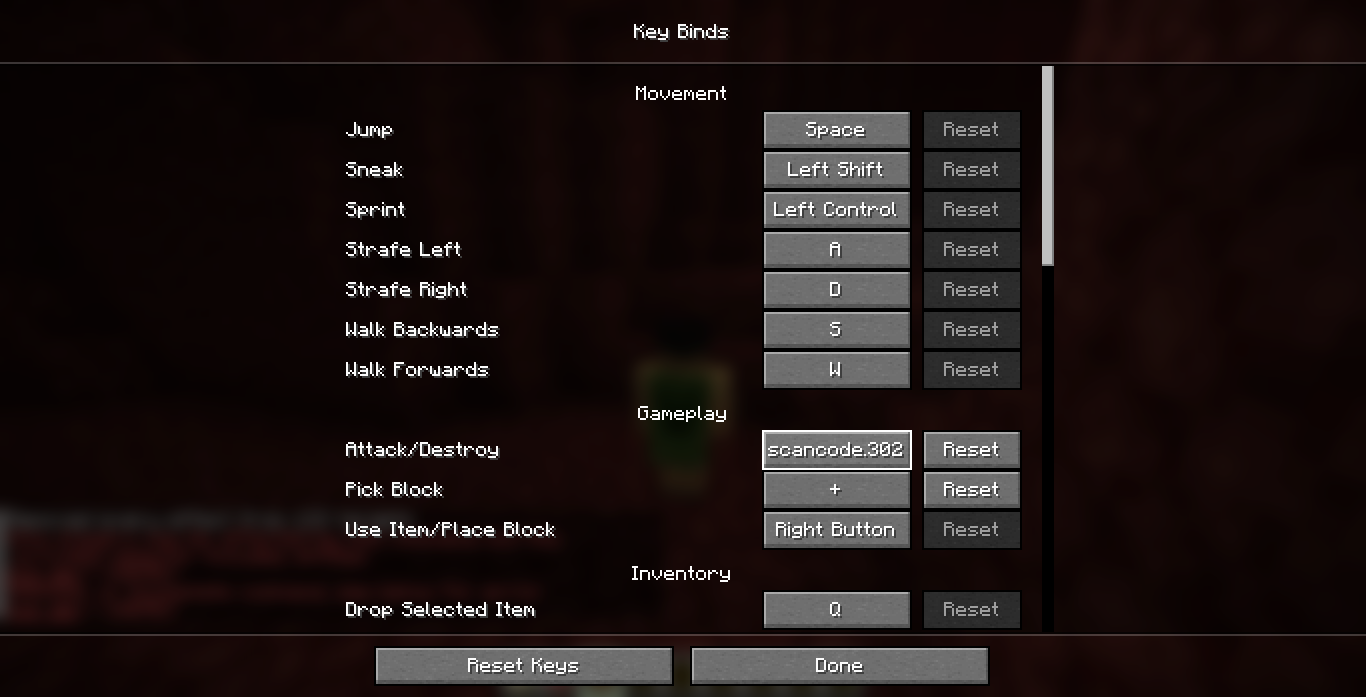
Several different media keys are bound to "scancode.number" on Windows
If you bind your volume key to a control, it will call it "scancode.256"
I found this bug when my Logitech mouse's side-buttons stopped working in minecraft, because they also lowered my PC volume.
Linked Issues
is duplicated by1
![[Mod] ampolive](../../../data/avatars/users/18949.svg)



Created Issue:
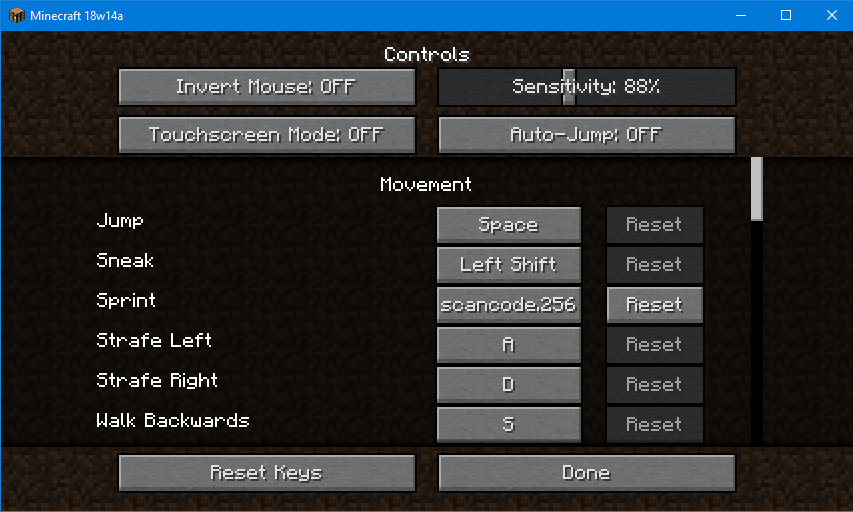
"MOUSE4" and "MOUSE5" are detected as "scancode.256" in the Controls
I have binded my side button - MOUSE4 to Sprint in the control settings, in previous minecraft versions.
In this snapshot I noticed my sprint key suddenly didn't work, but it instead lowered my PC volume, like the button normally does when I'm not in-game.
When I rebinded my Sprint to that button again, it was called "scancode.256" instead for some reason. After testing it in game, the sprint worked but it still lowered my pc volume, so if I sprinted it would basically mute my audio.
Problem: I can't bind my sprint to mouse4 because it will mute my game.
How to reproduce: Bind your mouse's mouse4/5 sidebutton to a control, the button name will be "scancode.256" and maybe it will also lower your pc volume too.
Attachments1
I have binded my side button - MOUSE4 to Sprint in the control settings, in previous minecraft versions.
In this snapshot I noticed my sprint key suddenly didn't work, but it instead lowered my PC volume, like the button normally does when I'm not in-game.
When I rebinded my Sprint to that button again, it was called "scancode.256" instead for some reason. After testing it in game, the sprint worked but it still lowered my pc volume, so if I sprinted it would basically mute my audio.
Problem: I can't bind my sprint to mouse4 because it will mute my game.
How to reproduce: Bind your mouse's mouse4/5 sidebutton to a control, the button name will be "scancode.256" and maybe it will also lower your pc volume too.
I have binded my side button - MOUSE4 to Sprint in the control settings, in previous minecraft versions.
In this snapshot I noticed my sprint key suddenly didn't work, but it instead lowered my PC volume, like the button normally does when I'm not in-game.
When I rebinded my Sprint to that button again, it was called "scancode.256" instead for some reason. After testing it in game, the sprint worked but it still lowered my pc volume, so if I sprinted it would basically mute my audio.
Problem: I can't bind my sprint to mouse4 because it will mute my game.
How to reproduce: Bind your mouse's mouse4/5 sidebutton to a control, the button name will be "scancode.256" and maybe it will also lower your pc volume too.
I have binded my side button - MOUSE4 to Sprint in the control settings, in previous minecraft versions.
In this snapshot I noticed my sprint key suddenly didn't work, but it instead lowered my PC volume, like the button normally does when I'm not in-game.
When I rebinded my Sprint to that button again, it was called "scancode.256" instead for some reason. After testing it in game, the sprint worked but it still lowered my pc volume, so if I sprinted it would basically mute my audio.
Problem: I can't bind my sprint to mouse4 because
it will mute my game.How to reproduce: Bind your mouse's mouse4/5 sidebutton to a control, the button name will be "scancode.256" and maybe it will also lower your pc volume too.
I have binded my side button - MOUSE4 to Sprint in the control settings, in previous minecraft versions.
In this snapshot I noticed my sprint key suddenly didn't work, but it instead lowered my PC volume, like the button normally does when I'm not in-game.
When I rebinded my Sprint to that button again, it was called "scancode.256" instead for some reason. After testing it in game, the sprint worked but it still lowered my pc volume, so if I sprinted it would basically mute my audio.
Problem: I can't bind my sprint to mouse4 because then sprinting will mute my game.
How to reproduce: Bind your mouse's mouse4/5 sidebutton to a control, the button name will be "scancode.256" and maybe it will also lower your pc volume too.
I have binded my side button - MOUSE4 to Sprint in the control settings, in previous minecraft versions.
In this snapshot I noticed my sprint key suddenly didn't work, but it instead lowered my PC volume, like the button normally does when I'm not in-game.
When I rebinded my Sprint to that button again, it was called "scancode.256" instead for some reason. After testing it in game, the sprint worked but it still lowered my pc volume, so if I sprinted it would basically mute my audio.
My Problem: I can't bind my sprint to mouse4 because then sprinting will mute my game.
How to reproduce: Bind your mouse's mouse4/5 sidebutton to a control, the button name will be "scancode.256" and maybe it will also lower your pc volume too.
I have binded my side button - MOUSE4 to Sprint in the control settings, in previous minecraft versions.
In this snapshot I noticed my sprint key suddenly didn't work, but it instead lowered my PC volume, like the button normally does when I'm not in-game.
When I rebinded my Sprint to that button again, it was called "scancode.256" instead for some reason. After testing it in game, the sprint worked but it still lowered my pc volume, so if I sprinted it would basically mute my audio.
My Problem: I can't bind my sprint to mouse4 because then sprinting will mute my game.
How to reproduce: Bind your mouse's mouse4/5 sidebutton to a control, the button name will be "scancode.256" and maybe it will also lower your pc volume too.
I have binded my side button - MOUSE4 to Sprint in the control settings, in previous minecraft versions.
In this snapshot I noticed my sprint key suddenly didn't work, but it instead lowered my PC volume, like the button normally does when I'm not in-game.
When I rebinded my Sprint to that button again, it was called "scancode.256" instead for some reason. After testing it in game, the sprint worked but it still lowered my pc volume, so if I sprinted it would basically mute my audio.
I can't bind my sprint to mouse4 because then sprinting will mute my game.
How to reproduce: Bind your mouse's mouse4/5 sidebutton to a control, the button name will be "scancode.256" and maybe it will also lower your pc volume too.
I have binded my side button - MOUSE4 to Sprint in the control settings, in previous minecraft versions.
In this snapshot I noticed my sprint key suddenly didn't work, but it instead lowered my PC volume, like the button normally does when I'm not in-game.
When I rebinded my Sprint to that button again, it was called "scancode.256" instead for some reason. After testing it in game, the sprint worked but it still lowered my pc volume, so if I sprinted it would basically mute my audio.
I can't bind my sprint to mouse4 because then sprinting will mute my game.
How to reproduce: Bind your mouse's mouse4/5 sidebutton to a control, the button name will be "scancode.256" and maybe it will also lower your pc volume too.
I have binded my side button - MOUSE4 to Sprint in the control settings, in previous minecraft versions.
In this snapshot I noticed my sprint key suddenly didn't work, but it instead lowered my PC volume, like the button normally does when I'm not in-game.
When I rebinded my Sprint to that button again, it was called "scancode.256" instead for some reason. After testing it in game, the sprint worked but it still lowered my pc volume, so if I sprinted it would basically mute my audio.
How to reproduce: Bind your mouse's mouse4/5 sidebutton to a control, the button name will be "scancode.256" and
maybe it willalso lower your pc volume too.I have binded my side button - MOUSE4 to Sprint in the control settings, in previous minecraft versions.
In this snapshot I noticed my sprint key suddenly didn't work, but it instead lowered my PC volume, like the button normally does when I'm not in-game.
When I rebinded my Sprint to that button again, it was called "scancode.256" instead for some reason. After testing it in game, the sprint worked but it still lowered my pc volume, so if I sprinted it would basically mute my audio.
How to reproduce: Bind your mouse's mouse4/5 sidebutton to a control, the button name will be "scancode.256", and using it ingame might also lower your pc volume too.
![[Mod] violine1101](../../../data/avatars/users/92858.png)
"MOUSE4" and "MOUSE5"are detected as "scancode.256" in the ControlsVolume keys are detected as "scancode.256" in the Controls
relates to
I have binded my side button - MOUSE4 to Sprint in the control settings, in previous minecraft versions.
In this snapshot I noticed my sprint key suddenly didn't work, but it instead lowered my PC volume, like the button normally does when I'm not in-game.
When I rebinded my Sprint to that button again, it was called "scancode.256" instead for some reason. After testing it in game, the sprint worked but it still lowered my pc volume, so if I sprinted it would basically mute my audio.
How to reproduce: Bind your mouse's mouse4/5 sidebutton
to a control,the button name will be "scancode.256", and using it ingame might also lower your pc volume too.I have binded my side button - MOUSE4 to Sprint in the control settings, in previous minecraft versions.
In this snapshot I noticed my sprint key suddenly didn't work, but it instead lowered my PC volume, like the button normally does when I'm not in-game.
When I rebinded my Sprint to that button again, it was called "scancode.256" instead for some reason. After testing it in game, the sprint worked but it still lowered my pc volume, so if I sprinted it would basically mute my audio.
How to reproduce: Bind your mouse's mouse4/5 sidebutton key to something, and the button name will be "scancode.256".
Now using it might also lower your pc volume.
I have binded my side button - MOUSE4 to Sprint in the control settings, in previous minecraft versions.
In this snapshot I noticed my sprint key suddenly didn't work, but it instead lowered my PC volume, like the button normally does when I'm not in-game.
When I rebinded my Sprint to that button again, it was called "scancode.256" instead for some reason. After testing it in game, the sprint worked but it still lowered my pc volume, so if I sprinted it would basically mute my audio.
How to reproduce: Bind your mouse's mouse4/5 sidebutton key to something, and the button name will be "scancode.256".
Now
using it might alsoloweryour pc volume.I have binded my side button - MOUSE4 to Sprint in the control settings, in previous minecraft versions.
In this snapshot I noticed my sprint key suddenly didn't work, but it instead lowered my PC volume, like the button normally does when I'm not in-game.
When I rebinded my Sprint to that button again, it was called "scancode.256" instead for some reason. After testing it in game, the sprint worked but it still lowered my pc volume, so if I sprinted it would basically mute my audio.
How to reproduce: Bind your mouse's mouse4/5 sidebutton key to something, and the button name will be "scancode.256".
Now pressing it might also change your pc volume.
I have binded my side button - MOUSE4 to Sprint in the control settings, in previous minecraft versions.
In this snapshot I noticed my sprint key suddenly didn't work, but it instead lowered my PC volume, like the button normally does when I'm not in-game.
When I rebinded my Sprint to that button again, it was called "scancode.256" instead for some reason. After testing it in game, the sprint worked but it still lowered my pc volume, so if I sprinted it would basically mute my audio.
How to reproduce: Bind your mouse's mouse4/5 sidebutton key to something, and the button name will be "scancode.256".
Now pressing
itmight also change your pc volume.I have binded my side button - MOUSE4 to Sprint in the control settings, in previous minecraft versions.
In this snapshot I noticed my sprint key suddenly didn't work, but it instead lowered my PC volume, like the button normally does when I'm not in-game.
When I rebinded my Sprint to that button again, it was called "scancode.256" instead for some reason. After testing it in game, the sprint worked but it still lowered my pc volume, so if I sprinted it would basically mute my audio.
How to reproduce: Bind your mouse's mouse4/5 sidebutton key to something, and the button name will be "scancode.256".
Now pressingthe key might also change your pc volume. I personally am using the Logitech G302 mouse.
I have binded my side button - MOUSE4 to Sprint in the control settings, in previous minecraft versions.
In this snapshot I noticed my sprint key suddenly didn't work, but it instead lowered my PC volume, like the button normally does when I'm not in-game.
When I rebinded my Sprint to that button again, it was called "scancode.256" instead for some reason. After testing it in game, the sprint worked but it still lowered my pc volume, so if I sprinted it would basically mute my audio.
How to reproduce: Bind your mouse's mouse4/5 sidebutton key to something, and the button name will be "scancode.256".
Now pressingthe key might also change your pc volume.
I personally am using the Logitech G302 mouse.
I have binded my side button - MOUSE4 to Sprint in the control settings, in previous minecraft versions.
In this snapshot I noticed my sprint key suddenly didn't work, but it instead lowered my PC volume, like the button normally does when I'm not in-game.
When I rebinded my Sprint to that button again, it was called "scancode.256" instead for some reason. After testing it in game, the sprint worked but it still lowered my pc volume, so if I sprinted it would basically mute my audio.
I am using the Logitech G302 mouse.
How to reproduce: Bind your mouse's mouse4/5 sidebutton key to something, and the button name will be "scancode.256".
Now pressingthe key might also change your pc volume.
I have binded my side button - MOUSE4 to Sprint in the control settings, in previous minecraft versions.
In this snapshot I noticed my sprint key suddenly didn't work, but it instead lowered my PC volume, like the button normally does when I'm not in-game.
When I rebinded my Sprint to that button again, it was called "scancode.256" instead for some reason. After testing it in game, the sprint worked but it still lowered my pc volume, so if I sprinted it would basically mute my audio.
I am using the Logitech G302 mouse.
How to reproduce: Bind your mouse's mouse4/5 sidebutton key to something, and the button name will be "scancode.256".
Now pressingthe key might also change your pc volume.
I have binded my side button - MOUSE4 to Sprint in the control settings, in previous minecraft versions.
In this snapshot I noticed my sprint key suddenly didn't work, but it instead lowered my PC volume, like the button normally does when I'm not in-game.
When I rebinded my Sprint to that button again, it was called "scancode.256" instead for some reason. After testing it in game, the sprint worked but it still lowered my pc volume, so if I sprinted it would basically mute my audio.
I am using the Logitech G302 mouse.
How to reproduce: Bind your mouse's mouse4/5 sidebutton key to something, and the button name will be "scancode.256".
Pressing the key might also change your pc volume depending on your mouse.
I have binded my side button - MOUSE4 to Sprint in the control settings, in previous minecraft versions.
In this snapshot I noticed my sprint key suddenly didn't work, but it instead lowered my PC volume, like the button normally does when I'm not in-game.
When I rebinded my Sprint to that button again, it was called "scancode.256" instead for some reason. After testing it in game, the sprint worked but it still lowered my pc volume, so if I sprinted it would basically mute my audio.
I am using the Logitech G302 mouse.
How to reproduce: Bind your mouse's mouse4/5 sidebutton key to something, and the button name will be "scancode.256".
Pressing the key might also changeyourpcvolumedepending on your mouse.
If you bind your volume key to a control, it will call it "scancode.256"
I found this bug when my Logitech mouse's side-buttons stopped working in minecraft, because they also lowered my PC volume.
![[Mojang] Nathan Adams](../../../data/assets/gravatar/dinnerbone.png)
relates to
Volume keys are detected as "scancode.256" in the ControlsVolume keys are detected as "'SOH'\'SOH']'SOH'" in the Controls
Volume keys are detected as "'SOH'\'SOH']'SOH'" in the ControlsSome keys are detected as "'SOH'\'SOH']'SOH'" in the Controls
![[Mod] Michael Wobst](../../../data/avatars/users/37868.png)
![[Helper] Johnibur](../../../data/avatars/users/28381.png)
is duplicated by
![[Bot] Arisa](../../../data/avatars/users/43007.png)
![[Mod] turbo](../../../data/avatars/users/92867.png)
Some keys are detected as "'SOH'\'SOH']'SOH'" in the ControlsSeveral different media keys are bound to "scancode.256" on Windows
Several different media keys are bound to "scancode.256" on WindowsSeveral different media keys are bound to "scancode.[number]" on Windows
Several different media keys are bound to "scancode.[number]" on Windows
![[Mod] Jiingy](../../../data/avatars/users/91802.png)
Please check if MC-127939 describes your issue. If not, please provide proper reproduction steps.
Thank you for your report!
We're tracking this issue in MC-127939, so this ticket is being resolved and linked as a duplicate.
If you would like to add a vote and any extra information to the main ticket it would be appreciated.
If you haven't already, you might like to make use of the search feature to see if the issue has already been mentioned.
Quick Links:
📓 Bug Tracker Guidelines – 💬 Community Support – 📧 Mojang Support
📓 Project Summary – ✍️ Feedback and Suggestions – 📖 Game Wiki
Are you still able to reproduce this issue in 1.21? I am unable, as I seem to run into MC-127939 instead on my machine (Windows 11).
When you try to assign this key to a keybind in the controls settings, what does show up? For me it's "scancode.256" (see MC-127939).
I can assign Mouse 4 and Mouse 5 just fine, but the scancode.256 appears if I use any of the volume controls on my keyboard.
@violine1101 I think for me it has something to do with the fact that my mouse4 and mouse5 also control my volume outside of games. It hasn't done that ingame until this snapshot, now that they appear as scancode.256
I couldn't get scancode.256 to show up, but this showed up instead:
This seems to have extended to several keys, including all media keys as well as Mouse6 and Mouse7 for me, and the thing shown in the Controls settings is even weirder now.
Can confirm in 1.17.1 Release Candidate 1.
Can confirm that I'm getting this issue in 1.17.1, specifically when attempting to assign my spacebar to any control.
Can confirm in 21w44a.
Worth noting that SOH is Start of Heading, ␁, which is codepoint $01, which may be an indicator that the game is reading garbage data. in all, the string "␁\␁]␁" is $01 5c 01 5b 01. This string was mentioned for scancode.310 in this MinecraftForum post, which went unanswered, back in 1.8.9. RShift is 229 according to this table, however this user's keyboard seems to be nonstandard, as they were able to get RShift recognized by holding Mouse1 at the same time they hit the key. Scancode 310 should be a modifier key according to the earlier table, however that table seems to conflict with the data gathered for MC-170376, so this should be taken with a grain of salt. Code analysis will need to be done to disambiguate whether the game is actually referring to scancodes, or is erroneously referring to keycodes as scancodes.
I can't get SOHSOHSOH to show up at all in the recent versions I've tested (1.20.2 and snapshots for 1.20.3), but scancode.256 has shown up plenty of times. Can this ticket be renamed back?
The ownership of this report can be given to anyone who wants it by the way, as I'm not personally updating it
Was a fix ever found for this? Never had the problem before, but now my headphone volume wheel is being recognized as a key, and when not bound to anything, just going back out of menus