 MC-12989
Chat from a server connected to using direct connect sometimes remains in chat when joining another server.
This report is about chat history remaining after switching servers. It is not about chat and other game elements, such as sun position or tab list of multiple servers being intermixed. That issue is likely MC-74984.
The bug
When I was on another server which I had joined through direct connect I was kicked when the owner's internet went out. And I joined my friend's server through direct and came to find that the other server's chat had remained in my chat.
Linked Issues


Created Issue:
Chat from a server connected to using direct connect sometimes remains in chat when joining another server.
When I was on another server which I had joined through direct connect I was kicked when the owner's internet went out. And I joined my friend's server through direct and came to find that the other server's chat had remained in my chat.
Environment
Windows 7 Ultimate

is duplicated by


is duplicated by
is duplicated by
is duplicated by
relates to
is duplicated by
is duplicated by
![[Mod] Neko](../../../data/avatars/users/92901.png)

is duplicated by
![[Mojang] Nathan Adams](../../../data/assets/gravatar/dinnerbone.png)
![[Mod] Asteraoth](../../../data/avatars/users/92886.png)
is duplicated by
latest.log
![[Bot] Arisa](../../../data/avatars/users/43007.png)

is duplicated by
![[Mod] Michael Wobst](../../../data/avatars/users/37868.png)
Confusion noteThis report is about chat history remaining after switching servers. It is not about chat and other game elements, such as sun position or tab list of multiple servers being intermixed. That issue is likely
MC-74984.The bug
When I was on another server which I had joined through direct connect I was kicked when the owner's internet went out. And I joined my friend's server through direct and came to find that the other server's chat had remained in my chat.
I've reproduced this issue on Minecraft 1.16.4. The chat, bossbar and tab screen are from the previous server, while the world, gamemode and position are of the current server (possibly other stuff belongs to one server or the other, this is what I could find so far; previous server is the server I joined, but quickly cancelled and current server is the server I joined after the cancellation of the first server). A side effect of this glitch is that I'm in "noclip"-mode: I can go through the terrain as if it's not there, while still seeing the terrain and being in creative mode.
Reproduction steps:
- Join one server via Direct Connection and quickly press the Cancel button
- Join a different server from the server list and wait until you're in the server
- The two servers are merged in the way as stated above
While doing this I had the client game log screen opened (enabled from within the launcher), so the game log printed there can be found in the latest.log I've attached to this issue. I've also taken multiple screenshots while in this mode which I've also attached, showing various effects caused by this.
The "noclip"-mode allowing me to go directly into the ground
The chat: the top lines are from the previous server, while everything below is from the current server
The tab screen from the previous server
The bossbar from the previous serverIn all these images, the world that can be seen in the background is of the current world.
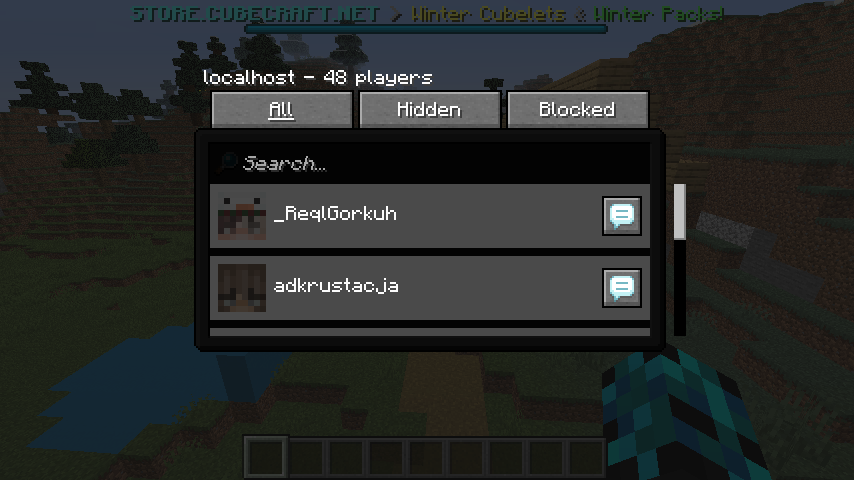
Edit: Some more information. I cannot interact with the world in any way: I cannot place or breaks blocks, spawn entities via spawn eggs, bonemeal grass blocks, use flint and steal, shoot arrows (the animation plays, but no arrow is shot), use a trident or interact with doors, beds, chests and shulker boxes; hitboxes for blocks are missing. The client does seem to know where blocks are, because when trying to use a spawn egg, it correctly shows the arm swing animation when looking at a block, while not showing this animation when right clicking the air. Chunks don't load as normal: I can move through the world, but after a certain amount of chunks, they stop loading completely. When going too far outwards (roughly half an unloaded chunk), all chunks that were visible disappear completely. The permissions from the previous server also carry over to this one, I am operator level 4 in the current server, yet I can't execute commands which require such an op level. The only commands I can use are commands from the previous server. Trying to execute those commands doesn't (visually) do anything. Chatting doesn't show my chat message. The social interactions screen also shows the players from the previous server, but shows the current server as the host name.
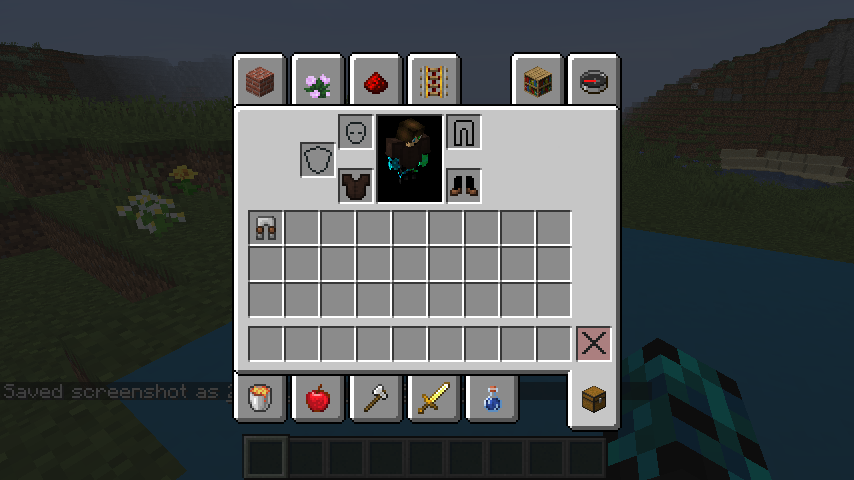
My armor of the previous server is also transferred over to this server. I've amended a screenshot to show this. (The effects are from the current server after eating an enchanted golden apple, this is as intended.)
After rejoining my armor items and items in my inventory (I put one piece of armor in my normal inventory, left two in my armor slots) stay in my inventory. This is potentially problematic, as then I can transfer armor from one server to another. (I could for example, get myself overpowered netherite armor from a creative server to a survival server.) This might warrant raising the priority of this issue or making this private.

this is not a duplicate to MC-12989
here, the client never disconects and the client is reciving the chat LIVE from the server. this means that if you go into a sp world, and then writing "say hello" then this will appear in my SP world chat: "[Server] hello". i repeat, the chat is updating live, not just carrying over from a server.
i want this issue reopened
Thank you for your report!
However, this issue is a Duplicate of MC-12989.
It has been linked to this report. If you have additional information, please add it to that report.
Please search before reporting, as it's likely that one exists already.
Quick Links:
📓 Issue Guidelines – 💬 Community Support – 📧 Customer Support – 📖 Game Wiki
Thank you for your report!
We're tracking this issue in MC-12989 and MC-74984, so this ticket is being resolved and linked as a duplicate.
If you would like to add a vote and any extra information to the main ticket it would be appreciated.
If you haven't already, you might like to make use of the search feature to see if the issue has already been mentioned.
Quick Links:
📓 Bug Tracker Guidelines – 💬 Community Support – 📧 Mojang Support
📓 Project Summary – ✍️ Feedback and Suggestions – 📖 Game Wiki
– I am a bot. This action was performed automatically! Please report any issues on Discord or Reddit
Moved from MC-12989
I've reproduced this issue on Minecraft 1.16.4. The chat, bossbar and tab screen are from the previous server, while the world, gamemode and position are of the current server (possibly other stuff belongs to one server or the other, this is what I could find so far; previous server is the server I joined, but quickly cancelled and current server is the server I joined after the cancellation of the first server). A side effect of this glitch is that I'm in "noclip"-mode: I can go through the terrain as if it's not there, while still seeing the terrain and being in creative mode.
Reproduction steps:
- Join one server via Direct Connection and quickly press the Cancel button
- Join a different server from the server list and wait until you're in the server
- The two servers are merged in the way as stated above
While doing this I had the client game log screen opened (enabled from within the launcher), so the game log printed there can be found in the latest.log I've attached to this issue. I've also taken multiple screenshots while in this mode which I've also attached, showing various effects caused by this.
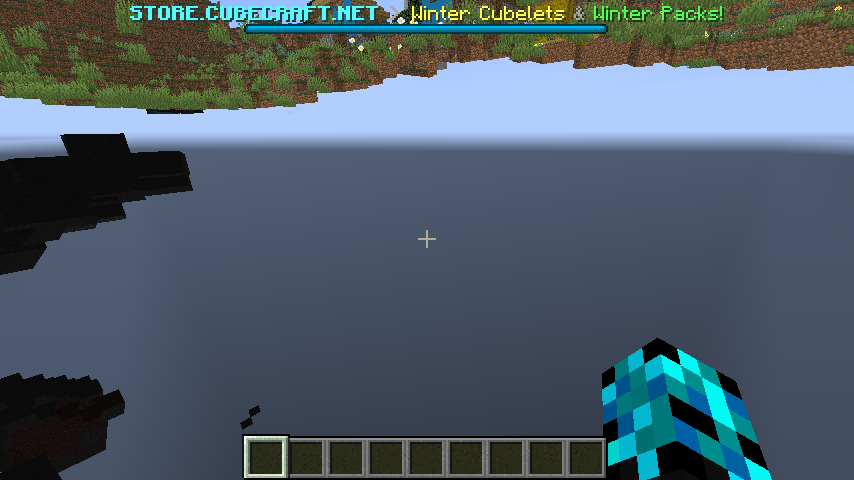
The "noclip"-mode allowing me to go directly into the ground
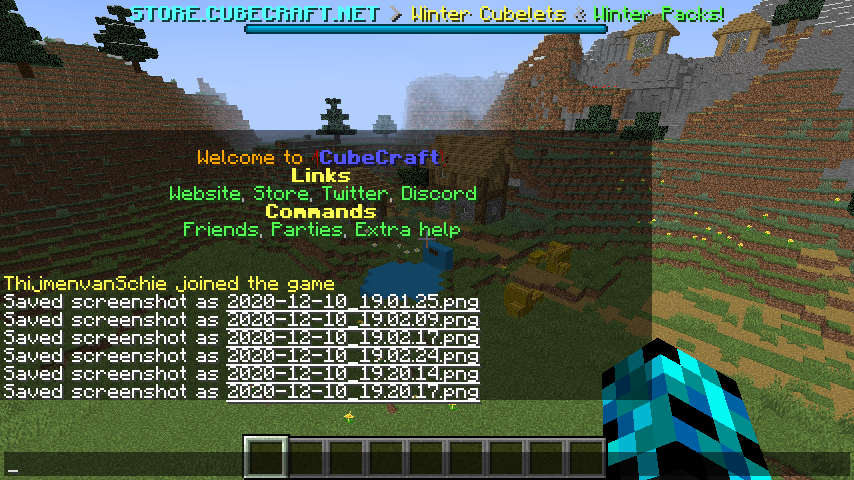
The chat: the top lines are from the previous server, while everything below is from the current server
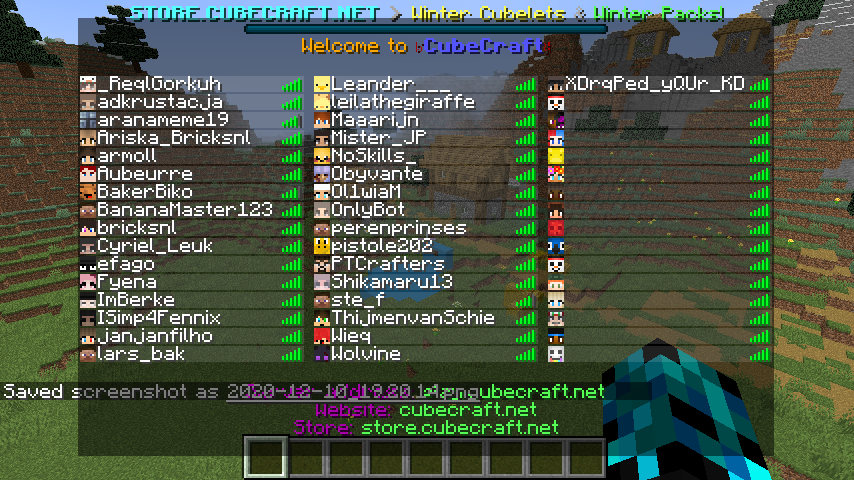
The tab screen from the previous server
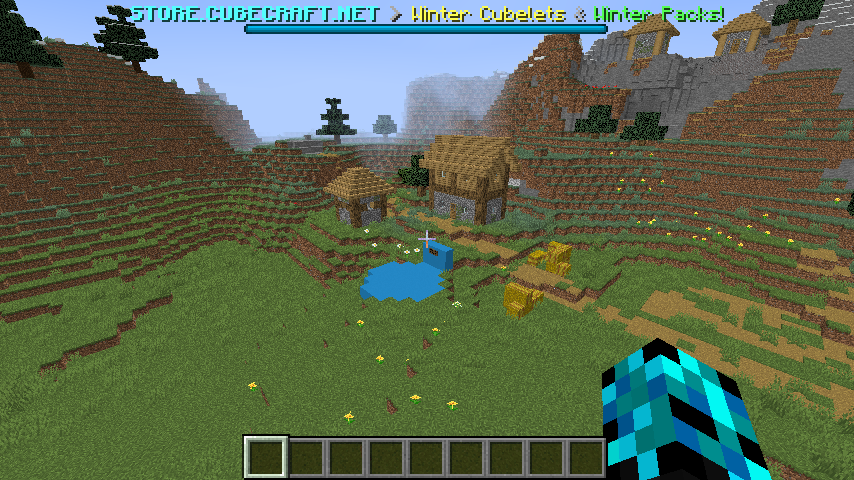
The bossbar from the previous server
In all these images, the world that can be seen in the background is of the current world.
Edit: Some more information. I cannot interact with the world in any way: I cannot place or breaks blocks, spawn entities via spawn eggs, bonemeal grass blocks, use flint and steal, shoot arrows (the animation plays, but no arrow is shot), use a trident or interact with doors, beds, chests and shulker boxes; hitboxes for blocks are missing. The client does seem to know where blocks are, because when trying to use a spawn egg, it correctly shows the arm swing animation when looking at a block, while not showing this animation when right clicking the air. Chunks don't load as normal: I can move through the world, but after a certain amount of chunks, they stop loading completely. When going too far outwards (roughly half an unloaded chunk), all chunks that were visible disappear completely. The permissions from the previous server also carry over to this one, I am operator level 4 in the current server, yet I can't execute commands which require such an op level. The only commands I can use are commands from the previous server. Trying to execute those commands doesn't (visually) do anything. Chatting doesn't show my chat message. The social interactions screen also shows the players from the previous server, but shows the current server as the host name.
My armor of the previous server is also transferred over to this server. I've amended a screenshot to show this. (The effects are from the current server after eating an enchanted golden apple, this is as intended.)

After rejoining my armor items and items in my inventory (I put one piece of armor in my normal inventory, left two in my armor slots) stay in my inventory. This is potentially problematic, as then I can transfer armor from one server to another. (I could for example, get myself overpowered netherite armor from a creative server to a survival server.) This might warrant raising the priority of this issue or making this private.
You mean that the chat history is not cleared when changing servers ?
If you get kicked from a server (like from the /stop command), when you join another server, your chat won't be cleared.
I can only confirm this. I currently test my first bukkit plugin on my local server and when i stop the server, and join any other server (can be the same) , the chat is not cleared and even the history (arrow up while typing) is still there.
But the chat will be cleared if you are kicked and then go to singleplayer.
this bug is not fixed in the newest snapshot
not fixed yet, but i can't edit it
Confirmed.
Connect to a server, stop the server (/stop command) and reconnect to a different server.
Is this still a concern in the current Minecraft version 1.8.1 Prerelease 3 / Launcher version 1.5.3 or later? If so, please update the affected versions in order to best aid Mojang ensuring bugs are still valid in the latest releases/pre-releases.
Confirmed for
my issue is marked as duplicate to this, but i want to say that this is not the same. on my issue the server chat was constantly updating, for example if i got killed in hardcore mode on an server, i go to single player, and the chat log does not stay, but the chat updates LIVE as if someone else was chatting in my sp world. i want my issue to be reopened or get an explanation why not.
mateusz drwal That is probably
MC-78113Confirmed for
Is this still an issue in the most recent versions (currently that is 1.10.2, or 16w42a) of Minecraft? If so, please update the affected versions and help us keeping this ticket updated from time to time.
Has been duplicated in 1.12.2 (
MC-121210)Cannot reproduce for 1.13.1.
Can someone please check, if this still applies to 1.15.2 or the latest 1.16 development snapshot (currently that is 20w07a)?
I found out about this and reproduce this glitch accidentally


I did this following
connect to server A * freeze*
click cancel * freeze *
connect to server B
and the result can be see my these screenshot
@Thanwa: Please try to reproduce it without any mods installed.
It appears this report was initially only about chat history remaining after switching servers, see this comment and this comment.
It was likely not about chat (and other things like sun position) being applied from two different servers intermixed, that is
MC-74984.@Stef van Schie, it sounds like the issue you are experiencing is also
MC-74984. Would it be alright for you to delete the screenshots you have attached here to not cause confusion regarding what this report is about?Is someone still experiencing chat history remaining after switching servers? E.g. after the first server was stopped using /stop and the second server was joined using Direct Connect?
Note that this report is not about chat history of servers appearing intermixed, that is
MC-74984.I've moved my comment and attachments over to
MC-74984, I'll delete them from here.