 MC-143614
Campfire item with "cooking" NBT heavily shakes in hand/off-screen, when CTRL+pick-blocked
The bug
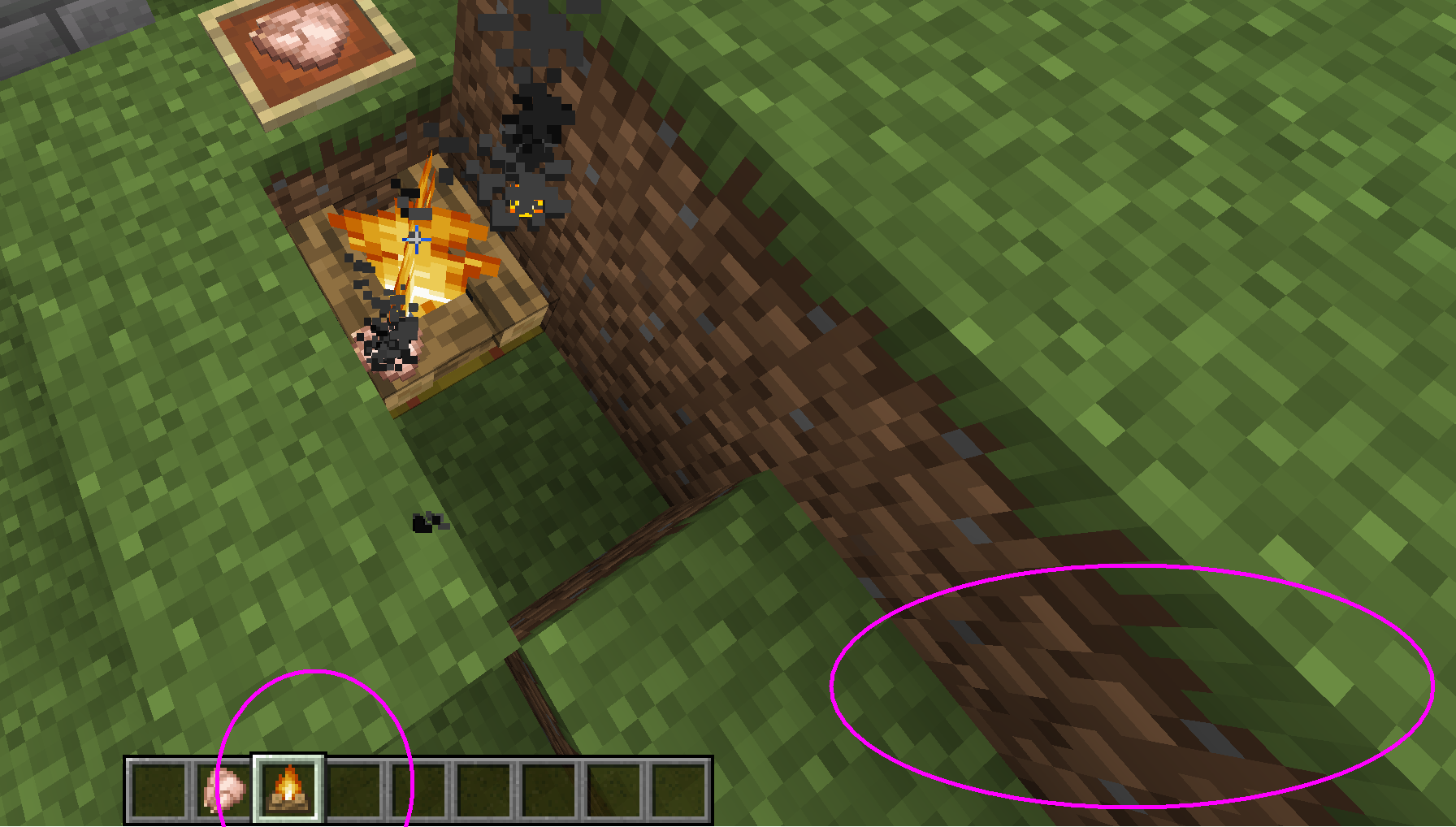
When you ctrl+pick-block a campfire that is cooking food, the NBT-containing campfire item model on your player character is shaking heavily and appears to be rendered outside the screen most of the time (when viewed in 1st person camera mode).
When you open the inventory screen or the cooking time expires, the effect wears off.
It appears that the constantly updating cooking time NBT on the item might be affecting the "new item selected in hotbar" arm animation.
How to reproduce
- Place a campfire and put some raw food on it
- CTRL+middle click the block
(observe how the item behaves in your hand for a while) - Open/close your inventory, it's now normal again
Linked Issues
- Fixed
![[Helper] Jack McKalling](../../../data/avatars/users/92859.png) [Helper] Jack McKalling
[Helper] Jack McKalling- 16
- 6
- Confirmed
 Normal
- Platform
- UI
- Creative
- campfire item-model pick-block
19w04b - 1.20.4
19w04b 19w05a 19w06a 19w07a 19w08b 19w09a 19w11a 19w11b 19w12a 19w12b 19w13a 19w13b 19w14a 19w14b 1.14-pre1 1.14-pre2 1.14-pre3 1.14-pre4 1.14-pre5 1.14 1.14.1-pre1 1.14.1-pre2 1.14.1 1.14.2 1.14.3-pre1 1.14.3-pre2 1.14.3-pre3 1.14.3-pre4 1.14.3 1.14.4-pre1 1.14.4-pre2 1.14.4-pre3 1.14.4-pre4 1.14.4-pre5 1.14.4-pre6 1.14.4-pre7 1.14.4 19w34a 19w35a 19w37a 19w38b 19w38a 19w39a 19w40a 19w41a 19w42a 19w44a 19w45a 19w45b 19w46a 19w46b 1.15-pre1 1.15-pre2 1.15-pre3 1.15-pre4 1.15-pre5 1.15-pre7 1.15 1.15.1 1.15.1-pre1 1.15.2-pre1 1.15.2-pre2 1.15.2 20w06a 20w07a 20w08a 20w09a 20w10a 20w11a 20w12a 20w13a 20w13b 20w14a 20w15a 20w16a 20w17a 20w18a 20w19a 20w20b 20w21a 20w22a 1.16-pre1 1.16-pre2 1.16-pre3 1.16-pre4 1.16-pre5 1.16-pre7 1.16-pre8 1.16-rc1 1.16 1.16.1 20w27a 20w28a 20w29a 20w30a 1.16.2-pre1 1.16.2-pre2 1.16.2-rc1 1.16.2-rc2 1.16.2 1.16.3-rc1 1.16.3 1.16.4-pre1 1.16.4-pre2 1.16.4-rc1 1.16.4 20w45a 20w46a 20w48a 20w49a 20w51a 21w03a 1.16.5 21w05a 21w05b 21w06a 21w07a 21w08b 21w10a 21w11a 21w13a 21w14a 21w15a 21w16a 21w17a 21w18a 21w19a 21w20a 1.17-rc2 1.17 1.17.1 1.18.1 1.18.2 22w14a 1.19.2 1.19.3 1.20.1 1.20.4- 24w09a
Created Issue:
Pick-block on cooking campfire glitches out the held item model
The bug
When you pick-block a campfire that is cooking food, the NBT campfire's item model on your player character will be glitching out wildly.
In contrast with the still item sprite of the non-NBT regular item, the item will be using the animated block model in your hand, it will move up and down irregularly, and will do all that until you open the inventory screen at which point the item will revert back to normal.
How to reproduce:
- Place a campfire and put some raw food on it
- CTRL+middle click the block
(observe how the item behaves in your hand)- Open/close your inventory, it's now normal again
Ctrl+Pick-block on cooking campfire glitches out the held item model
The bug
When you ctrl+pick-block a campfire that is cooking food, the NBT campfire's item model on your player character will be glitching out wildly.
In contrast with the still item sprite of the non-NBT regular item, the item will be using the animated block model in your hand, it will move up and down irregularly, and will do all that until you open the inventory screen at which point the item will revert back to normal.
How to reproduce:
- Place a campfire and put some raw food on it
- CTRL+middle click the block
(observe how the item behaves in your hand)- Open/close your inventory, it's now normal again
The bug
When you ctrl+pick-block a campfire that is cooking food, the NBT campfire's item model on your player character will be glitching out wildly.
In contrast with the still item sprite of the non-NBT regular item, the item will be using the animated block model in your hand, it will move up and down irregularly, and will do all that until you open the inventory screen at which point the item will revert back to normal.
How to reproduce:
- Place a campfire and put some raw food on it
- CTRL+middle click the block
(observe how the item behaves in your hand)- Open/close your inventory, it's now normal again
The bug
When you ctrl+pick-block a campfire that is cooking food, the NBT campfire's item model on your player character will be glitching out wildly.
In contrast with the still item sprite of the non-NBT regular item, the item will be using the animated block model in your hand (it will also move up and down irregularly), until you open the inventory screen at which point the item will revert back to normal.
How to reproduce:
- Place a campfire and put some raw food on it
- CTRL+middle click the block
(observe how the item behaves in your hand)- Open/close your inventory, it's now normal again
Relates to:
MC-142372
The bug
When you ctrl+pick-block a campfire that is cooking food, the NBT campfire's item model on your player character will be glitching out wildly.
In contrast with the still item sprite of the
non-NBTregular item, the item will be using the animated block model in your hand (it will also move up and down irregularly), until you open the inventory screen at which point the item will revert back to normal.How to reproduce:
- Place a campfire and put some raw food on it
- CTRL+middle click the block
(observe how the item behaves in your hand)- Open/close your inventory, it's now normal again
Relates to:
MC-142372The bug
When you ctrl+pick-block a campfire that is cooking food, the NBT campfire's item model on your player character will be glitching out wildly.
In contrast with the still item sprite of the regular item, the NBT item will be using the animated block model in your hand (it will also move up and down irregularly), until you open the inventory screen at which point the item will revert back to normal.
How to reproduce:
- Place a campfire and put some raw food on it
- CTRL+middle click the block
(observe how the item behaves in your hand)- Open/close your inventory, it's now normal again
Relates to:
MC-142372
![[Mod] Michael Wobst](../../../data/avatars/users/37868.png)
The bug
When you ctrl+pick-block a campfire that is cooking food, the NBT campfire's item model on your player character will be glitching out wildly.
In contrast with the still item sprite of the regular item, the NBT item will be using the animated block model in your hand (it will also move up and down irregularly), until you open the inventory screen at which point the item will revert back to normal.
How to reproduce
:
- Place a campfire and put some raw food on it
- CTRL+middle click the block
(observe how the item behaves in your hand)- Open/close your inventory, it's now normal again
Relates to:
MC-142372
The bug
When you ctrl+pick-block a campfire that is cooking food, the NBT campfire's item model on your player character will be glitching out wildly.
In contrast with the still item sprite of the regular item, the NBT item will be using the animated block model in your hand (it will also move up and down irregularly), until you open the inventory screen at which point the item will revert back to normal.
How to reproduce
- Place a campfire and put some raw food on it
- CTRL+middle click the block
(observe how the item behaves in your hand)- Open/close your inventory, it's now normal again
Relates to:
MC-142372
relates to
![[Mojang] Cory Scheviak](../../../data/avatars/users/92893.png) [Mojang] Cory Scheviak
[Mojang] Cory Scheviak![[Mojang] Nathan Adams](../../../data/assets/gravatar/dinnerbone.png)
![[Mojang] Adrian Östergård](../../../data/assets/gravatar/nighter.jpeg)
![[Mod] Asteraoth](../../../data/avatars/users/92886.png)
The bug
When you ctrl+pick-block a campfire that is cooking food, the NBT campfire's item model on your player character will be glitching out wildly.
In contrast with the still item sprite of the regular item, the NBT item will be using the animated block model in your hand (it will also move up and down irregularly), until you open the inventory screen at which point the item will revert back to normal, or if the cooking time expires.
How to reproduce
- Place a campfire and put some raw food on it
- CTRL+middle click the block
(observe how the item behaves in your hand)- Open/close your inventory, it's now normal again
The bug
When you ctrl+pick-block a campfire that is cooking food, the NBT campfire
'sitem model on your player characterwill be glitching out wildly.In contrast with the still item sprite of the regular item, the NBT item will be using the animated block model in your hand (it will also move up and down irregularly), until you open the inventory screen at which point the item will revert back to normal, or if the cooking time expires.
How to reproduce
- Place a campfire and put some raw food on it
- CTRL+middle click the block
(observe how the item behaves in your hand)- Open/close your inventory, it's now normal again
The bug
When you ctrl+pick-block a campfire that is cooking food, the NBT-containing campfire item model on your player character is shaking heavily and appears to be rendered outside the screen most of the time (when viewed in 1st person camera mode).
When you open the inventory screen or the cooking time expires, the effect wears off.
It appears that the constantly updating cooking time NBT on the item might be affecting the "new item selected in hotbar" arm animation.
How to reproduce
- Place a campfire and put some raw food on it
- CTRL+middle click the block
(observe how the item behaves in your hand for a while)- Open/close your inventory, it's now normal again
Ctrl+Pick-block on cooking campfire glitches out the held item modelCampfire item with "cooking" NBT heavily shakes in hand, when CTRL+pick-blocked
Campfire item with "cooking" NBT heavily shakes/off-screen in hand, when CTRL+pick-blocked
Campfire item with "cooking" NBT heavily shakes/off-screenin hand, when CTRL+pick-blockedCampfire item with "cooking" NBT heavily shakes in hand/off-screen, when CTRL+pick-blocked
![[Mod] violine1101](../../../data/avatars/users/92858.png)
ctrl pick block campfire offscreen.png

![[Helper] Johnibur](../../../data/avatars/users/28381.png)

![[Mojang] slicedlime](../../../data/assets/gravatar/slicedlime.jpeg)
![[Mod] redstonehelper](../../../data/avatars/users/10122.svg)
![[Mod] ampolive](../../../data/avatars/users/18949.svg)
I cannot reproduce this issue in 1.17.1, though it is marked as affected.
![[Mod] Avoma](../../../data/avatars/users/86198.png)
![[Mod] j_p_smith](../../../data/avatars/users/92851.png)
The Bug
If you Ctrl + Pick block on a campfire that has food cooking on it, the copy of the item in the inventory will keep updating its NBT during the time the actual original block is cooking food.
When the original campfire block has finished cooking, if the copied item is placed it will instantly drop the (also copied) food on it.
During this cooking time the copied item also heavily shakes in your hand (or is constantly off-screen if your computer is fast). This part of the issue is tracked in MC-143614
How to reproduce
- Place a campfire
- Right-click it with raw food to start cooking it
- In creative mode, press CTRL while you middle-click the campfire with an empty hand (this copies the block along with its NBT)
- Wait until the placed campfire has finished cooking and a cooked food item drops from it
- Now place the copy from your hand next to it
→ Notice a second cooked food item instantly drops from the new block
Related by MC-143614, as explained in above message
It fixes when you place and then break it for some reason
I cannot tell anymore if the item in your hand is animating, because in recent versions it shakes so heavily and is rendered offscreen so much, I can ever only observe like a single frame in succession.
the item in the hand seems to be updating every tick that the food on the campfire cooks. after it finishes cooking, it stops shaking
Can confirm in 1.18.1.
Can confirm in 1.18.2.
Can confirm in 1.19.2.
Why even is the item processing the block entity? It's quite unique behavior (others don't do this as far as I can tell) and aside from ctrl pick block, it's not possible to get campfire items with that NBT.