 MC-171859
The back faces of leaves do not render
The resource pack attached to MC-237955 offers a complete fix for this issue. Mojang have my full permission to (and are encouraged to) replace the affected vanilla model files with the contents of the resource pack.
The bug
The back faces of leaves blocks do not render. This results in single leaves blocks looking rather odd, as only the faces closest to the player are visible, making it look like the block only has one to three faces total.
This can be considered a parity issue, as leaves in Bedrock Edition are not subject to this.
How to reproduce
- Obtain leaves via your preferred method
- Place down a single, isolated leaves block of any type
- Observe how many faces are visible. Depending on the view direction, between one and three faces are able to be seen.
- Now go around to the other side of the leaves block
- Note how there are indeed faces there as well, despite the original view direction implying there are no faces with leaves.
Expected result
These back faces of leaves would be visible from all faces.
Actual result
The leaves block just doesn't show the back faces, which looks very strange in isolation.
How to fix
The resource pack attached to MC-237955 fixes this issue completely. A new "hollow cube" template model is created by it, based on the old powder snow model. Powder snow, spawners (MC-169969) and both types of azalea leaves are all pointed to this model, resulting in them having internal faces. A tinted version of the model is also added, which the six remaining types of leaves use to have internal planes.
If this fix is used, it may be worth changing the culling behaviour of leaves to make outside faces be culled by adjacent leaves, while leaving the inside faces as-is, as to make large amounts of leaves not appear excessively dense. On fast graphics mode, it may be advisable to make the inside faces not render at all, in addition to culling the outside faces like normal blocks (MC-179383).
Linked Issues
is duplicated by1
 Low
Low MCPE-125963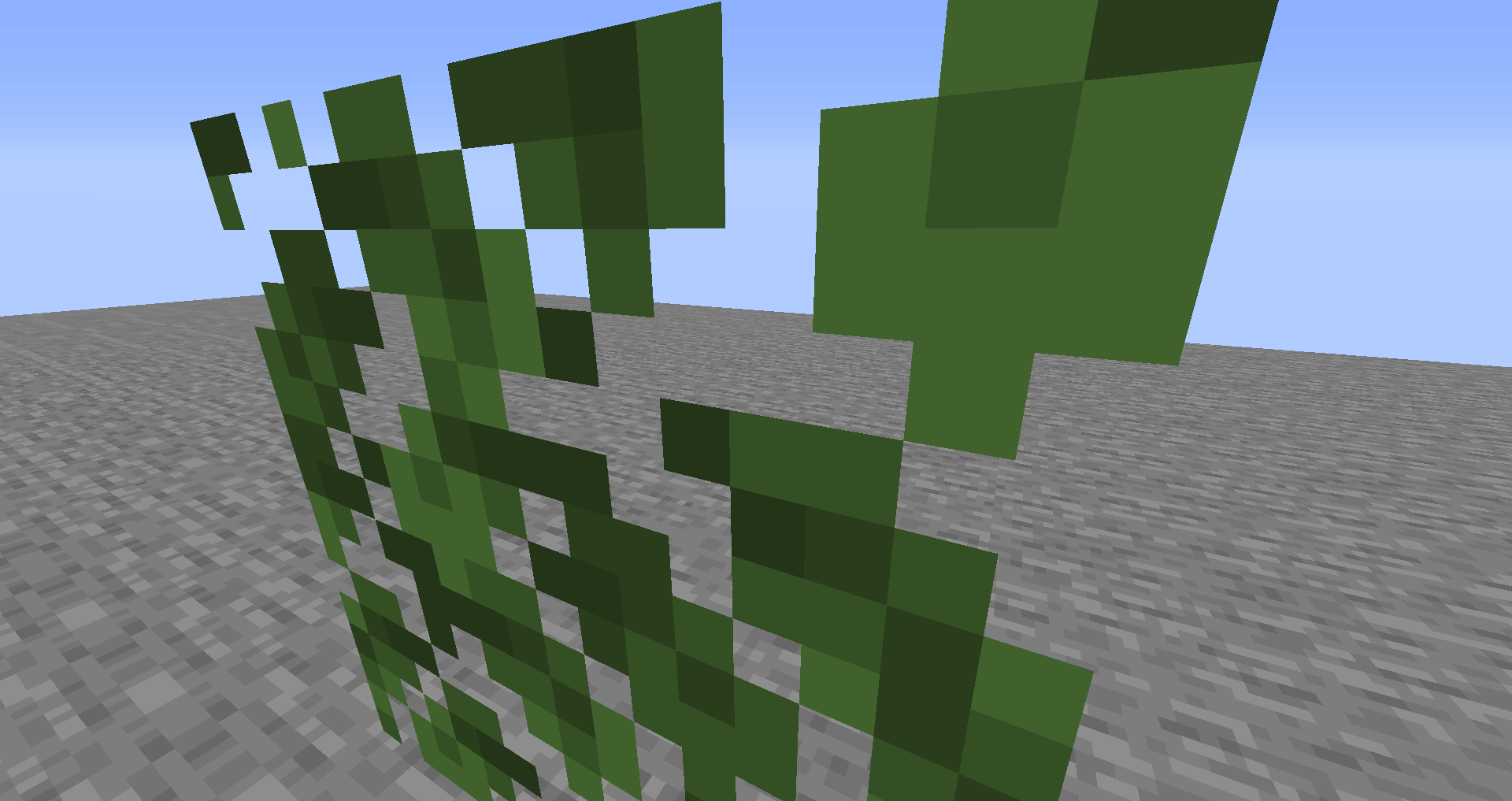



Created Issue:
(Might not be a bug)Leave Block textures appear only on one side of the block
Leave blocks and custom models have an issue where partially transparent textures appear on one side.
Environment
Java
Attachments1


(Might not be a bug)Leave Block textures appear only on one side of the block
Leave blocks and custom models have an issue where partially transparent textures appear on one side. / The back faces on leaves do not render despite that they are transparent blocks.
![[Mod] SPGoding](../../../data/avatars/users/44622.png)
Java
![[Mod] Michael Wobst](../../../data/avatars/users/37868.png)
The bug
The back faces of leaves blocks do not render. This results in single leaves blocks looking rather odd, as only the faces closest to the player are visible, making it look like the block only has one to three faces total.
This can be considered a parity issue, as leaves in Bedrock Edition are not subject to this.
How to reproduce
- Place down a single, isolated leaves block of any type
- Observe how many faces are visible. Depending on the view direction, between one and three faces are able to be seen.
- Now go around to the other side of the leaves block
- Note how there are indeed faces there as well, despite the original view direction implying there are no faces with leaves.
Expected result
These back faces of leaves would be visible from all faces.
Actual result
The leaves block just doesn't show the back faces, which looks very strange in isolation.
Leave Block textures appear only on one side of the blockThe back faces of leaves do not render
The resource pack attached to MC-237955 offers a complete fix for this issue. Mojang have my full permission to (and are encouraged to) replace the affected vanilla model files with the contents of the resource pack.
The bug
The back faces of leaves blocks do not render. This results in single leaves blocks looking rather odd, as only the faces closest to the player are visible, making it look like the block only has one to three faces total.
This can be considered a parity issue, as leaves in Bedrock Edition are not subject to this.
How to reproduce
- Place down a single, isolated leaves block of any type
- Observe how many faces are visible. Depending on the view direction, between one and three faces are able to be seen.
- Now go around to the other side of the leaves block
- Note how there are indeed faces there as well, despite the original view direction implying there are no faces with leaves.
Expected result
These back faces of leaves would be visible from all faces.
Actual result
The leaves block just doesn't show the back faces, which looks very strange in isolation.
How to fix
The resource pack attached to MC-237955 fixes this issue completely. A new "hollow cube" template model is created by it, based on the old powder snow model. Powder snow, spawners (
MC-169969) and both types of azalea leaves are all pointed to this model, resulting in them having internal faces. A tinted version of the model is also added, which the six remaining types of leaves use to have internal planes.
The resource pack attached to MC-237955 offers a complete fix for this issue. Mojang have my full permission to (and are encouraged to) replace the affected vanilla model files with the contents of the resource pack.
The bug
The back faces of leaves blocks do not render. This results in single leaves blocks looking rather odd, as only the faces closest to the player are visible, making it look like the block only has one to three faces total.
This can be considered a parity issue, as leaves in Bedrock Edition are not subject to this.
How to reproduce
- Place down a single, isolated leaves block of any type
- Observe how many faces are visible. Depending on the view direction, between one and three faces are able to be seen.
- Now go around to the other side of the leaves block
- Note how there are indeed faces there as well, despite the original view direction implying there are no faces with leaves.
Expected result
These back faces of leaves would be visible from all faces.
Actual result
The leaves block just doesn't show the back faces, which looks very strange in isolation.
How to fix
The resource pack attached to MC-237955 fixes this issue completely. A new "hollow cube" template model is created by it, based on the old powder snow model. Powder snow, spawners (
MC-169969) and both types of azalea leaves are all pointed to this model, resulting in them having internal faces. A tinted version of the model is also added, which the six remaining types of leaves use to have internal planes.If this fix is used, it may be worth changing the culling behaviour of leaves to make outside faces be culled by adjacent leaves, while leaving the inside faces as-is
The resource pack attached to MC-237955 offers a complete fix for this issue. Mojang have my full permission to (and are encouraged to) replace the affected vanilla model files with the contents of the resource pack.
The bug
The back faces of leaves blocks do not render. This results in single leaves blocks looking rather odd, as only the faces closest to the player are visible, making it look like the block only has one to three faces total.
This can be considered a parity issue, as leaves in Bedrock Edition are not subject to this.
How to reproduce
- Place down a single, isolated leaves block of any type
- Observe how many faces are visible. Depending on the view direction, between one and three faces are able to be seen.
- Now go around to the other side of the leaves block
- Note how there are indeed faces there as well, despite the original view direction implying there are no faces with leaves.
Expected result
These back faces of leaves would be visible from all faces.
Actual result
The leaves block just doesn't show the back faces, which looks very strange in isolation.
How to fix
The resource pack attached to MC-237955 fixes this issue completely. A new "hollow cube" template model is created by it, based on the old powder snow model. Powder snow, spawners (
MC-169969) and both types of azalea leaves are all pointed to this model, resulting in them having internal faces. A tinted version of the model is also added, which the six remaining types of leaves use to have internal planes.If this fix is used, it may be worth changing the culling behaviour of leaves to make outside faces be culled by adjacent leaves, while leaving the inside faces as-is
The resource pack attached to MC-237955 offers a complete fix for this issue. Mojang have my full permission to (and are encouraged to) replace the affected vanilla model files with the contents of the resource pack.
The bug
The back faces of leaves blocks do not render. This results in single leaves blocks looking rather odd, as only the faces closest to the player are visible, making it look like the block only has one to three faces total.
This can be considered a parity issue, as leaves in Bedrock Edition are not subject to this.
How to reproduce
- Place down a single, isolated leaves block of any type
- Observe how many faces are visible. Depending on the view direction, between one and three faces are able to be seen.
- Now go around to the other side of the leaves block
- Note how there are indeed faces there as well, despite the original view direction implying there are no faces with leaves.
Expected result
These back faces of leaves would be visible from all faces.
Actual result
The leaves block just doesn't show the back faces, which looks very strange in isolation.
How to fix
The resource pack attached to MC-237955 fixes this issue completely. A new "hollow cube" template model is created by it, based on the old powder snow model. Powder snow, spawners (
MC-169969) and both types of azalea leaves are all pointed to this model, resulting in them having internal faces. A tinted version of the model is also added, which the six remaining types of leaves use to have internal planes.If this fix is used, it may be worth changing the culling behaviour of leaves to make outside faces be culled by adjacent leaves, while leaving the inside faces as-is, as to make large amounts of leaves not appear excessively dense. On fast graphics mode, it may be advisable to make the inside faces not render at all, in addition to culling the outside faces like normal blocks (MC-179383).
The resource pack attached to MC-237955 offers a complete fix for this issue. Mojang have my full permission to (and are encouraged to) replace the affected vanilla model files with the contents of the resource pack.
The bug
The back faces of leaves blocks do not render. This results in single leaves blocks looking rather odd, as only the faces closest to the player are visible, making it look like the block only has one to three faces total.
This can be considered a parity issue, as leaves in Bedrock Edition are not subject to this.
How to reproduce
Place down a single, isolated leaves block of any typeObservehowmany faces are visible. Depending on the view direction, between one and three faces are able to be seen.Now go around to the other side of the leaves block- No
te how there are indeed faces there as well, despite the original view direction implying there are no faces with leaves.Expected result
These back faces of leaves would be visible from all faces.
Actual result
The leaves block just doesn't show the back faces, which looks very strange in isolation.
How to fix
The resource pack attached to MC-237955 fixes this issue completely. A new "hollow cube" template model is created by it, based on the old powder snow model. Powder snow, spawners (
MC-169969) and both types of azalea leaves are all pointed to this model, resulting in them having internal faces. A tinted version of the model is also added, which the six remaining types of leaves use to have internal planes.If this fix is used, it may be worth changing the culling behaviour of leaves to make outside faces be culled by adjacent leaves, while leaving the inside faces as-is, as to make large amounts of leaves not appear excessively dense. On fast graphics mode, it may be advisable to make the inside faces not render at all, in addition to culling the outside faces like normal blocks (MC-179383).
The resource pack attached to MC-237955 offers a complete fix for this issue. Mojang have my full permission to (and are encouraged to) replace the affected vanilla model files with the contents of the resource pack.
The bug
The back faces of leaves blocks do not render. This results in single leaves blocks looking rather odd, as only the faces closest to the player are visible, making it look like the block only has one to three faces total.
This can be considered a parity issue, as leaves in Bedrock Edition are not subject to this.
How to reproduce
- Obtain leaves via your preferred method
- Place down a single, isolated leaves block of any type
- Observe how many faces are visible. Depending on the view direction, between one and three faces are able to be seen.
- Now go around to the other side of the leaves block
- Note how there are indeed faces there as well, despite the original view direction implying there are no faces with leaves.
Expected result
These back faces of leaves would be visible from all faces.
Actual result
The leaves block just doesn't show the back faces, which looks very strange in isolation.
How to fix
The resource pack attached to MC-237955 fixes this issue completely. A new "hollow cube" template model is created by it, based on the old powder snow model. Powder snow, spawners (
MC-169969) and both types of azalea leaves are all pointed to this model, resulting in them having internal faces. A tinted version of the model is also added, which the six remaining types of leaves use to have internal planes.If this fix is used, it may be worth changing the culling behaviour of leaves to make outside faces be culled by adjacent leaves, while leaving the inside faces as-is, as to make large amounts of leaves not appear excessively dense. On fast graphics mode, it may be advisable to make the inside faces not render at all, in addition to culling the outside faces like normal blocks (MC-179383).
![[Mod] OcelotOnesie](../../../data/avatars/users/43220.png)
relates to
![[Mod] turbo](../../../data/avatars/users/92867.png)
is duplicated by
The resource pack attached to MC-237955 offers a complete fix for this issue. Mojang have my full permission to (and are encouraged to) replace the affected vanilla model files with the contents of the resource pack.
The bug
The back faces of spawner blocks do not render. This results in spawners looking rather odd, as only the faces closest to the player are visible, making it look like the block only has one to three faces total.
This can be considered a parity issue, as spawners in Bedrock Edition are not subject to this.
How to reproduce
- Obtain a spawner via commands (the Creative inventory will not work for this, see
MC-132820):/give @s minecraft:spawner
- Place down a single, isolated spawner block
- Observe how many faces are visible. Depending on the view direction, between one and three faces are able to be seen.
- Now go around to the other side of the spawner block
- Note how there are indeed faces there as well, despite the original view direction implying there are no faces with spawner bars.
Expected result
These back faces of the spawner would be visible from all faces.
Actual result
The spawner block just doesn't show the back faces, which looks very strange.
How to fix
The resource pack attached to MC-237955 fixes this issue completely. A new "hollow cube" template model is created by it, based on the old powder snow model. Powder snow, spawners and both types of azalea leaves (MC-171859) are all pointed to this model, resulting in them having internal faces and fixing this issue.
The resource pack attached offers a complete fix for this issue. Mojang have my full permission to (and are encouraged to) replace the affected vanilla model files with the contents of the resource pack.
Download resource pack:

The bug
The leaves block model, which is functionally a template model due to only containing the block shape and being referenced by other models to apply textures, is not prefixed with "template_". This is unlike a multitude of other template models which the game uses, which are in fact prefixed with "template_".
How to reproduce
This is as easy as just navigating to the assets/minecraft/models/block directory and checking the file names.
- Open the game jar file using one's preferred method
- Check the model file of a block that uses the leaves model, such as oak_leaves.json
- Note that it references block/leaves.json, and also note that it isn't prefixed with template_
- Check the model of a block such as a wall torch, anvil, chorus flower, ...
- Note that the model it references is prefixed with template_ due to the referenced model in question being a template model
Expected and actual results
The table below summarizes the expected file names for the models in question.
| Current name | Expected name | Notes |
|---|---|---|
| leaves.json | template_leaves.json | Resource pack does this completely differently, see below section |
How to fix
Fixing this is as simple as renaming leaves.json to template_leaves.json, and then repointing all model files that reference it to the new names. 6 different model files currently point to it, matching the 6 leaves types that use tints (azaleas do not).
The resource pack attached to this issue fixes this issue in a different (and I'd say better) way - rather than just rename leaves.json to template_leaves.json, it goes ahead and redefines hollow block models: powder snow's model has been changed to a template model, which powder snow is made to point to, as are spawners (fixing MC-169969). A tinted version of this model is also implemented, which the six usual leaves point to (fixing MC-171859 - the azalea leaves are pointed to the non-tinted model instead due to not using tints). As such, this issue can be declared fixed as the leaves template model now has template_ at the start, although not being called template_leaves.json but rather the more general template_tinted_cube_hollow_all.json. These new models can be added to minecraft.jar in seconds to fix this issue.
The pack also cleans up formatting for consistency.
Thank you for your report!
We're tracking this issue in MC-171859, so this ticket is being resolved and linked as a duplicate.
That ticket has already been resolved as working as intended, which means this is not considered a bug and won't be fixed. Please do not leave a comment on the linked ticket.
If you haven't already, you might like to make use of the search feature to see if the issue has already been mentioned.
Quick Links:
📓 Bug Tracker Guidelines – 💬 Community Support – 📧 Mojang Support (Technical Issues) – 📧 Microsoft Support (Account Issues)
📓 Project Summary – ✍️ Feedback and Suggestions – 📖 Game Wiki
Fixed model attached. It seems leaves not culling each other is hardcoded, so that will need to be changed such that only inside faces are the faces affected by this rather than outside faces, otherwise a z-fighting issue will end up arising since the unculled faces will end up coinciding with the new internal faces.
Duplicate of
MC-34751Confirmed for 21w40a.
May I request ownership of this issue due to the reporter having no activity since the start of 2020?
Confirmed with 21w42a