 Plagiatus
- Plagiatus
- plagiatus
- Europe/Stockholm
- Yes
- No
 MC-72048
![[Mojang] Searge (Michael Stoyke)](../../../data/assets/gravatar/searge.png)
 REALMS-301
![[Mojang] Agnes Larsson](../../../data/avatars/users/10122.svg)
![[Mojang] Nathan Adams](../../../data/assets/gravatar/dinnerbone.png)
![[Mojang] Panda](../../../data/avatars/users/41658.png)







 MCPE-186324

This happens on a vanilla 1.9.4 Server:
If a horse is attached to a fencepost using a lead and then ridden off, it kinda pulls you back once but after that, the lead breaks and drops (not sure if that on itself is also a bug), but the leashknot remains on the post (forever it seems, neither reloading chunks nor rejoining the server changed this).
This happens on a vanilla 1.9.4 Server:
If a horse is attached to a fencepost using a lead and then ridden off, it kinda pulls you back once but after that, the lead breaks and drops (not sure if that on itself is also a bug), but the leashknot remains on the post (forever it seems, neither reloading chunks nor rejoining the server changed this).
Steps to reproduce:
1. put a tamed horse on a lead, put that lead on a fence post
2. sit on the horse and ride it away from the fencepostSame effect occurs on any other entity that is attached with a lead and then killed.
(Steps to reproduce:
1. put a chicken on a lead, put that lead on a fence post
2. kill the chicken)
Leashknot remains if ridden horse causes lead to break/leashed entity dies
Hoppers now appear to push items downwards just as fast as they suck them up from above
Hoppers now appear to push items downwards simultanious to when they suck them up from above.
That means that in a vertical hopper tower, there will be 2 items at a time moving downwards.
Hoppers now appear to push items downwards simultanious to when they suck them up from above.
That means that in a vertical hopper tower, there will be 2 items at a time moving downwards.Steps to reproduce:
1. build a hopper tower of at least 3 hoppers
2. put a stack of items in the one on the top
3. observe the behavior of the hoppers
Video Demonstration
Minecraft 1.10 14.06.2016 23_55_43.mp4
Hoppers now appear to push items downwards simultanious to when they suck them up from above.
That means that in a vertical hopper tower, there will be 2 items at a time moving downwards.This won't happen if the top hopper isn't facing down onto the other hopper underneath.
Steps to reproduce:
1. build a hopper tower of at least 3 hoppers
2. put a stack of items in the one on the top
3. observe the behavior of the hoppers
Gfycat of the process
click events on signs with relative commands are inconsistent
click events on signs are sometimes processed as the clicking player and sometimes as the sign itself.
To reproduce, put down a sign and put a commandblock on top of it with the respective command:
`/blockdata ~ ~-1 ~ {Text2:"{\"text\":\"\",\"clickEvent\":{\"action\":\"run_command\",\"value\":\"/ [enter Command here] \"}}"}`activate the comandblock, rightclick the sign.
Testcases:
Command: ``/say @p``
this outputs "[playername] playername" of the clicking player, even if another player is closer to the sign.Command: `/say @a[c=1]`
same as @pCommand `/say @a[c=2]`
outputs the name of rightclicking player in square brackets but states the two closest players to the sign, in order of distance.Command `/say @e[c=1]`
same as @pCommand `/say @e[c=2]`
outputs the name of the clicking player in quare brackets but states the two closest entities to the sign, in order of distance.Command `/setblock ~ ~2 ~ gold_block`
sets a goldblock 2 blocks above the signCommand `/teleport @p ~ ~2 ~`
teleports the player that clicked the sign 2 blocks above the signThese testcases show an inconsistency in the processing of the commands on signs.
click events on signs are sometimes processed as the clicking player and sometimes as the sign itself.
To reproduce, put down a sign and put a commandblock on top of it with the respective command:
`/blockdata ~ ~-1 ~ {Text2:"{\"text\":\"\",\"clickEvent\":{\"action\":\"run_command\",\"value\":\"/ [enter Command here] \"}}"}`activate the comandblock, rightclick the sign.
Testcases:
Command:
``/say @p``
this outputs "[playername] playername" of the clicking player, even if another player is closer to the sign.Command: `/say @a[c=1]`
same as @pCommand `/say @a[c=2]`
outputs the name of rightclicking player in square brackets but states the two closest players to the sign, in order of distance.Command `/say @e[c=1]`
same as @pCommand `/say @e[c=2]`
outputs the name of the clicking player in quare brackets but states the two closest entities to the sign, in order of distance.Command `/setblock ~ ~2 ~ gold_block`
sets a goldblock 2 blocks above the signCommand `/teleport @p ~ ~2 ~`
teleports the player that clicked the sign 2 blocks above the signThese testcases show an inconsistency in the processing of the commands on signs.
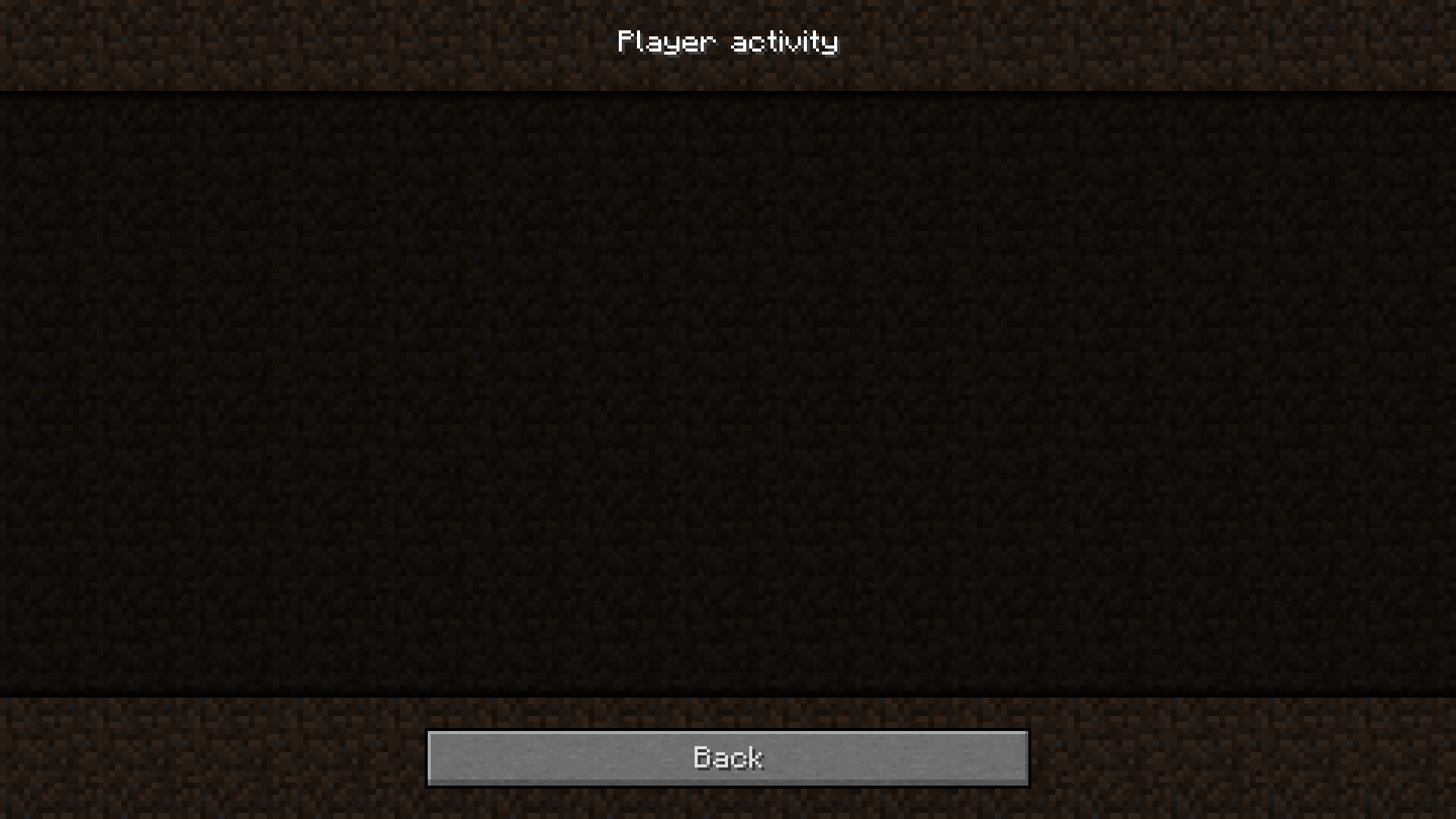
When I go into my realm's player activity screen, it won't load anything. It worked a while a ago, and now since a few weeks it seems like it doesn't anymore.
I currently have 94 people invited to my realm.When I go into my realm's player activity screen, it won't load anything. It worked a while a ago, and now since a few weeks it seems like it doesn't anymore.
Even after waiting for a few minutes, the screen stays that way.
I currently have 94 people invited to my realm.
When I go into my realm's player activity screen, it won't load anything. It worked a while a ago, and now since a few weeks it seems like it doesn't anymore.
Even after waiting for a few minutes, the screen stays that way.
I currently have 94 people invited to my realm.
Realms Owner is Plagiatus
When I go into my realm's player activity screen, it won't load anything. It worked a while a ago, and now since a few weeks it seems like it doesn't anymore.
Even after waiting for a few minutes, the screen stays that way.
I currently have 94 people invited to my realm.
Realms Owner is Plagiatus
EDIT:
Turns out it's working on a different PC other than my main one, so I guess this is not a realms problem but a normal game's problem then? Would be good if someone could enlighten me on whether this bugreport is in the correct category then.
When I go into my realm's player activity screen, it won't load anything. It worked a while a ago, and now since a few weeks it seems like it doesn't anymore.
Even after waiting for a few minutes, the screen stays that way.
I currently have 94 people invited to my realm.
Realms Owner is Plagiatus
EDIT:
Turns out it's working on a different PC other than my main one, so Iguess this is not a realms problem but a normal game's problem then? Would be good if someone could enlighten me on whether this bugreport is in the correct category then.When I go into my realm's player activity screen, it won't load anything. It worked a while a ago, and now since a few weeks it seems like it doesn't anymore.
Even after waiting for a few minutes, the screen stays that way.
I currently have 94 people invited to my realm.
Realms Owner is Plagiatus
EDIT:
Turns out it's working on a different PC other than my main one. I'll try to get the system surroundings afaik.
Realmowner IGN: Plagiatus
While developing a minigame on my realm I ran into the following issue:
The realm seems to apparently completely randomly crash *while the minigame is running* (it hasn't crashed while the minigame wasn't running yet).
I obviously use commandblocks, but I only ever activate those that I need when I need them and do everything in my power to make it as less ressource intensive as possible.It completely undoes everything in the last few seconds before the crash (see attached videos), including not counting up stat.leave for everyone that gets disconnected (I have a reset system hooked up to that objective, which should reset leaving players, instead they just log back in as if nothing happened). The objective is working normally if they e.g. relog.
The weirdest thing about all of that is, that I had way more taxing maps on my realm and it seemed to work just fine. Also, I tried to reproduce this bug on another, locally hosted vanilla server with 1GB RAM and absolutely nothing happened for several hours. The game was just fine, and there was nothing in the logs that looked like it could have become a problem. also, the debug didn't yield anything of significance as well (averaging 20 ticks per second over 3 minutes gameplay).
*Here is a list of things I thought might be interesting for context:*
- There is a relatively constant count of 150-200 entities in the world (not constantly resummoned ones, but summoned once at the beginning of each round), almost all of which are area effect clouds. they all get executed upon once every few seconds.
- there is one timer objective running in the background.
- there are a few scoreboard operations done, but nothing too severe.
- around 300 commandblocks are powering the game (and like I said, only the ones needed are activated).
Sadly there seems to be no way to reproduce this crash intentionally, other than playing the game and waiting for it to crash. (Un-)Conveniently the realm seems to crash every time the game is played for a while (there were barely any rounds that didn't crash on us. I need to add that one round in this game is taking a fair half hour or so).
EDIT:
allright, we were able to narrow it down to the following commands causing the crash, in this order, in a repeating commandline:
/scoreboard players set @a amountofcells 0
/execute @e[type=area_effect_cloud,score_team=1,score_team_min=1,tag=cellMarker] ~ ~ ~ /scoreboard players add @a[team=red] amountofcells 1
/execute @e[type=area_effect_cloud,score_team=2,score_team_min=2,tag=cellMarker] ~ ~ ~ /scoreboard players add @a[team=blue] amountofcells 1
/execute @e[type=area_effect_cloud,score_team=3,score_team_min=3,tag=cellMarker] ~ ~ ~ /scoreboard players add @a[team=green] amountofcells 1
/execute @e[type=area_effect_cloud,score_team=4,score_team_min=4,tag=cellMarker] ~ ~ ~ /scoreboard players add @a[team=yellow] amountofcells 1surrounding prequisites: there are only ever a maximum amount of one player per team. there are around 50-150 area_effect_clouds with the tag "cellMarker" present in the world during one round of the game, each starting with a team score of 0. each turn the amount of AECs that have those teamscores change, they basically increase overall. when playing with 4 players we found the threshold for the server to start acting up and likely crash after a short while of waiting to be around 80 (one instance with 84, one which was faster paced with 94) AECs having a team score of greater than one.
Again, I'd like to stress that we weren't able to reproduce this at all on a vanilla server with 1 GB of RAM allocated to it.
After summoning in a slime (i'm pretty sure size doesn't matter) they seem to be invulnerable for the first hit.
If hit, they will indicate a strong hit, with a lot of hearts (I counted 8-10 i believe) showing up, even on the smallest ones (harder to see on the bigger ones since the hearts seem to be displayed partially inside them).
Steps to reproduce:
/summon slime ~ ~ ~ {Size:0}punch it with your hand.
what i expected: the slime dies.
what happened: the slime displays a lot of hearts and survives, actually dying at the second hit.
After summoning in a slime (i'm pretty sure size doesn't matter) they seem to be invulnerable for the first hit.If hit, they will indicate a strong hit, with a lot of hearts (I counted 8-10 i believe) showing up, even on the smallest ones (harder to see on the bigger ones since the hearts seem to be displayed partially inside them).
Steps to reproduce:
/summon slime ~ ~ ~ {Size:0}punch it with your hand.
what i expected: the slime dies.
what happened: the slime displays a lot of hearts and survives, actually dying at the second hit.
Slimes areinvulnerable after spawned in for the first hitSlimes are summoned with the wrong amount of health.
using the `minecraft:summoned_entity` trigger in an advancement doesn't account for
the twoentites a player can create directly via placing of an item:1. `minecraft:armor_stand`
2. `minecraft:painting`(also, it won't work for `spawn_eggs`, but this might be different issue).
*****
here is an example advancement, that won't trigger upon placement of any of those
twoentities:{ "criteria":{ "created_entity": { "trigger":"minecraft:summoned_entity" } } }using the `minecraft:summoned_entity` trigger in an advancement doesn't account for a bunch of entites a player can create directly via placing of an item:
1. `minecraft:armor_stand`
2. `minecraft:painting`
3. `minecraft:minecart`
4. `minecraft:boat`
5. `minecraft:lead`
6. `minecraft:fireworks`/`minecraft:fireworks_rocket`(also, it won't work for `spawn_eggs`, but this might be different issue).
*****
here is an example advancement, that won't trigger upon placement of any of those entities:
{
	"criteria":{
		"created_entity": {
			"trigger":"minecraft:summoned_entity"
		}
	}
}
using the `minecraft:summoned_entity` trigger in an advancement doesn't account for a bunch of entites a player can create directly via placing of an item:
1. `minecraft:armor_stand`2. `minecraft:painting`3. `minecraft:minecart`4. `minecraft:boat`5. `minecraft:lead`6. `minecraft:fireworks`/`minecraft:fireworks_rocket`(also, it won't work for `spawn_eggs`, but this might be different issue).
*****
here is an example advancement, that won't trigger upon placement of any of those entities:
{ "criteria":{ "created_entity": { "trigger":"minecraft:summoned_entity" } } }using the `minecraft:summoned_entity` trigger in an advancement doesn't account for a bunch of entites a player can create directly via placing of an item:
1. minecraft:armor_stand
2. minecraft:painting
3. minecraft:minecart
4. minecraft:boat
5. minecraft:lead
6. minecraft:fireworks/minecraft:fireworks_rocket(also, it won't work for `spawn_eggs`, but this might be different issue).
here is an example advancement, that won't trigger upon placement of any of those entities:
{
	"criteria":{
		"created_entity": {
			"trigger":"minecraft:summoned_entity"
		}
	}
}
using the `minecraft:summoned_entity` trigger in an advancement doesn't account for a bunch of entities a player can create directly via placing of an item:
1. minecraft:armor_stand
2. minecraft:painting
3. minecraft:minecart
4. minecraft:boat
5. minecraft:lead
6. minecraft:fireworks/minecraft:fireworks_rocket(also, it won't work for `spawn_eggs`, but this might be different issue).
here is an example advancement, that won't trigger upon placement of any of those entities:
{ "criteria":{ "created_entity": { "trigger":"minecraft:summoned_entity" } } }using the `minecraft:summoned_entity` trigger in an advancement doesn't account for a bunch of entities a player can create directly via placing of an item:
1. minecraft:armor_stand
2. minecraft:painting
3. minecraft:minecart
4. minecraft:boat
5. minecraft:lead
6. minecraft:fireworks/minecraft:fireworks_rocket(also, it won't work for spawn_eggs, but this might be different issue).
here is an example advancement, that won't trigger upon placement of any of those entities:
{
	"criteria":{
		"created_entity": {
			"trigger":"minecraft:summoned_entity"
		}
	}
}
using the `minecraft:summoned_entity` trigger in an advancement doesn't account for a bunch of entities a player can create directly via placing of an item:
1. minecraft:armor_stand
2. minecraft:painting
3. minecraft:minecart
4. minecraft:boat
5. minecraft:lead
6. minecraft:fireworks/minecraft:fireworks_rocket(also, it won't work for spawn_eggs, but this might be different issue).
here is an example advancement, that won't trigger upon placement of any of those entities:
{ "criteria":{ "created_entity": { "trigger":"minecraft:summoned_entity" } } }using the minecraft:summoned_entity trigger in an advancement doesn't account for a bunch of entities a player can create directly via placing of an item:
1. minecraft:armor_stand
2. minecraft:painting
3. minecraft:minecart
4. minecraft:boat
5. minecraft:lead
6. minecraft:fireworks/minecraft:fireworks_rocket(also, it won't work for spawn_eggs, but this might be different issue).
here is an example advancement, that won't trigger upon placement of any of those entities:
{
	"criteria":{
		"created_entity": {
			"trigger":"minecraft:summoned_entity"
		}
	}
}
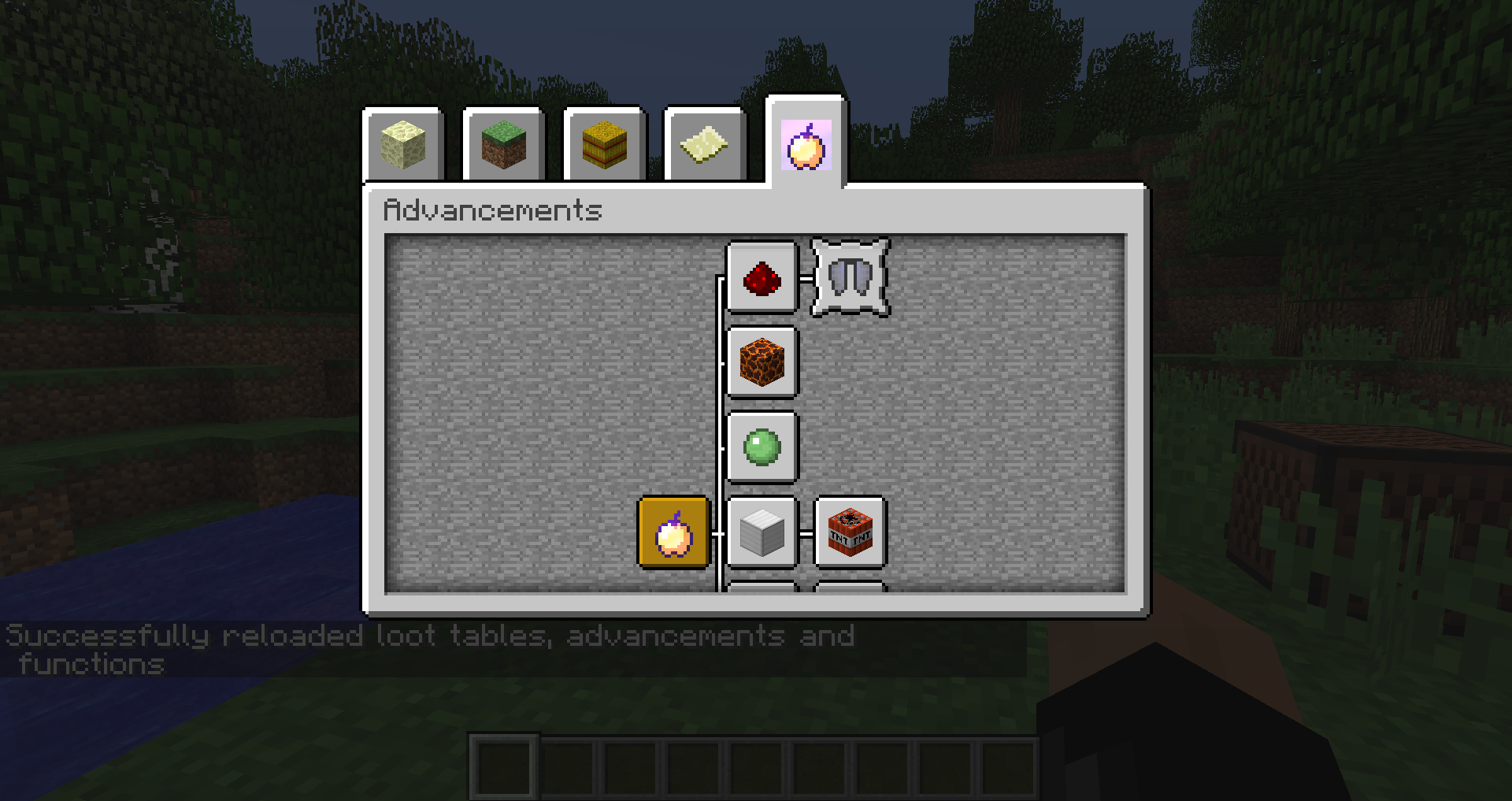
when using an item with the enchantment overlay (such as written_book or golden_apple with a damagevalue of 1, aka the notch_apple) as the advancement icon the enchantment overlay will show in the whole square in both the tab (if the advancement is the root advancement) as well as the toast while the advancement page is open.
If the advancement page is not open however, it doesn't display the overlay fully but only on the item the way it's supposed to be.
Every non-inventory GUI in the game has a button to close it ("done"), the Advancement one doesn't.
And while it is reachable via buttons in the pause-menu, it's not closable by a button, only "Esc" or "L" (default) can close it again.
Every non-inventory GUI in the game has a button to close it ("done"), the Advancement one doesn't.
And while it is reachable via buttons in the pause-menu, it's not closable by a button, only "Esc" or "L" (default) can close it again.
This, while inconsistent with other screens, also has the potential for confusion for players. Also, the old achievement screen does feature a button to close it.
placed_blockcriteriadoesn't work with doorsplaced_block trigger doesn't work with doors
the placed_block advancement trigger doesn't work with doors of any kind.
I've tried it both with a "block" criterion and a "item" criterion, which both worked fine if changed to e.g. "dirt" instead of "wooden_door"
To replicate, create an advancement that features one of these criteria, place down an oak door and see that nothing happens. You can of course replace minecraft:wooden_door with minecraft:dirt to check whether the syntax is correct and you'll see that it triggers just as you would expect.
"place_wooden_door":{ "trigger":"minecraft:placed_block", "conditions":{ "block":"minecraft:wooden_door" } }"place_wooden_door":{ "trigger":"minecraft:placed_block", "conditions":{ "item":{ "item":"minecraft:wooden_door" } } }as far as my rudimentary testing goes, this is only the case with doors, not with anything else that creates a tile-entity: beds, signs, chests, banners, cake
placed_block trigger doesn't work withdoorsplaced_block trigger doesn't work with multiple blocks
the placed_block advancement trigger doesn't work with doors of any kind, as well as cocoa.
I've tried it both with a "block" criterion and a "item" criterion, which both worked fine if changed to e.g. "dirt" instead of "wooden_door"
To replicate, create an advancement that features one of these criteria, place down an oak door and see that nothing happens. You can of course replace minecraft:wooden_door with minecraft:dirt to check whether the syntax is correct and you'll see that it triggers just as you would expect.
"place_wooden_door":{ "trigger":"minecraft:placed_block", "conditions":{ "block":"minecraft:wooden_door" } }"place_wooden_door":{ "trigger":"minecraft:placed_block", "conditions":{ "item":{ "item":"minecraft:wooden_door" } } }
the placed_block advancement trigger doesn't work with doors of any kind, as well as cocoa, carrots and potatoes.
I've tried it both with a "block" criterion and a "item" criterion, which both worked fine if changed to e.g. "dirt" instead of "wooden_door"
To replicate, create an advancement that features one of these criteria, place down an oak door and see that nothing happens. You can of course replace minecraft:wooden_door with minecraft:dirt to check whether the syntax is correct and you'll see that it triggers just as you would expect.
"place_wooden_door":{ "trigger":"minecraft:placed_block", "conditions":{ "block":"minecraft:wooden_door" } }"place_wooden_door":{ "trigger":"minecraft:placed_block", "conditions":{ "item":{ "item":"minecraft:wooden_door" } } }
probably relates to MC-88533
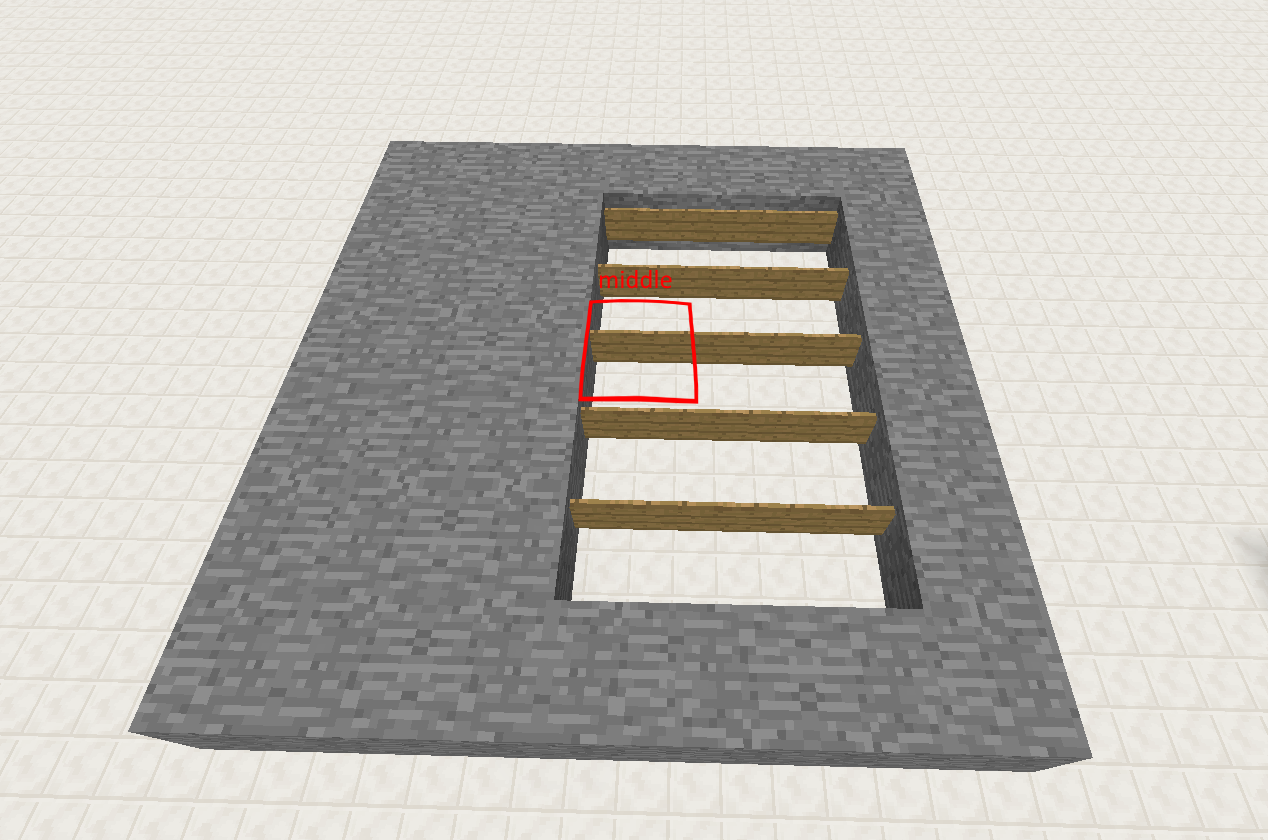
when summoning a marker armorstand at the edge of a block and trying to make it detect itself using dx/dz it will fail.
Steps to reporduce:
1. summon one armorstand at a fixed position:
/summon armor_stand 5 5 5
{Marker:1,NoGravity:1}2. try to make it detect itself using execute:
/execute @e[type=armor_stand] ~ ~ ~ /say @s[x=0,dx=10]
the command will fail. So will @s[z=0,dz=10].
@s[y=0,dy=10] on the other hand will succeed.3. try the same thing with a fixed position not at the bottom of a block, like 5 5.5 5
-> it works now.4. try the original coordinates with a non-marker armorstand
-> it works as well.probably relates to MC-88533
when summoning a marker armorstand at the edge of a block and trying to make it detect itself using dx/dz it will fail.
Steps to reporduce:
1. summon one armorstand at a fixed position:
{Marker:1,NoGravity:1}/summon armor_stand 5 5 5 *no* further _formatting_ is done here2. try to make it detect itself using execute:
/execute @e[type=armor_stand] ~ ~ ~ /say @s[x=0,dx=10]
the command will fail. So will @s[z=0,dz=10].
@s[y=0,dy=10] on the other hand will succeed.3. try the same thing with a fixed position not at the bottom of a block, like 5 5.5 5
-> it works now.4. try the original coordinates with a non-marker armorstand
-> it works as well.
probably relates to MC-88533
when summoning a marker armorstand at the edge of a block and trying to make it detect itself using dx/dz it will fail.
Steps to reporduce:
1. summon one armorstand at a fixed position:
{Marker:1,NoGravity:1}/summon armor_stand 5 5 5*no* further _formatting_ is done here2. try to make it detect itself using execute:
/execute @e[type=armor_stand] ~ ~ ~ /say @s[x=0,dx=10]
the command will fail. So will @s[z=0,dz=10].
@s[y=0,dy=10] on the other hand will succeed.3. try the same thing with a fixed position not at the bottom of a block, like 5 5.5 5
-> it works now.4. try the original coordinates with a non-marker armorstand
-> it works as well.probably relates to MC-88533
when summoning a marker armorstand at the edge of a block and trying to make it detect itself using dx/dz it will fail.
Steps to reporduce:
1. summon one armorstand at a fixed position:
/summon armor_stand 5 5 5 {Marker:1,NoGravity:1}2. try to make it detect itself using execute:
/execute @e[type=armor_stand] ~ ~ ~ /say @s[x=0,dx=10]
the command will fail. So will @s[z=0,dz=10].
@s[y=0,dy=10] on the other hand will succeed.3. try the same thing with a fixed position not at the bottom of a block, like 5 5.5 5
-> it works now.4. try the original coordinates with a non-marker armorstand
-> it works as well.
probably relates to MC-88533
when summoning a marker armorstand at the edge of a block and trying to make it detect itself using dx/dz it will fail.
Steps to reporduce:
1. summon one armorstand at a fixed position:
/summon armor_stand 5 5 5 {Marker:1,NoGravity:1}2. try to make it detect itself using execute:
/execute @e[type=armor_stand] ~ ~ ~ /say @s[x=0,dx=10]
the command will fail. So will @s[z=0,dz=10].
@s[y=0,dy=10] on the other hand will succeed.3. try the same thing with a fixed position not at the bottom of a block, like 5 5.5 5
-> it works now.4. try the original coordinates with a non-marker armorstand
-> it works as well.probably relates to MC-88533
when summoning a marker armorstand at the edge of a block and trying to make it detect itself using dx/dz it will fail.
Steps to reporduce:
1. summon one armorstand at a fixed position:
/summon armor_stand 5 5 5 {Marker:1,NoGravity:1}2. try to make it detect itself using execute:
/execute @e[type=armor_stand] ~ ~ ~ /say @s[x=0,dx=10]the command will fail. So will
@s[z=0,dz=10].
@s[y=0,dy=10]on the other hand will succeed.
3. try the same thing with a fixed position not at the bottom of a block, like
5 5.5 5-> it works now.
4. try the original coordinates with a non-marker armorstand
-> it works as well.
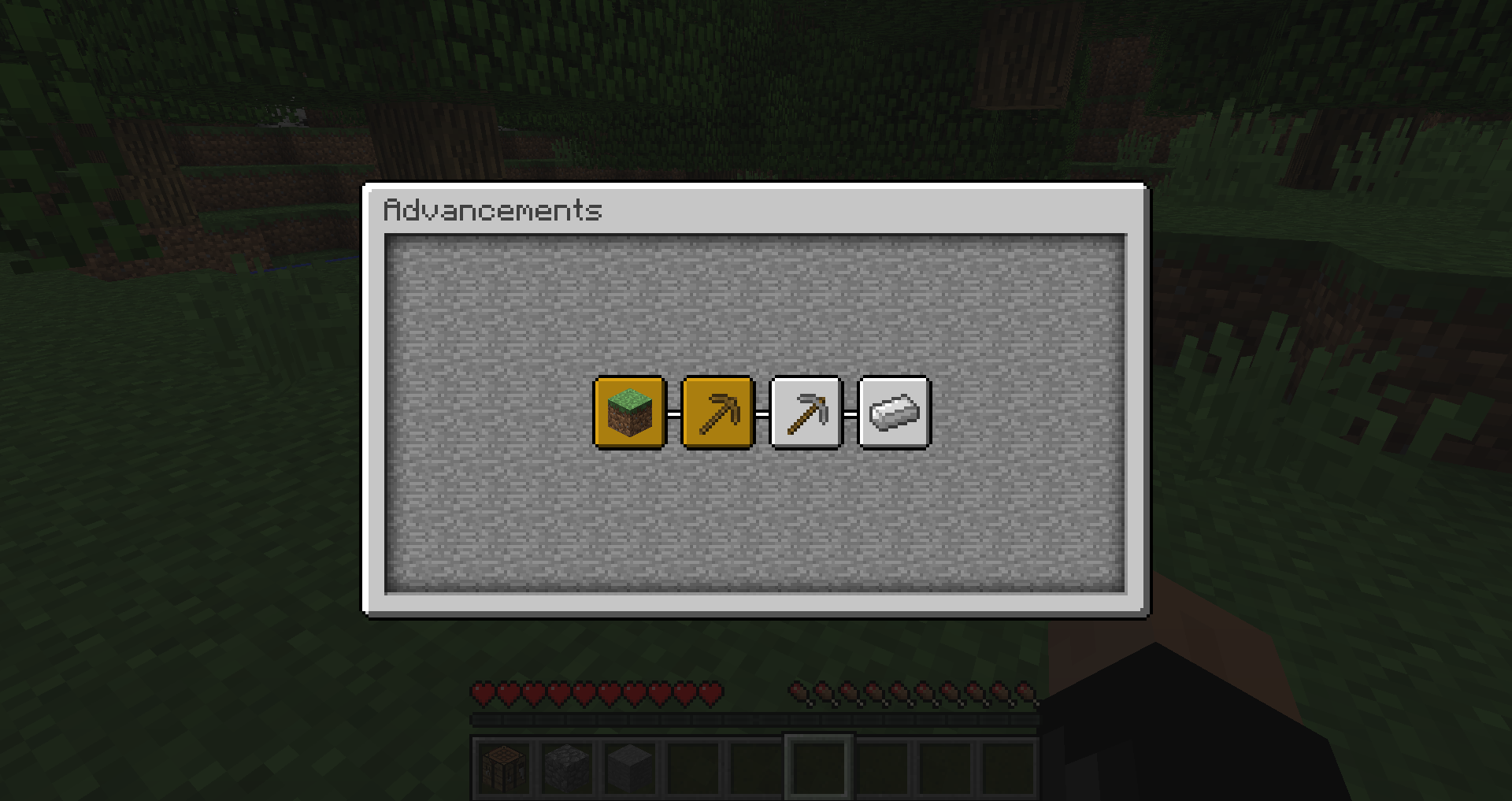
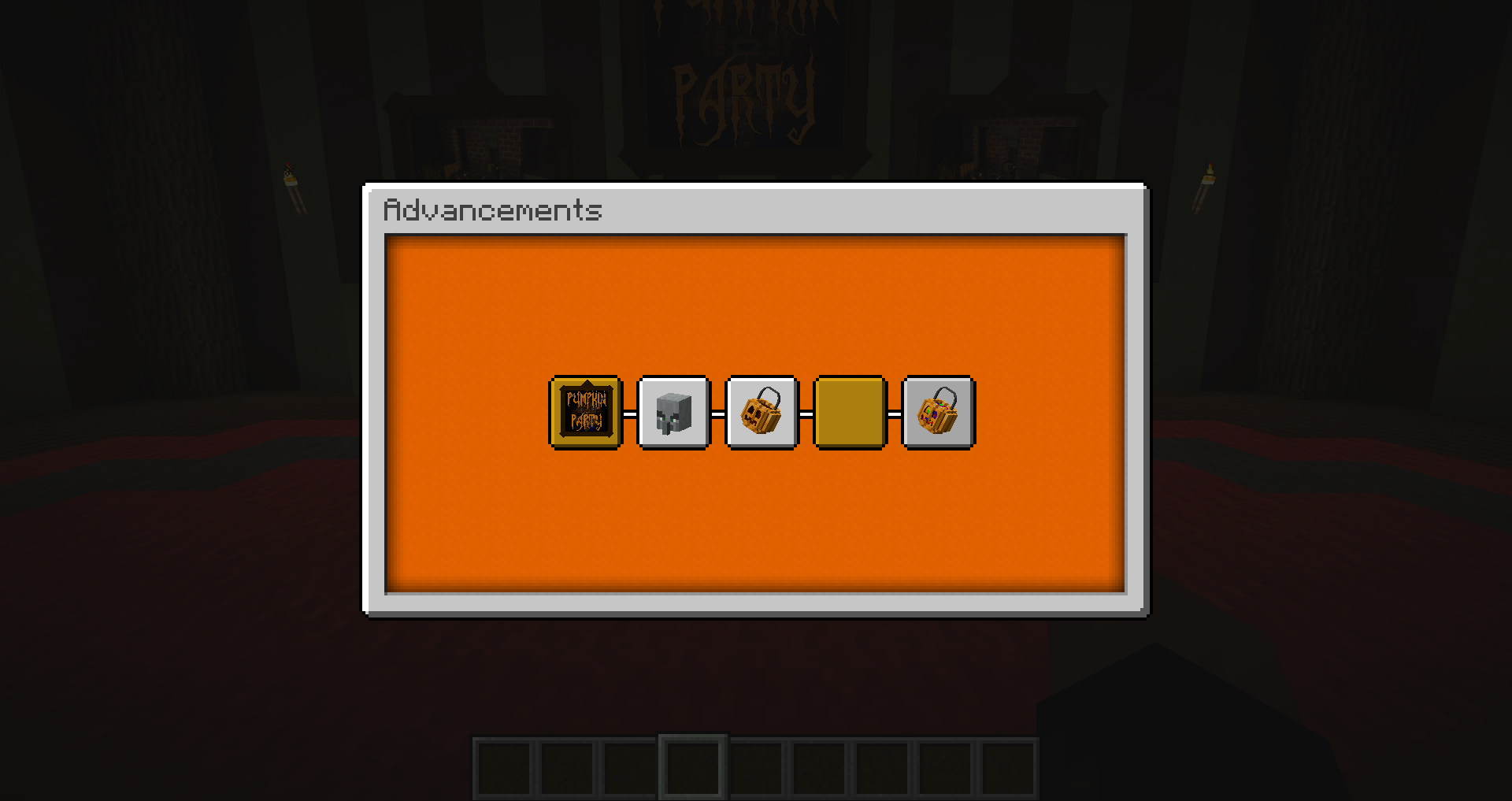
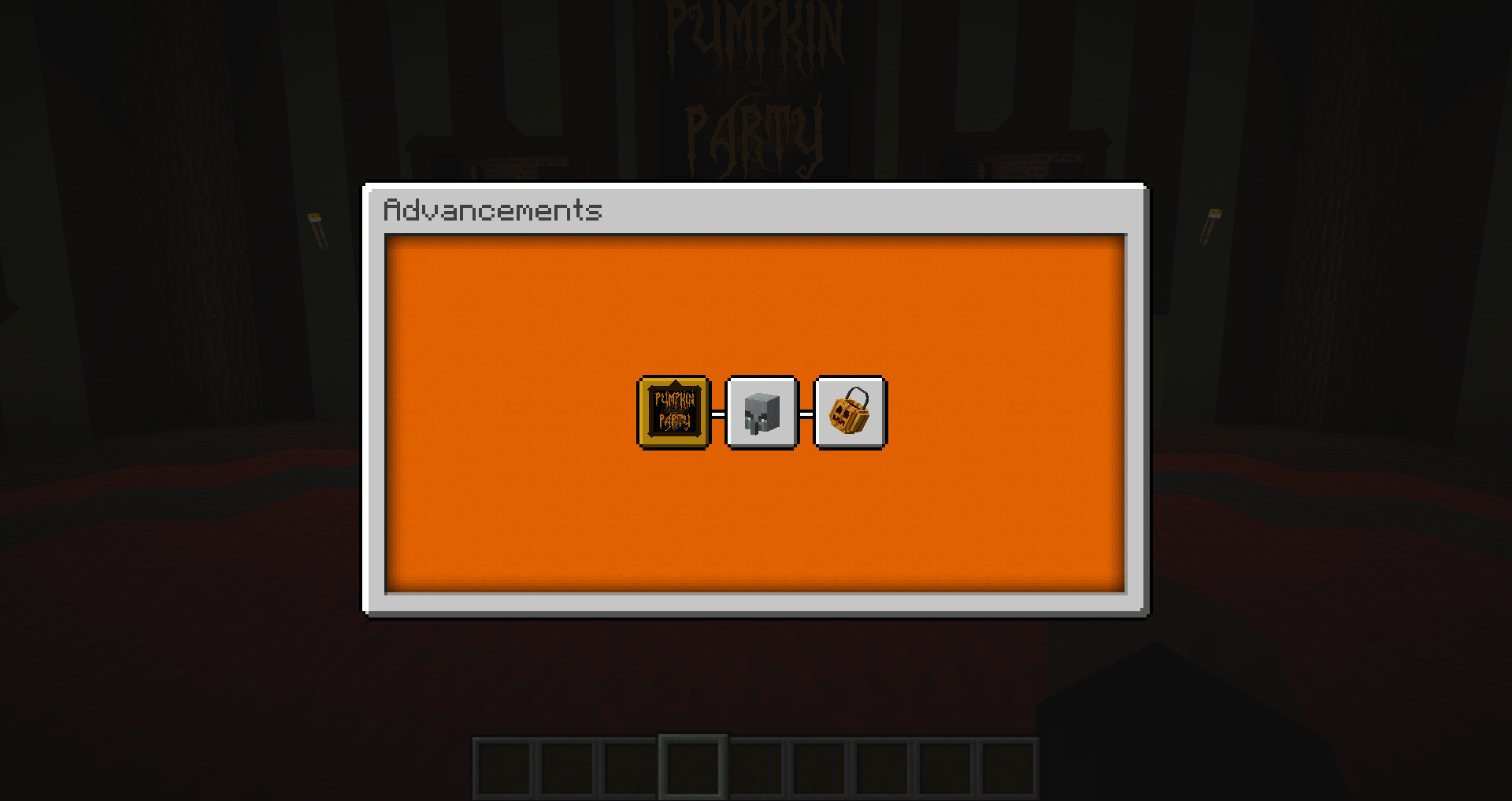
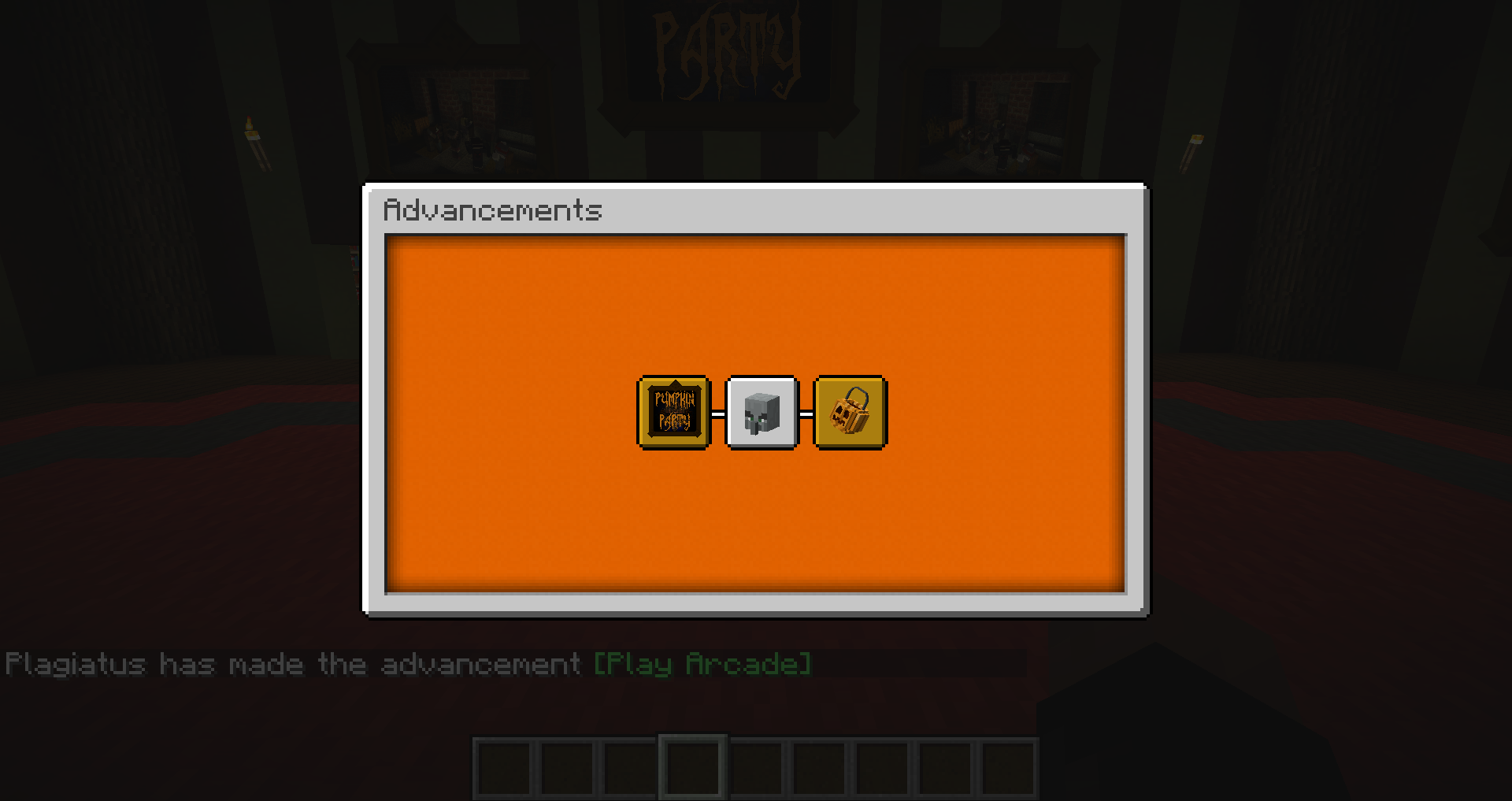
Advancements that are the child of advancements without the `display` tag are invisble until granted, even if the parent advancement or the parent of that advancement are granted.
Example used in the screenshots:
`arcade_play.json`{ "display": { "icon": { "item": "minecraft:dye", "data":14 }, "title": { "text": "Play Arcade" }, "description": ["",{"text": "Join your friendsina round of arcade!"}] }, "parent": "pumpkinparty:general/costumes", "criteria": { "impossible": { "trigger": "impossible" } } }`seperator_1.json` without display
{ "parent": "pumpkinparty:general/arcade_play", "criteria": { "instant": { "trigger": "location" } } }`seperator_1.json` including display
{ "display": { "icon": { "item": "minecraft:air" }, "title": { "text": "Seperator" }, "description": ["",{"text": "test"}] }, "parent": "pumpkinparty:general/arcade_play", "criteria": { "instant": { "trigger": "location" } } }`arcade_win.json`
{ "display": { "icon": { "item": "minecraft:dye", "data":1 }, "title": { "text": "Win Arcade" }, "description": ["",{"text": "Win a round of arcade"}] }, "parent": "pumpkinparty:general/seperator_1", "criteria": { "impossible": { "trigger": "impossible" } } }Advancements that are the child of advancements without the `display` tag are invisble until granted, even if the parent advancement or the parent of that advancement are granted.
Example used in the attached screenshots:
arcade_play.json
{ "display": { "icon": { "item": "minecraft:dye", "data":14 }, "title": { "text": "Play Arcade" }, "description": ["",{"text": "Join your friends in a round of arcade!"}] }, "parent": "pumpkinparty:general/costumes", "criteria": { "impossible": { "trigger": "impossible" } } }seperator_1.json without display
{ "parent": "pumpkinparty:general/arcade_play", "criteria": { "instant": { "trigger": "location" } } }seperator_1.json including display
{ "display": { "icon": { "item": "minecraft:air" }, "title": { "text": "Seperator" }, "description": ["",{"text": "test"}] }, "parent": "pumpkinparty:general/arcade_play", "criteria": { "instant": { "trigger": "location" } } }arcade_win.json
{
  "display": {
    "icon": {
      "item": "minecraft:dye",
	  "data":1
    },
    "title": {
      "text": "Win Arcade"
    },
    "description": ["",{"text": "Win a round of arcade"}]
  },
  "parent": "pumpkinparty:general/seperator_1",
  "criteria": {
    "impossible": {
      "trigger": "impossible"
    }
  }
}
Advancements that are the child of advancements without the `display` tag are invisble until granted, even if the parent advancement or the parent of that advancement are granted.
Example used in the attached screenshots:
arcade_play.json
{ "display": { "icon": { "item": "minecraft:dye", "data":14 }, "title": { "text": "Play Arcade" }, "description": ["",{"text": "Join your friends in a round of arcade!"}] }, "parent": "pumpkinparty:general/costumes", "criteria": { "impossible": { "trigger": "impossible" } } }seperator_1.json without display
{ "parent": "pumpkinparty:general/arcade_play", "criteria": { "instant": { "trigger": "location" } } }seperator_1.json including display
{ "display": { "icon": { "item": "minecraft:air" }, "title": { "text": "Seperator" }, "description": ["",{"text": "test"}] }, "parent": "pumpkinparty:general/arcade_play", "criteria": { "instant": { "trigger": "location" } } }arcade_win.json
{
  "display": {
    "icon": {
      "item": "minecraft:dye",
	  "data":1
    },
    "title": {
      "text": "Win Arcade"
    },
    "description": ["",{"text": "Win a round of arcade"}]
  },
  "parent": "pumpkinparty:general/seperator_1",
  "criteria": {
    "impossible": {
      "trigger": "impossible"
    }
  }
}
Advancements that are the child of advancements without the `display` tag are invisble until granted, even if the parent advancement or the parent of that advancement are granted.
Example used in the attached screenshots:
arcade_play.json
{ "display": { "icon": { "item": "minecraft:dye", "data":14 }, "title": { "text": "Play Arcade" }, "description": ["",{"text": "Join your friends in a round of arcade!"}] }, "parent": "pumpkinparty:general/costumes", "criteria": { "impossible": { "trigger": "impossible" } } }seperator_1.json without display
{ "parent": "pumpkinparty:general/arcade_play", "criteria": { "instant": { "trigger": "location" } } }seperator_1.json including display
{ "display": { "icon": { "item": "minecraft:air" }, "title": { "text": "Seperator" }, "description": ["",{"text": "test"}] }, "parent": "pumpkinparty:general/arcade_play", "criteria": { "instant": { "trigger": "location" } } }arcade_win.json
{
  "display": {
    "icon": {
      "item": "minecraft:dye",
	  "data":1
    },
    "title": {
      "text": "Win Arcade"
    },
    "description": ["",{"text": "Win a round of arcade"}]
  },
  "parent": "pumpkinparty:general/seperator_1",
  "criteria": {
    "impossible": {
      "trigger": "impossible"
    }
  }
}
I have attached a standalone version of this bug as a datapack for 1.18.2, using a boiled down version of the example above.
Advancements that are the child of advancements without the `display` tag are invisble until granted, even if the parent advancement or the parent of that advancement are granted.
Example used in the attached screenshots:
arcade_play.json
{ "display": { "icon": { "item": "minecraft:dye", "data":14 }, "title": { "text": "Play Arcade" }, "description": ["",{"text": "Join your friends in a round of arcade!"}] }, "parent": "pumpkinparty:general/costumes", "criteria": { "impossible": { "trigger": "impossible" } } }seperator_1.json without display
{ "parent": "pumpkinparty:general/arcade_play", "criteria": { "instant": { "trigger": "location" } } }seperator_1.json including display
{ "display": { "icon": { "item": "minecraft:air" }, "title": { "text": "Seperator" }, "description": ["",{"text": "test"}] }, "parent": "pumpkinparty:general/arcade_play", "criteria": { "instant": { "trigger": "location" } } }arcade_win.json
{
  "display": {
    "icon": {
      "item": "minecraft:dye",
	  "data":1
    },
    "title": {
      "text": "Win Arcade"
    },
    "description": ["",{"text": "Win a round of arcade"}]
  },
  "parent": "pumpkinparty:general/seperator_1",
  "criteria": {
    "impossible": {
      "trigger": "impossible"
    }
  }
}
I have attached a standalone version of this bug as a datapack for 1.18.2, using a boiled down version of the outdated example above.
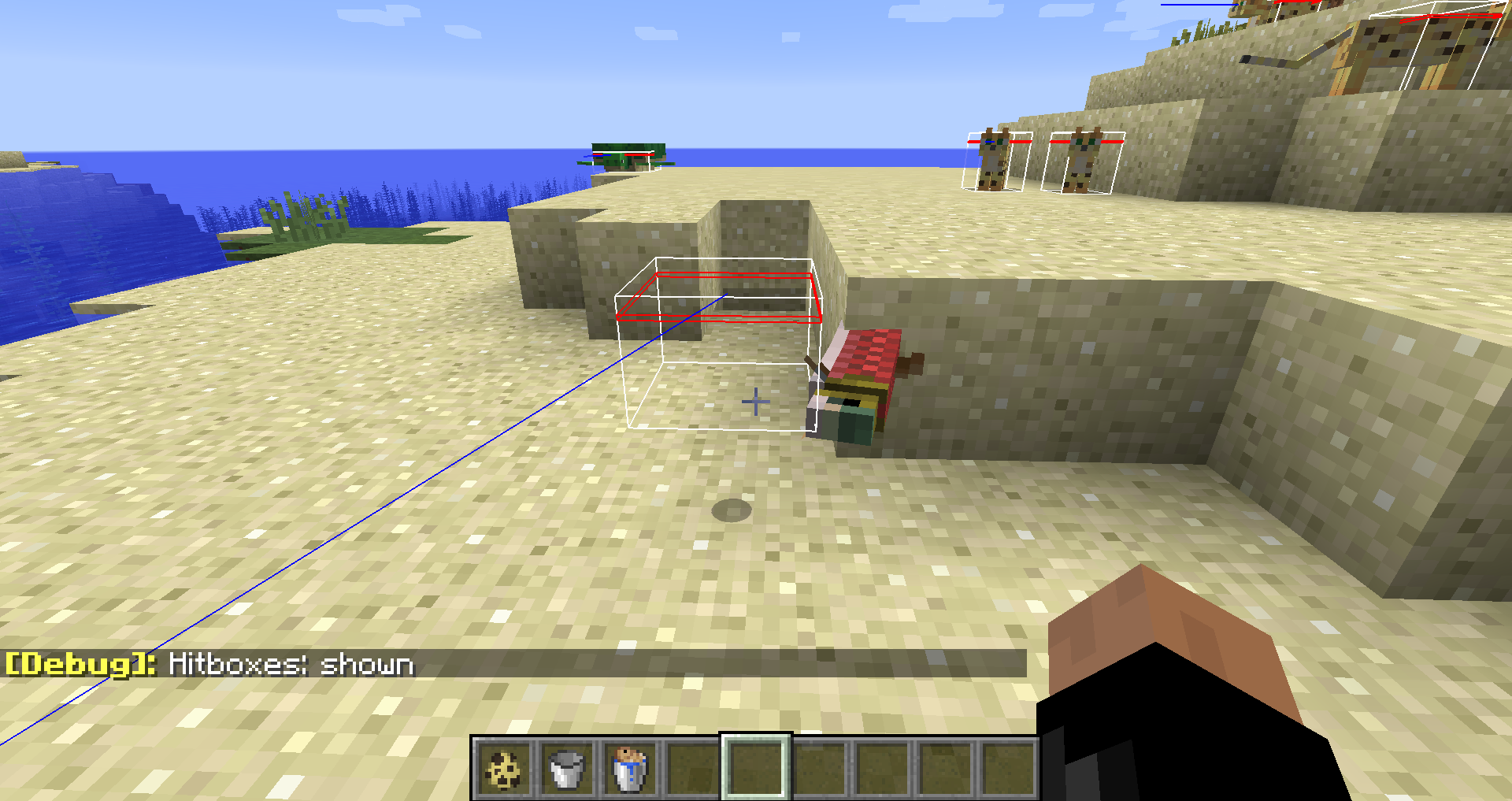
Slamon Hitbox on land is wrongly positioned.Salmon Hitbox on land is wrongly positioned.
SuccessCount in Commandblocks iswronglyupdatedSuccessCount in Commandblocks is updated wrong
Preface: This is a somewhat speculative title, as it is hard to reproduce for outsiders and the gamepass part is just a common factor that we noticed.
Sometimes, a realm that you're invited to just doesn't show up ingame, eventhough you haven't been uninvited and the realm hasn't expired. After multiple reports and lots of headscratching on the /r/realms subreddit (
[[1]|https://www.reddit.com/r/realms/comments/sd1wdn/realm_keeps_disappearing_from_list/,] [[2]|https://www.reddit.com/r/realms/comments/svvaqk/realm_dissapears_when_the_owner_doesnt_play_for_a/,|https://www.reddit.com/r/realms/comments/sd1wdn/realm_keeps_disappearing_from_list/],] [[3]|https://www.reddit.com/r/realms/comments/txwt4n/realm_list_not_showing_java_edition/,|https://www.reddit.com/r/realms/comments/sd1wdn/realm_keeps_disappearing_from_list/],] [[4]|https://www.reddit.com/r/realms/comments/tzzkll/active_realm_doesnt_show_up_on_list/]and more), we think we were able to pinpoint the issue a little:
- The realm is only visble while the owner has the game running. Not necessarily on realms, but just has the game open.
- The realm is owned by someone who owns the game through xbox gamepass, not through buying it individually.
Other issues seem to include that that player cannot be invited to servers while they're not online either, so it might be a larger issue related to gamepass at play here.
Preface: This is a somewhat speculative title, as it is hard to reproduce for outsiders and the gamepass part is just a common factor that we noticed.
Sometimes, a realm that you're invited to just doesn't show up ingame, eventhough you haven't been uninvited and the realm hasn't expired. After multiple reports and lots of headscratching on the /r/realms subreddit ((1), (2), (3), (4) and more), we think we were able to pinpoint the issue a little:
- The realm is only visble while the owner has the game running. Not necessarily on realms, but just has the game open.
- The realm is owned by someone who owns the game through xbox gamepass, not through buying it individually.
Other issues seem to include that that player cannot be invited to servers while they're not online either, so it might be a larger issue related to gamepass at play here.
Preface: This is a somewhat speculative title, as it is hard to reproduce for outsiders and the gamepass part is just a common factor that we noticed.Sometimes, a realm that you're invited to just doesn't show up ingame, eventhough you haven't been uninvited and the realm hasn't expired. After multiple reports and lots of headscratching on the /r/realms subreddit ((1), (2), (3), (4) and more), we think we were able to pinpoint the issue a little:
- The realm is only visble while the owner has the game running. Not necessarily on realms, but just has the game open.
- The realm
is owned by someone who owns the game through xbox gamepass, not through buying it individually.Other issues seem to include that that player cannot be invited to servers while they're not online either, so it might be a larger issue related to gamepass at play here.
_The original title blamed gamepass for this behavior, as it was a common factor that we noticed from the posts linked below as well as this issue starting to occur in a similar timeframe as gamepass was introduced. However we since had a few non-gamepass ones that reported this issue, so I'm removing it from the title and the rest of the post, just leaving it here as a note in case it might be a lead.
Sometimes, a realm that you're invited to just doesn't show up ingame, eventhough you haven't been uninvited and the realm hasn't expired. After multiple reports and lots of headscratching on the /r/realms subreddit ((1), (2), (3), (4) and many more), we think we were able to pinpoint the issue a little:
- The realm is sometimes only visble while the owner has the game running. Not necessarily on realms, but just has the game open. Some reports indicate that even opening the launcher alone is enough to make the world reappear.
- The realm sometimes stays around after the owner logged off for about 24 hours, after which it disappears from the list.
- ~The realm is owned by someone who owns the game through xbox gamepass, not through buying it individually.~
~Other issues seem to include that that player cannot be invited to servers while they're not online either, so it might be a larger issue related to gamepass at play here.~
Owning the game through gamepass makes your realm disappearif you're not onlineRealm disappears from player list if you're not online for a while
_The original title blamed gamepass for this behavior, as it was a common factor that we noticed from the posts linked below as well as this issue starting to occur in a similar timeframe as gamepass was introduced. However we since had a few non-gamepass ones that reported this issue, so I'm removing it from the title and the rest of the post, just leaving it here as a note in case it might be a lead.
Sometimes, a realm that you're invited to just doesn't show up ingame, eventhough you haven't been uninvited and the realm hasn't expired. After multiple reports and lots of headscratching on the /r/realms subreddit ((1), (2), (3), (4) and many more), we think we were able to pinpoint the issue a little:
- The realm is sometimes only visble while the owner has the game running. Not necessarily on realms, but just has the game open. Some reports indicate that even opening the launcher alone is enough to make the world reappear.
- The realm sometimes stays around after the owner logged off for about 24 hours, after which it disappears from the list.
- ~
The realm is owned by someone who owns the game through xbox gamepass, not through buying it individually.~~
Other issues seem to include that that player cannot be invited to servers while they're not online either, so it might be a larger issue related to gamepass at play here.~
Using more than one `execute anchored` per command doesn't work as expected and only the first one is applied.
Examples to reproduce (put them in a repeating commandblock):
Unable to find source-code formatter for language: mcfunction. Available languages are: actionscript, ada, applescript, bash, c, c#, c++, cpp, css, erlang, go, groovy, haskell, html, java, javascript, js, json, lua, none, nyan, objc, perl, php, python, r, rainbow, ruby, scala, sh, sql, swift, visualbasic, xml, yamlexecute as @a at @s anchored eyes run particle minecraft:basic_flame_particle ^^^3will put the particle 3 blocks in front of where the player is looking.
Unable to find source-code formatter for language: mcfunction. Available languages are: actionscript, ada, applescript, bash, c, c#, c++, cpp, css, erlang, go, groovy, haskell, html, java, javascript, js, json, lua, none, nyan, objc, perl, php, python, r, rainbow, ruby, scala, sh, sql, swift, visualbasic, xml, yamlexecute as @a at @s anchored feet run particle minecraft:basic_flame_particle ^^^3will put the particle 3 blocks in front of where the player is looking, but forward based on the feet position.
Unable to find source-code formatter for language: mcfunction. Available languages are: actionscript, ada, applescript, bash, c, c#, c++, cpp, css, erlang, go, groovy, haskell, html, java, javascript, js, json, lua, none, nyan, objc, perl, php, python, r, rainbow, ruby, scala, sh, sql, swift, visualbasic, xml, yamlexecute as @a at @s anchored eyes anchored feet run particle minecraft:basic_flame_particle ^^^3will put the particle 3 blocks in front of where the player is looking, instead of at the feet.
Unable to find source-code formatter for language: mcfunction. Available languages are: actionscript, ada, applescript, bash, c, c#, c++, cpp, css, erlang, go, groovy, haskell, html, java, javascript, js, json, lua, none, nyan, objc, perl, php, python, r, rainbow, ruby, scala, sh, sql, swift, visualbasic, xml, yamlexecute as @a at @s anchored feet anchored eyes run particle minecraft:basic_flame_particle ^^^3will put the particle 3 blocks in front of where the player is looking based on the feet instead of the eyes.
You might say "but why would you want to do that anyways": in more complex execute commands, being able to switch back and forth between these is very helpful.
For example, using the method described here you can use a single execute command to check whether a player is roughly looking in the direction of something.
Using more than one `execute anchored` per command doesn't work as expected and only the first one is applied.
Examples to reproduce (put them in a repeating commandblock):
execute as @a at @s anchored eyes run particle minecraft:basic_flame_particle ^^^3will put the particle 3 blocks in front of where the player is looking.
execute as @a at @s anchored feet run particle minecraft:basic_flame_particle ^^^3will put the particle 3 blocks in front of where the player is looking, but forward based on the feet position.
execute as @a at @s anchored eyes anchored feet run particle minecraft:basic_flame_particle ^^^3will put the particle 3 blocks in front of where the player is looking, instead of at the feet.
execute as @a at @s anchored feet anchored eyes run particle minecraft:basic_flame_particle ^^^3will put the particle 3 blocks in front of where the player is looking based on the feet instead of the eyes.
You might say "but why would you want to do that anyways": in more complex execute commands, being able to switch back and forth between these is very helpful.
For example, using the method described here you can use a single execute command to check whether a player is roughly looking in the direction of something.
The function run through the `run_command` entity effect type runs in the wrong dimension / always in the overworld.
To reproduce, download the attached datapack and add it to a world. Then follow these steps.
- give yourself a pickaxe
- enchant this pickaxe with the test enchantment using /enchant @s test:test while holding it in your hand
- make sure you're in survival mode
- hit a nearby block. Observe how you get teleported to that block.
- go through a nether or end portal
- hit any block there
- observe how you're getting teleported to the corresponding block in the overworld instead.
All the function does is this:
tp @s ~ ~ ~
Same issue asMCPE-181058, but we have found a reliable way to reproduce this:
- Make a new singleplayer world in 1.21.22 (or use attached).
- Join the world with a second player for easier killing, but it also works in singleplayer using /kill.
- place a bed at x = 112 and one at x = 111.
- let the second player stand at the same x pos as the bed (see the attached picture)
- make them click the bed, destroy the bed, then kill them.
- observe that if the player & bed were at 111, they will respawn at world spawn.
- observe that if the player & bed were at 112, they will get stuck on the respawn screen.
From our further testing here are some more observations:
- if either X or Z coordinate is at or above 112 it will trigger the issue
- it's not a problem anymore if the other coordinate is -97 or below (-96 is still a problem)
- it doesn't seem to be very consistent, as in it doesn't seem to span a huge rectangle of chunks - but at least it seems to be chunk based.
- bed position doesn't matter, death position doesn't matter, only the position of the player when clicking the bed
- it happens on singleplayer worlds as well as singleplayer worlds that has friends join in them
- it does NOT happen in worlds that were created on dedicated servers while on said server
- it however does happen in worlds that were created in singleplayer and then copied to dedicated servers
I hope some of these infos help figure out where the issue is coming from.
We've run into the same issue as
MCPE-181058, but we have found a reliable way to reproduce this:
- Make a new singleplayer world in 1.21.22 (or use attached).
- Join the world with a second player for easier killing, but it also works in singleplayer using /kill.
- place a bed at x = 112 and one at x = 111.
- let the second player stand at the same x pos as the bed (see the attached picture)
- make them click the bed, destroy the bed, then kill them.
- observe that if the player & bed were at 111, they will respawn at world spawn.
- observe that if the player & bed were at 112, they will get stuck on the respawn screen.
From our further testing here are some more observations:
- if either X or Z coordinate is at or above 112 it will trigger the issue
- it's not a problem anymore if the other coordinate is -97 or below (-96 is still a problem)
- it doesn't seem to be very consistent, as in it doesn't seem to span a huge rectangle of chunks - but at least it seems to be chunk based.
- bed position doesn't matter, death position doesn't matter, only the position of the player when clicking the bed
- it happens on singleplayer worlds as well as singleplayer worlds that has friends join in them
- it does NOT happen in worlds that were created on dedicated servers while on said server
- it however does happen in worlds that were created in singleplayer and then copied to dedicated servers
I hope some of these infos help figure out where the issue is coming from, as it's currently a massive issue with a map we're making.
We've run into the same issue as
MCPE-181058, but we have found a reliable way to reproduce this:
- Make a new singleplayer world in 1.21.22 (or use attached).
- Join the world with a second player for easier killing, but it also works in singleplayer using /kill.
- place a bed at x = 112 and one at x = 111.
- let the second player stand at the same x pos as the bed (see the attached picture)
- make them click the bed, destroy the bed, then kill them.
- observe that if the player & bed were at 111, they will respawn at world spawn.
- observe that if the player & bed were at 112, they will get stuck on the respawn screen.
From our further testing here are some more observations:
- if either X or Z coordinate is at or above 112 it will trigger the issue
- it's not a problem anymore if the other coordinate is -97 or below (-96 is still a problem)
- it doesn't seem to be very consistent, as in it doesn't seem to span a huge rectangle of chunks - but at least it seems to be chunk based.
- bed position doesn't matter, death position doesn't matter, only the position of the player when clicking the bed
- it happens on singleplayer worlds as well as singleplayer worlds that has friends join in them
- it does NOT happen in worlds that were created on dedicated servers while on said server
- it however does happen in worlds that were created in singleplayer and then copied to dedicated servers
I hope some of these infos help figure out where the issue is coming from, as it's currently a massive issue with a map we're making.
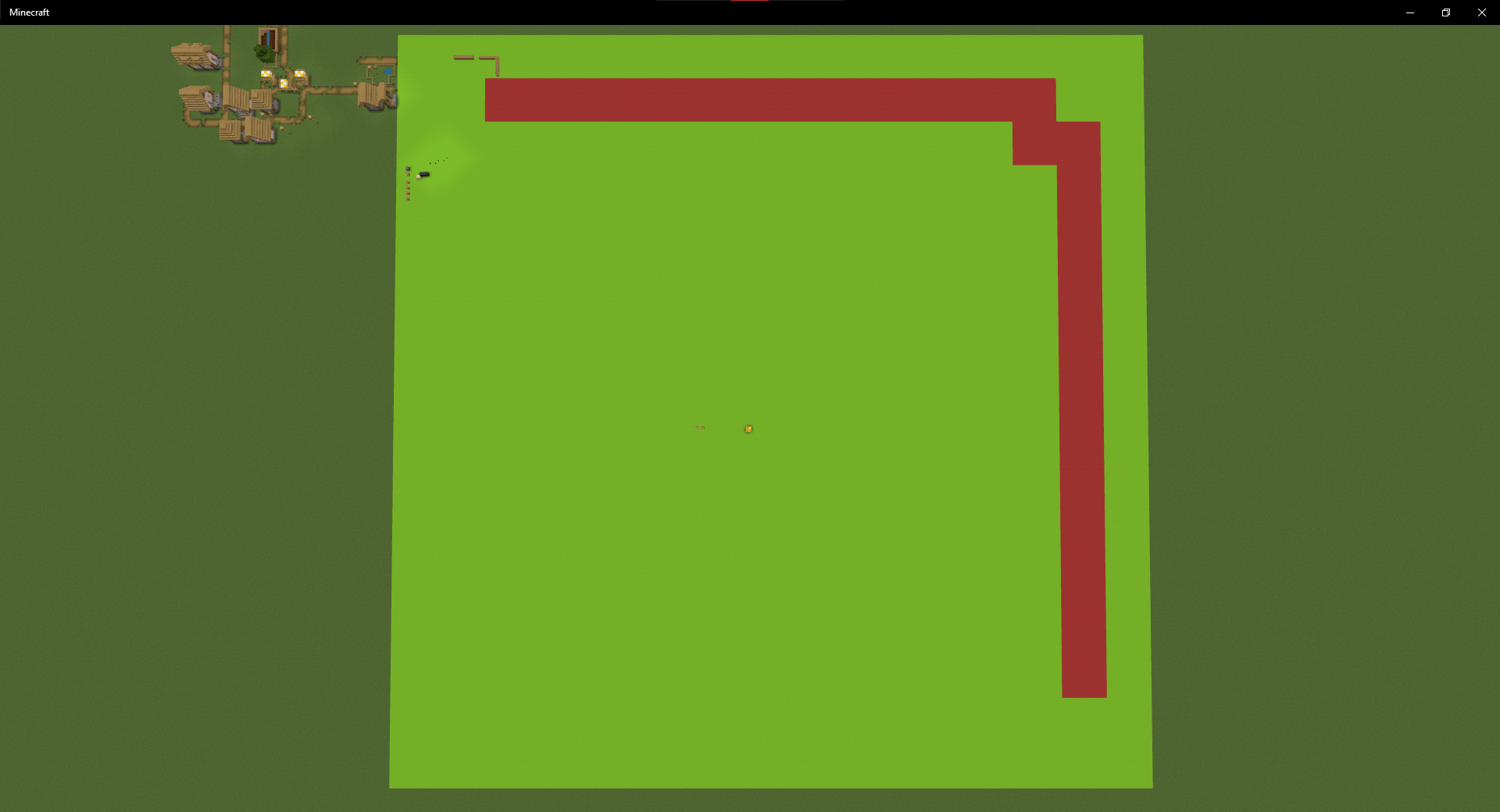
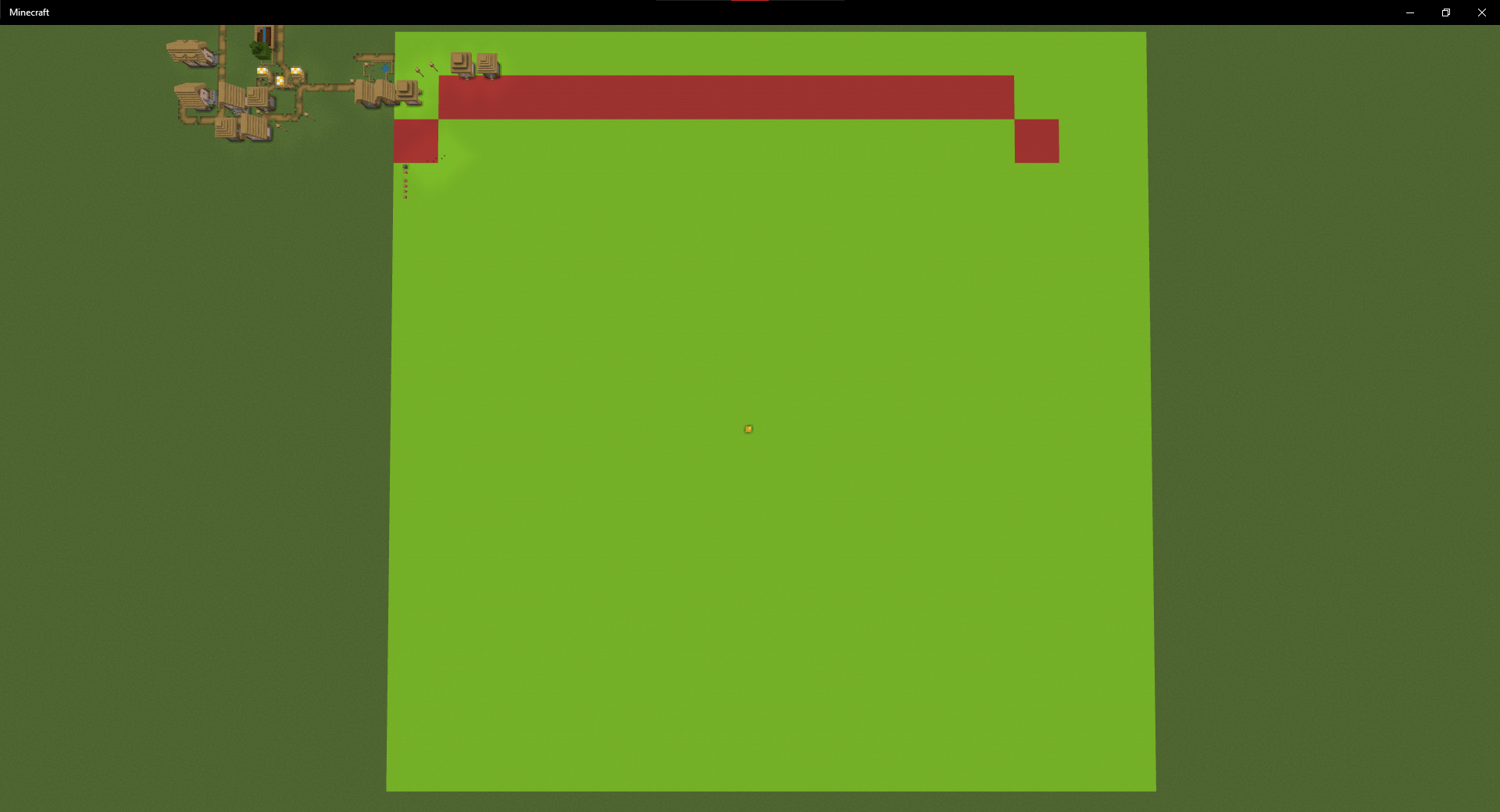
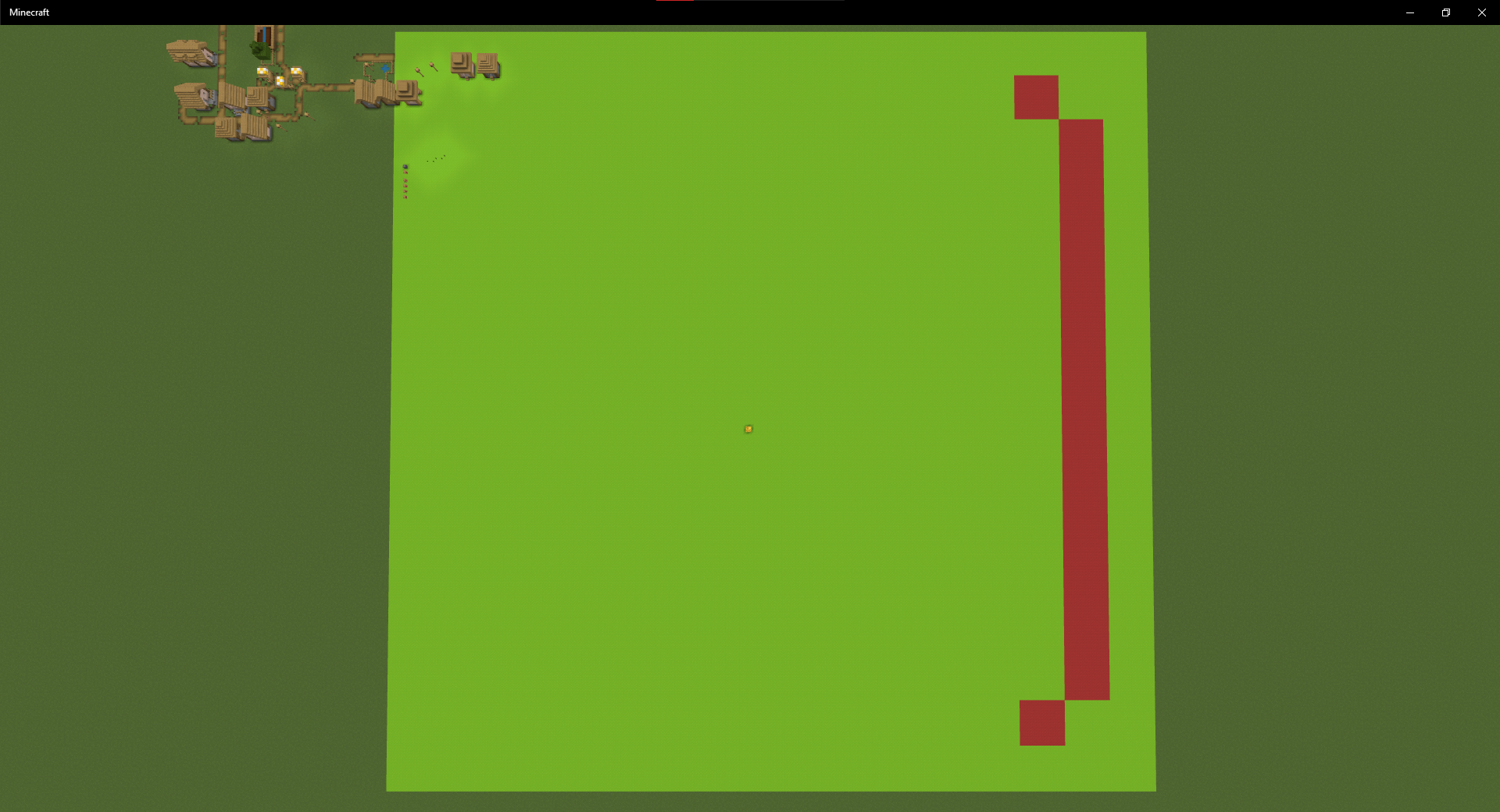
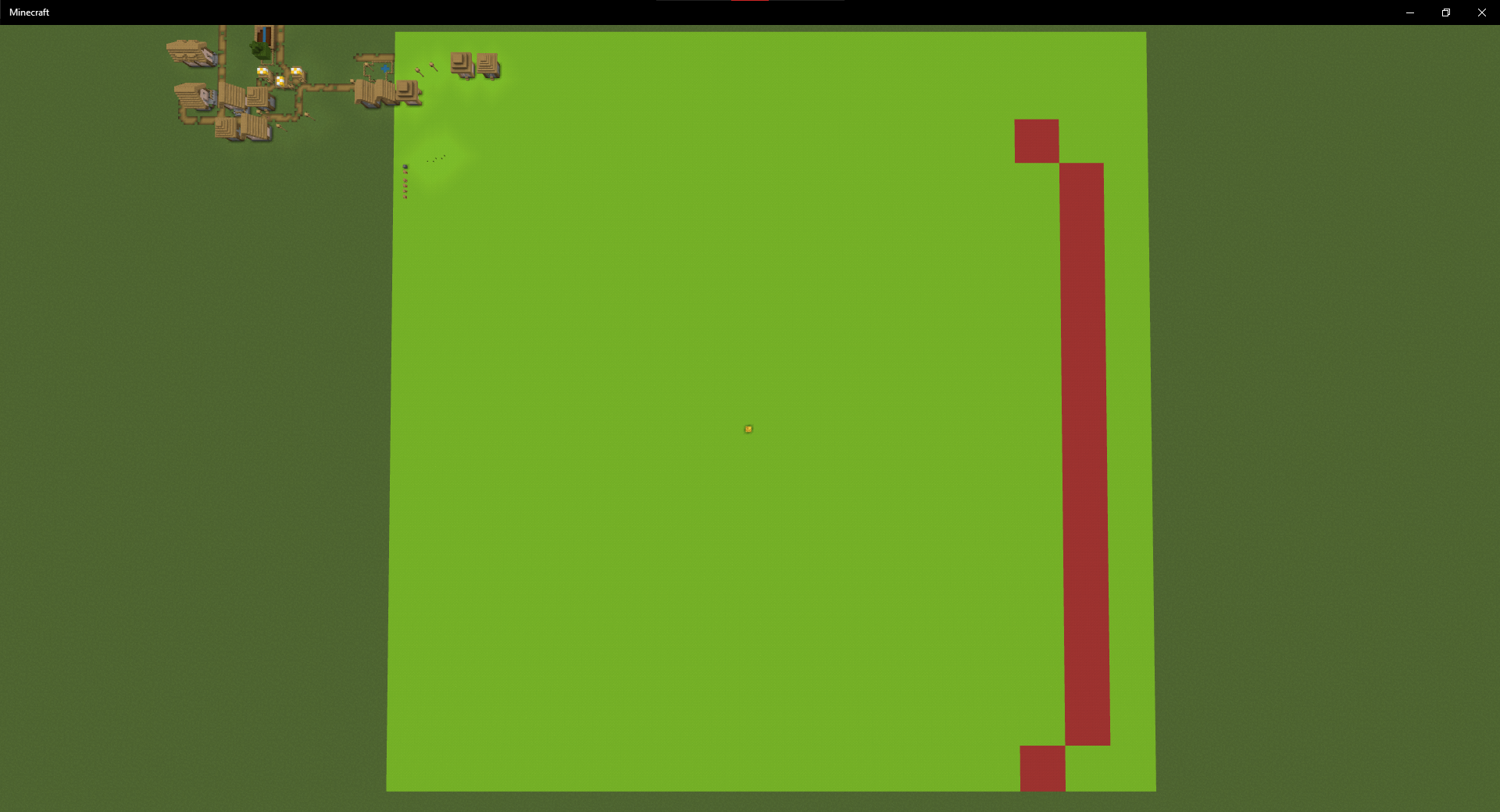
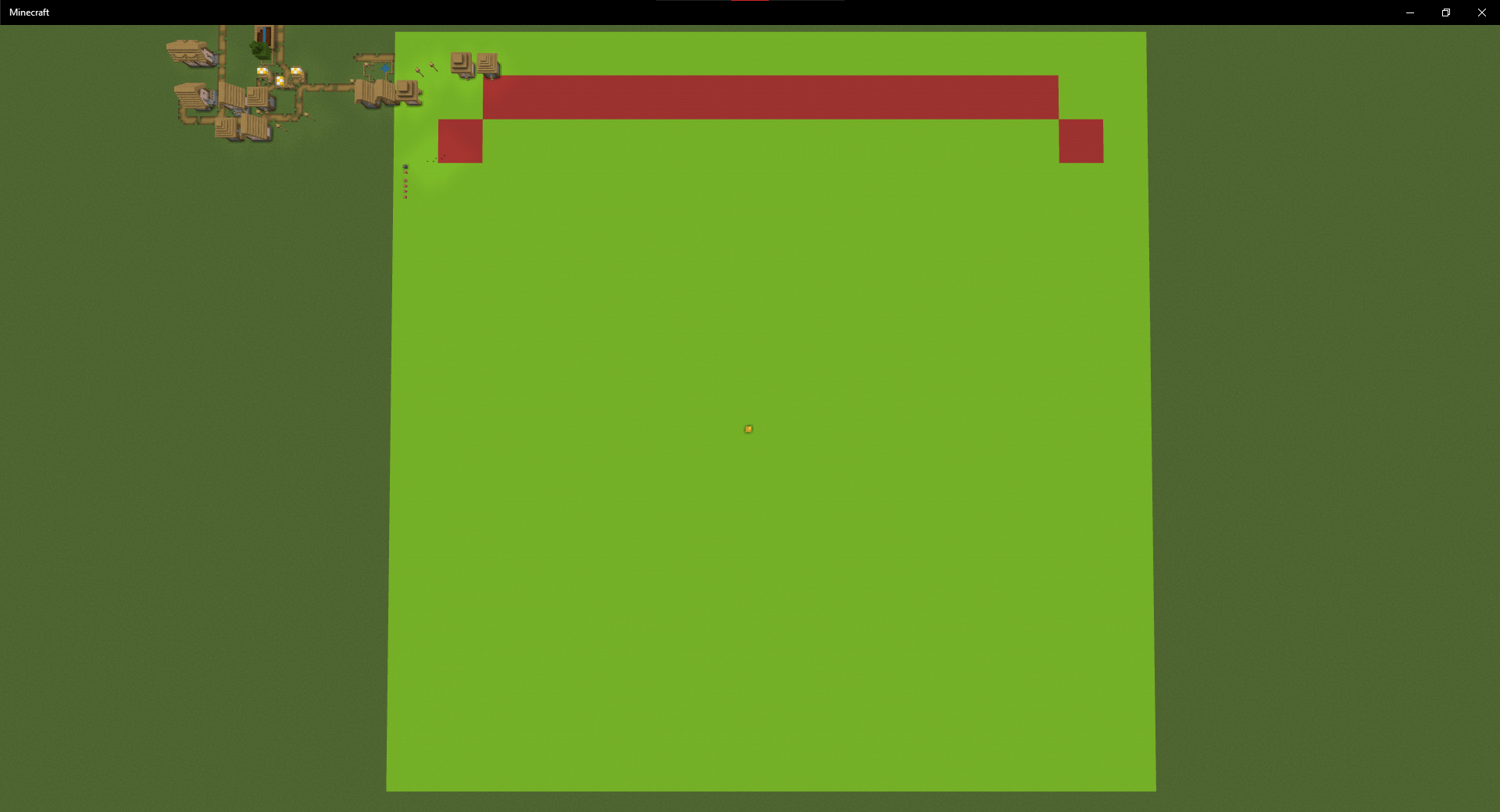
Here is a testrun, with one test per chunk. green chunks mean respawn worked, red chunks mean the player got stuck on the respawn screen. up is +x, right is +y, the gold block is 0 0, the raw gold blocks are the blocks on -1.
We've run into the same issue as
MCPE-181058, but we have found a reliable way to reproduce this:
- Make a new singleplayer world in 1.21.22 (or use attached).
- Join the world with a second player for easier killing, but it also works in singleplayer using /kill.
- place a bed at x = 112 and one at x = 111.
- let the second player stand at the same x pos as the bed (see the attached picture)
- make them click the bed, destroy the bed, then kill them.
- observe that if the player & bed were at 111, they will respawn at world spawn.
- observe that if the player & bed were at 112, they will get stuck on the respawn screen.
From our further testing here are some more observations:
- if either X or Z coordinate is at or above 112 it will trigger the issue
- it's not a problem anymore if the other coordinate is -97 or below (-96 is still a problem)
- it doesn't seem to be very consistent, as in it doesn't seem to span a huge rectangle of chunks - but at least it seems to be chunk based.
- bed position doesn't matter, death position doesn't matter, only the position of the player when clicking the bed
- it happens on singleplayer worlds as well as singleplayer worlds that has friends join in them
- it does NOT happen in worlds that were created on dedicated servers while on said server
- it however does happen in worlds that were created in singleplayer and then copied to dedicated servers
I hope some of these infos help figure out where the issue is coming from, as it's currently a massive issue with a map we're making.
Here is a testrun, with one test per chunk. green chunks mean respawn worked, red chunks mean the player got stuck on the respawn screen. up is +x, right is +y, the gold block is 0 0, the raw gold blocks are the blocks on -1.
We've run into the same issue as
MCPE-181058, but we have found a reliable way to reproduce this:
- Make a new singleplayer world in 1.21.22 (or use attached).
- Join the world with a second player for easier killing, but it also works in singleplayer using /kill.
- place a bed at x = 112 and one at x = 111.
- let the second player stand at the same x pos as the bed (see the attached picture)
- make them click the bed, destroy the bed, then kill them.
- observe that if the player & bed were at 111, they will respawn at world spawn.
- observe that if the player & bed were at 112, they will get stuck on the respawn screen.
From our further testing here are some more observations:
- if either X or Z coordinate is at or above 112 it will trigger the issue
- it's not a problem anymore if the other coordinate is -97 or below (-96 is still a problem)
- it doesn't seem to be very consistent, as in it doesn't seem to span a huge rectangle of chunks - but at least it seems to be chunk based.
- bed position doesn't matter, death position doesn't matter, only the position of the player when clicking the bed
- it happens on singleplayer worlds as well as singleplayer worlds that has friends join in them
- it does NOT happen in worlds that were created on dedicated servers while on said server
- it however does happen in worlds that were created in singleplayer and then copied to dedicated servers
I hope some of these infos help figure out where the issue is coming from, as it's currently a massive issue with a map we're making.
Here is a testrun, with one test per chunk. green chunks mean respawn worked, red chunks mean the player got stuck on the respawn screen. up is +x, right is +y, the gold block is 0 0, the raw gold blocks are the blocks on -1.
We've run into the same issue as
MCPE-181058, but we have found a reliable way to reproduce this:
- Make a new singleplayer world in 1.21.22 (or use attached).
- Join the world with a second player for easier killing, but it also works in singleplayer using /kill.
- place a bed at x = 112 and one at x = 111.
- let the second player stand at the same x pos as the bed (see the attached picture)
- make them click the bed, destroy the bed, then kill them.
- observe that if the player & bed were at 111, they will respawn at world spawn.
- observe that if the player & bed were at 112, they will get stuck on the respawn screen.
From our further testing here are some more observations:
- if either X or Z coordinate is at or above 112 it will trigger the issue
- it's not a problem anymore if the other coordinate is -97 or below (-96 is still a problem)
- it doesn't seem to be very consistent, as in it doesn't seem to span a huge rectangle of chunks - but at least it seems to be chunk based.
- bed position doesn't matter, death position doesn't matter, only the position of the player when clicking the bed
- it happens on singleplayer worlds as well as singleplayer worlds that has friends join in them
- it does NOT happen in worlds that were created on dedicated servers while on said server
- it however does happen in worlds that were created in singleplayer and then copied to dedicated servers
I hope some of these infos help figure out where the issue is coming from, as it's currently a massive issue with a map we're making.
Here is a testrun, with one test per chunk. green chunks mean respawn worked, red chunks mean the player got stuck on the respawn screen. up is +x, right is +y, the gold block is 0 0, the raw gold blocks are the blocks on -1.
We've run into the same issue as
MCPE-181058, but we have found a reliable way to reproduce this:
- Make a new singleplayer world in 1.21.22 (or use attached).
- Join the world with a second player for easier killing, but it also works in singleplayer using /kill.
- place a bed at x = 112 and one at x = 111.
- let the second player stand at the same x pos as the bed (see the attached picture)
- make them click the bed, destroy the bed, then kill them.
- observe that if the player & bed were at 111, they will respawn at world spawn.
- observe that if the player & bed were at 112, they will get stuck on the respawn screen.
From our further testing here are some more observations:
- if either X or Z coordinate is at or above 112 it will trigger the issue
- it's not a problem anymore if the other coordinate is -97 or below (-96 is still a problem)
- it doesn't seem to be very consistent, as in it doesn't seem to span a huge rectangle of chunks - but at least it seems to be chunk based.
- bed position doesn't matter, death position doesn't matter, only the position of the player when clicking the bed
- it happens on singleplayer worlds as well as singleplayer worlds that has friends join in them
- it does NOT happen in worlds that were created on dedicated servers while on said server
- it however does happen in worlds that were created in singleplayer and then copied to dedicated servers
I hope some of these infos help figure out where the issue is coming from, as it's currently a massive issue with a map we're making.
Here is a testrun, with one test per chunk. green chunks mean respawn worked, red chunks mean the player got stuck on the respawn screen. up is +x, right is +y, the gold block is 0 0, the raw gold blocks are the blocks on -1.
We've run into the same issue as
MCPE-181058, but we have found a reliable way to reproduce this:
- Make a new singleplayer world in 1.21.22 (or use attached).
- Join the world with a second player for easier killing, but it also works in singleplayer using /kill.
- place a bed at x = 112 and one at x = 111.
- let the second player stand at the same x pos as the bed (see the attached picture)
- make them click the bed, destroy the bed, then kill them.
- observe that if the player & bed were at 111, they will respawn at world spawn.
- observe that if the player & bed were at 112, they will get stuck on the respawn screen.
From our further testing here are some more observations:
- if either X or Z coordinate is at or above 112 it will trigger the issue
- it's not a problem anymore if the other coordinate is -97 or below (-96 is still a problem)
- it doesn't seem to be very consistent, as in it doesn't seem to span a huge rectangle of chunks - but at least it seems to be chunk based.
- bed position doesn't matter, death position doesn't matter, only the position of the player when clicking the bed
- it happens on singleplayer worlds as well as singleplayer worlds that has friends join in them
- it does NOT happen in worlds that were created on dedicated servers while on said server
- it however does happen in worlds that were created in singleplayer and then copied to dedicated servers
- This seems to be an issue if the world spawn is at 0 0 (default), -1 0, 0 -1; but not at 1 0 or 0 1. (y always -60 in my test case) At least not in the areas previously identified.
I hope some of these infos help figure out where the issue is coming from, as it's currently a massive issue with a map we're making.
Here is a testrun, with one test per chunk. green chunks mean respawn worked, red chunks mean the player got stuck on the respawn screen. up is +x, right is +y, the gold block is 0 0, the raw gold blocks are the blocks on -1.
We've run into the same issue as
MCPE-181058, but we have found a reliable way to reproduce this:
- Make a new singleplayer world in 1.21.22 (or use attached).
- Join the world with a second player for easier killing, but it also works in singleplayer using /kill.
- place a bed at x = 112 and one at x = 111.
- let the second player stand at the same x pos as the bed (see the attached picture)
- make them click the bed, destroy the bed, then kill them.
- observe that if the player & bed were at 111, they will respawn at world spawn.
- observe that if the player & bed were at 112, they will get stuck on the respawn screen.
From our further testing here are some more observations:
- if either X or Z coordinate is at or above 112 it will trigger the issue
- it's not a problem anymore if the other coordinate is -97 or below (-96 is still a problem)
- it doesn't seem to be very consistent, as in it doesn't seem to span a huge rectangle of chunks - but at least it seems to be chunk based.
- bed position doesn't matter, death position doesn't matter, only the position of the player when clicking the bed
- it happens on singleplayer worlds as well as singleplayer worlds that has friends join in them
- it does NOT happen in worlds that were created on dedicated servers while on said server
- it however does happen in worlds that were created in singleplayer and then copied to dedicated servers
- This seems to be an issue if the world spawn is at 0 0 (default), -1 0, 0 -1; but not at 1 0 or 0 1. (y always -60 in my test case) At least not in the areas previously identified.
I hope some of these infos help figure out where the issue is coming from, as it's currently a massive issue with a map we're making.
Here is a testrun, with one test per chunk. green chunks mean respawn worked, red chunks mean the player got stuck on the respawn screen. up is +x, right is +y, the gold block is 0 0, the raw gold blocks are the blocks on -1.
I've attached the same tests with different world spawn locations, they are labeled x_z by the respective spawnpoint.

in the gamefiles there actually is a random.classic_hurt sound (\.minecraft\resources\sound3\random\classic_hurt). it might just be, that its not compatible with the playsound command.
confirmed for 1.8.7
swords don't block anymore and therefor don't have a mouse2 action any more.
it is a request and thus does not belong in here.
This is for bugs only
its no issue anymore in 16w07a.
Yet another restriction for the mapmakers sigh
At least remove the "effect has been applied" message, please?
Allright, case closed I guess. Now I'll head over to reddit to the suggestions sub to suggest the change
Confirmed for 1.9.1-pre3
After putting some more research into this behavior i came to assume that this has way more positive than negative behaviors to it and thus i would recommend it being "WAI"
It does.
Also, i found out that it makes perfect sense to do that actually and thus WAI.
Sorry to bother.
The half falling/suspended FallingSand entity in this state also deletes arrows that hit it from above.
Using a leash doesn't even count on a fence if you're leashing a mob to it.
sure. sorry I missed that ticked when searching for the issue.
@Skylinerw mentioned to me, that this was likely because the the slimes now get spawned with a base of 20 by default, and when they first take damage, the game will notice the discrepancy and then revert back to the correct amount of hearts while displaying the difference in the "damage-hearts" visually.
I just noticed that I started the timer in the second video too early since i was fixated on the wrong block. The timer should start 4 seconds later.
You know that there is a lot of bugs reported and only a few people working on developing realms? Especially with relatively minor bugs this obviously doesn't take topmost priority.
Also, in this case it might be better to contact support https://help.mojang.com/
is there any source that it is WAI?
okay. still, a silent "WAI" is not satisfying.
I'm fine with it being WAI, as long as there is some form of source.
confirmed for pre-5
are you sure it wasn't just unlucky? The Eye of Ender has a 20% chance of shattering upon use.
confirmed for pre-7
just noticed this bug in pre-7. though the leashed entities are in the spawnchunks, after I died it looked like this
i think this somewhat relates to this report:
the shield is affected by this as well, rendering the wrong way around in the tab but not as the advancement.
Also, I made an interesting observation that it's happening as well in the toast, but only if the advancement GUI is open.
Proof: http://i.imgur.com/mQ4PlAY.png (upper is normal gameplay, lower is with the advancement screen open, as well as in the tab and as the advancement)
Try granting/revoking this advancement to see this effect ingame.
/advancement grant Plagiatus only minecraft:story/deflect_arrow
this is in 1.12
dupe of
REALMS-410Can confirm. Whenever the players switch in who's killing and who's killed, the messages come in the wrong order for me.
I've created a bare-bones version of their Datapack, just to be sure it isn't cause by anything else. also, I've added the current gametick to the tellraw to show clearly that it's run in the same tick.
OutOfOrder_WithTimeStamps.zip
okay, I think I've located the issue here: The function that produces the messages is called upon every player. each player can either send the death or the kill message. the order in which the same function is executed upon the player is arbitrary, since not further specified (and mc, as far as I know, uses age as arbitrary, and since one of the players died, their age was reset and thus the sorting order is reverted, and thus the moment it gets reverted the previous order was still a thing and thus the commands come in the wrong order whenever you switch killer and killed).
So, the problem is probably not that commands aren't run in a consistent order, but instead that players are getting rearranged in the arbitrary list when killed?
I've found a very similar bugreport:
MC-122595As a matter of fact I do. I've overlooked that. This makes this bug invalid.
Thanks for that input.
just tested it as well. in 1.13.2 it's still a thing, in 1.14-pre-5 it's apparently fixed.
I suggest marking it as fixed instead of "cannot reproduce", as the long list of versions clearly states that it used to be reproduceable.
can confirm. setting the worldborder to 16 will basically crash the game when running /reload (tested with a different datapack). it doesn't register any commands anymore, nor does it notice dropped items or anything like that.
trying to close the game after this using Alt+F4 will leave a black window that can only be removed with the task manager. Using F3+C also doesn't close the game but freezes it entirely.
doesn't crash if there is no datapack enabled. does crash if it gets enabled in this situation.
There are no logs in the gamelog that point to anything wrong.
further testing seems to reveal that the reload command crashes if the worldspawn is outside of the worldborder.
might relate to
MC-128494confirmed for 1.14.4
Confirmed for 1.15.2
Entities don't seem to loose their scores when being teleported to unloaded chunks, but they do loose them when entering the nether now (1.15.2)
same happened to me and, as I asked my peers, I got some comments about this as well. Very annoying to have to restart after I almost finished the level.
See
MC-249021Can confirm, I just ran into the same issue on a 1.18.2 realm. I attached the video to the issue. It also happens for "Beaconators", not just "Bring home the beacon".
I did not build those beacons, another player did, and it only triggered after I (got kicked for being afk and) relogged.
In case this is relevant, I was standing at 705 -55 -1881, the closest beacon is at 696 -55 -1881, so about 8-9 block away. I was able to reproduce this issue on every relog, as long as I was 8 or less blocks away.
> Note that issues with Java Realms are tracked separately from Bedrock Realms
okay, so is there a Java Edition bugreport for this yet? if so, you should probably link it in the notice.
If not, I'll make one myself, as I've encountered this issue, too.
EDIT: found it, it's funnily enough 1k above this one: https://bugs.mojang.com/browse/REALMS-10191
Can confirm. On my 1.18.2 realm I am encountering the same two issues:
1. chat messages from other players don't show (yes, I checked, they are not blocked in the communications screen)
2. signs are empty
More Info on 1):
Using /say will display the chat to everyone, using /me will not. Using /tell or /w will work, so will /tm and /teammsg.
For 2) I have some more information on how it looks on my end:
I'm happy to provide any additional details on either one if I can.
yes, it's still present in 1.18.2
confirmed for 1.18.2
can confirm for 1.18.2
Another option is that the "Multiplayer Secure Chat Signing" introduced in this week's snapshot 22w17a causes some issues. As the bug seems to have appeared around the same time.
Then again, the existence of the "FilteredText" NBT attributes (and similar) hints in a different direction.
it seems that today my realm is just fine again and doesn't show any of these issues anymore, after it experienced this issue for the past few days.
@kurbs75 wrong bug report. This one is about Java. The bedrock report is
REALMS-9191@Mods at this point can we get a modnote like in
REALMS-9191telling people that this one is NOT about Bedrock?can confirm for 1.19.3
It actually seems to go beyond return and also affects success, where success would store the success value of the last command run in the function instead of whether the function was run or not.
This is different from the behavior in chat and commandblocks, where it seems to return 1 for success if the function is run successfully, independent of the final commands success.
Seems to still be a thing in 23w32a, despite being marked as fixed.
Can confirm for 1.20.1
Also can confirm this happens when spectating any entity, not just players.
Another observation:
This seems to be an issue if the world spawn is at 0 0, -1 0, 0 -1; but not at 1 0 or 0 1. (y always -60 in my test case) - at least not in the areas previously identified.
can confirm for 1.21.4
Unfortunately in my case it's more difficult to work around this issue, as I'm using `execute summon` instead of a normal summon and thus cannot add the alignment data to it until i'm inside the called function.