 MC-256392
Pointed dripstone breaking animation is horizontally misaligned, resulting in cut-off pixels
The bug
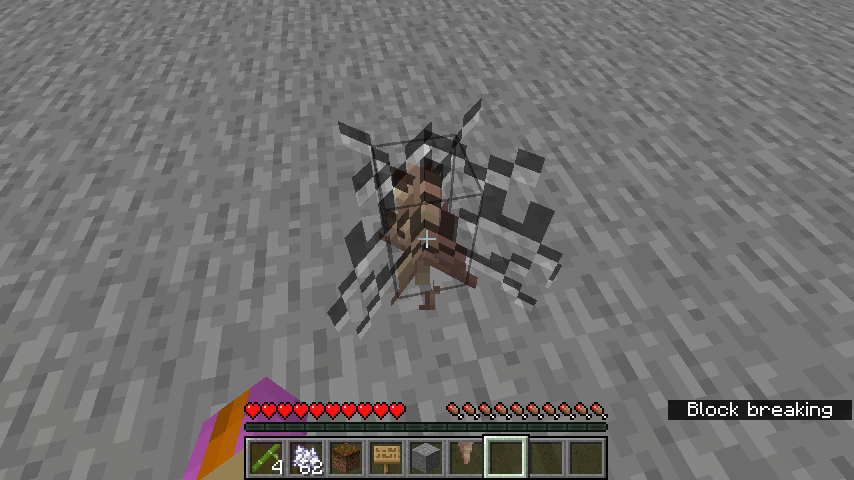
When breaking a placed pointed dripstone, the cracking texture is not locked to the same grid as the block's own texture, resulting in the cracking texture being misaligned.
THIS IS A DIFFERENT BUG FROM MC-142156 - while MC-142156 makes this effect clearer to see, that bug is a fundamentally different problem (it concerns cracks appearing on transparent surfaces, whereas this ticket concerns cracks not being aligned correctly to the pixel grid) and fixing one will not fix the other.
How to reproduce
- Place pointed dripstone
- Start punching it in Survival
- Pay close attention
Expected results
The cracking animation would be aligned to the same pixel grid as the pointed dripstone texture.
Actual results
There is a misalignment on the horizontal axes.
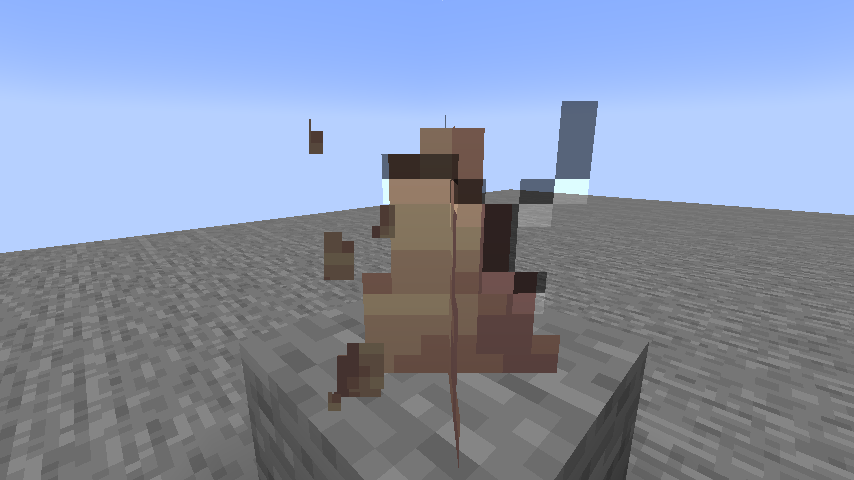
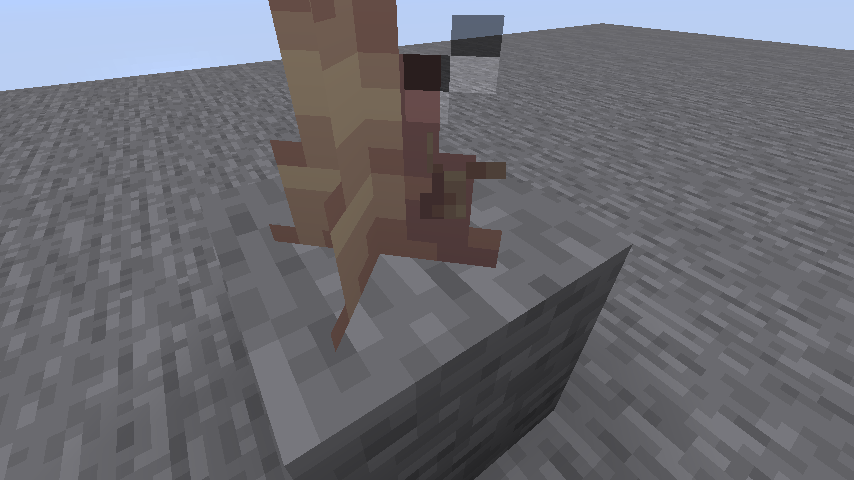
MC-142156 allows us to see a secondary side-effect of this issue: if we continue to punch the block until it breaks, the cracking animation eventually appears cut-off on one side.
How to fix
It may be possible to fix this issue by only allowing blocks with random offsets, such as pointed dripstone, to only be offset by sixteenths of a block.
Linked Issues
 Low
LowAttachments8





![[Mod] Avoma](../../../data/avatars/users/86198.png)
 Normal
Created Issue:
Pointed dripstone breaking animation is horizontally misaligned, resulting in cut-off pixels
Closely relates to MC-256390.
The bug
When breaking a placed pointed dripstone, the cracking texture is not locked to the same grid as the block's own texture, resulting in the cracking texture being misaligned.
THIS IS A DIFFERENT BUG FROM MC-142156 - while MC-142156 makes this effect clearer to see, that bug is a fundamentally different problem (it concerns cracks appearing on transparent surfaces, whereas this ticket concerns cracks not being aligned correctly to the pixel grid) and fixing one will not fix the other.
How to reproduce
- Place pointed dripstone
- Start punching it in Survival
- Pay close attention
Expected results
The cracking animation would be aligned to the same pixel grid as the pointed dripstone texture.
Actual results
There is a misalignment on the horizontal axes.
MC-142156 allows us to see a secondary side-effect of this issue: if we continue to punch the block until it breaks, the cracking animation eventually appears cut-off on one side.
How to fix
It may be possible to fix this issue by only allowing blocks with random offsets, such as pointed dripstone, to only be offset by sixteenths of a block.
Attachments5
![[Mod] markderickson](../../../data/avatars/users/18946.svg)
![[Mod] ampolive](../../../data/avatars/users/18949.svg)
relates to
![[Mod] Michael Wobst](../../../data/avatars/users/37868.png)
 Important
Closely relates to MC-256390.
The bug
When breaking a placed pointed dripstone, the cracking texture is not locked to the same grid as the block's own texture, resulting in the cracking texture being misaligned.
THIS IS A DIFFERENT BUG FROM MC-142156 - while MC-142156 makes this effect clearer to see, that bug is a fundamentally different problem (it concerns cracks appearing on transparent surfaces, whereas this ticket concerns cracks not being aligned correctly to the pixel grid) and fixing one will not fix the other.
How to reproduce
- Place pointed dripstone
- Start punching it in Survival
- Pay close attention
Expected results
The cracking animation would be aligned to the same pixel grid as the pointed dripstone texture.
Actual results
There is a misalignment on the horizontal axes.
MC-142156 allows us to see a secondary side-effect of this issue: if we continue to punch the block until it breaks, the cracking animation eventually appears cut-off on one side.
How to fix
It may be possible to fix this issue by only allowing blocks with random offsets, such as pointed dripstone, to only be offset by sixteenths of a block.
![[Mojang] slicedlime](../../../data/assets/gravatar/slicedlime.jpeg)
![[Mod] turbo](../../../data/avatars/users/92867.png)
is caused by
![[Mod] ManosSef](../../../data/avatars/users/61702.png)
![[Mojang] Triage Team](../../../data/avatars/users/89842.png)
![[Mod] Jiingy](../../../data/avatars/users/91802.png)
If the player breaks a block which is not within the 16x16 block resolution, or has slanted/shifted model-parts, the block break animation will not display properly. Often, the animation will be stretched, misaligned, or too large/small.
This issue is not MC-142156, though it is directly related. This issue specifically pertains to alignment, not visibility. This issue is also not MC-167836, as that issue includes full-cuboid blocks and applies across all blocks generally. It does go hand-in-hand with this issue though.
The core of this issue is that the breaking animation is always trying to center itself inside the 16x16 pixel space of a block, with a scale of 1. This works fine when blocks are within that space (like a full block, or a block which aligns on that grid), but when a block goes outside that alignment in any way, the issue arises.
Steps to Reproduce:
- Place down any of the listed blocks:
Affected Block Part Affected Notes Banner Entire Block Affected 'wall' variant too Sign Entire Block Affects all rotations Hanging Sign Chains Wall Hanging Sign Chains & Top/Bottom
when rotatedChains only affected when
attached: falseChains Entire Block Ender Dragon Head Entire Block Texture is not 16x16
in resolution, affecting
alignmentLectern Topmost Cube Also affects inserted book Skull / Head Entire Block Must be rotated Dripstone Entire Block Tracked in MC-256392 Bamboo Stalk Tracked in MC-256390 - Mine the block long enough to see the cracks, following any notes listed above.
Expected & Observed Results:
 - All blocks listed above have incorrectly displayed block breaking animations on at least one cube of the block, or more.
 - The block break animation would properly scale, rotate, and move as appropriate for the block currently being broken. If the break animation is not intended to be dynamic, it would at least be properly aligned vertically and horizontally for each case.
Screenshots/Videos:
Affected blocks (as of now):

I can confirm this behavior.
Can confirm too but I think it's because it
Is using the same model for small grass or glow barry's