Enchanted items hotbar display colored background in shader mode
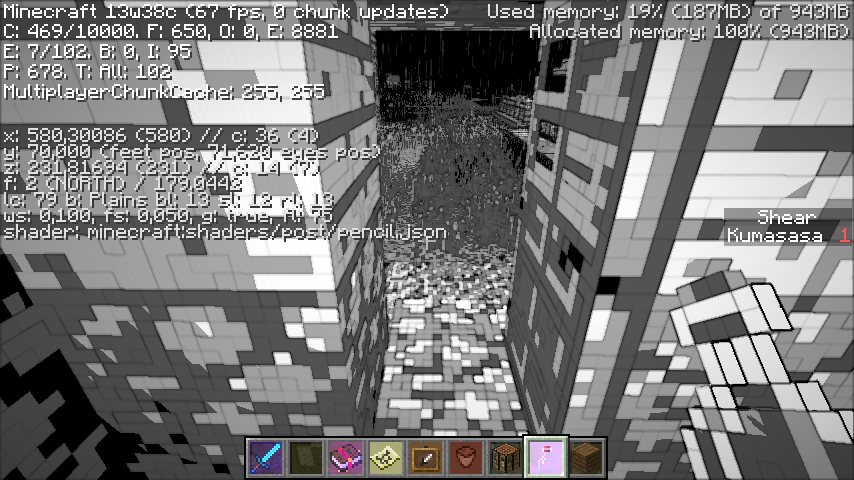
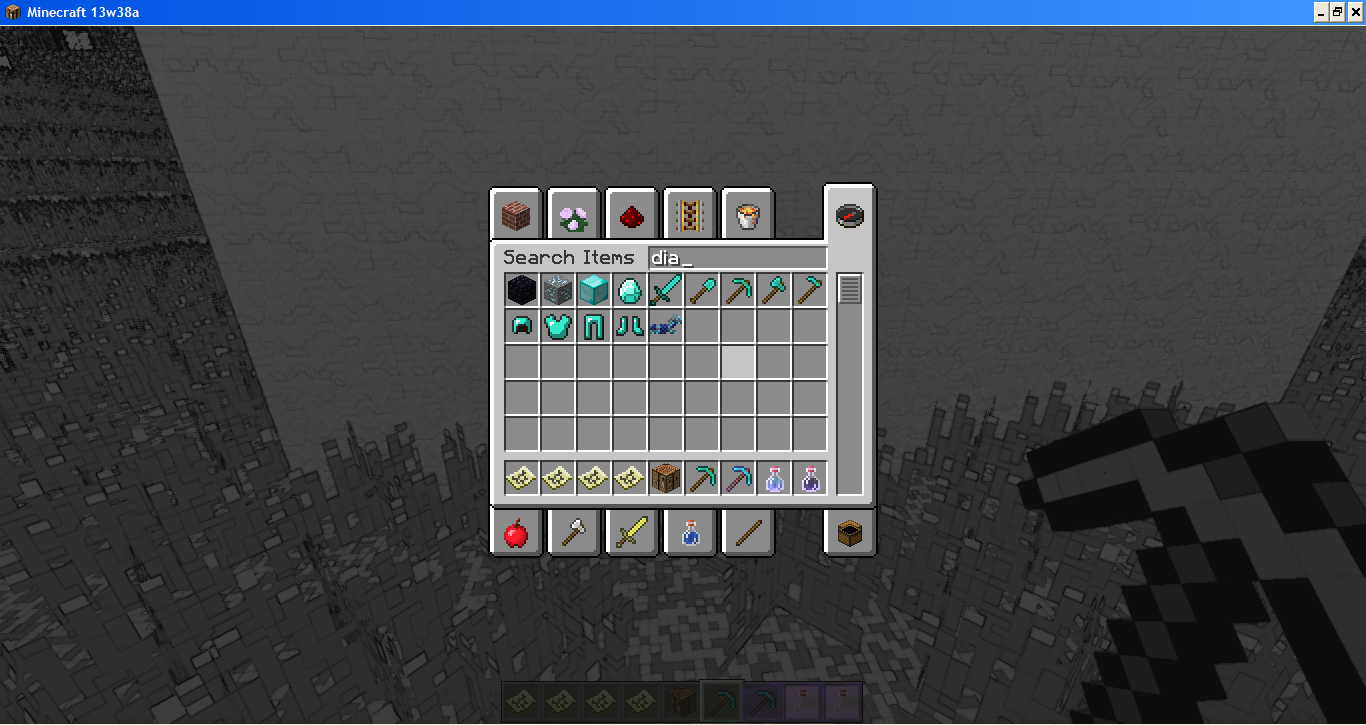
I was playing around with the new shaders, and I found the motion blur one, and I thought "That would look awesome with a speed potion", so I got one from the creative menu, and it looked fine, no enchantment background, but when I put it on the hotbar, things changed.
What I was hoping to happen was you wouldn't have the enchantment background, but actually it did when in the hotbar.
Steps to Reproduce:
1. Open minecraft 13w38a
2. Select "Super Secret Settings", any shader will do
3. Get a potion from the creative menu, and observe its appearance in the hotbar
Environment
Windows 7 64-Bit, Both java 6 and 7, latest version (Don't know which one it's using)
Linked Issues
is duplicated by15
 MC-31709Video Of Bugs and GlitchesDuplicateMC-31726Potion inventory item is wrong with Super Secret SettingsDuplicateMC-31730When Wearing Certain Shaders, The Enchant Visuals Are Displayed IncorrectlyDuplicateMC-31781Shaders cause items to malrender.DuplicateMC-31792On-Hand Inventory BackgroundDuplicateMC-31835Enchanted items display background of enchant in a shader mode - 13w38aDuplicateMC-31952glint.png is applied to the whole inventory slotDuplicateMC-3201213w38a snapshot bugDuplicateMC-32024Enchanted Item in Hotbar Bug, Player Following Mouse in Creative Survival Inventory, and Survival Inventory Chest Icon in Creative BugsDuplicateMC-32155fishingDuplicateMC-32411Items on hotbar with weird background with ShadersDuplicateMC-32497"Super Secret Settings" Shaders create a weird coloring on the hot bar, works for any of the shaders.(shown in the image)DuplicateMC-33432bug of shader 'bumpy'DuplicateMC-35108Enchant effect is incorrect in hotbar when using new 1.7 shadersDuplicateMC-36995Weird bug with enchantment glow.Duplicate




Created Issue:
Enchanted items display background of enchant in a shader mode - 13w38a
I was playing around with the new shaders, and I found the motion blur one, and I thought "That would look awesome with a speed potion", so I got one from the creative menu, and it looked fine, no enchantment background, but when I put it on the hotbar, things changed.
What I was hoping to happen was you wouldn't have the enchantment background, but actually it did when in the hotbar.
Steps to Reproduce:
1. Open minecraft 13w38a
2. Select "Super Secret Settings", any shader will do
3. Get a potion from the creative menu, and observe its appearance in the hotbarEnvironment
Windows 7 64-Bit, Both java 6 and 7, latest version (Don't know which one it's using)
Attachments1
Enchanted items displaybackground ofenchant inashader mode- 13w38aEnchanted items display enchant glow in shader mode
is duplicated by
is duplicated by
is duplicated by
![[Mojang] Nathan Adams](../../../data/assets/gravatar/dinnerbone.png) [Mojang] Nathan Adams
[Mojang] Nathan Adamsis duplicated by

is duplicated by
is duplicated by
Enchanted itemsdisplay enchant glowin shader modeEnchanted items, flowers, buckets in hotbar display colored background in shader mode
is duplicated by
Enchanted items, flowers, buckets inhotbar display colored background in shader mode
is duplicated by
![[Mod] CubeTheThird](../../../data/assets/gravatar/cubethethird.jpeg)
is duplicated by

is duplicated by


No longer able to reproduce this in 1.7.1. Seems to be fixed.
is duplicated by
is duplicated by
![[Mod] Ezekiel (ezfe)](../../../data/assets/gravatar/ezekielelin.jpeg)
![[Mod] Pokechu22](../../../data/avatars/users/92931.png)
Duplicate of MC-31669.
Or that is a duplicate of this. The other one has a lower value, though.
Seems to be a dublicate of MC-31669 ... the bug is definitely related to shaders.
Still present in 13w39a and b. Looks to be all shaders at this point. I've observed various results depending on what items are in the hotbar, as well as several variations as to when it happens.
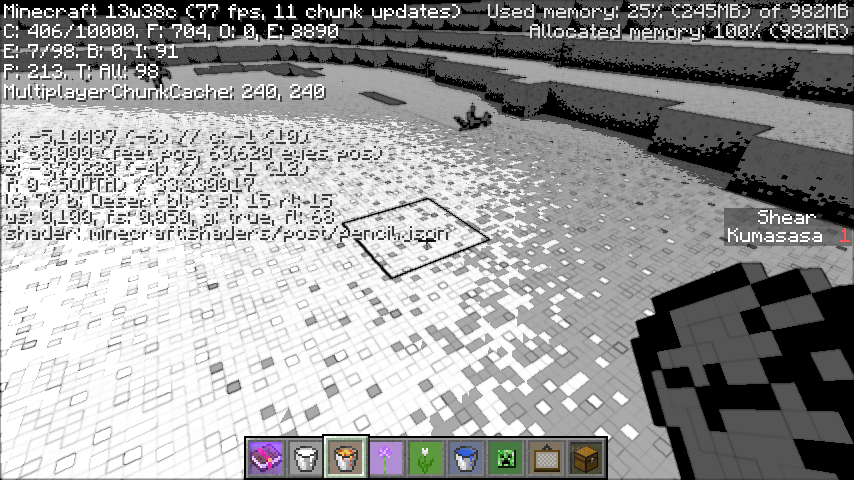
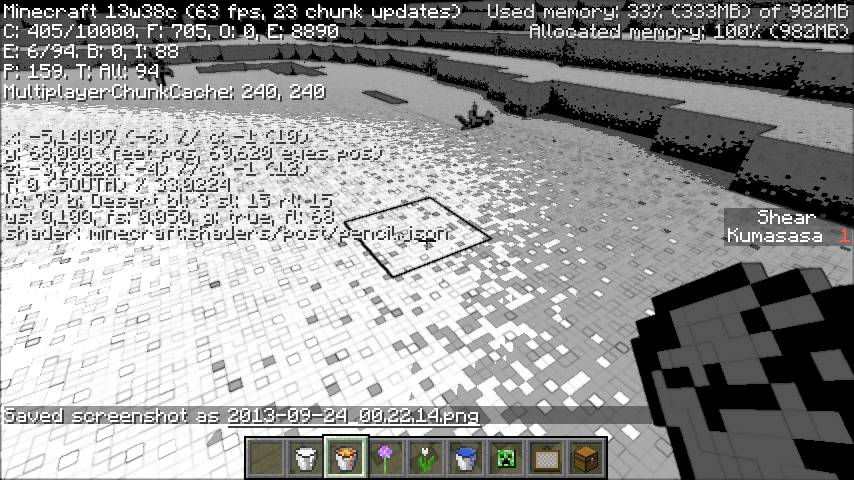
Most often, for me, the background for the slot changes to either a single color that happens to be dominant in that item, or if the item is enchanted, the enchantment effect is applied to the whole box. Glass turns solid white when affected.
Whoops, this comment applies more to MC-31669 than to this one.
@Joon-Ho Hwang:
Welcome to the internet. There are no "foreigners" here  ... and your English is understandable too.
To your ticket: It's a dublicate of MC-31669. Please use the search function before creating new tickets too see if the issue was already reported.
Dublicate of MC-31669! Please use the search function next time.
Duplicate of MC-31669 - If you have not, please use the search function in the future, to see if your bug has already been submitted. If you could not find the original report, please comment with the keywords you searched for.
Duplicate of MC-31669 - If you have not, please use the search function in the future, to see if your bug has already been submitted. If you could not find the original report, please comment with the keywords you searched for.
Duplicate of MC-31669 - If you have not, please use the search function in the future, to see if your bug has already been submitted. If you could not find the original report, please comment with the keywords you searched for.
After further testing, there seems to be some relation to the enchanted items/hotbar background bug that was fixed during the later snapshots (I'll look up the issue number in a minute). MC-31669, although there are no shaders active here, like there were in that one, just similar triggers.
It also appears that the bug is not limited to GUI scale as I had thought, as I was able to reproduce the bug in the other scale modes as well.
I'm not sure what is triggering the bug in the Creative inventory, but in the Survival inventory it seems that any item higher in the inventory (meaning further left and/or above) than the cactus that has a visible durability bar and no items stacked higher than 1 (in other words, no numbers overlaying the items) will cause the bug to occur. It will continue on to further cacti as long as there are no stacks between the cacti, including the first stack of cacti. Moving the mouse over any of the spots between the cactus and the damaged item, including the damaged item but not including the cactus, will cause the bug to disappear until another damaged item is encountered.
I still need to test the enchanted effect to see if it triggers the bug as well. Another possible cause is items with transparency, which would explain the appearance in the creative inventory, due to the presence of leaves and other items higher on the list.
Okay, as mentioned by someone else above, enchanted items (and other items that use the same effect) will trigger the bug. Spawn Eggs, Firework Stars, and Leather Armor also appear to trigger the bug, but not transparent items, clocks, or compasses. Still not sure what it is on the creative inventory that triggers it when on a page that doesn't have any of these on it (blocks, decorations, redstone, transportation) or why it only triggers on the search tab when one of these is visible. Unless it is the title of the tab itself, which is getting cancelled on the Search tab because of the search box, and doesn't appear at all on the survival tab...
After I cycled through all the shaders and came back to the first one, the texture persists. Confirmed.
Confirmed. If you have non-block unenchanted items in the slots after an enchantment-glowing item, there will be a transparent background reflecting that item's color as well.
Confirmed.
Not fixed with 13w38c.
@Kumasasa:
I think I created a dublicate of this:
MC-31952... at least it looks like the same bug.Unable to reproduce:
Can no longer reproduce on NVIDIA integrated GeForce 6150SE nForce 430.
Perhaps its resolved, because there was a new snapshot since you people who cant reproduce this reported this.
Not resolved, look at my recent screenshot https://mojang.atlassian.net/secure/attachment/42265/2013-09-22_22.38.57.png
Regarding the title change: are you sure this bug effects flowers and buckets on their own? When I had this bug, flowers, buckets, and other items would only show a colored background if an enchanted item was at any earlier location on the hotbar.
Try again without any enchanted items on the hotbar - do flowers and buckets still have a colored background for you?
And note that any item with an enchantment glow will trigger this - super golden apples, potions, enchanted or written books, and nether stars included. Try without any of these on your hotbar.
You're right, ony "glowing" items trigger this.
Still happens in 13w39a/b !
/Users/Kara/Desktop/2013-09-26_18.34.32 copy.png I works with other items too and this is in 13w39a.
From my testing, it looks like:
1: (as has been said before) Any enchanted item will start the bug.
2: The bug will affect other items until it finds
certain blocks or items (I have seen it stop with glass panes)more than one item in a slot.3: If an affected item has transparency, the transparent areas will appear white while the area around the block/item will be the normal hotbar background.
4: If two or more enchanted items are in the hotbar without a stack of items between them, the second and higher item will have the colored background in addition to the enchantment animation.
5: If there is a stack to the left of the enchanted item, the bug will NOT trigger.
Edit 2: Further testing shows only certain blocks and items will cancel the bug. So far that includes Glass Blocks, Glass Panes, and Hardened Clay. Stained clay (only tested with orange so far), smooth stone, and glowstone will not cancel the bug.
Edit 3: Okay, it looks like it's not the type of item or block that will cancel the bug, but whether that item is by itself or in a stack. All observations updated to reflect this.
No longer able to reproduce this in 1.7.1 and 1.7.2. Seems to be fixed.
Im able to reproduce it, having shaders both on and off, version 1.7.2, please reopen this
@Rockyfelle: Please attach a screenshot with enabled debug screen (F3).
This has not been fixed, I updated to 1.7.2 yesterday - I've never touched anything to do with shaders.
Heres a few screenshots:
http://puu.sh/4ZRU1.png
http://puu.sh/4ZZSn.png
I've deleted my whole .Minecraft file in appdata and the glitch still occured. I've tried pressing the Super Secret Settings button but nothing happens to the visual interface - instead I hear random sounds. GPU = NVIDIA GeForce 7600 GS, Os = Windows Xp
@Jame Talbot: Your issue is
MC-36772