 MC-96428
Attack indicator and weapon position heavily out of sync
The bug
The attack indicator fills at a completely different rate than the item raises.
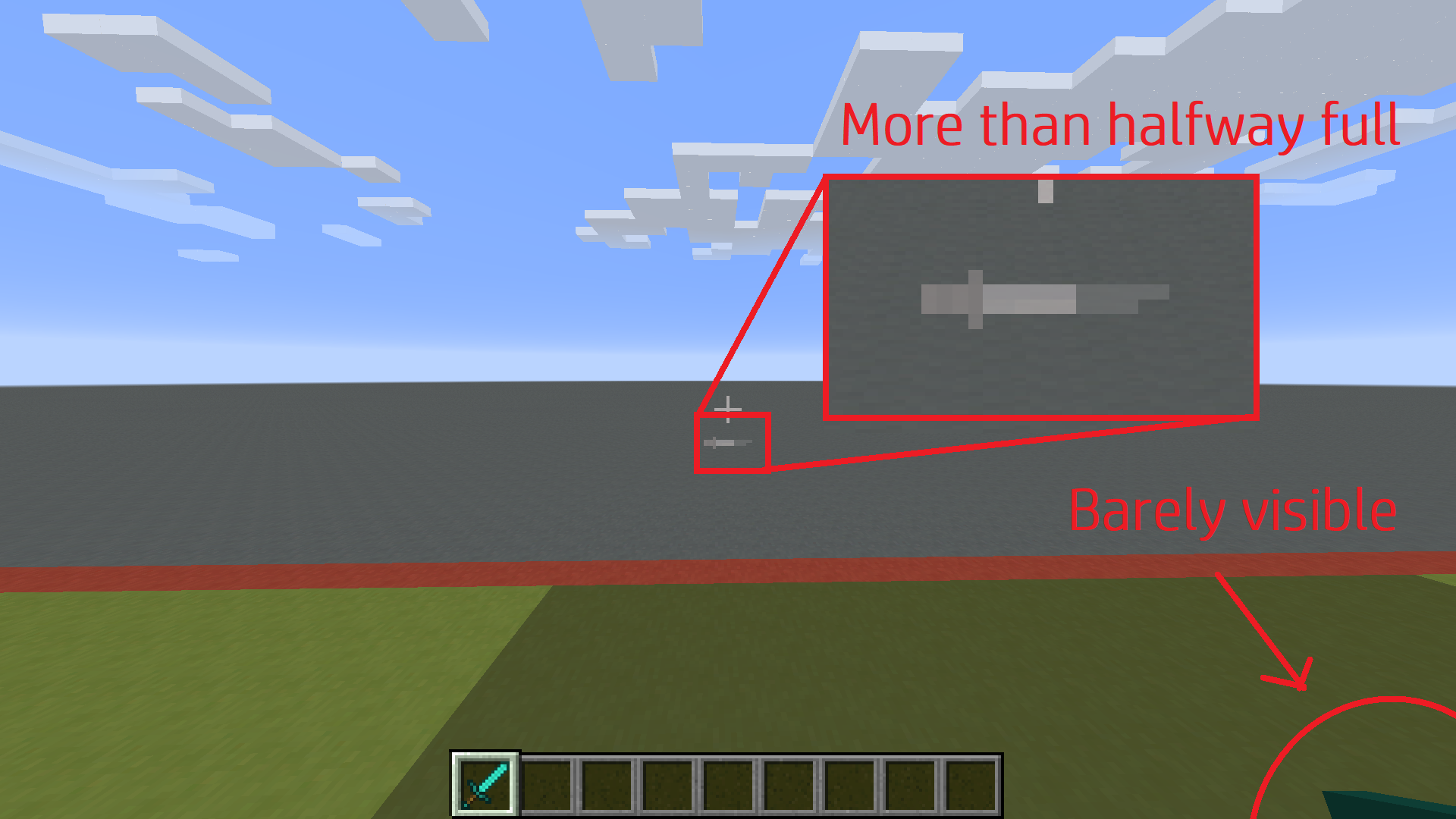
1. By the time the item enters the screen, the attack indicator is more than halfway full:

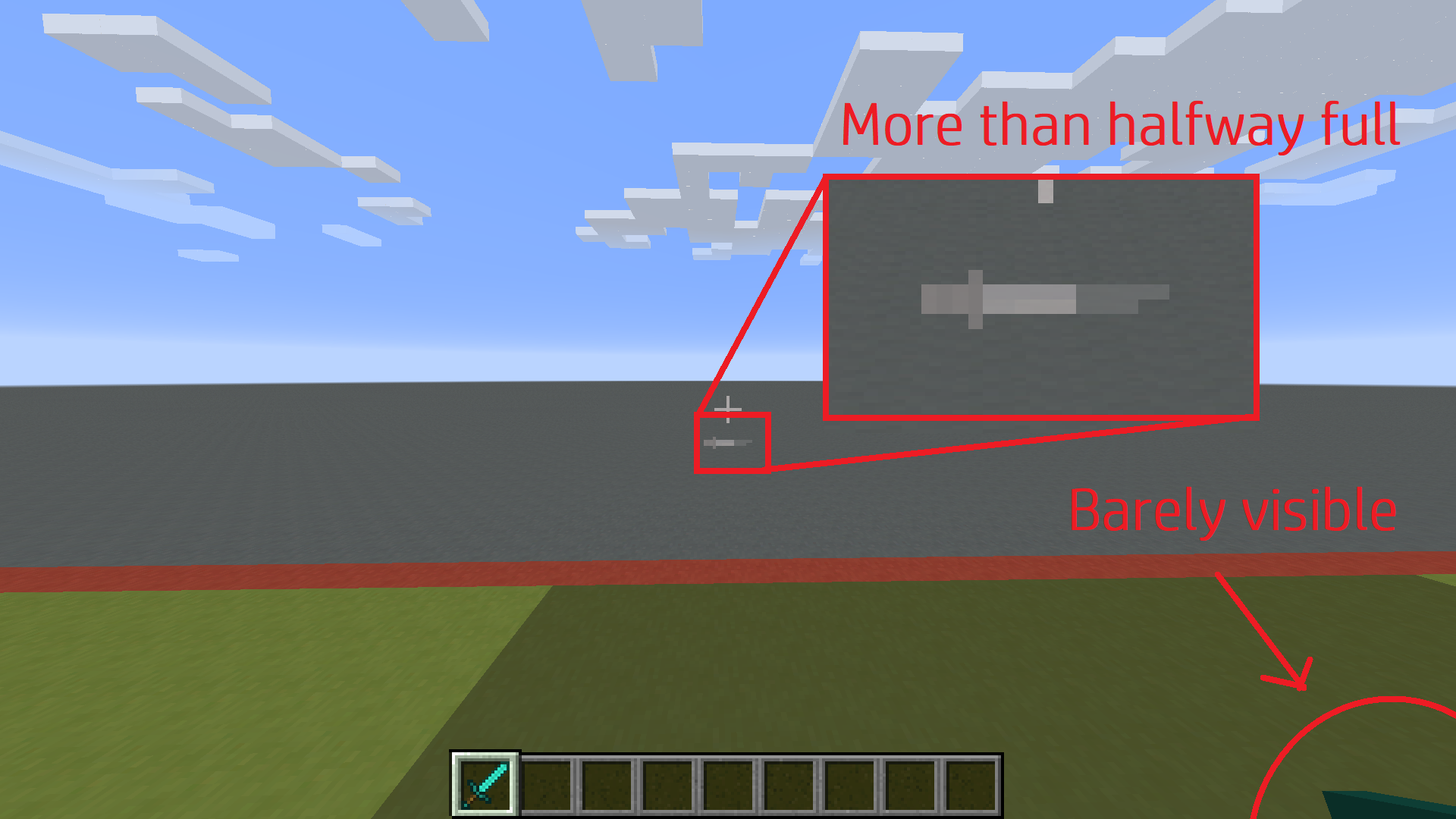
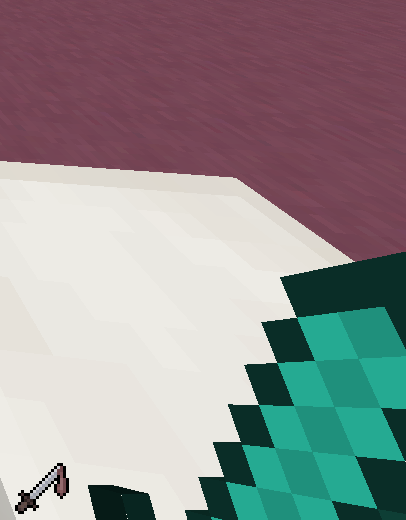
2. By the time the hotbar indicator is full, the item is still mostly off-screen. It continues raising for a moment while the indicator remains full:

Hotbar Indicator:
Item begins raising at 50%.
Item stops raising at ~125%.
Crosshair Indicator:
Item begins raising at 50%.
Item stops raising at 100%.
How to reproduce
The animation is very quick. It's noticeable with any item, even non-weapons. To see the discrepancy precisely, use a weapon with very slow attack speed:
/give @p diamond_sword{AttributeModifiers:[{AttributeName:"generic.attack_speed",Name:"Attack Speed",Amount:-3.8d,Operation:0,UUID:[I;9,7,5,3],Slot:"mainhand"}]}

- Unresolved
![[Mod] tryashtar](../../../data/avatars/users/41963.png) [Mod] tryashtar
[Mod] tryashtar- 16
- 3
- Confirmed
- Items UI
- attack attackSpeed indicator
16w04a - 1.21
16w04a 1.9-pre2 1.9-pre3 1.9-pre4 1.9 1.10.2 16w33a 16w38a 1.11-pre1 1.11 1.11.2 17w06a 17w13a 17w14a 17w15a 17w16a 17w16b 17w17a 17w17b 17w18a 17w18b 1.12-pre1 1.12-pre2 1.12-pre3 1.12-pre5 1.12-pre6 1.12-pre7 1.12 1.12.1 1.12.2 17w43a 17w45a 17w45b 17w46a 17w47a 17w48a 17w49a 17w49b 18w01a 18w02a 18w03b 18w10a 18w16a 1.13-pre1 1.13-pre8 1.13 18w30a 1.13.1 18w48b 19w04a 20w17a 20w51a 21w03a 1.16.5 21w05b 21w06a 21w07a 21w08b 21w11a 1.19.2 22w42a 1.21
Created Issue:
Attack indicator does not match weapon position
The attack indicator is not indicative of the weapon position or damage dealt.
http://imgur.com/a/nIbZLThis album shows how the weapon is not at all visible until the attack indicator is more than halfway filled, and the weapon continues to raise even when the attack indicator is entirely filled. This means the attack indicator is misleading and does not accurately represent attack damage or "weapon recharge."
This affects most 1.9 snapshots (and probably all), but I'm not going to go back and test them all (sorry!), so I just put 16w04a.

![[Mod] redstonehelper](../../../data/avatars/users/10122.svg)
The attack indicator is not indicative of the weapon position or damage dealt.
http://imgur.com/a/nIbZLThis album shows how the weapon is not at all visible until the attack indicator is more than halfway filled, and the weapon continues to raise even when the attack indicator is entirely filled. This means the attack indicator is misleading and does not accurately represent attack damage or "weapon recharge."
This affects most 1.9 snapshots (and probably all), but I'm not going to go back and test them all (sorry!), so I just put 16w04a.
/give @p diamond_sword 1 0 {AttributeModifiers:[{AttributeName:"generic.attackSpeed",Name:"Attack Speed",Amount:-3.9d,Operation:0,UUIDLeast:1L,UUIDMost:1L,Slot:"mainhand"}]}
The attack indicator is not indicative of the weapon position or damage dealt.
http://imgur.com/a/nIbZLThis album shows how the weapon is not at all visible until the attack indicator is more than halfway filled, and the weapon continues to raise even when the attack indicator is entirely filled. This means the attack indicator is misleading and does not accurately represent attack damage or "weapon recharge."
This affects most 1.9 snapshots (and probably all), but I'm not going to go back and test them all (sorry!), so I just put 16w04a.
/give @p diamond_sword 1 0 {AttributeModifiers:[{AttributeName:"generic.attackSpeed",Name:"Attack Speed",Amount:-3.9d,Operation:0,UUIDLeast:1L,UUIDMost:1L,Slot:"mainhand"}]}That command will give you a slow-recharging sword so you can easily compare the indicator animation to the weapon raising (and therefore potential damage) animation. The discrepancy is obvious. Note that this also happens with normal weapons, it's just easier to see with this slow recharge speed.
The attack indicator is not indicative of the weapon position or damage dealt.
http://imgur.com/a/nIbZLThis album shows how the weapon is not at all visible until the attack indicator is more than halfway filled, and the weapon continues to raise even when the attack indicator is entirely filled. This means the attack indicator is misleading and does not accurately represent attack damage or "weapon recharge."
This affects most 1.9 snapshots (and probably all), but I'm not going to go back and test them all (sorry!), so I just put 16w04a./give @p diamond_sword 1 0 {AttributeModifiers:[{AttributeName:"generic.attackSpeed",Name:"Attack Speed",Amount:-3.9d,Operation:0,UUIDLeast:1L,UUIDMost:1L,Slot:"mainhand"}]}That command will give you a slow-recharging sword so you can easily compare the indicator animation to the weapon raising (and therefore potential damage) animation. The discrepancy is obvious. Note that this also happens with normal weapons, it's just easier to see with this slow recharge speed.
The attack indicator is not indicative of the weapon position or damage dealt.
http://imgur.com/a/nIbZLThis album shows how the weapon is not at all visible until the attack indicator is more than halfway filled, and the weapon continues to raise even when the attack indicator is entirely filled. This means the attack indicator is misleading and does not accurately represent attack damage or "weapon recharge."
I don't have every version from 1.9 to 1.10 listed, but I really doubt they managed to fix it and then reverted it between patches.
/give @p diamond_sword 1 0 {AttributeModifiers:[{AttributeName:"generic.attackSpeed",Name:"Attack Speed",Amount:-3.9d,Operation:0,UUIDLeast:1L,UUIDMost:1L,Slot:"mainhand"}]}That command will give you a slow-recharging sword so you can easily compare the indicator animation to the weapon raising (and therefore potential damage) animation. The discrepancy is obvious. Note that this also happens with normal weapons, it's just easier to see with this slow recharge speed.
The attack indicator is not indicative of the weapon position or damage dealt.
http://imgur.com/a/nIbZLThis album shows how the weapon is not at all visible until the attack indicator is more than halfway filled, and the weapon continues to raise even when the attack indicator is entirely filled. This means the attack indicator is misleading and does not accurately represent attack damage or "weapon recharge."
I don't have every version from 1.9 to 1.10 listed, but I really doubt they managed to fix it and then reverted it between patches.
/give @p diamond_sword 1 0 {AttributeModifiers:[{AttributeName:"generic.attackSpeed",Name:"Attack Speed",Amount:-3.9d,Operation:0,UUIDLeast:1L,UUIDMost:1L,Slot:"mainhand"}]}That command will give you a slow-recharging sword so you can easily compare the indicator animation to the weapon raising (and therefore potential damage) animation. The discrepancy is obvious. Note that this also happens with normal weapons, it's just easier to see with this slow recharge speed.
The two screenshots illustrate how the sword is not fully raised even when the indicator is full. Notice the difference between fully raised sword and the raise level when the indicator is full.
The attack indicator is not indicative of the weapon position or damage dealt.
http://imgur.com/a/nIbZLThis album shows how the weapon is not at all visible until the attack indicator is more than halfway filled, and the weapon continues to raise even when the attack indicator is entirely filled. This means the attack indicator is misleading and does not accurately represent attack damage or "weapon recharge."
I don't have every version from 1.9 to 1.10 listed, but I really doubt they managed to fix it and then reverted it between patches.
/give @p diamond_sword 1 0 {AttributeModifiers:[{AttributeName:"generic.attackSpeed",Name:"Attack Speed",Amount:-3.9d,Operation:0,UUIDLeast:1L,UUIDMost:1L,Slot:"mainhand"}]}That command will give you a slow-recharging sword so you can easily compare the indicator animation to the weapon raising (and therefore potential damage) animation. The discrepancy is obvious. Note that this also happens with normal weapons, it's just easier to see with this slow recharge speed.
The two screenshots illustrate how the sword is not fully raised even when the indicator is full. Notice the difference between fully raised sword and the raise level when the indicator is full.
The attack indicator is not indicative of the weapon position or damage dealt.
http://imgur.com/a/nIbZLThis album shows how the weapon is not at all visible until the attack indicator is more than halfway filled, and the weapon continues to raise even when the attack indicator is entirely filled. This means the attack indicator is misleading and does not accurately represent attack damage or "weapon recharge."
/give @p diamond_sword 1 0 {AttributeModifiers:[{AttributeName:"generic.attackSpeed",Name:"Attack Speed",Amount:-3.9d,Operation:0,UUIDLeast:1L,UUIDMost:1L,Slot:"mainhand"}]}That command will give you a slow-recharging sword so you can easily compare the indicator animation to the weapon raising (and therefore potential damage) animation. The discrepancy is obvious. Note that this also happens with normal weapons, it's just easier to see with this slow recharge speed.
The two screenshots illustrate how the sword is not fully raised even when the indicator is full. Notice the difference between fully raised sword and the raise level when the indicator is full.

The attack indicator is not indicative of the weapon position or damage dealt.
http://imgur.com/a/nIbZLThis album shows how the weapon is not at all visible until the attack indicator is more than halfway filled, and the weapon continues to raise even when the attack indicator is entirely filled. This means the attack indicator is misleading and does not accurately represent attack damage or "weapon recharge."
/give @p diamond_sword 1 0 {AttributeModifiers:[{AttributeName:"generic.attackSpeed",Name:"Attack Speed",Amount:-3.9d,Operation:0,UUIDLeast:1L,UUIDMost:1L,Slot:"mainhand"}]}
That command will give you a slow-recharging sword so you can easily compare the indicator animation to the weapon raising (and therefore potential damage) animation. The discrepancy is obvious. Note that this also happens with normal weapons, it's just easier to see with this slow recharge speed.The two screenshots illustrate how the sword is not fully raised even when the indicator is full. Notice the difference between fully raised sword and the raise level when the indicator is full.
The bug
The attack indicator is not indicative of the weapon position or damage dealt.
http://imgur.com/a/nIbZLThis album shows how the weapon is not at all visible until the attack indicator is more than halfway filled, and the weapon continues to raise even when the attack indicator is entirely filled. This means the attack indicator is misleading and does not accurately represent attack damage or "weapon recharge."
How to reproduce
To obtain a slow-recharging weapon that easily demonstrates this behavior, run the following command:
/give @p diamond_sword 1 0 {AttributeModifiers:[{AttributeName:"generic.attackSpeed",Name:"Attack Speed",Amount:-3.9d,Operation:0,UUIDLeast:1L,UUIDMost:1L,Slot:"mainhand"}]}Compare the indicator animation to the weapon raising (and therefore potential damage) animation. The discrepancy is obvious. Note that this also happens with normal weapons, it's just easier to see with this slow recharge speed.
The two screenshots illustrate how the sword is not fully raised even when the indicator is full. Notice the difference between fully raised sword and the raise level when the indicator is full.
![[Mod] bemoty](../../../data/avatars/users/50554.png)
Can confirm for MC 1.12.1.
The bug
The attack indicator is not indicative of the weapon position or damage dealt.
http://imgur.com/a/nIbZLThis album shows how the weapon is not at all visible until the attack indicator is more than halfway filled, and the weapon continues to raise even when the attack indicator is entirely filled. This means the attack indicator is misleading and does not accurately represent attack damage or "weapon recharge."
How to reproduce
To obtain a slow-recharging weapon that easily demonstrates this behavior, run the following command:
/give @p diamond_sword1 0{AttributeModifiers:[{AttributeName:"generic.attackSpeed",Name:"Attack Speed",Amount:-3.9d,Operation:0,UUIDLeast:1L,UUIDMost:1L,Slot:"mainhand"}]}Compare the indicator animation to the weapon raising (and therefore potential damage) animation. The discrepancy is obvious. Note that this also happens with normal weapons, it's just easier to see with this slow recharge speed.
The two screenshots illustrate how the sword is not fully raised even when the indicator is full. Notice the difference between fully raised sword and the raise level when the indicator is full.
Attack indicatordoes not matchweapon positionAttack indicator and weapon position heavily out of sync
The bug
The attack indicator is not indicative of the weapon position or damage dealt.
http://imgur.com/a/nIbZLThis album shows how the weapon is not at all visible until the attack indicator is more than halfway filled, and the weapon continues to raise even when the attack indicator is entirely filled. This means the attack indicator is misleading and does not accurately represent attack damage or "weapon recharge."
How to reproduce
T
o obtain a slow-recharging weapon that easily demonstrates this behavior, run the following command:/give @p diamond_sword{AttributeModifiers:[{AttributeName:"generic.attackSpeed",Name:"Attack Speed",Amount:-3.9d,Operation:0,UUIDLeast:1L,UUIDMost:1L,Slot:"mainhand"}]}Compare the indicator animation to the weapon raising (and therefore potential damage) animation. The discrepancy is obvious. Note that this also happens with normal weapons, it's just easier to see with this slow recharge speed.
The two screenshots illustrate how the sword is not fully raised even when the indicator is full. Notice the difference between fully raised sword and the raise level when the indicator is full.
The bug
The attack indicator fills at a completely different rate than the item raises.
1. By the time the item enters the screen, the attack indicator is more than halfway full:
2. By the time the hotbar indicator is full, the item is still mostly off-screen:
Hotbar Indicator:
Item begins raising at 50%.
Item stops raising at ~125%.Crosshair Indicator:
Item begins raising at 50%.
Item stops raising at 100%.
How to reproduce
The animation is very quick. It's noticeable with any item, even non-weapons. To see the discrepancy precisely, use a weapon with very slow attack speed:
/give @p diamond_sword{AttributeModifiers:[{AttributeName:"generic.attackSpeed",Name:"Attack Speed",Amount:-3.8d,Operation:0,UUIDLeast:1L,UUIDMost:1L,Slot:"mainhand"}]}
The bug
The attack indicator fills at a completely different rate than the item raises.
1. By the time the item enters the screen, the attack indicator is more than halfway full:
2. By the time the hotbar indicator is full, the item is still mostly off-screen:
Hotbar Indicator:
Item begins raising at 50%.
Item stops raising at ~125%.Crosshair Indicator:
Item begins raising at 50%.
Item stops raising at 100%.
How to reproduce
The animation is very quick. It's noticeable with any item, even non-weapons. To see the discrepancy precisely, use a weapon with very slow attack speed:
/give @p diamond_sword{AttributeModifiers:[{AttributeName:"generic.attackSpeed",Name:"Attack Speed",Amount:-3.8d,Operation:0,UUIDLeast:1L,UUIDMost:1L,Slot:"mainhand"}]}The bug
The attack indicator fills at a completely different rate than the item raises.
1. By the time the item enters the screen, the attack indicator is more than halfway full:
2. By the time the hotbar indicator is full, the item is still mostly off-screen. It continues raising for a moment while the indicator remains full:
Hotbar Indicator:
Item begins raising at 50%.
Item stops raising at ~125%.Crosshair Indicator:
Item begins raising at 50%.
Item stops raising at 100%.
How to reproduce
The animation is very quick. It's noticeable with any item, even non-weapons. To see the discrepancy precisely, use a weapon with very slow attack speed:
/give @p diamond_sword{AttributeModifiers:[{AttributeName:"generic.attackSpeed",Name:"Attack Speed",Amount:-3.8d,Operation:0,UUIDLeast:1L,UUIDMost:1L,Slot:"mainhand"}]}
![[Mod] Asteraoth](../../../data/avatars/users/92886.png)
![[Mojang] Nathan Adams](../../../data/assets/gravatar/dinnerbone.png)
The bug
The attack indicator fills at a completely different rate than the item raises.
1. By the time the item enters the screen, the attack indicator is more than halfway full:
2. By the time the hotbar indicator is full, the item is still mostly off-screen. It continues raising for a moment while the indicator remains full:
Hotbar Indicator:
Item begins raising at 50%.
Item stops raising at ~125%.Crosshair Indicator:
Item begins raising at 50%.
Item stops raising at 100%.
How to reproduce
The animation is very quick. It's noticeable with any item, even non-weapons. To see the discrepancy precisely, use a weapon with very slow attack speed:
/give @p diamond_sword{AttributeModifiers:[{AttributeName:"generic.attackSpeed",Name:"Attack Speed",Amount:-3.8d,Operation:0,UUIDLeast:1L,UUIDMost:1L,Slot:"mainhand"}]}The bug
The attack indicator fills at a completely different rate than the item raises.
1. By the time the item enters the screen, the attack indicator is more than halfway full:
2. By the time the hotbar indicator is full, the item is still mostly off-screen. It continues raising for a moment while the indicator remains full:
Hotbar Indicator:
Item begins raising at 50%.
Item stops raising at ~125%.Crosshair Indicator:
Item begins raising at 50%.
Item stops raising at 100%.
How to reproduce
The animation is very quick. It's noticeable with any item, even non-weapons. To see the discrepancy precisely, use a weapon with very slow attack speed:
/give @p diamond_sword{AttributeModifiers:[{AttributeName:"generic.attack_speed",Name:"Attack Speed",Amount:-3.8d,Operation:0,UUID:[I;9,7,5,3],Slot:"mainhand"}]}
![[Mod] Michael Wobst](../../../data/avatars/users/37868.png)
![[Mod] Jarl-Penguin](../../../data/avatars/users/92849.png)
This site is for bug reports only. For feature suggestions or changes please see: Minecraft Suggestions on Reddit.
This sounds like a valid bug, but I am unable to reproduce this
Feature suggestions...? Are you implying that the attack indicator is supposed to be meaningless?
Also, Marcono, here's an easy way to see it happening:
/give @p diamond_sword 1 0 {AttributeModifiers:[{Name:a,AttributeName:generic.attack speed,UUIDMost:3727,UUIDLeast:2729,Operation:0,Amount:-3.9}]}Keep in mind that this also happens with normal-speed items, it's just easier to see this way.
This is a bug not a suggestion with all my respect.
Confirmed for
Looks like the "percentage" of how far the icon should be filled is rounded up
[Mod] tryashtar please add the command to reproduce to the description or add the following one:
/give @p diamond_sword 1 0 {AttributeModifiers:[{AttributeName:"generic.attackSpeed",Name:"Attack Speed",Amount:-3.9d,Operation:0,UUIDLeast:1L,UUIDMost:1L,Slot:"mainhand"}]}Looks like someone already has! Thanks for improving it, by the way--I forgot the Slot tag. I'll edit the description in a minute to clarify.
Confirmed for 1.12-pre2
Confirmed, it seems like it only affects the hotbar attack indicator though.
Hm, I notice the same behavior with the crosshair indicator. For the entire first half of the animation, the sword is not on the screen.
However, unlike the hotbar animation, they do at least finish at the same time.
Do you want to include that or create a separate report for it? In my opinion a separate report, but marked as related, might be better since the bug you are describing sounds different than the one originally described in this report.
I emphasized the "sword keeps rising after indicator is filled" behavior in the report, but the "sword doesn't even start to rise until the indicator is halfway full" behavior was mentioned. That's what happens with both indicators. I think I'll revamp this report in a little bit to show the bug more clearly for both indicators, and point out the issue.
Can confirm in 20w51a.
Can confirm in 21w03a.
Can confirm in 21w05a.
Can confirm in 21w06a.
Can confirm in 21w07a.
Can confirm in 1.16.5 and 21w08b.
Can confirm in 21w11a.