Locator and Explorer maps no longer show your rotation when far away
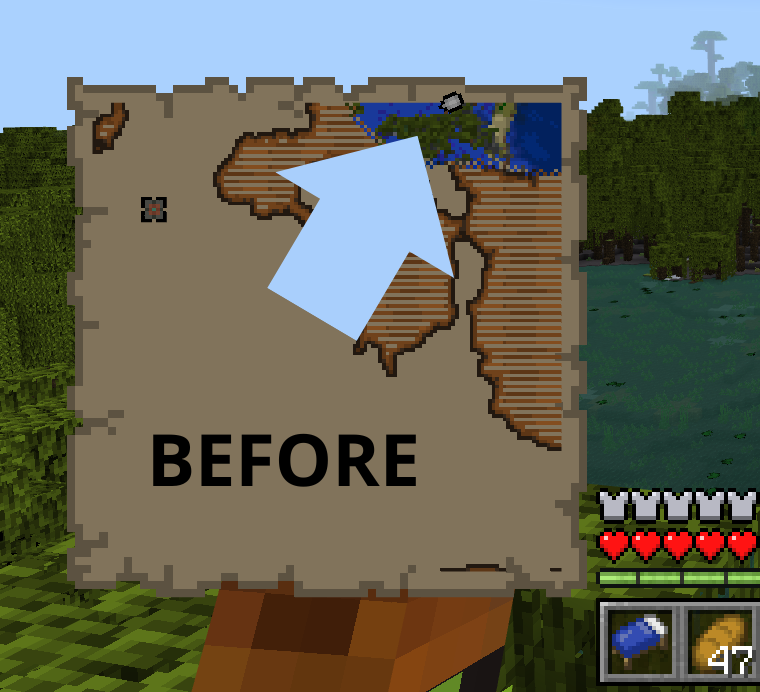
When you're holding a locator maps or explorer maps and you're far away/outside of the maps, the pointer no longer show your rotation anymore
Steps to reproduce:
- Method 1
- Give yourself Empty Locator Map and create it
- Fly far away, or run: /tp @s ~64 ~ ~ 0 90
- Method 2
- Trade with cartographer villager until leveled up to Apprentice
- Bought Ocean Explorer Map and then hold it
Expected results:
The pointer show your rotation when far away
Observed results:
The pointer no longer show your rotation when far away
Note:
This happens on all dimension, these also affects explorer maps sell by cartographer villager as well
Linked Issues
is duplicated by14
 BDS-19596Broken treasure map DuplicateBDS-19715Map does not show direction you are facing once you are no longer within borders of mapDuplicate
 MCPE-181121The indicator of players that will shows in the locator map was changing from arrow head to circle when reaching outside of the locator map.DuplicateMCPE-185348Locator Map Only shows a square where the player is. No way to tell direction player is facing.DuplicateMCPE-185442The arrow on the maps does not show the direction the player is looking.DuplicateMCPE-185540Locator maps brokenDuplicateMCPE-185812My worlds map has turned into a circle and is un useable, note that it was not like this when i first started my world.DuplicateMCPE-185847map not rotating indicator bedrockDuplicateMCPE-185884Locator MapDuplicateMCPE-185940My trial chamber pointer become circleDuplicateMCPE-186469Map issues DuplicateMCPE-187165Problems with the locator map DuplicateMCPE-189328Treasure map does not show the player's direction Duplicate
 REALMS-12241Explorer map BugDuplicate



- Unresolved
 KejuGorenk
- 71
- 24
- Confirmed
- 1279940
- Multiple
1.21.60.23 Preview - 1.21.51 Hotfix
1.21.60.23 Preview 1.21.60.21 Preview 1.21.50.26 Preview 1.21.50.24 Preview 1.21.40.22 Preview 1.21.40.20 Preview 1.20.80 1.21.30.22 Preview 1.21.30.21 Preview 1.21.20 1.21.30.23 Preview 1.21.21 Hotfix 1.21.22 Hotfix 1.21.23 Hotfix 1.21.30 1.21.40.23 Preview 1.21.44 Hotfix 1.21.50 1.21.60.24 Preview 1.21.51 Hotfix
Created Issue:
Locator maps no longer shows your direction when far away
When you're holding a locator maps and you're far away/outside of the maps, the pointer no longer show your current direction anymore
Step to Reproduce:
1. Give yourself a Locator maps and create it
2. Fly far away until you're outside the maps, or run this command: /tp @s ~64 ~ ~ 0 90Expected Result:
The pointer show your current direction when far awayObserved Result:
The pointer no longer show your current direction when far away
When you're holding a locator maps and you're far away/outside of the maps, the pointer no longer show your current direction anymore
Step to Reproduce:
1. Give yourself a Locatormapsand create it
2. Fly far away until you're outside the maps, or run this command: /tp @s ~64 ~ ~ 0 90Expected Result:
The pointer show your current direction when far awayObserved Result:
The pointer no longer show your current direction when far awayWhen you're holding a locator maps and you're far away/outside of the maps, the pointer no longer show your current direction anymore
Step to Reproduce:
1. Give yourself a Empty Locator Map and create it
2. Fly far away until you're outside the maps, or run this command: /tp @s ~64 ~ ~ 0 90Expected Result:
The pointer show your current direction when far awayObserved Result:
The pointer no longer show your current direction when far away
![[Mod] Jarl-Penguin](../../../data/avatars/users/92849.png)
Locator maps no longer showsyourdirection when far awayLocator maps no longer show your rotation when far away
![[MCQA] Bartłomiej Słodkowski](../../../data/avatars/users/18941.svg)
is duplicated by
is duplicated by
is duplicated by
is duplicated by
![[Bot] Arisa](../../../data/avatars/users/43007.png)
When you're holding a locator maps and you're far away/outside of the maps, the pointer no longer show your
current direction anymoreStep to
Reproduce:
1. Give yourself a Empty Locator Map and create it
2. Fly far away until you're outside the maps, or run this command: /tp @s ~64 ~ ~ 0 90Expected
Result:
The pointer show yourcurrent direction when far awayObserved
Result:
The pointer no longer show yourcurrent direction when far awayWhen you're holding a locator maps and you're far away/outside of the maps, the pointer no longer show your rotation anymore
Steps to reproduce:
- Give yourself Empty Locator Map and create it
- Fly far away, or run: /tp @s ~64 ~ ~ 0 90
Expected results:
The pointer show your rotation when far awayObserved results:
The pointer no longer show your rotation when far away
is duplicated by
relates to
is duplicated by
is duplicated by
![[Mod] Umija5895M](../../../data/avatars/users/10122.svg)
is duplicated by
When you're holding a locator maps and you're far away/outside of the maps, the pointer no longer show your rotation anymore
Steps to reproduce:
- Give yourself Empty Locator Map and create it
- Fly far away, or run: /tp @s ~64 ~ ~ 0 90
Expected results:
The pointer show your rotation when far awayObserved results:
The pointer no longer show your rotation when far awayNote:
This happens on all dimension, these also affects Explorer maps sell by cartography villager as well
When you're holding a locator maps and you're far away/outside of the maps, the pointer no longer show your rotation anymore
Steps to reproduce:
- Give yourself Empty Locator Map and create it
- Fly far away, or run: /tp @s ~64 ~ ~ 0 90
Expected results:
The pointer show your rotation when far awayObserved results:
The pointer no longer show your rotation when far awayNote:
This happens on all dimension, these also affectsExplorer maps sell by cartography villager as wellWhen you're holding a locator maps or explorer maps and you're far away/outside of the maps, the pointer no longer show your rotation anymore
Steps to reproduce:
- Method 1
- Give yourself Empty Locator Map and create it
- Fly far away, or run: /tp @s ~64 ~ ~ 0 90
- Method 2
- Trade with Cartography villager until they leveled up to Apprentice
- Bought a Ocean Explorer Map and then hold it
Expected results:
The pointer show your rotation when far awayObserved results:
The pointer no longer show your rotation when far awayNote:
This happens on all dimension, these also affects explorer maps sell by cartography villager as well
When you're holding a locator maps or explorer maps and you're far away/outside of the maps, the pointer no longer show your rotation anymore
Steps to reproduce:
- Method 1
- Give yourself Empty Locator Map and create it
- Fly far away, or run: /tp @s ~64 ~ ~ 0 90
- Method 2
- Trade with
Cartographyvillager untiltheyleveled up to Apprentice- Bought
aOcean Explorer Map and then hold itExpected results:
The pointer show your rotation when far awayObserved results:
The pointer no longer show your rotation when far awayNote:
This happens on all dimension, these also affects explorer maps sell by cartography villager as wellWhen you're holding a locator maps or explorer maps and you're far away/outside of the maps, the pointer no longer show your rotation anymore
Steps to reproduce:
- Method 1
- Give yourself Empty Locator Map and create it
- Fly far away, or run: /tp @s ~64 ~ ~ 0 90
- Method 2
- Trade with cartographer villager until leveled up to Apprentice
- Bought Ocean Explorer Map and then hold it
Expected results:
The pointer show your rotation when far awayObserved results:
The pointer no longer show your rotation when far awayNote:
This happens on all dimension, these also affects explorer maps sell by cartography villager as well
When you're holding a locator maps or explorer maps and you're far away/outside of the maps, the pointer no longer show your rotation anymore
Steps to reproduce:
- Method 1
- Give yourself Empty Locator Map and create it
- Fly far away, or run: /tp @s ~64 ~ ~ 0 90
- Method 2
- Trade with cartographer villager until leveled up to Apprentice
- Bought Ocean Explorer Map and then hold it
Expected results:
The pointer show your rotation when far awayObserved results:
The pointer no longer show your rotation when far awayNote:
This happens on all dimension, these also affects explorer maps sell by cartographyvillager as wellWhen you're holding a locator maps or explorer maps and you're far away/outside of the maps, the pointer no longer show your rotation anymore
Steps to reproduce:
- Method 1
- Give yourself Empty Locator Map and create it
- Fly far away, or run: /tp @s ~64 ~ ~ 0 90
- Method 2
- Trade with cartographer villager until leveled up to Apprentice
- Bought Ocean Explorer Map and then hold it
Expected results:
The pointer show your rotation when far awayObserved results:
The pointer no longer show your rotation when far awayNote:
This happens on all dimension, these also affects explorer maps sell by cartographer villager as well
Locator and Explorer maps no longer show your rotation when far away
![[Mod] OcelotOnesie](../../../data/avatars/users/43220.png)
is duplicated by
![[Mod] GoldenHelmet](../../../data/avatars/users/18951.svg)
relates to
is duplicated by
is duplicated by
is duplicated by
is duplicated by

It baffles me how anyone saw this and thought that it was a bug just because they don't like that it's different. This change is actually great as it makes it crystal clear when you are standing within the boundaries of a map. That makes linking maps together to make map walls much easier because you don't have to guess if you've traveled enough for it to be safe to open a new map without creating a duplicate.
Also to the people being subtly manipulative with the "think of the children" arguments in these comments I would argue that having this feature in Minecraft would be a great way to teach children how to navigate in the real world by learning about the position the sun rises/sets in. That's an actually useful skill that they can gain from applying it in a popular game.
Thank you for your report!
We're tracking this issue in MCPE-184843, so this ticket is being resolved and linked as a duplicate.
If you would like to add a vote and any extra information to the main ticket it would be appreciated.
If you haven't already, you might like to make use of the search feature to see if the issue has already been mentioned.
Quick Links:
📓 Bug Tracker Guidelines – 💬 Community Support – 📧 Mojang Support (Technical Issues) – 📧 Microsoft Support (Account Issues)
📓 Project Summary – ✍️ Feedback and Suggestions – 📖 Game Wiki
Thank you for your report!
We're tracking this issue in MCPE-184843, so this ticket is being resolved and linked as a duplicate.
If you would like to add a vote and any extra information to the main ticket it would be appreciated.
If you haven't already, you might like to make use of the search feature to see if the issue has already been mentioned.
Quick Links:
📓 Bug Tracker Guidelines – 💬 Community Support – 📧 Mojang Support (Technical Issues) – 📧 Microsoft Support (Account Issues)
📓 Project Summary – ✍️ Feedback and Suggestions – 📖 BDS Wiki – 📖 FAQs
Thank you for your report!
We're tracking this issue in MCPE-184843, so this ticket is being resolved and linked as a duplicate.
If you would like to add a vote and any extra information to the main ticket it would be appreciated.
If you haven't already, you might like to make use of the search feature to see if the issue has already been mentioned.
Quick Links:
📓 Bug Tracker Guidelines – 💬 Community Support – 📧 Mojang Support (Technical Issues) – 📧 Microsoft Support (Account Issues)
📓 Project Summary – ✍️ Feedback and Suggestions – 📖 Game Wiki
Thank you for your report!
We're tracking this issue in MCPE-184843, so this ticket is being resolved and linked as a duplicate.
If you would like to add a vote and any extra information to the main ticket it would be appreciated.
If you haven't already, you might like to make use of the search feature to see if the issue has already been mentioned.
Quick Links:
📓 Bug Tracker Guidelines – 💬 Community Support – 📧 Mojang Support (Technical Issues) – 📧 Microsoft Support (Account Issues)
📓 Project Summary – ✍️ Feedback and Suggestions – 📖 Game Wiki
Thank you for your report!
We're tracking this issue in MCPE-184843, so this ticket is being resolved and linked as a duplicate.
If you would like to add a vote and any extra information to the main ticket it would be appreciated.
If you haven't already, you might like to make use of the search feature to see if the issue has already been mentioned.
Quick Links:
📓 Bug Tracker Guidelines – 💬 Community Support – 📧 Mojang Support (Technical Issues) – 📧 Microsoft Support (Account Issues)
📓 Project Summary – ✍️ Feedback and Suggestions – 📖 Game Wiki
Thank you for your report!
We're tracking this issue in MCPE-184843, so this ticket is being resolved and linked as a duplicate.
If you would like to add a vote and any extra information to the main ticket it would be appreciated.
If you haven't already, you might like to make use of the search feature to see if the issue has already been mentioned.
Quick Links:
📓 Bug Tracker Guidelines – 💬 Community Support – 📧 Mojang Support (Technical Issues) – 📧 Microsoft Support (Account Issues)
📓 Project Summary – ✍️ Feedback and Suggestions – 📖 Game Wiki
Thank you for your report!
We're tracking this issue in MCPE-184843 and MCPE-184844, so this ticket is being resolved and linked as a duplicate.
If you would like to add a vote and any extra information to the main tickets it would be appreciated.
If you haven't already, you might like to make use of the search feature to see if the issue has already been mentioned.
Quick Links:
📓 Bug Tracker Guidelines – 💬 Community Support – 📧 Mojang Support (Technical Issues) – 📧 Microsoft Support (Account Issues)
📓 Project Summary – ✍️ Feedback and Suggestions – 📖 Game Wiki
Duplicate of MCPE-184843
Thank you for your report!
We're tracking this issue in MCPE-184843, so this ticket is being resolved and linked as a duplicate.
If you would like to add a vote and any extra information to the main ticket it would be appreciated.
If you haven't already, you might like to make use of the search feature to see if the issue has already been mentioned.
Quick Links:
📓 Bug Tracker Guidelines – 💬 Community Support – 📧 Mojang Support (Technical Issues) – 📧 Microsoft Support (Account Issues)
📓 Project Summary – ✍️ Feedback and Suggestions – 📖 Game Wiki
– I am a bot. This action was performed automatically! The ticket was resolved by one of our moderators, and I left this message to give more information to you.
Thank you for your report!
We're tracking this issue in MCPE-184843, so this ticket is being resolved and linked as a duplicate.
If you would like to add a vote and any extra information to the main ticket it would be appreciated.
If you haven't already, you might like to make use of the search feature to see if the issue has already been mentioned.
Quick Links:
📓 Bug Tracker Guidelines – 💬 Community Support – 📧 Mojang Support (Technical Issues) – 📧 Microsoft Support (Account Issues)
📓 Project Summary – ✍️ Feedback and Suggestions – 📖 BDS Wiki – 📖 FAQs
Thank you for your report!
We're resolving and linking this ticket forward as a duplicate of MCPE-184843, as that ticket contains more detailed information and/or has already been triaged by Mojang.
If you would like to add a vote and any extra information to the main ticket it would be appreciated.
Quick Links:
📓 Bug Tracker Guidelines – 💬 Community Support – 📧 Mojang Support (Technical Issues) – 📧 Microsoft Support (Account Issues)
📓 Project Summary – ✍️ Feedback and Suggestions – 📖 Game Wiki
Thank you for your report!
We're tracking this issue in MCPE-184843, so this ticket is being resolved and linked as a duplicate.
If you would like to add a vote and any extra information to the main ticket it would be appreciated.
If you haven't already, you might like to make use of the search feature to see if the issue has already been mentioned.
Quick Links:
📓 Bug Tracker Guidelines – 💬 Community Support – 📧 Mojang Support (Technical Issues) – 📧 Microsoft Support (Account Issues)
📓 Project Summary – ✍️ Feedback and Suggestions – 📖 Game Wiki
Thank you for your report!
We're tracking this issue in MCPE-184843, so this ticket is being resolved and linked as a duplicate.
If you would like to add a vote and any extra information to the main ticket it would be appreciated.
If you haven't already, you might like to make use of the search feature to see if the issue has already been mentioned.
Quick Links:
📓 Bug Tracker Guidelines – 💬 Community Support – 📧 Mojang Support (Technical Issues) – 📧 Microsoft Support (Account Issues)
📓 Project Summary – ✍️ Feedback and Suggestions – 📖 Game Wiki – 📖 FAQs
Thank you for your report!
We're tracking this issue in MCPE-184843, so this ticket is being resolved and linked as a duplicate.
If you would like to add a vote and any extra information to the main ticket it would be appreciated.
If you haven't already, you might like to make use of the search feature to see if the issue has already been mentioned.
Quick Links:
📓 Bug Tracker Guidelines – 💬 Community Support – 📧 Mojang Support (Technical Issues) – 📧 Microsoft Support (Account Issues)
📓 Project Summary – ✍️ Feedback and Suggestions – 📖 Game Wiki

I would like to point out that this behavior is the normal behavior for locator maps in Java Edition. This bug report along with MCPE-184843 means that the behavior of the player marker on locator maps is currently fully in parity with Java Edition. Additionally, this behavior does NOT affect explorer maps, only locator maps created by players.

@OcelotOnesie These are errors that still exist, that are 100% here but have not yet been resolved on the platforms. When can we expect something to be done about it? There is also a problem like this that has been going on for a long time and there is a lot of evidence of other tickets being closed regardless. There is no correct answer as to what will happen to the errors now? MCPE-184843
Confirmed in Android
MCPE-184843 Android Beta 1.21.30.21.mp4
This may have been unintentionally caused by the fixes to
MCPE-61891orMCPE-182681, which were mentioned in the changelog, but it makes villager maps practically useless since there is no way to tell whether you are going towards or away from the structure. Additionally, pointers on regular maps disappear altogether once players get at least 320 blocks away from them.Edit: A workaround for villager structure maps would be to consider the world’s cardinal directions, but this still isn’t a solution for finding regular locator maps once you get far away from them.
jennaw3 I'm pretty sure the fix for
MCPE-182681is causing this issue, but i might be wrong, also pointers disappears when players get at least 320 blocks away from the center of the maps is already tracked on MCPE-184844 (also mods/helper if you see this, can this be linked as related? thanks)I can confirm this also on Windows 11 1.21.21. I didn't realise it was a bug until now but it is very annoying. I have a circle on my locator map not showing the direction I need to head. I hope it isn't a parity with Java as Bedrock's Arrow is much better.
I don't see the issue. The locator being a square from a certain distance away has been a thing for a while. I always assumed that because the player is too far from the border, there was no telling where they are anyway
Pup O This is a bad changes, especially for peoples that rely on Locator maps, as they can no longer get back to their home and/or to their destination because the pointer/arrow no longer show the direction when far away (and fully gone after 320 blocks away (MCPE-184844)), forcing them to kill themself/turn on coordinates to get back to their base/destination, this changes is also undocumented and this issue has been confirmed by Mojang so it's up to them whenever this is an intended changes or not (well i hope not, it would be much better if they port this to Java instead of removing it from Bedrock.)
Locator maps no longer show location.
this parity exists in java. However, those of us who play on bedrock, it's terrible that we don't have a debug screen, where we can see the direction we are going.
please developers have a little more affection with those who play bedrock, we are suffering from bugs and more bugs. It's now this horrible parity where we have no information about cardinal points.
PLEASE GO BACK TO WHAT IT WAS BEFORE!!!
The arrow icon changing to a dot when the player is off the map is an older feature/behavior that was removed in 1.2.5 (see changelog and
MCPE-34088). It seems to have been brought back as part of a larger map fix + parity project that included the fixes toMCPE-182681andMCPE-61891.The idea that you can't find direction because of this is not convincing to me. Maps are always oriented with north at the top and the position of the dot tells you where you are in relation to the map. There are already many natural and conventional indicators in the game to tell you which direction you are facing: sun position and sunflower orientation, and various directional textures like pumpkin stems. The pointer changing to a dot actually gives more information, because it tells you if you are on the edge of the map or off the map. When MCPE-184844 is fixed the size of the dot will also tell you whether you are far away or close to the map.
I and many other still prefer the Maps system introduce on Bedrock 1.2.5 tho, as it is easier to use and more accessible for people with disabilities. I don't want to carry sunflower/pumpkin just to use the Maps, and the sun direction method won't work on underground, other dimension, or when it's raining/thunder.
On Java Edition, you can always see your cardinal rotation by using F3, which we cannot access on Bedrock Edition.
Also there's a much better way to show the players that you're at the edge of the Maps without removing the pointer rotation (by making the pointer icon smaller, for example).
@GoldenHelmet what do you mean it's not convincing you?? The locator map feature of direction indicator is absolutely great and advice to refer to sun or sunflower when you crafted the mapo with a COMPASS is lame.
Please check here and ALL VOTE: https://feedback.minecraft.net/hc/en-us/community/posts/29315924692493-Please-change-locator-maps-back-to-the-way-they-were?page=1#community_comment_30577187518861
Yes the problems still exist it is difficult to get there I hope there is a fix
Mojang could fix this, many players have some difficulties with locator maps, and this dot turns the return to somewhere the player would like to go pratically impossible. Mojang could make smaller pointers instead of a dot, and this change can save a lot of players.
On bedrock addition, if you place the map in a picture frame the location arrow appears and will tell you the direction to start to travel (right, left, ahead (up), backwards (down). This is a poor work around but should help to find the structure on the map.
You need to fix this, stop coming up with radical arguments like thinking that a pumpkin texture that always faces one direction is a great solution to this problem, of course it isn't. Think about younger people who haven't had geography in school yet, of course they may already know the cardinal directions but a game with an age rating of 7+ shouldn't require this knowledge. Think about us die-hard gamers who have been playing Minecraft for many years, we love Bedrock exclusive features like this and our blood boils when you gradually take our version away from us. Remember what made Minecraft so successful in the first place, it was its simplicity, the fact that the game never required great knowledge and quickly became a perfect relaxing adventure without having to figure out directions in the rain when the sun disappears.
PLEASE FIX THIS. My little sister spent hours trying to find her way back onto the map. Older players can use coordinates but younger players have a VERY hard time without the pointer. Please fix this as soon as possible.
This isn’t a bug. It’s actually an intended feature. But now I just don’t get the point of those explorer maps, because you are usually off the map to start. Mojang, please change this.
Yes please fix it
Glimm I'm never talked about "think of the children", but my friends that has a disabilities (can't say what kind of disabilites to respect her privacy) used locator maps to explore/navigate her world since it's easy to understand which direction you're currently in by looking at your player marker, but now she cannot do that due to these changes.
While i understand your point, they can just create a smaller variant of the player marker instead of removing the direction (or the entire marker for locator maps, see MCPE-184844) while on the maps boundaries, that way it can inform you whenever you're outside of the maps boundaries (just like how Explorer Maps work) while still showing your current direction, also this count as a accessibility features so why removing it while it can be improved.
Also we shouldn't discuss in here, this is not the right place to do that, this also sends an unnecessary notifications to people who watches this.