 KillerbeeNL
- killerbeenl83
- killerbeenl83
- Europe/Amsterdam
- Yes
- No
 MC-79565
 WEB-680




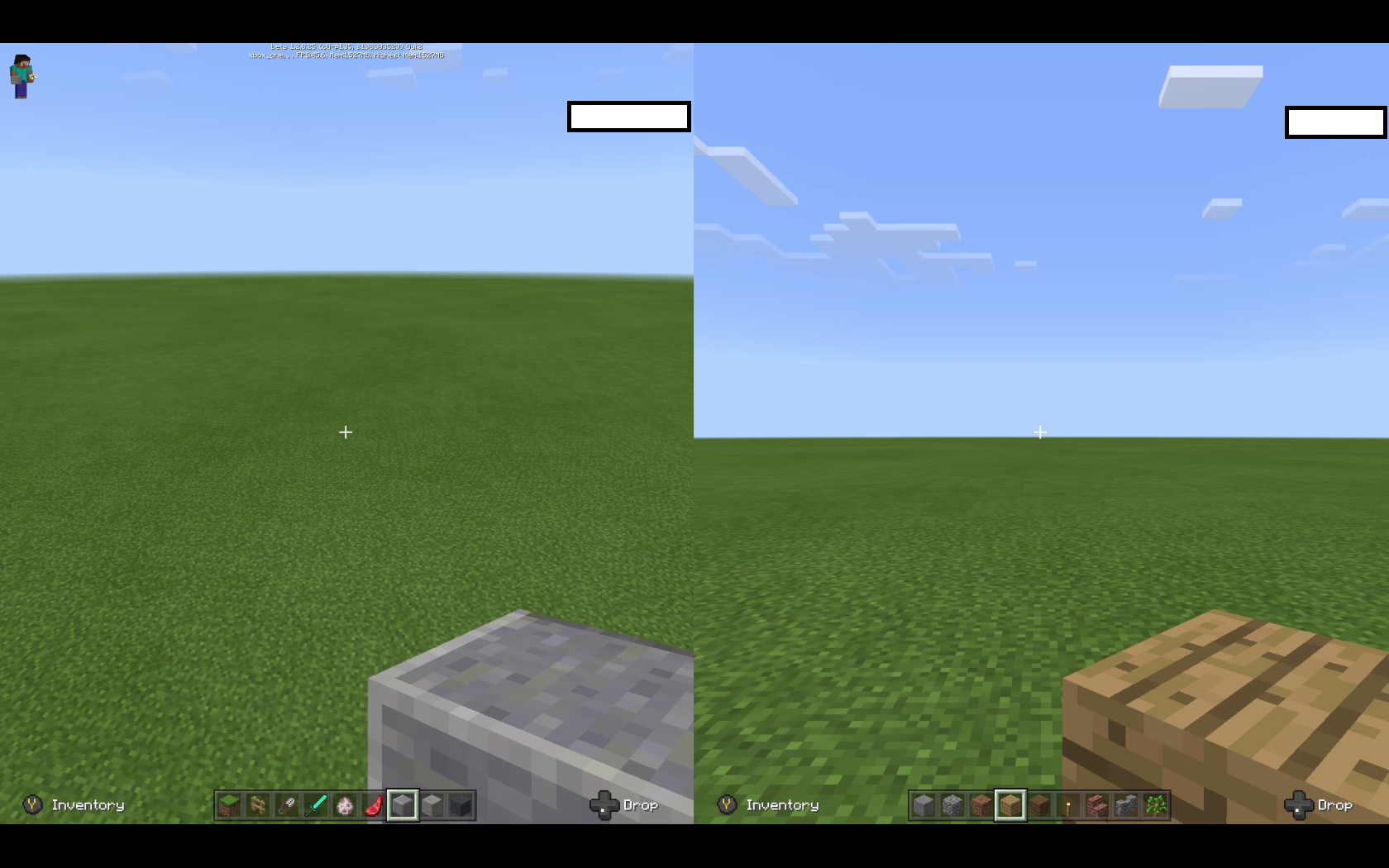



Visual Glitch.
When placing a button in down flowing water. There is a visual glitch.Buttons should be destroyed by water, but while doing so there are incorrect visuals shown.
In one direction a button appears as a block (stone and oak wood planks block)
And buttons appear in the incorrect orientation in otherorientations.See video for reproducing the issue: https://youtu.be/RlLX-ybWOJY
Visual Glitch.
When placing a button in down flowing water. There is a visual glitch.Buttons should be destroyed by water, but while doing so there are incorrect visuals shown.
In one direction a button appears as a block (stone and oak wood planks block)
And buttons appear in the incorrect orientation in other directions.See video for reproducing the issue: https://youtu.be/RlLX-ybWOJY
When placing a full block on top of a hopper it sucks in items next to the full block.
When a full block is on top of a hopper, a hopper should not take items.Video to reproduce the issue: https://youtu.be/rShGBhFo2c0
Possible solution: Disable the hopper suction function completely, when a full block is on top.
Description:
When a non full block moves by pistons it renders the width of the full block in one direction (or changes to another block/direction)this does occur for fence, fence gate, stairs, end rod.Examples
Fence post acting weird.mp4(As a ingame example)

Test world:
MCPE-Fence post bug.mcworldDescription:
When a non full block moves by pistons it renders the width of the full block in one direction (or changes to another block/direction). This does occur for fence, fence gate, stairs, end rods. Maybe more blocks.Examples
Fence post acting weird.mp4
Test world:
MCPE-Fence post bug.mcworld
Description:
When a non full block moves by pistons it renders the width of the full block in one direction(or changes to another block/direction). This does occur for fence, fence gate, stairs, end rods. Maybe more blocks.Examples
Fence post acting weird.mp4
Test world:
MCPE-Fence post bug.mcworld
Description:
When a non full block moves by pistons it renders the width of the full block in one direction. This does occur for fence, fence gate, stairs, end rods. Maybe more blocks. The incorrect visuals only occur when the block is moving.Examples
Fence post acting weird.mp4
Test world:
MCPE-Fence post bug.mcworld
Description:
When a non full block moves by pistons it renders the width of the full block in one direction. This does occur for fence, fence gate, stairs, end rods. Maybe more blocks. The incorrect visuals only occur when the block is moving.Examples
Fence post acting weird.mp4
Test world:
MCPE-Fence post bug.mcworldDescription:
When a non full block moves by pistons it renders the width of the full block in one direction. This does occur for fence, fence gate, stairs, end rods. Maybe more blocks. This only occur when the block is moving.Examples
Fence post acting weird.mp4
Test world:
MCPE-Fence post bug.mcworld
Blocks appear the full width of a block when moving(render issue)
Description:
When a non full block moves by pistons it renders the width of the full block in one direction. This does occur for fence, walls (cobblestone wall, mossy cobblestone wall) , fence gate, stairs, end rods. Maybe more blocks. This only occur when the block is moving.Examples
Fence post acting weird.mp4
Test world:
MCPE-Fence post bug.mcworld
Description:
When a non full block moves by pistons it renders the width of the full block in one direction. This does occur for fence, walls (cobblestone wall, mossy cobblestone wall) , fence gate, stairs (changing orientation), end rods. Maybe more blocks. This only occur when the block is moving.Examples
Fence post acting weird.mp4
Test world:
MCPE-Fence post bug.mcworld
MCPE-Fence post bug.mcworld
Blocks appear the full width of a block when movingNon full blocks appear the full width of a block when moving
Description:
When a non full block moves by pistons it renders the width of the full block in one direction. This does occur for fence, walls (cobblestone wall, mossy cobblestone wall) , fence gate, stairs (changing orientation), end rods. Maybe more blocks. This only occurs when the block is moving.Examples
Fence post acting weird.mp4
Test world:
MCPE-Fence post bug.mcworld
Description:
When a non full block moves by pistons it renders the width of the full block in one direction. This does occur for fence, walls (cobblestone wall, mossy cobblestone wall) , fence gate,stairs (changing orientation), end rods. Maybe more blocks. This only occurs when the block is moving.Examples
Fence post acting weird.mp4
Test world:
MCPE-Fence post bug.mcworldDescription:
When a non full block moves by pistons it renders the width of the full block in one direction. This does occur for fence, walls (cobblestone wall, mossy cobblestone wall) , fence gate,stairs (changing orientation), end rods. Maybe more blocks. This only occurs when the block is moving.Examples
Fence post acting weird.mp4
Test world:
MCPE-Fence post bug.mcworld
Description:
When a non full block moves by pistons it renders the width of the full block in one direction. This does occur for fence, walls (cobblestone wall, mossy cobblestone wall) , fence gate,stairs (changing orientation), end rods. Maybe more blocks. This only occurs when the block is moving.Examples
Fence post acting weird.mp4
Test world:
MCPE-Fence post bug.mcworldDescription:
When a non full block moves by pistons it renders the width of the full block in one direction. This does occur for fence, walls (cobblestone wall, mossy cobblestone wall) , fence gate, stairs (changing orientation?), end rods. Maybe more blocks. This only occurs when the block is moving.Examples
Fence post acting weird.mp4
Test world:
MCPE-Fence post bug.mcworld
There are some Dutch translations that make no sense in the way they are used in-game.
"Verbruik" means using the item and it is depleting (or referring to a amount). "Gebruik" refers to how to use it. Usage /give player.... Gebruik: /geef speler (used when explaining how to use something)
Code English Dutch Should be commands.generic.usage Usage: %1$s Verbruik: %1$s Gebruik: %1$s commands.generic.usage.noparam Usage: Verbuik: Gebruik: Consequent incorrect translation of the word "Level" to the word "Niveau". "Niveau" refers to a rank / height / altitude /amount (can be used for xp or difficulty). Level as in a world / save can't be translated to "Niveau" as it referring to the actual save file (a thing, not a amount or status). It can be changed to "level" (like in English) or "deze wereld"="this world" or "wereld"="world".
Code English Dutch Should be commands.generic.disabled Cheats aren't enabled in this level. Cheats zijn niet ingeschakeld in dit niveau Cheats zijn niet ingeschakeld in dit level commands.save-all.error An error occurred when trying to pause the level storage Er is een fout opgetreden bij het pauzeren van de niveauopslag. Er is een fout opgetreden bij het pauzeren van de level-opslag. commands.save-on.success Changes to the level are resumed. Wijzigingen in het niveau worden hervat. Wijzigingen in het level worden hervat. disconnectionScreen.editionMismatch This level was saved from Minecraft: Education Edition. It cannot be loaded. Dit niveau is opgeslagen in Minecraft: Education Edition en kan niet worden geladen. Dit level is opgeslagen in Minecraft: Education Edition en kan niet worden geladen. disconnectionScreen.futureVersion A newer version of the game has saved this level. It cannot be loaded. Dit niveau is opgeslagen in een nieuwere versie van het spel en kan niet worden geladen. Dit level is opgeslagen in een nieuwere versie van het spel en kan niet worden geladen. level.export.started Level export started... Niveau exporteren gestart... Level exporteren gestart... level.import.started Level import started... Niveau importeren gestart... Level importeren gestart... level.export.success Level export finished successfully Niveau exporteren voltooid Level exporteren voltooid level.import.success Level import finished successfully Niveau importeren voltooid Level importeren voltooid level.export.failed Level export failed Niveau exporteren mislukt Level exporteren mislukt level.import.failed Level import failed Niveau importeren mislukt Niveauimporteren misluktThere are some Dutch translations that make no sense in the way they are used in-game.
"Verbruik" means using the item and it is depleting (or referring to a amount). "Gebruik" refers to how to use it. Usage /give player.... Gebruik: /geef speler (used when explaining how to use something)
Code English Dutch Should be commands.generic.usage Usage: %1$s Verbruik: %1$s Gebruik: %1$s commands.generic.usage.noparam Usage: Verbuik: Gebruik: Consequent incorrect translation of the word "Level" to the word "Niveau". "Niveau" refers to a rank / height / altitude /amount (can be used for xp or difficulty). Level as in a world / save can't be translated to "Niveau" as it referring to the actual save file (a thing, not a amount or status). It can be changed to "level" (like in English) or "deze wereld"="this world" or "wereld"="world".
Code English Dutch Should be commands.generic.disabled Cheats aren't enabled in this level. Cheats zijn niet ingeschakeld in dit niveau Cheats zijn niet ingeschakeld in dit level commands.save-all.error An error occurred when trying to pause the level storage Er is een fout opgetreden bij het pauzeren van de niveauopslag. Er is een fout opgetreden bij het pauzeren van de level-opslag. commands.save-on.success Changes to the level are resumed. Wijzigingen in het niveau worden hervat. Wijzigingen in het level worden hervat. disconnectionScreen.editionMismatch This level was saved from Minecraft: Education Edition. It cannot be loaded. Dit niveau is opgeslagen in Minecraft: Education Edition en kan niet worden geladen. Dit level is opgeslagen in Minecraft: Education Edition en kan niet worden geladen. disconnectionScreen.futureVersion A newer version of the game has saved this level. It cannot be loaded. Dit niveau is opgeslagen in een nieuwere versie van het spel en kan niet worden geladen. Dit level is opgeslagen in een nieuwere versie van het spel en kan niet worden geladen. level.export.started Level export started... Niveau exporteren gestart... Level exporteren gestart... level.import.started Level import started... Niveau importeren gestart... Level importeren gestart... level.export.success Level export finished successfully Niveau exporteren voltooid Level exporteren voltooid level.import.success Level import finished successfully Niveau importeren voltooid Level importeren voltooid level.export.failed Level export failed Niveau exporteren mislukt Level exporteren mislukt level.import.failed Level import failed Niveau importeren mislukt Level importeren mislukt
There are some Dutch translations that make no sense in the way they are used in-game.
"Verbruik" means using the item and it is depleting (or referring to a amount). "Gebruik" refers to how to use it. Usage /give player.... Gebruik: /geef speler (used when explaining how to use something)
Code English Dutch Should be commands.generic.usage Usage: %1$s Verbruik: %1$s Gebruik: %1$s commands.generic.usage.noparam Usage: Verbuik: Gebruik: Cons
equent incorrect translation of the word "Level" to the word "Niveau". "Niveau" refers to a rank / height / altitude /amount (can be used for xp or difficulty). Level as in a world / save can't be translated to "Niveau" as it referring to the actual save file (a thing, not a amount or status). It can be changed to "level" (like in English) or "deze wereld"="this world" or "wereld"="world".
Code English Dutch Should be commands.generic.disabled Cheats aren't enabled in this level. Cheats zijn niet ingeschakeld in dit niveau Cheats zijn niet ingeschakeld in dit level commands.save-all.error An error occurred when trying to pause the level storage Er is een fout opgetreden bij het pauzeren van de niveauopslag. Er is een fout opgetreden bij het pauzeren van de level-opslag. commands.save-on.success Changes to the level are resumed. Wijzigingen in het niveau worden hervat. Wijzigingen in het level worden hervat. disconnectionScreen.editionMismatch This level was saved from Minecraft: Education Edition. It cannot be loaded. Dit niveau is opgeslagen in Minecraft: Education Edition en kan niet worden geladen. Dit level is opgeslagen in Minecraft: Education Edition en kan niet worden geladen. disconnectionScreen.futureVersion A newer version of the game has saved this level. It cannot be loaded. Dit niveau is opgeslagen in een nieuwere versie van het spel en kan niet worden geladen. Dit level is opgeslagen in een nieuwere versie van het spel en kan niet worden geladen. level.export.started Level export started... Niveau exporteren gestart... Level exporteren gestart... level.import.started Level import started... Niveau importeren gestart... Level importeren gestart... level.export.success Level export finished successfully Niveau exporteren voltooid Level exporteren voltooid level.import.success Level import finished successfully Niveau importeren voltooid Level importeren voltooid level.export.failed Level export failed Niveau exporteren mislukt Level exporteren mislukt level.import.failed Level import failed Niveau importeren mislukt Level importeren mislukt There are some Dutch translations that make no sense in the way they are used in-game.
"Verbruik" means using the item and it is depleting (or referring to a amount). "Gebruik" refers to how to use it. Usage /give player.... Gebruik: /geef speler (used when explaining how to use something)
Code English Dutch Should be commands.generic.usage Usage: %1$s Verbruik: %1$s Gebruik: %1$s commands.generic.usage.noparam Usage: Verbuik: Gebruik: Consistentt incorrect translation of the word "Level" to the word "Niveau". "Niveau" refers to a rank / height / altitude /amount (can be used for xp or difficulty). Level as in a world / save can't be translated to "Niveau" as it referring to the actual save file (a thing, not a amount or status). It can be changed to "level" (like in English) or "deze wereld"="this world" or "wereld"="world".
Code English Dutch Should be commands.generic.disabled Cheats aren't enabled in this level. Cheats zijn niet ingeschakeld in dit niveau Cheats zijn niet ingeschakeld in dit level commands.save-all.error An error occurred when trying to pause the level storage Er is een fout opgetreden bij het pauzeren van de niveauopslag. Er is een fout opgetreden bij het pauzeren van de level-opslag. commands.save-on.success Changes to the level are resumed. Wijzigingen in het niveau worden hervat. Wijzigingen in het level worden hervat. disconnectionScreen.editionMismatch This level was saved from Minecraft: Education Edition. It cannot be loaded. Dit niveau is opgeslagen in Minecraft: Education Edition en kan niet worden geladen. Dit level is opgeslagen in Minecraft: Education Edition en kan niet worden geladen. disconnectionScreen.futureVersion A newer version of the game has saved this level. It cannot be loaded. Dit niveau is opgeslagen in een nieuwere versie van het spel en kan niet worden geladen. Dit level is opgeslagen in een nieuwere versie van het spel en kan niet worden geladen. level.export.started Level export started... Niveau exporteren gestart... Level exporteren gestart... level.import.started Level import started... Niveau importeren gestart... Level importeren gestart... level.export.success Level export finished successfully Niveau exporteren voltooid Level exporteren voltooid level.import.success Level import finished successfully Niveau importeren voltooid Level importeren voltooid level.export.failed Level export failed Niveau exporteren mislukt Level exporteren mislukt level.import.failed Level import failed Niveau importeren mislukt Level importeren mislukt
There are some Dutch translations that make no sense in the way they are used in-game.
"Verbruik" means using the item and it is depleting (or referring to a amount). "Gebruik" refers to how to use it. Usage /give player.... Gebruik: /geef speler (used when explaining how to use something)
Code English Dutch Should be commands.generic.usage Usage: %1$s Verbruik: %1$s Gebruik: %1$s commands.generic.usage.noparam Usage: Verbuik: Gebruik: Consistent
tincorrect translation of the word "Level" to the word "Niveau". "Niveau" refers to a rank / height / altitude /amount (can be used for xp or difficulty). Level as in a world / save can't be translated to "Niveau" as it referring to the actual save file (a thing, not a amount or status). It can be changed to "level" (like in English) or "deze wereld"="this world" or "wereld"="world".
Code English Dutch Should be commands.generic.disabled Cheats aren't enabled in this level. Cheats zijn niet ingeschakeld in dit niveau Cheats zijn niet ingeschakeld in dit level commands.save-all.error An error occurred when trying to pause the level storage Er is een fout opgetreden bij het pauzeren van de niveauopslag. Er is een fout opgetreden bij het pauzeren van de level-opslag. commands.save-on.success Changes to the level are resumed. Wijzigingen in het niveau worden hervat. Wijzigingen in het level worden hervat. disconnectionScreen.editionMismatch This level was saved from Minecraft: Education Edition. It cannot be loaded. Dit niveau is opgeslagen in Minecraft: Education Edition en kan niet worden geladen. Dit level is opgeslagen in Minecraft: Education Edition en kan niet worden geladen. disconnectionScreen.futureVersion A newer version of the game has saved this level. It cannot be loaded. Dit niveau is opgeslagen in een nieuwere versie van het spel en kan niet worden geladen. Dit level is opgeslagen in een nieuwere versie van het spel en kan niet worden geladen. level.export.started Level export started... Niveau exporteren gestart... Level exporteren gestart... level.import.started Level import started... Niveau importeren gestart... Level importeren gestart... level.export.success Level export finished successfully Niveau exporteren voltooid Level exporteren voltooid level.import.success Level import finished successfully Niveau importeren voltooid Level importeren voltooid level.export.failed Level export failed Niveau exporteren mislukt Level exporteren mislukt level.import.failed Level import failed Niveau importeren mislukt Level importeren mislukt
is duplicated by
is duplicated by
 MCCE-5694 →
  MCPE-25336MCCE-5696 → MCPE-25341MCCE-5699 → MCPE-25344
is duplicated by
is duplicated by
is duplicated by
is duplicated by
is duplicated by
is duplicated by
is duplicated by
is duplicated by
is duplicated by
is duplicated by
is duplicated by
MCCE-5698 → MCPE-25347MCCE-5704 → MCPE-25356MCCE-5712 → MCPE-25394is duplicated by
is duplicated by
is duplicated by
is duplicated by
is duplicated by
relates to
is duplicated by
is duplicated by
is duplicated by
is duplicated by
is duplicated by
is duplicated by
is duplicated by
MCCE-5723 → MCPE-25437MCCE-5724 → MCPE-25445Can you verify if this issue is occurring on the xbox one beta or the console edition?
MCCE-5728 → MCPE-25471@Ashley Wallace Can you specify your exact build that the dashboard is on or take a photo of it (and upload it here)?
You find that in: All settings --> System --> Console info
MCCE-5725 → MCPE-25472MCCE-5735 → MCPE-25481MCCE-5740 → MCPE-25491duplicates
MCCE-5738 → MCPE-25495MCCE-5748 → MCPE-25526duplicates
MCCE-5751 → MCPE-25538MCCE-5758 → MCPE-25575MCCE-5760 → MCPE-25588duplicates
MCCE-5761 → MCPE-25589MCCE-5801 → MCPE-25659MCCE-5810 → MCPE-25666MCCE-5824 → MCPE-25732duplicates
is duplicated by
is duplicated by
is duplicated by
MCCE-5842 → MCPE-25760Summary:
When entering the end of the supplied converted world. The end exit portal is generated on top or belowthe existing one.
Steps to Reproduce:
Load the supplied world
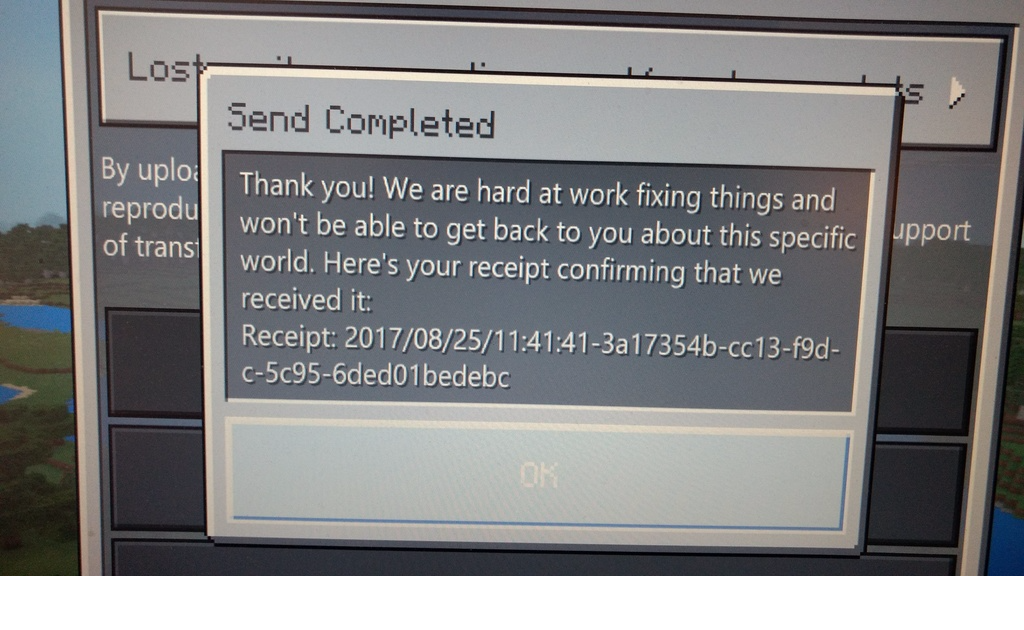
(receipt but in dutch)
Go to the end and observe the results.
Expected Results:
Only to have one Exit portal.
Current behaviour:
See image

Summary:
When entering the end of the supplied converted world. The end exit portal is generated on top of the existing one.
Steps to Reproduce:
Load the supplied world
Go to the end and observe the results.
Expected Results:
Only to have one Exit portal.
Current behaviour:
See image
Summary:
When entering the end of the supplied converted world. The end exit portal is generated on top of the existing one.
Steps to Reproduce:
Load the supplied world
Convert it
Go to the end and observe the results.
Expected Results:
Only to have one Exit portal.
Current behaviour:
See image
Summary:
When entering the end of the supplied converted world.The end exit portal is generated on top of the existing one.
Steps to Reproduce:
Load the supplied world
Convert it
Go to the end and observe the results.
Expected Results:
Only to have one Exit portal.
Current behaviour:
See image
Summary:
The end exit portal is generated on top of the existing one. Creating two portals.
Steps to Reproduce:
Load the supplied world
Convert it
Go to the end and observe the results.
Expected Results:
Only to have one Exit portal.
Current behaviour:
See image
MCCE-5826 → MCPE-25777World conversion issue
Short description:
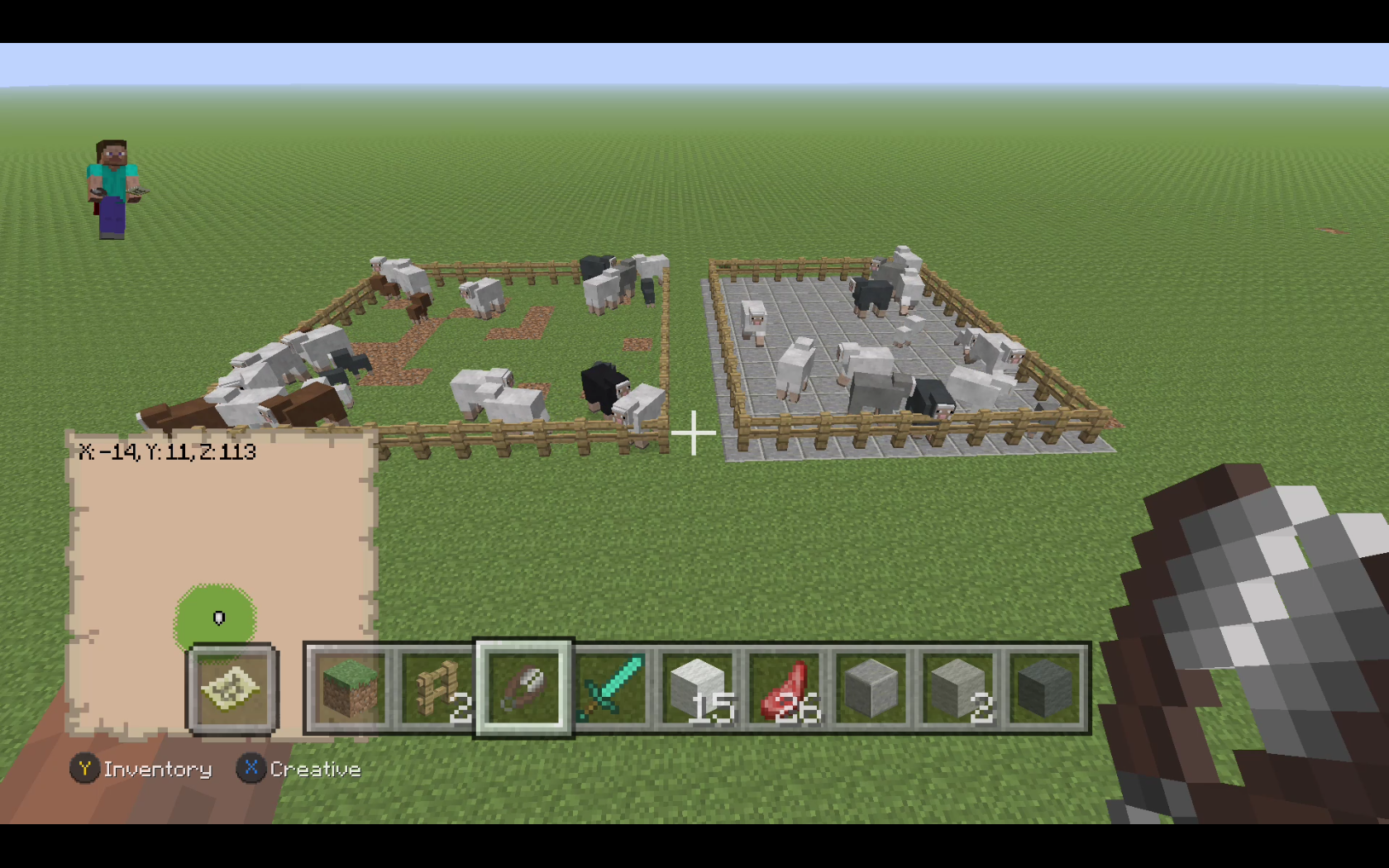
After converting a world from the xbox one edition over to bedrock, you are unable to sheer a adult sheep. Unless they eat grass (and the values get updated), then you will be able to sheer the sheep.Steps to reproduce:
Convert a world with adult sheeps with wool from the console edition.
Don't let them eat grass.
Result:
You can't shear the sheep.
Note:
If you let them eat grass, although they had wool already, suddenly they can be sheared.Attached images:
Test
Attached world
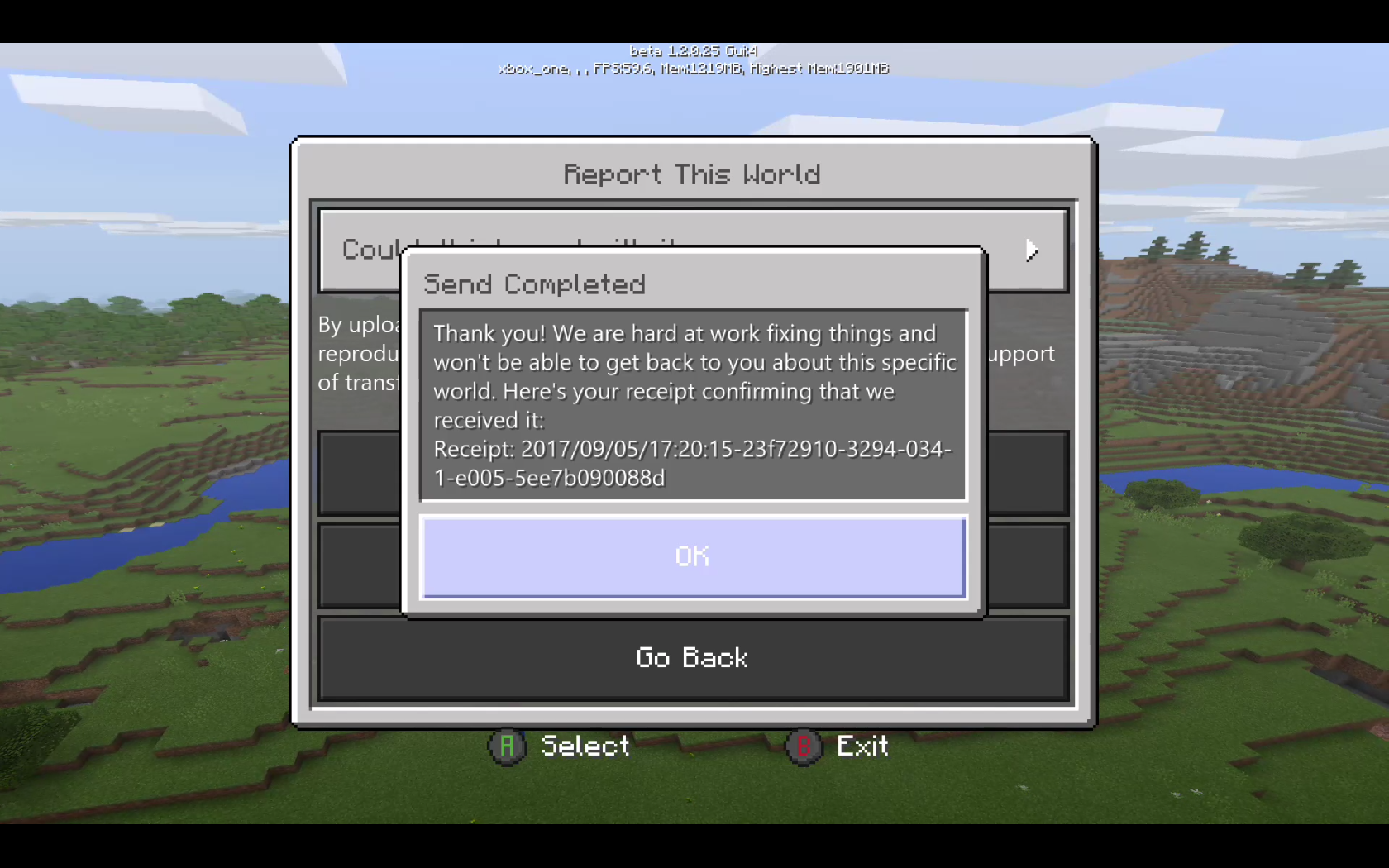
conversionreceipt:
World conversion issueShort description:
After converting a world from the xbox one edition over to bedrock, you are unable to sheer a adult sheep. Unless they eat grass (and the values get updated), then you will be able to sheer the sheep.Steps to reproduce:
Convert a world with adult sheeps with wool from the console edition.
Don't let them eat grass.
Result:
You can't shear the sheep.
Note:
If you let them eat grass, although they had wool already, suddenly they can be sheared.Attached images:
Test
Attached world receipt:
Short description:
After converting a world from the xbox one edition over to bedrock, you are unable to sheer a adult sheep. Unless they eat grass (and the values get updated), then you will be able to sheer the sheep.Steps to reproduce:
Convert a world with adult sheeps with wool from the console edition.
Don't let them eat grass.
Result:
You can't shear the sheep.
Note:
If you let them eat grass, although they had wool already, suddenly they can be sheared.Attached images:
Test
Attached world receipt:
Short description:
After converting a world from the xbox one edition over to bedrock, you are unable to sheer a adult sheep with wool. Unless they eat grass (and the values get updated), then you will be able to sheer the sheep.Steps to reproduce:
Convert a world with adult sheeps with wool from the console edition.
Don't let them eat grass.
Result:
You can't shear the sheep.
Note:
If you let them eat grass, although they had wool already, suddenly they can be sheared.Attached images:
Test
Attached world receipt:
Short description:
After converting a world from the xbox one edition over to bedrock, you are unable to sheer a adult sheep with wool. Unless they eat grass (and the values get updated), then you will be able to sheer the sheep.Steps to reproduce:
Convert a world with adult sheeps with wool from the console edition.
Don't let them eat grass.
Result:
You can't shear the sheep.
Note:
If you let them eat grass, although they had wool already, suddenly they can be sheared.Attached images:
Test
Attached world receipt:
Attached video:
One of many little test
MCPE-25833.mp4
Short description:
After converting a world from the xbox one edition over to bedrock, you are unable to sheer a adult sheep with wool. Unless they eat grass (and the values get updated), then you will be able to sheer the sheep.Steps to reproduce:
Convert a world with adult sheeps with wool from the console edition.
Don't let them eat grass.
Result:
You can't shear the sheep.
Note:
If you let them eat grass, although they had wool already, suddenly they can be sheared.Attached images:
Test
Attached world receipt:
Attached video:
One of many little test
MCPE-25833.mp4Short description:
After converting a world from the xbox one edition over to bedrock, you are unable to shear a adult sheep with wool. Unless they eat grass (and the values get updated), then you will be able to shear the sheep.Steps to reproduce:
Convert a world with adult sheeps with wool from the console edition.
Don't let them eat grass.
Result:
You can't shear the sheep.
Note:
If you let them eat grass, although they had wool already, suddenly they can be sheared.Attached images:
Test
Attached world receipt:
Attached video:
One of many little test
MCPE-25833.mp4
Summary:
When converting a hopper minecart on a rail from CU49 (build 1.12 1622.0 6.1) they are converted without functionality. They simply don't pickup any item, until broken and replaced by a new hopper minecart.Steps to reproduce:
Create a minecart track like the image below (in console edition).

Convert the world
Try for the hopper minecarts to pickup any items.
Result:
Hopper minecarts won't pick up any items until broken and replaced by a new one.
Video:
https://youtu.be/mLju-BrH4f0World Receipt:

Summary:
When converting a hopper minecart on a rail from CU49 (build 1.12 1622.0 6.1) they are converted without functionality. They simply don't pickup any item, until broken and replaced by a new hopper minecart.Steps to reproduce:
Create a minecart track like the image below (in console edition).
Convert the world
Try for the hopper minecarts to pickup any items.
Result:
Hopper minecarts won't pick up any items until broken and replaced by a new one.
Video:
https://youtu.be/mLju-BrH4f0
World Receipt:
Summary:
When converting a world with a hopper minecart on a rail from CU49 (build 1.12 1622.0 6.1) they are converted without functionality. They simply don't pickup any item, until broken and replaced by a new hopper minecart.Steps to reproduce:
Create a minecart track like the image below (in console edition).
Convert the world
Try for the hopper minecarts to pickup any items.
Result:
Hopper minecarts won't pick up any items until broken and replaced by a new one.
Video:
https://youtu.be/mLju-BrH4f0
World Receipt:
duplicates
is duplicated by
duplicates
is duplicated by
is duplicated by
is duplicated by
MCCE-5889 → MCPE-25954Summary:
Having a keyboard and mouse connected. Whenever there is directional input by the mouse and the cursor should show, the screen goes black and the cursor starts duplicating. The os overlay also starts flashing at occasions.Steps to reproduce:
1 Make sure to be on build Xbox OS 10.0.16287.1002 (rs3_release_xbox_dev.170910-1900)
(this is a beta os soon to be released to the public, possibly other os builds have the same
issue)
2 Attach a mouse and keyboard
3 Start minecraft and move the mouse.
4 The screen now goes black the cursor starts to duplicateNote:
Also the os starts experiencing flashes when minecraft is active and the home button is pressed.
This issue doesn't occur on the current retail xbox dashboard.Images showing the issue:


Video:
Xbox 20-9-2017 17_45_21.mp4Possibly the issue should be communicated with Microsoft before everyone is affected by this dashboard update.
Summary:
Having a keyboard and mouse connected. Whenever there is directional input by the mouse and the cursor should show, the screen goes black and the cursor starts duplicating. The os overlay also starts flashing at occasions.Steps to reproduce:
1 Make sure to be on build Xbox OS 10.0.16287.1002 (rs3_release_xbox_dev.170910-1900)
(this is a beta os soon to be released to the public, possibly other os builds have the same
issue)
2 Attach a mouse and keyboard
3 Start minecraft and move the mouse.
4 The screen now goes black the cursor starts to duplicate
Note:
Also the os starts experiencing flashes when minecraft is active and the home button is pressed.
This issue doesn't occur for me on the current retail xbox dashboard on a other xbox.Images showing the issue:
Video:
Xbox 20-9-2017 17_45_21.mp4Possibly the issue should be communicated with Microsoft before everyone is affected by this dashboard update.
Mouse input (cursor) shows black screen with flashing cursors.
Summary:
Having a keyboard and mouse connected. Whenever there is directional input by the mouse and the cursor should show, the screen goes black and the cursor starts duplicating. The os overlay also starts flashing at occasions.Steps to reproduce:
1 Make sure to be on build Xbox OS 10.0.16287.1002 (rs3_release_xbox_dev.170910-1900)
(this is a beta os soon to be released to the public, possibly other os builds have the same
issue)
2 Attach a mouse and keyboard
3 Start minecraft and move the mouse.
4 The screen now goes black the cursor starts to duplicate
Note:
Also the os starts experiencing flashes when minecraft is active and the home button is pressed.
This issue doesn't occur for me on the current retail xbox dashboard on a other xbox.
The game remains unplayable when the mouse is attached, until the mouse is removed and the system rebooted.Images showing the issue:
Video:
Xbox 20-9-2017 17_45_21.mp4Possibly the issue should be communicated with Microsoft before everyone is affected by this dashboard update.
MCCE-5947 → MCPE-26179MCCE-5944 → MCPE-26180MCCE-5943 → MCPE-26181better together sart upOwn disk version can
Own disk version can't get Minecraft (bedrock)
is duplicated by
MCCE-5941 → MCPE-26182MCCE-5940 → MCPE-26183MCCE-5935 → MCPE-26184MCCE-5951 → MCPE-26232duplicates
duplicates
is duplicated by
is duplicated by
is duplicated by
is duplicated by
MCCE-5955 → MCPE-26257duplicates
MCCE-5954 → MCPE-26260duplicates
is duplicated by
is duplicated by
is duplicated by
relates to
is duplicated by
is duplicated by
is duplicated by
is duplicated by
is duplicated by
is duplicated by
is duplicated by
is duplicated by
MCCE-5953 → MCPE-26261duplicates
MCCE-5960 → MCPE-26303Xbox One, OS Version 10.0.15063.4103 (rs2_release_xbox_1706.170830-1908)
Minecraft Better Together V1.2.0
duplicates
MCCE-5964 → MCPE-26304duplicates
MCCE-5961 → MCPE-26305MCCE-5959 → MCPE-26306MCCE-5963 → MCPE-26309relates to
MCCE-5984 → MCPE-26416MCCE-5983 → MCPE-26417duplicates
MCCE-5982 → MCPE-26418MCCE-5981 → MCPE-26419MCCE-5980 → MCPE-26421duplicates
MCCE-5979 → MCPE-26422MCCE-5975 → MCPE-26423MCCE-5978 → MCPE-26424MCCE-5973 → MCPE-26425duplicates
MCCE-5972 → MCPE-26426duplicates
MCCE-5989 → MCPE-26473MCCE-5997 → MCPE-26535duplicates
is duplicated by
MCCE-5995 → MCPE-26536MCCE-5996 → MCPE-26537MCCE-5994 → MCPE-26538MCCE-6001 → MCPE-26542Thank you for your report!
However, this issue has been closed as a Duplicate ofMCPE-25354.
It has been linked to this report. If you have additional information, please add it to that report.
Issues that concern Minecraft (Xbox One Bedrock version) should be posted on the Minecraft (Bedrock codebase) tracker. I have moved your ticket to the correct section.
Please search before reporting, as it's likely that one exists already.
Quick Links:
📓 Issue Guidelines – 💬 Community Support – 📖 Game Wiki
duplicates
relates to
MCCE-6003 → MCPE-26551MCCE-6002 → MCPE-26552MCCE-6016 → MCPE-26634MCCE-6017 → MCPE-26641MCCE-6018 → MCPE-26648duplicates
is duplicated by
duplicates
duplicates
is duplicated by
duplicates
duplicates
is duplicated by
duplicates
duplicates
duplicates
is duplicated by
duplicates
duplicates
MCCE-6021 → MCPE-26693MCCE-6024 → MCPE-26705MCCE-6028 → MCPE-26732duplicates

Edit by: KillerbeeNL
Summary:
Minecarts (with hopper / chest / tnt) collide while they are on separate adjacent tracks. Having unpowered powerrail in most cases can't prevent the minecarts from escaping due to the collision. Minecarts also slow down or change direction because of the collision with a other minecart. Normal minecarts are not affected.
For reproduction use the supplied world:
Take note the issue becomes worse/more apparent if the minecarts move at a lower speed.
MCPE-26200 Minecart collision.mcworld 1.2.5.15 (beta world)
Video/ screenshot attached:

Minecraft 3-11-2017 20_58_36.mp4
Orriginal report:
On the old Minecraft Xbox edition, two chest mine carts could be placed next to each other on separate rails with no issues. Now on the new bedrock edition, if they are next to each other one of them will move away. Please make it so they don't push each other like this on separate tracks!
In case you experience a connection issue, please supply detailed information where possible.
Troubleshoot information:
For information about NAT types, please visit this article: https://support.xbox.com/en-us/xbox-one/networking/nat-error-solution
Please take note that retesting your NAT type, might give a false positive Open result. (restarting your network equipment is required to perform an accurate test)
Settings for your Xbox account Online Privacy / Multiplayer can be managed here: http://account.xbox.com/settings.
How to manage this directly from the Xbox one console and also about child accounts: https://privacy.microsoft.com/en-us/xbox-one-privacy-and-online-safety.
A troubleshoot guide can be found here: https://support.xbox.com/en-US/xbox-one/security/cannot-change-my-privacy-settings
Please contact Xbox support https://support.xbox.com, if you experience any issues with changing these settings.
Keep in mind that we do not have access to your Xbox account here on the bugtracker, please do NOT provide personal information.
me and a friend are trying to play the new minecraft on xbox one together, but everytime we try to join one another we get unable to connect to world. both with open nat and hardwired connection
Mod edit by KillerbeeNL
Summary:
Villagers in converted worlds from xbox one won't pick up any food supplied to them. Also newly created villagers (in bedrock using spawneggs) also don't pick up any food in a converted world.
Steps to reproduce:
- Gamemode Creative on minecraft xbox one edition
- Create a new superflat in MCCE (xbox one latest update CU49)
- Place villagers in a confined space using a spawnegg
(or skip the previous steps by using the supplied receipt) - Transfer the world over to the bedrock version (1.2.5.12 is used for this test)
- Supply wheat, carrots, potato's, beetroot to the villagers
- Notice the villagers won't pick up any of the supplied food. When later collecting the food those samples resemble the exact sample that was supplied.
Attached screenshot and receipt:


Note:
The behavior was tested against a new world (bedrock) created in the same version and same device where villagers do pickup all food that is supplied to them. (using the "same" steps)
Original report:
Most current version of Better Together:
My villagers that transferred from my synced world wont pick up any items that they need for breeding. Examples would be wheat, carrots, potatos, and beetroot. Also, even after trading and gaining willingness, the villagers won't breed, and will not enter love mode.
It seems like the villagers themselves are bugged.
The most recent version of Better Together:
Tamed horses transferred via sync to the new version (then added to a Realm) won't enter love mode/won't breed. The horses had saddles, and some with armor.
-Fed them tons of wheat, so they were not 'hungry,' they would eat the wheat infinitely
-Fed then two golden carrots, no love mode
-They would just keep eating the golden carrots infinitely
-Never entered love mode/wouldn't breed
Edit by: KillerbeeNL
Converted horses donkeys and mule don't have a health-bar (hearts) most likely causing the issue.
Converted horse / donkey:


Newly spawned horse / donkey:


Receipt attached:


Mod edit by KillerbeeNL
Summary:
Fire renders through solid blocks at certain angles (depending on the layout of blocks). It becomes more visible at certain angles and when the player is further away.
Steps To Reproduce
- Use the following world save as provided below this text.
- MCPE-28670 Fire though blocks.mcworld 1.2.6.2 world
Screenshot attached:

Original report:
Fire can be seen through blocks if blocks are placed
In front and to the side of the fire and not diagonally from the fire. The problem is worse as you get further away.

Mod edit by KillerbeeNL
There are two possible issues that can occur:
1. Not being able to send a invite through the dashboard (for friends):


2. Not receiving a game invite on xbox one.
Original text:
I can't invite people to minecraft worlds On the new version of minecraft (Xbox) Why Is this?
Edit by:KillerbeeNL
Summary:
Throwing a trident in topsnow causes repeating hit sound (as if it doesn't get stuck) and shows weird animation.
Steps to reproduce:
1. Put down top snow
2. Throw a trident in the top snow
Video attached:
MCPE-31666.mp4
Notes:
The issue doesn't seem to be caused by the channeling enchant
Original report
Bug When Trident Concerning When In The Throw To Snow Use Enchant Channeling
Edit by KillerbeeNL
Summary:
Flowing water shows a glitched texture when the education edition setting is enabled.
Steps to reproduce:
- Start a new world (flat creative, Windows 10 was used to to verify the issue)
- Enable Education edition in the world settings
- Empty a bucket of water and observe the flowing water texture
World with settings preset:
MCPE-32416.mcworld
Images attached:

Original report:
Hello there is a problem with the texture of the water, it has no animation, and when it is running it looks fatal it tires my eyes, with this I do not explain much so look at the photos.
Hola hay un problema con la textura del agua, no tiene animacion, y cuando esta corriendo se ve fatal me cansa los ojos, con esto no explico mucho asi que mirad las fotos.
Edit by KillerbeeNL
Verification build 1.5.0.1 (win 10)
Summary:
With Screen Animations Enabled a active (or powered) repeating command_block can't change the command or other settings for the command_block (they revert back to previously set or previous command). While this works when Screen Animations is Disabled.
Steps to reproduce:
- Make sure the setting screen animations is enabled
- Gamemode creative, Cheats enabled, flat world
- Give yourself a command_block and place it
- Set the command_block to Repeat
- Set it to always active (or continuously power the command block, needs redstone)
Example: - Use the command say test 1 (in the command block)
- Close the command_block and observe the chat
- Open the command_block and change the command to say test 2
- Close the command_block and observe the chat, notice it still reads test 1
- Open the command_block and observe that the command still has the command say test 1
Video:
Video showing the issue with Screen Animations Enabled:
MCPE-32692 Screen animations on (Reproduction).mp4
Video showing the expected behavior with Screen Animations Disabled:
MCPE-32692 Screen animations off (expected behaviour).mp4
Expected results:
Are shown in the second video (screen animations disabled)
Original report:
THIS ISSUE IS SOLVED (Answer at bottom of Comments)
Command Blocks that are in the REPEAT setting are preventing me from Changing its settings or alter its command in any way once it has been activated. it shows the changes when i make them, but once i exit the Menu for the command block it just reverts back to the previous settings/command text. i am forced to destroy the repeating command block and re type it all and enter new settings to change it again
*UPDATED**
This issue only occurs when i load the world or realm on my xbox one. but it causes the issue to permanently be a part of that world file or realm after i have opened it through xbox. If i download the world from the Realm Settings menu through my windows 10 version, the downloaded version will no longer have the command block issue
I have also discovered that the Repeating Command block will prevent changes as long as it is Active rather than just set to Always Active. This issue persists even on Repeating Command blocks that are only activated through Redstone, but the difference between the two is that if i use Redstone to activate it, i just have to turn the redstone off to be able to make changes to the command block Text/Settings
Edited:
KillerbeeNL discovered that redstone ticks are being processed in the center of the world. The problem is that the redstone ticking area is permanently set to the 96 x 96 bock area centered on the center point of the world. It has nothing to do with Experimental Gameplay, and has probably been working this way since 1.4.0. I have updated the summary and description of the ticket to reflect the actual bug.
The redstone ticking area should be centered on the player, and its size should be determined by the Simulation Distance setting, just like the block update area is.
As a possible workaround, you might be able to move your redstone inward from the edge. Redstone more than 32 blocks from the edge should work properly and continuously.

Original Title: It appears when you press the button of slot without item and scroll to slot where Item located (Trident).
You need firstly activate attack of trident then U need to scroll to another (empty) slot item, then just press button of slot with trident or bow without unpressing right mouse button.
Edit by KillerbeeNL
Steps to reproduce:
Creative Windows 10, kb and mouse, verification build 1.6.0, 1.7.0.5 (fresh install).
1. Have a trident in inventory slot 1 and a empty hand in slot 2.
2. Select slot 1 with the trident (keyboard numbers are used)
3. Press and hold right mouse button and wait for the trident charging animation to finish
4. Keep holding right mouse button and press 2 (slot 2)
5. Keep holding right mouse and press 1 (slot 1)
6. Release right mouse button
Additional notes:
The issue was also reproduced on Xbox One S running 1.6.0 using a different KB and mouse. And on a laptop (1.6.0) with a different mouse and keyboard. Possibly this issue might not be reproducible on all hardware or versions.
Video attached:
MCPE-37581.mp4

When the lingering potion pours on the ground it does not disappear after you leave the game and does not give any effect.
Update by: KillerbeeNL
Turning on the day / night cycle (command: /gamerule dodaylightcycle true) seem to fix this problem for some users.

Thank you for your answer, KillerbeeNL!
I tried Hud Opacity in Settings (as well as all other options there), but it didn't help.
Update by KillerbeeNL:
Summary:
When a entity (mob) is in a boat and the boat is broken, the entity will keep facing the same direction while walking / moving.
Steps to reproduce:
- Spawn a entity with a spawnegg
- Let the entity enter a boat
- Break the boat
Observed behavior:
- The entity faces the same direction while moving
Expected behavior:
- The entity faces the direction it is moving in
Workaround:
Reload the world after the entity exits the boat
Screenshots/Videos attached: Yes
Notes:*
Original Description:
taming pets go weird. I know that the cat and the parrot walk like that, but I don’t know about the dog.
KillerbeeNL: I think there may also be a problem with villager conversion causing the particles over multiple beds. In the NBT data, converted villagers without any profession (because their tier 2 trades were never unlocked) only have the 'minecraft:villager' and 'adult' components. They should at least have either the 'behavior_peasant' or 'behavior_non_peasant' or 'unskilled' component, as well as the 'basic_schedule' component. Egg-spawned villagers will have those components. So if all you have are converted no-profession villagers, there's nobody who can detect a bed. Then the first time you spawn a villager by egg, it detects all the beds and creates the village.
The defective converted villagers is a different problem. I'm not even sure they're considered inhabitants of the village. They absolutely will not claim a bed until after they find a job site, whereas it should be the other way around. But all this belongs in another ticket, once I figure it out some more.
Edit: After further experimentation, there doesn't seem to be a problem with villagers after all, it's just the cats. If you kill all the villagers, the village is destroyed. Then, when you spawn a new villager, it detects and claims one bed and creates the village again. But if there are any stray cats around, they claim beds as soon as the village is created, so multiple beds display green particles.
Update by: KillerbeeNL
Summary:
Curved rail is not switching direction when powered with redstone on a t-junction.
Steps to reproduce:
- Place rails in a t-shape and make sure the rail is curved to one of the sides
- Power the curved rail
- Unpower the curved rail

MCPE-44735 Curved rail switch.mcworld
Observed behavior:
The curved rail doesn't change in direction.
Expected behavior:
The curved rail switches sides when powered and switches back when unpowered.
Original description:
The normal rails are not switching direction in the new beta when using levers.
This is well known about currently, and the helpers, mods and developers know you are sad about this, but please don't continue to comment about having this issue. The devs are aware and are looking to fix this issue. It cannot be fixed instantly but will be fixed soon. Keep it to new info like what KillerbeeNL said.
Please note that this is affecting the Xbox one version cu11 of the game as stated in the environment.
Thanks. Sorry for the possible inconvenience.
I reported this bug on the console version same behaviour applies to PC 1.11.2. As I was able to easily follow a procedure to recreate mobs going trough fence or wall on pc as well. In the description i can find nothing over replication or cause that's why i'm posting this. (don't know the exact state of this bug i normally mostly report for Console).
Maybe there are details in the video https://www.youtube.com/watch?v=qUs1er67Zlg on that issue as in there it relates/ correlates to how you place something over chunk edges and loading. MCCE-3945 exactly the same behaviour as in the video applies to the pc version 1.11.2. Just tested it . Easy to reproduce in single player. Maybe there are details in the attached video that solve this. As in the linked issue there is nothing addressed to reproduce and I just did it easily. It applies to fenced / closed in villagers mobs everything. It has to do with the loading algorithm of chunks and timing if mobs are placed I guess(i'm not good at code). Just watch the video or see report for more info. In that bug report there is also a image showing how a large enclosure reproduces this behaviour (this issue has been going on quite long on pc I see)
That is kinda what i thought as well. Only beautifully detailed explained.
I just didn't find the do this then this happens, how to have some consistent behavior on replication (the video is not something that happens ow hard to recreate, but often 3 out of 4 on pc as well). So you have something to test against.
The big enclosure picture and video perfectly fits your explanation on the chunk loading and behaviour on my issue. This issue also possibly affects MCPE as reported by a user, so it is across all platforms currently.
(Forgotten to mention: in my video the wool marks the chunk edges so the edge of a chunk is exactly in between the rows of wool)
Have you tried this to replicate it https://www.youtube.com/watch?v=qUs1er67Zlg method to verify its gone?. Must be placed across chunks (as people reacted on my issue it being present this way on MCPE. (blocks can be fence gate around) (on the video you see wool rows in the middle of the wool is the chunk edge) It not depends on what you build but where you build it. See my issue for a bigger enclosure. (as nathan mentioned it) This same behaviour is happening on pc java version and console , i can't verify it for MCPE
On pc side of this bug, it is related / theory to one chunk being loaded the other chunk isn't yet and mobs pushing the other mob out of that unloaded chunk into a block/fence. That is why a bigger enclosure one block away from the edge of the chunk "works" as well.
One person had the idea that unloaded chunks should be handled as a solid until their loaded. Other way is freezing mob movement when the adjacent chunk hasn't been loaded (but that might cause issues/visual glitches) I suggest a single solution across all platforms would be best.
It should be loading without issues in the center of the chunk. Your thinking is totally right
M|MB M=mob | = chunk border B= block
Left mob is loaded pushes the other mob in the unloaded chunk into the block upon loading that chunk (theory) At least this way you can replicate it. (I attached a image on that behaviour with a villager getting pushed)
(note that recreating the bug depends on the loading algorithm that is used for chunks one chunk has to load before the other to recreate it. If it doesn't work try standing in another chunk or approaching it from another side.)
It might eventually be even 2 bugs one the pushing upon load and the chunk loading in itself at least as above it is easy to recreate.
Staff Note:
Might need some attention.
This probably will be a issue when people try to convert their MCCE world to MCPE console.
Console players are used to create overworld Nether portal gold farms. On MCCE the nether ceiling is kinda closed (can't build there properly). So they are used to building overworld gold farms. When they transfer their world this would disable those farms and turn them into nether zombie pigman spawning portals.
Tested in Win 10 1.1.0.
Integer overflow error? MC Java player explaining this. https://www.youtube.com/watch?v=Q4g8fnE2wYs
Wiki about integer overflow https://en.wikipedia.org/wiki/Integer_overflow
Technically this would be a underflow.
Also creates this issue with half slabs. https://youtu.be/ute_zRUjv3k
Although i'm no expert i think the original poster made a syntax error. You should specify a replacement block when using replace. As in replace what with air?
/fill <x1> <y1> <z1> <x2> <y2> <z2> <tileName:string> <tileData:int> replace <replaceTileName:string> <replaceDataValue:int>.
You totally missed the last part in the supplied image. <replaceTileName:string> <replaceDataValue:int> when using replace in the command.
Can confirm this on win 10 1.2.0.9 occurring on all stairs.The "selection box" is scaled/set to half the size it should be (in all directions).
Stairs should have been fixed with bug fix: Pistons, stairs, and chests no longer rotate when pushed by pistons (1.2.0.11 /1.2 Build 4)

They still appear to be doing something weird between positions.
All the other blocks are still affected by 1.2.0.11 as well.
This issue occurs in Beta build 4/ 1.2.0.11 (win 10). Reopened the report.
I moved your ticket. Issues that concern the Xbox beta, should go to the pocket edition/bedrock tracker. (version 1.2.0.20)
I moved your ticket. Issues that concern the Xbox beta, should go to the pocket edition/bedrock tracker. (version 1.2.0.20)
Issues that concern the Xbox One beta should be posted on the Pocket Edition (bedrock tracker). I moved your ticket to the correct section.
For further bug reports about the Xbox One beta, please post them here.
Have a look at our Issue Guidelines.
Please search before reporting, as it's likely that one exists already.
Quick Links:
📓 Issue Guidelines – 💬 Community Support – 📖 Game Wiki
Issues that concern the Xbox One beta should be posted on the Pocket Edition. I moved your ticket to the correct section.
For further bug reports about the Xbox One beta, please post them here.
Have a look at our Issue Guidelines.
Quick Links:
📓 Issue Guidelines – 💬 Community Support – 📖 Game Wiki
@Hunter Please only use the comment section for information.
Issues that concern the Xbox One beta should be posted on the Pocket Edition tracker. I moved your ticket to the correct section.
For further bug reports about the Xbox One beta, please post them here.
Have a look at our Issue Guidelines.
Quick Links:
📓 Issue Guidelines – 💬 Community Support – 📖 Game Wiki
Issues that concern the Xbox One beta should be posted on the Pocket Edition (bedrock) tracker. I moved your ticket to the correct section.
For further bug reports about the Xbox One beta, please post them here.
Have a look at our Issue Guidelines.
Quick Links:
📓 Issue Guidelines – 💬 Community Support – 📖 Game Wiki
Issues that concern the Xbox One beta should be posted on the Pocket Edition (bedrock) tracker. I moved your ticket to the correct section.
For further bug reports about the Xbox One beta, please post them here.
Quick Links:
📓 Issue Guidelines – 💬 Community Support – 📖 Game Wiki
Issues that concern the Xbox One beta should be posted on the Pocket Edition (bedrock) tracker. I moved your ticket to the correct section.
For further bug reports about the Xbox One beta, please post them here.
Quick Links:
📓 Issue Guidelines – 💬 Community Support – 📖 Game Wiki
Issues that concern the Xbox One beta should be posted on the Pocket Edition (bedrock) tracker. I moved your ticket to the correct section.
For further bug reports about the Xbox One beta, please post them here.
Have a look at our Issue Guidelines.
Quick Links:
📓 Issue Guidelines – 💬 Community Support – 📖 Game Wiki
Issues that concern the Xbox One beta should be posted on the Pocket Edition (bedrock) tracker. I moved your ticket to the correct section.
For further bug reports about the Xbox One beta, please post them here.
Have a look at our Issue Guidelines.
Quick Links:
📓 Issue Guidelines – 💬 Community Support – 📖 Game Wiki
This issue can also be caused by difference in world size on the xbox one edition.
In the Console Edition, the ratio depends on the world size: 1:3 for classic (which includes all worlds on PS3 and Xbox 360) and small worlds, 1:6 for medium, and 1:8 for large. https://minecraft.gamepedia.com/Nether_portal#Coordinate_conversion
@Ashley Wallace Can you specify your exact build that the alpha dashboard is on or take a photo of it (and upload it here)?
You find that in: All settings --> System --> Console info
Have you tried doing a hard reset. Power down your console. Unpower the powerbrick by removing it's power from the socket for at least 45 seconds. Plug it back in. See if the game now starts.
Have you tried installing the minecraft beta again? Remove the game and redownload it from the store.
Please let us know if any of these methods solved the issue for you.
This is the link to your issue https://bugs.mojang.com/browse/MCPE-25394
(Note the methods above are a player solution not a fix for the issue.)
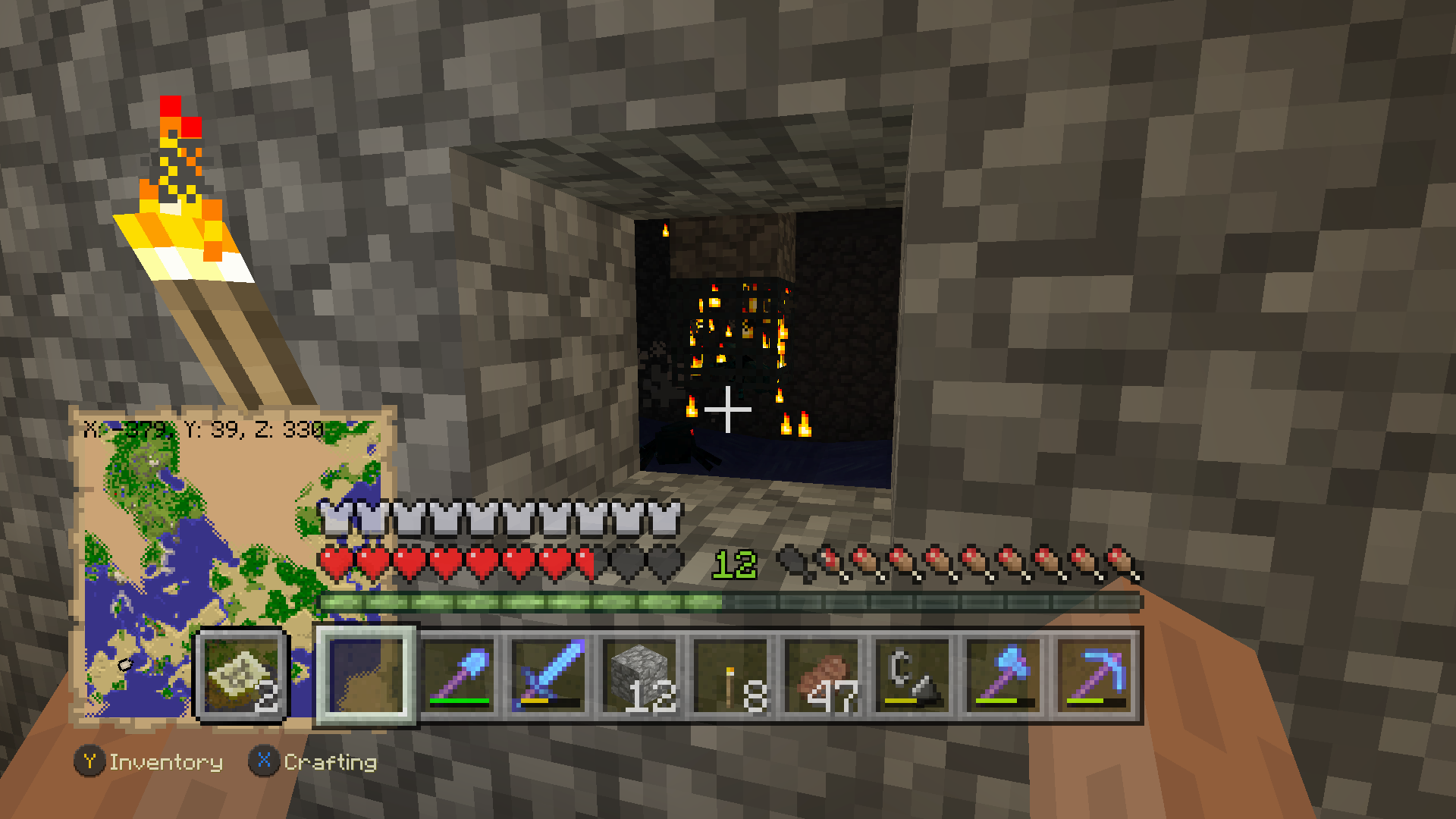
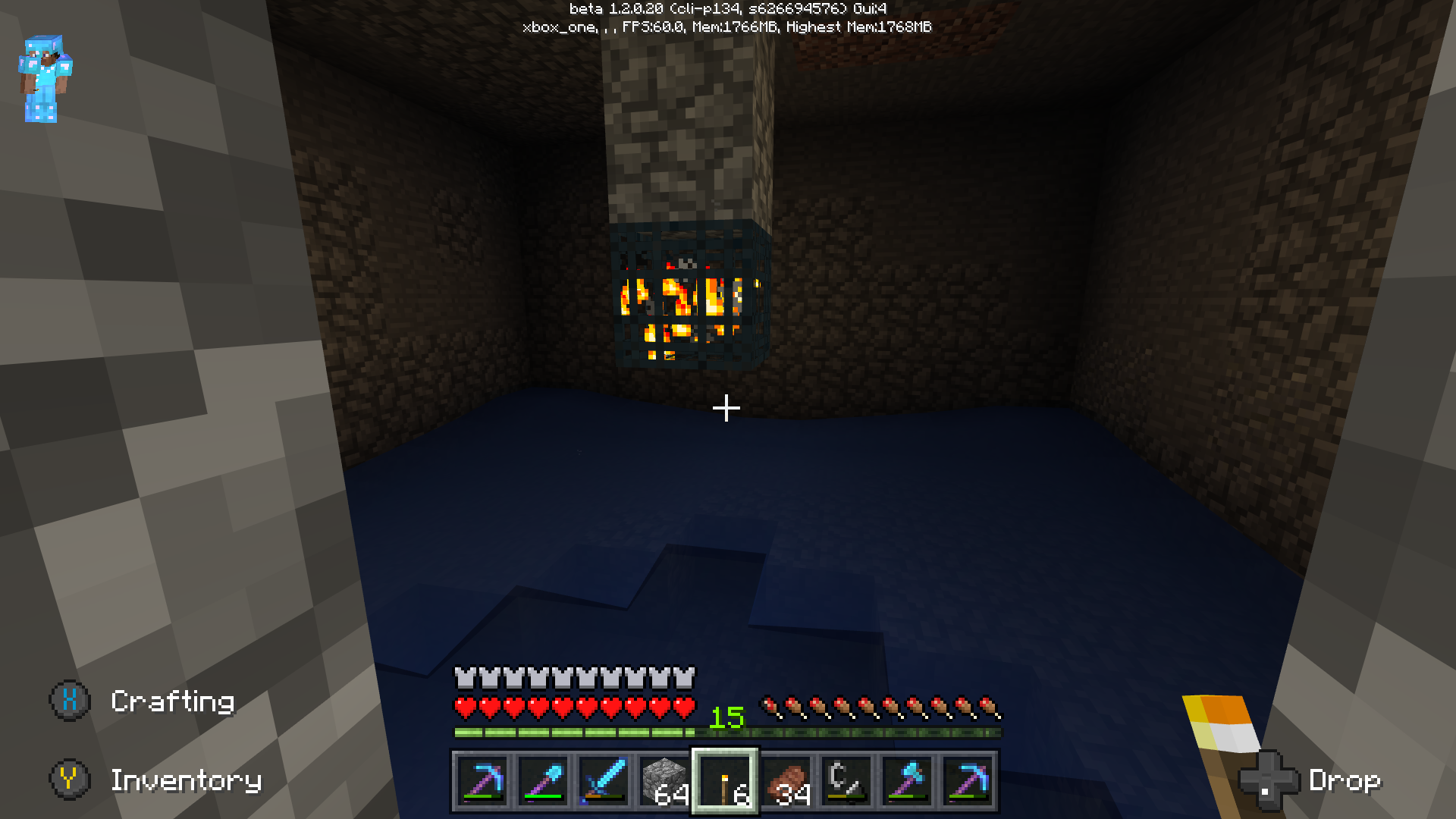
This is a vanilla world that has this issue:



Before (note on the image i'm holding a map to show the location)
After
World Receipt:
Another thing you can try, is launching the beta with another account the user/player data may be corrupted by the crash. (Can only try that if the game is installed on your home console). Let us know if that changes anything.
Issues that concern the Xbox One beta should be posted on the Pocket Edition (bedrock) tracker. I moved your ticket to the correct section.
For further bug reports about the Xbox One beta, please post them here.
Have a look at our Issue Guidelines.
Quick Links:
📓 Issue Guidelines – 💬 Community Support – 📖 Game Wiki
Issues that concern the Xbox One beta should be posted on the Minecraft Pocket Edition (bedrock codebase) tracker. I moved your ticket to the correct section.
For further bug reports about the Xbox One beta, please post them here.
Have a look at our Issue Guidelines.
Quick Links:
📓 Issue Guidelines – 💬 Community Support – 📖 Game Wiki
Issues that concern the Xbox One beta should be posted on the Minecraft Pocket Edition (bedrock codebase) tracker. I moved your ticket to the correct section.
For further bug reports about the Xbox One beta, please post them here.
Have a look at our Issue Guidelines.
Quick Links:
📓 Issue Guidelines – 💬 Community Support – 📖 Game Wiki
Issues that concern the Xbox One beta should be posted on the Minecraft (bedrock codebase) tracker. I moved your ticket to the correct section.
For further bug reports about the Xbox One beta, please post them here.
Have a look at our Issue Guidelines.
Quick Links:
📓 Issue Guidelines – 💬 Community Support – 📖 Game Wiki
Issues that concern the Xbox One beta should be posted on the Minecraft (bedrock codebase) tracker. I moved your ticket to the correct section.
For further bug reports about the Xbox One beta, please post them here.
Have a look at our Issue Guidelines.
Quick Links:
📓 Issue Guidelines – 💬 Community Support – 📖 Game Wiki
This issue also applies to endermite in boats.
Issues that concern the Xbox One beta should be posted on the Minecraft (bedrock codebase) tracker. I moved your ticket to the correct section.
For further bug reports about the Xbox One beta, please post them here.
Quick Links:
📓 Issue Guidelines – 💬 Community Support – 📖 Game Wiki
Issues that concern the Xbox One beta should be posted on the Minecraft (bedrock codebase) tracker. I moved your ticket to the correct section.
For further bug reports about the Xbox One beta, please post them here.
Have a look at our Issue Guidelines.
Quick Links:
📓 Issue Guidelines – 💬 Community Support – 📖 Game Wiki
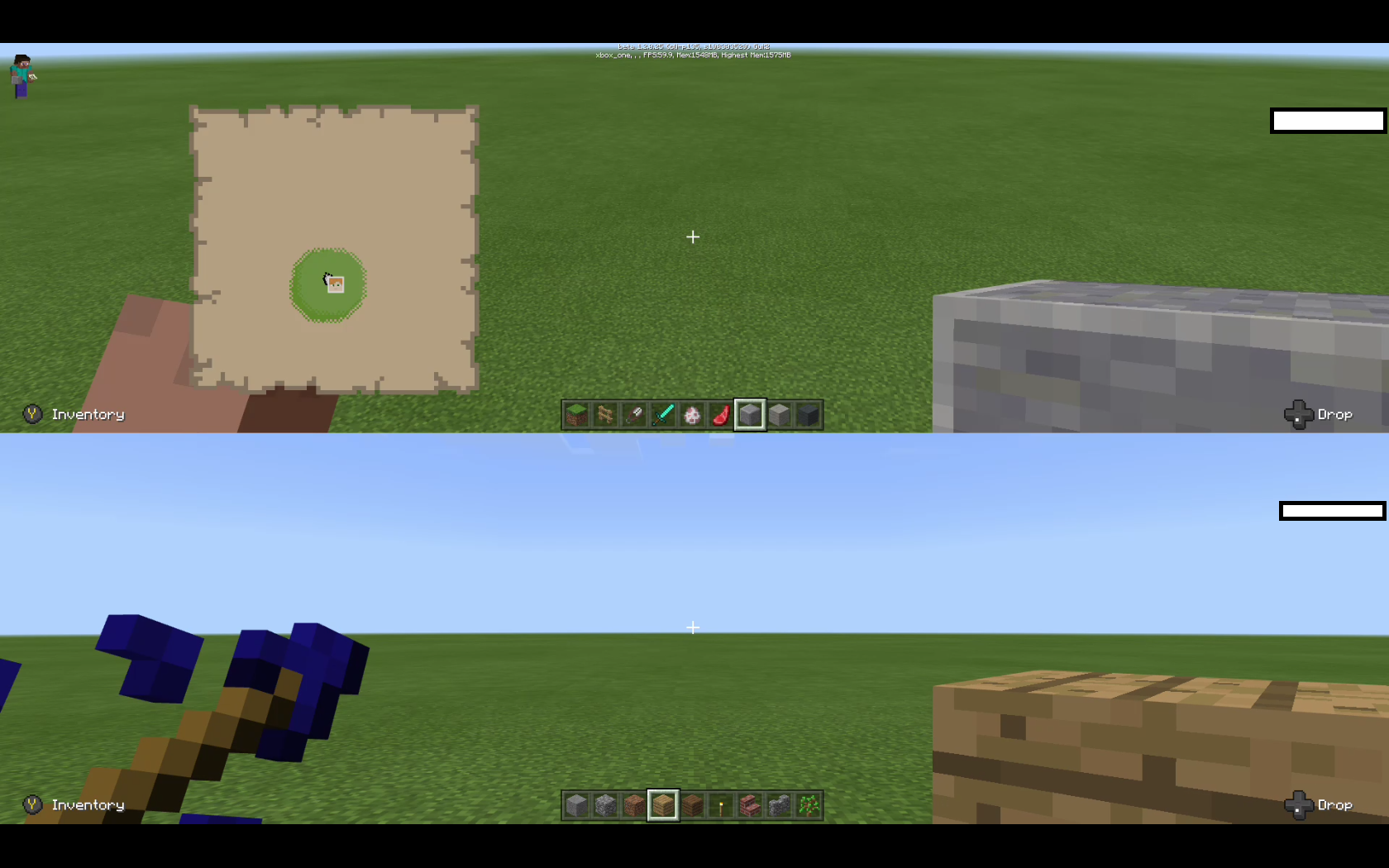
Reproduced on Xbox one in vertical split-screen. Updated confirmation status to Confirmed.
This issue only seems to affect the Xbox one version of the game.


Tested in 1.2.0.25
Win 10:
Incorrect texture or graphical glitch Xbox One:
Thank you for your report!
However, this issue has been closed as Incomplete.
Have a look at our Issue Guidelines.
I have written a new report
MCPE-25833. If this represents the issue you had, please supply any missing information on that ticket.If not, then please create a new ticket following the Issue Guidelines.
Quick Links:
📓 Issue Guidelines – 💬 Community Support – 📖 Game Wiki
@Daniel Bohn Johansen Please keep the comment section to share details on the issue. No inappropriate language.
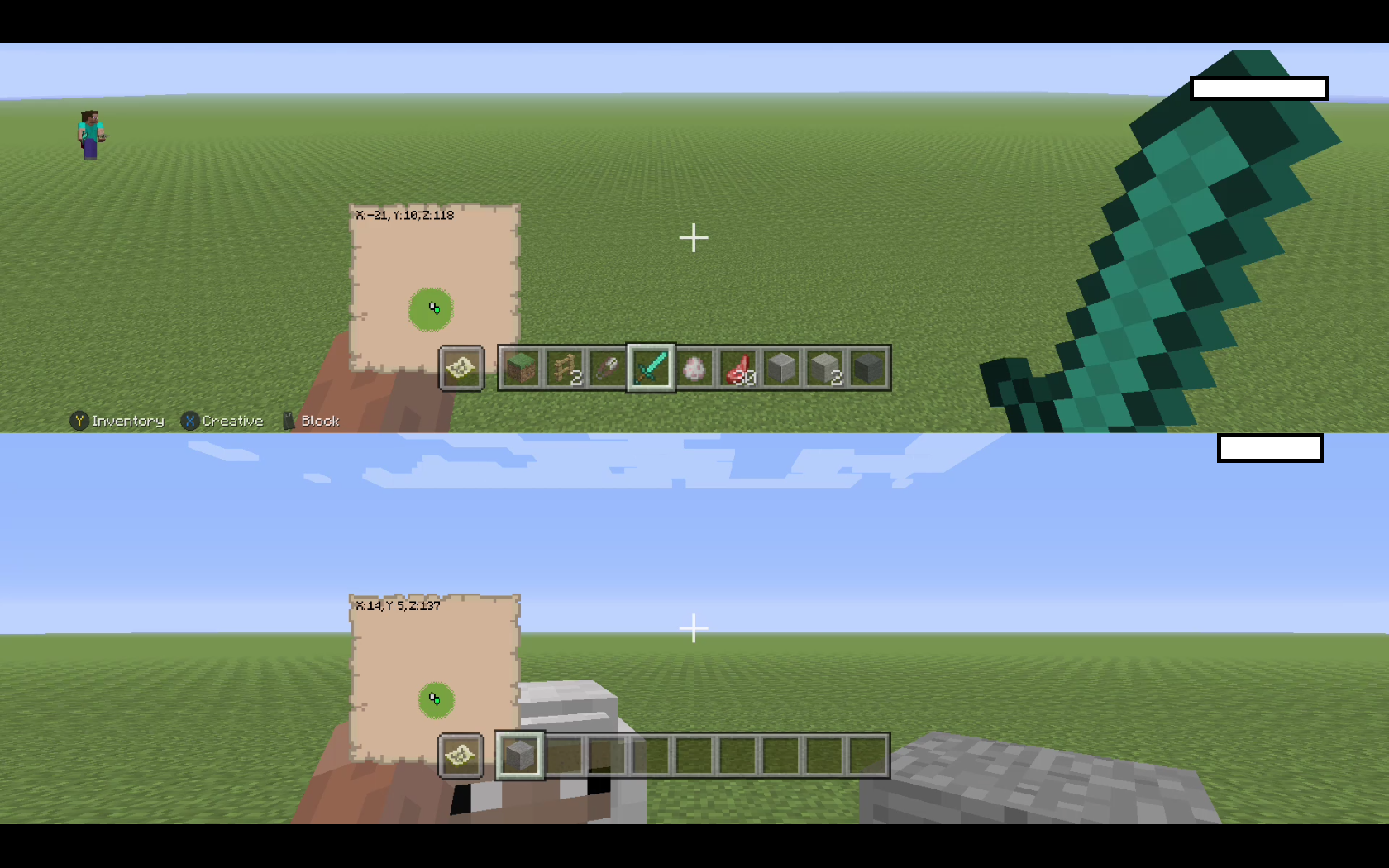
Items appear large on screen and take up most of the screen in horizontal split-screen.




Off-hand items don't appear on screen at all in vertical splitscreen. (image of holding a map in the off-hand)
Console Edition images for reference.
Is this issue still occurring in 1.2.0.25? What items do they have on their head?
I'm not seeing this issue in the latest build 1.2.0.25, when converting from Xbox one Console edition CU49 build 1.12 1622.0 6.1.
My Xbox one language is set to English (while location is set to The Netherlands)
The game is set to English.
The achievements in game (and for some part of the dashboard) show by localization / location (The Netherlands in my case).
These should all be in English since the language is changed to English.
Ingame:


Dashboard part in english (correct):
Dashboard part in dutch (incorrect):
What i expected was since the console is set to be in English language to have the achievements in English as well.
(not partially based on location)
Changing the localization of the console (to england for example) to overcome this issue, disables purchases from the xbox one store. Since creditcard data doesn't match with the location. Thus also disables the ability to buy minecraft content.
Are you sure you have your sound turned up high enough? So you can hear it.
The volume of rain has been lowered in 1.2.0.25.
Changelog Build 8 "Rebalanced most of the game sound effects and music, such as rain being much quieter"
Is this in a converted world?
Are you missing rain sounds in all worlds? Even newly created ones.
Couldn't get a mining fatigue animation, without crashing the game. Just hear a little bit of the sound and instant crash. (xbox one 1.2.0.25)
(On Windows 10 it seems to work fine)
Can you supply the steps to reproduce?
Please also supply the gamemode (creative or survival) and if this occurs in converted worlds or in newly created worlds.
Issues that concern the Win 10 version or Xbox one beta should be posted on the Minecraft (bedrock codebase) tracker. I moved your ticket to the correct section.
For further bug reports about the Bedrock version of Minecraft, please post them here.
Have a look at our Issue Guidelines.
Quick Links:
📓 Issue Guidelines – 💬 Community Support – 📖 Game Wiki
Due to different development cycles build numbers might be different. Build 1.2.0.29 is currently the latest version for Xbox one.
This bug tracker is not to keep documentation up to date with the information you request. Although someone might add it somewhere in the future.
Moderators and helpers do have direct communication with internal staff. You have received confirmation, this is intentional.
We will not add derivative builds to this bug tracker currently.
Issues that concern Minecraft (Xbox One Bedrock version) should be posted on the Minecraft (bedrock codebase) tracker. I moved your ticket to the correct section.
Issues that concern Minecraft (Xbox One Bedrock version) should be posted on the Minecraft (bedrock codebase) tracker. I moved your ticket to the correct section.
It might take 1 or 2 extra days when owning the disk version to receive the update.
"If you own the Xbox One Edition of the game on disc, be prepared for a short wait before your free download of the new Minecraft is available - we'll work as fast as we can, but it may take a day or two to process all the requests!"
https://minecraft.net/nl-nl/article/better-together-update-here
Issues that concern the Xbox one Bedrock version should be reported to the Minecraft (bedrock codebase) bugtracker.
I moved your ticket to the correct section.
Issues that concern Minecraft (Xbox One Bedrock version) should be posted on the Minecraft (bedrock codebase) tracker. I moved your ticket to the correct section.
Keep in mind if you previously owned the xbox one edition of the game your entitled to download the bedrock version for free.
Issues that concern Minecraft (Xbox One Bedrock version) should be posted on the Minecraft (bedrock codebase) tracker. I moved your ticket to the correct section.
Issues that concern Minecraft (Xbox One Bedrock version) should be posted on the Minecraft (bedrock codebase) tracker. I moved your ticket to the correct section.
Thank you for your report!
However, this issue has been closed as a Duplicate of
MCPE-25344.It has been linked to this report. If you have additional information, please add it to that report.
Please search before reporting, as it's likely that one exists already.
Quick Links:
📓 Issue Guidelines – 💬 Community Support – 📖 Game Wiki
Thank you for your report!
However, this issue has been closed as a Duplicate of
MCPE-25337.It has been linked to this report. If you have additional information, please add it to that report.
Please search before reporting, as it's likely that one exists already.
Quick Links:
📓 Issue Guidelines – 💬 Community Support – 📖 Game Wiki
Steps to reproduce:
Possibly other firework combinations cause the same effect.
Thank you for your report!
However, this issue has been closed as a Duplicate of
MCPE-25354.It has been linked to this report. If you have additional information, please add it to that report.
Quick Links:
📓 Issue Guidelines – 💬 Community Support – 📖 Game Wiki
Thank you for your report!
However, this issue has been closed as a Duplicate of
MCPE-25354.It has been linked to this report. If you have additional information, please add it to that report.
Quick Links:
📓 Issue Guidelines – 💬 Community Support – 📖 Game Wiki
Thank you for your report!
However, this issue has been closed as Invalid.
We can not manage multiple issues in one report. Have a look at our Issue Guidelines.
Please search before reporting this as new seperate tickets, as it's likely that one exists already.
Quick Links:
📓 Issue Guidelines – 💬 Community Support – 📖 Game Wiki
If you have a detailed way to reproduce the crashing issue, please create a new report about that issue following the Issue Guidelines.
Thank you for your report!
However, this issue has been closed as Invalid.
We can not manage multiple issues in one report. Have a look at our Issue Guidelines.
Please search before reporting this as new seperate tickets, as it's likely that one exists already.
Quick Links:
📓 Issue Guidelines – 💬 Community Support – 📖 Game Wiki
As a player fix have you tried resetting your end on Minecraft console edition?
Create a copy of your world on Minecraft console edition! --> Reset the end (on console edition) --> Load the world (being in the overworld) --> Save the world (on console edition) --> Quit Minecraft console edition and wait a couple of minutes for the background save to complete --> On Minecraft (bedrock version) import the world again via Old worlds. Does that make any difference?
This is not a definitive solution of course.
I've moved your ticket to the correct location and marked the double report as a duplicate against the other report.
The console edition section is for Minecraft versions developed by 4J Studios. Minecraft (Bedrock) is not developed by 4J Studios. The "new" game is based on pocket edition (bedrock) code.
The issue is the on screen keyboard works the wrong way around:
It shows the on screen keyboard (for controller input) when using keyboard (t or /), but not shows the on screen keyboard when using the controller to open chat. This breaks the ability to use the enter key to confirm what your typing. And the controller can't use the on screen keyboard properly.
Please do not report issues as private, unless it is a security issue, exploit or requires private information.
The issue you are experiencing is a console/xbox service related issue. Please contact Xbox Support directly in your local region via http://support.xbox.com or via twitter http://twitter.com/xboxsupport for support with installation issues.
Thank you for your report!
However, this issue has been closed as a Duplicate of
MCPE-25344andMCPE-25354.It has been linked to this report. If you have additional information, please add it to that report.
Please search before reporting, as it's likely that one exists already.
Quick Links:
📓 Issue Guidelines – 💬 Community Support – 📖 Game Wiki
Have a look at our Issue Guidelines.
Thank you for your report!
However, this is Working as Intended.
Also see issue
MCPE-25896Please keep in mind that not all differences between versions/platforms of Minecraft are bugs.
For suggestions, please visit the MCPE Feedback Site.
Quick Links:
📓 Issue Guidelines – 💬 Community Support – 📧 Feedback – 📖 Game Wiki
Thank you for your report!
However, this issue has been closed as a Duplicate of
MCPE-25354.It has been linked to this report. If you have additional information, please add it to that report.
Please search before reporting, as it's likely that one exists already.
Quick Links:
📓 Issue Guidelines – 💬 Community Support – 📧 Feedback – 📖 Game Wiki
Thank you for your report!
However, this Works as Intended.
Unlike in the Console edition, block entities (like droppers hoppers furnaces chest) are movable in Minecraft (bedrock). Slimeblocks / pistons do ignore inmovable blocks like obsidian.
Keep in mind that not all differences between versions/platforms of Minecraft are bugs. If you need help or would like to make a suggestion please follow a link below.
Quick Links:
📓 Issue Guidelines – 💬 Community Support – 📧 Feedback – 📖 Game Wiki
@kenny Making the effort to keep the number of duplicate reports to a minimum is the best way to help the Minecraft team and bug tracker volunteers out. The fewer bugs we have to go through and mark as duplicates, the less time we'll need to spend cleaning up the bug tracker and more time we'll have to look into your bugs!
Thank you for your report!
However, this issue has been closed as a Duplicate of
MCPE-25354.It has been linked to this report. If you have additional information, please add it to that report.
Please search before reporting, as it's likely that one exists already.
Quick Links:
📓 Issue Guidelines – 💬 Community Support – 📧 Feedback – 📖 Game Wiki
Console edition was a exception due to the limited nether.
"Nether wart generates naturally in nether fortresses as a plant, in patches near stairwells.
It is also randomly found in soul sand patches around the landscape of the Nether.(Legacy Console Edition only)
Nether wart can be found in 19.2% of nether fortress chests in stacks of 3–7."
https://minecraft.gamepedia.com/Nether_Wart#Natural_generation
If you want to see this changed use the feedback website, as this is not a bug.
Thank you for your report!
However, this issue has been closed as a Duplicate of
MCPE-22251andMCPE-25394.It has been linked to this report. If you have additional information, please add it to that report.
Please search before reporting, as it's likely that one exists already.
Quick Links:
📓 Issue Guidelines – 💬 Community Support – 📧 Feedback – 📖 Game Wiki
Are you seeing this issue on the Minecraft console edition or Minecraft bedrock (better together) version?
Thank you for your report!
However, this issue has been closed as a Duplicate of
MCPE-25354.It has been linked to this report. If you have additional information, please add it to that report.
Please search before reporting, as it's likely that one exists already.
Quick Links:
📓 Issue Guidelines – 💬 Community Support – 📧 Feedback – 📖 Game Wiki
Thank you for your report!
However, this issue has been closed as a Duplicate of
MCPE-25332.It has been linked to this report. If you have additional information, please add it to that report.
Please search before reporting, as it's likely that one exists already.
Quick Links:
📓 Issue Guidelines – 💬 Community Support – 📧 Feedback – 📖 Game Wiki
Thank you for your report!
However, this issue has been closed as a Duplicate of
MCPE-25394.It has been linked to this report. If you have additional information, please add it to that report.
Please search before reporting, as it's likely that one exists already.
Quick Links:
📓 Issue Guidelines – 💬 Community Support – 📧 Feedback – 📖 Game Wiki
Moved to correct location. Please report bugs for Minecraft (windows 10) here.
Thank you for your report!
However, this issue has been closed as a Duplicate of
MCPE-24124.It has been linked to this report. If you have additional information, please add it to that report.
Please search before reporting, as it's likely that one exists already.
Quick Links:
📓 Issue Guidelines – 💬 Community Support – 📧 Feedback – 📖 Game Wiki
Thank you for your report!
However, this issue has been closed as a Duplicate of
MCPE-26812.It has been linked to this report. If you have additional information, please add it to that report.
Please search before reporting, as it's likely that one exists already.
📓 Issue Guidelines – 💬 Community Support – 📧 Feedback – 📖 Game Wiki
Thank you for your report!
However, this issue has been closed as a Duplicate of
MCPE-26498.It has been linked to this report. If you have additional information, please add it to that report.
Please search before reporting, as it's likely that one exists already.
Quick Links:
📓 Issue Guidelines – 💬 Community Support – 📧 Feedback – 📖 Game Wiki
Thank you for your report!
However, this issue has been closed as a Duplicate of
MCPE-26498.It has been linked to this report. If you have additional information, please add it to that report.
Please search before reporting, as it's likely that one exists already.
Quick Links:
📓 Issue Guidelines – 💬 Community Support – 📧 Feedback – 📖 Game Wiki
Your not hacked, the pink black checker pattern is a missing texture placeholder.
Thank you for your report!
However, this issue has been closed as a Duplicate of
MCPE-25394.It has been linked to this report. If you have additional information, please add it to that report.
Please search before reporting, as it's likely that one exists already.
Quick Links:
📓 Issue Guidelines – 💬 Community Support – 📧 Feedback – 📖 Game Wiki
If you participate in the beta. Can you upload your world to the developers and mention the receipt number in this report or take a screenshot of the receipt and add it to the ticket?
Beta only. Highlight the pre-conversion world you have issues with. Press Y. Follow the dialog and upload the world. Once the upload has finished you will see a receipt. Supply the receipt on this ticket as a image/screenshot/photo (clearly readable) or text. So a developer can search for your world.
Thank you for your report!
However, this issue has been closed as a Duplicate of
MCPE-13517.It has been linked to this report. If you have additional information, please add it to that report.
Please search before reporting, as it's likely that one exists already.
Quick Links:
📓 Issue Guidelines – 💬 Community Support – 📧 Feedback – 📖 Game Wiki
Do you have this issue on the console edition or the bedrock (better together) version?
Thank you for your report!
However, this issue has been closed as a Duplicate of
MCPE-26819.It has been linked to this report. If you have additional information, please add it to that report.
Please search before reporting, as it's likely that one exists already.
Please only supply one issue per report. Create a new detailed report for the secondary flying issue. Be as detailed as possible so the issue can be reproduced. Have a look at our issue guidelines (link below).
Quick Links:
📓 Issue Guidelines – 💬 Community Support – 📧 Feedback – 📖 Game Wiki
For feature suggestions like the lava/water buckets, please use the feedback site.
Please search in the correct section and if not already reported create a new ticket for the other issues described in your comment. We can not manage multiple issues in one report. Have a look at our Issue Guidelines.
Thank you for your report!
However, this issue has been closed as a Duplicate of
MCPE-25344.It has been linked to this report. If you have additional information, please add it to that report.
Please search before reporting, as it's likely that one exists already.
Quick Links:
📓 Issue Guidelines – 💬 Community Support – 📧 Feedback – 📖 Game Wiki
Thank you for your report!
However, this issue has been closed as a Duplicate of
MCPE-25344.It has been linked to this report. If you have additional information, please add it to that report.
Please search before reporting, as it's likely that one exists already.
Quick Links:
📓 Issue Guidelines – 💬 Community Support – 📧 Feedback – 📖 Game Wiki
Thank you for your report!
However, this is Working as Intended.
Minecraft (bedrock/better together) only has access to the cloud save of the Xbox one Console edition.
If you want to transfer a world from Minecraft xbox 360 edition to Minecraft (bedrock version) it is only possible through the following process:
Technically the Minecraft bedrock version and the Xbox one edition are 2 different games and the bedrock version only has read access to the cloud storage for the xbox one edition.
For feature suggestions please use: feedback.minecraft.net.
Quick Links:
📓 Issue Guidelines – 💬 Community Support – 📧 Feedback – 📖 Game Wiki
Thank you for your report!
However, this issue has been closed as Invalid.
This site is for bug reports only. For suggestions please use: feedback.minecraft.net.
Quick Links:
📓 Issue Guidelines – 💬 Community Support – 📧 Feedback – 📖 Game Wiki
Added affected versions.
@Dawson Berry
I can only update the ticket with the currently released versions. This gives a estimate what versions are affected. The most important thing is posting the receipts, if you still experience this issue and do participate in the beta so the team can have a look at the specific issues. As requested by [Mojang] Mega_Spud (Jay Wells) here.
Can you post a image of the complete redstone circuit with all of its repeater timings, torches, etc? So we have the exact same timing as you. Thank you! (If you used some sort of tutorial and kept the timing the same that is also sufficient)
Thank you for your report!
However, this issue has been closed as a Duplicate of
MCPE-25438.It has been linked to this report. If you have additional information, please add it to that report.
Please search before reporting, as it's likely that one exists already.
Quick Links:
📓 Issue Guidelines – 💬 Community Support – 📧 Feedback – 📖 Game Wiki
Thank you for your report!
However, this issue has been closed as a Duplicate of
MCPE-10839.It has been linked to this report. If you have additional information, please add it to that report.
Please search before reporting, as it's likely that one exists already.
Quick Links:
📓 Issue Guidelines – 💬 Community Support – 📧 Feedback – 📖 Game Wiki
I can confirm that zombies trying to path-find for villagers cause a substantial frame-rate drop when the path to the villager can't be found or is invalid. The framerate drop is especially worse on lower end devices using the following example.
(The general path-find issue seems to be caused when the path-finding can't reach the target)
Details: Superflat. No other mobs or builds are present. Creative so the zombie's don't track the player in this case.
Example 1: Good framerate

The zombies try to path-find to the villagers the route to the villagers is valid (trapdoors are seen as blocks). The zombie falls through the trapdoor and path-findinding starts again. Tricking the zombie in a valid route.
Example 2: Bad framerate

The valid path to the villagers is blocked by raising 4 blocks (using a piston) on the staircases the framerate drops substantially in some cases below 5 fps.
Can you update the affected version to the correct one if you participate in the beta? For the beta the current version is 1.2.5.12.
(if your not in the beta, the version number should be correct)
Are you sure there isn't a cave where the enderman spawn and then teleport to those blocks? Enderman teleporting has different rules then spawning. I don't see this issue if every possible spawn is blocked in version 1.2.5.
More information about the seeds and integer size can also be found here: https://minecraft.gamepedia.com/Seed_(level_generation)#Technical
Like Java edition, Console edition also uses a 64-bit integer, hence why you might see larger values for seeds there.
Thank you for your report!
However, this issue has been closed as a Duplicate of
MCPE-28028.It has been linked to this report. If you have additional information, please add it to that report.
Please search before reporting, as it's likely that one exists already.
This report also relates to:
MCPE-28022Quick Links:
📓 Issue Guidelines – 💬 Community Support – 📧 Feedback – 📖 Game Wiki
Can you supply more information what mobs are causing the issue?
Did anyone try to create a copy on the console edition and after that wait a long time (with the console running)?
Couple of hours in some cases depending on the internet speed and speed of the cloud service (this background process can't be monitored). So the world is for sure completely uploaded to the xbox one edition cloud. Then try to download and convert that copy on bedrock. Does this make any difference?
(note: you might have fast internet, but the cloud service might not be fast so please be patient when trying this)
Are you sure you see this issue on 1.2.5.12 (beta) or 1.2.5.15 (beta)? As those versions should have fixed the mobs spawning on glass issue. It does happen in 1.2.3 (not beta).
https://feedback.minecraft.net/knowledgebase/articles/1816993-minecraft-xbox-one-win-10-android-beta-1-2-5-bui - Hostile mobs will no longer spawn on top or inside transparent blocks
Possibly you have selected the wrong version to be affected.
If you still experience this issue please contact Xbox support: http://support.xbox.com or via twitter http://twitter.com/xboxsupport
They can verify you played 5 hours with the disk version or downloaded dlc and solve the issue for your account.
Thank you for your report!
However, this issue has been closed as a Duplicate of
MCPE-14467.It has been linked to this report.
Please search before reporting, as it's likely that one exists already.
Quick Links:
📓 Issue Guidelines – 💬 Community Support – 📧 Feedback – 📖 Game Wiki
Side Note
The mentioned enderman spawning in lit area has been documented/reported as a separate issue:
MCPE-28627@Jerry Yuan Please make sure that comments are related to reported bug and written respectfully towards other players and development team. Offtopic, arguments and insults will be removed and author will be banned.
The most likely reason you get a crash is this issue:
MCPE-28316(fixed in beta release)Can you confirm the blaze are getting killed by suffocation?
(Or possibly you try to soften the blaze by suffocation and occasionally they die in the process)
Thank you for your report!
However, this issue has been closed as a Duplicate of
MCPE-25438.It has been linked to this report. If you have additional information, please add it to that report.
Please search before reporting, as it's likely that one exists already.
Quick Links:
📓 Issue Guidelines – 💬 Community Support – 📧 Feedback – 📖 Game Wiki
You have selected a beta version 1.2.6.2 to be affected. The current retail version is 1.2.3.6.
Beta users can't join realms. Please select the correct version or downgrade (unenroll from beta) to access realms.
@Greg Daly Most likely the issue you have is that it is still in the store cache. You can try to: Reenroll into the beta while the game is in beta. Wait a little while. Unenroll (all acounts that might have enrolled into the beta). Do not remove the insider hub. Remove the game. Hard reset the console by holding the powerbutton longer then 4 seconds (or powerdown and unplug for a couple of minutes).
If the issue occurs on windows 10: reboot the machine or try running the windows 10 store troubleshooter. (at this step)
Now boot up the console/machine and download minecraft. Sometimes waiting between steps can make a difference as the unenrollment has to be registered by the store. Hope it helps.
Keep in mind: On xbox one anything that is not stored in the cloud will be removed. On windows 10 you first need to create a backup as there is no cloud storage. Worlds might not load as they are possibly not backward compatible. The beta is for testing purposes. Any progress being lost or unexpected behavior is at your own risk. There is also currently no easy way to create a backup on xbox one.
@Trustin Johnson Can you check the account setting are set correctly for xbox one?
http://privacy.microsoft.com/en-us/xbox-one-privacy-and-online-safety
So the accounts can use multiplayer. Also xbox live gold is required to join multiplayer via xbox consoles.
Thank you for your report!
However, this issue has been closed as a Duplicate of
MCPE-28195.It has been linked to this report. If you have additional information, please add it to that report.
Please search before reporting, as it's likely that one exists already.
Quick Links:
📓 Issue Guidelines – 💬 Community Support – 📧 Feedback – 📖 Game Wiki
Issues that concern Minecraft (Xbox One Bedrock version) should be posted on the Minecraft (Bedrock codebase) tracker. I have moved your ticket to the correct section.
Thank you for your report!
However, this issue has been closed as a Duplicate of
MCPE-28511.It has been linked to this report. If you have additional information, please add it to that report.
Please search before reporting, as it's likely that one exists already.
Quick Links:
📓 Issue Guidelines – 💬 Community Support – 📧 Feedback – 📖 Game Wiki
Thank you for your report!
However, this issue has been closed as a Duplicate of
MCPE-28511.It has been linked to this report. If you have additional information, please add it to that report.
Please search before reporting, as it's likely that one exists already.
Quick Links:
📓 Issue Guidelines – 💬 Community Support – 📧 Feedback – 📖 Game Wiki
Thank you for your report!
However, this issue has been closed as a Duplicate of
MCPE-28511.It has been linked to this report. If you have additional information, please add it to that report.
Please search before reporting, as it's likely that one exists already.
Quick Links:
📓 Issue Guidelines – 💬 Community Support – 📧 Feedback – 📖 Game Wiki
Thank you for your report!
However, this issue has been closed as a Duplicate of
MCPE-28511.It has been linked to this report. If you have additional information, please add it to that report.
Please search before reporting, as it's likely that one exists already.
Quick Links:
📓 Issue Guidelines – 💬 Community Support – 📧 Feedback – 📖 Game Wiki
Thank you for your report!
However, this issue has been closed as a Duplicate of
MCPE-28511.It has been linked to this report. If you have additional information, please add it to that report.
Please search before reporting, as it's likely that one exists already.
Quick Links:
📓 Issue Guidelines – 💬 Community Support – 📧 Feedback – 📖 Game Wiki
This issue currently only seems to affect the xbox one
All enchanted items seem to have this visual glitch while held in hand in first person.
Thank you for your report!
However, this issue has been closed as a Duplicate of
MCPE-28511.It has been linked to this report. If you have additional information, please add it to that report.
Please search before reporting, as it's likely that one exists already.
Quick Links:
📓 Issue Guidelines – 💬 Community Support – 📧 Feedback – 📖 Game Wiki
Bug reports are only accepted in English, sorry. If you speak English, feel free to create a new ticket.
Thank you for your report!
However, this issue has been closed as a Duplicate of
MCPE-25394.It has been linked to this report. If you have additional information, please add it to that report.
Please search before reporting, as it's likely that one exists already.
Quick Links:
📓 Issue Guidelines – 💬 Community Support – 📧 Feedback – 📖 Game Wiki
Is this issue still occurring in the latest update?
Thank you for your report!
However, this is Working as Intended.
Please keep in mind that not all differences between versions/platforms of Minecraft are bugs.
This site is for bug reports only. For feature suggestions please use: feedback.minecraft.net.
Quick Links:
📓 Issue Guidelines – 💬 Community Support – 📧 Feedback – 📖 Game Wiki
Confirmed the issue for java-parity. Keep in mind this behavior might still be intentional for bedrock.
@angecalo Because 1.2.6 (beta) is a higher version then the 1.2.5 retail release, it will not install itself automatically.
Thank you for your report!
However, this issue has been closed as a Duplicate of
MCPE-10839.It has been linked to this report. This issue is marked fixed in a beta release / higher version.
Quick Links:
📓 Issue Guidelines – 💬 Community Support – 📧 Feedback – 📖 Game Wiki
Are you using fireworks that are converted to boost with the elytra?
Thank you for your report!
However, this issue has been closed as a Duplicate of
MCPE-28257.It has been linked to this report.
Please search before reporting, as it's likely that one exists already.
Quick Links:
📓 Issue Guidelines – 💬 Community Support – 📧 Feedback – 📖 Game Wiki
Is the issue occurring in a converted world?
Has that world been converted before 1.2.5.52 got released?