 Krev
Krev
- 11people5
- 11people5
- Pacific/Pitcairn
- Yes
- No
 MC-73900
![[Mojang] Nathan Adams](../../../data/assets/gravatar/dinnerbone.png)

![[Mojang] Matthew Gatland](../../../data/avatars/users/43046.png)




 MCL-15978


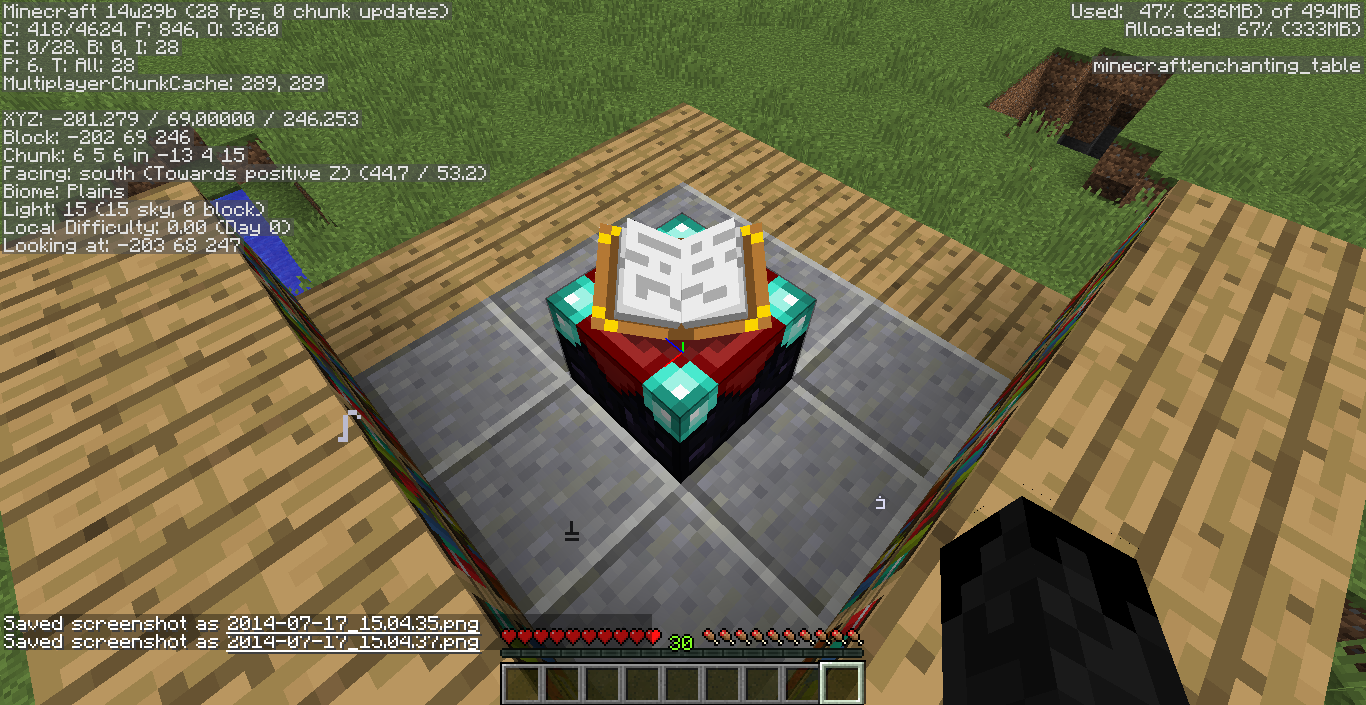
Endercrystals: Bedrock parttoo lowEnder Crystal entity spawning 1 block too low
The bedrock part of Ender Crystals is placed too low.
The entire Ender Crystal entity is spawning 1 block too low. Also, the bedrock it would normally sit on/wrap around is failing to spawn from trying to do the same, but since there's obsidian instead of air, it can't spawn. (These 2 errors may or may not be related)
What was expected to happen was:
Each Ender Crystal entity should have spawned on top of a bedrock block at the top of each obsidian pillar within the End.What actually happened was:
Each Ender Crystal entity spawned where the bedrock block should normally have been. The bedrock block is nowhere to be found.Steps to Reproduce:
1. Generate new world.
2. Locate the End Portal, activate it, and go into it.
3. Go up to any/all Ender Crystals. (Take note of the obvious displacement)
Java ver. 7 update 65 (build 1.7.0_65-b20)
Intel HD Graphics 3000
Intel Core i5-2520M ~2.5GHz
4 GB RAMDoesn't seem to be relevant.
The gamerule 'mobGriefing' now has an alternate gamerule argument called 'doMobGriefing', which doesn't do anything (but implies it should change the same gamerule).
I found this while I was trying to disable mob griefing (obviously), but I typed 'doMobGriefing' intead by accident and ended up with several craters. Later, I realized my mistake, as well as how it actually DID change a gamerule for the first time (I've accidentally messed this up before).
I tested 'doMobGriefing' against 'mobGriefing' with creepers, withers, blazes, and villagers. 'doMobGriefing' did absolutely nothing to stop the mobs from changing the terrain, while 'mobGriefing' worked every time, as was expected.
How to reproduce my test (use survival mode):
1. Type '/gamerule doMobGriefing true'
2. Type '/gamerule mobGriefing false'
3. Summon a mob that can normally change the terrain (such as a creeper) and then see if it does so. (terrain should be changed/damaged)
4. Type '/gamerule doMobGriefing false'
5. Type '/gamerule mobGriefing true'
6. Repeat step 3. (terrain should remain unchanged this time)I see three possible solutions:
1. Remove 'doMobGriefing' gamerule
2. Replace 'mobGriefing' with 'doMobGriefing'
3. Have 'doMobGriefing' change the same gamerule as 'mobGriefing'
The gamerule 'mobGriefing' now has an alternate gamerule argument called 'doMobGriefing', which doesn't do anything (but implies it should change the same gamerule).
I found this while I was trying to disable mob griefing (obviously), but I typed 'doMobGriefing' intead by accident and ended up with several craters. Later, I realized my mistake, as well as how it actually DID change a gamerule for the first time (I've accidentally messed this up before).
I tested 'doMobGriefing' against 'mobGriefing' with creepers, withers, blazes, and villagers. 'doMobGriefing' did absolutely nothing to stop the mobs from changing the terrain, while 'mobGriefing' worked every time, as was expected.
How to reproduce my test (use survival mode):
1. Type '/gamerule doMobGriefing true'
2. Type '/gamerule mobGriefing false'
3. Summon a mob that can normally change the terrain (such as a creeper) and then see if it does so. (terrain should be changed/damaged)
4. Type '/gamerule doMobGriefing false'
5. Type '/gamerule mobGriefing true'
6. Repeat step 3. (terrain should remain unchanged this time)I see three possible solutions:
1. Remove 'doMobGriefing' gamerule
2. Replace 'mobGriefing' with 'doMobGriefing'
3. Have 'doMobGriefing' change the same gamerule as 'mobGriefing'The gamerule 'mobGriefing' now has an alternate gamerule argument called 'doMobGriefing', which doesn't do anything (but implies it should change the same gamerule).
I found this while I was trying to disable mob griefing (obviously), but I typed 'doMobGriefing' intead by accident and ended up with several craters. Later, I realized my mistake, as well as how it actually DID change a gamerule for the first time (I've accidentally messed this up before).
I tested 'doMobGriefing' against 'mobGriefing' with creepers, withers, blazes, and villagers. 'doMobGriefing' did absolutely nothing to stop the mobs from changing the terrain, while 'mobGriefing' worked every time, as was expected.
EDIT:
Never mind, it seems you can enter custom gamerules although it doesn't actually say something logical like "New game rule created" or anything of the sort. And can someone help me close this?
Yeah, although the jukebox/ambient music overlap IS still a thing, that is technically a different bug. And it's one that was apparently "intentional" (but if you ask me, they were just being lazy with it). Anyway, it's a separate bug, so it shouldn't really be included with this bug. Only the title screen music and ambient tracks, not the records.
On a side note, thank you for updating it!

For some reason, I'm not able to tie any animals down with a lead. Whenever I try to tie down an animal, the lead simply breaks and drops to the ground. A previously placed lead was broken when I reloaded the chunks it was in (I had done this in earlier versions with no problem).
It won't work whether I'm in survival, creative, SSP, or SMP.
Here's a link to a 40 second video of it happening: https://youtu.be/aiy_uUa96bQ
Not fixed in 17w15a. The game now crashes instead of showing the subtitle.
2017-04-21_13.12.39.png
The "Sniper Duel" advancement is not granted to a player upon shooting and killing a stray from 50+ blocks away. It's only granted for regular skeletons, despite them being fundamentally the same for the scenario presented in the advancement.
The /execute command will execute said command at the executors location instead of at the specified entity's location.
For example, running the following
/execute @e[type=bat] ~ ~ ~ testfor @p[r=2]in a command block will only give a successful output if you are within a radius of 2 blocks from the command block, as opposed to from the bat.
Here are some video examples where the bat is told to explode (via summoned creeper) with a successful output:
Previous/Expected Behavior (1.12-pre1): https://youtu.be/05ALD44QtaU
Current Behavior (1.12-pre2): https://youtu.be/En6l4UmK1rg
(The commands themselves used in the example videos are consistent and listed in either video's description.)
Blocks added
backin 1.12 (specifically concrete & glazed terracotta) have a noticeably lower blast resistance compared to similar blocks (stone, cobblestone, bricks, terracotta, etc). Not only that, but they're some ofthevery few blocks with unique blast resistance values, but I've only just recently discovered the reason.All blocks added in 1.12, the World of Color Update, have their blast resistance set to the same value as their hardness. This also shows why concrete powder (the only other block added in the update) doesn't seem to have this problem, as it has roughly the same hardness & blast resistance as both gravel & sand. Here's a table for easy comparisons:
1.12 Added Block Blast Resist. Hardness Concrete 1.8 1.8 Stone 6 1.5 Cobblestone 6 2 Glazed Terracotta 1.4 1.4 Terracotta 4.2 1.25 Bricks 6 2 Concrete Powder 0.5 0.5 Sand 0.5 0.5 Gravel 0.6 0.6 Now, in case it wasn't clear why this is a problem, ghasts are able to destroy blocks with a blast resistance of ~
4or less, and since 1.16+ now encourages building more in the nether, this problem becomes much more apparent.I do suppose a case could be made for glazed terracotta possibly being more fragile than regular terracotta, as it is more of a detail oriented block, but that's also why I included bricks as a comparison, as they're both made almost the same way and with the same ingredients. All things considered, glazed terracotta should probably have a blast resistance of 4.2.
Concrete, on the other hand, has no reason for being not only over 3 times less resistant than stone, but also less resistant than
wood(B.R. of 2), planks (B.R. of 3), and evencobwebs (B.R. of4). Concrete should have a blast resistance of 6, given the blast resistance of similar blocks.Blocks added in 1.12 (specifically concrete & glazed terracotta) have a noticeably lower blast resistance compared to similar blocks (stone, cobblestone, bricks, terracotta, etc). Not only that, but they're some of only a very few blocks with unique blast resistance values (the others being cobwebs, hoppers, & ender chests), but I've only just recently discovered the reason. All blocks added in 1.12, the World of Color Update, have their blast resistance set to the same value as their hardness. This also shows why concrete powder (the only other block added in the update) doesn't seem to have this problem, as it has roughly the same hardness & blast resistance as both gravel & sand. Here's a table for easy comparisons:
1.12 Added Block Blast Resist. Hardness Concrete 1.8 1.8 Stone 6 1.5 Cobblestone 6 2 Glazed Terracotta 1.4 1.4 Terracotta 4.2 1.25 Bricks 6 2 Concrete Powder 0.5 0.5 Sand 0.5 0.5 Gravel 0.6 0.6 Now, in case it wasn't clear why this is a problem, ghasts are able to destroy blocks with a blast resistance of ~3 or less, and since 1.16+ now encourages building more in the nether, this problem becomes much more apparent.
I do suppose a case could be made for glazed terracotta possibly being more fragile than regular terracotta, as it is more of a detail oriented block, but that's also why I included bricks as a comparison, as they're both made almost the same way and with the same ingredients. All things considered, glazed terracotta should probably have a blast resistance of 4.2.
Concrete, on the other hand, has no reason for being not only over 3 times less resistant than stone, but also less resistant than logs (B.R. of 2), planks (B.R. of 3), and even bone blocks (B.R. of 2). Concrete should have a blast resistance of 6, given the blast resistance of similar blocks.


Krev, how?! Test it some times more if you didn't, and you'll see that there's something wrong. If you don't find anything, yeah, maybe you don't have this bug on your end. But I'm having it here...
Mods? Can you do something, please??
Krev: "Hoe" -> "How" (fixed).
Remember that the native language of many (most?) of the bug reporters is not English.

Krev I specifically suggested that they let us texture pack it. That would let you go back to the old colors if you preferred them.
Now the durability bar doesn't turn red until the last pixel is left.
This is not a fix, this is replacing one bug with another. I support creating a new bug to get them to fix it properly.
Logan Langrish I have no idea how to make red more visible, but if they'd let us texture pack it like I suggested, you could have a solid bar instead of a shrinking one that isn't even visible until it turns fully red at 5 or 10% durability.
Mojang - Please fix this properly, come on...
This still occurs in the latest snapshot (14w29b).
Still occurs in snapshot 14w29b.
Turning off Advanced OpenGL does seem to help fix it in my case, but leaves in my inventory still appear "fancy" (transparent) when they should be "fast" (opaque).
Also, I couldn't help but notice how the description says "opaque" instead of "transparent".
This still occurs in snapshot 14w29b.
The name/description is inaccurate. The bedrock part of the ender crystal isn't too low; it's right where it should be: the center of the obsidian pillar, around the base of the topmost block. Thus, the actual bug has to do with the fact that the intended block for the crystal to rest on (the bedrock block itself) doesn't exist. Since the bedrock doesn't exist, the entire crystal places itself one block lower onto the obsidian.
And with that in mind, this still occurs in 1.8.
No, the block I'm talking about is definitely a bedrock block. There was always a bedrock block that the entity sat on/around at the top of each pillar. I'd rather not have to attach a picture to prove it, because I'd assume it's obvious by now.
I just realized how vague the description is. Even if this bug is still a problem (I haven't experienced music overlap recently without /playsound), I doubt Mojang will be able to do much about it (or even care) when all they have to go on is "The game play the differents music but they overlap every times. Now in the Title Screen."
I know for a fact that "they overlap everytimes" is not the case anymore because I'm listening to the game music right now. Sounds fine to me. If this does still happen, it must either be rare, have something to do with the computer of whoever is running the game, or something's wrong with the game's files of whoever experiences this. The Last time I experienced this was early 1.7 (before 1.7.4).
Ah, okay then. That clears everything up. My bad I guess, although it's kind of weird being able to add custom gamerules...
Alright, based on my understanding of this whole bug, it has to do with the entire Ender Crystal entity spawning 1 block too low. Also, the bedrock it would normally sit on/wrap around is failing to spawn from trying to do the same, but since there's obsidian instead of air, it can't spawn. (These 2 errors may or may not be related)
Considering (based on the list of duplicate issues) how if anyone were to try to make a new report that's more accurate, it'd just be marked as a duplicate (no one would look at it), I highly suggest that someone update the title/summary to something like "Ender Crystal entity spawning 1 block too low". The current title "Ender crystals: Bedrock part too low" is inaccurate/misleading since the problem has nothing to do with just the bedrock part of the Ender Crystal entity spawning too low (since that's just part of the texture and the texture is clearly what it should be, and where it should be), but it instead has to do with the Ender Crystal entity as a whole spawning too low. And if for some reason anyone thinks the "Bedrock part" mentioned in the current title is referring to the bedrock block that the entity rests on/around, that is also wrong because the bedrock block itself is NOT part of the actual entity, only the large bedrock slab-shaped piece is.
The description should also be changed, so I recommend that it should say something similar to what I said in my first paragraph. And sorry if this all seems a bit excessive, but I just really want this bug report to be accurate so that it gets fixed.
Still occurs in 1.8.1-pre3
Well I just tested this in 1.8.1-pre5 and I've got to say... Fire charges still don't play any sound. Is that intentional or something?? What gives??? How can you say you fixed it when you didn't fix it?!
Okay, but I'm just a bit confused as to why it's marked as fixed for 1.8.1-pre5 when the fix is for 1.8.1
...Oh well I guess....
Well then that might explain why most people haven't been experiencing this (most people don't play on trains that go into tunnels). Although, I think I'll try to test this with a server timeout myself... If I can.
I've never heard the credits music play before (whether it be on Single/Multiplayer in Survival or Creative). I only found out that Minecraft had music for the credits when I made a list of sound arguments for /playsound.... I asked my friends and none of them have actually heard the music play for the credits before either (let alone knew that there was music for the credits).
I don't really see much of a difference between 'Community Consensus' and 'Confirmed' - they're basically the same thing here, considering that bugs are reported/confirmed by the community. It's basically confirmed, so I say it should be labelled as such since I see no one saying otherwise/denying this as a bug.
Confirmed
Even though I haven't tested it yet (my laptop's broken), I'm 99% sure that this is still a problem in 1.8.2-pre1. Would someone mind checking for that last 1%?
Well... if someone wants to update the description, please feel free. It's kind of terrible at the moment.
Huh... Everything's fine for me now. I wonder what's wrong on your guys' end.
I'm running Minecraft 1.8.3, on Windows 8.1, 32-bit, with Java 8 update 40. Music plays fine and is very fitting. I only wish it had always been like that....
I'm starting to doubt that this bug will be fixed, or even acknowledged. The description is just terrible. Can someone please make it at least slightly more accurate? My O.C.D. is raging with this o_o
Just put "The game's music overlaps sometimes for certain people. Happens in the title screen and in worlds." Done. Something that simple should still prove somewhat better than the current description.
In the meantime, can anyone actually confirm that this is still happening for them? If not, than just ignore my previous statements. I don't think anyone's mentioned this happening for a while now, so this may not even be a problem anymore.
Although the jukeboxes do overlap, I have to agree with the fact that it is technically a different bug. This bug only includes the title screen music and ambient tracks, not records/jukeboxes. But as a side note, thank you for updating the bug's description! It's MUCH more accurate than before.
Yep, I tried it a good 4 or so times, works perfectly... for me, at least. It's weird that it's not working for you. What "environment" are you using to run the game? I would think that that would have something to do with it if it's only working for some of us.
Well, that "jukebox related" comment chain accomplished very little... How about something more useful for a change? Something like adding an "environment" to this bug's details. Windows 8.1 32-bit, Java 8u40 is what I'm using, and it works fine. If you're running the same and it's not working, we can immediately rule the environment out as a possible factor in this. Otherwise, I don't think adding an environment that does experience this bug to the list of details would hurt too much.
Are you implying that listing any/all affected environments in the "Environment" field would be a bad thing? Because I'm fairly certain that isn't the case. All you would have to do is list any/all affected environments, then put "possibly more" after it all. Another option is someone can take the time to nicely write out every (reported) affected environment for us in a comment and keep it up-to-date as well.
But again, If it works for someone with one environment, but not for someone else with the same thing, then I'm sure we can all safely assume that it has nothing to do with environments and thus drop the topic. In the meantime, if people were to start listing their environments here in the comments (as well as if they're affected or not), then I'm sure that we could figure something out regarding such.
Yeah, saying that the list is "non-exhaustive" would work too. And I guess I wasn't clear with it, but I'm not disagreeing with Anon Ymus (in fact I agree with them completely), I was simply saying that there's more than one way to go about this: we could list all of them in the comments or the "environment" field.
And now that I think about it, it would probably be best to simply put "Non-exhaustive List (See comments)" in the "environment" field, then just have everyone comment saying their environment along with saying whether the bug affects them or not. Also, I'm too lazy to make a list of all of them, so that likely won't happen. Ever.
I think the environment is a factor because only certain people are experiencing this bug on the most recent version. If that doesn't scream "environment is a factor!", than I don't know what would. Obviously though, that could mean either a very specific environment is affected or a broad range of environments are affected (more likely the latter though).
Now, before anyone updates the "affected versions", who can say without a doubt that this bug is affecting them? If no one can say that this bug definitely affects them AND state their environment, then there is no point in updating anything.
And before anyone asks "why should I say my environment?", I'll say this: If no one who is affected by this bug can give their environment, then how is anyone going to be able to tell why only a select few are experiencing this bug? If you can't give you're environment, then you might as well just live to deal with the bug.
Alright Fenhl (Max Dominik Weber), would you mind stating your environment so that we can actually get somewhere with this?
I believe with the new snapshot 15w31a, they fixed it since they completely redid the End. So this is finally resolved.
I'd like to know if anyone experiencing this bug did anything different than they normally do when starting up their game. I actually had this happen to me just one time last week. I started up my game and heard 2 songs overlapping on the title screen, so I immediately thought "oh, did I somehow open 2 games by accident?" And apparently I did. But the weird part is how when I closed the second one, the music remained overlapped. It was kinda weird, and I couldn't reproduce it a second time. I'll post my environment since it changed since last time, but i think there might be a little more to this bug.
Windows 8.1 (64-bit)
Java SE 8u51 (64-bit)
It's likely that not too many people voted because they actually used this bug. I mean, I can't say I haven't used it myself, but I'm still glad it's fixed now. The less exploits the better in my opinion.
Okay, the ticket that this supposedly "duplicates" is involving a different effect as well as circumstance. And I thought that amplifiers over 127 were SUPPOSE to reverse.
What I'm getting at here is that reversing effects (specifically the levitation effect) is useful for map makers, as you can make players float up OR down via reversing it. Since players bounce repeatedly when hitting the ground before eventually dying when they have the effect, that creates a problem. Therefore, this is a valid bug and has NOTHING to do with the bug that it's claimed to "duplicate".
Would a mod please reopen this?
As of previous versions, there was little to no use for reversing effects, as most effects had another effect reverse it instead. In the case of levitation though, this is different. Unless they add a new effect for map makers that reverses the effect, this needs to be reopened.
My point was that your question was invalid. It doesn't matter if it works with an amplifier of 4 or less. Jeb implied he didn't want to deal with problems that have no effect on the gameplay. That was 2 years ago. At this point in time, there is a use for it to map makers (at least for this effect alone, which OBVIOUSLY didn't exist 2 year ago). If made to work correctly and not bounce players in survival/adventure mode, this would create an amazingly helpful effect. I'd say that it'd probably be one of the most useful effects for map makers since Saturation.
Maybe the problem is caused by the end music playing when you enter the portal? I'll go test that in a moment.
Yep, can confirm. Happens when the end music starts to play before entering the portal. Oddly enough, after a few attempts to recreate (~3 or so), the music stopped altogether. Not just the credits, but the game music itself. Exiting and reloading the world didn't seem to do anything. Turning the music off then back on also did nothing. Restarting minecraft seemed to undo the sound being broken, however the bug itself still occurs.
Effects caused by the bug (that I've seen so far when entering the portal):
So yeah.... Idk anymore. The sound/music system is just crap I guess.
uh... this still isn't fixed. Occurs in 15w46a.
Using /playsound isn't really the same since you're basically manually telling the game to play the music instead of letting it happen naturally.
We are already aware that using /playsound works – it has nothing to do with this bug though. This bug is about the music playing normally, meaning on its own.
I think the bug name/description should be updated to more accurately fit the bug now. It should be something like "In-game cave ambiance does not play automatically".
I was just editing the recording I made last night of my friend and I playing survival, and randomly (about 2 hours in) I heard cave ambiance play. Didn't notice it before now.
Try spending 2 hours in or near an unlit cave system, as we were on the surface when it played. We played for 4 hours, yet it only happened that one time, so maybe it's just extremely uncommon?
Sounds like your problem is different. Maybe not completely different, but different nonetheless.
Wow, first person to provide a way to reproduce this. Can confirm, the steps to reproduce are spot on.
I updated my resource pack and it still doesn't work. It's the only resource pack I use as well. What gives?
The more ways to reproduce, the more likely it'll get fixed. Please do provide the steps for us.
Grum has a really bad habit of marking bugs as resolved before he has actually done anything about it. He really needs to stop doing that. Marking a bug as fixed for a later update is just an easy way to forget about it.
What's with that Hoe in the description?
Every so often when I load a chunk with a minecart in it, the subtitles will say "Minecart rolls" dispite being more than out of range of the sound. So the fact that it's also saying "Eerie noise" without playing the cave ambiance could mean that it's playing the sound in a random location for some reason, and it's (more likely than not) out of range of the player.
It would seem that what I said IS the case, as I decided to test it. The test came out positive.
Here's a short video of the test & its setup: https://youtu.be/TzzswTJnHyo
I also tested this in a default world beforehand, and it would occasionally display "Eerie noise" in the subtitles, but I could never make it to the location before the sound stopped. In the video, I fixed this by making a smaller, more controlled environment to test with. It worked oddly well.
I'm gonna test some more to try and see how consistent it is, even though I'm now willing to bet it's 100% consistent.
Sam, this has nothing to do with the playsound command. It only has to do with cave ambiance playing naturally.
In Single Player the end poem and credits play as intended, music and all. In Multiplayer, they're skipped entirely, respawning the player the moment they step through the portal. I just tested it all myself and can say without a doubt that it's confirmed for 16w35a.
Someone should probably update the summary & description.
Okay, further testing reveals that it actually has nothing to do with single/multiplayer, but instead has to do with how new the map is. Older maps suffer from this bug, while newer maps do not. Only real problem is I'm not sure where the threshold is between the two. I'll keep looking I guess.
Confirmed for 16w41a
Cave ambiance still plays randomly away from player.
Now the durability bar doesn't turn red until the last pixel is left.
This wasn't a bug to begin with, and now it's worse than before.
Confirmed for 1.11-pre1
I see the bug title is "Wrong sounds for some blocks", which makes sense. I read the bug description though, and a lot of things aren't adding up.
Some things pointed out in the description are clearly a bug. Water/lava shouldn't sound like stone, fire shouldn't sound like wool, blocks made of wood (ex: jukeboxes) shouldn't sound like stone, items made a stone (ex: repeaters) shouldn't sound like wood, etc. These all clearly play the incorrect sounds.
Then there are things like glass playing stone sounds when placed/stepped on, ice playing the same sounds as glass, pumpkins/melons sounding like wood, cake sounding like wool, etc. These all play a very fitting sound that just so happens to be used more generally by another block. That means these all clearly work as intended.
There are also those blocks that make sounds that you could argue do/don't fit. Diamond blocks play the metal block sound, yet you'd expect it to play the stone sound, however, these two sounds are arguably similar and both fairly fitting in their own right. End portal frames use glass sounds despite seemingly being made mostly of end stone, yet has anyone considered that the other material may be glass-like? Maybe it's even coated in this glass-like material? And how would anyone know for sure that a chorus plant and it's flower don't sound similar to wood? It's not like they exist in real life. The same can be said with barriers; who's to say they shouldn't make the metal sound? Even if they shouldn't, isn't that more of a suggestion then a bug anyway?
Lastly, whichever way you look at it, there are some obvious errors in the provided table. It says that wood and leaves make stone sounds in-game, which isn't true in the slightest (I know because I just checked all the mentioned sounds). It's the same with beetroots, carrots & potatoes; they all make the intended, AND expected, sound (wood/plant sounds, respectively). Then there's the fact that you're straight up suggesting a new sound for ice in the middle of a bug report. There's also the very obvious "...plants and tnt share the same sound..." bit, which is also a suggestion.
There's just so much going on in this bug report, it's ridiculous. When I first read the description, I wan't even sure what part of this was a bug, a suggestion, or something else entirely. A lot of the description is generalized where it shouldn't be, like how the chart is simply labelled "Sound" as opposed to "Step Sound", "Break Sound", etc. Not to mention all the question marks... Why are some of them even there? It's all just a mess.
Confirmed for 17w06a
Confirmed for 17w06a
Confirmed for 17w14a.
I also suggest a rename:
"Parrots on shoulders stop rendering when flying up in creative or spectator mode"
Actually, it should just be renamed to "Parrots on shoulders stop rendering when flying up in creative", due to the fact that parrots getting on your shoulders in spectator is also a bug in itself.
Confirmed for 17w14a.
Not sure why the bug summary/description still mention game music. The bug should be renamed to simply, "Cave Ambiance plays too far away from player"
#4 in the description under "How to Reproduce" needs to be updated since right-clicking no longer puts parrots on your shoulders.
Suggested change: "4. Allow the parrot to land on your shoulder"
Confirmed for 17w15a.
Also, thanks to whoever updated the summary/description.
Some steps in how to reproduce are unnecessary or have unnecessary details. I suggest changing to the following:
Parrots don't seem to land on your shoulders while flying anymore (exception is when they're already on your shoulder while flying from previous version). This honestly seems like a very odd way to try and fix something... they just tried to remove it altogether.
I just tried flying into the parrot with an elytra while the parrot was airborne and that allowed it to land on my shoulder (it's kind of finicky since the parrot dismounts if you start gliding upwards at all). I then double-tapped space to start flying which also disabled the elytra without making the parrot's model disappear. After that I was able to reproduce the bug like before.
So... fixed/not really though? Idk, this is just weird now.
Whoever was in charge of fixing this did it both badly, and in a horrible way (they both failed to fully remove a feature, and shouldn't be removing features to begin with).
As a side note, descending doesn't make the parrot's model disappear, only ascending. Also, the initial jump causes the parrot to dismount, which is why step 3 was start flying and step 4 was allow parrot to land on shoulder.
Okay, it turns out a much simpler way is to fall into an airborne parrot to get it to land on your shoulder, then double-tapping space to start flying while still falling. The bug can then be reproduced from there.
Here's a couple examples on how to reproduce the bug in case what I said was too wordy (I just made these, so they're up-to-date):
Example 1: https://youtu.be/bHVC9VVirOg
Example 2: https://youtu.be/CgU5K8u4ZIk
Not fixed for 17w15a in multiplayer. The game loses connection the moment a parrot attempts to mimic a hostile mob sound, rarely crashing the game as well.
Affects sugarcane, nether portal blocks, end portal blocks, and structure void blocks as well in case you want to add those to the list. It also affects dragon eggs, but I'm not sure if that really applies to this bug or not (dragon eggs don't really fit the trend here).
Okay, it seems fences didn't connect to dragon eggs in previous versions, so I think they are affected here.
Fixed for everything except nether portal blocks in 17w16a.
In 17w16a, parrots now dismount your shoulder if you're in the air for even a split second (affects flying, jumping, walking down stairs, and any form of falling whatsoever).
This would probably be considered a new bug involving the fix, but... Can this really be called a fix? I'm more than disappointed in the amount of effort being put into fixing this bug. I mean, couldn't they just make double-tapping shift dismount the parrot or something? Why are they so set on completely removing this feature? And why are they so bad at removing it?
Except for walking down stairs. There is no way that's intended behavior.
The rest of what I said still stands.
Confirmed for 17w16a.
Confirmed for 17w16b.
Confirmed for 17w17a.
Confirmed for 17w17a.
Confirmed for 17w17a.
I'd like to point out that I did search before reporting, however, I wasn't expecting it to be marked as "resolved" considering it still occurs in the latest version.
I'll add what I've found to
MC-117319if it happens to still occur in the next version released.Yeah, but then the point of having untamed parrots die from cookies is slightly diminished.
Also, sadists. But in a more serious note, it's possible for someone to grow tired of their pet and want to use this special way to off them (as dark as that may sound).
It's 1.12-pre4 now actually.
Confirmed for 1.12-pre4.
Confirmed for Minecraft 1.12
Yeah, I'd have to agree that this is more of a "Won't Fix" rather than "Works as Intended".
So, the wiki says that the end poem/credits should play every time you enter the portal in the end. I went into the portal once, everything started to play but I skipped most of it since I had placed a nether portal nearby with /setblock and it was making sounds over the credits. Afterwards, I went back and removed the nether portal so I could actually enjoy the ending, but nothing played and I was simply put back at spawn.
So either the wiki is inaccurate now, or this is still slightly broken since the end poem/credits don't play after the first time going through them. (This is 1.12 btw)
Confirmed for Minecraft 1.12
Confirmed for 18w11a, although the description on how to reproduce needs some slight updating, so here:
→ You will see that the skeleton is not riding a spider
I feel like this was marked as WAI because of the way the description and summary are worded. There's nothing inherently wrong with the model, it's just that the structure file doesn't differentiate between top and bottom slabs.
So this IS a bug, but should be changed to "Shipwrecks only spawn with bottom slabs" if it's reopened (which it should be since shipwrecks are clearly suppose to generate as they do in Bedrock Edition).
I'd like to restate my claim that this was falsely marked as WAI due to the reasoning I stated previously.
The bug should be renamed to "Shipwrecks only spawn with bottom slabs" and the description should be updated accordingly.
Would a mod please reopen this and update it.
Still occurs in 18w46a.
I did my test again, and it turns out that cave ambiance just doesn't play at all in 18w46a. Probably has to do with the new light engine changes, but that's just a guess.
I'd like to point out that this is technically no longer the same bug due to cave ambiance not playing at all (where before it only played away from the player).
I can confirm that cave ambiance doesn't play in 18w46a.
I used the same test I used for
MC-91803and never got any sounds after over 30min of testing (I can also say that cave ambiance normally plays every 10min on average in previous versions).I'd also like to point out the difference here being that cave ambiance doesn't play at all, where as in
MC-91308, cave ambiance plays away from the player.Confirmed for 18w47a.
I've also had this happen with blast furnaces, smokers, and brewing stands placed before updating to 19w11a (and 11b), but not normal furnaces or chests, so it definitely seems to be related to them now being villager work sites.
The description and summary should probably be updated to something like "Looting gets applied to other weapons on kill". Infinite looting isn't really the problem now that mending exists, it's more so that it can be applied to any player kill method so long as a looting sword is in their main hand on kill (so that includes bows, etc. in a player's off hand).
Still occurs in 20w08a.
Possibly related to https://bugs.mojang.com/browse/MC-171830 and https://bugs.mojang.com/browse/MC-172279
First off, keep in mind that explosion power and blast resistance are not 1 to 1. It seems a little unintuitive on the surface, but that's just how it is.
Second, the video you attached shows the first fireball hitting the concrete before the netherrack behind it, followed by the second fireball barely hitting the ground before the wall, both of which don't really add anything to the report... A fireball's hitbox is the size of a block, meaning that (assuming you were aiming at the netherrack) you'd need to be pixel-perfect to make that first shot you showed, while the second shot is an edge-case that you hit based on your downwards angled pitch. Either way, they both still break when hit by fireballs so...
I'd like to add that this is also happening for me, but only for a specific skin. The launcher keeps saying "Unable to activate skin" and the website itself just doesn't apply the skin and instantly resets the page like nothing happened the moment I hit "Upload". I'd also like to note that this is not a new skin, as I have been using it off-and-on for a couple of years already.
That launcher_log.txt should show that I attempt to switch between some skins a few times, only one of which consistently encounters problems.
Definitely fixed for me. I've been able to switch to every one of my skins and even add a few new ones.
Still present in 21w14a.
I'd also be willing to take over as reporter.
Still happens in both 1.16.5 and 21w14a, although it seems to only happen when there's either no open beds or they simply can't pathfind to one. The 1.16.5 screenshots I've posted show a villager refusing to go past the doorway despite tracking the unoccupied beds inside, the 21w14a screenshot shows the much more common attempt to use an occupied bed with none immediately available.
Something to note is that the villagers seem to be making repeated attempts to pathfind to/use the bed, and seem to only very occasionally (and seemingly at random) give up and wander the village in search for another (which is what I assume the intended behavior is, but it's just not happening consistently whatsoever).
Confirmed in 1.17.1 Release Candidate 1
Confirmed in 21w42a
Alright, in what way is this intended behavior? There's literally no way concrete is intended to be more susceptible to explosions than wood.