 Darkness202
- DarkPower202
- darkpower202
- Europe/Stockholm
- Yes
- No
 MC-106491
 MCPE-29799

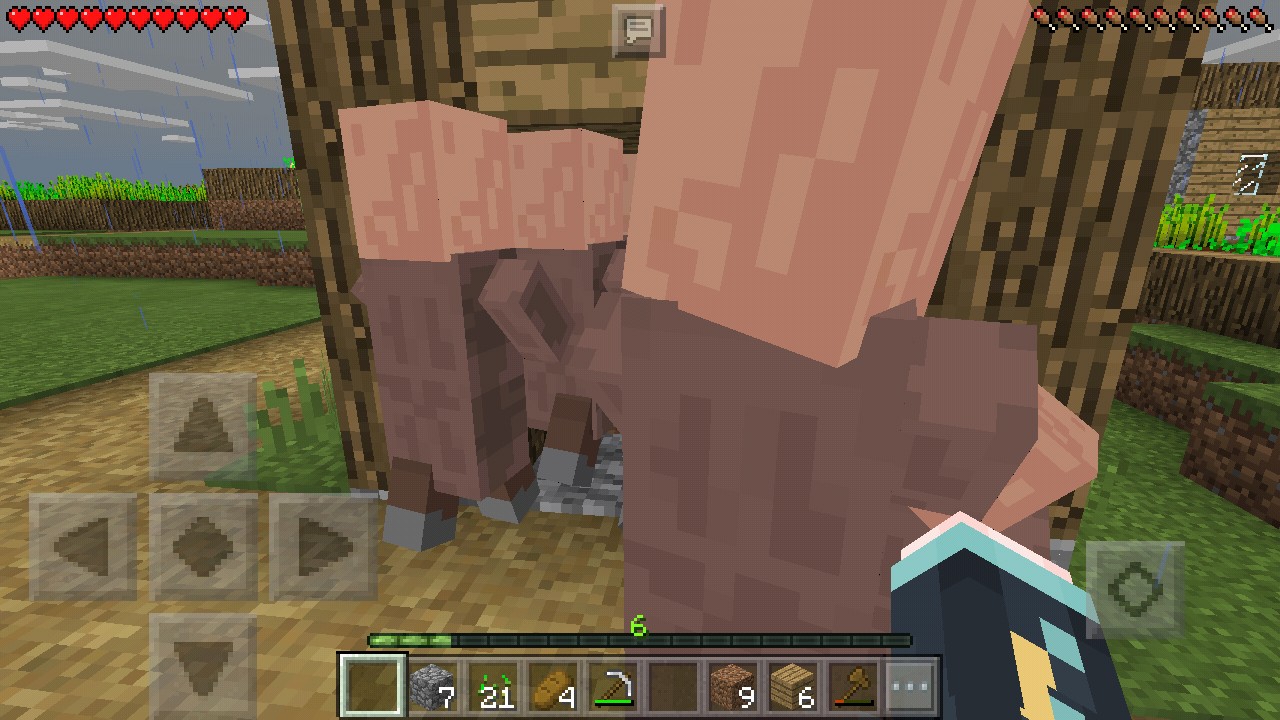


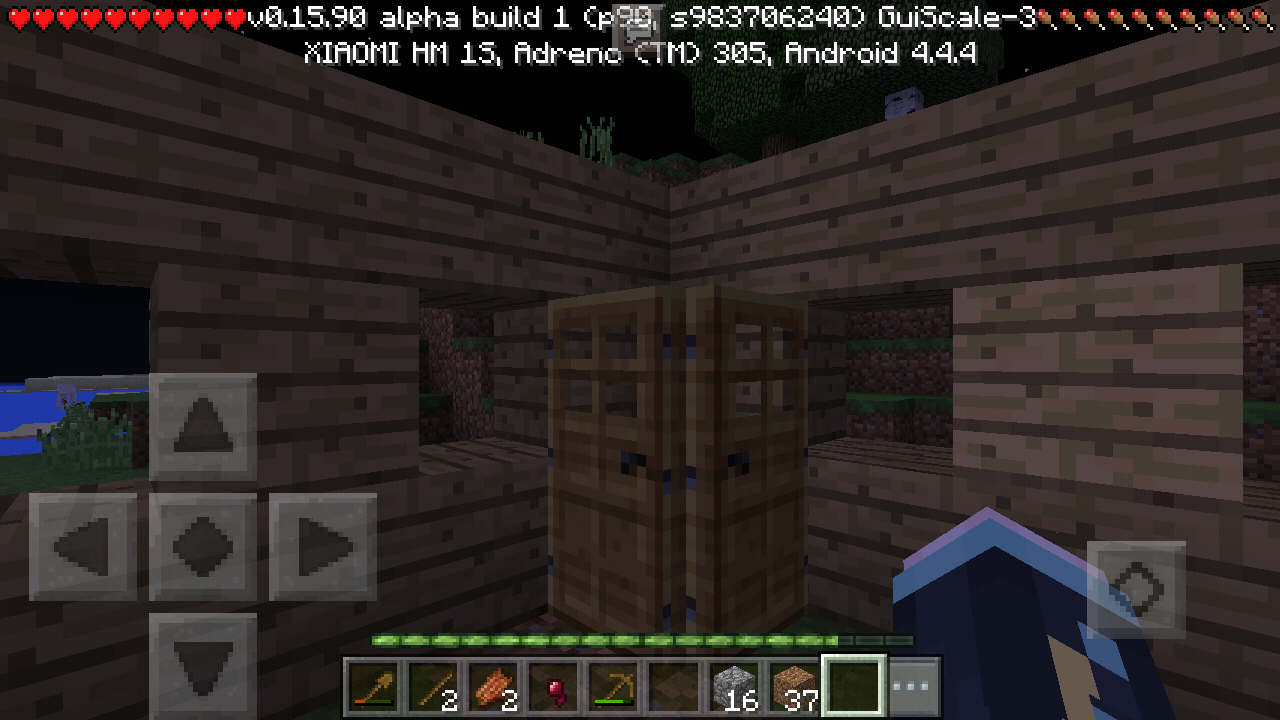






Everything can be seen on the Screenshots, They barely open and close the door rapidly + lots of mob collision causes lags.
They should have go to the other Small House on the right but it doesn't have door.
UPDATE: Destroying the Door that has a Villager Inside the Small House will make the game crashes/stopped working.
Villagersflows-fills the occupied Small Villager House causes lagsVillagers A.I. Flows & Door Crash
Device: Xiaomi Redmi 1S 1.6GHz Quad-Core 1GB RAM
Everything can be seen on the Screenshots, They barely open and close the door rapidly + lots of mob collision causes lags.
They should have go to the other Small House on the right but it doesn't have door.
UPDATE: Destroying the Door that has a Villager Inside the Small House will make the game crashes/stopped working.
Device: Xiaomi Redmi 1S 1.6GHz Quad-Core 1GB RAM
Everything can be seen on the Screenshots, They
barely openandclose the doorrapidly + lots of mob collisioncauses lags.They should have go to the other Small House on the right but it doesn't have door.
UPDATE: Destroying the Door that has a Villager Inside the Small House will
makethe gamecrashes/stopped working.Device: Xiaomi Redmi 1S 1.6GHz Quad-Core 1GB RAM
Everything can be seen on the Screenshots, They rapidly open/close the door which causes lags.
They should have go to the other Small House on the right but it doesn't have door.
UPDATE: Destroying the Door that has a Villager Inside the Small House will crash the game.
I've created a Nether Portal and let it on forever, After a few while, I heard an Oink!
(Pigmen's pain sound) and then the game crashes. Please Confirm & Fix.. Thanks!Device: Xiaomi Redmi 1S 1.6GHz Quad-Core 1GB RAM
I've created a Nether Portal and let it on forever, After a few while, I heard an Oink! sound. (It's like he got suffocated or something, There is no blocks blocking the Nether Portal entrance) and then the game crashes. Please Confirm & Fix.. Thanks!
Zombie Pigmen crashes the game when teleporting to Overworld.Zombie Pigman crashes the game when teleporting to Overworld.
Video: https://www.youtube.com/watch?v=zd_oqwxcJ0Q
This happens when I switched the Stone block to Grass block from Slot 2 to Slot 1 by hotkeys.
Device: Xiaomi Redmi 1S
In Survival Mode, I crafted an Oak Door
andthen when i pass by, I see the bubbles and when its depleted, I tale damage like getting drowned underwater.Device: Xiaomi Redmi 1S
In Survival Mode, I crafted an Oak Door & placed it. then when i pass by, I see the bubbles and when its depleted, I take damage like getting drowned underwater.
Device: Xiaomi Redmi 1S
In Survival Mode, I crafted an Oak Door & placed it. then when i pass by/stand right next to the door, I see the bubbles and when its depleted, I take damage like getting drowned underwater.
Screenshot_2016-09-16-23-41-44.png
Test on Xiaomi Redmi 1S (Android 4.4.4)
Mobs & Players do get damages and knockback's.
It should push you up (or down, depending on the Crystal's floating-position) when you're standing at the same block as the Crystal or Inside of it.
I was unable to login into my Xbox account. It shows Xbox loading screen then it goes white.
I was able to login on the previous version though.
I have checked my Xbox account and there was no issue at all.Device:
Xiaomi Redmi Note 4X (Qualcomm Snapdragon)Turns out it was my mobile network.
Turns out it was my mobile network, no need to fix this.
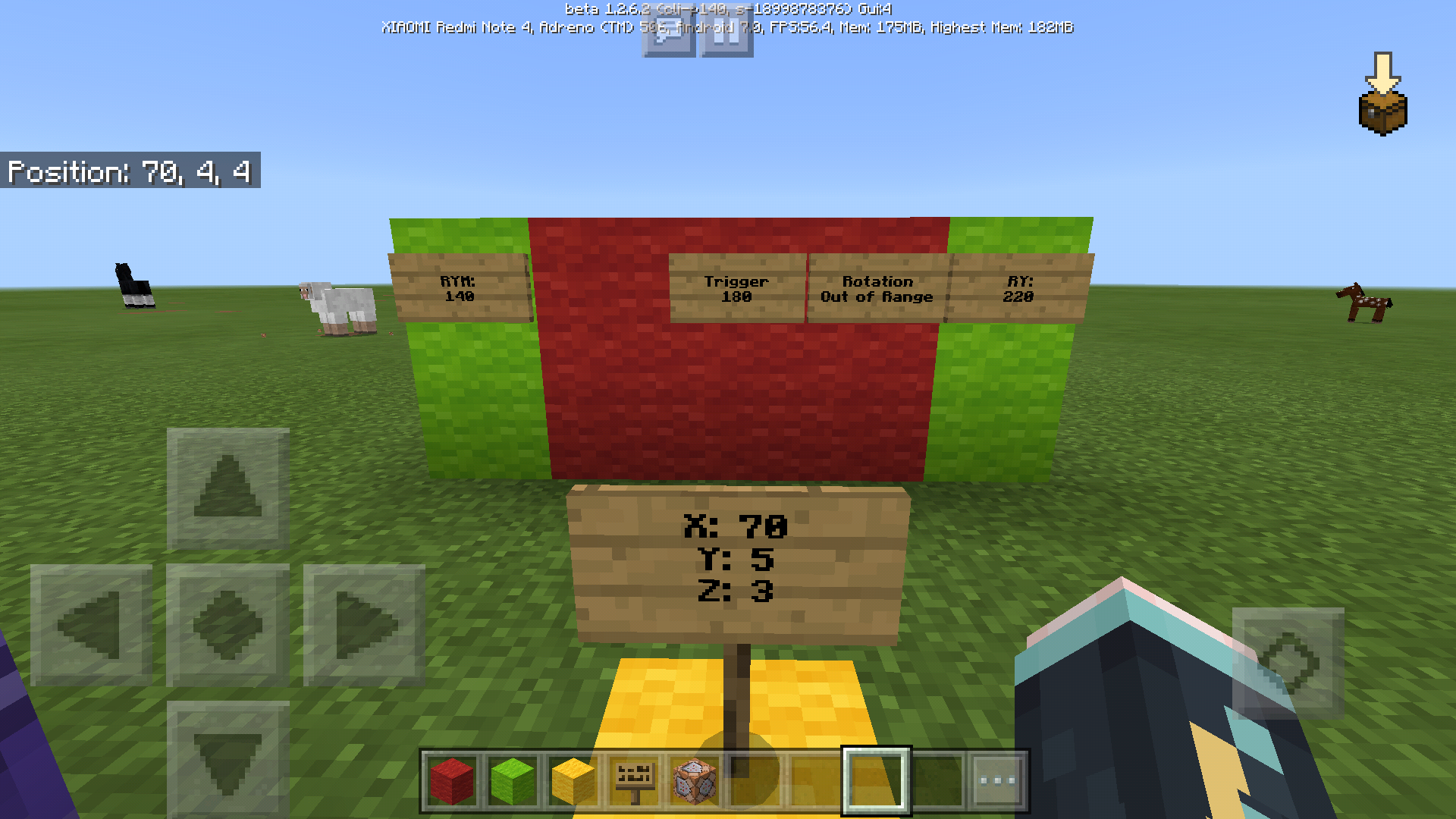
I can't make testfor trigger by looking at certain rotation.
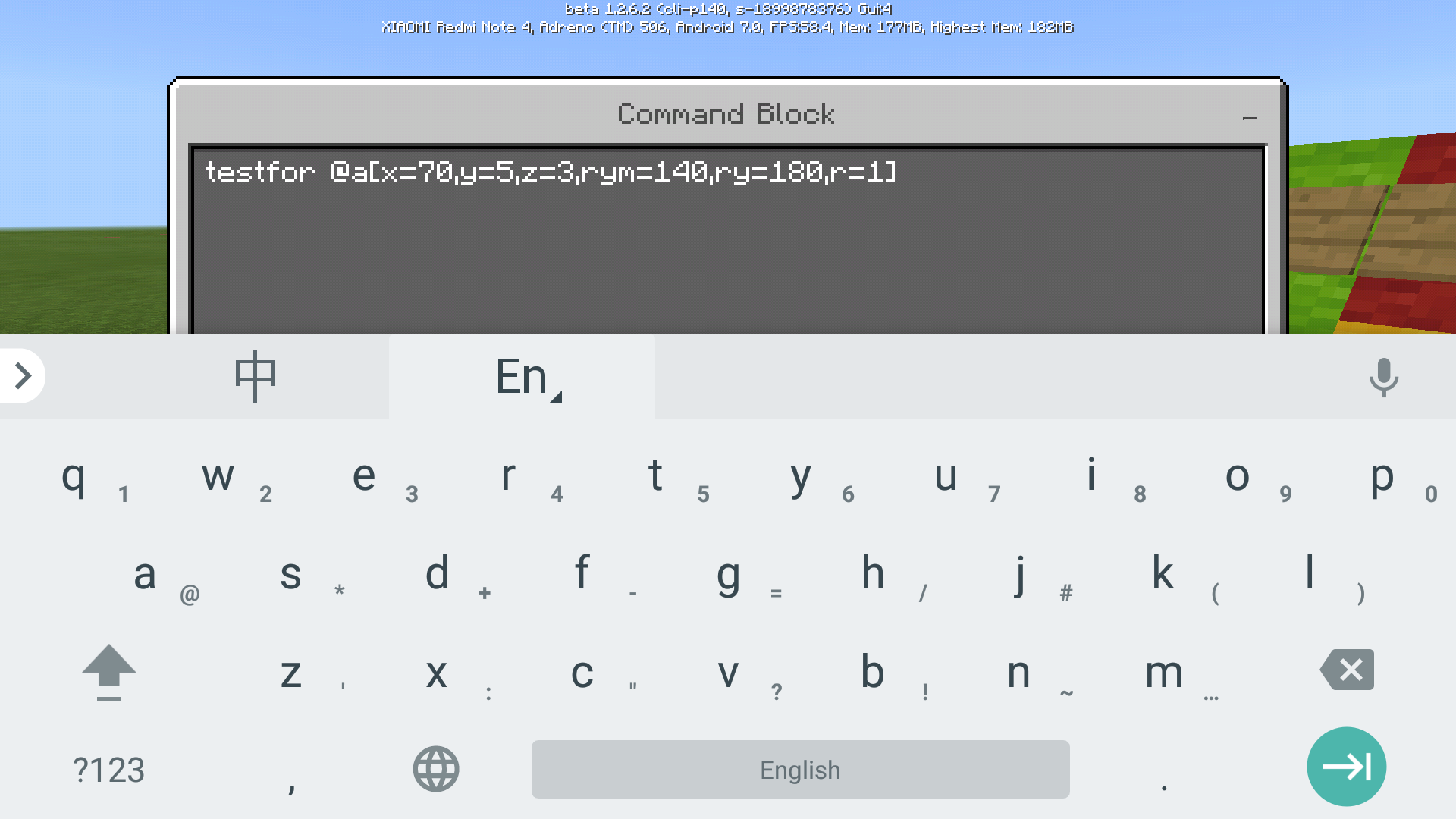
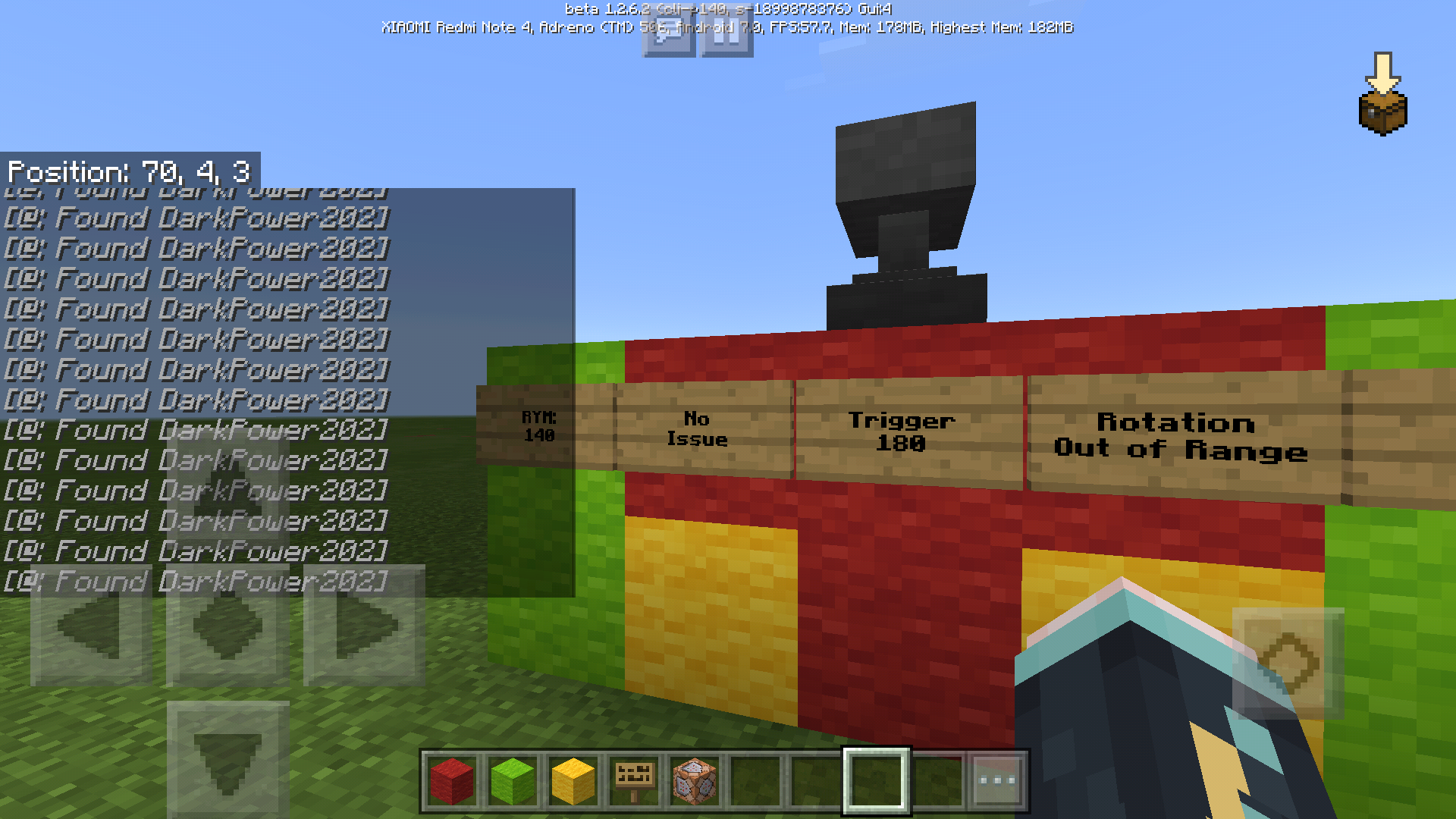
As you can see on the screenshot provided, I have set RY Min to 140 and RY Max to 220.
It shows up "Rotation out of range". The Y rotation can't exceed more than 180.I changed the RY Max to 180, it works without any issue, but that's not i wanted for.
Setting RY Min to -140 and RY Max to 180 would make the command block get triggered even when the player is not looking at the look-at-trigger.Is it a bug or is it just me doing it wrong?
I can't make testfor trigger by looking at certain rotation.
As you can see on the screenshot provided, I have set RY Min to 140 and RY Max to 220.
It shows up "Rotation out of range". The Y rotation can't exceed more than 180.I changed the RY Max to 180, it works without any issue, but that's not i wanted for.
Setting RY Min to -140 and RY Max to 140 would make the command block get triggered even when the player is not looking at the look-at-trigger.Is it a bug or is it just me doing it wrong?
I can't make testfor trigger by looking at certain rotation.
As you can see on the screenshot I provided, I have set RY Min to 140 and RY Max to 220.
It shows up "Rotation out of range". The Y rotation can't exceed more than 180.I changed the RY Max to 180, it works without any issue, but that's not i wanted for.
Setting RY Min to -140 and RY Max to 140 would make the command block get triggered even when the player is not looking at the look-at-trigger.Is it a bug or is it just me doing it wrong?
I can't make testfor trigger by looking at certain rotation.
As you can see on the screenshot I provided, I have set RY Min to 140 and RY Max to 220.
It shows up "Rotation out of range". The RY rotation can't exceed more than 180.I changed the RY Max to 180, it works without any issue, but that's not i wanted for.
Setting RY Min to -140 and RY Max to 140 would make the command block get triggered even when the player is not looking at the look-at-trigger.Is it a bug or is it just me doing it wrong?
I can't make testfor trigger by looking at certain rotation.
As you can see on the screenshot I provided, I have set RY Min to 140 and RY Max to 220.
It shows up "Rotation out of range". The RY rotation can't exceed more than 180.I changed the RY Max to 180, it works without any issue, but that's not i wanted for.
Setting RY Min to -140 and RY Max to 140 would make the command block get triggered even when the player is not looking at the look-at-trigger.Is it a bug or is it just me doing it wrong?
It works fine with v1.1
Rotation out of range (rym,ry & rxm,rx) can't exceed 180+ [testfor cmd]
Device:
Xiaomi Redmi Note 4X SnapdragonI can't make testfor trigger by looking at certain rotation.
As you can see on the screenshot I provided, I have set RY Min to 140 and RY Max to 220.
It shows up "Rotation out of range". The RY rotation can't exceed more than 180.I changed the RY Max to 180, it works without any issue, but that's not i wanted for.
Setting RY Min to -140 and RY Max to 140 would make the command block get triggered even when the player is not looking at the look-at-trigger.Is it a bug or is it just me doing it wrong?
It works fine with v1.1
It works when we use WiFi, the button shows up.
If we use 3G/4G data connection, it won't show up at all.
Player remains in world aftetleaving the world when joining a friend's worldPlayer remains in world after leaving the world when joining a friend's world
When a player is leaving on a friend's world while we're connecting to the world, the player remains in the world after we successfully joined the world.
This might be a little bit tricky to reproduce:
1. Have a world loaded with a friend inside (call it Player A).
2. Tell Player B to connect to your world.
3. Player B should be in Generating world screen, tell Player A to leave.
4. Player B joined the world and can see Player A but the Host player can't see Player A at all.Player B should be able to see the Player A's left the world text when this happens.
Device:
Xiaomi Redmi Note 4X
When a player is leaving on a friend's world while we're connecting to the world, the player remains in the world after we successfully joined the world.
This might be a little bit tricky to reproduce:
1. Have a world loaded with a friend inside (call it Player A).
2. Tell Player B to connect to your world.
3. Player B should be in Generating world screen, tell Player A to leave.
4. Player B joined the world and can see Player A but the Host player can't see Player A at all.Player B should be able to see
thePlayer A's left the world text when this happens.Device:
Xiaomi Redmi Note 4XWhen a player is leaving on a friend's world while we're connecting to the world, the player remains in the world after we successfully joined the world.
This might be a little bit tricky to reproduce:
1. Have a world loaded with a friend inside (call it Player A).
2. Tell Player B to connect to your world.
3. Player B should be in Generating world screen, tell Player A to leave.
4. Player B joined the world and can see Player A but the Host player can't see Player A at all.In some cases, Player B should be able to see Player A's left the world text when this happens.
Device:
Xiaomi Redmi Note 4X
Minecraft had issues with internet right now, use WiFi to connect to the store without a problem.
You can see the Bedrock textures fading from Pumpkin Block from the distance..
Use the back button?
Temporary fix was adding Doors to that other house, the Villagers that filled the house before now moves to the other house but the game still crashes when destroying the door if there's a villager inside.
This happened to me too. My device is Xiaomi Redmi 1S.
Confirmed on my Xiaomi Redmi 1S, The head is offset position and they always eats grass no matter what.
They always eats grass in their way too
This happened to me too
Device: Xiaomi Redmi 1S
could be version exclusive tho
it's fixed
It heats up my phone and drains the battery quickly If i kept the Data Connection on..
Please fix this problem, It still crashes even with WiFi on or without XBOX Account Connected.
I have to wait for at least 15 seconds of Black Screen with Active Data Connection when launching the game,
Turning Off the Data Connection while on Main Menu/Pause Menu or even when playing will causes the game to crash.
Minecraft: Pocket Edition v1.0 build 2
Android 4.4.4 Xiaomi Redmi 1S (Quad-Core 1.6 GHz Adreno 305)
[Clocklimited to 1GHz to prevent overheating, Causing textures gets glitched sometimes]
Wither Boss pain sound is still using Player's pain sound, problem still exists in v1.0 b2
Android 4.4.4 Xiaomi Redmi 1S (Quad-Core 1.6 GHz Adreno 305)
Do you have an Active Data Connection?
Duplicate of MCPE-18256
Confirmed on Xiaomi Redmi Note 4X, had the same problem ☹️
I can login without any problems now.
This isn't the proper place to report players.
Did you purchase the game from the playstore?
Parameters are not supported yet for /summon command
Cannot reproduce as of 1.1+
Cannot reproduce as of 1.1+
Issue still present in the latest version (v1.2.8)
I have a stable 4G network and was able to join my friend's world but I'm unable to invite my friends to my world, no invite button.
I provided 2 screenshots.
First one is me on my own world, no invite button.
Second one is me on my friend's world, invite button is there.
I get back to my world and there's still no invite button.


I have checked my Xbox settings and it's all fine.
I have the same problem.
Device:
Xiaomi Redmi Note 4X
So i used WiFi and guess what?!
Invite button showed up!
I used a different device as a hotspot with a 3G connection.
Please fix this problem, thanks.
This happens because Powered Rail Detector has its own block id.
If you clone that, the Rail Detector will be always active.
I have this problem too sometimes.
What i did is close Minecraft, reconnect network, then launch Minecraft again and connect. Problem solved (for me atleast)
P.S. I'm on Android
First of all, there's no such things as 3G LTE.
Second, it might be your ISP having a slow speed network.
Have a look at this video:
https://youtu.be/Crnr-H5Dd3o
Animals spawns very very rare in my worlds. It should spawn more frequently.
/effect @p 999 0
Without the brackets.
Confirmed on Android Devices (7.0) [Xiaomi Redmi Note 4X]
Sometimes i get absorption effect when i don't get killed.
I had a full diamond armor set and it brokes when i get this one-hit bug.
Also the death message was: Player was slain by Blaze.
Rabbits keeps running away, can't tame them.
Try a different name for the realm without any symbols.
If that didn't help then I'd suggest you to subscribe a new realm for now until the problem is solved.
You can download your world from that expired realm and upload it to the new realm after if I'm not wrong.
Still not working? Check how your Xbox Live Account is set up on account.xbox.com/en-US/Settings
I think i have the same problem on my Xiaomi Redmi Note 4X.
Please take a look at the video below:
https://youtu.be/7-DVln5gAm0
It stutters a lot.
It's the server/it's your net.
The developers doesn't have anything to do with 3rd party servers.
This happens to tallgrass/any 2blocks flowers.
Able to place sign/torch on the 2nd height and flower went missing.
Added a screenshot.
There's no world option in realms but here's how i change my realm world settings:
1. Download the World.
2. Change the World Settings.
3. Upload the World again.
Strangely i don't encounter this issue. Must have been a problem with chunks i think.
All hostile/passive mobs spawns normally for me and yes, I'm using the latest version.
You'll have to check how your Xbox Account is set up. Go to https://account.xbox.com/en-US/Settings and change your settings there.
Rarely when i jump on the farmland, the seed popped out, farmland becomes dirt as expected and the seed sometimes stays there. It drops another seed if i destroy it.
Same here, I obtained a Woodland Explorer Map from a Cartographer and entered it. Didn't receive the achievements.
Device: Xiaomi Redmi Note 4X Snapdragon Android 7.0
You'll have to use "" example: /tp "Player Name"
Still have this issue on the latest stable release of Minecraft
Any updates? Still won't show up in v1.6.0 unless using WiFi..
I have the same issue (MCW10) as well..
It is focused on the text input box and I was unable to select, copy & paste.
I was able to select the texts and copy/paste it sometimes which is buggy.
P.S. I'm using MSI GL62M 7RDX
Try updating your drivers and make sure that you're on the latest update of W10.
Happens to me often..
Still affects the latest beta version apparently. (1.16.100.54)
I've disabled gfx_vsync (0) and set gfx_max_framerate to 120 through options.txt and no more input lags.