Cannot Choose Custom Skin, or change between Steve and Alex
Update for 0.16.0
Using the 'Hanger' button to change skins causes some devices to crash.
rplatham Updated after half fix in 0.15.90.7:
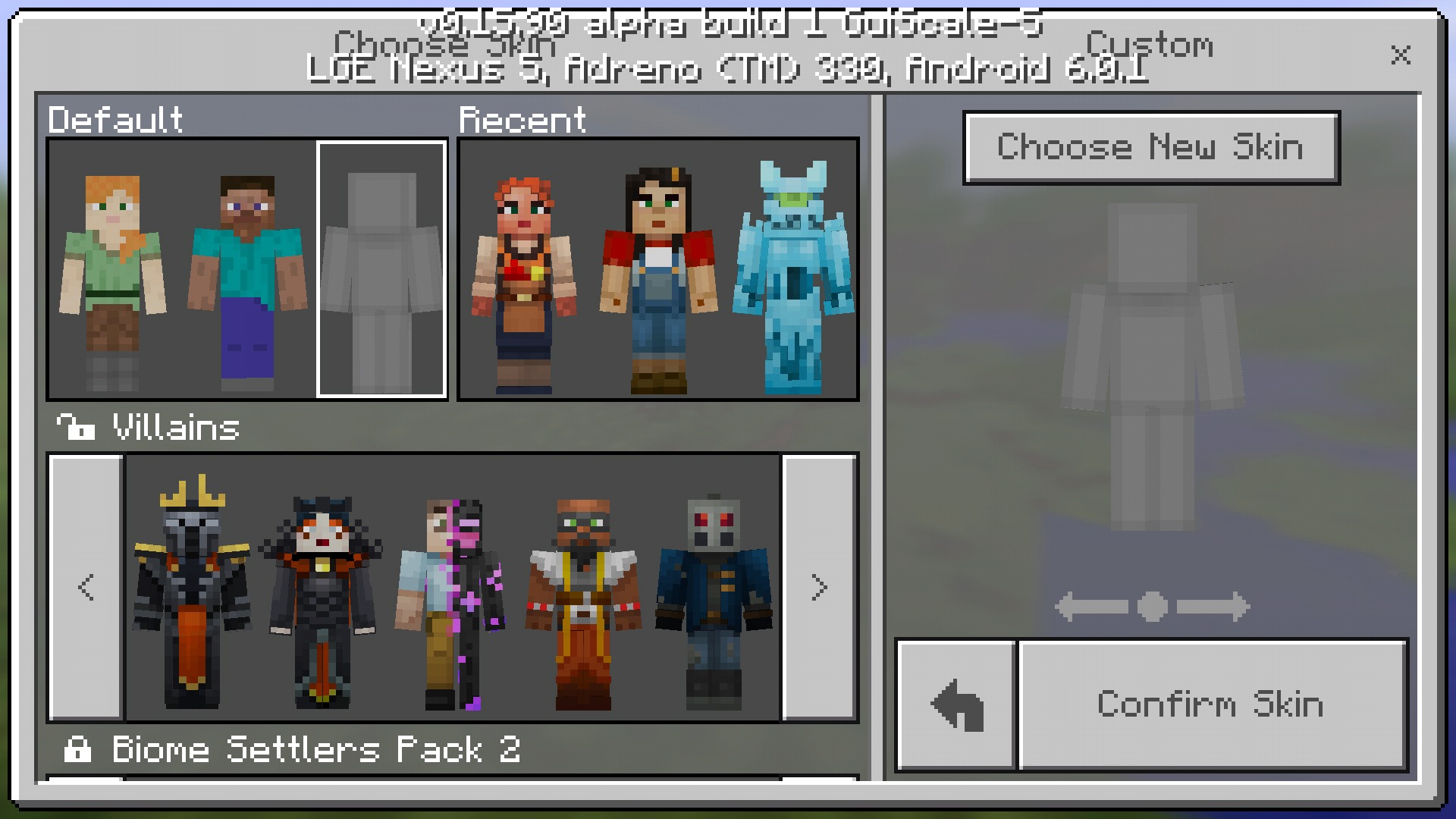
To see the "Choose New Skin" button to select a custom skin, the player must first tap on the grey space to the right of the Alex and Steve models. On some devices, that space shows a solid grey model (making this step more obvious) like this. But on some devices, that model does not appear, like this.
I expected that the blank grey model would always appear or the "Choose New Skin" would always appear.
Original description
Effects Samsung Galaxy Tab A (SM-T350) & Samsung Galaxy Tab 4 (SM-T230NU)
Steve and Alex skins are invisible and you cannot Choose a custom skin
Linked Issues
is duplicated by45
 MCPE-16325can't change skinDuplicateMCPE-16673Skin bugDuplicateMCPE-16683Stuck as Alex SkinDuplicateMCPE-16706Inability to use custom skins in mcpe betaDuplicateMCPE-16709I can't apply my skinDuplicateMCPE-16734Custom skins dont load DuplicateMCPE-16754Skin problemsDuplicateMCPE-16773Can't change skinDuplicateMCPE-16808Can't see the Default or custom skins in menuDuplicateMCPE-16844Unable to have custom skinsDuplicateMCPE-16912Trying to change skins to a custom one still shows alex on both sidesDuplicateMCPE-16981The skin bug on selection DuplicateMCPE-17027Can't Import Custom skins.DuplicateMCPE-17423Selecting the skins button crashes the gameDuplicateMCPE-17568When I try to change my skin it crashed! Please fix thisDuplicateMCPE-17609Crash when trying to open skin menuDuplicateMCPE-17736Coat hanger for skinsDuplicateMCPE-17802Crash,if you want change your SkinDuplicateMCPE-17805using coat hanger crashes game. was fixed but broken againDuplicateMCPE-17925CrashedDuplicateMCPE-17937Skin Menu=Game CrashDuplicateMCPE-17972a crash problem in minecraft 0.16.1DuplicateMCPE-17989Click on button on the home screen of skin change is closing the gameDuplicateMCPE-18007Can't load worlds or change skinsDuplicateMCPE-18106Pressing skin button crashes gameDuplicateMCPE-18278skin button triggers crashesDuplicateMCPE-18442MineCraft Pocket Edition cannot change skinDuplicateMCPE-18448cant Change my skin or update my MCPE on my Kindle fire 6DuplicateMCPE-18710Switching charactersDuplicateMCPE-18743When I click the button to change my skin the app crashesDuplicateMCPE-18747Can't change skinDuplicateMCPE-18748Can't change skinDuplicateMCPE-18756Skin won't changeDuplicateMCPE-18761Crashes when click coat hanger icon to change skinDuplicateMCPE-18795Crash when click to change skinDuplicateMCPE-18834Skin ChangerDuplicateMCPE-189520.16.2 Pocket Edition Crash when clicking Coat HangarDuplicateMCPE-18965In Minecraft Pe every time I try to change my character my game crashes and kicks me out of app.DuplicateMCPE-18966Unable to change skinDuplicateMCPE-18992Tapping the hanger button causes game to crashDuplicateMCPE-18993annoying skin glitchDuplicateMCPE-19108The game crashes when pressing the 'Skin' buttonDuplicateMCPE-19120When I push the hanger option on the main screen the game crashesDuplicateMCPE-19177Game crashes whenever i want to change skinDuplicateMCPE-19204Can't change my skinDuplicate


Created Issue:
Cannot Choose Custom Skin, or change between Steve and Alex
Effects Samsung Galaxy Tab A (SM-T350) & Samsung Galaxy Tab 4 (SM-T230NU)
Steve and Alex skins are invisible and you cannot Choose a custom skin
- Unresolved
- Open
- Unconfirmed
- Tablet - Android - Other (Specify in description)
- Android 6.0.1 & Android 4.4.2
- 0.15.90.0
is duplicated by
is duplicated by
is duplicated by
is duplicated by
is duplicated by
is duplicated by
Thanks for the report, please search before posting!
duplicates
is duplicated by
is duplicated by
![[Mojang] Mega_Spud (Jay Wells)](../../../data/avatars/users/92696.png)
is duplicated by
relates to
duplicates

is duplicated by
![[Mojang] Adrian Östergård](../../../data/assets/gravatar/nighter.jpeg)
rplatham Updated after half fix in 0.15.90.7:
To see the "Choose New Skin" button to select a custom skin, the player must first tap on the grey space to the right of the Alex and Steve models. On some devices, that space shows a solid grey model (making this step more obivous) but on some devices, that model does not appear. See
Effects Samsung Galaxy Tab A (SM-T350) & Samsung Galaxy Tab 4 (SM-T230NU)
Steve and Alex skins are invisible and you cannot Choose a custom skin
rplatham Updated after half fix in 0.15.90.7:
To see the "Choose New Skin" button to select a custom skin, the player must first tap on the grey space to the right of the Alex and Steve models. On some devices, that space shows a solid grey model (making this step more obivous) but on some devices, that model does not appear. See
Effects Samsung Galaxy Tab A (SM-T350) & Samsung Galaxy Tab 4 (SM-T230NU)
Steve and Alex skins are invisible and you cannot Choose a custom skin
rplatham Updated after half fix in 0.15.90.7:
To see the "Choose New Skin" button to select a custom skin, the player must first tap on the grey space to the right of the Alex and Steve models. On some devices, that space shows a solid grey model (making this step more obvious) [like this|]. But on some devices, that model does not appear, like this.
Effects Samsung Galaxy Tab A (SM-T350) & Samsung Galaxy Tab 4 (SM-T230NU)
Steve and Alex skins are invisible and you cannot Choose a custom skin
rplatham Updated after half fix in 0.15.90.7:
To see the "Choose New Skin" button to select a custom skin, the player must first tap on the grey space to the right of the Alex and Steve models. On some devices, that space shows a solid grey model (making this step more obvious)
[like this|]. But on some devices, that model does not appear, like this.Effects Samsung Galaxy Tab A (SM-T350) & Samsung Galaxy Tab 4 (SM-T230NU)
Steve and Alex skins are invisible and you cannot Choose a custom skin
rplatham Updated after half fix in 0.15.90.7:
To see the "Choose New Skin" button to select a custom skin, the player must first tap on the grey space to the right of the Alex and Steve models. On some devices, that space shows a solid grey model (making this step more obvious) like this. But on some devices, that model does not appear, like this.
I expected that the blank grey model would always appear or the "Choose New Skin" would always appear.
Original description
Effects Samsung Galaxy Tab A (SM-T350) & Samsung Galaxy Tab 4 (SM-T230NU)
Steve and Alex skins are invisible and you cannot Choose a custom skin

Screenshot_20160926-100551.png

Update for 0.16.0
Using the 'Hanger' button to change skins causes some devices to crash.
rplatham Updated after half fix in 0.15.90.7:
To see the "Choose New Skin" button to select a custom skin, the player must first tap on the grey space to the right of the Alex and Steve models. On some devices, that space shows a solid grey model (making this step more obvious) like this. But on some devices, that model does not appear, like this.
I expected that the blank grey model would always appear or the "Choose New Skin" would always appear.
Original description
Effects Samsung Galaxy Tab A (SM-T350) & Samsung Galaxy Tab 4 (SM-T230NU)
Steve and Alex skins are invisible and you cannot Choose a custom skin

is duplicated by
is duplicated by
relates to
is duplicated by
is duplicated by
is duplicated by
is duplicated by
is duplicated by
is duplicated by
is duplicated by
is duplicated by
is duplicated by
is duplicated by
is duplicated by
is duplicated by
is duplicated by
is duplicated by
is duplicated by
is duplicated by

is duplicated by
is duplicated by
is duplicated by
![[MCPE Mod] Celesian](../../../data/avatars/users/81635.png)
is duplicated by
is duplicated by
is duplicated by
![[Bot] Arisa](../../../data/assets/gravatar/mustek2.png)
This ticket is a duplicate of MCPE-16652
Please remember to do a search in the future before submitting a ticket
This ticket is a duplicate of MCPE-16652
Please remember to do a search in the future before submitting a ticket
This is a Duplicate of MCPE-16652 – If you have not, please use the search function in the future, to see if your bug has already been submitted, as currently over 47% of tickets are being closed as duplicate.
This is a Duplicate of MCPE-16652 – If you have not, please use the search function in the future, to see if your bug has already been submitted, as currently over 47% of tickets are being closed as duplicate.
Thank you for your report. This issue was, however, submitted earlier as MCPE-16652. Please perform a search next time to make sure your bug hasn't already been reported. The parent issue can easily be found by searching for "mcpe unresolved custom skin".
Thank you for your report!
However, this issue has been closed as a Duplicate of MCPE-16652.
It has been linked to this report. If you have additional information, please add it to that report.
Please search before reporting, as it's likely that one exists already.
Quick Links:
📓 Issue Guidelines – 💬 Community Support – 📧 Feedback – 📖 Game Wiki
Thank you for your report!
However, this issue has been closed as a Duplicate of MCPE-16652.
It has been linked to this report. If you have additional information, please add it to that report.
Please search before reporting, as it's likely that one exists already.
Quick Links:
📓 Issue Guidelines – 💬 Community Support – 📧 Feedback – 📖 Game Wiki
This bug report duplicates MCPE-16652 Consider doing a search before creating a new issue.
Thank you for your report!
However, this issue has been closed as a Duplicate of MCPE-16652.
It has been linked to this report. If you have additional information, please add it to that report.
Please search before reporting, as it's likely that one exists already.
Quick Links:
📓 Issue Guidelines – 💬 Community Support – 📧 Feedback – 📖 Game Wiki
Thank you for your report!
However, this issue has been closed as a Duplicate of MCPE-16652.
It has been linked to this report. If you have additional information, please add it to that report.
Please search before reporting, as it's likely that one exists already.
Quick Links:
📓 Issue Guidelines – 💬 Community Support – 📧 Feedback – 📖 Game Wiki
Thank you for your report!
However, this issue has been closed as a Duplicate of MCPE-16652.
It has been linked to this report. If you have additional information, please add it to that report.
Please search before reporting, as it's likely that one exists already.
Quick Links:
📓 Issue Guidelines – ☃D83D? Community Support – 📧 Feedback – 📖 Game Wiki
Thank you for your report!
However, this issue has been closed as a Duplicate of MCPE-16652.
It has been linked to this report. If you have additional information, please add it to that report.
Please search before reporting, as it's likely that one exists already.
Quick Links:
📓 Issue Guidelines – 💬 Community Support – 📧 Feedback – 📖 Game Wiki
Thank you for your report!
However, this issue has been closed as a Duplicate of MCPE-16652.
It has been linked to this report. If you have additional information, please add it to that report.
Please search before reporting, as it's likely that one exists already.
Quick Links:
📓 Issue Guidelines – 💬 Community Support – 📧 Feedback – 📖 Game Wiki
Thank you for your report!
However, this issue has been closed as a Duplicate of MCPE-16652.
It has been linked to this report. If you have additional information, please add it to that report.
Please search before reporting, as it's likely that one exists already.
Quick Links:
📓 Issue Guidelines – 💬 Community Support – 📧 Feedback – 📖 Game Wiki
Thank you for your report!
However, this issue has been closed as a Duplicate of MCPE-16652.
It has been linked to this report. If you have additional information, please add it to that report.
Please search before reporting, as it's likely that one exists already.
Quick Links:
📓 Issue Guidelines – 💬 Community Support – 📧 Feedback – 📖 Game Wiki
Thank you for your report!
However, this issue has been closed as a Duplicate of MCPE-16652.
It has been linked to this report. If you have additional information, please add it to that report.
Please search before reporting, as it's likely that one exists already.
Quick Links:
📓 Issue Guidelines – 💬 Community Support – 📧 Feedback – 📖 Game Wiki
Thank you for your report!
However, this issue has been closed as a Duplicate of MCPE-16652.
It has been linked to this report. If you have additional information, please add it to that report.
Please search before reporting, as it's likely that one exists already.
Quick Links:
📓 Issue Guidelines – 💬 Community Support – 📧 Feedback – 📖 Game Wiki
Thank you for your report!
However, this issue has been closed as a Duplicate of MCPE-16652.
It has been linked to this report. If you have additional information, please add it to that report.
Please search before reporting, as it's likely that one exists already.
Quick Links:
📓 Issue Guidelines – 💬 Community Support – 📧 Feedback – 📖 Game Wiki
Please provide more details. For example, I think you mean that clicking Choose New Skin allows you to select a skin, but you always get an error message stating "That's not a minecraft skin, silly."
I cannot select any option to choose a Custom skin
When you open the minecraft skins screen it says choose skin but if you click anywhere like on a different skin you can choose it but if it is Steve or when you open the skins screen and click costome before you tap any skin cause if you do you can't click the button unless so u exit the menu and go back in it then you pick your skin and then it all ways only says chose model for Alex not the skin you picked
me too
For me Steve and Alex are just blank and not selectable.
Why is this reopened
Cause it is not fixed
Not occurring in 0.15.90.2 on Acer B1-750. (Intel HD Graphics for BayTrail, Android 4.4.4.) However, this Reddit post seems to confirm that other people are experiencing this bug as well:
https://redd.it/50t0in
Happens to me too (Samsung SM T116NU also known as Samsung galaxy Tab 3V, with Android Kitkat 4.4.4)
Confirmed on LG G3 on Android 6
This happened to me too. My device is Xiaomi Redmi 1S.
Me too! My device is Moto G2 Android 6.0. I cant change skin and chat is very slow.
Confirmed on Amazon Kindle Fire HD 6, Fire OS 5.1.2. Can't choose a custom skin
Same thing happens to me. Thank you for reporting this.
Fixed in 0.15.90.7 (0.16.0 beta build 4)
This issue still occurs for some users, including myself.
Tested on mcpe 0.15.90.7 on Samsung Galaxy S6 (SM-G920W8), Android 6.0.1.
I tried changing the GUI size to all different settings, but the custom skin button just won't appear. Tapping where it should be (or up higher in case it was just up off the screen) did not do anything.
I cannot duplicate this on my device. Might be how the program files were arranged and may be either misplaced or outdated. I'll test this and get back to this as soon as possible. My device: Samsung Galaxy Tab 4 10.1
On both of my Samsung Galaxy Tab a6 Tablets (SM-T280), tapping the hanger button to change skins causes the game to crash / force close, meaning that you are unable to change from the default Steve skin.
I have the same problem. I have a Samsung Galaxy Tab 3 (SM-T310) and I am stuck as Alex since the 0.16 update. It just crashes when I push the hanger button.
Clicking the hanger button crashes my Samsung Galaxy S4.
I managed to fix the 'Hanger' crash by uninstalling and then deleting all of the com.mojang files before reinstalling. If you do this be sure to back up your worlds first, and reinstall them afterwards.
This only happens on our fire tablet. It seems to have been fixed a few times and then it breaks again. It is currently broken. Clicking the coat hanger now causes the game to crash completely. New skins can be selected if you choose a mojang skin via the shop. Player name cannot be changed from Alex. A recent update, just installed, has not resolved the issue. Thank you.
Tapping the hanger button to change skin crashes Minecraft. I have a Samsung Galaxy Tab 3 (SM-T550) and I am stuck as Steve since the 0.16 update. The 0.16.1 update didn't fix the issue. Will a future update automatically fix this?
Andrew me too
My Kindle Fire 7 HD crashes too.
Please fix this devs!
I HAVE FOUND A WAY TO FIX THIS BUG, AND IT LEAVES ALL OF YOUR SETTINGS AND WORLDS UNTOUCHED! However you need to have been backing-up... Sorry... Find one that has one with an older version of Minecraft on it. BUT FIRST, BEFORE ANYTHING ELSE, BACK UP YOUR PHONE!!!!! When that's done, restore the backup with an older version of the game and open Minecraft. Tap the skin button and select custom skin, choose whatever skin you want that is in your gallery. Close Minecraft, restore the most recent backup (the one you saved prior to this) and reopen Minecraft, this should fix it. If it doesn't or if you don't have a backup with an older version of Minecraft, try the way that the Mod Mega_Spud suggested.
There is another way to change skin
but it works on Android only
(i don't know if this works on iOS)
1. using app - that manage files - go to the games/com.mojang/minecraftpe
2. open "option.txt"
3. change "game_skintypefull : Standard_Steve(or Alex)" on line 10 to "Standard_Custom"
4. and close that text file, go to the minecraftpe folder, put your skin file here and rename it to "custom.png"
5. now play minecraft!
I had an HTC 8 with this problem. Clicking on the hanger icon on the home screen to change my skin caused MCPE to crash. While following the suggestion from @sehyum-kim I noticed that the existing custom.png was 0 bytes. Perhaps this is the real problem? Following the instructions did allow me to customize my skin.
10 minutes before my issue...i would never crash at all...i go to change my skin and then the game crashes...and I cant change my skin now...
Felix michael andersmith, have you been backing your phone up?
Does this issue still affect the latest version (1.0.0.7)? Please reply if it does.
Since I've been unable to reproduce this bug, and heard of no reports of any of the various issues relating to changing your skin, I think it is safe to say that this bug is gone. Resolving as fixed!
This was fixed in 1.0.2, ever since that update, there haven't been any issues with changing skins
I can't change to a custom skin anymore since updating to beta 1.0.5. When I try to click "choose new skin", nothing happens (gallery menu doesn't show up). In the previous version 1.0.4 I was still able to change skins. (Device: Samsung Galaxy Tab 3V aka SM T116 NU, with Android 4.4.4 Kitkat)
Elainedel, that sounds like a brand new, separate bug to me, unrelated to this issue. I'd suggest reporting this problem in a new ticket, unless someone else has already done so.
It appears to be fixed in 1.0.5.3. I can choose and use custom skins again after updating to 1.0.5.3, gallery option pops up after clicking the choose new skin option like normal again.
When I updated to 1.0.5 the bug appears to have came back. I can not chose a custom skin, but I can change from Steve to Alex.. :/
Amy Pennington Could you provide a screenshot? This may be a new, unrelated bug.
I have a bug where
1. I can't change my name
2. The game crashes whenever I try to use a custom skin
The version I'm using OR on is 1.1.2 on Kindle Fire. Please, does anyone know how to fix this? I've tried deleting Minecraft, deleting apps and photos, even deleting the skin finder app! I don't know what the problem is!
William Bruce, try updating to 1.1.4 and see if that fixes your problem.