 Brent
Brent
- Brent101
- brent101
- America/Chicago
- Yes
- No
 MCPE-8026
 MC-236848
![[Mojang] Georgii Gavrichev](../../../data/avatars/users/22428.png)
 Normal


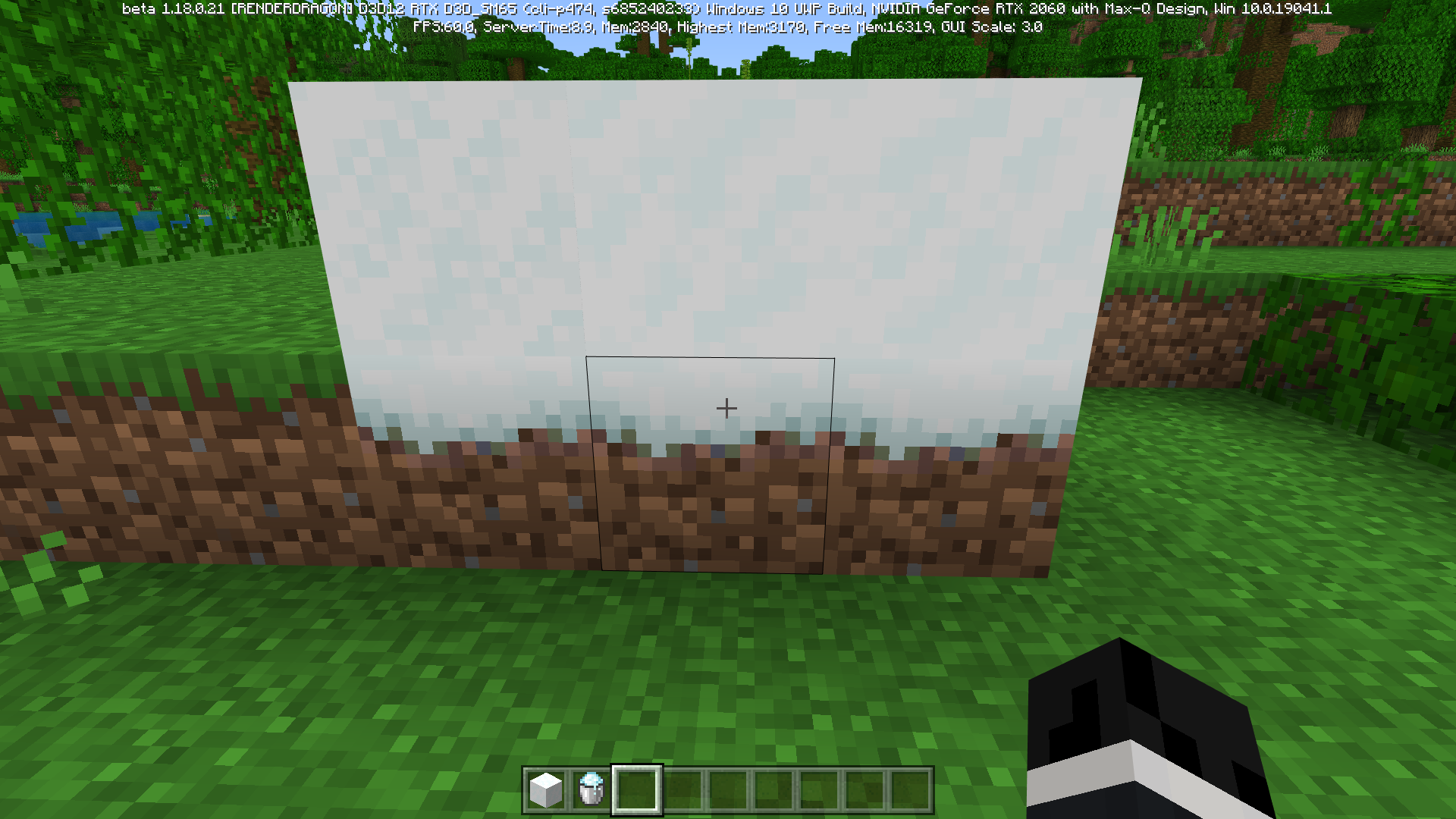


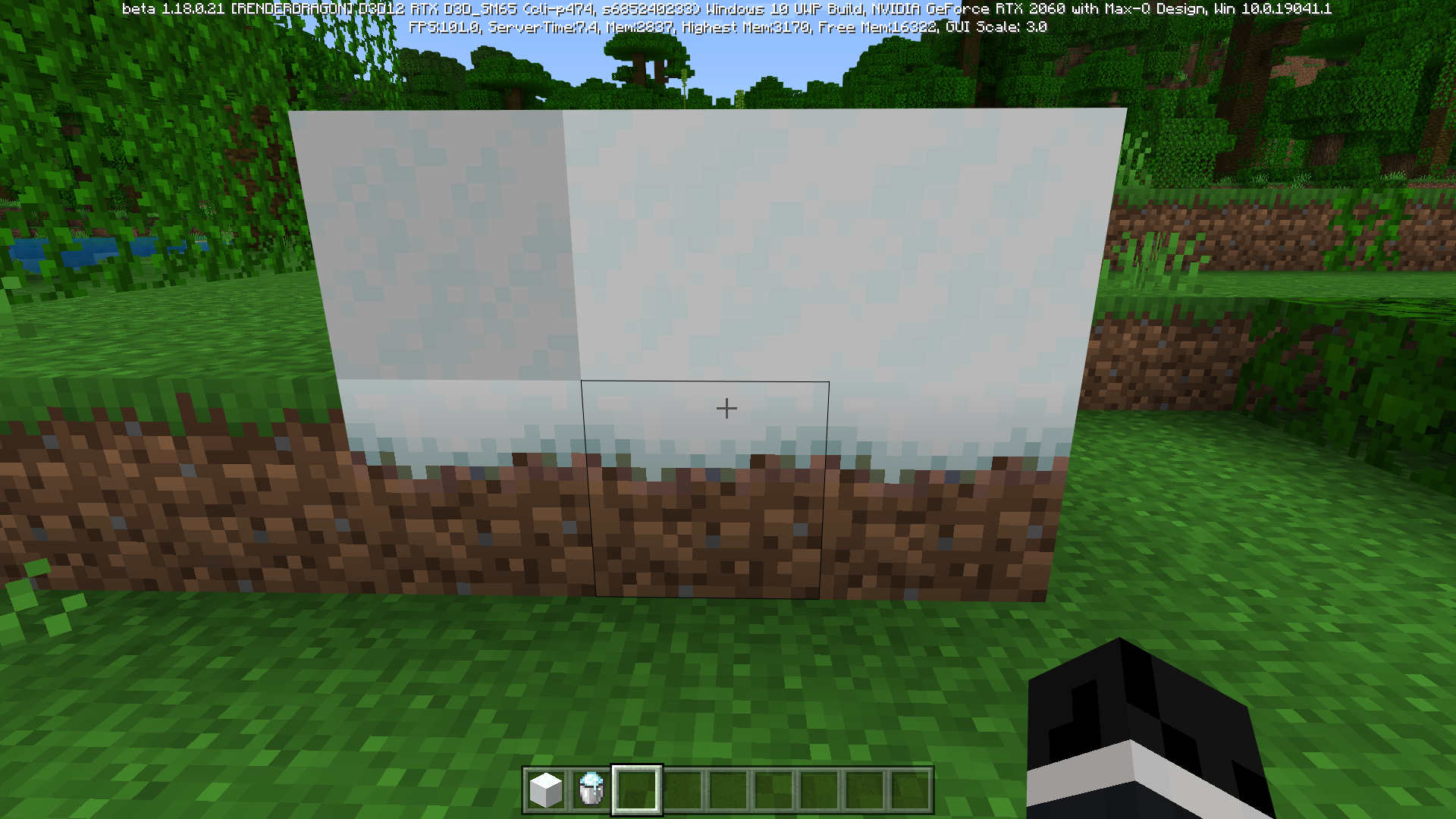
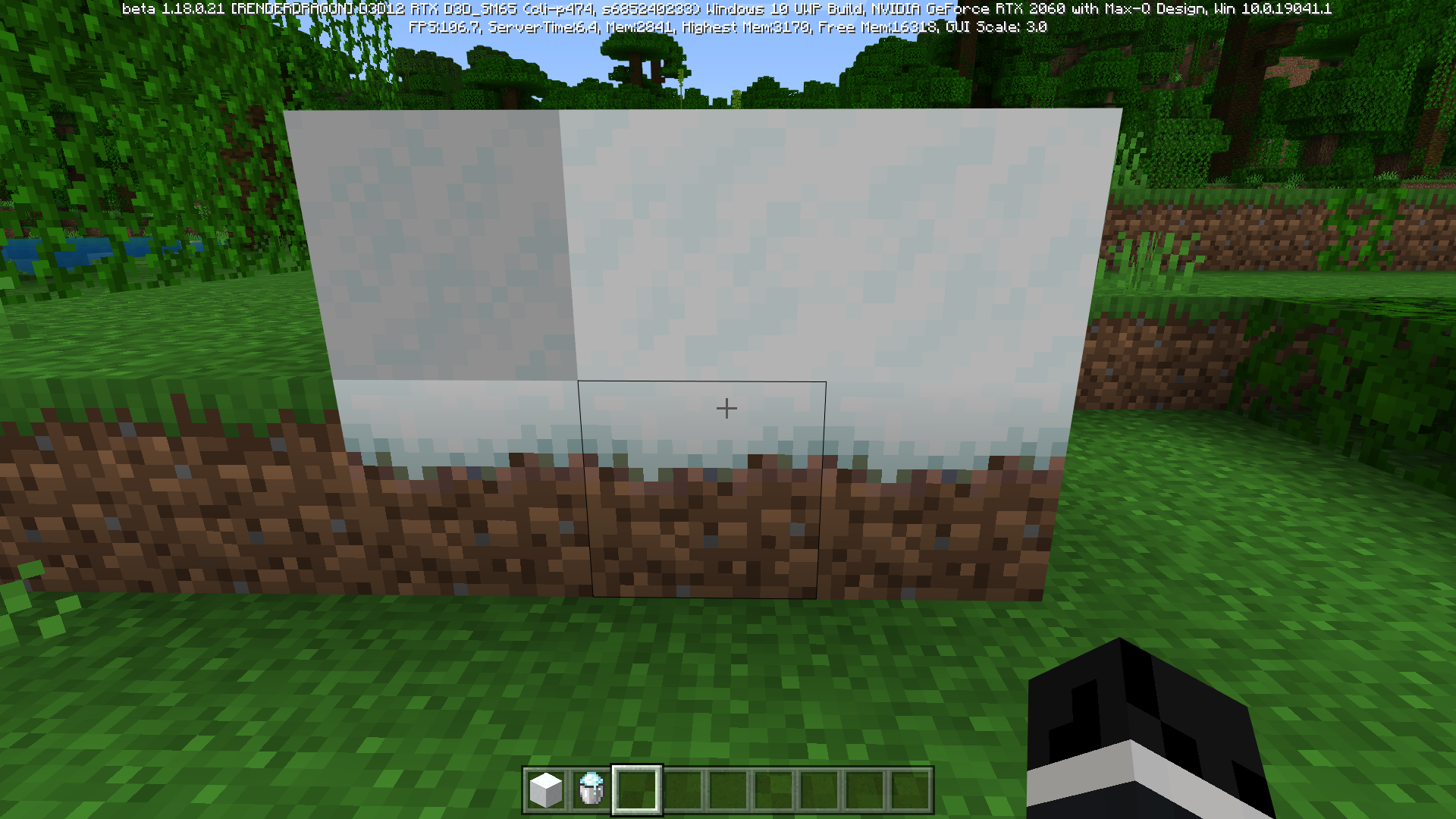


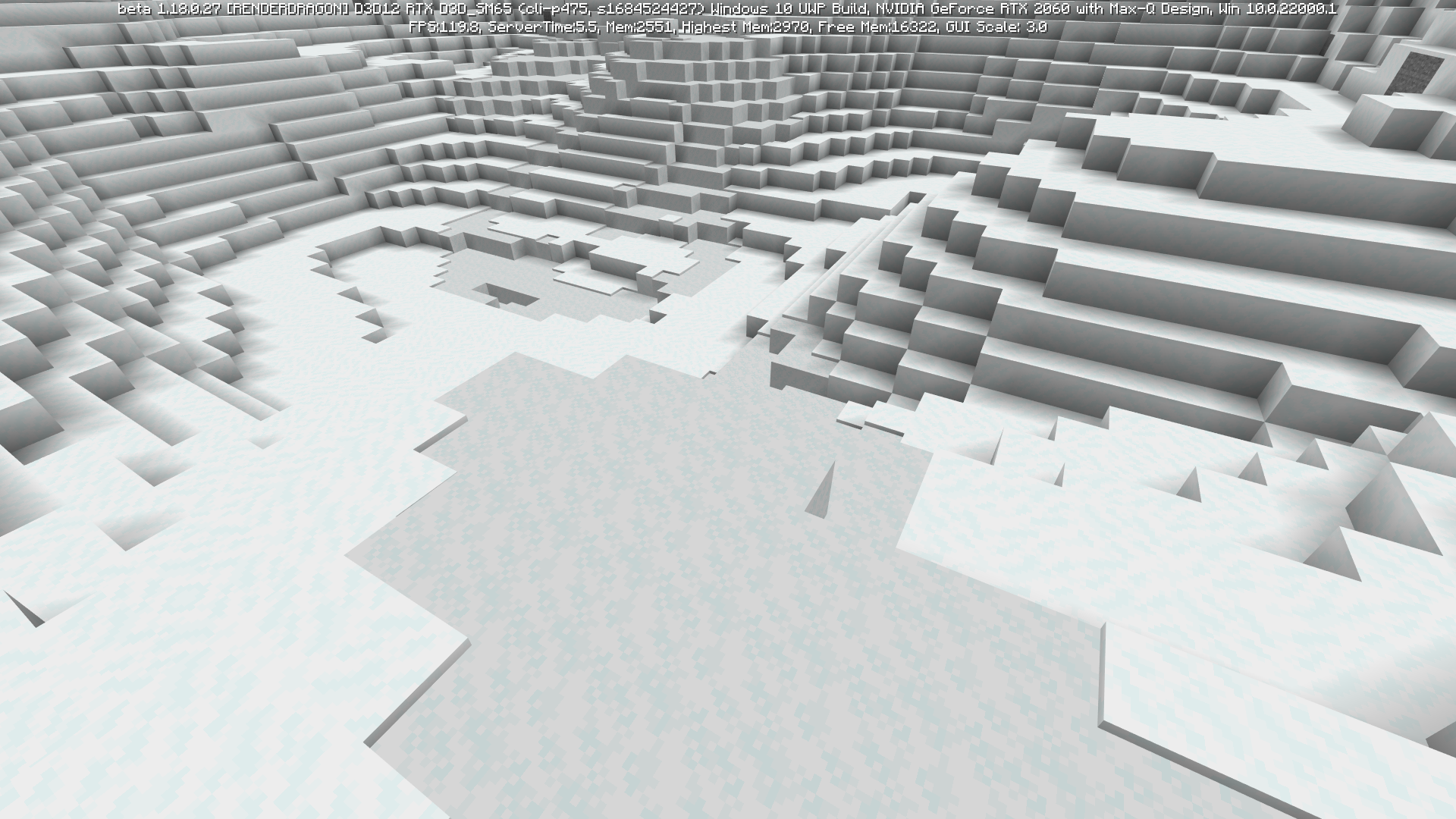


I have the issue as well and I've noticed that it occurs more prominently when moving in the negative z and x direction when compared to the positive.
Description:
Decorators are inconsistent in worlds with the same seedSteps to Reproduce:
1. Generate a world and copy its seed.
2. Make a new world with the same seed
3. Repeat as many times as you likeExpected Behavior:
Each world seed should generate with the same features doneto the decoratorsObserved Behavior:
Each instance of a seed has a different placement of decoratorsWorld Seed: -8718622960759467126
Rough Coordinates: 182, 81, 625Notes:
Possible link to MC-219200Description:
Decorators are inconsistent in worlds with the same seedSteps to Reproduce:
1. Generate a world and copy its seed.
2. Make a new world with the same seed
3. Repeat as many times as you likeExpected Behavior:
Each world seed should generate with the same features down to the decoratorsObserved Behavior:
Each instance of a seed has a different placement of decoratorsWorld Seed: -8718622960759467126
Rough Coordinates: 182, 81, 625Notes:
Possible link to MC-219200
2021-10-02_11.49.41.png
Description:
Decorators are inconsistent in worlds with the same seedSteps to Reproduce:
1. Generate a world and copy its seed.
2. Make a new world with the same seed
3. Repeat as many times as you likeExpected Behavior:
Each world seed should generate with the same features down to the decoratorsObserved Behavior:
Each instance of a seed has a different placement of decoratorsWorld Seed: -8718622960759467126
Rough Coordinates: 182, 81, 625Notes:
Possible link to MC-219200
Can confirm for 21w43a for the Overworld.
2021-10-27_12.17.19.png
A seed is supposed to generate exact the same world on all PC's. But some world chunks seem to have more versions. So most of the world is the same, but in 50% of all instances the seed is used to generate a new world, the seed is different. This is visible in the 2 screenshots I uploaded. There are two versions of this wall: one with coal in it, one with far less coal in it.
I discovered it this way: I was playing along with an LPer with the seed "1862394111". The world was the same, but upon seeing this wall, he had the version with many coal in it, I had just one coal spot. When playing along further, there were more instances (differently placed trees, pools, landscaping). This is kind of frustrating because when an LPer discovered for instance a diamond chunk, it may not be there in my world. This happens with every seed. So every seed has some differently generated chunks.
How to replicate this:
1. Make a world (use the seed "1862394111" or "1862394111" for verification)
2. Go to the coordinates specified on the screen
3. Observe the wall
4. Recreate the world, like ten times
5. Around 50% of the time, the wall looks different. This affects some other chunks as well and affects every seed.
- I didn't quit and reload during playing,
- I tried it at my parents house as well. 50% of the time, the wall was different. So a seed seems to have at least two versions of some chunks.
/tp -189 65 94 0 0Summary
A seed is supposed to generate exact the same world on all PC's. But some world chunks seem to have more versions. So most of the world is the same, but in 50% of all instances the seed is used to generate a new world, the seed is different. This is visible in the 2 screenshots I uploaded. There are two versions of this wall: one with coal in it, one with far less coal in it.I discovered it this way: I was playing along with an LPer with the seed "1862394111". The world was the same, but upon seeing this wall, he had the version with many coal in it, I had just one coal spot. When playing along further, there were more instances (differently placed trees, pools, landscaping). This is kind of frustrating because when an LPer discovered for instance a diamond chunk, it may not be there in my world. This happens with every seed. So every seed has some differently generated chunks.
Steps to Reproduce:
1. Create a world with seed
2. Go to the coordinates specified on the screen
3. Observe the wall
4. Recreate the world, like ten times
5. Around 50% of the time, the wall looks different. This affects some other chunks as well and affects every seed.Observed Results:
Expected Results:
Notes:
- I didn't quit and reload during playing,
- I tried it at my parents house as well. 50% of the time, the wall was different. So a seed seems to have at least two versions of some chunks.
/tp -189 65 94 0 0
Summary
A seed is supposed to generate exact the same world on all PC's. But some world chunks seem to have more versions. So most of the world is the same, but in 50% of all instances the seed is used to generate a new world, the seed is different. This is visible in the 2 screenshots I uploaded. There are two versions of this wall: one with coal in it, one with far less coal in it.I discovered it this way: I was playing along with an LPer with the seed "1862394111". The world was the same, but upon seeing this wall, he had the version with many coal in it, I had just one coal spot. When playing along further, there were more instances (differently placed trees, pools, landscaping). This is kind of frustrating because when an LPer discovered for instance a diamond chunk, it may not be there in my world. This happens with every seed. So every seed has some differently generated chunks.
Steps to Reproduce:
1. Create a world with seed
2. Go to the coordinates specified on the screen
3. Observe the wall
4. Recreate the world, like ten times
5. Around 50% of the time, the wall looks different. This affects some other chunks as well and affects every seed.
Observed Results:Expected Results:
Notes:
- I didn't quit and reload during playing,
- I tried it at my parents house as well. 50% of the time, the wall was different. So a seed seems to have at least two versions of some chunks.
/tp-189 65 94 0 0Summary
Chunks seem to have different variants between instances of worlds with the same seed.Steps to Reproduce:
- Create a world with seed 5666300950629472484.
- Go to the coordinates 5 115 -121.
- Observe the Jungle close to this position.
- Make another world with the same world seed as before.
- Travel to the coordinates listed. (If the spawn is different between instances, teleporting works the best.)
- Observe the jungle close to this position with a focus on discrepancies.
- Repeat as many times as one likes.
Observed Results:
Chunks within the same seed generate differently depending upon the loading order.Expected Results:
Chunks would be identical across all instances of the world seed./tp 5 115 -121
Summary
Chunks seem to have different variants between instances of worlds with the same seed.Steps to Reproduce:
- Create a world with seed 5666300950629472484.
- Go to the coordinates 5 115 -121.
- Observe the Jungle close to this position.
- Make another world with the same world seed as before.
- Travel to the coordinates listed. (If the spawn is different between instances, teleporting works the best.)
- Observe the jungle close to this position with a focus on discrepancies.
- Repeat as many times as one likes.
Observed Results:
Chunks within the same seed generate differently depending upon the loading order.Expected Results:
Chunks would be identical across allinstancesof the world seed./tp 5 115 -121Summary
Chunks seem to have different variants between instances of worlds with the same seed.
The issue appears to occur depending upon the order of chunk generation.Steps to Reproduce:
- Create a world with seed 5666300950629472484.
- Go to the coordinates 5 115 -121.
- Observe the Jungle close to this position.
- Make another world with the same world seed as before.
- Travel to the coordinates listed. (If the spawn is different between instances, teleporting works the best.)
- Observe the jungle close to this position with a focus on discrepancies.
- Repeat as many times as one likes.
Observed Results:
Chunks within the same seed generate differently depending upon the loading order.Expected Results:
Chunks would be identical across all instances of the world seed.Notes:
This behavior appears to be prevalent in both the Overworld and the Nether with no know instance occurring in the end./tp 5 115 -121
Summary
Chunks seem to have different variants between instances of worlds with the same seed.
The issue appears to occur depending upon the order of chunk generation.Steps to Reproduce:
- Create a world with seed 5666300950629472484.
- Go to the coordinates 5 115 -121.
- Observe the Jungle close to this position.
- Make another world with the same world seed as before.
- Travel to the coordinates listed. (If the spawn is different between instances, teleporting works the best.)
- Observe the jungle close to this position with a focus on discrepancies.
- Repeat as many times as one likes.
Observed Results:
Chunks within the same seed generate differently depending upon the loading order.Expected Results:
Chunks would be identical across all instances of the world seed.Screenshots/Videos:
Notes:
This behavior appears to be prevalent in both the Overworld and the Nether with no know instance occurring in the end./tp 5 115 -121
Summary
Chunks seem to have different variants between instances of worlds with the same seed.
The issue appears to occur depending upon the order of chunk generation.Steps to Reproduce:
- Create a world with seed 5666300950629472484.
- Go to the coordinates 5 115 -121.
- Observe the Jungle close to this position.
- Make another world with the same world seed as before.
- Travel to the coordinates listed. (If the spawn is different between instances, teleporting works the best.)
- Observe the jungle close to this position with a focus on discrepancies.
- Repeat as many times as one likes.
Observed Results:
Chunks within the same seed generate differently depending upon the loading order.Expected Results:
Chunks would be identical across all instances of the world seed.Screenshots/Videos:

Notes:
This behavior appears to be prevalent in both the Overworld and the Nether with no know instance occurring in the end./tp 5 115 -121
Summary
Chunks seem to have different variants between instances of worlds with the same seed.
The issue appears to occur depending upon the order of chunk generation.Steps to Reproduce:
- Create a world with seed 5666300950629472484.
- Go to the coordinates 5 115 -121.
- Observe the Jungle close to this position.
- Make another world with the same world seed as before.
- Travel to the coordinates listed. (If the spawn is different between instances, teleporting works the best.)
- Observe the jungle close to this position with a focus on discrepancies.
- Repeat as many times as one likes.
Observed Results:
Chunks within the same seed generate differently depending upon the loading order.Expected Results:
Chunks would be identical across all instances of the world seed.Screenshots/Videos:

Notes:
This behavior appears to be prevalent in both the Overworld and the Nether with no know instance occurring in the end./tp 5 115 -121
Summary
Chunks seem to have different variants between instances of worlds with the same seed.
The issue appears to occur depending upon the order of chunk generation.Steps to Reproduce:
- Create a world with seed 5666300950629472484.
- Go to the coordinates 5 115 -121.
- Observe the Jungle close to this position.
- Make another world with the same world seed as before.
- Travel to the coordinates listed. (If the spawn is different between instances, teleporting works the best.)
- Observe the jungle close to this position with a focus on discrepancies.
- Repeat as many times as one likes.
Observed Results:
Chunks within the same seed generate differently depending upon the loading order.Expected Results:
Chunks would be identical across all instances of the world seed.Screenshots/Videos:
Notes:
This behavior appears to be prevalent in both the Overworld and the Nether with no known instance occurring in the end./tp 5 115 -121
Summary
Chunks seem to have different variants between instances of worlds with the same seed.
The issue appears to occur depending upon the order of chunk generation.Steps to Reproduce:
- Create a world with seed 5666300950629472484.
- Go to the coordinates 5 115 -121.
- Observe the Jungle close to this position.
- Make another world with the same world seed as before.
- Travel to the coordinates listed. (If the spawn is different between instances, teleporting works the best.)
- Observe the jungle close to this position with a focus on discrepancies.
- Repeat as many times as one likes.
Observed Results:
Chunks within the same seed generate differently depending upon the loading order.Expected Results:
Chunks would be identical across all instances of the world seed.Screenshots/Videos:
Notes:
This behavior appears to be prevalent in both the Overworld and the Nether with no known instance occurring in theend./tp 5 115 -121Summary:
Chunks seem to have different variants between instances of worlds with the same seed.
The issue appears to occur depending upon the order of chunk generation.Steps to Reproduce:
- Create a world with seed 5666300950629472484.
- Go to the coordinates 5 115 -121.
- Observe the Jungle close to this position.
- Make another world with the same world seed as before.
- Travel to the coordinates listed. (If the spawn is different between instances, teleporting works the best.)
- Observe the jungle close to this position with a focus on discrepancies.
- Repeat as many times as one likes.
Observed Results:
Chunks within the same seed generate differently depending upon the loading order.Expected Results:
Chunks would be identical across all instances of the world seed.Screenshots/Videos:
Notes:
This behavior appears to be prevalent in both the Overworld and the Nether with no known instance occurring in the End./tp 5 115 -121


Able to load a world with 5,000 plus entities.

Can confirm in 1.18.2.
Minecraft 2021-12-10 14-37-18_Trim.mp4
It appears that jukeboxes give out a redstone signal even if a comparator isn't used.
Minecraft 2021-12-10 14-40-26_Trim.mp4


A more comprehensive view of this issue.

I believe this issue has been fixed as of 1.18.20.21 to at least a level that it is impossible to tell if slowdown is occurring.
Can confirm for 1.18.20.21

Summary:
Drowneds fail to pathfind over enchanting tables, End portal frames, lecterns, chests, bells, cauldrons, and pointed dripstone.
Steps to Reproduce:
- Place down one of the blocks specified
- Spawn a drowned on top of the block
- Spawn a villager near the drowned
Observed Results:
Drowned fails to chase the villager and remains stationary until pushed off of the block.
Expected Results:
Drowned would be able to properly pathfind over these blocks.
Video:
[^Minecraft 2022-02-01 19-02-38_Trim.mp4]
Notes:
Heavy relation to
MCPE-100622but more specialized around drowned as zombies react as expected.

Summary:
Drowneds, turtles, and axolotls (aquatic mobs that can also walk on land) fail to pathfind over enchanting tables, End portal frames, lecterns, chests, bells, cauldrons, pointed dripstone, brewing stands, composters, horizontal lightning rods, horizontal end rods, and horizontal grindstones. The attached worlds may be helpful in confirming this.
Steps to Reproduce:
- Open a test world and set the time to night
- Place down one of the blocks specified
- Spawn a drowned on top of the block
- Spawn a villager near the drowned
Observed Results:
Drowned fails to chase the villager and remains stationary until pushed off of the block.Expected Results:
Drowned should dismount the block and target the villager.Summary:
Drowneds, turtles, and axolotls (aquatic mobs that can also walk on land) fail to pathfind over enchanting tables, End portal frames, lecterns, chests, bells, cauldrons, pointed dripstone, brewing stands, composters, horizontal lightning rods, horizontal end rods, and horizontal grindstones. The attached worlds may be helpful in confirming this.
Steps to Reproduce:
- Open a test world(
MCPE-152043is the newest)- Set the time to night if it is not already
- Place down one of the blocks specified
- Spawn a drowned on top of the block
- Spawn a villager near the drowned
Observed Results:
Drowned fails to chase the villager and remains stationary until pushed off of the block.Expected Results:
Drowned should dismount the block and target the villager.
Summary:
Drowneds, turtles, and axolotls (aquatic mobs that can also walk on land) fail to pathfind over enchanting tables, End portal frames, lecterns, chests, bells, cauldrons, pointed dripstone, brewing stands, composters, horizontal lightning rods, horizontal end rods, and horizontal grindstones. The attached worlds may be helpful in confirming this.
Steps to Reproduce:
- Open a test world(
MCPE-152043is the newest)- Set the time to night if it is not already
- Place down one of the blocks specified
- Spawn a drowned on top of the block
- Spawn a villager near the drowned
Observed Results:
Drowned fails to chase the villager and remains stationary until pushed off of the block.Expected Results:
Drowned should dismount the block and target the villager.Summary:
Drowneds, turtles, and axolotls (aquatic mobs that can also walk on land) fail to pathfind over enchanting tables, End portal frames, lecterns, chests, bells, cauldrons, pointed dripstone, brewing stands, composters, horizontal lightning rods, horizontal end rods, and horizontal grindstones. The attached worlds may be helpful in confirming this.
Steps to Reproduce:
- Open a test world(MCPE-152043.mcworld
- Set the time to night if it is not already
- Place down one of the blocks specified
- Spawn a drowned on top of the block
- Spawn a villager near the drowned
Observed Results:
Drowned fails to chase the villager and remains stationary until pushed off of the block.Expected Results:
Drowned should dismount the block and target the villager.

Summary:
The heart of the Ancient city can have missing blocks of Reinforced Deepslate.
Steps to Reproduce:
- Create a world with seed -1838918361271022879
- Teleport to -187 -21 1700
- Observe the "Portal"/heart of the Ancient city
Observed Results:
One block of Reinforced Deepslate is missing
outfrom the structure.Expected Results:
No blocks of Reinforced Deepslate would be missing.
Image:

Reinforced Deepslate can fail to generate completely
Summary:
The heart of the Ancient city can have missing blocks of Reinforced Deepslate.
Steps to Reproduce:
- Create a world with seed
-1838918361271022879- Teleport to
-187 -21 1700- Observe the "Portal"/heart of the Ancient city
Observed Results:
One block of Reinforced Deepslate is missing from the structure.
Expected Results:
No blocks of Reinforced Deepslate would be missing.
Image:
Summary:
The heart of the Ancient city can have missing blocks of Reinforced Deepslate.
Steps to Reproduce:
- Create a world with seed 4522402648622798733
- Teleport to 924 -22 996
- Observe the "Portal"/heart of the Ancient city
Observed Results:
One block of Reinforced Deepslate is missing from the structure.
Expected Results:
No blocks of Reinforced Deepslate would be missing.
Image:

Summary:
The heart of the Ancient city can have missing blocks of Reinforced Deepslate.
Steps to Reproduce:
- Create a world with seed 4522402648622798733
- Teleport to 924 -22 996
- Observe the "Portal"/heart of the Ancient city
Observed Results:
One block of Reinforced Deepslateismissing from the structure.Expected Results:
No blocks of Reinforced Deepslate would be missing.
Image:
Summary:
The heart of the Ancient city can have missing blocks of Reinforced Deepslate.
Steps to Reproduce:
- Create a world with seed 4522402648622798733
- Teleport to 924 -22 996
- Observe the "Portal"/heart of the Ancient city
Observed Results:
Some blocks of Reinforced Deepslate are missing from the structure.
Expected Results:
No blocks of Reinforced Deepslate would be missing.
Image:

![[Mod] ampolive](../../../data/avatars/users/18949.svg)
Brent Not true, this is a parity break occurring after the world generation changes done in 1.17-1.18.

Brent this issue is NO duplicate of MC-135996 maybe related, still different.
Because this issue does NOT exists since version 1.18.
In e.g. 1.17.1 the stronghold where correct detected by ender eye AND the Locate-command.
So whatever caused this problem must be anything that was changed from 1.17.1 to 1.18
![[Mod] Les3awe](../../../data/avatars/users/79847.png)
@Brent, done.
Brent I was writing a comment on your original ticket MCPE-152043 when I saw you commented here. Because your affected versions include this ticket's fix version, there was a conflict, so I just tested it. This was actually fixed in 1.18.20.21 Beta and remains fixed in 1.18.20.23 Beta, for both the blocks listed above and those in your ticket. What your attached video shows isn't actually this problem, although the confusion is understandable. What your video actually shows is that drowned don't attack villagers on land during the day. If you repeat your test with the time set to night, the drowned will instantly go after the villager.
This matches the behavior drowned exhibit toward players, so it might be intentional, but I have no authoritative information either way about that. If it's not intentional, it's a bug, but it isn't what you described in your ticket so your ticket will remain closed as a duplicate of this one. If you believe it's a bug, you might want to create a new report. That report needn't mention short blocks, since they have nothing to do with the behavior.
![[Mod] EVGENSYPERPRO](../../../data/avatars/users/92853.png)
Brent: it will be tracked in MCPE-141154
Well I don't know how to snap pictures of the problem without another device also how am I supposed to know if the bug is on IOS but just if you can't read the sign unless you are right next to it then you have the same bug Note: I don't even know what gen of kidle I have
Thanks but I don't know how to connect it to the document but it has been sent to mojang
Signs are still unreadable in 0.11 and there are no block breaking pixels
Its for both single player amd multi-player
More info it has something to do with the block highlight
Yes
Can confirm in 21w39a unknown if present in the End, present in the Nether.

I wouldn't say so, as MC-55596 deals with chunk generation and block data. That issue is quite rare and difficult to reproduce but appears smaller in scale, whereas this issue and MC-219200 deal with all decorators and is relatively easy to mass-produce. MC-55596 does, however, lead to similar instances but on a smaller scale, usually one or two chunks. But if compounded could lead to a more significant difference within decorator or possibly terrain generation.
Brightness doesn't matter for this it only gets more pronounced the lower the level.





100% Brightness
75% Brightness
50% Brightness
25% Brightness
0% Brightness
Can confirm in 1.18.0.21 beta
Water sources/springs can generate in Java within ice but not lava.
Most likely an error within lava spring and water spring placement causing for them to overgenerate. It appears the rates were boosted to high causing overgeneration but only within ice. Lava generating in ice is a separate issue.
Cannot confirm
Can confirm
Seems to be somewhat fixed with less discrepancy as a whole but still major inconsistencies.
It appears that this issue is solved. The discrepancies noted appear to be MC-55596.
Can confirm for 21w43a
Overall, it can be stated that this issue is much more common than anticipated.
MC-238073seems to have covered up this issue making it harder to detect. As shown in screenshots, chunk consistency is now higher, with a few chunks being consistent across all images. However, this issue is much more pronounced than before 1.18. It is likely that the severity ofMC-238073was in part caused by this issue. This can be proven with the nether as its terrain generation is unchanged with the small instance documented being one of the few examples for this issue. However, the Overworld is covered in this issue making it incredibly easy to document.Can confirm in 21w43a. Possible relation to MC-55596.
That is a chunk border. Have you generated this world before this snapshot? If you have, you will have these unless the world is from 1.17, then chunk blending will take over, making smooth edges. If I am correct, then this is not an issue and is working as intended.
This is expected behavior. Redstone Repeater – Minecraft Wiki (fandom.com).
A similar issue occurred for me but happened upon the launch of Java edition resulting in the same crash.
Issue
BSOD crash happened upon the launch of Java edition. High GPU usage was present with it reaching 100% usage on the integrated graphics card during the launch of the game. The issue was not fixed when changing the graphics card from integrated to high power.
Fixed by using the old launcher.
Under futhur testing a temporary fix is to reinstall the MS launcher/new launcher, however, the issue usually reappears after a few instances of running Java Edition with two being the number I reached.
Relation to
MCL-19992Yes but most likely caused by a similar issue if not the same issue as the crash will throw an error/failed in wcifs.sys. Showing issue summary below. Add information if you wish.
Issue
BSOD crash happened upon the launch of Java edition. High GPU usage was present with it reaching 100% usage on the integrated graphics card during the launch of the game. The issue was not fixed when changing the graphics card from integrated to high power.
Fixed by using the old launcher.
Under futhur testing a temporary fix is to reinstall the MS launcher/new launcher, however, the issue usually reappears after a few instances of running Java Edition with two being the number I reached. This most likely means it is some kind of file corruption issue when launching an instance of Java Edition or the incorrect handling of a modified file.
Duplicate of
MCL-20009.Potential Duplicate of
MCL-20009/MCL-19992/MCL-20023.Potential duplicate of
MCL-20009/MCL-19992Most likely
MCL-20029.Most likely
MCL-20029/MCL-20009.True from the info gathered Windows 11 appears to be the common thread between all variants of this issue. I would recommend to move common info to the oldest issue thread.
Seems that the BSOD crash occurs in Windows 11 (Build 22000.282 to be exact) instances, look at
MCL-20009/MCL-20023/MCL-20029/MCL-20035. Assuming no other similar variable it can be said that the error is within Windows 11. If any other operating system is affected, I would recommend noting it below.Duplicate of
MCL-19992.Matches Java Behavior. Appears to be two separate issues documented. Most Likely MC-236649 for image 3 within the Java Project.
Image of world seed shown but in Java Edition.
-Terrain Builder Issue (MC-236649)

-Biome Builder Issue (MC-240485)

Wrong version. Please report only Java Edition issues in the Java Project.
It appears this issue has something to do with the Biome Builder causing the Biome Builder to not match the expected results of the Terrian Builder.

Small information update
Description
Biomes can generate in the ocean. Most likely caused by an inconsistency within the Terrian Builder and Biome Builder.
Step to Reproduce
Observed Behavior
Biomes (Deserts and Stony Shore, possibly others) can generate in the ocean.
Expected Behavior
The ocean would generate instead of these biomes or an island would generate.
Relates to
MC-241032but for the Bedrock projectCan confirm as well.
Duplicate of
MCL-19992. If you have evidence of this crash occurring in a different operating system (Other than Windows 11), please add the operating system to the report listed.Duplicate of
MCL-19992.Duplicate of
MCL-19992.Relates to
MC-241111Duplicate of
MCL-19992.Duplicate of MC-239041.
Modded variants of Minecraft are not supported if you can reproduce the issue with an unmodified variant I would recommend updating this report or opening a new one. Otherwise, this report is invalid.
Duplicate of
MCL-19992. If you do not have a Windows 11 instance for your operating system, please update the listed ticket with your operating system.This is a parity issue that is most likely before the Buzzy Bees update meaning it cannot be reported on the bug tracker and must instead be added to the feedback site.
https://feedback.minecraft.net/hc/en-us/community/topics/360001191251-Parity
Note: Incorrect information is present in this comment.
Not enough info, can you please provide a full screenshot of the Redstone and/or a world file. Otherwise, most likely expected behavior.
Then yes, this can be reported then. But is it a Java issue or Bedrock? Personally, I prefer Java generation over Bedrock. Potential relation to MC-236872.
Please provide seeds and coordinates for images; otherwise, it can be assumed that this matches expected behavior when compared to Java Edition.
Please provide world seeds and coordinates; otherwise, it can be assumed that this is expected behavior when compared to Java Edition. Possibly
MC-125033and/orMC-124988but in the Java Project.Use the command /give to get the bundle item as they are not being added in 1.18, so they can only be obtained through commands like the sculk sensor. Otherwise, this ticket is working as intended.
Is this on a chunk border? If so MC-125007 is most likely the issue you are reporting.
This is expected behavior as the ore generation was tweaked to allow this to occur.
Behavior matches Java Edition. Most likely works as intended.
Java Edition

Bedrock Edition

@Gabyplusyt please do not add images that have no value to the issue being discussed.
This would then be considered feedback and should be put in the feedback thread instead of the bug tracker.
Caves & Cliffs – Minecraft Feedback
Can confirm in 1.18.0.27 in relation to flower generation causing them to over generate compared to Java Edition.
Seed:
-1216849799
Coordinates:
1309 146 672
Java Edition


Bedrock Edition
Can confirm in 1.18.0.27.


Duplicate of MCPE-121708.
Related to (if not duplicated by) MCPE-141447. However, experimental generation is much closer to Java Edition than 1.18 generation.
Can confirm in 1.18.0.27. In general the color is much warmer in Java Edition and works better with the flowers and vegatation.
Java Edition


Bedrock Edition
New noise cave generation is consistent with Java Edition; however, cave carvers and ravines are still inconsistent with Java Edition. Cave carvers still seem to fail to completely generate within 1.18.0.27. Whereas ravines seem to be never present, at least at the surface level. I would say this is a good opportunity to make cave carvers and ravines consistent with Java Edition, as they seem to fail in generation anyways.


Java Edition
Bedrock Edition
Cave Carvers - Bedrock


Cave carvers that do generate connected to others, overgenerate resulting in a swiss cheese look with each section usually generating short in length.
Cave Carvers - Overgeneration
Seed: -806427813
Coordinates: -4917 119 881
Seems similar to MCPE-121708.
Can confirm for 1.18.0.27 beta

This is because Java supports numbers up to 2^64, whereas Bedrock supports numbers up to the value of 2^32
This is expected behavior for noise cave generation. MC-236613 is an issue similar to the behavior you posted but more of the general underground. Otherwise, most likely, working as intended.
Modded environments are invalid. If you can reproduce the behavior in the base game, feel free to update the current ticket or post a new one. Otherwise, post your issue on the developer's support branch.
Modified game states are considered invalid. The issue you experienced is from modifying world data. This does not fall into the jurisdiction of the developers.
Please attach the crash report from the crash report directory.
%appdata%\.minecraft\
Same issue as
MCPE-147398but in the Java Project. Resolved as works as intended. However, as pointed out by other people, feel free to add something into the suggestion thread.This is intended behavior for the command and thus would not be considered an issue. Instead, your report would be considered a feature request, and thus, should be placed on the feedback website, not the bug tracker.
Duplicate of
MC-239878. Resolved as won't fix.This appears to follow the expected behavior for noise caves. Please, do not post reports that do not showcase any issue. Otherwise, this ticket is invalid.
Cannot reproduce with the command
/kill @e[type=#minecraft:raiders]
most likely entered command
/kill @e[type=!#minecraft:raiders]
No, the command thread in Java Edition supports the # sign to represent a type class and a ! for a not symbol. Bedrock edition does not support the # sign nor does it have the raiders tag. Your variant of the game can thus be concluded to be modified making it invalid for it lacks command modifiers.
Can confirm for 1.18.10.20
Can confirm for 1.18.10.20

World data is impossible to uncompress due to the path being too long (the file was overcompressed). Otherwise, files for the fabric loader seem to be present in the data folder making the world invalid for testing/reporting. If you can reproduce the issue in an unmodified environment, feel free to add a new report or update the existing report. Otherwise, this ticket is invalid.
The crash log is also from a modified variant of the game. All modified instances are considered invalid.
Able to load a word with 9,000 plus entities. Unable to produce a crash at these levels.

(You will reach a crash eventually but this is expected behavior, a possible solution is to put a cap on entities)
Most likely a case of precision errors again. Would require reworking the number handler making it impossible to fix currently. Of course, it could be an infinite/max value but difficult to test without digging into the code. Otherwise, most likely another error with how Bedrock Edition handles numerical values.
The issue is primarily that Bedrock Edition can only support numbers up to 232 causing precision calculations to fail. This issue is nearly impossible to fix (at least right now) because of this limitation. To fix this would require a massive reworking of the internal structure of the code and could cause catastrophic issues. This is why these issues shall not be fixed. I expect though, that it is something the developers are looking into based upon the push for seed parity and the like.
Duplicate of
MCPE-128005.Duplicate of
MCPE-125388orMCPE-108568.Expected behavior.

Cannot reproduce.

Most likely a case of lag causing you to enter unloaded chunks. So, the collision data wasn't loaded when you entered the region.
Expected behavior per the changelog. So, works as intended.
Seems to me that biome blending tore the structures apart and attempted to blend them into the terrian.
The big issue, as pointed out, is the limitations of Bedrock Edition's number handler. Your solution is not horrible and could solve a few of the issues caused by the number handler, but it fails to solve the root of the problem, with that being the number handler itself. The only solution that can solve these issues is changing the number handler to support values up to 2 64 . Examples of these issues are simple to find with the stripped lands being a good showcase.
Duplicate of
MC-238499. Resolved as works as intended.There is not enough information to test this issue. Please provide the world seed and coordinates of the village.
There is not enough information to test this issue. Please provide the world seed and coordinates of the village. Beyond that, most likely a villager attempted to jump onto its workstation block and trampled the farmland in the process.
Duplicate of
MCPE-149214.That's because 1.17 and 1.18 use different generation algorithms. Nor does Minecraft support version downgrades. Along with this, all 1.18 chunks are completely (ish) incompatible with the default 1.17 generation.
This should also be moved to the Minecraft Launcher Project folder as it has nothing to do with the Vanilla game. Mostly likely a duplicate of
MCL-16943as well.Duplicate of
MC-135996. Relation to MC-195340.Duplicate of
MC-135996.Duplicate of MC-172449. Also, moddified game states are considered invalid.
Able to produce behavior, and as stated before, this is likely due to incompatibilities between chunk data of versions causing 1.17 to void the chunks. Otherwise, this ticket is most likely invalid or working as intended.
Duplicated by or related to MC-195340. It appears that /locate uses a system independent of world data causing these issues.
Most likely a duplicate of
MCPE-149214.From what I can tell, both of these issues are from the blending system. The second image is
MCPE-143505. However, the report is that the temperature map was stuck in the cold biome zone, which has no relation to the blending system. Please provide the world seed; otherwise, there is not enough information for testing. Also, one thousand blocks is not a good test case for the behavior you are documenting. Some biomes can expand for a few hundred blocks.This report is invalid. Please do not remake your report or make a report promoting a report.
Modified game states are considered invalid. If you can reproduce the issue in an unmodified game state, feel free to create a new report or update the existing report. Otherwise, this ticket is invalid.
As stated by Dhranios, this issue is
MC-135996, with it having the same cause but in a different version. This behavior has also been documented for other structures meaning it all relates to the same issue with the /locate command (and eyes of ender in extension) failing to locate pre-existing structure data.Modified game states are considered invalid. If you can reproduce the issue in an unmodified game state, feel free to create a new report of the issue or update the existing report. Otherwise, this ticket is invalid.
Able to locate temperate biome at -867, 104, -686 using world seed provided. Cannot reproduce any unexpected behavior. It appears that this ticket is invalid for it lacks any definitive issue, and the one provided cannot be reproduced. If this doesn't match up with your world, please provide a screenshot of the region. (Note: if you have already loaded these chunks in 1.17 do not document them as no data can be obtained from this)

If this issue is still occurring, add your crash report to the ticket and provide a world download. Sometimes issues can hide other issues, or your server could be a special instance of this problem. Steps to reproduce would also be useful. There is no way of knowing if an issue is fully fixed without a massive group of test cases. Since this issue has not been opened since then, it can be concluded to be rare in nature. There is little need to make accusations as all issues can reemerge; it is the nature of game development.
Yes, this is expected behavior. The only issue you documented was the generation of sugar cane on gravel, which is impossible through player actions and only possible from a world generation check failing, which is most likely related to
MCPE-134965andMCPE-135812.Please provide images of this issue occurring. From the description, though, this ticket seems to duplicate MC-125007.
Duplicate of
MCPE-125388.Duplicate of
MC-242658, which was marked as works as intended.Can confirm in 1.18.2. Updated description of the issue.
Summary:
Jukeboxes give out a redstone signal natively.
Steps to Reproduce:
Observed Results:
Jukebox gives out a redstone signal without being connected to a comparator.
Expected Results:
Jukebox doesn't give off a redstone signal unless connected to a comparator.
Screenshots/Videos:


Minecraft 2021-12-10 14-37-18_Trim.mp4
Minecraft 2021-12-10 14-40-26_Trim.mp4
Please attach the world seed and coordinates of this issue.
Then working as intended via Mincreaft 1.18 Changelog
Passage in changelog
UPGRADING OF OLD WORLDS
A new Bedrock layer is placed at y=-64
I would like to request ownership of this ticket as the original owner hasn't been active for upwards of 6+ years.
Relates to MC-240977.
Can confirm for 1.18.2.


Duplicate of
MCPE-125388.Sculk Sensors do not naturally generate, nor are they in the creative inventory. You can only access them through the Vanilla Expirements toggle and even then only in creative.
Expected behavior as per the 1.18 changelog.
Blocks
It's not "too complex" more that this report is too general, and knowing that Minecraft uses a large amount of the CPU at the start of the game doesn't give enough data to solve these issues. The only reasonable solution is to target main resource dump locations and optimize them while accepting that as Minecraft gets more complex, resource usage will continue to increase.
Duplicate of
MCPE-145612.Behavior aligns with Java Edition. At most, this would be a parity fix; otherwise, this issue works as intended.
Duplicate of
MCPE-144208.Duplicate of
MCPE-144208.Duplicate of
MCPE-125388.Duplicate of
MCPE-144208.Duplicate of
MCPE-144208.What you are describing is more of a feature request, not a bug report. Feedback should be added to the Minecraft Feedback Website, not the bug tracker. Otherwise, works as intended.
The problem is that you have made the statement of flat terrain being removed or decreased in frequency. However, this issue has failed to be reported in both the experimental snapshots and snapshot/beta phases. It can thus be safely concluded that the terrain generation at current is the intended outcome with this report relating to a desire for a change of the intended outcome and thus a feature request. However, if you have located discrepancies in the Bedrock world generation in comparison to Java, that behavior can be reported.
On a personal level, though, I have never noticed an issue and have located a multitude of seeds during the development phase that have flat areas close to world spawn. I feel the main issue is that Bedrock worlds used to generate larger biomes on average when compared to Java, resulting in Bedrock worlds now feeling more hilly, whereas Java worlds feel about the same on average, with the main cause of your problem being seed parity and the old Java generation being the basis for the new terrain generation. On that level, this issue works as intended.
Duplicate of
MCPE-125388.I consider a flat area being a region where elevation changes are on a level of 5-7 blocks from a central point.
Seed: -791946932
I consider this region relatively flat.
Seed: 1545031370
This seed has relatively flat areas around a coastline.
Seed: 1985244504
Another seed that has a relatively flat region near spawn (if you like snow).
These seeds were quick and on the fly, with better examples being possible to find but not showcasing suggested data.
Java Edition 1.17 for comparison.

Duplicate of
MCPE-125388orMCPE-144208. It is hard to tell.Duplicate of
MCPE-144208.Duplicate of
MCPE-125388.Duplicate of
MCPE-125388.Relation to MCPE-100217 but with a structure that has yet to be reported.
Can confirm for 1.18.2.
Minecraft 2022-01-03 14-04-21_Trim.mp4
A more comprehensive view of this issue.
Minecraft 2022-01-03 14-18-46_Trim.mp4
Duplicate of MCPE-141497.
Duplicate of
MCPE-144208.Duplicate of
MCPE-144208.This issue should possibly be reopened as it has been shown through other item models that 3d effects can be added to hotbar items, with a good example being the grindstone and the lectern. Otherwise, effects 1.18.2.
Duplicate of
MCPE-144208.Duplicate of
MCPE-151506.Can confirm for 1.18.10.26
Can confirm for 1.18.10.26
Can confirm for 1.18.10.26
Can confirm for 1.18.10.26
Can confirm for 1.18.10.26 and 1.18.2. Note: this issue seems to occur in the same way every time leading to the conclusion that the decorator that adds the vines to the trees is incorrectly placed when in relation to the tree.
Can confirm for 1.18.10.26
Can confirm for 1.18.10.26 with a relation to MCPE-147142 being present.
Can confirm for 1.18.10.27
Duplicate of MCPE-130350. Please do not create duplicate reports for issues when you already know the original posting for this issue.
This issue is already being internally tracked as indicated by the ADO number(s). Please vote for issues that you prioritize; otherwise, these issues are put off until later, with more critical issues being focused on first.
Report should be closed as 1.18 has released and expected materials now generate.
Can confirm for 1.18.20.21. This issue kind of defeats the purpose of powdered snow as a trap block.
I believe this issue has been fixed as of 1.18.20.21 to at least a level that it is impossible to tell if slowdown is occurring.

Minecraft 2022-01-27 19-14-22_Trim.mp4
Minecraft 2022-01-27 19-39-22_Trim (2).mp4
I do believe this issue is more widespread than just the jump button. I have noticed myself that the diagonal movement options became stuck leading to endless strafing until the arrow pad is released.
My device is a Galaxy S21 model SM-G991U. Running Kernel version 5.4.86-qgki-23396388-abG991USQU5BULJ on Android version 12.
Duplicate of
MCPE-151921.Duplicate of
MCPE-144208.Please include more information as understanding your issue is nearly impossible currently. But this is most likely a duplicate of
MCPE-144208based off the tags and the clips of the village. So, doesMCPE-144208describe your issue?What achievements are you having problems with? And are cheats enabled in your world? Are you using a behavior pack? These answers are kind of necessary to understand the issue.
Most likely works as intended based off of
MC-199231.Can confirm for 1.18.20.21
Duplicate of
MCPE-144208.Cannot reproduce. At least not on my device.
I cannot reproduce as of 1.18.20.21, at least with my understanding of the issue. Whenever the world of seed -365103615 is created, the world spawn is in the same spot on the ground. I also attempted to trigger this event using the respawn cycle, and no issue was detected. Please include additional steps for reproduction as, otherwise, there is no way for anyone to reproduce your issue.
I cannot reproduce, at least as of 1.18.20.21.
Does
MCPE-149193describe your issue? If it does, try to open a backup from before 1.18, asMCPE-149866can stop your world from working. However, it is strange that your world is still corrupted. Have you opened the world after or before 1.18.2?Related to
MCPE-145612and probably caused by the issue.Duplicate of
MCPE-146021. Resolved as won't fix. Should possibly be reconsidered as Bedrock edition now supports 64-bit values as of 1.18.20.21.Seems like a duplicate of
MCPE-143505.Duplicate of MCPE-25228 or MCPE-17595 in at least relation to the beacon beam side.
That is TPS lag and most likely compounds on top of the issue I stated. However, TPS lag is difficult to track down with your report being too general to target individual causes of TPS lag.
This is expected behavior as conversions between Java and Bedrock (Pocket) Edition are not supported. Your world is generating new chunks at the expected level as if you generated a super flat in 1.18 where chunks generate at -60 unless you created your world pre-1.18. Java Edition cannot tell that your world was generated before 1.18. This ticket is thus invalid as world conversion is not a supported feature.
Yes, that is expected behavior as 1.18 has released. You HAVE to upgrade your worlds to play in 1.18 so the game asks you to create a back-up, so the risk of your world breaking is decreased to a negligible level. If that is the issue you are describing, then this report can be closed as works as intended.
This is most likely a renderdragon issue which is why it has not appeared on the Switch and likely won't appear on any platform that has yet to have renderdragon enabled.
Duplicate of
MCPE-151944.Duplicate of
MCPE-144208.Duplicate of
MCPE-105535or one of the tickets related to it.Duplicate of
MCPE-130262.Duplicate of
MCPE-147817. Suggestions should be left on the Minecraft Feedback website.Most likely render dragon related with the support for third party shaders being cut. Minecraft with Ray Tracing and Advanced Graphics FAQ – Home gives some info on render dragon. But it could be something else.
Excerpt from the article:
Does Render Dragon Support Community Shaders?
Currently, Render Dragon does not support 3rd party community shaders. Any community shaders previously used on Minecraft for Windows may not run on a Render Dragon version of the game.
Render Dragon isn't just for ray tracing one of the biggest components is the spectral effect which wasn't possible to add into bedrock edition using the old rendering system. This also expands into even more functionality that could be added into the future like colored lighting and so on. On most devices Render Dragon actually improves performance by a large margin but requires more power/resources.
Relation to MCPE-74696 and
MCPE-97408.This issue will be fixed when 1.18.10 launches. So neither, you just have to wait until the next update.
Drowned fail to properly pathfind over enchanting tables, End portal frames, lecterns, chests, bells, cauldrons, pointed dripstone, brewing stands, composters, horizontal lightning rods, horizontal end rods, and horizontal grindstones. Turtles and axolotls get caught in a spinning loop on bells, end portal frames, brewing stands, lecterns, chests, and horizontal grindstones. Axolotls and baby turtles cannot exit composters or cauldrons. Turtles fail to pathfind over obstacles and get stuck in place as well. Otherwise, on my quick pass, most mobs pathfind correctly.
The time was set to night.
[^Minecraft 2022-02-04 19-50-23_Trim.mp4]
MCPE-100622 Drowned.mcworld Test.mcworld
These hopefully will help. And the drowned was due to testing and that I was near the seafront with mob spawning turned on. It was how I originally found out about the drowned issue being that a drowned walked on to a bell a got stuck on it.
Duplicate of
MCPE-125388.No this is in the wrong project and should be moved over to the Minecraft Realms project. Beyond that, this would be a game crash. What actions did you or someone take while in the realm to lead to this issue? Was it immediately at launch of the realm? Do you have any way of providing the world file? Can you reproduce this issue on any other device?
Wrong project should be moved over to the Bedrock project or Bedrock dedicated server project. Beyond that, more information is needed. What exactly happened? Because the issue you appear to be describing is MCPE-55815 or possibly something related.
This issue appears to be fixed as of 1.18.20.25.
Minecraft 2022-02-09 12-14-41_Trim.mp4