Persistent Chunk error / Corrupted world / Wrong location spam
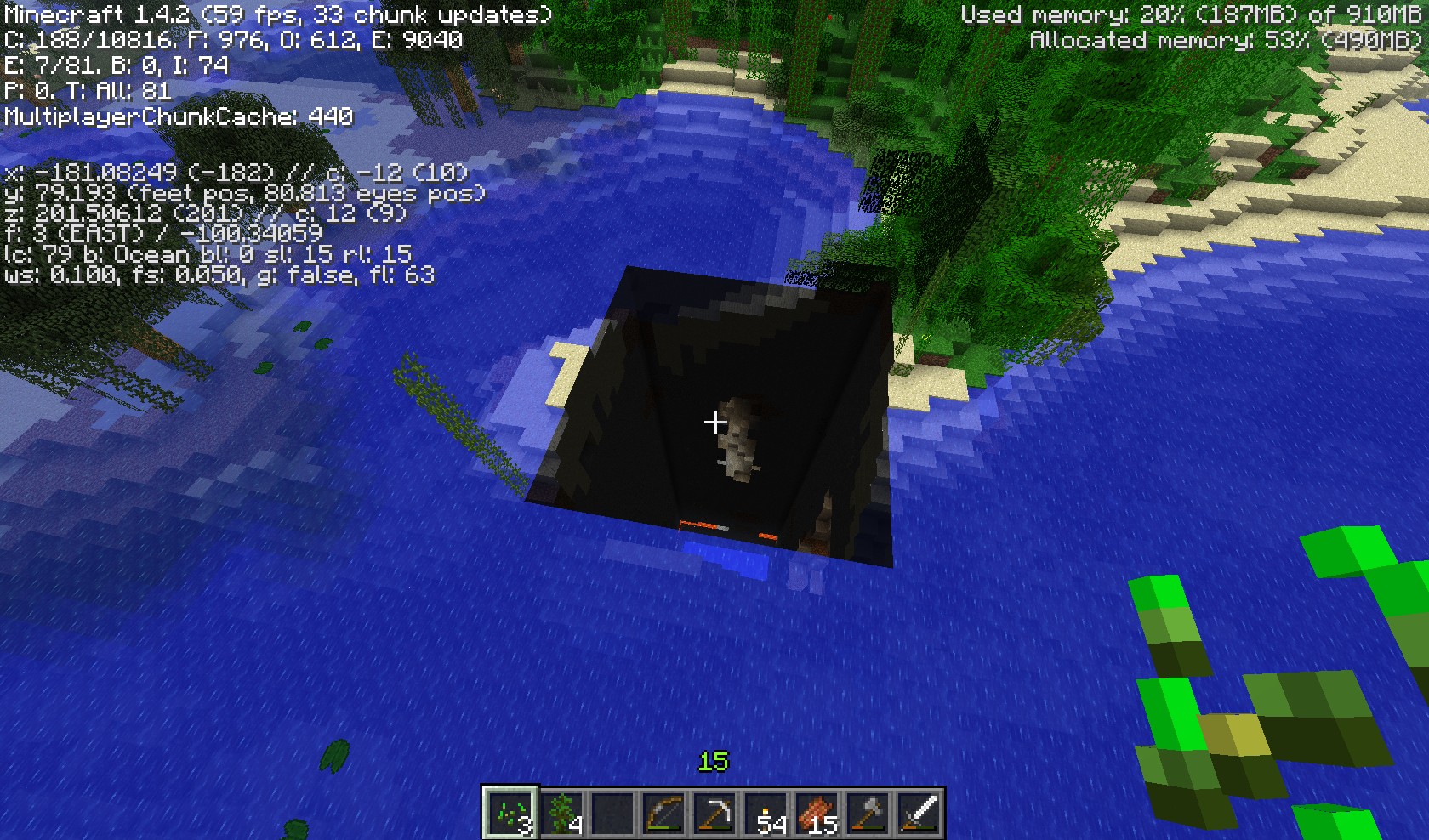
Chunk error in my single player world, is not fixable with a relog at all. World was generated in 1.4.2, and has been played through to 1.4.4 pre but only since 1.4.4 pre has the chunk error happened.
Environment
Windows 8 (Windows 7 compatibility mode)
Linked Issues
is duplicated by199
 MC-5399NullPointerException on server startDuplicateMC-54631.4.6 Server-Side chunk errorsDuplicateMC-5676Unloaded chunksDuplicateMC-6433Player is stuck in a block that not loadedDuplicateMC-7264Random Server CrashDuplicateMC-8279Falling into void in unloaded chuncks not causing dameage at -64DuplicateMC-8545world holesDuplicateMC-8564missing chunck in solo gameplayDuplicateMC-8767Permanently damaged chunks, ghost chunksDuplicateMC-8769CHUNKS NOT LOADING CAUSING MASSIVE LAGGDuplicateMC-9020Pigs are spawning everywhere and big black holes appear.DuplicateMC-9207The blocks disappear.DuplicateMC-9228Chunks not loading? DuplicateMC-9528Large shadow area never illuminatesDuplicateMC-9969Missing chunk at origin chunk (0,0)DuplicateMC-10606World chunk (Only one that we know of) dose not load at all.DuplicateMC-10672I got on my server without wifi i went to my mansion and there was a hole from the sky to bedrock, i got on wifi same problem, upgraded to the newest snapshot and it is still there.DuplicateMC-10911Can't Load Save WorldDuplicateMC-11159Chunk doesnt loadDuplicateMC-11246Weird Chunk/Block ErrorsDuplicateMC-11301Wrong Location in the console / Extreme FPS lag + chunk updatesDuplicateMC-11627[SEVERE] Wrong location! rb['item.item.rottenFlesh'/3717, l='world', x=164.87, y=71.13, z=-315.88DuplicateMC-12237World being self-destructDuplicateMC-12993Logged onto world and all except three chunks were missing--voidDuplicateMC-13092I was playing harcore single player, and everything but the chunk I was on dissapeared. No matter how many times I log out and back on, it's still gone.DuplicateMC-13134Unfixed Chunk ErrorDuplicateMC-14740chunks not loadingDuplicateMC-14938Giant world holesDuplicateMC-15000Chunks not loading DuplicateMC-15141Chunks randomly dissapearingDuplicateMC-15167World Corruption?DuplicateMC-15231Minecraft doesn't do things anymoreDuplicateMC-15344Error in loading Nether chunksDuplicateMC-15375World Generation IssuesDuplicateMC-15630CrashDuplicateMC-15977Game ticksDuplicateMC-15986Chunks not loading worldDuplicateMC-16474The game have created a "black hole" in the map.DuplicateMC-18330Some chunks aren't loaded, and lead straight down into the void. When you jump in you slowly float down to y 0 and stay there. You can then walk around in the void.DuplicateMC-18552There is an area that is zero fps, has dataless holes in the ground, sheep number in the hundreds there. And the world is just not loading normallyDuplicateMC-19034Wrong location of some mobsDuplicateMC-19249my world got filled with betaholesDuplicateMC-20355FPS drop - Launcher stuckDuplicateMC-20953[SEVERE] Wrong location!DuplicateMC-221121.6.1 will not load my world!!!DuplicateMC-23182semi-transparent black column that is impassableDuplicateMC-23197Wrong Loaction Mob DuplicationDuplicateMC-24760Extremely bad lag and console is spamming Entity in wrong placeDuplicateMC-25493i was in a mine getting wood en found the enderportal only it wasnt comleet there was a big hole after it DuplicateMC-25670big holesDuplicateMC-25792chunk errors in old mapsDuplicateMC-25818Permanent Chunck not LoadingDuplicateMC-26023Chunks lost - Server BugDuplicateMC-26058bug holes that wont disappere when i reloggDuplicateMC-26421a random hole appeared in the middle of the game. once i jumped down it i sank and couldn't jump or move upward. once i hit the bottom it bugs out and i res cannot close the launcher.DuplicateMC-26709A large section of the map (vertical rectangular solid) is missingDuplicateMC-2703816by16 area that cant be usedDuplicateMC-27543Wierd chunk error does not dissapairDuplicateMC-28003Chunks don't load at allDuplicateMC-28247Chunk won't loadDuplicateMC-28509I can't play my world!DuplicateMC-285161.6.2 black hole bugDuplicateMC-29204Server CrashDuplicateMC-29337Chunk ProblemsDuplicateMC-30525A big black hole till the voidDuplicateMC-30611World does not exist, unable to move.DuplicateMC-30740Worlds take a long time to load then lags excessivelyDuplicateMC-30826computer issued blue screen of death, on the map I was playing on at the time the chunks will no longer load and no interaction with the world is possible becides block breakingDuplicateMC-30983"dark space" and game not loading (related)DuplicateMC-31392chunks restored/missing after power outageDuplicateMC-33062This happens every time I open a world...DuplicateMC-33328Minecraft world won't openDuplicateMC-33559major problemDuplicateMC-33690I feel through a glitch in the world and can't get out.DuplicateMC-36164You can fall through the floor on a unloaded chunk in multiplayer.DuplicateMC-37171World Generate BugsDuplicateMC-37446a random chunck lake pit appearedDuplicateMC-37868[SEVERE] Chunk file at 18,21 is in the wrong location; relocating. (Expected 18, 21, got 12, 27)DuplicateMC-38021All the blocks in a square area were deleted down to bedrockDuplicateMC-38871Maps, chunksDuplicateMC-38877Unloaded ChunkDuplicateMC-38968Minecraft server freezes and boots all players with the following message: "minecraft internal exception: io.netty.handler.timeout.ReadTimeoutException"DuplicateMC-39220Repeatedly corrupted vanilla survival worldsDuplicateMC-39225It can,t loadDuplicateMC-39716Only small vertical section of world will loadDuplicateMC-40281Server issueDuplicateMC-40671World Not Loading, Freezes when 'World Loading'DuplicateMC-40948When i log on i can only see half the world. When i walk into the void i start slowly falling then i come back up to the land. I cant destroy or pick things up eitherDuplicateMC-41193Block/Item Lag in Single PlayerDuplicateMC-41446LaggingDuplicateMC-41930Descending Preformance of my MinecraftDuplicateMC-42326#black holes appearedDuplicateMC-42419Two javaw.exe processes consuming near 100% of CPUDuplicateMC-42432black holeDuplicateMC-42506Acts like far landsDuplicateMC-42527Nothing loading and saving properlyDuplicateMC-42966Permanent dead chunkDuplicateMC-43941Mass mob spawnsDuplicateMC-43995cows spawning everywhereDuplicateMC-44148I can't enter my worldDuplicateMC-45248Major Chunk loading errorDuplicateMC-45273Corrupt Beta HoleDuplicateMC-45352Chunck error with LAN WorldDuplicateMC-46578Lots And Lots of Chunk ErrorsDuplicateMC-47146World generation bug 1.7.4DuplicateMC-47349Minecraft Game Not RespondingDuplicateMC-47391Game freezes, CPU 100% busy, appears that two javaw.exe running and competing with each otherDuplicateMC-47702Large areas of chunks not loading in superflat.DuplicateMC-48541Corrupted ChunksDuplicateMC-48750chunks will not loadDuplicateMC-49426Chunk errors DuplicateMC-49920Chunks disappear or become corrupt in 14w08DuplicateMC-50737Loading ErrorDuplicateMC-50880chunck not loading in at allDuplicateMC-51294All the mobs are frozen and my map wont load no matter what. DuplicateMC-51534Chunk ErrorDuplicateMC-51854Chunck not loadingDuplicateMC-51945Chunk missingDuplicateMC-52040Chunk Error does not renderDuplicateMC-52335Air chunksDuplicateMC-523921.7.5 Glitches (Dug Rock Reappears, Trapped in Wall, Lose Progress)DuplicateMC-52545Old Bug Is BackDuplicateMC-52810Part of my world (top to bottom) goes completely black.DuplicateMC-529111.7.8 Server Not ConnectableDuplicateMC-52935A huge rectangular hole in the worldDuplicateMC-52990Unloaded chunks in single player world.DuplicateMC-53053My casle fan world will not build terrain.DuplicateMC-53176A huge 30x30 pit of nothing just appearedDuplicateMC-53951Chunk loading glitchDuplicateMC-55167World Holes DuplicateMC-55334World loading errors.DuplicateMC-55831Crashing computer, world missing piecesDuplicateMC-56103Empty spacesDuplicateMC-56664A chunk of the world is missing, and it won't allow you to enter the empty space or let you place blocks in it.DuplicateMC-56773World does not load and consumes RAMDuplicateMC-57124Server OverloadedDuplicateMC-58684Empty chunksDuplicateMC-59331Missing chunk of the world in my survival modeDuplicateMC-5934616x16 area Dark area opens to bottom of world from a 'y'of 75 to bottomDuplicateMC-62067Bug in saved gameDuplicateMC-62585Chests/doors either don't work or have a long delay before openingDuplicateMC-64005Wrong Location of a entityDuplicateMC-64016java.lang.exception: stack trace. at java.lang.Thread.dumpstack (Unknown Source) DuplicateMC-64033Random mobs spawnDuplicateMC-64583Random Craters in the Ground (not caves or ravines)DuplicateMC-65206random unloaded hole DuplicateMC-66103There is a large hole in my fortress. A missing chuck.DuplicateMC-68103Black HoleDuplicateMC-69044a chunk not loading and light not lighting a the space after you break a blockDuplicateMC-69567Chunk Loading Issues in 1.8-pre2 / corrupting world filesDuplicateMC-69653Got the vertical cave in my villageDuplicateMC-71277Chunks unloading and staying unloadedDuplicateMC-71458Crashed on Power Outage now whole block is goneDuplicateMC-717751.8 chunks regenerating when leaving chunk load distance.DuplicateMC-71783When loading my 1.8 survival world,an entire chunk was missing,and no entities could enter and fall to the void.DuplicateMC-71950Chunk not loading and recoveringDuplicateMC-72098un-use-able chunks DuplicateMC-72143Wrong location error in logDuplicateMC-72164Chunks not loading.DuplicateMC-72218Big hole in sceneryDuplicateMC-72264Black Hole in 1.8DuplicateMC-72942Chunks replacing sections of my Minecraft HomeDuplicateMC-73659Rectangular holes t bottom of world randomly appearDuplicateMC-73749Random HolesDuplicateMC-73750World went blank, then respawned to a giant holeDuplicateMC-74070A chunk of land is not being rendered visually.DuplicateMC-74192Large Pits Appearing In GameDuplicateMC-74479Bug with chunks loading....DuplicateMC-74495entire world disintegrated after a chasm spontaneously appeared next to houseDuplicateMC-74539Chunk errorDuplicateMC-74793Saved game loses everything builtDuplicateMC-74861A big hole in the ground !DuplicateMC-75375Huge hole to void - 1 chunk?DuplicateMC-76026Big chunks of the map start missing after the world has been played in for awhile.DuplicateMC-78793A large hole or structures cut in half cleanly or have a clean cut hole through the mapDuplicateMC-81955Mysterious Giant HolesDuplicateMC-81993When I try to open a world not created in 1.8, it is stuck on the "Downloading terrain" screen.DuplicateMC-82259Pit of Death?DuplicateMC-93134Missing chunkDuplicateMC-95857Chasm is created in villageDuplicateMC-136905My server crashed, when I started it up again some parts is moved and half of my Sugarcane farm is yet to be found!DuplicateMC-157736when i exited my world and came back in there was a giant cube missing from my house leading under groundDuplicateMC-157738A random chunk appeared DuplicateMC-219883world generationDuplicateMC-996Can't load my worldDuplicateMC-1194Worlds not saving, chunks not loading, not being able to interact with the worldDuplicateMC-1217Enderman glitch deathDuplicateMC-1245Infinite Hole DuplicateMC-1337bottomless pitDuplicateMC-2297I killed the Ender Dragon and My world is now Unplayable DuplicateMC-2477internal exception:java.net.sockecttimeoutexception: read timed outDuplicateMC-2730Large Biomes Chunk FailureDuplicateMC-352518 by 18 bottomless pitDuplicateMC-3742Impossible continue of loaded gameDuplicateMC-4006Some of chunks not loaded, player stuckDuplicateMC-4215Two missing chunksDuplicateMC-4746Almost Chunk Error?DuplicateMC-4972Square area won't renderDuplicateMC-5316Chunk errorDuplicate
relates to5
MC-276407Upgrading old worlds affected by MC-2545 & MC-4061 causes the world to become unplayable ImportantMC-2548A chunk with previously generated data was cleared, all the blocks and data within vanishAwaiting ResponseMC-3766Game crashes when opening a second instance of a world during the loading process of the same worldInvalidMC-4001Chunk reverts to an earlier stateAwaiting ResponseMC-4061Entity Mass Spawning near chunk errorFixed
Attachments16







Created Issue:
Persistant Chunk error in 1.4.4 pre
Chunk error in my single player world, is not fixable with a relog at all. World was generated in 1.4.2, and has been played through to 1.4.4 pre but only since 1.4.4 pre has the chunk error happened.
Environment
Windows 8 (Windows 7 compatibility mode)
Linked Issues
is duplicated by3
Attachments1
![[Mod] CubeTheThird](../../../data/assets/gravatar/cubethethird.jpeg)
is duplicated by

is duplicated by

is duplicated by
Persistant Chunk errorin 1.4.4 pre
is duplicated by
relates to
is duplicated by
relates to
is duplicated by
is duplicated by
is duplicated by
is duplicated by
is duplicated by

is duplicated by
is duplicated by
is duplicated by
is duplicated by
is duplicated by
is duplicated by
is duplicated by
is duplicated by
is duplicated by
is duplicated by
is duplicated by
is duplicated by
correction, i now only fall at most 3 blocks
is duplicated by
is duplicated by
is duplicated by
is duplicated by
is duplicated by
is duplicated by
is duplicated by
is duplicated by
and it has no data loss
is duplicated by
is duplicated by
is duplicated by
is duplicated by
is duplicated by
is duplicated by
is duplicated by
is duplicated by
Can Confirm in 1.6.2
is duplicated by
is duplicated by
is duplicated by
Persistant Chunk error / Corrupted world / Wrong location spam
relates to
is duplicated by
relates to
is duplicated by
MC-13191
is duplicated by
is duplicated by
is duplicated by
is duplicated by
is duplicated by
is duplicated by
is duplicated by
is duplicated by
is duplicated by
is duplicated by
is duplicated by
is duplicated by
is duplicated by
is duplicated by
is duplicated by
is duplicated by

is duplicated by
is duplicated by
is duplicated by
is duplicated by
is duplicated by
is duplicated by
is duplicated by
is duplicated by
is duplicated by
is duplicated by
is duplicated by
is duplicated by
is duplicated by
is duplicated by
is duplicated by
is duplicated by
is duplicated by
is duplicated by
is duplicated by
is duplicated by
is duplicated by
is duplicated by
is duplicated by
is duplicated by
is duplicated by
is duplicated by

is duplicated by
is duplicated by
is duplicated by
is duplicated by
is duplicated by
is duplicated by
is duplicated by
is duplicated by
is duplicated by
is duplicated by
is duplicated by
is duplicated by
is duplicated by
is duplicated by
is duplicated by
is duplicated by
is duplicated by
is duplicated by
is duplicated by
is duplicated by
is duplicated by
is duplicated by
is duplicated by
is duplicated by
is duplicated by
is duplicated by
is duplicated by
is duplicated by
is duplicated by
is duplicated by
is duplicated by
is duplicated by
![[Mod] Torabi](../../../data/assets/gravatar/torabi.png)
is duplicated by
is duplicated by

is duplicated by
is duplicated by
is duplicated by
is duplicated by
is duplicated by
is duplicated by
is duplicated by
is duplicated by
is duplicated by
is duplicated by
is duplicated by
is duplicated by
is duplicated by
is duplicated by
is duplicated by
is duplicated by
is duplicated by
is duplicated by
is duplicated by
is duplicated by
is duplicated by
is duplicated by
is duplicated by
is duplicated by
is duplicated by
is duplicated by
is duplicated by
is duplicated by
is duplicated by
is duplicated by
is duplicated by
is duplicated by
![[Mojang] Searge (Michael Stoyke)](../../../data/assets/gravatar/searge.png) [Mojang] Searge (Michael Stoyke)
[Mojang] Searge (Michael Stoyke)A comment with security level 'global-moderators' was removed.
is duplicated by
is duplicated by
is duplicated by
is duplicated by
is duplicated by
is duplicated by
is duplicated by
is duplicated by
is duplicated by
is duplicated by
is duplicated by
is duplicated by
is duplicated by
is duplicated by
is duplicated by
is duplicated by
is duplicated by
Duplicate of MC-2545. Will update the affected version.
For corrupted worlds, please see MC-2545
Crash: During the loading process of a world, Minecraft switches briefly to the main menu (see MC-185).
If you start loading a world, that takes a long time to load (due to corrupted chunks, see attached world below), when Minecraft switches to the main menu it is now possible to open a second instance of the same/another world, that will lead to the crash attached below.
Steps to reproduce:
1. Download the attached world below.
2. Start it.
3. When the game switches to the main menu quickly open the same or another world.
Minecraft crashes with the crash attached below.
Original Description:
- After updating to 1.4.5, I logged in and presumed play.
- At one point, an invisible (and unbreakable) block blocked my path. It was after I navigated a path around it that I noticed some serious lag.
- I restarted my computer, hoping this would solve things.
- Selected my save file and proceeded to load into the game
- The game returned me to the main menu screen
- I reselected my save file and waited during the loading screen
- This is where the game crashes! Please see attached txt.
*Note
- If I select my save file (the first time), and wait about 20 seconds (after being kicked back to the main menu) the game actually loads! However, it is impossible to play because of intense lag.
- I have no mods installed, and I was on single player!
Basic cause: Corrupted chunks, see MC-2545.
I hope this is enough information!
Duplicate of MC-2545 , please use the search function to see if your bug has already been submitted. Currently over 30% of tickets are being closed as duplicate.
Does it resemble the pictures in MC-2545, or can you not see anything in the whole?
It would seem to be a duplicate of MC-2545. It's probably that some of the world data for that chuck is corrupted.
Duplicate of MC-2545 , please use the search function to see if your bug has already been submitted. Currently over 35% of tickets are being closed as duplicate.
Duplicate of MC-2545, please use the search function to see if your bug has already been submitted. Currently over 42% of tickets are being closed as duplicate.
Duplicate of MC-2545, please use the search function to see if your bug has already been submitted. Currently over 50% of tickets are being closed as duplicate.
Duplicate of MC-2545, please use the search function to see if your bug has already been submitted. Currently over 50% of tickets are being closed as duplicate.
Duplicate of MC-2545, please use the search function to see if your bug has already been submitted. Currently over 51% of tickets are being closed as duplicate.
Duplicate of MC-2545, please use the search function to see if your bug has already been submitted. Currently over 53% of tickets are being closed as duplicate.
20th Duplicate of MC-2545, please use the search function to see if your bug has already been submitted. Currently over 53% of tickets are being closed as duplicate.
21st Duplicate of MC-2545, please use the search function to see if your bug has already been submitted. Currently over 53% of tickets are being closed as duplicate.
You indicate that the bug is resolved but i don't find the solution in the link MC-2545 Persistant Chunk error.
Please give me the solution to resolve the problem befor closing my ticket
Thanks
Please force a crash by pressing F3 + C for 10 seconds while ingame and attach the crash report here. Is this just an extreme case of MC-2545?
24th Duplicate of MC-2545, please use the search function to see if your bug has already been submitted. Currently over 55% of tickets are being closed as duplicate.
25th Duplicate of MC-2545, please use the search function to see if your bug has already been submitted. Currently over 55% of tickets are being closed as duplicate.
30th Duplicate of MC-2545, please use the search function to see if your bug has already been submitted. Currently over 56% of tickets are being closed as duplicate.
Duplicate of MC-2545, please use the search function to see if your bug has already been submitted. Currently over 55% of tickets are being closed as duplicate.
Duplicate of MC-2545, please use the search function to see if your bug has already been submitted. Currently over 58% of tickets are being closed as duplicate.
Duplicate of MC-2545, please use the search function to see if your bug has already been submitted. Currently over 58% of tickets are being closed as duplicate.
Duplicate of MC-2545, please use the search function to see if your bug has already been submitted. Currently over 58% of tickets are being closed as duplicate.
Duplicate of MC-2545
a random hole appeared in the middle of the game where a lake used to be. So naturally i jumped down it.
...wh...wh...why?
44tth Duplicate of MC-2545, please use the search function to see if your bug has already been submitted. Currently over 58% of tickets are being resolved as duplicate.
Seperated the crash from the world corruption. For world corruption / wrong location errors and chunk errors please see MC-2545.
Happened to me in a worst case,when loading a world it freeze.I written more information in MC-2545
Duplicate of MC-2545, please use the search function to see if your bug has already been submitted. Currently over 57% of tickets are being resolved as duplicate.
Th3F4114n0n3 I am playing it offline, means I have not logged in! So how can I suppose to log out as I am playing single player! If the chunk is corrupted how am I suppose to built rails on it, which is eaten by the big hole! This is the minecraft's biggest bug which happens in every version when we make big heavy things means a lot of bulidings, especially the redstone circuits and those of automatic circuits run through various ways i.e daylight sensor. MC-2545 is the same problem mentioned but it does not tell whether this problem still exists on latest snapshots 13w36a and 13w36b. Kindly, focus on this issue.
Thank you!
Might be similar/duplicating MC-2545 in that case. I think you are experiencing two different bugs.
Yes, but they are not like the one in MC-2545 because the chunks (making the void) are limiting my world and made it square (even if its not square then I accept my duplicating of the issue MC-2545) just like in MC Pocket Edition as I said that in the description above. My issue MC-30525 is a duplicate of MC-2545 but in that issue things make the world limited i.e can't explore new chunks (no generating of chunks) but the old chunks generate i.e those chunks which are in the square limiting place. What is Minecraft without new generating chunks in PC, especially? I think nothing. So please try to understand. And yes I experienced two bugs, one in the first two screenshots while the second main one in the other screenshots. I just post them because I think they inter relates and both happened in the same saved world. What do I expect more from 30$? Bugs. Enormous bugs that causes my creations to destroyed or just disappear. This is really huge bug and I don't think so that this bug can either be smaller than anyone!
Well, you seem to be near a chunk error. If the problem doesn't get fixed by logging in and out, you may be experiencing MC-2545 and the creeper got stuck inside it.
That's as far as I can tell.
Duplicate of MC-2545 - If you have not , please use the search function in the future, to see if your bug has already been submitted. If you could not find the original report, please comment with the keywords you searched for.
Reason for chunk reappearance:
[11:14:39] [Server thread/ERROR]: Chunk file at 12,12 is in the wrong location; relocating. (Expected 12, 12, got 3, 25)
Thus duplicate of MC-2545.
Reason for Launcher "freeze": Bazillions of
[10:30:21] [Server thread/ERROR]: Wrong location! uq['Bat'/3413, l='World 101', x=205.50, y=23.00, z=197.50]
Hm, Wrong Location...
MC-2545
Well known issue.
As far as I know, there are several possiblities, most of them are bugs. More information in MC-2545.
Things like version switching is for sure a possibility for World corruption. If you played your world in 1.7, never downgrade to 1.6. It's not called "The update that changed the world" for no reason (however, this also applies to any other Minecraft versions). However, this is just pure speculation.
Duplicate of Unresolved
MC-2545
If you have not, please use the search function in the future, to see if your bug has already been submitted. If you could not find the original report, please comment with the keywords you searched for.
Duplicate of MC-2545?
Duplicate of MC-2545
If you have not, please use the search function in the future, to see if your bug has already been submitted. If you could not find the original report, please comment with the keywords you searched for.
I'm having this mass sheep spawning bug along with something like MC-2545 since I updated to 1.7.9 on my Mac running OSX Mavericks. It seems to happen regularly in a particular world, sometimes crashing the game and causing the world to be unplayable. I luckily have backups.
Could be a duplicate of MC-2545
Possible duplicate of MC-2545
Duplicate of MC-2545
Your world is damaged, see MC-2545
[12:53:01 INFO]: Client> [12:53:01] [Server thread/WARN]: Wrong location! yn['Spider'/459, l='Survival', x=-351.92, y=63.35, z=193.30] (at -22, 12 instead of -26, 14)
[12:53:01 INFO]: Client> java.lang.Exception: Stack trace
[12:53:01 INFO]: Client> at java.lang.Thread.dumpStack(Thread.java:1288)
[12:53:01 INFO]: Client> at apx.a(SourceFile:572)
[12:53:01 INFO]: Client> at ahb.a(SourceFile:1392)
[12:53:01 INFO]: Client> at mt.a(SourceFile:480)
[12:53:01 INFO]: Client> at ahb.g(SourceFile:1346)
[12:53:01 INFO]: Client> at ahb.h(SourceFile:1253)
[12:53:01 INFO]: Client> at mt.h(SourceFile:365)
[12:53:01 INFO]: Client> at net.minecraft.server.MinecraftServer.v(SourceFile:522)
[12:53:01 INFO]: Client> at net.minecraft.server.MinecraftServer.u(SourceFile:453)
[12:53:01 INFO]: Client> at bsx.u(SourceFile:117)
[12:53:01 INFO]: Client> at net.minecraft.server.MinecraftServer.run(SourceFile:369)
[12:53:01 INFO]: Client> at lj.run(SourceFile:628)
@Mary Kuhner: This is MC-2545. You have several thousand Zombie pigmen around you, caused by the defect chunk and causing lag.
@Anthony Martin That's MC-2545
@Zan Zurathi: That's MC-2545
I know that error is documented in MC-2545, and I clarified that there are no corrupt chunks involved here. I believe the server is trying to spawn mobs in unloaded chunks, not corrupt chunks. Prior to 14w30c, there was no indication that mobs were being spawned in unloaded chunks, so I believe it's new logging of old behavior.
Duplicate of MC-2545
Duplicate of MC-2545
-There is some corruption going on on the server, see MC-2545 for that to fix the corrupted chunks.
-Your Java version is outdated on the server (hightly outdated, the one you are using has some security issues
-The issue potentially relates to "Failed to verify username!", which was an issue about 1 1/2 years ago. Please do the steps above to see if it still happens, and we will come back to you.
Duplicate of MC-2545
Dupe of MC-2545
Dupe of MC-2545
Dupe of MC-2545
Dupe of MC-2545
Dupe of MC-2545
According to your "water" screenshots, it is a duplicate of MC-2545 (there was a typo in the first link....)
I think this is a duplicate of MC-2545.
Please force a crash by holding F3+c for 10 seconds and attach the crash report here.
Is the chunk error persistant?
This issue is a duplicate of MC-2545. It has been linked to the original bugreport.
Please search before reporting any bugs, as it's likely that one exists already.
Please do not mark issues as private, unless your bug report is an exploit or contains information about your username or server.
Fixed for 1.8.1. See MC-2545
Sorry about the duplicate; I did a search but didn't find those. I wasn't using the right
terminology. I'm new to Minecraft (I literally just got it this Nov 3.)
so please forgive me for not knowing things.
- From what I read on
MC-25451.8.1 is not released yet? If not; any ETA on it? MC-2545also said there was a possible way to fix it? Does this fix require anything that will negatively my world. (I.E. having to use "cheat mode" to fix the chunk; which might disable features; I.E. the achievement system.- If not, can you give me a link / run-through of how to fix it please? (Let me know if you need any further information) I'm assuming the chunk / coordinates from the debug screen would be needed to localize the area.
- It is stated that it is fixed in 1.8.1; does that mean that upgrading to 1.8.1 when it is released will fix the issue?
Sorry about all these questions; I'm just trying to figure out how I am going to deal with this situation.
For example, if 1.8.1 is coming out soon and upgrading won't resolve the current issue; I may just wait until the update and start a new world over.
I learn quickly and am very computer savvy (just a noob to minecraft itself) so please be as
verbose / tech savvy when answering.
Thank you all for your time and quick responses!
From what I read on
MC-25451.8.1 is not released yet? If not; any ETA on it?
1.8.1 still has no set release date yet, but Mojang is going to start thinking of a release date when -pre4 is released today.
MC-2545also said there was a possible way to fix it? Does this fix require anything that will negatively my world. (I.E. having to use "cheat mode" to fix the chunk; which might disable features; I.E. the achievement system.
Sadly, yes. You can use MCEdit to fix the chunk error per this comment, but the only stuff you'll lose is whatever you had in the chunk when the error first occured.
If not, can you give me a link / run-through of how to fix it please? (Let me know if you need any further information) I'm assuming the chunk / coordinates from the debug screen would be needed to localize the area.
You can either use the link above or can find some videos on YouTube. Just search for "MCEdit chunk error".
It is stated that it is fixed in 1.8.1; does that mean that upgrading to 1.8.1 when it is released will fix the issue?
If you're running a world before 1.8.1, then sadly, the world is corrupted and will have to make a new one.
Fixed for 1.8.1. See MC-2545
MC-2545 I think
yes is dupe of MC-2545 closed
[13:14:16] [Server thread/ERROR]: Chunk file at -13,56 is in the wrong location; relocating. (Expected -13, 56, got -10, 54)
--> MC-2545
This was fixed in 1.8.1, but only prevents the corruption of chunks after that version. If the chunks were corrupted by previous version, nothing can be done about that.
I don't believe it is an operating system issue but a glitch with the program. I copied the file across to a back-up server and re-ran and the file worked. Based on the ticket MC-2545 it appears to have been causing quite a few end users / customer issues since release 1.4.4 and states fixed in 1.8.1 which is the version I am currently using with windows 8.1 (not in compatibility mode as per ticket MC-2545). Does ticket MC-2545 need to be re-opened?
Most probably - due the low memory - that world is broken now, see MC-2545
- Restore a backup
- Assign more RAM
- Reopen the world in 1.8
Please attach the logfiles from .minecraft/logs/<DATE>.gz from the time the chunk replacement happened.
Maybe related to MC-2545

Might be MC-2545
How is this supposed to be a duplicate of MC-2545? Especially since this is still happening in 19w04b so it's definitely not fixed!

Duplicate of MC-2545?
![[Mod] violine1101](../../../data/avatars/users/92858.png)
Thank you for your report!
We're tracking this issue in MC-2545, so this ticket is being resolved and linked as a duplicate.
If you would like to add a vote and any extra information to the main ticket it would be appreciated.
If you haven't already, you might like to make use of the search feature to see if the issue has already been mentioned.
Quick Links:
📓 Bug Tracker Guidelines – 💬 Community Support – 📧 Mojang Support
📓 Project Summary – ✍️ Feedback and Suggestions – 📖 Game Wiki
Worlds created between 1.4.4 and 1.8 may have misplaced chunks due to MC-2545
Inside those chunks there can be thousands of entities due to MC-4061
Between 1.8.1 and 1.12.2 these bugged entities would be properly removed letting you load the world as normal, but since 1.13 this is no longer the case.
Upgrading these worlds will take a long time (this report previously stated forever, but this is not actually the case as it turns out) and once you load in the world will be completely unplayable due to the intense lag.
Reproduction Steps
- Put this world in your saves folder BrokenWorld.zip

- On version 1.21.1 try to enter the world or use the "optimize world" button
- Wait several minutes for the world to upgrade
Observed Result
- The internal server stops after a few seconds
- Looking at chunk -27,28 will cause your FPS to spike

After using the performance profiler I realized chunk -27,28 contains a stupendous amount of skeletons due to MC-4061. About 13 thousand.
2024-09-10_11_00_49-Adeventure World-24w36a.zip
Expected Result
- Entities in misplaced chunks would be cleared as was the case in 1.8.1 - 1.12.2
Can you jump in it and fall, or does it make you glitch out?
Can't jump in it and cannot throw entities into it either. Its like an 'Invisible wall'
Can you upload your world, so the devs can eventually look at it?
World save (renamed)
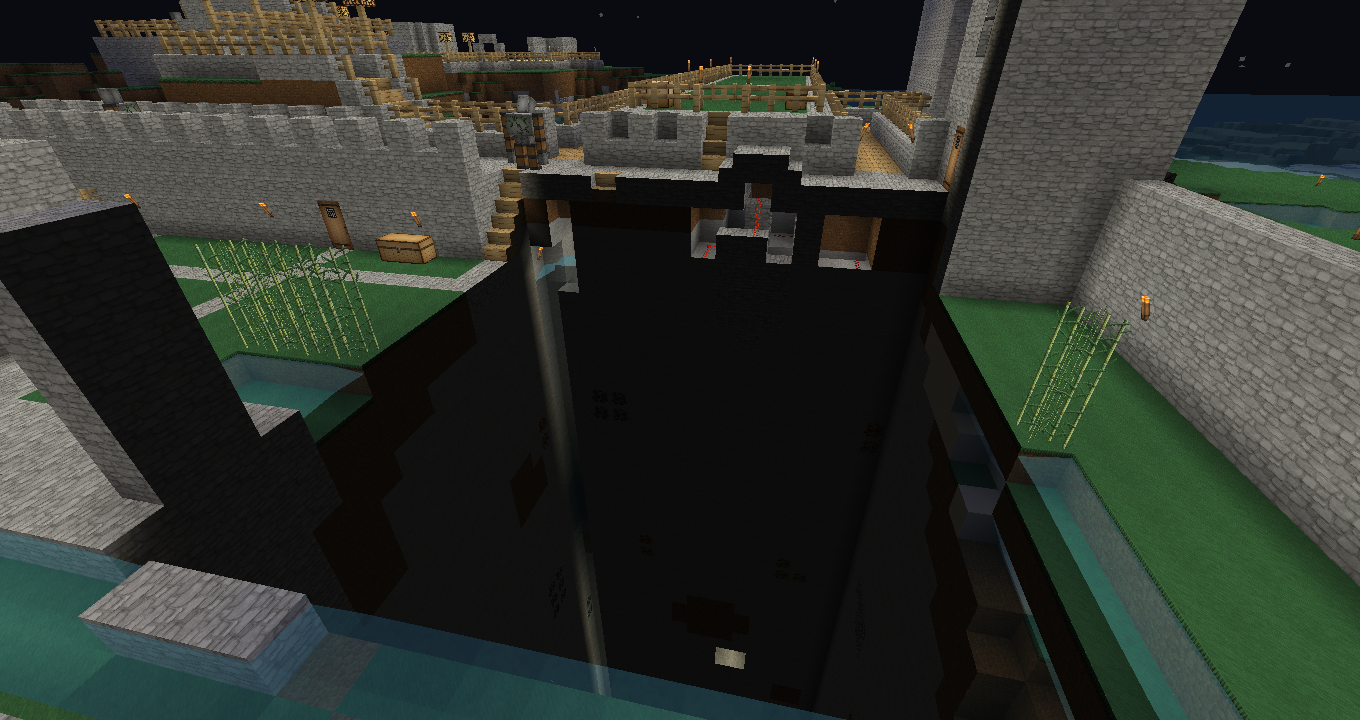
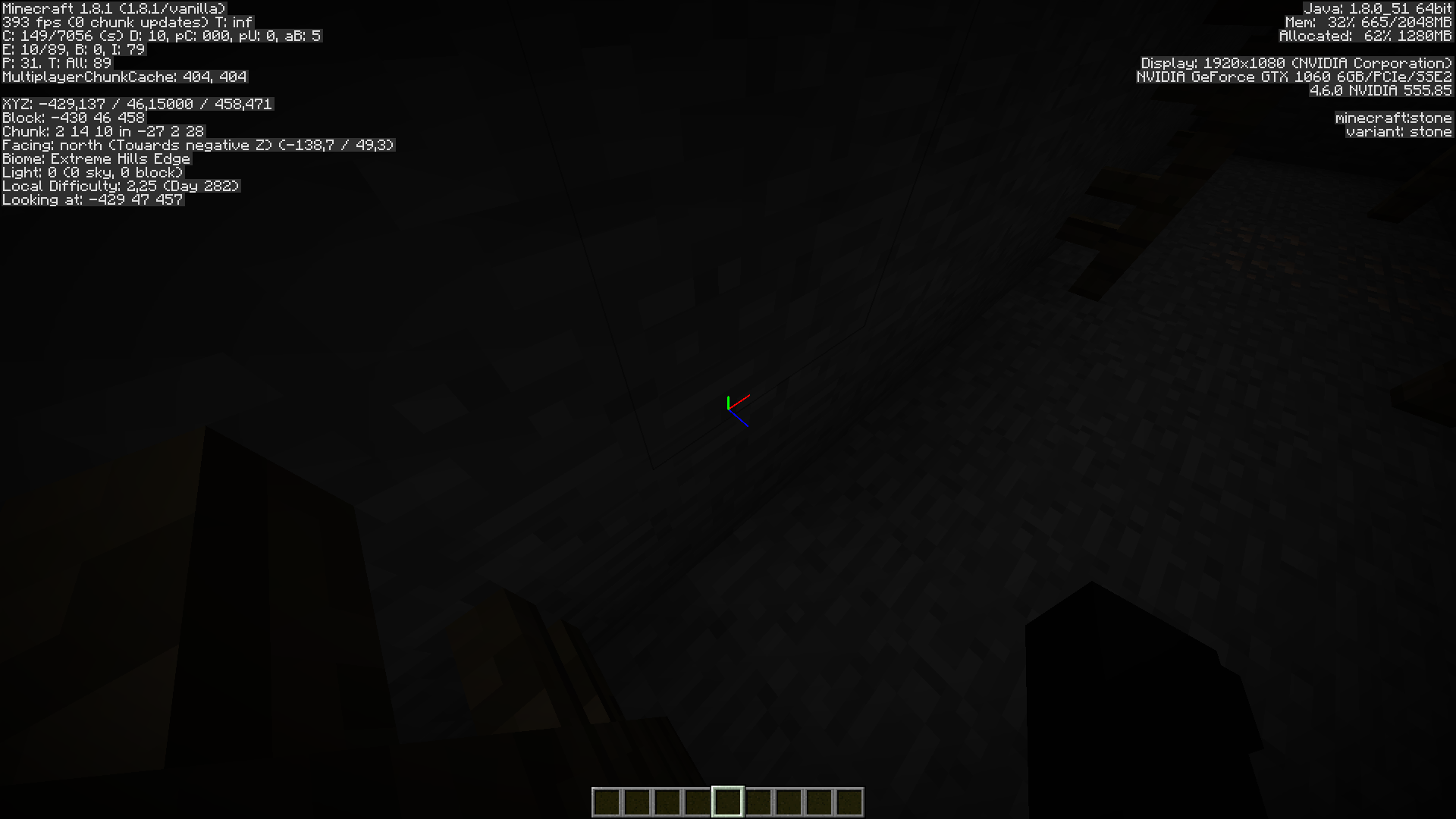
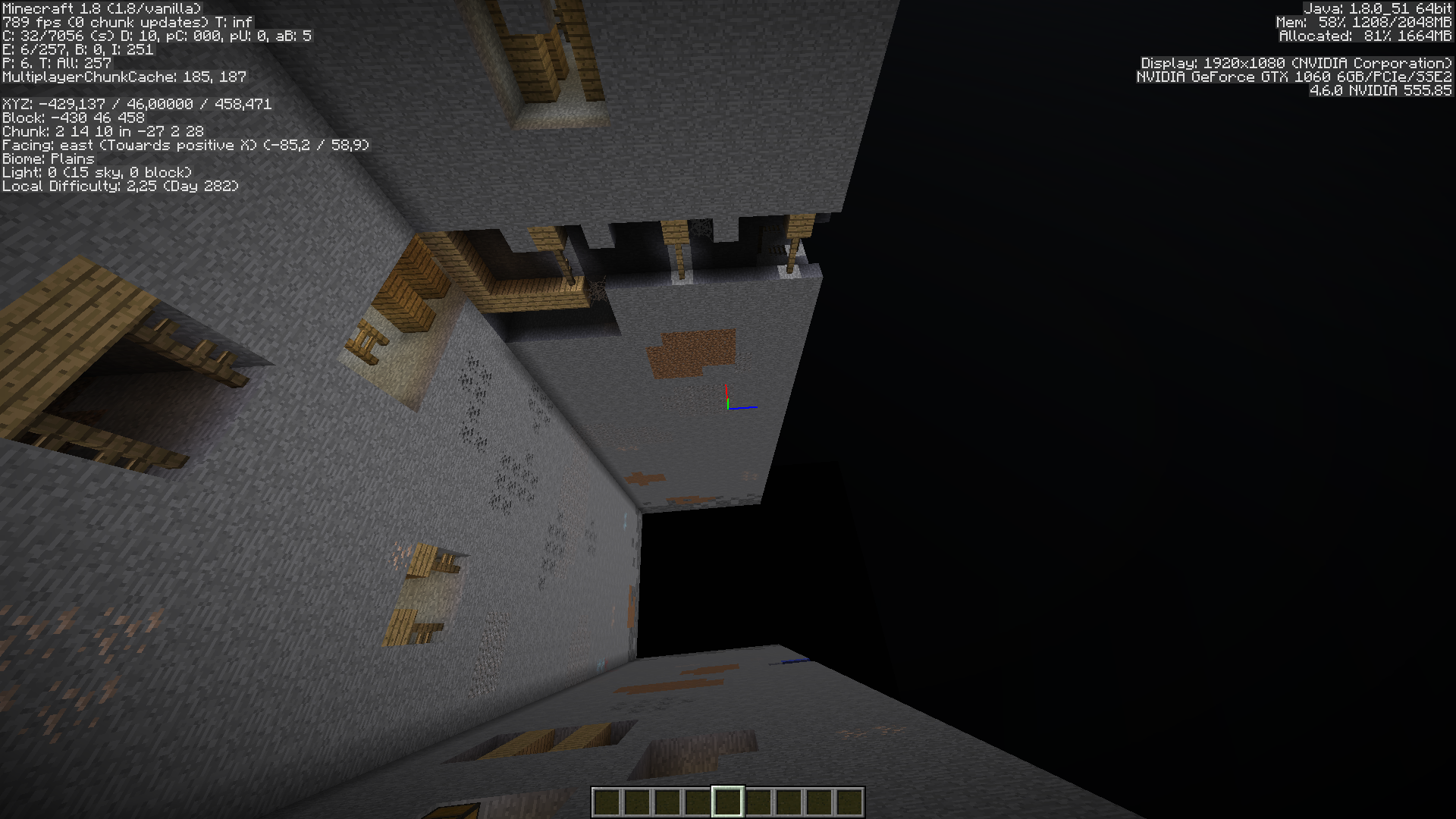
Loaded world world_144pre and got attached screenshot. It seems the trees etc are still there as you can get stuck on them with that glitchy "stuck in an invisible block" thing.
Wait is the chunk error there on the world named "world_before bug"? i cant check right now because I'm away from my desktop
world_before bug as per second screenshot (no chunk error)
Cant this just be your computers preformance?
It seems to be a corrupted save. Try downloading the provided world and see if you can also reproduce it.
Damn it. I had loads of progress from between world_before bug to world_144pre. Is there any way I can fix this short term (i.e with MC edit?)
Probably. But i've used MCEdit on a couple of occasions. Maybe give it a go, see how it goes.
I have the same problem , the world looks ok when you open it in MC edit , editing the corrupt area with MC edit doesn't change anything , the weird thing that even after recreating the world the problem is still there , i think we just have to build around the corrupt area ಥ_ಥ
ಥ_ಥ
I have the same problem. I hope this gets fixed soon.
Is this glitch on mac or windows? (or both?)
Cos i got the same problem on my mac mini, it only started when i updated to mountain lion, it did it on my newer world which i made in 1.4.6, then it happened to my fav world which has all my stuff on! It is now on all my worlds apart from my flat creative one, am i right in saying that this glitch doesn't happen on flat worlds?
Just happend to me on my test world in 13w05b. The corrupted chunk started to mass spawn zombies, so I can confirm
MC-4061aswell. Using MCEdit I found that this chunk was replaced by a chunk that is not too far away (there was redstone stuff, easy to recognize). Deleting the chunk and letting Minecraft rebuild it fixed the problem. I believe this,MC-2548andMC-4061are all related.I get this all the time now at the origin chunk, or the chunk the starts at 0X/0Z coordinates. It was in 1.4.6 and 1.4.7, if I fly away and back, it gets filled in, so its a server sync issue. Relogging does fix it, so this is a different bug than the one I reported, but my bug got merged into this as a duplicate, so here I am.
I had to use mcedit to move all of my worlds far away from 0,0 to avoid this issue. I suppose normal servers arent as affected by this as creative servers like ours where everyone has flymods. To cope with this I used mcedit to edit all of our worlds to have them start at 1000,1000.
I hope this gets fixed by 1.5.
how do you fix it?
This same happened to me! I wish I knew how to fix it!
This has been happening more frequently. Is there any way to reload the chunks?
This happened to me, and i jump down into the "hole"and i fall to about 2-3 blocks from the level it started on at ground, y- coord is 60, and when i disable flymode i fall at around half the speed of normal falls, and i cant place anything inside the chunk zone. Multiplayer chunk cache, if this has anything to do with it, is 439
I keep having this issue over and over on countless worlds. The only "fix" i can find is to figure out which region file that chunk lives in and delete it so the whole area re-generates.
I have yet to figure out how to "fix" it that doesnt involve losing any progress in that region.
Confirmed in 13w22a
One randomly appeared in my survival world today.
Deleting the chunk via mcedit seems to fix it.
This bug somehow duplicates chickens. (This is a serious statement.)
This can usually be fixed with F3+A , it reloads all loaded chunks
Even though i only had this in multiplayer, if my computer has low internet connection
@Nico No it does not, hence persistant. The chunk is corrupt and to fix it either MCEdit it out or use a backup.
Happened in 1.6.2 on my server, yup not fixable =3
Same to me.Badly,I cant delete my houses ,nether portal,farm chunk.And I have way TOO old backup for it.Deleting all entities seems to fix it.But it deletes my farm animals,and villagers.Maybe to copy entities and paste?For me minecraft freezes on building terrain,and in output-server.log there's a error;2013-07-31 22:59:25 [SERVER] [INFO] Starting integrated minecraft server version 1.6.2
This is a really strange problem in all Minecraft versions and snapshots, even the latest. The chunk is not corrupted but GET CORRUPTED by giving and taking wrong locations of chunks! I think this bug may never be fixed! I just duplicate by mistake. Issue
MC-30525.So there is no fix and the world has to be abandoned if not functional at normal speed?
A corrupted world is when Minecraft hiccups and plops a chunk from another world to a world. Backups may help.
Observed all the way through latest snapshot (13w42b). I'd be nice if there was a flag in server.properties to optionally reset chunks that have this problem.
Observed in 1.7.2, general release. The map was reset for this release, so everything is completely new, yet we still see these problems on occasion. Example of messages spammed to log:
Also observed in the same log:
Loading the region in MCEdit (0.1.8 build 665) and opening World Info, then clicking Repair Regions fixed the problem and now I don't have the error messages.
I think I have this problem too:
-Yesterday a chunk got corrupted.
-It had loaded correctly just minutes before.
-Closing and opening the game did not solve it.
-The world has been upgraded several times, this chunk was originally generated last year.
-I never downgraded, or used editors, game mode has always been adventure
-this chunk never regenerated, as happened before somewhere else in this world, but is a grey hole. Entering it will make you fall slowly, like sinking in the water.
-loading the world takes very long time, and all loading takes 'for ever'
-many glitches, sudden change of player location, general feeling of corruption
-reverted to backup
from the log:
20:33:43] [main/INFO]: Setting user: goudensun
[20:33:43] [main/INFO]: (Session ID is token:50c38eb7da7d4b0f9db2f872380cfb4b:d11567930001402ba76a2861e3cbd606)
[20:33:44] [Client thread/INFO]: LWJGL Version: 2.9.0
[20:33:45] [Client thread/INFO]: Reloading ResourceManager: Default
[20:33:46] [Sound Library Loader/INFO]: Sound engine started
[20:33:46] [Client thread/INFO]: Created: 512x256 textures/blocks-atlas
[20:33:47] [Client thread/INFO]: Created: 256x256 textures/items-atlas
[20:33:54] [Client thread/WARN]: Unable to play empty soundEvent: minecraft:music.menu
[20:33:58] [Client thread/WARN]: Unable to play empty soundEvent: minecraft:music.menu
[20:34:00] [Server thread/INFO]: Starting integrated minecraft server version 1.7.2
[20:34:00] [Server thread/INFO]: Generating keypair
[20:34:00] [Server thread/INFO]: Preparing start region for level 0
[20:34:02] [Server thread/INFO]: Preparing spawn area: 10%
[20:34:03] [Server thread/INFO]: goudensun[local:E:f53c9bea] logged in with entity id 59 at (1325.5, 70.69999998807907, -1708.766343297474)
[20:34:03] [Server thread/INFO]: goudensun joined the game
[20:34:05] [Server thread/ERROR]: Chunk file at 88,-113 is in the wrong location; relocating. (Expected 88, -113, got 78, -109)
[20:34:05] [Server thread/WARN]: Can't keep up! Did the system time change, or is the server overloaded? Running 2740ms behind, skipping 54 tick(s)
[20:34:56] [Server thread/ERROR]: Chunk file at 88,-113 is in the wrong location; relocating. (Expected 88, -113, got 78, -109)
[20:35:34] [Server thread/ERROR]: Wrong location! we['entity.MinecartRideable.name'/210, l='Finnmuren', x=1408.17, y=67.35, z=-1799.50]
[20:35:34] [Server thread/ERROR]: Wrong location! mm['goudensun'/59, l='Finnmuren', x=1408.17, y=66.55, z=-1799.50]
[20:35:34] [Server thread/ERROR]: Wrong location! mm['goudensun'/59, l='Finnmuren', x=1408.17, y=66.55, z=-1799.50]
[20:35:34] [Server thread/ERROR]: Wrong location! mm['goudensun'/59, l='Finnmuren', x=1408.17, y=66.55, z=-1799.50]
[20:35:34] [Server thread/ERROR]: Wrong location! mm['goudensun'/59, l='Finnmuren', x=1408.17, y=66.55, z=-1799.50]
[20:35:34] [Server thread/ERROR]: Wrong location! mm['goudensun'/59, l='Finnmuren', x=1408.17, y=66.55, z=-1799.50]
[20:35:34] [Server thread/ERROR]: Wrong location! mm['goudensun'/59, l='Finnmuren', x=1408.17, y=66.55, z=-1799.50]
[20:35:34] [Server thread/ERROR]: Wrong location! we['entity.MinecartRideable.name'/210, l='Finnmuren', x=1408.57, y=67.35, z=-1799.50]
[20:35:34] [Server thread/ERROR]: Wrong location! mm['goudensun'/59, l='Finnmuren', x=1408.57, y=66.55, z=-1799.50]
[20:35:34] [Server thread/ERROR]: Wrong location! mm['goudensun'/59, l='Finnmuren', x=1408.57, y=66.55, z=-1799.50]
[20:35:34] [Server thread/ERROR]: Wrong location! mm['goudensun'/59, l='Finnmuren', x=1408.57, y=66.55, z=-1799.50]
[20:35:34] [Server thread/ERROR]: Wrong location! mm['goudensun'/59, l='Finnmuren', x=1408.57, y=66.55, z=-1799.50]
[20:35:34] [Server thread/ERROR]: Wrong location! we['entity.MinecartRideable.name'/210, l='Finnmuren', x=1408.77, y=67.35, z=-1799.50]
[20:35:34] [Server thread/ERROR]: Wrong location! mm['goudensun'/59, l='Finnmuren', x=1408.77, y=66.55, z=-1799.50]
I think I have this bug in 1.7.3 prerelease
Not rendered chunk appeared in my singleplayer survival game. I can't enter the chunk. It causes severe lag. After a minute or so of gameplay FPS starts dropping, game starts to lag and usage of processor increases drastically for java process (the launcher).
The development console gets flooded with such type of messages (for various mobs):
The coords given in the last line match the problematic chunk, thus I think mobs spawned in the chunk or mobs trying to enter the chunk cause the lag.
Environment: Win 8.1 (x64), Java 7 update 45 (64-bit), i7-4770 3,4GHz, 16GB RAM, GTX760
I also observed this in 1.7.3 pre-release.
Observed on a vanilla server I run on both the snapshots leading up to 1.7, and 1.7.2 realease.
For some reason,
MC-41197is listed as a duplicate of this issue (blocks break, then re-appear). And that one's listed as "Resolved", but it is happening to me again in release 1.7.4, in Windows 7. It's consistent and ruins my attempts at a hardcore speed-run, so I had to go back to 1.7.2 for the time being.I'm really not sure this issue and
MC-41197should be counted as the same; nobody without programming knowledge would look for this issue, if their symptom is blocks breaking, then un-breaking. This made it hard for me to attempt reporting the issue.Thanks.
This never occured to me before, but since 1.7.4 it is happening constanly. Some corrupted chunks are fully non-solid, others experience the "stuck in invisible block" effect described further above. Most chunks luckily reload properly after logging out and back in or changing render distance multiple times, but one chunk in one particular world fails to load under any circumstances.
I noticed that the server will call Thread.dumpStack() every time it reports "Wrong Location!" which is very expensive (much lag inducing). If would be nice if Mojang would call logger.isDebuggingEnabled() (or whatever they use) before arbitrarily calling Thread.dumpStack().
Confirmed for 1.7.9. (
MC-55167)Resolved? But the hole is still there and the glitch is spreading. In that biome mine carts wont go on powered track, pressure plates don't work, chests have very delayed opening and I can't build anything because I get stuck in a sort of time warp. It started with one small area now my whole village biome is ruined and I'm concerned it's going to spread even further if I continue to play. Is my whole world of almost a years worth of intensive work destroyed?
Also getting this problem in 1.7.9, resolution involves either reverting to a backup copy and pasting changes via mcedit (or just re-doing the work) or deleting the chunk from the current world and pasting in construction from a backup. Without deleting the chunk using MCEdit, it generates continual errors as players or mobs attempt to move into the bad chunk.
When it reported:
Chunk file at 4,7 is in the wrong location; relocating. (Expected 4, 7, got 11, 15)
it actually was 4,7 and should have been kept at 4,7, not relocated!
This has happened a number of times now, very annoying and requiring many hours of rework to resolve.
I have seen this issue for the latest snapshots. I was playing Legendary by Vechs and the orange wool area had a whole chunk missing.
still in 14w28b...
still in 14w29b
Log from 14w30c, where the server seems to run fine but console log gets a lot of these:
[17:43:39] [Server thread/WARN]: Wrong location! (-9, -27) should be (-9, -28), abo['Cow'/3846968, l='world', x=-136,14, y=64,00, z=-430,88]
java.lang.Exception: Stack trace
at java.lang.Thread.dumpStack(Unknown Source)
at bed.a(SourceFile:641)
at bet.a(SourceFile:333)
at bet.a(SourceFile:95)
at bet.a(SourceFile:83)
at qk.e(SourceFile:133)
at qk.c(SourceFile:85)
at qk.d(SourceFile:120)
at aqa.a(SourceFile:278)
at aqa.f(SourceFile:274)
at aqa.p(SourceFile:661)
at avp.c(SourceFile:66)
at asv.b(SourceFile:421)
at ql.h(SourceFile:375)
at ql.c(SourceFile:202)
at net.minecraft.server.MinecraftServer.y(SourceFile:597)
at ph.y(SourceFile:303)
at net.minecraft.server.MinecraftServer.x(SourceFile:529)
at net.minecraft.server.MinecraftServer.run(SourceFile:445)
at java.lang.Thread.run(Unknown Source)
i get this issue in 14w30c but i dont crash or get permenet chunk errors
Persistant errors in a newly created 14w30c vanilla world.
Just happened to me on version 1,7.10. I jumped in the hole died by drowning, re spawned, but the error persisted tried minning around the hole but no blocks would generate, no mobs either. Finally the world won´t load anymore.
Still happening in 14w31a
Still happening in pre-1
same for v1.8
staying some time next to it results in "not be able to interact anymore with anything, so i can't dig/mine anymore
MCedit is helpful and to recommend.
the bug still occurs in 1.8
well this got fixed on 1.8.x, not released yet.
Maybe still occurs in 1.8.1-pre5 (according to
MC-74539)Still occurs in 1.8.1!!!
MC-74861same happens to me
Agreed - still an issue in 1.8.1 - see
MC-75375. This issue should be re-opened as it certainly is not resolvedCannot reproduce with a fresh world created in 1.8.1. If you're still experiencing this issue, then the whole world might be corrupted.
My server running 1.8.1 just got hit by this today, console spam with:
27.01 00:57:17 [Server] Server thread/ERROR Chunk file at 108,151 is in the wrong location; relocating. (Expected 108, 151, got 100, 149)
27.01 00:57:12 [Server] Server thread/ERROR Chunk file at 105,137 is in the wrong location; relocating. (Expected 105, 137, got 101, 141)
Come on Mojang! Fix this issue already! This really messes up player's saves when it happens.
You know why this happens right? It is because minecraft has a real-time autosaving feature. It's saving all the time. If anything interferes or interrupts that process in midsave then you get a corrupted chunk from saving. But there is a solution to real-time saving errors! It's the same solution as the one for handling noise corruption in cell phone transmissions, namely: REDUNDANCY. When you try to save over a perfectly good old save for a chunk DON'T overwrite it directly. Instead back up the working old save for that chunk. Hold onto these backups for about 5 minutes backwards. Then, if the game detects a missing/relocated/corrupt chunk replace it with the most recent backup and inform the player a chunk error has been detected and it was restored from a backup. This is the smart way to do it. It would mean that you don't need to back up your whole game, just carry backups for a few minutes in the past and only for the chunks that have been recently updated. This wouldn't even up file-sizes much. When you log out and close the game permanently only carry the latest backup so the game can run a check for errors when you log back in and restore if it detects this problem. Since you usually only have made changes to a few chunks in the minute before you logged out this would not increase file-sizes nearly as much as even a single backup of the whole save. They back up level.dat so they really should do the same for recently updated chunks.
Can not reproduce in minecraft 1.8 or 1.8.1
This ticket has an awful description, yet somehow it's been used as the main link for a ton of other tickets. It's been used as a dumping ground for any report that is related to chunk errors. However, I doubt ALL those dupe tickets are actually reporting the same issue.
I recently had a world that was created fresh in 1.8.7 load (after a couple save and quits) with a couple missing chunks. It was impossible to walk into the empty pit. Reloading the chunks with F3+A did not work. Exiting the world and opening it again restored the chunks to their proper state.
I'm adding a screenshot and relevant log info anyway...
Not fixed.
I just had this in my world
now I know what happens to my custom lightning
reopened and updated the affected versions
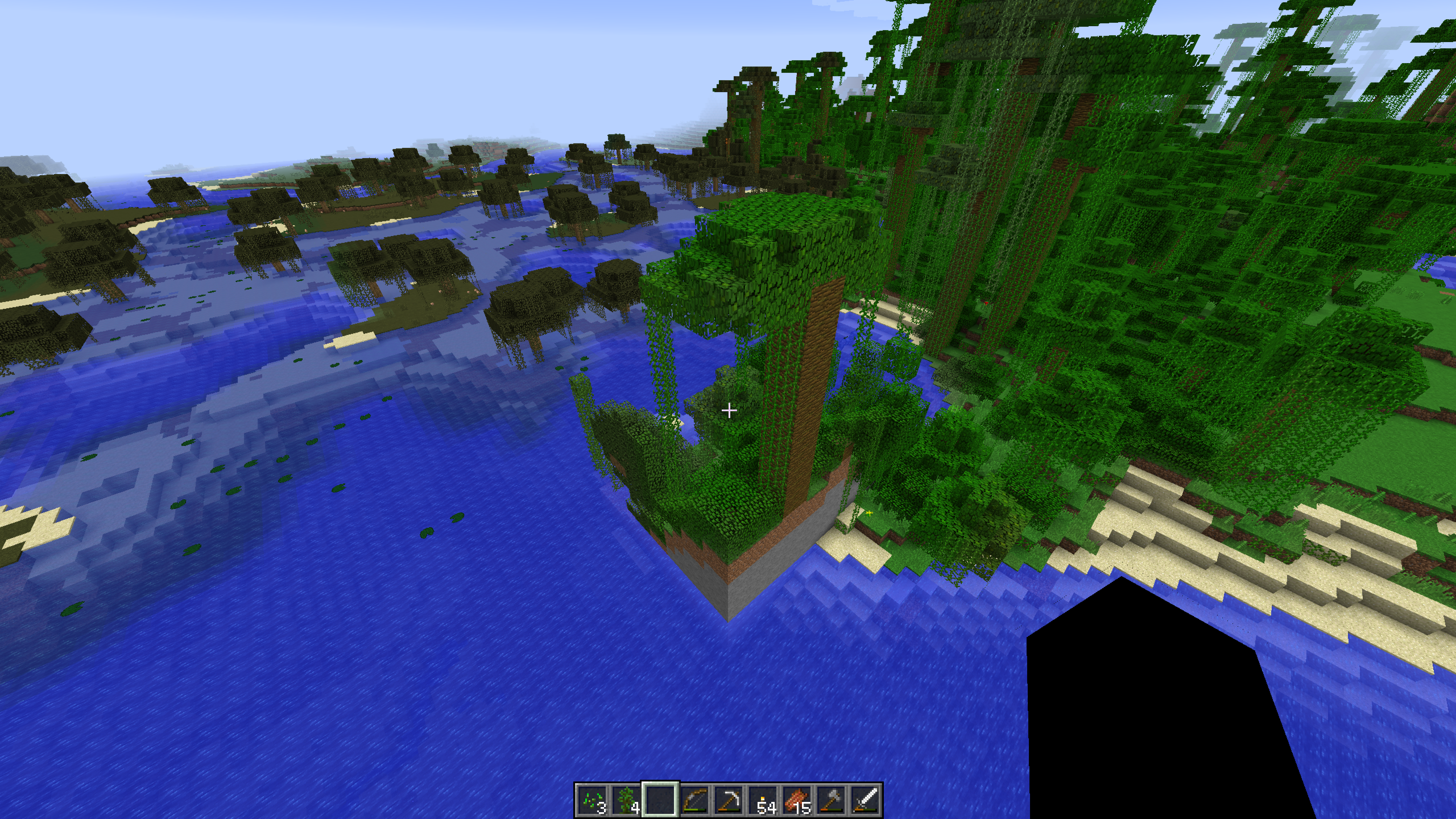
Appears to still be in 1.10.2. I went to the chunk error in 2012-11-08_20.27.32.png , but I found a chunk that was generated with new terrain (new_terrain.png
 ).
).
Change Required
Fix Version(s) "Minecraft 1.8.1-pre1" to "None"
Reason; Affects Version contains versions after Fix Version
Fix Version(s) list contains versions in which they attempted to fix the issue.
Cool.
this just happened to me except a little bit later i found part of the chunk that had been taken out, most of it. it was a separate area of my world...
Does this still affect the current versions of Minecraft? (1.12.2, 1.13-pre3). If so, please update the ticket accordingly.
Is this still an issue in Minecraft 1.13.1?
I think this issue was already confirmed for 1.13.1 per duplicate
MC-136905.This happened to me also. I assume there is no fix for this?
Big black hole going through the world. I have logged out/in. I have traveled to the nether and back. When I jump into the hole, I will fall through the world and die.
Since my house is partly in the hole, I have made my water elevator flow into the hole. I was able to travel down and into my mineshaft that is also affected.
Playing bedrock edition, windows 10. V1.14.1.
Is this still an issue in 1.15.2 or later? If it's still an issue, please provide repro steps or attach a world where the issue happens.
happenend to me in 21w07a
This no longer occurs. Some people mistake chunks loading slowly for chunk errors and "confirm" this bug is still present while it is not.
I actually haven't been able to find any of those dark chunk errors that caused
MC-4061for quite some timeOCA3P Your screenshots show an issue with Bedrock Edition. Please head to the MCPE project instead, this project is for Java Edition only.
I can confirm this issue has been fixed in 1.8.1 pre1.
Every single instance of "can confirm" or "duplicates" since then has been unrelated chunk loading issues, terrain generation quirks or difference between terrain gen between different version. Many issues were straight up invalid but marked as a duplicate of this report anyway
This permament chunk error that this report is about is indeed fixed. You can see it by downloading the world from



MC-11246If you load it in 1.8 you will notice permament chunk errors in chunks located at -488 (Y) 295 and -429 (Y) 458
You will also notice the signature "Wrong location!" spam in the console.
If you load the world in 1.8.1 the chunk errors and log spam is gone


TLDR; This is fixed the issue should be closed