 StrikeX2
- StrikeX2
- JIRAUSER766575
- Australia/Perth
- Yes
- No
 MC-266574









 REALMS-11598
Pufferfish will
effect you if you are in creative and give you the effects nausea, hunger and poison.
how to recreate
1:eat a pufferfish in creative modeExpected
Pufferfish does not give the creative player any effectswhat actually happens
Player will gain the effects nausea, hunger and poisionPufferfish will affect you if you are in creative and give you the effects nausea, hunger and poison.
How to recreate
1: Eat a pufferfish in creative modeExpected
Pufferfish does not give the creative player any effectswhat actually happens
Player will gain the effects nausea, hunger and poison
Pufferfish will affect you if you are in creative and give you the effects nausea, hunger and poison.
How to recreate
1: Eat a pufferfish in creative modeExpected
Pufferfish does not give the creative player any effectswhat actually happens
Player will gain the effects nausea, hunger and poisonNote: this may also be an intentional feature, but there is nothing on it and wither roses aren't supposed to give affects in creative
Pufferfish will affect you if you are in creative and give you the effects nausea, hunger and poison.
How to recreate
1: Eat a pufferfish in creative modeExpected
Pufferfish does not give the creative player any effectswhat actually happens
Player will gain the effects nausea, hunger and poisonNote: this may also be an intentional feature, but there is nothing
on itand wither roses aren't supposed to giveaffects in creativePufferfish will affect you if you are in creative and give you the effects nausea, hunger and poison.
How to recreate
1: Eat a pufferfish in creative modeExpected
Pufferfish does not give the creative player any effectswhat actually happens
Player will gain the effects nausea, hunger and poisonNote: this may also be an intentional feature, but there is nothing about it that i could find and wither roses aren't supposed to give effects in creative
Bugs aside, THAT IS AN EPIC SEED
In the past different structures have merged with each other, which is why there are seeds with multiple end portals and mineshafts in strongholds. This happens with other naturally generated structures, such as bastions in fortresses etc. It isn't bug, its just the way that the terrain and structures were coded to develop. Although mojang should definitely try to stop end portals being destroyed from other naturally generated structures
Confirmed in 23w45a
I will link a video here: https://youtu.be/RUMAG7hqcb0
This definitely is a major bug that mojang should change.
This is an intended feature. If you kept the armour trim in the crafting table you would gain 3 armour trims, Triplicating? ( I don't know the word) the trim. The banner also works as intended: after closing the table you will have 2 banners, which is double 1. The duplicating only affects one item at a time, so that is why it will seem like you are only adding 1 item if you have a few of the item you are duplicating.
I believe you have reported it because the duplicating method is different in the way it works instead?
Cannot reproduce. I will link a video here: https://youtu.be/8DkVXojmD-U
Cannot reproduce. I will link a video here.
seed is 4250192802940034139 at coords 5 16 -41
So when you enter tick freeze, you can still update certain blocks with redstone
these include:
Redstone dust
Crafter
Copper bulb
Redstone lamp
TNT
pressure plates
Doors
Trapdoors
Fence gates
Daylight sensor (it updates the redstone dust)
tripwire string and hooks
Dropper (nothing comes out but in the debug it says it is powered)
Dispenser (nothing comes out but in the debug it says it is powered)
Powered rail
Activator railHow to reproduce
1: create a new world
2: Place any of the listed blocks in front of you
3: add a trail of redstone dust connecting to that block
4: place a lever at the other end of the redstone trail
5: type /tick freeze
6: activate the lever
7: the block will update (either visually or in the f3 debug menu)Note: for the daylight sensor right click it to change it detecting day to night and add a trail of redstone to see it activating, for the tripwire string and hook walk over the tripwire string.
Also another note: i would attach the video to the site but it is 365 MB so it is just a tiny bit over the 10 MB file size limit. instead I have linked a video here: https://youtu.be/GSwGE0jlDkU
So when you enter tick freeze, you can still update certain blocks with redstone. These include:
Redstone dust
Crafter
Copper bulb
Redstone lamp
TNT
pressure plates
Doors
Trapdoors
Fence gates
Daylight sensor (it updates the redstone dust)
tripwire string and hooks
Dropper (nothing comes out but in the debug it says it is powered)
Dispenser (nothing comes out but in the debug it says it is powered)
Powered rail
Activator railHow to reproduce
1: create a new world
2: Place any of the listed blocks in front of you
3: add a trail of redstone dust connecting to that block
4: place a lever at the other end of the redstone trail
5: type /tick freeze
6: activate the lever
7: the block will update (either visually or in the f3 debug menu)Note: for the daylight sensor right click it to change it detecting day to night and add a trail of redstone to see it activating, for the tripwire string and hook walk over the tripwire string.
Also another note: i would attach the video to the site but it is 365 MB so it is just a tiny bit over the 10 MB file size limit. instead I have linked a video here: https://youtu.be/GSwGE0jlDkU
So when you enter tick freeze, you can still update certain blocks with redstone. These include:
Redstone dust
Crafter
Copper bulb
Redstone lamp
TNT
pressure plates
Doors
Trapdoors
Fence gates
Daylight sensor (it updates the redstone dust)
tripwire string and hooks
Dropper (nothing comes out but in the debug it says it is powered)
Dispenser (nothing comes out but in the debug it says it is powered)
Powered rail
Activator railHow to reproduce
1: create a new world
2: Place any of the listed blocks in front of you
3: add a trail of redstone dust connecting to that block
4: place a lever at the other end of the redstone trail
5: type /tick freeze
6: activate the lever
7: the block will update (either visually or in the f3 debug menu)Note: for the daylight sensor right click it to change it detecting day to night and add a trail of redstone to see it activating, for the tripwire string and hook walk over the tripwire string.
Also another note: i would attach the video to the site but it is 365 MB so it is just a tiny bit over the 10 MB file size limit. instead I have linked a video here: https://youtu.be/GSwGE0jlDkU
So when you enter tick freeze, you can still update certain blocks with redstone. These include:
Redstone dust
Crafter
Copper bulb
Redstone lamp
TNT
pressure plates
Doors
Trapdoors
Fence gates
Daylight sensor (it updates the redstone dust)
tripwire string and hooks
Dropper (nothing comes out but in the debug it says it is powered)
Dispenser (nothing comes out but in the debug it says it is powered)
Powered rail
Activator railHow to reproduce
1: create a new world
2: Place any of the listed blocks in front of you
3: add a trail of redstone dust connecting to that block
4: place a lever at the other end of the redstone trail
5: type /tick freeze
6: activate the lever
7: the block will update (either visually or in the f3 debug menu)Note: for the daylight sensor right click it to change it detecting day to night and add a trail of redstone to see it activating, for the tripwire string and hook walk over the tripwire string.
Also another note: i would attach the video to the site but it is 365 MB so it is just a tiny bit over the 10 MB file size limit. instead I have linked a video here: https://youtu.be/GSwGE0jlDkU
BTW this is not me complaining about the copper bulb and crafter change, it affects blocks other then them
So when you enter tick freeze, you can still update certain blocks with redstone. These include:
Redstone dust
Crafter
Copper bulb
Redstone lamp
TNT
pressure plates
Doors
Trapdoors
Fence gates
Daylight sensor (it updates the redstone dust)
tripwire string and hooks
Dropper (nothing comes out but in the debug it says it is powered)
Dispenser (nothing comes out but in the debug it says it is powered)
Powered rail
Activator railHow to reproduce
1: create a new world
2: Place any of the listed blocks in front of you
3: add a trail of redstone dust connecting to that block
4: place a lever at the other end of the redstone trail
5: type /tick freeze
6: activate the lever
7: the block will update (either visually or in the f3 debug menu)Note: for the daylight sensor right click it to change it detecting day to night and add a trail of redstone to see it activating, for the tripwire string and hook walk over the tripwire string.
Also another note: i would attach the video to the site but it is 365 MB so it is just a tiny bit over the 10 MB file size limit. instead I have linked a video here: https://youtu.be/GSwGE0jlDkU
BTW this is not me complaining about the copper bulb and crafter change, it affects blocks other then them. This also may be working as intended, just thought it would be good to point out some inconsistencies (although I know mojang doesn't have to be consistent)
So when you enter tick freeze, you can still update certain blocks with redstone. These include:
Redstone dust
Crafter
Copper bulb
Redstone lamp
TNT
pressure plates
Doors
Trapdoors
Fence gates
Daylight sensor (it updates the redstone dust)
tripwire string and hooks
Dropper (nothing comes out but in the debug it says it is powered)
Dispenser (nothing comes out but in the debug it says it is powered)
Powered rail
Activator railHow to reproduce
1: create a new world
2: Place any of the listed blocks in front of you
3: add a trail of redstone dust connecting to that block
4: place a lever at the other end of the redstone trail
5: type /tick freeze
6: activate the lever
7: the block will update (either visually or in the f3 debug menu)Note: for the daylight sensor right click it to change it detecting day to night and add a trail of redstone to see it activating, for the tripwire string and hook walk over the tripwire string.
Also another note:
iwould attach the video to the site but it is 365 MB so it is just a tiny bit over the 10 MB file size limit. instead I have linked a video here: https://youtu.be/GSwGE0jlDkUBTW this is not me complaining about the copper bulb and crafter change, it affects blocks other then them. This also may be working as intended, just thought it would be good to point out some inconsistencies (although I know mojang doesn't have to be consistent)
So when you enter tick freeze, you can still update certain blocks with redstone. These include:
Redstone dust
Crafter
Copper bulb
Redstone lamp
TNT
pressure plates
Doors
Trapdoors
Fence gates
Daylight sensor (it updates the redstone dust)
tripwire string and hooks
Dropper (nothing comes out but in the debug it says it is powered)
Dispenser (nothing comes out but in the debug it says it is powered)
Powered rail
Activator railHow to reproduce
1: create a new world
2: Place any of the listed blocks in front of you
3: add a trail of redstone dust connecting to that block
4: place a lever at the other end of the redstone trail
5: type /tick freeze
6: activate the lever
7: the block will update (either visually or in the f3 debug menu)Note: for the daylight sensor right click it to change it detecting day to night and add a trail of redstone to see it activating, for the tripwire string and hook walk over the tripwire string.
Also another note: I would attach the video to the site but it is 365 MB so it is just a tiny bit over the 10 MB file size limit. instead I have linked a video here: https://youtu.be/GSwGE0jlDkU
BTW this is not me complaining about the copper bulb and crafter change, it affects blocks other then them. This also may be working as intended, just thought it would be good to point out some inconsistencies (although I know mojang doesn't have to be consistent)
So when you enter tick freeze, you can still update certain blocks with redstone. These include:
Redstone dust
Crafter
Copper bulb
Redstone lamp
TNT
pressure plates
Doors
Trapdoors
Fence gates
Daylight sensor (it updates the redstone dust)
tripwire string and hooks
Dropper (nothing comes out but in the debug it says it is powered)
Dispenser (nothing comes out but in the debug it says it is powered)
Powered rail
Activator railHow to reproduce
1:create a new world
2: Place any of the listed blocks in front of you
3: add a trail of redstone dust connecting to that block
4: place a lever at the other end of the redstone trail
5: type /tick freeze
6: activate the lever
7: the block will update (either visually or in the f3 debug menu)Note: for the daylight sensor right click it to change it detecting day to night and add a trail of redstone to see it activating, for the tripwire string and hook walk over the tripwire string.
Also another note: I would attach the video to the site but it is 365 MB so it is just a tiny bit over the 10 MB file size limit. instead I have linked a video here: https://youtu.be/GSwGE0jlDkU
BTW this is not me complaining about the copper bulb and crafter change, it affects blocks other then them. This also may be working as intended, just thought it would be good to point out some inconsistencies (although I know mojang doesn't have to be consistent)
So when you enter tick freeze, you can still update certain blocks with redstone. These include:
Redstone dust
Crafter
Copper bulb
Redstone lamp
TNT
pressure plates
Doors
Trapdoors
Fence gates
Daylight sensor (it updates the redstone dust)
tripwire string and hooks
Dropper (nothing comes out but in the debug it says it is powered)
Dispenser (nothing comes out but in the debug it says it is powered)
Powered rail
Activator railHow to reproduce
1: Create a new world
2: Place any of the listed blocks in front of you
3: add a trail of redstone dust connecting to that block
4: place a lever at the other end of the redstone trail
5: type /tick freeze
6: activate the lever
7: the block will update (either visually or in the f3 debug menu)Note: for the daylight sensor right click it to change it detecting day to night and add a trail of redstone to see it activating, for the tripwire string and hook walk over the tripwire string.
Also another note: I would attach the video to the site but it is 365 MB so it is just a tiny bit over the 10 MB file size limit. instead I have linked a video here: https://youtu.be/GSwGE0jlDkU
BTW this is not me complaining about the copper bulb and crafter change, it affects blocks other then them. This also may be working as intended, just thought it would be good to point out some inconsistencies (although I know mojang doesn't have to be consistent)
Screen Recording 2023-11-19 at 1.42.22 am (1).mov
Is this a modified server?
Confirmed, however this actually may be an intended feature due to the glass pane linking texture. The reason it would be darker is because where the Glass panes connect it is not see through. It is basically double the connection texture compared to the glass block
If you have a large amount of wind charges in the same location, their hitbox size will be larger then visually displayed
Steps to reproduce:
1: Create a new world
2: Get a command block with /give @s command_block
3: place down the command block
4: Set the command block to repeat, unconditional, always active
5: Type the following command into the command block: /summon wind_charge ~ ~1 ~
6: Wait a little bit for the wind charges to stack up
7: Hit the air in the block next to the wind charge. The wind charge will explode
8: You also will not be able to destroy the command block unless below itNotes:
You may want to turn off command block output so the messages don't clog up your screen. You can do this by typing /gamerule commandBlockOutput falseI have linked a video here: https://youtu.be/4I9gpU7KsFA
Also the hitbox size is similar to an end crystal
Wind charge hitboxsize will non visually increase when many are spawned in the same locationWind charge hitbox is larger than visually displayed
If you
have a large amount ofwind chargesin the same location, theirhitbox size will be larger then visually displayedSteps to reproduce:
1: Create a new world
2: Get a command block with /give @s command_block
3: place down the command block
4:Setthe command blockto repeat, unconditional, always active
5: Type the following command into the command block: /summon wind_charge ~ ~1 ~
6:Wait a little bit for the wind charges to stack up
7: Hit the air in the block next to the wind charge. The wind charge will explode
8: You also will not be able to destroy the command block unless below itNotes:
You may want to turn off command block output so the messages don't clog up your screen. You can do this by typing /gamerule commandBlockOutput falseI have linked a video here: https://youtu.be/4I9gpU7KsFA
Also the hitbox size is similar to an end crystalIf you spawn a wind charge, its hitbox size will be larger then visually displayed
Steps to reproduce:
1: Create a new world
2: Get a command block with /give @s command_block
3: place down the command block
4: Put a button on the command block
5: Type the following command into the command block: /summon wind_charge ~ ~1 ~
6: Press the button
7: Hit the air in the block next to the wind charge. The wind charge will explode
8: You also will not be able to destroy the command block unless below itNotes:
You may want to turn off command block output so the messages don't clog up your screen. You can do this by typing /gamerule commandBlockOutput falseI have linked a video here: https://youtu.be/4I9gpU7KsFA
Also the hitbox size is similar to an end crystal
If you spawn a wind charge, its hitbox size will be larger then visually displayed
Steps to reproduce:
1: Create a new world
2: Get a command block with /give @s command_block
3: place down the command block
4: Put a button on the command block
5: Type the following command into the command block: /summon wind_charge ~ ~1 ~
6: Press the button
7: Hit the air in the block next to the wind charge. The wind charge will explode
8: You also will not be able to destroy the command block unless below itNotes:
You may want to turn off command block output so the messages don't clog up your screen. You can do this by typing /gamerule commandBlockOutput falseI have linked a video here: https://youtu.be/4I9gpU7KsFA
Also the hitbox size is similar to an end crystalIf you spawn a wind charge, its hitbox size will be larger then visually displayed with hitboxes (open with f3+b)
Steps to reproduce:
1: Create a new world
2: Get a command block with /give @s command_block
3: place down the command block
4: Put a button on the command block
5: Type the following command into the command block: /summon wind_charge ~ ~1 ~
6: Press the button
7: Hit the air in the block next to the wind charge. The wind charge will explode
8: You also will not be able to destroy the command block unless below itNotes:
You may want to turn off command block output so the messages don't clog up your screen. You can do this by typing /gamerule commandBlockOutput falseI have linked a video here: https://youtu.be/4I9gpU7KsFA
Also the hitbox size is similar to an end crystal
Wind charge and fireball hitbox is larger than visually displayed
If you spawn a wind charge, its hitbox size will be larger then visually displayed with hitboxes (open with f3+b)
Steps to reproduce:
1: Create a new world
2: Get a command block with /give @s command_block
3: place down the command block
4: Put a button on the command block
5: Type the following command into the command block: /summon wind_charge ~ ~1 ~
6: Press the button
7: Hit the air in the block next to the wind charge. The wind charge will explode
8: You also will not be able to destroy the command block unless below itNotes:
You may want to turn off command block output so the messages don't clog up your screen. You can do this by typing /gamerule commandBlockOutput falseI have linked a video here: https://youtu.be/4I9gpU7KsFA
Also the hitbox size is similar to an end crystalIf you spawn a wind charge/fireball, its hitbox size will be larger then visually displayed with hitboxes (open with f3+b)
Steps to reproduce:
1: (for wind charge) Type the command /summon minecraft:wind_charge ~ ~2 ~
2: (for fireball) Type the command /summon minecraft:fireball ~ ~2 ~
3: Turn on hitboxes with f3+b
4: Hit the air near where but not on the hitbox
5: the fireball/wind charge will move/explodeI have linked a video here: https://youtu.be/4I9gpU7KsFA
Also the hitbox size is similar to an end crystal
Wind chargeand fireballhitbox is larger than visually displayed
If you spawn a wind charge
/fireball, its hitbox size will be larger then visually displayed with hitboxes (open with f3+b)
Steps to reproduce:
1: (for wind charge) Type the command /summon minecraft:wind_charge ~ ~2 ~
2:(for fireball) Type the command /summon minecraft:fireball ~ ~2 ~
3:Turn on hitboxes with f3+b
4:Hit the air near where but not on the hitbox
5: the fireball/wind charge will move/explodeI have linked a video here: https://youtu.be/4I9gpU7KsFA
Also the hitbox size is similar to an end crystalIf you spawn a wind charge, its hitbox size will be larger then visually displayed with hitboxes (open with f3+b)
Steps to reproduce:
1: (for wind charge) Type the command /summon minecraft:wind_charge ~ ~2 ~
2: Turn on hitboxes with f3+b
3: Hit the air near where but not on the hitbox
4: The wind charge will move/explodeI have linked a video here: https://youtu.be/4I9gpU7KsFA
Also the hitbox size is similar to an end crystal
If you spawn a wind charge, its hitbox size will be larger then visually displayed with hitboxes (open with f3+b)
Steps to reproduce:
1: (for wind charge) Type the command /summon minecraft:wind_charge ~ ~2 ~
2: Turn on hitboxes with f3+b
3: Hit the air near where but not on the hitbox
4: The wind charge will move/explodeI have linked a video here: https://youtu.be/4I9gpU7KsFA (Note: This video is from before I knew that you didn't need heaps of wind charges stacked up on each other, a single one works fine
Also the hitbox size is similar to an end crystal
When you try to use backspace in an anvil when renaming an item, it does not work. ctrl+a and then backspace also does not work
This is definitely a very major bug
It also duplicates
MC-266898
1.20.3 pre-release anvil Text error, however that is in german so I am doing one in englishSteps to reproduce:
1: Get an anvil
2: Get an item
3: Try to rename it. Backspace will not work
When you try to use backspace in an anvil when renaming an item, it does not work.
ctrl+a and then backspace also does not workThis is definitely a very major bug
It also duplicates
MC-266898
1.20.3 pre-release anvil Text error, however that is in german so I am doing one in englishSteps to reproduce:
1: Get an anvil
2: Get an item
3: Try to rename it. Backspace will not work
When you try to use backspace in an anvil when renaming an item, it does not work.
This is definitely a very major bug
It also duplicates
MC-266898
1.20.3 pre-release anvil Text error, however that is in german so I am doing one in englishSteps to reproduce:
1: Get an anvil
2: Get an item
3: Try to rename it. Backspace will not workI will provide a translation of the original report here:
Hello dear Mojang team, I found a bug in the latest pre-release version of Snapshot version 1.20.3
Normally you can rename items such as name tags or other items, but this is not possible. This needs to be remedied immediately.
When I press Backspace or Ctrl+A and press Backspace, the element's letters cannot be removed. I can't change my name to Shed.
Steps to reproduce:
1. Go to an anvil and place an item in it.
2. Remove the item name.
3. Now you understand what I mean.
When you try to use backspace in an anvil when renaming an item, it does not work. Backspace key normally works fine, just does not work in anvil.
This is definitely a very major bug
It also duplicates
MC-266898
1.20.3 pre-release anvil Text error, however that is in german so I am doing one in englishSteps to reproduce:
1: Get an anvil
2: Get an item
3: Try to rename it. Backspace will not workI will provide a translation of the original report here:
Hello dear Mojang team, I found a bug in the latest pre-release version of Snapshot version 1.20.3
Normally you can rename items such as name tags or other items, but this is not possible. This needs to be remedied immediately.
When I press Backspace or Ctrl+A and press Backspace, the element's letters cannot be removed. I can't change my name to Shed.
Steps to reproduce:
1. Go to an anvil and place an item in it.
2. Remove the item name.
3. Now you understand what I mean.
When you try to use backspace in an anvil when renaming an item, it does not work. Backspace key normally works fine, just does not work in anvil.
This is definitely a very major bug
It also duplicates
MC-266898
1.20.3 pre-release anvil Text error, however that is in german so I am doing one in englishSteps to reproduce:
1: Get an anvil
2: Get an item
3: Try to rename it. Backspace will not workI will provide a translation of the original report by here:
Hello dear Mojang team, I found a bug in the latest pre-release version of Snapshot version 1.20.3
Normally you can rename items such as name tags or other items, but this is not possible. This needs to be remedied immediately.
When I press Backspace or Ctrl+A and press Backspace, the element's letters cannot be removed. I can't change my name to Shed.
Steps to reproduce:
1. Go to an anvil and place an item in it.
2. Remove the item name.
3. Now you understand what I mean.
When you try to use backspace in an anvil when renaming an item, it does not work. Backspace key normally works fine, just does not work in anvil.
This is definitely a very major bug
It also duplicates
MC-266898
1.20.3 pre-release anvil Text error, however that is in german so I am doing one in englishSteps to reproduce:
1: Get an anvil
2: Get an item
3: Try to rename it. Backspace will not workI will provide a translation of the original report by @hayden here:
Hello dear Mojang team, I found a bug in the latest pre-release version of Snapshot version 1.20.3
Normally you can rename items such as name tags or other items, but this is not possible. This needs to be remedied immediately.
When I press Backspace or Ctrl+A and press Backspace, the element's letters cannot be removed. I can't change my name to Shed.
Steps to reproduce:
1. Go to an anvil and place an item in it.
2. Remove the item name.
3. Now you understand what I mean.
When you try to use backspace in an anvil when renaming an item, it does not work. Backspace key normally works fine, just does not work in anvil.
This is definitely a very major bug
It also duplicates
MC-266898
1.20.3 pre-release anvil Text error, however that is in german so I am doing one in englishSteps to reproduce:
1: Get an anvil
2: Get an item
3: Try to rename it. Backspace will not workI will provide a translation of the original report by
@hayden here:Hello dear Mojang team, I found a bug in the latest pre-release version of Snapshot version 1.20.3
Normally you can rename items such as name tags or other items, but this is not possible. This needs to be remedied immediately.
When I press Backspace or Ctrl+A and press Backspace, the element's letters cannot be removed. I can't change my name to Shed.
Steps to reproduce:
1. Go to an anvil and place an item in it.
2. Remove the item name.
3. Now you understand what I mean.
When you try to use backspace in an anvil whenrenaming an item, it does not work. Backspace key normally works fine, just does not work in anvil.This is definitely a very major bug
It also duplicates
MC-266898
1.20.3 pre-release anvil Text error, however that is in german so I am doing one in englishSteps to reproduce:
1: Get an anvil
2: Get an item
3: Try to rename it. Backspace will not workI will provide a translation of the original report by hayden here:
Hello dear Mojang team, I found a bug in the latest pre-release version of Snapshot version 1.20.3
Normally you can rename items such as name tags or other items, but this is not possible. This needs to be remedied immediately.
When I press Backspace or Ctrl+A and press Backspace, the element's letters cannot be removed. I can't change my name to Shed.
Steps to reproduce:
1. Go to an anvil and place an item in it.
2. Remove the item name.
3. Now you understand what I mean.Note: All credit goes to haykam for finding this bug, the reason I did this one is because the other one was in german
When you try to use backspace in an anvil when renaming an item, it does not work. Backspace key normally works fine, just does not work in anvil.
This is definitely a very major bug
It also duplicates
MC-266898
1.20.3 pre-release anvil Text error, however that is in german so I am doing one in englishSteps to reproduce:
1: Get an anvil
2: Get an item
3: Try to rename it. Backspace will not workI will provide a translation of the original report by hayden here:
Hello dear Mojang team, I found a bug in the latest pre-release version of Snapshot version 1.20.3
Normally you can rename items such as name tags or other items, but this is not possible. This needs to be remedied immediately.
When I press Backspace or Ctrl+A and press Backspace, the element's letters cannot be removed. I can't change my name to Shed.
Steps to reproduce:
1. Go to an anvil and place an item in it.
2. Remove the item name.
3. Now you understand what I mean.
Note: All credit goes to
haykamfor finding this bug, the reason I did this one is because the other one was in germanWhen you try to use backspace in an anvil when renaming an item, it does not work. Backspace key normally works fine, just does not work in anvil.
This is definitely a very major bug
It also duplicates
MC-266898
1.20.3 pre-release anvil Text error, however that is in german so I am doing one in englishSteps to reproduce:
1: Get an anvil
2: Get an item
3: Try to rename it. Backspace will not workI will provide a translation of the original report by hayden here:
Hello dear Mojang team, I found a bug in the latest pre-release version of Snapshot version 1.20.3
Normally you can rename items such as name tags or other items, but this is not possible. This needs to be remedied immediately.
When I press Backspace or Ctrl+A and press Backspace, the element's letters cannot be removed. I can't change my name to Shed.
Steps to reproduce:
1. Go to an anvil and place an item in it.
2. Remove the item name.
3. Now you understand what I mean.Note: All credit goes to HerrPeter for finding this bug, the reason I did this one is because the other one was in german
When you try to use backspace in an anvil when renaming an item, it does not work. Backspace key normally works fine, just does not work in anvil.
This is definitely a very major bug
It also duplicates
MC-266898
1.20.3 pre-release anvil Text error, however that is in german so I am doing one in englishSteps to reproduce:
1: Get an anvil
2: Get an item
3: Try to rename it. Backspace will not workI will provide a translation of the original report by hayden here:
Hello dear Mojang team, I found a bug in the latest pre-release version of Snapshot version 1.20.3
Normally you can rename items such as name tags or other items, but this is not possible. This needs to be remedied immediately.
When I press Backspace or Ctrl+A and press Backspace, the element's letters cannot be removed. I can't change my name to Shed.
Steps to reproduce:
1. Go to an anvil and place an item in it.
2. Remove the item name.
3. Now you understand what I mean.
Note: All credit goes to HerrPeter for finding this bug, the reason I did this one is because the other one was in german
When you try to use backspace in an anvil when renaming an item, it does not work. Backspace key normally works fine, just does not work in anvil.
This is definitely a very major bug
It also duplicates
MC-266898
1.20.3 pre-release anvil Text error, however that is in german so I am doing one in englishSteps to reproduce:
1: Get an anvil
2: Get an item
3: Try to rename it. Backspace will not workI will provide a translation of the original report by
haydenhere:Hello dear Mojang team, I found a bug in the latest pre-release version of Snapshot version 1.20.3
Normally you can rename items such as name tags or other items, but this is not possible. This needs to be remedied immediately.
When I press Backspace or Ctrl+A and press Backspace, the element's letters cannot be removed. I can't change my name to Shed.
Steps to reproduce:
1. Go to an anvil and place an item in it.
2. Remove the item name.
3. Now you understand what I mean.Note: All credit goes to HerrPeter for finding this bug, the reason I did this one is because the other one was in german
When you try to use backspace in an anvil when renaming an item, it does not work. Backspace key normally works fine, just does not work in anvil.
This is definitely a very major bug
It also duplicates
MC-266898
1.20.3 pre-release anvil Text error, however that is in german so I am doing one in englishSteps to reproduce:
1: Get an anvil
2: Get an item
3: Try to rename it. Backspace will not workI will provide a translation of the original report by HerrPeter here:
Hello dear Mojang team, I found a bug in the latest pre-release version of Snapshot version 1.20.3
Normally you can rename items such as name tags or other items, but this is not possible. This needs to be remedied immediately.
When I press Backspace or Ctrl+A and press Backspace, the element's letters cannot be removed. I can't change my name to Shed.
Steps to reproduce:
1. Go to an anvil and place an item in it.
2. Remove the item name.
3. Now you understand what I mean.
Note: All credit goes to HerrPeter for finding this bug, the reason I did this one is because the other one was in germanWhen you try to use backspace in an anvil when renaming an item, it does not work. Backspace key normally works fine, just does not work in anvil.
This is definitely a very major bug
It also duplicates
MC-266898
1.20.3 pre-release anvil Text error, however that is in german so I am doing one in englishSteps to reproduce:
1: Get an anvil
2: Get an item
3: Try to rename it. Backspace will not workI will provide a translation of the original report by HerrPeter here:
Hello dear Mojang team, I found a bug in the latest pre-release version of Snapshot version 1.20.3
Normally you can rename items such as name tags or other items, but this is not possible. This needs to be remedied immediately.
When I press Backspace or Ctrl+A and press Backspace, the element's letters cannot be removed. I can't change my name to Shed.
Steps to reproduce:
1. Go to an anvil and place an item in it.
2. Remove the item name.
3. Now you understand what I mean.When you try to use backspace in an anvil when renaming an item, it does not work. Backspace key normally works fine, just does not work in anvil.
This is definitely a very major bug
It also duplicates
MC-266898
1.20.3 pre-release anvil Text error, however that is in german so I am doing one in englishSteps to reproduce:
1: Get an anvil
2: Get an item
3: Try to rename it. Backspace will not workI will provide a translation of the original report by HerrPeter here:
Hello dear Mojang team, I found a bug in the latest pre-release version of Snapshot version 1.20.3
Normally you can rename items such as name tags or other items, but this is not possible. This needs to be remedied immediately.
When I press Backspace or Ctrl+A and press Backspace, the element's letters cannot be removed. I can't change my name to Shed.
Steps to reproduce:
1. Go to an anvil and place an item in it.
2. Remove the item name.
3. Now you understand what I mean.
When you try to use backspace in an anvil when renaming an item, it does not work. Backspace key normally works fine, just does not work in anvil.
This is definitely a very major bug
It also duplicates
MC-266898
1.20.3 pre-release anvil Text error, however that is in german so I am doing one in englishSteps to reproduce:
1: Get an anvil
2: Get an item
3: Try to rename it. Backspace will not workI will provide a translation of the original report by HerrPeter here:
Hello dear Mojang team, I found a bug in the latest pre-release version of Snapshot version 1.20.3
Normally you can rename items such as name tags or other items, but this is not possible. This needs to be remedied immediately.
When I press Backspace or Ctrl+A and press Backspace, the element's letters cannot be removed. I can't change my name to Shed.
Steps to reproduce:
1. Go to an anvil and place an item in it.
2. Remove the item name.
3. Now you understand what I mean.When you try to use backspace in an anvil when renaming an item, it does not work. Backspace key normally works fine, just does not work in anvil.
This is definitely a very major bug
It also duplicates
MC-2668861.20.3 pre-release anvil Text error, however that is in german so I am doing one in english
Steps to reproduce:
1: Get an anvil
2: Get an item
3: Try to rename it. Backspace will not workI will provide a translation of the original report by HerrPeter here:
Hello dear Mojang team, I found a bug in the latest pre-release version of Snapshot version 1.20.3
Normally you can rename items such as name tags or other items, but this is not possible. This needs to be remedied immediately.
When I press Backspace or Ctrl+A and press Backspace, the element's letters cannot be removed. I can't change my name to Shed.
Steps to reproduce:
1. Go to an anvil and place an item in it.
2. Remove the item name.
3. Now you understand what I mean.
Can you please add steps to reproduce? Here is a template that you can use
[Briefly describe the bug here]
Steps to Reproduce:
[Step 1]
[Step 2]
[Step 3]Observed Results:
[Describe what happens]Expected Results:
[Describe what should happen]Screenshots/Videos:
[Optional: Attach an image or short video]Notes:
[Any further information you can provide about the bug, such as explaining any attachments you’re including, when the bug started to occur, how you’ve tested the bug,
messages displayed (e.g., error messages), and how the bug impacts gameplay.]
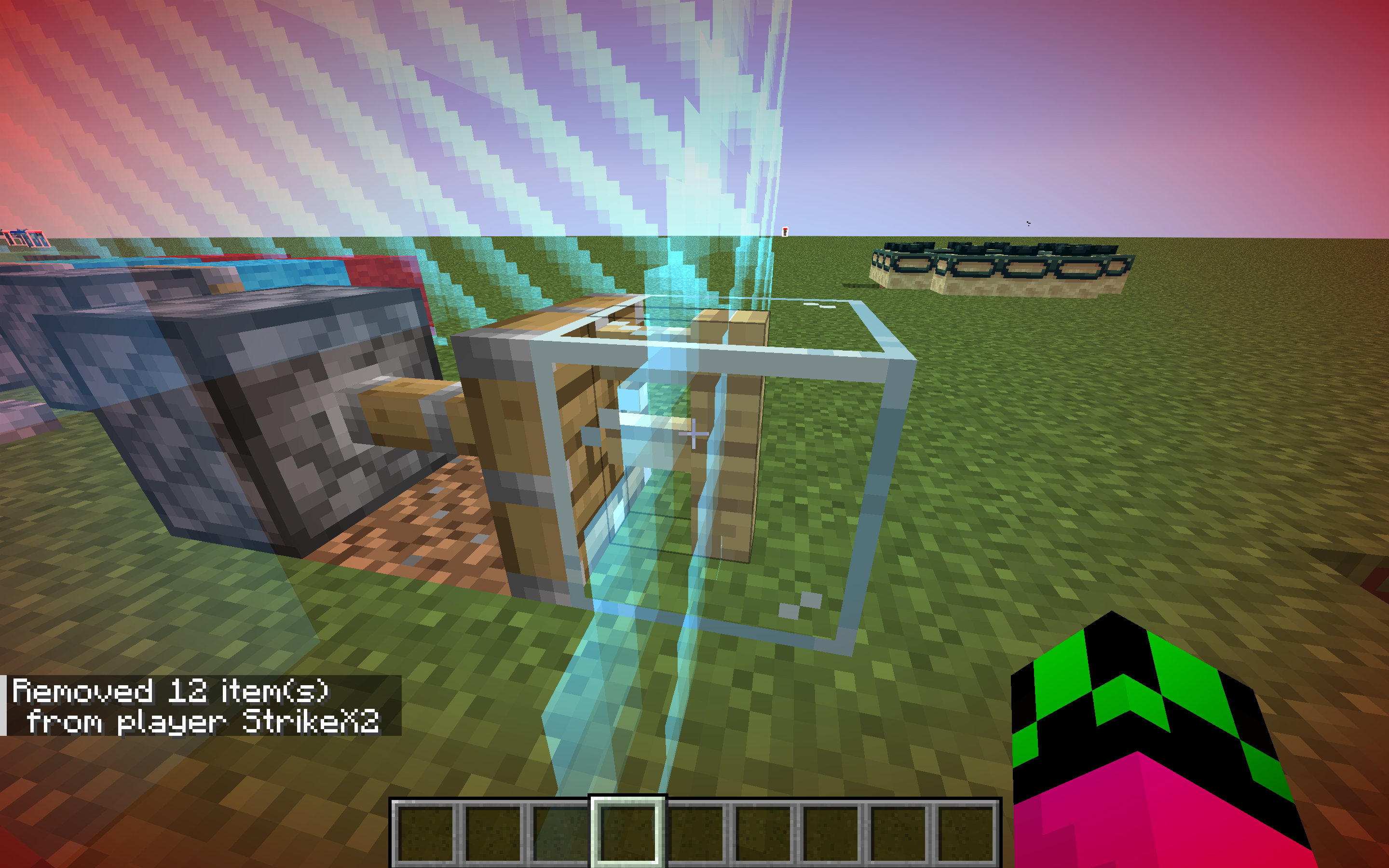
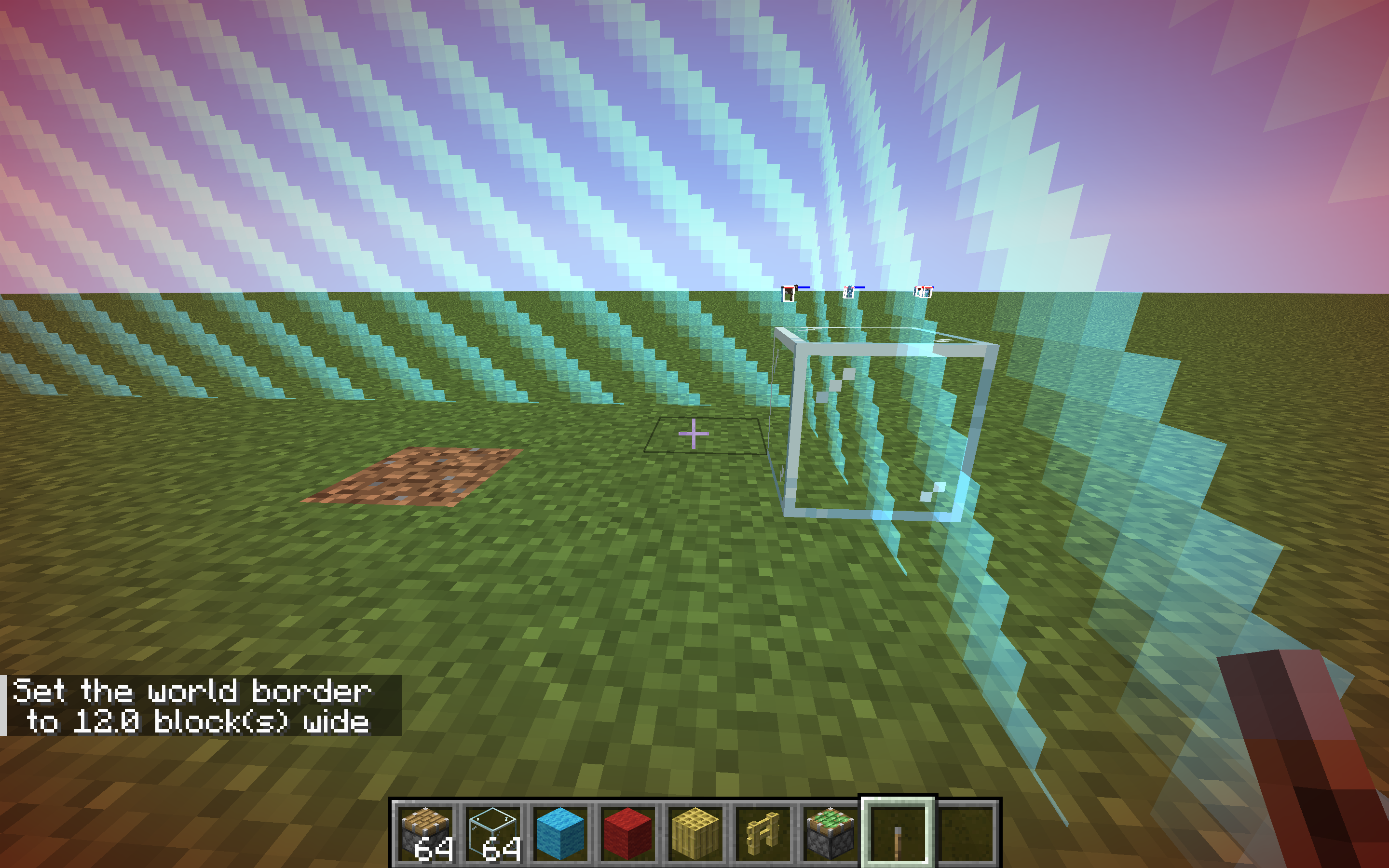
When you use a piston with certain blocks on the worldborder, you can merge blocks and create "ghost blocks" once you destroy them, that you can stand on but cannot destroy and is not seen in the debug menu. Blocks will also appear to "leap" when the worldborder is increased by 2 or 3 blocks
I will link the videos here:
First one: https://www.youtube.com/watch?v=SKpkcy-UxE4&ab_channel=MojirabugsStrikeX2Second one (forgot the ending): https://www.youtube.com/watch?v=Y7dx2NEU0Kg&ab_channel=MojirabugsStrikeX2
When you use a piston with certain blocks on the worldborder, you can merge blocks and create "ghost blocks" once you destroy them, that you can stand on but cannot destroy and is not seen in the debug menu. Blocks will also appear to "leap" when the worldborder is increased by 2 or 3 blocks
I will link the videos here:
First one: https://www.youtube.com/watch?v=SKpkcy-UxE4&ab_channel=MojirabugsStrikeX2Second one (forgot the ending): https://www.youtube.com/watch?v=Y7dx2NEU0Kg&ab_channel=MojirabugsStrikeX2
When you use a piston with certain blocks on the worldborder, you can merge blocks and create "ghost blocks" once you destroy them, that you can stand on but cannot destroy and is not seen in the debug menu. Blocks will also appear to "leap" when the worldborder is increased by 2 or 3 blocks
From my tests, this does not affect blocks that cannot be pushed such as chests or obsidian
I will link the video here:
When you use a piston with certain blocks on the worldborder, you can merge blocks and create "ghost blocks" once you destroy them, that you can stand on but cannot destroy and is not seen in the debug menu. Blocks will also appear to "leap" when the worldborder is increased by 2 or 3 blocks
From my tests, this does not affect blocks that cannot be pushed such as chests or obsidian
I will link the video here:
When you use a piston with certain blocks on the worldborder, you can merge blocks and create "ghost blocks" once you destroy them, that you can stand on but cannot destroy and is not seen in the debug menu. Blocks will also appear to "leap" when the worldborder is increased by 2 or 3 blocks
From my tests, this does not affect blocks that cannot be pushed such as chests or obsidian
I will link the video here: https://youtu.be/eeSRSPAD53s
When you use a piston with certain blocks on the worldborder, you can merge blocks and create "ghost blocks" once you destroy them, that you can stand on but cannot destroy and is not seen in the debug menu. Blocks will also appear to "leap" when the worldborder is increased by 2 or 3 blocks
I have also attached the world file
From my tests, this does not affect blocks that cannot be pushed such as chests or obsidian
I will link the video here: https://youtu.be/eeSRSPAD53s
Villagers and Zombies stuck on repeaters due to height miscalculation2 Block high mobs will not "see" repeaters when pathfinding
2 block tall
mobs like villagers and zombies think that they can go through repeaters, but they are just a little too tall so they can't and just get stuck there.Mobs that are 2 blocks tall will not be able to "see" redstone repeaters when pathfinding. This is most noticeable when aggravated on a player or other entity, such as a snow or iron golem.
2 Block high mobs will not"see" repeaters when pathfindingMobs are unable to"see" repeaters when pathfinding
Mobs
that are 2 blocks tallwill not be able to "see" redstone repeaters when pathfinding. This is most noticeable when aggravated on a player or other entity, such as a snow or iron golem.Mobs will not be able to "see" redstone repeaters when pathfinding. This is most noticeable when aggravated on a player or other entity, such as a snow or iron golem. if you replace the repeater with another block, such as a full block, the mob will not
Certain Mobs are unable to"see" repeaters when pathfinding
Mobs will not be able to "see" redstone repeaters when pathfinding. This is most noticeable when aggravated on a player or other entity, such as a snow or iron golem.if you replace the repeater with another block, such as a full block, the mob will notCertain mobs will not be able to "see" redstone repeaters when pathfinding, and will try to walk towards a point that they cannot access due to the repeater. This is most noticeable when aggravated on a player or other entity, such as a snow or iron golem. If you replace the repeater with another block, such as a full block, the mob will not be aggravated on the player or other entity. Mobs that are not affected by this are the ones with the dimensions that mean they cannot be put in a box where repeaters will block their movement, such as creepers and wither skeletons.
Steps to reproduce (for 2 block tall mobs, change accordingly to other mob dimensions:
1: Build two pillars 3 blocks high 1 block apart and connect them with a block in-between them at the top.
2: Build a small fenced off area connected to the arch on one side.
3: In the middle of the arch, place a redstone repeater
4: Spawn a hostile mob, say, a zombie inside the fenced off area.
5: Go to the opposite side of the arch and set your gamemode to survival
6: (x)The zombie will try to attack you, even if its path is blocked by the repeaterExpected result:
The zombie would not be aggravated towards the playerNote:
To reproduce for mobs like endermen, make the arch 1 block taller
Certain mobs will not be able to "see" redstone repeaters when pathfinding, and will try to walk towards a point that they cannot access due to the repeater. This is most noticeable when aggravated on a player or other entity, such as a snow or iron golem. If you replace the repeater with another block, such as a full block, the mob will not be aggravated on the player or other entity. Mobs that are not affected by this are the ones with the dimensions that mean they cannot be put in a box where repeaters will block their movement, such as creepers and wither skeletons.
Steps to reproduce (for 2 block tall mobs, change accordingly to other mob dimensions:
1: Build two pillars 3 blocks high 1 block apart and connect them with a block in-between them at the top.
2: Build a small fenced off area connected to the arch on one side.
3: In the middle of the arch, place a redstone repeater
4: Spawn a hostile mob, say, a zombie inside the fenced off area.
5: Go to the opposite side of the arch and set your gamemode to survival
6: (x)The zombie will try to attack you, even if its path is blocked by the repeaterExpected result:
Thezombiewould not be aggravated towards the player
Note:
To reproduce for mobs like endermen, make the arch 1 block tallerCertain mobs will not be able to "see" redstone repeaters when pathfinding, and will try to walk towards a point that they cannot access due to the repeater. This is most noticeable when aggravated on a player or other entity, such as a snow or iron golem. If you replace the repeater with another block, such as a full block, the mob will not be aggravated on the player or other entity. Mobs that are not affected by this are the ones with the dimensions that mean they cannot be put in a box where repeaters will block their movement, such as creepers and wither skeletons.
Steps to reproduce (for 2 block tall mobs, change accordingly to other mob dimensions:
1: Build two pillars 3 blocks high 1 block apart and connect them with a block in-between them at the top.
2: Build a small fenced off area connected to the arch on one side.
3: In the middle of the arch, place a redstone repeater
4: Spawn a hostile mob, say, a zombie inside the fenced off area.
5: Go to the opposite side of the arch and set your gamemode to survival
6: (x)The zombie will try to attack you, even if its path is blocked by the repeaterExpected result:
The mob would not be aggravated towards the playerObserved result:
The mob is aggravated on the playerNote:
To reproduce for mobs like endermen, make the arch 1 block taller
When you try and write a capital letter, either with shift or caps lock, it will not work in the structure name section. However, if you try and type it in any other part of the block it will.
How to reproduce
1: Obtain a structure block by typing /give @s structure_block
2: Place the structure block down on open it by right clicking it
3: Try and type a capital letter. It will not work
There appear to be 207 million rendered entities. The vexes aren’t the problem. The other 206,999,988 entities would be.
Can confirm in 1.20.3, however it is extremely difficult to repro
Items can be picked up from chestwhen /tick freeze is activeItems can be picked up from containers when /tick freeze is active
If you have tick freeze active and break a c
hestwith items inside, you will pick up the items inside. Furthermore, if you walk away and then turn off tick freeze the item that you picked up will visually be picked up againIf you have tick freeze active and break a container (chest, hopper etc) with items inside, you will pick up the items inside. Furthermore, if you walk away and then turn off tick freeze the item that you picked up will visually be picked up again
If you have tick freeze active and break a container (chest, hopper etc) with items inside, you will pick up the items inside. Furthermore, if you walk away and then turn off tick freeze the item that you picked up will visually be picked up again
If you have tick freeze active and break a container (chest, hopper etc) with items inside, you will pick up the items inside.
Relates toMC-267201
If you have tick freeze active and break a container (chest, hopper etc) with items inside, you will pick up the items inside.
Relates toMC-267201andMC-267202Steps to reproduce:
Note: For this example our example container block will be a chest
1 Activate tick freeze with the command /tick freeze
2 Place down a container block (chest, hopper, furnace etc) (for this example we will be using a chest
3 Break the chest
4 You will pick up the items inside, but not the chest
Items picked up when tick freeze is active will play extended pickup animationwith hitboxesItems picked up when tick freeze is active will play an extended pickup animation
![[Mod] Jiingy](../../../data/avatars/users/91802.png)
I cannot reproduce this issue. Seeing as you said you can confirm it StrikeX2, can you please attach a video?
![[Mod] LateLag](../../../data/avatars/users/92884.png)
StrikeX2 - It is still reproducible in the current release when one of the cats is sitting.
Cannot reproduce this issue with the working command provided by StrikeX2
Adding onto StrikeX2's comment, please make sure to provide exact steps to reproduce the observed behavior/issue. Generally, words such as 'sometimes' do not help narrow down exact situations where issues occur.

StrikeX2 are you in a realm? Chat isn't censored in single player nor normal servers.
This should be moved to the REALMS project.
Yes it works and the warden will attempt to attack you if you are in survival
I have attached my own video because file was too big: https://www.youtube.com/watch?v=Z9MEMXfVCMs&ab_channel=MojirabugsStrikeX2
To perform this glitch you need to:
1: create a new world
2: make sure the difficulty is not peaceful
3: type /tick freeze
4: type /summon warden
5: Type /ride @s mount @e[type=minecraft:warden,sort=nearest,limit=1] or use the entity tag
6: the warden will move around in a circle of around a 2 block radius. If you are in survival mode it will try to attack you and give you blindness, however it will not damage you
7: dismount the warden, it will freeze as it should once you dismount it
8: mount the breeze by typing /ride @s mount @e[type=minecraft:breeze,sort=nearest,limit=1] or use the entity tag (i used this as it would work in any application)
9: the breeze will stay still but play the idle animation
10: dismount the breeze
Confirmed, However I also am also unsure if trial spawners should work in peaceful mode. What happens is the mob is still in the trial spawner, but the spawner is inactive and does not display the mob. If you switch to any other difficulty it should be working fine.
I'll link a video of me performing the bug/ intentional feature: https://youtu.be/IRiY9uzrpL4
How to perform bug
1: Create a new world with cheats enabled
2: If it isn't already, set the difficulty to normal with /difficulty normal
3: place down a trial spawner
4: place a mob egg in it (any kind that will spawn, the hostility of the mob does not matter). the spawner will work normally
5: set the difficulty to peaceful with /difficulty peaceful
6: the trial spawner will deactivate and not show a mob, however it is still "working" because the mob is inside it but not shown
7: set the difficulty to normal with /difficulty normal. the trial spawner will work again with the same mob that you used for it earlier
8: break the trial spawner and place a new one without any entities in it
9: set the difficulty to peaceful with /difficulty peaceful
10: Right click the spawner with spawn egg (again, hostility does not matter). The mob is there but not displayed
11: set the difficulty to normal with /difficulty normal. the trial spawner will work normally and spawn the mob that you put in it while you were in peaceful
Notes
I have used normal difficulty as an example, however it will still work if you use hard/easy difficulty instead.
I will link a video of it here: https://youtu.be/qXYIodHPD7Y
Notes: The single observer is still going on and off, even though the lamp is always powered (you can see this with the f3 menu)
I have been unable to replicate this bug, i am getting particles both times. can you show me the command you used please?
would it be reproducible with the /structure and /setbiome command? if you were to spawn in a village then set the biome to oak forest would that work?
can confirm for 23w45a
Can confirm. I will link a video here: https://youtu.be/Na5vcC90HsI
How to recreate
1: build a 3 block high pillar with one block sticking out to the side on the top (this is to stop the breeze floating away)
2: spawn the breeze below the pillar then immediately copy and paste /effect give @e[type=minecraft:breeze,limit=1,distance=..10] minecraft:levitation infinite 3 false or use tick freeze to give yourself time to type the command then tick unfreeze
3: the breeze will now stay in place and seemingly have no ai
4: set your gamemode to survival
5: the breeze will seemingly have no ai
The problem appears to be an underwater xray like glitch when the chunks aren't loaded. the more beefy your pc, the less this will happen as the chunks will load faster. also it does not have to be one biome. the water texture difference is because the game hasn't loaded the seafloor there so the game thinks that the water is floating and the light will go through all sides and is not blocked by the seafloor
I have attached a video here: https://youtu.be/6ZUZF4uF0gQ
also confirmed in 1.20.2
Also your bug would have happened if your render distance was high because the seafloor chunks would not have loaded.
I have had experience with this bug... i used to use a 2013 mac so the chunks never loaded. Please say if you have an old or laggy computer, as this will mean it is more likely to happen
This is a duplicate of
MC-266439This is not vanilla. Please only post vanilla bugs on this. Bugs with mods should be reported to their developer, not the official minecraft bug site.
This is a duplicate of
MC-96198How long after you trading did you take this screenshot? If it is a couple seconds after buying or holding a villager trading item then it is likely the game being slow to update. They will also do this if the hero of the village effect is active. If possible send a video of you performing the bug to see how long after trading the bug happens and how long it lasts.
This bug is no longer reproducible. I have attached a video here: https://youtu.be/qQeUNXtRqbM
Cannot reproduce. I will link a video here: https://youtu.be/FFmfIBRDqlQ
Update: You use powdered snow instead of sea lantern and have to fly above the powdered snow
as of 1.20.2:
Armour (player) will go to top left
Inventory (player) will either go to top left or first hotbar slot
offhand will go to top left
crafting (player) will go to last hotbar slot
crafting (table) will go to last hotbar slot
Items from chests and barrels will go to last hotbar slot
Items from droppers and dispensers will go to bottom right
all other blocks and villager trades (Loom, smithing table etc) will have the input go to the top left and output go to the top right
Cannot reproduce as of 1.20.2 I have attached a video here: https://youtu.be/OF0fl2Io8Ow
Cannot reproduce as it is no longer possible to breed cats and get different breeds and the other player will gain ownership of the cat that you need to tame (if you breed your cat and the other players cat and the baby is the same breed as their cat, they will own it, not you)
This is not a bug and works as intended. If you have a suggestion to be implemented into the game, you should post it on the official minecraft suggestion forum here: https://www.minecraftforum.net/forums/minecraft-java-edition/suggestions
you might want to search up how to make a 20 or 10hz redstone clock. Here is a video i used for a report a while ago
20hz clock: https://www.youtube.com/watch?v=2hlcfU69cJU&ab_channel=%E2%80%AElracrofe
10hz clock: https://www.youtube.com/watch?v=H6B1Q9OYEh8&ab_channel=Beast
I have been unable to reproduce, it is most likely the pc/laptop hardware being slow/outdated. Please add your operating system to the bug description.
I am using a m1 mac air 2020 with a g502 hero wireless at a polling rate of 1000 hz, and I have never had this issue.
I believe this is due to some things having a 0 tick delay and a 1 tick delay.
This is Not a post complaining about the copper bulb and crafter change.
Duplicates
MC-266742,MC-266745,MC-266747andMC-266748Relates to MC-200887
if you want this changed, send it to the official feedback forum. sending it to the official bug tracker will just clutter it up as we already have 10 duplicates within like a day. Also please do not duplicate your own post and use the search feature to see if someone else has posted the same issue before posting a report
Can you please add in notes or steps to reproduce that you need an alt/friends mc account? Just to make it a bit clearer for others (I know it's obvious, but just so then people don't test it to find out that they don't have an alt or smth)
Can you add steps to reproduce please? There is currently not enough information to reproduce the bug
Here is a template that you can use
[Briefly describe the bug here]
Steps to Reproduce:
[Step 1]
[Step 2]
[Step 3]
Observed Results:
[Describe what happens]
Expected Results:
[Describe what should happen]
Screenshots/Videos:
[Optional: Attach an image or short video]
Notes:
[Any further information you can provide about the bug, such as explaining any attachments you’re including, when the bug started to occur, how you’ve tested the bug,
messages displayed (e.g., error messages), and how the bug impacts gameplay.]
This may be due to minimizing your window or tabbing out and back in again
Also is this vanilla minecraft
Can you please add steps to reproduce? just to make it a bit clearer in case it is a serious bug that mojang needs to fix quickly (most likely not, but you never know)
Can you please add steps to reproduce? Here is a template that you can use:
[Briefly describe the bug here]
Steps to Reproduce:
[Step 1]
[Step 2]
[Step 3]
Observed Results:
[Describe what happens]
Expected Results:
[Describe what should happen]
Screenshots/Videos:
[Optional: Attach an image or short video]
Notes:
[Any further information you can provide about the bug, such as explaining any attachments you’re including, when the bug started to occur, how you’ve tested the bug,
messages displayed (e.g., error messages), and how the bug impacts gameplay.]
Confirmed in 23wa46a
confirmed in 23w46a
Confirmed
(Feel free to use what I have written below in your report)
Steps to reproduce
For 1.20.2
1: Create a world in 1.20.2
2: Create/find a small flat area, around 5x5 blocks at most
3: Get a command block by typing in chat /give @s command_block
4: Dig a 1 block hole in the ground and place your command block there
5: Open your command block and set it to "Repeat" "Unconditional" "Impulse"
6: Enter the command in the command block /tp @e[type=minecraft:ravager] ~ ~0.5 ~
7: Place a lever on top of the command block and activate it
8: Summon a ravager either with commands or a spawn egg. The ravager will now stay still above the command block
9: Type in chat /effect give @s minecraft:resistance infinite 255 true (This is not necessary, just makes it so you are invincible)
10: Enter survival mode with /gamemode survival
11: Walk towards the ravager and get it to hit you. If you are playing 1.20.2+ you will have to be ~1 block away from the command block to be hit. if you are playing before 1.20.2 you will have to be ~3 blocks away to be hit by the ravager
Notes
You may want to turn off command block output so your screen isn't covered with the command block spam. You can do this by typing /gamerule commandBlockOutput false in chat
Confirmed
Confirmed in 23w46a
How to reproduce
1: Dig a 2x2x1 hole
2: Make it an infinite water source by placing a water bucket in both corners
3: Spawn an axolotl inside the water with a spawn egg
It appears to be working fine, just really bad luck. Also villager type does not matter. That appears to be either fake or only for a specific server, which is likely modified
this is in 1.20.2 btw.
I have attached a screenshot
Confirmed 1.20.2
also it seems to duplicate the helmet (although it is creative, not in survival not technically duplicating just feels like it)
Can you please add steps to reproduce? Here is a template that you can use:
[Briefly describe the bug here]
Steps to Reproduce:
[Step 1]
[Step 2]
[Step 3]
Observed Results:
[Describe what happens]
Expected Results:
[Describe what should happen]
Screenshots/Videos:
[Optional: Attach an image or short video]
Notes:
[Any further information you can provide about the bug, such as explaining any attachments you’re including, when the bug started to occur, how you’ve tested the bug,
messages displayed (e.g., error messages), and how the bug impacts gameplay.]
Confirmed in 1.20.2
Steps to reproduce:
1: Create a new world
2: You will hear the player fall without damage sfx
This is a feature request, not a bug
Duplicate of
MC-266742Please check if there are already reports about the same issue with the search feature before posting a report
Also please do not mark unreleased versions as affected
Bug reports below the latest release are not accepted. If they were, it would clog the bug tracker up.
Mark as invalid
Also when downgrading your world, a lot of data is removed due to changes in the way the game code is written. I once lost my world of 40+ hours of building due to this.
Duplicate/relates to of MC-130202
Have you traded with that villager before breaking its job block?
Also please add steps to reproduce. Here is a template that you can use:
[Briefly describe the bug here]
Steps to Reproduce:
[Step 1]
[Step 2]
[Step 3]
Observed Results:
[Describe what happens]
Expected Results:
[Describe what should happen]
Screenshots/Videos:
[Optional: Attach an image or short video]
Notes:
[Any further information you can provide about the bug, such as explaining any attachments you’re including, when the bug started to occur, how you’ve tested the bug,
messages displayed (e.g., error messages), and how the bug impacts gameplay.]
Confirmed.
Also please add steps to reproduce. Here is a template that you can use:
[Briefly describe the bug here]
Steps to Reproduce:
[Step 1]
[Step 2]
[Step 3]
Observed Results:
[Describe what happens]
Expected Results:
[Describe what should happen]
Screenshots/Videos:
[Optional: Attach an image or short video]
Notes:
[Any further information you can provide about the bug, such as explaining any attachments you’re including, when the bug started to occur, how you’ve tested the bug,
messages displayed (e.g., error messages), and how the bug impacts gameplay.]
Side note: Now we know what clutch dream will be doing next manhunt
Confirmed in 23w46a. However, not just powered rails but all rails do not appear in the redstone section.
Duplicate of MC-264151
Done.
Sorry I just realised I used .mov I have switched to .mp4
Confirmed
They are similar, however that describes a different issue with the inflation and constant exploding. This one focuses on the hitbox. They probably could be merged
Also it does relate to
MC-266808This is working as intended, sending these reports in will just clog up the reporter. You are more likely to have it changed if you send it in as a feature request. Duplicates
MC-266742Did you get a message in chat saying "You have no home bed or respawn anchor, or it was obstructed"
And did you remember to set your spawn in the bed
Also please add steps to reproduce, feel free to use this template:
[Briefly describe the bug here]
Steps to Reproduce:
[Step 1]
[Step 2]
[Step 3]
Observed Results:
[Describe what happens]
Expected Results:
[Describe what should happen]
Screenshots/Videos:
[Optional: Attach an image or short video]
Notes:
[Any further information you can provide about the bug, such as explaining any attachments you’re including, when the bug started to occur, how you’ve tested the bug,
messages displayed (e.g., error messages), and how the bug impacts gameplay.]
I am sorry, but bug reports using a modded client are not accepted.
Mark as invalid
Confirmed in 1.20.3 pre-1
UPDATE:
THis also works with comparators, however the procedure is slightly different. you will need to put the comparator next to, say a chest with items in it, while tick freeze is active. the comparator will still remain non updated, this would be the correct behavior. however, if you invert the comparator and un-invert it, the comparator will update.
Confirmed in 1.20.3 pre-1
This is not a bug, this is a feature request.
Mark as invalid
Confirmed in 1.20.3 pre 1
Can you please add steps to reproduce? Here is a template that you can use:
[Briefly describe the bug here]
Steps to Reproduce:
[Step 1]
[Step 2]
[Step 3]
Observed Results:
[Describe what happens]
Expected Results:
[Describe what should happen]
Screenshots/Videos:
[Optional: Attach an image or short video]
Notes:
[Any further information you can provide about the bug, such as explaining any attachments you’re including, when the bug started to occur, how you’ve tested the bug,
messages displayed (e.g., error messages), and how the bug impacts gameplay.]
Confirmed in 1.20.3 pre 1
This is a feature request, not a bug.
Mark as invalid
Confirmed in 1.20.3 pre 1
Confirmed in 1.20.3 pre 1
Can you also please add steps to reproduce? Here is a template that you can use:
[Briefly describe the bug here]
Steps to Reproduce:
[Step 1]
[Step 2]
[Step 3]
Observed Results:
[Describe what happens]
Expected Results:
[Describe what should happen]
Screenshots/Videos:
[Optional: Attach an image or short video]
Notes:
[Any further information you can provide about the bug, such as explaining any attachments you’re including, when the bug started to occur, how you’ve tested the bug,
messages displayed (e.g., error messages), and how the bug impacts gameplay.]
Confirmed in 1.20.3 pre 1
Can you please add steps to reproduce? Here is a template that you can use
[Briefly describe the bug here]
Steps to Reproduce:
[Step 1]
[Step 2]
[Step 3]
Observed Results:
[Describe what happens]
Expected Results:
[Describe what should happen]
Screenshots/Videos:
[Optional: Attach an image or short video]
Notes:
[Any further information you can provide about the bug, such as explaining any attachments you’re including, when the bug started to occur, how you’ve tested the bug,
messages displayed (e.g., error messages), and how the bug impacts gameplay.]
Confirmed in 1.20.3 pre-1
Can you explain a bit more on what you mean by counteract knockback? Also from my tests the shield did seem to block some of the wind charge kb compared to no shield
Can confirm
Duplicates MC-266736
Thanks, I was just about to do that myself. I realised right after my report
Can confirm in 2.20.3 pre 1
Confirmed in 1.20.3 pre 1
Also this behavior seems to work without ice vertically.
Confirmed in 1.20.3 pre-1. Also works with trident
The capes are still rolling out, just be patient. You will get yours soon
Duplicates https://bugs.mojang.com/browse/MC-79835
Works as intended
Confirmed
Confirmed in 1.20.3 pre 2
Confirmed in 1.20.3 pre 2
Also here is the updated command that works
/give @p minecraft:firework_rocket{display:{Name:'
{"text":"Bug Report","color":"red"}'}} 16
Confirmed in 1.20.3 pre 2, however this is most likely invalid/ working as intended as the mineshaft has no-where to spawn. Also you will get exposed mineshaft if you replace stone with air
I am a bit confused as to how you got stuck, I have linked a video here: https://youtu.be/rn772V_Y50Q
Am I doing something incorrectly, and if so can you please attach a screen recording or add steps to reproduce? Here is a good template that you can use:
[Briefly describe the bug here]
Steps to Reproduce:
[Step 1]
[Step 2]
[Step 3]
Observed Results:
[Describe what happens]
Expected Results:
[Describe what should happen]
Screenshots/Videos:
[Optional: Attach an image or short video]
Notes:
[Any further information you can provide about the bug, such as explaining any attachments you’re including, when the bug started to occur, how you’ve tested the bug,
messages displayed (e.g., error messages), and how the bug impacts gameplay.]
There appears to be an error in you command, instead of Colours:[8073150] it should be Colours:[I; 8073150]
Working command should be /summon minecraft:firework_rocket ~ ~ ~ {FireworksItem:{id:"minecraft:firework_rocket",Count:1b,tag:{Fireworks:{Flight:1b,Explosions:[
{Type:0b,Colors:[I; 8073150]}]}}},Life:1,LifeTime:26,ShotAtAngle:0b,HasBeenShot:1b}
For 1.20.3 pre 2 the command should be /bossbar add 7
{"text":"TEST","underlined":true}ok unprivated the vid
Confirmed
Confirmed
This is a feature request, not a bug
Confirmed in 1.20.3 pre 2, however the darkness effect appears to be irrelevant. Also I did not find that the trident entity did the same as the lightning rod, maybe It might have been me, will need someone else to check.
Confirmed
Confirmed in 1.20.3 pre 2 (sorry about the necropost btw)
Note: The turtle is only unable to pathfind when you are holding seagrass, otherwise they can leave the slab just fine
Confirmed in 1.20.3 pre 2
Note: It generally takes a couple tries, I got pretty lucky
Also DEFINITELY NOT NORMAL
Duplicates
MC-266742confirmed
confirmed, however this will only work at an angle above 0 degrees, the higher the angle the more often this occurs
Requesting ownership of this ticket as the previous owner has been inactive for nearly 2.5 years
Confirmed in 1.20.2
Confirmed
Confirmed.
Note: It is difficult to repro, try and get a singular xp orb and type /tick freeze when the shadow disappears. It is also easier when you are looking directly at it
I cannot reproduce. Can you please add steps to reproduce?
Can you add a command into the description, /tp 8.0 -60.0 8.0 please? just so then whoever is testing it will be able to find it
It would also be helpful if you attached the world file
Sorry, but only english reports are accepted. Here is a translation for the
description:
Leider werden nur englische Meldungen akzeptiert. Hier ist eine Übersetzung für die
Beschreibung:
For the Redstone torches, the facing tag is not present in the /fill command
Confirmed
Relates to
MC-123739Duplicate of
MC-265924, invalid, see [Mojang] Timur Nazarov's commentPencilSharpener I have updated the report. Thank you for telling me this, it does help quite a lot. I would never have noticed
Have updated to remove the fireball, will need a mod to add
MC-77613as related thoCan confirm in 1.20.3 pre 4
Can I also request you attach the resource pack used?
Can you please attach a screenshot with the f3 menu open? Thank you
Can confirm
Can confirm
Please only report one issue per report. Also the second mentioned issue relates to MC-114479. If you want, create a new ticket for the second issue you mentioned and remove it from this one, as the first mentioned issue is a duplicate
Can confirm in 1.20.3
Can confirm in 1.20.3 with command /summon ender_dragon ~ ~ ~. The dragon will behave normally if the command /summon ender_dragon ~ ~ ~
{DragonPhase:0}is used
Note: the dragon will gradually go into a wider and wider circle, however its Y height will not change
I also cannot reproduce in 1.20.3
https://bugs.mojang.com/secure/attachment/556626/CR.mp4
Can confirm in 1.20.3
Can confirm in 1.20.3
Can confirm in 1.20.3
Can confirm in 1.20.3
Can confirm in 1.20.3
Can you please attach the datapack you are using?
I can confirm, it also works with Cod
This is a feature request, not a bug.
This is working as intended.
Try running /gamerule reducedDebugInfo false, and then going into options>Chat settings, then scroll down to the reduceddebuginfo box. Click it until it changes to false
I cannot reproduce, see attached screenshot
Can confirm in 1.20.4
Can you please add the world files and some screenshots on the realms world so we can see the difference?
Can confirm in 1.20.4, see attached screenshot
CR in 1.20.4, see attached video
CR.mp4
Does MC-102418 describe your issue?
This is a launcher issue
This is invalid as it is modded.
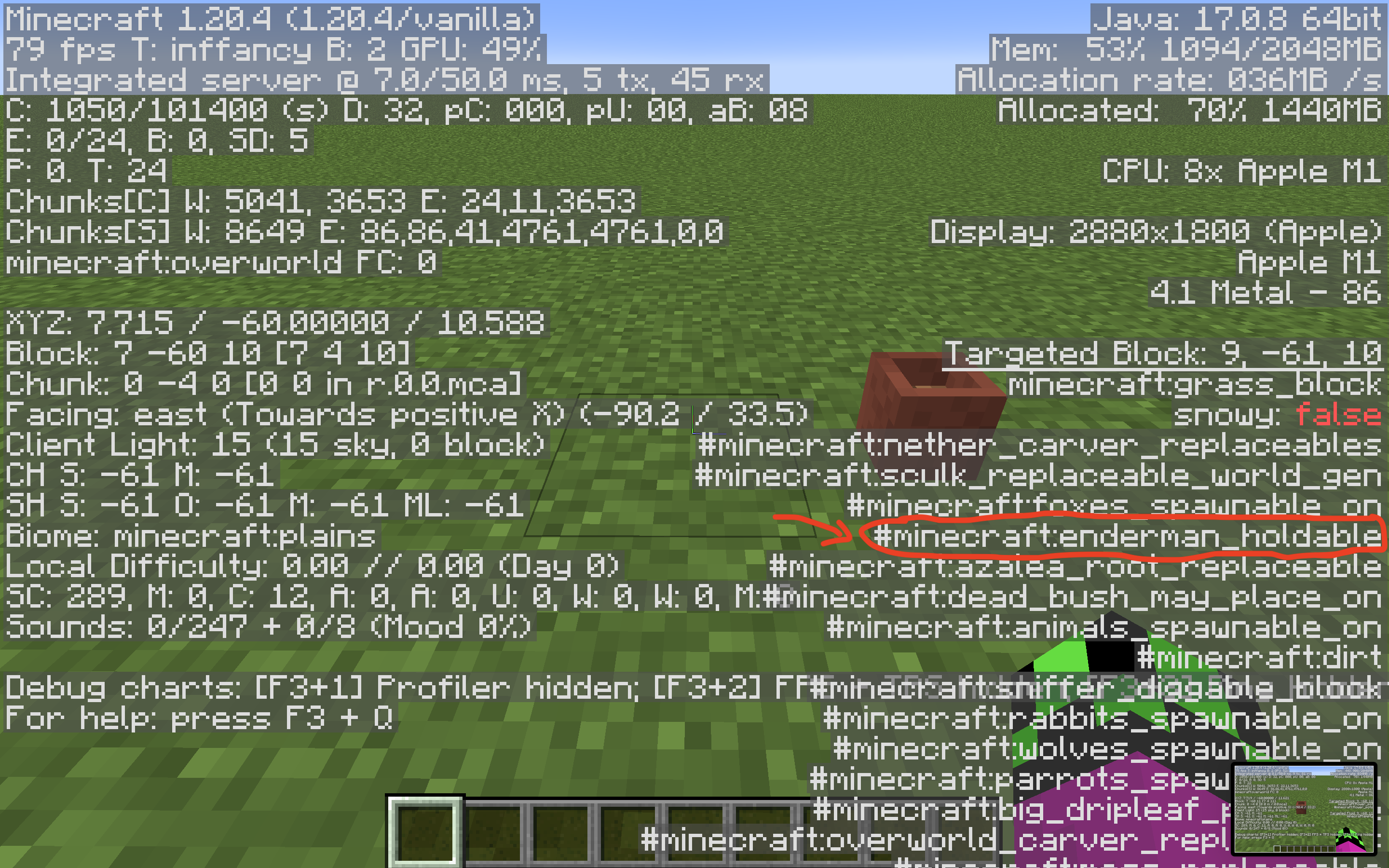
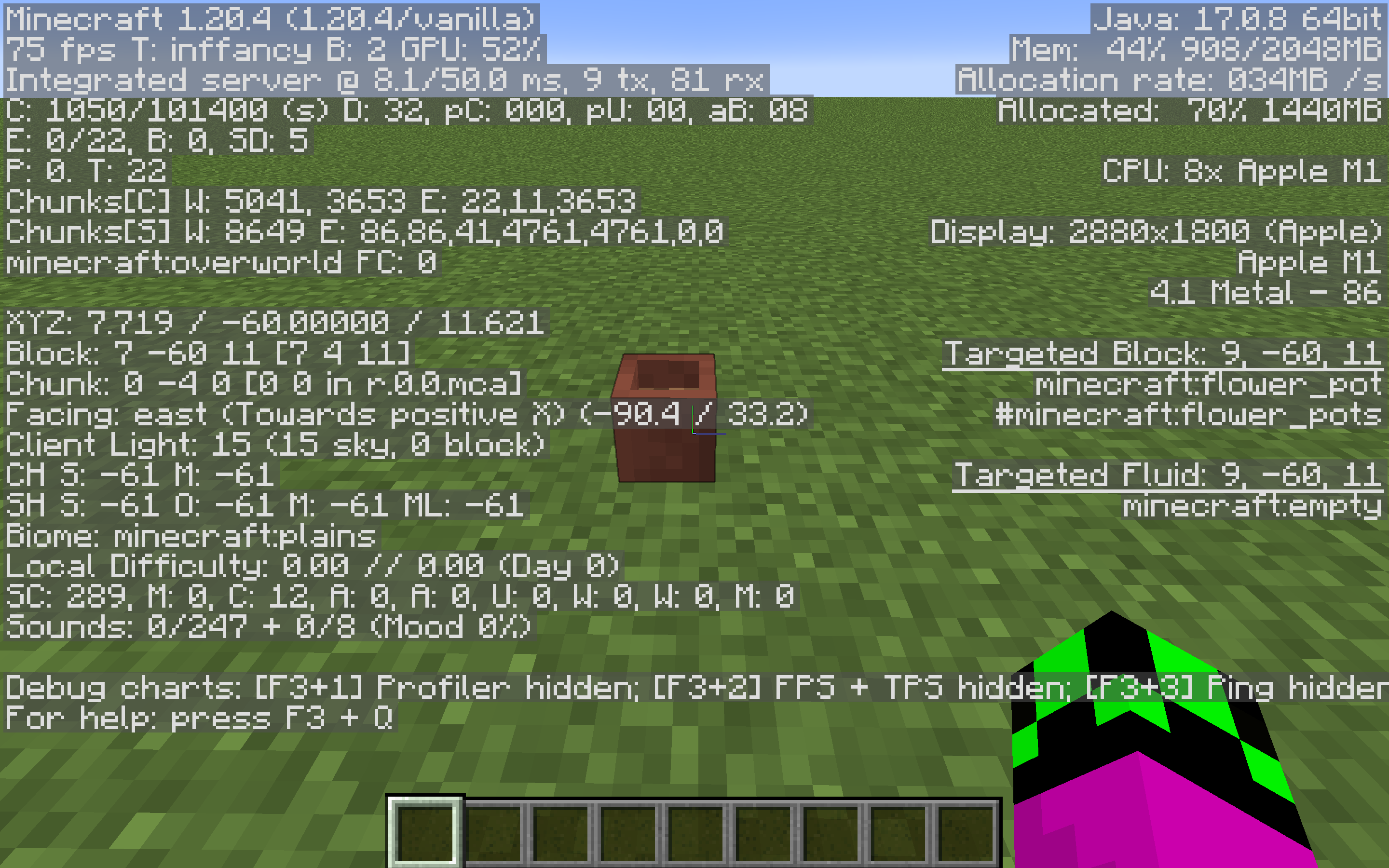
Invalid - Enderman cannot pick up plant pots, look at the #endermen_holdable block-tag in the F3 menu. I have added two screenshots showing this:


Does MC-127970 describe your issue?
Can you please add steps to reproduce (Such as commands)?
Is the server modified in any way? I currently am unable to repro
Can confirm
Can confirm.
How to repro:
1: tame a horse and put a saddle on it
2: ride the horse
3 type the command /attribute @s minecraft:generic.scale base set 10
4: open up hitboxes
Can confirm in 24w07a
Duplicates MC-119599
I cannot reproduce this, for me the shulker is still facing south, as expected. Could you attach a video or some screenshots please?
Can confirm in 1.21.2 Pre-3
Can confirm in 1.21.1, this also happens when riding mules
Does MC-256638 Describe your issue?
Can Confirm
Can confirm. Also affects version 1.21.2 pre-4
Can confirm
Can confirm. The command I used:
{id:text_display}/summon minecraft:zombie ~ ~ ~ {Passengers:[
]}
Can confirm in 1.21.2 pre-4
Can confirm. Also affects 1.21.2 pre 4
Can confirm in 1.21.1, I have also attached a video. I also found that any entity entering the boat then leaving would trigger this.