Bottom 2 rows of pixels in selected hotbar slot texture don't appear in game
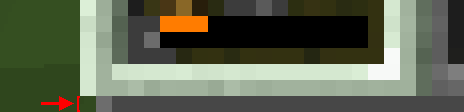
When I was editing my resource pack, I edited the texture for the selected hotbar slot, but when I went into the game, I saw that the bottom 2 rows of pixels weren't present. I thought it was a problem with my resource pack, so I switched to default and saw there was the same problem. It's easiest to see with the bottom left and right pixels of the texture when selecting slot 1 or 9, respectively.
Linked Issues
is duplicated by10
 MC-85131Hotbar selector improperly mappedDuplicateMC-96230Bottom right/left pixels are missing from the hotbar selector.DuplicateMC-152903Pixel line missing on toolbar / widgets.png fileDuplicateMC-209139Hotbar Selector Cut OffDuplicateMC-222645Inventory selection texture cuts of too earlyDuplicateMC-242177Missing pixels slotbar/hotbarDuplicateMC-252379Bottom line of selected hotbar slot is not visibleDuplicateMC-2527782 pixels (in height) of the Hotbar selection box don't appear in the HotbarDuplicateMC-262384Selected hotbar slot image is missing bottom row of pixelsDuplicateMC-264982Bottom 2 rows of pixels of the hotbar selector does not show upDuplicate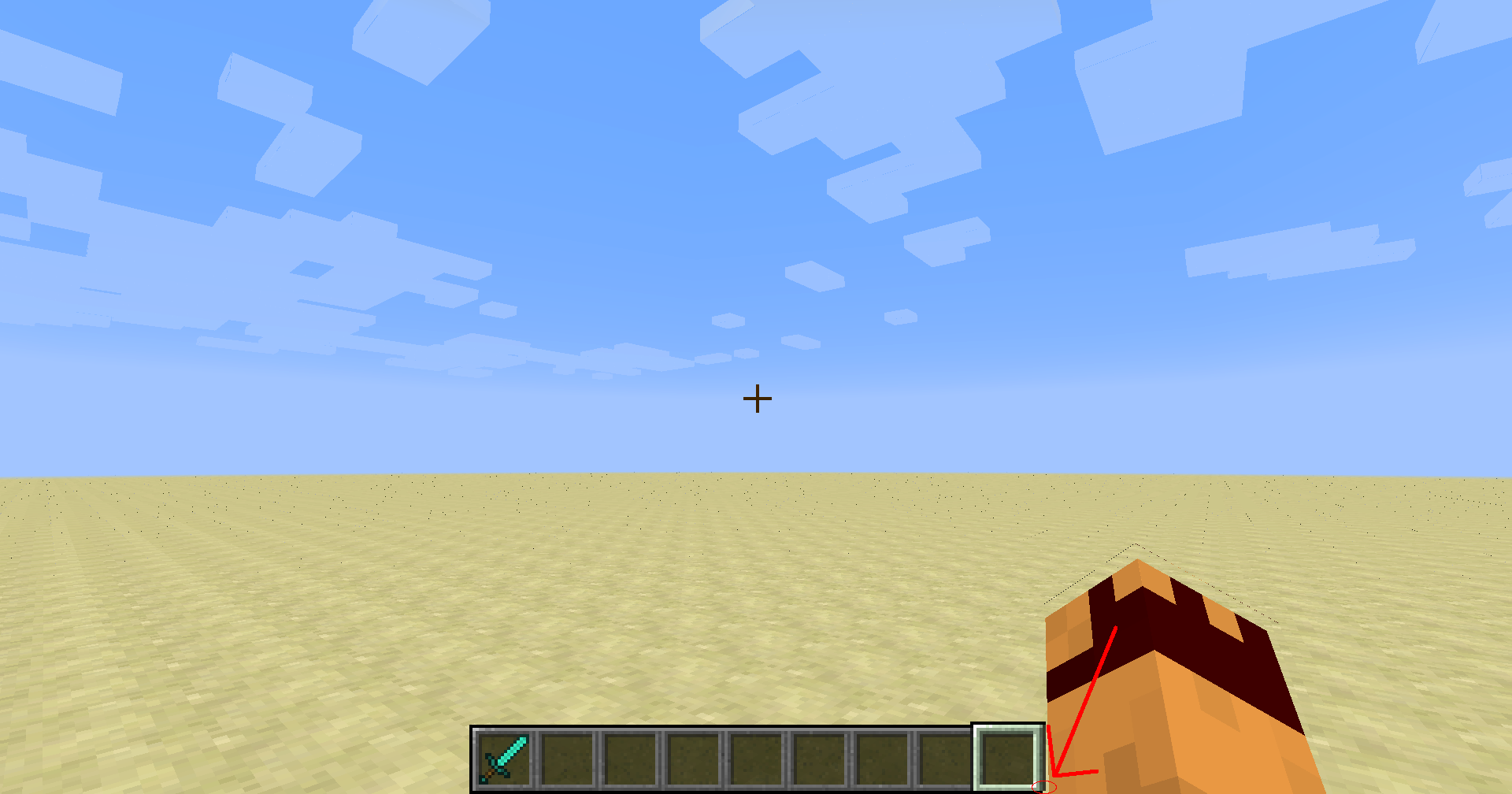


- Fixed
 Squid Eevee
![[Mojang] Gegy](../../../data/avatars/users/10122.svg) [Mojang] Gegy
[Mojang] Gegy- 55
- 27
- Confirmed
 Low
Low- Resource Packs Textures and models
- resource-pack-support texture
14w33a - 1.20.1
14w33a 1.8 1.8.1 1.8.2-pre1 1.8.2-pre4 1.8.2-pre5 1.8.2-pre6 1.8.3 1.8.4 1.8.5 1.8.6 15w31c 15w32a 15w34a 15w34b 15w34c 15w34d 15w35b 15w35c 15w35d 15w36b 15w36c 15w36d 15w43a 1.8.9 16w04a 1.10.2 16w41a 16w42a 16w43a 1.11.2 17w06a 1.12 1.13.1 1.13.2-pre2 1.15-pre1 1.15-pre2 1.15-pre3 1.15-pre4 1.15-pre6 1.15-pre7 1.15 1.15.1 1.15.1-pre1 1.15.2-pre1 1.15.2-pre2 1.15.2 20w06a 20w07a 20w08a 20w09a 20w10a 20w11a 20w12a 20w13a 20w16a 20w17a 20w18a 20w19a 20w20a 20w20b 20w21a 20w22a 1.16-pre1 1.16-pre2 1.16-pre5 1.16-pre6 1.16-rc1 1.16 1.16.1 20w27a 20w28a 20w30a 1.16.2-pre1 1.16.2-rc2 1.16.2 1.16.3-rc1 1.16.3 1.16.4-pre1 1.16.4-rc1 1.16.4 20w45a 20w46a 20w48a 20w49a 20w51a 21w03a 1.16.5 21w05a 21w05b 21w06a 21w07a 21w08a 21w08b 21w10a 21w11a 21w13a 21w14a 21w15a 21w16a 21w18a 21w20a 1.17-pre1 1.17-pre2 1.17 1.17.1-pre1 1.17.1-pre2 1.17.1 21w37a 21w38a 21w39a 21w40a 21w41a 21w42a 21w43a 21w44a 1.18-pre5 1.18-pre6 1.18-rc2 1.18 1.18.1-pre1 1.18.1-rc2 1.18.1 22w03a 22w05a 22w06a 1.18.2-pre1 1.18.2-pre2 1.18.2 22w11a 22w12a 22w13a 22w14a 22w15a 22w16b 22w17a 22w18a 22w19a 1.19-pre1 1.19-pre3 1.19-pre4 1.19-pre5 1.19-rc1 1.19-rc2 1.19 22w24a 1.19.1-pre1 1.19.1-rc1 1.19.1-pre2 1.19.1-pre4 1.19.1-pre6 1.19.1-rc2 1.19.1 1.19.2-rc1 1.19.2 22w42a 22w43a 22w45a 22w46a 1.19.3-pre1 1.19.3-pre2 1.19.3-rc1 1.19.3-rc3 1.19.3 23w03a 23w04a 23w05a 23w06a 23w07a 1.19.4-pre1 1.19.4-pre2 1.19.4-pre3 1.19.4-pre4 1.19.4-rc2 1.19.4-rc3 1.19.4 23w12a 23w13a 23w14a 23w16a 23w17a 23w18a 1.20-pre1 1.20-pre2 1.20-pre4 1.20-pre5 1.20-pre6 1.20-pre7 1.20-rc1 1.20 1.20.1- 23w31a
Created Issue:
Bottom row of pixels in selected hotbar slot texture don't appear.
When I was editing my resource pack, I edited the texture for the selected hotbar slot, but when I went into the game, I saw that the bottom row of textures weren't present. I thought it was a problem with my resource pack, so I switched to default and saw there was the same problem. It's easiest to see with the bottom left and right pixels of the texture when selecting slot 1 or 9, respectively.
Attachments2
Bottom row of pixels in selected hotbar slot texture don't appear in game.
When I was editing my resource pack, I edited the texture for the selected hotbar slot, but when I went into the game, I saw that the bottom row of textures weren't present. I thought it was a problem with my resource pack, so I switched to default and saw there was the same problem. It's easiest to see with the bottom left and right pixels of the texture when selecting slot 1 or 9, respectively.
When I was editing my resource pack, I edited the texture for the selected hotbar slot, but when I went into the game, I saw that the bottom 2 row of textures weren't present. I thought it was a problem with my resource pack, so I switched to default and saw there was the same problem. It's easiest to see with the bottom left and right pixels of the texture when selecting slot 1 or 9, respectively.
Bottom 2 rows of pixels in selected hotbar slot texture don't appear in game.
When I was editing my resource pack, I edited the texture for the selected hotbar slot, but when I went into the game, I saw that the bottom 2 rows of textures weren't present. I thought it was a problem with my resource pack, so I switched to default and saw there was the same problem. It's easiest to see with the bottom left and right pixels of the texture when selecting slot 1 or 9, respectively.
When I was editing my resource pack, I edited the texture for the selected hotbar slot, but when I went into the game, I saw that the bottom 2 rows of
textures weren't present. I thought it was a problem with my resource pack, so I switched to default and saw there was the same problem. It's easiest to see with the bottom left and right pixels of the texture when selecting slot 1 or 9, respectively.When I was editing my resource pack, I edited the texture for the selected hotbar slot, but when I went into the game, I saw that the bottom 2 rows of pixels weren't present. I thought it was a problem with my resource pack, so I switched to default and saw there was the same problem. It's easiest to see with the bottom left and right pixels of the texture when selecting slot 1 or 9, respectively.

I can confirm that this does effect Minecraft versions 1.8 and up.

is duplicated by
When I was editing my resource pack, I edited the texture for the selected hotbar slot, but when I went into the game, I saw that the bottom 2 rows of pixels weren't present. I thought it was a problem with my resource pack, so I switched to default and saw there was the same problem. It's easiest to see with the bottom left and right pixels of the texture when selecting slot 1 or 9, respectively.
Edit 5/09/2015: Looking back at this now, this is a really minor bug. I'm not sure it really matters a whole lot and it's not really that noticeable anyway.
is duplicated by
![[Mod] Michael Wobst](../../../data/avatars/users/37868.png)
When I was editing my resource pack, I edited the texture for the selected hotbar slot, but when I went into the game, I saw that the bottom 2 rows of pixels weren't present. I thought it was a problem with my resource pack, so I switched to default and saw there was the same problem. It's easiest to see with the bottom left and right pixels of the texture when selecting slot 1 or 9, respectively.
Edit 5/09/2015: Looking back at this now, this is a really minor bug. I'm not sure it really matters a whole lot and it's not really that noticeable anyway.


![[Mojang] Nathan Adams](../../../data/assets/gravatar/dinnerbone.png)
![[Mod] CubeTheThird](../../../data/assets/gravatar/cubethethird.jpeg)
is duplicated by
![[Mod] violine1101](../../../data/avatars/users/92858.png)
relates to
relates to
![[Helper] Johnibur](../../../data/avatars/users/28381.png)
is duplicated by
![[Mojang] Adrian Östergård](../../../data/assets/gravatar/nighter.jpeg)
![[Mod] SPGoding](../../../data/avatars/users/44622.png)
is duplicated by
is duplicated by
![[Bot] Arisa](../../../data/avatars/users/43007.png)
![[Mod] ampolive](../../../data/avatars/users/18949.svg)
Bottom 2 rows of pixels in selected hotbar slot texture don't appear in game.
![[Mod] Asteraoth](../../../data/avatars/users/92886.png)
is duplicated by
is duplicated by
is duplicated by
[Mojang] Gegy![[Bot] Piston](../../../data/avatars/users/31202.png)
![[Mod] Greymagic27](../../../data/avatars/users/92875.png)
is duplicated by
Dupe of MC-67532
Thank you for your report!
We're tracking this issue in MC-67532, so this ticket is being resolved and linked as a duplicate.
If you would like to add a vote and any extra information to the main ticket it would be appreciated.
If you haven't already, you might like to make use of the search feature to see if the issue has already been mentioned.
Quick Links:
📓 Bug Tracker Guidelines – 💬 Community Support – 📧 Mojang Support
📓 Project Summary – ✍️ Feedback and Suggestions – 📖 Game Wiki
![[Mod] Avoma](../../../data/avatars/users/86198.png)
Duplicate of MC-67532.
Thank you for your report!
We're tracking this issue in MC-67532, so this ticket is being resolved and linked as a duplicate.
If you would like to add a vote and any extra information to the main ticket it would be appreciated.
If you haven't already, you might like to make use of the search feature to see if the issue has already been mentioned.
Quick Links:
📓 Bug Tracker Guidelines – 💬 Community Support – 📧 Mojang Support
📓 Project Summary – ✍️ Feedback and Suggestions – 📖 Game Wiki
– I am a bot. This action was performed automatically! Please report any issues on Discord or Reddit

duplicate of MC-67532?
Thank you for your report!
We're tracking this issue in MC-67532, so this ticket is being resolved and linked as a duplicate.
If you would like to add a vote and any extra information to the main ticket it would be appreciated.
If you haven't already, you might like to make use of the search feature to see if the issue has already been mentioned.
Quick Links:
📓 Bug Tracker Guidelines – 💬 Community Support – 📧 Mojang Support
📓 Project Summary – ✍️ Feedback and Suggestions – 📖 Game Wiki
Duplicate of MC-67532
Thank you for your report!
We're tracking this issue in MC-67532, so this ticket is being resolved and linked as a duplicate.
If you would like to add a vote and any extra information to the main ticket it would be appreciated.
If you haven't already, you might like to make use of the search feature to see if the issue has already been mentioned.
Quick Links:
📓 Bug Tracker Guidelines – 💬 Community Support – 📧 Mojang Support
📓 Project Summary – ✍️ Feedback and Suggestions – 📖 Game Wiki
– I am a bot. This action was performed automatically! The ticket was resolved by one of our moderators, and I left this message to give more information to you.
Thank you for your report!
We're tracking this issue in MC-67532, so this ticket is being resolved and linked as a duplicate.
If you would like to add a vote and any extra information to the main ticket it would be appreciated.
If you haven't already, you might like to make use of the search feature to see if the issue has already been mentioned.
Quick Links:
📓 Bug Tracker Guidelines – 💬 Community Support – 📧 Mojang Support
📓 Project Summary – ✍️ Feedback and Suggestions – 📖 Game Wiki

Duplicate of MC-67532.
Thank you for your report!
We're tracking this issue in MC-67532, so this ticket is being resolved and linked as a duplicate.
If you would like to add a vote and any extra information to the main ticket it would be appreciated.
If you haven't already, you might like to make use of the search feature to see if the issue has already been mentioned.
Quick Links:
📓 Bug Tracker Guidelines – 💬 Community Support – 📧 Mojang Support
📓 Project Summary – ✍️ Feedback and Suggestions – 📖 Game Wiki
– I am a bot. This action was performed automatically! The ticket was resolved by one of our moderators, and I left this message to give more information to you.
![[Mod] turbo](../../../data/avatars/users/92867.png)
Thank you for your report!
We're tracking this issue in MC-67532, so this ticket is being resolved and linked as a duplicate.
That ticket has already been resolved as Fixed. Please check the Fix Version/s field in that ticket to see in which version this behavior was or will be fixed.
If you haven't already, you might like to make use of the search feature to see if the issue has already been mentioned.
Quick Links:
📓 Bug Tracker Guidelines – 💬 Community Support – 📧 Mojang Support
📓 Project Summary – ✍️ Feedback and Suggestions – 📖 Game Wiki
Despite MC-67532 being listed as "resolved" and being "fixed" in 23w31a, the issue STILL persists. It was never fixed in 23w31a, 23w32a, 23w33a, 23w35a, 1.20.2-pre1, or 1.20.2-pre2

I wouldn't consider it to be a feature request, it'd say it's closer to a bug fix myself, the hotbar has been broken all the way back since MC-67532. (It isn't broken in Bedrock, so you can say it's a parody feature, but it was originally like how it is in Bedrock before it was broken so I wouldn't consider it such.)
Also I would call this a completely logical report, before the new spliced hotbar sprites the HUD spritesheet (widgets.png) actually did contain the full hotbar_selection.png image that is present in Bedrock and has since been cut off by one pixel in Java.

Can reproduce in Minecraft 1.8.6 and other 1.8.x versions... Please update affected versions!
Affects 15w43a
Still happens as of 1.12. I've uploaded an image that uses a custom resource pack that showcases this issue.
Confirmed for 1.13.1.
WitherSlayer5000, please stop posting unrelated comments. This is your second warning.
Can confirm for 1.18 pre-release 6
In 1.19 Pre-Release 1
In 1.19.
Partially fixed, the bottom row is still not visible (because it's off the window); that should probably be a separate report, but I'm not invested enough into this issue to keep that up to date.
Please reopen this issue as the bug has not been fully fixed. (Issue still persists)
That seems like it should be a separate report since the bottom pixel not being rendered while the area it occupies should be on screen (as opposed to it being rendered off screen) is different.
I was notified on the MoJIRA discord that the texture for the selected hotbar actually no longer has said row, meaning those pixels no longer exist. It's therefore not hidden/unused.