 Trenton
- TheUnderp
- theunderp
- Europe/Stockholm
- Yes
- No
 MCPE-52683
 MCL-19200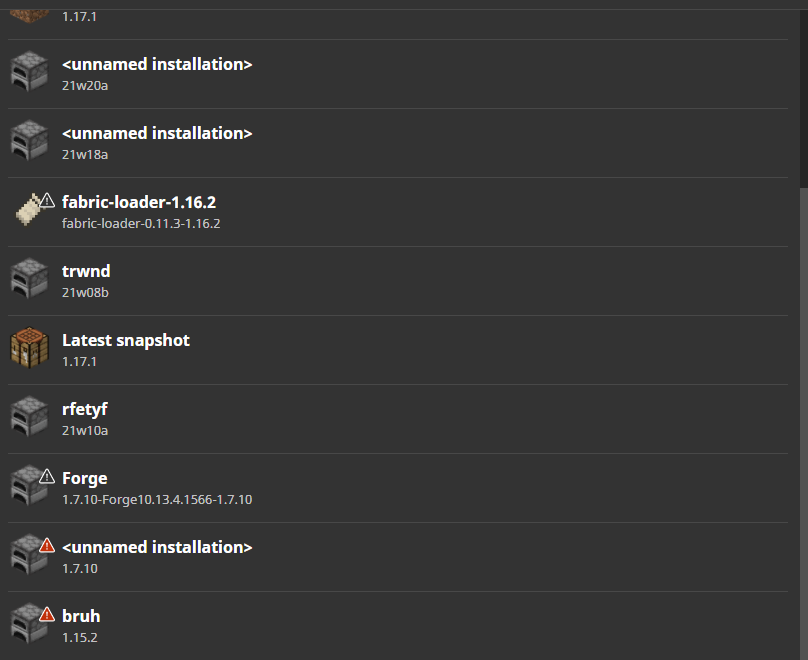



Whe
na mob gets killed by TNT their dead bodies are notpushed awayfrom the Explosion,In the early days of MCPE(0.10 and earlier), Mob's body will get knocked back by tnt when killed, But now, dead entities in MCPE do not get affected by knockback when they get killed.
This bug was introduced in 0.11 and is related to the bug MCPE 19222.
Hello i am new to this website, This is a report of a bug Where a mob gets killed by TNT but their dead bodies are not affected from the Explosion,
In the early days of MCPE(0.10 and earlier), Mob's body will get knocked back by tnt when killed, But now, dead entities in MCPE do not get affected by knockback when they get killed.
This bug was introduced in 0.11 with the bug
MCPE-19222.
Hello i am new to this website, This is a report of a bug Where a mob gets killed by TNT but their dead bodies are not affected from the Explosion,
In the early days of MCPE(0.10 and earlier), Mob's body will get knocked back by tnt when killed, But now, dead entities in MCPE do not get affected by knockback when they get killed.
This bug was introduced
in 0.11with the bugMCPE-19222.Hello i am new to this website, This is a report of a bug Where a mob gets killed by TNT but their dead bodies are not affected from the Explosion,
In the early days of MCPE(0.10 and earlier), Mob's body will get knocked back by tnt when killed, But now, dead entities in MCPE do not get affected by knockback when they get killed.
This bug origin dates back to the delevopment of 0.11 which it was introduced with the bug
MCPE-19222.
Hello i am new to this website
, This isa reportof a bugWherea mob gets killed by TNT but their dead bodies are not affected from the Explosion,In the early days of MCPE(0.10 and earlier),
Mob'sbody willget knocked back by tnt when killed, But now, dead entitiesin MCPEdo not get affected by knockbackwhen they get killed.This bug origin dates back to the delevopment of 0.11 which it was introduced with the bug
MCPE-19222.Hello i am new to this website i am reporting a bug that has been around a long time, When a mob gets killed by TNT but their dead bodies are not affected from the Explosion,
In the early days of MCPE(0.10 and earlier), the mobs dead bodies used to get knocked back by tnt when killed, But now, the dead entities do not get affected by knockback when they get killed.
This bug origin dates back to the delevopment of 0.11 which it was introduced with the bug
MCPE-19222.
This bug is not a duplicate of
MCPE-19222But Is Related.
Hello i am new to this website i am reporting a bug that has been around a long time, When a mob gets killed by TNT but their dead bodies are not affected from the Explosion,
In the early days of MCPE(0.10 and earlier), the mobs dead bodies used to get knocked back by tnt when killed, But now, the dead entities do not get affected by knockback when they get killed.
This bug origin dates back to the delevopment of 0.11 which it was introduced with the bug
MCPE-19222.Hello i am new to this website i am reporting a bug that has been around a long time, When a mob gets killed by TNT but their dead bodies are not affected from the Explosion,
In the early days of MCPE(0.10 and earlier), the mobs dead bodies used to get knocked back by tnt when killed, But now, the dead entities do not get affected by knockback when they get killed.
This bug origin dates back to the delevopment of 0.11.
Hello i am new to this website i am reporting a bug that has been around a long time, When a mob gets killed by TNT but their dead bodies are not affected from the Explosion,
In the early days of MCPE(0.10 and earlier), the mobs dead bodies used to get knocked back by tnt when killed, But now, the dead entities do not get affected by knockback when they get killed.
This bug origin dates back to the delevopment of 0.11.
Here's a video showing the bug.
Hello i am new to this website i am reporting a bug that has been around a long time, When a mob gets killed by TNT but their dead bodies are not affected from the Explosion,
In the early days of MCPE(0.10 and earlier), the mobs dead bodies used to get knocked back by tnt when killed, But now, the dead entities do not get affected by knockback when they get killed.
This bug origin dates back to the delevopment of 0.11.
Here's a video showing the bug in action.
Hello i am new to this website i am reporting a bug that has been around a long time, When a mob gets killed by TNT but their dead bodies are not affected from the Explosion,
In the early days of MCPE(0.10 and earlier), the mobs dead bodies used to get knocked back by tnt when killed, But now, the dead entities do not get affected by knockback when they get killed.
This bug's origin dates back to the delevopment of 0.11.
Here's a video showing the bug in action.
Hello i am new to this website i am reporting a bug that has been around a long time, When a mob gets killed by TNT but their dead bodies are not affected from the Explosion,
So In the early days of MCPE(0.10 and earlier), the mobs dead bodies used to get knocked back by tnt when killed, But now, the dead entities do not get affected by knockback when they get killed.
This bug's origin dates back to the delevopment of 0.11.
Here's a video showing the bug in action.
Hello i am new to this website i am reporting a bug that has been around a long time, When a mob gets killed by TNT but their dead bodies are not affected from the Explosion,
So In the early days of MCPE(0.10 and earlier), the mobs dead bodies used to get knocked back by tnt when killed, But now, the
dead entities do not get affected by knockback when they get killed.This bug's origin dates back to the delevopment of 0.11.
Here's a video showing the bug in action.
Hello i am new to this website i am reporting a bug that has been around a long time, When a mob gets killed by TNT but their dead bodies are not affected from the Explosion,
So In the early days of MCPE(0.10 and earlier), the mobs dead bodies used to get knocked back by tnt when killed, But now, the mobs dead bodies do not get affected by knockback when they get killed.
This bug's origin dates back to the delevopment of 0.11.
Here's a video showing the bug in action.
WarmheartedFlusteredFrogmouth-size_restricted.gif
This bug was no longer exists in 1.14.30 which is the version you were on. also, by the way the video was taken on 1.12.2 when the bug was still existent as the bug was fixed in 1.14.30 This issue is resolved and also change The resolution to "Resolved"
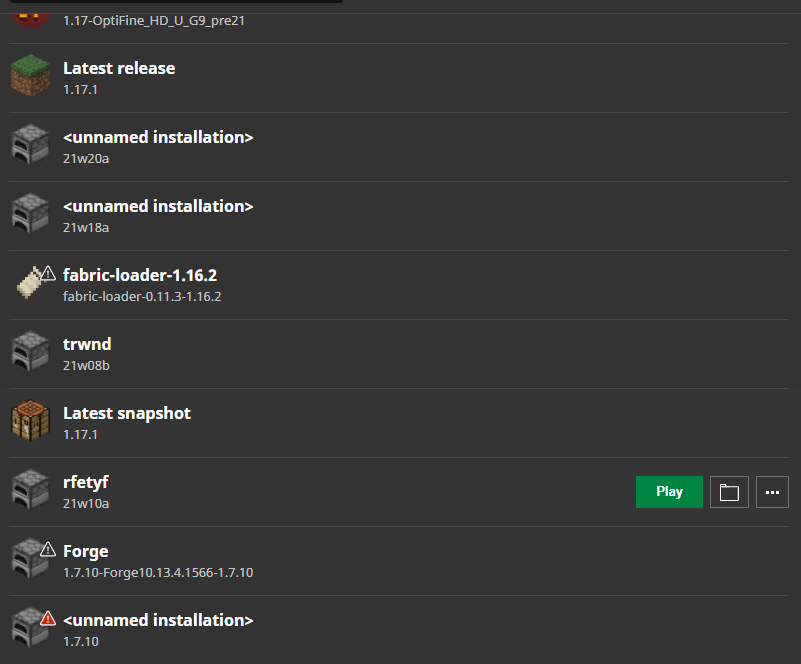
New Installations aren't savedand deleted installationsarenot deletedNew Installations aren't saved when the launcher is relaunched
New Installations aren't saved when the launcheris relaunchedNew Installations aren't saved when the launcher gets reopened
Whenever i create or delete an installation and restart the launcher, my new installations don't save and the deleted installation keep showing up!
Whenever i create or delete an installation and restart the launcher, my new installations don't save and the deleted installation keep showing up!
What i expect to see. the installation should stay when i open the launcher.
What i get. the installation gets deleted when i reopen the launcher
Whenever i create or delete an installation and restart the launcher, my new installations don't save and the deleted installation keep showing up!
What i expect to see. the installation should stay when i open the launcher.
What i get. the installation gets deleted when i reopen the launcher
Whenever i create or delete an installation and restart the launcher, my new installations don't save and the deleted installation keep showing up!
Can confirm that the bug still exists in 1.18.0.
Can confirm in 1.19.0, 1.19.2, 1.19.10 and 1.19.11 This bug has been around for almost eight years. There was an unnecessary change in the coding that caused this issue to occur in 0.11 all the way to the latest version of Minecraft, I would suggest reverting the errors from the coding, so the player takes knockback on death rather than having knockback resistance on death.
Steps to Reproduce:
1. Have a Zombie or a Skeleton kill you
2. Getting killed by another player
3. Getting blown up by a Creeper
Observed Results:
The player doesn't take knockback on death
Expected Results:
The player should take knockback on death as expected.
Affects 1.19.41
@DrownedZombie
I can confirm that this is still an issue in 1.19.50 and 1.19.60.22 Preview.
confirmed in 1.19.51 This bug has been in the game for almost eight years and it's still not fixed in the latest version. This was an unnecessary change that the devs made in 0.11 that broke the functions of the player to take knockback on death.
Steps to Reproduce:
1. Have a Zombie or a Skeleton kill you
2. Getting killed by another player
3. Getting blown up by a Creeper
Observed Results:
The player doesn't take knockback on death
Expected Results:
The player should take knockback on death as expected.
I also have the same bug happening to me. here's how to reproduce the issue shown below.
Steps to Reproduce:
1. Eat some food.
2. Drink potion of regeneration.
Observed Results:
The player heals very slow.
Expected Results:
The player should heal very fast.
If a mob gets killed by an end crystal explosion, they
donot get knocked back from the explosion.If a mob gets killed by an end crystal explosion, they will not get knocked back from the explosion, this bug affects all mobs similar to MCPE:19222
Steps to Reproduce:
1. Create an obsidian platform
2. Place some end crystals on the platform
3. Spawn a Cow
Observed Results:
The Cow doesn't get knocked back from the explosion
Expected Results:
The Cow should take knockback from the explosion as expected
If a mob gets killed by an end crystal explosion, they will not get knocked back from the explosion, this bug affects all mobs similar to MCPE:19222
Steps to Reproduce:
1. Create an obsidian platform
2. Place some end crystals on the platform
3. Spawn a Cow
Observed Results:
The Cow doesn't get knocked back from the explosion
Expected Results:
The Cow should take knockback from the explosion as expectedIf a mob gets killed by an end crystal explosion, they will not get knocked back from the explosion, this bug affects all mobs similar to
MCPE-19222Steps to Reproduce:
1. Create an obsidian platform
2. Place some end crystals on the platform
3. Spawn a Cow
Observed Results:
The Cow doesn't get knocked back from the explosion
Expected Results:
The Cow should take knockback from the explosion as expected
If a mob gets killed by an end crystal explosion, they will not get knocked back from the explosion, this bug affects all mobs similar to
MCPE-19222Steps to Reproduce:
1. Create an obsidian platform
2. Place some end crystals on the platform
3. Spawn a Cow
Observed Results:
The Cow doesn't get knocked back from the explosion
Expected Results:
The Cow should take knockback from the explosion as expectedIf a mob gets killed by an end crystal explosion, they will not get knocked back from the explosion, this bug affects all mobs similar to
MCPE-19222Steps to Reproduce:
1. Create an obsidian platform.
2. Place some end crystals on the platform.
3. Spawn a Cow.
Observed Results:
The Cow doesn't get knocked back from the explosion.
Expected Results:
The Cow should take knockback from the explosion as expected.
If a mob gets killed by an end crystal explosion, they will not get knocked back from the explosion
, this bug affects all mobssimilartoMCPE-19222Steps to Reproduce:
1. Create an obsidian platform.
2. Place some end crystals on the platform.
3. Spawn a Cow.
Observed Results:
The Cow doesn't get knocked back from the explosion.
Expected Results:
The Cow should take knockback from the explosionas expected.If a mob gets killed by an end crystal explosion, they will not get knocked back from the explosion at all. This bug affects all mobs including the player, this bug is related to
MCPE-19222Steps to Reproduce:
1. Create an obsidian platform.
2. Place some end crystals on the platform.
3. Spawn a Cow.
Observed Results:
The Cow doesn't get knocked back from the explosion.
Expected Results:
The Cow should take knockback from the explosion.
Ifa mob gets killed by an end crystal explosion, they will not get knocked back from the explosion at all. This bug affects all mobs including the player, this bug is related toMCPE-19222Steps to Reproduce:
1. Create an obsidian platform.
2. Place some end crystals on the platform.
3. Spawn a Cow.
Observed Results:
The Cow doesn't get knocked back from the explosion.
Expected Results:
The Cow should take knockback from the explosion.When a mob gets killed by an end crystal explosion, they will not get knocked back from the explosion at all. This bug affects all mobs including the player. This bug is related to
MCPE-19222Steps to Reproduce:
1. Create an obsidian platform.
2. Place some end crystals on the platform.
3. Spawn a Cow.
Observed Results:
The Cow doesn't get knocked back from the explosion.
Expected Results:
The Cow should take knockback from the explosion.
When a mob gets killed by an end crystal explosion, they will not get knocked back from the explosion at all. This bug affects all mobs including the player. This bug is related to
MCPE-19222Steps to Reproduce:
1. Create an obsidian platform.
2. Place some end crystals on the platform.
3. Spawn a Cow.
Observed Results:
The Cow doesn't get knocked back from the explosion.
Expected Results:
The Cow should take knockback from the explosion.When a mob gets killed by an end crystal explosion, they will not get knocked back from the explosion at all. This bug affects all mobs including the player. This bug is related to
MCPE-19222Steps to Reproduce:
1. Create an obsidian platform.
2. Place some end crystals on the platform.
3. Spawn a Cow.
Observed Results:
The Cow doesn't get knocked back from the explosion.
Expected Results:
The Cow should take knockback from the explosion.
When a mob gets killed by an end crystal explosion, they will not get knocked back from the explosion at all. This bug affects all mobs including the player. This bug is related to
MCPE-19222Steps to Reproduce:
1. Create an obsidian platform.
2. Place some end crystals on the platform.
3. Spawn a Cow.
Observed Results:
The Cow doesn't get knocked back from the explosion.
Expected Results:
The Cow should take knockback from the explosion.When a mob gets killed by an end crystal explosion, they will not get knocked back from the explosion at all. This bug affects all mobs including the player. This bug is related to
MCPE-19222Steps to Reproduce:
1. Create an obsidian platform.
2. Place some end crystals on the platform.
3. Spawn a Cow.
Observed Results:
The Cow doesn't get knocked back from the explosion.
Expected Results:
The Cow should take knockback from the explosion.
When a mob gets killed by an end crystal explosion, they will not get knocked back from the explosion
at all. This bug affects all mobs including the player. This bug is related toMCPE-19222Steps to Reproduce:
1. Create an obsidian platform.
2. Place some end crystals on the platform.
3. Spawn a Cow.
Observed Results:
The Cow doesn't get knocked back from the explosion.
Expected Results:
The Cow should take knockback from the explosion.
When a mob gets killed by an end crystal explosion, they will not get knocked back from the explosion. This bug affects all mobs including the player. This bug is related to
MCPE-19222Steps to Reproduce:
1. Create an obsidian platform.2.Place some end crystals on the platform.3.Spawn a Cow.
Observed Results:
The Cow doesn't get knocked back from the explosion.
Expected Results:
The Cow should take knockback from the explosion.When a mob gets killed by an end crystal explosion, they will not get knocked back from the explosion. This bug affects all mobs including the player. This bug is related to
MCPE-19222Steps to Reproduce:
1. Create an obsidian platform.
2. Place some end crystals on the platform.
3. Spawn a Cow.
Observed Results:
The Cow doesn't get knocked back from the explosion.
Expected Results:
The Cow should take knockback from the explosion.
When a mob
gets killedby an end crystal explosion, theywill not get knocked back from the explosion. This bug affects all mobs including the player. This bug is related toMCPE-19222Steps to Reproduce:
1. Create an obsidian platform.
2. Place some end crystals on the platform.
3. Spawn a Cow.
Observed Results:
The Cow doesn't get knocked back from the explosion.
Expected Results:
The Cow should take knockback from the explosion.When a mob is blown up by an end crystal explosion, it will not get knocked back from the explosion. This bug affects all mobs including the player. This bug is related to
MCPE-19222Steps to Reproduce:
1. Create an obsidian platform.
2. Place some end crystals on the platform.
3. Spawn a Cow.Observed Results:
The Cow doesn't get knocked back from the explosion.
Expected Results:
The Cow should take knockback from the explosion.
When a mob is blown up by an end crystal explosion, it will not get knocked back from the explosion. This bug affects all mobs including the player. This bug is related to
MCPE-19222Steps to Reproduce:
1. Create an obsidian platform.
2. Place some end crystals on the platform.
3. Spawn a Cow.Observed Results:
The Cow doesn't get knocked back from the explosion.
Expected Results:
The Cow should take knockback from the explosion.
When a mob is blown up by an end crystal explosion, it will not get knocked back from the explosion. This bug affects all mobs including the player. This bug is related to
MCPE-19222Steps to Reproduce:
1. Create an obsidian platform.
2. Place some end crystals on the platform.
3. Spawn a Cow.Observed Results:
The Cow doesn't get knocked back from the explosion.
Expected Results:
The Cow should take knockback from the explosion.
When a mob is blown up by an end crystal explosion, it will not get knocked back from the explosion. This bug affects all mobs including the player. This bug is related to
MCPE-19222Steps to Reproduce:
1. Create an obsidian platform.
2. Place some end crystals on the platform.
3. Spawn aCow.Observed Results:
The Cow doesn't get knocked back from the explosion.
Expected Results:
The Cow should
take knockbackfrom the explosion.When a mob is blown up by an end crystal explosion, it will not get knocked back from the explosion unlike in java edition. This bug affects all mobs including the player. This bug is related to
MCPE-19222Steps to Reproduce:
1. Create an obsidian platform.
2. Place some end crystals on the platform.
3. Spawn any mob.Observed Results:
The Cow doesn't get knocked back from the explosion.
Expected Results:
The Cow should be sent back flying from the explosion.
When a mob is blown up by an end crystal explosion, it will not get knocked back from the explosion unlike in java edition. This bug affects all mobs including the player. This bug is related to
MCPE-19222Steps to Reproduce:
1. Create an obsidian platform.
2. Place some end crystalson the platform.
3. Spawn any mob.Observed Results:
The
Cowdoesn'tget knocked back from the explosion.Expected Results:
The
Cowshould be sent back flying from the explosion.When a mob is blown up by an end crystal explosion, it will not get knocked back from the explosion unlike in java edition. This bug affects all mobs including the player. This bug is related to
MCPE-19222Steps to Reproduce:
1. Create an obsidian platform.
2. Place some end crystals.
3. Spawn any mob.Observed Results:
The mobs don't get knocked back from the explosion.
Expected Results:
The mobs should be sent back flying from the explosion.
When a mob is blown up by an end crystal explosion, it will not get knocked back from the explosion unlike in java edition. This bug affects all mobs including the player. This bug is related to
MCPE-19222Steps to Reproduce:
1. Create an obsidian platform.
2. Place some end crystals.
3. Spawn any mob.Observed Results:
The mobs don't get knocked back from the explosion.
Expected Results:
The mobs should be sent back flying from the explosion.
When a mob is blown up by an end crystal explosion, it will not get knocked back from the explosion unlike in java edition. This bug affects all mobs including the player. This bug is related to
MCPE-19222Steps to Reproduce:
1. Create an obsidian platform.
2. Place some end crystals.
3. Spawn any mob.Observed Results:
_The mob doesn't get knocked back from the explosion.
Expected Results:
_The mob should've been sent back flying from the explosion.
When a mob is blown up by an end crystal explosion, it will not get knocked back from the explosion unlike in java edition. This bug affects all mobs including the player. This bug is related to
MCPE-19222Steps to Reproduce:
1. Create an obsidian platform.
2. Place some end crystals.
3. Spawn any mob.Observed Results:
_The mob doesn't get knocked back from the explosion.Expected Results:
_The mob should've been sent back flying from the explosion.When a mob is blown up by an end crystal explosion, it will not get knocked back from the explosion unlike in java edition. This bug affects all mobs including the player. This bug is related to
MCPE-19222Steps to Reproduce:
1. Create an obsidian platform.
2. Place some end crystals.
3. Spawn any mob.Observed Results:
The mob doesn't get knocked back from the explosion.
Expected Results:
The mob should've been sent back flying from the explosion.
When a mob is blown up by an end crystal explosion, it
will not get knocked back from the explosion unlike in java edition. This bug affects all mobs including the player. This bug is related toMCPE-19222Steps to Reproduce:
1. Create an obsidian platform.
2. Place some end crystals.
3. Spawn any mob.Observed Results:
The mob doesn't get knocked back from the explosion.
Expected Results:
The mob should've been sent back flying from the explosion.
When a mob is blown up by an end crystal explosion, its dead body doesn't get knocked back from the explosion unlike in java edition. This bug affects all mobs including the player. This bug is related to
MCPE-19222Steps to Reproduce:
1. Create an obsidian platform.
2. Place some end crystals.
3. Spawn any mob.Observed Results:
The mob doesn't get knocked back from the explosion.
Expected Results:
The mob should've been sent back flying from the explosion.
When a mob is blown up by an end crystal explosion, its dead body doesn't get knocked back from the explosion unlike in java edition. This bug affects all mobs including the player. This bug is related to
MCPE-19222Steps to Reproduce:
1. Create an obsidian platform.
2. Place some end crystals.
3. Spawn any mob.Observed Results:
The mob doesn't get knocked back from the explosion.
Expected Results:
The mob should've been sent back flying from the explosion.
When a mob is blown up by an end crystal explosion, its dead body doesn't get knocked back from the explosion unlike in java edition. This bug affects all mobs including the player. The issue started happening when the End Update was out, the now fixed issue
MCPE-19222was still
an issue.
Steps to Reproduce:1. Create an obsidian platform.
2. Place some end crystals.
3. Spawn any mob.Observed Results:
The mob doesn't get knocked back from the explosion.
Expected Results:
The mob should've been sent back flying from the explosion.
When a mob is blown up by an end crystal explosion, its dead body doesn't get knocked back from the explosion unlike in java edition. This bug affects all mobs including the player. The issue started happening when the End Update was out, the now fixed issue
MCPE-19222was still
an issue.
Steps to Reproduce:1. Create an obsidian platform.
2. Place some end crystals.
3. Spawn any mob.Observed Results:
The mob doesn't get knocked back from the explosion.
Expected Results:
The mob should've been sent back flying from the explosion.
Notes
If you look in the end_crystal.json file, you'll notice that the string of code "minecraft:physics" doesn't have the following string of code "has_gravity" which determines if the entity has gravity for example, if it's set to false, then the entity has no gravity and it causes the entity to have knockback resistance, but if it's set to true, then the entity has gravity, meaning that the entity is able to take knockback!
When a mob is blown up by an end crystal explosion, its dead body doesn't get knocked back from the explosion unlike in java edition. This bug affects all mobs including the player. The issue started happening when the End Update was out, the now fixed issue
MCPE-19222was still
an issue.
Steps to Reproduce:1. Create an obsidian platform.
2. Place some end crystals.
3. Spawn any mob.Observed Results:
The mob doesn'tgetknocked back from the explosion.Expected Results:
The mob should've been sent back flying from the explosion.Notes
If you look in the end_crystal.json file, you'll notice that the string of code "minecraft:physics" doesn't have the following string of code "has_gravity" which determines if the entity has gravity for example, if it's set to false, then the entity has no gravity and it causes the entity to have knockback resistance, but if it's set to true, then the entity has gravity, meaning that the entity is able to take knockback!
When a mob is blown up by an end crystal explosion, its dead body doesn't get knocked back from the explosion unlike in java edition. This bug affects all mobs including the player. The issue started happening when the End Update was out, the now fixed issue
MCPE-19222was still
an issue.
Steps to Reproduce:1. Create an obsidian platform.
2. Place some end crystals.
3. Spawn any mob.Observed Results:
The mob doesn't Yknocked back from the explosion.
Expected Results:
The mob should've been sent back flying from the explosion.
Notes
- If you look in the end_crystal.json file, you'll notice that the string of code "minecraft:physics" doesn't have the following string of code "has_gravity" which determines if the entity has gravity for example, if it's set to false, then the entity has no gravity and it causes the entity to have knockback resistance, but if it's set to true, then the entity has gravity, meaning that the entity is able to take knockback! Here's what the code should look like
.  },
    "minecraft:physics": {
            "has_gravity": true
    },
When a mob is blown up by an end crystal explosion, its dead body doesn't get knocked back from the explosion unlike in java edition. This bug affects all mobs including the player. The issue started happening when the End Update was out, the now fixed issue
MCPE-19222was still
an issue.
Steps to Reproduce:1. Create an obsidian platform.
2. Place some end crystals.
3. Spawn any mob.Observed Results:
The mob doesn't Yknocked back from the explosion.
Expected Results:
The mob should've been sent back flying from the explosion.
Notes
- If you look in the end_crystal.json file, you'll notice that the string of code "minecraft:physics" doesn't have the following string of code "has_gravity" which determines if the entity has gravity for example, if it's set to false, then the entity has no gravity and it causes the entity to have knockback resistance, but if it's set to true, then the entity has gravity, meaning that the entity is able to take knockback! Here's what the code should look like
.  },
    "minecraft:physics": {
            "has_gravity": true
    },
When a mob is blown up by an end crystal explosion, its dead body doesn't get knocked back from the explosion unlike in java edition. This bug affects all mobs including the player. The issue started happening when the End Update was out, the now fixed issue
MCPE-19222was still
an issue.
Steps to Reproduce:1. Create an obsidian platform.
2. Place some end crystals.
3. Spawn any mob.Observed Results:
The mob doesn't Yknocked back from the explosion.
Expected Results:
The mob should've been sent back flying from the explosion.
Notes
- If you look in the end_crystal.json file, you'll notice that the string of code "minecraft:physics" doesn't have the following string of code "has_gravity" which determines if the entity has gravity for example, if it's set to false, then the entity has no gravity and it causes the entity to have knockback resistance, but if it's set to true, then the entity has gravity, meaning that the entity is able to take knockback!
- Here's what the code should look like,
.  },
    "minecraft:physics": {
            "has_gravity": true
    },
When a mob is blown up by an end crystal explosion, its dead body doesn't get knocked back from the explosion unlike in java edition. This bug affects all mobs including the player. The issue started happening when the End Update was out, the now fixed issue
MCPE-19222was still
an issue.
Steps to Reproduce:1. Create an obsidian platform.
2. Place some end crystals.
3. Spawn any mob.Observed Results:
The mob doesn't Yknocked back from the explosion.
Expected Results:
The mob should've been sent back flying from the explosion.
Notes
- If you look in the end_crystal.json file, you'll notice that the string of code "minecraft:physics" doesn't have the following string of code "has_gravity" which determines if the entity has gravity for example, if it's set to false, then the entity has no gravity and it causes the entity to have knockback resistance, but if it's set to true, then the entity has gravity, meaning that the entity is able to take knockback!
- Here's what the code should look like,
.  },
    "minecraft:physics": {
            "has_gravity": true
    },
When a mob is blown up by an end crystal explosion, its dead body doesn't get knocked back from the explosion unlike in java edition. This bug affects all mobs including the player. The issue started happening when the End Update was out, the now fixed issue
MCPE-19222was still
an issue.
Steps to Reproduce:1. Create an obsidian platform.
2. Place some end crystals.
3. Spawn any mob.Observed Results:
The mob doesn't Yknocked back from the explosion.
Expected Results:
The mob should've been sent back flying from the explosion.
Notes
- If you look in the end_crystal.json file, you'll notice that the string of code "minecraft:physics" doesn't have the following string of code "has_gravity" which determines if the entity has gravity for example, if it's set to false, then the entity has no gravity and it causes the entity to have knockback resistance, but if it's set to true, then the entity has gravity, meaning that the entity is able to take knockback!
- Here's what the code should look like,
.  },
    "minecraft:physics": {
            "has_gravity": true
    },
When a mob is blown up by an end crystal explosion, its dead body doesn't get knocked back from the explosion unlike in java edition. This bug affects all mobs including the player. The issue started happening when the End Update was out, the now fixed issue
MCPE-19222was still
an issue.
Steps to Reproduce:1. Create an obsidian platform.
2. Place some end crystals.
3. Spawn any mob.Observed Results:
The mob doesn't Yknocked back from the explosion.
Expected Results:
The mob should've been sent back flying from the explosion.
Notes
- If you look in the end_crystal.json file, you'll notice that the string of code "minecraft:physics" doesn't have the following string of code "has_gravity" which determines if the entity has gravity for example, if it's set to false, then the entity has no gravity and it causes the entity to have knockback resistance, but if it's set to true, then the entity has gravity, meaning that the entity is able to take knockback!
- Here's what the code should look like,
.  },
    "minecraft:physics": {
            "has_gravity": true
    },
When a mob is blown up by an end crystal explosion, its dead body doesn't get knocked back from the explosion unlike in java edition. This bug affects all mobs including the player. The issue started happening when the End Update was out, the now fixed issue
MCPE-19222was still
an issue.
Steps to Reproduce:1. Create an obsidian platform.
2. Place some end crystals.
3. Spawn any mob.Observed Results:
The mob doesn't Yknocked back from the explosion.
Expected Results:
The mob should've been sent back flying from the explosion.
Notes
- If you look in the end_crystal.json file, you'll notice that the string of code "minecraft:physics" doesn't have the following string of code "has_gravity" which determines if the entity has gravity for example, if it's set to false, then the entity has no gravity and it causes the entity to have knockback resistance, but if it's set to true, then the entity has gravity, meaning that the entity is able to take knockback!
- Here's what the code should look like,
.  },
    "minecraft:physics": {
            "has_gravity": true
    },
When a mob is blown up by an end crystal explosion, its dead body doesn't get knocked back from the explosion unlike in java edition. This bug affects all mobs including the player. The issue started happening when the End Update was out, the now fixed issue
MCPE-19222was still
an issue.
Steps to Reproduce:1. Create an obsidian platform.
2. Place some end crystals.
3. Spawn any mob.Observed Results:
The mob doesn't Yknocked back from the explosion.
Expected Results:
The mob should've been sent back flying from the explosion.
Notes
- If you look in the end_crystal.json file, you'll notice that the string of code "minecraft:physics" doesn't have the following string of code "has_gravity" which determines if the entity has gravity for example, if it's set to false, then the entity has no gravity and it causes the entity to have knockback resistance, but if it's set to true, then the entity has gravity, meaning that the entity is able to take knockback!
- Here's what the code should look like,
.  },
    "minecraft:physics": {
            "has_gravity": true
    },
When a mob is blown up by an end crystal explosion, its dead body doesn't get knocked back from the explosion unlike in java edition. This bug affects all mobs including the player. The issue started happening when the End Update was out, the now fixed issue
MCPE-19222was still
an issue.
Steps to Reproduce:1. Create an obsidian platform.
2. Place some end crystals.
3. Spawn any mob.Observed Results:
The mob doesn't Yknocked back from the explosion.
Expected Results:
The mob should've been sent back flying from the explosion.
Notes
- If you look in the end_crystal.json file, you'll notice that the string of code "minecraft:physics" doesn't have the following string of code "has_gravity" which determines if the entity has gravity for example, if it's set to false, then the entity has no gravity and it causes the entity to have knockback resistance, but if it's set to true, then the entity has gravity, meaning that the entity is able to take knockback! Here's what the code should look like,
.  },
    "minecraft:physics": {
            "has_gravity": true
    },
When a mob is blown up by an end crystal explosion, its dead body doesn't get knocked back from the explosion unlike in java edition. This bug affects all mobs including the player. The issue started happening when the End Update was out, the now fixed issue
MCPE-19222was still
an issue.
Steps to Reproduce:1. Create an obsidian platform.
2. Place some end crystals.
3. Spawn any mob.Observed Results:
The mob doesn't Yknocked back from the explosion.
Expected Results:
The mob should've been sent back flying from the explosion.
Notes
- If you look in the end_crystal.json file, you'll notice that the string of code "minecraft:physics" doesn't have the following string of code "has_gravity" which determines if the entity has gravity for example, if it's set to false, then the entity has no gravity and it causes the entity to have knockback resistance, but if it's set to true, then the entity has gravity, meaning that the entity is able to take knockback! Here's what the code should look like
,. },"minecraft:physics": { "has_gravity": true },
When a mob is blown up by an end crystal explosion, its dead body doesn't get knocked back from the explosion unlike in java edition. This bug affects all mobs including the player. The issue started happening when the End Update was out, the now fixed issue
MCPE-19222was still
an issue.
Steps to Reproduce:1. Create an obsidian platform.
2. Place some end crystals.
3. Spawn any mob.Observed Results:
The mob doesn't Yknocked back from the explosion.
Expected Results:
The mob should've been sent back flying from the explosion.
Notes
- If you look in the end_crystal.json file, you'll notice that the string of code "minecraft:physics" doesn't have the following string of code "has_gravity" which determines if the entity has gravity for example, if it's set to false, then the entity has no gravity and it causes the entity to have knockback resistance, but if it's set to true, then the entity has gravity, meaning that the entity is able to take knockback! Here's what the code should look like.
.  }
    "minecraft:physics": {
            "has_gravity": true
    },
I can confirm that this is still an issue in 1.19.50
Reply from [Mod] Umija5895M: Since you are the reporter of this issue, you can simply add new Affected Versions instead of commenting for that. (Feel free to delete this entire comment after reading).
When a mob is blown up by an end crystal explosion, its dead body doesn't get knocked back from the explosion unlike in java edition. This bug affects all mobs including the player. The issue started happening when the End Update was out, the now fixed issue
MCPE-19222was still
an issue.Steps to Reproduce:
- Create an obsidian platform.
- Place some end crystals.
- Spawn any mob.
Observed Results:
The mob doesn'tYknocked back from the explosion.Expected Results:
The mob should've been sent back flying from the explosion.Notes
- If you look in the end_crystal.json file, you'll notice that the string of code "minecraft:physics" doesn't have the following string of code "has_gravity" which determines if the entity has gravity for example, if it's set to false, then the entity has no gravity and it causes the entity to have knockback resistance, but if it's set to true, then the entity has gravity, meaning that the entity is able to take knockback! Here's what the code should look like.
.  }
    "minecraft:physics": {
            "has_gravity": true
    },
When a mob is blown up by an end crystal explosion, its dead body doesn't get knocked back from the explosion unlike in java edition. This bug affects all mobs including the player. The issue started happening when the End Update was out, the now fixed issue
MCPE-19222was still
an issue.Steps to Reproduce:
- Create an obsidian platform.
- Place some end crystals.
- Spawn any mob.
Observed Results:
The mob doesn't get knocked back from the explosion.Expected Results:
The mob should've been sent back flying from the explosion.Notes
If you look in the end_crystal.json file, you'll notice that the string of code "minecraft:physics" doesn't have the following string of code "has_gravity" which determines if the entity has gravity for example, if it's set to false, then the entity has no gravity and it causes the entity to have knockback resistance, but if it's set to true, then the entity has gravity, meaning that the entity is able to take knockback! Here's what the code should look like.
.  }
    "minecraft:physics": {
            "has_gravity": true
    },
When a mob is blown up by an end crystal explosion, its dead body doesn't get knocked back from the explosion unlike in java edition. This bug affects all mobs including the player. The issue started happening when the End Update was out, the now fixed issue
MCPE-19222was still
an issue.Steps to Reproduce:
- Create an obsidian platform.
- Place some end crystals.
- Spawn any mob.
Observed Results:
The mob doesn't get knocked back from the explosion.Expected Results:
The mob should've been sent back flying from the explosion.Notes
If you look in the end_crystal.json file, you'll notice that the string of code "minecraft:physics" doesn't have the following string of code "has_gravity" which determines if the entity has gravity for example, if it's set to false, then the entity has no gravity and it causes the entity to have knockback resistance, but if it's set to true, then the entity has gravity, meaning that the entity is able to take knockback! Here's what the code should look like.
.  }
    "minecraft:physics": {
            "has_gravity": true
    },
When a mob is blown up by an end crystal explosion, its dead body doesn't get knocked back from the explosion unlike in java edition. This bug affects all mobs including the player. The issue started happening when the End Update was out, the now fixed issue
MCPE-19222was still
an issue.Steps to Reproduce:
- Create an obsidian platform.
- Place some end crystals.
- Spawn any mob.
Observed Results:
The mob doesn't get knocked back from the explosion.Expected Results:
The mob should've been sent back flying from the explosion.Notes:
If you look in the end_crystal.json file, you'll notice that the string of code "minecraft:physics" doesn't have the following string of code "has_gravity" which determines if the entity has gravity for example, if it's set to false, then the entity has no gravity and it causes the entity to have knockback resistance, but if it's set to true, then the entity has gravity, meaning that the entity is able to take knockback!
Here's what the code should look like.
.  }
    "minecraft:physics": {
            "has_gravity": true
    },
When a mob is blown up by an end crystal explosion, its dead body doesn't get knocked back from the explosion unlike in java edition. This bug affects all mobs including the player. The issue started happening when the End Update was out, the now fixed issue
MCPE-19222was still
an issue.Steps to Reproduce:
- Create an obsidian platform.
- Place some end crystals.
- Spawn any mob.
Observed Results:
The mob doesn't get knocked backfromthe explosion.Expected Results:
Themobshould'vebeen sent back flying from the explosion.Notes:
If you look in the end_crystal.json file, you'll notice that the string of code "minecraft:physics" doesn't have the following string of code "has_gravity" which determines if the entity has gravity for example, if it's set to false, then the entity has no gravity and it causes the entity to have knockback resistance, but if it's set to true, then the entity has gravity, meaning that the entity is able to take knockback!
Here's what the code should look like.
.  }
    "minecraft:physics": {
            "has_gravity": true
    },
When a mob gets blown up by an end crystal explosion, its dead body doesn't get knocked back from that explosion. This bug affects all mobs and the player. The issue started happening when the End Update was out. The now-fixed issueMCPE-19222was still an issue.
Steps to Reproduce:
- Create an obsidian platform.
- Place some end crystals.
- Spawn any mob.
Observed Results:
The mob doesn't get knocked back by the explosion.Expected Results:
The explosion should've sent the mob back flying.Notes:
If you look in the end_crystal.json file, you'll notice that the string of code "minecraft:physics" doesn't have the following string of code "has_gravity" which determines if the entity has gravity like for example, if set to false, then the entity has no gravity causing the entity to have knockback resistance, but if set to true, then the entity has gravity, meaning that the entity can take knockback!
Here's what the code looks like. } "minecraft:physics": { "has_gravity": true },
When a mob gets blown up by an end crystal explosion, its dead body doesn't get knocked back from that explosion. This bug affects all mobs and the player. The issue started happening when the Ender Update was out. The now-fixed issueMCPE-19222was still an issue.
Steps to Reproduce:
- Create an obsidian platform.
- Place some end crystals.
- Spawn any mob.
Observed Results:
The mob doesn't get knocked back by the explosion.Expected Results:
The explosion should've sent the mob back flying.Notes:
If you look in the end_crystal.json file, you'll notice that the string of code "minecraft:physics" doesn't have the following string of code "has_gravity" which determines if the entity has gravity like for example, if set to false, then the entity has no gravity causing the entity to have knockback resistance, but if set to true, then the entity has gravity, meaning that the entity can take knockback!
Here's what the code looks like. } "minecraft:physics": { "has_gravity": true },
When End Crystals Explodes, mobs do not takeknockback on deathMobs aren't knocked back upon death from End Crystal Explosions
When a mob gets blown up by an end crystal explosion, its dead body doesn't get knocked back from that explosion. This bug affects all mobs and the player. The issue started happening when the Ender Update was out. The now-fixed issueMCPE-19222was still an issue.
Steps to Reproduce:
- Create an obsidian platform.
- Place some end crystals.
- Spawn any mob.
Observed Results:
The mob doesn't get knocked back by the explosion.Expected Results:
The explosion should've sent the mob back flying.Notes:
If you look in the end_crystal.json file, you'll notice that the string of code "minecraft:physics" doesn't have the following string of code "has_gravity" which determines if the entity has gravity like for example, if set to false, then the entity has no gravity causing the entity to have knockback resistance, but if set to true, then the entity has gravity, meaning that the entity can take knockback!
Here's what the code looks like. } "minecraft:physics": { "has_gravity": true },
When a mob gets blown up by an end crystal explosion, its dead body doesn't get knocked back from that explosion. This bug affects all mobs and the player. The issue started happening when the Ender Update was out. This issue relates toMCPE-19222
Steps to Reproduce:
- Create an obsidian platform.
- Place some end crystals.
- Spawn any mob.
Observed Results:
The mob doesn't get knocked back by the explosion.Expected Results:
The explosion should've sent the mob back flying.Notes:
If you look in the end_crystal.json file, you'll notice that the string of code "minecraft:physics" doesn't have the following string of code "has_gravity" which determines if the entity has gravity like for example, if set to false, then the entity has no gravity causing the entity to have knockback resistance, but if set to true, then the entity has gravity, meaning that the entity can take knockback!
Here's what the code looks like. } "minecraft:physics": { "has_gravity": true },
When a mob gets blown up by an end crystal explosion, its dead body doesn't get knocked back from that explosion. This bug affects all mobs and the player. The issue started happening when the Ender Update was out. This issue relates toMCPE-19222
Steps to Reproduce:
- Create an obsidian platform.
- Place some end crystals.
- Spawn any mob.
Observed Results:
The mob doesn't get knocked back by the explosion.Expected Results:
The explosion should've sent the mob back flying.Notes:
If you look in the end_crystal.json file, you'll notice that the string of code "minecraft:physics" doesn't have the following string of code "has_gravity" which determines if the entity has gravity like for example, if set to false, then the entity has no gravity causing the entity to have knockback resistance, but if set to true, then the entity has gravity, meaning that the entity can take knockback!
Here's what the code needs to looks like in order to fix this bug.. } "minecraft:physics": { "has_gravity": true },
When a mob gets blown up by an end crystal explosion, its dead body doesn't get knocked back from that explosion. This bug affects all mobs and the player. The issue started happening when the Ender Update was out. This issue relates toMCPE-19222
Steps to Reproduce:
- Create an obsidian platform.
- Place some end crystals.
- Spawn any mob.
Observed Results:
The mob doesn't get knocked back by the explosion.Expected Results:
The explosion should've sent the mob back flying.Notes:
If you look in the end_crystal.json file, you'll notice that the string of code "minecraft:physics" doesn't have the following string of code "has_gravity" which determines if the entity has gravity like for example, if set to false, then the entity has no gravity causing the entity to have knockback resistance, but if set to true, then the entity has gravity, meaning that the entity can take knockback!
Here's what the code needs to looks like in order to fix this bug..} "minecraft:physics": { "has_gravity": true },
When a mob gets blown up by an end crystal explosion, its dead body doesn't get knocked back from that explosion. This bug affects all mobs and the player. The issue started happening when the Ender Update was out. This issue relates toMCPE-19222
Steps to Reproduce:
- Create an obsidian platform.
- Place some end crystals.
- Spawn any mob.
Observed Results:
The mob doesn't get knocked back by the explosion.Expected Results:
The explosion should've sent the mob back flying.Notes:
If you look in the end_crystal.json file, you'll notice that the string of code "minecraft:physics" doesn't have the following string of code "has_gravity" which determines if the entity has gravity like for example, if set to false, then the entity has no gravity causing the entity to have knockback resistance, but if set to true, then the entity has gravity, meaning that the entity can take knockback!
Here's what the code needs to looks like in order to fix this bug.} "minecraft:physics": { "has_gravity": true },
When a mob gets blown up by an end crystal explosion, its dead body doesn't get knocked back from that explosion. This bug affects all mobs and the player. The issue started happening when the Ender Update was out. This issue relates toMCPE-19222.
Steps to Reproduce:
- Create an obsidian platform.
- Place some end crystals.
- Spawn any mob.
Observed Results:
The mob doesn't get knocked back by the explosion.Expected Results:
The explosion should've sent the mob back flying.
I just tested the issue in 1.19.22 a few minutes ago, and it's still an issue in the latest version!
When a mobgets blown up by an end crystal explosion, its dead bodydoesn't get knocked back from thatexplosion. This bug affects all mobs and the player. The issue started happening when the Ender Update was out. This issue relates toMCPE-19222.
Steps to Reproduce:
- Create an obsidian platform.
- Place
someend crystals.- Spawn any mob.
Observed Results:
The mob doesn't get knocked back by the explosion.Expected Results:
The explosionshould'vesent the mob back flying.
Whenever a mob is blown up by an end crystal explosion, it remains stationary upon death and does not get knocked back from the explosion. This bug affects all mobs and the player. The issue started happening when the Ender Update was out. This issue relates toMCPE-19222.
Steps to Reproduce:
- Create an obsidian platform.
- Place a end crystal.
- Spawn any kind of mob.
Observed Results:
The mob remains in the same position and doesn't get knocked back by the explosion.Expected Results:
The explosion sent the mob back flying.
Still an issue
Can confirm in 1.19.10
Confirmed in 1.19.20
Affects 1.19.11 Hotfix
Still an issue in 1.19.50
This bug doesn't affect the java version of Minecraft because passive mobs and entities don't despawn in that version, breaking parity between java and bedrock. They shouldn't despawn in the bedrock version of Minecraft, the bug needs to be fixed in 1.19.12.
I found more information that's connected to the origin of this bug. It's because the spawning system in Minecraft java edition is different, because they are persistent mobs in that version, but they are not in Minecraft bedrock edition, as they can despawn randomly every 30 seconds in this version. I'd suggest making the passive mobs remain persistent in the world, which would prevent passive mobs to stop despawning in Minecraft bedrock edition.
When a fish is killed, their dead body will not
get pushedback evenif you havethe knockback enchantmenton your sword.How to reproduce the issue:
1. Spawn any fish mob like tropical fish, pufferfish, cod and salmon
2. Kill the fish
Observed Result:
The fish doesn't take knockback on death
Expected Result:
The fish should've taken knockback on deathWhen a fish is killed, their dead body will not take any form of knockback, even swords with the knockback enchantment doesn't stop the bug from happening.
Steps to Reproduce:
1. Find any fish mob such as tropical fish, cod, salmon, etc.
2. Obtain a sword with Knockback 2
3. Kill the fishObserved Results:
The fish didn't take knockback when it died
Expected Result:
The fish should take knockback when it dies
When a fish is killed, their dead body will not take any form of knockback, even swords with the knockback enchantment doesn't stop the bug from happening.
Steps to Reproduce:
1. Find any fish mob such as tropical fish, cod, salmon, etc.
2. Obtain a sword with Knockback 2
3. Kill the fishObserved Results:
The fish didn't take knockback when it died
Expected Result:
The fish should take knockback when it dies
When a fish is killed, their dead body will not take any form of knockback, even swords with the knockback enchantment doesn't stop the bug from happening.
Steps to Reproduce:
1. Find any fish mob such as tropical fish, cod, salmon, etc.
2. Obtain a sword with Knockback 2
3. Kill the fishObserved Results:
The fish didn't take knockback when it died
Expected Result:
The fish should take knockback when it dies
When a fish is killed,
theirdead body will not take anyform ofknockback, even swords with the knockback enchantment doesn't stop the bug from happening.Steps to Reproduce:
1. Find any fish mob such as tropical fish, cod, salmon, etc.
2. Obtain a sword with Knockback 2
3. Kill the fishObserved Results:
The fish didn't take knockback when it died
Expected Result:
The fish should take knockback when it dies
When a fish is killed, its dead body will not take any knockback. Even swords with the knockback enchantment doesn't stop the bug from happening.
Steps to Reproduce:
1. Find any fish mob such as tropical fish, cod, salmon, etc.
2. Obtain a sword with Knockback 2
3. Kill the fishObserved Results:
The fish didn't take knockback when it died
Expected Result:
The fish should take knockback when it dies
When a fish is killed, its dead body will not take any knockback. Even swords with the knockback enchantment doesn't stop the bug from happening.
Steps to Reproduce:
1. Find any fish mob such as tropical fish, cod, salmon, etc.
2. Obtain a sword with Knockback2
3. Kill the fishObserved Results:
The fish didn't take knockback when it died
Expected Result:
The fish should take knockback when it dies
When a fish is killed, its dead body will not take any knockback. Even swords with the knockback enchantment doesn't stop the bug from happening.
Steps to Reproduce:
1. Find any fish mob such as tropical fish, cod, salmon, etc.
2. Obtain a sword with Knockback.
3. Kill the fish.Observed Results:
The fish didn't take knockback when it died.
Expected Result:
The fish should take knockback when it dies.
When dealing killing blows to fish, they do notactuallyget knocked backWhen dealing killing blows to fish, they do not get knocked back.
When dealing killing blowsto fish, they do not get knocked back.When dealing a killing blow to a fish, they do not get knocked back.
When a fish is killed, its dead body will not take any knockback. Even swords with the knockback enchantment doesn't stop the bug from happening.
Steps to Reproduce:
1. Find any fish mob such as tropical fish, cod, salmon, etc.
2. Obtain a sword with Knockback.
3. Kill the fish.Observed Result
s:The fish didn't take knockback when it died.
Expected Result
:The fish should take knockback when it dies.
When a fish is killed, its dead body will not take any knockback. Even swords with the knockback enchantment doesn't stop the bug from happening.
Steps to Reproduce
:1. Find any fish mob such as tropical fish, cod, salmon, etc.
2. Obtain a sword with Knockback.
3. Kill the fish.
ObservedResultThe fish didn't take knockback when it died.
Expected Result
The fish should take knockback when it dies.
When a fish is killed, its dead body will not take any knockback. Even swords with the knockback enchantment doesn't stop the bug from happening.
Steps to Reproduce
1. Find any fish mob such as tropical fish, cod, salmon, etc.
2. Obtain a sword with Knockback.
3. Kill the fish.Actual Result
The fish didn't take knockback when it died.
Expected Result
The fish should take knockback when it dies.
When a fish is killed, its dead body will not take any knockback. Even swords with the knockback enchantment doesn't stop the bug from happening.
Steps to Reproduce
1. Find any fish mob such as tropical fish, cod, salmon, etc.
2. Obtain a sword with Knockback.
3. Kill the fish.Actual Result
The fish didn't take knockback when it died.
Expected Result
The fish should take knockback when it dies.
When a fish is killed, its dead body will not take any knockback. Even swords with the knockback enchantment doesn't stop the bug from happening. This issue is related to
MCPE-19922Steps to Reproduce
1. Find any fish mob such as tropical fish, cod, salmon, etc.
2. Obtain a sword with Knockback.
3. Kill the fish.Actual Result
The fish didn't take knockback when it died.
Expected Result
The fish should take knockback when it dies.
When a fish is killed, its dead body will not take any knockback. Even swords with the knockback enchantment doesn't stop the bug from happening. This issue is related to
MCPE-19922Steps to Reproduce
1. Find any fish mob such as tropical fish, cod, salmon, etc.
2. Obtain a sword with Knockback.
3. Kill the fish.Actual Result
The fish didn't take knockback when it died.
Expected Result
The fish should take knockback when it dies.
When a fish is killed, its dead body will not take any knockback. Even swords with the knockback enchantment doesn't stop the bug from happening. This issue is related to
MCPE-19222Steps to Reproduce
1. Find any fish mob such as tropical fish, cod, salmon, etc.
2. Obtain a sword with Knockback.
3. Kill the fish.Actual Result
The fish didn't take knockback when it died.
Expected Result
The fish should take knockback when it dies.
When a fish is killed, its dead body will not take any knockback. Even swords with the knockback enchantment doesn't stop the bug from happening. This issue is related to
MCPE-19222Steps to Reproduce
1. Find any fish mob such as tropical fish, cod, salmon, etc.
2. Obtain a sword with Knockback.
3. Kill the fish.
ActualResultThe fish didn't take knockback when it died.
Expected Result
The fish should take knockback when it dies.
When a fish is killed, its dead body will not take any knockback. Even swords with the knockback enchantment doesn't stop the bug from happening. This issue is related to
MCPE-19222Steps to Reproduce:
1. Find any fish mob such as tropical fish, cod, salmon, etc.
2. Obtain a sword with Knockback.
3. Kill the fish.Observed Result:
The fish didn't take knockback when it died.
Expected Result:
The fish should take knockback when it dies.
Notes:
When fish were added to Minecraft as part of the update aquatic phase of the game, they were affected by
MCPE-19222Despite being mostly fixed by the developers, the issue still affects the fish mobs.
When a fish is killed, its dead body will not take any knockback. Even swords with the knockback enchantment doesn't stop the bug from happening. This issue is related to
MCPE-19222Steps to Reproduce:
1. Find any fish mob such as tropical fish, cod, salmon, etc.
2. Obtain a sword with Knockback.
3. Kill the fish.Observed Result:
The fish didn't take knockback when it died.
Expected Result:
The fish should take knockback when it dies.
Notes:
When fish were added to Minecraft as part of the update aquatic phase of the game, they were affected by
MCPE-19222. Despite being mostly fixed by the developers, the issue still affects the fish mobs.
When a fish is killed, its dead body will not take any knockback. Even swords with the knockback enchantment doesn't stop the bug from happening. This issue is related to
MCPE-19222Steps to Reproduce:
1. Find any fish mob such as tropical fish, cod, salmon, etc.
2. Obtain a sword with Knockback.
3. Kill the fish.Observed Result:
The fish didn't take knockback when it died.
Expected Result:
The fish should take knockback when it dies.
Notes:
When fish
wereadded to Minecraft as part of theupdateaquatic phase of the game, they were affected byMCPE-19222. Despite being mostly fixed by the developers, the issue still affects the fish mobs.When a fish is killed, its dead body will not take any knockback. Even swords with the knockback enchantment doesn't stop the bug from happening. This issue is related to
MCPE-19222Steps to Reproduce:
1. Find any fish mob such as tropical fish, cod, salmon, etc.
2. Obtain a sword with Knockback.
3. Kill the fish.Observed Result:
The fish didn't take knockback when it died.
Expected Result:
The fish should take knockback when it dies.
Notes:
When fish got added to Minecraft as part of the aquatic update phase of the game, they were affected by
MCPE-19222. Despite being mostly fixed by the developers, the issue still affects the fish mobs.
When a fish is killed, its dead body will not take any knockback
.Even swords with the knockback enchantment doesn't stop the bug from happening. This issue is related toMCPE-19222Steps to Reproduce:
1. Find any fish mob such as tropical fish, cod, salmon, etc.
2. Obtain a sword with Knockback.
3. Kill the fish.Observed Result:
The fish d
idn't take knockbackwhen it died.Expected Result:
The fish should take knockback when it dies.
Notes:
When fish got added to Minecraft as part of the aquatic update phase of the game, they were affected by
MCPE-19222. Despite being mostly fixed by the developers, the issue still affects the fish mobs.When a fish is killed by a player, its dead body will not take any knockback on death, Even swords with the knockback enchantment doesn't stop the bug from happening. This issue is related to
MCPE-19222Steps to Reproduce:
1. Find any fish mob such as tropical fish, cod, salmon, etc.
2. Obtain a sword with Knockback.
3. Kill the fish.Observed Result:
The fish doesn't take knockback on death.
Expected Result:
The fish should take knockback when it dies.
Notes:
When fish got added to Minecraft as part of the aquatic update phase of the game, they were affected by
MCPE-19222. Despite being mostly fixed by the developers, the issue still affects the fish mobs.
When a fish is killed by a player, its dead body will not take any knockback on death,
Even swords with the knockback enchantment doesn't stop the bug from happening. This issue is related toMCPE-19222Steps to Reproduce:
1. Find any fish mob such as tropical fish, cod, salmon, etc.
2. Obtain a sword with Knockback.
3. Kill the fish.Observed Result:
The fish doesn't take knockback on death.
Expected Result:
The fish should take knockback when it dies.
Notes:
When fish got added to Minecraft as part of the aquatic update phase of the game, they were affected by
MCPE-19222. Despite being mostly fixed by the developers, the issue still affects the fish mobs.When a fish is killed by a player, its dead body will not take any knockback on death, even swords with the knockback enchantment doesn't stop the bug from happening. This issue is related to
MCPE-19222Steps to Reproduce:
1. Find any fish mob such as tropical fish, cod, salmon, etc.
2. Obtain a sword with Knockback.
3. Kill the fish.Observed Result:
The fish doesn't take knockback on death.
Expected Result:
The fish should take knockback when it dies.
Notes:
When fish got added to Minecraft as part of the aquatic update phase of the game, they were affected by
MCPE-19222. Despite being mostly fixed by the developers, the issue still affects the fish mobs.
When a fish is killed by a player, its dead body will not take any knockback on death, even swords with the knockback enchantment doesn't stop the bug from happening.
This issue is related toMCPE-19222Steps to Reproduce:
1. Find any fish mob such as tropical fish, cod, salmon, etc.
2. Obtain a sword with Knockback.
3. Kill the fish.Observed Result:
The fish doesn't take knockback on death.
Expected Result:
The fish should take knockback when it dies.
Notes:
When fish got added to Minecraft as part of the aquatic update phase of the game, they were affected by
MCPE-19222. Despite being mostly fixed by the developers, the issue still affects the fish mobs.When a fish is killed by a player, its dead body will not take any knockback on death, even swords with the knockback enchantment doesn't stop the bug from happening.
{}Steps to Reproduce:
1. Find any fish mob such as tropical fish, cod, salmon, etc.
2. Obtain a sword with Knockback.
3. Kill the fish.Observed Result:
The fish doesn't take knockback on death.
Expected Result:
The fish should take knockback when it dies.
Notes:
When fish got added to Minecraft as part of the aquatic update phase of the game, the issue was caused by another bug that was partially fixed.
When a fish is killed by a player, its dead body will not take any knockback on death, even swords with the knockback enchantment doesn't stop the bug from happening.
{}Steps to Reproduce:
1. Find any fish mob such as tropical fish, cod, salmon, etc.
2. Obtain a sword with Knockback.
3. Kill the fish.Observed Result:
The fish doesn't take knockback on death.
Expected Result:
The fish should take knockback when it dies.
Notes:
When fish got added to Minecraft as part of the aquatic update phase of the game, the issue was caused by another bug that was partially fixed.
When a fish is killed by a player, its dead body will not take any knockback on death, even swords with the knockback enchantment doesn't stop the bug from happening.
Steps to Reproduce:
1. Find any fish mob such as tropical fish, cod, salmon, etc.
2. Obtain a sword with Knockback.
3. Kill the fish.Observed Result:
The fish doesn't take knockback on death.
Expected Result:
The fish should take knockback when it dies.
Notes:
When fish got added to Minecraft as part of the aquatic update phase of the game, the issue was caused by another bug that was partially fixed, but it still affects the fish.
When a fish is killed by a player, its dead body will not take any knockback on death, even swords with the knockback enchantment doesn't stop the bug from happening.
Steps to Reproduce:
1. Find any fish mob such as tropical fish, cod, salmon, etc.
2. Obtain a sword with Knockback.
3. Kill the fish.Observed Result:
The fish doesn't take knockback on death.
Expected Result:
The fish should take knockback when it dies.
Notes:
When fish got added to Minecraft as part of the aquatic update phase of the game, the is
sue was caused by another bug that was partially fixed, but it still affects the fish.When a fish is killed by a player, its dead body will not take any knockback on death, even swords with the knockback enchantment doesn't stop the bug from happening.
Steps to Reproduce:
1. Find any fish mob such as tropical fish, cod, salmon, etc.
2. Obtain a sword with Knockback.
3. Kill the fish.Observed Result:
The fish doesn't take knockback on death.
Expected Result:
The fish should take knockback when it dies.
Notes:
When fish got added to Minecraft as part of the aquatic update phase of the game, the fish got affected by another bug that was partially fixed, but it still affects the fish.
When a fish is killed by a player, its dead body will not take any knockback on death, even swords with the knockback enchantment doesn't stop the bug from happening.
Steps to Reproduce:
1. Find any fish mob such as tropical fish, cod, salmon, etc.
2. Obtain a sword with Knockback.
3. Kill the fish.Observed Result:
The fish doesn't take knockback on death.
Expected Result:
The fish should take knockback when it dies.
Notes:
When
fishgot added to Minecraft as part of the aquatic update phase of the game,thefish got affected by another bug that was partially fixed, but itstill affects the fish.When a fish is killed by a player, its dead body will not take any knockback on death, even swords with the knockback enchantment doesn't stop the bug from happening.
Steps to Reproduce:
1. Find any fish mob such as tropical fish, cod, salmon, etc.
2. Obtain a sword with Knockback.
3. Kill the fish.Observed Result:
The fish doesn't take knockback on death.
Expected Result:
The fish should take knockback when it dies.
Notes:
When the fish mobs got added to Minecraft as part of the aquatic update phase of the game. there was a bug that affected all mobs including fish, was partially fixed in bedrock 1.7, but the remnants of the bug still affects the fish.
When a fish is killed by a player, its dead body will not take any knockback on death, even swords with the knockback enchantment doesn't stop the bug from happening.
Steps to Reproduce:
1. Find any fish mob such as tropical fish, cod, salmon, etc.
2. Obtain a sword with Knockback.
3. Kill the fish.Observed Result:
The fish doesn't take knockback on death.
Expected Result:
The fish should take knockback when it dies.
Notes:
When t
he fish mobs gotadded to Minecraft as part of the aquatic updatephase of the game. there was a bug that affected all mobsincluding fish,was partially fixed in bedrock 1.7, but theremnants of thebug still affects thefish.When a fish is killed by a player, its dead body will not take any knockback on death, even swords with the knockback enchantment doesn't stop the bug from happening.
Steps to Reproduce:
1. Find any fish mob such as tropical fish, cod, salmon, etc.
2. Obtain a sword with Knockback.
3. Kill the fish.Observed Result:
The fish doesn't take knockback on death.
Expected Result:
The fish should take knockback when it dies.
Notes:
When tropical fish, cod, salmon and pufferfish were added to Minecraft as part of the aquatic update. there was a bug that affected all mobs that was partially fixed in bedrock 1.7, but the bug still affects tropical fish, cod, salmon and pufferfish.
When
a fish is killed by a player, its dead body will not take any knockback on death, even swords with the knockback enchantment doesn't stop the bug fromhappening.Steps to Reproduce:
1. Find any fish mob such as tropical fish, cod, salmon, etc.
2. Obtain a sword with Knockback.
3. Kill the fish.Observed Result:
The fish doesn't take knockback on death.
Expected Result:
The fish should take knockback when it dies.
Notes:
When tropical fish, cod, salmon and pufferfish
wereadded to Minecraft as part of the aquatic update.there was a bug that affected all mobs thatwaspartially fixedin bedrock 1.7, but the bug still affects tropical fish, cod, salmon and pufferfish.When you kill tropical fish, cod, salmon, and pufferfish, their dead body isn't affected by knockback when killed. Swords with the knockback enchantment do not stop the bug from occurring.
Steps to Reproduce:
1. Find any fish mob such as tropical fish, cod, salmon, etc.
2. Obtain a sword with the knockback enchantment.
3. Kill the fish.
Observed Result:
The fish doesn't take knockback on death.
Expected Result:
The fish should take knockback when it dies.
Notes:
When tropical fish, cod, salmon, and pufferfish got added to Minecraft as part of the aquatic update. There was a bug that affected all mobs that got partially fixed. The bug still affects tropical fish, cod, salmon, and pufferfish.
When you kill tropical fish, cod, salmon, and pufferfish, their dead body isn't affected by knockback when killed. Swords with the knockback enchantment do not stop the bug from occurring.
Steps to Reproduce:
1. Find any fish mob such as tropical fish, cod, salmon, etc.
2. Obtain a sword with the knockback enchantment.
3. Kill the fish.
Observed Result:
The fish doesn't take knockback on death.
Expected Result:
The fish should take knockback when it
dies.Notes:
When tropical fish, cod, salmon, and pufferfish got added to Minecraft as part of the aquatic update. There was a bug that affected all mobs that got partially fixed. The bug still affects tropical fish, cod, salmon, and pufferfish.
When you kill tropical fish, cod, salmon, and pufferfish, their dead body isn't affected by knockback when killed. Swords with the knockback enchantment do not stop the bug from occurring.
Steps to Reproduce:
1. Find any fish mob such as tropical fish, cod, salmon, etc.
2. Obtain a sword with the knockback enchantment.
3. Kill the fish.
Observed Result:
The fish doesn't take knockback on death.
Expected Result:
The fish should take knockback when it's killed.
Notes:
When tropical fish, cod, salmon, and pufferfish got added to Minecraft as part of the aquatic update. There was a bug that affected all mobs that got partially fixed. The bug still affects tropical fish, cod, salmon, and pufferfish.
When you kill tropical fish, cod, salmon, and pufferfish, their dead body isn't affected by knockback when killed. Swords with the knockback enchantment do not stop the bug from occurring.
Steps to Reproduce:
1. Find any fish mob such as tropical fish, cod, salmon, etc.
2. Obtain a sword with the knockback enchantment.
3. Kill the fish.
Observed Result:
The fish doesn't take knockback on death.
Expected Result:
The fish should take knockback when it's killed.
Notes:
When tropical fish, cod, salmon, and pufferfish got added to Minecraft as part of the aquatic update. There was a bug that affected all mobs that got partially fixed. The bug still affects tropical fish, cod, salmon, and pufferfish. Update: I found out what's causing this bug to happen. It looks like
When you kill tropical fish, cod, salmon, and pufferfish, their dead body isn't affected by knockback when killed. Swords with the knockback enchantment do not stop the bug from occurring.
Steps to Reproduce:
1. Find any fish mob such as tropical fish, cod, salmon, etc.
2. Obtain a sword with the knockback enchantment.
3. Kill the fish.
Observed Result:
The fish doesn't take knockback on death.
Expected Result:
The fish should take knockback when it's killed.
Notes:
When tropical fish, cod, salmon, and pufferfish got added to Minecraft as part of the aquatic update. There was a bug that affected all mobs that got partially fixed. The bug still affects tropical fish, cod, salmon, and pufferfish. Update: I found out what's causing this bug to happen. It looks like the issue is being caused by minecraft:physics
When you kill tropical fish, cod, salmon, and pufferfish, their dead body isn't affected by knockback when killed. Swords with the knockback enchantment do not stop the bug from occurring.
Steps to Reproduce:
1. Find any fish mob such as tropical fish, cod, salmon, etc.
2. Obtain a sword with the knockback enchantment.
3. Kill the fish.
Observed Result:
The fish doesn't take knockback on death.
Expected Result:
The fish should take knockback when it's killed.
Notes:
When tropical fish, cod, salmon, and pufferfish got added to Minecraft as part of the aquatic update. There was a bug that affected all mobs that got partially fixed. The bug still affects tropical fish, cod, salmon, and pufferfish. Update: I found out what's causing this bug to happen. It looks like the issue is being caused by
minecraft:physicsWhen you kill tropical fish, cod, salmon, and pufferfish, their dead body isn't affected by knockback when killed. Swords with the knockback enchantment do not stop the bug from occurring.
Steps to Reproduce:
1. Find any fish mob such as tropical fish, cod, salmon, etc.
2. Obtain a sword with the knockback enchantment.
3. Kill the fish.
Observed Result:
The fish doesn't take knockback on death.
Expected Result:
The fish should take knockback when it's killed.
Notes:
When tropical fish, cod, salmon, and pufferfish got added to Minecraft as part of the aquatic update. There was a bug that affected all mobs that got partially fixed. The bug still affects tropical fish, cod, salmon, and pufferfish. Update: I found out what's causing this bug to happen. It looks like the issue is being caused by has_gravity
When you kill tropical fish, cod, salmon, and pufferfish, their dead body isn't affected by knockback when killed. Swords with the knockback enchantment do not stop the bug from occurring.
Steps to Reproduce:
1. Find any fish mob such as tropical fish, cod, salmon, etc.
2. Obtain a sword with the knockback enchantment.
3. Kill the fish.
Observed Result:
The fish doesn't take knockback on death.
Expected Result:
The fish should take knockback when it's killed.
Notes:
When tropical fish, cod, salmon, and pufferfish got added to Minecraft as part of the aquatic update. There was a bug that affected all mobs that got partially fixed. The bug still affects tropical fish, cod, salmon, and pufferfish. Update: I found out what's causing this bug to happen. I
tlooks like the issue is being caused by has_gravityWhen you kill tropical fish, cod, salmon, and pufferfish, their dead body isn't affected by knockback when killed. Swords with the knockback enchantment do not stop the bug from occurring.
Steps to Reproduce:
1. Find any fish mob such as tropical fish, cod, salmon, etc.
2. Obtain a sword with the knockback enchantment.
3. Kill the fish.
Observed Result:
The fish doesn't take knockback on death.
Expected Result:
The fish should take knockback when it's killed.
Notes:
When tropical fish, cod, salmon, and pufferfish got added to Minecraft as part of the aquatic update. There was a bug that affected all mobs that got partially fixed. The bug still affects tropical fish, cod, salmon, and pufferfish. Update: I found out what's causing this bug to happen. I looked at the code and found out that minecraft:pysics has_gravity being set to "false"
When you kill tropical fish, cod, salmon, and pufferfish, their dead body isn't affected by knockback when killed. Swords with the knockback enchantment do not stop the bug from occurring.
Steps to Reproduce:
1. Find any fish mob such as tropical fish, cod, salmon, etc.
2. Obtain a sword with the knockback enchantment.
3. Kill the fish.
Observed Result:
The fish doesn't take knockback on death.
Expected Result:
The fish should take knockback when it's killed.
Notes:
When tropical fish, cod, salmon, and pufferfish got added to Minecraft as part of the aquatic update. There was a bug that affected all mobs that got partially fixed. The bug still affects tropical fish, cod, salmon, and pufferfish. Update: I found out what's causing this bug to happen. I looked at the code and found out that minecraft:physics has_gravity being set to "false"
When you kill tropical fish, cod, salmon, and pufferfish, their dead body isn't affected by knockback when killed. Swords with the knockback enchantment do not stop the bug from occurring.
Steps to Reproduce:
1. Find any fish mob such as tropical fish, cod, salmon, etc.
2. Obtain a sword with the knockback enchantment.
3. Kill the fish.
Observed Result:
The fish doesn't take knockback on death.
Expected Result:
The fish should take knockback when it's killed.
Notes:
When tropical fish, cod, salmon, and pufferfish got added to Minecraft as part of the aquatic update. There was a bug that affected all mobs that got partially fixed. The bug still affects tropical fish, cod, salmon, and pufferfish. Update: I found out what's causing this bug to happen. I looked at the code and found out that minecraft:physics has_gravity
beingset to "false"When you kill tropical fish, cod, salmon, and pufferfish, their dead body isn't affected by knockback when killed. Swords with the knockback enchantment do not stop the bug from occurring.
Steps to Reproduce:
1. Find any fish mob such as tropical fish, cod, salmon, etc.
2. Obtain a sword with the knockback enchantment.
3. Kill the fish.
Observed Result:
The fish doesn't take knockback on death.
Expected Result:
The fish should take knockback when it's killed.
Notes:
When tropical fish, cod, salmon, and pufferfish got added to Minecraft as part of the aquatic update. There was a bug that affected all mobs that got partially fixed. The bug still affects tropical fish, cod, salmon, and pufferfish. Update: I found out what's causing this bug to happen. I looked at the code and found out that the minecraft:physics has_gravity section was unintentionally set to "false"
When you kill tropical fish, cod, salmon, and pufferfish, their dead body isn't affected by knockback when killed. Swords with the knockback enchantment do not stop the bug from occurring.
Steps to Reproduce:
1. Find any fish mob such as tropical fish, cod, salmon, etc.
2. Obtain a sword with the knockback enchantment.
3. Kill the fish.
Observed Result:
The fish doesn't take knockback on death.
Expected Result:
The fish should take knockback when it's killed.
Notes:
When tropical fish, cod, salmon
,and pufferfish got added to Minecraft as part of the aquatic update. There was a bug that affected all mobs that got partially fixed. The bug still affects tropical fish, cod, salmon, and pufferfish. Update: I found out what's causing this bug to happen. I looked at the code and found out that the minecraft:physicshas_gravitysection was unintentionally set to "false"When you kill tropical fish, cod, salmon, and pufferfish, their dead body isn't affected by knockback when killed. Swords with the knockback enchantment do not stop the bug from occurring.
Steps to Reproduce:
1. Find any fish mob such as tropical fish, cod, salmon, etc.
2. Obtain a sword with the knockback enchantment.
3. Kill the fish.
Observed Result:
The fish doesn't take knockback on death.
Expected Result:
The fish should take knockback when it's killed.
Notes:
When tropical fish, cod, salmon and pufferfish got added to Minecraft as part of the aquatic update. There was a bug that affected all mobs that got partially fixed. The bug still affects tropical fish, cod, salmon, and pufferfish. Update: I found out what's causing this bug to happen. I looked at the code and found out that the minecraft:physics section was unintentionally set to "false" which is causing tropical fish, cod, salmon and pufferfish to not take knockback on death, I'd suggest setting has_gravity to "true".
When you kill tropical fish, cod, salmon, and pufferfish, their dead body isn't affected by knockback when killed. Swords with the knockback enchantment do not stop the bug from occurring.
Steps to Reproduce:
1. Find any fish mob such as tropical fish, cod, salmon, etc.
2. Obtain a sword with the knockback enchantment.
3. Kill the fish.
Observed Result:
The fish doesn't take knockback on death.
Expected Result:
The fish should take knockback when it's killed.
Notes:
When tropical fish, cod, salmon and pufferfish got added to Minecraft as part of the aquatic update. There was a bug that affected all mobs that got partially fixed. The bug still affects tropical fish, cod, salmon, and pufferfish.
Update: I found out what's causing this bug to happen. I looked at the code and found out that the minecraft:physics section was unintentionally set to "false" which is causing tropical fish, cod, salmon and pufferfish to not take knockback on death, I'd suggest setting has_gravity to "true".
When you killtropical fish, cod, salmon,and pufferfish,their dead body isn't affected by knockback when killed. Swords with the knockback enchantment do not stop the bug from occurring.Steps to Reproduce:
1. Find any fish mob such as tropical fish, cod, salmon, etc.
2. Obtain a sword with the knockback enchantment.
3. Kill the fish.
Observed Result:
The fish doesn't take knockback on death.
Expected Result:
The fish should take knockback when it's killed.
Notes:
When tropical fish, cod, salmon and pufferfish got added to Minecraft as part of the aquatic update. There was a bug that affected all mobs that got partially fixed. The bug still affects tropical fish, cod, salmon, and pufferfish.
Update: I found out what's causing this bug to happen. I looked at the code and found out that the minecraft:physics section was unintentionally set to "false" which is causing tropical fish, cod, salmon and pufferfish to not take knockback on death, I'd suggest setting has_gravity to "true".
When you kill tropical fish, cod, salmon, and pufferfish, their dead body isn't affected by knockback when killed. Swords with the knockback enchantment do not stop the bug from occurring.
Steps to Reproduce:
1. Find any fish mob such as tropical fish, cod, salmon, etc.
2. Obtain a sword with the knockback enchantment.
3. Kill the fish.
Observed Result:
The fish doesn't take knockback on death.
Expected Result:
The fish should take knockback when it's killed.
Notes:
When tropical fish, cod, salmon and pufferfish got added to Minecraft as part of the aquatic update. There was a bug that affected all mobs that got partially fixed. The bug still affects tropical fish, cod, salmon, and pufferfish.
Update: I found out what's causing this bug to happen. I looked at the code and found out that the minecraft:physics section was unintentionally set to "false" which is causing tropical fish, cod, salmon and pufferfish to not take knockback on death, I'd suggest setting has_gravity to "true".
When you kill tropical fish, cod, salmon, and pufferfish, their dead body isn't affected by knockback when killed. Swords with the knockback enchantment do not stop the bug from occurring.
Steps to Reproduce:
1. Find any fish mob such as tropical fish, cod, salmon, etc.
2. Obtain a sword with the knockback enchantment.
3. Kill the fish.
Observed Result:
The fish doesn't take knockback on death.
Expected Result:
The fish should take knockback when it's killed.
Notes:
When tropical fish, cod, salmon and pufferfish got added to Minecraft as part of the aquatic update. There was a bug that affected all mobs that got partially fixed. The bug still affects tropical fish, cod, salmon, and pufferfish.
Update: I found out what's causing this bug to happen. I looked at the code and found out that the minecraft:physics section was unintentionally set to "false" which is causing tropical fish, cod, salmon and pufferfish to not take knockback on death, I'd suggest setting has_gravity to "true".
Original description
When you kill tropical fish, cod, salmon, and pufferfish, their dead body isn't affected by knockback when killed. Swords with the knockback enchantment do not stop the bug from occurring.
Steps to Reproduce:
1. Find any fish mob such as tropical fish, cod, salmon, etc.
2. Obtain a sword with the knockback enchantment.
3. Kill the fish.
Observed Result:
The fish doesn't take knockback on death.
Expected Result:
The fish should take knockback when it's killed.
Notes:
When tropical fish, cod, salmon and pufferfish got added to Minecraft as part of the aquatic update. There was a bug that affected all mobs that got partially fixed. The bug still affects tropical fish, cod, salmon, and pufferfish.
Update: I found out what's causing this bug to happen. I looked at the code and found out that the minecraft:physics section was unintentionally set to "false" which is causing tropical fish, cod, salmon and pufferfish to not take knockback on death, I'd suggest setting has_gravity to "true".
Original description
When you kill tropical fish, cod, salmon, and pufferfish, their dead body isn't affected by knockback when killed. Swords with the knockback enchantment do not stop the bug from occurring.
Steps to Reproduce:
1. Find any fish mob such as tropical fish, cod, salmon, etc.
2. Obtain a sword with the knockback enchantment.
3. Kill the fish.
Observed Result:
The fish doesn't take knockback on death.
Expected Result:
The fish should take knockback when it's killed.
Notes:
When tropical fish, cod, salmon and pufferfish got added to Minecraft as part of the aquatic update. There was a bug that affected all mobs that got partially fixed. The bug still affects tropical fish, cod, salmon, and pufferfish.
Update: I found out what's causing this bug to happen. I looked at the code and found out that the minecraft:physics section was unintentionally set to "false" which is causing tropical fish, cod, salmon and pufferfish to not take knockback on death, I'd suggest setting has_gravity to "true".
Original description
When you kill tropical fish, cod, salmon, and pufferfish, their dead body isn't affected by knockback when killed. Swords with the knockback enchantment do not stop the bug from occurring.
Steps to Reproduce:
1. Find any fish mob such as tropical fish, cod, salmon, etc.
2. Obtain a sword with the knockback enchantment.
3. Kill the fish.
Observed Result:
The fish doesn't take knockback on death.
Expected Result:
The fish should take knockback when it's killed.
Update: I found out what's causing this bug to happen. I looked at the code and found out that the minecraft:physics section was unintentionally set to "false" which is causing tropical fish, cod, salmon and pufferfish to not take knockback on death, I'd suggest setting has_gravity to "true".
Original description
When you kill tropical fish, cod, salmon, and pufferfish, their dead body isn't affected by knockback when killed. Swords with the knockback enchantment do not stop the bug from occurring.
Steps to Reproduce:
1. Find any fish mob such as tropical fish, cod, salmon, etc.
2. Obtain a sword with the knockback enchantment.
3. Kill the fish.
Observed Result:
The fish doesn't take knockback on death.
Expected Result:
The fish should take knockback when it's killed.
Update: I found out what's causing this bug to happen. I looked at the code and found out that the minecraft:physics section was unintentionally set to
"false"which is causing tropical fish, cod, salmon and pufferfish to not take knockback on death, I'd suggest setting has_gravity to "true".
Original description
When you kill tropical fish, cod, salmon, and pufferfish, their dead body isn't affected by knockback when killed. Swords with the knockback enchantment do not stop the bug from occurring.
Steps to Reproduce:
1. Find any fish mob such as tropical fish, cod, salmon, etc.
2. Obtain a sword with the knockback enchantment.
3. Kill the fish.
Observed Result:
The fish doesn't take knockback on death.
Expected Result:
The fish should take knockback when it's killed.
Update: I finally found out what's causing this bug to happen. I looked at the code and found out that the minecraft:physics section was unintentionally set to false! which is causing tropical fish, cod, salmon and pufferfish to not take knockback on death, I'd suggest setting has_gravity to "true".
Original description
When you kill tropical fish, cod, salmon, and pufferfish, their dead body isn't affected by knockback when killed. Swords with the knockback enchantment do not stop the bug from occurring.
Steps to Reproduce:
1. Find any fish mob such as tropical fish, cod, salmon, etc.
2. Obtain a sword with the knockback enchantment.
3. Kill the fish.
Observed Result:
The fish doesn't take knockback on death.
Expected Result:
The fish should take knockback when it's killed.
Update: I finally found out what's causing this bug to happen. I looked at the code and found out that the minecraft:physics section was unintentionally set to false
!which is causing tropical fish, cod, salmon and pufferfish to not take knockback on death, I'd suggest setting has_gravity to "true".
Original description
When you kill tropical fish, cod, salmon, and pufferfish, their dead body isn't affected by knockback when killed. Swords with the knockback enchantment do not stop the bug from occurring.
Steps to Reproduce:
1. Find any fish mob such as tropical fish, cod, salmon, etc.
2. Obtain a sword with the knockback enchantment.
3. Kill the fish.
Observed Result:
The fish doesn't take knockback on death.
Expected Result:
The fish should take knockback when it's killed.
Update: I finally found out what's causing this bug to happen. I looked at the code and found out that the minecraft:physics section was unintentionally set to "false", which is causing tropical fish, cod, salmon and pufferfish to not take knockback on death, I'd suggest setting has_gravity to "true".
Original description
When you kill tropical fish, cod, salmon, and pufferfish, their dead body isn't affected by knockback when killed. Swords with the knockback enchantment do not stop the bug from occurring.
Steps to Reproduce:
1. Find any fish mob such as tropical fish, cod, salmon, etc.
2. Obtain a sword with the knockback enchantment.
3. Kill the fish.
Observed Result:
The fish doesn't take knockback on death.
Expected Result:
The fish should take knockback when it's killed.
Update: I finally found out what's causing this bug to happen. I looked at the code and found out that the minecraft:physics section was unintentionally set to "false", which is causing tropical fish, cod, salmon and pufferfish to not take knockback on death
,I'd suggest setting has_gravity to "true".
Original description
When you kill tropical fish, cod, salmon, and pufferfish, their dead body isn't affected by knockback when killed. Swords with the knockback enchantment do not stop the bug from occurring.
Steps to Reproduce:
1. Find any fish mob such as tropical fish, cod, salmon, etc.
2. Obtain a sword with the knockback enchantment.
3. Kill the fish.
Observed Result:
The fish doesn't take knockback on death.
Expected Result:
The fish should take knockback when it's killed.
Update: I finally found out what's causing this bug to happen. I looked at the code and found out that the minecraft:physics section was unintentionally set to "false", which is causing tropical fish, cod, salmon and pufferfish to not take knockback on death. I'd suggest setting has_gravity to "true".
Original description
When you kill tropical fish, cod, salmon, and pufferfish, their dead body isn't affected by knockback when killed. Swords with the knockback enchantment do not stop the bug from occurring.
Steps to Reproduce:
1. Find any fish mob such as tropical fish, cod, salmon, etc.
2. Obtain a sword with the knockback enchantment.
3. Kill the fish.
Observed Result:
The fish doesn't take knockback on death.
Expected Result:
The fish should take knockback when it's killed.
When dealing a killing blow to a fish, they do not getknockedback.Fish are not affected by knockback
Update:
I finally found out what's causing this bug to happen.I looked at the code and found out that the minecraft:physics section was unintentionally set to "false", which is causing tropical fish, cod, salmon and pufferfish to not take knockback on death. I'd suggest setting has_gravity to "true".
Original description
When you kill tropical fish, cod, salmon, and pufferfish, their dead body isn't affected by knockback when killed. Swords with the knockback enchantment do not stop the bug from occurring.
Steps to Reproduce:
1. Find any fish mob such as tropical fish, cod, salmon, etc.
2. Obtain a sword with the knockback enchantment.
3. Kill the fish.
Observed Result:
The fish doesn't take knockback on death.
Expected Result:
The fish should take knockback when it's killed.
Update: I
looked at the code and found out that the minecraft:physics section was unintentionally setto "false", which is causing tropical fish, cod, salmon and pufferfish to not take knockback on death. I'd suggest setting has_gravity to "true".
Original description
When you kill tropical fish, cod, salmon, and pufferfish, their dead body
isn't affected by knockback when killed. Swords with the knockback enchantment do not stop the bug from occurring.Steps to Reproduce:
1. Find any fish mob such as tropical fish, cod, salmon, etc.
2. Obtain a sword with the knockback enchantment.
3. Kill the fish.
Observed Result:
Thefish doesn't take knockback on death.Expected Result:
The fish should take knockback when it's killed.
Update: It seems that the Minecraft developers had unintentionally set the string "minecraft:physics, has_gravity" to "false", which is causing tropical fish, cod, salmon and pufferfish to not take knockback on death. I'd suggest setting minecraft:physics, has_gravity to "true".
Original description
When you kill tropical fish, cod, salmon, and pufferfish, their dead body does not get pushed back when killed. Swords with the knockback enchantment do not stop the bug from occurring.
Steps to Reproduce:
1. Find any fish mob such as tropical fish, cod, salmon, etc.
2. Obtain a sword with the knockback enchantment.
3. Kill the fish.
Observed Result:
Notice how the fish doesn't take knockback on death.
Expected Result:
The fish should take knockback when it's killed.
Update: It seems that the Minecraft developers had unintentionally set the string "minecraft:physics, has_gravity" to "false", which is causing tropical fish, cod, salmon and pufferfish to not take knockback on death. I'd suggest setting minecraft:physics, has_gravity to "true".
Original description
When you kill tropical fish, cod, salmon, and pufferfish, their dead body
doesnot get pushed back when killed. Swords with the knockback enchantment do not stop the bug from occurring.Steps to Reproduce:
1. Find any fish mob such as tropical fish, cod, salmon, etc.
2. Obtain a sword with the knockback enchantment.
3. Kill the fish.
Observed Result:
Notice how the fish doesn't take knockback on death.
Expected Result:
The fish should take knockback when it's killed.
Update: It seems that the Minecraft developers had unintentionally set the string "minecraft:physics, has_gravity" to "false", which is causing tropical fish, cod, salmon and pufferfish to not take knockback on death. I'd suggest setting minecraft:physics, has_gravity to "true".
Original description
When you kill tropical fish, cod, salmon, and pufferfish, their dead body will not get pushed back when killed. Swords with the knockback enchantment do not stop the bug from occurring.
Steps to Reproduce:
1. Find any fish mob such as tropical fish, cod, salmon, etc.
2. Obtain a sword with the knockback enchantment.
3. Kill the fish.
Observed Result:
Notice how the fish doesn't take knockback on death.
Expected Result:
The fish should take knockback when it's killed.
Update: It seems that the Minecraft developers had unintentionally set the string "minecraft:physics, has_gravity" to "false", which is causing tropical fish, cod, salmon and pufferfish to not take knockback on death. I'd suggest setting minecraft:physics, has_gravity to "true".
Original descriptionWhen you kill tropical fish, cod, salmon, and pufferfish, their dead body will not get pushed back when killed. Swords with the knockback enchantment do not stop the bug from occurring.
Steps to Reproduce:
1. Find any fish mob such as tropical fish, cod, salmon, etc.
2. Obtain a sword with the
knockback enchantment.3. Kill the fish.
Observed Result:
Notice how the
fish doesn't take knockback on death.Expected Result:
The fish should take knockback when it's killed.
When you kill tropical fish, cod, salmon, and pufferfish, their dead body will not get pushed away when killed. Swords with the Knockback enchantment do not stop the bug from occurring. This issue seems to be caused by the partially fixed issue
MCPE-19222.Steps to Reproduce:
1. Find any fish mob such as tropical fish, cod, salmon, etc.
2. Obtain a sword with the Knockback enchantment.
3. Kill the fish.
Observed Result:
Notice how the fish doesn't take knockback on death.
Expected Result:
The fish should take knockback when it gets killed.
Notes:
It looks like the Minecraft developers had unintentionally set "minecraft:physics, has_gravity" to false when they were added in the update aquatic, which is main reason why tropical fish, cod, salmon, and pufferfish are not taking knockback upon death. I'd suggest setting minecraft:physics, has_gravity to true, which would give them the intended behavior on death.
When you kill tropical fish, cod, salmon, and pufferfish, their dead body will not get pushed away when killed. Swords with the Knockback enchantment do not stop the bug from occurring. This issue
seems to be caused by the partially fixed issueMCPE-19222.Steps to Reproduce:
1. Find any fish mob such as tropical fish, cod, salmon, etc.
2. Obtain a sword with the Knockback enchantment.
3. Kill the fish.
Observed Result:
Notice how the fish doesn't take knockback on death.
Expected Result:
The fish should take knockback when it gets killed.
Notes:
It looks like the Minecraft developers had unintentionally set "minecraft:physics, has_gravity" to false when they were added in the update aquatic, which is main reason why tropical fish, cod, salmon, and pufferfish are not taking knockback upon death. I'd suggest setting minecraft:physics, has_gravity to true, which would give them the intended behavior on death.
When you kill tropical fish, cod, salmon, and pufferfish, their dead body will not get pushed away when killed. Swords with the Knockback enchantment do not stop the bug from occurring. This issue is caused by
MCPE-19222Steps to Reproduce:
1. Find any fish mob such as tropical fish, cod, salmon, etc.
2. Obtain a sword with the Knockback enchantment.
3. Kill the fish.
Observed Result:
Notice how the fish doesn't take knockback on death.
Expected Result:
The fish should take knockback when it gets killed.
Notes:
It looks like the Minecraft developers had unintentionally set "minecraft:physics, has_gravity" to false when they were added in the update aquatic, which is main reason why tropical fish, cod, salmon, and pufferfish are not taking knockback upon death. I'd suggest setting minecraft:physics, has_gravity to true, which would give them the intended behavior on death.
When you kill tropical fish, cod, salmon, and pufferfish, their dead body will not get pushed away when killed. Swords with the Knockback enchantment do not stop the bug from occurring. This issue is caused by
MCPE-19222Steps to Reproduce:
1. Find any fish mob such as tropical fish, cod, salmon, etc.
2. Obtain a sword with the Knockback enchantment.
3. Kill the fish.
Observed Result:
Notice how the fish doesn't take knockback on death.
Expected Result:
The fish should take knockback when it gets killed.
Notes:
It looks like the Minecraft developers ha
dunintentionally set "minecraft:physics, has_gravity" to falsewhen they were added in the update aquatic, which is main reason why tropical fish, cod, salmon, and pufferfishare not takingknockback upon death. I'd suggest setting minecraft:physics, has_gravity to true, which would give them the intended behavior on death.When you kill tropical fish, cod, salmon, and pufferfish, their dead body will not get pushed away when killed. Swords with the Knockback enchantment, End crystals, and TNT do not stop the bug from occurring. This issue is caused by
MCPE-19222Steps to Reproduce:
1. Find any fish mob such as tropical fish, cod, salmon, etc.
2. Obtain a sword with the Knockback enchantment.
3. Kill the fish.
Observed Result:
Notice how the fish doesn't take knockback on death.
Expected Result:
The fish should take knockback when it gets killed.
Notes:
It looks like the Minecraft developers has unintentionally set "minecraft:physics, has_gravity" to false, which is main reason why tropical fish, cod, salmon, and pufferfish don't take knockback upon death. I'd suggest setting minecraft:physics, has_gravity to true, which would give them the intended behavior on death.
Can confirm in 1.19.11, the issue doesn't happen when you're auto jumping on a block while sprinting, it only happens when you're not jumping on a block while sprinting.
Still an issue
Still an issue in 1.19.50 and 1.19.60.22 preview
Can somebody reopen this bug, this bug still happens with parrots when they fly, fish, vex, phantom, arrow of harming, TNT and End Crystal.
I can confirm that this bug has been fixed. when I'm on my xbox series x, It now syncs my account data and skin, instead of showing me steve and alex.
Still an issue in 1.19.20
Can confirm in 1.19.10
This is still an issue in the 1.19.11 Hotfix.
Still an issue in 1.19.41
The view bobbing in java edition looks better, however in bedrock edition 1.13 to the latest version, a bug was introduced that causes the camera to go in a left and right direction instead of the correct view bobbing from java edition.
This issue also affects 1.19.0
When the player dies from hunger, gets killed by a mob, fall damage, and drowning. The hand of the player will disappear when they die. The issue is not present in java edition.
Steps to Reproduce:
1. Have any hostile mob kill you
2. Die from hunger
3. Fall from a high place
Expected Result:
The player's hand should stay visible when they die
Actual Result:
The player's hand disappeared when they died
When the player dies from hunger, gets killed by a mob, fall damage, and drowning. The hand of the player will disappear when they die. The issue is not present in java edition.
Steps to Reproduce:
1. Have any hostile mob kill you
2. Die from hunger
3. Fall from a high place
Expected Result:
The player's hand should stay visible when they die
Actual Result:
The player's hand disappeared when they died
When the player dies from hunger, gets killed by a mob, fall damage, and drowning. The hand of the player will disappear when they die. The issue is not present in java edition.
Steps to Reproduce:
1. Have any hostile mob kill you
2. Die from hunger
3. Fall from a high place
Expected Result:
The player's hand should stay visible when they die
Actual Result:
The player's hand disappeared when they died
When the player dies from hunger, gets killed by a mob, fall damage, and drowning. The hand of the player will disappear when they die. The issue is not present in java edition.
Steps to Reproduce:
1. Have any hostile mob kill you
2. Die from hunger
3. Fall from a high place
Expected Result:
The player's hand should stay visible when they die
Actual Result:
The player's hand disappeared when they died
When the player dies from hunger, gets killed by a mob, fall damage, and drowning. The hand of the player will disappear when they die. The issue is not present in java edition.
Steps to Reproduce:
1. Have any hostile mob kill you
2. Die from hunger
3. Fall from a high place
Expected Result:
The player's hand should stay visible when they die
Actual Result:
The player's hand disappeared when they died{}
When the player dies from hunger, gets killed by a mob, fall damage, and drowning. The hand of the player will disappear when they die. The issue is not present in java edition.
Steps to Reproduce:
1. Have any hostile mob kill you
2. Die from hunger
3. Fall from a high place
Expected Result:
The player's hand should stay visible when they die
Actual Result:
The player's hand disappeared when they died{}
When the player dies from hunger, gets killed by a mob, fall damage, and drowning. The hand of the player will disappear when they die. The issue is not present in java edition.
Steps to Reproduce:
1. Have any hostile mob kill you
2. Die from hunger
3. Fall from a high place
Expected Result:
The player's hand should stay visible when they die
Actual Result:
The player's hand disappeared when they died
When the player dies from hunger, gets killed by a mob, fall damage, and drowning. The hand of the player will disappear when they die. The issue is not present in java edition.
Steps to Reproduce:
1. Have any hostile mob kill you
2. Die from hunger
3. Fall from a high place
Expected Result:
The player's hand should stay visible when they die
Actual Result:
The player's hand disappeared when they died
Images:
When the player dies from hunger, gets killed by a mob, fall damage, and drowning. The hand of the player will disappear when they die. The issue is not present in java edition.
Steps to Reproduce:
1. Have any hostile mob kill you
2. Die from hunger
3. Fall from a high place
Expected Result:
The player's hand should stay visible when they die
Actual Result:
The player's hand disappeared when they died
Images:
When the player dies from hunger, gets killed by a mob, fall damage, and drowning. The hand of the player will disappear when they die. The issue is not present in java edition.
Steps to Reproduce:
1. Have any hostile mob kill you
2. Die from hunger
3. Fall from a high place
Expected Result:
The player's hand should stay visible when they die
Actual Result:
The player's hand disappeared when they died
When the player dies from hunger, gets killed by a mob, fall damage, and drowning. The hand of the player will disappear when they die.
The issue is not present in java edition.Steps to Reproduce:
1. Have any hostile mob kill you
2. Die from hunger
3. Fall from a high place
Expected Result:
The player's hand should stay visible when they die
Actual Result:
The player's hand disappeared when they died
When the player dies from hunger, gets killed by a mob, fall damage, and drowning. The hand of the player will disappear when they die.
Steps to Reproduce:
1. Have any hostile mob kill you
2. Die from hunger
3. Fall from a high place
Expected Result:
The player's hand should stay visible when they die
Actual Result:
The player's hand disappeared when they died
Why is my bug report invalid? This is literally an issue that's been in the game for some time, and I was not trying to report this as a parity issue in the first place.
This is the exact same bug that has happened on bedrock Edition versions 0.11 and 1.14.20.
Still an issue in the latest version. The changelog for the 1.14.1 Hotfix had said that this bug was fixed, however this bug was reopened because there were reports that it was still an issue in the 1.14.1 Hotfix, despite the fact that this bug was fixed!

When the player starves to death, gets killed by a hostile mob, dies from fall damage, The hand of the player doesn't render in the "You Died!" screen.
Steps to Reproduce:
1. Have any hostile mob kill you
2. Die from hunger
3. Fall from a high place
Expected Result:
The player's hand should stay visible when they die
Actual Result:
The player's hand disappeared when they died
When the player starves to death, gets killed by a hostile mob, dies from fall damage, The hand of the player doesn't render in the "You Died!" screen.
Steps to Reproduce:
1. Have any hostile mob kill you
2. Die from hunger
3. Fall from a high place
Expected Result:
The player's hand should stay visible when they die
Actual Result:
The player's hand disappeared when they died
Still an issue
Still an issue in 1.19.41
Fixed in 1.19.50
Still an issue in 1.19.41
I can confirm that this is still an issue in 1.19.50
This is still an issue in 1.19.50 and Preview 1.19.60
This is still an issue in 1.19.50 and Preview 1.19.60.22
I made a recording of this bug in action. In the video, I was entering one of my worlds where i died in and I noticed that the progress bar briefly flickered and the progress bar starts filling up until the progress bar stops moving and as a result the game will never get past this screen.
Still an issue, I was able to reproduce this issue in 1.19.50 and 1.19.60.22 Preview.
Reply from [Mod] Umija5895M: I noticed that you have a number of similar comments on various bug reports. You might want to join the Mojira Discord, where you can submit requests to add Affected Versions to reports. This is a more reliable way to get issues updated, but more importantly, it reduces the clutter of these kind of comments.
Issue has been fixed in the latest version, because I was unable to reproduce this issue.
Affects 1.19.50
Affects 1.19.50 and 1.19.60.22 preview
Can confirm in the 1.19.11 Hotfix.
Confirmed in 1.19.50
Still an issue in 1.19.50
Still an issue in 1.19.50 and 1.19.60.22 Preview
Still an issue in 1.19.50
This is still an issue in the latest version, I would suggest setting the sounds_definition volume values for C418s music to 0.4 or 0.40 instead of 0.1, 0.2, and 0.3
Still an issue in 1.19.51
I
n the marketplace, the itemLapis Croptop's pricesays-1 instead of the item's actual price.This human error usually occurs when a new item is added to the marketplace.
I was in the character creator marketplace when I noticed that the Lapis Croptop's price is saying -1 instead of the item's actual price.
This human error usually occurs when a new item is added to the marketplace.
I was in the character creator marketplace when I noticed that the Lapis Croptop's price
is saying-1 instead of the item's actual price.This human error usually occurs when a new item is added to the marketplace.
I was in the character creator marketplace when I noticed that the Lapis Croptop's price says -1 instead of the item's actual price.
This human error usually occurs when a new item is added to the marketplace.
I was in the character creator marketplace when I noticed that the Lapis Croptop's price says -1 instead of the item's actual price.
This human error usually occurs when a new item is added to the marketplace sometimes.
Observed Results:
The item's price shows up as -1
Expected Results:
The item's actual price shows up normal like other items
Notes:
The Lapis Croptop used to appear in the character creator, however it no longer shows up in the character creator which has happened to other items in the past.
Still not fixed in the recent 1.20.11 Hotfix Update.
I was in the character creator marketplace when I noticed that the Lapis Croptop's price sa
ys-1 instead of the item's actual price.This
humanerror usually occurs when a new item is added to the marketplace sometimes.Observed Results:
The item's price shows up as -1
Expected Results:
The item's actual price shows up
normallike other itemsNotes:
The Lapis Croptop used to appear in the character creator
,however it no longershows upin the character creator which has happened to other items in the past.I was in the character creator marketplace when I noticed that the Lapis Croptop's price said -1 instead of the item's actual price; when I tried to buy the item, it said purchase in progress, but I was brought back to the character screen instead of seeing "You just bought Lapis Croptop."
This glitch error usually occurs when a new item is added to the marketplace sometimes.
Observed Results:
The item's price shows up as -1
Expected Results:
The item's actual price shows up regularly, like other items
Notes:
The Lapis Croptop used to appear in the character creator; however, it no longer appears in the character creator, which has happened to other items in the past.
Lapis Croptop's priceis -1 inMarketplaceLapis Croptop's price doesn't show up correctly in the Marketplace
I was in the character creator marketplace when I noticed that the Lapis Croptop's price said -1 instead of the item's actual price; when I tried to buy the item, it said purchase in progress, but I was brought back to the character screen instead of seeing "You just bought Lapis Croptop."
This glitch error usually occurs when a new item is added to the marketplace sometimes.
Observed Results:
The item's price shows up as -1
Expected Results:
The item's actual price shows up regularly, like other items
Notes:
The Lapis Croptop
used to appear in the character creator; however, it no longer appears in the character creator, which has happened to other items in the past.I was in the character creator marketplace when I noticed that the Lapis Croptop's price said -1 instead of the item's actual price; when I tried to buy the item, it said purchase in progress, but I was brought back to the character screen instead of seeing "You just bought Lapis Croptop."
This glitch error usually occurs when a new item is added to the marketplace sometimes.
Observed Results:
The item's price shows up as -1
Expected Results:
The item's actual price shows up regularly, like other items
Notes:
The Lapis Croptop has disappeared from character creator and no longer shows up in the list of clothing.
I was in the character creator marketplace when I noticed that the Lapis Croptop's price said -1 instead of the item's actual price; when I tried to buy the item, it said purchase in progress, but I was brought back to the character screen instead of seeing "You just bought Lapis Croptop."
This glitch error usually occurs when a new item is added to the marketplace sometimes.
Observed Results:
The item's price shows up as -1
Expected Results:
The item's actual price shows up regularly, like other items
Notes:
The Lapis Croptop
hasdisappearedfrom character creator and no longer shows up in the list of clothing.I was in the character creator marketplace when I noticed that the Lapis Croptop's price said -1 instead of the item's actual price; when I tried to buy the item, it said purchase in progress, but I was brought back to the character screen instead of seeing "You just bought Lapis Croptop."
This glitch error usually occurs when a new item is added to the marketplace sometimes.
Observed Results:
The item's price shows up as -1
Expected Results:
The item's actual price shows up regularly, like other items
Notes:
The Lapis Croptop was created on October 21, 2022 and was modified on January 10, 2023 which caused it to no longer shows up in the list of persona clothing, I'd suggest to add a proper price to this item, so it can reappear in the
I was in the character creator marketplace when I noticed that the Lapis Croptop's price said -1 instead of the item's actual price; when I tried to buy the item, it said purchase in progress, but I was brought back to the character screen instead of seeing "You just bought Lapis Croptop."
This glitch error usually occurs when a new item is added to the marketplace sometimes.
Observed Results:
The item's price shows up as -1
Expected Results:
The item's actual price shows up regularly, like other items
Notes:
The Lapis Croptop was created on October 21, 2022 and was modified on January 10, 2023 which caused it to no longer shows up in the list of persona clothing, I
'd suggestto add a properprice to this item, so it can reappear in theI was in the character creator marketplace when I noticed that the Lapis Croptop's price said -1 instead of the item's actual price; when I tried to buy the item, it said purchase in progress, but I was brought back to the character screen instead of seeing "You just bought Lapis Croptop."
This glitch error usually occurs when a new item is added to the marketplace sometimes.
Observed Results:
The item's price shows up as -1
Expected Results:
The item's actual price shows up regularly, like other items
Notes:
The Lapis Croptop was created on October 21, 2022 and was modified on January 10, 2023 which caused it to no longer shows up in the list of persona clothing, I would suggest adding the 80 Minecoins price to this item, so it can reappear in the Marketplace.
I was in the character creator marketplace when I noticed that the Lapis Croptop's price said -1 instead of the item's actual price; when I tried to buy the item, it said purchase in progress, but I was brought back to the character screen instead of seeing "You just bought Lapis Croptop."
This glitch error usually occurs when a new item is added to the marketplace sometimes.
Observed Results:
The item's price shows up as -1
Expected Results:
The item's actual price shows up regularly, like other items
Notes:
The Lapis Croptop was created on October 21, 2022 and was modified on January 10, 2023 which caused it to no longer show
sup in the list of persona clothing, I would suggest adding the 80 Minecoins price to this item, so it can reappear in the Marketplace.
I was in the character creator marketplace when I noticed that t
he Lapis Croptop's price said -1 instead of the item's actual price; when I tried to buy the item, it said purchase in progress, but I was brought back to the character screen instead of seeing "You just bought Lapis Croptop."
Thisglitcherrorusually occurs when a new item is added to themarketplace sometimes.Observed Results:
The
item's price shows up as -1Expected Results:
The
item's actual price shows up regularly, like other itemsNotes:
The Lapis Croptop was created on October 21, 2022 and was modified on January 10, 2023 which caused it to no longer show up in the list of persona clothing
,I would suggest addingthe80 Minecoinspriceto this item,so it can reappear in the Marketplace.So I was in the character creator marketplace to buy the Lapis Croptop when I noticed that its price said -1 instead of the item's actual price; when I tried to buy the item, it said purchase in progress, but I was brought back to the character screen instead of seeing the following message "You just bought Lapis Croptop."
A glitch usually occurs when a new item is added to the Marketplace, which sometimes causes the price to be -1 instead of the actual price.
Observed Results:
The Lapis Croptop's price shows up as -1
Expected Results:
The Lapis Croptop's actual price shows up regularly, like the other items
Notes:
The Lapis Croptop was created on October 21, 2022, and was modified on January 10, 2023, which caused it to no longer show up in the list of persona clothing; I would suggest adding a proper price of 80 Minecoins to this item so that it can reappear in the Marketplace again.
Steps to Reproduce:
- Place a sign and use it
Observed Results:
The Xbox typing interface shows up instead of the keyboard.Expected Results:
The Xbox Floating keyboard should show up instead ot the typing interface.
I'v
rnoticed that some of the Character Creator items that I don't know the names of have completely vanished from the marketplace for seemingly no reason and completely missing from the marketplace.I have seen many of the items that have been affected by this bug.
I've noticed that some of the Character Creator items that I don't know the names of have completely vanished from the marketplace for seemingly no reason and completely missing from the marketplace.
I have seen many of the items that have been affected by this bug.
Observed Result:
The items are missing from the marketplace
Expected Result:
The items appear in the marketplace.
I've noticed that some of the Character Creator items that I don't know the names of have completely vanished from the marketplace for seemingly no reason and completely missing from the marketplace.
I have seen many of the items that have been affected by this bug.
Observed Result:
The items are missing fromthe marketplace
Expected Result:The items a
ppear inthe marketplace.I've noticed that some of the Character Creator items that I don't know the names of have completely vanished from the marketplace for seemingly no reason and completely missing from the marketplace.
I have seen many of the items that have been affected by this bug.
Steps to Reproduce:
1. Find any item in the marketplace.
Observed Result:
The items are missing from the marketplace.
Expected Result:
The items appear in the marketplace.
I've noticed that some of the Character Creator items that I don't know the names of have completely vanished from the marketplace for seemingly no reason and completely missing from the marketplace.
I have seen many of the items that have been affected by this bug.
Steps to Reproduce:
1. Find any item in the marketplace.
Observed Result:
The items are missing from the marketplace.
Expected Result:
The items appear in the marketplace.
Mobs that are far away from the Player start to stutter at a certain distance depending on your simulation distance.
Steps to reproduce:
- Spawn any Mob
- Go far away from the Mob
Observed Results:
Notice how the Mob is stuttering when they shouldn't
Expected Results:
The far away Mobs move around with no problems
Mobs that are far away from the Player start to stutter at a certain distance depending on your simulation distance.
Steps to reproduce:
- Spawn any Mob
- Go far away from the Mob
Observed Results:
Notice how the Mob is stuttering when they shouldn't
Expected Results:
The far away Mob
smove around with no problemsMobs that are far away from the Player start to stutter at a certain distance depending on your simulation distance.
Steps to reproduce:
- Spawn any Mob
- Go far away from the Mob
Observed Results:
Notice how the Mob is stuttering when they shouldn't
Expected Results:
The far away Mob moves around with no problems
Mobs that are far away from the Player start to stutter at a certain distance depending on your simulation distance.
Steps to reproduce:
- Spawn any Mob
- Go far away from the Mob
Observed Results:
Notice how the Mob is stuttering when they shouldn't
Expected Results:
The
far awayMob moves around with no problemsMobs that are far away from the Player start to stutter at a certain distance depending on your simulation distance.
Steps to reproduce:
- Spawn any Mob
- Go far away from the Mob
Observed Results:
Notice how the Mob is stuttering when they shouldn't
Expected Results:
The Mob moves around with no problems far away from the player
Mobs that are far away from the Player start to stutter at a certain distance
dependingonyour simulation distance.Steps to reproduce:
- Spawn any Mob
- Go far away from the Mob
Observed Results:
Notice how the Mob is stuttering when they shouldn't
Expected Results:
The Mob moves around with no problems far away from the player
Mobs that are far away from the Player start to stutter at a certain distance regardless of your simulation distance setting.
Steps to reproduce:
- Spawn any Mob
- Go far away from the Mob
Observed Results:
Notice how the Mob is stuttering when they shouldn't
Expected Results:
The Mob moves around with no problems far away from the player
Still an issue
Confirmed in 1.19.50 and 1.19.60.22 Preview
Still an issue
Confirmed in 1.19.60.22
I would suggest reverting the changes that made some of the mob animations to have a low framerate.
Affects 1.19.50
Still an issue in the latest Preview (1.19.60.20)
Versions prior to 1.13 never had this bug, and the developers can fix this by modifying the player_firstperson.animation.json file and reverting the changes that made the hand out of place.
Still an issue in the 1.19.11 Hotfix.
Can confirm in 1.19.10
Can confirm in 1.19.22
Since 1.20 the passive mob spawn rate is broken whenever it is nighttime, however, hostile mobs still spawn during nighttime. This was working in 1.19 but was broken in 1.20 and I need to use light sources to make the passive spawn again
Steps to Reproduce:
- Set the time to night
Observed Results:
Passive mobs don't spawn during nighttime and hostile mobs only spawn.
Expected Results:
Passive mobs spawn during nighttime
normally.Since 1.20 the passive mob spawn rate is broken whenever it is nighttime, however, hostile mobs still spawn during nighttime. This was working in 1.19 but was broken in 1.20 and I need to use light sources to make the passive mobs spawn again.
Steps to Reproduce:
- Set the time to night
Observed Results:
Passive mobs don't spawn during nighttime and hostile mobs only spawn.
Expected Results:
Passive mobs spawn during nighttime.
Still a valid issue in the latest version, I've noticed that the spawn rate of passive mobs have decreased significantly in 1.20 when it's nighttime, and I have to use light sources to make them spawn, also requesting ownership of this report because the user has been inactive.
I just wanted to say that cake is also affected by this issue.
This bug can be fixed if the item breathing animation in first person was removed completely, because in java edition there is no breathing animation when holding any items in first person.
With the recent introduction of addons in the marketplace, it appears that the items in the addons you can now get from the marketplace now experience this same view bobbing bouncing up and down behavior as well the attacking animation being lower than other items.
![[MCPE Mod] Auldrick](../../../data/avatars/users/10122.svg)
Trenton: Your last 2 comments have been removed because they do not conform to our guidelines. Please familiarize yourself with the Mojang Bug Tracker Guidelines and FAQ before commenting again.
Briefly, comments must provide additional information that might help the developers find and fix the problem. Anything else is off topic and may be removed. This is not a Customer Service site. Requests such as yours cannot be addressed here, as we are not Mojang Studios employees, we're volunteers from the community.

Trenton But it's intended to play old sound, it's iconic and sounds better than new one, what's the problem??
Trenton But new Java's water splash sound is much worse than the old one
the last time I checked, i was playing minecraft on a nintendo switch and This issue still happens 1.13 and 1.14. as This bug was introduced in 0.11 and is not fixed.
I can confirm that this also affects 21w18a.
Nevermind, my minecraft installation was corrupted so i reinstalled it and the issue was gone! Please close this bug as invalid.
Still an issue in 1.19.10.
Still an issue in 1.19.11
Issue doesn't occur on Xbox, android, iOS, Nintendo switch and pc.
Can confirm in 1.19.11 The issue also affects other resource packs including the default textures of the game.
Still an issue in 1.19.20
Still an issue in the latest version.
Ok it's now working for me now, thanks for giving me information how to unlock this achievement since this is not a valid issue after all.
No longer an issue
Still an issue
Looking into the codes of these mobs shows that the code "minecraft:physics, has_gravity" was set to false instead of true, which is causing any flying creatures such as tropical fish, cod, salmon, pufferfish, parrots, phantoms, bees, allays, and vexes unable to take the usual knockback upon death.
Still an issue in the latest version, the only two skin packs that aren't loading for me are Blockheads, and the Villains skin pack.
It just looks very strange when the arm of the player is not visible on the death screen. This issue started somewhere during the alpha versions of the game where the player's arm was briefly visible on the death screen before the player model despawned causing the arm of the player to go missing, This bug has been in the game for a very long time.
The description of my previous bug report of the same issue mentioned that the issue didn't affect java edition however, that bug report was resolved immediately as Invalid due to it apparently being a parity issue, and I don't think that Invalid bug reports are unable to be reopened. I just wanted to ask this, are Invalid bug reports reopenable or not?
Reply from [Mod] Umija5895M:
Parity differences are only valid if they began after the Buzzy Bees update. As you noted, this behavior has been in Bedrock since the "alpha" release.
my bug report had briefly mentioned that this issue didn't affect java edition. However, this bug report was resolved as Invalid because it was a parity issue, and I don't think that this is a parity issue and it's still an issue before I created this bug report. Are there any chances of this bug report getting reopened?
Affects 1.19.41
Works as Intended, Since 1.18.30 The rate that hunger decreases at was changed to match java edition.
Affects 1.19.41 and the latest Beta/Preview (1.19.60.20)
This issue has been fixed in 1.19.50
Duplicate of
MCPE-159285I can still confirm this in 1.19.50
The Issue has been fixed the last time I checked, the resource pack was updated for the Wild Update!
Duplicate of
MCPE-163405I was unable to reproduce this issue on Xbox. It seems that the issue only occurs on Android devices.
Still an issue in 1.19.51. It is worth noting that C418's music is way too quiet, especially the creative mode music is nearly inaudible. However, the soundtrack that Lena Raine composed is at the usual volume level.
Can confirm in 1.19.51
the sounds of the sculk shrieker are the same in each version, but in bedrock edition the screams are quieter and can only be heard 16 blocks away. The upcoming 1.19.60 version is going to increase the distance of the sculk shrieker's sound to 32 blocks and make them louder which is reported as
MCPE-163989Apparently, the new water splash sounds haven't been implemented into the game's default resource pack.
Steps to Reproduce:
Observed Results:
The water splash sound uses the old splash sounds.
Expected Results:
The water splash sound should use the new splash sounds.
Confirmed in 1.19.51 When a player sleeps in a bed, it is supposed to show the respawn point set message once instead of showing the same message twice.
Steps to Reproduce:
1. Craft a bed
2. Place the bed
3. Sleep in the bed
Observed Results:
The "respawn point set" message is shown to the player twice
Expected Results:
A single "respawn point set" message should be shown to the player.
Not only are the facial features are affected, but It also caused some other items in the character creator that are affected by this same issue to mysteriously disappear. This issue started happening somewhere in October 2022.
Tested in 1.19.81 and I was unable to reproduce this issue, because entities execpt entities that do not walk now take knockback upon death from status effects and from tnt explosions, however mobs aren't knocked back upon death from ender crystal explosions.
I've have some worlds that would occasionally receive the "You are out of data storage space and Minecraft is unable to save your Progress! Minecraft will return you to the main Menu to clear up storage space" message despite having plenty of storage on my Series X, but if I reopen the same world that received the out of data storage message, it would say "There was a problem loading this world" and restarting Minecraft usually fixes the world failing to load.
The Lapis Croptop no longer appears in the marketplace the last time I checked, rather than fixing the item's price, it was removed completely!
The Character Creator is causing the player's hand to be out of place when using the Medium skin height and gets lower on Small and Smaller sizes, this issue also affects the Classic skins.
Steps to Reproduce:
1. Using Classic skins or Character Creator
2. Set the skin size to Small
3. Set the skin size to Smaller
Observed Results:
The player's hand is barely rendered and visible on Smaller, but it's a little more visible on Small and is mostly visible on Medium size and renders correctly on Tall size.
Expected Results:
The player's hand renders correctly, regardless of skin size.
Notes:
The issue started happening when the Character Creator was introduced in Bedrock 1.13. This bug could be fixed is by modifying the player_firstperson.animation.json file by adjusting the hand position to pre Bedrock 1.13 values shown below.
The devs made an unnecessary change in 0.11 which created
MCPE-19222and got fixed in 1.7.0.2 Beta. However, players still do not get knocked back upon death for whatever triggers this issue, but I do believe what could be causing this issue to happen, the "minecraft:movement.basic": {} component is missing from the code.Steps to Reproduce:
1. Have a Zombie or a Skeleton kill you
2. Get killed by another player
3. Get blown up by a Creeper
4. Get blown up by TNT and end crystals
5. Drowning in water
Observed Results:
The player doesn't take knockback upon death
Expected Results:
The player should take knockback upon death.
I was expecting Cows, Chickens, Sheep, Pigs, and Horses to spawn during nighttime but they never do, apparently the light level must be not too low. since this is not a bug afterall, please close this report as invalid.
I checked if this is still an issue in the latest version, 1.20.51, and the problem appears to have been fixed.
I managed to get the new water splash sounds to play by modifying the code that wasn't changed.
@angel96444 The current water splash sounds in Bedrock edition are outdated compared to Java edition. Mojang attempted to fix this bug by adding the new sounds, but the underwater entering and exiting sounds were playing instead of the splash sounds.
@DaHangZiBCD There is no need to add comments like these, as they only create clutter and make it harder for the developers to find important information. Comments like these on adding affected versions should only be requested on the Mojira Discord.