Distorted fonts when using a converted texturepack on startup
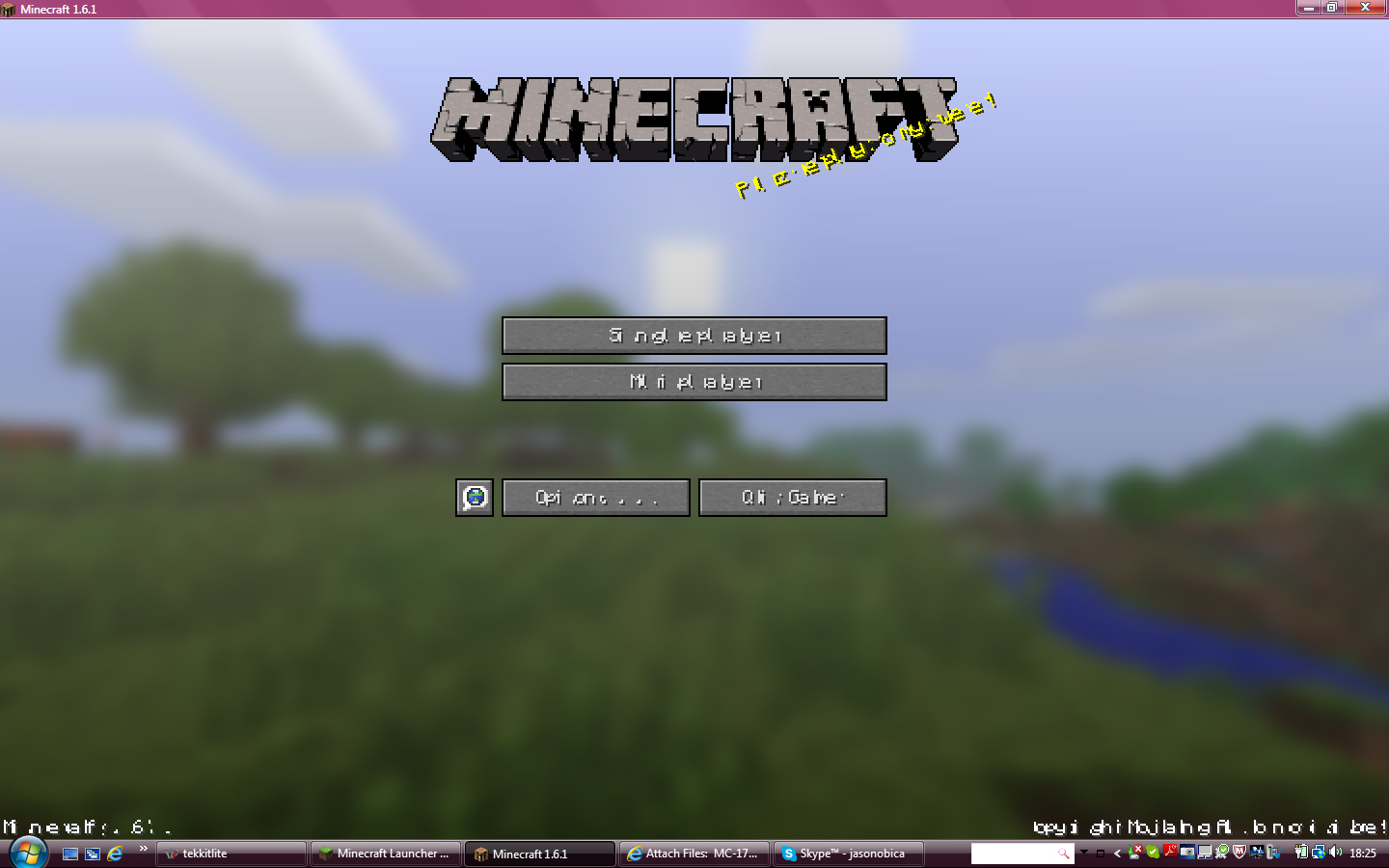
When I start the game with a resourcepack that got created from converting a texturepack with TextureEnder (lol), the font everywhere in the game looks like in "screenshot-1". However when I start with the default resourcepack, everything's normal.
Changing the pack on runtime doesn't change anything.
How to reproduce:
1. Take a texturepack.
2. Convert it using TextureEnder (from Mojang blog post for 13w24a)
3. Move the converted resourcepack to the resourcepack directory in /.minecraft/
4. Start the game
5. Select the resourcepack
6. Restart the game
7. Start eating hotdogs because of frustration.
PS: This may only happen if that texturepack has a custom font 
Linked Issues
is duplicated by153
 MC-17697Weird Font Gltich With Resource PacksDuplicateMC-17735Resource convertion problems and main screen text problemsDuplicateMC-17759English Language not displaying correctlyDuplicateMC-17770When changing resource packs fonts get messed up.DuplicateMC-17791Font messes up with Resource packDuplicateMC-17792Text is jumbled when Minecraft is launched with texture pack selectedDuplicateMC-17800Text unreadableDuplicateMC-17834If a resource pack is already chosen on launch, the font in game will be illegible.DuplicateMC-17860Resoursepacks and SnapshotDuplicateMC-17898After used a resourcepack (That got turned on while a MC-17831 crash) with custom font all normal (Also resourcepack affected) text will have too short texture. (Also happens while using the resource pack after a MC-17831 crash) [13w24b]DuplicateMC-17946Text GlitchDuplicateMC-17950Text messed upDuplicateMC-18005Starting the game with HD pack breaks the textDuplicateMC-18032changing Resources packs and letters are weird DuplicateMC-18086GUI is scrambled/Text is overlaid with the same text with shifted to the right making menu indiscernible. DuplicateMC-18106When I opened the main minecraft screen, all the letters were all jumbled upDuplicateMC-18111When I try to use the John Smith Legacy resource pack, the text is all garbled and the game is unplayableDuplicateMC-18153Resource Pack Bug "Unresolved"DuplicateMC-18176words all jumbled upDuplicateMC-18206Resource packs don't work...DuplicateMC-18212Resource Pack Loading error?(edit: Duplicate of MC-17673)DuplicateMC-18241When I select English all of the letters mix togetherDuplicateMC-18253Nice Texturepack Display BugDuplicateMC-18279If your using a resource pack with custom font and then restart the game the font will look wrong. (Like in the 13w24b after a crash)DuplicateMC-18302Text looks weirdDuplicateMC-18307When logging on with resource pack text is screwed up...DuplicateMC-18344Mysterious Font with and without a Resource PackDuplicateMC-18390Text getting very buggyDuplicateMC-18400Minecraft Text CorruptionDuplicateMC-18464Font messed up after switching a resource packDuplicateMC-18586Restarting Minecraft in a resource pack will cause jumbled text.DuplicateMC-18587Resource pack text bugDuplicateMC-18623Text error/glitchDuplicateMC-18650Font problem when you restart the launcherDuplicateMC-18669All the font/text gets all wierdDuplicateMC-18863text texture bugDuplicateMC-18872When I start the game in the DEV Launcher, All game and main menu text looks like foreign languageDuplicateMC-18931Launcher crashed when I downloaded new launcherDuplicateMC-19016Text Squished TogetherDuplicateMC-19022name and text errorDuplicateMC-19088Running Minecraft With Resource PackDuplicateMC-19102Text is unreadableDuplicateMC-19126TexturePack / Resource Pack and HorseShadow BUGDuplicateMC-19134Text bug with ressource packDuplicateMC-19139A few problems with resource packsDuplicateMC-19186Texts become hard to read after using converted texture packsDuplicateMC-19203Text bugDuplicateMC-19261Font bug when I start Minecraft with a ressource pack with a custom font.DuplicateMC-19296screen disfigured with languagesDuplicateMC-19325glitched overlaping lettersDuplicateMC-19332Using wrong font on blocks, items, menus, etc.DuplicateMC-19352When started, ALL the words were disoriented, however, a recourcepack was on startup.then it fixed with the default pack on reset DuplicateMC-19367Minecraft Language Selector: EnglishDuplicateMC-19400Custom 32x32 text in 16x16 format on restartDuplicateMC-19442Any English language does not work.DuplicateMC-19459Fonts visual glitchingDuplicateMC-19516After using the TextureEnder.jar to convert my texture pack I used it once, then after I quit and reloged all of the text was misaligned! Even when I went into normal textures it was that way. Hope you see this and fix before the release! DuplicateMC-19549Bug police with the English languageDuplicateMC-19579Today (28/06/13) and beforeDuplicateMC-19609Text bugDuplicateMC-19634Font issue after converting texture packsDuplicateMC-19696when logging in with texturepack enabled font goes all screwyDuplicateMC-19705Text gets messed upDuplicateMC-19713font is brokenDuplicateMC-19715Bug minecraft Texture Ender for Ressource PackDuplicateMC-19762Resource Pack Font GlitchesDuplicateMC-19788text on splash screen and in game is garbledDuplicateMC-19812HD fonts are displayed incorrectly the second time you launch minecraft.DuplicateMC-19833Text Displays Wrong with Resource PackDuplicateMC-19851All Text In Minecraft Is Going HaywireDuplicateMC-19895Resource Packs Break fontsDuplicateMC-19896Font messed up + some animations brokenDuplicateMC-19897Bugged textDuplicateMC-19932Text went all freakyDuplicateMC-19935ALL TEXT mixed and screwed upDuplicateMC-20006Using a resource pack at launch, makes english text get spaced weirdly.DuplicateMC-20071Resource Pack Bug NOT FIXED!DuplicateMC-20097Lanching game with resourcepack on messes up textDuplicateMC-20114Text problem in Ressources pack changementsDuplicateMC-20118Text problem in Ressources pack changementsDuplicateMC-20147Font rendering messed upDuplicateMC-20162Minecraft Font SmudgeDuplicateMC-20166Text on title page went wierdDuplicateMC-20215HD text becomes jumbled upon restart of client!DuplicateMC-20279text throughout the game is buggedDuplicateMC-20298Words are Garbled when launching the game with a texture pack of x64 or greater.DuplicateMC-20309Resource PackDuplicateMC-20348Text Bug with Resource PacksDuplicateMC-20360Random punctuation marks are disrupting all game textDuplicateMC-20378Language ChangeDuplicateMC-20449Resource Pack's.DuplicateMC-20464Minecraft 1.6 Resource PackText IssueDuplicateMC-20526Starting up with custom fonts bugs out text.DuplicateMC-20600Most languages not workingDuplicateMC-20601English Text Glitches OutDuplicateMC-20656Crazy unreadable textDuplicateMC-20697Font bug DuplicateMC-20730Text scrambled when launching Minecraft while using resource packDuplicateMC-20782jumbled text for names and links in 1.6 DuplicateMC-20839English is not English. DuplicateMC-20866LanguageDuplicateMC-20876On startup of the game, lettering is messed up at title screen and in gameDuplicateMC-20886lettersDuplicateMC-20958Fonts not loading properly if using resource packDuplicateMC-21063my english us language is screwed up badDuplicateMC-21149Any text gets scrambledDuplicateMC-21229Text does not load properly with HD fontsDuplicateMC-21240What I expected to happen was to change the language to English but instead I got a pixelated letters that aren't real.DuplicateMC-21296Broken Text After Resource Pack SwitchingDuplicateMC-21313Wrong placement of lettersDuplicateMC-21356Text/font bug DuplicateMC-21451Whenever I refresh my minecraft after adding a texture pack, my text is all messed up. Heres a picture: http://prntscr.com/1dc1kwDuplicateMC-21502Text Size DuplicateMC-21516Text GlitchDuplicateMC-21525Font is broken in clientDuplicateMC-21569Typography is not spaced correctly, making it illegible. DuplicateMC-21867Scrambled textDuplicateMC-21887Weird wording for everythingDuplicateMC-21931Text not displayed properly for converted resource packDuplicateMC-21958Fonts don't display properlyDuplicateMC-21988When someone have an HD resource pack and use it then exit mc then re-enter it there will be a font bug and if he/she uses the default resource pack the font bug stays.DuplicateMC-22022glitching charactersDuplicateMC-22134The English (UK) text is changed to weird symbolsDuplicateMC-22179words jumbling the lettersDuplicateMC-22340local Global Language messed up and not readableDuplicateMC-22461Fonts are messed upDuplicateMC-22504Wierd text in game startupDuplicateMC-22512disorted fonts with converted Recource packsDuplicateMC-22549Text Corrupt After Exiting GameDuplicateMC-22562Custom Fonts won't work...DuplicateMC-22640HD Fonts appear misalignedDuplicateMC-22725Title Screen Letter BugDuplicateMC-22860Inverted text?? What is going on...DuplicateMC-22901what happens some times is that I launch the game and the font gets all screwed up and then i have to restart my game multiple times before the font go's back to normal.DuplicateMC-23017Major text issueDuplicateMC-23151Fonts messed up after using a custom resource pack fontDuplicateMC-23427Language ProblemDuplicateMC-23514ressource packDuplicateMC-23595No support for unicode font edditing in resource packsDuplicateMC-23689Improperly displayed text on resource pack switchingDuplicateMC-23700Resource PacksDuplicateMC-23745Resource pack issuesDuplicateMC-23960Minecraft 1.6.2 Custom Fonts don't display properlyDuplicateMC-23973My chatDuplicateMC-24032Text glitch, text comes up all wierdDuplicateMC-24077When I try playing the 1.6.1 version all the letters are mashed up on the game making it impossible to read anything but the runner is fine.DuplicateMC-25638Weird Minecraft "text" ( letters )DuplicateMC-25722whenever I log into minecraft 1.6 the text is al scrambled and brokenDuplicateMC-26881The letter that have been typed are, uh... messed up?Duplicate
 MCL-982Minecraft text is jumbled and spacing is all offDuplicateMCL-1054Text GlitchDuplicateMC-17832Font Glitch w/ Resource PacksDuplicateMC-20846Bug of an letterDuplicate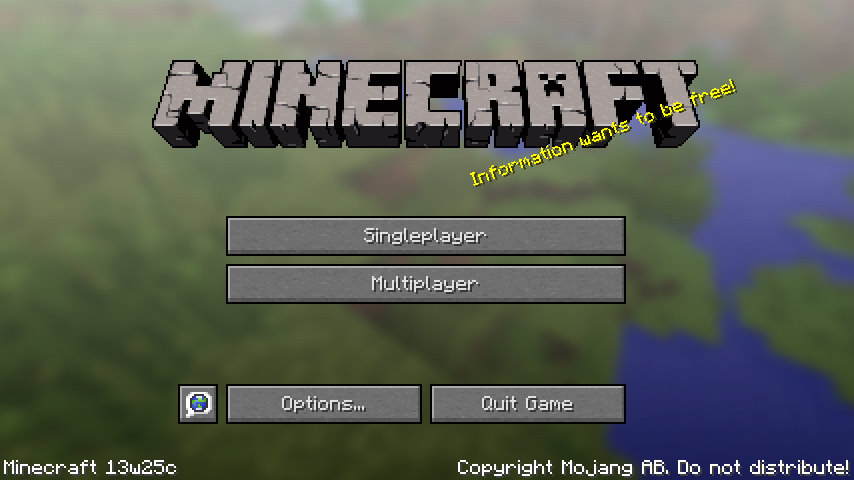




Created Issue:
Distorted fonts when using a converted texturepack on startup
When I start the game with a resourcepack that got created from converting a texturepack with TextureEnder (lol), the font everywhere in the game looks like in "screenshot-1". However when I start with the default resourcepack, everything's normal.
Changing the pack on runtime doesn't change anything.
Linked Issues
When I start the game with a resourcepack that got created from converting a texturepack with TextureEnder (lol), the font everywhere in the game looks like in "screenshot-1". However when I start with the default resourcepack, everything's normal.
Changing the pack on runtime doesn't change anything.
How to reproduce:
1. Take a texturepack.
2. Convert it using TextureEnder (from Mojang blog post for 13w24a)
3. Move the converted resourcepack to the resourcepack directory in /.minecraft/
4. Start the game
5. Select the resourcepack
6. Restart the game
7. Start eating hotdogs because of frustration.
When I start the game with a resourcepack that got created from converting a texturepack with TextureEnder (lol), the font everywhere in the game looks like in "screenshot-1". However when I start with the default resourcepack, everything's normal.
Changing the pack on runtime doesn't change anything.
How to reproduce:
1. Take a texturepack.
2. Convert it using TextureEnder (from Mojang blog post for 13w24a)
3. Move the converted resourcepack to the resourcepack directory in /.minecraft/
4. Start the game
5. Select the resourcepack
6. Restart the game
7. Start eating hotdogs because of frustration.PS: This may only happen if that texturepack has a custom font

is duplicated by

relates to
is duplicated by
relates to
2013-06-13_23.51.42.png
is duplicated by
Screenshots:
- After chosing texture pack
- After quitting and restarting game
- After chosing default texture pack
is duplicated by
relates to
is duplicated by
is duplicated by
is duplicated by
is duplicated by
is duplicated by

is duplicated by
is duplicated by
is duplicated by
is duplicated by
is duplicated by
is duplicated by
is duplicated by
is duplicated by
is duplicated by
is duplicated by
is duplicated by
is duplicated by
is duplicated by
is duplicated by
is duplicated by
is duplicated by
is duplicated by
is duplicated by
is duplicated by
is duplicated by
MC-18723
01 Default
02 Resource Pack
03 After Restart
04 Default Again
When I start the game with a resourcepack that got created from converting a texturepack with TextureEnder (lol), the font everywhere in the game looks like in "screenshot-1". However when I start with the default resourcepack, everything's normal.
Changing the pack on runtime doesn't change anything.
How to reproduce:
1. Take a texturepack.
2. Convert it using TextureEnder (from Mojang blog post for 13w24a)
3. Move the converted resourcepack to the resourcepack directory in /.minecraft/
4. Start the game
5. Select the resourcepack
6. Restart the game
7. Start eating hotdogs because of frustration.PS: This may only happen if that texturepack has a custom font
Not a bug.
Until we add font properties you cannot fix this. They haven't yet been finished.
- [Mojang] Grum (Erik Broes)
-----------------------------------------------------------------------------------------------------------
When I start the game with a resourcepack that got created from converting a texturepack with TextureEnder (lol), the font everywhere in the game looks like in "screenshot-1". However when I start with the default resourcepack, everything's normal.Changing the pack on runtime doesn't change anything.
How to reproduce:
1. Take a texturepack.
2. Convert it using TextureEnder (from Mojang blog post for 13w24a)
3. Move the converted resourcepack to the resourcepack directory in /.minecraft/
4. Start the game
5. Select the resourcepack
6. Restart the game
7. Start eating hotdogs because of frustration.PS: This may only happen if that texturepack has a custom font
is duplicated by
is duplicated by
is duplicated by
Not a bug.
Until we add font properties you cannot fix this. They haven't yet been finished.
- [Mojang] Grum (Erik Broes)
-----------------------------------------------------------------------------------------------------------
When I start the game with a resourcepack that got created from converting a texturepack with TextureEnder (lol), the font everywhere in the game looks like in "screenshot-1". However when I start with the default resourcepack, everything's normal.Changing the pack on runtime doesn't change anything.
How to reproduce:
1. Take a texturepack.
2. Convert it using TextureEnder (from Mojang blog post for 13w24a)
3. Move the converted resourcepack to the resourcepack directory in /.minecraft/
4. Start the game
5. Select the resourcepack
6. Restart the game
7. Start eating hotdogs because of frustration.PS: This may only happen if that texturepack has a custom font
Not a bug.
Until we add font properties you cannot fix this. They haven't yet been finished.
- [Mojang] Grum (Erik Broes)
-----------------------------------------------------------------------------------------------------------
Workaround:
Delete <resourcepack>/assets/minecraft/textures/font/ascii.pngWhen I start the game with a resourcepack that got created from converting a texturepack with TextureEnder (lol), the font everywhere in the game looks like in "screenshot-1". However when I start with the default resourcepack, everything's normal.
Changing the pack on runtime doesn't change anything.
How to reproduce:
1. Take a texturepack.
2. Convert it using TextureEnder (from Mojang blog post for 13w24a)
3. Move the converted resourcepack to the resourcepack directory in /.minecraft/
4. Start the game
5. Select the resourcepack
6. Restart the game
7. Start eating hotdogs because of frustration.PS: This may only happen if that texturepack has a custom font
Not a bug.
Until we add font properties you cannot fix this. They haven't yet been finished.
- [Mojang] Grum (Erik Broes)
-----------------------------------------------------------------------------------------------------------
Workaround:
Delete <resourcepack>/assets/minecraft/textures/font/ascii.png
-----------------------------------------------------------------------------------------------------------When I start the game with a resourcepack that got created from converting a texturepack with TextureEnder (lol), the font everywhere in the game looks like in "screenshot-1". However when I start with the default resourcepack, everything's normal.
Changing the pack on runtime doesn't change anything.
How to reproduce:
1. Take a texturepack.
2. Convert it using TextureEnder (from Mojang blog post for 13w24a)
3. Move the converted resourcepack to the resourcepack directory in /.minecraft/
4. Start the game
5. Select the resourcepack
6. Restart the game
7. Start eating hotdogs because of frustration.PS: This may only happen if that texturepack has a custom font
is duplicated by
is duplicated by
is duplicated by
is duplicated by
is duplicated by
is duplicated by
is duplicated by
is duplicated by
is duplicated by
is duplicated by
is duplicated by
is duplicated by
is duplicated by
is duplicated by
is duplicated by
is duplicated by
is duplicated by
is duplicated by
is duplicated by
is duplicated by
is duplicated by

is duplicated by
is duplicated by
is duplicated by
is duplicated by
is duplicated by
is duplicated by
is duplicated by
is duplicated by
is duplicated by
is duplicated by
is duplicated by
is duplicated by
relates to
is duplicated by
is duplicated by
relates to
is duplicated by
is duplicated by
![[Mojang] Grum (Erik Broes)](../../../data/assets/gravatar/grum.png) [Mojang] Grum (Erik Broes)
[Mojang] Grum (Erik Broes)
Not a bug.
Until we add font properties you cannot fix this. They haven't yet been finished.
- [Mojang] Grum (Erik Broes)
-----------------------------------------------------------------------------------------------------------
Workaround:
Delete <resourcepack>/assets/minecraft/textures/font/ascii.png
-----------------------------------------------------------------------------------------------------------When I start the game with a resourcepack that got created from converting a texturepack with TextureEnder (lol), the font everywhere in the game looks like in "screenshot-1". However when I start with the default resourcepack, everything's normal.
Changing the pack on runtime doesn't change anything.
How to reproduce:
1. Take a texturepack.
2. Convert it using TextureEnder (from Mojang blog post for 13w24a)
3. Move the converted resourcepack to the resourcepack directory in /.minecraft/
4. Start the game
5. Select the resourcepack
6. Restart the game
7. Start eating hotdogs because of frustration.PS: This may only happen if that texturepack has a custom font
is duplicated by
is duplicated by
is duplicated by
is duplicated by
is duplicated by
is duplicated by
is duplicated by
will there be a mcmeta file for the sizes of the characters? if not, is the default text changed by glyph_sizes.bin or is that just the unicode stuff?
is duplicated by
is duplicated by
is duplicated by
is duplicated by
I'm still experiencing this issue with any resource pack converted from any texture pack.
is duplicated by
is duplicated by
is duplicated by
is duplicated by
is duplicated by
is duplicated by
is duplicated by
is duplicated by
is duplicated by
is duplicated by
is duplicated by
is duplicated by
is duplicated by
is duplicated by
is duplicated by
is duplicated by
is duplicated by
is duplicated by
is duplicated by
is duplicated by
is duplicated by
is duplicated by
is duplicated by
is duplicated by
is duplicated by
is duplicated by
is duplicated by
is duplicated by
is duplicated by
is duplicated by
is duplicated by
is duplicated by
is duplicated by
is duplicated by
![[Mod] Ezekiel (ezfe)](../../../data/assets/gravatar/ezekielelin.jpeg)
is duplicated by
is duplicated by
Using what version?
is duplicated by
is duplicated by
is duplicated by
is duplicated by
is duplicated by
is duplicated by
is duplicated by
is duplicated by
is duplicated by
is duplicated by
is duplicated by
is duplicated by
is duplicated by
is duplicated by
relates to
is duplicated by
is duplicated by
is duplicated by
is duplicated by
is duplicated by
Duplicate of MC-17673, please use the search function to see if your bug has already been submitted. Currently over 57% of tickets are being closed as duplicate.

Spacings between characters are missing when using default-shaped fonts. The default font itself works fine though.
Custom shaped font (which are completely different to the default font) on the other hand look like this: MC-17673 (spacings are wrong, but not missing in this case!)
Duplicate of MC-17673, please use the search function to see if your bug has already been submitted. Currently over 57% of tickets are being closed as duplicate.
Duplicate of MC-17673, please use the search function to see if your bug has already been submitted. Currently over 57% of tickets are being closed as duplicate.
Duplicate of MC-17673, please use the search function to see if your bug has already been submitted. Currently over 57% of tickets are being closed as duplicate.
Duplicate of MC-17673, please use the search function to see if your bug has already been submitted. Currently over 57% of tickets are being closed as duplicate.
Duplicate of MC-17673, please use the search function to see if your bug has already been submitted. Currently over 57% of tickets are being closed as duplicate.
Duplicate of MC-17673 and MC-17831, please use the search function to see if your bug has already been submitted. Currently over 56% of tickets are being closed as duplicate.
Duplicate of MC-17673, please use the search function to see if your bug has already been submitted. Currently over 56% of tickets are being closed as duplicate.
Duplicate of MC-17673, please use the search function to see if your bug has already been submitted. Currently over 57% of tickets are being closed as duplicate.
Duplicate of MC-17673 and MC-17831, please use the search function to see if your bug has already been submitted. Currently over 57% of tickets are being closed as duplicate.
26th Duplicate of MC-17673, please use the search function to see if your bug has already been submitted. Currently over 57% of tickets are being closed as duplicate.
27th Duplicate of MC-17673, please use the search function to see if your bug has already been submitted. Currently over 57% of tickets are being closed as duplicate.
29th Duplicate of MC-17673, please use the search function to see if your bug has already been submitted. Currently over 57% of tickets are being closed as duplicate.
Duplicate of MC-17673, please use the search function to see if your bug has already been submitted. Currently over 57% of tickets are being closed as duplicate.
31st Duplicate of MC-17673, please use the search function to see if your bug has already been submitted. Currently over 57% of tickets are being closed as duplicate.
32nd Duplicate of MC-17673, please use the search function to see if your bug has already been submitted. Currently over 57% of tickets are being closed as duplicate.
Duplicate of MC-17673, please use the search function to see if your bug has already been submitted. Currently over 57% of tickets are being closed as duplicate.
@Everyone:
For further discussion on fonts, see MC-17673.
Custom fonts should work after the implementation of metadata for fonts ...
Duplicate of MC-17673, please use the search function to see if your bug has already been submitted. Currently over 57% of tickets are being closed as duplicate.
35th Duplicate of MC-17673, please use the search function to see if your bug has already been submitted. Currently over 57% of tickets are being closed as duplicate.
36th Duplicate of MC-17673, please use the search function to see if your bug has already been submitted. Currently over 57% of tickets are being closed as duplicate.
Duplicate of MC-17673, please use the search function to see if your bug has already been submitted. Currently over 57% of tickets are being closed as duplicate.
Duplicate of MC-17673, please use the search function to see if your bug has already been submitted. Currently over 57% of tickets are being closed as duplicate.
Effect will come back on restart of Minecraft.
But customs fonts are not possible at the moment. read the comments in MC-17673
Duplicate of MC-17673, please use the search function to see if your bug has already been submitted. Currently over 57% of tickets are being closed as duplicate.
42nd Duplicate of MC-17673, please use the search function to see if your bug has already been submitted. Currently over 57% of tickets are being closed as duplicate.
43rd Duplicate of MC-17673, please use the search function to see if your bug has already been submitted. Currently over 57% of tickets are being closed as duplicate.
Duplicate of MC-17673 and MC-17684, please use the search function to see if your bug has already been submitted. Currently over 57% of tickets are being closed as duplicate.
45th Duplicate of MC-17673, please use the search function to see if your bug has already been submitted. Currently over 57% of tickets are being closed as duplicate.
47th duplicate of MC-17673, please use the search function to see if your bug has already been submitted. Currently over 57% of tickets are being closed as duplicate.
- Fix your texture pack
- 48th Duplicate of
MC-17673, please use the search function to see if your bug has already been submitted. Currently over 57% of tickets are being closed as duplicate.
48th Duplicate of MC-17673, please use the search function to see if your bug has already been submitted. Currently over 57% of tickets are being closed as duplicate.
Duplicate of MC-17673, please use the search function to see if your bug has already been submitted. Currently over 57% of tickets are being closed as duplicate.
50th Duplicate of MC-17673, please use the search function to see if your bug has already been submitted. Currently over 57% of tickets are being closed as duplicate.
51st Duplicate of MC-17673, please use the search function to see if your bug has already been submitted. Currently over 57% of tickets are being closed as duplicate.
52nd Duplicate of MC-17673, please use the search function to see if your bug has already been submitted. Currently over 57% of tickets are being closed as duplicate.
53rd Duplicate of MC-17673, please use the search function to see if your bug has already been submitted. Currently over 57% of tickets are being closed as duplicate.
54th Duplicate of MC-17673, please use the search function to see if your bug has already been submitted. Currently over 57% of tickets are being closed as duplicate.
56th Duplicate of MC-17673, please use the search function to see if your bug has already been submitted. Currently over 57% of tickets are being closed as duplicate.
Duplicate of MC-17673, please use the search function to see if your bug has already been submitted. Currently over 57% of tickets are being closed as duplicate.
59th Duplicate of MC-17673, please use the search function to see if your bug has already been submitted. Currently over 57% of tickets are being closed as duplicate.
Posted in wrong project and duplicate of MC-17673, please use the search function to see if your bug has already been submitted. Currently over 57% of tickets are being closed as duplicate.
Duplicate of MC-17673.
Duplicate of MC-17673, please use the search function to see if your bug has already been submitted. Currently over 57% of tickets are being closed as duplicate.
Duplicate of MC-17673.
Duplicate of MC-17673, please use the search function to see if your bug has already been submitted. Currently over 57% of tickets are being closed as duplicate.
64th Duplicate of MC-17673, please use the search function to see if your bug has already been submitted. Currently over 57% of tickets are being closed as duplicate.
Duplicate of MC-17673, please do a bit more research and use the search function to see if your bug has already been submitted. Currently over 57% of tickets are being closed as duplicate.
66th Duplicate of MC-17673, please do a bit more research and use the search function to see if your bug has already been submitted. Currently over 57% of tickets are being closed as duplicate.
Duplicate of MC-17673, please use the search function to see if your bug has already been submitted. Currently over 57% of tickets are being closed as duplicate.
Duplicate of MC-17673, please use the search function to see if your bug has already been submitted. Currently over 57% of tickets are being closed as duplicate.
68th Duplicate of MC-17673, please use the search function to see if your bug has already been submitted. Currently over 57% of tickets are being closed as duplicate.
70th Duplicate of MC-17673, please use the search function to see if your bug has already been submitted. Currently over 57% of tickets are being closed as duplicate.
So is it a duplicate of MC-17673?
71st Duplicate of MC-17673, please use the search function to see if your bug has already been submitted. Currently over 57% of tickets are being closed as duplicate.
Duplicate of MC-17673, please use the search function to see if your bug has already been submitted. Currently over 57% of tickets are being closed as duplicate.
Duplicate of MC-17673, please use the search function to see if your bug has already been submitted. Currently over 57% of tickets are being closed as duplicate.
@John L
Your theory:
...if issues such as this one were not treated with ignorance, the claimed high percentages of duplicates would not exist...
My theory:
If the bug tracker wouldn't be spammed with an insane amount of duplicates, the mods and devs would've be able to care about the real issues.
Proof: Recent most spammed issues (numbers as of time of writing this comment)
Duplicate of MC-17673, please use the search function to see if your bug has already been submitted. Currently over 57% of tickets are being closed as duplicate.
76th Duplicate of MC-17673, please use the search function to see if your bug has already been submitted. Currently over 57% of tickets are being closed as duplicate.
77th Duplicate of MC-17673, please use the search function to see if your bug has already been submitted. Currently over 58% of tickets are being closed as duplicate.
Duplicate of MC-17673, please use the search function to see if your bug has already been submitted. Currently over 58% of tickets are being closed as duplicate.
109th Duplicate of MC-17673, please use the search function to see if your bug has already been submitted. Currently over 58% of tickets are being closed as duplicate.
Duplicate of MC-17673, please use the search function to see if your bug has already been submitted. Currently over 58% of tickets are being closed as duplicate.
110+ Duplicate of MC-17673, please use the search function to see if your bug has already been submitted. Currently over 58% of tickets are being closed as duplicate.
You are now the proud owner of duplicate 110 of MC-17673. Well searched sir!!!!
116th Duplicate of MC-17673, please use the search function to see if your bug has already been submitted. Currently over 58% of tickets are being closed as duplicate.
117th Duplicate of MC-17673, please use the search function to see if your bug has already been submitted. Currently over 58% of tickets are being closed as duplicate.
118th Duplicate of MC-17673, please use the search function to see if your bug has already been submitted. Currently over 58% of tickets are being closed as duplicate.
D..d...duplicate 114! MC-17673
120+ Duplicate of MC-17673, please use the search function to see if your bug has already been submitted. Currently over 58% of tickets are being closed as duplicate.
Duplicate of MC-17673, please use the search function to see if your bug has already been submitted. Currently over 58% of tickets are being closed as duplicate.
Duplicate of MC-17673, please use the search function to see if your bug has already been submitted. Currently over 58% of tickets are being closed as duplicate.
120th duplicate of MC-17673, please use the search function to see if your bug has already been submitted. Currently over 58% of tickets are being closed as duplicate.
120+ Duplicate of MC-17673, please use the search function to see if your bug has already been submitted. Currently over 58% of tickets are being closed as duplicate.
Duplicate of MC-17673, please use the search function to see if your bug has already been submitted. Currently over 57% of tickets are being closed as duplicate.
120+ Duplicate of MC-17673, please use the search function to see if your bug has already been submitted. Currently over 58% of tickets are being closed as duplicate.
120+ Duplicate of MC-17673, please use the search function to see if your bug has already been submitted. Currently over 58% of tickets are being closed as duplicate.
130+ Duplicate of MC-17673, please use the search function to see if your bug has already been submitted. Currently over 58% of tickets are being closed as duplicate
130+ Duplicate of MC-17673, please use the search function to see if your bug has already been submitted. Currently over 58% of tickets are being closed as duplicate.
130+ Duplicate of MC-17673, please use the search function to see if your bug has already been submitted. Currently over 58% of tickets are being closed as duplicate.
It is the same issue as this bug MC-17673 but I cannot get it to work, the issue there is marked as Resolved.
130+ Duplicate of MC-17673, please use the search function to see if your bug has already been submitted. Currently over 58% of tickets are being closed as duplicate.
140+ Duplicate of MC-17673, please use the search function to see if your bug has already been submitted. Currently over 58% of tickets are being closed as duplicate.
140+ Duplicate of MC-17673, please use the search function to see if your bug has already been submitted. Currently over 58% of tickets are being closed as duplicate.
Duplicate of MC-17673, please use the search function to see if your bug has already been submitted. Currently over 58% of tickets are being closed as duplicate.
140+ Duplicate of MC-17673, please use the search function to see if your bug has already been submitted. Currently over 58% of tickets are being closed as duplicate.
140+ Duplicate of MC-17673, please use the search function to see if your bug has already been submitted. Currently over 58% of tickets are being closed as duplicate.
Duplicate of MC-17673, please use the search function to see if your bug has already been submitted. Currently over 58% of tickets are being closed as duplicate.
140+ Duplicate of MC-17673, please use the search function to see if your bug has already been submitted. Currently over 58% of tickets are being closed as duplicate.
160+ Duplicate of MC-17673, please use the search function to see if your bug has already been submitted. Currently over 58% of tickets are being closed as duplicate.
![[Mod] Torabi](../../../data/assets/gravatar/torabi.png)
Duplicate of MC-17673.
Looks like MC-17673. Are you using a resource pack?
153rd Duplicate of MC-17673, please use the search function to see if your bug has already been submitted. Currently over 58% of tickets are being resolved as duplicate.
But according to the code there is no restrictrion of any pages. The rendering of characters is simply done graphical.
Did you try to copy an existing working unicode page (like unicode_page_00.png) to unicode_page_e0.png to see if the characters are still not rendered ?
If the loader cannot check the character width because of broken transparency, the characters are not rendered. Read Grum's comments in MC-17673.
Not a bug.
Until we add font properties you cannot fix this. They haven't yet been finished.
Okay then.
Good guy Erik.
Ender.jar Converter isn't working on Mac OS X
@Grum:
But this >>>
MC-17729should not happen, right? Default-shaped fonts should work without the properties file, or not?No, perfectly aligned defaultsized fonts will display properly.
There is no support for any 'high res fonts' nor will any automatic tool we make ever output 'correct data' to dispay them.
you have to add all the files from : C:\Users\YOU\AppData\Roaming\.minecraft\versions\YOURVERSION\YOURVERSION.jar\assets\minecraft\textures\font
to
C:\Users\YOU\AppData\Roaming\.minecraft\resourcepacks\YOURRESOURCEPACK\assets\minecraft\textures\font
they use the normal fonts but its better than nothing
@Niklas:
That does not make sense. You could simply delete all fonts from your resource pack, Minecraft automatically uses the default fonts if there are no fonts available in your resource pack. But yes, at least it makes stuff readable again.
@Grum:
Any progress update on the fonts? Still crazy hieroglyphes in 13w25c ... :-b
I've found that I can get a converted 32x texture pack to work on the first load without distorting the fonts. However, after closing and re-opening MineCraft, the glitch shows up again, even with the default pack. The workaround for me has been to delete any resource packs found in the resource pack folder before opening MineCraft, then copy over the converted hi-res pack to the proper folder, then select it within MineCraft, and it works just fine.
Because of this behavior I'm questioning what Grum has said about this not being a bug, since the hi-res fonts do in fact work after jumping through some hoops.
I'm having the same issue.
The resource pack font loads fine but the font is messed up the next time you start Minecraft, if you select the Default pack the font is still messed up, restarting has no effect unless you restart when you have the Default pack selected.
The work around I've found that works is to select the Default pack, exit the game.
Restart the game again and the font will be correct again in game.
Then you can select a Resource pack again and the font will be fine until you restart the game again then it will be messed up.
Yeah the same here as the poster above, i use 256x texpacks for my server, and i converted it to a resource-pack, and loaded it fine the first run! - the second time i started minecraft though, the fonts were broken (cannot be read as heavily misaligned as they are)
I will try the work-round with having default at game-start.
But i do hope the actual issue where it does not reload the default font after having selected another resource-pack previously, get's fixed : )
/PReP
@Grum:
Any progress on the fonts? Or do you plan to release 1.6 with an unfinished resource pack system?
It's working perfectly fine. We might add the extended font feature later.
Later? So it's up to Kahr again to make custom fonts work in 1.6 ...
Without the font feature, resource packs are incomplete to me (and I'm sure every texture artist using custom fonts in his/her pack will agree with this). Does it really take that long to add a properties/metadata file to let us define the font widths?
Now I will wait an additional 2 weeks. happy?
Do you guys realize that (at least in my testing) HD fonts work perfectly well, as long as the game doesn't try to start up with them?
It seems that the interface only goes berserk if the Resource Pack that the game loads up with (i.e the last Pack you used before you quite MC) has an HD font. It seems to work find if you select a pack with an HD font after you launch MC-- and will work fine next time as long as you switch to a non-HD font pack before you quit.
Perhaps the quick fix would be to use the default font when MC launches no matter what pack is selected.
I just quote a part of the tickets description:
"7. Start eating hotdogs because of frustration."
This problem still occasionally happens for me on the latest snapshot, but I figured out a way to fix this one my computer, not sure if it will work for others.
1. Switch texture pack to default.
2. Close and relaunch Minecraft.
I've been able to do this multiple times with success. I can even switch the texture pack back to a custom one after that and it will look fine.
The proper fix for the code takes a bit longer to finish. I've hacked in a workaround for now.
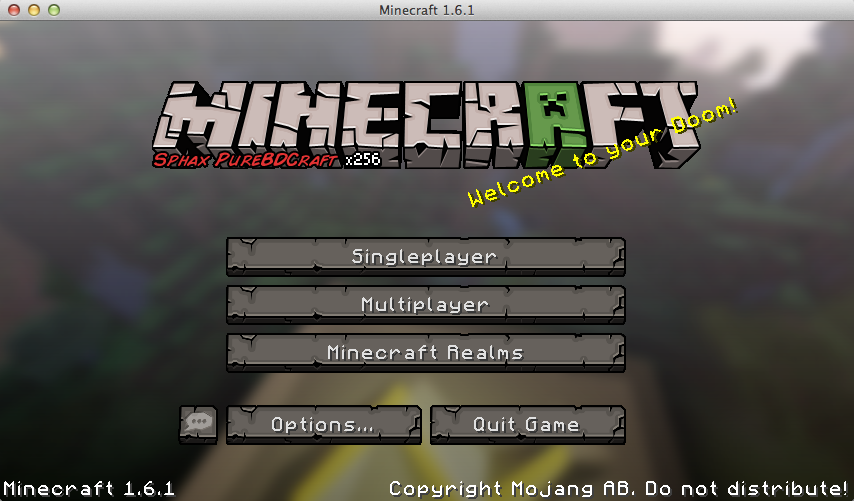
Result in the 'sphax' screenshot.
PS: The extra space in Sphax is because there is extra 'spacing-garbage' in the images.
Thanks a lot Grum! I assume by garbage you mean extra pixels in front of the letter images? Will a mcmeta file be needed for this fix?
No, it seems the author of Sphax just added some extra artificial spacing to perhaps combat some other problem. He can stop doing that now
The extra spacings are an old relict of a time where MCPatchers HD Font mod wasn't able to properly handle the spacings between characters, many texture artists added this "spacing-garbage" to their font as a workaround. After Kahr fixed that and additionally added support for font widh properties (about a year ago), this became obsolete. Sphax obviosly forgot to delete them.
Anyhow ... the new screenshot looks ... promising
Grum: "The proper fix for the code takes a bit longer to finish. I've hacked in a workaround for now"
Why not just reuse the font code from texture packs? HD fonts work fine in 1.5.2 (WITHOUT optifine if you're wondering)
also grum if you see this, since i have no other way to contact you and the following is not really a bug, i will tell you here. sorry for off-topic stuff.
the watercolor.png colormap appears to be missing in 1.6.1, not in the colormaps folder, not in the misc folder where it used to be. please re-add it!
grum the english language UK is still distorted even when using the default resorcepack

ive added an atachment it is the default background but the sphax spacing ???
@Conor McS:
Why should he re-add the old code after he found a working compromise to the current one? Does not make sense to me :-P
About the watercolor stuff: Yep, that's a bit off-topic here, but FYI: watercolor.png was never used in vanilla, so it's not missing. Would be nice to have working water and underwater color maps in vanilla though (or the whole Custom Colors stuff in general).
@jason gillam-wright: This bug is fixed for 1.6.2 not for 1.6.1
Re-install minecraft.
re-select your HQ texture pack with its great font.
It work work correctly the first time you select a resource pack. its only after you exit and re-enter that it has a problem.
very strange that it can work fine the first time, and only has an issue after you restart.
there has to be a simple folder you can replace every time (until the issue is resolved)
If you switch to the default texture pack before exiting, you won't have to re-install like it says above or anything.
Use pirate english if you remember where everything is, that is fixed, for now we will have to wait for 1.6.2/ 1.7
If you want it not to affect you...first boot into original....quit....next open the resourcepack folder... use like 7zip, WinRAR to delete in the texture folder the fonts folder, if you see any other folder locations saying font delete that as well.... Then every time you load minecraft you'll have default fonts with your favorite texture/resource pack. I'm looking forward to 1.6.2 where they've fixed this.
@Conor McS Add it because it did nothing? nope!
The file wasn't used and therefor purged.
I seem to still have this issue.
EDIT: Image right here (Sorry if there is a way to upload it on here. I don't use this website to often.): http://i.imgur.com/GEgcKhk.png
HD fonts still are broken for me, but they are broken differently. Now they are always broken, and the spacing is different.
Is there some sort of .mcmeta file needed to make this work?
EDIT: this is in reference to the 1.6.2 snapshot
John W Bjerk: please attach the resource you are using.
That goes for everyone btw, without data I cannot fix it
Grum:
certainly, here it is:
http://www.mediafire.com/download/wuy1z6ub3yibh1f/lithos_font_issues.zip
and thanks...
A problem with HD font is still occurring for me on 1.6.2, however, instead of going hieroglyphic, my font simply expands compared to default. It is more tolerable, but still annoying.
Examples:
Default: http://imgur.com/BNZ9wer
High Def: http://imgur.com/wgPjnUh
Resourcepack: https://www.dropbox.com/s/c4rgsyhgpvci74o/%5B64x%5D%5B1.6.x%5D%20Affinite%27s%20Faithful%20%2B%20Better%20Rain.zip
@John W Bjerk: in your case the texture has non-0 alpha values (0x03 to be exact) where it should be zero, so every glyph gets seen as max-width. (now there is a little rendering error, so it renders a little bit of the 'next' glyph too, which is what causes the weird lines)
@Ryan Sims
Your font is actually the same as the Sphax one and it has extra 'spacing' after each letter that is 'almost invisible' though not invisible for my code. Remove the spacers and it looks good.
Default-shaped HD font works absolutely fine in 1.6.2, no problems with spacings on my side. Thanks Grum
What does "non-0 alpha values" mean? I have a also a few stray characters that i can't get rid of no matter what i try.
Edit: Duh, got it - anything else than pure white and opaque will cause errors. Thanks, works perfectly! http://i.imgur.com/MY0lamv.png
Excellent, my code seems to indeed work as it should. I'll commit the little fix for the 'max-width-glyphs' over-rendering by a pixel.
For all people seeing this thread and thinking the spacing of the letters is broken for HD fonts.
Please make sure that:
* You start each letter touching the left size of the square it sits in
* You ensure the pixels you do not want to see are black and have an alpha channel value of 0.
And keep in mind, as it is a 'hack', the width of the character will be calculated from how many columns have pixels in it. However the internals work on a 0-8 integer scale so we need to round the resulting number to the nearest integer, this might cause some spacing issues but it should be significantly less than before.
If you feel there is still a bug, attach the ascii.png to this ticket – and prepared to be angrily glared at if the data contains 'weird values' in the alpha channel
Not only the transparency is important, it seems also important that the visible pixels have to be pure white.
My font had a very light yellow tint (artistic reason, not a mistake), this caused problems - seems that the boundaries weren't detected properly anymore (as you mentioned already).
Not a complaint! I just felt like adding this to your list.
Actually the code checks for the ARGB-hex value to be non-0.
So yes, do not leave ANYTHING in the pixels you want empty.
OK, i guess i'm going to risk a dev glare.
I've tried multiple methods, any one of which should have removed non-zero transparency values. The font still goes glitchy in the same way. To the best of my knowledge it mets the other requirements.
http://www.mediafire.com/download/e7o0l39skqf3uxx/ascii.png
Grum, I was wondering if you'd be able to check my ascii. http://www.mediafire.com/?5u1vhd9umvb4qcx
EDIT: Managed to fix it myself when poking in the files. Thanks for the help!
@John W Bjerk: your transparant areas are white, not black
Grum: Gotcha, thanks, that works.
For anyone that's not sure if they're transparent areas are black, be sure by coloring the background black then erasing it.
So I'm trying to edit my unicode font, have read the whole issue but still I am not able to correctly edit this file.
https://dl.dropboxusercontent.com/u/15788493/Temp/unicode_page_00.png
Alpha channel is i think 0 but I didn't quite understood how to make it.
At this moment they look like this:
https://dl.dropboxusercontent.com/u/15788493/Temp/3.png
Any idea? Is the unicode supported?
No. Ask here: http://www.minecraftforum.net/forum/252-resource-pack-help/
Actually updated the 1.6.2 jar. Now the only rule it goes by is: if a pixel is 100% transparant (0x00 in alpha field) it is considered transparant regardless of colour.
@Grum:
http://i.imgur.com/8ELGI9T.jpg - the new stylish appearance of italic font isn't intended, right? Mind to take a look at
MC-23928? Thanks !