 MC-190258
Abnormally very high RAM usage since 1.13 (server side)
The bug
Since 1.13, the RAM used by the server has increased drastically to reach more than 3 GB in 1.15.2 and higher when it is not limited by JVM default arguments (= put -Xmx8G for example)!
For comparison, 1.12.2 uses only 500 MB of RAM!
This problem is apparently due to the DataFixerUpper introduced in 1.13.
How to test
- Go to the "Installations" section of your Minecraft launcher.
- Click on the three dots that appear when you hover over the profile you want to use for this test, and then click "Edit". If you don't already have a profile, create one!
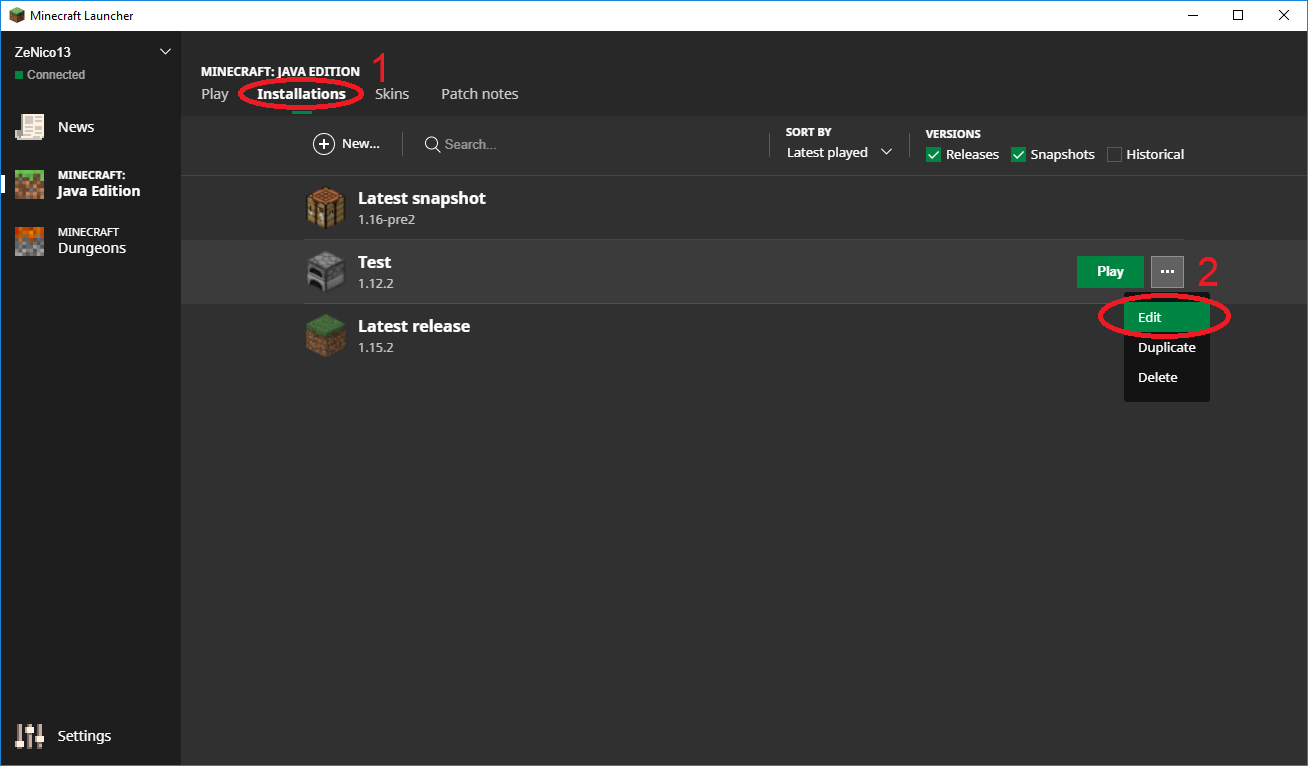
- Select the version you want to test.
- Download the server jar of the version you want to test.
- Open the task manager of your operating system.
- Launch the server with the following JVM arguments (for 8GB of RAM):
java -Xmx8G -Xms1024M -jar server.jar nogui
- Observe the evolution of the RAM used by the server in the task manager.
- Repeat for each version you want to test.

Videos tests
Here are all the tests I did from 1.12.2 to 1.16 Pre-Release 2, on all stable versions of Minecraft.
I have allocated 8 GB of RAM each time so as not to restrict the server to too low a ceiling, which would not allow us to see the problem.
No other programs run on the PC (except Discord and my recording program).
I did the test on my two different machines and the results are the same.
- Minecraft 1.12.2 (~450 MB) : Server RAM Test 1.12.2.mp4

- Minecraft 1.13.2 (~2.5 GB) : Server RAM Test 1.13.2.mp4
- Minecraft 1.14.4 (~2.9 GB) : Server RAM Test 1.14.4.mp4
- Minecraft 1.15.2 (~3.0 GB) : Server RAM Test 1.15.2.mp4
- Minecraft 1.16 Pre-Release 2 (~3.1 GB) : Server RAM Test 1.16 Pre-2.mp4
We can also observe that with each new version, the CPU is used harder and harder, even after the game is fully loaded (especially in 1.16).
Note: This ticket is attached to MC-188163 which processes the client side.
Environment
Windows 10 1909 (64 bits) (November 2019 Update)
Java 8 Update 251 (64 bits)
Linked Issues
- Unresolved
![[Helper] ZeNico13](../../../data/avatars/users/31913.png) [Helper] ZeNico13
[Helper] ZeNico13- 60
- 24
- Community Consensus
 Normal
- Platform
- Performance
- high high-ram memory-leak ram ram-usage server
1.15.2 - 1.19.4-pre1
1.15.2 1.16-pre8 1.16-rc1 1.16 1.16.1 20w27a 20w28a 20w29a 20w30a 1.16.2-pre1 1.16.2-pre2 1.16.2-rc1 1.16.2-rc2 1.16.2 1.16.3-rc1 1.16.3 1.16.4-pre1 1.16.4-pre2 1.16.4-rc1 1.16.4 20w46a 20w48a 20w49a 21w03a 1.16.5 21w05a 21w05b 21w06a 21w07a 21w11a 1.17 1.17.1-pre1 1.17.1 1.18-pre4 1.18 1.19 1.19.1-rc1 1.19.1-pre2 1.19.1-pre4 1.19.3 23w07a 1.19.4-pre1
Created Issue:
Abnormally very high RAM usage since 1.13 (on server)
The bug
Since 1.13, the RAM used by the server has increased drastically to reach more than 3 GB in 1.15.2 and higher when it is not limited by JVM default arguments (= put -Xmx8G for example)!
For comparison, 1.12.2 uses only 500 MB of RAM!
How to test
- Go to the "Installations" section of your Minecraft launcher.
- Click on the three dots that appear when you hover over the profile you want to use for this test, and then click "Edit". If you don't already have a profile, create one!
- Select the version you want to test.
- Download the server jar of the version you want to test.
- Open the task manager of your operating system.
- Launch the server with the following JVM arguments (for 8GB of RAM):
java -Xmx8G -Xms1024M -jar server.jar nogui- Observe the evolution of the RAM used by the server in the task manager.
- Repeat for each version you want to test.
Videos tests
Here are all the tests I did from 1.12.2 to 1.16 Pre-Release 2, on all stable versions of Minecraft.
I have allocated 8 GB of RAM each time so as not to restrict the server to too low a ceiling, which would not allow us to see the problem.
No other programs run on the PC (except Discord and my recording program).
I did the test on my two different machines and the results are the same.
- Minecraft 1.12.2 (~450 MB) : Server RAM Test 1.12.2.mp4
- Minecraft 1.13.2 (~2.5 GB) : Server RAM Test 1.13.2.mp4
- Minecraft 1.14.4 (~2.9 GB) : Server RAM Test 1.14.4.mp4
- Minecraft 1.15.2 (~3.0 GB) : Server RAM Test 1.15.2.mp4
- Minecraft 1.16 Pre-Release 2 (~3.1 GB) : [^Client RAM Test 1.16 Pre-2.mp4]
We can also observe that with each new version, the CPU is used harder and harder, even after the game is fully loaded (especially in 1.16).
Note: This ticket is attached to
MC-188163which processes the client side.
Attachments7
Abnormally very high RAM usage since 1.13 (onserver)Abnormally very high RAM usage since 1.13 (server side)
Windows 10 1909 (64 bits) (November 2019 Update)
Java 8 Update 251 (64 bits)
The bug
Since 1.13, the RAM used by the server has increased drastically to reach more than 3 GB in 1.15.2 and higher when it is not limited by JVM default arguments (= put -Xmx8G for example)!
For comparison, 1.12.2 uses only 500 MB of RAM!
How to test
- Go to the "Installations" section of your Minecraft launcher.
- Click on the three dots that appear when you hover over the profile you want to use for this test, and then click "Edit". If you don't already have a profile, create one!
- Select the version you want to test.
- Download the server jar of the version you want to test.
- Open the task manager of your operating system.
- Launch the server with the following JVM arguments (for 8GB of RAM):
java -Xmx8G -Xms1024M -jar server.jar nogui- Observe the evolution of the RAM used by the server in the task manager.
- Repeat for each version you want to test.
Videos tests
Here are all the tests I did from 1.12.2 to 1.16 Pre-Release 2, on all stable versions of Minecraft.
I have allocated 8 GB of RAM each time so as not to restrict the server to too low a ceiling, which would not allow us to see the problem.
No other programs run on the PC (except Discord and my recording program).
I did the test on my two different machines and the results are the same.
- Minecraft 1.12.2 (~450 MB) : Server RAM Test 1.12.2.mp4
- Minecraft 1.13.2 (~2.5 GB) : Server RAM Test 1.13.2.mp4
- Minecraft 1.14.4 (~2.9 GB) : Server RAM Test 1.14.4.mp4
- Minecraft 1.15.2 (~3.0 GB) : Server RAM Test 1.15.2.mp4
- Minecraft 1.16 Pre-Release 2 (~3.1 GB) : [^Client RAM Test 1.16 Pre-2.mp4]
We can also observe that with each new version, the CPU is used harder and harder, even after the game is fully loaded (especially in 1.16).
Note: This ticket is attached to
MC-188163which processes the client side.The bug
Since 1.13, the RAM used by the server has increased drastically to reach more than 3 GB in 1.15.2 and higher when it is not limited by JVM default arguments (= put -Xmx8G for example)!
For comparison, 1.12.2 uses only 500 MB of RAM!
How to test
- Go to the "Installations" section of your Minecraft launcher.
- Click on the three dots that appear when you hover over the profile you want to use for this test, and then click "Edit". If you don't already have a profile, create one!
- Select the version you want to test.
- Download the server jar of the version you want to test.
- Open the task manager of your operating system.
- Launch the server with the following JVM arguments (for 8GB of RAM):
java -Xmx8G -Xms1024M -jar server.jar nogui- Observe the evolution of the RAM used by the server in the task manager.
- Repeat for each version you want to test.
Videos tests
Here are all the tests I did from 1.12.2 to 1.16 Pre-Release 2, on all stable versions of Minecraft.
I have allocated 8 GB of RAM each time so as not to restrict the server to too low a ceiling, which would not allow us to see the problem.
No other programs run on the PC (except Discord and my recording program).
I did the test on my two different machines and the results are the same.
- Minecraft 1.12.2 (~450 MB) : Server RAM Test 1.12.2.mp4
- Minecraft 1.13.2 (~2.5 GB) : Server RAM Test 1.13.2.mp4
- Minecraft 1.14.4 (~2.9 GB) : Server RAM Test 1.14.4.mp4
- Minecraft 1.15.2 (~3.0 GB) : Server RAM Test 1.15.2.mp4
- Minecraft 1.16 Pre-Release 2 (~3.1 GB) : Server RAM Test 1.16 Pre-2.mp4
We can also observe that with each new version, the CPU is used harder and harder, even after the game is fully loaded (especially in 1.16).
Note: This ticket is attached to
MC-188163which processes the client side.
![[Mod] violine1101](../../../data/avatars/users/92858.png)

is duplicated by
![[Mod] Michael Wobst](../../../data/avatars/users/37868.png)
![[Mod] Jarl-Penguin](../../../data/avatars/users/92849.png)
![[Helper] Misode](../../../data/avatars/users/93314.png)
![[Mod] Chandler](../../../data/assets/gravatar/triwonder81.png)
![[Helper] gaspoweredpick](../../../data/avatars/users/80904.png)
![[Mojang] Adrian Östergård](../../../data/assets/gravatar/nighter.jpeg)
![[Helper] Jack McKalling](../../../data/avatars/users/92859.png)
![[Mod] Anthony Cicinelli](../../../data/avatars/users/10122.svg)
The bug
Since 1.13, the RAM used by the server has increased drastically to reach more than 3 GB in 1.15.2 and higher when it is not limited by JVM default arguments (= put -Xmx8G for example)!
For comparison, 1.12.2 uses only 500 MB of RAM!
This problem is apparently due to the DataFixerUpper introduced in 1.13.
How to test
- Go to the "Installations" section of your Minecraft launcher.
- Click on the three dots that appear when you hover over the profile you want to use for this test, and then click "Edit". If you don't already have a profile, create one!
- Select the version you want to test.
- Download the server jar of the version you want to test.
- Open the task manager of your operating system.
- Launch the server with the following JVM arguments (for 8GB of RAM):
java -Xmx8G -Xms1024M -jar server.jar nogui- Observe the evolution of the RAM used by the server in the task manager.
- Repeat for each version you want to test.
Videos tests
Here are all the tests I did from 1.12.2 to 1.16 Pre-Release 2, on all stable versions of Minecraft.
I have allocated 8 GB of RAM each time so as not to restrict the server to too low a ceiling, which would not allow us to see the problem.
No other programs run on the PC (except Discord and my recording program).
I did the test on my two different machines and the results are the same.
- Minecraft 1.12.2 (~450 MB) : Server RAM Test 1.12.2.mp4
- Minecraft 1.13.2 (~2.5 GB) : Server RAM Test 1.13.2.mp4
- Minecraft 1.14.4 (~2.9 GB) : Server RAM Test 1.14.4.mp4
- Minecraft 1.15.2 (~3.0 GB) : Server RAM Test 1.15.2.mp4
- Minecraft 1.16 Pre-Release 2 (~3.1 GB) : Server RAM Test 1.16 Pre-2.mp4
We can also observe that with each new version, the CPU is used harder and harder, even after the game is fully loaded (especially in 1.16).
Note: This ticket is attached to
MC-188163which processes the client side.
![[Mod] markderickson](../../../data/avatars/users/18946.svg)
![[Mod] ampolive](../../../data/avatars/users/18949.svg)
is duplicated by
is duplicated by
![[Mojang] slicedlime](../../../data/assets/gravatar/slicedlime.jpeg)
The bug
Since 1.13, the RAM used by the game has increased drastically to reach more than 5 GB in 1.15.2 and higher when Minecraft is not limited by JVM default arguments (= put -Xmx8G for example)!
For comparison, 1.12.2 uses only 500 MB of RAM!
This problem is apparently due to the DataFixerUpper introduced in 1.13.
How to test
- Go to the "Installations" section of your Minecraft launcher.
- Click on the three dots that appear when you hover over the profile you want to use for this test, and then click "Edit". If you don't already have a profile, create one!
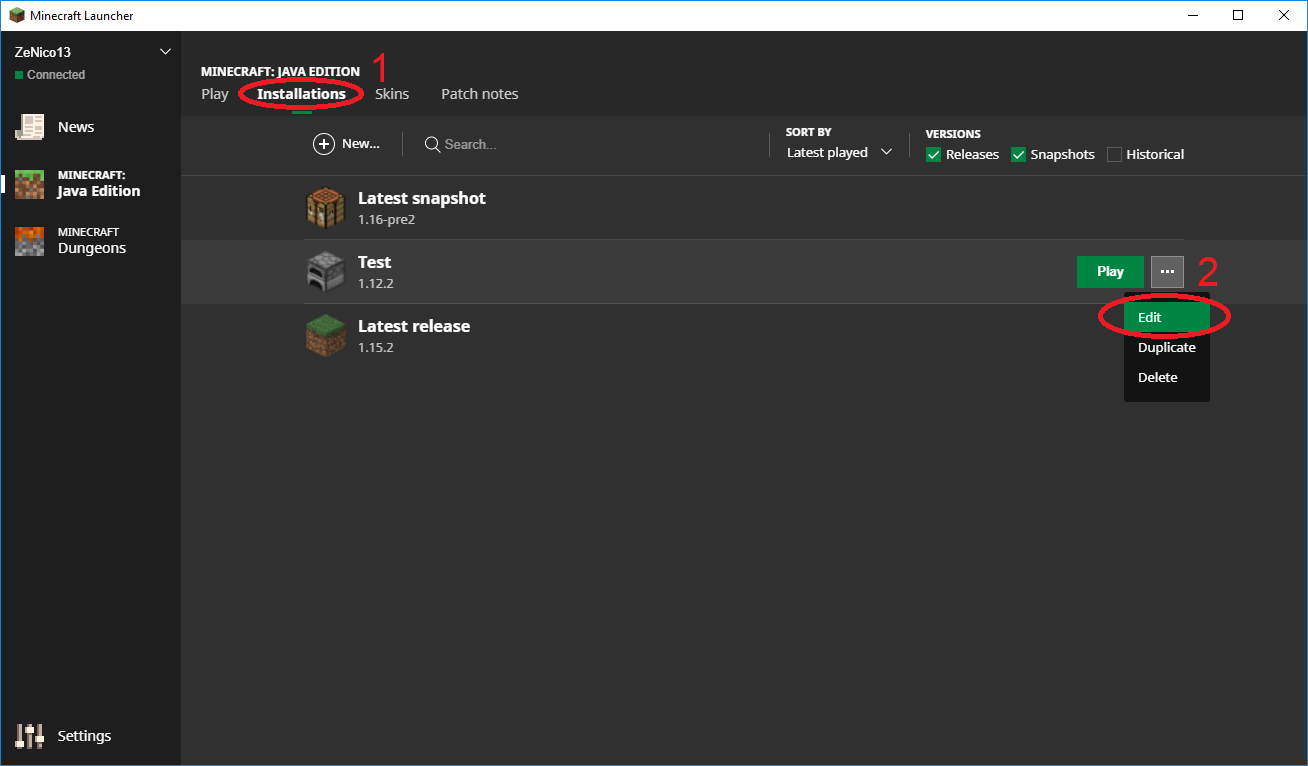
- Select the version you want to test.
- Click on "More Options"
- Change the "-Xmx" argument in the "JVM Arguments" section to allocate 6 GB of RAM or more. Example for 8 GB (recommended) : -Xmx8G
- Save your profile.
- Open the task manager of your operating system.
- Launch the game with the correct profile and observe the evolution of the RAM used by the game in the task manager.
- Repeat for each version you want to test.

Videos tests
Here are all the tests I did from 1.12.2 to 1.16 Pre-Release 2, on all stable versions of Minecraft.
I have allocated 8 GB of RAM each time so as not to restrict the game to too low a ceiling, which would not allow us to see the problem.
No other programs run on the PC (except Discord and my recording program).
I did the test on my two different machines and the results are the same.
- Minecraft 1.12.2 (~450 MB) : Client RAM Test 1.12.2.mp4
- Minecraft 1.13.2 (~2.1 GB) : Client RAM Test 1.13.2.mp4
- Minecraft 1.14.4 (~5.0 GB) : Client RAM Test 1.14.4.mp4
- Minecraft 1.15.2 (~5.2 GB) : Client RAM Test 1.15.2.mp4
- Minecraft 1.16 Pre-Release 2 (~5.2 GB) : Client RAM Test 1.16 Pre-2.mp4
We can also observe that with each new version, the CPU is used harder and harder, even after the game is fully loaded (especially in 1.16).
Note: This ticket is attached to MC-190258 which processes the server side.
Thank you for your report!
However, we are already tracking this issue, and this report is a Duplicate of MC-190258, which is a report that has not been resolved yet.
If you want, you can upvote the parent ticket, and enable watching to receive any updates about it - if you believe you have any information that may be important for this issue, please leave a comment on the parent. Please also use the search function in the future to prevent duplicate reports.
Quick Links:
📓 Issue Guidelines – 🛠 Community Support – 📧 Customer Support – ✍️ Feedback and Suggestions – 📖 Game Wiki
💬 Mojira Subreddit – 💬 Mojira Discord
I recreated this issue, because the original was marked a a duplicate. This is NOT the case. The original ticket: MC-191094. The fake duplicate ticket: MC-190258. The fake duplicate points out the high ram usage while my original tickets points out that in the 1.16 release candidate server the server ram usage will grow exponentially. With this I mean that when the server is idle the server ram usage will keep growing and after around 50mb drop 50mb back again. This is visible in the server window. These are not stats gotten from task manager or something.
@Iosiv Visokogorskiy Look at MC-188163 and MC-190258.

It appears this is related to DataFixerUpper, which was introduced for 1.13. This would explain why this issue started occurring for 1.13. This applies to the dedicated server (MC-190258) as well.
I don't have enough experience in profiling Java applications, but it appears DataFixerUpper creates multiple hundred Mega Bytes of objects which it then discards.
Note that this apparently only affects start up of the game / server. Afterwards the the data is garbage and will be collected by the JVM garbage collector if necessary.
... or a duplicate of MC-190258.
Thank you for your report!
We're tracking this issue in MC-190258, so this ticket is being resolved and linked as a duplicate.
If you would like to add a vote and any extra information to the main ticket it would be appreciated.
If you haven't already, you might like to make use of the search feature to see if the issue has already been mentioned.
Quick Links:
📓 Bug Tracker Guidelines – 💬 Community Support – 📧 Mojang Support
📓 Project Summary – ✍️ Feedback and Suggestions – 📖 Game Wiki
Can confirm
Can confirm for 1.16.1
Can confirm for 20w27a
Can confirm for 1.19. VERY HIGH
Why is this bug not resolved? I think this would be very important and could get a lot of players for the new versions.
Performance issues can be quite difficult and complicated to fix. This report has been given a Mojang Priority of "Normal", so it will get fixed at some point.
If you haven't already, be sure to upvote the issue
Thy