 MC-54989
Video settings sliders invalid values
What I thought was going to happen
Clicking in the space between options on the "Mipmap Levels" sliders would automatically jump the slider head to the predetermined option (slider snapping).
What actually happened
Clicking on the slider caused the game to hang momentarily (normal behavior), but when the slider was clicked while the game was hanging, the slider head moved to an "invalid" location on the slider (i.e. not one of the options).
How to reproduce
- Open the video settings screen
- Click (don't drag) the Mipmap Level slider to cause the game to hang momentarily
- While the game is hanging, click somewhere on the slider that doesn't correspond to a predefined level (e.g. between 0 and 1). This may not work on the first try, but should happen eventually.
- Slider head is in the wrong position
Linked Issues
 Normal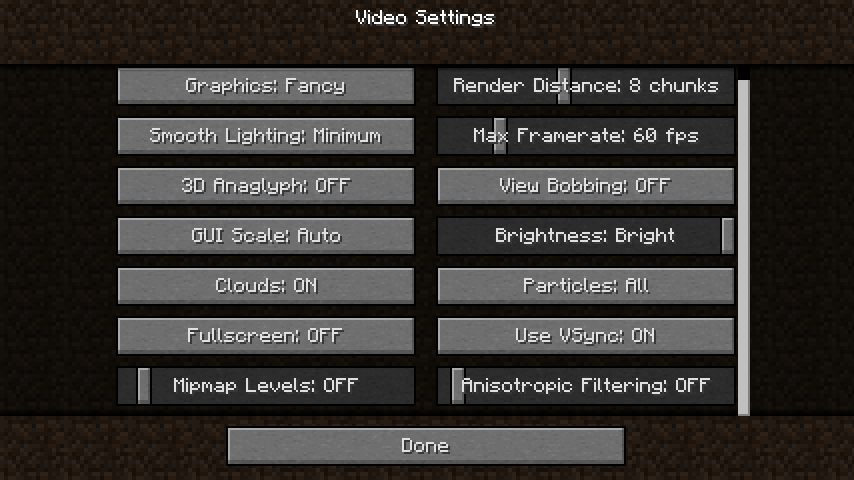

Created Issue:
Video Settings Sliders Invalid Values
What I thought was going to happen:
Clicking in the space between options on the "Mipmap Levels" and "Anisotropic Filtering" sliders would automatically jump the slider head to the predetermined option (slider snapping)What actually happened:
Clicking on the slider caused the game to hang momentarily (normal behavior), but when the slider was clicked while the game was hanging, the slider head moved to an "invalid" location on the slider (i.e. not one of the options).How to Reproduce
1. Open the video settings screen
2. Click (don't drag) the Mipmap Level slider to cause the game to hang momentarily
3. While the game is hanging, click somewhere on the slider that doesn't correspond to a predefined level (e.g. between 0 and 1). This may not work on the first try, but should happen eventually.
4. Slider head is in the wrong positionEnvironment
Mac OS 10.9.2 (rMBP, running in retina mode), Java 1.7.0_55
![[Mod] Ezekiel (ezfe)](../../../data/assets/gravatar/ezekielelin.jpeg)
Screenshot of bug happening for both Mipmap Levels and Anisotropic Filtering sliders

Mac OS 10.9.2 (rMBP, running in retina mode), Java 1.7.0_55; Mac OS 10.10 (rMBP, running in retina mode), Java 1.8.0_40-ea
![[Bot] Arisa](../../../data/assets/gravatar/mustek2.png)

I just said it wasn't resolved? May not be important but it certainly still happens.
![[Mod] Michael Wobst](../../../data/avatars/users/37868.png)
What I thought was going to happen:
Clicking in the space between options on the "Mipmap Levels" and "Anisotropic Filtering" sliders would automatically jump the slider head to the predetermined option (slider snapping)What actually happened:
Clicking on the slider caused the game to hang momentarily (normal behavior), but when the slider was clicked while the game was hanging, the slider head moved to an "invalid" location on the slider (i.e. not one of the options).
HowtoReproduce
1. Open the video settings screen
2. Click (don't drag) the Mipmap Level slider to cause the game to hang momentarily
3. While the game is hanging, click somewhere on the slider that doesn't correspond to a predefined level (e.g. between 0 and 1). This may not work on the first try, but should happen eventually.
4. Slider head is in the wrong positionWhat I thought was going to happen:
Clicking in the space between options on the "Mipmap Levels" and "Anisotropic Filtering" sliders would automatically jump the slider head to the predetermined option (slider snapping)What actually happened:
Clicking on the slider caused the game to hang momentarily (normal behavior), but when the slider was clicked while the game was hanging, the slider head moved to an "invalid" location on the slider (i.e. not one of the options).Steps to reproduce:
- Open the video settings screen
- Click (don't drag) the Mipmap Level slider to cause the game to hang momentarily
- While the game is hanging, click somewhere on the slider that doesn't correspond to a predefined level (e.g. between 0 and 1). This may not work on the first try, but should happen eventually.
- Slider head is in the wrong position

What I thought was going to happen:
Clicking in the space between options on the "Mipmap Levels" and "Anisotropic Filtering" sliders would automatically jump the slider head to the predetermined option (slider snapping)What actually happened:
Clicking on the slider caused the game to hang momentarily (normal behavior), but when the slider was clicked while the game was hanging, the slider head moved to an "invalid" location on the slider (i.e. not one of the options).Steps to reproduce:
- Open the video settings screen
- Click (don't drag) the Mipmap Level slider to cause the game to hang momentarily
- While the game is hanging, click somewhere on the slider that doesn't correspond to a predefined level (e.g. between 0 and 1). This may not work on the first try, but should happen eventually.
- Slider head is in the wrong position
What I thought was going to happen
Clicking in the space between options on the "Mipmap Levels" sliders would automatically jump the slider head to the predetermined option (slider snapping).
What actually happened
Clicking on the slider caused the game to hang momentarily (normal behavior), but when the slider was clicked while the game was hanging, the slider head moved to an "invalid" location on the slider (i.e. not one of the options).
How to reproduce
- Open the video settings screen
- Click (don't drag) the Mipmap Level slider to cause the game to hang momentarily
- While the game is hanging, click somewhere on the slider that doesn't correspond to a predefined level (e.g. between 0 and 1). This may not work on the first try, but should happen eventually.
- Slider head is in the wrong position
Mac OS 10.9.2 (rMBP, running in retina mode), Java 1.7.0_55; Mac OS 10.10 (rMBP, running in retina mode), Java 1.8.0_40-ea
VideoSettingsSlidersInvalidValuesVideo settings sliders invalid values
![[Mod] Asteraoth](../../../data/avatars/users/92886.png)
![[Mojang] Nathan Adams](../../../data/assets/gravatar/dinnerbone.png)
![[Mod] CubeTheThird](../../../data/assets/gravatar/cubethethird.jpeg)
relates to
![[Mod] markderickson](../../../data/avatars/users/18946.svg)
![[Mod] turbo](../../../data/avatars/users/92867.png)
Apparently this also works with Mac's tap-to-click on (sends a mouseDown and a mouseUp event on the same frame).
Confirmed for 14w25b.
Confirmed for 1.8 and 1.8.1-pre3. (yes it's still a concern)
Reopened, thanks
Is this still an issue in the most recent versions (i.e. 1.10.2, or 16w42a) of Minecraft?
Yep, still on 1.10.2
Can confirm in 21w05b.
Can confirm in version 1.20.5 pre-release 2.