Drop-down menus not working on Linux using sloppy window focus
I can click on a drop down menu and see all of the options, but when I click on an option the menu disappears and nothing happens.
Linked Issues
is duplicated by21
 MCL-17159Cannot Change VersionsDuplicateMCL-17162I cannot select things from drop down menu'sDuplicateMCL-17757Can't switch version or profileDuplicateMCL-18187Menus are not working, can't change anything.DuplicateMCL-19411Drop-Downs are not working using the mouse (was: Cannot switch accounts)DuplicateMCL-19734Version Quick select does not respond.DuplicateMCL-20916Drop-down menus can not be interacted with using mouse clicksDuplicateMCL-21164Minecraft launcher drop-down lists don't correctly handle mouse clicks on LinuxDuplicateMCL-22853Settings of launcher or installations are unchangeable or unsaveableDuplicateMCL-23482Lists doesn't work on LinuxDuplicateMCL-23949Unable to use the drop down menu for changing versions of Minecraft Java editionDuplicateMCL-24117Dropdown menu buttons don't workDuplicateMCL-24204I can't select a game version when adding or editing an installation.DuplicateMCL-24219I can only play the latest version of Minecraft on Ubuntu 22DuplicateMCL-24221I can only play the latest versions of Minecraft on Ubuntu 22DuplicateMCL-24222I can only play the latest version of Minecraft on Ubuntu 22DuplicateMCL-24228Can't Change new installation versionDuplicateMCL-24235Buttons in context menus are not clicked on LinuxDuplicateMCL-24537Issues with mouse interaction on LinuxDuplicateMCL-24640[Linux] Cannot edit version of any installationDuplicateMCL-24834Cannot change minecraft versionDuplicate
Attachments8

![[Mod] turbo](../../../data/avatars/users/92867.png)


- Unresolved
 TTNO1
TTNO1- 12
- 15
- Confirmed
- 734342, 1080353
- Minecraft Launcher
2.2.2528 (Linux) - 3.7.2 (Linux)
2.2.2528 (Linux) 2.2.3103 (Linux) 2.2.3963 (Linux) 2.2.11106 (Linux) 2.4.79 (Linux) 2.7.12 (Linux) 2.8.2 (Linux) 2.12.2 (Linux) 2.14.12 (Linux) 2.17.13 (Linux) 2.18.2 (Linux) 2.19.10 (Linux) 2.22.14 (Linux) 2.23.7 (Linux) 2.28.11 (Linux) 2.29.11 (Linux) 2.29.15 (Linux) 3.7.2 (Linux)
Created Issue:
Drop Down Menus Not Working
I can click on a drop down menu and see all of the options, but when I click on an option the menu disappears and nothing happens.
Environment
Linux (fossapup64 9.5)
Java 1.8.0_291
Launcher Version 2.2.3123
![[Mod] Greymagic27](../../../data/avatars/users/92875.png)
DropDownMenusNotWorkingDrop down menus not working
![[Bot] Arisa](../../../data/avatars/users/43007.png)

is duplicated by
is duplicated by
is duplicated by
![[Mod] markderickson](../../../data/avatars/users/18946.svg)
relates to
is duplicated by
![[Mojang] Mega_Spud (Jay Wells)](../../../data/avatars/users/92696.png)
Dropdown menus not workingDrop-down menus not working on Linux
Drop-down menus not working on Linux using sloppy window focus
is duplicated by
is duplicated by
relates to
Linux (fossapup64 9.5)
Java 1.8.0_291
Launcher Version 2.2.3123
is duplicated by
is duplicated by
is duplicated by
is duplicated by
is duplicated by
is duplicated by
is duplicated by
is duplicated by
is duplicated by
is duplicated by
Thank you for your report!
We're actually already tracking this issue at MCL-18387, so I will resolve and link this ticket as a duplicate.
I suggest also to browse through the main issue for potential fixes.
If you would like to add a vote and any extra information to the main ticket it would be appreciated.
If you haven't already, you might like to make use of the search feature to see if the issue has already been mentioned.
Quick Links:
📓 Issue Guidelines – 💬 Community Support – 📧 Customer Support – ✍️ Feedback and Suggestions – 📖 Game Wiki
Thank you for your report!
We're actually already tracking this issue at MCL-18387, so I will resolve and link this ticket as a duplicate.
I suggest also to browse through the main issue for potential fixes.
If you would like to add a vote and any extra information to the main ticket it would be appreciated.
If you haven't already, you might like to make use of the search feature to see if the issue has already been mentioned.
Quick Links:
📓 Issue Guidelines – 💬 Community Support – 📧 Customer Support – ✍️ Feedback and Suggestions – 📖 Game Wiki
Thank you for your report!
We're tracking this issue in MCL-18387, so this ticket is being resolved and linked as a duplicate.
If you would like to add a vote and any extra information to the main ticket it would be appreciated.
If you haven't already, you might like to make use of the search feature to see if the issue has already been mentioned.
Quick Links:
📓 Bug Tracker Guidelines – 📧 Mojang Support
📓 Project Summary – ✍️ Feedback and Suggestions – 📖 Game Wiki
Thank you for your report!
We're tracking this issue in MCL-18387, so this ticket is being resolved and linked as a duplicate.
If you would like to add a vote and any extra information to the main ticket it would be appreciated.
If you haven't already, you might like to make use of the search feature to see if the issue has already been mentioned.
Quick Links:
📓 Bug Tracker Guidelines – 📧 Mojang Support
📓 Project Summary – ✍️ Feedback and Suggestions – 📖 Game Wiki
Thank you for your report!
We're tracking this issue in MCL-18387, so this ticket is being resolved and linked as a duplicate.
If you would like to add a vote and any extra information to the main ticket it would be appreciated.
If you haven't already, you might like to make use of the search feature to see if the issue has already been mentioned.
Quick Links:
📓 Bug Tracker Guidelines – 💬 Community Support – 📧 Mojang Support
📓 Project Summary – ✍️ Feedback and Suggestions – 📖 Game Wiki
– I am a bot. This action was performed automatically! The ticket was resolved by one of our moderators, and I left this message to give more information to you.
Thank you for your report!
We're tracking this issue in MCL-18387, so this ticket is being resolved and linked as a duplicate.
If you would like to add a vote and any extra information to the main ticket it would be appreciated.
If you haven't already, you might like to make use of the search feature to see if the issue has already been mentioned.
Quick Links:
📓 Bug Tracker Guidelines – 💬 Community Support – 📧 Mojang Support
📓 Project Summary – ✍️ Feedback and Suggestions – 📖 Game Wiki
Thank you for your report!
We're tracking this issue in MCL-18387, so this ticket is being resolved and linked as a duplicate.
If you would like to add a vote and any extra information to the main ticket it would be appreciated.
If you haven't already, you might like to make use of the search feature to see if the issue has already been mentioned.
Quick Links:
📓 Bug Tracker Guidelines – 💬 Community Support – 📧 Mojang Support (Technical Issues) – 📧 Microsoft Support (Account Issues)
📓 Project Summary – ✍️ Feedback and Suggestions – 📖 Game Wiki
– I am a bot. This action was performed automatically! The ticket was resolved by one of our moderators, and I left this message to give more information to you.
Does MCL-18387 describe your issue?
Yep, it describes my issue! Should I upload my videos and logs on MCL-18387?
Thank you for your report!
We're tracking this issue in MCL-18387, so this ticket is being resolved and linked as a duplicate.
If you would like to add a vote and any extra information to the main ticket it would be appreciated.
If you haven't already, you might like to make use of the search feature to see if the issue has already been mentioned.
Quick Links:
📓 Bug Tracker Guidelines – 💬 Community Support – 📧 Mojang Support (Technical Issues) – 📧 Microsoft Support (Account Issues)
📓 Project Summary – ✍️ Feedback and Suggestions – 📖 Game Wiki
– I am a bot. This action was performed automatically! The ticket was resolved by one of our moderators, and I left this message to give more information to you.
Thank you for your report!
We're tracking this issue in MCL-18387, so this ticket is being resolved and linked as a duplicate.
If you would like to add a vote and any extra information to the main ticket it would be appreciated.
If you haven't already, you might like to make use of the search feature to see if the issue has already been mentioned.
Quick Links:
📓 Bug Tracker Guidelines – 💬 Community Support – 📧 Mojang Support (Technical Issues) – 📧 Microsoft Support (Account Issues)
📓 Project Summary – ✍️ Feedback and Suggestions – 📖 Game Wiki
– I am a bot. This action was performed automatically! The ticket was resolved by one of our moderators, and I left this message to give more information to you.
Thank you for your report!
We're tracking this issue in MCL-18387, so this ticket is being resolved and linked as a duplicate.
If you would like to add a vote and any extra information to the main ticket it would be appreciated.
If you haven't already, you might like to make use of the search feature to see if the issue has already been mentioned.
Quick Links:
📓 Bug Tracker Guidelines – 💬 Community Support – 📧 Mojang Support (Technical Issues) – 📧 Microsoft Support (Account Issues)
📓 Project Summary – ✍️ Feedback and Suggestions – 📖 Game Wiki
– I am a bot. This action was performed automatically! The ticket was resolved by one of our moderators, and I left this message to give more information to you.
Thank you for your report!
We're tracking this issue in MCL-18387, so this ticket is being resolved and linked as a duplicate.
If you would like to add a vote and any extra information to the main ticket it would be appreciated.
If you haven't already, you might like to make use of the search feature to see if the issue has already been mentioned.
Quick Links:
📓 Bug Tracker Guidelines – 💬 Community Support – 📧 Mojang Support (Technical Issues) – 📧 Microsoft Support (Account Issues)
📓 Project Summary – ✍️ Feedback and Suggestions – 📖 Game Wiki
– I am a bot. This action was performed automatically! The ticket was resolved by one of our moderators, and I left this message to give more information to you.

Thank you for your report!
We're tracking this issue in MCL-18387, so this ticket is being resolved and linked as a duplicate.
If you would like to add a vote and any extra information to the main ticket it would be appreciated.
If you haven't already, you might like to make use of the search feature to see if the issue has already been mentioned.
Quick Links:
📓 Bug Tracker Guidelines – 💬 Community Support – 📧 Mojang Support (Technical Issues) – 📧 Microsoft Support (Account Issues)
📓 Project Summary – ✍️ Feedback and Suggestions – 📖 Game Wiki
– I am a bot. This action was performed automatically! The ticket was resolved by one of our moderators, and I left this message to give more information to you.
Thank you for your report!
We're tracking this issue in MCL-18387, so this ticket is being resolved and linked as a duplicate.
If you would like to add a vote and any extra information to the main ticket it would be appreciated.
If you haven't already, you might like to make use of the search feature to see if the issue has already been mentioned.
Quick Links:
📓 Bug Tracker Guidelines – 💬 Community Support – 📧 Mojang Support (Technical Issues) – 📧 Microsoft Support (Account Issues)
📓 Project Summary – ✍️ Feedback and Suggestions – 📖 Game Wiki
– I am a bot. This action was performed automatically! The ticket was resolved by one of our moderators, and I left this message to give more information to you.

Hi, how is this different from the MCL-18387 issue?
This ticket will automatically reopen when you reply.
Thank you for your report!
We're tracking this issue in MCL-18387, so this ticket is being resolved and linked as a duplicate.
If you would like to add a vote and any extra information to the main ticket it would be appreciated.
If you haven't already, you might like to make use of the search feature to see if the issue has already been mentioned.
Quick Links:
📓 Bug Tracker Guidelines – 💬 Community Support – 📧 Mojang Support (Technical Issues) – 📧 Microsoft Support (Account Issues)
📓 Project Summary – ✍️ Feedback and Suggestions – 📖 Game Wiki
– I am a bot. This action was performed automatically! The ticket was resolved by one of our moderators, and I left this message to give more information to you.
Hello, your Minecraft is stuck
@Léonard What do you mean?
We do not have enough information to find the cause of this issue.
Please record a video of this happening and attach it to this report.
If you are on Windows, you can use Windows+Alt+R to open a built-in app for recording game footage.
If you are on Mac (Mojave or later), you can use Shift+Command+5 to open a built-in app for recording your screen.
In case you don't have a program to record videos, we recommend using the free recording software OBS.
In case the resulting video file is too large to be uploaded to the bug tracker directly, please upload it elsewhere (e.g. as unlisted video on YouTube) and link to it here.
This issue is being temporarily closed as Awaiting Response. Once the requested information has been delivered, the report will be reopened automatically.
Quick Links:
📓 Bug Tracker Guidelines – 💬 Community Support – 📧 Mojang Support
📓 Project Summary – ✍️ Feedback and Suggestions – 📖 Game Wiki
It's okay I'll just use MultiMC.
A video will not provide any more information.
When in the launcher, I click on a drop-down menu, such as to change the version of an installation or to change the installation I want to play. Then, the menu appears with all of the correct options. Next, I proceed to move my cursor over the option I wish to select. Once the cursor is placed over the option I wish to select, I depress the left mouse button in an attempt to click, and thus select, the aforementioned option. In spite of my attempts, however, the desired menu option remains unselected as the menu disappears leaving the default option still selected.
I can confirm that I am also experiencing this issue, exactly as @TTNO1 described. I, too, am on a Linux system, mine being GalliumOS 3.1. My launcher version is 2.2.3200.
I can confirm that this still exists in version 2.2.3554, exactly as it has before.
Can confirm on version 2.2.3963.
I'm having the same issue: every drop down that I've used (profile selector on "play" tab, version selector in "new installation" dialogue box, language selector in settings) refuses to change selected item.
I'm on ubuntu 21.04. Launcher details copied from "about" tab:
Here's a video of the bug:
minecraft-launcher-bug-dropdown.ogv
I found out from another post that you can use the arrow keys to select things in the drop-down menus. Shout-out to William Turner on bug
MCL-17159.However, the mouse still does not work for drop-down menus as of version 2.2.7448.
This still occurs for me on version 2.3.228 on Debian 11.
The dropdown menus still don't work properly for me. I'm on Debian 11.6 and version 2.3.592 of the launcher. They also don't open at all. I've attached a video that shows the issue.
2023-02-20 16-08-28.mkv
This problem seems to be related to "focus follows mouse" or "sloppy" window focusing. Try setting window focus to "mouse click" and see if this resolves the issue. This worked for me with Minecraft Launcher and also the Steam client. (Here is the related Steam bug, if that is helpful in any way.) Hopefully this will help track down the source of the bug.
Still doesn't seem to be working (didn't make any changes to "out-of-the-box" MCL settings or windows alignment).
Linux, MCL version 2.7.12-1.2.30
Hi, I still can't reproduce it on a fresh installation of Manjaro Linux. Are there any other Linux distributions than Debian and Ubuntu affected?
Arch Linux is affected. Based off the fact that it's related to Window Focus mode probably means it's display server or window manager related, as opposed to distro. I'm using Cinnamon desktop environment (uses Muffin window manager) on X11. Maybe with that combo of software it can be reproduced?
Edit: For the possibly related Steam bug, users are reporting it doesn't happen on Wayland, so maybe only reproducible on X11?
Hi again, thanks for the reply. I'm using GNOME DE, where by default I can't change the window focus to "sloppy" without installing other tools like GNOME Tweaks. So I need to install more applications and change their settings to make the launcher menu drop-down not work anymore? Also on X11, by the way.
I believe you can use the Gnome Tweak Tool in order to change that particular setting. If you're using Manjaro I think the package should be gnome-tweaks (this is the Arch package).
Ubuntu and derivatives I think would be gnome-tweak-tool.Same package name, I seen an outdated help article.I was messing with some different desktop environments and found that the issue only occurs in some of them. It doesn't occur in Ubuntu or i3, but it does in LXQt.
Brent Wassum: I think we're misunderstanding each other. I have gnome-tweaks installed, and I know that you can use it to change the window focus. But I'm asking for a way to configure this in a clean Linux installation without any other applications.
If I have to install other programs to be able to change system settings there, so that the normal behavior becomes "buggy" and no longer works, I wonder to what extent this is a "vanilla" problem. So far, there has never been any talk of affected users installing extra programs and having things stop working - rather, I assumed it was a fundamental problem, which it apparently is not.
If I said something wrong: Please correct me. I would like to be able to understand and reproduce this behavior, or know which distributions and/or desktop environments are affected, without having to download any extra programs, i.e. where I can change the window focus by default.
I believe I understand now. However, Gnome Tweak Tool is part of the Gnome Project (https://gitlab.gnome.org/GNOME/gnome-tweaks). It only exposes Gnome settings that already exist. It's not installed as part of a normal Gnome installation because the Gnome devs deemed that those settings were too "advanced" for regular users. I would hardly count it as an "extra" application that would cause unwanted buginess.
However, it you want a clean, default installation, you can run gsettings set org.gnome.desktop.wm.preferences focus-mode 'sloppy' in a terminal to achieve the same result. Gnome Tweaks just provides a UI for this.
Alternatively, use a distro with a default DE that exposes this setting, such as Linux Mint/Cinnamon.
Also note that I am using Cinnamon DE on Arch Linux, and did not use any third party applications to configure my Cinnamon settings, and I'm currently experiencing the problem.
Hi again, thanks for the detailed explanation. I was able to reproduce the behavior in a clean installation of Linux Mint 21.2 Cinnamon in the latest launcher version. For testing, I tried it in launcher version 2.2.12148, which did not have this issue.
Can you confirm you do NOT have this issue in Launcher version 2.2.12148? I just reproduced the bug on Garuda Linux w/ Cinnamon on Launcher version 2.2.12148.
Also, is 2.2.12148 not the latest version?
I don't have this issue in 2.2.12148, and no, that version is from March 2022. The current launcher version is 2.7.12 from August 2023, and this is the only supported launcher version for bugs (except 2.2.2040 for macOS 10.9 only).
Okay, weird. For some reason the Launcher update was hanging, but still opening the Launcher without updating. I did get that straightened out, and I'm now on Launcher version 2.7.12.
Can confirm bug still exists on Launcher version 2.7.12 on Garuda LInux/Cinnamon.
Once I get home I can confirm my Launcher version on my desktop and see if the bug still exist on Arch Linux/Cinnamon.
I can confirm this is still an issue with launcher v.2.12.17-1.6.2
I am on latest Ubuntu 23.04 x86_64
Now the issue is even worse because now it just clicks on whats below the menu item, making half the launcher unusable.
Hi!
Does this issue still occur for anybody?
Yes, it does. It seems to be working no differently on my end.
Yes, still occurs for me. Fedora 39, GNOME 45.4, Wayland (through xwayland), launcher version 2.17.13 installed through flatpak. I have not changed the focus settings in GNOME Tweaks–they are still on Click to Focus. In my case, clicking the drop down instantly closes it. I can use tab to select the dropdown, and from there my mouse works to select a version.
Occurs for me on Ubuntu 23.10 and Fedora 39, on both v.2.18.2-1.8.2 and b.2.19.2-1.9.2.
Here the two videos:
v.2.18.2-1.8.2.webm (current version)
b.2.19.2-1.9.2.webm (beta)
Here the logs:
Ubuntu23.10-2024-03-02-launcher_log.txt
Note that the timestamps in the logs are in UTC time, while in the videos, the timezone is UTC+1.
Note that I can launch any instance from the “Installations” (in French « Configurations ») tab.
Edit: The problem only occurs under Xorg, and everything works fine in Wayland.
As of launcher version 2.22.14, the version select drop-down menu in the new experimental home page seems to work just fine on my device. All the other menus are still behaving as they were, not allowing interaction except by pressing enter or shift-/control-clicking.
My current OS is Lubuntu 22.04.04 LTS x86_64 and my window manager is Openbox. Hope this helps.
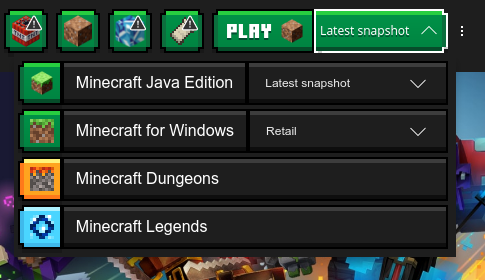
This is the menu that is working, no others that I know of:
Edit: To clarify, both this menu and its child menus are all working fine.
Same problem here
MCL-24220I have issues with dropdown menus too. Launcher: Linux 6.2.0-39-generic 2.26.2. Ubuntu 23.04 x86. To reproduce: Installations > New Installation > VERSION. The dropdown menu does not work. It immediately closes when I click on it. I am unable to select any other version than the topmost one.
Is this still an issue?
Yes, it is still very much an issue.