 MCLG-8
Deluxe edition content not present on PS5
Basically I started up my game looked around and never found the deluxe skin or anything of the deluxe stuff

Created Issue:
Minecraft legends deluxe edition for ps5 dlc isn't downloaded or installed
Basically I started up my game looked around and never found the deluxe skin or anything of the deluxe stuff
- Unresolved
- Open
- Unconfirmed
- PlayStation 5
- Playstation 5
- Version #21436
![[Mod] Greymagic27](../../../data/avatars/users/92875.png)
Basically I started up my game looked around and never found the deluxe skin or anything of the deluxe stuff
Minecraft legends deluxe edition for ps5 dlc isn't downloaded or installedDeluxe edition content not present on PS5
![[Mod] Chandler](../../../data/assets/gravatar/triwonder81.png)
is duplicated by
![[MCQA] v-weszaj](../../../data/avatars/users/18941.svg)
is duplicated by
is duplicated by

Also effects windows.

Since i downloaded the Minecraft Legends update 1.17.28951 for PC, my skins Deluxe edition and the skin of the Lost Legends : Portal Pile don't appear anymore.
![[Mojang] Big Beak](../../../data/avatars/users/88062.png)

is duplicated by

![[Bot] Arisa](../../../data/avatars/users/43007.png)
Thank you for your report!
We're tracking this issue in MCLG-8, so this ticket is being resolved and linked as a duplicate.
If you would like to add a vote and any extra information to the main ticket it would be appreciated.
If you haven't already, you might like to make use of the search feature to see if the issue has already been mentioned.
Quick Links:
📓 Bug Tracker Guidelines – 💬 Community Support – 📧 Mojang Support
📓 Project Summary – ✍️ Feedback and Suggestions – 📖 Game Wiki – 📖 FAQs
– I am a bot. This action was performed automatically! The ticket was resolved by one of our moderators, and I left this message to give more information to you.
Thank you for your report!
We're tracking this issue in MCLG-8, so this ticket is being resolved and linked as a duplicate.
If you would like to add a vote and any extra information to the main ticket it would be appreciated.
If you haven't already, you might like to make use of the search feature to see if the issue has already been mentioned.
Quick Links:
📓 Bug Tracker Guidelines – 💬 Community Support – 📧 Mojang Support
📓 Project Summary – ✍️ Feedback and Suggestions – 📖 Game Wiki – 📖 FAQs
– I am a bot. This action was performed automatically! The ticket was resolved by one of our moderators, and I left this message to give more information to you.
Thank you for your report!
We're tracking this issue in MCLG-8, so this ticket is being resolved and linked as a duplicate.
If you would like to add a vote and any extra information to the main ticket it would be appreciated.
If you haven't already, you might like to make use of the search feature to see if the issue has already been mentioned.
Quick Links:
📓 Bug Tracker Guidelines – 💬 Community Support – 📧 Mojang Support
📓 Project Summary – ✍️ Feedback and Suggestions – 📖 Game Wiki – 📖 FAQs
![[Mojang] Mega_Spud (Jay Wells)](../../../data/avatars/users/92696.png)
To enable us to look into this further, it would be helpful if you could also send a message to Mojang Support.
Please choose Technical Support as the category, and Game Crashes as the subject. In the form, please include:
- This bug ticket reference:
MCLG-8(Please copy and paste this exactly, without it we may not be able to track and fix the issue) - Your Gamertag and PlayStation ID
(Please do not share this information here at the bug tracker.)

We do not have enough information to find the cause of this issue.
Have you attempted following the steps outlined in the comment by Mega_Spud, in MCLG-8 ticket?
This issue is being temporarily resolved as Awaiting Response. Once the requested information has been delivered, the report will be reopened automatically.
Quick Links:
📓 Bug Tracker Guidelines – 📧 Mojang Support
📓 Project Summary – ✍️ Feedback and Suggestions – 📖 Game Wiki – 📖 FAQs

I am on vacation. It’s not resolved.I am well aware of the MCLG-8 ticket but not the steps outlined by Mega_Spud. Will do so next week or following.
Thank you for your report!
We're tracking this issue in MCLG-8, so this ticket is being resolved and linked as a duplicate.
If you would like to add a vote and any extra information to the main ticket it would be appreciated.
If you haven't already, you might like to make use of the search feature to see if the issue has already been mentioned.
Quick Links:
📓 Bug Tracker Guidelines – 💬 Community Support – 📧 Mojang Support
📓 Project Summary – ✍️ Feedback and Suggestions – 📖 Game Wiki – 📖 FAQs
– I am a bot. This action was performed automatically! The ticket was resolved by one of our moderators, and I left this message to give more information to you.
I purchased the "Minecraft Deluxe Collection" via the PlayStation store.
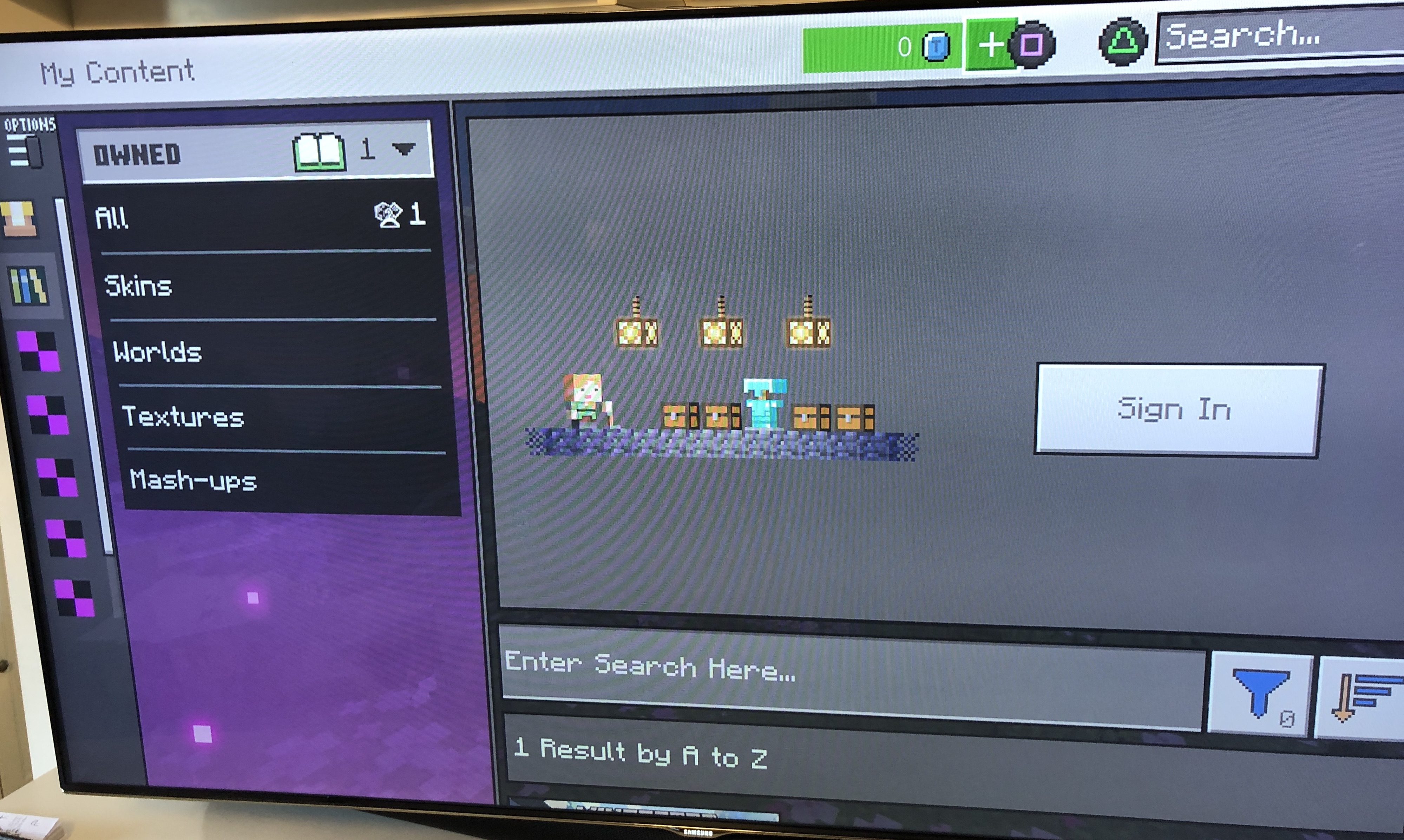
Once downloaded, I opened the game and the Deluxe Collection content was visible via the Marketplace. Next, I then attempted to link my Microsoft account (from the main page). I used my mobile phone to complete the process, unfortunately I was signed into the wrong Microsoft account, thus thus it was linked to the wrong account. In the settings, I found an 'unlink account' option, so I proceeded, at which point all the Deluxe Collection content disappeared.
I have been in contact with Playstation support on a continuous basis over the last month without a resolution. They have also outlined:
> Looking at the screenshots that you sent, it looks like there's a problem with your Minecraft account. Please contact Minecraft support.
I've tried the solutions outlined on MCLG-8 to no avail.
I have also tried:
- Ensuring the PS5 software is up-to-date.
- Ensuring the game software is up-to-date.
- Restarting the PS5.
- Deleing the PS5 cache.
- Deleting the game and reinstalling.
- Restoring the licences
Upon opening the game, the following message has displayed upon occasions:
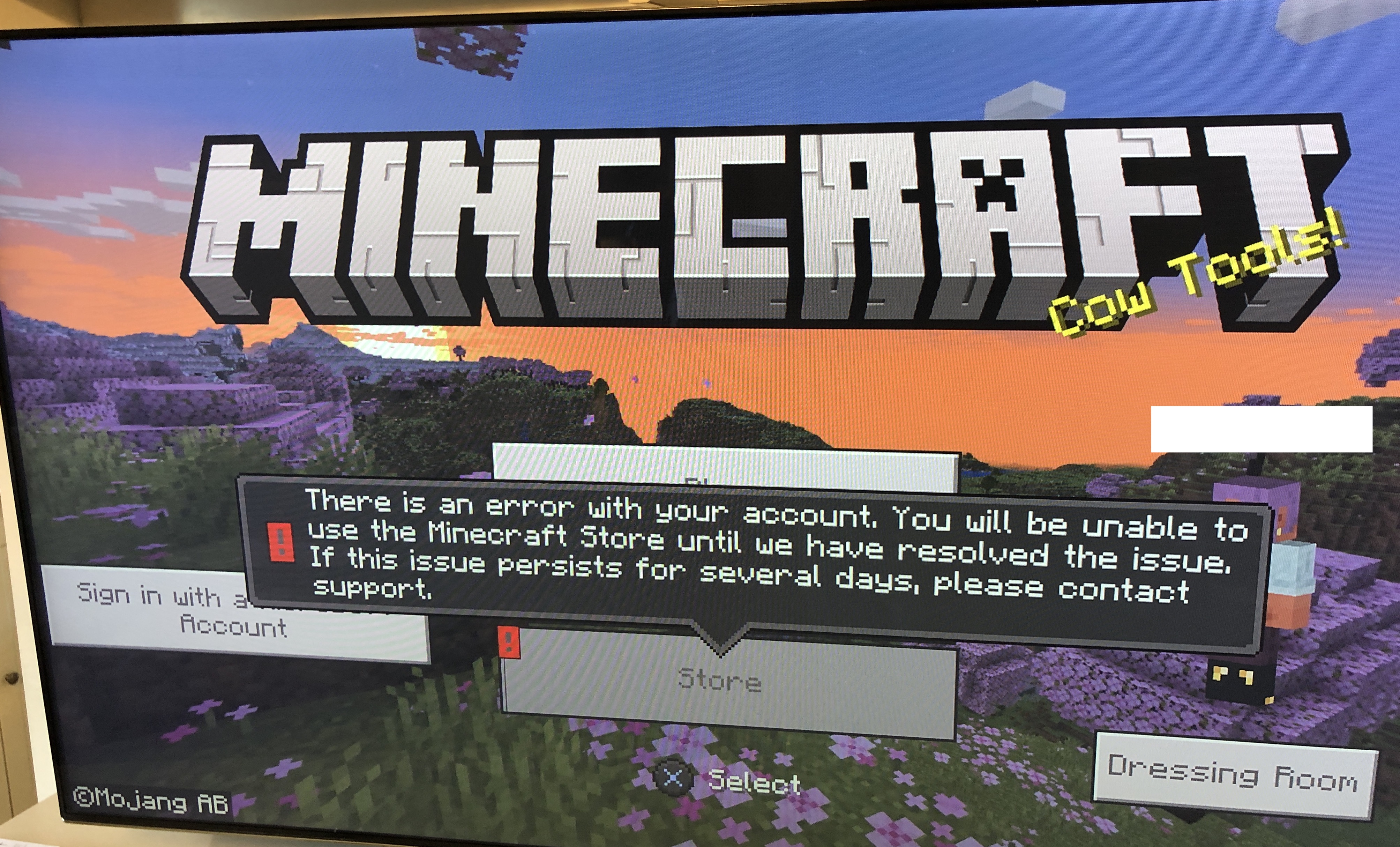
But once it disappears, it's possible to access the store, where no tokens are present, or the other Deluxe Collection content:
User on legends discord also having this issue: https://discord.com/channels/951551304528961597/1094334513624125540/1097925792845025320
Having the same issue too!
Please confirm you've gone to the marketplace in-game, clicked on the the Carrot Commander Strike Team pack, and choosen "Download DLC".
If you have done this and are still have the issue please leave a comment saying so. If this has fixed the issue please also leave a comment saying so.
I have confirmed I went on commander strike team pack and it says i have to buy it again and when I'm on playstation store it won't let me download it sorry forgot to mention when I go through the market place its saying the add on doesn't exist when it goes go the playstation store
I have the same issue with not able to get the Deluxe skin pack, I got myself Minecraft Legends Deluxe edition on switch, but I can't find the deluxe skin pack, it's not in the marketplace and then my inventory. Don't really have much more info on it, its just not there.
Did you purchase the physical copy of the game or digitally? If physical, have you redeemed the code included in the box?
The physical copy, didn't know there was a code, thank you!
Edit: Filled in the code now to, and it works fine, thanks again.
I bought the digital deluxe edition of the game on psn
I have also this problem i own the ps5 digital deluxe edition. and i dont have the deluxe skin pack addon in my library. Also not in game. When on the marked place i have to buy it with coins. i also can not buy the addon skins separated in ps5 store, because i already own the deluxe edition.
what i tryed:
Matt i bought the digital version but haven't recived the deluxe edition rewards
I can confirm as a Deluxe Edition owner with the Mod. You need to go to the Marketplace and select the DLC that you own and then click the download option. Also if you purchase anything from the marketplace you need to click download after purchasing as well in order for it to show up in your inventory. It does not download automatically even if you just bought it.
I still haven't gotten the deluxe bundle.
I have already checked the market place on the game and its telling me to buy the bundle again and when i go to buy tokens for the ps5 version on the game it won't allow me to because it's saying that the place its going to doesn't exist
Has this been resolved at all???
I can also not receive any coins that i payed for from the ps store to the market place. I got the 10 euro pack and my coins in game is stil on 0. I guess that this addon skin pack issue and the coins not received issue are from the same problem. This needs to be fixed assap!
The report is marked as "Confirmed", as soon as it is fixed, you should receive everything.
I have the same issue. It would be great If Mojang give us an Update for the Situation.
Can confirm this is still an issue. The Deluxe item shows as purchased in the PS store. When loading the game, the pack shows as purchasable for 2550.
Hello was wondering if there are any updates for the deluxe stuff that's missing?
stil waiting on my coins. T-T
7 days later, notting recieved jet.
To enable us to look into this further, it would be helpful if you could also send a message to Mojang Support.
Please choose Technical Support as the category, and Game Crashes as the subject. In the form, please include:
MCLG-8(Please copy and paste this exactly, without it we may not be able to track and fix the issue)(Please do not share this information here at the bug tracker.)
Together with help desk support i manage to get my missing content it toke a lot of days to send them emails back and fort because they only answares once a day.
I finaly have my 1720 tokens coins and the carrot team skin pack from the deluxe edition on ps5.
Can confirm that raising the technical support case as advised by Mega_Spud resolved my query. Had access to the content within an hour after raising the query.
ok I will try contact support thanks for the information
This issue has been fixed with a server-side update and anyone who purchased Deluxe Edition digitally through PlayStation Store should have their content. Be sure to head to Marketplace and download the Carrot Commander Skin Pack, which will appear as "owned".
What if I bought the game physically and redeemed the codes on PlayStation store?